We all are familiar with the Android & iOS platforms. Majority of smart phones and tablets in the market use either of the two OSes. To develop native apps for Android, we use Android Studio or Eclipse - selecting Java or Kotlin as the programming language. On the other hand for iOS, we use Xcode IDE and program in Swift or Objective-C.
To cover most of the devices, there is a need to build any app for these two platforms and hence maintain two builds respectively. To ease up the issue with maintainance of the two builds, the React Native came to rescue. React Native combines the best parts of native development with React, a best-in-class JavaScript library for building user interfaces. React primitives render to native platform UI, meaning your app uses the same native platform APIs other apps do. It provides a core set of platform agnostic native components like View, Text, and Image that map directly to the platform's native UI building blocks. Create platform-specific versions of components so a single codebase can share code across platforms. With React Native, one team can maintain multiple platforms and share a common technology—React.
To get started with react native, just use the Node package execute command below:
npx react-native init MyTestApp
Following is the screenshot of the files generated by the above command
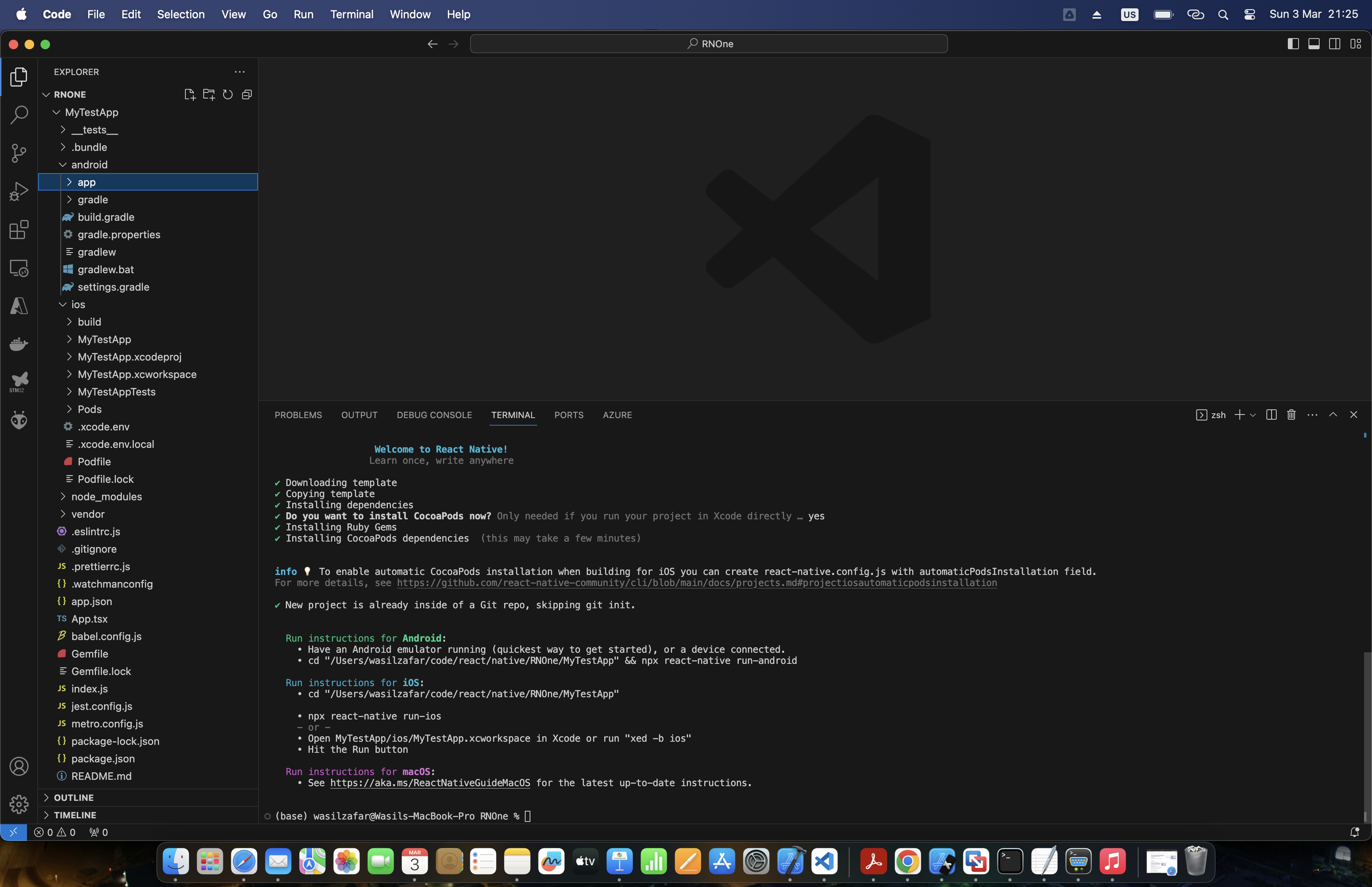
As seen above, the iOS and Android builds are generated, and we could also see see TypeScript based App.tsx file for React based UI development.