We use cookies to enhance your browsing experience, serve personalized content, and analyze our traffic.
By clicking "Accept All", you consent to our use of cookies. See our
Privacy Policy
for more information.
Python Data Science Series Part 1: NumPy Foundations
December 27, 2025Wasil Zafar26 min read
Master NumPy, the foundational library powering Python's data science ecosystem. Learn efficient array operations, broadcasting, and the core concepts that make scientific computing in Python possible.
Prerequisites: Before running the code examples in this tutorial, make sure you have Python and Jupyter notebooks properly set up. If you haven't configured your development environment yet, check out our complete setup guide for VS Code, PyCharm, Jupyter, and Colab.
If you're entering the world of data science, machine learning, or scientific computing with Python, NumPy is your essential starting point. NumPy (Numerical Python) provides the foundation upon which the entire Python data science ecosystem is built—from Pandas for data manipulation to scikit-learn for machine learning.
Key Insight: NumPy isn't just another library—it's the backbone of scientific Python. Understanding NumPy is critical because Pandas, SciPy, scikit-learn, TensorFlow, and PyTorch all depend on its efficient array operations and mathematical capabilities.
NumPy excels at handling large, multi-dimensional arrays and matrices, performing mathematical operations at speeds comparable to compiled languages like C and Fortran. This performance comes from its implementation in C and intelligent memory management, making Python viable for computationally intensive scientific work.
The Evolution of NumPy
Historical Context
NumPy's story begins in the mid-1990s when Python was emerging as a scientific computing platform:
1995: Jim Hugunin creates Numeric, the first array package for Python
2001:Numarray emerges to address Numeric's limitations with large arrays
2005: Travis Oliphant unifies Numeric and Numarray into NumPy, combining the best of both
2006-Present: NumPy becomes the de facto standard for numerical computing in Python
Historical Milestone
Why NumPy Succeeded
NumPy succeeded where predecessors struggled by solving three critical problems:
Performance: C-based implementation with optimized algorithms
Memory efficiency: Contiguous memory allocation and views instead of copies
Unified API: Single, consistent interface replacing fragmented tools
This combination made NumPy 10-100x faster than pure Python for numerical operations while maintaining Python's ease of use.
Why It Matters Today
NumPy's importance has only grown with the data science revolution:
Foundation for ML: Deep learning frameworks like TensorFlow and PyTorch use NumPy-compatible tensors
Data pipelines: Pandas DataFrames are built on NumPy arrays underneath
Scientific computing: SciPy extends NumPy for advanced scientific functions
Industry standard: Over 1,000 packages depend on NumPy in the Python ecosystem
Pro Tip: The shape attribute is crucial—it tells you the dimensions of your array. A shape of (2, 3) means 2 rows and 3 columns. This becomes critical when debugging matrix operations.
Working with Arrays
Array Creation Methods
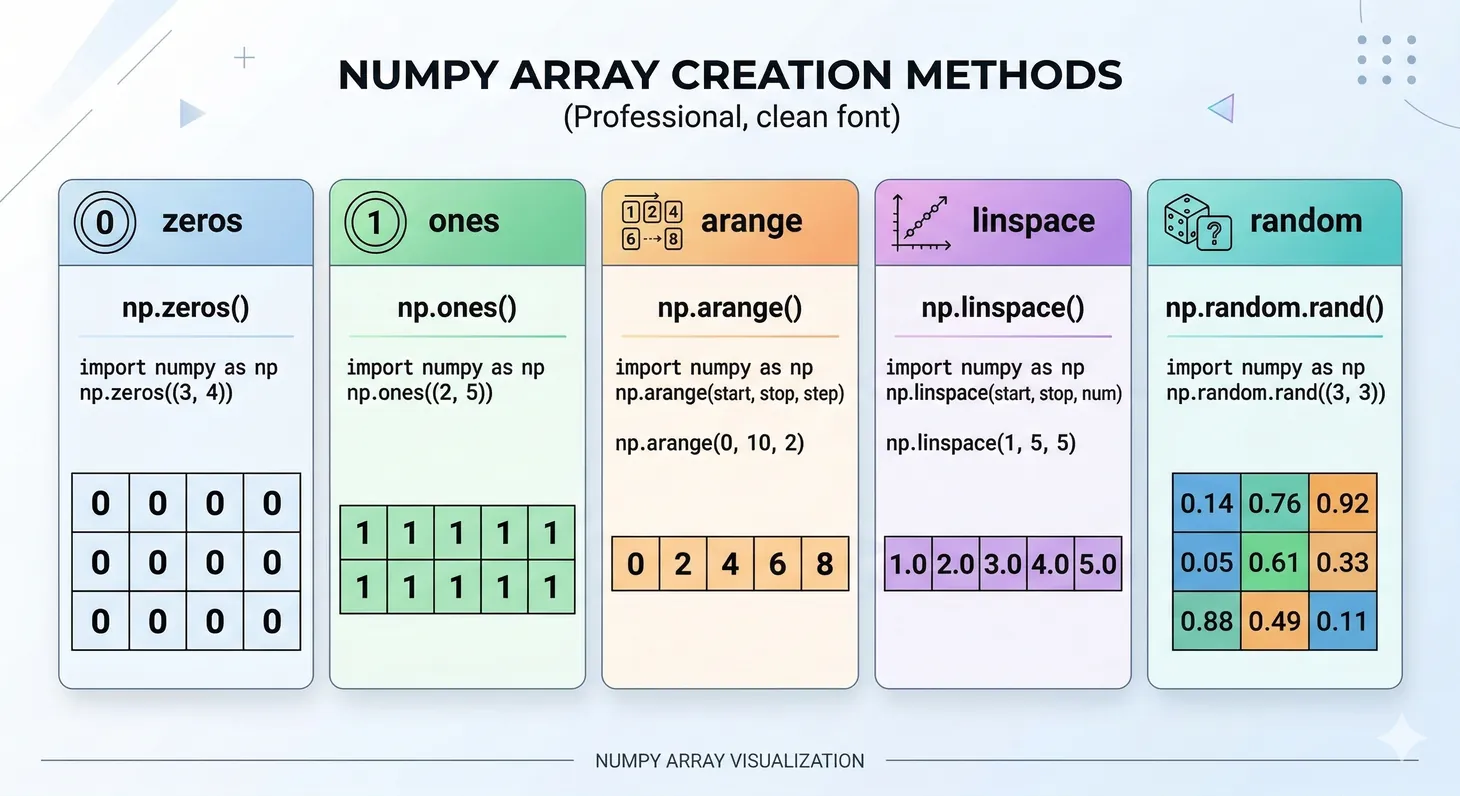
NumPy provides numerous ways to create arrays beyond converting lists:
Figure 1: Common NumPy array creation methods and their output shapes
import numpy as np

# np.zeros(shape, dtype=float) - Create array filled with zeros
# Parameters:
#   shape: int or tuple - Dimensions (e.g., 3 for 1D, (3,4) for 2D)
#   dtype: data type - Type of elements (default: float64)
zeros = np.zeros((3, 4))        # 3x4 array of zeros (floats)
print("Zeros:\n", zeros)

# np.ones(shape, dtype=float) - Create array filled with ones
# Parameters same as zeros
ones = np.ones((2, 3))          # 2x3 array of ones (floats)
print("Ones:\n", ones)

# np.empty(shape, dtype=float) - Create uninitialized array (faster but random values)
# Use only when you'll immediately fill all values
empty = np.empty((2, 2))        # Uninitialized 2x2 array
print("Empty (random values):\n", empty)
import numpy as np

# np.arange([start,] stop[, step,], dtype=None) - Create range of values
# Parameters:
#   start: number - Starting value (inclusive, default: 0)
#   stop: number - Ending value (exclusive)
#   step: number - Spacing between values (default: 1)
#   dtype: data type - Type of elements (inferred if not specified)
range_arr = np.arange(0, 10, 2)       # [0, 2, 4, 6, 8] - start=0, stop=10, step=2
print("Range:", range_arr)

# np.linspace(start, stop, num=50, endpoint=True) - Evenly spaced values
# Parameters:
#   start: number - Starting value (inclusive)
#   stop: number - Ending value (inclusive if endpoint=True)
#   num: int - Number of samples to generate (default: 50)
#   endpoint: bool - Include stop value (default: True)
linspace = np.linspace(0, 1, 5)       # 5 evenly spaced: [0, 0.25, 0.5, 0.75, 1]
print("Linspace:", linspace)

# Key difference: arange uses step size, linspace uses number of points
import numpy as np

# np.eye(N, M=None, k=0, dtype=float) - Create identity or diagonal matrix
# Parameters:
#   N: int - Number of rows
#   M: int - Number of columns (default: same as N for square matrix)
#   k: int - Index of diagonal (0=main, 1=above, -1=below)
#   dtype: data type - Type of elements
identity = np.eye(3)                   # 3x3 identity matrix (1s on diagonal, 0s elsewhere)
print("Identity:\n", identity)

# np.diag(v, k=0) - Extract diagonal or create diagonal matrix
# Parameters:
#   v: array - 1D array to place on diagonal, or 2D array to extract diagonal from
#   k: int - Diagonal offset (0=main, 1=above, -1=below)
diagonal = np.diag([1, 2, 3, 4])      # Create diagonal matrix from 1D array
print("Diagonal:\n", diagonal)

# Extract diagonal from 2D array
matrix = np.array([[1, 2, 3], [4, 5, 6], [7, 8, 9]])
diag_values = np.diag(matrix)          # Extract [1, 5, 9]
print("Extracted diagonal:", diag_values)
Array Attributes
Understanding array properties is essential for effective NumPy usage:
import numpy as np

arr = np.array([[1, 2, 3], [4, 5, 6]])

print("Shape:", arr.shape)           # (2, 3) - dimensions
print("Size:", arr.size)             # 6 - total elements
print("Dtype:", arr.dtype)           # int64 - data type
print("Ndim:", arr.ndim)             # 2 - number of dimensions
print("Itemsize:", arr.itemsize)     # 8 - bytes per element
Data Types Matter
Memory Efficiency with dtypes
Choosing the right data type can dramatically reduce memory usage:
Result: Using int8 instead of int64 reduces memory by 8x when values fit in 8 bits. For large datasets, this saves gigabytes.
Practice Exercises
Arrays Section Exercises
Exercise 1 (Beginner): Create a 3x4 array with values from 1-12, then print its shape, size, and dtype. Modify the array to use float32 data type.
Exercise 2 (Beginner): Create three arrays: zeros(5), ones(5), and arange(5). Print their shapes and data types.
Exercise 3 (Intermediate): Create arrays using linspace (5 values from 0-1), eye (3x3), and diag([1,2,3]). Explain what each creates.
Exercise 4 (Intermediate): Create a 4x4 array using arange and reshape. Check its attributes: shape, size, dtype, ndim, itemsize. Convert dtype to float32 and verify memory reduction.
Challenge (Advanced): Create arrays with different dtypes (int8, int16, int32, float32) using arange() and astype(). Calculate memory usage (nbytes) for each. Verify which dtype saves the most memory.
Array Operations & Vectorization
Vectorization: The NumPy Advantage
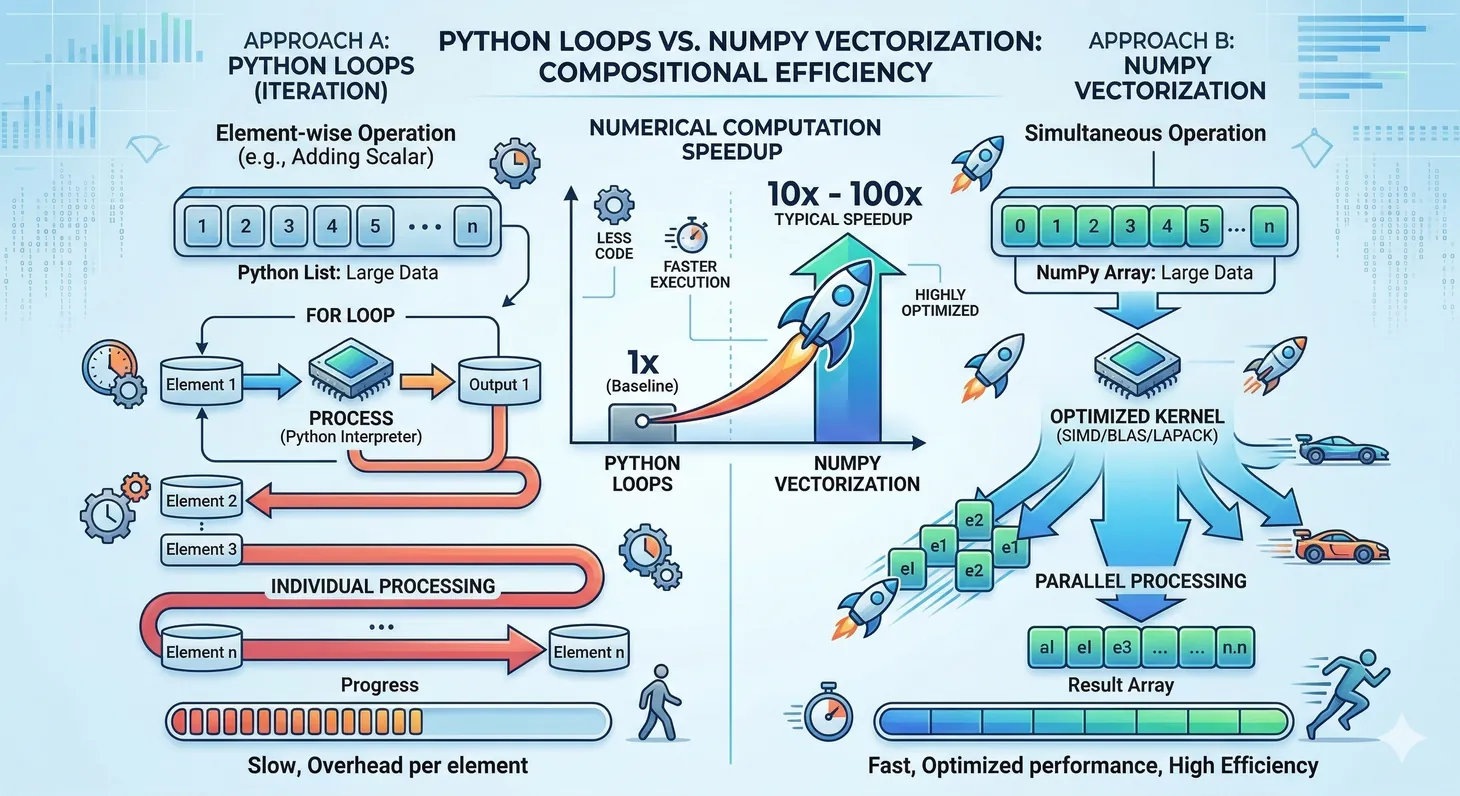
Vectorization means operations apply to entire arrays without explicit Python loops. This is NumPy's superpower:
Figure 2: Vectorized NumPy operations versus Python loops — typical speedup of 10-100x for numerical computations
import numpy as np
import time

# Python list approach (slow)
python_list = list(range(1000000))
start = time.time()
result_list = [x * 2 for x in python_list]
list_time = time.time() - start

print(f"Python list time: {list_time*1000:.2f}ms")
Boolean masking becomes especially powerful with 2D arrays, where you can filter rows and select specific columns simultaneously:
import numpy as np

# Create sample 2D data (5 rows, 3 columns)
data = np.array([
    [1.5, 2.3, 3.1],
    [4.2, 5.1, 6.3],
    [2.1, 1.8, 2.5],
    [5.5, 6.2, 7.1],
    [1.9, 2.2, 2.8]
])

# Create boolean mask for rows (e.g., where first column > 3)
mask = data[:, 0] > 3
print("Row mask:", mask)  # [False, True, False, True, False]

# Select all rows where mask is True
print("Filtered rows:\n", data[mask])
# Output:
# [[4.2, 5.1, 6.3],
#  [5.5, 6.2, 7.1]]
You can combine row filtering with column selection in a single indexing operation:
import numpy as np

# Sample data: 6 observations with 2 features each
X = np.array([
    [1.2, 3.4],
    [2.3, 4.5],
    [1.5, 3.2],
    [5.1, 7.3],
    [5.8, 7.9],
    [6.2, 8.1]
])

# Labels for each row (0 or 1)
y = np.array([0, 0, 0, 1, 1, 1])

# Select first column (feature 0) for all rows where y == 0
feature_0_class_0 = X[y == 0, 0]
print("Feature 0 for class 0:", feature_0_class_0)  # [1.2, 2.3, 1.5]

# Select second column (feature 1) for all rows where y == 1
feature_1_class_1 = X[y == 1, 1]
print("Feature 1 for class 1:", feature_1_class_1)  # [7.3, 7.9, 8.1]
Understanding the Pattern:
The indexing pattern X[y == 0, 0] works in two steps:
Column selection:0 selects the first column (index 0)
Result: Combines both to extract first column values only from rows where y equals 0
This pattern is essential for machine learning tasks like separating features by class for visualization or analysis. See the Pandas and Visualization chapters for advanced applications.
Practice Exercises
Indexing & Filtering Exercises
Exercise 1 (Beginner): Create a 1D array [10, 20, 30, 40, 50]. Practice indexing: first element, last element, elements at indices 1 and 3.
Exercise 2 (Beginner): Create a 2D array [[1,2,3],[4,5,6],[7,8,9]]. Extract row 1, column 2, and the submatrix from rows 0-1, columns 1-2.
Exercise 3 (Intermediate): Create an array of scores [85, 92, 78, 95, 88, 73]. Use boolean masking to find all scores > 85. Use & operator to find scores between 80 and 90.
Exercise 4 (Intermediate): Create an array with sensor values including -999 (errors). Use boolean masking to filter out errors, calculate mean of valid data, and replace errors with the mean.
Challenge (Advanced): Create a 3x3 matrix. Use fancy indexing to select specific rows and columns. Create boolean masks for multiple conditions (e.g., values > 5 AND < 8). Verify mask combinations with & | ~ operators.
Broadcasting: NumPy's Superpower
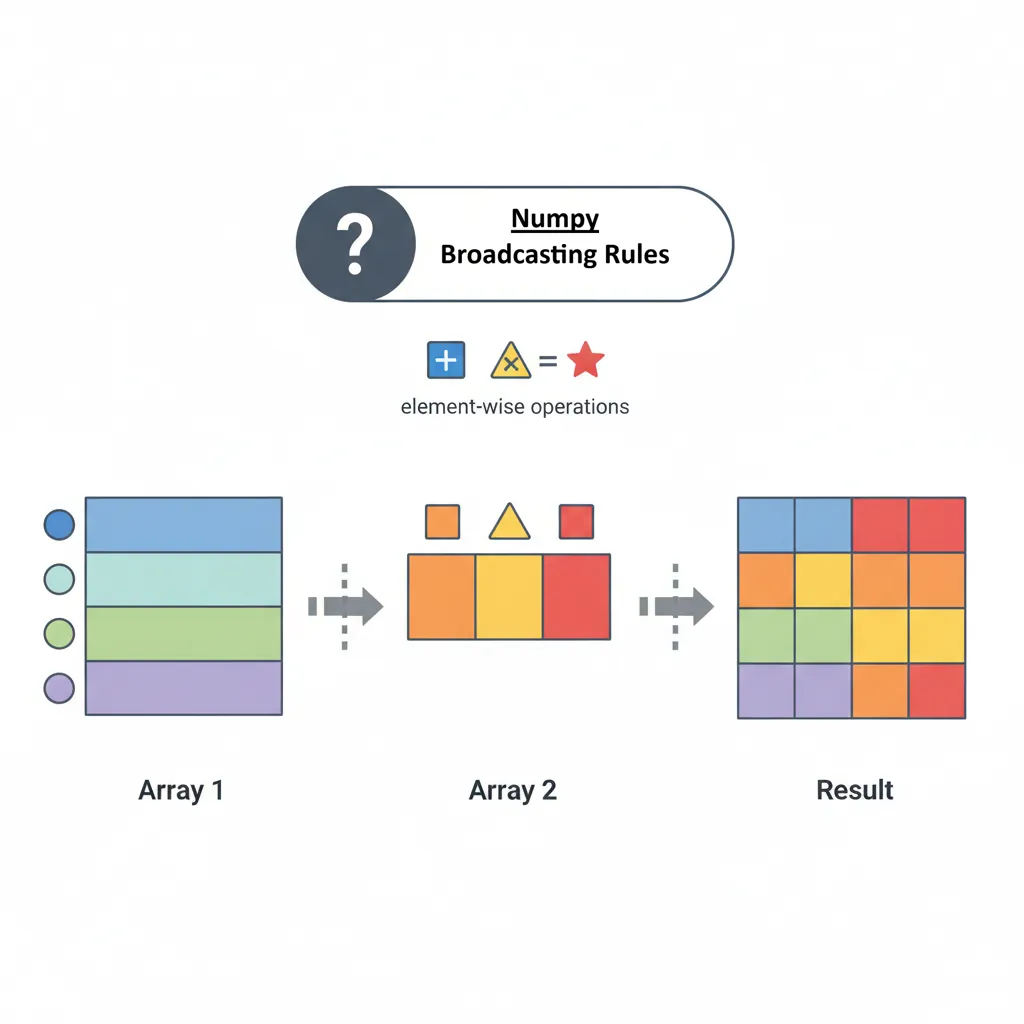
Broadcasting is NumPy's ability to perform operations on arrays of different shapes without explicit loops or copying data. This makes code both faster and more readable.
Figure 3: NumPy broadcasting rules — how arrays of different shapes are automatically aligned for element-wise operations
Broadcasting Rules
NumPy compares shapes element-wise from right to left. Two dimensions are compatible when:
They are equal, or
One of them is 1
import numpy as np

# Example 1: Scalar broadcasting
arr = np.array([1, 2, 3, 4])
result = arr + 10              # Adds 10 to each element
print(result)                  # [11, 12, 13, 14]
import numpy as np

# Example 2: 1D to 2D broadcasting
matrix = np.array([[1, 2, 3],
                   [4, 5, 6]])
row_vec = np.array([10, 20, 30])

result = matrix + row_vec      # Adds row_vec to each row
print(result)
# [[11, 22, 33],
#  [14, 25, 36]]
Practical Broadcasting Examples
import numpy as np

# Normalize data (zero mean, unit variance)
data = np.array([[1, 2, 3],
                 [4, 5, 6],
                 [7, 8, 9]])

mean = data.mean(axis=0)       # Column means: [4, 5, 6]
std = data.std(axis=0)         # Column stds

normalized = (data - mean) / std
print("Normalized:\n", normalized)
Broadcasting Magic: Without broadcasting, you'd need nested loops. Broadcasting does this automatically in optimized C code, making it 100x faster while keeping code readable.
Practice Exercises
Operations & Broadcasting Exercises
Exercise 1 (Beginner): Create two arrays: a = [1,2,3,4] and b = [10,20,30,40]. Perform addition, subtraction, multiplication, and division. Print all results.
Exercise 2 (Beginner): Create a 2D array [[1,2],[3,4]]. Add 10 to every element. Multiply each element by 2. Print the result.
Exercise 3 (Intermediate): Given data = np.array([[10,20,30],[40,50,60]]), subtract the mean of each column from that column (normalization). Verify the column means are now ~0.
Exercise 4 (Intermediate): Create a matrix and row vector. Use broadcasting to add the row vector to each row. Then multiply each row by a column vector [1,2,3,...].
Challenge (Advanced): Implement z-score normalization: (x - mean) / std for data = np.arange(12).reshape(3,4) without using explicit loops. Verify mean is ~0 and std is ~1.
Array Reshaping & Manipulation
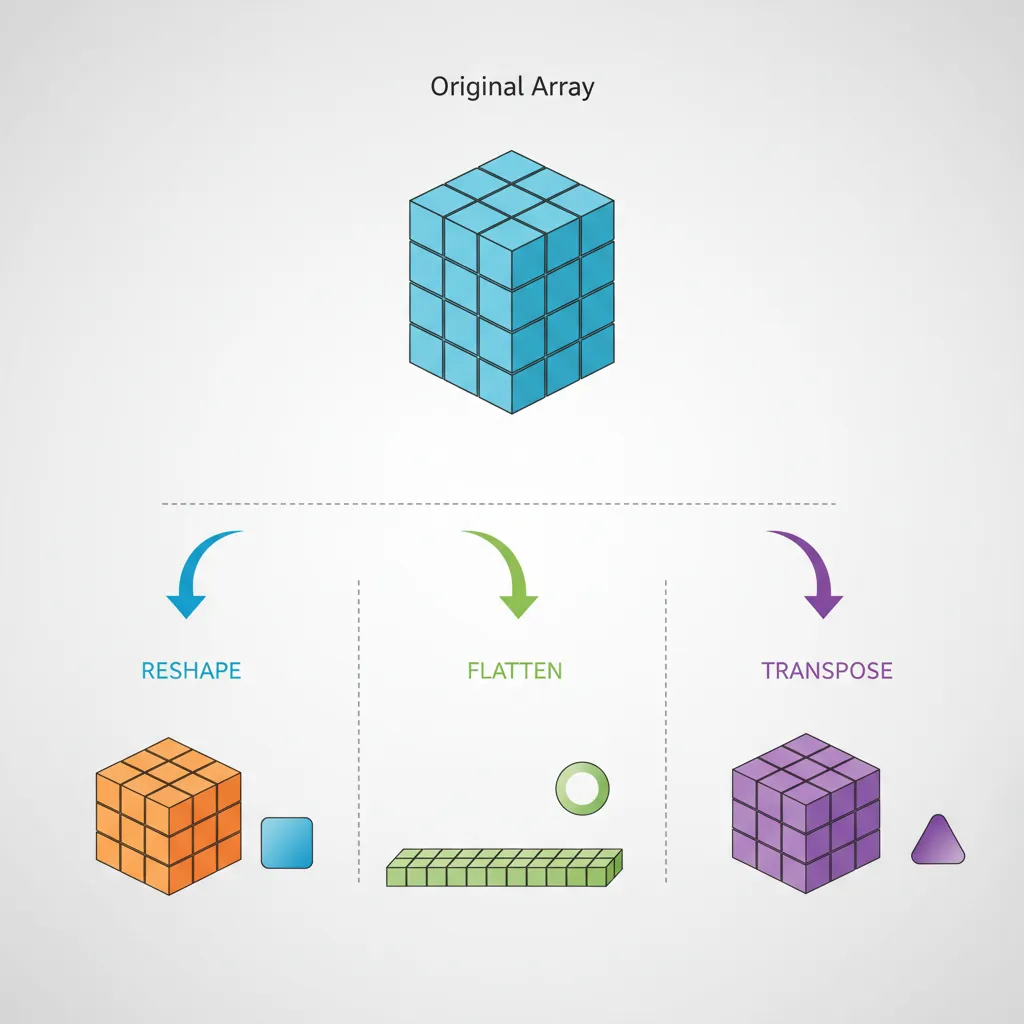
Reshaping arrays is essential for preparing data for different algorithms and transforming between data representations.
Figure 4: Array reshaping operations — reshape, flatten, and transpose transform data between different dimensional representations
Reshaping Arrays
import numpy as np

# Create 1D array
arr = np.arange(12)
print("Original:", arr)          # [0, 1, 2, ..., 11]

# arr.reshape(shape, order='C') - Change array shape without changing data
# Parameters:
#   shape: int or tuple - New dimensions (total elements must match)
#             Use -1 for one dimension to auto-calculate (e.g., (3, -1))
#   order: 'C' or 'F' - Row-major (C) or column-major (Fortran) ordering
# Returns: view if possible, copy if necessary
matrix = arr.reshape(3, 4)       # Reshape to 3x4 (12 elements total)
print("3x4 matrix:\n", matrix)
# [[ 0  1  2  3]
#  [ 4  5  6  7]
#  [ 8  9 10 11]]
import numpy as np

arr = np.arange(12)

# Reshape with -1 (auto-calculate dimension)
# The -1 tells NumPy to figure out this dimension automatically
# Total elements must match: 12 elements = 4 rows × ? columns ? 4 × 3
auto = arr.reshape(4, -1)        # NumPy calculates: (4, 3)
print("Auto reshape shape:", auto.shape)  # (4, 3)
print("Auto reshape:\n", auto)

# Reshape to 3D
# Parameters: (depth, rows, columns) or (blocks, height, width)
cube = arr.reshape(2, 3, 2)      # 2 blocks of 3×2 matrices (2×3×2 = 12 elements)
print("3D shape:", cube.shape)   # (2, 3, 2)
print("2x3x2 cube:\n", cube)
Flattening Arrays
import numpy as np

matrix = np.array([[1, 2, 3], [4, 5, 6]])

# arr.flatten(order='C') - Return 1D copy of array
# Parameters:
#   order: 'C' (row-major, default) or 'F' (column-major)
# Returns: Always creates a NEW copy (safe, but uses more memory)
flat_copy = matrix.flatten()
print("Flatten (copy):", flat_copy)  # [1, 2, 3, 4, 5, 6]
flat_copy[0] = 999                    # Modification doesn't affect original
print("Original unchanged:", matrix[0, 0])  # Still 1

# arr.ravel(order='C') - Return 1D view (if possible)
# Parameters:
#   order: 'C' (row-major, default) or 'F' (column-major)
# Returns: View when possible (faster, less memory), copy when necessary
ravel_view = matrix.ravel()
print("Ravel (view):", ravel_view)   # [1, 2, 3, 4, 5, 6]
ravel_view[0] = 999                   # Modification DOES affect original!
print("Original changed:", matrix[0, 0])  # Now 999

# Key Difference:
# - flatten() always copies (safe but slower)
# - ravel() returns view when possible (faster but modifications propagate)
# Use flatten() when you need independent copy, ravel() for read-only or when you want changes to propagate
Transpose and Swapping Axes
import numpy as np

# arr.T or arr.transpose() - Transpose (swap rows and columns)
# For 2D arrays: .T is shortcut for .transpose()
# Returns: view (not a copy)
A = np.array([[1, 2, 3], [4, 5, 6]])  # Shape (2, 3)
transposed = A.T                       # Shape (3, 2)
print("Original shape:", A.shape)      # (2, 3)
print("Transposed shape:", transposed.shape)  # (3, 2)
print("Transposed:\n", transposed)
# [[1, 4]
#  [2, 5]
#  [3, 6]]
import numpy as np

# arr.transpose(axes=None) - Permute axes for multi-dimensional arrays
# Parameters:
#   axes: tuple of ints - New order of axes (None = reverse all axes)
# For 3D arrays: specify which axis goes where
cube = np.random.rand(2, 3, 4)         # Shape (2, 3, 4)
print("Original shape:", cube.shape)   # (2, 3, 4)

# Swap axes: axis 0 ? 2, axis 1 ? 0, axis 2 ? 1
# Old positions: (0,    1,    2  )
# New positions: (axis2, axis0, axis1) = (2, 0, 1)
swapped = cube.transpose(2, 0, 1)      # (4, 2, 3)
print("Swapped shape:", swapped.shape) # (4, 2, 3)

# Example: Convert (batch, height, width) to (width, batch, height)
# Original: (2, 3, 4) = (batch=2, height=3, width=4)
# Result:   (4, 2, 3) = (width=4, batch=2, height=3)

# np.swapaxes(arr, axis1, axis2) - Swap two specific axes
# Parameters:
#   axis1, axis2: ints - Axes to swap
swapped_simple = np.swapaxes(cube, 0, 2)  # Swap first and last axis
print("Swapaxes (0,2):", swapped_simple.shape)  # (4, 3, 2)
import numpy as np

# Split array into equal parts
arr = np.array([1, 2, 3, 4, 5, 6])
split_arrays = np.split(arr, 3)  # Split into 3 equal parts
print("Split into 3:", [a for a in split_arrays])
# [array([1, 2]), array([3, 4]), array([5, 6])]

# Split at specific indices
split_arrays = np.split(arr, [2, 4])  # Split at indices 2 and 4
print("Split at indices:", [a for a in split_arrays])
# [array([1, 2]), array([3, 4]), array([5, 6])]
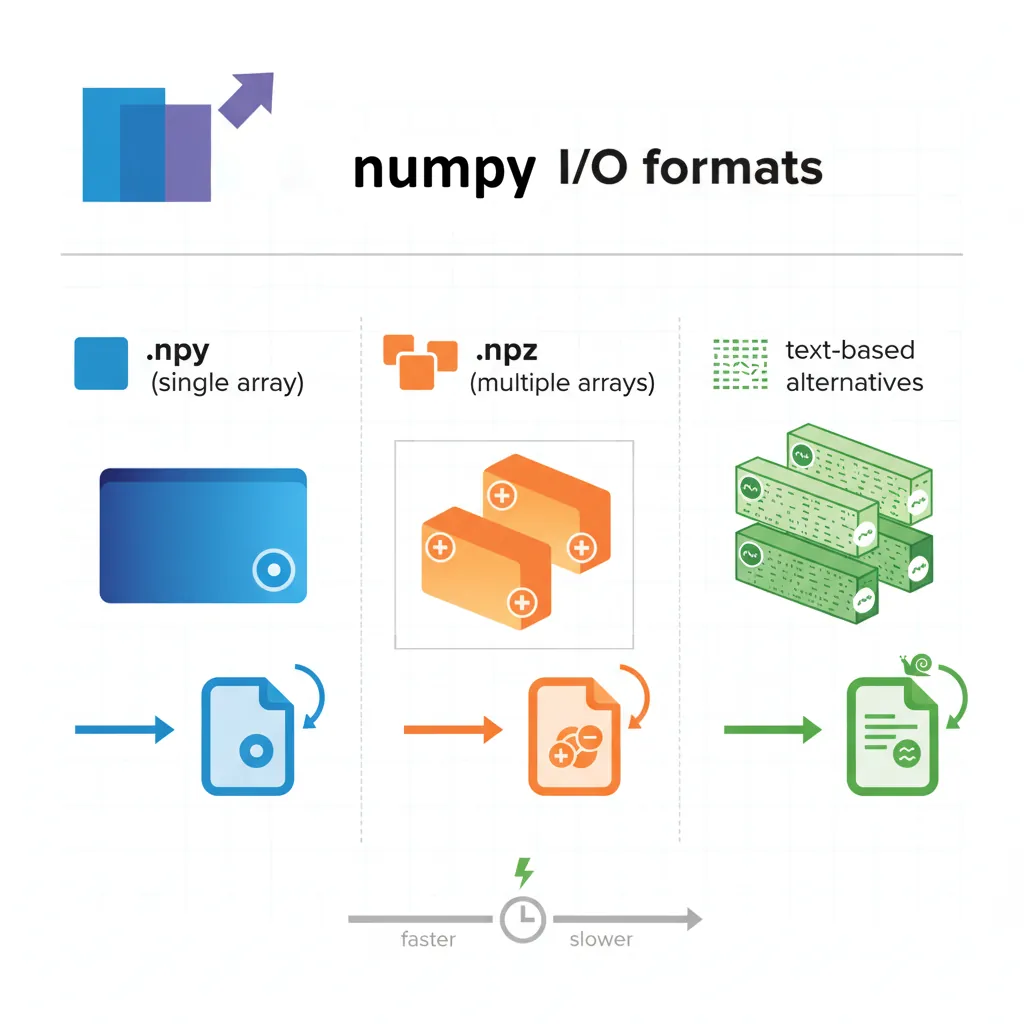
import numpy as np

# Save to text file
data = np.array([[1, 2, 3], [4, 5, 6]])
np.savetxt('data.txt', data, delimiter=',', fmt='%d')

# Load from text file
loaded = np.loadtxt('data.txt', delimiter=',')
print("Loaded from text:\n", loaded)
Performance Comparison
Binary vs Text Format
import numpy as np
import time

# Create large array
large = np.random.rand(10000, 100)

# Binary save (.npy) - FAST
start = time.time()
np.save('binary.npy', large)
binary_time = time.time() - start

# Text save (.txt) - SLOW
start = time.time()
np.savetxt('text.txt', large)
text_time = time.time() - start

print(f"Binary save: {binary_time:.3f}s")
print(f"Text save: {text_time:.3f}s")
print(f"Binary is {text_time/binary_time:.1f}x faster")
Result: Binary format is typically 10-50x faster and produces much smaller files. Use .npy/.npz for NumPy-to-NumPy storage!
Practice Exercises
Reshaping & Manipulation Exercises
Exercise 1 (Beginner): Create a 1D array with 24 elements. Reshape it to 2x3x4, then back to 6x4. Verify each shape transformation.
Exercise 2 (Beginner): Given a 3x4 array, flatten it to 1D using flatten() and reshape(). Are they the same? Why or why not?
Exercise 3 (Intermediate): Create a 4x4 array. Transpose it. Flip it horizontally (flip(axis=1)). Stack the original, transposed, and flipped versions along axis 0.
Exercise 4 (Intermediate): Create three 2D arrays of shape (3,3). Use hstack() and vstack() to combine them different ways. Compare results.
Challenge (Advanced): Create a 3D array (2,3,4). Reshape to 2D, apply some operations, then reshape back to 3D. Ensure data integrity throughout.
Linear Algebra Operations
NumPy's linalg module provides comprehensive linear algebra functionality essential for machine learning and scientific computing.
Matrix Operations
import numpy as np

A = np.array([[1, 2], [3, 4]])
B = np.array([[5, 6], [7, 8]])

# Matrix multiplication
C = A @ B                      # Python 3.5+ syntax
# or: C = np.dot(A, B)
print("A @ B:\n", C)

# Transpose
print("Transpose:\n", A.T)

# Determinant
det = np.linalg.det(A)
print("Determinant:", det)     # -2.0

# Inverse (if exists)
A_inv = np.linalg.inv(A)
print("Inverse:\n", A_inv)
Linear regression can be solved using the normal equation: ? = (X^T X)^(-1) X^T y
import numpy as np

# Generate synthetic data
X = np.array([[1, 1], [1, 2], [1, 3]])  # Features with bias term
y = np.array([2, 4, 6])                  # Target values

# Normal equation: theta = (X^T X)^(-1) X^T y
theta = np.linalg.inv(X.T @ X) @ X.T @ y
print("Coefficients:", theta)            # [0, 2] (intercept=0, slope=2)
This is exactly how libraries like scikit-learn solve linear regression under the hood!
Random Number Generation
NumPy's random module is crucial for simulations, data generation, and machine learning initialization.
Basic Random Generation
import numpy as np

# np.random.seed(seed) - Set random number generator seed for reproducibility
# Parameters:
#   seed: int - Seed value (same seed = same random sequence)
np.random.seed(42)

# np.random.rand(d0, d1, ..., dn) - Random floats from uniform [0, 1)
# Parameters:
#   d0, d1, ..., dn: ints - Dimensions of output array
#   Returns: floats in range [0.0, 1.0)
uniform = np.random.rand(3, 3)         # 3x3 array of random floats
print("Uniform [0,1):\n", uniform)

# np.random.randint(low, high=None, size=None, dtype=int) - Random integers
# Parameters:
#   low: int - Lowest integer (inclusive), or if high=None, range is [0, low)
#   high: int - Highest integer (exclusive)
#   size: int or tuple - Shape of output array
#   dtype: data type - Integer type (default: int)
integers = np.random.randint(0, 10, size=(2, 3))  # Random ints from 0 to 9
print("Random integers:\n", integers)

# np.random.randn(d0, d1, ..., dn) - Random floats from standard normal (mean=0, std=1)
# Parameters:
#   d0, d1, ..., dn: ints - Dimensions of output array
#   Returns: samples from normal distribution N(0, 1)
normal = np.random.randn(1000)         # 1000 samples from standard normal
print("Normal mean:", normal.mean())    # ~0
print("Normal std:", normal.std())      # ~1
Statistical Distributions
import numpy as np

# np.random.exponential(scale=1.0, size=None) - Exponential distribution
# Parameters:
#   scale: float - Scale parameter (1/lambda, mean of distribution)
#   size: int or tuple - Output shape
exponential = np.random.exponential(scale=2.0, size=1000)
print(f"Exponential mean: {exponential.mean():.2f}")  # Should be ~2.0

# np.random.poisson(lam=1.0, size=None) - Poisson distribution (count data)
# Parameters:
#   lam: float - Expected number of events (lambda parameter)
#   size: int or tuple - Output shape
poisson = np.random.poisson(lam=3, size=1000)
print(f"Poisson mean: {poisson.mean():.2f}")  # Should be ~3.0

# np.random.binomial(n, p, size=None) - Binomial distribution (coin flips)
# Parameters:
#   n: int - Number of trials
#   p: float - Probability of success (0 to 1)
#   size: int or tuple - Output shape
binomial = np.random.binomial(n=10, p=0.5, size=1000)  # 10 coin flips, 1000 times
print(f"Binomial mean: {binomial.mean():.2f}")  # Should be ~5.0 (n*p)

# np.random.shuffle(x) - Shuffle array in-place (modifies original)
# Parameters:
#   x: array - Array to shuffle (modified directly)
deck = np.arange(52)                   # Create deck [0, 1, 2, ..., 51]
np.random.shuffle(deck)                # Shuffle in-place
print(f"First 5 cards after shuffle: {deck[:5]}")

# np.random.choice(a, size=None, replace=True, p=None) - Random sample from array
# Parameters:
#   a: array or int - If int, sample from range(a); if array, sample from array
#   size: int or tuple - Output shape
#   replace: bool - Sample with replacement (True) or without (False)
#   p: array - Probabilities for each element (must sum to 1)
hand = np.random.choice(deck, size=5, replace=False)  # Draw 5 unique cards
print(f"Hand: {hand}")
Reproducibility: Always set np.random.seed() at the start of notebooks or scripts. This ensures random operations produce identical results across runs—critical for debugging and scientific reproducibility.
Performance Optimization
Views vs Copies
Understanding when NumPy creates views (references) versus copies is critical for performance:
Congratulations! You now understand NumPy's core concepts and capabilities. You've mastered:
? Array creation and manipulation
? Vectorized operations and broadcasting
? Indexing, slicing, and boolean masking
? Linear algebra operations
? Performance optimization techniques
NumPy is the foundation, but Pandas is where data science really comes alive. See you in the next article!
NumPy API Cheat Sheet
Quick reference for the most commonly used NumPy operations covered in this article.
Array Creation
np.array([1,2,3])
Create from list
np.zeros((3,4))
3×4 array of zeros
np.ones((2,3))
2×3 array of ones
np.arange(0,10,2)
[0,2,4,6,8]
np.linspace(0,1,5)
5 evenly spaced
np.eye(3)
3×3 identity matrix
np.random.rand(3,4)
3×4 random [0,1)
np.random.randn(3,4)
Normal distribution
Indexing & Slicing
arr[0]
First element
arr[-1]
Last element
arr[1:4]
Elements 1 to 3
arr[::2]
Every 2nd element
arr[1,2]
2D: row 1, col 2
arr[:,0]
All rows, col 0
arr[0,:]
Row 0, all cols
arr[arr > 5]
Boolean indexing
Array Operations
arr + 5
Add scalar
arr1 + arr2
Element-wise add
arr * 2
Multiply scalar
arr1 * arr2
Element-wise mult
arr ** 2
Element-wise power
np.sqrt(arr)
Square root
np.exp(arr)
Exponential
np.log(arr)
Natural log
Aggregations
arr.sum()
Sum all elements
arr.mean()
Mean (average)
arr.std()
Standard deviation
arr.min()
Minimum value
arr.max()
Maximum value
arr.sum(axis=0)
Sum by column
arr.sum(axis=1)
Sum by row
np.median(arr)
Median value
Reshaping
arr.reshape(3,4)
New shape (3×4)
arr.flatten()
To 1D array
arr.ravel()
To 1D (view)
arr.T
Transpose
np.vstack([a,b])
Stack vertically
np.hstack([a,b])
Stack horizontally
np.concatenate()
Join arrays
np.split(arr, 3)
Split into 3
Linear Algebra
A @ B
Matrix multiply
A.dot(B)
Dot product
np.linalg.inv(A)
Matrix inverse
np.linalg.det(A)
Determinant
np.linalg.eig(A)
Eigenvalues/vectors
np.linalg.solve(A,b)
Solve Ax=b
np.trace(A)
Trace (diagonal sum)
np.linalg.norm(v)
Vector norm
Pro Tips:
Broadcasting: Arrays with different shapes can work together if dimensions are compatible
Views vs Copies: Slicing creates views (modifies original); use .copy() for independence
Axis parameter:axis=0 operates on columns (down), axis=1 on rows (across)
Performance: Vectorized operations are 10-100× faster than Python loops
Practice Exercises
Linear Algebra Exercises
Exercise 1 (Beginner): Create two 2x2 matrices and perform matrix multiplication using @ operator. Compare with element-wise multiplication (*).
Exercise 2 (Beginner): Create a 3x3 matrix and calculate its determinant, trace (sum of diagonal), and rank. Verify the relationship between these properties.
Exercise 3 (Intermediate): Create a 3x3 matrix, compute its inverse, and multiply it by the original. The result should be close to identity matrix.
Exercise 4 (Intermediate): Create a 4x2 matrix A and 2x3 matrix B. Compute A @ B and verify the shape is 4x3. What happens with incompatible shapes?
Challenge (Advanced): Implement Least Squares regression: Given A (design matrix) and b (target), solve A @ x = b using linalg.lstsq(). Verify solution minimizes error.
Related Articles in This Series
Part 2: Pandas for Data Analysis
Master Pandas DataFrames, Series, data cleaning, transformation, groupby operations, and merge techniques for real-world data analysis.
Part 3: Data Visualization with Matplotlib & Seaborn
Create compelling visualizations with Python's most powerful plotting libraries. Learn line plots, bar charts, scatter plots, and statistical graphics.