Introduction: Why DSA Matters
Data Structures and Algorithms (DSA) form the core foundation of computer science and software engineering. Whether you're preparing for FAANG interviews, building scalable systems, or solving complex problems, mastering DSA is essential.
FAANG Interview Prep
Foundations, Memory & Complexity
Recursion Complete Guide
Arrays & Array ADT
Strings
Matrices
Linked Lists
Stack
Queue
Trees
BST & Balanced Trees
Heaps, Sorting & Hashing
Graphs, DP, Greedy & Backtracking
Physical vs Logical Data Structures
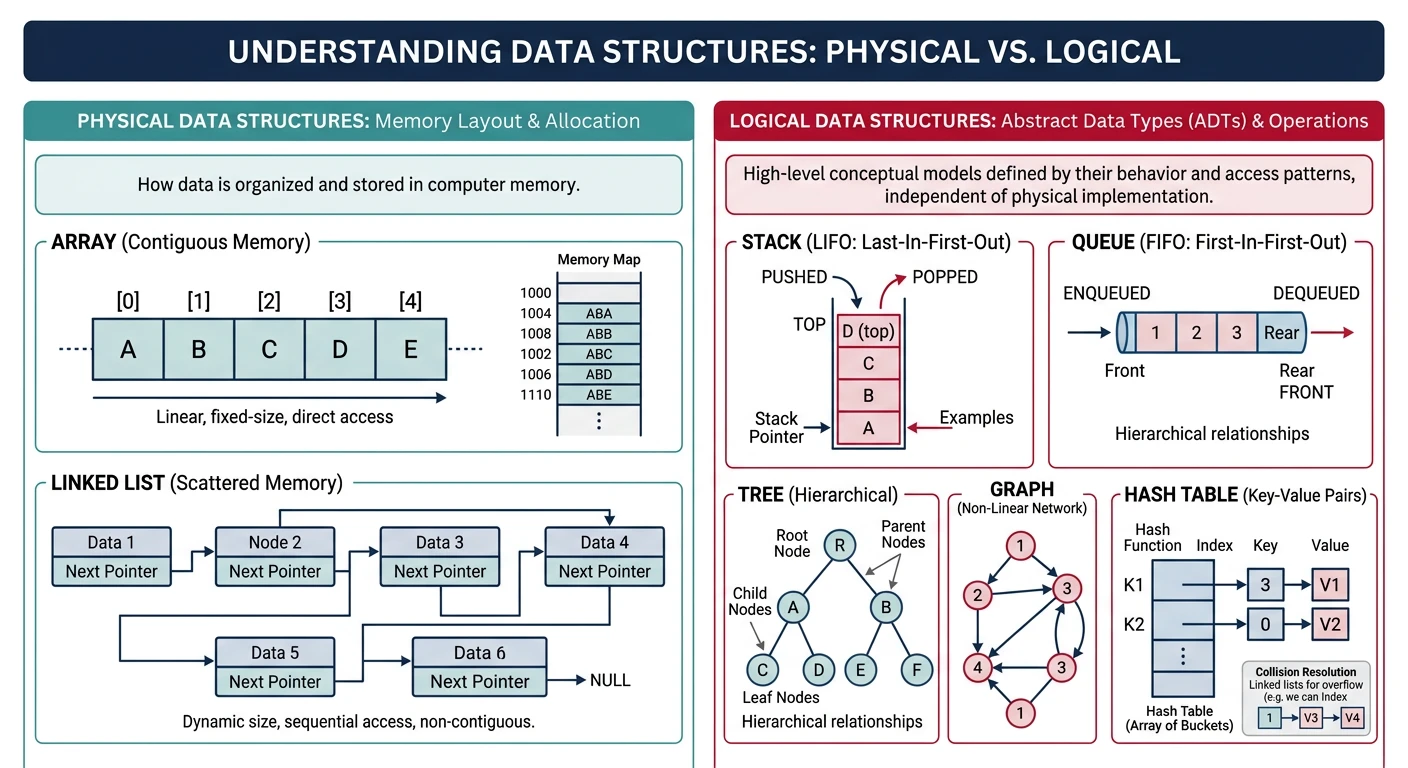
Data structures can be classified based on how they are stored in memory (physical) and how they behave logically.
Physical Data Structures
What are Data Structures?
A data structure is a specialized format for organizing, processing, retrieving, and storing data. Think of it like organizing items in a warehouse—different organization methods work better for different purposes.
Why learn this? The right data structure can make the difference between an algorithm that runs in milliseconds vs. one that takes hours!
Physical Data Structures
Physical structures define how data is actually stored in memory:
- Arrays - Contiguous memory allocation, fixed size at creation. Elements stored one after another in memory.
- Linked Lists - Non-contiguous nodes connected via pointers/references, dynamic size. Each node stores data + address of next node.
Logical Data Structures
Logical structures define the behavior and operations, implemented using physical structures:
- Linear: Stack (LIFO - Last In First Out), Queue (FIFO - First In First Out), Deque (Double-ended Queue)
- Non-Linear: Trees (hierarchical), Graphs (interconnected nodes)
- Tabular: Hash Tables (key-value mapping)
Key Insight
A Stack can be implemented using an Array OR a Linked List. The physical structure is the "how", while the logical structure is the "what behavior".
Python
# Physical vs Logical Data Structures in Python
import array
from collections import deque
# PHYSICAL: Array - contiguous memory
arr = array.array('i', [1, 2, 3, 4, 5])
print(f"Array: {list(arr)}")
# PHYSICAL: Linked List concept
class Node:
def __init__(self, data):
self.data = data
self.next = None
head = Node(10)
head.next = Node(20)
head.next.next = Node(30)
# Traverse linked list
current = head
print("Linked List: ", end="")
while current:
print(current.data, end=" -> " if current.next else "\n")
current = current.next
# LOGICAL: Stack (LIFO) - can use list or linked list underneath
stack = []
stack.append(10) # push
stack.append(20) # push
print(f"Stack pop: {stack.pop()}") # Output: 20
# LOGICAL: Queue (FIFO) - using deque for O(1) operations
queue = deque()
queue.append(10) # enqueue
queue.append(20) # enqueue
print(f"Queue dequeue: {queue.popleft()}") # Output: 10
C++
// Physical vs Logical Data Structures in C++
#include <iostream>
#include <stack>
#include <queue>
using namespace std;
// PHYSICAL: Linked List Node
struct Node {
int data;
Node* next;
Node(int val) : data(val), next(nullptr) {}
};
int main() {
// PHYSICAL: Array - contiguous memory
int arr[5] = {1, 2, 3, 4, 5};
cout << "Array: ";
for (int i = 0; i < 5; i++) {
cout << arr[i] << " ";
}
cout << endl;
// PHYSICAL: Linked List
Node* head = new Node(10);
head->next = new Node(20);
head->next->next = new Node(30);
cout << "Linked List: ";
Node* current = head;
while (current) {
cout << current->data;
if (current->next) cout << " -> ";
current = current->next;
}
cout << endl;
// LOGICAL: Stack (LIFO) using STL
stack<int> s;
s.push(10);
s.push(20);
cout << "Stack pop: " << s.top() << endl; // 20
s.pop();
// LOGICAL: Queue (FIFO) using STL
queue<int> q;
q.push(10);
q.push(20);
cout << "Queue dequeue: " << q.front() << endl; // 10
q.pop();
// Cleanup
while (head) {
Node* temp = head;
head = head->next;
delete temp;
}
return 0;
}
Java
// Physical vs Logical Data Structures in Java
import java.util.*;
public class DataStructuresDemo {
// PHYSICAL: Linked List Node
static class Node {
int data;
Node next;
Node(int data) { this.data = data; }
}
public static void main(String[] args) {
// PHYSICAL: Array - contiguous memory
int[] arr = {1, 2, 3, 4, 5};
System.out.print("Array: ");
for (int num : arr) {
System.out.print(num + " ");
}
System.out.println();
// PHYSICAL: Linked List
Node head = new Node(10);
head.next = new Node(20);
head.next.next = new Node(30);
System.out.print("Linked List: ");
Node current = head;
while (current != null) {
System.out.print(current.data);
if (current.next != null) System.out.print(" -> ");
current = current.next;
}
System.out.println();
// LOGICAL: Stack (LIFO)
Stack<Integer> stack = new Stack<>();
stack.push(10);
stack.push(20);
System.out.println("Stack pop: " + stack.pop()); // 20
// LOGICAL: Queue (FIFO)
Queue<Integer> queue = new LinkedList<>();
queue.offer(10);
queue.offer(20);
System.out.println("Queue dequeue: " + queue.poll()); // 10
}
}
Abstract Data Types (ADT)
What is an ADT?
An Abstract Data Type (ADT) defines what operations can be performed, not how they're implemented. It's like a contract or interface that specifies behavior without implementation details.
Real-world analogy: A TV remote is an ADT—you know pressing "Volume Up" increases volume, but you don't need to know the internal circuitry!
List ADT Operations
insert(index, element)- Insert element at positiondelete(index)- Remove element at positionget(index)- Retrieve element at positionset(index, element)- Update element at positionlength()- Return number of elementssearch(element)- Find element position
Implementations: Can use Array-based (fast access), Linked List-based (fast insert/delete), or Dynamic Array (balanced)
Python - List ADT Implementation
# List ADT Implementation in Python
from abc import ABC, abstractmethod
# Define the ADT interface
class ListADT(ABC):
@abstractmethod
def insert(self, index, element): pass
@abstractmethod
def delete(self, index): pass
@abstractmethod
def get(self, index): pass
@abstractmethod
def set(self, index, element): pass
@abstractmethod
def length(self): pass
@abstractmethod
def search(self, element): pass
# Array-based implementation
class ArrayList(ListADT):
def __init__(self, capacity=10):
self.data = [None] * capacity
self.size = 0
self.capacity = capacity
def insert(self, index, element):
if self.size >= self.capacity:
raise RuntimeError("Array is full")
# Shift elements right
for i in range(self.size, index, -1):
self.data[i] = self.data[i - 1]
self.data[index] = element
self.size += 1
def delete(self, index):
if index >= self.size:
raise IndexError("Index out of bounds")
element = self.data[index]
# Shift elements left
for i in range(index, self.size - 1):
self.data[i] = self.data[i + 1]
self.size -= 1
return element
def get(self, index):
if index >= self.size:
raise IndexError("Index out of bounds")
return self.data[index]
def set(self, index, element):
if index >= self.size:
raise IndexError("Index out of bounds")
self.data[index] = element
def length(self):
return self.size
def search(self, element):
for i in range(self.size):
if self.data[i] == element:
return i
return -1
# Test
arr_list = ArrayList(10)
arr_list.insert(0, 10)
arr_list.insert(1, 20)
arr_list.insert(1, 15) # Insert in middle
print(f"Length: {arr_list.length()}") # 3
print(f"Element at 1: {arr_list.get(1)}") # 15
print(f"Search 20: index {arr_list.search(20)}") # 2
C++ - List ADT Implementation
// List ADT Implementation in C++
#include <iostream>
#include <stdexcept>
using namespace std;
// Abstract base class (interface)
template<typename T>
class ListADT {
public:
virtual void insert(int index, T element) = 0;
virtual T remove(int index) = 0;
virtual T get(int index) = 0;
virtual void set(int index, T element) = 0;
virtual int length() = 0;
virtual int search(T element) = 0;
virtual ~ListADT() {}
};
// Array-based implementation
template<typename T>
class ArrayList : public ListADT<T> {
private:
T* data;
int size;
int capacity;
public:
ArrayList(int cap = 10) : capacity(cap), size(0) {
data = new T[capacity];
}
~ArrayList() { delete[] data; }
void insert(int index, T element) override {
if (size >= capacity)
throw runtime_error("Array is full");
// Shift elements right
for (int i = size; i > index; i--) {
data[i] = data[i - 1];
}
data[index] = element;
size++;
}
T remove(int index) override {
if (index >= size)
throw out_of_range("Index out of bounds");
T element = data[index];
// Shift elements left
for (int i = index; i < size - 1; i++) {
data[i] = data[i + 1];
}
size--;
return element;
}
T get(int index) override {
if (index >= size)
throw out_of_range("Index out of bounds");
return data[index];
}
void set(int index, T element) override {
if (index >= size)
throw out_of_range("Index out of bounds");
data[index] = element;
}
int length() override { return size; }
int search(T element) override {
for (int i = 0; i < size; i++) {
if (data[i] == element) return i;
}
return -1;
}
};
int main() {
ArrayList<int> arrList(10);
arrList.insert(0, 10);
arrList.insert(1, 20);
arrList.insert(1, 15); // Insert in middle
cout << "Length: " << arrList.length() << endl; // 3
cout << "Element at 1: " << arrList.get(1) << endl; // 15
cout << "Search 20: index " << arrList.search(20) << endl; // 2
return 0;
}
Java - List ADT Implementation
// List ADT Implementation in Java
// Define the ADT interface
interface ListADT<T> {
void insert(int index, T element);
T delete(int index);
T get(int index);
void set(int index, T element);
int length();
int search(T element);
}
// Array-based implementation
class ArrayList<T> implements ListADT<T> {
private Object[] data;
private int size;
private int capacity;
public ArrayList(int capacity) {
this.capacity = capacity;
this.data = new Object[capacity];
this.size = 0;
}
@Override
public void insert(int index, T element) {
if (size >= capacity)
throw new RuntimeException("Array is full");
// Shift elements right
for (int i = size; i > index; i--) {
data[i] = data[i - 1];
}
data[index] = element;
size++;
}
@Override
@SuppressWarnings("unchecked")
public T delete(int index) {
if (index >= size)
throw new IndexOutOfBoundsException("Index out of bounds");
T element = (T) data[index];
// Shift elements left
for (int i = index; i < size - 1; i++) {
data[i] = data[i + 1];
}
size--;
return element;
}
@Override
@SuppressWarnings("unchecked")
public T get(int index) {
if (index >= size)
throw new IndexOutOfBoundsException("Index out of bounds");
return (T) data[index];
}
@Override
public void set(int index, T element) {
if (index >= size)
throw new IndexOutOfBoundsException("Index out of bounds");
data[index] = element;
}
@Override
public int length() { return size; }
@Override
public int search(T element) {
for (int i = 0; i < size; i++) {
if (data[i].equals(element)) return i;
}
return -1;
}
public static void main(String[] args) {
ArrayList<Integer> arrList = new ArrayList<>(10);
arrList.insert(0, 10);
arrList.insert(1, 20);
arrList.insert(1, 15); // Insert in middle
System.out.println("Length: " + arrList.length()); // 3
System.out.println("Element at 1: " + arrList.get(1)); // 15
System.out.println("Search 20: index " + arrList.search(20)); // 2
}
}
Stack vs Heap Memory
Why Does Memory Matter?
Understanding memory is crucial for writing efficient code and debugging memory-related issues like:
- Stack Overflow - Too many function calls (deep recursion)
- Memory Leak - Forgetting to free allocated memory
- Segmentation Fault - Accessing invalid memory addresses
| Aspect | Stack Memory | Heap Memory |
|---|---|---|
| Allocation | Automatic (compile-time) | Dynamic (run-time) |
| Speed | Very Fast (LIFO pointer) | Slower (search for free space) |
| Size | Limited (typically 1-8 MB) | Large (available RAM) |
| Management | Automatic cleanup | Manual / Garbage Collector |
| Stores | Local variables, function calls | Objects, dynamic arrays |
| Error | Stack Overflow | Out of Memory / Memory Leak |
Python - Memory Concepts
# Python Memory Demonstration
# Python handles memory automatically via garbage collection
import sys
def stack_example():
"""Local variables are stored on the stack"""
local_var = 10 # Stack: primitive stored directly
local_list = [1, 2, 3] # Stack: reference to heap object
print(f"Local var: {local_var}")
print(f"List size in bytes: {sys.getsizeof(local_list)}")
# When function returns, stack frame is popped automatically
def heap_example():
"""Objects are stored on the heap"""
# All Python objects live on heap
# Python handles deallocation via reference counting + garbage collection
small_list = [1, 2, 3]
big_list = list(range(1000000)) # Large heap allocation
print(f"Small list bytes: {sys.getsizeof(small_list)}")
print(f"Big list bytes: {sys.getsizeof(big_list)}")
# No manual cleanup needed - garbage collector handles it
del big_list # Hint to garbage collector (optional)
def demonstrate_reference():
"""Show how Python uses references"""
a = [1, 2, 3] # Create object on heap, 'a' is reference
b = a # 'b' points to SAME object (not a copy!)
b.append(4)
print(f"a = {a}") # [1, 2, 3, 4] - both see the change
print(f"b = {b}") # [1, 2, 3, 4]
print(f"Same object? {a is b}") # True
# Run examples
stack_example()
heap_example()
demonstrate_reference()
C++ - Memory Management
// C++ Memory Demonstration - Full control over memory
#include <iostream>
using namespace std;
void stackExample() {
// STACK allocation - automatic cleanup
int localVar = 10; // Stack: 4 bytes
int arr[5] = {1,2,3,4,5}; // Stack: 20 bytes (fixed size)
cout << "Stack variable: " << localVar << endl;
cout << "Stack array[0]: " << arr[0] << endl;
cout << "Stack array address: " << &arr[0] << endl;
} // localVar and arr automatically freed when function returns
void heapExample() {
// HEAP allocation - manual cleanup required!
int* ptr = new int(20); // Heap: single integer
int* arr = new int[5]{1,2,3,4,5}; // Heap: dynamic array
cout << "Heap variable: " << *ptr << endl;
cout << "Heap array[0]: " << arr[0] << endl;
cout << "Heap pointer address: " << ptr << endl;
// CRITICAL: Must free heap memory to avoid memory leak!
delete ptr; // Free single object
delete[] arr; // Free array (note the [])
// After delete, ptr and arr are "dangling pointers"
ptr = nullptr; // Good practice: set to nullptr
arr = nullptr;
}
void memoryLeakDemo() {
// BAD: Memory leak - allocate but never free
// int* leaked = new int[1000000];
// Function ends, 'leaked' pointer is destroyed
// but heap memory remains allocated forever!
// GOOD: Always pair new with delete
int* safe = new int[100];
// ... use safe ...
delete[] safe; // Clean up!
}
int main() {
cout << "=== Stack Example ===" << endl;
stackExample();
cout << "\n=== Heap Example ===" << endl;
heapExample();
return 0;
}
Java - Memory and Garbage Collection
// Java Memory Demonstration
// Java uses automatic garbage collection (like Python)
public class MemoryDemo {
public static void stackExample() {
// Primitives stored on stack
int localVar = 10;
double d = 3.14;
// Reference stored on stack, object on heap
int[] arr = {1, 2, 3, 4, 5};
System.out.println("Local var: " + localVar);
System.out.println("Array[0]: " + arr[0]);
} // localVar and reference 'arr' removed from stack
// Array object on heap becomes eligible for GC
public static void heapExample() {
// All objects live on heap in Java
int[] smallArr = new int[5]; // Heap allocation
int[] bigArr = new int[1000000]; // Large heap allocation
System.out.println("Small array created");
System.out.println("Big array length: " + bigArr.length);
// No manual deallocation - GC handles it
bigArr = null; // Hint to GC that object can be collected
// Request garbage collection (not guaranteed to run immediately)
System.gc();
}
public static void referenceDemo() {
// Demonstrate reference behavior
int[] a = {1, 2, 3};
int[] b = a; // 'b' points to SAME object!
b[0] = 999;
System.out.println("a[0] = " + a[0]); // 999 - same object
System.out.println("a == b? " + (a == b)); // true
}
public static void main(String[] args) {
System.out.println("=== Stack Example ===");
stackExample();
System.out.println("\n=== Heap Example ===");
heapExample();
System.out.println("\n=== Reference Demo ===");
referenceDemo();
}
}
Memory Management Comparison
| Language | Memory Management | Key Points |
|---|---|---|
| C++ | Manual (new/delete) | Full control, must avoid leaks |
| Java | Garbage Collector | Automatic, but objects may linger |
| Python | Reference Counting + GC | Automatic, handles circular refs |
Static vs Dynamic Memory Allocation
Static Allocation
- Size determined at compile time
- Memory allocated on stack
- Fast but inflexible
- Cannot resize after creation
int arr[100]; // Fixed 100 elements
Dynamic Allocation
- Size determined at runtime
- Memory allocated on heap
- Flexible but requires management
- Can resize (with reallocation)
int* arr = new int[n]; // Size n at runtime
Asymptotic Notations (O, O, T)
Why Asymptotic Notation?
Asymptotic notation describes algorithm efficiency as input size approaches infinity, ignoring constants and lower-order terms.
Why? Actual runtime depends on hardware, language, and implementation. By focusing on growth rate, we can compare algorithms independent of these factors. An O(n²) algorithm will always eventually be slower than O(n log n) for large enough n!
The Three Notations
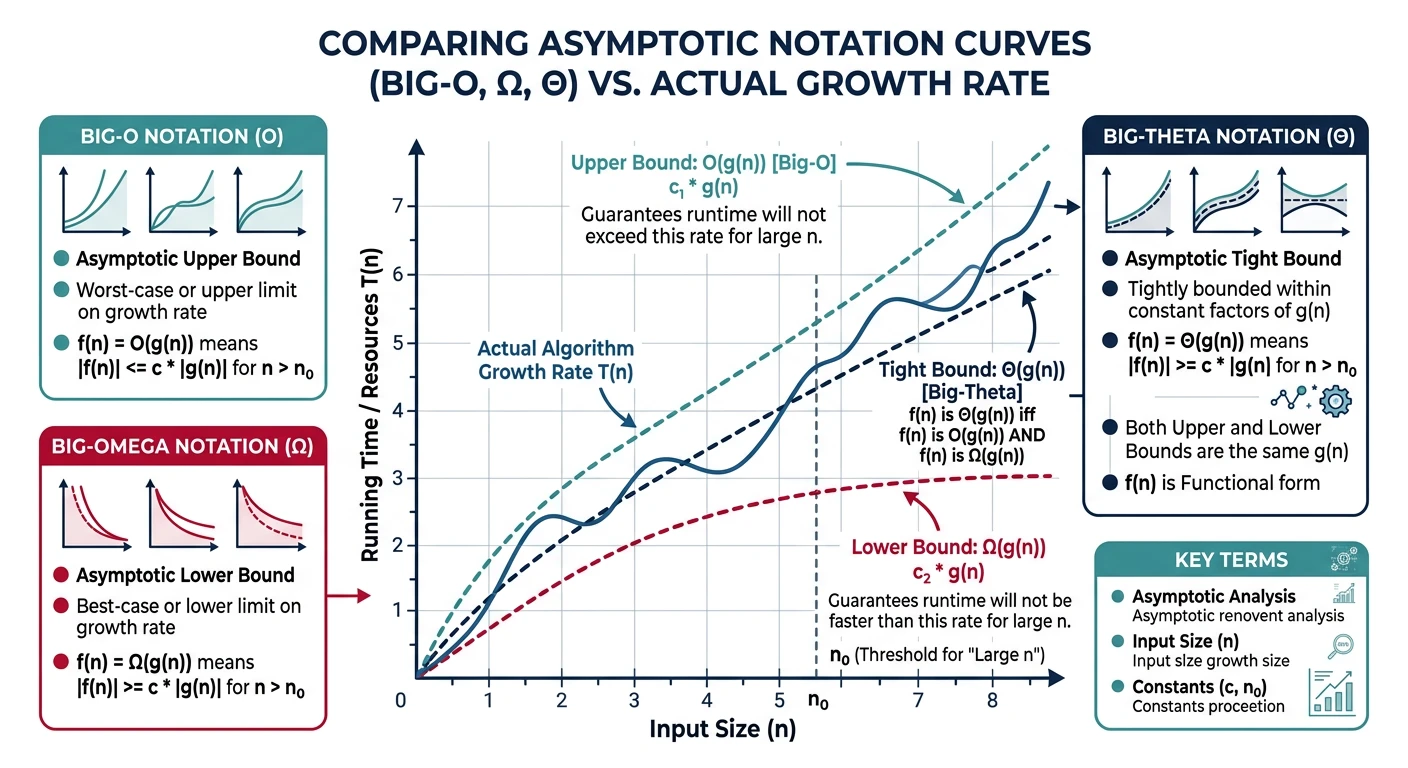
- Big-O (O) - Upper Bound: "At most this much time" (worst case)
- Omega (O) - Lower Bound: "At least this much time" (best case)
- Theta (T) - Tight Bound: "Exactly this order of time" (average case)
Big-O Notation (O) - Upper Bound
Describes the worst-case scenario. "The algorithm takes at most this much time." This is the most commonly used notation in interviews.
Omega Notation (O) - Lower Bound
Describes the best-case scenario. "The algorithm takes at least this much time." Useful for proving minimum required work.
Theta Notation (T) - Tight Bound
When upper and lower bounds match. "The algorithm takes exactly this order of time." The most precise description.
Python - Search Algorithm Comparison
# Understanding Asymptotic Notations through Search Algorithms
import time
def linear_search(arr, target):
"""
Time Complexity Analysis:
- Best Case O(1): target is at index 0
- Worst Case O(n): target is last element or not present
- Average Case T(n): target is somewhere in the middle
"""
for i in range(len(arr)):
if arr[i] == target:
return i
return -1
def binary_search(arr, target):
"""
Time Complexity: T(log n) - tight bound
Requires sorted array
Halves search space each iteration
"""
left, right = 0, len(arr) - 1
while left <= right:
mid = (left + right) // 2
if arr[mid] == target:
return mid
elif arr[mid] < target:
left = mid + 1
else:
right = mid - 1
return -1
# Test and compare
arr = list(range(1, 1000001)) # 1 million elements
# Worst case for linear search
start = time.time()
linear_search(arr, 1000000) # Search for last element
linear_time = time.time() - start
# Same search with binary search
start = time.time()
binary_search(arr, 1000000)
binary_time = time.time() - start
print(f"Linear Search (O(n)): {linear_time:.6f} seconds")
print(f"Binary Search (O(log n)): {binary_time:.6f} seconds")
print(f"Binary is ~{linear_time/binary_time:.0f}x faster!")
C++ - Search Algorithm Comparison
// Understanding Asymptotic Notations in C++
#include <iostream>
#include <vector>
#include <chrono>
using namespace std;
// Linear Search - O(n)
int linearSearch(const vector<int>& arr, int target) {
for (int i = 0; i < arr.size(); i++) {
if (arr[i] == target) return i;
}
return -1;
}
// Binary Search - O(log n)
int binarySearch(const vector<int>& arr, int target) {
int left = 0, right = arr.size() - 1;
while (left <= right) {
int mid = left + (right - left) / 2; // Avoid overflow
if (arr[mid] == target) return mid;
else if (arr[mid] < target) left = mid + 1;
else right = mid - 1;
}
return -1;
}
int main() {
// Create array of 1 million elements
vector<int> arr(1000000);
for (int i = 0; i < 1000000; i++) {
arr[i] = i + 1;
}
// Benchmark linear search (worst case)
auto start = chrono::high_resolution_clock::now();
linearSearch(arr, 1000000);
auto end = chrono::high_resolution_clock::now();
auto linearTime = chrono::duration<double>(end - start).count();
// Benchmark binary search
start = chrono::high_resolution_clock::now();
binarySearch(arr, 1000000);
end = chrono::high_resolution_clock::now();
auto binaryTime = chrono::duration<double>(end - start).count();
cout << "Linear Search O(n): " << linearTime << " seconds" << endl;
cout << "Binary Search O(log n): " << binaryTime << " seconds" << endl;
cout << "Binary is ~" << (int)(linearTime/binaryTime) << "x faster!" << endl;
return 0;
}
Java - Search Algorithm Comparison
// Understanding Asymptotic Notations in Java
public class SearchComparison {
// Linear Search - O(n)
public static int linearSearch(int[] arr, int target) {
for (int i = 0; i < arr.length; i++) {
if (arr[i] == target) return i;
}
return -1;
}
// Binary Search - O(log n)
public static int binarySearch(int[] arr, int target) {
int left = 0, right = arr.length - 1;
while (left <= right) {
int mid = left + (right - left) / 2; // Avoid overflow
if (arr[mid] == target) return mid;
else if (arr[mid] < target) left = mid + 1;
else right = mid - 1;
}
return -1;
}
public static void main(String[] args) {
// Create array of 1 million elements
int[] arr = new int[1000000];
for (int i = 0; i < 1000000; i++) {
arr[i] = i + 1;
}
// Benchmark linear search (worst case)
long start = System.nanoTime();
linearSearch(arr, 1000000);
long linearTime = System.nanoTime() - start;
// Benchmark binary search
start = System.nanoTime();
binarySearch(arr, 1000000);
long binaryTime = System.nanoTime() - start;
System.out.printf("Linear Search O(n): %.6f seconds%n", linearTime / 1e9);
System.out.printf("Binary Search O(log n): %.6f seconds%n", binaryTime / 1e9);
System.out.printf("Binary is ~%dx faster!%n", linearTime / binaryTime);
}
}
Time Complexity
Time complexity measures how the number of operations grows with input size.
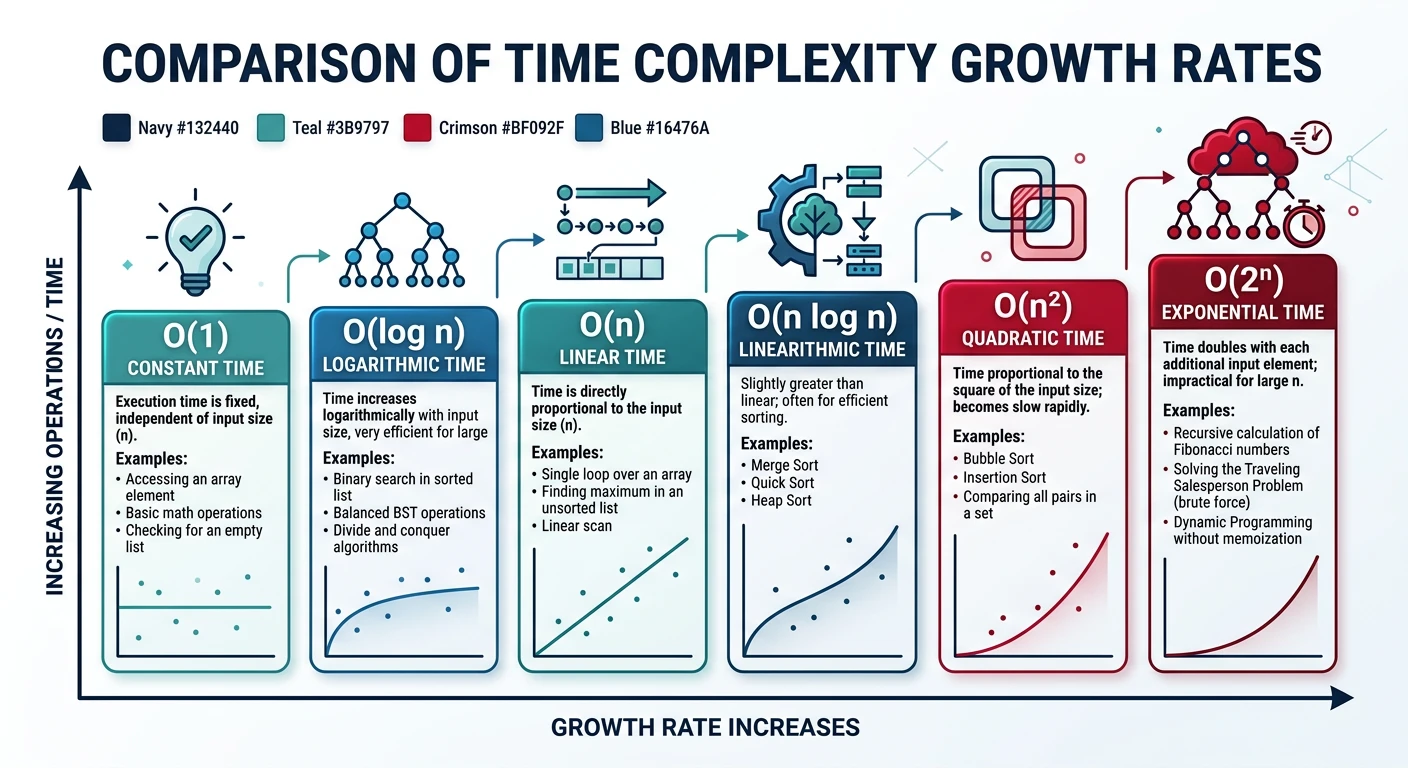
| Complexity | Name | n=10 | n=100 | n=1000 | Example |
|---|---|---|---|---|---|
| O(1) | Constant | 1 | 1 | 1 | Array access |
| O(log n) | Logarithmic | 3 | 7 | 10 | Binary search |
| O(n) | Linear | 10 | 100 | 1000 | Linear search |
| O(n log n) | Linearithmic | 33 | 664 | 9966 | Merge sort |
| O(n²) | Quadratic | 100 | 10,000 | 1,000,000 | Bubble sort |
| O(2n) | Exponential | 1024 | 10³° | 8 | Naive Fibonacci |
Space Complexity
What is Space Complexity?
Space complexity measures how much extra memory an algorithm needs as input size grows. It includes:
- Auxiliary Space: Extra space used by the algorithm (not including input)
- Total Space: Input space + auxiliary space
Python - Space Complexity Examples
# Space Complexity Examples in Python
# O(1) - Constant Space
def sum_array(arr):
"""Uses fixed amount of extra memory regardless of input size"""
total = 0 # Only one variable, no matter how big arr is
for num in arr:
total += num
return total
# O(n) - Linear Space
def duplicate_array(arr):
"""Creates new array proportional to input size"""
result = [] # New list grows with input
for num in arr:
result.append(num)
return result
# O(n) - Recursion Stack Space
def factorial(n):
"""Each recursive call adds to stack - O(n) space"""
if n <= 1:
return 1
return n * factorial(n - 1)
# O(n²) - Quadratic Space
def create_adjacency_matrix(n):
"""Creates n×n matrix - n² space"""
matrix = [[0] * n for _ in range(n)]
return matrix
# Test
print(f"Sum (O(1) space): {sum_array([1,2,3,4,5])}")
print(f"Duplicate (O(n) space): {duplicate_array([1,2,3])}")
print(f"5x5 matrix (O(n²) space) created")
C++ - Space Complexity Examples
// Space Complexity Examples in C++
#include <iostream>
#include <vector>
using namespace std;
// O(1) - Constant Space
int sumArray(const vector<int>& arr) {
int total = 0; // Fixed space regardless of input
for (int num : arr) {
total += num;
}
return total;
}
// O(n) - Linear Space
vector<int> duplicateArray(const vector<int>& arr) {
vector<int> result; // Grows with input size
for (int num : arr) {
result.push_back(num);
}
return result;
}
// O(n) - Recursion Stack Space
int factorial(int n) {
if (n <= 1) return 1;
return n * factorial(n - 1); // Each call uses stack space
}
// O(n²) - Quadratic Space
vector<vector<int>> createAdjacencyMatrix(int n) {
vector<vector<int>> matrix(n, vector<int>(n, 0));
return matrix;
}
int main() {
vector<int> arr = {1, 2, 3, 4, 5};
cout << "Sum (O(1) space): " << sumArray(arr) << endl;
cout << "Duplicate (O(n) space): created " << duplicateArray(arr).size() << " elements" << endl;
cout << "5x5 matrix (O(n²) space): created " << createAdjacencyMatrix(5).size() << "x5 matrix" << endl;
return 0;
}
Java - Space Complexity Examples
// Space Complexity Examples in Java
import java.util.*;
public class SpaceComplexity {
// O(1) - Constant Space
public static int sumArray(int[] arr) {
int total = 0; // Fixed space
for (int num : arr) {
total += num;
}
return total;
}
// O(n) - Linear Space
public static int[] duplicateArray(int[] arr) {
int[] result = new int[arr.length]; // New array same size as input
for (int i = 0; i < arr.length; i++) {
result[i] = arr[i];
}
return result;
}
// O(n) - Recursion Stack Space
public static int factorial(int n) {
if (n <= 1) return 1;
return n * factorial(n - 1); // Stack grows with n
}
// O(n²) - Quadratic Space
public static int[][] createAdjacencyMatrix(int n) {
int[][] matrix = new int[n][n]; // n×n = n² space
return matrix;
}
public static void main(String[] args) {
int[] arr = {1, 2, 3, 4, 5};
System.out.println("Sum (O(1) space): " + sumArray(arr));
System.out.println("Duplicate (O(n) space): created " + duplicateArray(arr).length + " elements");
System.out.println("5x5 matrix (O(n²) space): created " + createAdjacencyMatrix(5).length + "x5 matrix");
}
}
Analyzing Complexity from Code
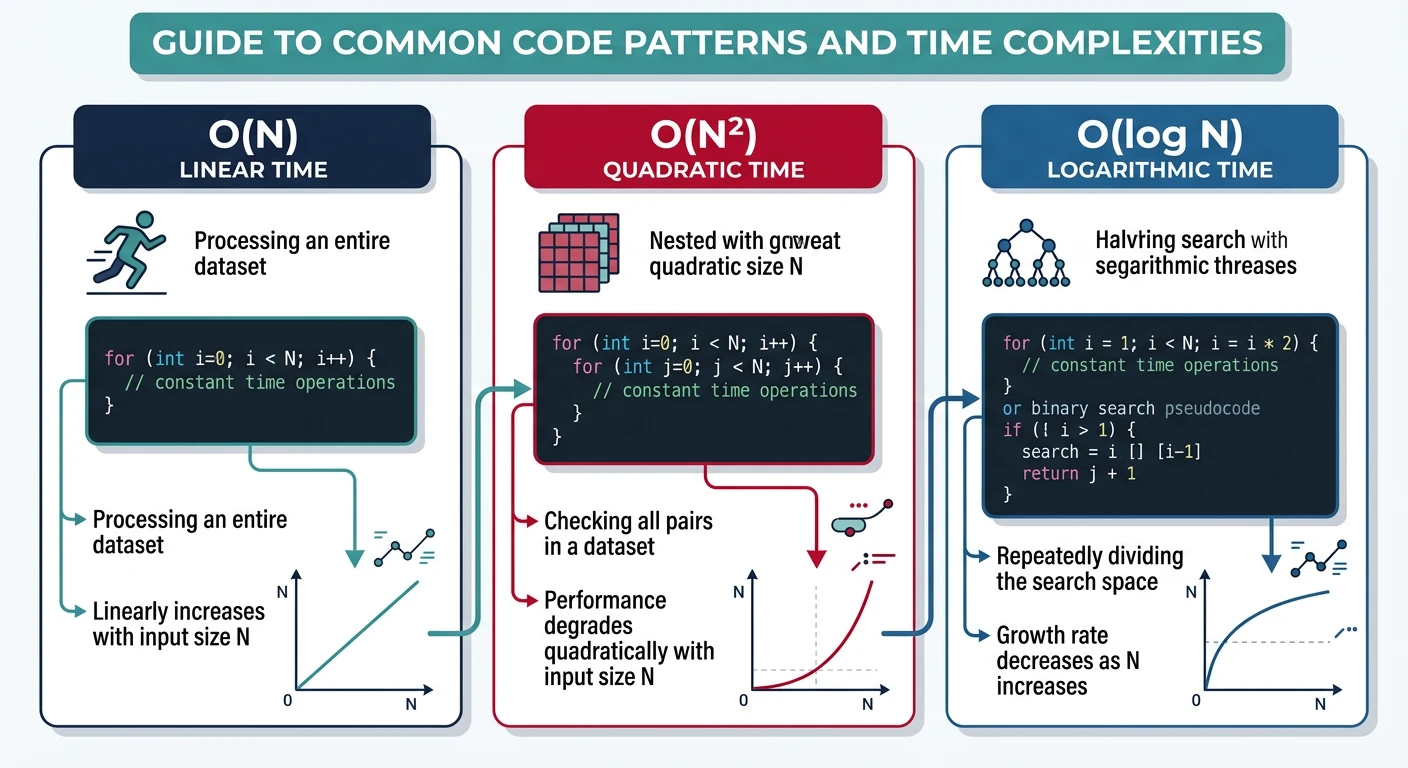
Learn to look at code and determine its time/space complexity. These patterns appear constantly in interviews!
Python - Complexity Patterns
# Complexity Analysis Patterns
# Pattern 1: Single Loop ? O(n)
def single_loop(n):
"""One loop through n elements = O(n)"""
count = 0
for i in range(n):
count += 1 # O(1) operation, done n times
return count
# Pattern 2: Nested Loops ? O(n²)
def nested_loops(n):
"""Loop inside loop = O(n × n) = O(n²)"""
count = 0
for i in range(n): # Outer: n times
for j in range(n): # Inner: n times each
count += 1 # Total: n × n = n²
return count
# Pattern 3: Loop with Halving ? O(log n)
def halving_loop(n):
"""Halve each iteration = O(log n)"""
count = 0
while n > 1:
n = n // 2 # Halve the problem size
count += 1
return count
# Pattern 4: Nested Loop with Halving Inner ? O(n log n)
def n_log_n_pattern(n):
"""Linear outer × logarithmic inner = O(n log n)"""
count = 0
for i in range(n): # n times
j = n
while j > 1: # log n times
j = j // 2
count += 1
return count
# Pattern 5: Two Different Inputs ? O(n × m)
def two_inputs(arr1, arr2):
"""Don't assume same size - use O(n × m)"""
count = 0
for a in arr1: # n times
for b in arr2: # m times
count += 1
return count
print(f"Single loop (1000): {single_loop(1000)} iterations")
print(f"Nested loops (10): {nested_loops(10)} iterations")
print(f"Halving loop (1000): {halving_loop(1000)} iterations")
print(f"n log n (100): {n_log_n_pattern(100)} iterations")
C++ - Complexity Patterns
// Complexity Analysis Patterns in C++
#include <iostream>
#include <cmath>
using namespace std;
// Pattern 1: Single Loop ? O(n)
int singleLoop(int n) {
int count = 0;
for (int i = 0; i < n; i++) {
count++; // n iterations
}
return count;
}
// Pattern 2: Nested Loops ? O(n²)
int nestedLoops(int n) {
int count = 0;
for (int i = 0; i < n; i++) {
for (int j = 0; j < n; j++) {
count++; // n × n = n² iterations
}
}
return count;
}
// Pattern 3: Loop with Halving ? O(log n)
int halvingLoop(int n) {
int count = 0;
while (n > 1) {
n = n / 2; // log2(n) iterations
count++;
}
return count;
}
// Pattern 4: n log n Pattern
int nLogNPattern(int n) {
int count = 0;
for (int i = 0; i < n; i++) { // n times
for (int j = n; j > 1; j /= 2) { // log n times
count++;
}
}
return count;
}
int main() {
cout << "Single loop (1000): " << singleLoop(1000) << " iterations" << endl;
cout << "Nested loops (10): " << nestedLoops(10) << " iterations" << endl;
cout << "Halving loop (1000): " << halvingLoop(1000) << " iterations" << endl;
cout << "n log n (100): " << nLogNPattern(100) << " iterations" << endl;
return 0;
}
Java - Complexity Patterns
// Complexity Analysis Patterns in Java
public class ComplexityPatterns {
// Pattern 1: Single Loop ? O(n)
public static int singleLoop(int n) {
int count = 0;
for (int i = 0; i < n; i++) {
count++; // n iterations
}
return count;
}
// Pattern 2: Nested Loops ? O(n²)
public static int nestedLoops(int n) {
int count = 0;
for (int i = 0; i < n; i++) {
for (int j = 0; j < n; j++) {
count++; // n × n iterations
}
}
return count;
}
// Pattern 3: Loop with Halving ? O(log n)
public static int halvingLoop(int n) {
int count = 0;
while (n > 1) {
n = n / 2; // log2(n) iterations
count++;
}
return count;
}
// Pattern 4: n log n Pattern
public static int nLogNPattern(int n) {
int count = 0;
for (int i = 0; i < n; i++) {
for (int j = n; j > 1; j /= 2) {
count++;
}
}
return count;
}
public static void main(String[] args) {
System.out.println("Single loop (1000): " + singleLoop(1000) + " iterations");
System.out.println("Nested loops (10): " + nestedLoops(10) + " iterations");
System.out.println("Halving loop (1000): " + halvingLoop(1000) + " iterations");
System.out.println("n log n (100): " + nLogNPattern(100) + " iterations");
}
}
Complexity Rules Summary
- Drop constants: O(2n) ? O(n), O(100n²) ? O(n²)
- Drop lower-order terms: O(n² + n) ? O(n²), O(n + log n) ? O(n)
- Sequential operations: O(A) + O(B) = O(A + B) ? O(max(A, B))
- Nested operations: O(A) × O(B) = O(A × B)
- Different inputs, different variables: O(n × m), not O(n²)
LeetCode Practice Problems
Practice these foundational problems to solidify your understanding. Solutions provided in Python, C++, and Java!
Easy 1920. Build Array from Permutation
Given a zero-based permutation nums, build array ans where ans[i] = nums[nums[i]].
Analysis: Time O(n), Space O(n) - we create a new array of size n.
Python Solution
# LeetCode 1920 - Build Array from Permutation
# Time: O(n), Space: O(n)
def buildArray(nums):
"""Use list comprehension for clean Pythonic solution"""
return [nums[nums[i]] for i in range(len(nums))]
# Test cases
print(buildArray([0,2,1,5,3,4])) # Output: [0,1,2,4,5,3]
print(buildArray([5,0,1,2,3,4])) # Output: [4,5,0,1,2,3]
C++ Solution
// LeetCode 1920 - Build Array from Permutation
// Time: O(n), Space: O(n)
#include <vector>
#include <iostream>
using namespace std;
class Solution {
public:
vector<int> buildArray(vector<int>& nums) {
vector<int> ans(nums.size());
for (int i = 0; i < nums.size(); i++) {
ans[i] = nums[nums[i]];
}
return ans;
}
};
int main() {
Solution sol;
vector<int> nums = {0, 2, 1, 5, 3, 4};
vector<int> result = sol.buildArray(nums);
for (int x : result) cout << x << " "; // 0 1 2 4 5 3
return 0;
}
Java Solution
// LeetCode 1920 - Build Array from Permutation
// Time: O(n), Space: O(n)
import java.util.Arrays;
class Solution {
public int[] buildArray(int[] nums) {
int[] ans = new int[nums.length];
for (int i = 0; i < nums.length; i++) {
ans[i] = nums[nums[i]];
}
return ans;
}
public static void main(String[] args) {
Solution sol = new Solution();
int[] nums = {0, 2, 1, 5, 3, 4};
int[] result = sol.buildArray(nums);
System.out.println(Arrays.toString(result)); // [0, 1, 2, 4, 5, 3]
}
}
Easy 2011. Final Value After Operations
Given array of operations, perform ++X, X++, --X, X-- on initial X=0.
Analysis: Time O(n), Space O(1) - just iterate and check characters.
Python Solution
# LeetCode 2011 - Final Value After Operations
# Time: O(n), Space: O(1)
def finalValueAfterOperations(operations):
"""Check if '+' is in the operation string"""
x = 0
for op in operations:
if '+' in op:
x += 1
else:
x -= 1
return x
# Test cases
print(finalValueAfterOperations(["--X","X++","X++"])) # Output: 1
print(finalValueAfterOperations(["++X","++X","X++"])) # Output: 3
C++ Solution
// LeetCode 2011 - Final Value After Operations
// Time: O(n), Space: O(1)
#include <vector>
#include <string>
#include <iostream>
using namespace std;
class Solution {
public:
int finalValueAfterOperations(vector<string>& operations) {
int x = 0;
for (const string& op : operations) {
// Check if '+' exists in the operation string
if (op.find('+') != string::npos) {
x++;
} else {
x--;
}
}
return x;
}
};
int main() {
Solution sol;
vector<string> ops = {"--X", "X++", "X++"};
cout << sol.finalValueAfterOperations(ops) << endl; // Output: 1
return 0;
}
Java Solution
// LeetCode 2011 - Final Value After Operations
// Time: O(n), Space: O(1)
class Solution {
public int finalValueAfterOperations(String[] operations) {
int x = 0;
for (String op : operations) {
if (op.contains("+")) {
x++;
} else {
x--;
}
}
return x;
}
public static void main(String[] args) {
Solution sol = new Solution();
String[] ops = {"--X", "X++", "X++"};
System.out.println(sol.finalValueAfterOperations(ops)); // Output: 1
}
}