We use cookies to enhance your browsing experience, serve personalized content, and analyze our traffic.
By clicking "Accept All", you consent to our use of cookies. See our
Privacy Policy
for more information.
GNU Make Mastery Part 1: Build Systems Foundations & GNU Make Basics
February 19, 2026Wasil Zafar20 min read
Understand why build systems exist, how the compilation pipeline works from preprocessing through linking, and write your first Makefile. Master incremental builds, dependency graphs, and essential make flags.
Series Overview: This is Part 1 of our 16-part GNU Make Mastery Series — from complete beginner to professional-grade builds. We cover every concept you need to confidently write Makefiles for real projects, from single-file programs to multi-directory C/C++ codebases.
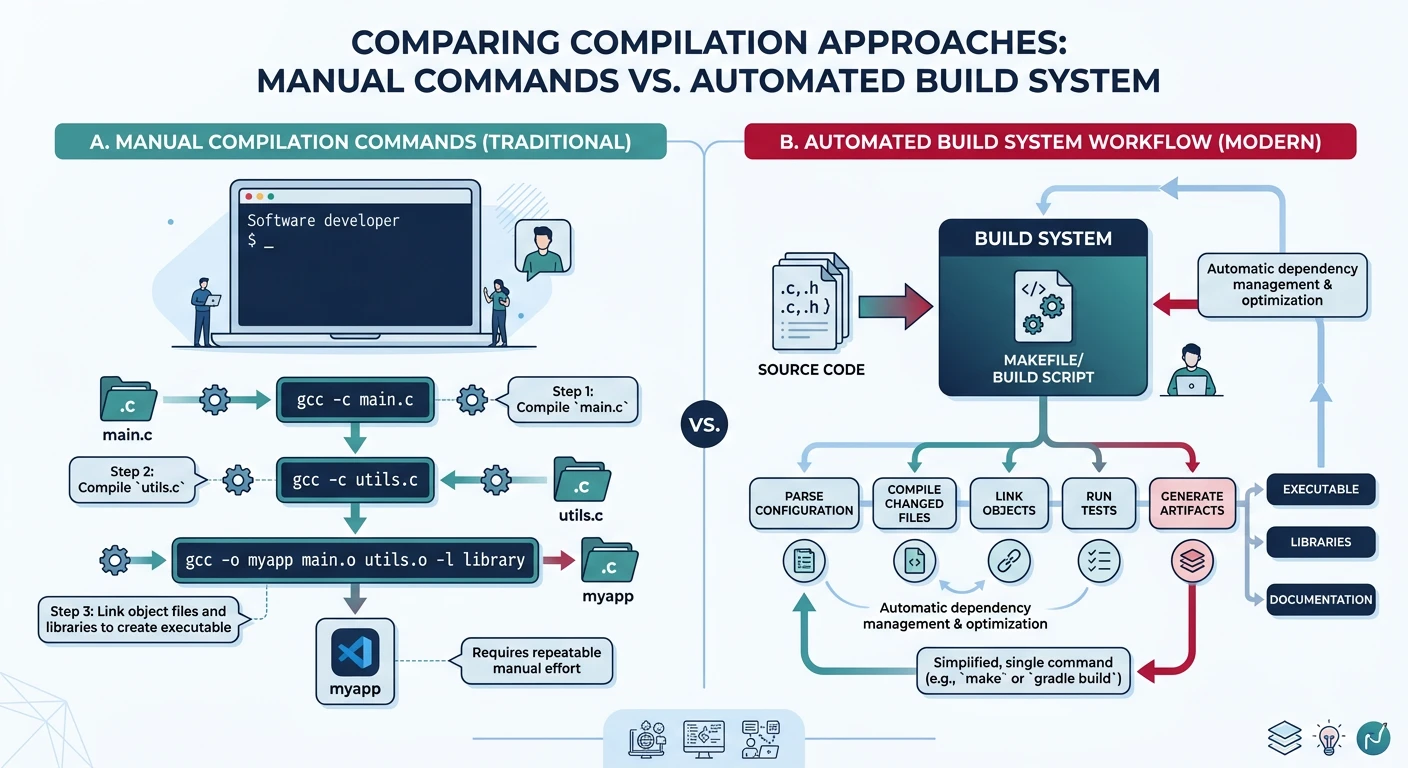
Before the first make command is ever typed, a problem exists: compiling even a modest C project by hand is tedious, error-prone, and slow. As a project grows from one source file to hundreds, manually tracking which files need recompilation after a change becomes practically impossible.
Manual compilation commands versus an automated build system — as projects grow, manual tracking becomes impractical
Key Insight: A build system answers one question: given what has changed, what is the minimum work needed to produce an up-to-date output? GNU Make answers that question through timestamps and dependency graphs.
What a Build System Solves
A build system provides three core guarantees:
Correctness: Every output is derived from its current inputs — nothing stale is shipped.
Efficiency: Only the minimum set of steps is re-executed after a change.
Reproducibility: Given the same inputs, the build always produces the same output.
Historical Context
GNU Make's Origins
Make was invented by Stuart Feldman at Bell Labs in 1976 — born out of frustration after a colleague shipped a bug because they forgot to recompile a changed file. GNU Make, the Free Software Foundation's implementation, became the de-facto standard on Unix systems and remains the most widely deployed build tool in the world today, powering the Linux kernel build among millions of other projects.
Sample Source Files
Self-contained examples: The Makefile snippets throughout this part reference a small project with three C source files. They are intentionally trivial — copy them into any directory, run make, and watch every concept in action.
main.c
/* main.c — program entry point */
#include <stdio.h>
#include "utils.h"

int main(void) {
    utils_greet("World");
    printf("Sum: %d\n", utils_add(3, 4));
    return 0;
}
utils.h
/* utils.h — utility function declarations */
#ifndef UTILS_H
#define UTILS_H

void utils_greet(const char *name);
int  utils_add(int a, int b);

#endif /* UTILS_H */
utils.c
/* utils.c — utility function implementations */
#include <stdio.h>
#include "utils.h"

void utils_greet(const char *name) {
    printf("Hello, %s!\n", name);
}

int utils_add(int a, int b) {
    return a + b;
}
math.c
/* math.c — simple arithmetic helpers */
#include <stdio.h>

int  add(int a, int b)           { return a + b; }
int  multiply(int a, int b)      { return a * b; }
double divide(double a, double b){ return (b != 0.0) ? a / b : 0.0; }
The Compilation Pipeline
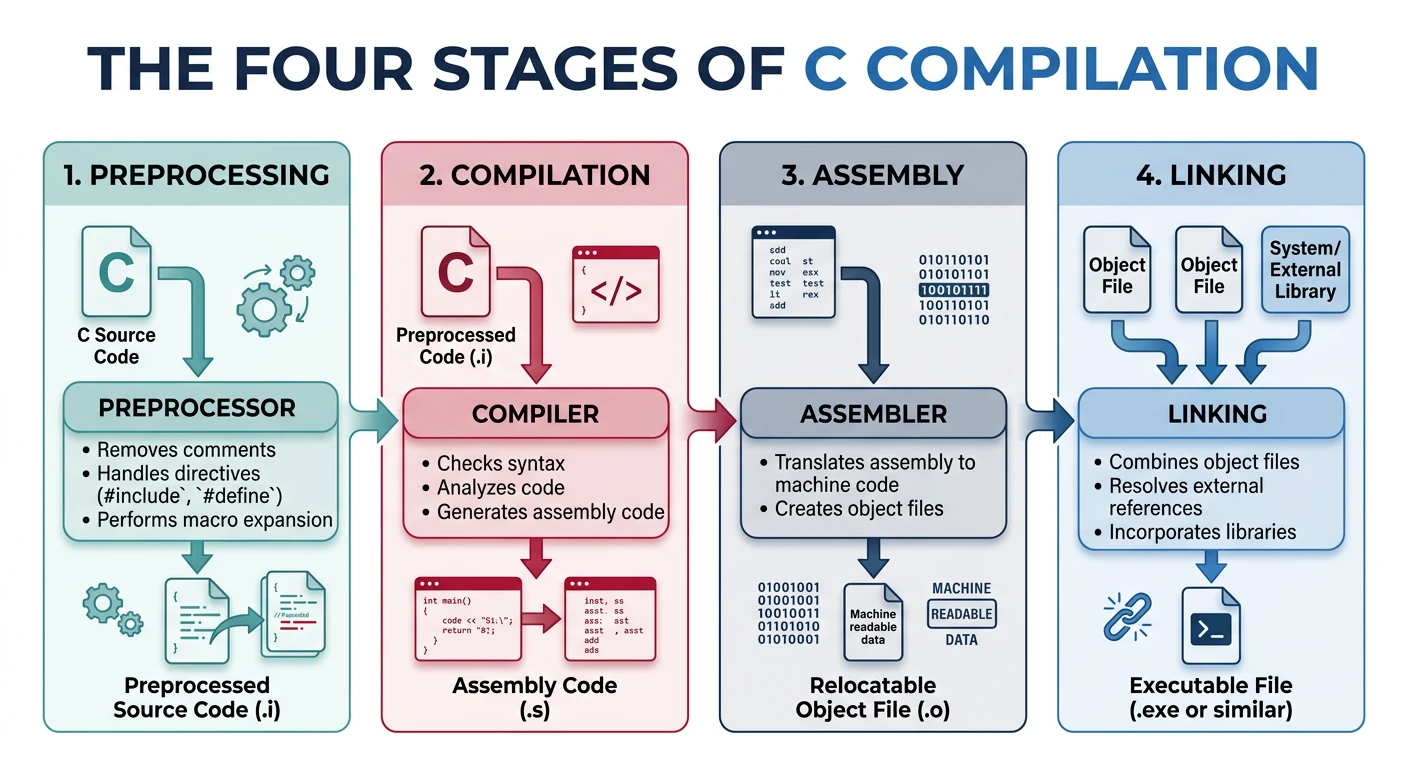
To understand what Make is orchestrating, you first need to understand what happens when a C/C++ source file becomes an executable. The process has four distinct stages.
The four stages of the C compilation pipeline: preprocessing, compilation, assembly, and linking
1. Preprocessing
The C preprocessor (cpp) runs first. It handles all directives beginning with #: expanding macros, processing #include directives, evaluating #ifdef/#ifndef guards, and stripping comments.
# Run just the preprocessor on a single file
gcc -E main.c -o main.i

# View what gets included from stdio.h
gcc -E main.c | head -100
2. Compilation
The compiler translates preprocessed C source (.i) into assembly language (.s) for the target architecture. This is where optimisation flags like -O2 take effect, where type checking occurs, and where most compiler warnings are generated.
# Compile to assembly (stop before assembling)
gcc -S main.c -o main.s

# Compile to assembly with optimisation
gcc -O2 -S main.c -o main.s
3. Assembly
The assembler (as) converts assembly text into an object file (.o) — a binary file containing machine code and symbol tables, but with unresolved external references.
# Compile to object file (stop before linking)
gcc -c main.c -o main.o

# Inspect object file symbols
nm main.o
4. Linking
The linker (ld, invoked via gcc in practice) combines object files and libraries, resolves all external symbol references, and produces the final executable or shared library.
# Link two object files into an executable
gcc main.o utils.o -o myprogram

# Link with a math library
gcc main.o -o myprogram -lm
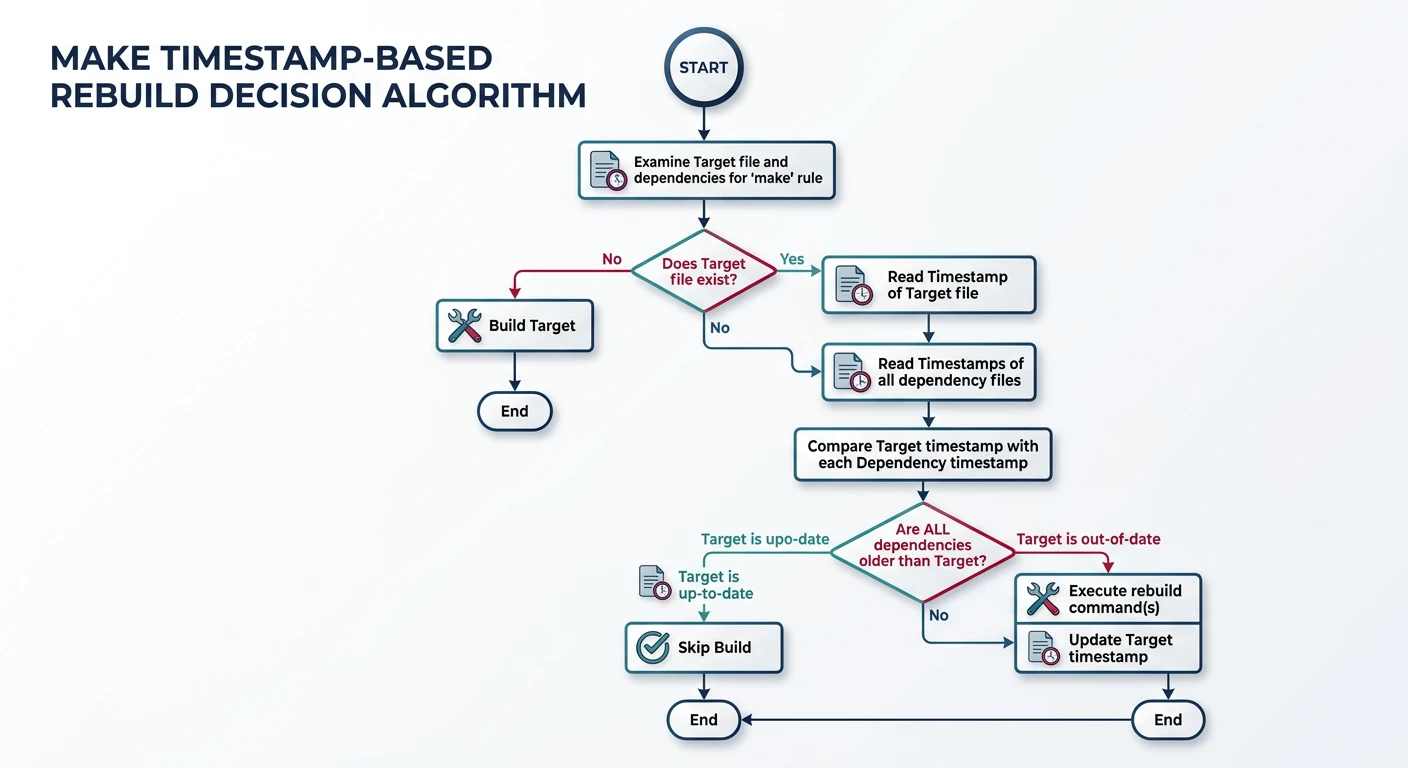
Make's core algorithm is elegantly simple: a target needs to be rebuilt if any prerequisite file is newer than the target file (by filesystem modification timestamp), or if the target file does not exist.
Make's timestamp-based rebuild decision — a target rebuilds only when prerequisites are newer
Core Algorithm
Make's Rebuild Decision
For each target, Make asks:
Does the target file exist? If not → build it.
For each prerequisite, recursively apply the same logic.
Is any prerequisite's timestamp newer than the target's? If yes → rebuild.
Otherwise → skip (already up to date).
This deceptively simple rule enables Make to correctly handle arbitrarily complex dependency trees.
Dependency DAG
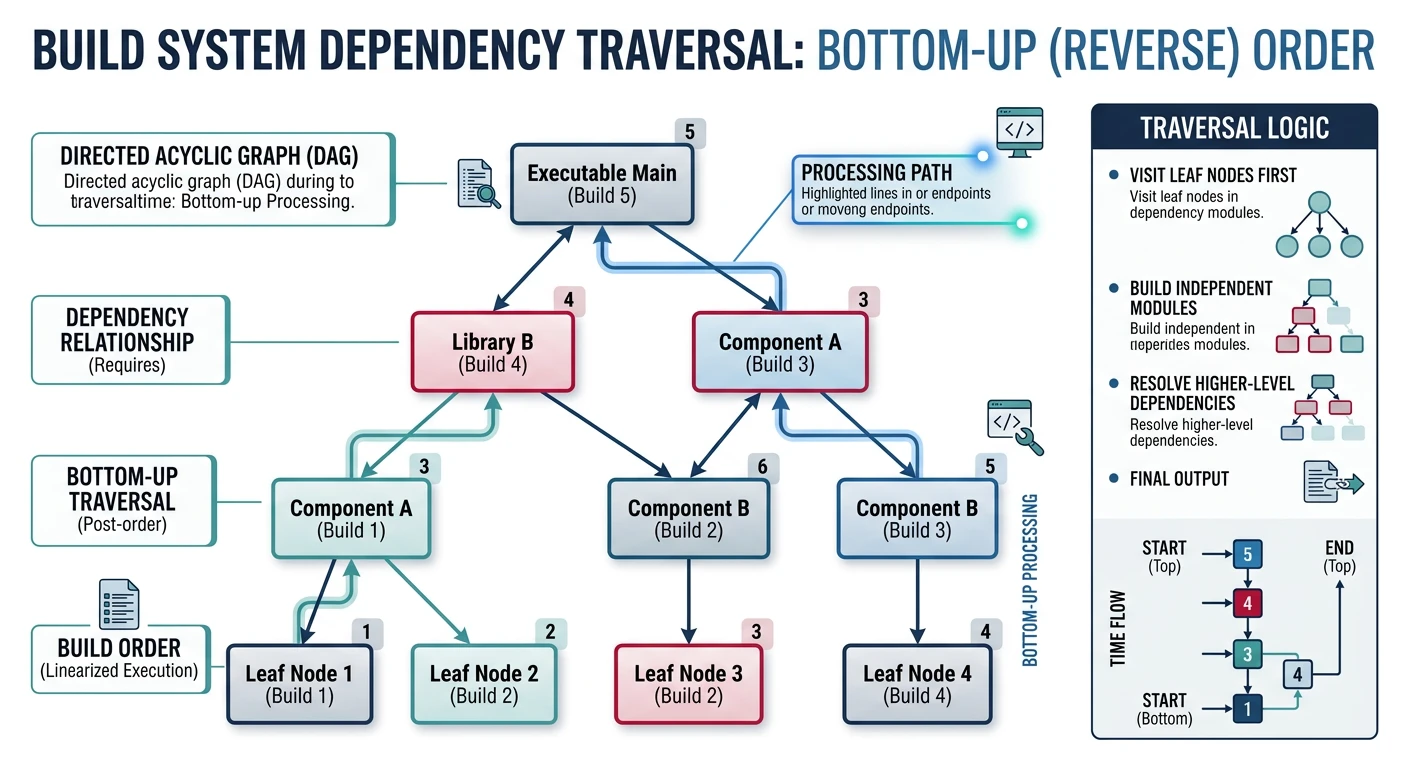
Make models your build as a Directed Acyclic Graph (DAG). Nodes are files (or phony targets); edges represent "this depends on that". Make traverses this graph bottom-up, building prerequisites before targets.
A build dependency DAG — Make traverses bottom-up, building prerequisites before targets
# A simple dependency graph:
#
#  program
#    ├── main.o   ← main.c, header.h
#    └── utils.o  ← utils.c, header.h
#
# Changing header.h triggers rebuilding BOTH .o files and the program.
# Changing only utils.c triggers rebuilding utils.o and the program — not main.o.
Makefile Syntax Basics
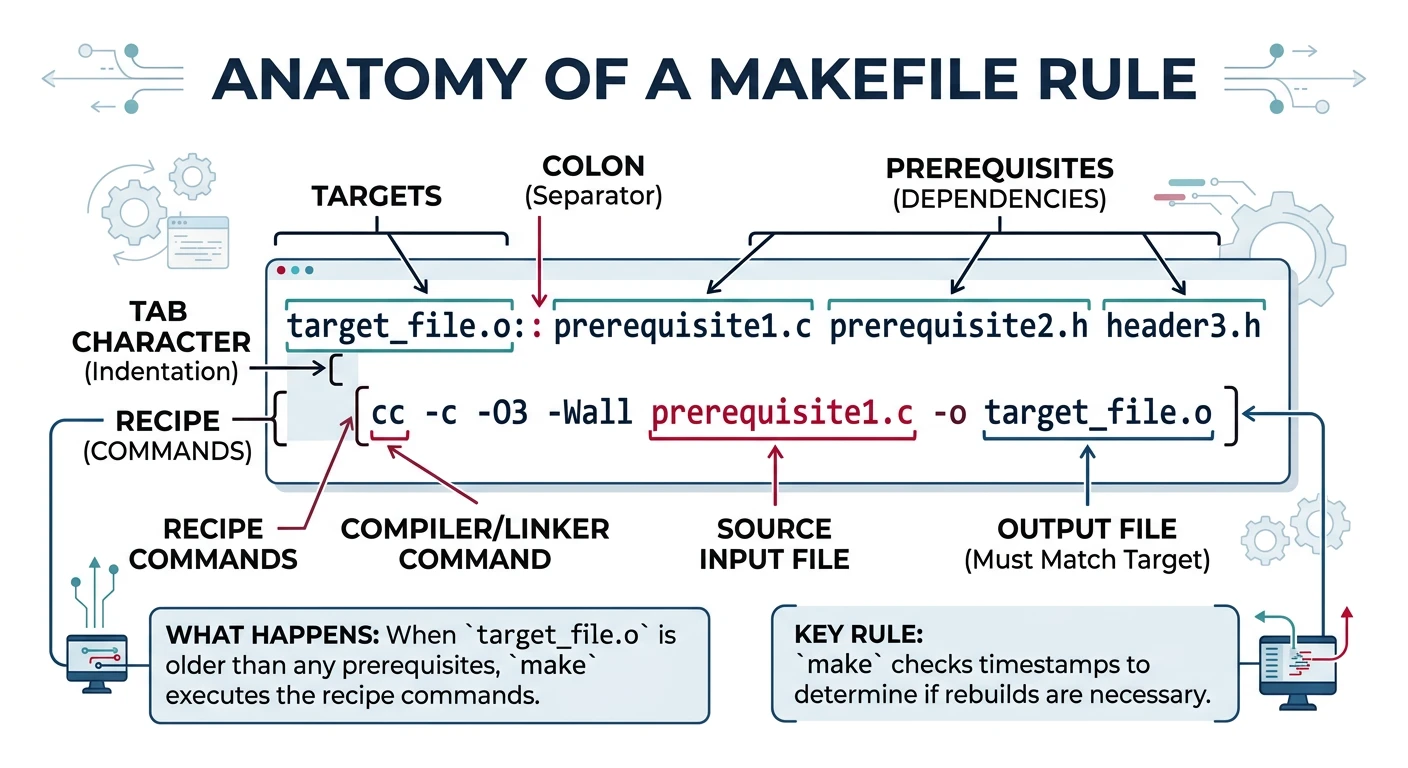
A Makefile is a plain text file (named Makefile or makefile) containing rules. Each rule has three parts:
Anatomy of a Makefile rule: target, prerequisites, and tab-indented recipe lines
target: prerequisites   # target = file to create; prerequisites = files it depends on
	recipe              # shell command(s) executed to build the target
	recipe              # each recipe line MUST start with a TAB character
Critical: Recipe lines must be indented with a real TAB character, not spaces. This is Make's most notorious gotcha. Most modern editors can be configured to insert tabs in Makefiles.
Variables in Make are defined with NAME = value or NAME := value and expanded with $(NAME). We cover variable types in depth in Part 3; for now, use := (simple expansion) for build flags — it is safer and more predictable.
CC      := gcc                        # compiler
CFLAGS  := -Wall -O2                  # warning flags + optimisation
TARGET  := myapp                      # final binary name
SRCS    := main.c utils.c math.c      # list of source files
OBJS    := $(SRCS:.c=.o)              # string substitution: .c → .o

# ── Link rule: combine all .o files into the executable ──
$(TARGET): $(OBJS)
	$(CC) $(CFLAGS) -o $(TARGET) $(OBJS)
Comments & Conventions
Lines starting with # are comments.
By convention, variable names use UPPER_CASE (e.g., CC, CFLAGS, LDFLAGS).
Always declare phony targets (targets that are not real files) with .PHONY.
The first rule in the file is the default target — make it the "build all" rule.
Running Make
Essential Flags
Reference
Common make Flags
Flag
Meaning
make
Build the default (first) target
make target
Build a specific named target
make -f path/Makefile
Use a specific Makefile
make -C dir
Change to directory before running
make -n
Dry run — print commands without executing
make -B
Force rebuild everything unconditionally
make -k
Keep going after errors
make -j4
Run up to 4 jobs in parallel
make -p
Print all rules and variable values (database)
make V=1
Verbose output (if Makefile supports it)
Hands-On Milestone
Milestone: By the end of Part 1 you should be able to:
✅ Write a Makefile that compiles two C files into an executable
✅ Observe that make rebuilds only the changed file
✅ Use make -n to preview the build without running it
✅ Use make clean to remove build artefacts
# Complete minimal starter Makefile — copy and try it

# ── Variables ────────────────────────────────────────────
CC      := gcc                        # C compiler to use
CFLAGS  := -Wall -Wextra -std=c11 -g  # Warnings + C11 standard + debug symbols
TARGET  := hello                      # Final binary name
SRCS    := main.c utils.c math.c      # All source files
OBJS    := $(SRCS:.c=.o)              # Swap .c → .o to get object file list

# ── Phony targets (not real files) ───────────────────────
.PHONY: all clean info

# ── Default target: build the binary ─────────────────────
all: $(TARGET)

# ── Link: combine object files into the final executable ─
$(TARGET): $(OBJS)
	$(CC) $(CFLAGS) -o $@ $^

# ── Compile: turn each .c file into a .o object file ─────
%.o: %.c
	$(CC) $(CFLAGS) -c $< -o $@

# ── Clean: remove all build artifacts ────────────────────
clean:
	rm -f $(TARGET) $(OBJS)

# ── Info: display variable values — run: make info ───────
info:
	@echo "CC      = $(CC)"
	@echo "CFLAGS  = $(CFLAGS)"
	@echo "TARGET  = $(TARGET)"
	@echo "SRCS    = $(SRCS)"
	@echo "OBJS    = $(OBJS)"
# --- Setup: create sample source files (from the "Sample Source Files" section above) ---
cat > main.c << 'EOF'
#include <stdio.h>
#include "utils.h"
int main(void) {
    utils_greet("World");
    printf("Sum: %d\n", utils_add(3, 4));
    return 0;
}
EOF

cat > utils.h << 'EOF'
#ifndef UTILS_H
#define UTILS_H
void utils_greet(const char *name);
int  utils_add(int a, int b);
#endif
EOF

cat > utils.c << 'EOF'
#include <stdio.h>
#include "utils.h"
void utils_greet(const char *name) { printf("Hello, %s!\n", name); }
int  utils_add(int a, int b)       { return a + b; }
EOF

cat > math.c << 'EOF'
#include <stdio.h>
int    add(int a, int b)            { return a + b; }
int    multiply(int a, int b)       { return a * b; }
double divide(double a, double b)   { return (b != 0.0) ? a / b : 0.0; }
EOF
# --- Try these commands in sequence ---
make          # first build — compiles everything
make          # second run — nothing to do (already up to date)
make info     # display all variable values
touch main.c  # simulate a change to main.c
make          # rebuilds only main.o and hello
make -n       # dry run — see what would run without doing it
make clean    # remove artefacts
make -B       # force full rebuild
Continue the Series
Part 2: Targets, Prerequisites & Execution Model
Master rule anatomy, default target behaviour, order-only prerequisites, file vs phony targets, and build/clean/run workflows.