We use cookies to enhance your browsing experience, serve personalized content, and analyze our traffic. By clicking "Accept All", you consent to our use of cookies. See our Privacy Policy for more information.
GNU Make Mastery Part 9: Project Architecture & Multi-Directory Builds
February 25, 2026Wasil Zafar22 min read
Scale your Makefile from a single directory to an enterprise-grade project: compare recursive $(MAKE) -C sub-makes with non-recursive include, choose the right out-of-source build layout, and avoid the classic pitfalls that haunt large C codebases.
Part 9 of 16 — GNU Make Mastery Series. Everything so far has lived in one directory. Real projects span dozens of directories, libraries, and subsystems. This part covers two fundamentally different approaches and when to use each.
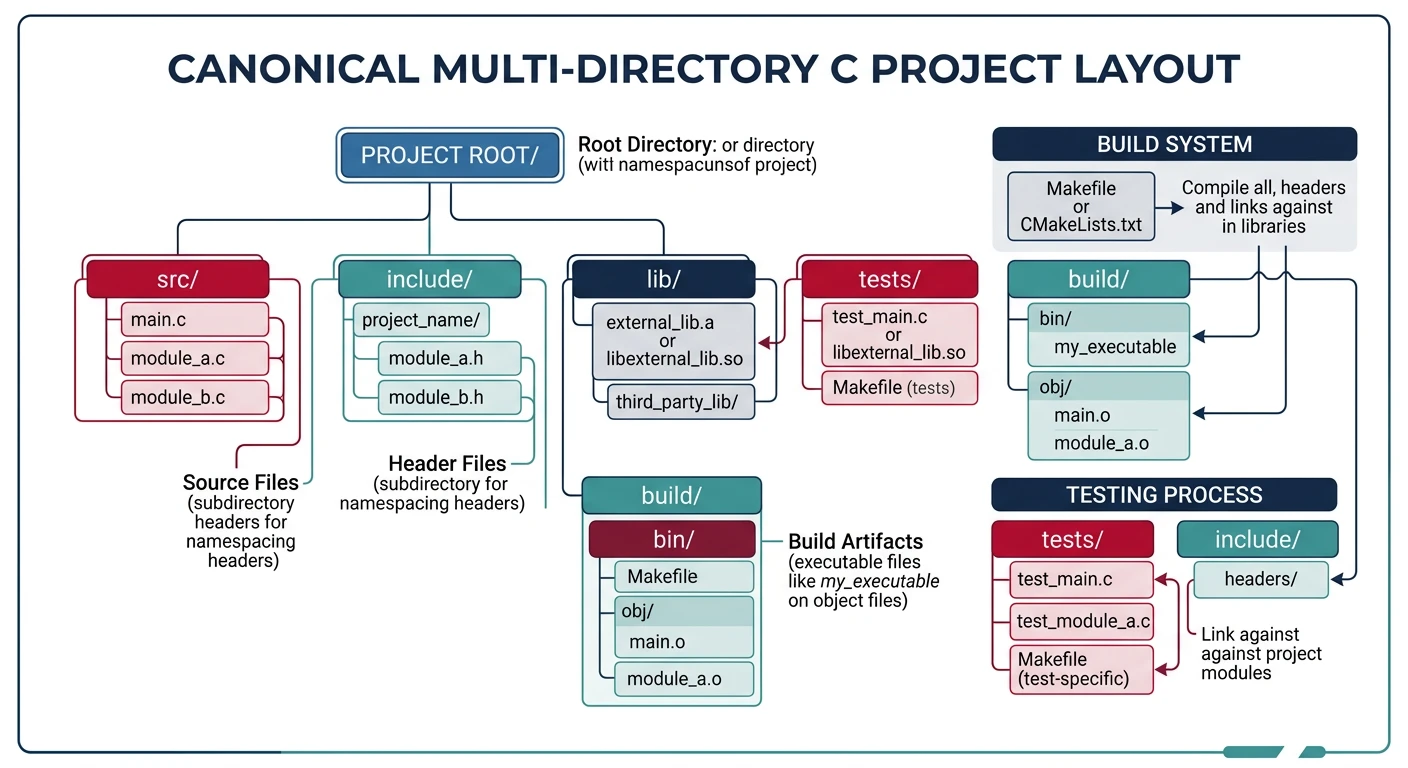
Canonical project layout separating source, headers, build artifacts, and tests into distinct directories
Sample Source Files
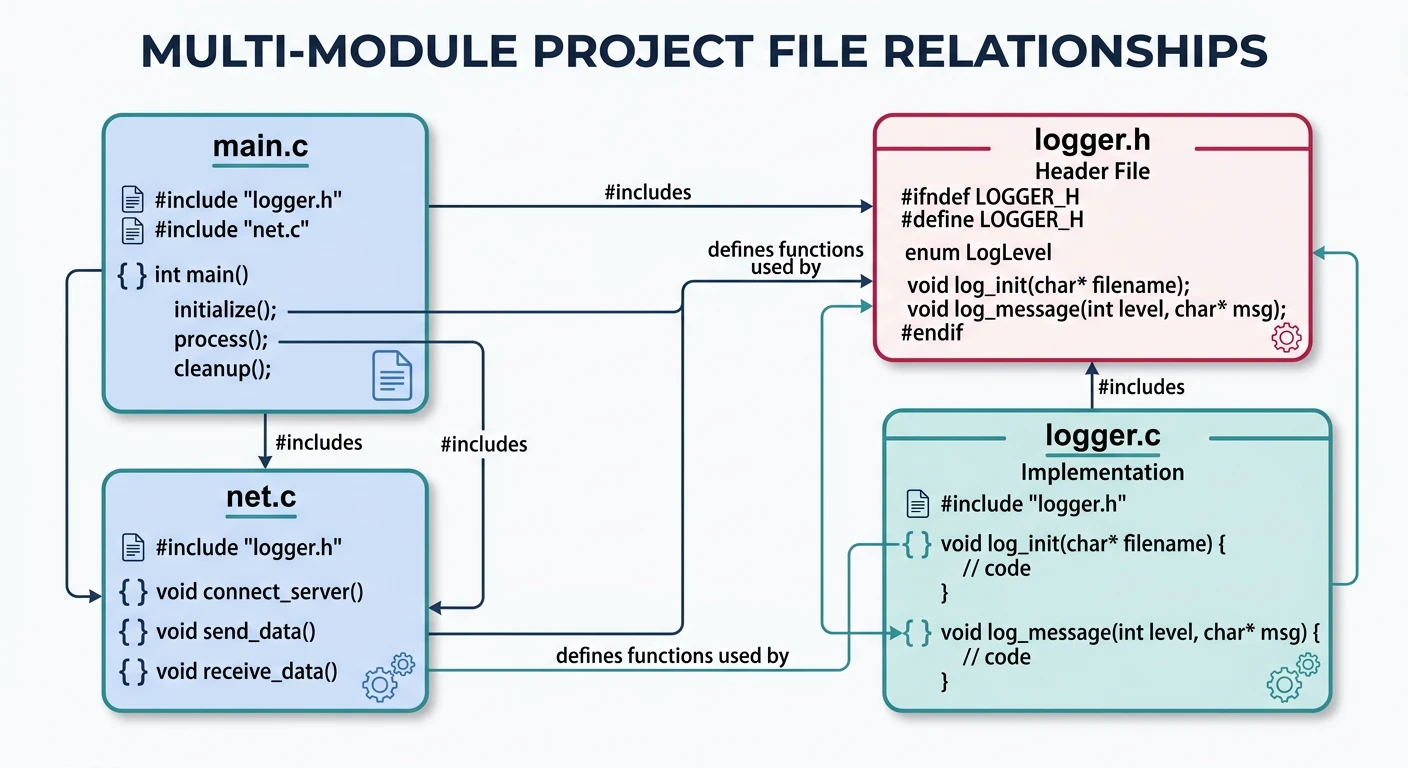
Self-contained examples: Multi-module project examples reference main.c, net.c, and logger.c. Drop these files into the module subdirectories shown in the project-tree snippets and the Makefiles will build cleanly.
Source file relationships in a multi-module C project with logging and networking subsystems
main.c
/* main.c — entry point */
#include <stdio.h>
#include "logger.h"

int main(void) {
    log_info("Application started");
    return 0;
}
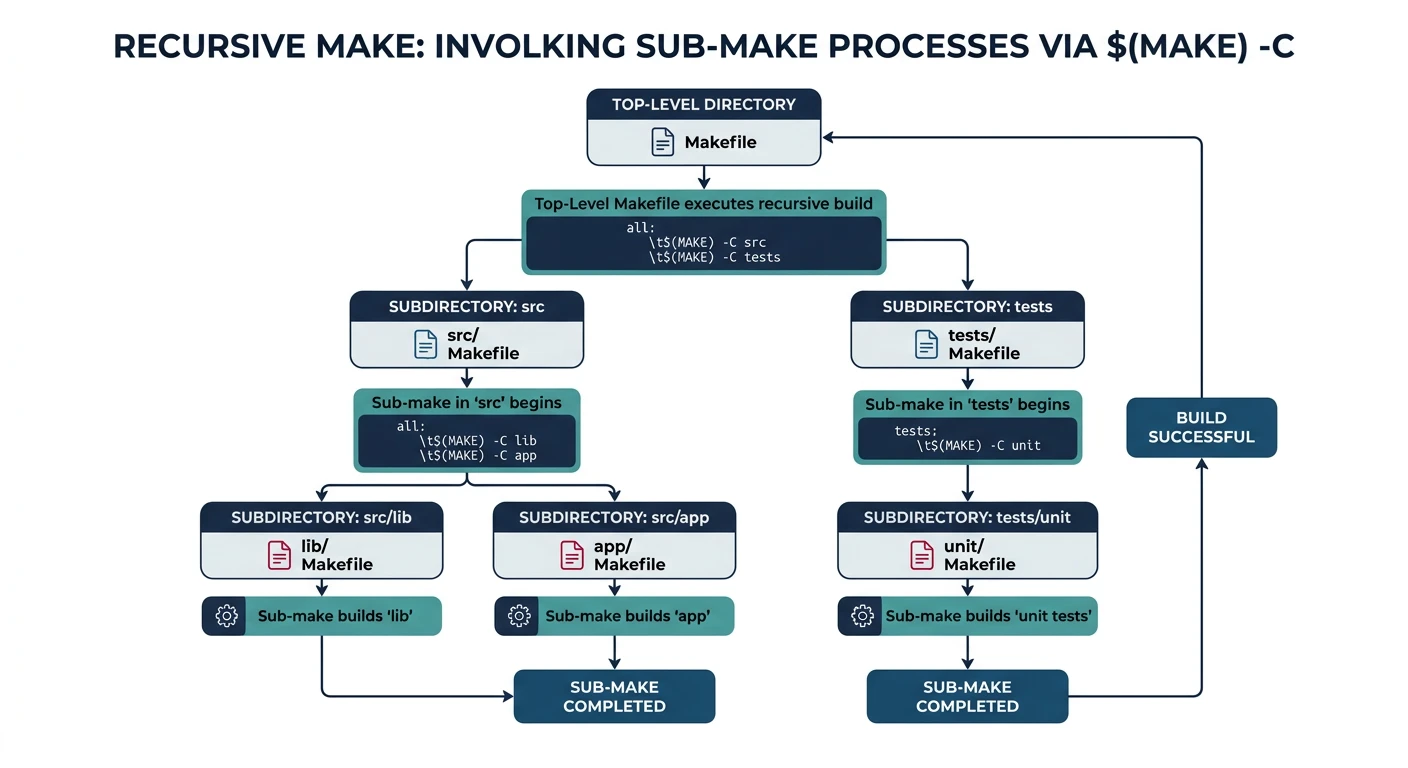
$(MAKE) -C dir changes into dir and invokes a new Make process there. Always use $(MAKE) (not make) so the same Make binary and jobserver options propagate.
Recursive make spawns separate make processes for each subdirectory using $(MAKE) -C
Recursive vs Non-Recursive Make
graph TD
    subgraph Recursive["Recursive Make"]
        TOP["Top Makefile"] -->|"$(MAKE) -C src"| SRC["src/Makefile"]
        TOP -->|"$(MAKE) -C lib"| LIB["lib/Makefile"]
        TOP -->|"$(MAKE) -C test"| TEST["test/Makefile"]
        SRC --> SOBJ["src/*.o"]
        LIB --> LOBJ["lib/*.o"]
        TEST --> TOBJ["test/*.o"]
    end

    subgraph NonRecursive["Non-Recursive Make"]
        SINGLE["Single Makefile"] --> SRCMK["include src/Module.mk"]
        SINGLE --> LIBMK["include lib/Module.mk"]
        SINGLE --> TESTMK["include test/Module.mk"]
        SRCMK --> UNIFIED["Unified\nDependency Graph"]
        LIBMK --> UNIFIED
        TESTMK --> UNIFIED
    end
# Top-level Makefile (recursive approach)
SUBDIRS := src/core src/net tests

.PHONY: all clean $(SUBDIRS)

all: $(SUBDIRS)

# Each subdir target triggers a sub-make in that directory
$(SUBDIRS):
	$(MAKE) -C $@              # -C changes to subdir; $(MAKE) propagates jobserver

# Pass build config down to each sub-make
$(SUBDIRS): BUILD ?= release
$(SUBDIRS):
	$(MAKE) -C $@ BUILD=$(BUILD)

clean:
	for dir in $(SUBDIRS); do $(MAKE) -C $$dir clean; done  # $$dir: escape $ for shell
Classic Pitfalls
Pitfalls
Broken parallelism:make -j8 at the top level doesn't parallelize across subdirs without the jobserver. Use $(MAKE) -C (not a shell loop) so Make can coordinate jobs.
Stale inter-directory deps: If src/net depends on a header rebuilt by src/core, recursive Make may not see the dependency. Express it explicitly.
Ordering: Use prerequisite chaining to enforce order: src/net: src/core
Passing Variables to Sub-makes
# Method 1: export (makes variable visible to all child processes)
export CC := arm-linux-gnueabihf-gcc
export CFLAGS := -Wall -O2

# Method 2: pass on command line (overrides child Makefile vars)
$(MAKE) -C src/core CC=$(CC) CFLAGS="$(CFLAGS)"

# Method 3: export all variables (use sparingly — can cause surprises)
export
Non-Recursive Make
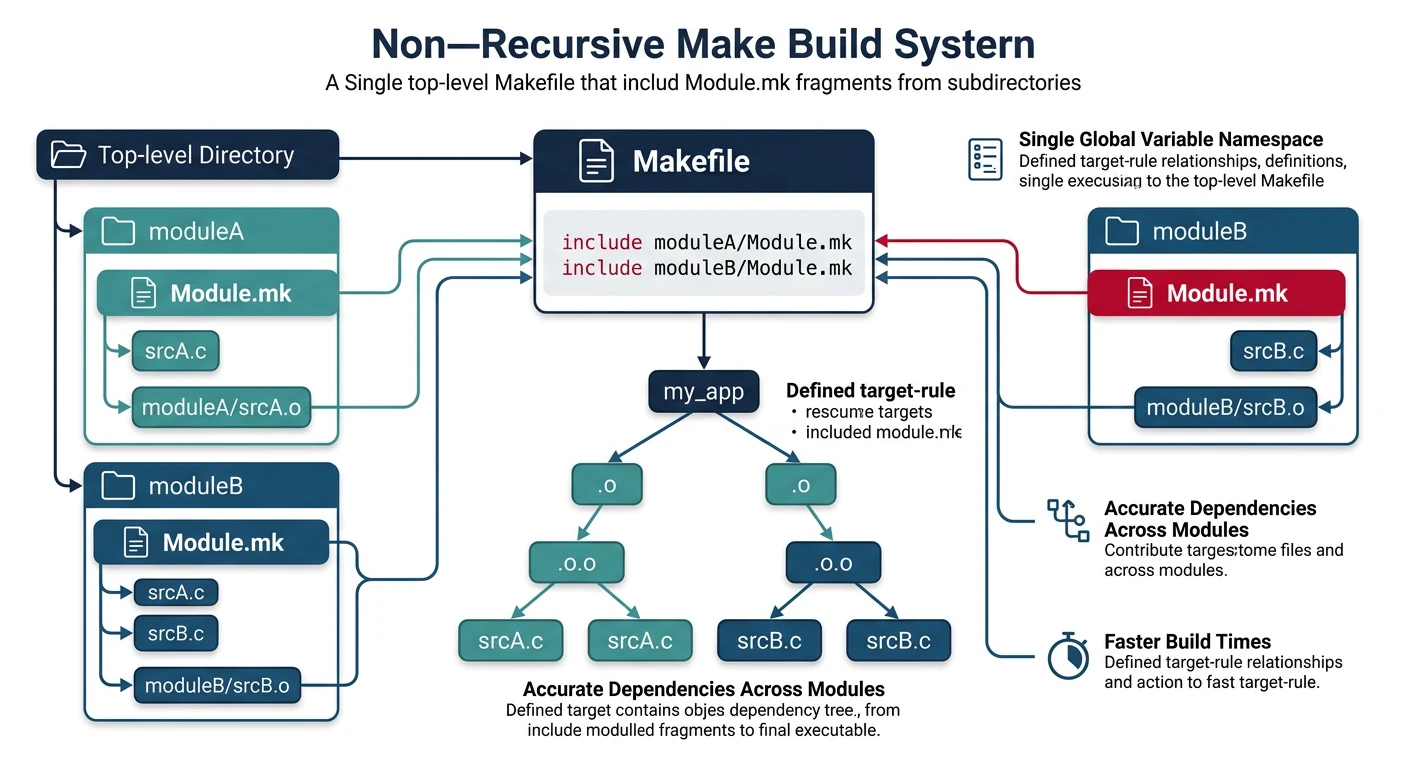
In the non-recursive approach, a single top-level Makefileincludes per-directory fragments (Module.mk) that append to global variable lists. Make has a single, complete dependency graph — enabling correct parallelism and cross-directory deps.
Non-recursive make uses a single process with included Module.mk fragments for a unified dependency graph
include Module.mk Pattern
# src/core/Module.mk — note use of $(d) for current dir prefix
d := src/core

CORE_SRCS := $(d)/allocator.c $(d)/logger.c $(d)/config.c
CORE_OBJS := $(patsubst $(d)/%.c,build/$(d)/%.o,$(CORE_SRCS))

# Append to global lists
SRCS += $(CORE_SRCS)
OBJS += $(CORE_OBJS)

# Module-specific compile flags
$(CORE_OBJS): CFLAGS += -DCORE_MODULE

build/$(d)/%.o: $(d)/%.c
	@mkdir -p $(dir $@)
	$(CC) $(CFLAGS) -MMD -MP -c $< -o $@
# Top-level Makefile (non-recursive: single Make process)
CC      := gcc
CFLAGS  := -Wall -Wextra -std=c11 -O2
BUILDDIR := build
TARGET  := myapp

# Include all module fragments — they append to SRCS and OBJS
include src/core/Module.mk
include src/net/Module.mk

DEPS := $(OBJS:.o=.d)              # .o → .d for dependency tracking

.PHONY: all clean

all: $(TARGET)

$(TARGET): $(OBJS)
	$(CC) $(LDFLAGS) -o $@ $^          # single link step sees all objects

-include $(DEPS)                       # pull in auto-generated .d files

clean:
	rm -rf $(BUILDDIR) $(TARGET)
Advantages & Trade-offs
Comparison
Recursive
Non-Recursive
Cross-dir deps
Error-prone to express
Natural — single graph
Parallel builds
Needs jobserver tuning
Full -j exploitation
Module independence
Each subdir self-contained
All fragments share namespace
Incremental builds
Per-subdir Makefiles re-evaluated
Single Make database
Best for
Large, loosely-coupled monorepos
Tightly-coupled libraries
Out-of-Source Builds
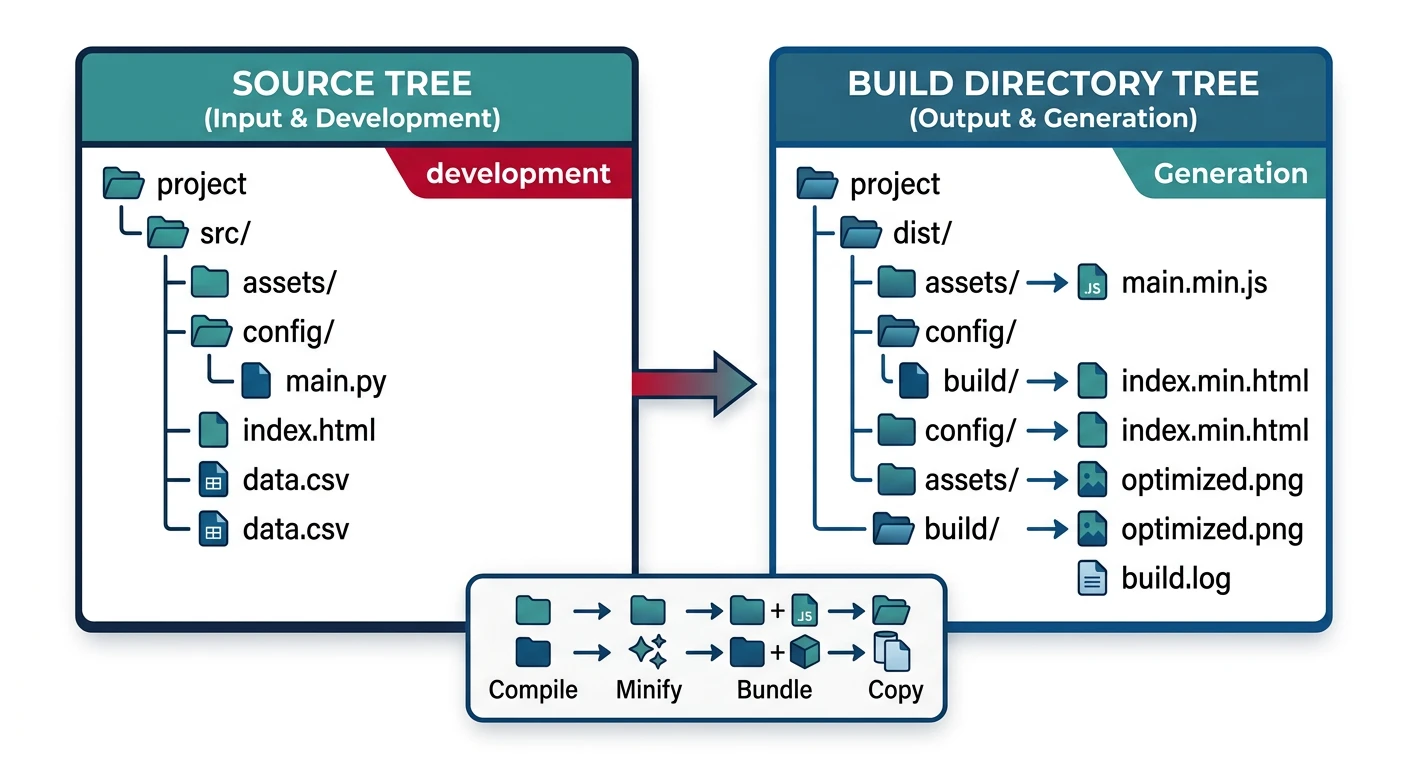
Never pollute your source tree with build artifacts. Keep all .o, .d, and output files in a separate build/ tree, mirroring the source structure:
Out-of-source builds mirror the source tree structure under a separate build/ directory to keep sources clean
# Inspect accumulated variables
make info
make BUILD=debug info    # different build dir

# Build the project
make
./build/release/myapp     # "Core initialized" + "Connecting to localhost"

# Debug build
make BUILD=debug
./build/debug/myapp

make clean
Continue the Series
Part 10: Cross-Compilation & Toolchains
Configure CROSS_COMPILE, sysroots, and toolchain variables for ARM, RISC-V, and MIPS embedded targets.