We use cookies to enhance your browsing experience, serve personalized content, and analyze our traffic. By clicking "Accept All", you consent to our use of cookies. See our Privacy Policy for more information.
GNU Make Mastery Part 8: Compilation Workflow & Libraries
February 24, 2026Wasil Zafar22 min read
Extend your Makefile to produce static archives (.a) and shared objects (.so), apply -fPIC correctly, manage SONAME versioning, and control link order to avoid the subtle errors that bite large multi-library C projects.
Part 8 of 16 — GNU Make Mastery Series. We now have a working incremental build with automatic dependency tracking. This part extends it to produce reusable libraries — the building blocks of every serious C/C++ project.
Static vs Shared Library Workflow
graph LR
    subgraph Static["Static Library (.a)"]
        S1["ar rcs libfoo.a
foo.o bar.o"]
        S2["gcc main.c -lfoo
(link at compile time)"]
        S3["Executable
(self-contained,
larger binary)"]
        S1 --> S2 --> S3
    end

    subgraph Shared["Shared Library (.so)"]
        D1["gcc -shared -fPIC
-o libfoo.so foo.o"]
        D2["gcc main.c -lfoo
(link at compile time)"]
        D3["Executable + libfoo.so
(loaded at runtime
by ld.so)"]
        D1 --> D2 --> D3
    end

    style Static fill:#f0f4f8,stroke:#16476A
    style Shared fill:#e8f4f4,stroke:#3B9797
Self-contained examples: Library-workflow examples build a libcrypto static and shared library from crypto.c, then link it into main.c. These stubs compile cleanly on any POSIX system.
crypto.h
/* crypto.h — public API for the crypto library */
#ifndef CRYPTO_H
#define CRYPTO_H

/* Simple XOR-based hash (demo only — not cryptographically secure) */
void  crypto_hash(const char *input, char *output, int outlen);
int   crypto_verify(const char *a, const char *b);

#endif /* CRYPTO_H */
crypto.c
/* crypto.c — crypto library implementation */
#include <string.h>
#include <stdio.h>
#include "crypto.h"

void crypto_hash(const char *input, char *output, int outlen) {
    int i;
    for (i = 0; i < outlen - 1 && input[i]; i++)
        output[i] = (char)(input[i] ^ 0x5A);   /* trivial XOR */
    output[i] = '\0';
}

int crypto_verify(const char *a, const char *b) {
    return strcmp(a, b) == 0;
}
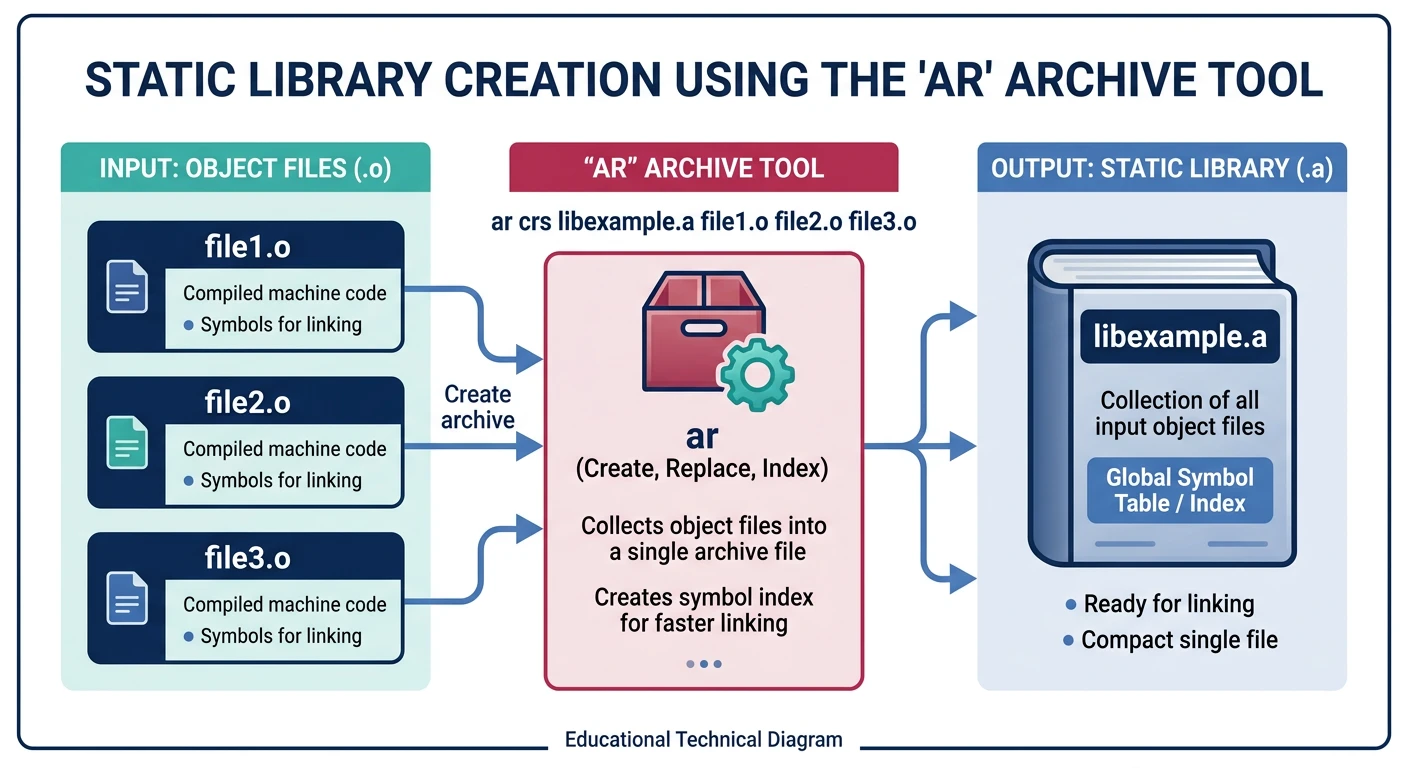
A static library is an archive of .o files. The ar command manages these archives.
Static libraries bundle .o files into a .a archive using ar — the linker extracts only needed modules
# ar rcs syntax:
# r = insert/replace members
# c = create archive if it doesn't exist
# s = write an index (equivalent to ranlib)
ar rcs libmath.a add.o sub.o mul.o div.o
# Link app against static lib:
gcc -Wall main.c -Llib -lmath -Iinclude -o myapp

# The linker pulls only the .o modules it actually needs from libmath.a
Shared Libraries
-fPIC — Position Independent Code
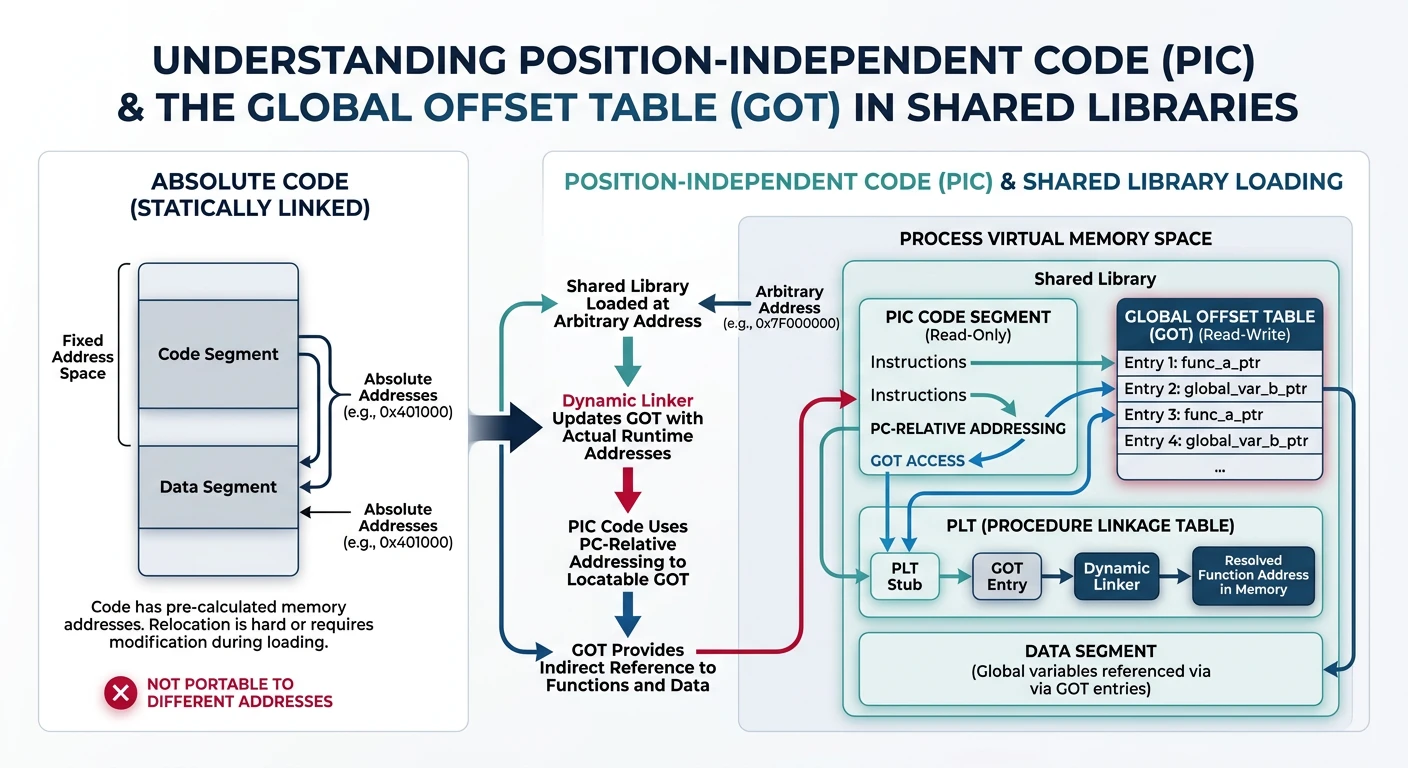
Shared libraries may be mapped to different virtual addresses in each process. -fPIC generates code that uses a Global Offset Table (GOT) for data references, making it address-independent. Forgetting -fPIC causes a link error when building .so on most Linux targets:
-fPIC generates position-independent code using a GOT, allowing shared libraries to load at any address
# Compile with -fPIC for shared library objects:
gcc -Wall -O2 -fPIC -c src/crypto.c -o build/crypto.o

# Create the shared library:
gcc -shared -Wl,-soname,libcrypto.so.1 \
    -o lib/libcrypto.so.1.0.0 build/crypto.o
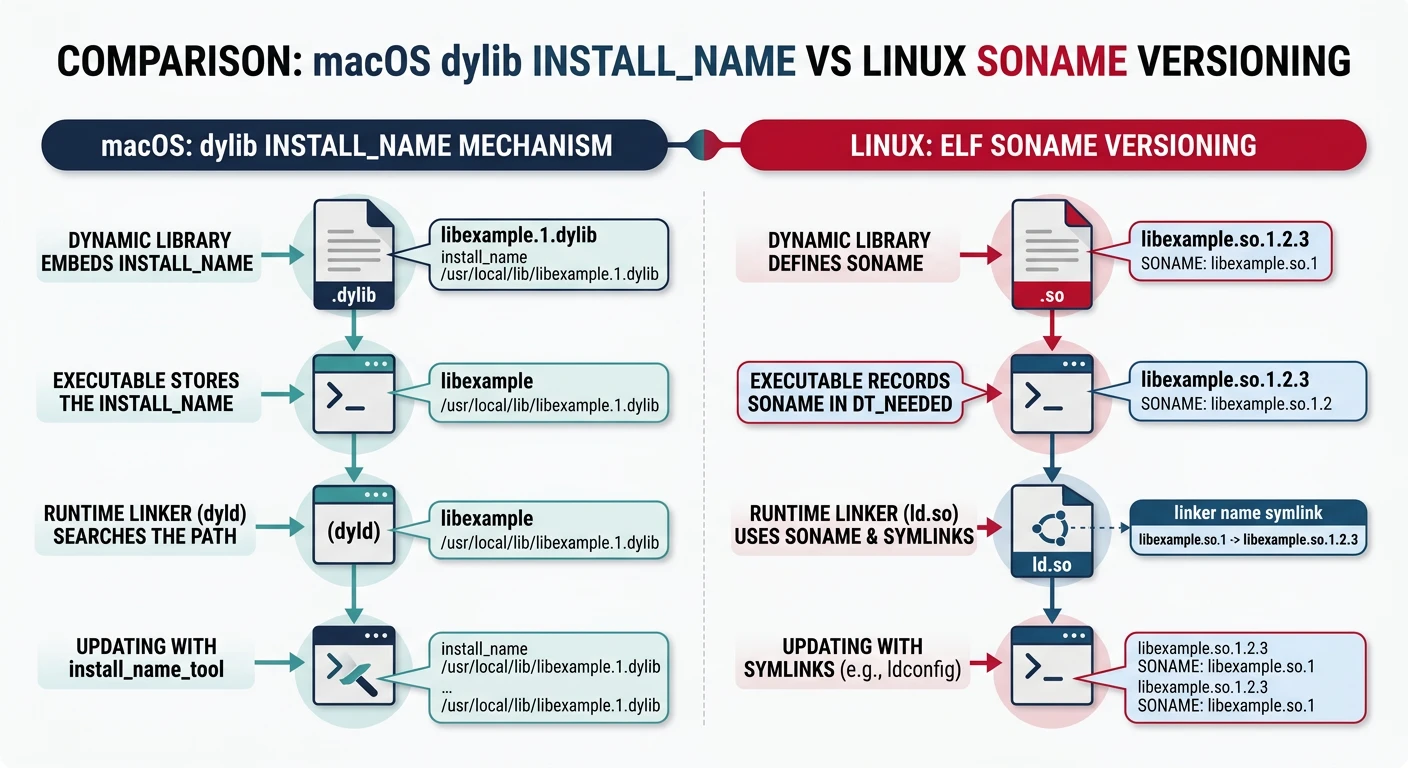
SONAME Versioning
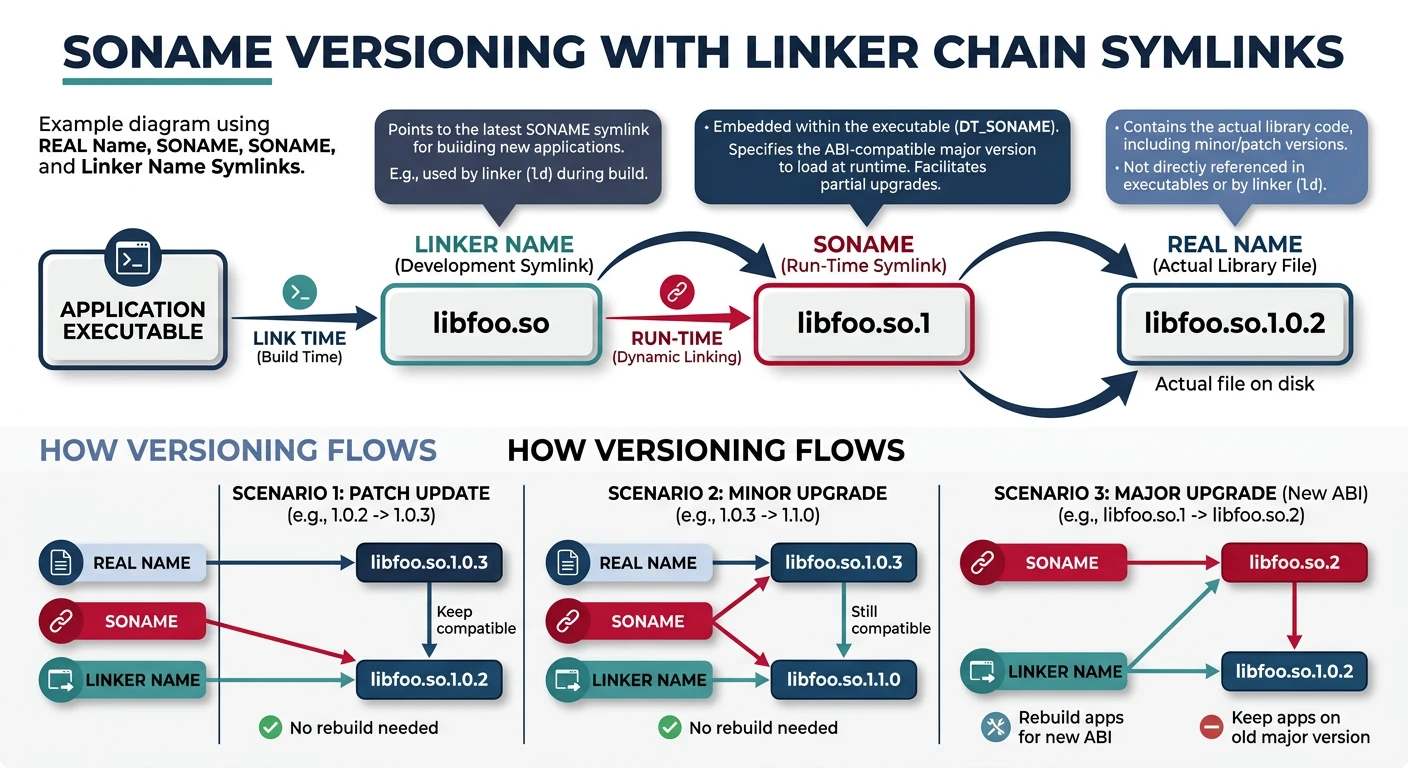
Linux shared library versioning uses three components embedded via the linker:
SONAME versioning: real name → SONAME symlink → linker name symlink enables ABI-compatible library updates
# Real name:  libcrypto.so.1.0.0  (full version, what's on disk)
# SONAME:     libcrypto.so.1       (ABI version, embedded in the .so)
# Linker name: libcrypto.so        (used during -lcrypto lookup at build time)

# Create symlinks (ldconfig does this automatically on install):
ln -sf libcrypto.so.1.0.0 lib/libcrypto.so.1    # SONAME symlink
ln -sf libcrypto.so.1     lib/libcrypto.so       # linker name symlink

# Read the SONAME embedded in an existing .so:
readelf -d lib/libcrypto.so.1.0.0 | grep SONAME
Shared Library Makefile
CC      := gcc
CFLAGS  := -Wall -Wextra -std=c11 -O2 -fPIC    # -fPIC = position-independent code (required for .so)
LDFLAGS := -shared                              # tell linker to produce a shared library

# ── Versioning ──
LIBNAME := myutil
LIBVER  := 1.0.0                                # full version (real name on disk)
SONAME  := lib$(LIBNAME).so.1                   # ABI version (embedded in the .so)
REALNAME := lib$(LIBNAME).so.$(LIBVER)          # libmyutil.so.1.0.0
LINKNAME := lib$(LIBNAME).so                    # linker name (used by -lmyutil)

LIBDIR   := lib
BUILDDIR := build
SRCDIR   := src

LIB_SRCS := $(wildcard $(SRCDIR)/$(LIBNAME)/*.c)
LIB_OBJS := $(patsubst $(SRCDIR)/%.c,$(BUILDDIR)/%.o,$(LIB_SRCS))

.PHONY: all clean

all: $(LIBDIR)/$(REALNAME) symlinks

# ── Build the shared library with embedded SONAME ──
$(LIBDIR)/$(REALNAME): $(LIB_OBJS)
	@mkdir -p $(LIBDIR)
	$(CC) $(LDFLAGS) -Wl,-soname,$(SONAME) -o $@ $^   # -Wl passes option to linker

# ── Create SONAME and linker symlinks ──
symlinks: $(LIBDIR)/$(REALNAME)
	cd $(LIBDIR) && ln -sf $(REALNAME) $(SONAME) && ln -sf $(SONAME) $(LINKNAME)

$(BUILDDIR)/%.o: $(SRCDIR)/%.c
	@mkdir -p $(dir $@)
	$(CC) $(CFLAGS) -MMD -MP -c $< -o $@

-include $(LIB_OBJS:.o=.d)

clean:
	rm -rf $(BUILDDIR) $(LIBDIR)
# Link app against the shared library:
gcc main.c -Llib -Wl,-rpath,lib -lmyutil -Iinclude -o myapp

# -Wl,-rpath embeds the library search path into the binary for development.
# In production use ldconfig or LD_LIBRARY_PATH.
Link Order
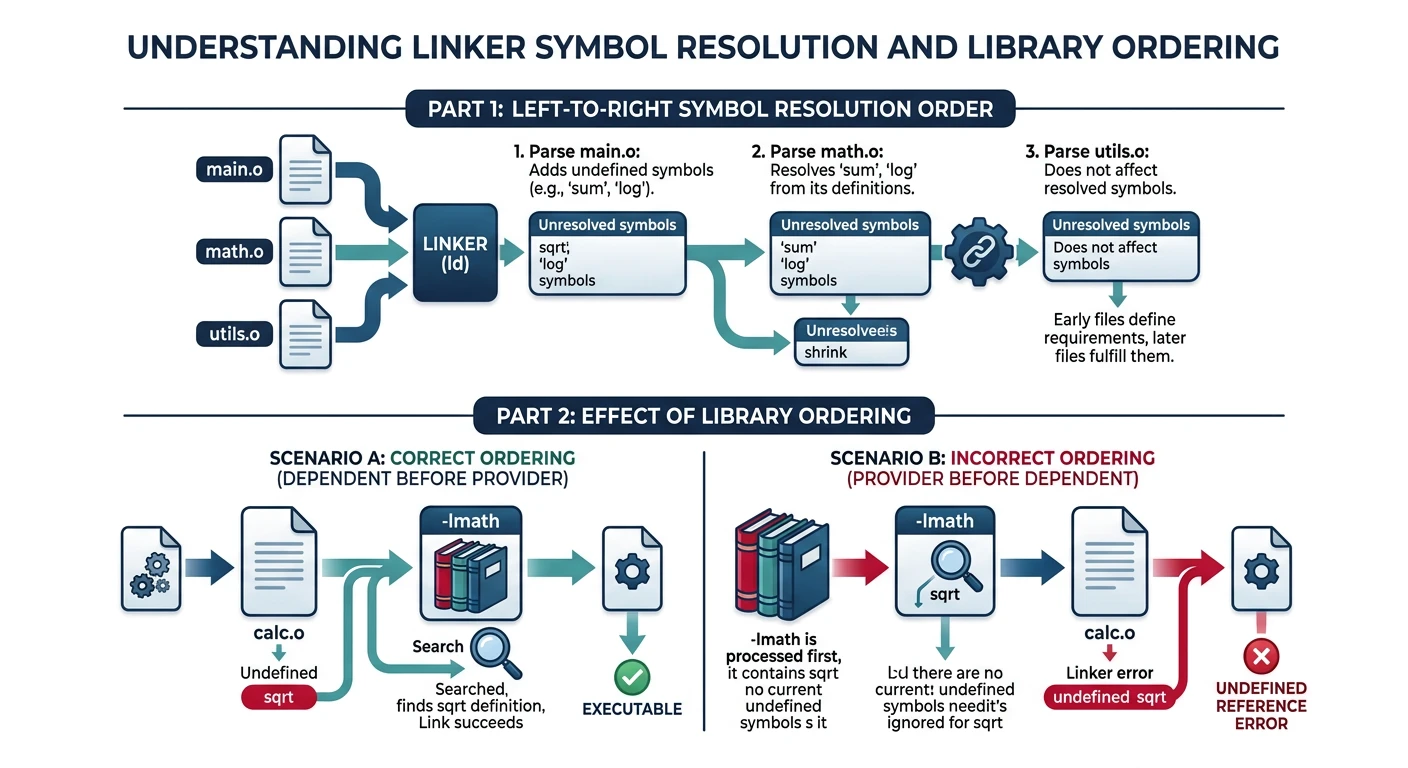
Critical gotcha: The GNU linker resolves symbols left-to-right. If library A depends on library B, you must list A before B on the command line. Listing them in the wrong order produces "undefined reference" linker errors.
# WRONG — libapp.a uses symbols from libcore.a, but libcore.a listed first:
gcc main.c -lcore -lapp -o myapp
# => undefined reference to `app_function`

# CORRECT — list libraries in dependency order (dependers first):
gcc main.c -lapp -lcore -o myapp
# In your Makefile, define LIBS in dependency order:
LIBS := -lapp -lcore -lplatform -lpthread -lm

$(TARGET): $(OBJS)
	$(CC) $(LDFLAGS) -o $@ $^ -L$(LIBDIR) $(LIBS)
For circular dependencies between archives, use the --start-group / --end-group linker options (or the shorthand -( / -)):
The GNU linker resolves symbols left-to-right — libraries must be listed in dependency order
# Linker rescans grouped archives until all references are resolved:
gcc main.c -Wl,--start-group -la -lb -lc -Wl,--end-group -o myapp

# Note: this is slower; fix circular deps if possible
macOS Dylibs
On macOS, shared libraries use the .dylib extension and the install_name mechanism instead of SONAME:
macOS uses .dylib with install_name and @rpath instead of Linux's .so with SONAME
# Build a .dylib on macOS:
clang -dynamiclib \
      -install_name @rpath/libmyutil.dylib \
      -o lib/libmyutil.dylib build/*.o

# Fix or inspect rpath/install_name:
otool -L lib/libmyutil.dylib
install_name_tool -change old_path new_path myapp
The Makefile expects src/math/*.c, src/io/*.c, and main.c. Create them so every target resolves:
mkdir -p src/math src/io

cat > src/math/math_ops.h << 'EOF'
#ifndef MATH_OPS_H
#define MATH_OPS_H
int add(int a, int b);
int multiply(int a, int b);
#endif
EOF

cat > src/math/math_ops.c << 'EOF'
#include "math_ops.h"
int add(int a, int b)      { return a + b; }
int multiply(int a, int b) { return a * b; }
EOF

cat > src/io/io_ops.h << 'EOF'
#ifndef IO_OPS_H
#define IO_OPS_H
void io_print(const char *msg);
#endif
EOF

cat > src/io/io_ops.c << 'EOF'
#include "io_ops.h"
#include <stdio.h>
void io_print(const char *msg) { printf("[IO] %s\n", msg); }
EOF

cat > main.c << 'EOF'
#include <stdio.h>
#include "src/math/math_ops.h"
#include "src/io/io_ops.h"

int main(void) {
    printf("3 + 4 = %d\n", add(3, 4));
    io_print("Hello from shared lib!");
    return 0;
}
EOF
Try It
# Inspect all variables
make info

# Build static lib + shared lib + app
make

# Verify the outputs
ls lib/              # libmath.a  libio.so
file myapp           # ELF executable
LD_LIBRARY_PATH=lib ./myapp

# Incremental: touch a math source → only static lib rebuilds
touch src/math/math_ops.c
make

make clean
Continue the Series
Part 9: Project Architecture & Multi-Directory
Recursive $(MAKE) -C, non-recursive include, and structured out-of-source builds for large C projects.