Introduction to Android Architecture
Embedded Systems Mastery
Fundamentals & Architecture
Microcontrollers, memory, interruptsSTM32 & ARM Cortex-M Development
ARM architecture, peripherals, HALRTOS Fundamentals (FreeRTOS/Zephyr)
Task management, scheduling, synchronizationCommunication Protocols Deep Dive
UART, SPI, I2C, CAN, USBEmbedded Linux Fundamentals
Linux kernel, userspace, filesystemU-Boot Bootloader Mastery
Boot process, configuration, customizationLinux Device Drivers
Character, platform, network driversLinux Kernel Customization
Configuration, modules, debuggingAndroid System Architecture
AOSP layers, services, BinderAndroid HAL & Native Development
HAL interfaces, NDK, JNIAndroid BSP & Kernel
BSP development, kernel integrationDebugging & Optimization
JTAG, GDB, profiling, optimizationAUTOSAR & EB Tresos
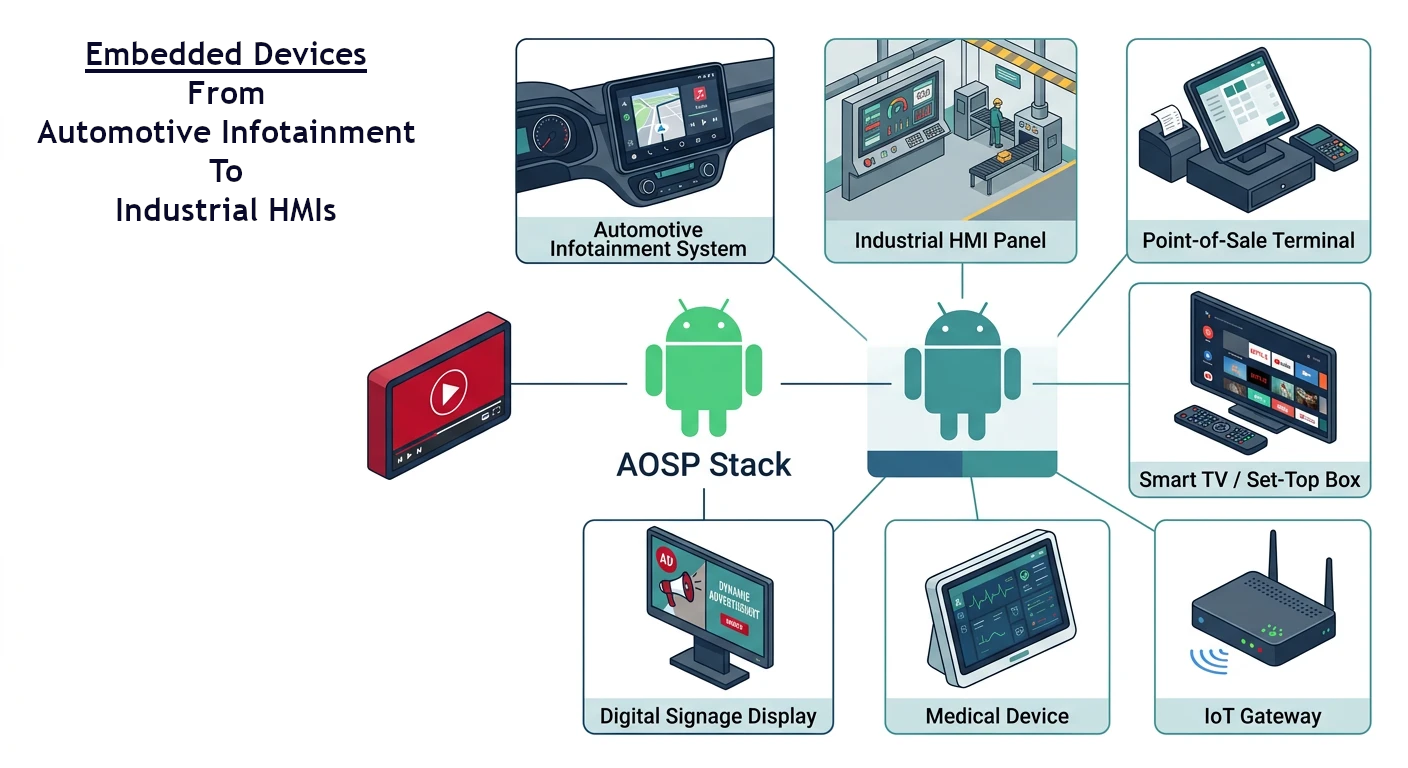
AUTOSAR architecture, MCAL, MPU protectionAndroid is not just a smartphone OS—it powers embedded devices from automotive infotainment to industrial HMIs. Understanding AOSP (Android Open Source Project) internals is essential for embedded Android development.
AOSP Layer Overview
Android Architecture Stack
+-----------------------------------------+
│         Applications (APKs)             │  → Java/Kotlin
+-----------------------------------------+
│       Android Framework (Java)          │  → System APIs
+-----------------------------------------+
│    Native Libraries + Android Runtime   │  → C/C++, ART
+-----------------------------------------+
│       HAL (Hardware Abstraction)        │  → HIDL/AIDL
+-----------------------------------------+
│         Linux Kernel + Drivers          │  → Kernel modules
+-----------------------------------------+
Init Process & Boot
Android boot sequence: Bootloader → Kernel → init (PID 1) → Zygote → System Server → Apps.
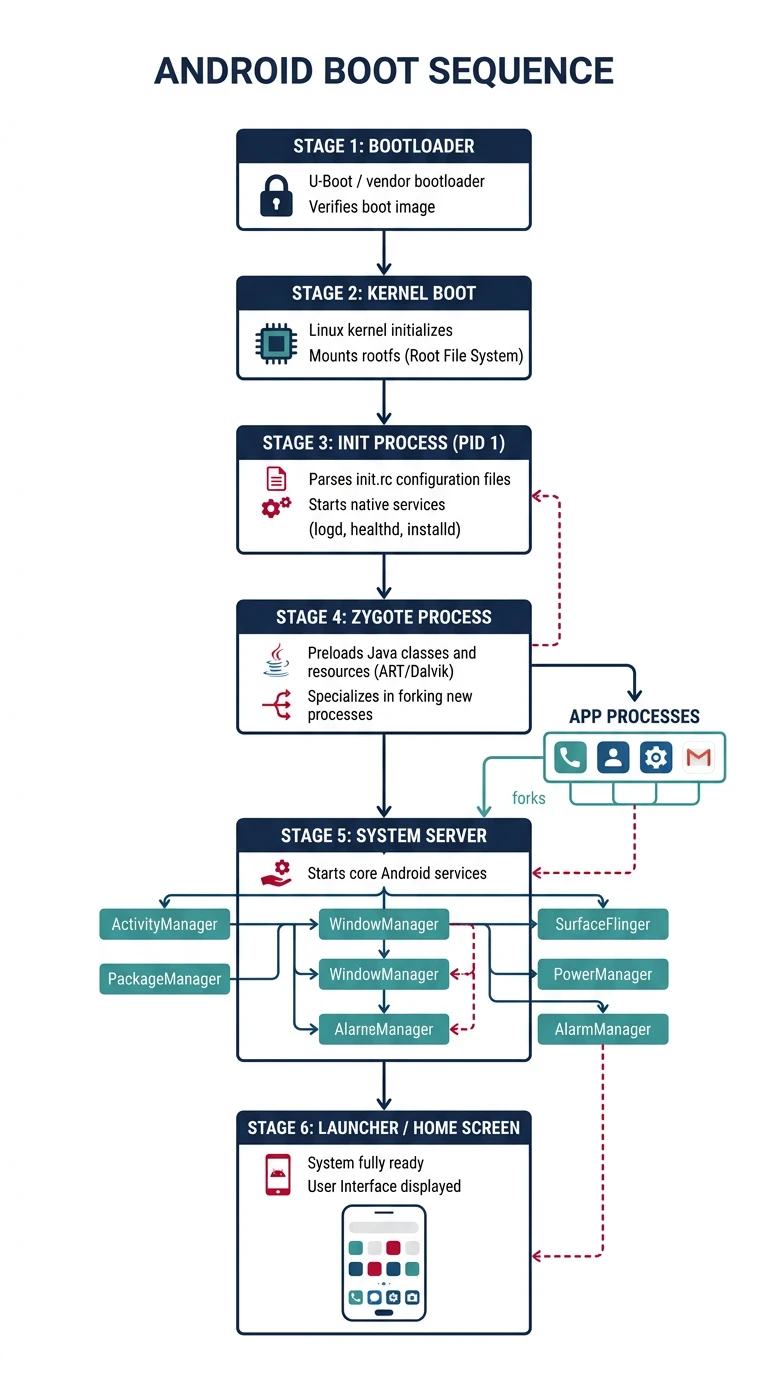
flowchart TD
    BL["Bootloader"] --> KERNEL["Linux Kernel"]
    KERNEL --> INIT["init\n(PID 1)"]
    INIT --> PROP["Property Service"]
    INIT --> ZYGO["Zygote\n(App Runtime)"]
    ZYGO --> SS["System Server\n(AMS, WMS, PMS)"]
    SS --> LAUNCHER["Launcher\n(Home Screen)"]
    INIT --> SERV["Native Services\n(SurfaceFlinger, AudioFlinger)"]
    ZYGO --> APP["App Process\n(fork from Zygote)"]
# Android init process location
/system/bin/init         # First userspace process

# Key init.rc files
/system/etc/init/        # Core system services
/vendor/etc/init/        # Vendor-specific services
/init.rc                 # Main configuration

# Init service definition
service surfaceflinger /system/bin/surfaceflinger
    class core animation
    user system
    group graphics drmrpc readproc
    onrestart restart zygote
    writepid /dev/stune/foreground/tasks
System Services
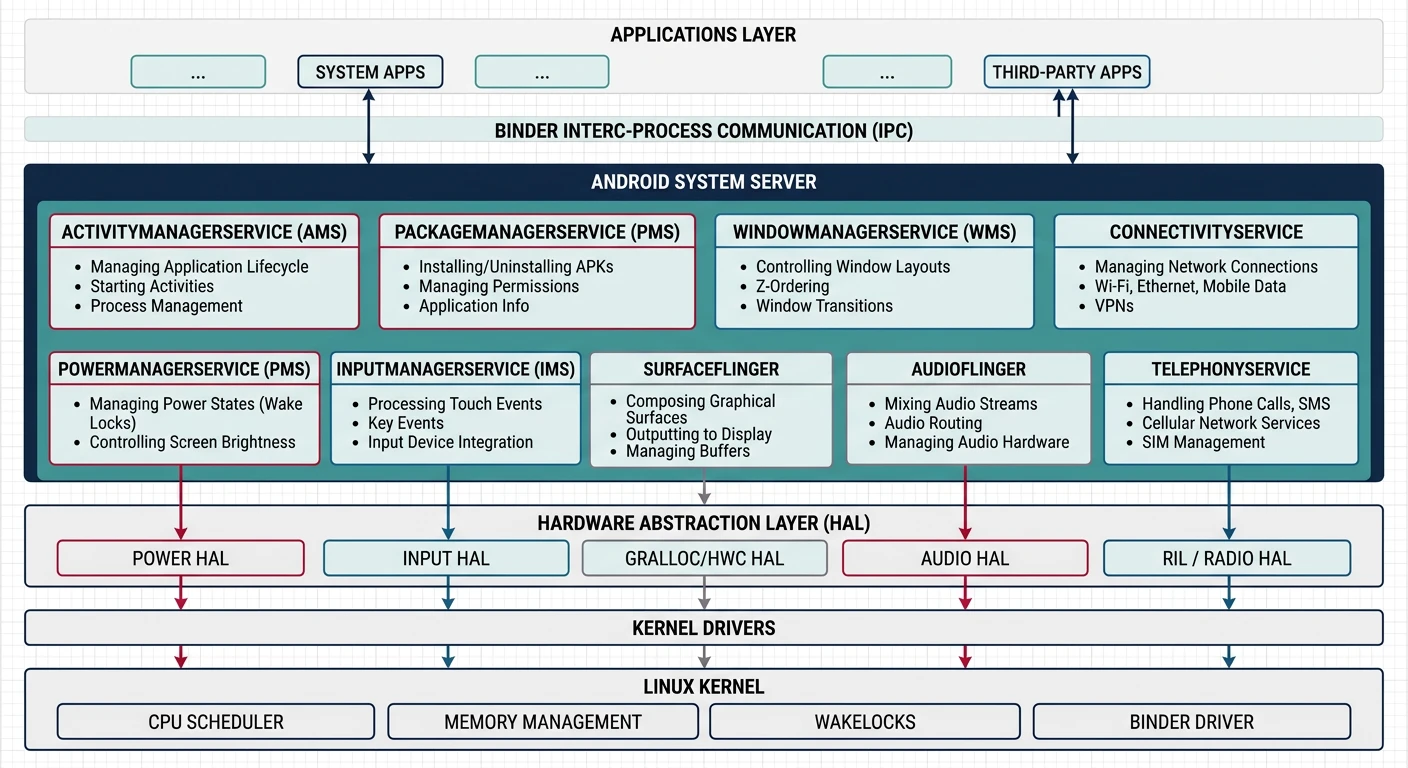
System Server hosts critical services: ActivityManager, PackageManager, WindowManager, etc.
# View running services
adb shell service list

# Key system services
activity              # Activity lifecycle management
package               # App installation/packages
window                # Window management
input                 # Input events
SurfaceFlinger        # Display composition (native)
AudioFlinger          # Audio mixing (native)

# Service Manager registration (Java)
ServiceManager.addService("my_service", myBinder);
Binder IPC Mechanism
Binder is Android's IPC mechanism—efficient, type-safe, and secure. It enables communication between apps and system services.
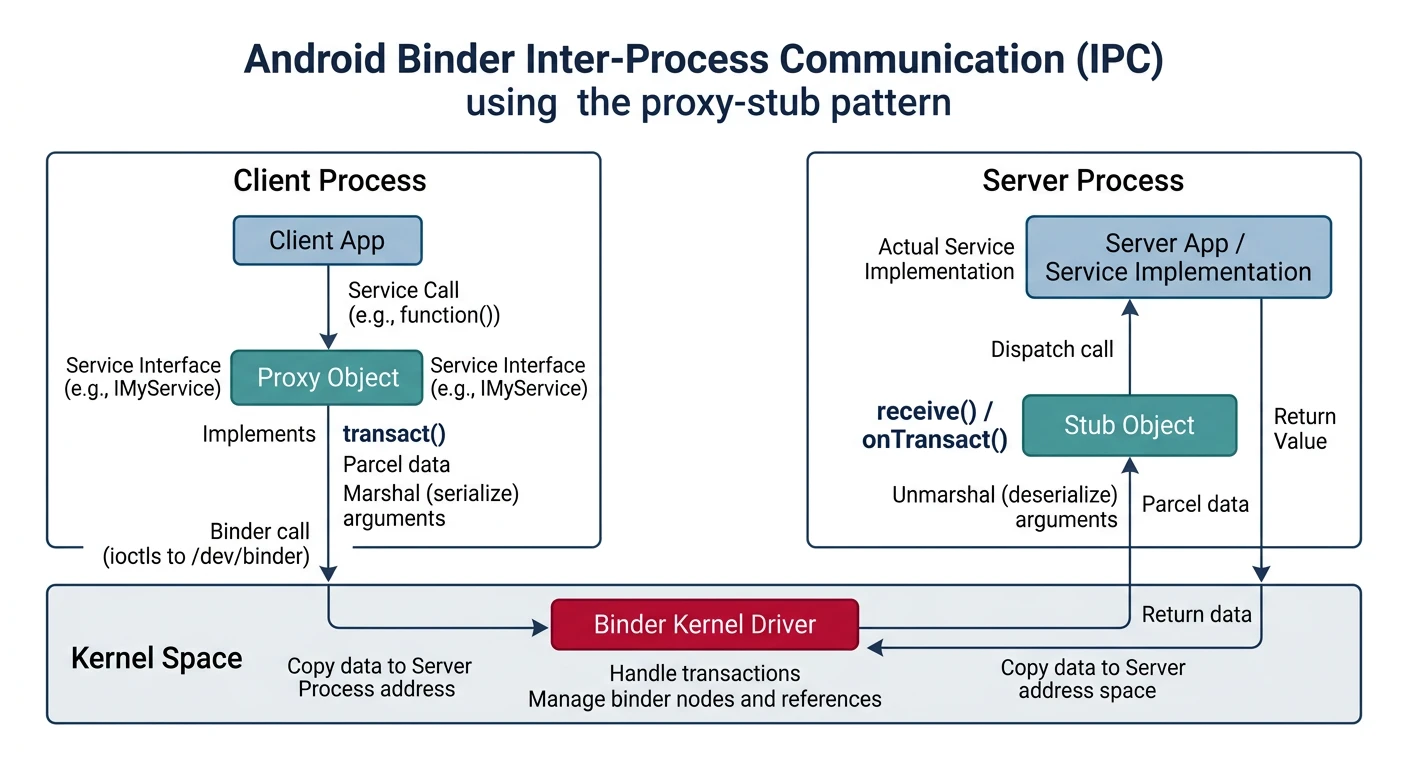
- Binder Driver: Kernel module at
/dev/binder - AIDL: Android Interface Definition Language
- Proxy/Stub: Client-side proxy calls server-side stub
- Parcel: Serialized data for IPC
// AIDL interface definition (IMyService.aidl)
interface IMyService {
    int getValue();
    void setValue(int value);
}

// Client usage
IMyService service = IMyService.Stub.asInterface(
    ServiceManager.getService("my_service")
);
int value = service.getValue();
Android Runtime (ART)
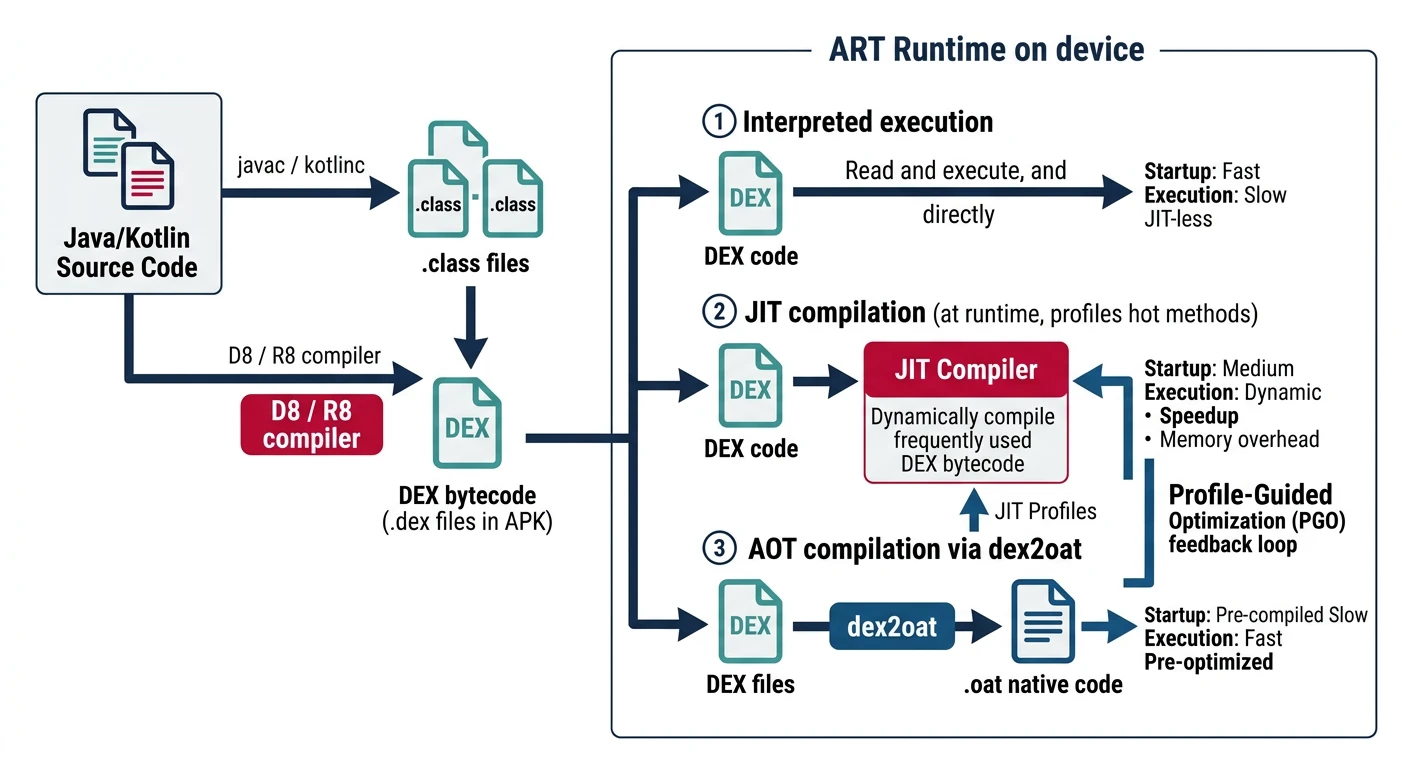
ART replaced Dalvik—provides Ahead-of-Time (AOT) compilation for better performance.
# Zygote - parent of all Android apps
/system/bin/app_process64   # 64-bit Zygote
/system/bin/app_process32   # 32-bit Zygote

# Zygote preloads classes and resources
# Apps fork from Zygote (fast startup)

# ART compilation
dex2oat --dex-file=app.apk --oat-file=app.oat

# Runtime files
/system/framework/         # Framework JARs
/data/dalvik-cache/        # Compiled OAT files
SELinux in Android
# SELinux mode
getenforce                # Enforcing or Permissive
adb shell setenforce 0    # Permissive (debugging only!)

# SELinux policy files
/system/etc/selinux/      # System policies
/vendor/etc/selinux/      # Vendor policies

# Check denials
adb logcat | grep avc     # Access Vector Cache denials

# audit2allow - generate policy from denials
audit2allow -i audit.log
Android Partitions
Key Android Partitions
- /boot: Kernel + ramdisk
- /system: Android OS (read-only)
- /vendor: Vendor-specific HALs and libraries
- /data: User data, apps (read-write)
- /cache: Temporary files, OTA
- /recovery: Recovery mode image
Android Build System
# AOSP source setup
repo init -u https://android.googlesource.com/platform/manifest
repo sync -j8

# Build commands
source build/envsetup.sh
lunch aosp_arm64-eng       # Select target
make -j$(nproc)            # Build everything

# Build specific module
make SurfaceFlinger
make bootimage             # Kernel + ramdisk

# Output
out/target/product/*/system.img
out/target/product/*/boot.img
Conclusion & What's Next
You've learned Android's architecture—from the Linux kernel through HAL, native libraries, ART, and the Java framework. This foundation is essential for Android system development.
- Android is a layered architecture on Linux
- Init, Zygote, and System Server are core processes
- Binder is the primary IPC mechanism
- SELinux enforces mandatory access control
In Part 10, we'll explore Android HAL & Native Development—creating HAL interfaces and native code with NDK/JNI.