Introduction to Android BSP
Series Navigation: This is Part 11 of the 13-part Embedded Systems Series. Review Part 10: Android HAL & Native Development first.
Embedded Systems Mastery
Your 13-step learning path • Currently on Step 11
Fundamentals & Architecture
Microcontrollers, memory, interruptsSTM32 & ARM Cortex-M Development
ARM architecture, peripherals, HALRTOS Fundamentals (FreeRTOS/Zephyr)
Task management, scheduling, synchronizationCommunication Protocols Deep Dive
UART, SPI, I2C, CAN, USBEmbedded Linux Fundamentals
Linux kernel, userspace, filesystemU-Boot Bootloader Mastery
Boot process, configuration, customizationLinux Device Drivers
Character, platform, network driversLinux Kernel Customization
Configuration, modules, debuggingAndroid System Architecture
AOSP layers, services, BinderAndroid HAL & Native Development
HIDL, AIDL, NDK, JNI11
Android BSP & Kernel
BSP development, kernel integration12
Debugging & Optimization
JTAG, GDB, profiling, optimization13
AUTOSAR & EB Tresos
AUTOSAR architecture, MCAL, MPU protectionA Board Support Package (BSP) is all the hardware-specific code required to run Android on a particular board—kernel, device tree, bootloader, HALs, and AOSP configuration.
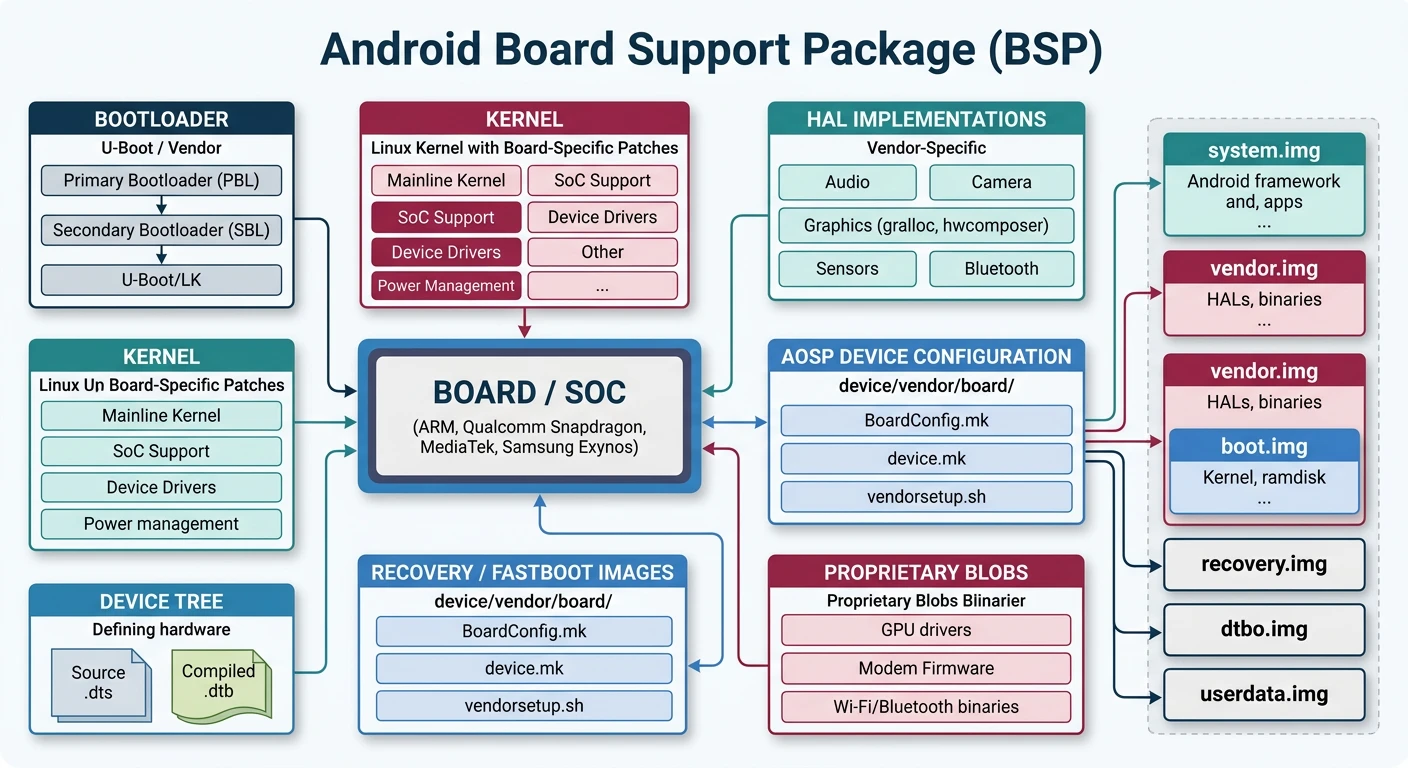
AOSP Device Configuration
# AOSP device directory structure
device/
+-- <vendor>/
    +-- <device>/
        +-- AndroidProducts.mk      # Product definitions
        +-- BoardConfig.mk          # Board-level config
        +-- device.mk               # Device packages
        +-- <device>.mk            # Product-specific config
        +-- manifest.xml            # VINTF manifest
        +-- fstab.<device>         # Filesystem table
        +-- init.<device>.rc       # Init scripts
# AndroidProducts.mk
PRODUCT_MAKEFILES := \
    $(LOCAL_DIR)/myboard.mk

COMMON_LUNCH_CHOICES := \
    myboard-eng \
    myboard-userdebug \
    myboard-user
Board Bring-Up Process
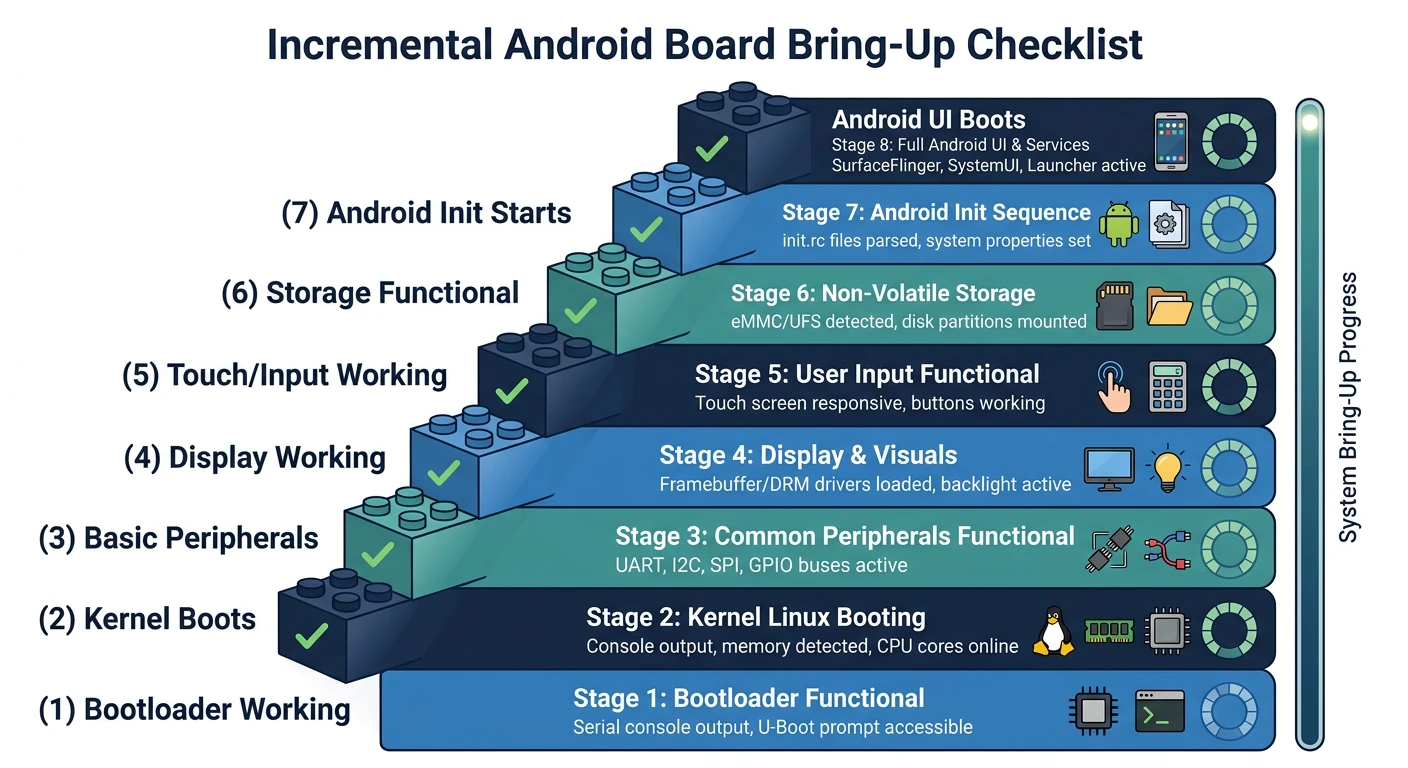
Board Bring-Up Checklist
- Bootloader: U-Boot/vendor bootloader working
- Kernel boot: Console output, basic drivers
- Root filesystem: Minimal ramdisk boots
- Display: Framebuffer/DRM working
- Touch/Input: Input events working
- Storage: eMMC/UFS accessible
- Networking: Ethernet/WiFi functional
- Android boot: Full AOSP boots
Kernel Integration
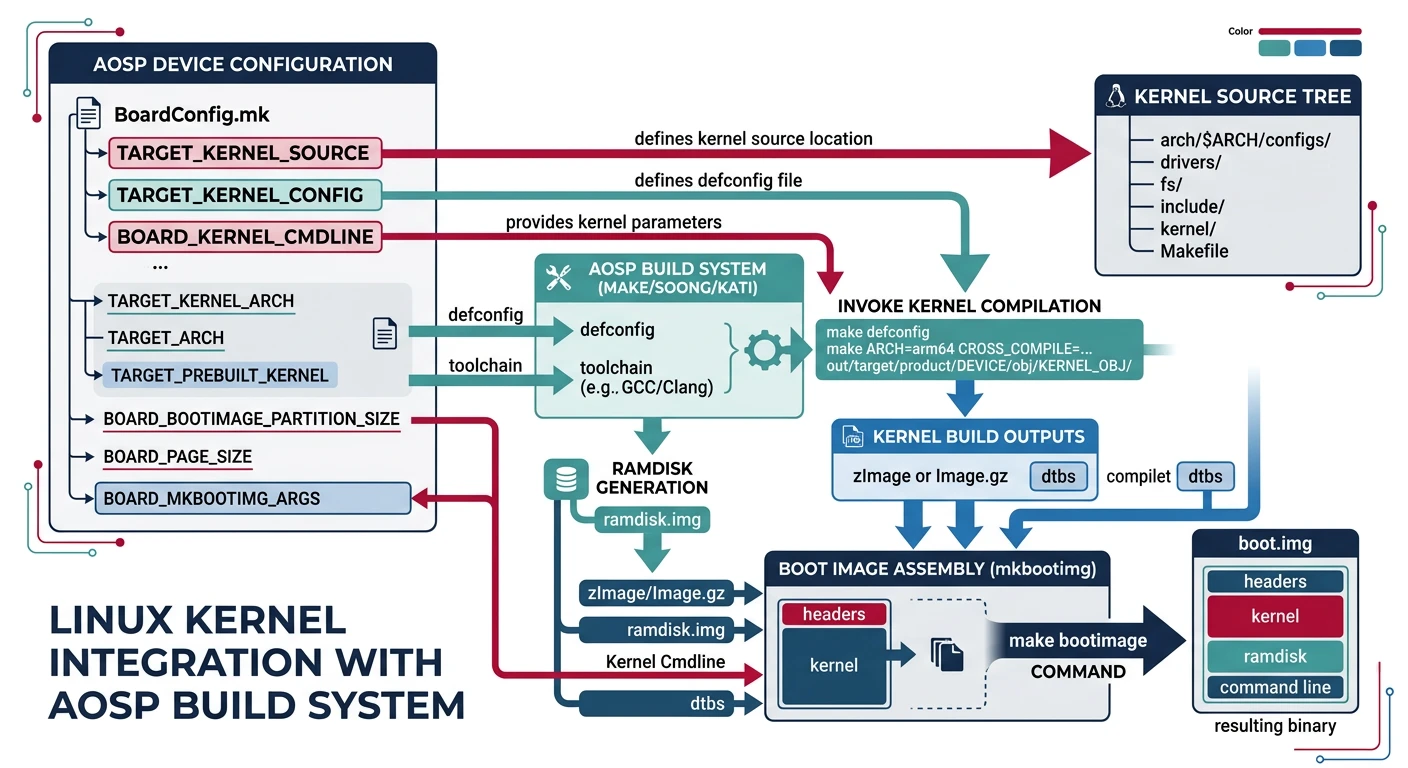
# BoardConfig.mk - Kernel configuration
TARGET_KERNEL_SOURCE := kernel/myvendor/myboard
TARGET_KERNEL_CONFIG := myboard_defconfig
TARGET_KERNEL_CLANG_COMPILE := true

BOARD_KERNEL_BASE := 0x40000000
BOARD_KERNEL_PAGESIZE := 4096
BOARD_KERNEL_OFFSET := 0x00008000
BOARD_RAMDISK_OFFSET := 0x01000000
BOARD_DTB_OFFSET := 0x01f00000

# Kernel command line
BOARD_KERNEL_CMDLINE := console=ttyS0,115200 \
    androidboot.hardware=myboard \
    androidboot.selinux=permissive
Device Tree for Android
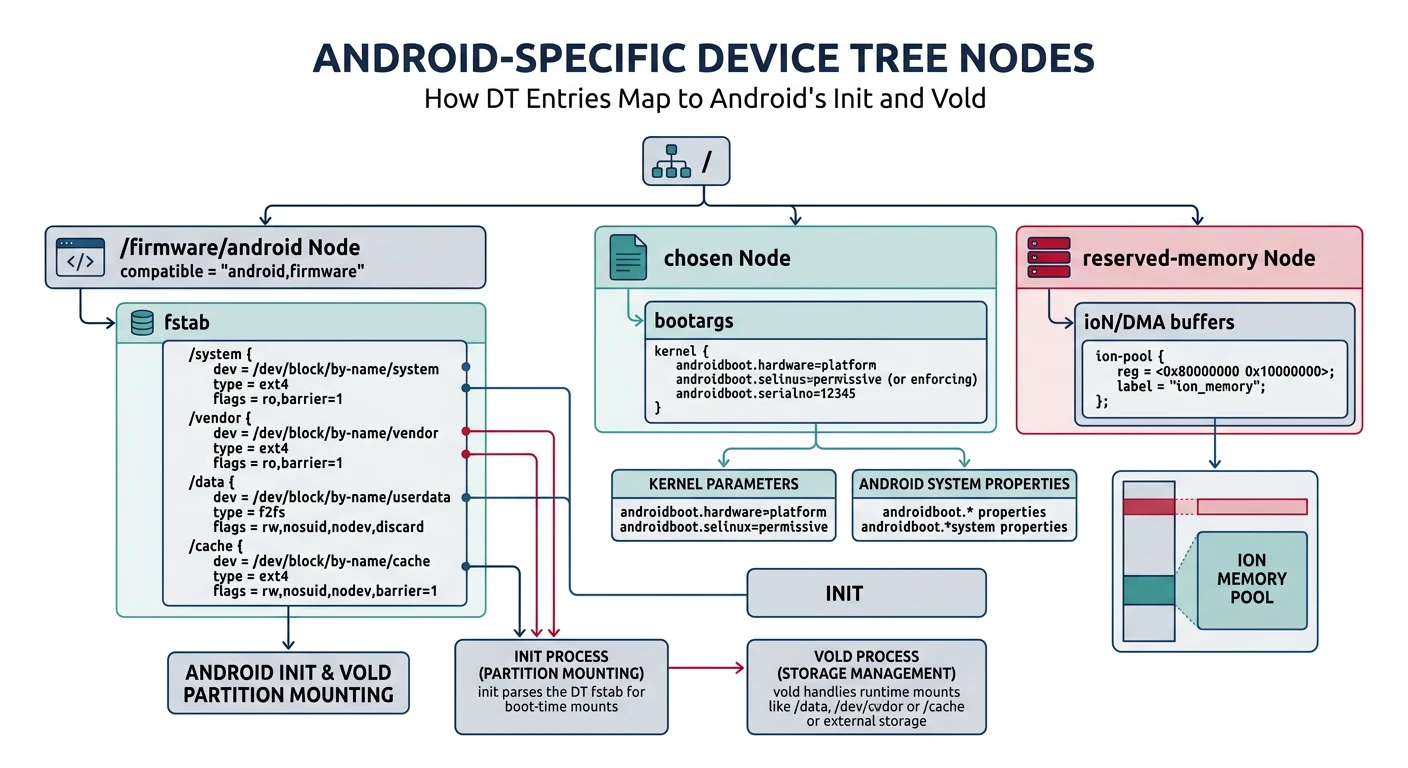
// myboard.dts - Board device tree
/dts-v1/;
#include "mysoc.dtsi"

/ {
    model = "MyVendor MyBoard";
    compatible = "myvendor,myboard";

    chosen {
        bootargs = "androidboot.hardware=myboard";
        stdout-path = "serial0:115200n8";
    };

    memory@40000000 {
        device_type = "memory";
        reg = <0x40000000 0x80000000>;  // 2GB
    };

    // Android-specific nodes
    firmware {
        android {
            compatible = "android,firmware";
            fstab {
                compatible = "android,fstab";
                vendor {
                    compatible = "android,vendor";
                    dev = "/dev/block/by-name/vendor";
                    type = "ext4";
                    mnt_flags = "ro,barrier=1";
                    fsmgr_flags = "wait,avb";
                };
            };
        };
    };
};
Peripheral Driver Integration
# Enable kernel drivers in defconfig
CONFIG_FB=y
CONFIG_DRM=y
CONFIG_I2C=y
CONFIG_SPI=y
CONFIG_USB_GADGET=y
CONFIG_USB_CONFIGFS=y

# Device tree driver binding
&i2c1 {
    status = "okay";

    touchscreen@38 {
        compatible = "focaltech,ft5x06";
        reg = <0x38>;
        interrupt-parent = <&gpio>;
        interrupts = <17 IRQ_TYPE_EDGE_FALLING>;
    };
};
Vendor Partition & VNDK
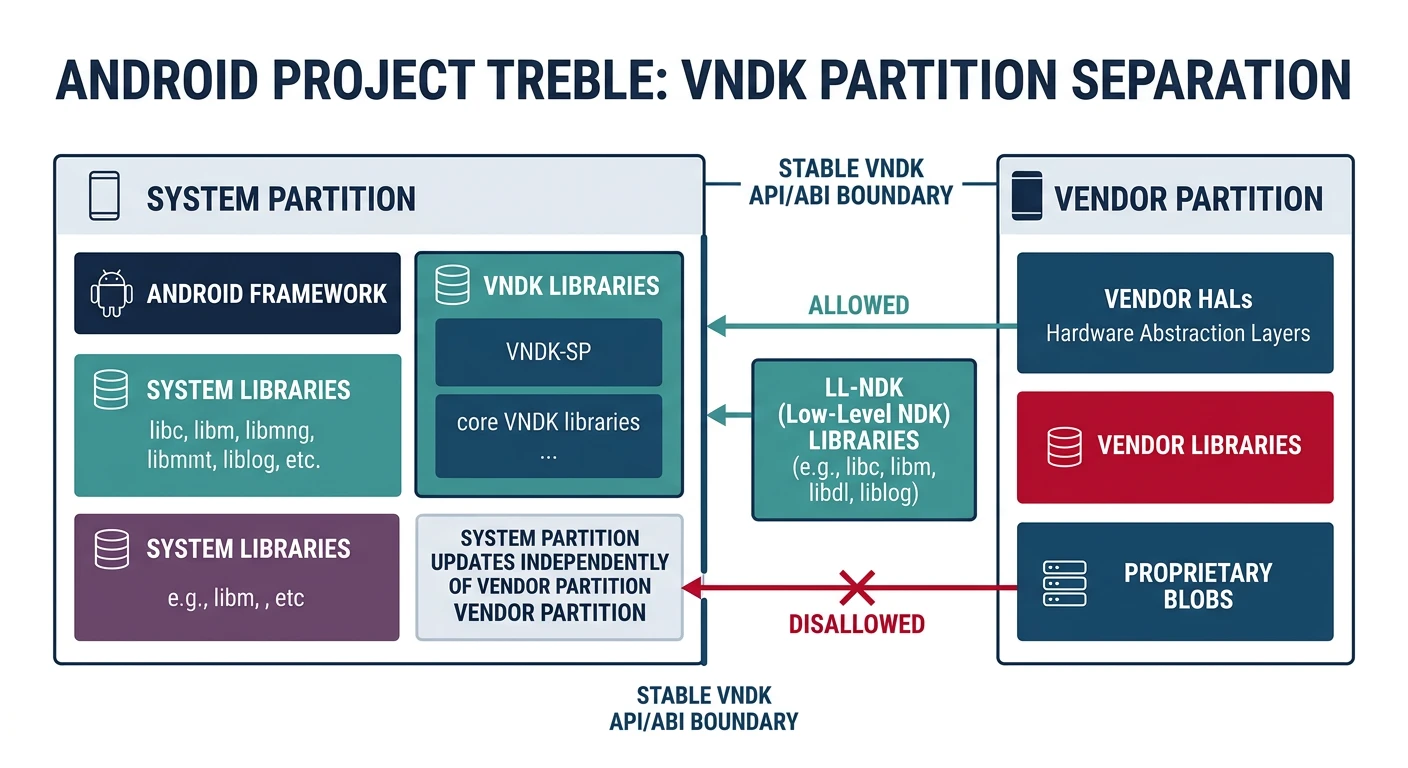
VNDK (Vendor Native Development Kit) ensures vendor code uses stable NDK APIs—critical for Treble compliance.
# BoardConfig.mk - VNDK configuration
BOARD_VNDK_VERSION := current
PRODUCT_ENFORCE_VINTF_MANIFEST := true

# Vendor partition
BOARD_VENDORIMAGE_PARTITION_SIZE := 536870912
BOARD_VENDORIMAGE_FILE_SYSTEM_TYPE := ext4
TARGET_COPY_OUT_VENDOR := vendor
Building System Images
# Full build
source build/envsetup.sh
lunch myboard-userdebug
make -j$(nproc)

# Output images
out/target/product/myboard/
+-- boot.img          # Kernel + ramdisk
+-- system.img        # Android OS
+-- vendor.img        # Vendor HALs
+-- userdata.img      # Empty user data
+-- super.img         # Dynamic partitions (Android 10+)

# Flash images
fastboot flash boot boot.img
fastboot flash system system.img
fastboot flash vendor vendor.img
fastboot reboot
Debugging BSP Issues
# Serial console debugging
screen /dev/ttyUSB0 115200

# Check boot progress
dmesg | head -100            # Kernel boot
logcat -b all | head -200    # Android boot

# Common issues
# 1. Kernel panic: Check memory/DTB
# 2. No display: Verify DRM/FB drivers
# 3. Boot loop: Check init.rc, selinux
# 4. HAL failures: Check VINTF manifest

# ADB debugging
adb shell dmesg
adb shell cat /proc/last_kmsg   # Previous boot log
adb logcat -b events
Conclusion & What's Next
You've mastered Android BSP development—AOSP configuration, kernel integration, device tree, and image building. BSP work is the foundation of Android on custom hardware.
Key Takeaways:
- AOSP device config lives in device/vendor/board/
- Board bring-up is incremental (bootloader → kernel → Android)
- Device tree describes hardware to kernel
- VNDK ensures Treble compliance
In Part 12, we'll explore Debugging & Optimization—JTAG, GDB, profiling, and performance optimization techniques.