Introduction to Android HAL
Series Navigation: This is Part 10 of the 13-part Embedded Systems Series. Review Part 9: Android System Architecture first.
Embedded Systems Mastery
Your 13-step learning path • Currently on Step 10
Fundamentals & Architecture
Microcontrollers, memory, interruptsSTM32 & ARM Cortex-M Development
ARM architecture, peripherals, HALRTOS Fundamentals (FreeRTOS/Zephyr)
Task management, scheduling, synchronizationCommunication Protocols Deep Dive
UART, SPI, I2C, CAN, USBEmbedded Linux Fundamentals
Linux kernel, userspace, filesystemU-Boot Bootloader Mastery
Boot process, configuration, customizationLinux Device Drivers
Character, platform, network driversLinux Kernel Customization
Configuration, modules, debuggingAndroid System Architecture
AOSP layers, services, Binder10
Android HAL & Native Development
HIDL, AIDL, NDK, JNI11
Android BSP & Kernel
BSP development, kernel integration12
Debugging & Optimization
JTAG, GDB, profiling, optimization13
AUTOSAR & EB Tresos
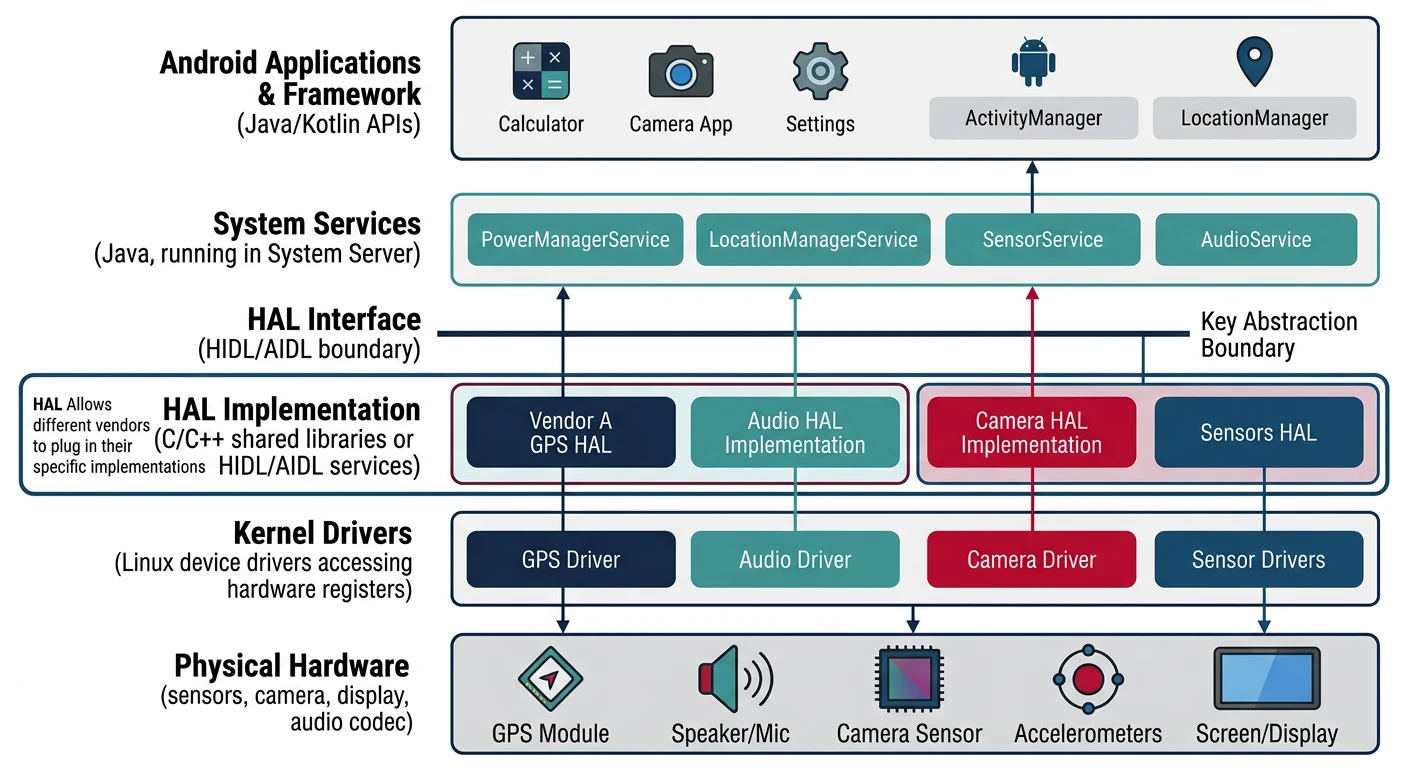
AUTOSAR architecture, MCAL, MPU protectionThe Hardware Abstraction Layer (HAL) bridges Android framework and kernel drivers. HALs define standardized interfaces—OEMs implement vendor-specific code while Android remains hardware-agnostic.
HAL Evolution (Legacy to Treble)
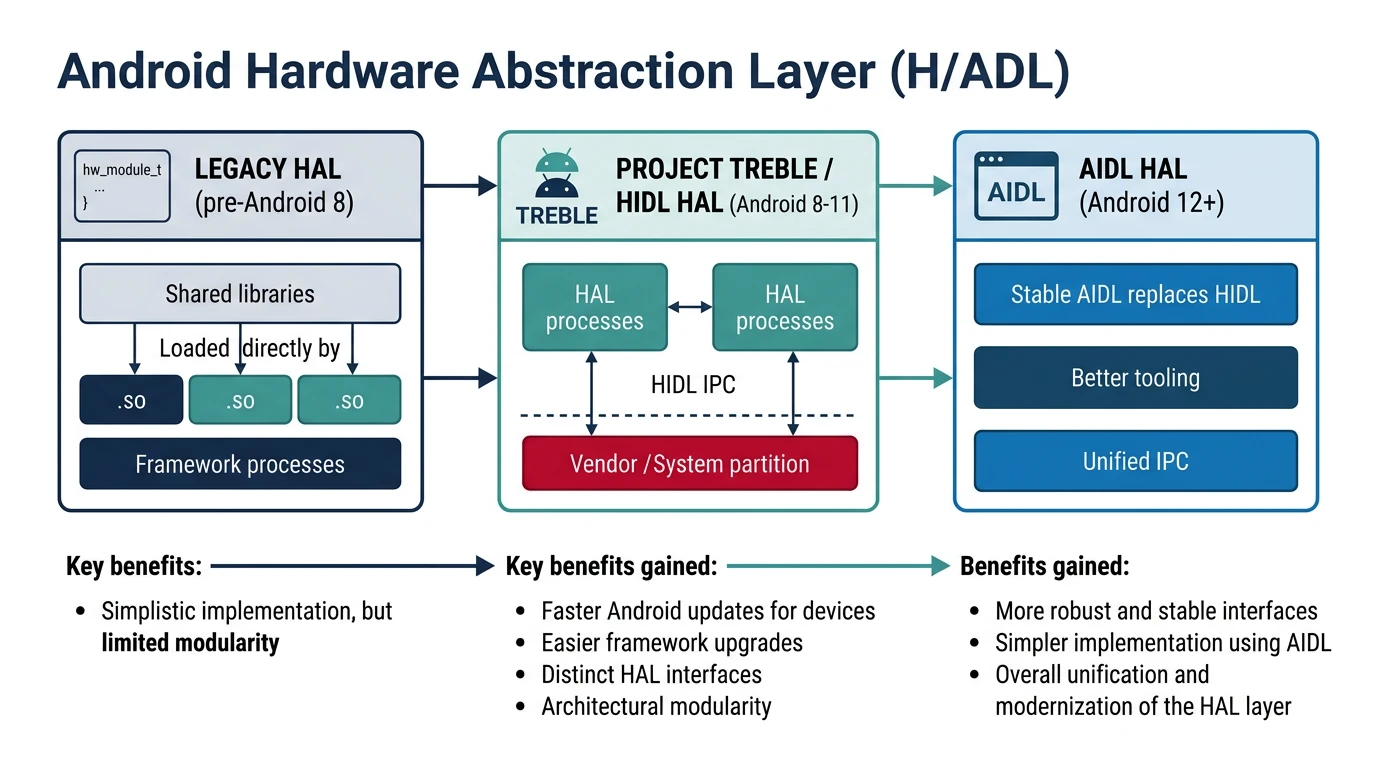
Android HAL Architecture Evolution
graph TD
    subgraph Legacy["Legacy HAL (Pre-Treble)"]
        A1[Application] --> F1[Framework]
        F1 --> H1["HAL (.so in /system)"]
        H1 --> K1[Kernel Driver]
    end

    subgraph Treble["Project Treble (Android 8+)"]
        A2[Application] --> F2[Framework]
        F2 --> HIDL["HIDL Interface"]
        HIDL --> H2["HAL (.so in /vendor)"]
        H2 --> K2[Kernel Driver]
    end

    subgraph Modern["Modern (Android 11+)"]
        A3[Application] --> F3[Framework]
        F3 --> AIDL["AIDL Interface"]
        AIDL --> H3["HAL (in /vendor)"]
        H3 --> K3[Kernel Driver]
    end

    Legacy -.->|"Tight Coupling"| Treble
    Treble -.->|"Stable Interface"| Modern

    style Legacy fill:#fff5f5,stroke:#BF092F
    style Treble fill:#f0f4f8,stroke:#16476A
    style Modern fill:#e8f4f4,stroke:#3B9797
HAL Architecture Evolution
- Legacy HAL (pre-8.0): .so libraries loaded into framework process
- Treble/HIDL (8.0-10): Separate HAL processes, binderized IPC
- AIDL HAL (11+): Unified AIDL for both framework and HAL
# HAL locations
/vendor/lib/hw/           # Legacy HAL .so files
/vendor/bin/hw/           # HIDL HAL services
/vendor/lib64/            # 64-bit HAL libraries

# HAL manifest (device capabilities)
/vendor/etc/vintf/manifest.xml
HIDL Interface Definition
HIDL (HAL Interface Definition Language) defines versioned, stable interfaces.
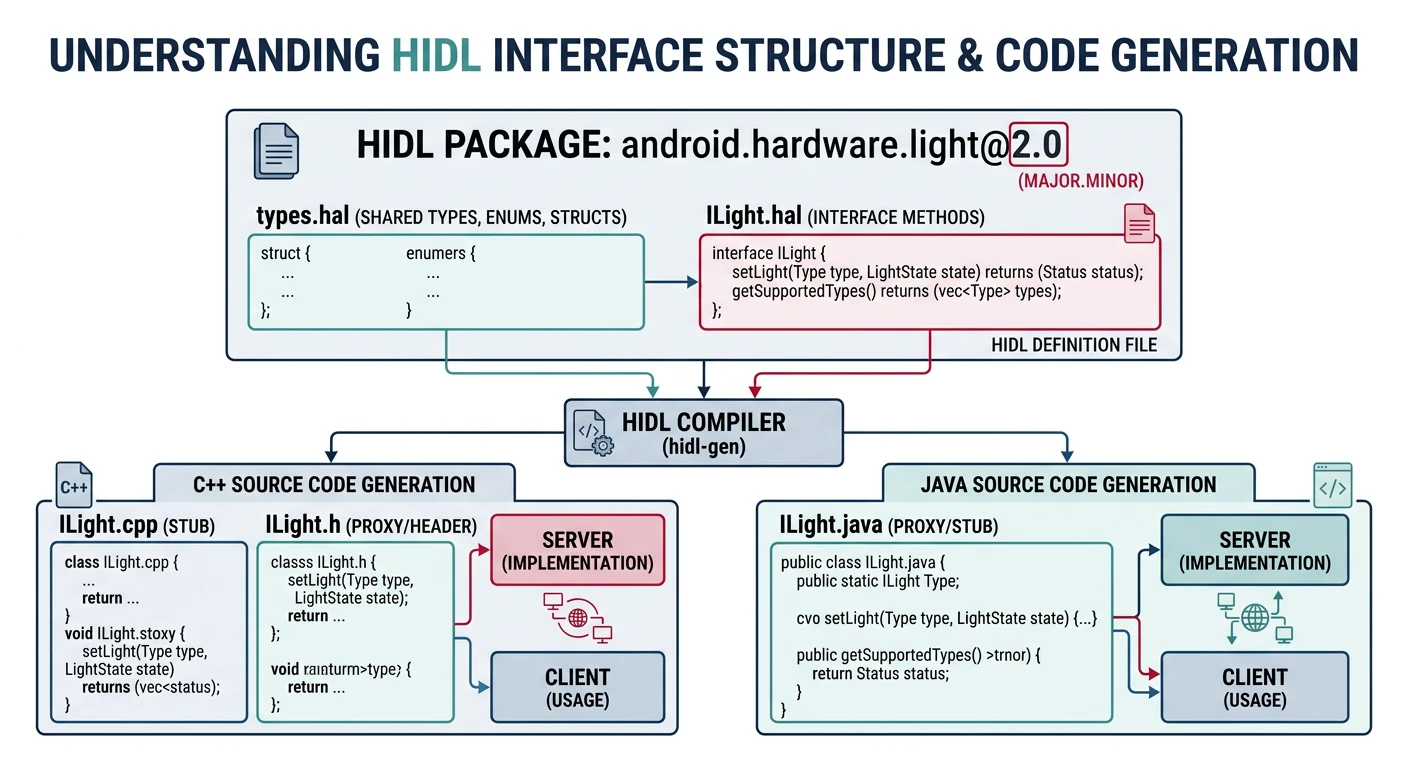
// hardware/interfaces/sensors/2.0/ISensors.hal
package android.hardware.sensors@2.0;

interface ISensors {
    getSensorsList() generates (vec<SensorInfo> list);
    activate(int32_t sensorHandle, bool enabled) generates (Result result);
    poll(int32_t maxCount) generates (vec<Event> events);
};

// Generate C++ from HIDL
hidl-gen -o output -L c++-impl \
    android.hardware.sensors@2.0
AIDL for HAL (Android 11+)
// hardware/interfaces/vibrator/aidl/android/hardware/vibrator/IVibrator.aidl
package android.hardware.vibrator;

@VintfStability
interface IVibrator {
    void on(int timeoutMs);
    void off();
    boolean supportsAmplitudeControl();
    void setAmplitude(int amplitude);
}
HAL Implementation
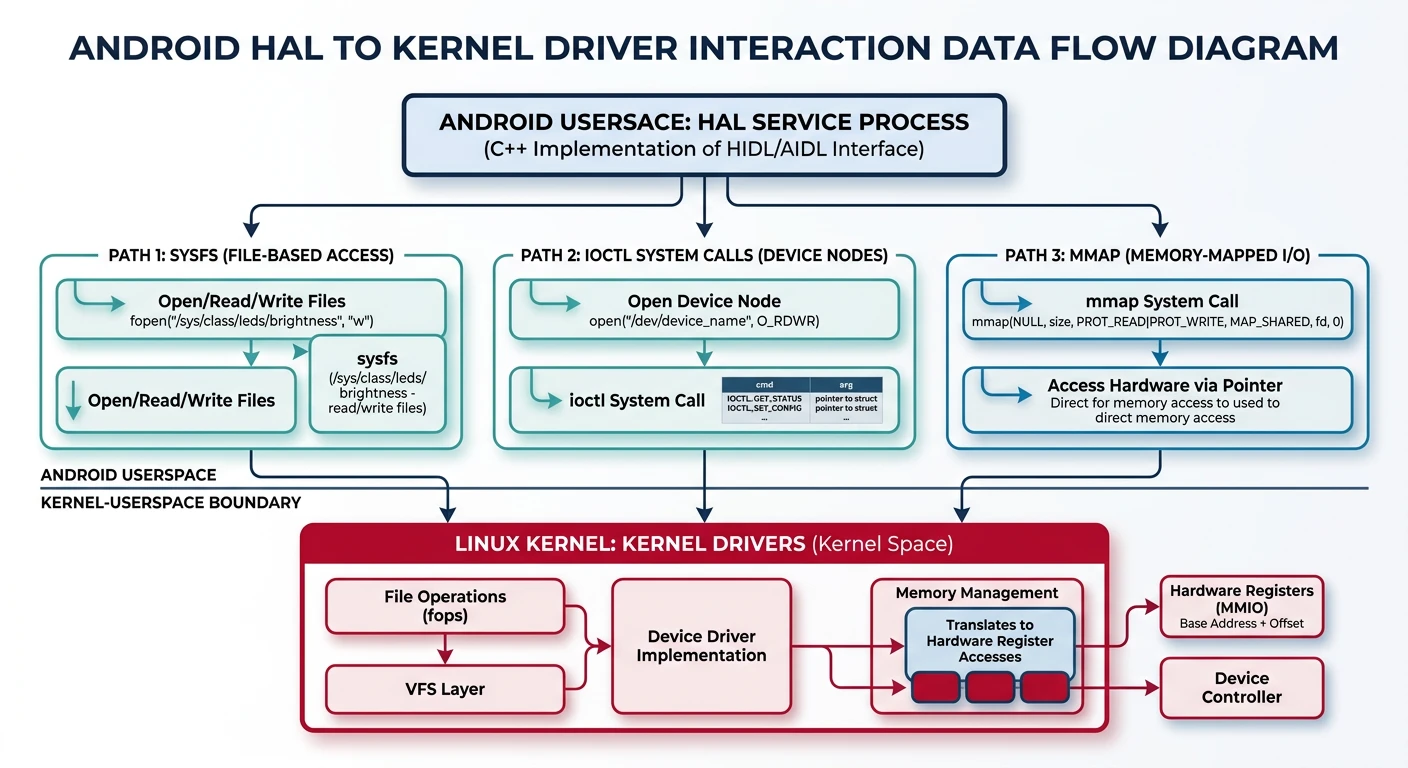
// Vibrator HAL implementation
#include <aidl/android/hardware/vibrator/BnVibrator.h>

using aidl::android::hardware::vibrator::BnVibrator;

class Vibrator : public BnVibrator {
public:
    ndk::ScopedAStatus on(int32_t timeoutMs) override {
        // Write to kernel driver
        write_to_sysfs("/sys/class/leds/vibrator/state", "1");
        write_to_sysfs("/sys/class/leds/vibrator/duration", timeoutMs);
        return ndk::ScopedAStatus::ok();
    }

    ndk::ScopedAStatus off() override {
        write_to_sysfs("/sys/class/leds/vibrator/state", "0");
        return ndk::ScopedAStatus::ok();
    }
};
NDK Programming
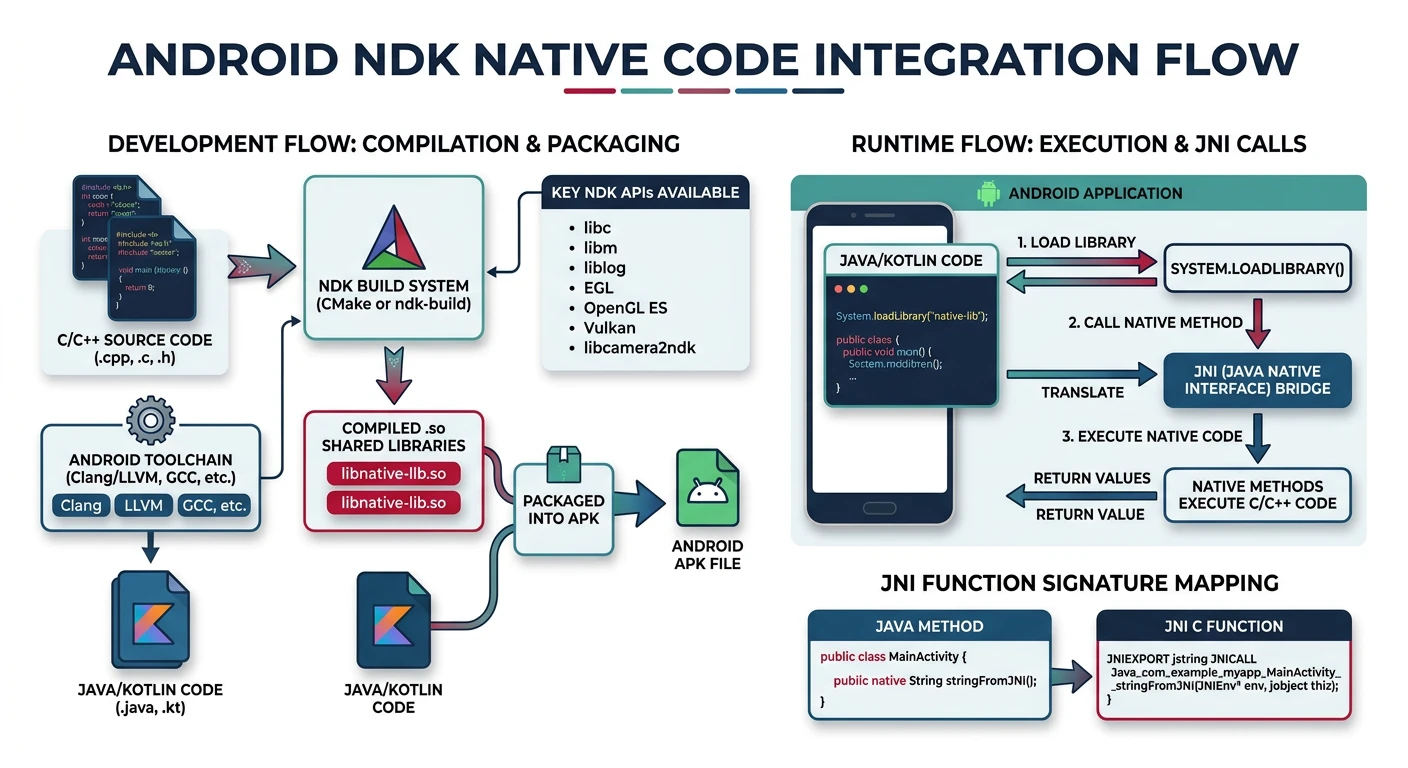
The NDK (Native Development Kit) enables C/C++ code in Android apps for performance-critical operations.
// native-lib.cpp
#include <jni.h>
#include <string>

extern "C" JNIEXPORT jstring JNICALL
Java_com_example_app_MainActivity_stringFromJNI(
    JNIEnv* env, jobject /* this */) {
    std::string hello = "Hello from C++";
    return env->NewStringUTF(hello.c_str());
}
# CMakeLists.txt
cmake_minimum_required(VERSION 3.10)
add_library(native-lib SHARED native-lib.cpp)
find_library(log-lib log)
target_link_libraries(native-lib ${log-lib})
JNI Bindings
// Java side
public class MainActivity extends Activity {
    static {
        System.loadLibrary("native-lib");
    }

    public native String stringFromJNI();
    public native int calculate(int a, int b);
    public native void processArray(int[] data);
}
// C++ JNI implementation
extern "C" JNIEXPORT jint JNICALL
Java_com_example_app_MainActivity_calculate(
    JNIEnv* env, jobject obj, jint a, jint b) {
    return a + b;
}

extern "C" JNIEXPORT void JNICALL
Java_com_example_app_MainActivity_processArray(
    JNIEnv* env, jobject obj, jintArray arr) {
    jint* data = env->GetIntArrayElements(arr, nullptr);
    jsize len = env->GetArrayLength(arr);

    for (int i = 0; i < len; i++) {
        data[i] *= 2;  // Process array
    }

    env->ReleaseIntArrayElements(arr, data, 0);
}
Native Service Development
// Native service main
#include <binder/ProcessState.h>
#include <binder/IServiceManager.h>

int main() {
    android::ProcessState::self()->startThreadPool();

    sp<MyService> service = new MyService();
    defaultServiceManager()->addService(
        String16("my_native_service"), service);

    android::IPCThreadState::self()->joinThreadPool();
    return 0;
}
Debugging HAL & Native Code
# List HAL services
lshal                    # List all HAL services
dumpsys hwservicemanager

# Native debugging
adb shell gdbserver64 :5039 /vendor/bin/hw/my_hal
adb forward tcp:5039 tcp:5039
arm-linux-gnueabihf-gdb
(gdb) target remote :5039

# Logcat for native
adb logcat -s "MY_HAL"
__android_log_print(ANDROID_LOG_INFO, "MY_HAL", "msg");
Conclusion & What's Next
You've learned Android HAL development—HIDL/AIDL interfaces, HAL implementation, NDK native programming, and JNI bindings. These skills enable custom hardware integration in Android.
Key Takeaways:
- HAL bridges Android framework and kernel drivers
- AIDL for HAL is the modern approach (Android 11+)
- NDK enables C/C++ for performance-critical code
- JNI bridges Java and native code
In Part 11, we'll explore Android BSP & Kernel—building board support packages and integrating custom kernels.