Introduction to Kernel Customization
Series Navigation: This is Part 8 of the 13-part Embedded Systems Series. Review Part 7: Linux Device Drivers first.
Embedded Systems Mastery
Your 13-step learning path • Currently on Step 8
Fundamentals & Architecture
Microcontrollers, memory, interruptsSTM32 & ARM Cortex-M Development
ARM architecture, peripherals, HALRTOS Fundamentals (FreeRTOS/Zephyr)
Task management, scheduling, synchronizationCommunication Protocols Deep Dive
UART, SPI, I2C, CAN, USBEmbedded Linux Fundamentals
Linux kernel, userspace, filesystemU-Boot Bootloader Mastery
Boot process, configuration, customizationLinux Device Drivers
Character, platform, network drivers8
Linux Kernel Customization
Configuration, modules, debugging9
Android System Architecture
Android layers, services, framework10
Android HAL & Native Development
HAL interfaces, NDK, JNI11
Android BSP & Kernel
BSP development, kernel integration12
Debugging & Optimization
JTAG, GDB, profiling, optimization13
AUTOSAR & EB Tresos
AUTOSAR architecture, MCAL, MPU protectionThe Linux kernel is highly configurable—embedded systems rarely need the full kernel. Customization reduces image size, improves boot time, and removes unnecessary attack surfaces.
Kernel Source Structure
linux/
+-- arch/          # Architecture-specific (arm, arm64, x86)
│   +-- arm/
│       +-- boot/dts/    # Device tree sources (.dts)
│       +-- configs/     # Default configs (imx_v7_defconfig)
│       +-- mach-*/      # SoC-specific code
+-- drivers/       # Device drivers
+-- fs/            # Filesystems
+-- include/       # Kernel headers
+-- kernel/        # Core kernel (scheduler, fork, signals)
+-- mm/            # Memory management
+-- net/           # Networking stack
+-- scripts/       # Build scripts, Kconfig tools
+-- Documentation/ # Kernel documentation
+-- Makefile       # Top-level Makefile
+-- Kconfig        # Top-level configuration
Kernel Configuration (Kconfig)
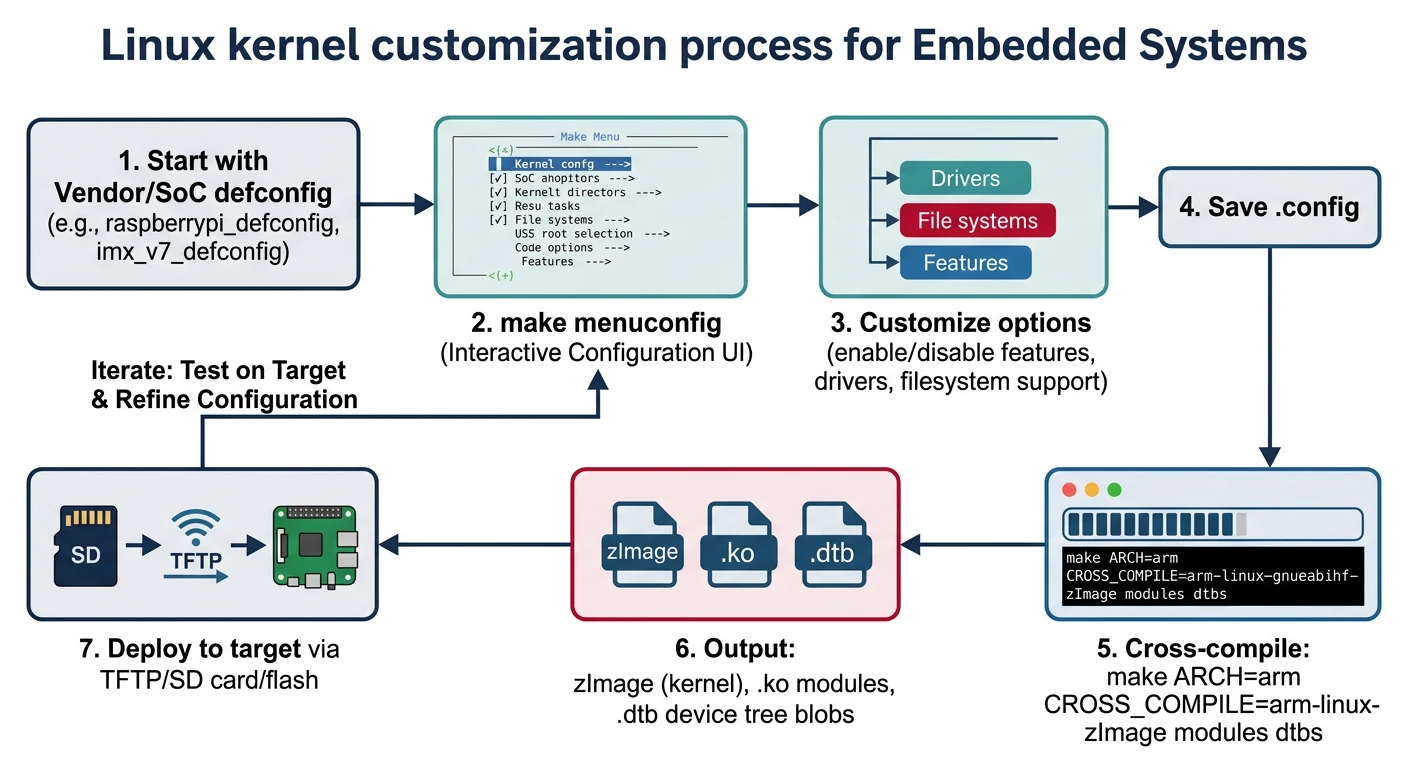
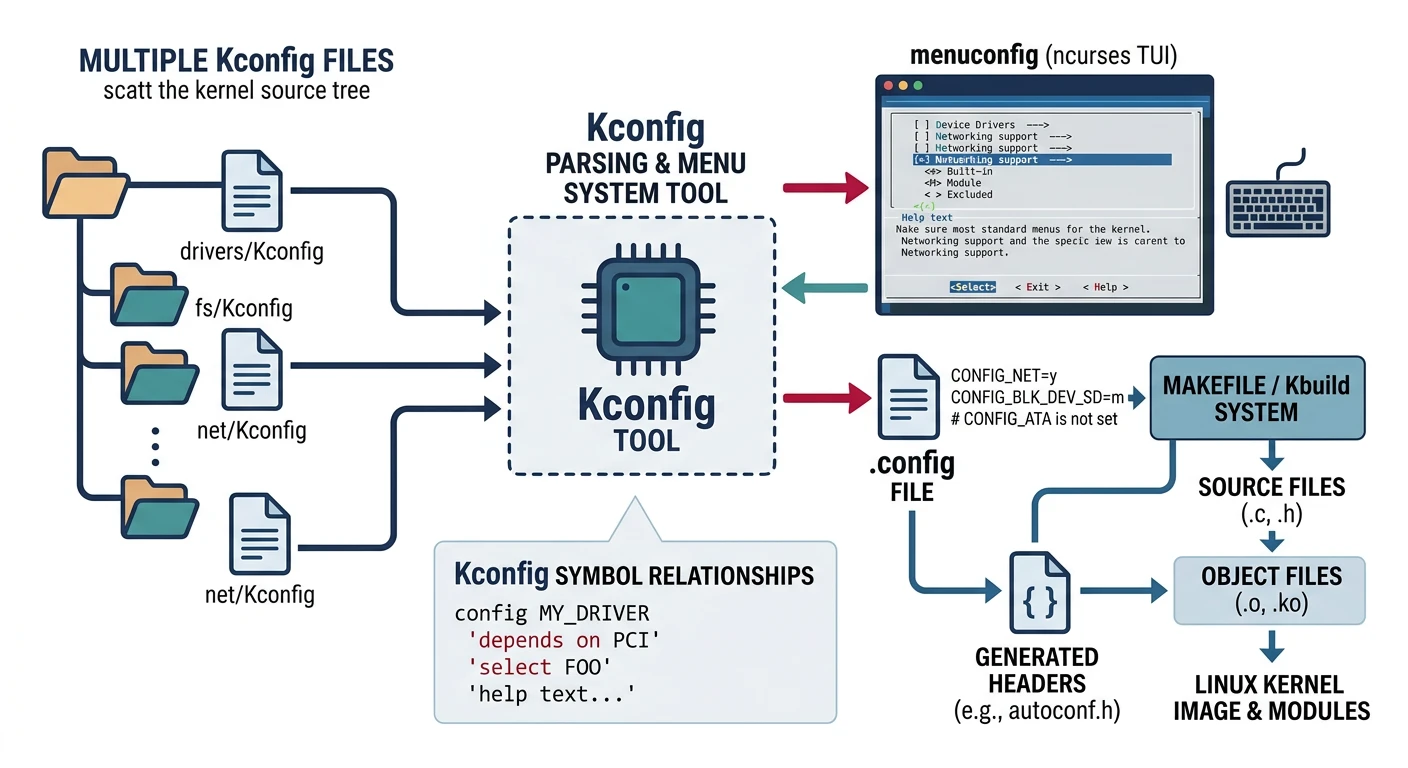
Kernel features are controlled by Kconfig—a configuration language that generates .config.
# Start with a default configuration
cd linux-source/
make ARCH=arm imx_v7_defconfig    # i.MX7/6 default
make ARCH=arm64 defconfig         # ARM64 generic
make ARCH=arm bcm2835_defconfig   # Raspberry Pi

# Copy current running config
cat /proc/config.gz | gunzip > .config

# Configuration options
make ARCH=arm menuconfig     # Ncurses UI (most common)
make ARCH=arm xconfig        # Qt GUI
make ARCH=arm gconfig        # GTK GUI
make ARCH=arm nconfig        # Newer ncurses
make ARCH=arm oldconfig      # Update old config (prompts new options)
make ARCH=arm olddefconfig   # Update with defaults (no prompts)
Using menuconfig
menuconfig Navigation:
/- Search for optiony- Build into kernel (*)m- Build as module (M)n- Disable ( )?- Show help for option- Space - Toggle selection
# Key embedded configuration areas
Device Drivers  --->
    [*] GPIO Support  --->
    [*] I2C support  --->
    [*] SPI support  --->
    <*> USB support  --->

File systems  --->
    <*> Ext4 filesystem
    [*] Network File Systems  --->
        <*> NFS client support

Networking support  --->
    [*] Wireless  --->

# Size reduction
General setup  --->
    [ ] Support for paging of anonymous memory (swap)
    [ ] Auditing support
    [ ] Enable loadable module support   # If no modules needed

# Save to .config and exit
Device Tree Overlays
Device tree overlays modify hardware configuration without recompiling the base DTB—useful for add-on boards.
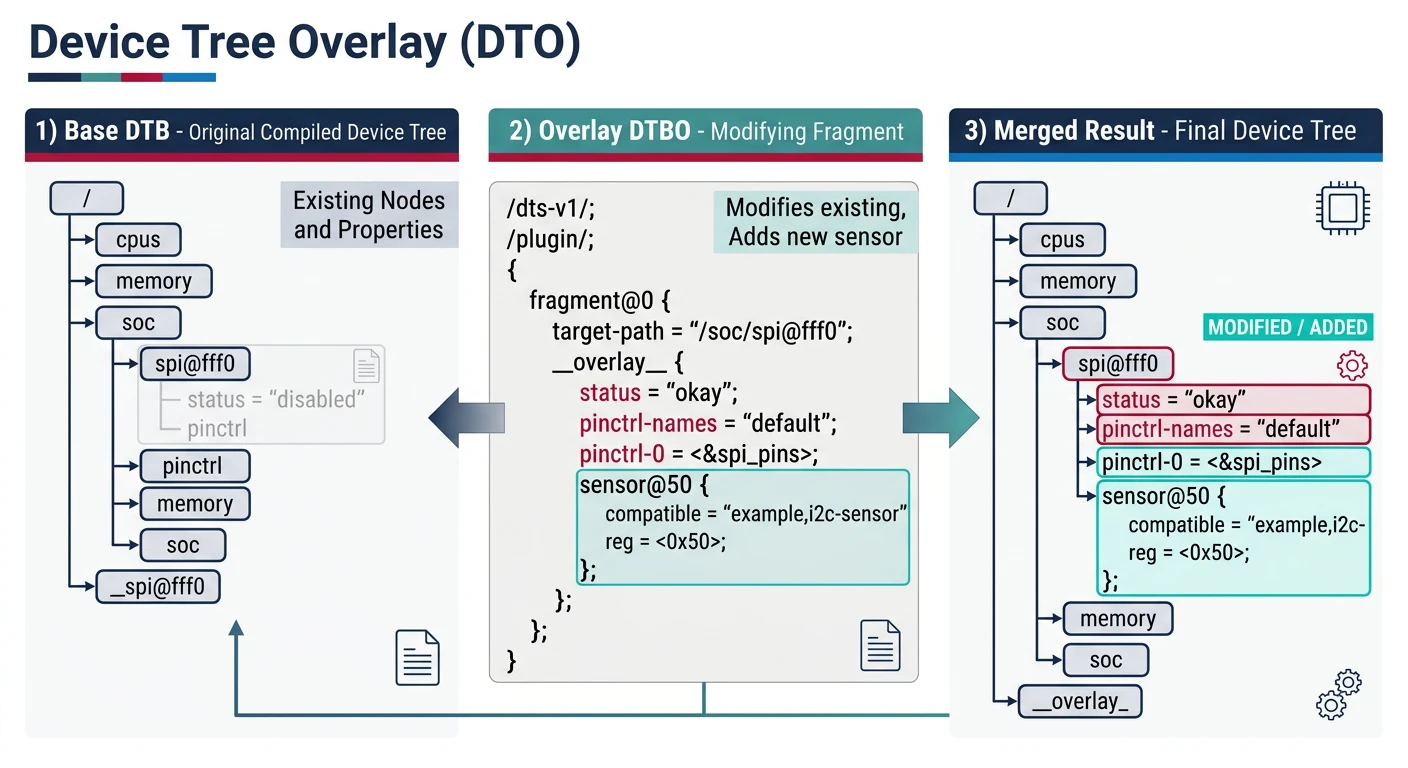
// my_overlay.dts - Enable SPI device on Raspberry Pi
/dts-v1/;
/plugin/;

/ {
    compatible = "brcm,bcm2835";

    fragment@0 {
        target = <&spi0>;
        __overlay__ {
            status = "okay";
            #address-cells = <1>;
            #size-cells = <0>;

            spidev@0 {
                compatible = "spidev";
                reg = <0>;              // Chip select 0
                spi-max-frequency = <1000000>;
            };
        };
    };

    fragment@1 {
        target = <&gpio>;
        __overlay__ {
            my_led_pin: my_led_pin {
                brcm,pins = <17>;
                brcm,function = <1>;    // Output
            };
        };
    };
};
# Compile and apply overlay
dtc -@ -I dts -O dtb -o my_overlay.dtbo my_overlay.dts

# On Raspberry Pi (/boot/config.txt)
dtoverlay=my_overlay

# Runtime loading (if supported)
sudo dtoverlay my_overlay
Building the Kernel
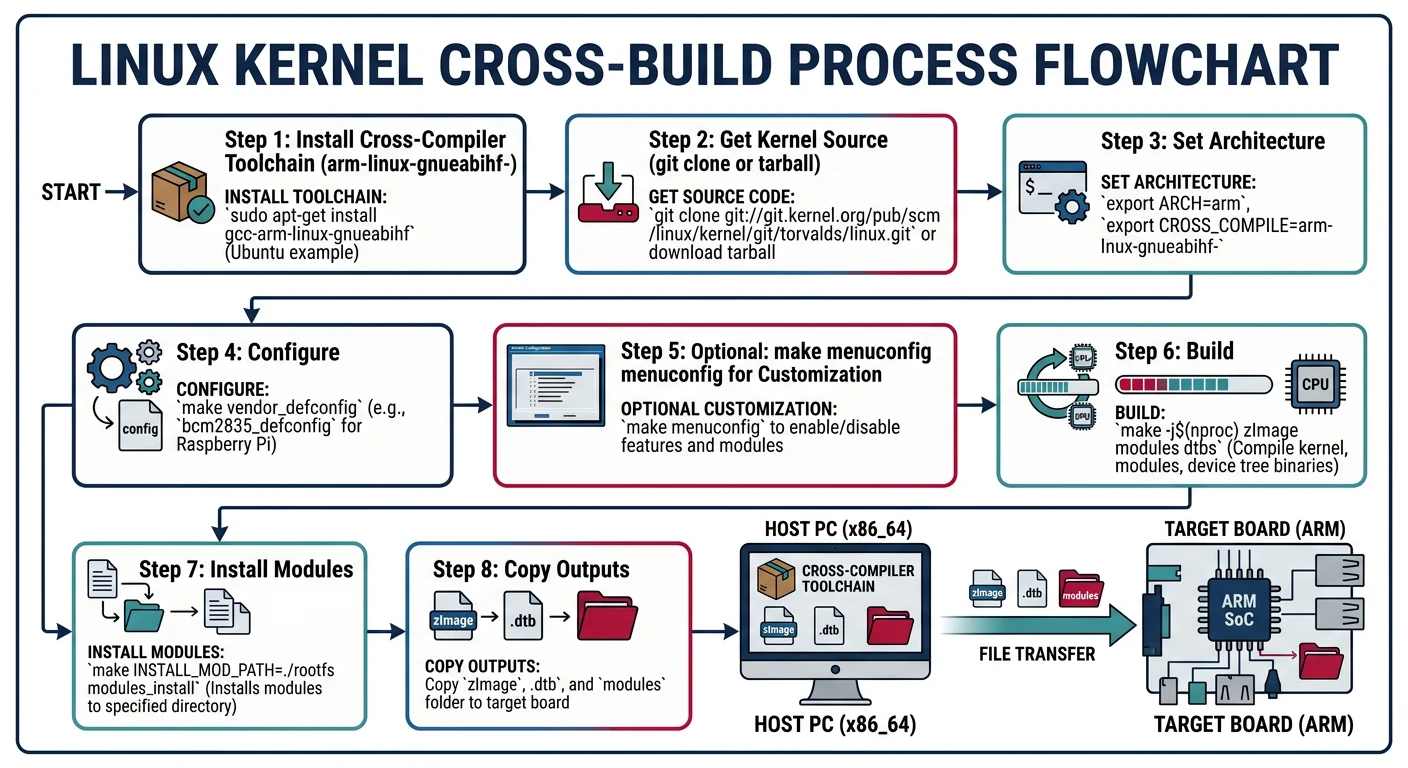
# Set cross-compiler (ARM)
export ARCH=arm
export CROSS_COMPILE=arm-linux-gnueabihf-

# Build kernel and modules
make -j$(nproc) zImage       # Compressed kernel
make -j$(nproc) modules      # Loadable modules
make -j$(nproc) dtbs         # Device tree blobs

# Install modules to staging directory
make INSTALL_MOD_PATH=./staging modules_install

# Output files
arch/arm/boot/zImage         # Kernel image
arch/arm/boot/dts/*.dtb      # Device tree binaries
./staging/lib/modules/       # Kernel modules

# ARM64 example
export ARCH=arm64
export CROSS_COMPILE=aarch64-linux-gnu-
make -j$(nproc) Image        # Uncompressed for ARM64
Custom Out-of-Tree Modules
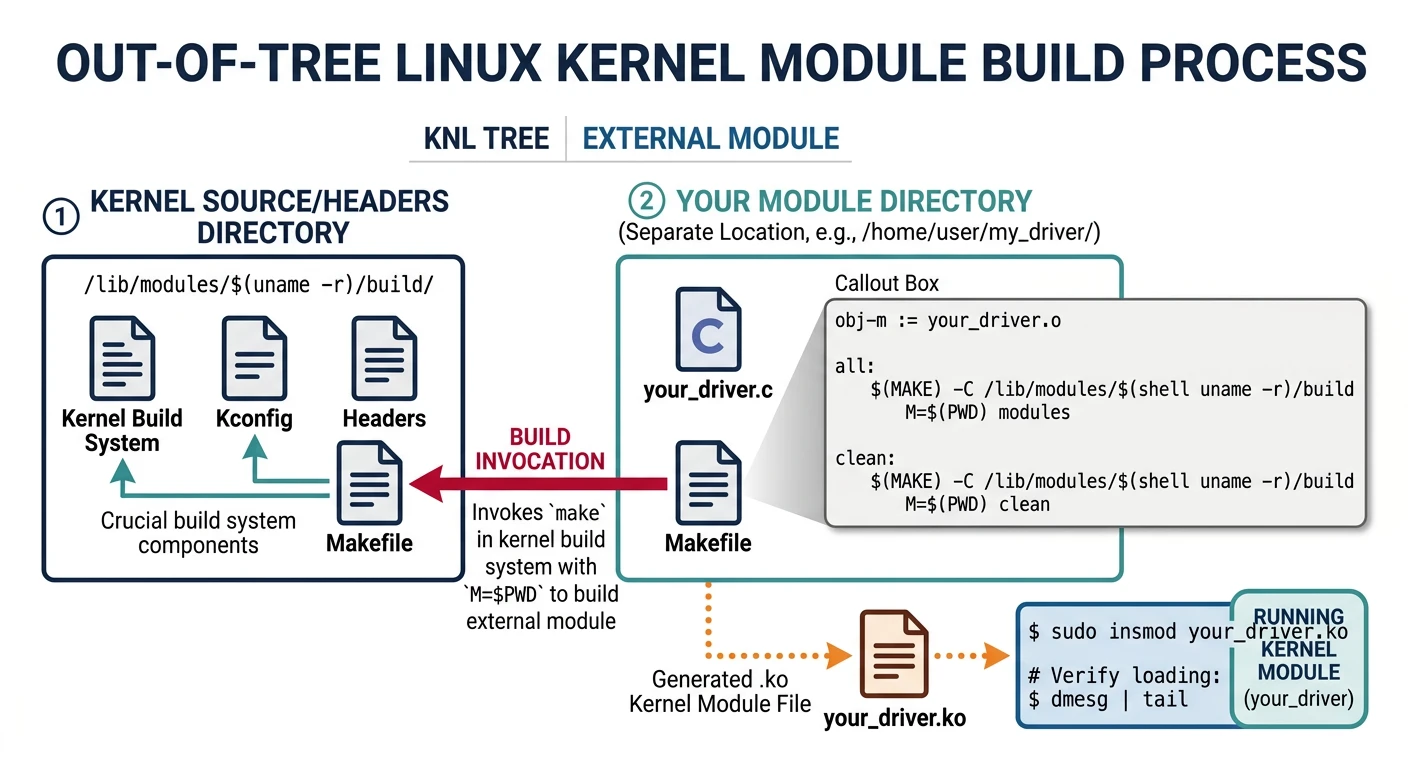
// my_oob_module.c - Out-of-tree module
#include
#include
#include

static int debug_level = 0;
module_param(debug_level, int, 0644);
MODULE_PARM_DESC(debug_level, "Debug verbosity (0-3)");

static int __init oob_init(void)
{
    pr_info("OOB Module loaded, debug=%d\n", debug_level);
    return 0;
}

static void __exit oob_exit(void)
{
    pr_info("OOB Module unloaded\n");
}

module_init(oob_init);
module_exit(oob_exit);

MODULE_LICENSE("GPL");
MODULE_AUTHOR("Wasil Zafar");
MODULE_DESCRIPTION("Out-of-Tree Example");
MODULE_VERSION("1.0");
# Makefile for out-of-tree module
obj-m += my_oob_module.o

KERNEL_SRC ?= /path/to/kernel/source

all:
	$(MAKE) -C $(KERNEL_SRC) M=$(PWD) ARCH=arm \
		CROSS_COMPILE=arm-linux-gnueabihf- modules

clean:
	$(MAKE) -C $(KERNEL_SRC) M=$(PWD) clean

# Load with parameters
insmod my_oob_module.ko debug_level=2
Kernel Debugging Techniques
# Enable debugging options in menuconfig
Kernel hacking  --->
    [*] Kernel debugging
    [*] KGDB: kernel debugger  --->
    [*] Tracers  --->
        [*] Kernel Function Tracer

# printk and dmesg
dmesg -w                    # Follow kernel log
dmesg -l err,warn           # Filter by level
echo 8 > /proc/sys/kernel/printk  # Enable all levels

# ftrace - function tracing
cd /sys/kernel/debug/tracing
echo function > current_tracer
echo 1 > tracing_on
cat trace                    # View trace

# kgdb - kernel debugger (via serial)
# Boot with: kgdbwait kgdboc=ttyS0,115200
# Connect: arm-linux-gnueabihf-gdb vmlinux
# (gdb) target remote /dev/ttyUSB0
Kernel Optimization
Size Optimization
# menuconfig optimizations
General setup  --->
    [ ] Configure standard kernel features  --->
    [*] Optimize for size (-Os)
    [ ] Enable the block layer (if no block devices)

# Disable unused features
Networking support  --->
    [ ] Wireless (if not needed)
    [ ] Bluetooth subsystem support

Device Drivers  --->
    [ ] Sound card support
    [ ] Multimedia support

# Result: Kernel can shrink from 5MB to under 1MB
Conclusion & What's Next
You've mastered Linux kernel customization—Kconfig, device tree overlays, building, and debugging. These skills are essential for optimizing embedded Linux systems.
Key Takeaways:
- Use defconfig as starting point, customize with menuconfig
- Device tree overlays enable runtime hardware changes
- Out-of-tree modules simplify driver development
- ftrace and kgdb are powerful kernel debugging tools
In Part 9, we'll explore Android System Architecture—understanding Android's layered architecture and system services.