Introduction to Cloud Computing
Cloud computing has revolutionized how organizations build, deploy, and scale applications. Instead of managing physical servers and infrastructure, businesses can leverage on-demand computing resources provided by cloud service providers like AWS, Microsoft Azure, and Google Cloud Platform (GCP).
Cloud Computing Mastery
Cloud Computing Fundamentals
IaaS, PaaS, SaaS, deployment modelsCLI Tools & Setup
AWS CLI, Azure CLI, gcloud, TerraformCompute Services
VMs, containers, auto-scaling, spot instancesStorage Services
Object, block, file storage, data lifecycleDatabase Services
RDS, DynamoDB, Cosmos DB, cachingNetworking & CDN
VPCs, load balancers, DNS, content deliveryServerless Computing
Lambda, Functions, event-driven architectureContainers & Kubernetes
Docker, EKS, AKS, GKE, orchestrationIdentity & Security
IAM, RBAC, encryption, complianceMonitoring & Observability
CloudWatch, Azure Monitor, loggingDevOps & CI/CD
Pipelines, infrastructure as code, GitOpsWhat is Cloud Computing?
Cloud computing is the delivery of computing services—including servers, storage, databases, networking, software, analytics, and intelligence—over the Internet ("the cloud") to offer faster innovation, flexible resources, and economies of scale.
The National Institute of Standards and Technology (NIST) defines cloud computing with five essential characteristics:
- On-demand self-service: Users can provision computing capabilities automatically without requiring human interaction with service providers
- Broad network access: Capabilities are available over the network and accessed through standard mechanisms (web browsers, mobile apps, APIs)
- Resource pooling: Provider's computing resources are pooled to serve multiple consumers using a multi-tenant model
- Rapid elasticity: Capabilities can be elastically provisioned and released to scale rapidly with demand
- Measured service: Cloud systems automatically control and optimize resource use through metering capabilities
Benefits of Cloud Computing
Cost Efficiency
Eliminate upfront hardware costs and reduce ongoing operational expenses. Pay only for what you use with flexible pricing models.
Scalability
Scale resources up or down based on demand, handling traffic spikes and seasonal variations automatically.
Global Reach
Deploy applications across multiple geographic regions to reduce latency and improve user experience worldwide.
Reliability
Benefit from built-in redundancy, backup, and disaster recovery capabilities provided by cloud platforms.
Cloud Service Models
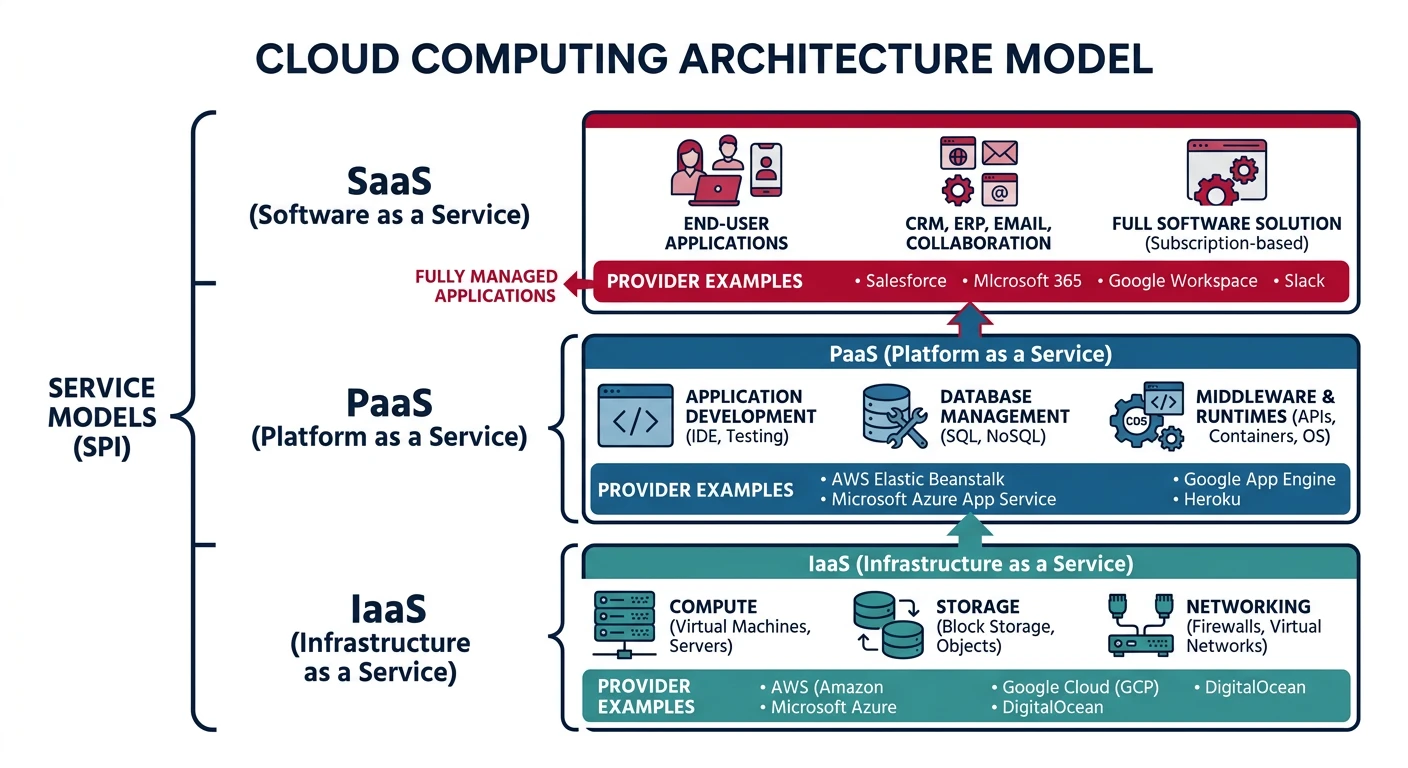
Cloud services are categorized into three primary models, each offering different levels of control, flexibility, and management responsibility:
Infrastructure as a Service (IaaS)
IaaS provides virtualized computing resources over the internet. You rent IT infrastructure—servers, virtual machines (VMs), storage, networks, and operating systems—from a cloud provider on a pay-as-you-go basis.
- Test & Development: Quickly set up and dismantle development and test environments
- Website Hosting: Run websites at lower costs than traditional web hosting
- Storage & Backup: Implement scalable storage solutions and disaster recovery
- High-Performance Computing: Run complex computations on demand
Popular IaaS Providers:
- AWS: Amazon EC2 (compute), S3 (storage), VPC (networking)
- Azure: Virtual Machines, Blob Storage, Virtual Network
- GCP: Compute Engine, Cloud Storage, VPC
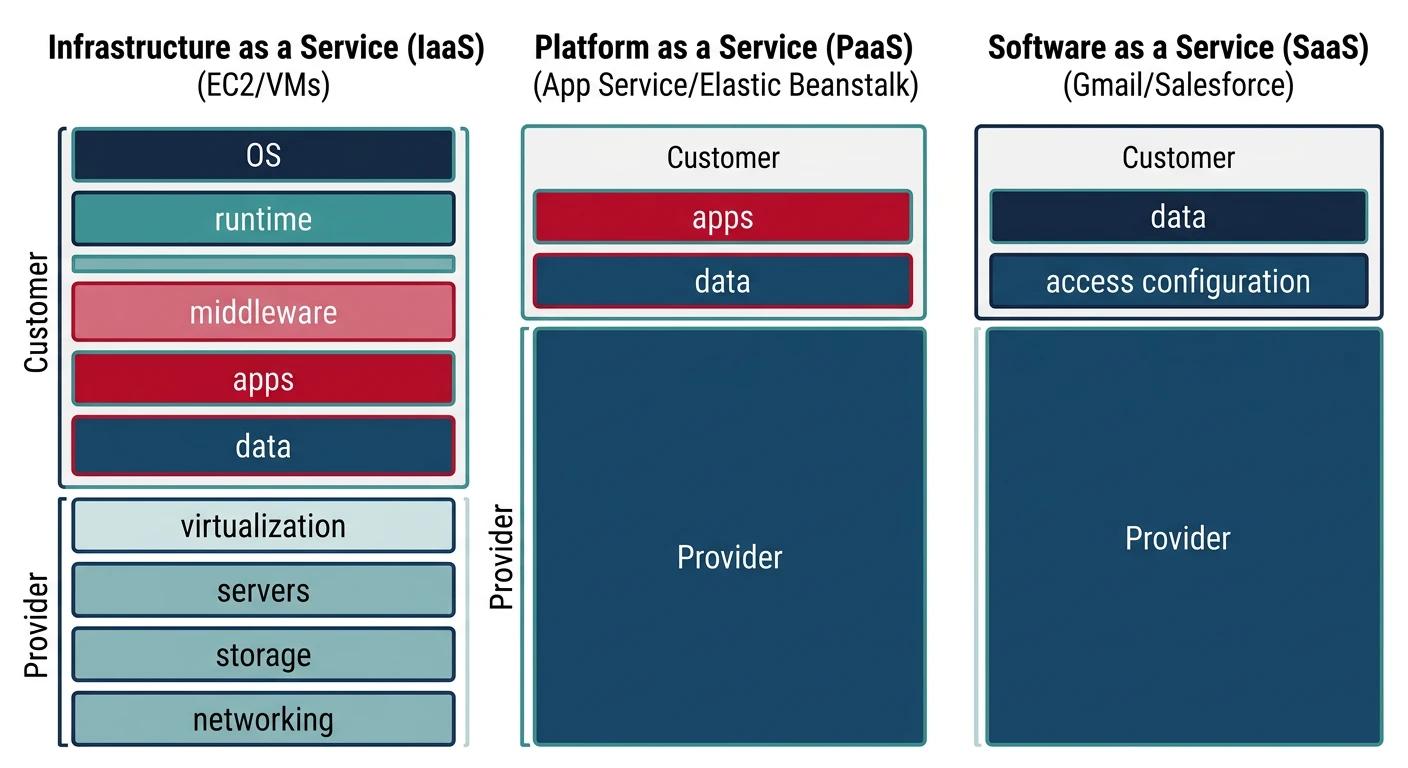
Responsibility Model: With IaaS, you manage the OS, middleware, runtime, data, and applications. The provider manages virtualization, servers, storage, and networking.
# Example: Launching a VM instance (conceptual CLI pattern across providers)

# AWS EC2 instance
aws ec2 run-instances \
  --image-id ami-0c55b159cbfafe1f0 \
  --count 1 \
  --instance-type t2.micro \
  --key-name MyKeyPair \
  --security-group-ids sg-903004f8

# Azure VM
az vm create \
  --resource-group myResourceGroup \
  --name myVM \
  --image UbuntuLTS \
  --size Standard_B1s \
  --admin-username azureuser \
  --generate-ssh-keys

# GCP Compute Engine
gcloud compute instances create my-instance \
  --zone=us-central1-a \
  --machine-type=e2-micro \
  --image-family=ubuntu-2004-lts \
  --image-project=ubuntu-os-cloud
Platform as a Service (PaaS)
PaaS provides a complete development and deployment environment in the cloud. It includes infrastructure (servers, storage, networking) plus middleware, development tools, database management systems, and business intelligence services.
- Faster Development: Pre-configured development environments accelerate application creation
- Built-in Security: Automated security patching and compliance built into the platform
- Database Management: Managed database services with automatic backups and scaling
- Middleware Integration: Seamless integration with authentication, messaging, and caching services
Popular PaaS Offerings:
- AWS: Elastic Beanstalk, Lambda, RDS, DynamoDB
- Azure: App Service, Azure Functions, SQL Database, Cosmos DB
- GCP: App Engine, Cloud Functions, Cloud SQL, Firestore
- Cross-platform: Heroku, Cloud Foundry, OpenShift
Responsibility Model: You manage applications and data. The provider manages runtime, middleware, OS, virtualization, servers, storage, and networking.
# Example: Deploying an application to PaaS

# AWS Elastic Beanstalk
eb init -p python-3.8 my-app
eb create my-environment
eb deploy

# Azure App Service
az webapp create \
  --resource-group myResourceGroup \
  --plan myAppServicePlan \
  --name myUniqueAppName \
  --runtime "PYTHON|3.8"
az webapp deployment source config-zip \
  --resource-group myResourceGroup \
  --name myUniqueAppName \
  --src app.zip

# GCP App Engine
gcloud app create --region=us-central
gcloud app deploy app.yaml --project=my-project-id
Software as a Service (SaaS)
SaaS delivers fully functional applications over the internet. Users access software through a web browser without worrying about infrastructure, platform, or software maintenance.
- Subscription-based: Monthly or annual licensing with predictable costs
- Automatic Updates: Provider handles all software updates and patches
- Accessibility: Access from any device with internet connectivity
- Multi-tenancy: Single instance serves multiple customers with data isolation
Popular SaaS Examples:
- Productivity: Microsoft 365, Google Workspace, Dropbox
- CRM: Salesforce, HubSpot, Zoho CRM
- Collaboration: Slack, Microsoft Teams, Zoom
- Development: GitHub, Jira, Confluence
Responsibility Model: You only manage your data and user access. The provider manages everything else—applications, runtime, middleware, OS, virtualization, servers, storage, and networking.
| Aspect | IaaS | PaaS | SaaS |
|---|---|---|---|
| Control | Highest | Medium | Lowest |
| Flexibility | Maximum | Moderate | Limited |
| Management Overhead | High | Medium | Low |
| Time to Deploy | Hours to Days | Minutes to Hours | Immediate |
| Typical Users | IT Administrators, DevOps | Developers | End Users, Business Teams |
Cloud Deployment Models
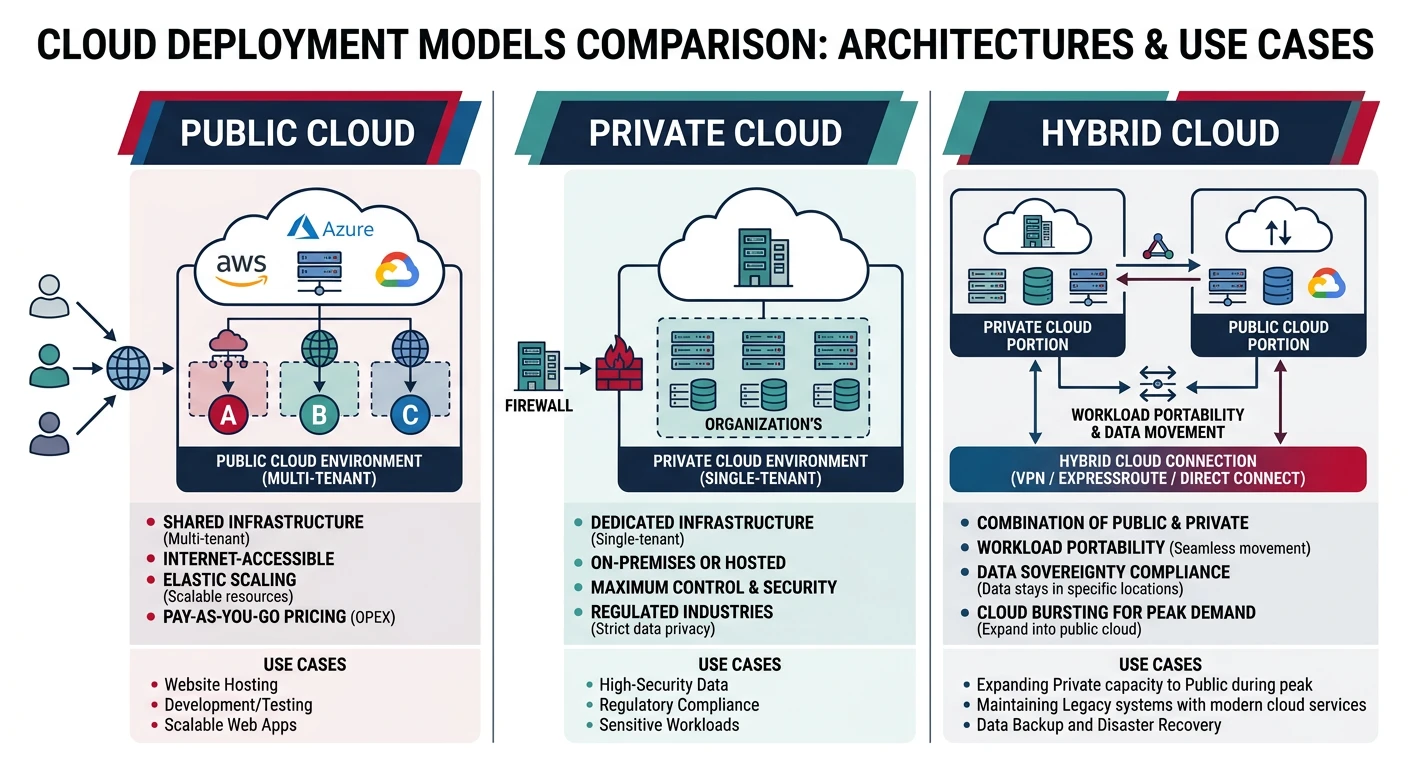
Cloud deployment models define where your infrastructure resides and who manages it. Each model offers different levels of control, security, and cost considerations.
Public Cloud
Public clouds are owned and operated by third-party cloud service providers. Infrastructure and services are delivered over the public internet and shared across multiple organizations (multi-tenancy).
Public Cloud Characteristics
Advantages:
- No CapEx: Zero upfront hardware investment
- High Scalability: Nearly unlimited resources on demand
- Pay-as-you-go: Pay only for consumed resources
- No Maintenance: Provider handles all infrastructure maintenance
Considerations:
- Shared infrastructure may not meet specific compliance requirements
- Less control over physical security
- Network latency for data-intensive applications
Private Cloud
Private clouds consist of computing resources used exclusively by one organization. They can be physically located at your organization's on-site data center or hosted by a third-party provider.
Private Cloud Characteristics
Advantages:
- Enhanced Security: Complete control over security policies and configurations
- Compliance: Meet specific regulatory and compliance requirements
- Customization: Tailor infrastructure to specific business needs
- Performance: Dedicated resources with predictable performance
Considerations:
- Higher upfront capital expenditure for hardware
- Ongoing maintenance and staffing costs
- Limited scalability compared to public cloud
Hybrid Cloud
Hybrid clouds combine public and private clouds, allowing data and applications to be shared between them. This model provides greater flexibility and optimization of existing infrastructure, security, and compliance.
- Cloud Bursting: Run applications on-premises normally, burst to public cloud during peak demand
- Data Sovereignty: Keep sensitive data on-premises while leveraging public cloud for non-sensitive workloads
- Gradual Migration: Incrementally move workloads to the cloud while maintaining legacy systems
- Disaster Recovery: Use public cloud as a DR site for on-premises applications
Hybrid Cloud Technologies:
- AWS: AWS Outposts, VMware Cloud on AWS, AWS Direct Connect
- Azure: Azure Arc, Azure Stack, ExpressRoute
- GCP: Anthos, Cloud Interconnect, Google Cloud VMware Engine
# Example: Setting up hybrid connectivity

# AWS Direct Connect (dedicated network connection)
aws directconnect create-connection \
  --location EqDC2 \
  --bandwidth 1Gbps \
  --connection-name MyConnection

# Azure ExpressRoute
az network express-route create \
  --resource-group myResourceGroup \
  --name myCircuit \
  --peering-location "Silicon Valley" \
  --bandwidth 200 \
  --provider "Equinix" \
  --sku-family MeteredData \
  --sku-tier Standard

# GCP Dedicated Interconnect
gcloud compute interconnects create my-interconnect \
  --interconnect-type DEDICATED \
  --link-type LINK_TYPE_ETHERNET_10G_LR \
  --location us-west1-a \
  --requested-link-count 2
Multi-Cloud
Multi-cloud strategies use services from multiple public cloud providers simultaneously. Organizations choose best-of-breed services from different vendors to avoid vendor lock-in and optimize costs.
- Vendor Independence: Avoid lock-in by distributing workloads across providers
- Best-of-Breed: Choose the best service from each provider for specific needs
- Geographic Coverage: Leverage different providers' regional presence
- Risk Mitigation: Reduce dependency on single provider outages
Cloud Architecture Patterns
Cloud architecture patterns are reusable solutions to common challenges in cloud application design. Understanding these patterns helps you build robust, scalable, and maintainable cloud applications.
Microservices Architecture
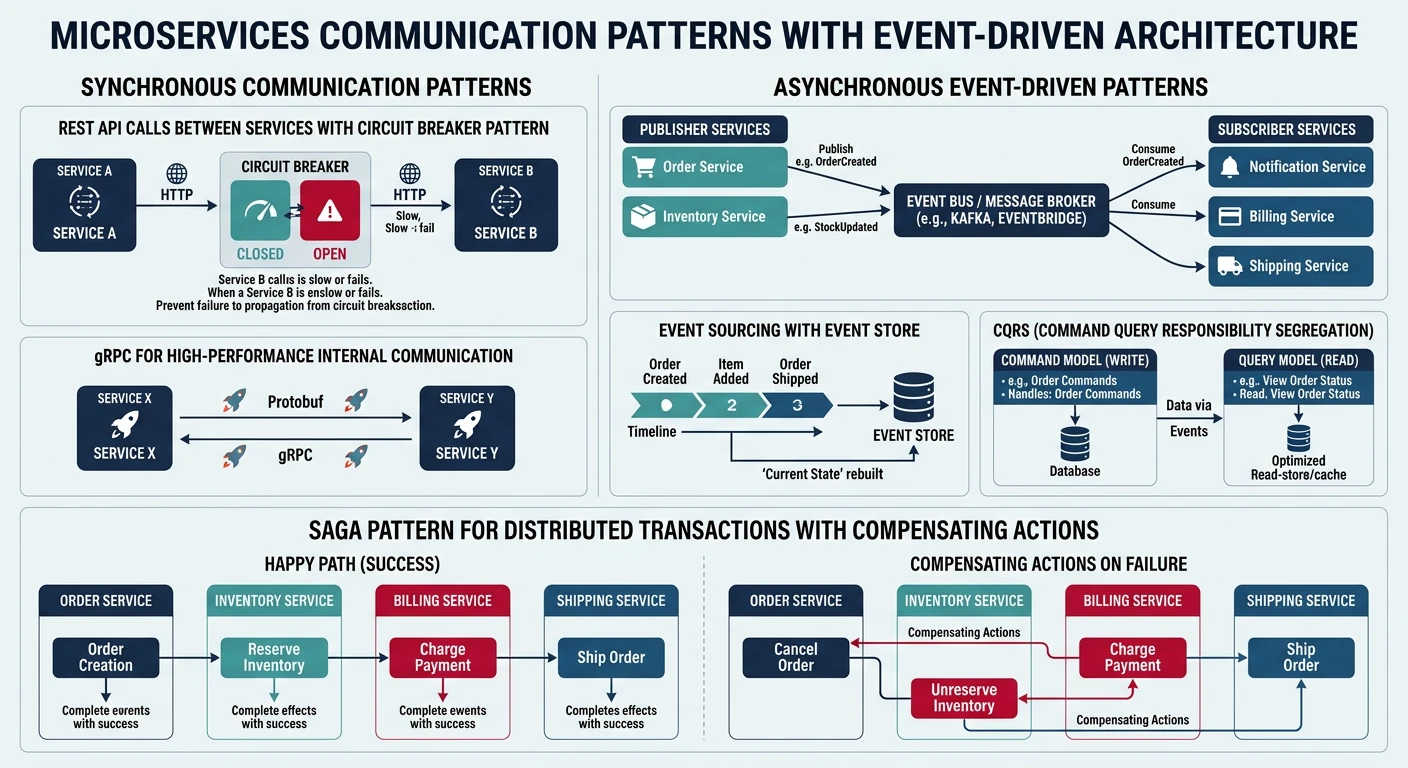
Microservices break applications into small, independent services that communicate through well-defined APIs. Each service runs in its own process and can be developed, deployed, and scaled independently.
Microservices Pattern
Key Characteristics:
- Single Responsibility: Each service handles one specific business capability
- Independent Deployment: Services can be updated without affecting others
- Technology Diversity: Different services can use different tech stacks
- Decentralized Data: Each service manages its own database
Cloud Services for Microservices:
- Container Orchestration: AWS ECS/EKS, Azure AKS, GCP GKE
- Serverless: AWS Lambda, Azure Functions, GCP Cloud Functions
- API Gateway: AWS API Gateway, Azure API Management, GCP Apigee
- Service Mesh: AWS App Mesh, Azure Service Fabric Mesh, GCP Anthos Service Mesh
# Example: Kubernetes deployment for microservice

apiVersion: apps/v1
kind: Deployment
metadata:
  name: user-service
  labels:
    app: user-service
spec:
  replicas: 3
  selector:
    matchLabels:
      app: user-service
  template:
    metadata:
      labels:
        app: user-service
    spec:
      containers:
      - name: user-service
        image: myregistry/user-service:v1.2.0
        ports:
        - containerPort: 8080
        env:
        - name: DATABASE_URL
          valueFrom:
            secretKeyRef:
              name: db-credentials
              key: url
        resources:
          requests:
            memory: "256Mi"
            cpu: "250m"
          limits:
            memory: "512Mi"
            cpu: "500m"
---
apiVersion: v1
kind: Service
metadata:
  name: user-service
spec:
  selector:
    app: user-service
  ports:
  - protocol: TCP
    port: 80
    targetPort: 8080
  type: LoadBalancer
Serverless Architecture
Serverless computing allows you to build and run applications without managing servers. The cloud provider automatically handles server provisioning, scaling, and maintenance. You only pay for the compute time consumed.
- Zero Server Management: No infrastructure provisioning or maintenance
- Automatic Scaling: Scales automatically from zero to peak demand
- Pay-per-Use: Charged only for actual execution time (milliseconds)
- Event-Driven: Functions triggered by events (HTTP requests, file uploads, database changes)
# Example: Azure Function for data processing

import logging
import azure.functions as func
import json
from azure.storage.blob import BlobServiceClient

def main(req: func.HttpRequest) -> func.HttpResponse:
    """
    Azure Function triggered by HTTP request
    Processes uploaded data and stores results in Blob Storage
    """
    logging.info('Processing HTTP request for data transformation')

    try:
        # Parse request body
        req_body = req.get_json()
        data = req_body.get('data')

        if not data:
            return func.HttpResponse(
                "Please provide 'data' in request body",
                status_code=400
            )

        # Transform data
        processed_data = {
            'original_count': len(data),
            'uppercase': [item.upper() for item in data],
            'timestamp': func.datetime.datetime.utcnow().isoformat()
        }

        # Store in Blob Storage
        connection_string = os.environ['AzureWebJobsStorage']
        blob_service = BlobServiceClient.from_connection_string(connection_string)
        container_client = blob_service.get_container_client('processed-data')

        blob_name = f"result-{func.datetime.datetime.utcnow().timestamp()}.json"
        blob_client = container_client.get_blob_client(blob_name)
        blob_client.upload_blob(json.dumps(processed_data))

        return func.HttpResponse(
            json.dumps({'status': 'success', 'blob': blob_name}),
            mimetype='application/json',
            status_code=200
        )

    except Exception as e:
        logging.error(f'Error processing request: {str(e)}')
        return func.HttpResponse(
            f"Error: {str(e)}",
            status_code=500
        )
Event-Driven Architecture
Event-driven architecture uses events to trigger and communicate between decoupled services. An event is a change in state or an update (e.g., item placed in shopping cart, file uploaded, user registered).
Event-Driven Pattern Components
Core Components:
- Event Producers: Services that generate events (e.g., user service creating "UserRegistered" event)
- Event Router: Distributes events to interested consumers (AWS EventBridge, Azure Event Grid)
- Event Consumers: Services that react to events (e.g., email service sending welcome email)
- Event Store: Optional persistent storage of events for replay and audit
Cloud Messaging Services:
- AWS: SNS, SQS, EventBridge, Kinesis
- Azure: Event Grid, Event Hubs, Service Bus, Queue Storage
- GCP: Pub/Sub, Cloud Tasks, Eventarc
# Example: Publishing events to AWS SNS

import boto3
import json

# Initialize SNS client
sns = boto3.client('sns')
topic_arn = 'arn:aws:sns:us-east-1:123456789012:UserEvents'

def publish_user_registered_event(user_id, email, username):
    """
    Publish UserRegistered event to SNS topic
    Multiple services can subscribe and react to this event
    """
    event = {
        'eventType': 'UserRegistered',
        'timestamp': datetime.datetime.utcnow().isoformat(),
        'data': {
            'userId': user_id,
            'email': email,
            'username': username
        }
    }

    response = sns.publish(
        TopicArn=topic_arn,
        Message=json.dumps(event),
        Subject='UserRegistered',
        MessageAttributes={
            'eventType': {
                'DataType': 'String',
                'StringValue': 'UserRegistered'
            }
        }
    )

    print(f"Event published with MessageId: {response['MessageId']}")
    return response

# Usage
publish_user_registered_event(
    user_id='user-12345',
    email='user@example.com',
    username='newuser'
)
# Example: Consuming events from Azure Service Bus

from azure.servicebus import ServiceBusClient, ServiceBusReceiver
import json

# Connection string and queue name
connection_str = "Endpoint=sb://myservicebus.servicebus.windows.net/;..."
queue_name = "user-events"

def process_user_event(message):
    """
    Process incoming user event message
    Each consumer handles events independently
    """
    try:
        event_data = json.loads(str(message))
        event_type = event_data.get('eventType')

        if event_type == 'UserRegistered':
            user_data = event_data['data']
            # Send welcome email
            send_welcome_email(user_data['email'], user_data['username'])
            print(f"Welcome email sent to {user_data['email']}")

        elif event_type == 'UserDeleted':
            user_id = event_data['data']['userId']
            # Clean up user data
            cleanup_user_data(user_id)
            print(f"Cleaned up data for user {user_id}")

    except Exception as e:
        print(f"Error processing event: {str(e)}")
        raise

# Create Service Bus client and receiver
with ServiceBusClient.from_connection_string(connection_str) as client:
    with client.get_queue_receiver(queue_name) as receiver:
        # Receive messages
        for message in receiver:
            process_user_event(message)
            # Complete the message so it's removed from the queue
            receiver.complete_message(message)
Core Cloud Concepts
Elasticity vs. Scalability
While often used interchangeably, elasticity and scalability have distinct meanings in cloud computing:
Scalability
Definition: The ability to handle increased load by adding resources (scale up/vertical) or instances (scale out/horizontal).
Characteristics:
- Planned capacity increases
- Long-term growth accommodation
- Manual or scheduled scaling
Example: Adding more servers during holiday season
Elasticity
Definition: The ability to automatically scale resources up or down based on real-time demand.
Characteristics:
- Dynamic, automatic adjustment
- Responds to current demand
- Bi-directional (up and down)
Example: Auto-scaling during traffic spikes
# Example: Auto-scaling configuration (AWS Auto Scaling Group)

Resources:
  WebServerGroup:
    Type: AWS::AutoScaling::AutoScalingGroup
    Properties:
      VPCZoneIdentifier:
        - subnet-12345678
        - subnet-87654321
      LaunchConfigurationName: !Ref LaunchConfig
      MinSize: 2          # Minimum instances
      MaxSize: 10         # Maximum instances
      DesiredCapacity: 3  # Normal capacity
      TargetGroupARNs:
        - !Ref ALBTargetGroup
      HealthCheckType: ELB
      HealthCheckGracePeriod: 300
      Tags:
        - Key: Name
          Value: WebServer
          PropagateAtLaunch: true

  ScaleUpPolicy:
    Type: AWS::AutoScaling::ScalingPolicy
    Properties:
      AdjustmentType: ChangeInCapacity
      AutoScalingGroupName: !Ref WebServerGroup
      Cooldown: 60
      ScalingAdjustment: 2  # Add 2 instances

  CPUAlarmHigh:
    Type: AWS::CloudWatch::Alarm
    Properties:
      AlarmDescription: Scale up if CPU > 80%
      MetricName: CPUUtilization
      Namespace: AWS/EC2
      Statistic: Average
      Period: 300
      EvaluationPeriods: 2
      Threshold: 80
      AlarmActions:
        - !Ref ScaleUpPolicy
      ComparisonOperator: GreaterThanThreshold
High Availability & Fault Tolerance
Building resilient cloud applications requires understanding and implementing high availability and fault tolerance principles:
Ensures systems remain operational and accessible even when components fail. Measured in "nines" of uptime:
- 99.9% (Three nines): ~8.76 hours downtime per year
- 99.99% (Four nines): ~52.56 minutes downtime per year
- 99.999% (Five nines): ~5.26 minutes downtime per year
Ability to continue operating properly when one or more components fail. Achieved through:
- Redundancy: Multiple instances of critical components
- Health Checks: Continuous monitoring and automatic failover
- Data Replication: Synchronous or asynchronous data copies across zones/regions
- Graceful Degradation: Reduced functionality instead of complete failure
Regions and Availability Zones
Cloud providers organize their infrastructure into geographic regions and availability zones to provide resilience and reduce latency:
Geographic Distribution
Regions:
- Separate geographic areas (e.g., us-east-1, eu-west-1, ap-southeast-1)
- Each region is completely independent and isolated
- Data doesn't automatically replicate across regions
- Choose regions based on latency, data residency requirements, and compliance
Availability Zones (AZs):
- Multiple isolated data centers within a region
- Each AZ has independent power, cooling, and networking
- Low-latency, high-throughput connections between AZs in same region
- Deploy across multiple AZs for high availability
Provider Examples:
- AWS: 30+ regions, 90+ availability zones
- Azure: 60+ regions, paired regions for disaster recovery
- GCP: 35+ regions, 100+ zones
Cloud Design Patterns
Circuit Breaker Pattern
The Circuit Breaker pattern prevents an application from repeatedly trying to execute an operation that's likely to fail, allowing it to continue without waiting for the fault to be fixed or wasting CPU cycles.
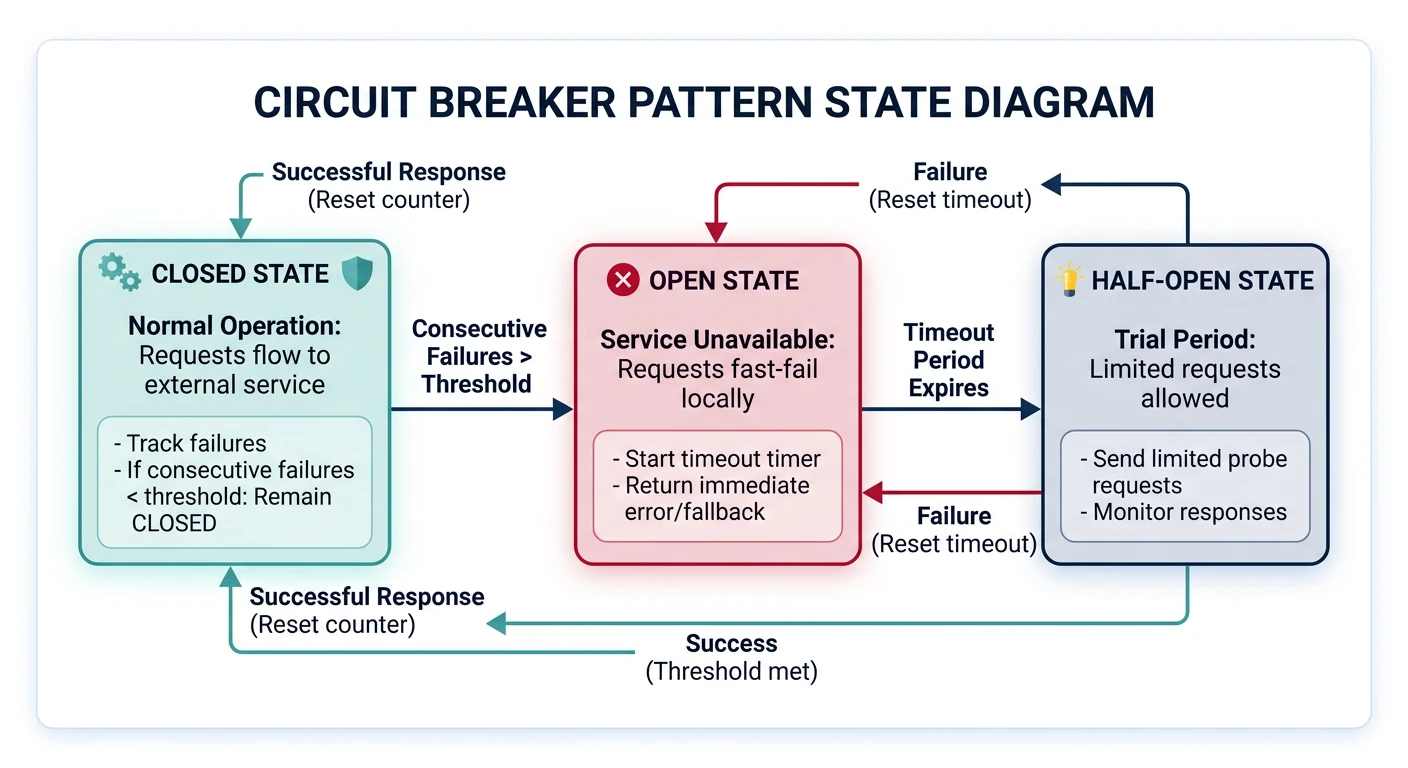
- Closed: Requests flow normally. Monitor for failures.
- Open: Requests fail immediately without attempting the operation. After timeout, transition to Half-Open.
- Half-Open: Allow limited requests to test if the underlying problem has been fixed.
# Example: Circuit Breaker implementation in Python

import time
from enum import Enum
from functools import wraps

class CircuitBreakerState(Enum):
    CLOSED = 1
    OPEN = 2
    HALF_OPEN = 3

class CircuitBreaker:
    def __init__(self, failure_threshold=5, timeout=60, expected_exception=Exception):
        self.failure_threshold = failure_threshold
        self.timeout = timeout
        self.expected_exception = expected_exception
        self.failure_count = 0
        self.last_failure_time = None
        self.state = CircuitBreakerState.CLOSED

    def call(self, func, *args, **kwargs):
        if self.state == CircuitBreakerState.OPEN:
            if time.time() - self.last_failure_time > self.timeout:
                self.state = CircuitBreakerState.HALF_OPEN
                print("Circuit breaker entering HALF_OPEN state")
            else:
                raise Exception("Circuit breaker is OPEN")

        try:
            result = func(*args, **kwargs)
            self._on_success()
            return result
        except self.expected_exception as e:
            self._on_failure()
            raise e

    def _on_success(self):
        self.failure_count = 0
        self.state = CircuitBreakerState.CLOSED
        print("Circuit breaker CLOSED")

    def _on_failure(self):
        self.failure_count += 1
        self.last_failure_time = time.time()

        if self.failure_count >= self.failure_threshold:
            self.state = CircuitBreakerState.OPEN
            print(f"Circuit breaker OPEN after {self.failure_count} failures")

# Usage example
def unreliable_api_call():
    """Simulates an unreliable external API"""
    import random
    if random.random() < 0.7:  # 70% failure rate
        raise Exception("API call failed")
    return "Success"

circuit_breaker = CircuitBreaker(failure_threshold=3, timeout=10)

for i in range(10):
    try:
        result = circuit_breaker.call(unreliable_api_call)
        print(f"Call {i+1}: {result}")
    except Exception as e:
        print(f"Call {i+1}: Failed - {str(e)}")
    time.sleep(1)
Retry Pattern
The Retry pattern handles transient failures by automatically retrying failed operations with exponential backoff and jitter.
# Example: Retry with exponential backoff

import time
import random
from functools import wraps

def retry_with_backoff(max_retries=3, base_delay=1, max_delay=32, exponential_base=2):
    """
    Decorator for retrying functions with exponential backoff

    Args:
        max_retries: Maximum number of retry attempts
        base_delay: Initial delay in seconds
        max_delay: Maximum delay in seconds
        exponential_base: Base for exponential calculation
    """
    def decorator(func):
        @wraps(func)
        def wrapper(*args, **kwargs):
            retries = 0

            while retries < max_retries:
                try:
                    return func(*args, **kwargs)
                except Exception as e:
                    retries += 1

                    if retries >= max_retries:
                        print(f"Max retries ({max_retries}) exceeded")
                        raise e

                    # Calculate exponential backoff with jitter
                    delay = min(base_delay * (exponential_base ** retries), max_delay)
                    jitter = random.uniform(0, delay * 0.1)  # Add 10% jitter
                    total_delay = delay + jitter

                    print(f"Attempt {retries} failed: {str(e)}. Retrying in {total_delay:.2f}s...")
                    time.sleep(total_delay)

        return wrapper
    return decorator

# Usage
@retry_with_backoff(max_retries=5, base_delay=1, max_delay=30)
def call_external_api(endpoint):
    """Simulate API call with potential failures"""
    import random

    if random.random() < 0.6:  # 60% chance of failure
        raise Exception("API temporarily unavailable")

    return {"status": "success", "data": "Response data"}

# Make API call with automatic retries
try:
    result = call_external_api("/api/users")
    print(f"API call succeeded: {result}")
except Exception as e:
    print(f"API call failed after all retries: {str(e)}")
Bulkhead Pattern
The Bulkhead pattern isolates critical resources to prevent cascading failures. Like compartments in a ship, if one compartment is damaged, others remain unaffected.
Bulkhead Implementation Strategies
Techniques:
- Thread Pool Isolation: Separate thread pools for different operations
- Process Isolation: Run services in separate processes or containers
- Connection Pool Partitioning: Dedicated connection pools for different clients
- Resource Quotas: Limit resources (CPU, memory) per service/tenant
Cloud Implementation:
- Kubernetes: Resource limits and requests, namespaces
- AWS: Separate Auto Scaling Groups, Lambda concurrency limits
- Azure: App Service Plans, Service Bus partitioning
Cloud Architecture Best Practices
1. Design for Failure
- Implement health checks for all services
- Use load balancers to distribute traffic across multiple instances
- Deploy across multiple availability zones
- Implement automatic failover for databases
- Use chaos engineering to test resilience (AWS Fault Injection Simulator, Chaos Monkey)
2. Implement Security in Depth
- Network Security: VPCs, security groups, network ACLs, private subnets
- Identity & Access: IAM roles, least privilege principle, MFA
- Data Protection: Encryption at rest and in transit, key management
- Monitoring: CloudTrail, GuardDuty, Security Hub, Azure Sentinel
- Compliance: Enable compliance standards (PCI-DSS, HIPAA, SOC 2)
3. Optimize Costs
- Right-sizing: Monitor and adjust instance sizes based on actual usage
- Reserved Instances: Commit to 1-3 year terms for predictable workloads (up to 75% savings)
- Spot Instances: Use spare capacity for fault-tolerant workloads (up to 90% savings)
- Auto-scaling: Scale down during low-demand periods
- Storage Tiering: Move infrequently accessed data to cheaper storage tiers
- Serverless: Pay only for actual execution time
4. Monitor and Log Everything
# Example: Structured logging for cloud applications

import logging
import json
from datetime import datetime

class CloudLogger:
    def __init__(self, service_name):
        self.service_name = service_name
        self.logger = logging.getLogger(service_name)
        self.logger.setLevel(logging.INFO)

        # JSON formatter for cloud logging services
        handler = logging.StreamHandler()
        handler.setFormatter(logging.Formatter('%(message)s'))
        self.logger.addHandler(handler)

    def log(self, level, message, **kwargs):
        """
        Structured logging compatible with CloudWatch, Stackdriver, Azure Monitor
        """
        log_entry = {
            'timestamp': datetime.utcnow().isoformat(),
            'service': self.service_name,
            'level': level,
            'message': message,
            **kwargs
        }

        self.logger.log(
            getattr(logging, level.upper()),
            json.dumps(log_entry)
        )

    def info(self, message, **kwargs):
        self.log('info', message, **kwargs)

    def error(self, message, **kwargs):
        self.log('error', message, **kwargs)

    def warning(self, message, **kwargs):
        self.log('warning', message, **kwargs)

# Usage
logger = CloudLogger('user-service')

logger.info(
    'User login successful',
    user_id='user-12345',
    ip_address='192.168.1.1',
    session_id='sess-abc123'
)

logger.error(
    'Database connection failed',
    error_code='DB_CONN_001',
    retry_count=3,
    database='users-db'
)
5. Use Infrastructure as Code (IaC)
Infrastructure as Code allows you to define and provision cloud infrastructure using code, ensuring consistency, version control, and repeatability.
# Example: Terraform configuration for multi-tier web application

# VPC and Networking
resource "aws_vpc" "main" {
  cidr_block           = "10.0.0.0/16"
  enable_dns_hostnames = true

  tags = {
    Name = "main-vpc"
    Environment = "production"
  }
}

resource "aws_subnet" "public" {
  count             = 2
  vpc_id            = aws_vpc.main.id
  cidr_block        = "10.0.${count.index + 1}.0/24"
  availability_zone = data.aws_availability_zones.available.names[count.index]

  tags = {
    Name = "public-subnet-${count.index + 1}"
    Tier = "public"
  }
}

resource "aws_subnet" "private" {
  count             = 2
  vpc_id            = aws_vpc.main.id
  cidr_block        = "10.0.${count.index + 10}.0/24"
  availability_zone = data.aws_availability_zones.available.names[count.index]

  tags = {
    Name = "private-subnet-${count.index + 1}"
    Tier = "private"
  }
}

# Application Load Balancer
resource "aws_lb" "web" {
  name               = "web-alb"
  internal           = false
  load_balancer_type = "application"
  security_groups    = [aws_security_group.alb.id]
  subnets            = aws_subnet.public[*].id

  enable_deletion_protection = true

  tags = {
    Name = "web-alb"
  }
}

# Auto Scaling Group
resource "aws_autoscaling_group" "web" {
  name                = "web-asg"
  vpc_zone_identifier = aws_subnet.private[*].id
  target_group_arns   = [aws_lb_target_group.web.arn]
  health_check_type   = "ELB"

  min_size         = 2
  max_size         = 10
  desired_capacity = 3

  launch_template {
    id      = aws_launch_template.web.id
    version = "$Latest"
  }

  tag {
    key                 = "Name"
    value               = "web-server"
    propagate_at_launch = true
  }
}

# RDS Database
resource "aws_db_instance" "main" {
  identifier           = "main-db"
  engine              = "postgres"
  engine_version      = "14.6"
  instance_class      = "db.t3.medium"
  allocated_storage   = 100

  db_name  = "appdb"
  username = "admin"
  password = var.db_password

  multi_az               = true
  publicly_accessible    = false
  db_subnet_group_name   = aws_db_subnet_group.main.name
  vpc_security_group_ids = [aws_security_group.database.id]

  backup_retention_period = 7
  backup_window          = "03:00-04:00"
  maintenance_window     = "sun:04:00-sun:05:00"

  enabled_cloudwatch_logs_exports = ["postgresql", "upgrade"]

  tags = {
    Name = "main-database"
  }
}
Conclusion & Next Steps
Understanding cloud computing fundamentals is essential for building modern, scalable applications. You've learned about:
- Service Models: IaaS, PaaS, and SaaS and their appropriate use cases
- Deployment Models: Public, private, hybrid, and multi-cloud strategies
- Architecture Patterns: Microservices, serverless, and event-driven architectures
- Core Concepts: Elasticity, high availability, regions, and availability zones
- Design Patterns: Circuit breaker, retry, and bulkhead patterns for resilience
- Best Practices: Security, cost optimization, monitoring, and infrastructure as code
Explore the complete Cloud Computing Series:
- CLI Tools Setup Guide - AWS CLI, Azure CLI, Google Cloud SDK
- Storage Services - S3, Azure Blob, GCS
- Compute Services - EC2, Azure VMs, GCE
Recommended Practice: Set up a free tier account with AWS, Azure, or GCP and experiment with creating virtual machines, storage buckets, and serverless functions. Hands-on experience is invaluable for mastering cloud computing.