Introduction
DevOps and CI/CD are essential practices for modern software delivery. This guide covers automated pipelines, Infrastructure as Code, and deployment strategies across all major cloud providers with practical CLI examples.
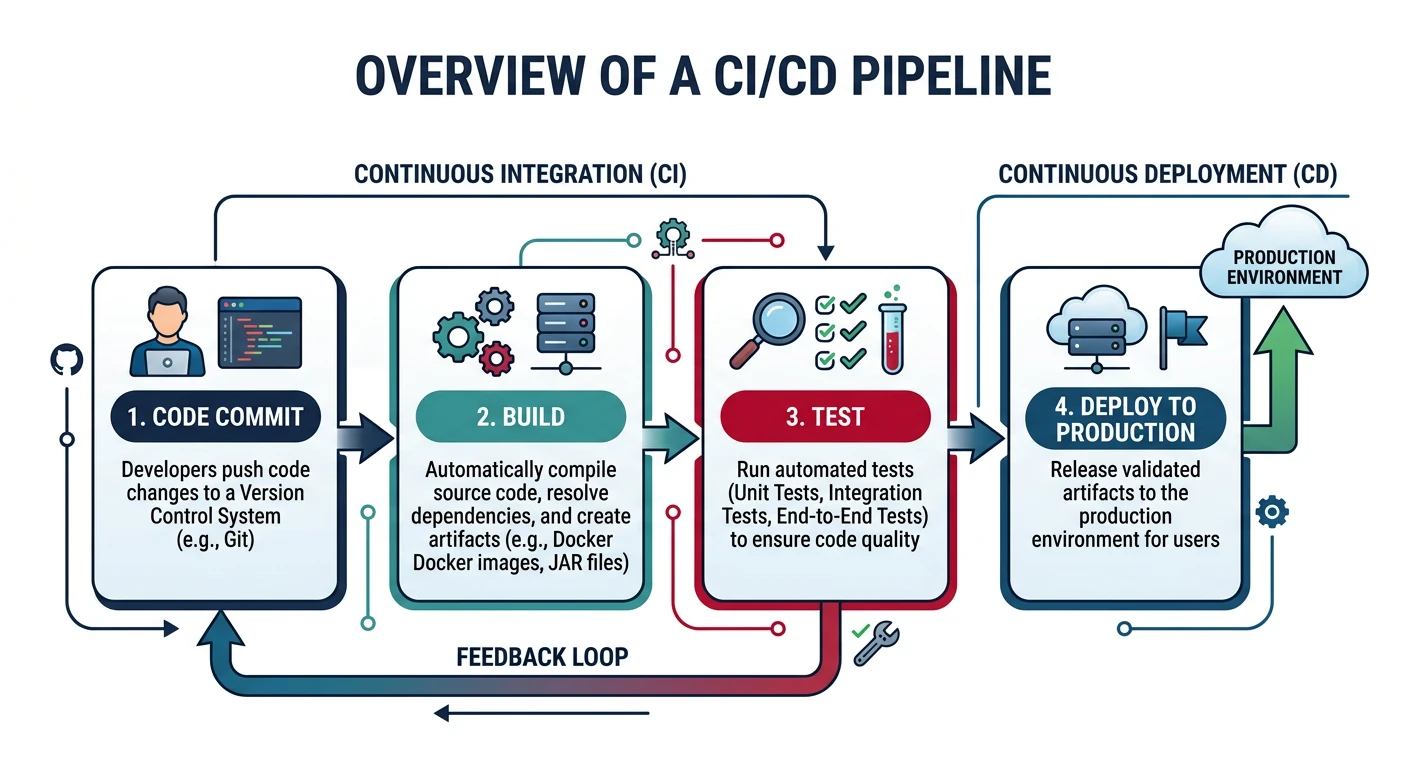
What We'll Cover:
- CI/CD Pipelines - Automated build, test, and deploy
- Source Control - CodeCommit, Azure Repos, Cloud Source Repositories
- Build Services - CodeBuild, Azure Pipelines, Cloud Build
- Infrastructure as Code - Terraform, CloudFormation, Bicep
- GitOps - Declarative infrastructure management
- Deployment Strategies - Blue-green, canary, rolling
Cloud Computing Mastery
Your 11-step learning path • Currently on Step 11
Cloud Computing Fundamentals
IaaS, PaaS, SaaS, deployment modelsCLI Tools & Setup
AWS CLI, Azure CLI, gcloud, TerraformCompute Services
VMs, containers, auto-scaling, spot instancesStorage Services
Object, block, file storage, data lifecycleDatabase Services
RDS, DynamoDB, Cosmos DB, cachingNetworking & CDN
VPCs, load balancers, DNS, content deliveryServerless Computing
Lambda, Functions, event-driven architectureContainers & Kubernetes
Docker, EKS, AKS, GKE, orchestrationIdentity & Security
IAM, RBAC, encryption, complianceMonitoring & Observability
CloudWatch, Azure Monitor, logging11
DevOps & CI/CD
Pipelines, infrastructure as code, GitOpsCI/CD Concepts
Continuous Integration (CI)
CI Pipeline Stages
- Source - Code commit triggers pipeline
- Build - Compile code, resolve dependencies
- Test - Unit tests, integration tests, code quality
- Package - Create artifacts (Docker images, JARs, ZIPs)
Cloud CI/CD Pipeline
flowchart LR
    A["Source Code
Git Push"] --> B["Build
Compile and Package"]
    B --> C["Test
Unit and Integration"]
    C --> D["Artifact
Registry"]
    D --> E["Deploy Staging
Automated"]
    E --> F["Acceptance
Tests"]
    F --> G["Deploy Production
Blue-Green or Canary"]

    style A fill:#e8f4f4,stroke:#3B9797
    style D fill:#f0f4f8,stroke:#16476A
    style G fill:#e8f4f4,stroke:#3B9797
Continuous Deployment (CD)
CD Pipeline Stages
- Deploy to Dev - Automatic deployment for testing
- Deploy to Staging - Production-like environment
- Approval Gate - Manual or automated approval
- Deploy to Production - Release to users
Provider Comparison
| Feature | AWS | Azure | GCP |
|---|---|---|---|
| Source Control | CodeCommit | Azure Repos | Cloud Source Repositories |
| Build | CodeBuild | Azure Pipelines | Cloud Build |
| Deploy | CodeDeploy | Azure Pipelines | Cloud Deploy |
| Pipeline Orchestration | CodePipeline | Azure Pipelines | Cloud Build Triggers |
| Artifact Storage | CodeArtifact / S3 | Azure Artifacts | Artifact Registry |
| Native IaC | CloudFormation / CDK | ARM / Bicep | Deployment Manager |
| Config Language | YAML / JSON | YAML | YAML |
AWS CI/CD Services
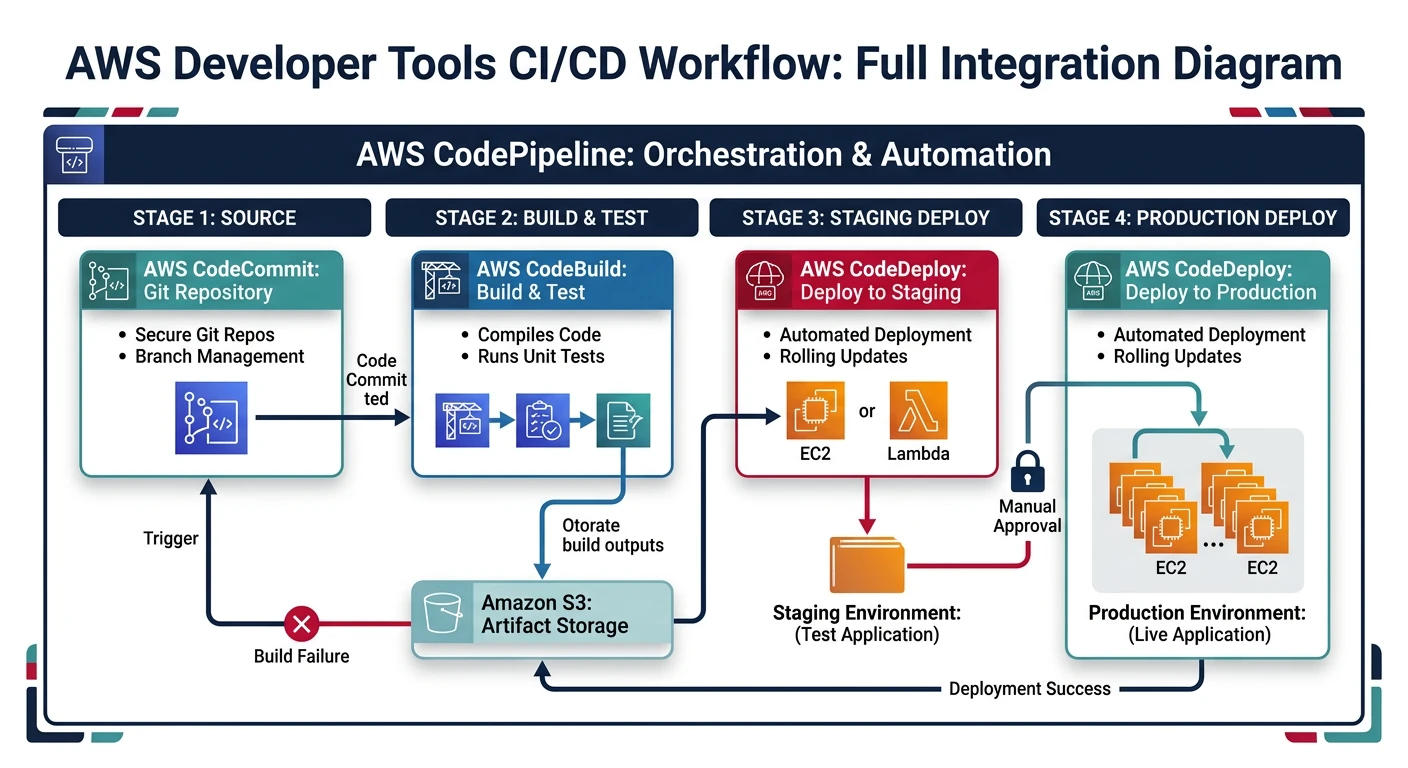
AWS Developer Tools
- CodeCommit - Managed Git repositories
- CodeBuild - Managed build service
- CodeDeploy - Automated deployments
- CodePipeline - CI/CD orchestration
CodeCommit
# Create repository
aws codecommit create-repository \
    --repository-name my-app \
    --repository-description "My application repository"

# Clone repository
git clone https://git-codecommit.us-east-1.amazonaws.com/v1/repos/my-app

# List repositories
aws codecommit list-repositories

# Create branch
aws codecommit create-branch \
    --repository-name my-app \
    --branch-name feature/new-feature \
    --commit-id abc123

# Create pull request
aws codecommit create-pull-request \
    --title "Add new feature" \
    --description "Implements feature X" \
    --targets repositoryName=my-app,sourceReference=feature/new-feature,destinationReference=main

# Merge pull request
aws codecommit merge-pull-request-by-fast-forward \
    --pull-request-id 1 \
    --repository-name my-app
CodeBuild
# Create build project
aws codebuild create-project \
    --name my-build-project \
    --source type=CODECOMMIT,location=https://git-codecommit.us-east-1.amazonaws.com/v1/repos/my-app \
    --artifacts type=S3,location=my-artifacts-bucket \
    --environment type=LINUX_CONTAINER,computeType=BUILD_GENERAL1_SMALL,image=aws/codebuild/amazonlinux2-x86_64-standard:4.0 \
    --service-role arn:aws:iam::123456789012:role/CodeBuildServiceRole

# Start build
aws codebuild start-build --project-name my-build-project

# Start build with environment variables
aws codebuild start-build \
    --project-name my-build-project \
    --environment-variables-override \
        name=ENV,value=production,type=PLAINTEXT \
        name=API_KEY,value=secret-key,type=SECRETS_MANAGER

# List builds
aws codebuild list-builds-for-project --project-name my-build-project

# Get build details
aws codebuild batch-get-builds --ids my-build-project:abc123

# View build logs
aws logs get-log-events \
    --log-group-name /aws/codebuild/my-build-project \
    --log-stream-name abc123/build
buildspec.yml Example
# buildspec.yml - CodeBuild configuration
version: 0.2

env:
  variables:
    NODE_ENV: production
  secrets-manager:
    DB_PASSWORD: arn:aws:secretsmanager:us-east-1:123456789012:secret:db-creds:password

phases:
  install:
    runtime-versions:
      nodejs: 18
    commands:
      - npm ci

  pre_build:
    commands:
      - echo "Running tests..."
      - npm test
      - echo "Logging into ECR..."
      - aws ecr get-login-password --region $AWS_DEFAULT_REGION | docker login --username AWS --password-stdin $ECR_REPO

  build:
    commands:
      - echo "Building application..."
      - npm run build
      - echo "Building Docker image..."
      - docker build -t $ECR_REPO:$CODEBUILD_RESOLVED_SOURCE_VERSION .
      - docker tag $ECR_REPO:$CODEBUILD_RESOLVED_SOURCE_VERSION $ECR_REPO:latest

  post_build:
    commands:
      - echo "Pushing Docker image..."
      - docker push $ECR_REPO:$CODEBUILD_RESOLVED_SOURCE_VERSION
      - docker push $ECR_REPO:latest
      - echo "Creating image definitions file..."
      - printf '[{"name":"app","imageUri":"%s"}]' $ECR_REPO:$CODEBUILD_RESOLVED_SOURCE_VERSION > imagedefinitions.json

artifacts:
  files:
    - imagedefinitions.json
    - appspec.yml
    - scripts/**/*
  discard-paths: no

cache:
  paths:
    - node_modules/**/*
CodeDeploy
# Create application
aws deploy create-application \
    --application-name my-app \
    --compute-platform Server

# Create deployment group for EC2
aws deploy create-deployment-group \
    --application-name my-app \
    --deployment-group-name production \
    --deployment-config-name CodeDeployDefault.OneAtATime \
    --ec2-tag-filters Key=Environment,Value=Production,Type=KEY_AND_VALUE \
    --service-role-arn arn:aws:iam::123456789012:role/CodeDeployServiceRole \
    --auto-rollback-configuration enabled=true,events=DEPLOYMENT_FAILURE

# Create deployment group for ECS (Blue/Green)
aws deploy create-deployment-group \
    --application-name my-ecs-app \
    --deployment-group-name production \
    --deployment-config-name CodeDeployDefault.ECSAllAtOnce \
    --service-role-arn arn:aws:iam::123456789012:role/CodeDeployServiceRole \
    --ecs-services clusterName=my-cluster,serviceName=my-service \
    --load-balancer-info targetGroupPairInfoList=[{targetGroups=[{name=tg-blue},{name=tg-green}],prodTrafficRoute={listenerArns=[arn:aws:elasticloadbalancing:...]}}] \
    --blue-green-deployment-configuration '{
        "terminateBlueInstancesOnDeploymentSuccess": {
            "action": "TERMINATE",
            "terminationWaitTimeInMinutes": 5
        },
        "deploymentReadyOption": {
            "actionOnTimeout": "CONTINUE_DEPLOYMENT"
        }
    }'

# Create deployment
aws deploy create-deployment \
    --application-name my-app \
    --deployment-group-name production \
    --s3-location bucket=my-artifacts,key=app.zip,bundleType=zip

# Get deployment status
aws deploy get-deployment --deployment-id d-ABC123

# Stop deployment
aws deploy stop-deployment --deployment-id d-ABC123
appspec.yml Example (EC2)
# appspec.yml - CodeDeploy configuration for EC2
version: 0.0
os: linux

files:
  - source: /
    destination: /var/www/myapp

permissions:
  - object: /var/www/myapp
    owner: www-data
    group: www-data
    mode: 755
    type:
      - directory
  - object: /var/www/myapp
    owner: www-data
    group: www-data
    mode: 644
    type:
      - file

hooks:
  BeforeInstall:
    - location: scripts/before_install.sh
      timeout: 300
      runas: root

  AfterInstall:
    - location: scripts/after_install.sh
      timeout: 300
      runas: root

  ApplicationStart:
    - location: scripts/start_server.sh
      timeout: 300
      runas: root

  ValidateService:
    - location: scripts/validate_service.sh
      timeout: 300
      runas: root
CodePipeline
# Create pipeline
aws codepipeline create-pipeline --cli-input-json file://pipeline.json

# Example pipeline.json structure
cat > pipeline.json << 'EOF'
{
    "pipeline": {
        "name": "my-pipeline",
        "roleArn": "arn:aws:iam::123456789012:role/CodePipelineServiceRole",
        "artifactStore": {
            "type": "S3",
            "location": "my-pipeline-artifacts"
        },
        "stages": [
            {
                "name": "Source",
                "actions": [{
                    "name": "Source",
                    "actionTypeId": {
                        "category": "Source",
                        "owner": "AWS",
                        "provider": "CodeCommit",
                        "version": "1"
                    },
                    "outputArtifacts": [{"name": "SourceOutput"}],
                    "configuration": {
                        "RepositoryName": "my-app",
                        "BranchName": "main"
                    }
                }]
            },
            {
                "name": "Build",
                "actions": [{
                    "name": "Build",
                    "actionTypeId": {
                        "category": "Build",
                        "owner": "AWS",
                        "provider": "CodeBuild",
                        "version": "1"
                    },
                    "inputArtifacts": [{"name": "SourceOutput"}],
                    "outputArtifacts": [{"name": "BuildOutput"}],
                    "configuration": {
                        "ProjectName": "my-build-project"
                    }
                }]
            },
            {
                "name": "Deploy",
                "actions": [{
                    "name": "Deploy",
                    "actionTypeId": {
                        "category": "Deploy",
                        "owner": "AWS",
                        "provider": "CodeDeploy",
                        "version": "1"
                    },
                    "inputArtifacts": [{"name": "BuildOutput"}],
                    "configuration": {
                        "ApplicationName": "my-app",
                        "DeploymentGroupName": "production"
                    }
                }]
            }
        ]
    }
}
EOF

# Start pipeline execution
aws codepipeline start-pipeline-execution --name my-pipeline

# Get pipeline state
aws codepipeline get-pipeline-state --name my-pipeline

# List pipeline executions
aws codepipeline list-pipeline-executions --pipeline-name my-pipeline

# Approve manual action
aws codepipeline put-approval-result \
    --pipeline-name my-pipeline \
    --stage-name Approval \
    --action-name ManualApproval \
    --result summary="Approved by admin",status=Approved \
    --token abc123
Azure DevOps
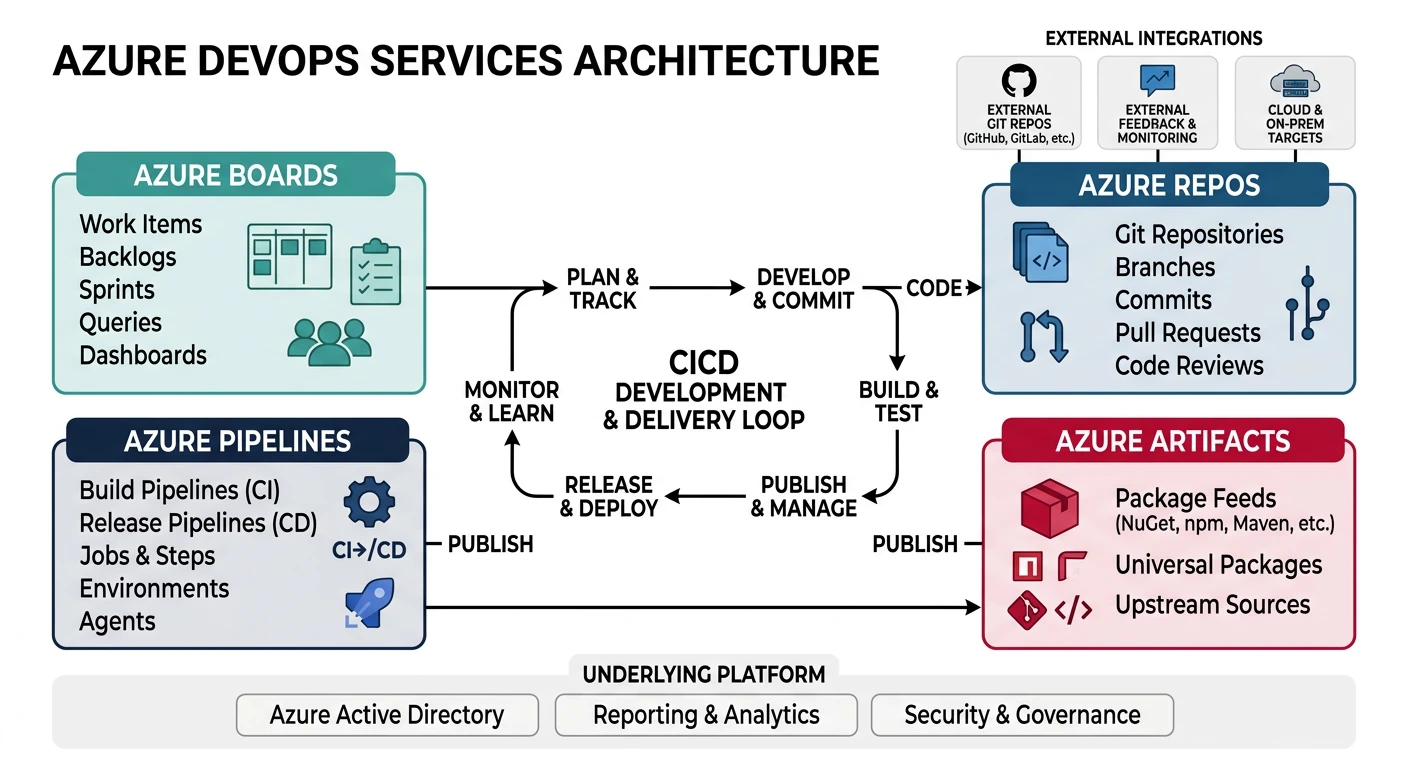
Azure DevOps Services
- Azure Repos - Git repositories
- Azure Pipelines - CI/CD pipelines
- Azure Artifacts - Package management
- Azure Boards - Work tracking
Azure Repos
# Install Azure DevOps CLI extension
az extension add --name azure-devops

# Configure defaults
az devops configure --defaults organization=https://dev.azure.com/myorg project=myproject

# Create repository
az repos create --name my-app --project myproject

# List repositories
az repos list --project myproject --output table

# Clone repository
git clone https://dev.azure.com/myorg/myproject/_git/my-app

# Create pull request
az repos pr create \
    --repository my-app \
    --source-branch feature/new-feature \
    --target-branch main \
    --title "Add new feature" \
    --description "Implements feature X"

# List pull requests
az repos pr list --repository my-app --status active

# Approve pull request
az repos pr set-vote --id 1 --vote approve

# Complete pull request
az repos pr update --id 1 --status completed
Azure Pipelines
# Create pipeline from YAML
az pipelines create \
    --name my-pipeline \
    --repository my-app \
    --branch main \
    --yml-path azure-pipelines.yml

# Run pipeline
az pipelines run --name my-pipeline

# Run pipeline with parameters
az pipelines run \
    --name my-pipeline \
    --parameters environment=production version=1.2.3

# List pipeline runs
az pipelines runs list --pipeline-name my-pipeline --output table

# Get pipeline run details
az pipelines runs show --id 123

# Cancel pipeline run
az pipelines runs cancel --id 123

# List pipelines
az pipelines list --output table

# Show pipeline variables
az pipelines variable list --pipeline-name my-pipeline
azure-pipelines.yml Example
# azure-pipelines.yml - Azure Pipelines configuration
trigger:
  branches:
    include:
      - main
      - release/*
  paths:
    exclude:
      - docs/*
      - README.md

pr:
  branches:
    include:
      - main

variables:
  - group: production-secrets
  - name: imageName
    value: 'myapp'
  - name: dockerRegistry
    value: 'myregistry.azurecr.io'

stages:
  - stage: Build
    displayName: 'Build and Test'
    jobs:
      - job: Build
        pool:
          vmImage: 'ubuntu-latest'
        steps:
          - task: NodeTool@0
            inputs:
              versionSpec: '18.x'
            displayName: 'Install Node.js'

          - script: |
              npm ci
              npm run lint
              npm test
            displayName: 'Install and Test'

          - script: npm run build
            displayName: 'Build Application'

          - task: Docker@2
            displayName: 'Build Docker Image'
            inputs:
              containerRegistry: 'myACRConnection'
              repository: '$(imageName)'
              command: 'buildAndPush'
              Dockerfile: '**/Dockerfile'
              tags: |
                $(Build.BuildId)
                latest

          - publish: $(Build.ArtifactStagingDirectory)
            artifact: drop

  - stage: DeployDev
    displayName: 'Deploy to Dev'
    dependsOn: Build
    condition: succeeded()
    jobs:
      - deployment: DeployDev
        environment: 'development'
        pool:
          vmImage: 'ubuntu-latest'
        strategy:
          runOnce:
            deploy:
              steps:
                - task: AzureWebAppContainer@1
                  inputs:
                    azureSubscription: 'myAzureSubscription'
                    appName: 'myapp-dev'
                    containers: '$(dockerRegistry)/$(imageName):$(Build.BuildId)'

  - stage: DeployProd
    displayName: 'Deploy to Production'
    dependsOn: DeployDev
    condition: and(succeeded(), eq(variables['Build.SourceBranch'], 'refs/heads/main'))
    jobs:
      - deployment: DeployProd
        environment: 'production'
        pool:
          vmImage: 'ubuntu-latest'
        strategy:
          runOnce:
            deploy:
              steps:
                - task: AzureWebAppContainer@1
                  inputs:
                    azureSubscription: 'myAzureSubscription'
                    appName: 'myapp-prod'
                    containers: '$(dockerRegistry)/$(imageName):$(Build.BuildId)'
Azure Artifacts
# Create feed
az artifacts universal publish \
    --organization https://dev.azure.com/myorg \
    --project myproject \
    --scope project \
    --feed myFeed \
    --name mypackage \
    --version 1.0.0 \
    --path ./dist

# Download artifact
az artifacts universal download \
    --organization https://dev.azure.com/myorg \
    --project myproject \
    --scope project \
    --feed myFeed \
    --name mypackage \
    --version 1.0.0 \
    --path ./download
GCP Cloud Build
Google Cloud Build
- Cloud Source Repositories - Git hosting
- Cloud Build - Serverless CI/CD
- Artifact Registry - Package management
- Cloud Deploy - Continuous delivery
Cloud Source Repositories
# Create repository
gcloud source repos create my-app

# Clone repository
gcloud source repos clone my-app

# List repositories
gcloud source repos list

# Add repository as remote
git remote add google https://source.developers.google.com/p/my-project/r/my-app

# Push to repository
git push google main
Cloud Build
# Submit build from local source
gcloud builds submit --tag gcr.io/my-project/my-app:v1

# Submit build with config file
gcloud builds submit --config cloudbuild.yaml

# Submit build with substitutions
gcloud builds submit \
    --config cloudbuild.yaml \
    --substitutions _ENV=production,_VERSION=1.2.3

# List builds
gcloud builds list --limit=10

# Get build details
gcloud builds describe BUILD_ID

# Cancel build
gcloud builds cancel BUILD_ID

# Stream build logs
gcloud builds log BUILD_ID --stream

# Create build trigger (GitHub)
gcloud builds triggers create github \
    --name=my-trigger \
    --repo-name=my-app \
    --repo-owner=myorg \
    --branch-pattern='^main$' \
    --build-config=cloudbuild.yaml

# Create build trigger (Cloud Source Repositories)
gcloud builds triggers create cloud-source-repositories \
    --name=my-trigger \
    --repo=my-app \
    --branch-pattern='^main$' \
    --build-config=cloudbuild.yaml

# List triggers
gcloud builds triggers list

# Run trigger manually
gcloud builds triggers run my-trigger --branch=main
cloudbuild.yaml Example
# cloudbuild.yaml - Cloud Build configuration
steps:
  # Install dependencies
  - name: 'node:18'
    entrypoint: 'npm'
    args: ['ci']

  # Run tests
  - name: 'node:18'
    entrypoint: 'npm'
    args: ['test']

  # Build application
  - name: 'node:18'
    entrypoint: 'npm'
    args: ['run', 'build']

  # Build Docker image
  - name: 'gcr.io/cloud-builders/docker'
    args:
      - 'build'
      - '-t'
      - 'gcr.io/$PROJECT_ID/my-app:$COMMIT_SHA'
      - '-t'
      - 'gcr.io/$PROJECT_ID/my-app:latest'
      - '.'

  # Push Docker image
  - name: 'gcr.io/cloud-builders/docker'
    args:
      - 'push'
      - 'gcr.io/$PROJECT_ID/my-app:$COMMIT_SHA'

  - name: 'gcr.io/cloud-builders/docker'
    args:
      - 'push'
      - 'gcr.io/$PROJECT_ID/my-app:latest'

  # Deploy to Cloud Run
  - name: 'gcr.io/cloud-builders/gcloud'
    args:
      - 'run'
      - 'deploy'
      - 'my-app'
      - '--image'
      - 'gcr.io/$PROJECT_ID/my-app:$COMMIT_SHA'
      - '--region'
      - 'us-central1'
      - '--platform'
      - 'managed'
      - '--allow-unauthenticated'

# Store images in Container Registry
images:
  - 'gcr.io/$PROJECT_ID/my-app:$COMMIT_SHA'
  - 'gcr.io/$PROJECT_ID/my-app:latest'

# Build options
options:
  machineType: 'E2_HIGHCPU_8'
  logging: CLOUD_LOGGING_ONLY

# Substitutions
substitutions:
  _ENV: 'production'

# Timeout
timeout: '1200s'
Cloud Deploy
# Create delivery pipeline
gcloud deploy delivery-pipelines create my-pipeline \
    --region=us-central1 \
    --file=delivery-pipeline.yaml

# Example delivery-pipeline.yaml
cat > delivery-pipeline.yaml << 'EOF'
apiVersion: deploy.cloud.google.com/v1
kind: DeliveryPipeline
metadata:
  name: my-pipeline
serialPipeline:
  stages:
    - targetId: dev
    - targetId: staging
      profiles:
        - staging
    - targetId: production
      profiles:
        - production
EOF

# Create target
gcloud deploy targets create dev \
    --region=us-central1 \
    --gke-cluster=projects/my-project/locations/us-central1/clusters/dev-cluster

# Create release
gcloud deploy releases create release-001 \
    --delivery-pipeline=my-pipeline \
    --region=us-central1 \
    --images=my-app=gcr.io/my-project/my-app:v1

# Promote release
gcloud deploy releases promote \
    --release=release-001 \
    --delivery-pipeline=my-pipeline \
    --region=us-central1

# Rollback
gcloud deploy targets rollback production \
    --delivery-pipeline=my-pipeline \
    --region=us-central1
Infrastructure as Code
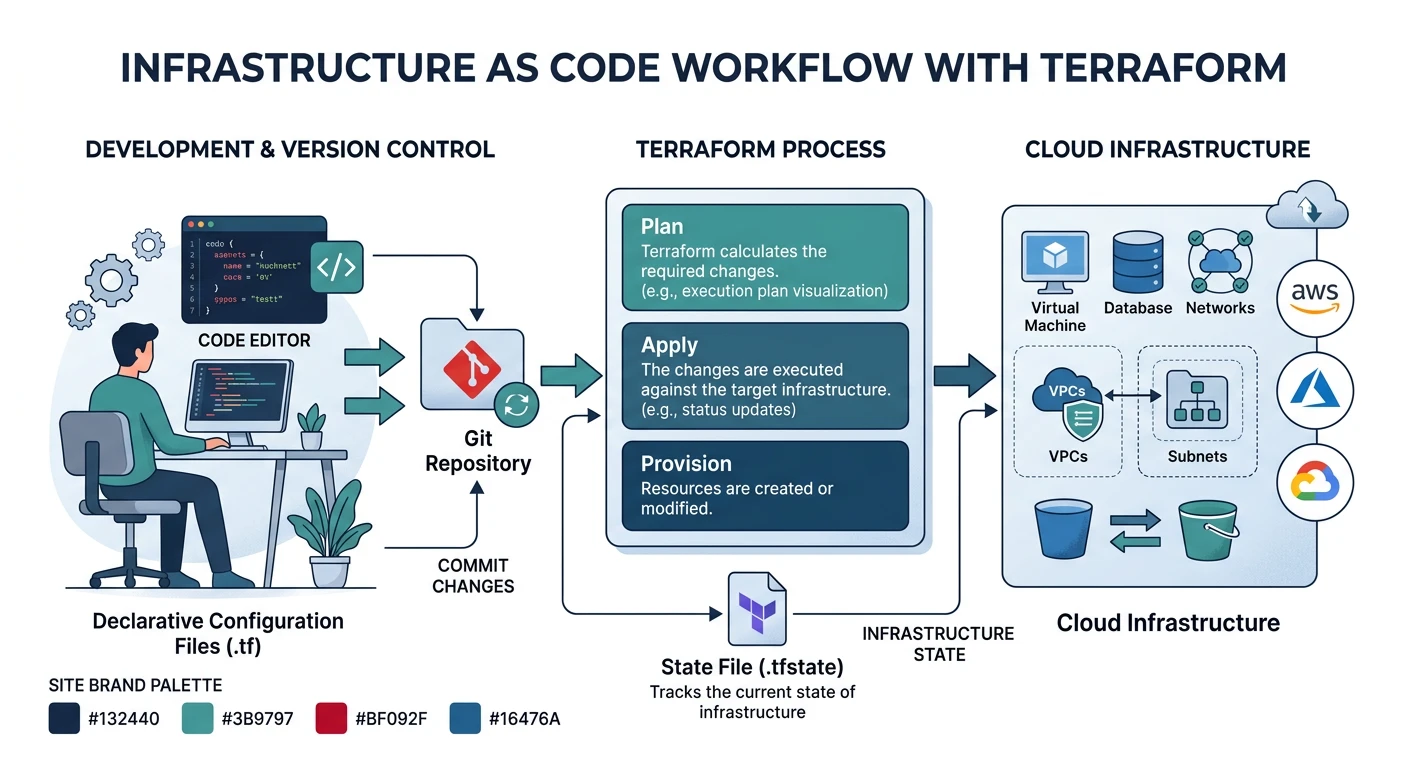
Terraform (Multi-Cloud)
# Initialize Terraform
terraform init

# Format code
terraform fmt

# Validate configuration
terraform validate

# Plan changes
terraform plan -out=tfplan

# Apply changes
terraform apply tfplan

# Apply with auto-approve
terraform apply -auto-approve

# Destroy infrastructure
terraform destroy

# Import existing resource
terraform import aws_instance.example i-1234567890abcdef0

# State management
terraform state list
terraform state show aws_instance.example
terraform state mv aws_instance.old aws_instance.new
terraform state rm aws_instance.example

# Workspace management
terraform workspace list
terraform workspace new production
terraform workspace select production
Terraform AWS Example
# main.tf - Terraform AWS configuration
terraform {
  required_version = ">= 1.0"

  required_providers {
    aws = {
      source  = "hashicorp/aws"
      version = "~> 5.0"
    }
  }

  backend "s3" {
    bucket         = "my-terraform-state"
    key            = "prod/terraform.tfstate"
    region         = "us-east-1"
    dynamodb_table = "terraform-locks"
    encrypt        = true
  }
}

provider "aws" {
  region = var.aws_region

  default_tags {
    tags = {
      Environment = var.environment
      ManagedBy   = "Terraform"
    }
  }
}

# Variables
variable "aws_region" {
  description = "AWS region"
  type        = string
  default     = "us-east-1"
}

variable "environment" {
  description = "Environment name"
  type        = string
}

# VPC
module "vpc" {
  source  = "terraform-aws-modules/vpc/aws"
  version = "5.0.0"

  name = "my-vpc"
  cidr = "10.0.0.0/16"

  azs             = ["${var.aws_region}a", "${var.aws_region}b"]
  private_subnets = ["10.0.1.0/24", "10.0.2.0/24"]
  public_subnets  = ["10.0.101.0/24", "10.0.102.0/24"]

  enable_nat_gateway = true
  single_nat_gateway = var.environment != "production"
}

# ECS Cluster
resource "aws_ecs_cluster" "main" {
  name = "my-cluster"

  setting {
    name  = "containerInsights"
    value = "enabled"
  }
}

# Output
output "vpc_id" {
  value = module.vpc.vpc_id
}
AWS CloudFormation
# Create stack
aws cloudformation create-stack \
    --stack-name my-stack \
    --template-body file://template.yaml \
    --parameters ParameterKey=Environment,ParameterValue=production \
    --capabilities CAPABILITY_IAM

# Update stack
aws cloudformation update-stack \
    --stack-name my-stack \
    --template-body file://template.yaml \
    --parameters ParameterKey=Environment,ParameterValue=production

# Create change set
aws cloudformation create-change-set \
    --stack-name my-stack \
    --change-set-name my-changes \
    --template-body file://template.yaml

# Execute change set
aws cloudformation execute-change-set \
    --stack-name my-stack \
    --change-set-name my-changes

# Describe stack
aws cloudformation describe-stacks --stack-name my-stack

# Delete stack
aws cloudformation delete-stack --stack-name my-stack

# List stack resources
aws cloudformation list-stack-resources --stack-name my-stack
Azure Bicep
# Build Bicep to ARM
az bicep build --file main.bicep

# Deploy Bicep template
az deployment group create \
    --resource-group myRG \
    --template-file main.bicep \
    --parameters environment=production

# What-if deployment
az deployment group what-if \
    --resource-group myRG \
    --template-file main.bicep

# Decompile ARM to Bicep
az bicep decompile --file template.json
Bicep Example
// main.bicep - Azure Bicep configuration
@description('Environment name')
param environment string = 'production'

@description('Location for resources')
param location string = resourceGroup().location

// App Service Plan
resource appServicePlan 'Microsoft.Web/serverfarms@2022-03-01' = {
  name: 'asp-${environment}'
  location: location
  sku: {
    name: environment == 'production' ? 'P1v3' : 'B1'
    tier: environment == 'production' ? 'PremiumV3' : 'Basic'
  }
  properties: {
    reserved: true // Linux
  }
}

// Web App
resource webApp 'Microsoft.Web/sites@2022-03-01' = {
  name: 'app-${environment}-${uniqueString(resourceGroup().id)}'
  location: location
  properties: {
    serverFarmId: appServicePlan.id
    siteConfig: {
      linuxFxVersion: 'NODE|18-lts'
      alwaysOn: environment == 'production'
    }
  }
}

// Output
output webAppUrl string = 'https://${webApp.properties.defaultHostName}'
GitOps
GitOps Principles:
- Declarative - Describe desired state, not steps
- Versioned - Git as single source of truth
- Automated - Approved changes auto-applied
- Continuously Reconciled - Agents ensure state matches
ArgoCD Setup
# Install ArgoCD
kubectl create namespace argocd
kubectl apply -n argocd -f https://raw.githubusercontent.com/argoproj/argo-cd/stable/manifests/install.yaml

# Get admin password
kubectl -n argocd get secret argocd-initial-admin-secret -o jsonpath="{.data.password}" | base64 -d

# Port forward UI
kubectl port-forward svc/argocd-server -n argocd 8080:443

# Login via CLI
argocd login localhost:8080

# Add cluster
argocd cluster add my-cluster

# Create application
argocd app create my-app \
    --repo https://github.com/myorg/my-app.git \
    --path k8s \
    --dest-server https://kubernetes.default.svc \
    --dest-namespace default \
    --sync-policy automated \
    --auto-prune \
    --self-heal

# Sync application
argocd app sync my-app

# Get application status
argocd app get my-app

# Rollback
argocd app rollback my-app 1
ArgoCD Application YAML
# application.yaml - ArgoCD Application
apiVersion: argoproj.io/v1alpha1
kind: Application
metadata:
  name: my-app
  namespace: argocd
spec:
  project: default
  source:
    repoURL: https://github.com/myorg/my-app.git
    targetRevision: HEAD
    path: k8s/overlays/production
  destination:
    server: https://kubernetes.default.svc
    namespace: production
  syncPolicy:
    automated:
      prune: true
      selfHeal: true
      allowEmpty: false
    syncOptions:
      - CreateNamespace=true
      - PruneLast=true
    retry:
      limit: 5
      backoff:
        duration: 5s
        factor: 2
        maxDuration: 3m
Flux CD Setup
# Install Flux
flux bootstrap github \
    --owner=myorg \
    --repository=fleet-infra \
    --branch=main \
    --path=clusters/production \
    --personal

# Create source
flux create source git my-app \
    --url=https://github.com/myorg/my-app \
    --branch=main \
    --interval=1m

# Create kustomization
flux create kustomization my-app \
    --source=my-app \
    --path="./k8s" \
    --prune=true \
    --interval=10m

# Reconcile
flux reconcile source git my-app
flux reconcile kustomization my-app

# Get status
flux get sources git
flux get kustomizations

# Suspend/Resume
flux suspend kustomization my-app
flux resume kustomization my-app
Deployment Strategies
Architecture Context: For microservices-specific deployment patterns (service per container, service per VM, serverless deployment, service deployment platform) and system evolution strategies (Strangler Fig, feature flags, expand-contract), see System Design Part 5: Microservices Architecture.
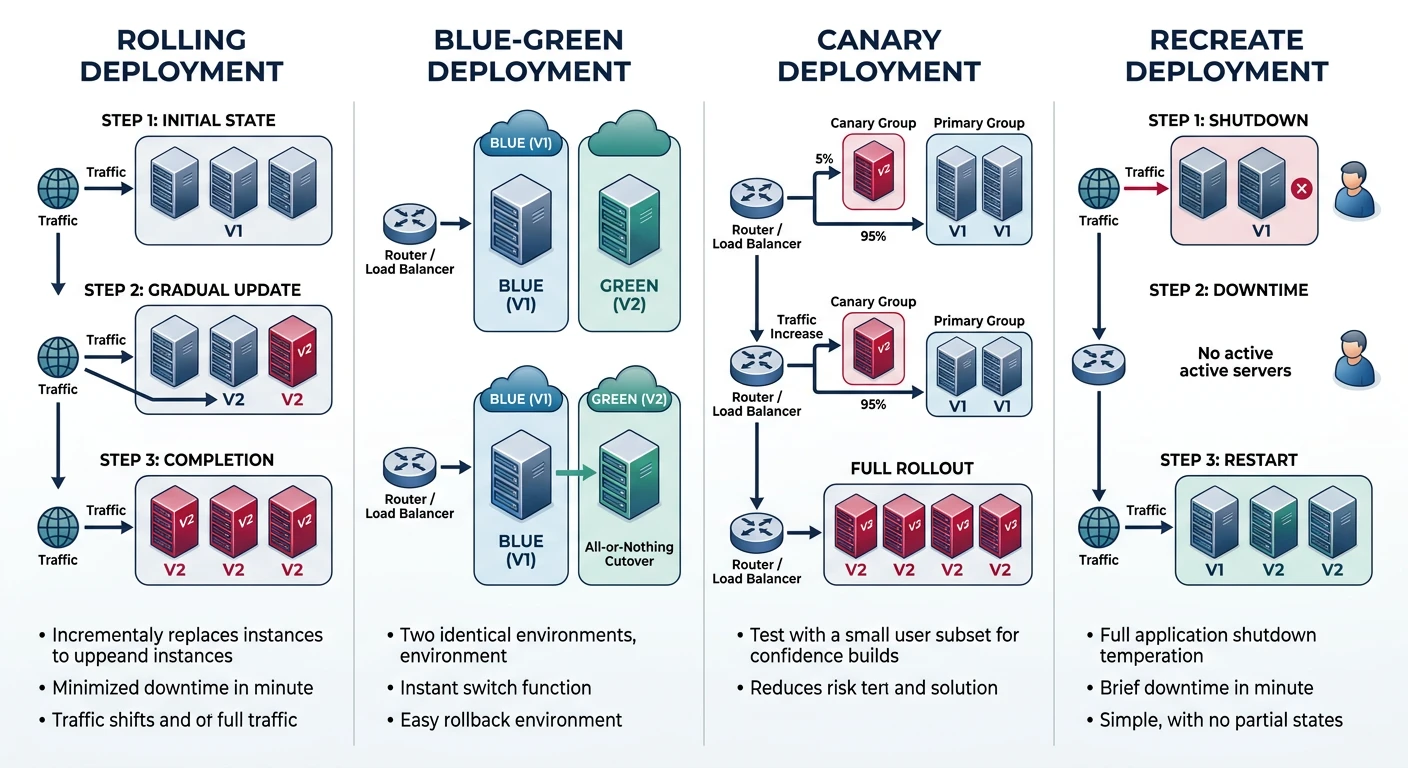
| Strategy | Description | Rollback | Risk |
|---|---|---|---|
| Rolling | Gradual replacement of instances | Slow | Medium |
| Blue-Green | Two identical environments, switch traffic | Instant | Low |
| Canary | Small % of traffic to new version | Fast | Very Low |
| Recreate | Stop all, then start new | N/A | High (downtime) |
Kubernetes Rolling Update
# deployment.yaml - Rolling update strategy
apiVersion: apps/v1
kind: Deployment
metadata:
  name: my-app
spec:
  replicas: 4
  strategy:
    type: RollingUpdate
    rollingUpdate:
      maxSurge: 1        # Extra pods during update
      maxUnavailable: 0  # No downtime
  selector:
    matchLabels:
      app: my-app
  template:
    metadata:
      labels:
        app: my-app
    spec:
      containers:
        - name: app
          image: my-app:v2
          readinessProbe:
            httpGet:
              path: /health
              port: 8080
            initialDelaySeconds: 5
            periodSeconds: 5
Blue-Green with AWS ALB
# Create target groups
aws elbv2 create-target-group --name blue-tg --protocol HTTP --port 80 --vpc-id vpc-xxx
aws elbv2 create-target-group --name green-tg --protocol HTTP --port 80 --vpc-id vpc-xxx

# Switch traffic (modify listener rule)
aws elbv2 modify-listener \
    --listener-arn arn:aws:elasticloadbalancing:...:listener/... \
    --default-actions Type=forward,TargetGroupArn=arn:aws:elasticloadbalancing:...:targetgroup/green-tg/...
Canary with Istio
# virtual-service.yaml - Canary deployment
apiVersion: networking.istio.io/v1beta1
kind: VirtualService
metadata:
  name: my-app
spec:
  hosts:
    - my-app
  http:
    - route:
        - destination:
            host: my-app
            subset: stable
          weight: 90
        - destination:
            host: my-app
            subset: canary
          weight: 10
---
apiVersion: networking.istio.io/v1beta1
kind: DestinationRule
metadata:
  name: my-app
spec:
  host: my-app
  subsets:
    - name: stable
      labels:
        version: v1
    - name: canary
      labels:
        version: v2
Best Practices
CI/CD Security
- Secrets management - Use vaults, not environment variables
- Least privilege - Minimal permissions for service accounts
- Signed commits - Verify code authenticity
- Image scanning - Scan containers for vulnerabilities
- SAST/DAST - Static and dynamic security testing
Pipeline Best Practices:
- Fast feedback - Run quick tests first
- Parallel execution - Speed up builds
- Cache dependencies - Reduce build time
- Immutable artifacts - Build once, deploy many
- Environment parity - Dev mirrors production
- Automated rollback - Quick recovery from failures
Conclusion
This guide covered DevOps and CI/CD practices across all major cloud providers. Key takeaways:
| Component | AWS | Azure | GCP |
|---|---|---|---|
| CI/CD | CodePipeline + CodeBuild | Azure Pipelines | Cloud Build |
| IaC | CloudFormation / CDK | Bicep / ARM | Deployment Manager |
| Multi-Cloud IaC | Terraform, Pulumi | ||
| GitOps | ArgoCD, Flux CD | ||