Introduction
Serverless computing revolutionizes how we build and deploy applications by abstracting away infrastructure management. You write code, the cloud provider handles everything else—scaling, patching, availability, and capacity planning.
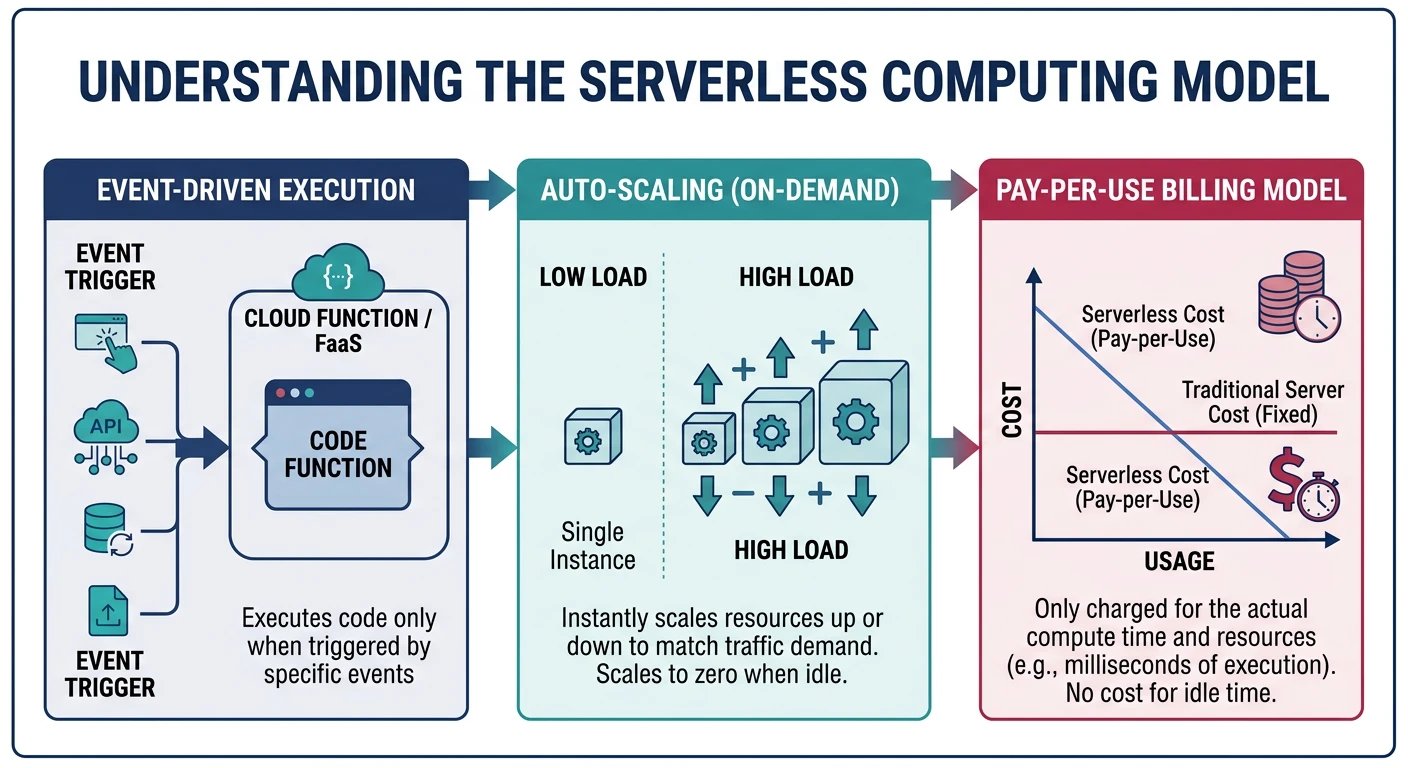
Serverless doesn't mean "no servers"—it means you don't manage them. Key characteristics:
- No server management - Provider handles all infrastructure
- Auto-scaling - Scales from zero to thousands automatically
- Pay-per-use - Billed only for actual execution time
- Event-driven - Functions triggered by events
- Stateless - Each invocation is independent
Cloud Computing Mastery
Cloud Computing Fundamentals
IaaS, PaaS, SaaS, deployment modelsCLI Tools & Setup
AWS CLI, Azure CLI, gcloud, TerraformCompute Services
VMs, containers, auto-scaling, spot instancesStorage Services
Object, block, file storage, data lifecycleDatabase Services
RDS, DynamoDB, Cosmos DB, cachingNetworking & CDN
VPCs, load balancers, DNS, content deliveryServerless Computing
Lambda, Functions, event-driven architectureContainers & Kubernetes
Docker, EKS, AKS, GKE, orchestrationIdentity & Security
IAM, RBAC, encryption, complianceMonitoring & Observability
CloudWatch, Azure Monitor, loggingDevOps & CI/CD
Pipelines, infrastructure as code, GitOpsCore Concepts
Function as a Service (FaaS)
FaaS is the compute component of serverless. Your code runs in stateless containers that are:
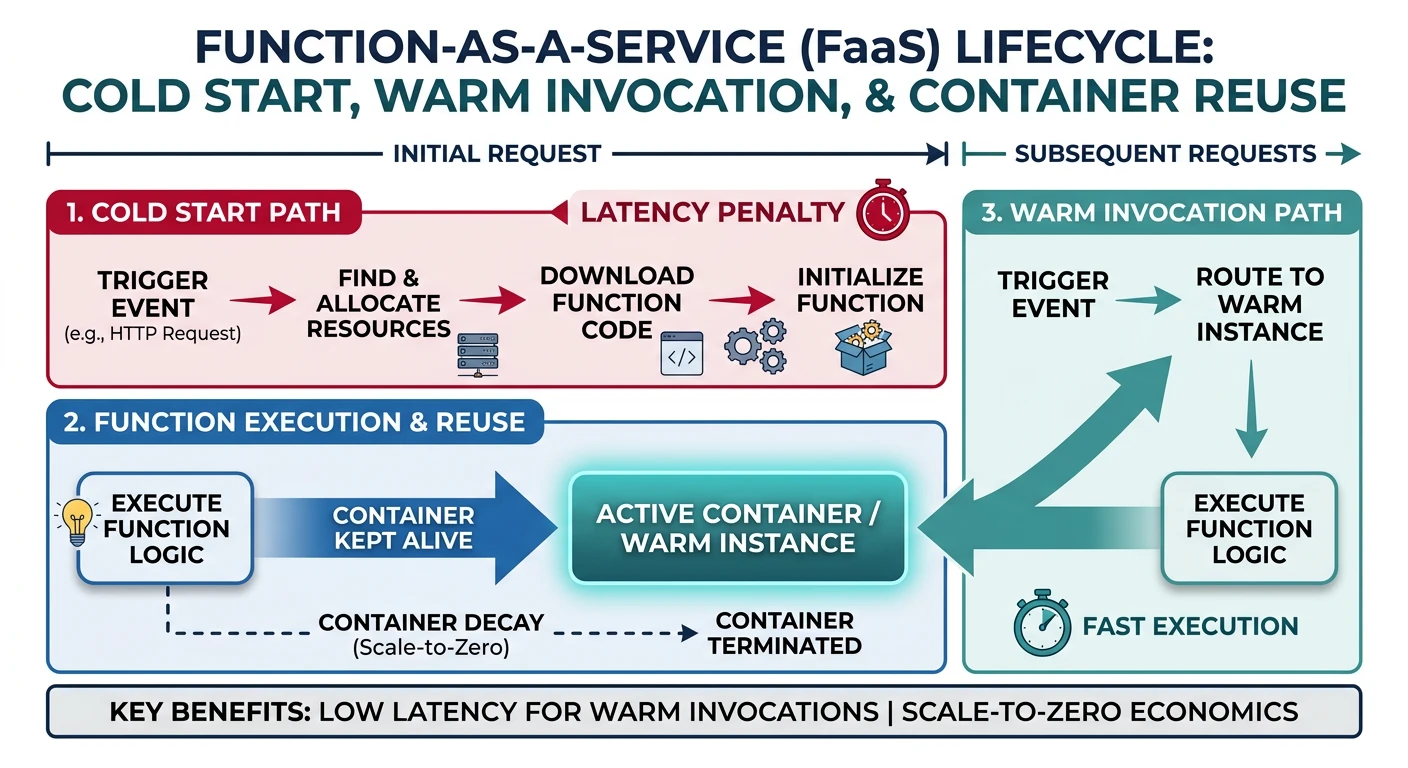
- Event-triggered - HTTP requests, queue messages, file uploads, schedules
- Ephemeral - Containers spin up and down on demand
- Managed - Provider handles runtime, security patches, scaling
Cold Starts vs Warm Starts
Understanding execution context is crucial for performance:
| Aspect | Cold Start | Warm Start |
|---|---|---|
| When | First invocation or after idle period | Subsequent invocations while container exists |
| Latency | 100ms - 10s+ (varies by runtime/size) | 1-100ms typical |
| What Happens | Container provisioned, runtime loaded, code initialized | Reuses existing container |
Execution Model
# Python Lambda handler example
import json

# INITIALIZATION CODE - runs once per cold start
# Place expensive operations here (DB connections, SDK clients)
import boto3
dynamodb = boto3.resource('dynamodb')
table = dynamodb.Table('MyTable')

def handler(event, context):
    """
    HANDLER CODE - runs on every invocation
    - event: Input data (HTTP body, S3 event, etc.)
    - context: Runtime info (timeout, memory, request ID)
    """
    # Process the event
    body = json.loads(event.get('body', '{}'))

    # Business logic
    result = table.get_item(Key={'id': body['id']})

    # Return response
    return {
        'statusCode': 200,
        'headers': {'Content-Type': 'application/json'},
        'body': json.dumps(result.get('Item', {}))
    }
Provider Comparison
| Feature | AWS Lambda | Azure Functions | Cloud Functions |
|---|---|---|---|
| Max Timeout | 15 minutes | Unlimited (Premium/Dedicated) | 60 min (2nd gen) |
| Max Memory | 10,240 MB | 14,336 MB | 32,768 MB (2nd gen) |
| Concurrency | 1000 default (can increase) | 200 per instance | 1000 per function |
| Languages | Python, Node.js, Java, Go, .NET, Ruby, Custom | C#, JavaScript, Python, Java, PowerShell, TypeScript | Node.js, Python, Go, Java, .NET, Ruby, PHP |
| Pricing Model | Per request + GB-seconds | Per execution + GB-seconds | Per invocation + GB-seconds + GHz-seconds |
| Free Tier | 1M requests, 400K GB-sec/month | 1M executions, 400K GB-sec/month | 2M invocations, 400K GB-sec/month |
AWS Lambda
AWS Lambda Key Features
- Deepest AWS service integration
- Lambda@Edge for CloudFront
- Provisioned Concurrency for consistent latency
- Lambda Layers for shared code/dependencies
- Container image support (up to 10GB)
Creating Lambda Functions
# Create a simple Lambda function
aws lambda create-function \
    --function-name my-function \
    --runtime python3.12 \
    --role arn:aws:iam::123456789012:role/lambda-role \
    --handler index.handler \
    --zip-file fileb://function.zip

# Create with environment variables
aws lambda create-function \
    --function-name api-handler \
    --runtime nodejs20.x \
    --role arn:aws:iam::123456789012:role/lambda-role \
    --handler index.handler \
    --zip-file fileb://function.zip \
    --environment Variables={DB_HOST=mydb.example.com,LOG_LEVEL=info} \
    --timeout 30 \
    --memory-size 512

# List functions
aws lambda list-functions --output table

# Get function details
aws lambda get-function --function-name my-function
Invoking Lambda Functions
# Synchronous invocation (wait for response)
aws lambda invoke \
    --function-name my-function \
    --payload '{"key": "value"}' \
    --cli-binary-format raw-in-base64-out \
    response.json

# Asynchronous invocation (fire and forget)
aws lambda invoke \
    --function-name my-function \
    --invocation-type Event \
    --payload '{"key": "value"}' \
    --cli-binary-format raw-in-base64-out \
    response.json

# Dry run (validate without executing)
aws lambda invoke \
    --function-name my-function \
    --invocation-type DryRun \
    --payload '{"key": "value"}' \
    --cli-binary-format raw-in-base64-out \
    response.json
Updating Lambda Functions
# Update function code
aws lambda update-function-code \
    --function-name my-function \
    --zip-file fileb://function.zip

# Update configuration
aws lambda update-function-configuration \
    --function-name my-function \
    --timeout 60 \
    --memory-size 1024 \
    --environment Variables={DB_HOST=newdb.example.com}

# Publish version
aws lambda publish-version \
    --function-name my-function \
    --description "Production release v1.0"

# Create alias
aws lambda create-alias \
    --function-name my-function \
    --name prod \
    --function-version 1

# Update alias to new version
aws lambda update-alias \
    --function-name my-function \
    --name prod \
    --function-version 2
Lambda Layers
# Create a layer (shared dependencies)
aws lambda publish-layer-version \
    --layer-name my-dependencies \
    --description "Common Python libraries" \
    --zip-file fileb://layer.zip \
    --compatible-runtimes python3.11 python3.12

# Add layer to function
aws lambda update-function-configuration \
    --function-name my-function \
    --layers arn:aws:lambda:us-east-1:123456789012:layer:my-dependencies:1

# List layers
aws lambda list-layers

# List layer versions
aws lambda list-layer-versions --layer-name my-dependencies
Lambda Function URL (HTTP Endpoint)
# Create function URL (public HTTP endpoint)
aws lambda create-function-url-config \
    --function-name my-function \
    --auth-type NONE \
    --cors AllowOrigins='*',AllowMethods='GET,POST'

# Create with IAM auth
aws lambda create-function-url-config \
    --function-name my-function \
    --auth-type AWS_IAM

# Get function URL
aws lambda get-function-url-config --function-name my-function

# Delete function URL
aws lambda delete-function-url-config --function-name my-function
Azure Functions
Azure Functions Key Features
- Durable Functions for stateful workflows
- Multiple hosting plans (Consumption, Premium, Dedicated)
- Local development with Azure Functions Core Tools
- Deep integration with Azure services
- Hybrid connections for on-premises access
Azure Functions Core Tools
# Install Azure Functions Core Tools
# Windows (winget)
winget install Microsoft.Azure.FunctionsCoreTools

# macOS
brew tap azure/functions
brew install azure-functions-core-tools@4

# Create new function project
func init MyFunctionApp --worker-runtime python

# Create a new function
cd MyFunctionApp
func new --name HttpTrigger --template "HTTP trigger"

# Run locally
func start

# Test locally
curl http://localhost:7071/api/HttpTrigger?name=World
Creating Azure Functions
# Create resource group
az group create --name myResourceGroup --location eastus

# Create storage account (required)
az storage account create \
    --name mystorageaccount \
    --resource-group myResourceGroup \
    --location eastus \
    --sku Standard_LRS

# Create function app (Consumption plan)
az functionapp create \
    --name myFunctionApp \
    --resource-group myResourceGroup \
    --storage-account mystorageaccount \
    --consumption-plan-location eastus \
    --runtime python \
    --runtime-version 3.11 \
    --functions-version 4 \
    --os-type Linux

# Create with Premium plan (for VNet, longer timeout)
az functionapp plan create \
    --name myPremiumPlan \
    --resource-group myResourceGroup \
    --location eastus \
    --sku EP1 \
    --is-linux

az functionapp create \
    --name myPremiumFunctionApp \
    --resource-group myResourceGroup \
    --storage-account mystorageaccount \
    --plan myPremiumPlan \
    --runtime python \
    --runtime-version 3.11 \
    --functions-version 4
Deploying Azure Functions
# Deploy from local project
func azure functionapp publish myFunctionApp

# Deploy with build
func azure functionapp publish myFunctionApp --build remote

# Deploy using Azure CLI (zip deploy)
az functionapp deployment source config-zip \
    --resource-group myResourceGroup \
    --name myFunctionApp \
    --src function.zip

# List functions in app
az functionapp function list \
    --resource-group myResourceGroup \
    --name myFunctionApp \
    --output table

# Get function URL
az functionapp function show \
    --resource-group myResourceGroup \
    --name myFunctionApp \
    --function-name HttpTrigger \
    --query invokeUrlTemplate
Azure Functions Configuration
# Set application settings (environment variables)
az functionapp config appsettings set \
    --resource-group myResourceGroup \
    --name myFunctionApp \
    --settings DB_CONNECTION_STRING="Server=myserver;Database=mydb"

# List application settings
az functionapp config appsettings list \
    --resource-group myResourceGroup \
    --name myFunctionApp \
    --output table

# Configure scaling
az functionapp scale config set \
    --resource-group myResourceGroup \
    --name myFunctionApp \
    --maximum-instance-count 10 \
    --minimum-instance-count 1

# Enable Application Insights
az functionapp config appsettings set \
    --resource-group myResourceGroup \
    --name myFunctionApp \
    --settings APPINSIGHTS_INSTRUMENTATIONKEY="your-key"
Python Azure Function Example
# function_app.py (Python v2 programming model)
import azure.functions as func
import json
import logging

app = func.FunctionApp(http_auth_level=func.AuthLevel.ANONYMOUS)

@app.route(route="hello")
def hello(req: func.HttpRequest) -> func.HttpResponse:
    logging.info('Python HTTP trigger function processed a request.')

    name = req.params.get('name')
    if not name:
        try:
            req_body = req.get_json()
            name = req_body.get('name')
        except ValueError:
            pass

    if name:
        return func.HttpResponse(
            json.dumps({"message": f"Hello, {name}!"}),
            mimetype="application/json"
        )
    else:
        return func.HttpResponse(
            "Pass a name in the query string or request body",
            status_code=400
        )

@app.blob_trigger(arg_name="myblob", path="samples-workitems/{name}",
                  connection="AzureWebJobsStorage")
def blob_trigger(myblob: func.InputStream):
    logging.info(f"Blob trigger processed: {myblob.name}, Size: {myblob.length}")

@app.timer_trigger(schedule="0 */5 * * * *", arg_name="mytimer")
def timer_trigger(mytimer: func.TimerRequest) -> None:
    logging.info('Timer trigger function ran at %s', mytimer.schedule_status)
Google Cloud Functions
Cloud Functions Key Features
- 2nd gen built on Cloud Run (more features)
- Eventarc for unified event routing
- Longer timeouts (up to 60 min)
- Higher memory (up to 32 GB)
- Concurrency support (multiple requests per instance)
Creating Cloud Functions (2nd Gen)
# Deploy HTTP function (2nd gen)
gcloud functions deploy my-function \
    --gen2 \
    --runtime=python312 \
    --region=us-central1 \
    --source=. \
    --entry-point=hello_http \
    --trigger-http \
    --allow-unauthenticated

# Deploy with environment variables
gcloud functions deploy api-handler \
    --gen2 \
    --runtime=nodejs20 \
    --region=us-central1 \
    --source=. \
    --entry-point=handler \
    --trigger-http \
    --set-env-vars DB_HOST=mydb.example.com,LOG_LEVEL=info \
    --memory=512MB \
    --timeout=60s

# Deploy with VPC connector
gcloud functions deploy private-function \
    --gen2 \
    --runtime=python312 \
    --region=us-central1 \
    --source=. \
    --entry-point=handler \
    --trigger-http \
    --vpc-connector=my-connector \
    --egress-settings=all
Event-Driven Cloud Functions
# Cloud Storage trigger
gcloud functions deploy process-upload \
    --gen2 \
    --runtime=python312 \
    --region=us-central1 \
    --source=. \
    --entry-point=process_file \
    --trigger-event-filters="type=google.cloud.storage.object.v1.finalized" \
    --trigger-event-filters="bucket=my-bucket"

# Pub/Sub trigger
gcloud functions deploy process-message \
    --gen2 \
    --runtime=python312 \
    --region=us-central1 \
    --source=. \
    --entry-point=process_pubsub \
    --trigger-topic=my-topic

# Cloud Scheduler (cron) via Pub/Sub
gcloud scheduler jobs create pubsub my-job \
    --schedule="*/5 * * * *" \
    --topic=my-topic \
    --message-body="{}"
Managing Cloud Functions
# List functions
gcloud functions list

# Describe function
gcloud functions describe my-function --gen2 --region=us-central1

# View logs
gcloud functions logs read my-function --gen2 --region=us-central1

# Test function
gcloud functions call my-function \
    --gen2 \
    --region=us-central1 \
    --data '{"name": "World"}'

# Delete function
gcloud functions delete my-function --gen2 --region=us-central1

# Update function
gcloud functions deploy my-function \
    --gen2 \
    --runtime=python312 \
    --region=us-central1 \
    --update-env-vars LOG_LEVEL=debug
Python Cloud Function Example
# main.py
import functions_framework
from flask import jsonify
import json

@functions_framework.http
def hello_http(request):
    """HTTP Cloud Function."""
    request_json = request.get_json(silent=True)
    request_args = request.args

    if request_json and 'name' in request_json:
        name = request_json['name']
    elif request_args and 'name' in request_args:
        name = request_args['name']
    else:
        name = 'World'

    return jsonify({"message": f"Hello, {name}!"})

@functions_framework.cloud_event
def process_storage(cloud_event):
    """Cloud Storage trigger function."""
    data = cloud_event.data

    print(f"Bucket: {data['bucket']}")
    print(f"File: {data['name']}")
    print(f"Created: {data['timeCreated']}")

@functions_framework.cloud_event
def process_pubsub(cloud_event):
    """Pub/Sub trigger function."""
    import base64

    data = base64.b64decode(cloud_event.data["message"]["data"]).decode()
    print(f"Received message: {data}")
Triggers & Events
Serverless functions are event-driven. Here's a comparison of trigger types:
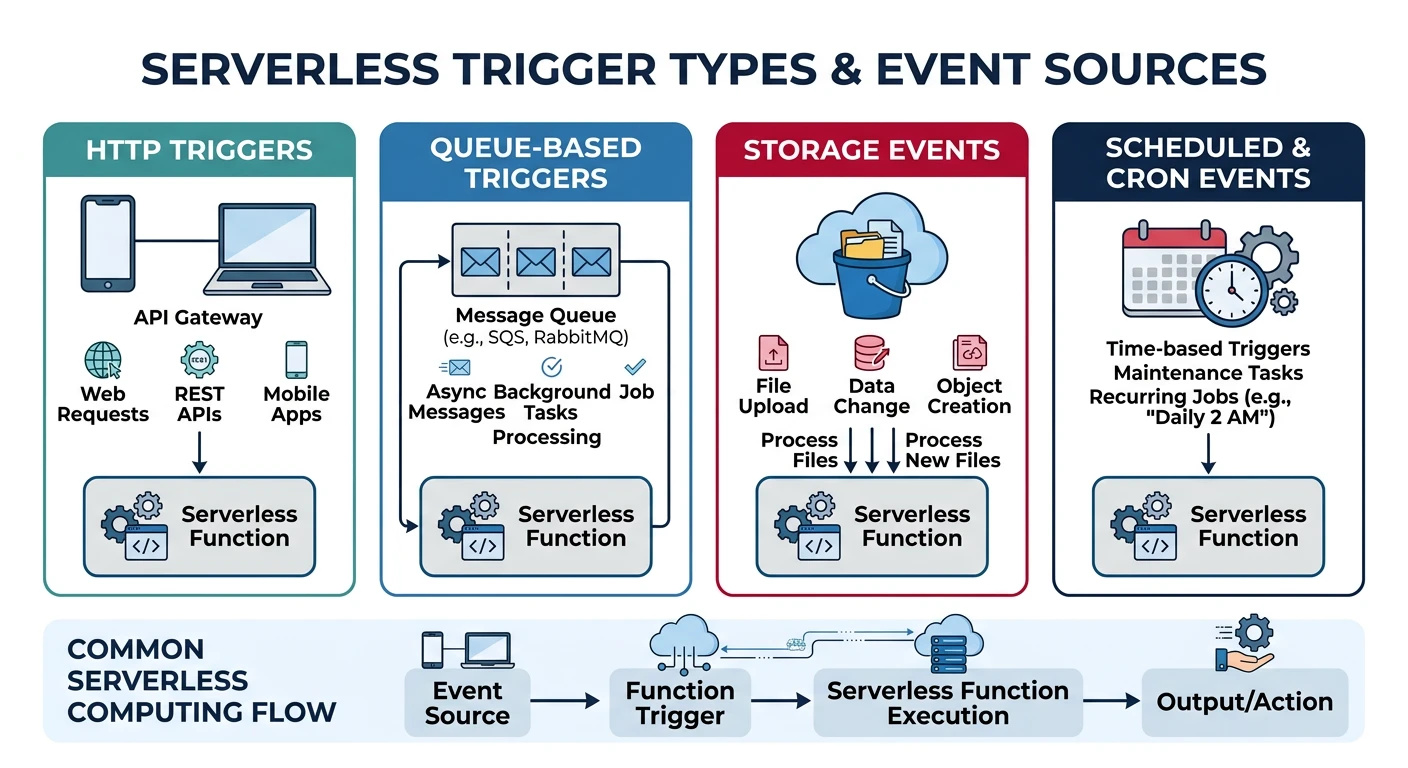
| Trigger Type | AWS Lambda | Azure Functions | Cloud Functions |
|---|---|---|---|
| HTTP | API Gateway, Function URL, ALB | HTTP Trigger | HTTP Trigger |
| Storage | S3 Events | Blob Trigger | Cloud Storage (Eventarc) |
| Queue/Messaging | SQS, SNS, Kinesis | Queue, Service Bus, Event Hub | Pub/Sub |
| Database | DynamoDB Streams | Cosmos DB Trigger | Firestore (Eventarc) |
| Schedule | EventBridge (CloudWatch Events) | Timer Trigger | Cloud Scheduler + Pub/Sub |
AWS Lambda Trigger Examples
# Add S3 trigger
aws lambda add-permission \
    --function-name my-function \
    --statement-id s3-trigger \
    --action lambda:InvokeFunction \
    --principal s3.amazonaws.com \
    --source-arn arn:aws:s3:::my-bucket

aws s3api put-bucket-notification-configuration \
    --bucket my-bucket \
    --notification-configuration '{
        "LambdaFunctionConfigurations": [{
            "LambdaFunctionArn": "arn:aws:lambda:us-east-1:123456789012:function:my-function",
            "Events": ["s3:ObjectCreated:*"],
            "Filter": {"Key": {"FilterRules": [{"Name": "prefix", "Value": "uploads/"}]}}
        }]
    }'

# Add SQS trigger
aws lambda create-event-source-mapping \
    --function-name my-function \
    --event-source-arn arn:aws:sqs:us-east-1:123456789012:my-queue \
    --batch-size 10

# Add scheduled trigger (EventBridge)
aws events put-rule \
    --name my-schedule \
    --schedule-expression "rate(5 minutes)"

aws events put-targets \
    --rule my-schedule \
    --targets "Id"="1","Arn"="arn:aws:lambda:us-east-1:123456789012:function:my-function"

aws lambda add-permission \
    --function-name my-function \
    --statement-id eventbridge-trigger \
    --action lambda:InvokeFunction \
    --principal events.amazonaws.com \
    --source-arn arn:aws:events:us-east-1:123456789012:rule/my-schedule
AWS SAM (Serverless Application Model)
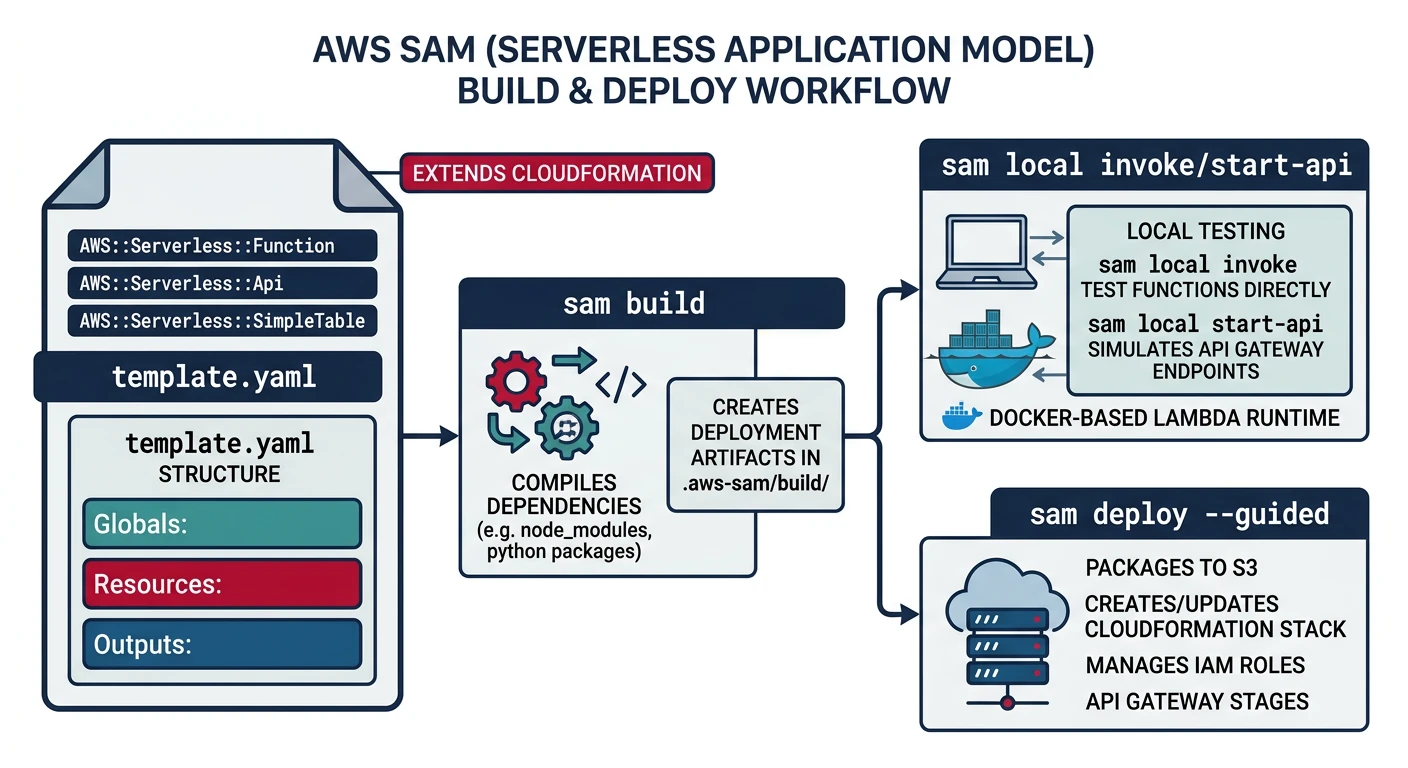
AWS SAM is an open-source framework for building serverless applications on AWS. It extends CloudFormation with serverless-specific syntax.
SAM Project Structure
# Initialize new SAM project
sam init

# Project structure
my-sam-app/
+-- template.yaml          # SAM template
+-- samconfig.toml         # Deployment configuration
+-- src/
¦   +-- handlers/
¦       +-- __init__.py
¦       +-- hello.py
+-- tests/
¦   +-- unit/
¦       +-- test_handler.py
+-- requirements.txt
SAM Template Example
# template.yaml
AWSTemplateFormatVersion: '2010-09-09'
Transform: AWS::Serverless-2016-10-31
Description: My Serverless Application

Globals:
  Function:
    Timeout: 30
    MemorySize: 256
    Runtime: python3.12
    Architectures:
      - x86_64
    Environment:
      Variables:
        LOG_LEVEL: INFO

Resources:
  # HTTP API Gateway
  HttpApi:
    Type: AWS::Serverless::HttpApi
    Properties:
      StageName: prod
      CorsConfiguration:
        AllowOrigins:
          - "*"
        AllowMethods:
          - GET
          - POST

  # Lambda Function with HTTP trigger
  HelloFunction:
    Type: AWS::Serverless::Function
    Properties:
      FunctionName: hello-function
      CodeUri: src/
      Handler: handlers/hello.handler
      Events:
        HelloApi:
          Type: HttpApi
          Properties:
            ApiId: !Ref HttpApi
            Path: /hello
            Method: GET

  # Lambda with S3 trigger
  ProcessImageFunction:
    Type: AWS::Serverless::Function
    Properties:
      FunctionName: process-image
      CodeUri: src/
      Handler: handlers/process_image.handler
      Timeout: 60
      MemorySize: 1024
      Policies:
        - S3ReadPolicy:
            BucketName: !Ref ImageBucket
        - S3WritePolicy:
            BucketName: !Ref ProcessedBucket
      Events:
        S3Event:
          Type: S3
          Properties:
            Bucket: !Ref ImageBucket
            Events: s3:ObjectCreated:*
            Filter:
              S3Key:
                Rules:
                  - Name: prefix
                    Value: uploads/

  # S3 Buckets
  ImageBucket:
    Type: AWS::S3::Bucket
    Properties:
      BucketName: !Sub ${AWS::StackName}-images

  ProcessedBucket:
    Type: AWS::S3::Bucket
    Properties:
      BucketName: !Sub ${AWS::StackName}-processed

  # DynamoDB Table
  DataTable:
    Type: AWS::Serverless::SimpleTable
    Properties:
      PrimaryKey:
        Name: id
        Type: String

Outputs:
  ApiEndpoint:
    Description: API Gateway endpoint URL
    Value: !Sub "https://${HttpApi}.execute-api.${AWS::Region}.amazonaws.com/prod"
SAM CLI Commands
# Build the application
sam build

# Run locally
sam local start-api

# Invoke function locally
sam local invoke HelloFunction --event events/event.json

# Generate sample event
sam local generate-event apigateway http-api-proxy > events/event.json

# Deploy to AWS
sam deploy --guided

# Deploy with specific configuration
sam deploy \
    --stack-name my-app \
    --capabilities CAPABILITY_IAM \
    --resolve-s3

# View logs
sam logs --name HelloFunction --stack-name my-app --tail

# Delete stack
sam delete --stack-name my-app
Serverless Framework
Serverless Framework is a multi-cloud framework supporting AWS, Azure, and GCP with a unified configuration syntax.
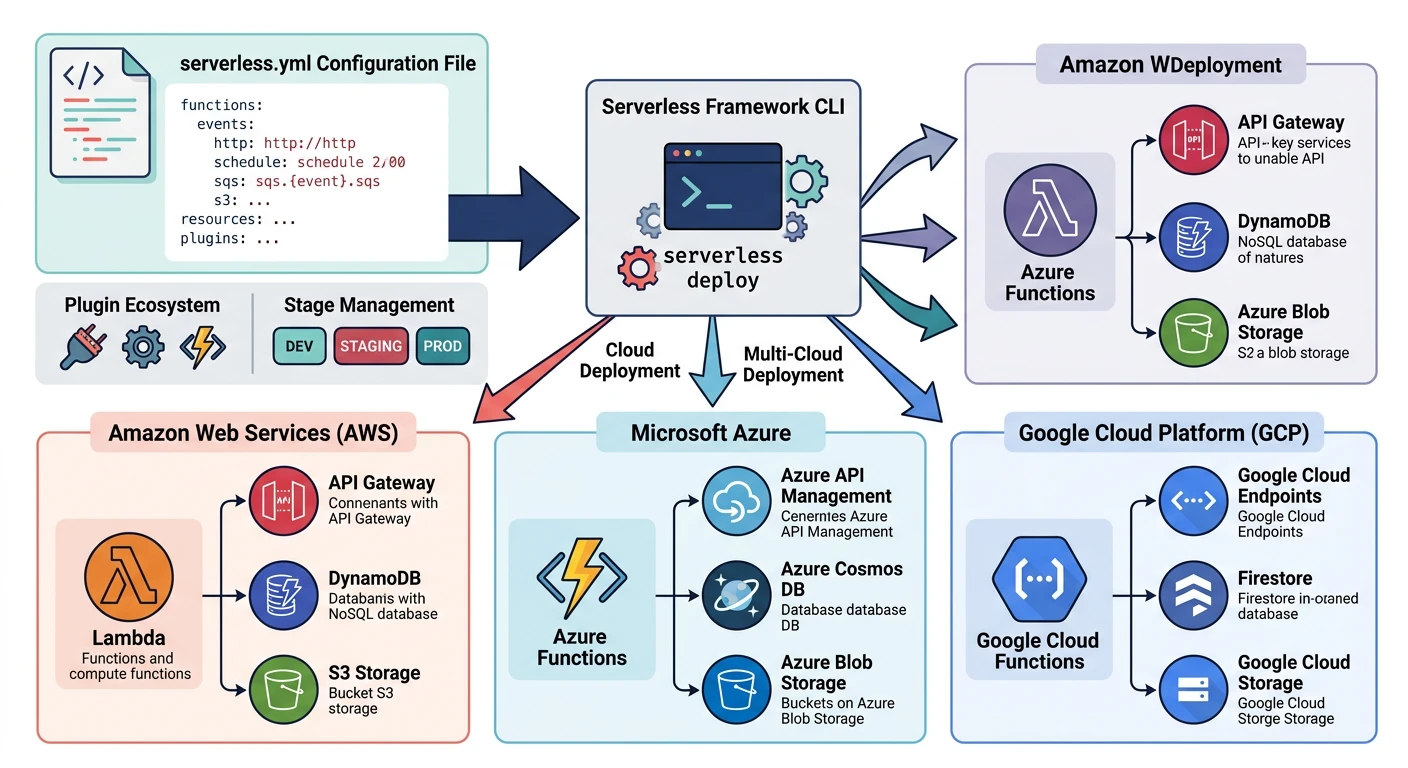
Installation and Setup
# Install Serverless Framework
npm install -g serverless

# Create new project
serverless create --template aws-python3 --path my-service
cd my-service

# Or use interactive wizard
serverless

# Configure AWS credentials
serverless config credentials --provider aws --key AKIAIOSFODNN7EXAMPLE --secret wJalrXUtnFEMI/K7MDENG/bPxRfiCYEXAMPLEKEY
serverless.yml for AWS
# serverless.yml
service: my-service

frameworkVersion: '3'

provider:
  name: aws
  runtime: python3.12
  stage: ${opt:stage, 'dev'}
  region: ${opt:region, 'us-east-1'}
  memorySize: 256
  timeout: 30
  environment:
    STAGE: ${self:provider.stage}
    TABLE_NAME: ${self:service}-${self:provider.stage}-data
  iam:
    role:
      statements:
        - Effect: Allow
          Action:
            - dynamodb:GetItem
            - dynamodb:PutItem
            - dynamodb:Query
          Resource: !GetAtt DataTable.Arn

functions:
  hello:
    handler: handler.hello
    events:
      - httpApi:
          path: /hello
          method: get
      - httpApi:
          path: /hello
          method: post

  processQueue:
    handler: handler.process_queue
    events:
      - sqs:
          arn: !GetAtt MyQueue.Arn
          batchSize: 10

  scheduledTask:
    handler: handler.scheduled_task
    events:
      - schedule: rate(5 minutes)

resources:
  Resources:
    DataTable:
      Type: AWS::DynamoDB::Table
      Properties:
        TableName: ${self:provider.environment.TABLE_NAME}
        AttributeDefinitions:
          - AttributeName: id
            AttributeType: S
        KeySchema:
          - AttributeName: id
            KeyType: HASH
        BillingMode: PAY_PER_REQUEST

    MyQueue:
      Type: AWS::SQS::Queue
      Properties:
        QueueName: ${self:service}-${self:provider.stage}-queue

plugins:
  - serverless-python-requirements
  - serverless-offline

custom:
  pythonRequirements:
    dockerizePip: non-linux
serverless.yml for Azure
# serverless.yml (Azure)
service: my-azure-service

frameworkVersion: '3'

provider:
  name: azure
  region: East US
  runtime: python3.11
  os: linux
  functionApp:
    name: ${self:service}-${opt:stage, 'dev'}

functions:
  hello:
    handler: handler.hello
    events:
      - http: true
        methods:
          - GET
          - POST
        route: hello

  processBlob:
    handler: handler.process_blob
    events:
      - blob:
          name: blobTrigger
          path: uploads/{name}
          connection: AzureWebJobsStorage

  scheduledTask:
    handler: handler.scheduled
    events:
      - timer:
          schedule: "0 */5 * * * *"
serverless.yml for GCP
# serverless.yml (GCP)
service: my-gcp-service

frameworkVersion: '3'

provider:
  name: google
  runtime: python312
  region: us-central1
  project: my-gcp-project
  credentials: ~/.gcloud/keyfile.json

functions:
  hello:
    handler: hello_http
    events:
      - http: path

  processStorage:
    handler: process_storage
    events:
      - event:
          eventType: google.cloud.storage.object.v1.finalized
          resource: projects/_/buckets/my-bucket

  processPubSub:
    handler: process_pubsub
    events:
      - event:
          eventType: google.cloud.pubsub.topic.v1.messagePublished
          resource: projects/my-gcp-project/topics/my-topic
Serverless Framework Commands
# Deploy to cloud
serverless deploy

# Deploy single function
serverless deploy function -f hello

# Invoke function
serverless invoke -f hello --data '{"name": "World"}'

# Invoke locally
serverless invoke local -f hello --data '{"name": "World"}'

# View logs
serverless logs -f hello --tail

# Run locally (with serverless-offline plugin)
serverless offline

# Remove deployment
serverless remove

# Print generated CloudFormation
serverless print
Best Practices
- Minimize cold starts - Use provisioned concurrency, smaller packages
- Reuse connections - Initialize DB/SDK clients outside handler
- Right-size memory - CPU scales with memory in Lambda
- Use ARM64 - Graviton/ARM is cheaper and often faster
- Bundle dependencies - Use layers or bundlers to reduce package size
Security Best Practices
- Least privilege IAM - Only grant permissions functions need
- Environment variables - Use Secrets Manager/Key Vault for sensitive data
- VPC configuration - Put functions in VPC for private resource access
- Input validation - Always validate and sanitize inputs
- Enable logging - CloudWatch, Application Insights, Cloud Logging
- Set concurrency limits - Prevent runaway costs from infinite loops
Cost Optimization
# AWS: Set reserved concurrency (limits and guarantees)
aws lambda put-function-concurrency \
    --function-name my-function \
    --reserved-concurrent-executions 100

# AWS: Provisioned concurrency (reduces cold starts)
aws lambda put-provisioned-concurrency-config \
    --function-name my-function \
    --qualifier prod \
    --provisioned-concurrent-executions 5

# Azure: Set function app scale limits
az functionapp scale config set \
    --resource-group myResourceGroup \
    --name myFunctionApp \
    --maximum-instance-count 10

# GCP: Set max instances
gcloud functions deploy my-function \
    --gen2 \
    --max-instances=10 \
    --min-instances=0
Monitoring and Observability
# AWS: View CloudWatch metrics
aws cloudwatch get-metric-statistics \
    --namespace AWS/Lambda \
    --metric-name Invocations \
    --dimensions Name=FunctionName,Value=my-function \
    --start-time 2026-01-25T00:00:00Z \
    --end-time 2026-01-25T23:59:59Z \
    --period 3600 \
    --statistics Sum

# AWS: View logs
aws logs tail /aws/lambda/my-function --follow

# Azure: View function execution history
az monitor metrics list \
    --resource myFunctionApp \
    --resource-group myResourceGroup \
    --resource-type Microsoft.Web/sites \
    --metric FunctionExecutionCount

# GCP: View logs
gcloud functions logs read my-function --gen2 --region=us-central1 --limit=50
Conclusion
Serverless computing offers tremendous benefits for event-driven workloads. Each provider has strengths:
| Choose AWS Lambda If... | Choose Azure Functions If... | Choose Cloud Functions If... |
|---|---|---|
| You're heavily invested in AWS ecosystem | You need Durable Functions for workflows | You want custom machine types or longer timeouts |
| You need Lambda@Edge for CDN | You have .NET/Windows workloads | You need instance concurrency |
| You want mature tooling (SAM, CDK) | You need hybrid with on-premises | You want seamless Cloud Run migration path |