Introduction
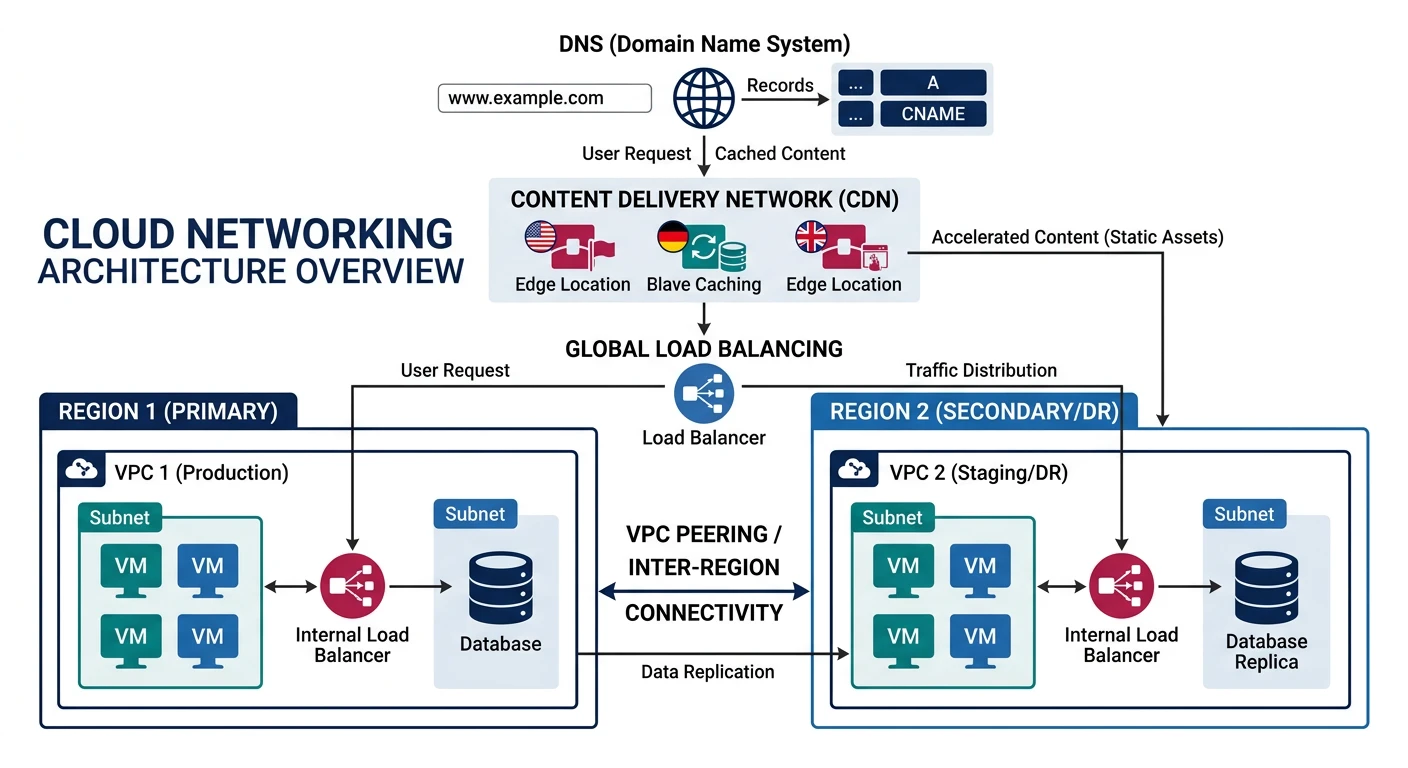
Cloud networking forms the foundation of your cloud infrastructure, enabling secure communication between resources and the internet. This guide covers virtual private clouds, load balancing, and content delivery networks across all major cloud providers.
What We'll Cover:
- Virtual Private Clouds - VPC, VNet, subnets, routing
- Security - Security groups, NACLs, firewalls
- Load Balancers - ALB, NLB, Azure LB, Cloud Load Balancing
- CDN Services - CloudFront, Azure CDN, Cloud CDN
- DNS Services - Route 53, Azure DNS, Cloud DNS
Cloud Computing Mastery
Your 11-step learning path • Currently on Step 6
Cloud Computing Fundamentals
IaaS, PaaS, SaaS, deployment modelsCLI Tools & Setup
AWS CLI, Azure CLI, gcloud, TerraformCompute Services
VMs, containers, auto-scaling, spot instancesStorage Services
Object, block, file storage, data lifecycleDatabase Services
RDS, DynamoDB, Cosmos DB, caching6
Networking & CDN
VPCs, load balancers, DNS, content delivery7
Serverless Computing
Lambda, Functions, event-driven architecture8
Containers & Kubernetes
Docker, EKS, AKS, GKE, orchestration9
Identity & Security
IAM, RBAC, encryption, compliance10
Monitoring & Observability
CloudWatch, Azure Monitor, logging11
DevOps & CI/CD
Pipelines, infrastructure as code, GitOpsNetworking Concepts
Key Terminology
| Concept | Description | Example |
|---|---|---|
| VPC/VNet | Isolated virtual network in the cloud | 10.0.0.0/16 |
| Subnet | Subdivision of a VPC, tied to availability zone | 10.0.1.0/24 (public), 10.0.2.0/24 (private) |
| CIDR Block | IP address range notation | /16 = 65,536 IPs, /24 = 256 IPs |
| Internet Gateway | Enables internet access for VPC resources | Attached to VPC for public subnets |
| NAT Gateway | Allows private subnets to access internet | Outbound-only internet access |
| Route Table | Rules determining traffic routing | 0.0.0.0/0 ? Internet Gateway |
| Security Group | Virtual firewall at instance level | Allow inbound port 443 from 0.0.0.0/0 |
| Peering | Connect two VPCs privately | VPC-A ? VPC-B via private IPs |
Cloud VPC Network Layout
graph TD
    subgraph VPC ["Virtual Private Cloud"]
        subgraph PUB ["Public Subnet"]
            LB["Load Balancer"]
            NAT["NAT Gateway"]
        end
        subgraph PRIV ["Private Subnet"]
            APP["App Servers"]
            DB["Database"]
        end
    end

    Internet["Internet"] --> LB
    LB --> APP
    APP --> DB
    APP --> NAT
    NAT --> Internet

    style VPC fill:#f8f9fa,stroke:#132440
    style PUB fill:#e8f4f4,stroke:#3B9797
    style PRIV fill:#f0f4f8,stroke:#16476A
Provider Comparison
| Feature | AWS | Azure | GCP |
|---|---|---|---|
| Virtual Network | VPC | VNet | VPC (global) |
| Scope | Regional | Regional | Global |
| Instance Firewall | Security Groups | NSG (Network Security Group) | Firewall Rules |
| Subnet Firewall | NACLs | NSG (subnet-level) | Firewall Rules (network tags) |
| Layer 7 LB | Application Load Balancer | Application Gateway | HTTP(S) Load Balancer |
| Layer 4 LB | Network Load Balancer | Azure Load Balancer | TCP/UDP Load Balancer |
| CDN | CloudFront | Azure CDN / Front Door | Cloud CDN |
| DNS | Route 53 | Azure DNS | Cloud DNS |
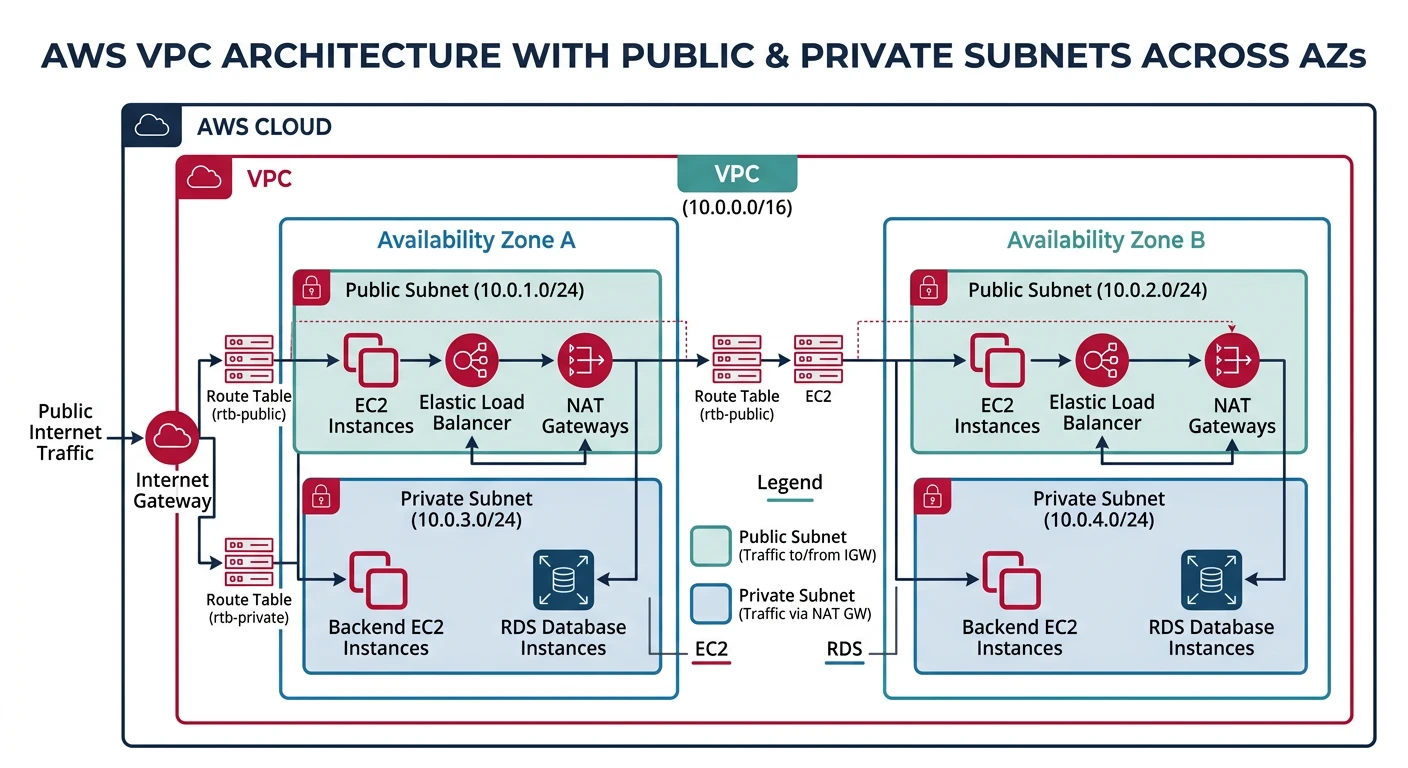
AWS VPC
Amazon Virtual Private Cloud
- Regional service - VPC spans all AZs in a region
- Default VPC - Pre-created in each region
- VPC Peering - Connect VPCs across regions/accounts
- Transit Gateway - Hub for connecting multiple VPCs
Creating VPC with Subnets
# Create VPC
aws ec2 create-vpc \
    --cidr-block 10.0.0.0/16 \
    --tag-specifications 'ResourceType=vpc,Tags=[{Key=Name,Value=my-vpc}]'

# Get VPC ID
VPC_ID=$(aws ec2 describe-vpcs \
    --filters "Name=tag:Name,Values=my-vpc" \
    --query "Vpcs[0].VpcId" --output text)

# Enable DNS hostnames
aws ec2 modify-vpc-attribute --vpc-id $VPC_ID --enable-dns-hostnames

# Create public subnet (AZ-a)
aws ec2 create-subnet \
    --vpc-id $VPC_ID \
    --cidr-block 10.0.1.0/24 \
    --availability-zone us-east-1a \
    --tag-specifications 'ResourceType=subnet,Tags=[{Key=Name,Value=public-subnet-1a}]'

# Create private subnet (AZ-a)
aws ec2 create-subnet \
    --vpc-id $VPC_ID \
    --cidr-block 10.0.10.0/24 \
    --availability-zone us-east-1a \
    --tag-specifications 'ResourceType=subnet,Tags=[{Key=Name,Value=private-subnet-1a}]'

# Create public subnet (AZ-b)
aws ec2 create-subnet \
    --vpc-id $VPC_ID \
    --cidr-block 10.0.2.0/24 \
    --availability-zone us-east-1b \
    --tag-specifications 'ResourceType=subnet,Tags=[{Key=Name,Value=public-subnet-1b}]'

# Create private subnet (AZ-b)
aws ec2 create-subnet \
    --vpc-id $VPC_ID \
    --cidr-block 10.0.20.0/24 \
    --availability-zone us-east-1b \
    --tag-specifications 'ResourceType=subnet,Tags=[{Key=Name,Value=private-subnet-1b}]'
Internet Gateway & NAT Gateway
# Create Internet Gateway
aws ec2 create-internet-gateway \
    --tag-specifications 'ResourceType=internet-gateway,Tags=[{Key=Name,Value=my-igw}]'

IGW_ID=$(aws ec2 describe-internet-gateways \
    --filters "Name=tag:Name,Values=my-igw" \
    --query "InternetGateways[0].InternetGatewayId" --output text)

# Attach to VPC
aws ec2 attach-internet-gateway --vpc-id $VPC_ID --internet-gateway-id $IGW_ID

# Allocate Elastic IP for NAT Gateway
aws ec2 allocate-address --domain vpc

EIP_ALLOC=$(aws ec2 describe-addresses \
    --query "Addresses[?Domain=='vpc'] | [0].AllocationId" --output text)

# Get public subnet ID
PUBLIC_SUBNET=$(aws ec2 describe-subnets \
    --filters "Name=tag:Name,Values=public-subnet-1a" \
    --query "Subnets[0].SubnetId" --output text)

# Create NAT Gateway in public subnet
aws ec2 create-nat-gateway \
    --subnet-id $PUBLIC_SUBNET \
    --allocation-id $EIP_ALLOC \
    --tag-specifications 'ResourceType=natgateway,Tags=[{Key=Name,Value=my-nat-gw}]'
Route Tables
# Create public route table
aws ec2 create-route-table \
    --vpc-id $VPC_ID \
    --tag-specifications 'ResourceType=route-table,Tags=[{Key=Name,Value=public-rt}]'

PUBLIC_RT=$(aws ec2 describe-route-tables \
    --filters "Name=tag:Name,Values=public-rt" \
    --query "RouteTables[0].RouteTableId" --output text)

# Add route to Internet Gateway
aws ec2 create-route \
    --route-table-id $PUBLIC_RT \
    --destination-cidr-block 0.0.0.0/0 \
    --gateway-id $IGW_ID

# Associate with public subnets
aws ec2 associate-route-table --subnet-id $PUBLIC_SUBNET --route-table-id $PUBLIC_RT

# Create private route table
aws ec2 create-route-table \
    --vpc-id $VPC_ID \
    --tag-specifications 'ResourceType=route-table,Tags=[{Key=Name,Value=private-rt}]'

PRIVATE_RT=$(aws ec2 describe-route-tables \
    --filters "Name=tag:Name,Values=private-rt" \
    --query "RouteTables[0].RouteTableId" --output text)

NAT_GW=$(aws ec2 describe-nat-gateways \
    --filter "Name=tag:Name,Values=my-nat-gw" \
    --query "NatGateways[0].NatGatewayId" --output text)

# Add route to NAT Gateway for private subnets
aws ec2 create-route \
    --route-table-id $PRIVATE_RT \
    --destination-cidr-block 0.0.0.0/0 \
    --nat-gateway-id $NAT_GW
Security Groups
# Create web server security group
aws ec2 create-security-group \
    --group-name web-sg \
    --description "Web server security group" \
    --vpc-id $VPC_ID

WEB_SG=$(aws ec2 describe-security-groups \
    --filters "Name=group-name,Values=web-sg" \
    --query "SecurityGroups[0].GroupId" --output text)

# Allow HTTP from anywhere
aws ec2 authorize-security-group-ingress \
    --group-id $WEB_SG \
    --protocol tcp \
    --port 80 \
    --cidr 0.0.0.0/0

# Allow HTTPS from anywhere
aws ec2 authorize-security-group-ingress \
    --group-id $WEB_SG \
    --protocol tcp \
    --port 443 \
    --cidr 0.0.0.0/0

# Allow SSH from specific IP
aws ec2 authorize-security-group-ingress \
    --group-id $WEB_SG \
    --protocol tcp \
    --port 22 \
    --cidr 203.0.113.0/32

# Create database security group
aws ec2 create-security-group \
    --group-name db-sg \
    --description "Database security group" \
    --vpc-id $VPC_ID

DB_SG=$(aws ec2 describe-security-groups \
    --filters "Name=group-name,Values=db-sg" \
    --query "SecurityGroups[0].GroupId" --output text)

# Allow PostgreSQL from web security group only
aws ec2 authorize-security-group-ingress \
    --group-id $DB_SG \
    --protocol tcp \
    --port 5432 \
    --source-group $WEB_SG

# List security group rules
aws ec2 describe-security-group-rules --filter "Name=group-id,Values=$WEB_SG"
VPC Peering
# Create VPC peering connection
aws ec2 create-vpc-peering-connection \
    --vpc-id $VPC_ID \
    --peer-vpc-id vpc-0987654321 \
    --peer-region us-west-2

# Accept peering connection (from peer account/region)
aws ec2 accept-vpc-peering-connection \
    --vpc-peering-connection-id pcx-1234567890

# Add route to peer VPC in route table
aws ec2 create-route \
    --route-table-id $PUBLIC_RT \
    --destination-cidr-block 10.1.0.0/16 \
    --vpc-peering-connection-id pcx-1234567890
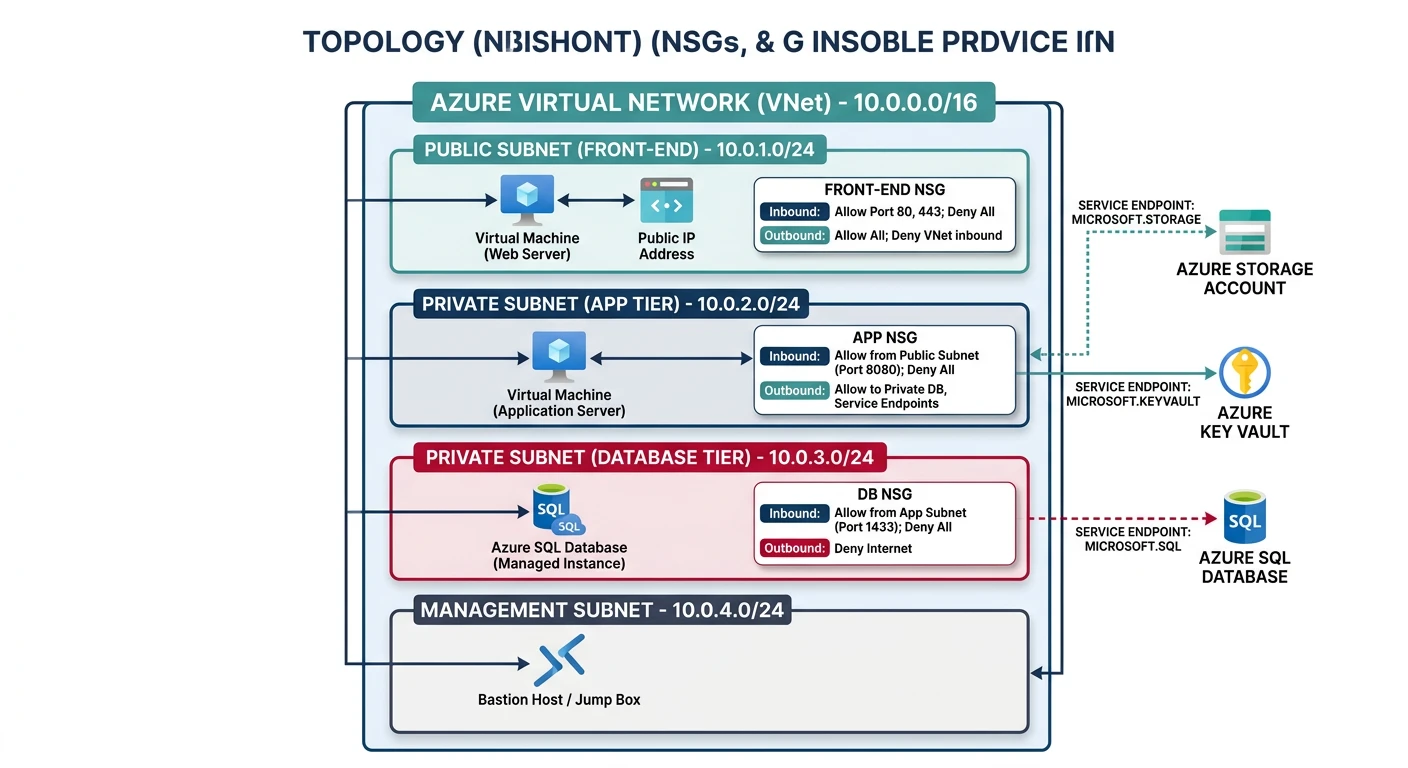
Azure Virtual Network
Azure Virtual Network (VNet)
- Regional service - VNet within a single region
- Global VNet Peering - Connect VNets across regions
- Service Endpoints - Direct access to Azure services
- Private Link - Private connectivity to services
Creating VNet with Subnets
# Create resource group
az group create --name myNetworkRG --location eastus

# Create VNet with subnets
az network vnet create \
    --resource-group myNetworkRG \
    --name myVNet \
    --address-prefix 10.0.0.0/16 \
    --subnet-name public-subnet \
    --subnet-prefix 10.0.1.0/24

# Add private subnet
az network vnet subnet create \
    --resource-group myNetworkRG \
    --vnet-name myVNet \
    --name private-subnet \
    --address-prefix 10.0.10.0/24

# Add database subnet (with service endpoints)
az network vnet subnet create \
    --resource-group myNetworkRG \
    --vnet-name myVNet \
    --name db-subnet \
    --address-prefix 10.0.20.0/24 \
    --service-endpoints Microsoft.Sql Microsoft.Storage

# List subnets
az network vnet subnet list \
    --resource-group myNetworkRG \
    --vnet-name myVNet \
    --output table
Network Security Groups (NSG)
# Create NSG
az network nsg create \
    --resource-group myNetworkRG \
    --name web-nsg

# Allow HTTP
az network nsg rule create \
    --resource-group myNetworkRG \
    --nsg-name web-nsg \
    --name AllowHTTP \
    --priority 100 \
    --direction Inbound \
    --access Allow \
    --protocol Tcp \
    --destination-port-range 80 \
    --source-address-prefix '*'

# Allow HTTPS
az network nsg rule create \
    --resource-group myNetworkRG \
    --nsg-name web-nsg \
    --name AllowHTTPS \
    --priority 110 \
    --direction Inbound \
    --access Allow \
    --protocol Tcp \
    --destination-port-range 443 \
    --source-address-prefix '*'

# Allow SSH from specific IP
az network nsg rule create \
    --resource-group myNetworkRG \
    --nsg-name web-nsg \
    --name AllowSSH \
    --priority 120 \
    --direction Inbound \
    --access Allow \
    --protocol Tcp \
    --destination-port-range 22 \
    --source-address-prefix 203.0.113.0/32

# Associate NSG with subnet
az network vnet subnet update \
    --resource-group myNetworkRG \
    --vnet-name myVNet \
    --name public-subnet \
    --network-security-group web-nsg

# List NSG rules
az network nsg rule list \
    --resource-group myNetworkRG \
    --nsg-name web-nsg \
    --output table
NAT Gateway
# Create public IP for NAT Gateway
az network public-ip create \
    --resource-group myNetworkRG \
    --name nat-pip \
    --sku Standard \
    --allocation-method Static

# Create NAT Gateway
az network nat gateway create \
    --resource-group myNetworkRG \
    --name myNatGateway \
    --public-ip-addresses nat-pip \
    --idle-timeout 10

# Associate with private subnet
az network vnet subnet update \
    --resource-group myNetworkRG \
    --vnet-name myVNet \
    --name private-subnet \
    --nat-gateway myNatGateway
VNet Peering
# Create VNet peering (from VNet1 to VNet2)
az network vnet peering create \
    --resource-group myNetworkRG \
    --name vnet1-to-vnet2 \
    --vnet-name myVNet \
    --remote-vnet /subscriptions/xxx/resourceGroups/otherRG/providers/Microsoft.Network/virtualNetworks/otherVNet \
    --allow-vnet-access \
    --allow-forwarded-traffic

# Create reverse peering (from VNet2 to VNet1)
az network vnet peering create \
    --resource-group otherRG \
    --name vnet2-to-vnet1 \
    --vnet-name otherVNet \
    --remote-vnet /subscriptions/xxx/resourceGroups/myNetworkRG/providers/Microsoft.Network/virtualNetworks/myVNet \
    --allow-vnet-access \
    --allow-forwarded-traffic

# List peerings
az network vnet peering list \
    --resource-group myNetworkRG \
    --vnet-name myVNet \
    --output table
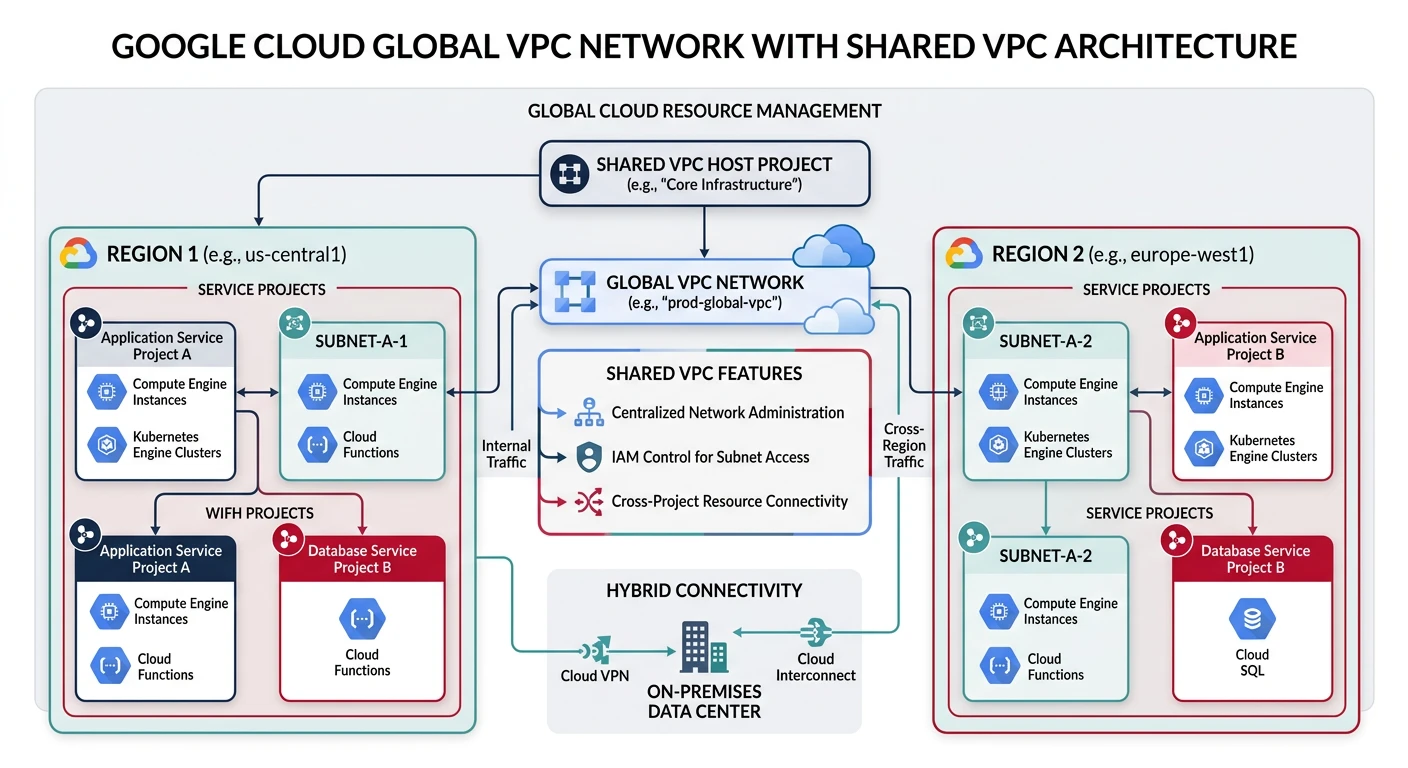
Google Cloud VPC
Google Cloud VPC
- Global resource - VPC spans all regions
- Auto mode vs Custom mode - Automatic or manual subnets
- Shared VPC - Share VPC across projects
- VPC Network Peering - Connect VPCs across projects
Creating VPC Network
# Create custom mode VPC
gcloud compute networks create my-vpc \
    --subnet-mode=custom \
    --bgp-routing-mode=regional

# Create subnet in us-central1
gcloud compute networks subnets create public-subnet \
    --network=my-vpc \
    --region=us-central1 \
    --range=10.0.1.0/24

# Create private subnet
gcloud compute networks subnets create private-subnet \
    --network=my-vpc \
    --region=us-central1 \
    --range=10.0.10.0/24 \
    --enable-private-ip-google-access

# Create subnet in europe-west1 (global VPC)
gcloud compute networks subnets create eu-subnet \
    --network=my-vpc \
    --region=europe-west1 \
    --range=10.1.0.0/24

# List subnets
gcloud compute networks subnets list --network=my-vpc
Firewall Rules
# Allow HTTP traffic
gcloud compute firewall-rules create allow-http \
    --network=my-vpc \
    --allow=tcp:80 \
    --source-ranges=0.0.0.0/0 \
    --target-tags=web-server

# Allow HTTPS traffic
gcloud compute firewall-rules create allow-https \
    --network=my-vpc \
    --allow=tcp:443 \
    --source-ranges=0.0.0.0/0 \
    --target-tags=web-server

# Allow SSH from specific IP
gcloud compute firewall-rules create allow-ssh \
    --network=my-vpc \
    --allow=tcp:22 \
    --source-ranges=203.0.113.0/32 \
    --target-tags=allow-ssh

# Allow internal traffic
gcloud compute firewall-rules create allow-internal \
    --network=my-vpc \
    --allow=tcp:0-65535,udp:0-65535,icmp \
    --source-ranges=10.0.0.0/8

# Allow health checks from Google
gcloud compute firewall-rules create allow-health-check \
    --network=my-vpc \
    --allow=tcp:80,tcp:443 \
    --source-ranges=130.211.0.0/22,35.191.0.0/16 \
    --target-tags=web-server

# List firewall rules
gcloud compute firewall-rules list --filter="network:my-vpc"
Cloud NAT
# Create Cloud Router
gcloud compute routers create my-router \
    --network=my-vpc \
    --region=us-central1

# Create Cloud NAT
gcloud compute routers nats create my-nat \
    --router=my-router \
    --region=us-central1 \
    --auto-allocate-nat-external-ips \
    --nat-all-subnet-ip-ranges

# Create NAT for specific subnets
gcloud compute routers nats create my-nat-private \
    --router=my-router \
    --region=us-central1 \
    --auto-allocate-nat-external-ips \
    --nat-custom-subnet-ip-ranges=private-subnet

# View NAT status
gcloud compute routers get-nat-mapping-info my-router --region=us-central1
VPC Peering
# Create peering from VPC1 to VPC2
gcloud compute networks peerings create peer-vpc1-to-vpc2 \
    --network=my-vpc \
    --peer-network=projects/other-project/global/networks/other-vpc

# Create reverse peering
gcloud compute networks peerings create peer-vpc2-to-vpc1 \
    --network=other-vpc \
    --peer-network=projects/my-project/global/networks/my-vpc \
    --project=other-project

# List peerings
gcloud compute networks peerings list --network=my-vpc
Load Balancers
AWS Load Balancers
# Create Application Load Balancer
aws elbv2 create-load-balancer \
    --name my-alb \
    --subnets subnet-12345678 subnet-87654321 \
    --security-groups $WEB_SG \
    --scheme internet-facing \
    --type application

ALB_ARN=$(aws elbv2 describe-load-balancers \
    --names my-alb --query "LoadBalancers[0].LoadBalancerArn" --output text)

# Create target group
aws elbv2 create-target-group \
    --name my-targets \
    --protocol HTTP \
    --port 80 \
    --vpc-id $VPC_ID \
    --health-check-path /health \
    --target-type instance

TG_ARN=$(aws elbv2 describe-target-groups \
    --names my-targets --query "TargetGroups[0].TargetGroupArn" --output text)

# Register targets
aws elbv2 register-targets \
    --target-group-arn $TG_ARN \
    --targets Id=i-1234567890abcdef0 Id=i-0987654321fedcba0

# Create listener (HTTP)
aws elbv2 create-listener \
    --load-balancer-arn $ALB_ARN \
    --protocol HTTP \
    --port 80 \
    --default-actions Type=forward,TargetGroupArn=$TG_ARN

# Create HTTPS listener with certificate
aws elbv2 create-listener \
    --load-balancer-arn $ALB_ARN \
    --protocol HTTPS \
    --port 443 \
    --certificates CertificateArn=arn:aws:acm:us-east-1:123456789012:certificate/abc123 \
    --default-actions Type=forward,TargetGroupArn=$TG_ARN

# Create Network Load Balancer
aws elbv2 create-load-balancer \
    --name my-nlb \
    --subnets subnet-12345678 subnet-87654321 \
    --scheme internet-facing \
    --type network
Azure Load Balancer
# Create public IP for load balancer
az network public-ip create \
    --resource-group myNetworkRG \
    --name lb-pip \
    --sku Standard \
    --allocation-method Static

# Create Standard Load Balancer
az network lb create \
    --resource-group myNetworkRG \
    --name myLoadBalancer \
    --sku Standard \
    --public-ip-address lb-pip \
    --frontend-ip-name myFrontEnd \
    --backend-pool-name myBackEndPool

# Create health probe
az network lb probe create \
    --resource-group myNetworkRG \
    --lb-name myLoadBalancer \
    --name myHealthProbe \
    --protocol tcp \
    --port 80

# Create load balancing rule
az network lb rule create \
    --resource-group myNetworkRG \
    --lb-name myLoadBalancer \
    --name myHTTPRule \
    --protocol tcp \
    --frontend-port 80 \
    --backend-port 80 \
    --frontend-ip-name myFrontEnd \
    --backend-pool-name myBackEndPool \
    --probe-name myHealthProbe

# Create Application Gateway (Layer 7)
az network application-gateway create \
    --resource-group myNetworkRG \
    --name myAppGateway \
    --location eastus \
    --sku Standard_v2 \
    --capacity 2 \
    --vnet-name myVNet \
    --subnet public-subnet \
    --public-ip-address appgw-pip \
    --http-settings-port 80 \
    --http-settings-protocol Http \
    --frontend-port 80
GCP Load Balancers
# Create instance group
gcloud compute instance-groups managed create my-ig \
    --zone=us-central1-a \
    --template=my-template \
    --size=2

# Set named port
gcloud compute instance-groups set-named-ports my-ig \
    --named-ports=http:80 \
    --zone=us-central1-a

# Create health check
gcloud compute health-checks create http my-health-check \
    --port=80 \
    --request-path=/health

# Create backend service
gcloud compute backend-services create my-backend \
    --protocol=HTTP \
    --health-checks=my-health-check \
    --global

# Add instance group to backend
gcloud compute backend-services add-backend my-backend \
    --instance-group=my-ig \
    --instance-group-zone=us-central1-a \
    --global

# Create URL map
gcloud compute url-maps create my-url-map \
    --default-service=my-backend

# Create target HTTP proxy
gcloud compute target-http-proxies create my-http-proxy \
    --url-map=my-url-map

# Create global forwarding rule
gcloud compute forwarding-rules create my-http-rule \
    --global \
    --target-http-proxy=my-http-proxy \
    --ports=80

# Create HTTPS load balancer with SSL
gcloud compute ssl-certificates create my-cert \
    --certificate=cert.pem \
    --private-key=key.pem

gcloud compute target-https-proxies create my-https-proxy \
    --url-map=my-url-map \
    --ssl-certificates=my-cert

gcloud compute forwarding-rules create my-https-rule \
    --global \
    --target-https-proxy=my-https-proxy \
    --ports=443
CDN Services
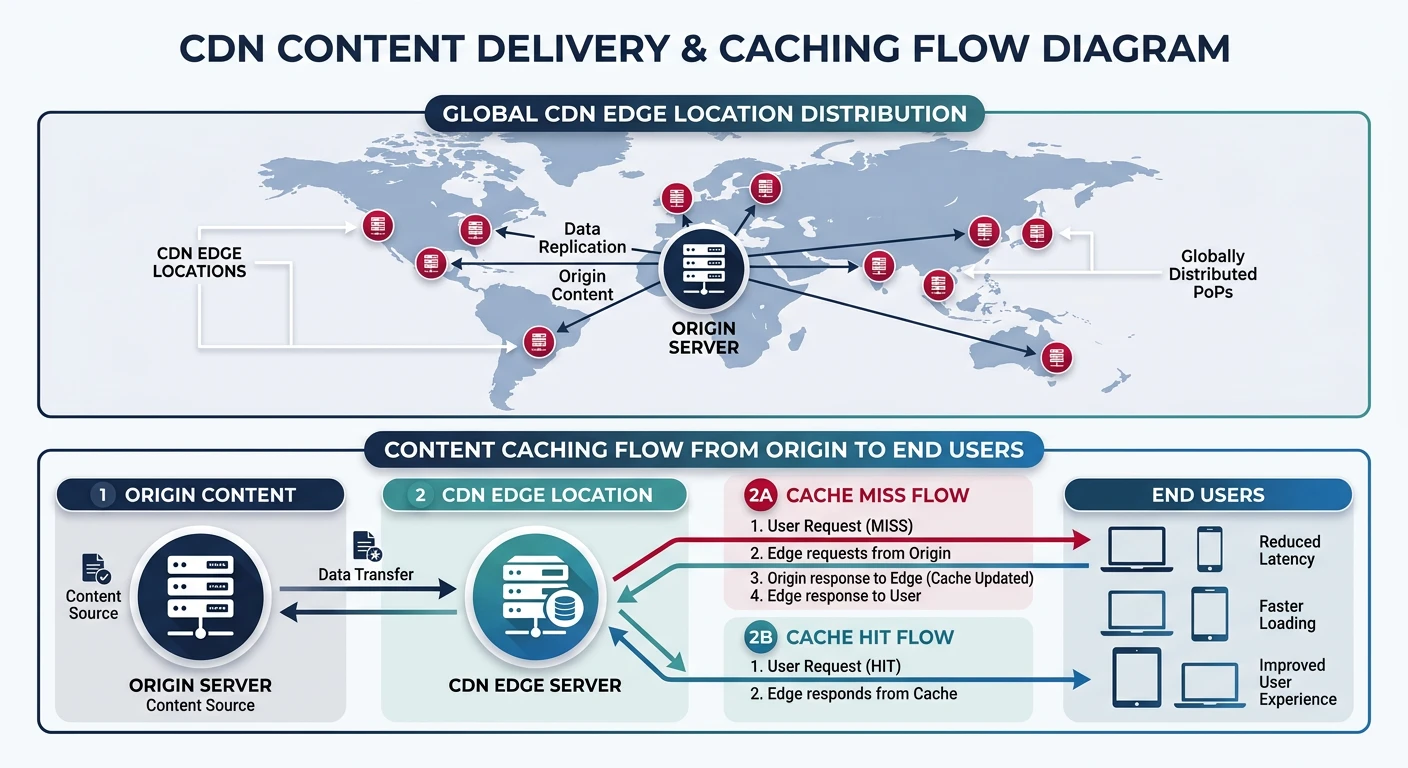
AWS CloudFront
# Create CloudFront distribution for S3
aws cloudfront create-distribution \
    --distribution-config '{
        "CallerReference": "my-distribution-2026",
        "Comment": "My CloudFront Distribution",
        "DefaultCacheBehavior": {
            "TargetOriginId": "myS3Origin",
            "ViewerProtocolPolicy": "redirect-to-https",
            "CachePolicyId": "658327ea-f89d-4fab-a63d-7e88639e58f6",
            "Compress": true,
            "AllowedMethods": {
                "Quantity": 2,
                "Items": ["GET", "HEAD"]
            }
        },
        "Origins": {
            "Quantity": 1,
            "Items": [{
                "Id": "myS3Origin",
                "DomainName": "my-bucket.s3.amazonaws.com",
                "S3OriginConfig": {
                    "OriginAccessIdentity": ""
                }
            }]
        },
        "Enabled": true,
        "PriceClass": "PriceClass_100"
    }'

# Create distribution for ALB origin
aws cloudfront create-distribution \
    --distribution-config '{
        "CallerReference": "alb-distribution-2026",
        "Comment": "ALB Distribution",
        "DefaultCacheBehavior": {
            "TargetOriginId": "myALBOrigin",
            "ViewerProtocolPolicy": "redirect-to-https",
            "CachePolicyId": "4135ea2d-6df8-44a3-9df3-4b5a84be39ad",
            "OriginRequestPolicyId": "216adef6-5c7f-47e4-b989-5492eafa07d3",
            "Compress": true,
            "AllowedMethods": {
                "Quantity": 7,
                "Items": ["GET", "HEAD", "OPTIONS", "PUT", "POST", "PATCH", "DELETE"]
            }
        },
        "Origins": {
            "Quantity": 1,
            "Items": [{
                "Id": "myALBOrigin",
                "DomainName": "my-alb-123456.us-east-1.elb.amazonaws.com",
                "CustomOriginConfig": {
                    "HTTPPort": 80,
                    "HTTPSPort": 443,
                    "OriginProtocolPolicy": "https-only"
                }
            }]
        },
        "Enabled": true
    }'

# List distributions
aws cloudfront list-distributions --query "DistributionList.Items[*].[Id,DomainName,Status]"

# Invalidate cache
aws cloudfront create-invalidation \
    --distribution-id E1234567890ABC \
    --paths "/*"
Azure CDN / Front Door
# Create CDN profile
az cdn profile create \
    --resource-group myNetworkRG \
    --name myCDNProfile \
    --sku Standard_Microsoft

# Create CDN endpoint
az cdn endpoint create \
    --resource-group myNetworkRG \
    --profile-name myCDNProfile \
    --name myEndpoint \
    --origin www.example.com \
    --origin-host-header www.example.com

# Enable HTTPS with custom domain
az cdn custom-domain enable-https \
    --resource-group myNetworkRG \
    --profile-name myCDNProfile \
    --endpoint-name myEndpoint \
    --name myCustomDomain

# Create Azure Front Door
az afd profile create \
    --resource-group myNetworkRG \
    --profile-name myFrontDoor \
    --sku Premium_AzureFrontDoor

# Add endpoint
az afd endpoint create \
    --resource-group myNetworkRG \
    --profile-name myFrontDoor \
    --endpoint-name myEndpoint \
    --enabled-state Enabled

# Add origin group
az afd origin-group create \
    --resource-group myNetworkRG \
    --profile-name myFrontDoor \
    --origin-group-name myOriginGroup \
    --probe-request-type HEAD \
    --probe-protocol Https \
    --probe-interval-in-seconds 30

# Add origin
az afd origin create \
    --resource-group myNetworkRG \
    --profile-name myFrontDoor \
    --origin-group-name myOriginGroup \
    --origin-name myOrigin \
    --host-name www.example.com \
    --http-port 80 \
    --https-port 443 \
    --priority 1 \
    --weight 1000

# Purge cache
az cdn endpoint purge \
    --resource-group myNetworkRG \
    --profile-name myCDNProfile \
    --name myEndpoint \
    --content-paths "/*"
Google Cloud CDN
# Enable Cloud CDN on backend service
gcloud compute backend-services update my-backend \
    --enable-cdn \
    --global

# Set cache policy
gcloud compute backend-services update my-backend \
    --cache-mode=CACHE_ALL_STATIC \
    --default-ttl=3600 \
    --max-ttl=86400 \
    --global

# Create backend bucket for static content
gcloud compute backend-buckets create my-cdn-bucket \
    --gcs-bucket-name=my-static-bucket \
    --enable-cdn \
    --cache-mode=CACHE_ALL_STATIC

# Add backend bucket to URL map
gcloud compute url-maps add-path-matcher my-url-map \
    --path-matcher-name=static-matcher \
    --default-backend-bucket=my-cdn-bucket \
    --path-rules="/static/*=my-cdn-bucket"

# Invalidate cache
gcloud compute url-maps invalidate-cdn-cache my-url-map \
    --path="/*"

# View CDN cache hit/miss stats
gcloud logging read 'resource.type="http_load_balancer"' \
    --format="table(jsonPayload.statusDetails)"
DNS Services
AWS Route 53
# Create hosted zone
aws route53 create-hosted-zone \
    --name example.com \
    --caller-reference $(date +%s)

ZONE_ID=$(aws route53 list-hosted-zones \
    --query "HostedZones[?Name=='example.com.'].Id" --output text | cut -d'/' -f3)

# Create A record
aws route53 change-resource-record-sets \
    --hosted-zone-id $ZONE_ID \
    --change-batch '{
        "Changes": [{
            "Action": "CREATE",
            "ResourceRecordSet": {
                "Name": "www.example.com",
                "Type": "A",
                "TTL": 300,
                "ResourceRecords": [{"Value": "203.0.113.1"}]
            }
        }]
    }'

# Create CNAME for CloudFront
aws route53 change-resource-record-sets \
    --hosted-zone-id $ZONE_ID \
    --change-batch '{
        "Changes": [{
            "Action": "CREATE",
            "ResourceRecordSet": {
                "Name": "cdn.example.com",
                "Type": "CNAME",
                "TTL": 300,
                "ResourceRecords": [{"Value": "d1234567890.cloudfront.net"}]
            }
        }]
    }'

# Create alias record for ALB
aws route53 change-resource-record-sets \
    --hosted-zone-id $ZONE_ID \
    --change-batch '{
        "Changes": [{
            "Action": "CREATE",
            "ResourceRecordSet": {
                "Name": "api.example.com",
                "Type": "A",
                "AliasTarget": {
                    "HostedZoneId": "Z35SXDOTRQ7X7K",
                    "DNSName": "my-alb-123456.us-east-1.elb.amazonaws.com",
                    "EvaluateTargetHealth": true
                }
            }
        }]
    }'

# List records
aws route53 list-resource-record-sets --hosted-zone-id $ZONE_ID
Azure DNS
# Create DNS zone
az network dns zone create \
    --resource-group myNetworkRG \
    --name example.com

# Create A record
az network dns record-set a add-record \
    --resource-group myNetworkRG \
    --zone-name example.com \
    --record-set-name www \
    --ipv4-address 203.0.113.1

# Create CNAME record
az network dns record-set cname set-record \
    --resource-group myNetworkRG \
    --zone-name example.com \
    --record-set-name cdn \
    --cname myendpoint.azureedge.net

# Create alias record for Azure resource
az network dns record-set a create \
    --resource-group myNetworkRG \
    --zone-name example.com \
    --name api \
    --target-resource /subscriptions/xxx/resourceGroups/myRG/providers/Microsoft.Network/publicIPAddresses/myIP

# List records
az network dns record-set list \
    --resource-group myNetworkRG \
    --zone-name example.com \
    --output table
Google Cloud DNS
# Create managed zone
gcloud dns managed-zones create my-zone \
    --dns-name=example.com. \
    --description="My DNS Zone"

# Start transaction
gcloud dns record-sets transaction start --zone=my-zone

# Add A record
gcloud dns record-sets transaction add 203.0.113.1 \
    --name=www.example.com. \
    --ttl=300 \
    --type=A \
    --zone=my-zone

# Add CNAME record
gcloud dns record-sets transaction add my-backend.example.com. \
    --name=cdn.example.com. \
    --ttl=300 \
    --type=CNAME \
    --zone=my-zone

# Execute transaction
gcloud dns record-sets transaction execute --zone=my-zone

# List records
gcloud dns record-sets list --zone=my-zone
Best Practices
Security Best Practices:
- Least privilege - Only open required ports
- Private subnets - Keep databases and app servers private
- VPC Flow Logs - Enable for traffic monitoring
- WAF - Use Web Application Firewall for public endpoints
- DDoS protection - Enable AWS Shield, Azure DDoS Protection
- Encryption in transit - Use HTTPS/TLS everywhere
Performance Tips
- Use CDN - Cache static content at edge locations
- Regional deployment - Deploy close to users
- Connection pooling - Reduce connection overhead
- Health checks - Configure appropriate intervals
- Right-size subnets - Plan CIDR ranges for growth
- Use private endpoints - Direct connectivity to cloud services
Conclusion
Cloud networking is foundational to building secure, scalable applications. Key takeaways:
| Component | AWS | Azure | GCP |
|---|---|---|---|
| VPC Scope | Regional | Regional | Global |
| Best for Layer 7 LB | ALB + WAF | App Gateway / Front Door | HTTP(S) LB + Cloud Armor |
| CDN Strength | Lambda@Edge for compute | Front Door global routing | Integrated with GCP LB |
Continue Learning: