Introduction
Containers have revolutionized how we package, deploy, and scale applications. Combined with orchestration platforms like Kubernetes, they provide a powerful foundation for cloud-native architectures.
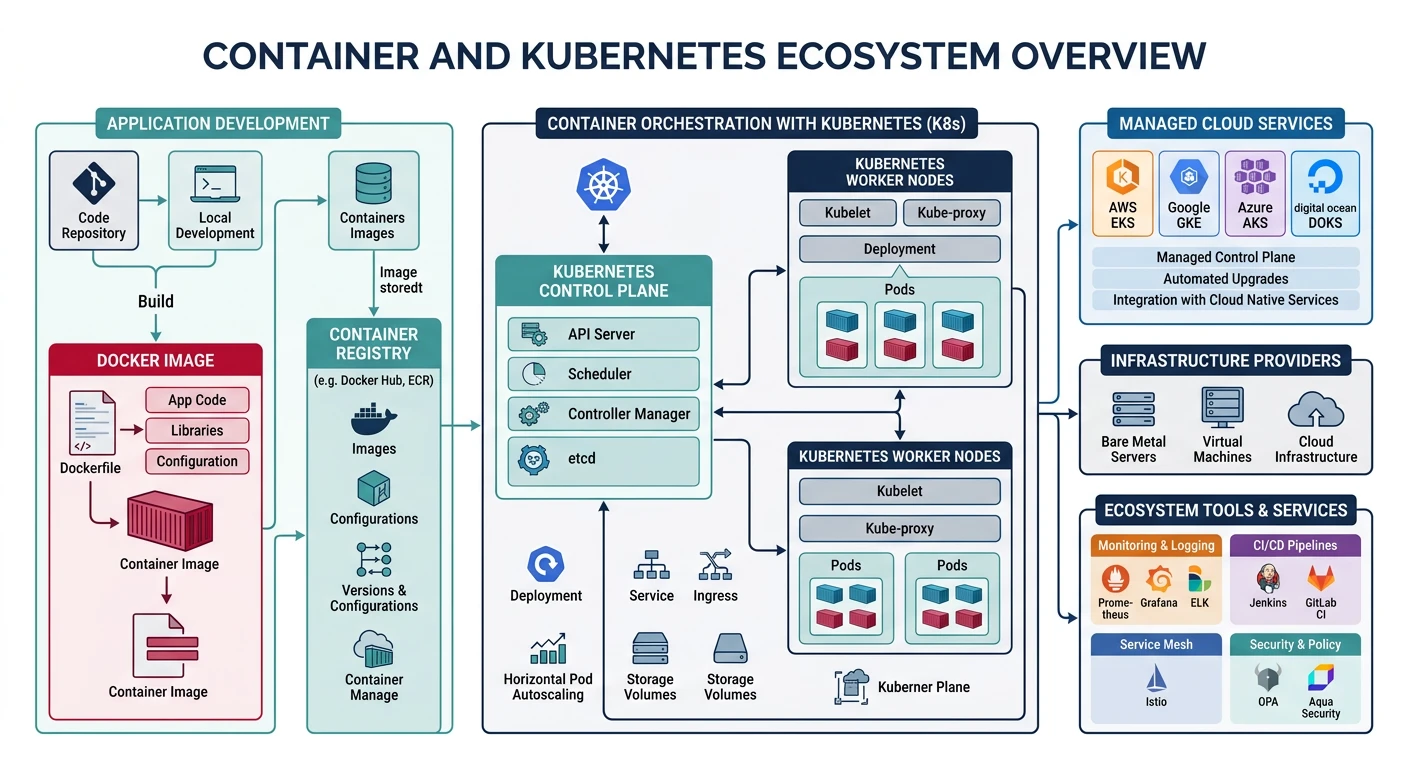
What We'll Cover:
- Docker basics - Building and managing containers
- Kubernetes fundamentals - Pods, Deployments, Services
- AWS ECS/EKS - Amazon's container services
- Azure AKS - Azure Kubernetes Service
- Google GKE - Google Kubernetes Engine
- Helm - Package manager for Kubernetes
Cloud Computing Mastery
Your 11-step learning path • Currently on Step 8
Cloud Computing Fundamentals
IaaS, PaaS, SaaS, deployment modelsCLI Tools & Setup
AWS CLI, Azure CLI, gcloud, TerraformCompute Services
VMs, containers, auto-scaling, spot instancesStorage Services
Object, block, file storage, data lifecycleDatabase Services
RDS, DynamoDB, Cosmos DB, cachingNetworking & CDN
VPCs, load balancers, DNS, content deliveryServerless Computing
Lambda, Functions, event-driven architecture8
Containers & Kubernetes
Docker, EKS, AKS, GKE, orchestration9
Identity & Security
IAM, RBAC, encryption, compliance10
Monitoring & Observability
CloudWatch, Azure Monitor, logging11
DevOps & CI/CD
Pipelines, infrastructure as code, GitOpsDocker Basics
Building Docker Images
# Sample Dockerfile
cat > Dockerfile << 'EOF'
FROM python:3.12-slim

WORKDIR /app

COPY requirements.txt .
RUN pip install --no-cache-dir -r requirements.txt

COPY . .

EXPOSE 8080

CMD ["python", "app.py"]
EOF

# Build image
docker build -t my-app:v1 .

# Build with build arguments
docker build -t my-app:v1 --build-arg ENV=production .

# Build for multiple platforms
docker buildx build --platform linux/amd64,linux/arm64 -t my-app:v1 .

# List images
docker images

# Tag image for registry
docker tag my-app:v1 myregistry.azurecr.io/my-app:v1
Running Containers
# Run container
docker run -d --name my-container -p 8080:8080 my-app:v1

# Run with environment variables
docker run -d --name my-container \
    -e DATABASE_URL=postgres://localhost/mydb \
    -e LOG_LEVEL=info \
    -p 8080:8080 \
    my-app:v1

# Run with volume mount
docker run -d --name my-container \
    -v $(pwd)/data:/app/data \
    -p 8080:8080 \
    my-app:v1

# Run interactive shell
docker run -it --rm my-app:v1 /bin/bash

# List running containers
docker ps

# View logs
docker logs -f my-container

# Stop and remove
docker stop my-container
docker rm my-container
Container Registries
# AWS ECR
aws ecr create-repository --repository-name my-app
aws ecr get-login-password --region us-east-1 | docker login --username AWS --password-stdin 123456789012.dkr.ecr.us-east-1.amazonaws.com
docker push 123456789012.dkr.ecr.us-east-1.amazonaws.com/my-app:v1

# Azure Container Registry
az acr create --resource-group myRG --name myregistry --sku Basic
az acr login --name myregistry
docker push myregistry.azurecr.io/my-app:v1

# Google Container Registry / Artifact Registry
gcloud auth configure-docker us-central1-docker.pkg.dev
docker push us-central1-docker.pkg.dev/my-project/my-repo/my-app:v1
Kubernetes Fundamentals
Architecture Context: Containers and Kubernetes are the primary deployment vehicle for microservices. For microservices architecture patterns (service decomposition, API gateway, circuit breaker, service mesh, saga pattern) and deployment strategies, see System Design Part 5: Microservices Architecture.
Kubernetes Architecture
graph TD
    subgraph CP ["Control Plane"]
        API["API Server"]
        ETCD["etcd
State Store"]
        SCHED["Scheduler"]
        CM["Controller
Manager"]
        API --> ETCD
        SCHED --> API
        CM --> API
    end

    subgraph W1 ["Worker Node 1"]
        K1["kubelet"]
        P1["Pod A"]
        P2["Pod B"]
        K1 --> P1
        K1 --> P2
    end

    subgraph W2 ["Worker Node 2"]
        K2["kubelet"]
        P3["Pod C"]
        P4["Pod D"]
        K2 --> P3
        K2 --> P4
    end

    API --> K1
    API --> K2

    style CP fill:#f0f4f8,stroke:#16476A
    style W1 fill:#e8f4f4,stroke:#3B9797
    style W2 fill:#e8f4f4,stroke:#3B9797
Core Concepts
| Resource | Description | Use Case |
|---|---|---|
| Pod | Smallest deployable unit, one or more containers | Single instance of an application |
| Deployment | Manages ReplicaSets, handles rolling updates | Stateless applications |
| Service | Stable network endpoint for pods | Load balancing, service discovery |
| ConfigMap | Non-sensitive configuration data | Environment variables, config files |
| Secret | Sensitive data (base64 encoded) | Passwords, API keys, certificates |
| Ingress | HTTP/HTTPS routing rules | External access, SSL termination |
| StatefulSet | Manages stateful applications | Databases, message queues |
| DaemonSet | Runs pod on every node | Log collectors, monitoring agents |
kubectl Essential Commands
# Cluster info
kubectl cluster-info
kubectl get nodes

# Pods
kubectl get pods
kubectl get pods -A  # All namespaces
kubectl describe pod my-pod
kubectl logs my-pod
kubectl logs -f my-pod -c container-name  # Follow specific container
kubectl exec -it my-pod -- /bin/bash

# Deployments
kubectl get deployments
kubectl describe deployment my-deployment
kubectl scale deployment my-deployment --replicas=5
kubectl rollout status deployment my-deployment
kubectl rollout history deployment my-deployment
kubectl rollout undo deployment my-deployment

# Services
kubectl get services
kubectl get svc
kubectl expose deployment my-deployment --port=80 --target-port=8080 --type=LoadBalancer

# Apply manifests
kubectl apply -f deployment.yaml
kubectl apply -f .  # All YAML files in directory
kubectl delete -f deployment.yaml

# Namespaces
kubectl get namespaces
kubectl create namespace production
kubectl config set-context --current --namespace=production
Kubernetes Manifests
# deployment.yaml
apiVersion: apps/v1
kind: Deployment
metadata:
  name: my-app
  labels:
    app: my-app
spec:
  replicas: 3
  selector:
    matchLabels:
      app: my-app
  template:
    metadata:
      labels:
        app: my-app
    spec:
      containers:
      - name: my-app
        image: my-app:v1
        ports:
        - containerPort: 8080
        env:
        - name: LOG_LEVEL
          value: "info"
        - name: DATABASE_URL
          valueFrom:
            secretKeyRef:
              name: my-secrets
              key: database-url
        resources:
          requests:
            memory: "128Mi"
            cpu: "100m"
          limits:
            memory: "256Mi"
            cpu: "500m"
        livenessProbe:
          httpGet:
            path: /health
            port: 8080
          initialDelaySeconds: 30
          periodSeconds: 10
        readinessProbe:
          httpGet:
            path: /ready
            port: 8080
          initialDelaySeconds: 5
          periodSeconds: 5
---
apiVersion: v1
kind: Service
metadata:
  name: my-app-service
spec:
  selector:
    app: my-app
  ports:
  - protocol: TCP
    port: 80
    targetPort: 8080
  type: LoadBalancer
---
apiVersion: networking.k8s.io/v1
kind: Ingress
metadata:
  name: my-app-ingress
  annotations:
    kubernetes.io/ingress.class: nginx
    cert-manager.io/cluster-issuer: letsencrypt-prod
spec:
  tls:
  - hosts:
    - myapp.example.com
    secretName: myapp-tls
  rules:
  - host: myapp.example.com
    http:
      paths:
      - path: /
        pathType: Prefix
        backend:
          service:
            name: my-app-service
            port:
              number: 80
Provider Comparison
| Feature | AWS ECS/EKS | Azure AKS | Google GKE |
|---|---|---|---|
| Managed K8s | EKS | AKS | GKE |
| Proprietary Option | ECS (Fargate) | Container Instances | Cloud Run |
| Control Plane Cost | $0.10/hour (~$73/month) | Free | Free (Standard), $0.10/hr (Autopilot) |
| Serverless Containers | Fargate | ACI, AKS virtual nodes | GKE Autopilot, Cloud Run |
| Max Pods/Node | 110-250 | 250 | 110 |
| Auto-Scaling | Cluster Autoscaler, Karpenter | Cluster Autoscaler, KEDA | Cluster Autoscaler, HPA, VPA |
AWS ECS & EKS
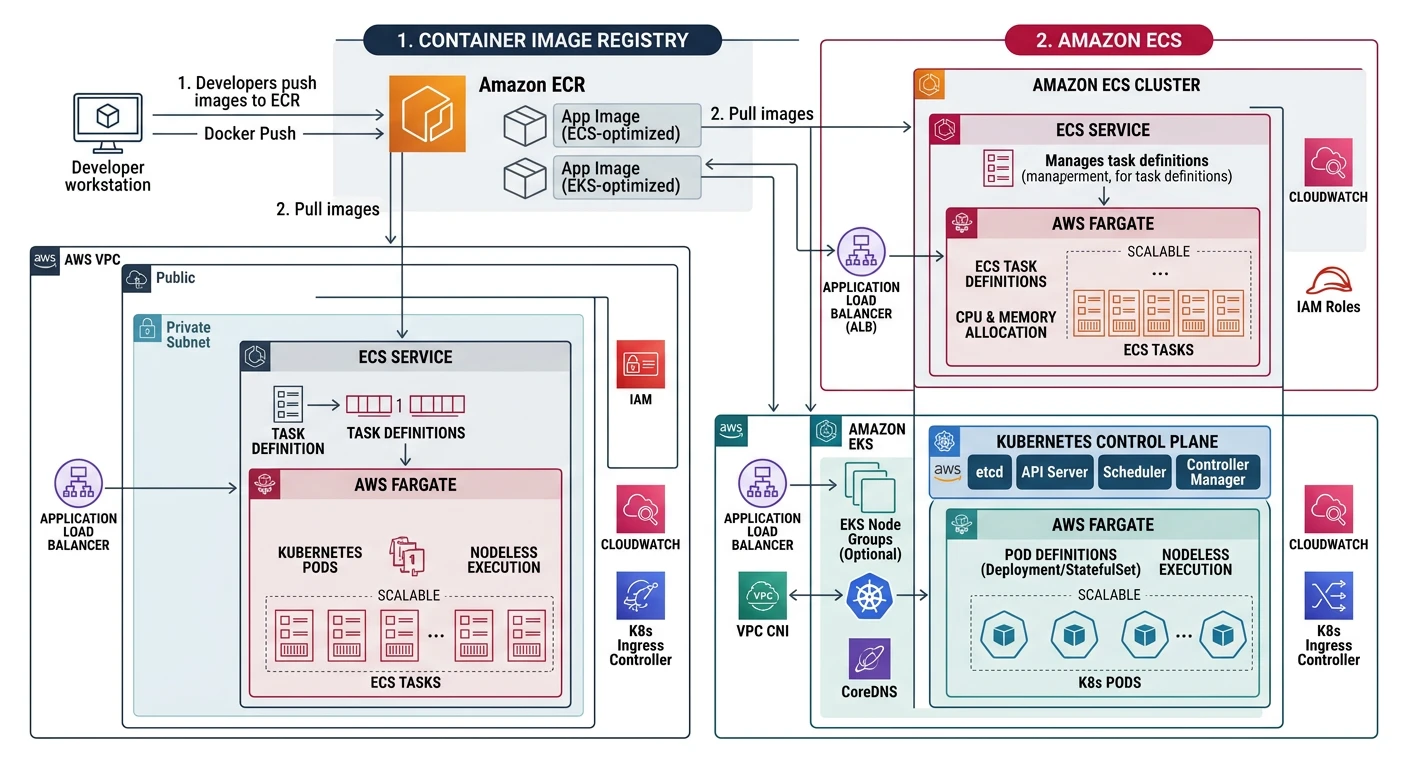
AWS Container Services
- ECS - AWS-native container orchestration
- EKS - Managed Kubernetes service
- Fargate - Serverless compute for containers
- App Runner - Fully managed container service
- ECR - Container registry
AWS ECS with Fargate
# Create ECS cluster
aws ecs create-cluster --cluster-name my-cluster

# Register task definition
aws ecs register-task-definition --cli-input-json file://task-definition.json

# Task definition JSON
cat > task-definition.json << 'EOF'
{
  "family": "my-app",
  "networkMode": "awsvpc",
  "requiresCompatibilities": ["FARGATE"],
  "cpu": "256",
  "memory": "512",
  "executionRoleArn": "arn:aws:iam::123456789012:role/ecsTaskExecutionRole",
  "containerDefinitions": [
    {
      "name": "my-app",
      "image": "123456789012.dkr.ecr.us-east-1.amazonaws.com/my-app:v1",
      "portMappings": [
        {
          "containerPort": 8080,
          "protocol": "tcp"
        }
      ],
      "environment": [
        {"name": "LOG_LEVEL", "value": "info"}
      ],
      "logConfiguration": {
        "logDriver": "awslogs",
        "options": {
          "awslogs-group": "/ecs/my-app",
          "awslogs-region": "us-east-1",
          "awslogs-stream-prefix": "ecs"
        }
      }
    }
  ]
}
EOF

# Create service
aws ecs create-service \
    --cluster my-cluster \
    --service-name my-service \
    --task-definition my-app:1 \
    --desired-count 2 \
    --launch-type FARGATE \
    --network-configuration "awsvpcConfiguration={subnets=[subnet-12345678],securityGroups=[sg-12345678],assignPublicIp=ENABLED}"

# Update service
aws ecs update-service \
    --cluster my-cluster \
    --service my-service \
    --task-definition my-app:2 \
    --desired-count 3

# List services
aws ecs list-services --cluster my-cluster

# Describe service
aws ecs describe-services --cluster my-cluster --services my-service
AWS EKS
# Create EKS cluster using eksctl
eksctl create cluster \
    --name my-cluster \
    --region us-east-1 \
    --version 1.29 \
    --nodegroup-name standard-workers \
    --node-type t3.medium \
    --nodes 3 \
    --nodes-min 1 \
    --nodes-max 5 \
    --managed

# Or using AWS CLI
aws eks create-cluster \
    --name my-cluster \
    --role-arn arn:aws:iam::123456789012:role/EKSClusterRole \
    --resources-vpc-config subnetIds=subnet-a,subnet-b,securityGroupIds=sg-123

# Update kubeconfig
aws eks update-kubeconfig --name my-cluster --region us-east-1

# Add managed node group
eksctl create nodegroup \
    --cluster my-cluster \
    --name new-nodes \
    --node-type t3.large \
    --nodes 2 \
    --nodes-min 1 \
    --nodes-max 4

# Add Fargate profile (serverless)
eksctl create fargateprofile \
    --cluster my-cluster \
    --name my-fargate-profile \
    --namespace my-namespace

# Install AWS Load Balancer Controller
eksctl create iamserviceaccount \
    --cluster=my-cluster \
    --namespace=kube-system \
    --name=aws-load-balancer-controller \
    --attach-policy-arn=arn:aws:iam::123456789012:policy/AWSLoadBalancerControllerIAMPolicy \
    --approve

helm install aws-load-balancer-controller eks/aws-load-balancer-controller \
    -n kube-system \
    --set clusterName=my-cluster \
    --set serviceAccount.create=false \
    --set serviceAccount.name=aws-load-balancer-controller

# Delete cluster
eksctl delete cluster --name my-cluster
Azure AKS
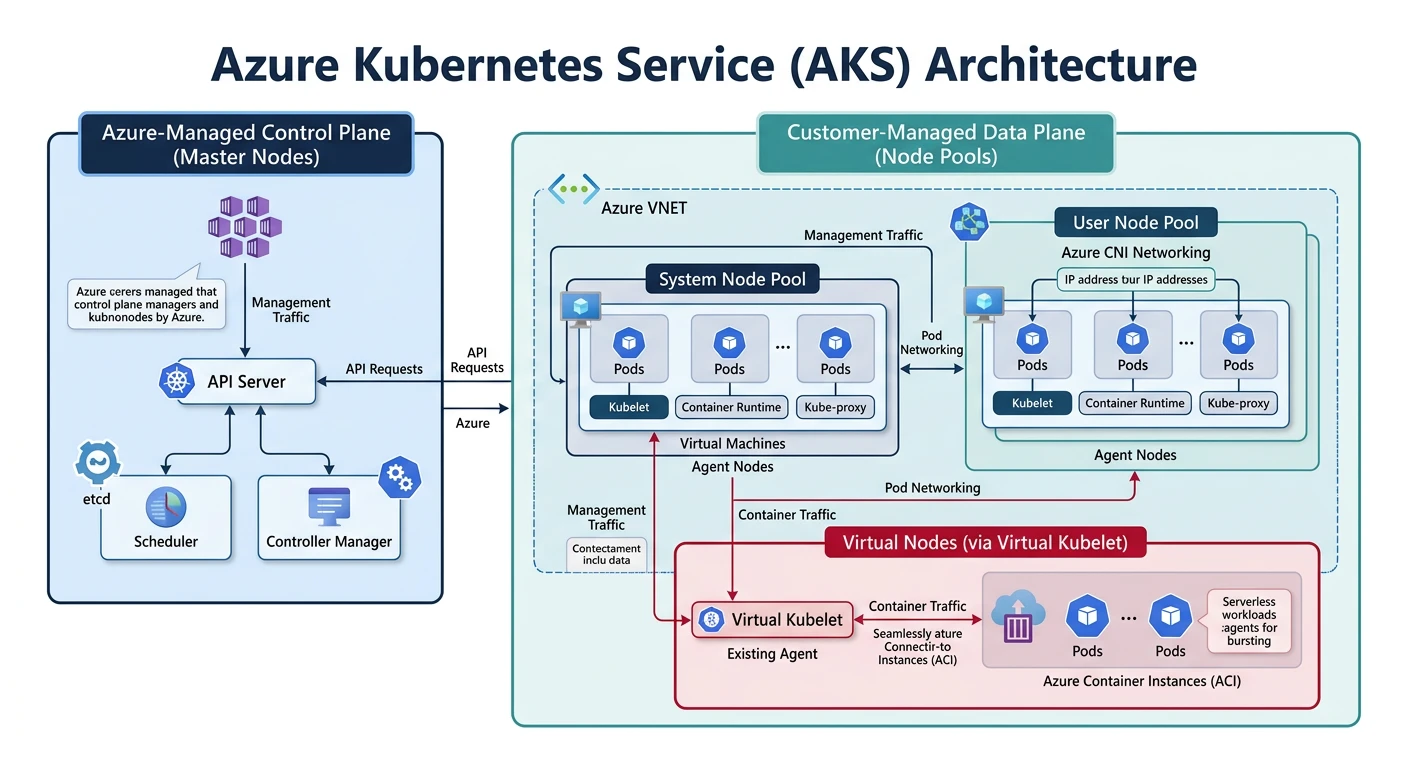
Azure Kubernetes Service
- Free control plane (only pay for nodes)
- Azure CNI for advanced networking
- Virtual nodes (ACI integration)
- Azure AD integration for RBAC
- Azure Policy for governance
Creating AKS Cluster
# Create resource group
az group create --name myResourceGroup --location eastus

# Create AKS cluster
az aks create \
    --resource-group myResourceGroup \
    --name myAKSCluster \
    --node-count 3 \
    --node-vm-size Standard_D2s_v3 \
    --enable-managed-identity \
    --generate-ssh-keys

# Create with advanced options
az aks create \
    --resource-group myResourceGroup \
    --name myAKSCluster \
    --node-count 3 \
    --node-vm-size Standard_D4s_v3 \
    --enable-managed-identity \
    --network-plugin azure \
    --network-policy calico \
    --enable-cluster-autoscaler \
    --min-count 1 \
    --max-count 10 \
    --enable-addons monitoring \
    --zones 1 2 3 \
    --kubernetes-version 1.29.0

# Get credentials
az aks get-credentials --resource-group myResourceGroup --name myAKSCluster

# Verify connection
kubectl get nodes
Managing AKS
# Scale node pool
az aks scale \
    --resource-group myResourceGroup \
    --name myAKSCluster \
    --node-count 5

# Add node pool
az aks nodepool add \
    --resource-group myResourceGroup \
    --cluster-name myAKSCluster \
    --name gpupool \
    --node-count 2 \
    --node-vm-size Standard_NC6 \
    --labels workload=gpu

# Upgrade cluster
az aks get-upgrades --resource-group myResourceGroup --name myAKSCluster
az aks upgrade \
    --resource-group myResourceGroup \
    --name myAKSCluster \
    --kubernetes-version 1.30.0

# Enable virtual nodes (serverless)
az aks enable-addons \
    --resource-group myResourceGroup \
    --name myAKSCluster \
    --addons virtual-node \
    --subnet-name myVirtualNodeSubnet

# Attach ACR
az aks update \
    --resource-group myResourceGroup \
    --name myAKSCluster \
    --attach-acr myACRRegistry

# View cluster info
az aks show --resource-group myResourceGroup --name myAKSCluster

# Delete cluster
az aks delete --resource-group myResourceGroup --name myAKSCluster --yes
AKS with Azure CNI
# Create VNet
az network vnet create \
    --resource-group myResourceGroup \
    --name myVNet \
    --address-prefixes 10.0.0.0/8 \
    --subnet-name myAKSSubnet \
    --subnet-prefix 10.240.0.0/16

# Get subnet ID
SUBNET_ID=$(az network vnet subnet show \
    --resource-group myResourceGroup \
    --vnet-name myVNet \
    --name myAKSSubnet \
    --query id -o tsv)

# Create cluster with Azure CNI
az aks create \
    --resource-group myResourceGroup \
    --name myAKSCluster \
    --network-plugin azure \
    --vnet-subnet-id $SUBNET_ID \
    --docker-bridge-address 172.17.0.1/16 \
    --dns-service-ip 10.2.0.10 \
    --service-cidr 10.2.0.0/24 \
    --node-count 3 \
    --generate-ssh-keys
Google GKE
Google Kubernetes Engine
- Autopilot mode - fully managed nodes
- Release channels for automatic upgrades
- GKE Sandbox for untrusted workloads
- Workload Identity for secure service accounts
- Multi-cluster management with Connect
Creating GKE Cluster
# Create standard cluster
gcloud container clusters create my-cluster \
    --zone us-central1-a \
    --num-nodes 3 \
    --machine-type e2-standard-2 \
    --enable-autoscaling \
    --min-nodes 1 \
    --max-nodes 10

# Create Autopilot cluster (fully managed)
gcloud container clusters create-auto my-autopilot-cluster \
    --region us-central1

# Create with advanced options
gcloud container clusters create my-cluster \
    --zone us-central1-a \
    --num-nodes 3 \
    --machine-type e2-standard-4 \
    --enable-autoscaling \
    --min-nodes 1 \
    --max-nodes 20 \
    --enable-ip-alias \
    --enable-network-policy \
    --workload-pool=my-project.svc.id.goog \
    --release-channel regular \
    --enable-vertical-pod-autoscaling

# Get credentials
gcloud container clusters get-credentials my-cluster --zone us-central1-a

# Verify
kubectl get nodes
Managing GKE
# Resize cluster
gcloud container clusters resize my-cluster \
    --zone us-central1-a \
    --num-nodes 5

# Add node pool
gcloud container node-pools create gpu-pool \
    --cluster my-cluster \
    --zone us-central1-a \
    --machine-type n1-standard-4 \
    --accelerator type=nvidia-tesla-t4,count=1 \
    --num-nodes 2 \
    --enable-autoscaling \
    --min-nodes 0 \
    --max-nodes 5

# Upgrade cluster
gcloud container clusters upgrade my-cluster \
    --zone us-central1-a \
    --master \
    --cluster-version 1.30.0

# Upgrade node pool
gcloud container clusters upgrade my-cluster \
    --zone us-central1-a \
    --node-pool default-pool

# Enable Workload Identity
gcloud container clusters update my-cluster \
    --zone us-central1-a \
    --workload-pool=my-project.svc.id.goog

# List clusters
gcloud container clusters list

# Describe cluster
gcloud container clusters describe my-cluster --zone us-central1-a

# Delete cluster
gcloud container clusters delete my-cluster --zone us-central1-a
GKE with Workload Identity
# Create GCP service account
gcloud iam service-accounts create my-gsa \
    --display-name "My GSA"

# Grant permissions to GSA
gcloud projects add-iam-policy-binding my-project \
    --member "serviceAccount:my-gsa@my-project.iam.gserviceaccount.com" \
    --role "roles/storage.objectViewer"

# Create Kubernetes service account
kubectl create serviceaccount my-ksa --namespace default

# Bind KSA to GSA
gcloud iam service-accounts add-iam-policy-binding my-gsa@my-project.iam.gserviceaccount.com \
    --role roles/iam.workloadIdentityUser \
    --member "serviceAccount:my-project.svc.id.goog[default/my-ksa]"

# Annotate KSA
kubectl annotate serviceaccount my-ksa \
    --namespace default \
    iam.gke.io/gcp-service-account=my-gsa@my-project.iam.gserviceaccount.com
Helm Charts
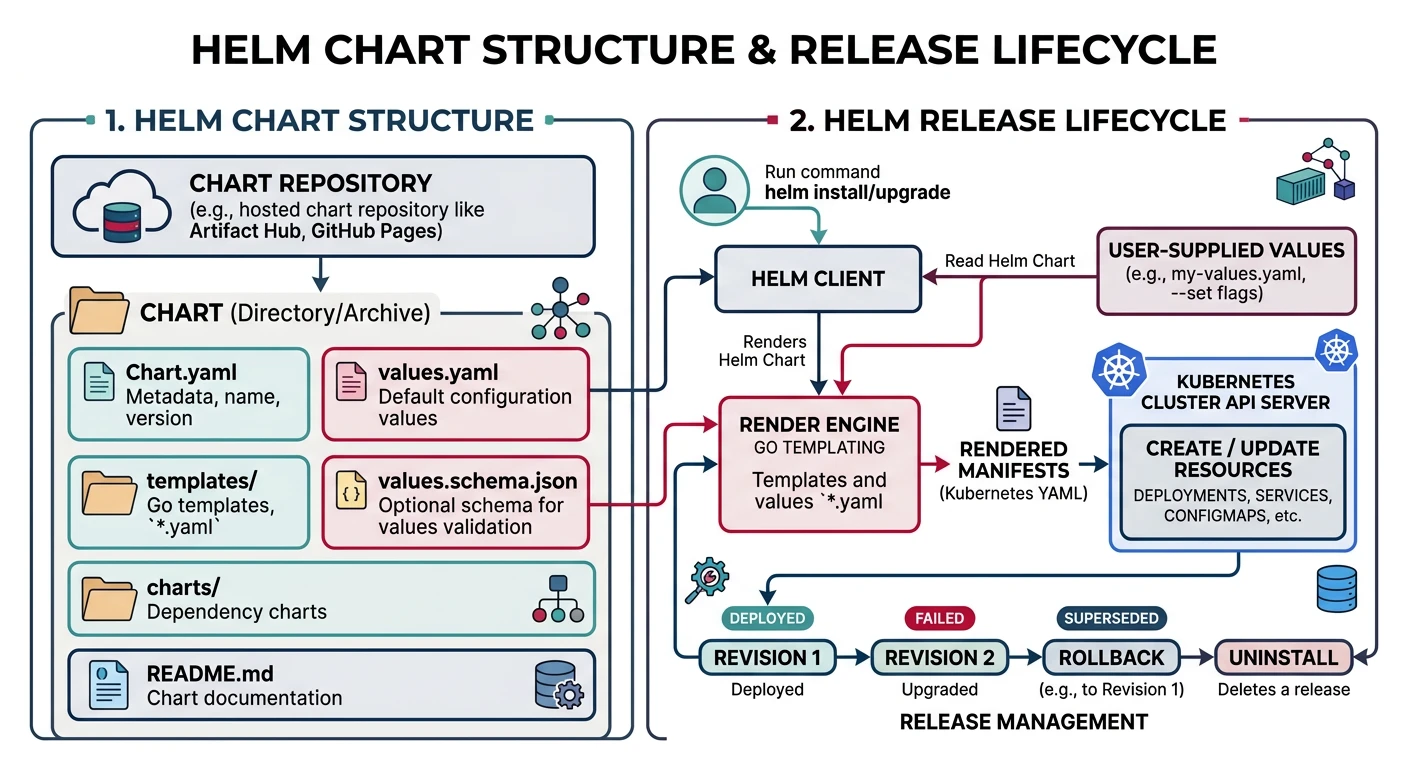
Helm is the package manager for Kubernetes, allowing you to define, install, and upgrade complex applications.
Helm Basics
# Add repository
helm repo add bitnami https://charts.bitnami.com/bitnami
helm repo add ingress-nginx https://kubernetes.github.io/ingress-nginx
helm repo update

# Search charts
helm search repo nginx
helm search hub postgresql

# Install chart
helm install my-nginx ingress-nginx/ingress-nginx

# Install with custom values
helm install my-nginx ingress-nginx/ingress-nginx \
    --set controller.replicaCount=2 \
    --set controller.service.type=LoadBalancer

# Install with values file
helm install my-app ./my-chart -f values-prod.yaml

# List releases
helm list
helm list -A  # All namespaces

# Upgrade release
helm upgrade my-nginx ingress-nginx/ingress-nginx --set controller.replicaCount=3

# Rollback
helm rollback my-nginx 1

# Uninstall
helm uninstall my-nginx
Creating a Helm Chart
# Create chart scaffold
helm create my-app

# Chart structure
my-app/
+-- Chart.yaml          # Chart metadata
+-- values.yaml         # Default configuration
+-- templates/
¦   +-- deployment.yaml
¦   +-- service.yaml
¦   +-- ingress.yaml
¦   +-- configmap.yaml
¦   +-- secret.yaml
¦   +-- hpa.yaml
¦   +-- _helpers.tpl    # Template helpers
¦   +-- NOTES.txt       # Post-install notes
+-- charts/             # Dependencies
# Chart.yaml
apiVersion: v2
name: my-app
description: A Helm chart for my application
type: application
version: 0.1.0
appVersion: "1.0.0"
dependencies:
  - name: postgresql
    version: "12.x.x"
    repository: https://charts.bitnami.com/bitnami
    condition: postgresql.enabled
# values.yaml
replicaCount: 3

image:
  repository: my-app
  tag: "v1.0.0"
  pullPolicy: IfNotPresent

service:
  type: ClusterIP
  port: 80

ingress:
  enabled: true
  className: nginx
  hosts:
    - host: myapp.example.com
      paths:
        - path: /
          pathType: Prefix

resources:
  limits:
    cpu: 500m
    memory: 256Mi
  requests:
    cpu: 100m
    memory: 128Mi

autoscaling:
  enabled: true
  minReplicas: 2
  maxReplicas: 10
  targetCPUUtilizationPercentage: 80

postgresql:
  enabled: true
  auth:
    database: myapp
# templates/deployment.yaml
apiVersion: apps/v1
kind: Deployment
metadata:
  name: {{ include "my-app.fullname" . }}
  labels:
    {{- include "my-app.labels" . | nindent 4 }}
spec:
  {{- if not .Values.autoscaling.enabled }}
  replicas: {{ .Values.replicaCount }}
  {{- end }}
  selector:
    matchLabels:
      {{- include "my-app.selectorLabels" . | nindent 6 }}
  template:
    metadata:
      labels:
        {{- include "my-app.selectorLabels" . | nindent 8 }}
    spec:
      containers:
        - name: {{ .Chart.Name }}
          image: "{{ .Values.image.repository }}:{{ .Values.image.tag }}"
          imagePullPolicy: {{ .Values.image.pullPolicy }}
          ports:
            - name: http
              containerPort: 8080
              protocol: TCP
          livenessProbe:
            httpGet:
              path: /health
              port: http
          readinessProbe:
            httpGet:
              path: /ready
              port: http
          resources:
            {{- toYaml .Values.resources | nindent 12 }}
Helm Commands
# Lint chart
helm lint ./my-app

# Template chart (dry run)
helm template my-release ./my-app

# Install with dry run
helm install my-release ./my-app --dry-run --debug

# Package chart
helm package ./my-app

# Push to OCI registry
helm push my-app-0.1.0.tgz oci://myregistry.azurecr.io/helm

# Install from OCI
helm install my-release oci://myregistry.azurecr.io/helm/my-app --version 0.1.0

# Get release values
helm get values my-release

# Get release manifest
helm get manifest my-release

# Show chart info
helm show chart ./my-app
helm show values ./my-app
Deployment Patterns
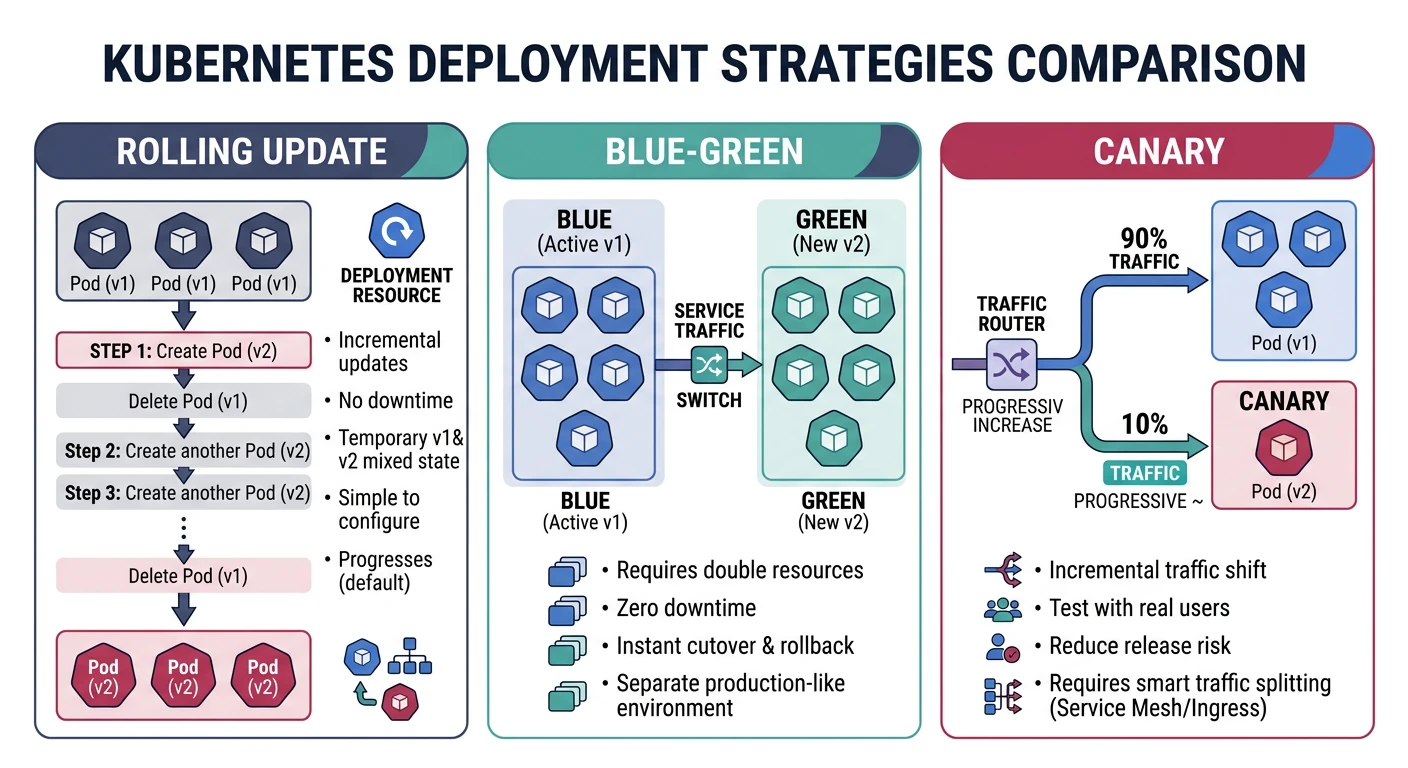
Rolling Deployment
# Default strategy - gradual replacement
apiVersion: apps/v1
kind: Deployment
metadata:
  name: my-app
spec:
  replicas: 4
  strategy:
    type: RollingUpdate
    rollingUpdate:
      maxSurge: 1        # Max pods over desired
      maxUnavailable: 1  # Max pods unavailable
  template:
    spec:
      containers:
      - name: my-app
        image: my-app:v2
Blue-Green Deployment
# Blue deployment (current)
apiVersion: apps/v1
kind: Deployment
metadata:
  name: my-app-blue
  labels:
    app: my-app
    version: blue
spec:
  replicas: 3
  selector:
    matchLabels:
      app: my-app
      version: blue
  template:
    metadata:
      labels:
        app: my-app
        version: blue
    spec:
      containers:
      - name: my-app
        image: my-app:v1
---
# Green deployment (new)
apiVersion: apps/v1
kind: Deployment
metadata:
  name: my-app-green
  labels:
    app: my-app
    version: green
spec:
  replicas: 3
  selector:
    matchLabels:
      app: my-app
      version: green
  template:
    metadata:
      labels:
        app: my-app
        version: green
    spec:
      containers:
      - name: my-app
        image: my-app:v2
---
# Service - switch by changing selector
apiVersion: v1
kind: Service
metadata:
  name: my-app
spec:
  selector:
    app: my-app
    version: green  # Switch: blue -> green
  ports:
  - port: 80
    targetPort: 8080
Canary Deployment
# Stable deployment (90% traffic)
apiVersion: apps/v1
kind: Deployment
metadata:
  name: my-app-stable
spec:
  replicas: 9
  selector:
    matchLabels:
      app: my-app
      track: stable
  template:
    metadata:
      labels:
        app: my-app
        track: stable
    spec:
      containers:
      - name: my-app
        image: my-app:v1
---
# Canary deployment (10% traffic)
apiVersion: apps/v1
kind: Deployment
metadata:
  name: my-app-canary
spec:
  replicas: 1
  selector:
    matchLabels:
      app: my-app
      track: canary
  template:
    metadata:
      labels:
        app: my-app
        track: canary
    spec:
      containers:
      - name: my-app
        image: my-app:v2
---
# Service routes to both
apiVersion: v1
kind: Service
metadata:
  name: my-app
spec:
  selector:
    app: my-app  # Both stable and canary
  ports:
  - port: 80
    targetPort: 8080
Horizontal Pod Autoscaler
# hpa.yaml
apiVersion: autoscaling/v2
kind: HorizontalPodAutoscaler
metadata:
  name: my-app-hpa
spec:
  scaleTargetRef:
    apiVersion: apps/v1
    kind: Deployment
    name: my-app
  minReplicas: 2
  maxReplicas: 20
  metrics:
  - type: Resource
    resource:
      name: cpu
      target:
        type: Utilization
        averageUtilization: 70
  - type: Resource
    resource:
      name: memory
      target:
        type: Utilization
        averageUtilization: 80
  behavior:
    scaleDown:
      stabilizationWindowSeconds: 300
      policies:
      - type: Percent
        value: 10
        periodSeconds: 60
    scaleUp:
      stabilizationWindowSeconds: 0
      policies:
      - type: Percent
        value: 100
        periodSeconds: 15
Best Practices
Security Best Practices:
- Use non-root containers - Set securityContext.runAsNonRoot
- Read-only filesystem - securityContext.readOnlyRootFilesystem
- Network policies - Limit pod-to-pod communication
- RBAC - Principle of least privilege for service accounts
- Image scanning - Scan images for vulnerabilities
- Secrets management - Use external secrets (Vault, AWS Secrets Manager)
Resource Management
# Always set resource requests and limits
containers:
- name: my-app
  resources:
    requests:
      memory: "128Mi"
      cpu: "100m"
    limits:
      memory: "256Mi"
      cpu: "500m"

# Security context
  securityContext:
    runAsNonRoot: true
    runAsUser: 1000
    readOnlyRootFilesystem: true
    allowPrivilegeEscalation: false
    capabilities:
      drop:
        - ALL
Network Policy
# Allow only specific traffic
apiVersion: networking.k8s.io/v1
kind: NetworkPolicy
metadata:
  name: my-app-network-policy
spec:
  podSelector:
    matchLabels:
      app: my-app
  policyTypes:
  - Ingress
  - Egress
  ingress:
  - from:
    - podSelector:
        matchLabels:
          app: frontend
    ports:
    - protocol: TCP
      port: 8080
  egress:
  - to:
    - podSelector:
        matchLabels:
          app: database
    ports:
    - protocol: TCP
      port: 5432
Performance Tips
- Set proper resource requests - Helps scheduler make better decisions
- Use liveness and readiness probes - Ensure only healthy pods receive traffic
- Configure PodDisruptionBudget - Maintain availability during updates
- Use node affinity/anti-affinity - Spread pods across nodes/zones
- Enable HPA - Auto-scale based on metrics
- Use Cluster Autoscaler - Auto-scale node pools
Conclusion
Container orchestration is essential for modern cloud-native applications. Each managed Kubernetes service offers unique advantages:
| Choose AWS ECS/EKS If... | Choose Azure AKS If... | Choose GKE If... |
|---|---|---|
| You're in the AWS ecosystem | You want free control plane | You want cutting-edge K8s features |
| You need ECS simplicity + Fargate | You need Azure AD integration | You want Autopilot simplicity |
| You want Karpenter for auto-scaling | You need hybrid with Azure Arc | You need multi-cluster mesh |
Continue Learning: