Introduction
Cloud security is a shared responsibility between cloud providers and customers. This guide covers identity and access management (IAM), encryption, secrets management, and compliance across all major cloud platforms.
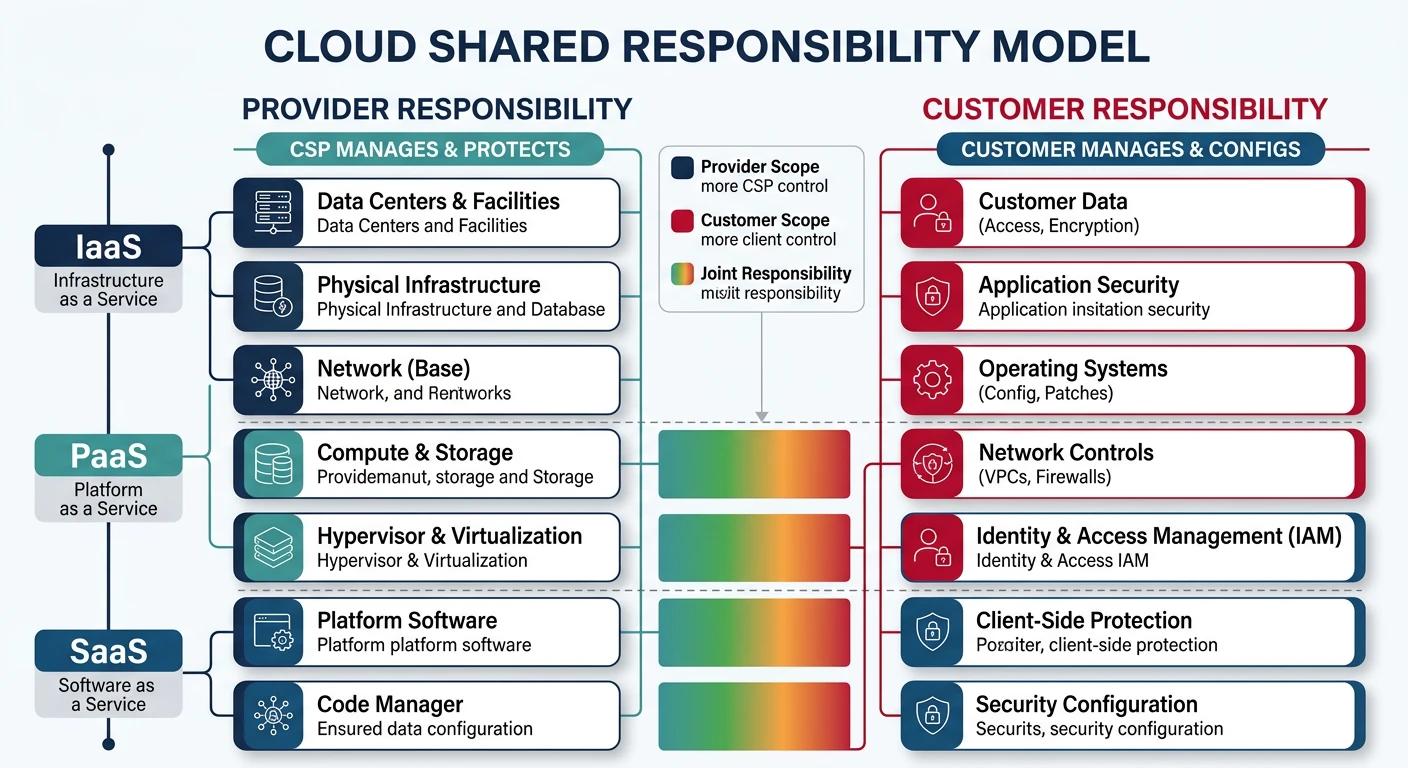
What We'll Cover:
- Identity Management - Users, groups, roles, service accounts
- Access Control - Policies, permissions, RBAC
- Secrets Management - Key Vault, Secrets Manager, Secret Manager
- Encryption - KMS, data encryption at rest and in transit
- Compliance - Frameworks, auditing, governance
Cloud Computing Mastery
Your 11-step learning path • Currently on Step 9
Cloud Computing Fundamentals
IaaS, PaaS, SaaS, deployment modelsCLI Tools & Setup
AWS CLI, Azure CLI, gcloud, TerraformCompute Services
VMs, containers, auto-scaling, spot instancesStorage Services
Object, block, file storage, data lifecycleDatabase Services
RDS, DynamoDB, Cosmos DB, cachingNetworking & CDN
VPCs, load balancers, DNS, content deliveryServerless Computing
Lambda, Functions, event-driven architectureContainers & Kubernetes
Docker, EKS, AKS, GKE, orchestration9
Identity & Security
IAM, RBAC, encryption, compliance10
Monitoring & Observability
CloudWatch, Azure Monitor, logging11
DevOps & CI/CD
Pipelines, infrastructure as code, GitOpsIAM Concepts
Key Terminology
| Concept | Description | Example |
|---|---|---|
| Principal | Entity that can request access (user, service, application) | IAM user, service account, Lambda function |
| Identity | Unique representation of a principal | user@domain.com, arn:aws:iam::123:user/john |
| Authentication | Verifying identity (who you are) | Password, MFA, certificate, token |
| Authorization | Determining permissions (what you can do) | Policy evaluation, role assignment |
| Role | Set of permissions that can be assumed | EC2 instance role, Azure RBAC role |
| Policy | Document defining permissions | JSON policy allowing S3 read access |
| Service Account | Identity for applications/services | GCP service account, Azure managed identity |
| Least Privilege | Grant only minimum required permissions | Read-only access to specific S3 bucket |
IAM Request Authorization Flow
flowchart LR
    U["User / Service"] --> R["API Request
with Credentials"]
    R --> AUTH["Authentication
Who are you?"]
    AUTH --> AUTHZ["Authorization
What can you do?"]
    AUTHZ --> P["Policy Evaluation"]
    P -->|Allow| RES["Access Resource"]
    P -->|Deny| D["Access Denied"]

    style AUTH fill:#f0f4f8,stroke:#16476A
    style AUTHZ fill:#f0f4f8,stroke:#16476A
    style RES fill:#e8f4f4,stroke:#3B9797
    style D fill:#fff5f5,stroke:#BF092F
Security Principle:
Always follow the principle of least privilege. Grant only the permissions necessary to perform a task, and remove permissions when no longer needed.
Provider Comparison
| Feature | AWS | Azure | GCP |
|---|---|---|---|
| Identity Service | IAM | Entra ID (Azure AD) | Cloud Identity / IAM |
| User Management | IAM Users | Entra ID Users | Google Workspace / Cloud Identity |
| Service Identity | IAM Roles | Managed Identity | Service Account |
| Permission Model | Policy-based (JSON) | RBAC + Azure Policy | IAM Policies + Org Policies |
| Secrets Manager | Secrets Manager / SSM Parameter Store | Key Vault | Secret Manager |
| Key Management | KMS | Key Vault Keys | Cloud KMS |
| MFA | Virtual MFA, Hardware MFA | Microsoft Authenticator, FIDO2 | Google Authenticator, Security Keys |
| SSO | IAM Identity Center | Entra ID SSO | Cloud Identity SSO |
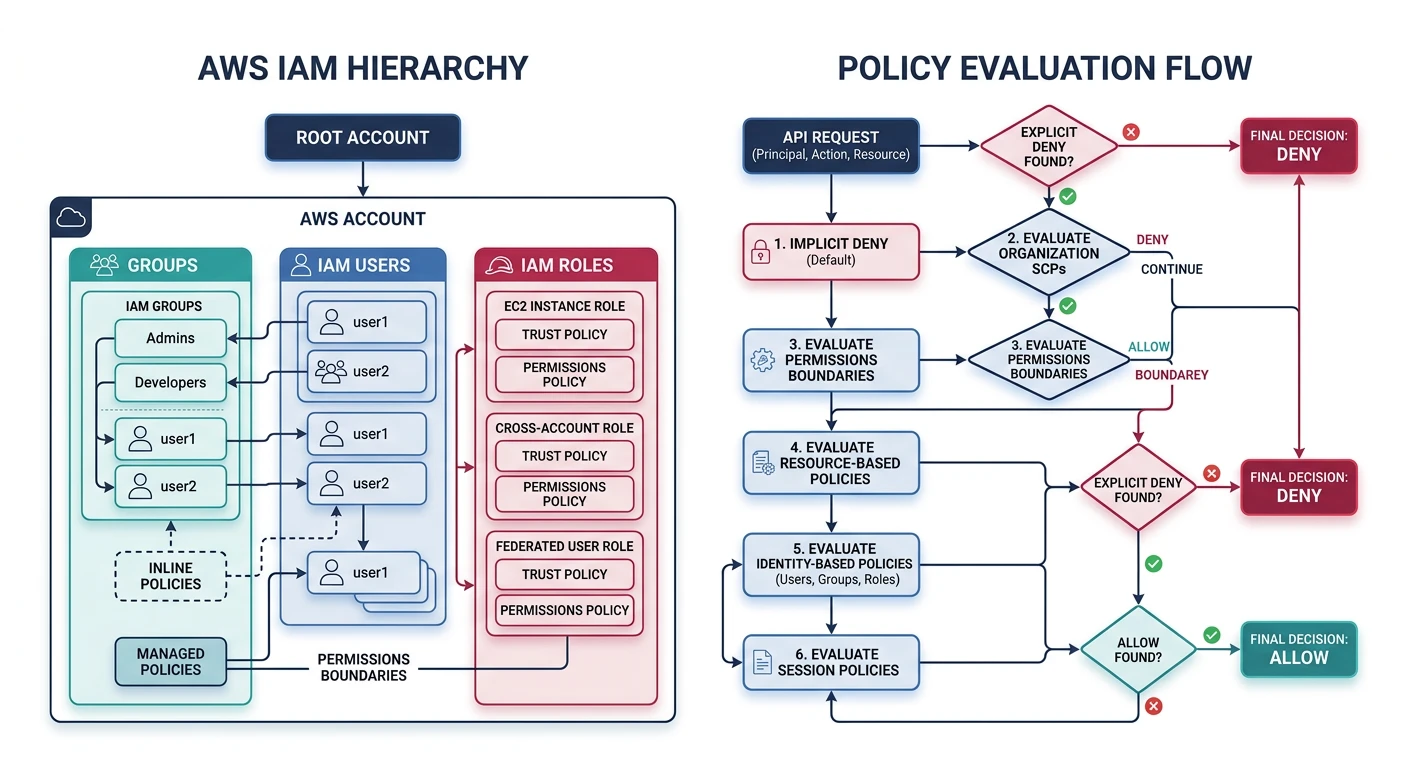
AWS IAM
AWS Identity and Access Management
- Global service - IAM is not region-specific
- Free to use - No additional charges for IAM
- Policy types - Identity-based, resource-based, permissions boundaries
- Organizations - Multi-account management with SCPs
IAM Users and Groups
# Create IAM user
aws iam create-user --user-name developer1

# Create access keys for user
aws iam create-access-key --user-name developer1

# Create IAM group
aws iam create-group --group-name Developers

# Add user to group
aws iam add-user-to-group --user-name developer1 --group-name Developers

# List users
aws iam list-users --output table

# List groups for user
aws iam list-groups-for-user --user-name developer1

# Enable MFA for user (after creating virtual MFA device)
aws iam enable-mfa-device \
    --user-name developer1 \
    --serial-number arn:aws:iam::123456789012:mfa/developer1 \
    --authentication-code1 123456 \
    --authentication-code2 789012
IAM Policies
{
    "Version": "2012-10-17",
    "Statement": [
        {
            "Sid": "AllowS3ReadAccess",
            "Effect": "Allow",
            "Action": [
                "s3:GetObject",
                "s3:ListBucket"
            ],
            "Resource": [
                "arn:aws:s3:::my-bucket",
                "arn:aws:s3:::my-bucket/*"
            ]
        },
        {
            "Sid": "DenyDeleteBucket",
            "Effect": "Deny",
            "Action": "s3:DeleteBucket",
            "Resource": "*"
        }
    ]
}
# Create policy from JSON file
aws iam create-policy \
    --policy-name S3ReadOnlyPolicy \
    --policy-document file://s3-readonly-policy.json

# Attach policy to user
aws iam attach-user-policy \
    --user-name developer1 \
    --policy-arn arn:aws:iam::123456789012:policy/S3ReadOnlyPolicy

# Attach policy to group
aws iam attach-group-policy \
    --group-name Developers \
    --policy-arn arn:aws:iam::aws:policy/ReadOnlyAccess

# List attached policies for user
aws iam list-attached-user-policies --user-name developer1

# Get policy document
aws iam get-policy-version \
    --policy-arn arn:aws:iam::123456789012:policy/S3ReadOnlyPolicy \
    --version-id v1
IAM Roles
# Create role trust policy (for EC2)
cat > trust-policy.json << 'EOF'
{
    "Version": "2012-10-17",
    "Statement": [
        {
            "Effect": "Allow",
            "Principal": {
                "Service": "ec2.amazonaws.com"
            },
            "Action": "sts:AssumeRole"
        }
    ]
}
EOF

# Create IAM role
aws iam create-role \
    --role-name EC2S3AccessRole \
    --assume-role-policy-document file://trust-policy.json

# Attach policy to role
aws iam attach-role-policy \
    --role-name EC2S3AccessRole \
    --policy-arn arn:aws:iam::aws:policy/AmazonS3ReadOnlyAccess

# Create instance profile (for EC2)
aws iam create-instance-profile --instance-profile-name EC2S3Profile

# Add role to instance profile
aws iam add-role-to-instance-profile \
    --instance-profile-name EC2S3Profile \
    --role-name EC2S3AccessRole

# Assume role (get temporary credentials)
aws sts assume-role \
    --role-arn arn:aws:iam::123456789012:role/EC2S3AccessRole \
    --role-session-name MySession

# Cross-account role trust policy
cat > cross-account-trust.json << 'EOF'
{
    "Version": "2012-10-17",
    "Statement": [
        {
            "Effect": "Allow",
            "Principal": {
                "AWS": "arn:aws:iam::987654321098:root"
            },
            "Action": "sts:AssumeRole",
            "Condition": {
                "StringEquals": {
                    "sts:ExternalId": "unique-external-id"
                }
            }
        }
    ]
}
EOF
Service Control Policies (SCPs)
{
    "Version": "2012-10-17",
    "Statement": [
        {
            "Sid": "DenyLeaveOrganization",
            "Effect": "Deny",
            "Action": "organizations:LeaveOrganization",
            "Resource": "*"
        },
        {
            "Sid": "RequireIMDSv2",
            "Effect": "Deny",
            "Action": "ec2:RunInstances",
            "Resource": "arn:aws:ec2:*:*:instance/*",
            "Condition": {
                "StringNotEquals": {
                    "ec2:MetadataHttpTokens": "required"
                }
            }
        },
        {
            "Sid": "DenyRegionsOutsideUS",
            "Effect": "Deny",
            "Action": "*",
            "Resource": "*",
            "Condition": {
                "StringNotEquals": {
                    "aws:RequestedRegion": [
                        "us-east-1",
                        "us-west-2"
                    ]
                }
            }
        }
    ]
}
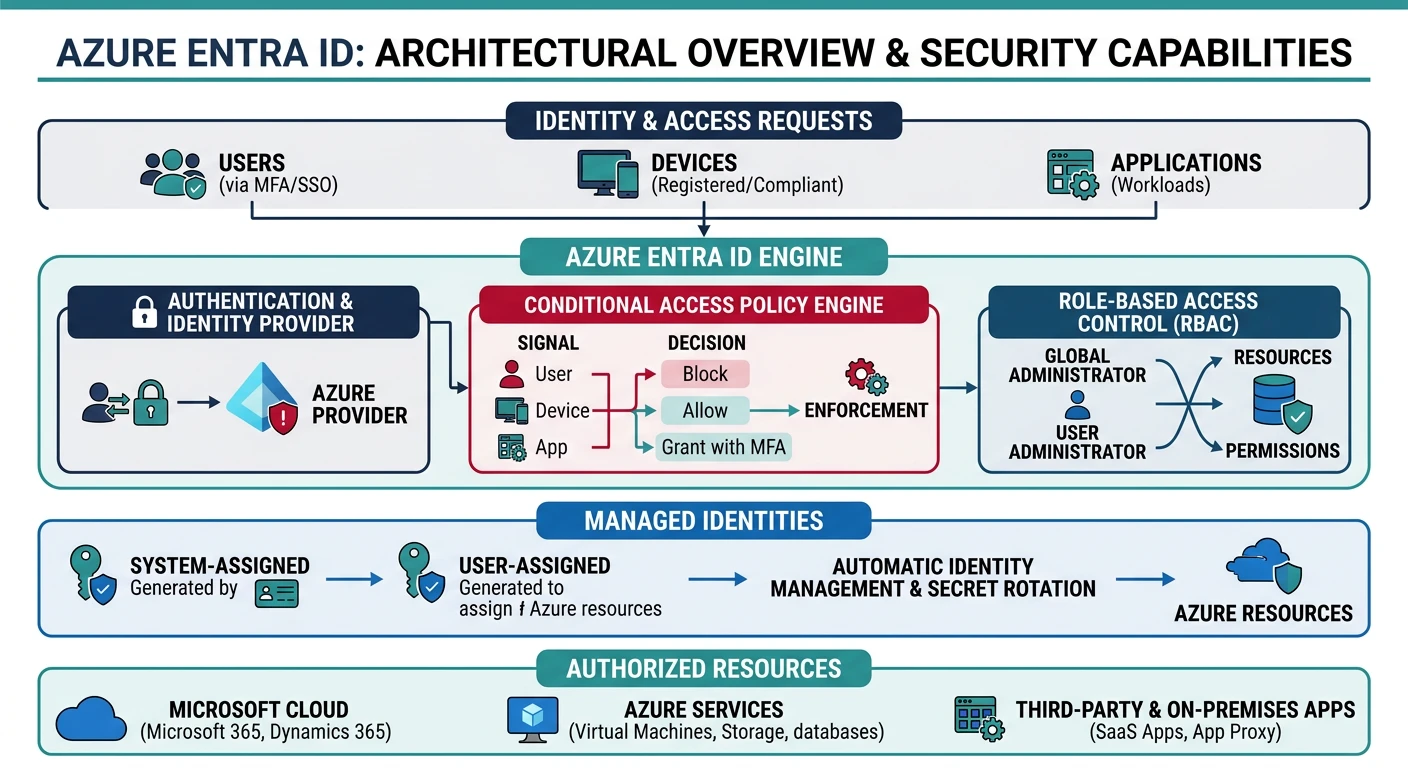
Azure Entra ID
Microsoft Entra ID (formerly Azure AD)
- Cloud-based identity - Comprehensive identity platform
- Hybrid identity - Sync with on-premises Active Directory
- Conditional Access - Context-aware access policies
- Privileged Identity Management - Just-in-time access
Users and Groups
# Create user
az ad user create \
    --display-name "John Developer" \
    --user-principal-name john@contoso.onmicrosoft.com \
    --password "SecureP@ssw0rd!"

# List users
az ad user list --output table

# Create security group
az ad group create \
    --display-name "Developers" \
    --mail-nickname "developers"

# Add user to group
az ad group member add \
    --group "Developers" \
    --member-id $(az ad user show --id john@contoso.onmicrosoft.com --query id -o tsv)

# List group members
az ad group member list --group "Developers" --output table

# Create service principal
az ad sp create-for-rbac \
    --name "myapp-sp" \
    --role Contributor \
    --scopes /subscriptions/xxx/resourceGroups/myRG
Azure RBAC
# List built-in roles
az role definition list --output table

# Get role definition details
az role definition list --name "Contributor" --output json

# Assign role to user at resource group scope
az role assignment create \
    --assignee john@contoso.onmicrosoft.com \
    --role "Contributor" \
    --resource-group myResourceGroup

# Assign role to service principal at subscription scope
az role assignment create \
    --assignee-object-id $(az ad sp show --id myapp-sp --query id -o tsv) \
    --role "Reader" \
    --scope /subscriptions/xxx

# List role assignments
az role assignment list \
    --resource-group myResourceGroup \
    --output table

# Create custom role
az role definition create --role-definition '{
    "Name": "Custom VM Operator",
    "Description": "Can start and stop VMs",
    "Actions": [
        "Microsoft.Compute/virtualMachines/start/action",
        "Microsoft.Compute/virtualMachines/powerOff/action",
        "Microsoft.Compute/virtualMachines/restart/action",
        "Microsoft.Compute/virtualMachines/read"
    ],
    "NotActions": [],
    "AssignableScopes": ["/subscriptions/xxx"]
}'

# Remove role assignment
az role assignment delete \
    --assignee john@contoso.onmicrosoft.com \
    --role "Contributor" \
    --resource-group myResourceGroup
Managed Identities
# Create user-assigned managed identity
az identity create \
    --resource-group myResourceGroup \
    --name myManagedIdentity

# Get managed identity details
az identity show \
    --resource-group myResourceGroup \
    --name myManagedIdentity

# Assign managed identity to VM
az vm identity assign \
    --resource-group myResourceGroup \
    --name myVM \
    --identities myManagedIdentity

# Enable system-assigned managed identity on VM
az vm identity assign \
    --resource-group myResourceGroup \
    --name myVM

# Assign role to managed identity
az role assignment create \
    --assignee $(az identity show -g myResourceGroup -n myManagedIdentity --query principalId -o tsv) \
    --role "Storage Blob Data Reader" \
    --scope /subscriptions/xxx/resourceGroups/myRG/providers/Microsoft.Storage/storageAccounts/mystorageaccount
Conditional Access (via Portal/Graph API)
# List conditional access policies (requires Graph API)
az rest --method GET \
    --url "https://graph.microsoft.com/v1.0/identity/conditionalAccess/policies"

# Example policy structure (create via Portal or Graph API)
# {
#   "displayName": "Require MFA for admins",
#   "state": "enabled",
#   "conditions": {
#     "users": {
#       "includeRoles": ["62e90394-69f5-4237-9190-012177145e10"]
#     },
#     "applications": {
#       "includeApplications": ["All"]
#     }
#   },
#   "grantControls": {
#     "operator": "OR",
#     "builtInControls": ["mfa"]
#   }
# }
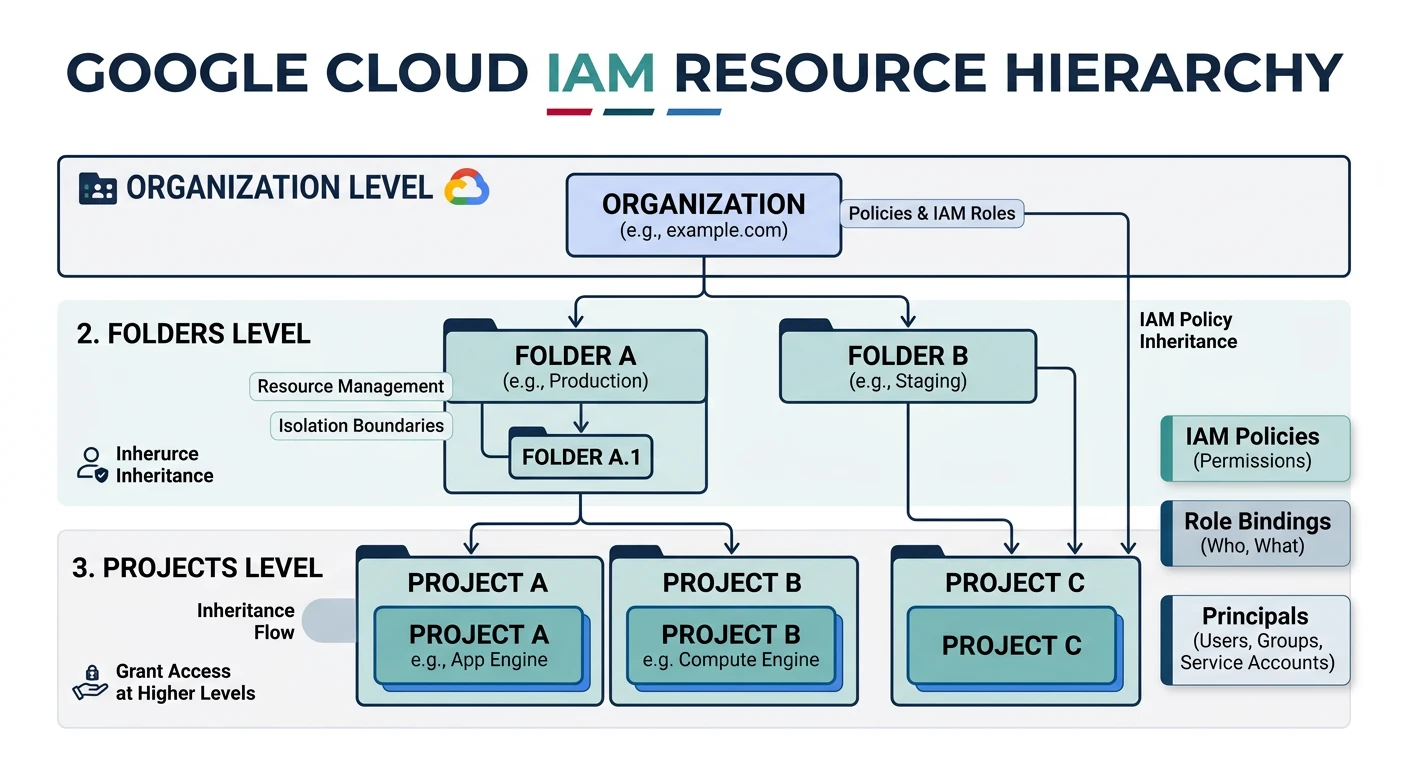
Google Cloud IAM
Google Cloud IAM
- Resource hierarchy - Organization ? Folders ? Projects ? Resources
- Policy inheritance - Permissions inherit down the hierarchy
- Predefined roles - Curated sets of permissions
- Custom roles - Define exact permissions needed
Service Accounts
# Create service account
gcloud iam service-accounts create my-service-account \
    --display-name="My Service Account" \
    --description="Service account for my application"

# List service accounts
gcloud iam service-accounts list

# Create key for service account
gcloud iam service-accounts keys create key.json \
    --iam-account=my-service-account@my-project.iam.gserviceaccount.com

# Grant role to service account
gcloud projects add-iam-policy-binding my-project \
    --member="serviceAccount:my-service-account@my-project.iam.gserviceaccount.com" \
    --role="roles/storage.objectViewer"

# Enable service account impersonation
gcloud iam service-accounts add-iam-policy-binding \
    my-service-account@my-project.iam.gserviceaccount.com \
    --member="user:admin@example.com" \
    --role="roles/iam.serviceAccountUser"

# Impersonate service account
gcloud auth print-access-token \
    --impersonate-service-account=my-service-account@my-project.iam.gserviceaccount.com
IAM Policies
# Get current IAM policy
gcloud projects get-iam-policy my-project --format=json > policy.json

# Grant role to user
gcloud projects add-iam-policy-binding my-project \
    --member="user:developer@example.com" \
    --role="roles/viewer"

# Grant role with condition
gcloud projects add-iam-policy-binding my-project \
    --member="user:developer@example.com" \
    --role="roles/storage.objectViewer" \
    --condition='expression=request.time < timestamp("2026-12-31T00:00:00Z"),title=temporary-access,description=Access until end of year'

# Remove role from user
gcloud projects remove-iam-policy-binding my-project \
    --member="user:developer@example.com" \
    --role="roles/viewer"

# List all roles
gcloud iam roles list

# Describe a role
gcloud iam roles describe roles/storage.objectAdmin
Custom Roles
# Create custom role definition file
cat > custom-role.yaml << 'EOF'
title: "Custom Storage Reader"
description: "Can read storage objects but not list buckets"
stage: "GA"
includedPermissions:
  - storage.objects.get
  - storage.objects.list
EOF

# Create custom role
gcloud iam roles create customStorageReader \
    --project=my-project \
    --file=custom-role.yaml

# Update custom role
gcloud iam roles update customStorageReader \
    --project=my-project \
    --add-permissions=storage.buckets.get

# Delete custom role
gcloud iam roles delete customStorageReader --project=my-project
Workload Identity Federation
# Create workload identity pool
gcloud iam workload-identity-pools create my-pool \
    --location="global" \
    --display-name="My Identity Pool"

# Add AWS provider
gcloud iam workload-identity-pools providers create-aws my-aws-provider \
    --location="global" \
    --workload-identity-pool="my-pool" \
    --account-id="123456789012" \
    --attribute-mapping="google.subject=assertion.arn"

# Add OIDC provider (GitHub Actions)
gcloud iam workload-identity-pools providers create-oidc github-actions \
    --location="global" \
    --workload-identity-pool="my-pool" \
    --issuer-uri="https://token.actions.githubusercontent.com" \
    --attribute-mapping="google.subject=assertion.sub,attribute.repository=assertion.repository"

# Grant access to service account
gcloud iam service-accounts add-iam-policy-binding \
    my-service-account@my-project.iam.gserviceaccount.com \
    --role="roles/iam.workloadIdentityUser" \
    --member="principalSet://iam.googleapis.com/projects/123456789/locations/global/workloadIdentityPools/my-pool/attribute.repository/my-org/my-repo"
Secrets Management
AWS Secrets Manager
# Create secret
aws secretsmanager create-secret \
    --name MyDatabaseSecret \
    --description "Database credentials" \
    --secret-string '{"username":"admin","password":"MySecureP@ss123"}'

# Get secret value
aws secretsmanager get-secret-value \
    --secret-id MyDatabaseSecret \
    --query SecretString --output text

# Update secret
aws secretsmanager update-secret \
    --secret-id MyDatabaseSecret \
    --secret-string '{"username":"admin","password":"NewP@ssword456"}'

# Enable automatic rotation
aws secretsmanager rotate-secret \
    --secret-id MyDatabaseSecret \
    --rotation-lambda-arn arn:aws:lambda:us-east-1:123456789012:function:SecretsRotation \
    --rotation-rules AutomaticallyAfterDays=30

# List secrets
aws secretsmanager list-secrets --output table

# Delete secret (with recovery window)
aws secretsmanager delete-secret \
    --secret-id MyDatabaseSecret \
    --recovery-window-in-days 7
AWS SSM Parameter Store
# Create SecureString parameter
aws ssm put-parameter \
    --name "/myapp/database/password" \
    --value "SecureP@ssword123" \
    --type SecureString \
    --key-id alias/aws/ssm

# Create parameter with tags
aws ssm put-parameter \
    --name "/myapp/config/api-key" \
    --value "abc123xyz" \
    --type SecureString \
    --tags "Key=Environment,Value=Production"

# Get parameter value
aws ssm get-parameter \
    --name "/myapp/database/password" \
    --with-decryption \
    --query "Parameter.Value" --output text

# Get parameters by path
aws ssm get-parameters-by-path \
    --path "/myapp/" \
    --recursive \
    --with-decryption

# Delete parameter
aws ssm delete-parameter --name "/myapp/database/password"
Azure Key Vault
# Create Key Vault
az keyvault create \
    --resource-group myResourceGroup \
    --name myKeyVault \
    --location eastus \
    --sku standard

# Set secret
az keyvault secret set \
    --vault-name myKeyVault \
    --name DatabasePassword \
    --value "SecureP@ssword123"

# Get secret
az keyvault secret show \
    --vault-name myKeyVault \
    --name DatabasePassword \
    --query value -o tsv

# List secrets
az keyvault secret list --vault-name myKeyVault --output table

# Set secret with expiration
az keyvault secret set \
    --vault-name myKeyVault \
    --name TempApiKey \
    --value "temp-key-123" \
    --expires "2026-12-31T23:59:59Z"

# Grant access to managed identity
az keyvault set-policy \
    --name myKeyVault \
    --object-id $(az identity show -g myRG -n myManagedIdentity --query principalId -o tsv) \
    --secret-permissions get list

# Enable soft delete and purge protection
az keyvault update \
    --resource-group myResourceGroup \
    --name myKeyVault \
    --enable-soft-delete true \
    --enable-purge-protection true

# Delete secret (soft delete)
az keyvault secret delete --vault-name myKeyVault --name DatabasePassword

# Recover deleted secret
az keyvault secret recover --vault-name myKeyVault --name DatabasePassword
Google Secret Manager
# Create secret
gcloud secrets create my-database-password \
    --replication-policy="automatic"

# Add secret version
echo -n "SecureP@ssword123" | gcloud secrets versions add my-database-password --data-file=-

# Access secret (latest version)
gcloud secrets versions access latest --secret=my-database-password

# Access specific version
gcloud secrets versions access 1 --secret=my-database-password

# List secrets
gcloud secrets list

# List secret versions
gcloud secrets versions list my-database-password

# Grant access to service account
gcloud secrets add-iam-policy-binding my-database-password \
    --member="serviceAccount:my-sa@my-project.iam.gserviceaccount.com" \
    --role="roles/secretmanager.secretAccessor"

# Disable secret version
gcloud secrets versions disable 1 --secret=my-database-password

# Delete secret
gcloud secrets delete my-database-password
Encryption Services
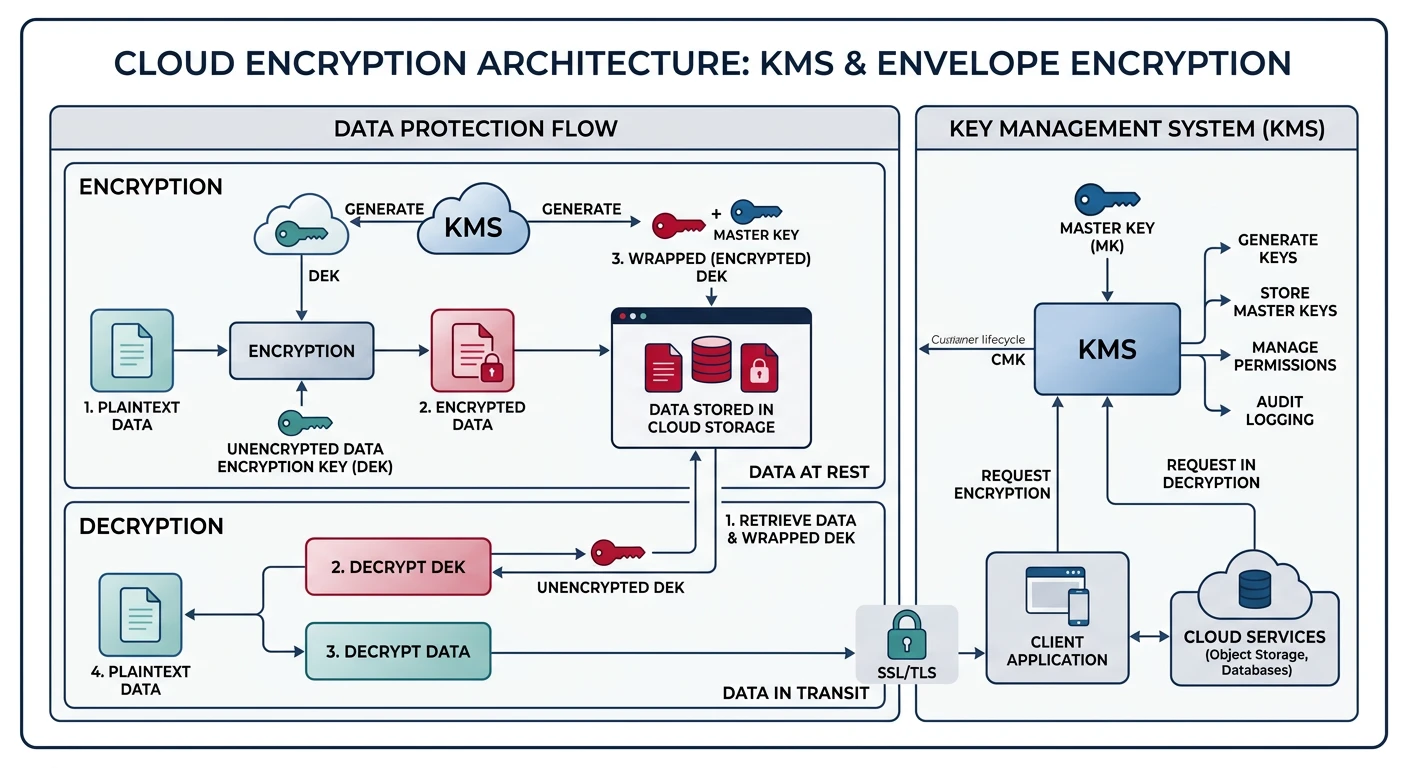
AWS KMS
# Create KMS key
aws kms create-key \
    --description "My encryption key" \
    --key-usage ENCRYPT_DECRYPT \
    --origin AWS_KMS

KEY_ID=$(aws kms list-keys --query "Keys[0].KeyId" --output text)

# Create alias for key
aws kms create-alias \
    --alias-name alias/my-key \
    --target-key-id $KEY_ID

# Encrypt data
aws kms encrypt \
    --key-id alias/my-key \
    --plaintext fileb://plaintext.txt \
    --output text --query CiphertextBlob | base64 -d > encrypted.bin

# Decrypt data
aws kms decrypt \
    --ciphertext-blob fileb://encrypted.bin \
    --output text --query Plaintext | base64 -d > decrypted.txt

# Generate data key for client-side encryption
aws kms generate-data-key \
    --key-id alias/my-key \
    --key-spec AES_256

# Enable automatic key rotation
aws kms enable-key-rotation --key-id $KEY_ID

# Create key policy
aws kms put-key-policy \
    --key-id $KEY_ID \
    --policy-name default \
    --policy '{
        "Version": "2012-10-17",
        "Statement": [
            {
                "Sid": "Enable IAM User Permissions",
                "Effect": "Allow",
                "Principal": {"AWS": "arn:aws:iam::123456789012:root"},
                "Action": "kms:*",
                "Resource": "*"
            },
            {
                "Sid": "Allow use of the key",
                "Effect": "Allow",
                "Principal": {"AWS": "arn:aws:iam::123456789012:role/MyAppRole"},
                "Action": ["kms:Encrypt", "kms:Decrypt", "kms:GenerateDataKey"],
                "Resource": "*"
            }
        ]
    }'

# List keys
aws kms list-keys --output table
Azure Key Vault Keys
# Create RSA key
az keyvault key create \
    --vault-name myKeyVault \
    --name myRSAKey \
    --kty RSA \
    --size 2048

# Create EC key
az keyvault key create \
    --vault-name myKeyVault \
    --name myECKey \
    --kty EC \
    --curve P-256

# List keys
az keyvault key list --vault-name myKeyVault --output table

# Encrypt data (requires SDK - example using Azure CLI)
az keyvault key encrypt \
    --vault-name myKeyVault \
    --name myRSAKey \
    --algorithm RSA-OAEP \
    --value "SGVsbG8gV29ybGQ="

# Decrypt data
az keyvault key decrypt \
    --vault-name myKeyVault \
    --name myRSAKey \
    --algorithm RSA-OAEP \
    --value ""

# Enable key rotation policy
az keyvault key rotation-policy update \
    --vault-name myKeyVault \
    --name myRSAKey \
    --value '{
        "lifetimeActions": [{
            "action": {"type": "rotate"},
            "trigger": {"timeAfterCreate": "P90D"}
        }],
        "attributes": {"expiryTime": "P1Y"}
    }'

# Backup key
az keyvault key backup \
    --vault-name myKeyVault \
    --name myRSAKey \
    --file myRSAKey.backup
Google Cloud KMS
# Create key ring
gcloud kms keyrings create my-keyring \
    --location=global

# Create symmetric encryption key
gcloud kms keys create my-key \
    --keyring=my-keyring \
    --location=global \
    --purpose=encryption \
    --rotation-period=90d \
    --next-rotation-time=$(date -d "+90 days" --iso-8601)

# Encrypt data
gcloud kms encrypt \
    --keyring=my-keyring \
    --key=my-key \
    --location=global \
    --plaintext-file=plaintext.txt \
    --ciphertext-file=encrypted.bin

# Decrypt data
gcloud kms decrypt \
    --keyring=my-keyring \
    --key=my-key \
    --location=global \
    --ciphertext-file=encrypted.bin \
    --plaintext-file=decrypted.txt

# Create asymmetric signing key
gcloud kms keys create my-signing-key \
    --keyring=my-keyring \
    --location=global \
    --purpose=asymmetric-signing \
    --default-algorithm=ec-sign-p256-sha256

# List keys
gcloud kms keys list --keyring=my-keyring --location=global

# Grant encrypt/decrypt permissions
gcloud kms keys add-iam-policy-binding my-key \
    --keyring=my-keyring \
    --location=global \
    --member="serviceAccount:my-sa@my-project.iam.gserviceaccount.com" \
    --role="roles/cloudkms.cryptoKeyEncrypterDecrypter"
Compliance & Governance
Common Compliance Frameworks:
- SOC 2 - Security, Availability, Processing Integrity, Confidentiality, Privacy
- ISO 27001 - Information Security Management
- GDPR - EU Data Protection Regulation
- HIPAA - Healthcare data protection (US)
- PCI DSS - Payment card data security
- FedRAMP - US Federal cloud security
AWS Config & Security Hub
# Enable AWS Config
aws configservice put-configuration-recorder \
    --configuration-recorder name=default,roleARN=arn:aws:iam::123456789012:role/ConfigRole

# Enable Config rule (S3 bucket encryption)
aws configservice put-config-rule \
    --config-rule '{
        "ConfigRuleName": "s3-bucket-server-side-encryption-enabled",
        "Source": {
            "Owner": "AWS",
            "SourceIdentifier": "S3_BUCKET_SERVER_SIDE_ENCRYPTION_ENABLED"
        }
    }'

# Check compliance
aws configservice get-compliance-details-by-config-rule \
    --config-rule-name s3-bucket-server-side-encryption-enabled

# Enable Security Hub
aws securityhub enable-security-hub --enable-default-standards

# Get findings
aws securityhub get-findings \
    --filters '{"SeverityLabel": [{"Value": "CRITICAL", "Comparison": "EQUALS"}]}'

# Enable GuardDuty
aws guardduty create-detector --enable

# List GuardDuty findings
aws guardduty list-findings --detector-id $(aws guardduty list-detectors --query DetectorIds[0] -o text)
Azure Policy & Defender
# List built-in policy definitions
az policy definition list \
    --query "[?policyType=='BuiltIn'].{Name:displayName, Category:metadata.category}" \
    --output table

# Assign policy (require encryption on storage accounts)
az policy assignment create \
    --name "require-storage-encryption" \
    --policy "/providers/Microsoft.Authorization/policyDefinitions/7c322315-e26d-4174-a99e-f49d351b4688" \
    --scope "/subscriptions/xxx"

# Check compliance
az policy state summarize \
    --filter "policyAssignmentName eq 'require-storage-encryption'"

# Enable Microsoft Defender for Cloud
az security pricing create \
    --name VirtualMachines \
    --tier Standard

# List security recommendations
az security assessment list --output table

# Enable Azure Blueprints (for governance)
az blueprint create \
    --name "SecurityBaseline" \
    --target-scope subscription \
    --description "Security baseline for new subscriptions"
GCP Organization Policies
# List available constraints
gcloud org-policies list-available-constraints \
    --organization=123456789012

# Set organization policy (disable external IPs on VMs)
gcloud org-policies set-policy \
    --organization=123456789012 \
    policy.yaml

# Example policy.yaml:
# name: organizations/123456789012/policies/compute.vmExternalIpAccess
# spec:
#   rules:
#     - denyAll: true

# Enable Security Command Center
gcloud services enable securitycenter.googleapis.com

# List findings
gcloud scc findings list organizations/123456789012 \
    --filter="state=\"ACTIVE\" AND severity=\"HIGH\""

# Create notification config for findings
gcloud scc notification-configs create my-config \
    --organization=123456789012 \
    --pubsub-topic=projects/my-project/topics/scc-findings \
    --filter="state=\"ACTIVE\""

# Enable Cloud Asset Inventory
gcloud asset search-all-resources \
    --scope=projects/my-project \
    --query="state:ACTIVE"
Best Practices
Identity Security:
- Never use root/owner accounts for daily tasks
- Enable MFA for all human users
- Use service accounts/roles for applications
- Rotate credentials regularly
- Review access periodically and remove unused permissions
Security Checklist
- Least Privilege - Grant minimum required permissions
- Defense in Depth - Multiple security layers
- Encrypt Everything - Data at rest and in transit
- Audit Logging - Enable CloudTrail, Activity Logs, Audit Logs
- Secrets Management - Never hardcode secrets in code
- Network Security - Use private subnets, security groups
- Incident Response - Have a plan and test it
- Compliance - Understand and meet regulatory requirements
Secrets Best Practices:
- Use dedicated secrets management services (Secrets Manager, Key Vault, Secret Manager)
- Enable automatic rotation for database credentials
- Use managed identities/IAM roles instead of access keys when possible
- Never commit secrets to version control
- Use environment variables or secrets injection at runtime
Conclusion
Cloud security requires a comprehensive approach covering identity, encryption, and compliance. Key takeaways:
| Component | AWS | Azure | GCP |
|---|---|---|---|
| Start With | IAM roles over users | Managed Identities | Service Accounts + WIF |
| Secrets | Secrets Manager + rotation | Key Vault + RBAC | Secret Manager + IAM |
| Compliance | Config + Security Hub | Policy + Defender | Org Policies + SCC |
Continue Learning: