Game Development
Introduction to Game Development
Industry overview, roles, game design pipelineChoosing a Game Engine
Unity, Unreal, Godot, engine comparison, tradeoffsProgramming Basics for Games
Game loops, input handling, state machines, OOP2D Game Development
Sprites, tilemaps, platformers, 2D physics, animation3D Game Development
Meshes, materials, lighting, cameras, 3D mathPhysics & Collision Systems
Rigidbodies, colliders, raycasting, physics enginesAudio & Sound Design
Sound effects, music, spatial audio, audio middlewarePublishing Your Game
Store submission, marketing, monetization, launch strategyGame Design Fundamentals
Mechanics, dynamics, aesthetics, level design, balancingAI in Games
Pathfinding, behavior trees, state machines, NPC intelligenceMultiplayer & Networking
Client-server, peer-to-peer, netcode, synchronizationProfessional Game Dev Workflow
Version control, CI/CD, QA testing, agile for gamesBuilding a Portfolio
Showcasing projects, demo reels, job applications, indie devPathfinding (A*, Dijkstra)
Pathfinding is how AI figures out how to get from point A to point B. It's essential for enemies chasing players, NPCs navigating towns, and units in strategy games.
Graph-Based Pathfinding
Grid as a Graph:

┌───┬───┬───┬───┬───┐
│ S │   │   │ █ │   │   S = Start
├───┼───┼───┼───┼───┤   G = Goal
│   │ █ │   │ █ │   │   █ = Obstacle
├───┼───┼───┼───┼───┤
│   │ █ │   │   │   │   Each cell = Node
├───┼───┼───┼───┼───┤   Adjacent cells = Edges
│   │   │   │ █ │   │
├───┼───┼───┼───┼───┤
│   │   │   │   │ G │
└───┴───┴───┴───┴───┘

Pathfinding finds the shortest route from S to G avoiding obstacles.
Dijkstra's Algorithm
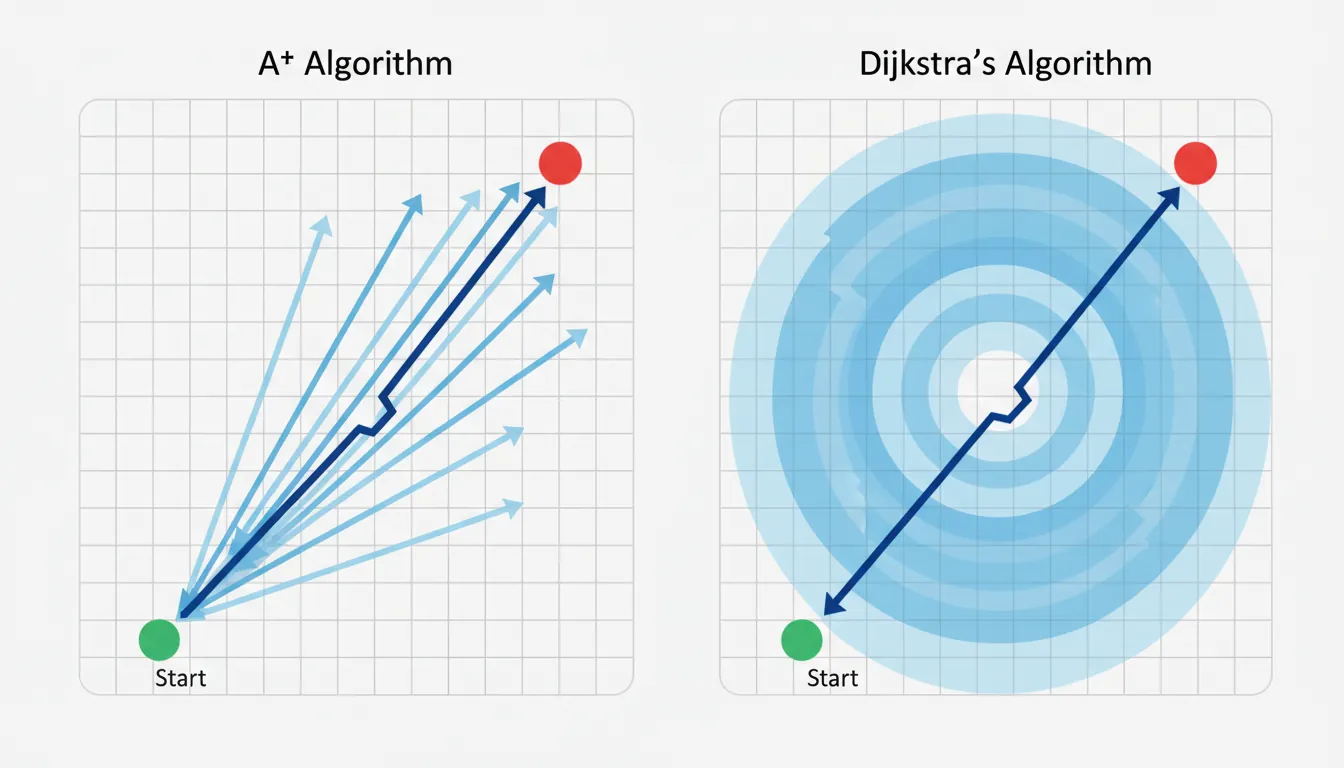
Dijkstra: Explores outward from start, finds shortest path

Step-by-step (numbers = distance from start):

Start:          Step 2:         Step 4:         Found!
┌─┬─┬─┐         ┌─┬─┬─┐         ┌─┬─┬─┐         ┌─┬─┬─┐
│S│ │ │         │0│1│2│         │0│1│2│         │0│1│2│
├─┼─┼─┤    →    ├─┼─┼─┤    →    ├─┼─┼─┤    →    ├─┼─┼─┤
│ │█│ │         │1│█│3│         │1│█│3│         │1│█│3│
├─┼─┼─┤         ├─┼─┼─┤         ├─┼─┼─┤         ├─┼─┼─┤
│ │ │G│         │2│3│?│         │2│3│4│         │2│3│4│G
└─┴─┴─┘         └─┴─┴─┘         └─┴─┴─┘         └─┴─┴─┘

Pros: Guarantees shortest path
Cons: Explores in ALL directions (slow for large maps)
A* Algorithm (A-Star)
A* = Dijkstra + Heuristic (estimated distance to goal)

f(n) = g(n) + h(n)
       │       │
       │       └── Heuristic: Estimated cost to goal
       └────────── Actual cost from start to n

Heuristics:
• Manhattan: |dx| + |dy|  (4-directional movement)
• Euclidean: √(dx² + dy²)  (any direction)
• Diagonal: max(|dx|, |dy|) + (√2-1) * min(|dx|, |dy|)

A* prioritizes nodes that seem closer to goal:

Dijkstra explores:         A* explores:
┌─┬─┬─┬─┬─┬─┬─┐            ┌─┬─┬─┬─┬─┬─┬─┐
│●│●│●│●│ │ │ │            │●│ │ │ │ │ │ │
├─┼─┼─┼─┼─┼─┼─┤            ├─┼─┼─┼─┼─┼─┼─┤
│●│●│●│●│ │ │ │            │●│●│ │ │ │ │ │
├─┼─┼─┼─┼─┼─┼─┤            ├─┼─┼─┼─┼─┼─┼─┤
│S│●│●│●│●│●│G│            │S│●│●│●│●│●│G│
├─┼─┼─┼─┼─┼─┼─┤            ├─┼─┼─┼─┼─┼─┼─┤
│●│●│●│●│ │ │ │            │ │ │ │ │ │ │ │
└─┴─┴─┴─┴─┴─┴─┘            └─┴─┴─┴─┴─┴─┴─┘
   (Wasteful)                 (Focused)
// Simplified A* Implementation
public class AStarPathfinding : MonoBehaviour
{
public List<Vector2Int> FindPath(Vector2Int start, Vector2Int goal, bool[,] obstacles)
{
var openSet = new PriorityQueue<Node>();
var closedSet = new HashSet<Vector2Int>();
var cameFrom = new Dictionary<Vector2Int, Vector2Int>();
var gScore = new Dictionary<Vector2Int, float>();
gScore[start] = 0;
openSet.Enqueue(new Node(start, Heuristic(start, goal)));
while (openSet.Count > 0)
{
var current = openSet.Dequeue().Position;
if (current == goal)
return ReconstructPath(cameFrom, current);
closedSet.Add(current);
foreach (var neighbor in GetNeighbors(current, obstacles))
{
if (closedSet.Contains(neighbor))
continue;
float tentativeG = gScore[current] + 1; // Cost of 1 per step
if (!gScore.ContainsKey(neighbor) || tentativeG < gScore[neighbor])
{
cameFrom[neighbor] = current;
gScore[neighbor] = tentativeG;
float fScore = tentativeG + Heuristic(neighbor, goal);
openSet.Enqueue(new Node(neighbor, fScore));
}
}
}
return null; // No path found
}
float Heuristic(Vector2Int a, Vector2Int b)
{
// Manhattan distance
return Mathf.Abs(a.x - b.x) + Mathf.Abs(a.y - b.y);
}
}Navigation Meshes
A NavMesh (Navigation Mesh) is a simplified representation of walkable surfaces. Instead of grids, it uses polygons that AI agents can traverse.
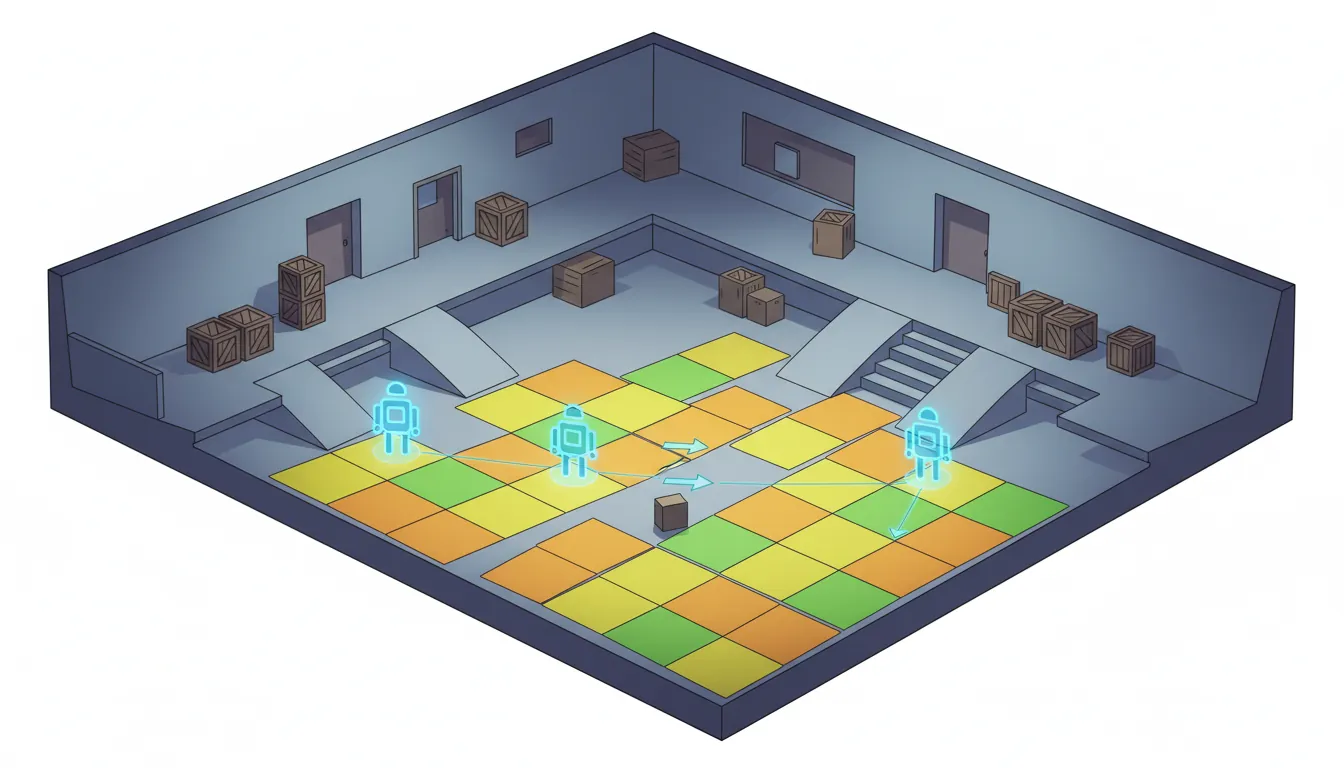
NavMesh vs Grid:

Grid (memory intensive):         NavMesh (efficient):
┌─┬─┬─┬─┬─┬─┬─┬─┐               ┌───────────────────┐
│●│●│●│●│●│●│●│●│               │        A          │
├─┼─┼─┼─┼─┼─┼─┼─┤               │    ╱─────╲        │
│●│●│●│●│●│●│●│●│               │   B       C       │
├─┼─┼─┼─┼─┼─┼─┼─┤               │    ╲─────╱        │
│●│●│█│█│█│█│●│●│               │        D          │
├─┼─┼─┼─┼─┼─┼─┼─┤               └───────────────────┘
│●│●│█│█│█│█│●│●│
├─┼─┼─┼─┼─┼─┼─┼─┤               Only stores polygon vertices
│●│●│●│●│●│●│●│●│               and connections (much smaller!)
└─┴─┴─┴─┴─┴─┴─┴─┘

64 nodes to store                4 polygons, ~12 vertices
// Unity NavMesh Agent Usage
using UnityEngine.AI;
public class EnemyNavigation : MonoBehaviour
{
private NavMeshAgent agent;
public Transform target;
void Start()
{
agent = GetComponent<NavMeshAgent>();
// Configure agent
agent.speed = 5f;
agent.angularSpeed = 120f;
agent.stoppingDistance = 2f;
agent.acceleration = 8f;
}
void Update()
{
// Set destination - NavMesh handles pathfinding!
agent.SetDestination(target.position);
// Check if we've arrived
if (!agent.pathPending && agent.remainingDistance <= agent.stoppingDistance)
{
Attack();
}
}
// Check if position is on NavMesh
bool IsValidPosition(Vector3 position)
{
NavMeshHit hit;
return NavMesh.SamplePosition(position, out hit, 1f, NavMesh.AllAreas);
}
// Get random point on NavMesh (for patrol)
Vector3 GetRandomNavMeshPoint(float range)
{
Vector3 randomDirection = Random.insideUnitSphere * range;
randomDirection += transform.position;
NavMeshHit hit;
NavMesh.SamplePosition(randomDirection, out hit, range, NavMesh.AllAreas);
return hit.position;
}
}Finite State Machines
A Finite State Machine (FSM) is the simplest AI pattern. The AI is always in exactly one state, and transitions between states based on conditions.
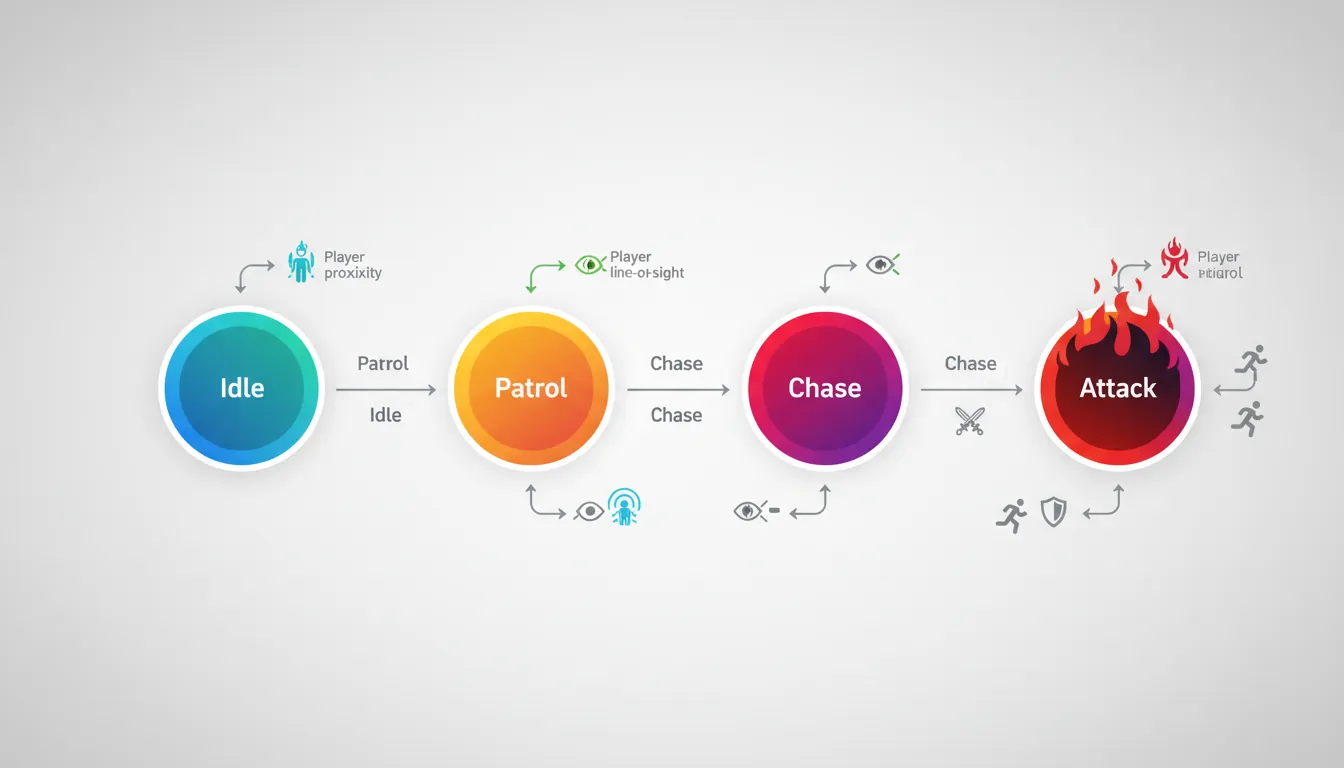
stateDiagram-v2
    [*] --> Idle
    Idle --> Patrol : No threat
    Patrol --> Chase : Player detected
    Chase --> Attack : In attack range
    Attack --> Chase : Player escapes range
    Chase --> Patrol : Player lost
    Attack --> Flee : Health < 20%
    Flee --> Idle : Reached safe zone
    Attack --> Dead : Health = 0
    Dead --> [*]
Enemy FSM Example:

           ┌─────────────────────────────────────────┐
           │                                         │
           ▼            Player spotted               │
     ┌──────────┐    ──────────────────►    ┌──────────┐
     │  PATROL  │                           │  CHASE   │
     └──────────┘    ◄──────────────────    └──────────┘
           │            Lost player                  │
           │                                         │
           │            In attack range              │
           │    ┌──────────────────────────────────┐│
           │    │                                  ││
           │    ▼                                  ▼│
     ┌──────────┐                           ┌──────────┐
     │  IDLE    │                           │  ATTACK  │
     └──────────┘                           └──────────┘
                      Out of range
                    ◄──────────────────
// Simple FSM Implementation
public enum EnemyState { Idle, Patrol, Chase, Attack }
public class EnemyFSM : MonoBehaviour
{
public EnemyState currentState = EnemyState.Idle;
public Transform player;
public float detectRange = 10f;
public float attackRange = 2f;
void Update()
{
float distanceToPlayer = Vector3.Distance(transform.position, player.position);
// State machine logic
switch (currentState)
{
case EnemyState.Idle:
// Just wait
if (distanceToPlayer < detectRange)
TransitionTo(EnemyState.Chase);
break;
case EnemyState.Patrol:
DoPatrol();
if (distanceToPlayer < detectRange)
TransitionTo(EnemyState.Chase);
break;
case EnemyState.Chase:
ChasePlayer();
if (distanceToPlayer < attackRange)
TransitionTo(EnemyState.Attack);
else if (distanceToPlayer > detectRange * 1.5f)
TransitionTo(EnemyState.Patrol);
break;
case EnemyState.Attack:
AttackPlayer();
if (distanceToPlayer > attackRange)
TransitionTo(EnemyState.Chase);
break;
}
}
void TransitionTo(EnemyState newState)
{
// Exit current state
OnExitState(currentState);
// Enter new state
currentState = newState;
OnEnterState(newState);
}
void OnEnterState(EnemyState state)
{
switch (state)
{
case EnemyState.Chase:
PlaySound("AlertSound");
break;
case EnemyState.Attack:
animator.SetTrigger("Attack");
break;
}
}
}Behavior Trees
Behavior Trees are more flexible than FSMs for complex AI. They use a tree structure of tasks that are evaluated from root to leaves.
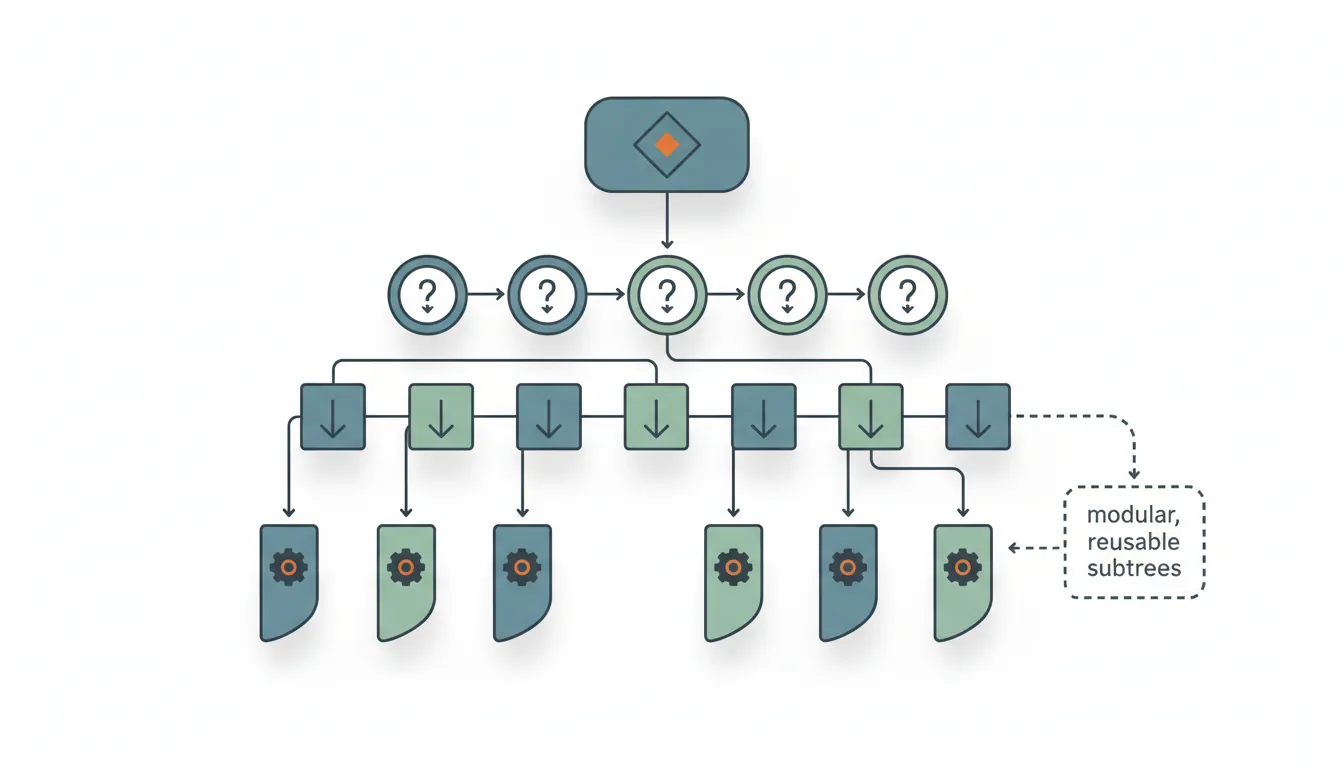
graph TD
    ROOT["Root Selector\n(Try in order)"]
    ROOT --> SEQ1["Sequence:\nCombat"]
    ROOT --> SEQ2["Sequence:\nPatrol"]
    ROOT --> IDLE["Action:\nIdle"]

    SEQ1 --> C1["Condition:\nEnemy Visible?"]
    SEQ1 --> C2["Condition:\nIn Range?"]
    SEQ1 --> A1["Action:\nAttack"]

    SEQ2 --> C3["Condition:\nHas Waypoints?"]
    SEQ2 --> A2["Action:\nMove to\nWaypoint"]
    SEQ2 --> A3["Action:\nWait"]
Behavior Tree Structure:

                     Root (Selector)
                           │
          ┌────────────────┼────────────────┐
          │                │                │
    [Sequence]       [Sequence]       [Sequence]
    "Attack"          "Chase"          "Patrol"
          │                │                │
    ┌─────┴─────┐    ┌─────┴─────┐    ┌─────┴─────┐
    │           │    │           │    │           │
Is Player   Attack  See      Move    No        Wander
In Range?   Action  Player?  To      Threat?   Around
                           Player

Node Types:
• Selector (?)  : Try children until one succeeds
• Sequence (→)  : Run children until one fails
• Decorator (~) : Modify child behavior (repeat, invert, etc.)
• Leaf          : Actual actions or conditions

Execution: Returns SUCCESS, FAILURE, or RUNNING
// Behavior Tree Implementation
public abstract class BTNode
{
public enum Status { Success, Failure, Running }
public abstract Status Evaluate();
}
public class Selector : BTNode // Try until success
{
private List<BTNode> children;
public override Status Evaluate()
{
foreach (var child in children)
{
Status status = child.Evaluate();
if (status != Status.Failure)
return status;
}
return Status.Failure;
}
}
public class Sequence : BTNode // Run until failure
{
private List<BTNode> children;
public override Status Evaluate()
{
foreach (var child in children)
{
Status status = child.Evaluate();
if (status != Status.Success)
return status;
}
return Status.Success;
}
}
// Condition node
public class IsPlayerInRange : BTNode
{
private Enemy enemy;
private float range;
public override Status Evaluate()
{
float distance = Vector3.Distance(enemy.transform.position, enemy.player.position);
return distance < range ? Status.Success : Status.Failure;
}
}
// Action node
public class MoveToPlayer : BTNode
{
private Enemy enemy;
public override Status Evaluate()
{
enemy.navAgent.SetDestination(enemy.player.position);
if (enemy.navAgent.remainingDistance < 0.5f)
return Status.Success;
return Status.Running;
}
}Decision Trees
Decision Trees are branching structures where each node asks a yes/no question, leading to different outcomes.
Decision Tree Example (NPC Shop Interaction):

                    Is player nearby?
                          │
              ┌───────────┴───────────┐
             Yes                      No
              │                       │
    Has player talked before?     Do nothing
              │
     ┌────────┴────────┐
    Yes                No
     │                  │
Is player a customer?  Introduce self
     │                 "Hello stranger!"
  ┌──┴──┐
 Yes    No
  │      │
"Welcome "Sorry, we're
 back!"   closed."
Steering Behaviors
Steering behaviors create natural-looking movement by combining simple forces. They're used for crowds, flocks, and smooth AI navigation.
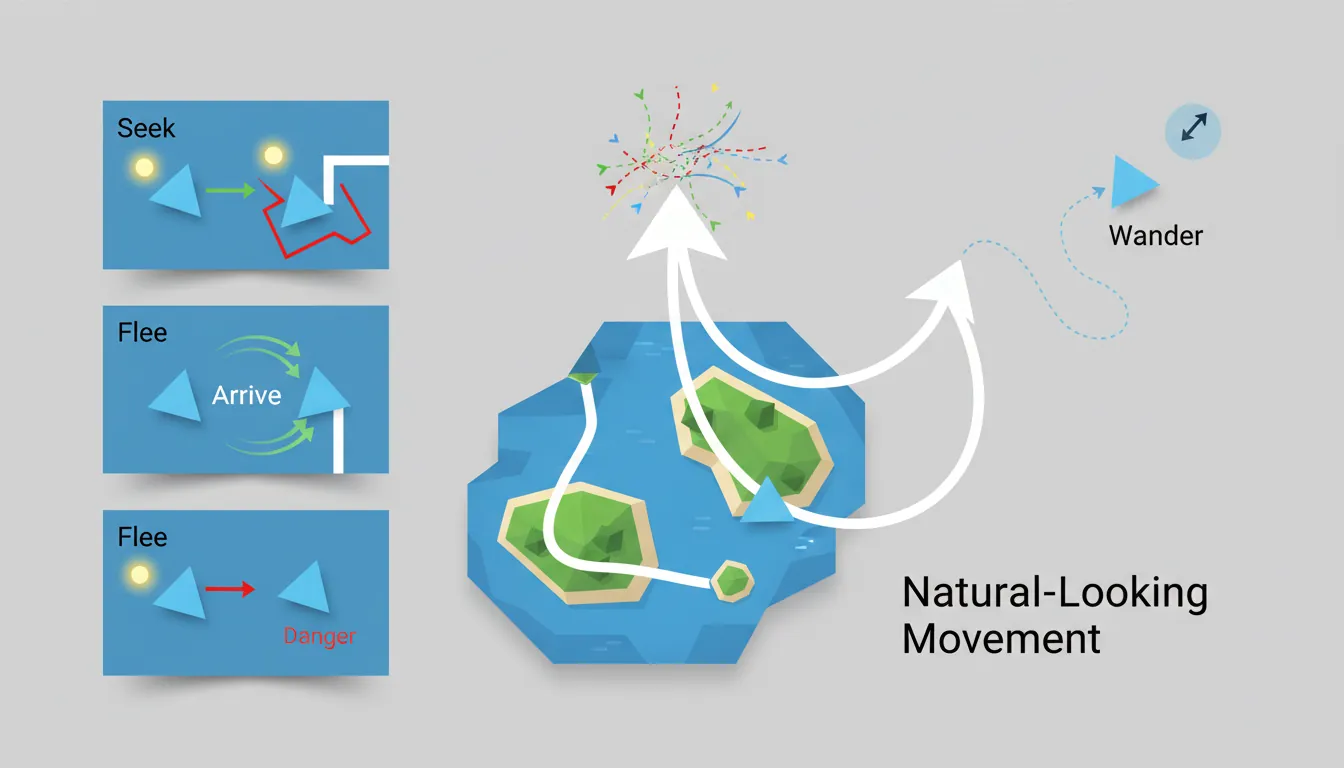
Basic Steering Behaviors:

Seek:                Flee:                Arrive:
     Target              Enemy              Target
        ●                  ●                  ●
       ╱                    ╲               slow↗
      ╱ Force              Force ╲        ────→
     ╱                            ╲      Agent
  Agent                          Agent    (slows down near target)

Wander:              Obstacle Avoidance:
   ●───┐             Agent ──────→
  ╱    │              ╲       █ Obstacle
 ╱ Random              ╲ ───→
Agent direction         Goes around
// Steering Behaviors Implementation
public class SteeringAgent : MonoBehaviour
{
public float maxSpeed = 5f;
public float maxForce = 10f;
private Vector3 velocity;
void Update()
{
Vector3 steering = Vector3.zero;
// Combine behaviors
steering += Seek(target.position) * 1f;
steering += AvoidObstacles() * 2f; // Higher priority
steering += Separation(nearbyAgents) * 1.5f;
// Apply steering
steering = Vector3.ClampMagnitude(steering, maxForce);
velocity += steering * Time.deltaTime;
velocity = Vector3.ClampMagnitude(velocity, maxSpeed);
transform.position += velocity * Time.deltaTime;
transform.forward = velocity.normalized;
}
Vector3 Seek(Vector3 targetPos)
{
Vector3 desired = (targetPos - transform.position).normalized * maxSpeed;
return desired - velocity;
}
Vector3 Flee(Vector3 threatPos)
{
return -Seek(threatPos); // Opposite of seek
}
Vector3 Arrive(Vector3 targetPos, float slowRadius)
{
Vector3 toTarget = targetPos - transform.position;
float distance = toTarget.magnitude;
float speed = maxSpeed;
if (distance < slowRadius)
speed = maxSpeed * (distance / slowRadius);
Vector3 desired = toTarget.normalized * speed;
return desired - velocity;
}
Vector3 Separation(List<Transform> neighbors)
{
Vector3 steering = Vector3.zero;
foreach (var neighbor in neighbors)
{
Vector3 away = transform.position - neighbor.position;
steering += away.normalized / away.magnitude; // Closer = stronger
}
return steering;
}
}Exercise: Build an AI Enemy
Goal: Create an enemy with multiple AI behaviors.
- Set up a NavMesh and create an enemy with NavMeshAgent
- Implement FSM with Idle, Patrol, Chase, and Attack states
- Add patrol waypoints that the enemy walks between
- Implement player detection using line-of-sight (raycasting)
- Add obstacle avoidance using steering behaviors
- Upgrade to a behavior tree for more complex logic
Bonus: Add group behaviors (flocking) for multiple enemies