We use cookies to enhance your browsing experience, serve personalized content, and analyze our traffic.
By clicking "Accept All", you consent to our use of cookies. See our
Privacy Policy
for more information.
Complete Database Mastery Part 2: Advanced SQL & Query Mastery
January 31, 2026Wasil Zafar40 min read
Master advanced SQL techniques including CTEs, window functions, stored procedures, triggers, and production-grade query patterns for complex data manipulation and analysis.
In Part 1, we mastered SQL fundamentals. Now we're leveling up to advanced query techniques that separate junior developers from senior engineers—CTEs, window functions, stored procedures, and patterns for writing clean, maintainable SQL.
Series Context: This is Part 2 of 15 in the Complete Database Mastery series. We're building on fundamentals to unlock powerful query capabilities.
Write cleaner queries using CTEs instead of nested subqueries
Solve ranking problems with window functions (ROW_NUMBER, RANK, DENSE_RANK)
Handle hierarchical data using recursive queries
Encapsulate business logic in stored procedures and triggers
Work with semi-structured data using JSON functions
Practice Environment: All examples use PostgreSQL syntax (most portable), with MySQL/SQL Server variations noted where they differ. Try these queries in your local database or use DB Fiddle online.
Subqueries
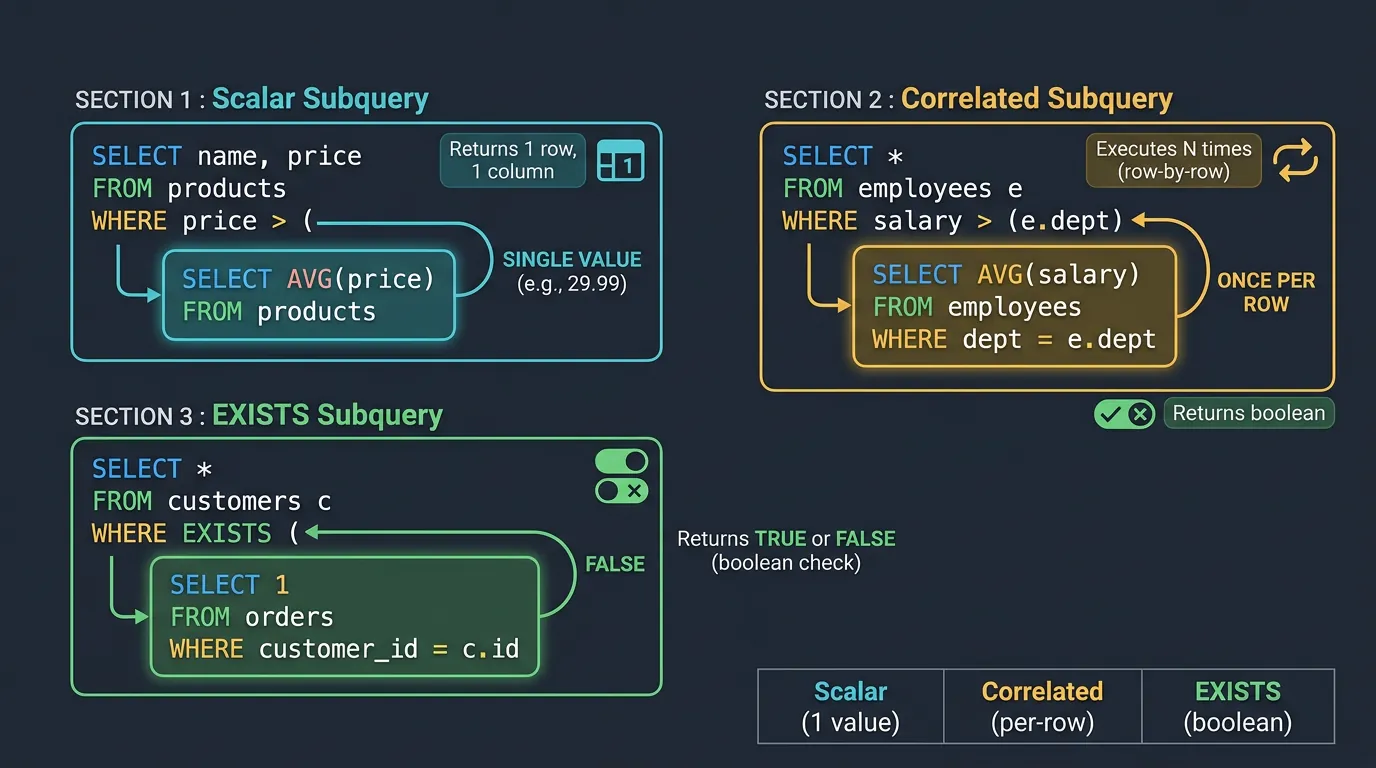
A subquery is a query nested inside another query. Think of it as asking a question that requires answering another question first—like "Find all customers who spent more than the average order value" (you need to calculate the average first).
Types of SQL subqueries: scalar (single value), correlated (row-by-row), and EXISTS (boolean check)
Scalar Subqueries
A scalar subquery returns exactly one value (one row, one column). You can use it anywhere a single value is expected—in SELECT, WHERE, or even inside expressions.
-- Using our sample tables
CREATE TABLE products (
    id SERIAL PRIMARY KEY,
    name VARCHAR(100),
    category VARCHAR(50),
    price DECIMAL(10,2)
);

CREATE TABLE order_items (
    id SERIAL PRIMARY KEY,
    order_id INT,
    product_id INT REFERENCES products(id),
    quantity INT,
    unit_price DECIMAL(10,2)
);

INSERT INTO products (name, category, price) VALUES
    ('Laptop', 'Electronics', 999.99),
    ('Mouse', 'Electronics', 29.99),
    ('Desk Chair', 'Furniture', 199.99),
    ('Notebook', 'Office', 4.99),
    ('Monitor', 'Electronics', 349.99);

-- Scalar subquery in SELECT (compare each price to average)
SELECT
    name,
    price,
    (SELECT AVG(price) FROM products) AS avg_price,
    price - (SELECT AVG(price) FROM products) AS diff_from_avg
FROM products;

-- Scalar subquery in WHERE (products above average price)
SELECT name, price
FROM products
WHERE price > (SELECT AVG(price) FROM products);

-- Result:
-- name       | price
-- -----------+--------
-- Laptop     | 999.99
-- Monitor    | 349.99
Correlated Subqueries
A correlated subquery references the outer query—it runs once for each row in the outer query. This is powerful but can be slow on large datasets.
-- Find products that are the most expensive in their category
SELECT p1.name, p1.category, p1.price
FROM products p1
WHERE p1.price = (
    SELECT MAX(p2.price)
    FROM products p2
    WHERE p2.category = p1.category  -- Correlation: references outer query
);

-- Find customers who have placed more orders than average
SELECT c.id, c.first_name, c.last_name,
       (SELECT COUNT(*) FROM orders o WHERE o.customer_id = c.id) AS order_count
FROM customers c
WHERE (SELECT COUNT(*) FROM orders o WHERE o.customer_id = c.id) >
      (SELECT AVG(order_count) FROM (
          SELECT COUNT(*) AS order_count
          FROM orders
          GROUP BY customer_id
      ) subq);
EXISTS vs IN vs JOIN
Three ways to filter based on related table data—each with different performance characteristics:
-- Using IN (good for small result sets)
SELECT * FROM customers
WHERE id IN (SELECT customer_id FROM orders WHERE total > 1000);

-- Using EXISTS (often faster for large tables - stops at first match)
SELECT * FROM customers c
WHERE EXISTS (
    SELECT 1 FROM orders o
    WHERE o.customer_id = c.id AND o.total > 1000
);

-- Using JOIN (most flexible, can return columns from both tables)
SELECT DISTINCT c.*
FROM customers c
INNER JOIN orders o ON c.id = o.customer_id
WHERE o.total > 1000;
Method
Best For
Notes
IN
Small subquery results
Can be slow with large lists; handles NULLs differently
EXISTS
Checking existence only
Short-circuits on first match; often most efficient
JOIN
Need columns from both tables
May return duplicates without DISTINCT
Performance Warning: Correlated subqueries execute once per row. On a 1M row table, that's 1M executions of the inner query! Use JOINs or window functions instead when possible.
Common Table Expressions (CTEs)
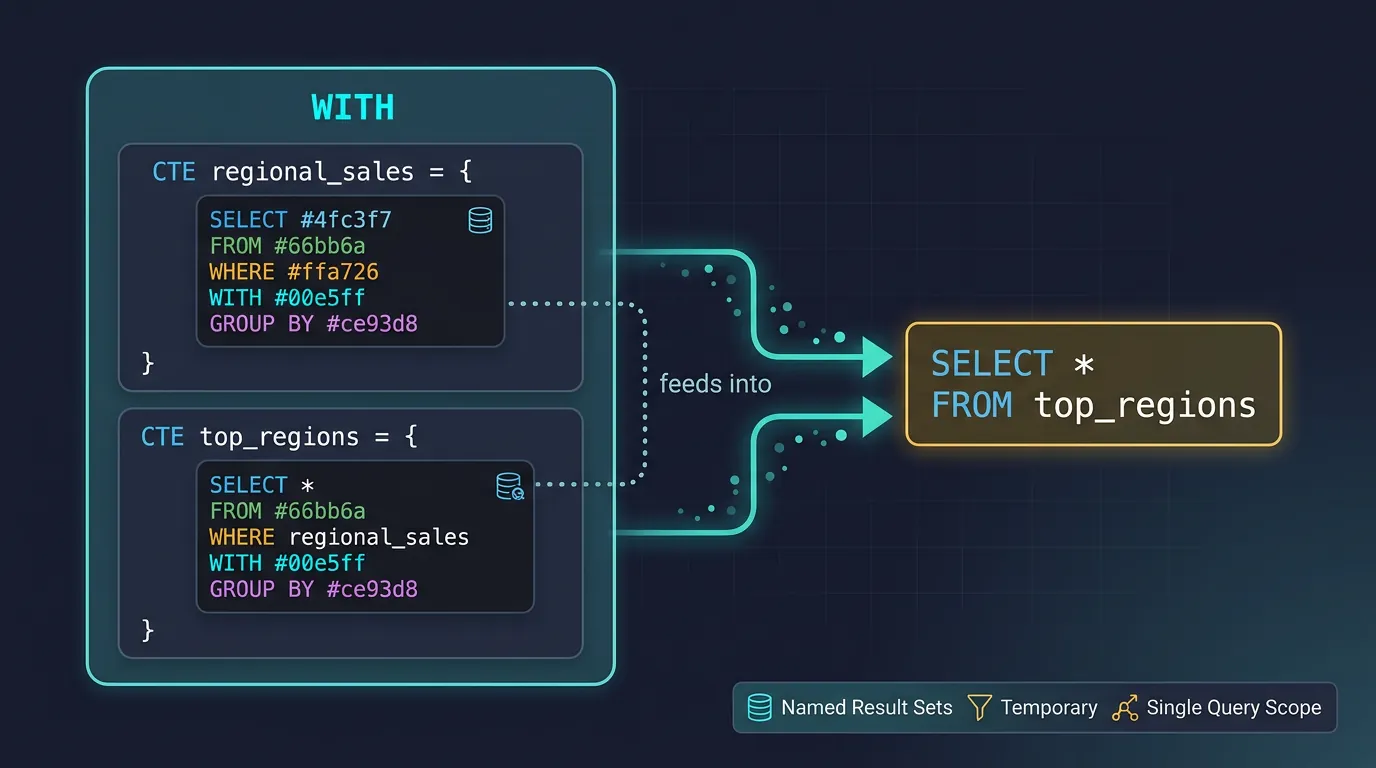
CTEs are named temporary result sets that exist only within a single query. Think of them as "query variables"—they make complex queries readable by breaking them into logical, named steps.
CTE execution flow: named result sets defined in WITH clause feed into the final SELECT statement
Basic CTEs
-- Basic CTE syntax
WITH cte_name AS (
    -- Your query here
    SELECT column1, column2 FROM some_table
)
SELECT * FROM cte_name;

-- Real example: Find customers with above-average lifetime value
WITH customer_totals AS (
    SELECT
        customer_id,
        SUM(total) AS lifetime_value,
        COUNT(*) AS order_count
    FROM orders
    GROUP BY customer_id
),
average_value AS (
    SELECT AVG(lifetime_value) AS avg_value FROM customer_totals
)
SELECT
    c.first_name,
    c.last_name,
    ct.lifetime_value,
    ct.order_count,
    a.avg_value,
    ct.lifetime_value - a.avg_value AS above_average_by
FROM customers c
JOIN customer_totals ct ON c.id = ct.customer_id
CROSS JOIN average_value a
WHERE ct.lifetime_value > a.avg_value
ORDER BY ct.lifetime_value DESC;
CTE vs Subquery: CTEs and subqueries produce the same results, but CTEs are:
More readable (named, at the top of the query)
Reusable within the same query (reference multiple times)
Easier to debug (test each CTE independently)
Required for recursive queries
-- Multiple CTEs chained together (monthly sales analysis)
WITH monthly_sales AS (
    SELECT
        DATE_TRUNC('month', order_date) AS month,
        SUM(total) AS revenue,
        COUNT(*) AS orders
    FROM orders
    WHERE order_date >= '2024-01-01'
    GROUP BY DATE_TRUNC('month', order_date)
),
monthly_growth AS (
    SELECT
        month,
        revenue,
        orders,
        LAG(revenue) OVER (ORDER BY month) AS prev_revenue,
        revenue - LAG(revenue) OVER (ORDER BY month) AS revenue_change
    FROM monthly_sales
),
categorized AS (
    SELECT
        *,
        CASE
            WHEN revenue_change > 0 THEN 'Growth'
            WHEN revenue_change < 0 THEN 'Decline'
            ELSE 'Flat'
        END AS trend
    FROM monthly_growth
)
SELECT * FROM categorized ORDER BY month;
Recursive CTEs
Recursive CTEs query hierarchical or tree-structured data—like org charts, categories/subcategories, or graph traversal. They consist of two parts:
Base case (anchor): The starting point (non-recursive)
Recursive case: References itself to build upon previous results
-- Employee hierarchy (org chart)
CREATE TABLE employees_org (
    id SERIAL PRIMARY KEY,
    name VARCHAR(100),
    manager_id INT REFERENCES employees_org(id),
    title VARCHAR(100)
);

INSERT INTO employees_org (name, manager_id, title) VALUES
    ('Alice', NULL, 'CEO'),           -- id=1
    ('Bob', 1, 'VP Engineering'),      -- id=2
    ('Carol', 1, 'VP Sales'),          -- id=3
    ('Dave', 2, 'Dev Manager'),        -- id=4
    ('Eve', 2, 'QA Manager'),          -- id=5
    ('Frank', 4, 'Senior Developer'),  -- id=6
    ('Grace', 4, 'Developer');         -- id=7

-- Find all employees under Bob (VP Engineering)
WITH RECURSIVE org_tree AS (
    -- Base case: Start with Bob
    SELECT id, name, manager_id, title, 1 AS level, name AS path
    FROM employees_org
    WHERE name = 'Bob'

    UNION ALL

    -- Recursive case: Find direct reports
    SELECT e.id, e.name, e.manager_id, e.title,
           ot.level + 1,
           ot.path || ' > ' || e.name
    FROM employees_org e
    INNER JOIN org_tree ot ON e.manager_id = ot.id
)
SELECT * FROM org_tree ORDER BY level, name;

-- Result:
-- id | name  | manager_id | title           | level | path
-- ---+-------+------------+-----------------+-------+------------------
-- 2  | Bob   | 1          | VP Engineering  | 1     | Bob
-- 4  | Dave  | 2          | Dev Manager     | 2     | Bob > Dave
-- 5  | Eve   | 2          | QA Manager      | 2     | Bob > Eve
-- 6  | Frank | 4          | Senior Developer| 3     | Bob > Dave > Frank
-- 7  | Grace | 4          | Developer       | 3     | Bob > Dave > Grace
Real-World Use Case: Category Breadcrumbs
-- E-commerce category hierarchy
CREATE TABLE categories (
    id SERIAL PRIMARY KEY,
    name VARCHAR(100),
    parent_id INT REFERENCES categories(id)
);

INSERT INTO categories (name, parent_id) VALUES
    ('Electronics', NULL),
    ('Computers', 1),
    ('Laptops', 2),
    ('Gaming Laptops', 3);

-- Generate breadcrumb: Electronics > Computers > Laptops > Gaming Laptops
WITH RECURSIVE breadcrumb AS (
    SELECT id, name, parent_id, name AS path
    FROM categories
    WHERE name = 'Gaming Laptops'

    UNION ALL

    SELECT c.id, c.name, c.parent_id, c.name || ' > ' || b.path
    FROM categories c
    INNER JOIN breadcrumb b ON c.id = b.parent_id
)
SELECT path FROM breadcrumb WHERE parent_id IS NULL;
-- Result: Electronics > Computers > Laptops > Gaming Laptops
Infinite Loop Warning: Recursive CTEs can run forever if your data has cycles! Always add a termination condition like WHERE level < 100 or use a cycle-detection column.
Window Functions
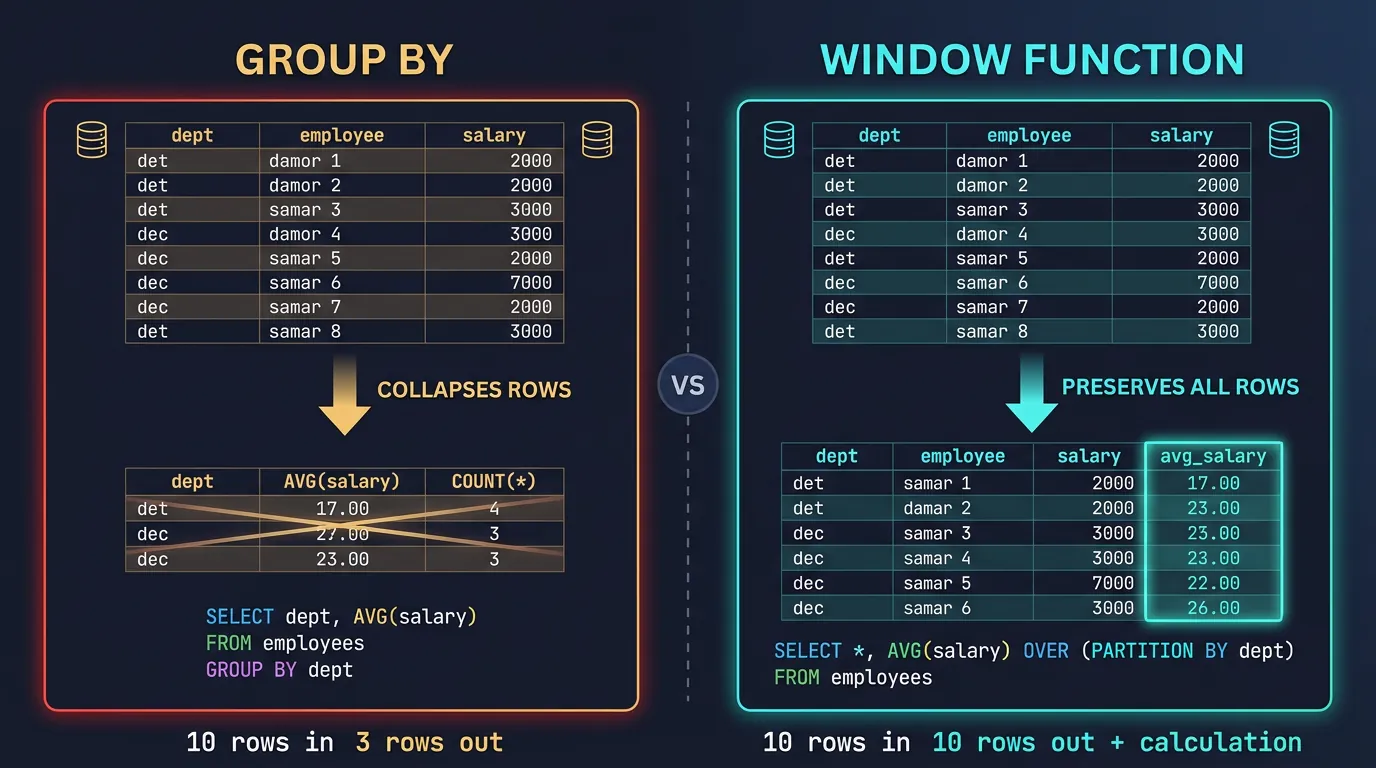
Window functions perform calculations across a set of rows related to the current row—without collapsing them like GROUP BY does. They're your secret weapon for rankings, running totals, and comparisons.
Window functions vs GROUP BY: window functions add calculations while preserving all original rows
Window vs GROUP BY: GROUP BY collapses multiple rows into one (10 orders → 1 summary row). Window functions keep all rows and add a calculation column (10 orders → 10 rows, each with a rank).
ROW_NUMBER, RANK & DENSE_RANK
These functions assign a number to each row based on ordering. The difference is how they handle ties:
-- Sample data with ties
CREATE TABLE sales_data (
    salesperson VARCHAR(50),
    region VARCHAR(50),
    revenue DECIMAL(10,2)
);

INSERT INTO sales_data VALUES
    ('Alice', 'North', 50000),
    ('Bob', 'North', 45000),
    ('Carol', 'North', 45000),  -- Tie with Bob!
    ('Dave', 'North', 40000),
    ('Eve', 'South', 60000),
    ('Frank', 'South', 55000);

-- Compare the three ranking functions
SELECT
    salesperson,
    revenue,
    ROW_NUMBER() OVER (ORDER BY revenue DESC) AS row_num,
    RANK() OVER (ORDER BY revenue DESC) AS rank,
    DENSE_RANK() OVER (ORDER BY revenue DESC) AS dense_rank
FROM sales_data;

-- Result:
-- salesperson | revenue | row_num | rank | dense_rank
-- ------------+---------+---------+------+------------
-- Eve         | 60000   | 1       | 1    | 1
-- Frank       | 55000   | 2       | 2    | 2
-- Alice       | 50000   | 3       | 3    | 3
-- Bob         | 45000   | 4       | 4    | 4     ← Same rank as Carol
-- Carol       | 45000   | 5       | 4    | 4     ← Same rank as Bob
-- Dave        | 40000   | 6       | 6    | 5     ← RANK skips 5, DENSE_RANK doesn't
When to Use Each
Function
Handles Ties
Best For
ROW_NUMBER()
Unique numbers (arbitrary for ties)
Pagination, unique row IDs, deduplication
RANK()
Same rank, gaps after ties
Competition rankings (1st, 2nd, 2nd, 4th)
DENSE_RANK()
Same rank, no gaps
Continuous rankings (1st, 2nd, 2nd, 3rd)
PARTITION BY: Windowing Within Groups
PARTITION BY divides the result set into groups (like GROUP BY) but keeps all rows. The window function then applies within each partition independently.
-- Rank salespeople within their region
SELECT
    salesperson,
    region,
    revenue,
    RANK() OVER (PARTITION BY region ORDER BY revenue DESC) AS region_rank,
    revenue - AVG(revenue) OVER (PARTITION BY region) AS vs_region_avg
FROM sales_data;

-- Result:
-- salesperson | region | revenue | region_rank | vs_region_avg
-- ------------+--------+---------+-------------+--------------
-- Alice       | North  | 50000   | 1           | 5000
-- Bob         | North  | 45000   | 2           | 0
-- Carol       | North  | 45000   | 2           | 0
-- Dave        | North  | 40000   | 4           | -5000
-- Eve         | South  | 60000   | 1           | 2500
-- Frank       | South  | 55000   | 2           | -2500

-- Get top 2 salespeople per region
WITH ranked AS (
    SELECT
        *,
        ROW_NUMBER() OVER (PARTITION BY region ORDER BY revenue DESC) AS rn
    FROM sales_data
)
SELECT salesperson, region, revenue
FROM ranked
WHERE rn <= 2;
Running Totals, Moving Averages & Lag/Lead
-- Daily sales with running total
CREATE TABLE daily_sales (
    sale_date DATE,
    amount DECIMAL(10,2)
);

INSERT INTO daily_sales VALUES
    ('2024-01-01', 100),
    ('2024-01-02', 150),
    ('2024-01-03', 200),
    ('2024-01-04', 120),
    ('2024-01-05', 180);

-- Running total and moving average
SELECT
    sale_date,
    amount,
    SUM(amount) OVER (ORDER BY sale_date) AS running_total,
    AVG(amount) OVER (ORDER BY sale_date
                      ROWS BETWEEN 2 PRECEDING AND CURRENT ROW) AS moving_avg_3day,
    amount - LAG(amount) OVER (ORDER BY sale_date) AS daily_change,
    LEAD(amount) OVER (ORDER BY sale_date) AS next_day_amount
FROM daily_sales;

-- Result:
-- sale_date   | amount | running_total | moving_avg_3day | daily_change | next_day
-- ------------+--------+---------------+-----------------+--------------+---------
-- 2024-01-01  | 100    | 100           | 100.00          | NULL         | 150
-- 2024-01-02  | 150    | 250           | 125.00          | 50           | 200
-- 2024-01-03  | 200    | 450           | 150.00          | 50           | 120
-- 2024-01-04  | 120    | 570           | 156.67          | -80          | 180
-- 2024-01-05  | 180    | 750           | 166.67          | 60           | NULL
Window Frame Specifications
The ROWS BETWEEN clause defines exactly which rows are included in the window:
-- Common window frame patterns
SUM(amount) OVER (ORDER BY date ROWS BETWEEN UNBOUNDED PRECEDING AND CURRENT ROW)
-- All rows from start to current (running total)

AVG(amount) OVER (ORDER BY date ROWS BETWEEN 2 PRECEDING AND CURRENT ROW)
-- Current row + 2 previous (3-day moving average)

AVG(amount) OVER (ORDER BY date ROWS BETWEEN 1 PRECEDING AND 1 FOLLOWING)
-- Centered average (previous + current + next)

SUM(amount) OVER (ORDER BY date ROWS BETWEEN CURRENT ROW AND UNBOUNDED FOLLOWING)
-- Remaining total (current to end)
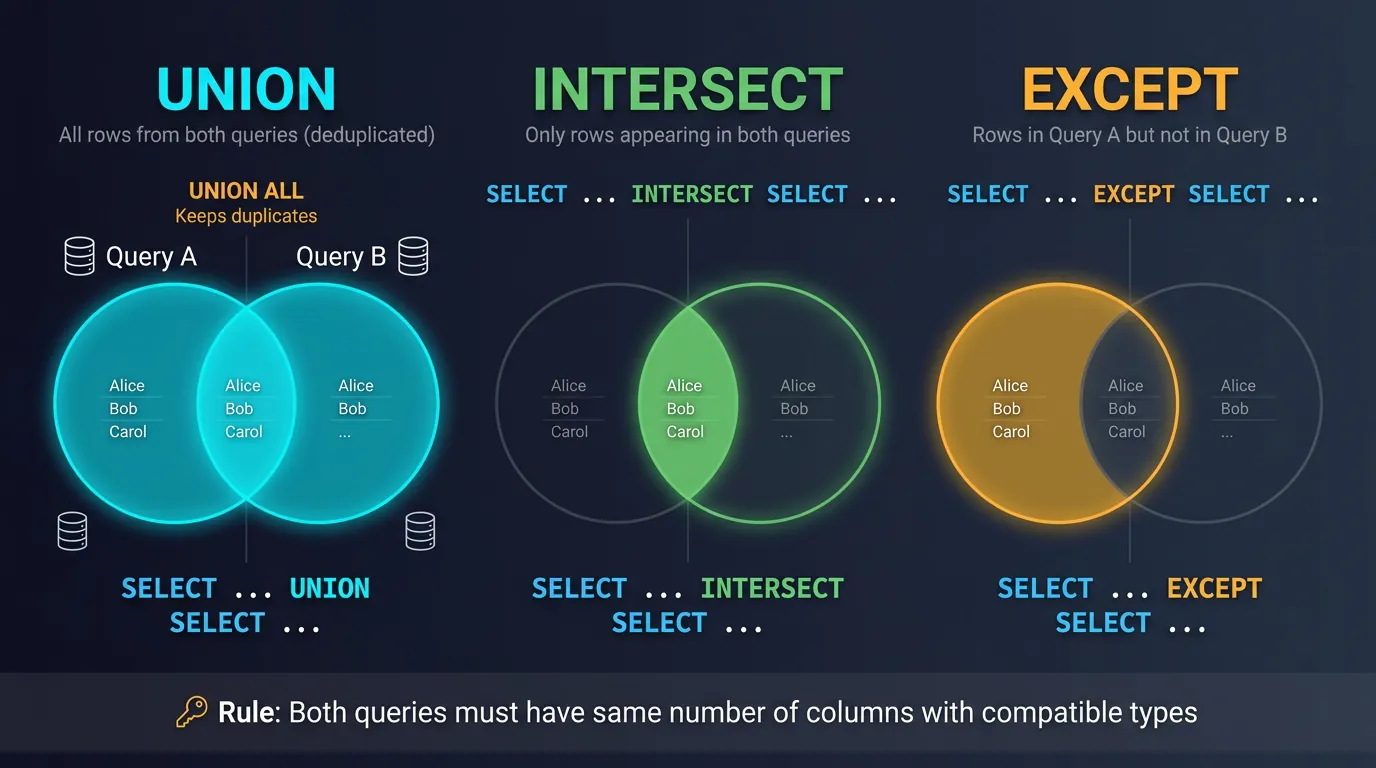
Set operations combine results from multiple queries. Think Venn diagrams: UNION is the full circle, INTERSECT is the overlap, and EXCEPT is what's left.
SQL set operations as Venn diagrams: UNION (all), INTERSECT (overlap), EXCEPT (difference)
UNION & UNION ALL
UNION combines results from two queries and removes duplicates. UNION ALL keeps duplicates (faster, no deduplication step).
-- Sample tables
CREATE TABLE employees_us (
    id INT,
    name VARCHAR(100),
    department VARCHAR(50)
);

CREATE TABLE employees_eu (
    id INT,
    name VARCHAR(100),
    department VARCHAR(50)
);

INSERT INTO employees_us VALUES
    (1, 'Alice', 'Engineering'),
    (2, 'Bob', 'Sales'),
    (3, 'Carol', 'Engineering');

INSERT INTO employees_eu VALUES
    (4, 'Dave', 'Engineering'),
    (5, 'Eve', 'Marketing'),
    (3, 'Carol', 'Engineering');  -- Carol works in both regions!

-- UNION removes duplicates
SELECT name, department FROM employees_us
UNION
SELECT name, department FROM employees_eu;

-- Result: 5 rows (Carol appears once)
-- Alice, Bob, Carol, Dave, Eve

-- UNION ALL keeps duplicates
SELECT name, department FROM employees_us
UNION ALL
SELECT name, department FROM employees_eu;

-- Result: 6 rows (Carol appears twice)

-- Combining with additional columns to track source
SELECT name, department, 'US' AS region FROM employees_us
UNION ALL
SELECT name, department, 'EU' AS region FROM employees_eu;
Performance Tip: Use UNION ALL when you know there are no duplicates or want to keep them. It's faster because it skips the deduplication sort.
INTERSECT & EXCEPT
-- INTERSECT: Only rows that appear in BOTH queries
SELECT name FROM employees_us
INTERSECT
SELECT name FROM employees_eu;

-- Result: Carol (appears in both)

-- Real-world use: Customers who bought from BOTH categories
SELECT customer_id FROM orders
WHERE product_category = 'Electronics'
INTERSECT
SELECT customer_id FROM orders
WHERE product_category = 'Furniture';

-- EXCEPT (MINUS in Oracle): Rows in first query but NOT in second
SELECT name FROM employees_us
EXCEPT
SELECT name FROM employees_eu;

-- Result: Alice, Bob (in US but not EU)

-- Real-world use: Active customers who haven't ordered in 2024
SELECT id FROM customers
WHERE is_active = true
EXCEPT
SELECT DISTINCT customer_id FROM orders
WHERE order_date >= '2024-01-01';
Set Operation Rules
Both queries must return the same number of columns
Column data types must be compatible (can be implicitly converted)
Column names come from the first query
ORDER BY applies to the final result (goes at the end)
-- ❌ ERROR: Different number of columns
SELECT id, name FROM employees_us
UNION
SELECT name FROM employees_eu;

-- ✅ Correct with ORDER BY
SELECT name, department FROM employees_us
UNION
SELECT name, department FROM employees_eu
ORDER BY name;  -- ORDER BY goes at the very end
Stored Procedures & Functions
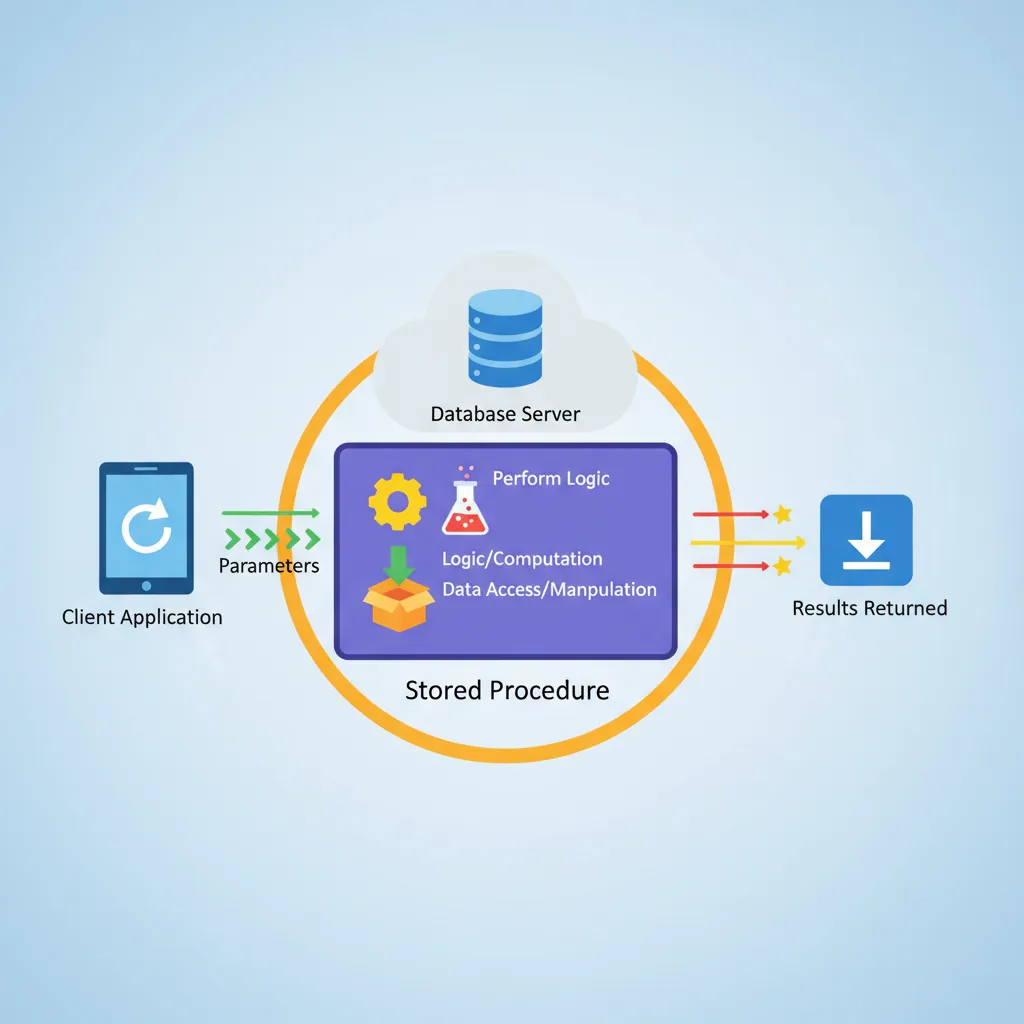
Stored procedures and functions encapsulate SQL logic on the database server. They're like API endpoints for your database—reusable, secure, and efficient.
Stored procedures execute on the database server: accept parameters, perform logic, and return results
Creating Stored Procedures
A stored procedure is a saved set of SQL statements that can accept parameters, perform operations, and optionally return results. They can modify data (INSERT/UPDATE/DELETE).
-- PostgreSQL procedure syntax
CREATE OR REPLACE PROCEDURE transfer_funds(
    sender_id INT,
    receiver_id INT,
    amount DECIMAL(10,2)
)
LANGUAGE plpgsql
AS $$
BEGIN
    -- Check sufficient balance
    IF (SELECT balance FROM accounts WHERE id = sender_id) < amount THEN
        RAISE EXCEPTION 'Insufficient funds';
    END IF;

    -- Perform transfer (both must succeed or both fail)
    UPDATE accounts SET balance = balance - amount WHERE id = sender_id;
    UPDATE accounts SET balance = balance + amount WHERE id = receiver_id;

    -- Log the transaction
    INSERT INTO transactions (from_account, to_account, amount, transaction_date)
    VALUES (sender_id, receiver_id, amount, CURRENT_TIMESTAMP);

    COMMIT;
END;
$$;

-- Call the procedure
CALL transfer_funds(101, 202, 500.00);
-- MySQL procedure with output parameters
DELIMITER //
CREATE PROCEDURE get_customer_stats(
    IN customer_id INT,
    OUT total_orders INT,
    OUT total_spent DECIMAL(12,2)
)
BEGIN
    SELECT COUNT(*), COALESCE(SUM(total), 0)
    INTO total_orders, total_spent
    FROM orders
    WHERE customer_id = customer_id;
END //
DELIMITER ;

-- Call with output variables
CALL get_customer_stats(1, @orders, @spent);
SELECT @orders, @spent;
User-Defined Functions (UDFs)
Unlike procedures, functions must return a value and cannot modify data (in most databases). They can be used inline in queries—like built-in functions.
-- Scalar function: Returns a single value
CREATE OR REPLACE FUNCTION calculate_discount(
    price DECIMAL(10,2),
    discount_pct INT
)
RETURNS DECIMAL(10,2)
LANGUAGE SQL
IMMUTABLE
AS $$
    SELECT price * (1 - discount_pct / 100.0);
$$;

-- Use in queries
SELECT
    name,
    price,
    calculate_discount(price, 20) AS sale_price
FROM products;

-- Table-returning function
CREATE OR REPLACE FUNCTION get_products_in_range(
    min_price DECIMAL,
    max_price DECIMAL
)
RETURNS TABLE (
    product_id INT,
    product_name VARCHAR,
    price DECIMAL
)
LANGUAGE SQL
AS $$
    SELECT id, name, price
    FROM products
    WHERE price BETWEEN min_price AND max_price
    ORDER BY price;
$$;

-- Use like a table
SELECT * FROM get_products_in_range(50, 200);
Procedures vs Functions
Feature
Stored Procedure
Function (UDF)
Returns
Optional (via OUT params)
Required (single value or table)
Called via
CALL / EXEC
SELECT (inline in queries)
Can modify data
Yes (INSERT/UPDATE/DELETE)
Usually no (read-only)
Transactions
Can control (COMMIT/ROLLBACK)
Cannot control
Use case
Complex business logic
Calculations, data transformation
Version Control Challenge: Stored procedures live in the database, not your Git repo. Use migration tools (Flyway, Liquibase) or keep CREATE statements in versioned .sql files.
Triggers & Events
Triggers are automatic actions that fire when specific database events occur. They're like event listeners for your database—"when X happens, do Y."
Trigger Fundamentals
-- PostgreSQL trigger: Auto-update timestamp
CREATE OR REPLACE FUNCTION update_modified_timestamp()
RETURNS TRIGGER AS $$
BEGIN
    NEW.updated_at = CURRENT_TIMESTAMP;
    RETURN NEW;
END;
$$ LANGUAGE plpgsql;

CREATE TRIGGER set_updated_at
    BEFORE UPDATE ON products
    FOR EACH ROW
    EXECUTE FUNCTION update_modified_timestamp();

-- Now any UPDATE on products automatically sets updated_at
UPDATE products SET price = 99.99 WHERE id = 1;
-- updated_at is now current timestamp!
-- Audit trail trigger: Log all changes
CREATE TABLE audit_log (
    id SERIAL PRIMARY KEY,
    table_name VARCHAR(50),
    record_id INT,
    action VARCHAR(10),
    old_values JSONB,
    new_values JSONB,
    changed_by VARCHAR(100),
    changed_at TIMESTAMP DEFAULT CURRENT_TIMESTAMP
);

CREATE OR REPLACE FUNCTION audit_product_changes()
RETURNS TRIGGER AS $$
BEGIN
    IF TG_OP = 'DELETE' THEN
        INSERT INTO audit_log (table_name, record_id, action, old_values, changed_by)
        VALUES ('products', OLD.id, 'DELETE', to_jsonb(OLD), current_user);
        RETURN OLD;
    ELSIF TG_OP = 'UPDATE' THEN
        INSERT INTO audit_log (table_name, record_id, action, old_values, new_values, changed_by)
        VALUES ('products', NEW.id, 'UPDATE', to_jsonb(OLD), to_jsonb(NEW), current_user);
        RETURN NEW;
    ELSIF TG_OP = 'INSERT' THEN
        INSERT INTO audit_log (table_name, record_id, action, new_values, changed_by)
        VALUES ('products', NEW.id, 'INSERT', to_jsonb(NEW), current_user);
        RETURN NEW;
    END IF;
END;
$$ LANGUAGE plpgsql;

CREATE TRIGGER audit_products
    AFTER INSERT OR UPDATE OR DELETE ON products
    FOR EACH ROW
    EXECUTE FUNCTION audit_product_changes();
Event-Driven SQL Patterns
Trigger Timing & Types
Timing
Description
Use Case
BEFORE
Runs before the operation
Validation, data transformation, auto-fill columns
AFTER
Runs after the operation
Audit logs, notifications, cascade updates
INSTEAD OF
Replaces the operation (views)
Making views updatable
Level
Fires
Access
FOR EACH ROW
Once per affected row
OLD and NEW row values
FOR EACH STATEMENT
Once per SQL statement
No row access
-- Business rule enforcement trigger
CREATE OR REPLACE FUNCTION check_order_total()
RETURNS TRIGGER AS $$
BEGIN
    -- Prevent orders over credit limit
    IF NEW.total > (
        SELECT credit_limit FROM customers WHERE id = NEW.customer_id
    ) THEN
        RAISE EXCEPTION 'Order total exceeds credit limit';
    END IF;

    -- Auto-apply loyalty discount
    IF (SELECT loyalty_tier FROM customers WHERE id = NEW.customer_id) = 'Gold' THEN
        NEW.discount = GREATEST(NEW.discount, 0.10);  -- At least 10% for Gold members
    END IF;

    RETURN NEW;
END;
$$ LANGUAGE plpgsql;

CREATE TRIGGER validate_order
    BEFORE INSERT OR UPDATE ON orders
    FOR EACH ROW
    EXECUTE FUNCTION check_order_total();
Trigger Warnings:
Triggers are hidden logic—developers may not know they exist
Cascading triggers can cause infinite loops
They add overhead to every write operation
Hard to debug—no breakpoints, limited logging
Consider application-level logic for complex business rules
JSON Support in SQL
Modern relational databases (PostgreSQL, MySQL 5.7+, SQL Server 2016+) support JSON natively. This bridges the gap between structured relational data and semi-structured document data.
When to Use JSON Columns:
Schema varies per row (custom attributes, settings, metadata)
Data from external APIs stored as-is
Prototyping before schema solidifies
Audit logs with varying structure
-- PostgreSQL JSON support (json vs jsonb)
CREATE TABLE products_extended (
    id SERIAL PRIMARY KEY,
    name VARCHAR(100),
    base_price DECIMAL(10,2),
    attributes JSONB  -- Use JSONB for better performance (binary, indexable)
);

INSERT INTO products_extended (name, base_price, attributes) VALUES
    ('Laptop', 999.99, '{"brand": "Dell", "ram_gb": 16, "storage": {"type": "SSD", "size_gb": 512}}'),
    ('Mouse', 29.99, '{"brand": "Logitech", "wireless": true, "dpi": 12000}'),
    ('Monitor', 349.99, '{"brand": "LG", "size_inches": 27, "resolution": "4K", "panel": "IPS"}');

-- Accessing JSON values
SELECT
    name,
    attributes->>'brand' AS brand,                    -- Text extraction
    (attributes->>'ram_gb')::INT AS ram,             -- Cast to integer
    attributes->'storage'->>'type' AS storage_type   -- Nested access
FROM products_extended;

-- Filtering on JSON values
SELECT name, attributes
FROM products_extended
WHERE attributes->>'brand' = 'Dell'
   OR (attributes->>'wireless')::BOOLEAN = true;

-- JSON path queries (PostgreSQL 12+)
SELECT name, attributes
FROM products_extended
WHERE attributes @? '$.storage.type ? (@ == "SSD")';
-- Modifying JSON data
UPDATE products_extended
SET attributes = attributes || '{"warranty_years": 2}'  -- Add field
WHERE name = 'Laptop';

UPDATE products_extended
SET attributes = attributes - 'wireless'  -- Remove field
WHERE name = 'Mouse';

UPDATE products_extended
SET attributes = jsonb_set(attributes, '{storage,size_gb}', '1024')  -- Update nested
WHERE name = 'Laptop';

-- Indexing JSON for performance
CREATE INDEX idx_product_brand
ON products_extended ((attributes->>'brand'));

CREATE INDEX idx_product_attrs
ON products_extended USING GIN (attributes);  -- Indexes entire JSON structure
JSON Operators Quick Reference (PostgreSQL)
Operator
Returns
Example
->
JSON object
data->'key' → {"nested": "value"}
->>
Text value
data->>'key' → value
#>
JSON at path
data#>'{a,b}' → nested JSON
#>>
Text at path
data#>>'{a,b}' → nested text
@>
Contains
data @> '{"key": "val"}'
?
Has key
data ? 'key'
-- MySQL JSON support
SELECT
    name,
    JSON_EXTRACT(attributes, '$.brand') AS brand,
    JSON_UNQUOTE(JSON_EXTRACT(attributes, '$.brand')) AS brand_unquoted
FROM products_extended;

-- MySQL shorthand (-> and ->> operators)
SELECT
    name,
    attributes->'$.brand' AS brand,          -- Returns JSON string (quoted)
    attributes->>'$.brand' AS brand_text     -- Returns unquoted text
FROM products_extended;

-- SQL Server JSON support
SELECT
    name,
    JSON_VALUE(attributes, '$.brand') AS brand,
    JSON_QUERY(attributes, '$.storage') AS storage_object
FROM products_extended;
JSON Anti-Patterns:
Don't store queryable data in JSON if you frequently filter/join on it
Don't use JSON to avoid proper schema design—normalization exists for good reasons
Don't forget indexing—unindexed JSON queries can be very slow
Consider document databases (MongoDB, see Part 8) if your data is mostly semi-structured
Production-Grade SQL Patterns
Writing SQL that works in development is easy. Writing SQL that performs well with millions of rows, handles concurrent users, and doesn't break under edge cases—that's the challenge. Here are battle-tested patterns.
Pagination That Scales
-- ❌ BAD: OFFSET gets slower as pages increase
-- Page 10,000 reads 100,000 rows to skip 99,990!
SELECT * FROM products
ORDER BY id
LIMIT 10 OFFSET 99990;

-- ✅ GOOD: Keyset pagination (cursor-based)
-- "Give me 10 products after ID 99990"
SELECT * FROM products
WHERE id > 99990
ORDER BY id
LIMIT 10;

-- For multi-column sorting
SELECT * FROM products
WHERE (created_at, id) > ('2024-01-15 10:30:00', 12345)
ORDER BY created_at, id
LIMIT 10;
Upsert (Insert or Update)
-- PostgreSQL UPSERT (INSERT ... ON CONFLICT)
INSERT INTO products (sku, name, price, stock)
VALUES ('LAPTOP-001', 'Gaming Laptop', 1299.99, 50)
ON CONFLICT (sku) DO UPDATE SET
    price = EXCLUDED.price,
    stock = products.stock + EXCLUDED.stock,  -- Add to existing stock
    updated_at = CURRENT_TIMESTAMP;

-- MySQL UPSERT (INSERT ... ON DUPLICATE KEY)
INSERT INTO products (sku, name, price, stock)
VALUES ('LAPTOP-001', 'Gaming Laptop', 1299.99, 50)
ON DUPLICATE KEY UPDATE
    price = VALUES(price),
    stock = stock + VALUES(stock),
    updated_at = CURRENT_TIMESTAMP;
Batch Operations
-- ❌ BAD: 10,000 separate INSERT statements
-- Each is a network round-trip + transaction
FOR i IN 1..10000:
    INSERT INTO logs (message) VALUES ('Log ' + i);

-- ✅ GOOD: Batch insert
INSERT INTO logs (message)
VALUES
    ('Log 1'), ('Log 2'), ('Log 3'),
    -- ... batch of 1000 at a time
    ('Log 1000');

-- ✅ GOOD: COPY for bulk loading (PostgreSQL)
COPY products (sku, name, price)
FROM '/data/products.csv'
WITH (FORMAT csv, HEADER true);

-- ✅ GOOD: Large UPDATE in batches (avoid locking entire table)
DO $$
DECLARE
    rows_updated INT;
BEGIN
    LOOP
        UPDATE products
        SET status = 'archived'
        WHERE id IN (
            SELECT id FROM products
            WHERE last_sold < '2020-01-01' AND status = 'active'
            LIMIT 1000
        );

        GET DIAGNOSTICS rows_updated = ROW_COUNT;
        EXIT WHEN rows_updated = 0;

        COMMIT;  -- Release locks between batches
        PERFORM pg_sleep(0.1);  -- Brief pause
    END LOOP;
END $$;
Safe Schema Migrations
-- Adding a column with default (PostgreSQL 11+)
-- This is instant, no table rewrite!
ALTER TABLE orders
ADD COLUMN priority VARCHAR(20) DEFAULT 'normal';

-- For older PostgreSQL or other DBs, add column then backfill
ALTER TABLE orders ADD COLUMN priority VARCHAR(20);
-- Backfill in batches (see above pattern)
UPDATE orders SET priority = 'normal' WHERE priority IS NULL;
ALTER TABLE orders ALTER COLUMN priority SET DEFAULT 'normal';

-- Adding an index without blocking writes (PostgreSQL)
CREATE INDEX CONCURRENTLY idx_orders_customer
ON orders (customer_id);

-- Safe column rename pattern
-- 1. Add new column
ALTER TABLE users ADD COLUMN full_name VARCHAR(200);
-- 2. Backfill
UPDATE users SET full_name = first_name || ' ' || last_name;
-- 3. Update application code to use new column
-- 4. Drop old columns after deployment verified
ALTER TABLE users DROP COLUMN first_name, DROP COLUMN last_name;
Production SQL Checklist
☐ EXPLAIN ANALYZE run on production-like data?
☐ Indexes exist for all WHERE and JOIN conditions?
☐ LIMIT included to prevent unbounded result sets?
You've now mastered advanced SQL techniques that form the backbone of complex data operations. CTEs, window functions, and stored procedures are essential tools for any serious database developer.
Continue the Database Mastery Series
Part 1: SQL Fundamentals & Syntax
Review the fundamentals: CRUD operations, joins, constraints, and SQL basics.