We use cookies to enhance your browsing experience, serve personalized content, and analyze our traffic.
By clicking "Accept All", you consent to our use of cookies. See our
Privacy Policy
for more information.
PostgreSQL (often called "Postgres") is the world's most advanced open-source relational database. It combines SQL compliance with powerful features that rival—and often exceed—commercial databases like Oracle.
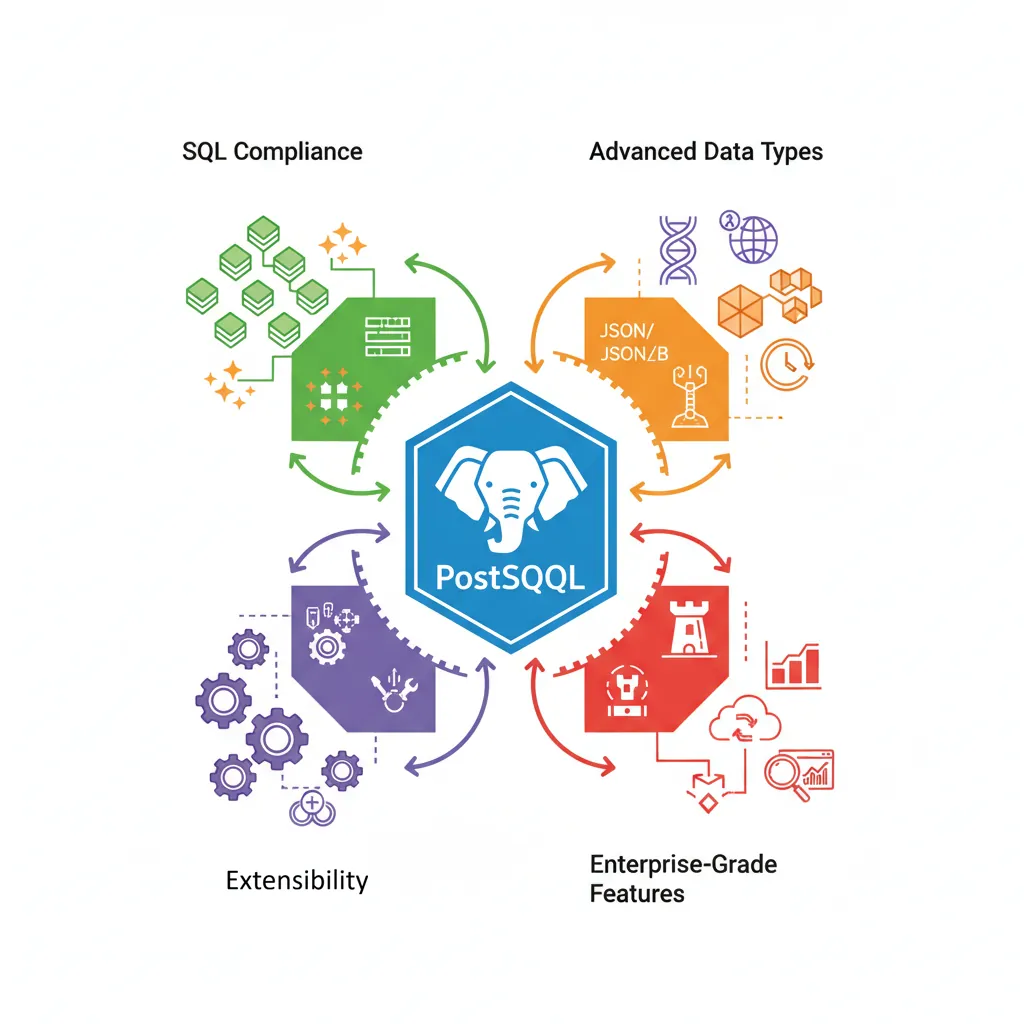
PostgreSQL's rich ecosystem: SQL compliance, advanced data types, extensibility, and enterprise-grade features
Series Context: This is Part 3 of 15 in the Complete Database Mastery series. We're diving deep into PostgreSQL's unique capabilities.
Here's why PostgreSQL dominates in many high-stakes environments:
ACID Compliant: Full transaction support with no compromises
Extensible: Custom data types, operators, indexes, and extensions
Standards-based: Most SQL-compliant database available
Rich Data Types: JSONB, arrays, ranges, UUIDs, geospatial, and more
Mature Ecosystem: Extensions like PostGIS, TimescaleDB, and pg_cron
Who Uses PostgreSQL?
Apple: Core infrastructure
Instagram: Primary datastore (billions of photos)
Spotify: Metadata and user data
Reddit: Core database
Twitch: Primary database for streaming platform
Version Note: This guide covers PostgreSQL 14-16. Most features work in earlier versions, but newer features like JSON path queries and enhanced partitioning require 12+.
PostgreSQL Architecture
Understanding PostgreSQL's internal architecture helps you optimize performance, troubleshoot issues, and make informed configuration decisions.
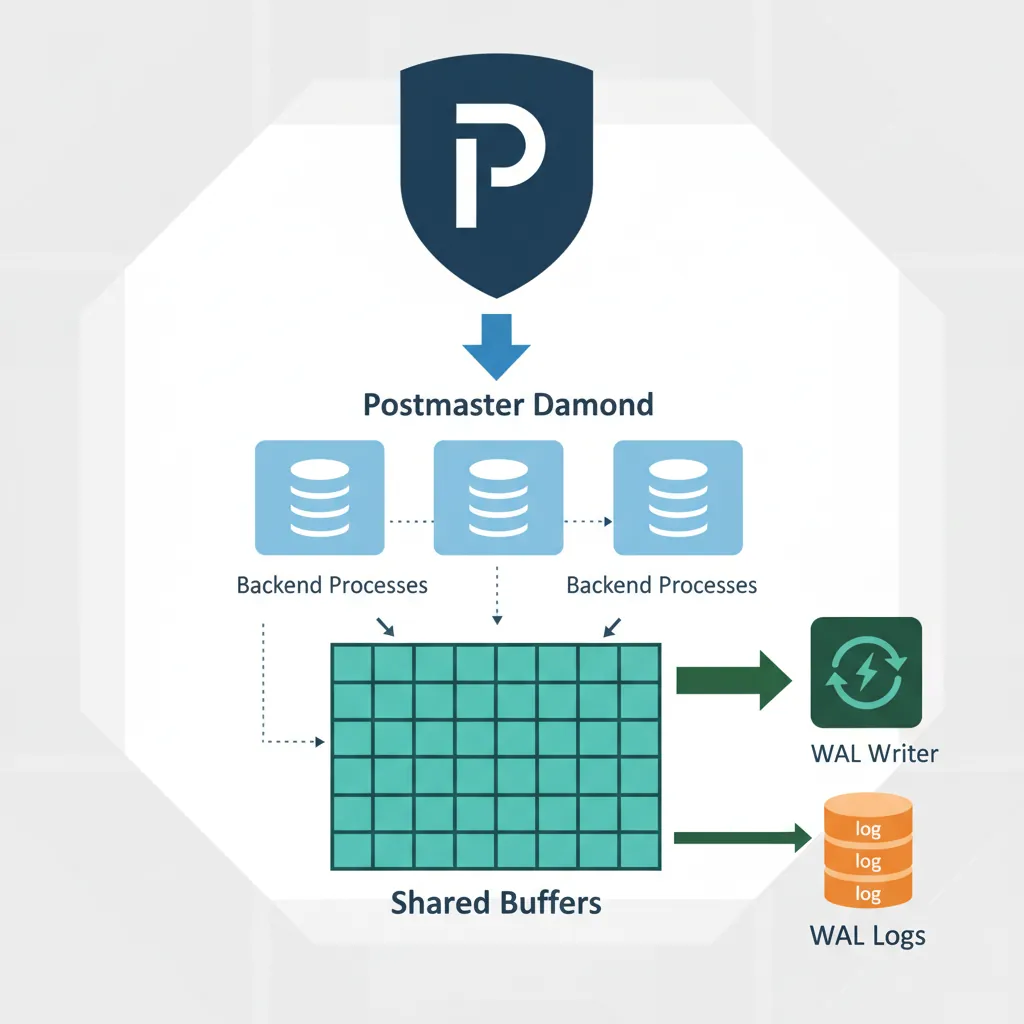
PostgreSQL uses a process-per-connection model—each client connection gets its own backend process. This is simpler than thread-based models and provides better isolation.
Main daemon—listens for connections, spawns backends
checkpointer
Writes dirty buffers to disk at checkpoint intervals
background writer
Gradually writes dirty buffers to reduce checkpoint spike
walwriter
Flushes Write-Ahead Log (WAL) to disk
autovacuum
Reclaims dead row space, updates statistics
backend
Handles individual client connections
Memory Structure
PostgreSQL memory is divided into shared memory (used by all processes) and local memory (per-process).
-- View current memory settings
SHOW shared_buffers;     -- Main cache for table/index data
SHOW work_mem;           -- Memory for sorts/hash joins (per operation!)
SHOW maintenance_work_mem;  -- Memory for maintenance ops (VACUUM, CREATE INDEX)
SHOW effective_cache_size;  -- Planner hint for available cache

-- Real-world example configuration (for 16GB RAM server)
-- In postgresql.conf:
-- shared_buffers = 4GB          # 25% of RAM
-- work_mem = 64MB               # Per-operation, be careful!
-- maintenance_work_mem = 1GB    # For maintenance operations
-- effective_cache_size = 12GB   # 75% of RAM (includes OS cache)
work_mem Danger:work_mem is allocated per operation, per connection. With 100 connections and a complex query using 3 sorts, you could need 100 × 3 × 64MB = 19GB! Start low (32-64MB) and increase carefully.
Advanced Data Types
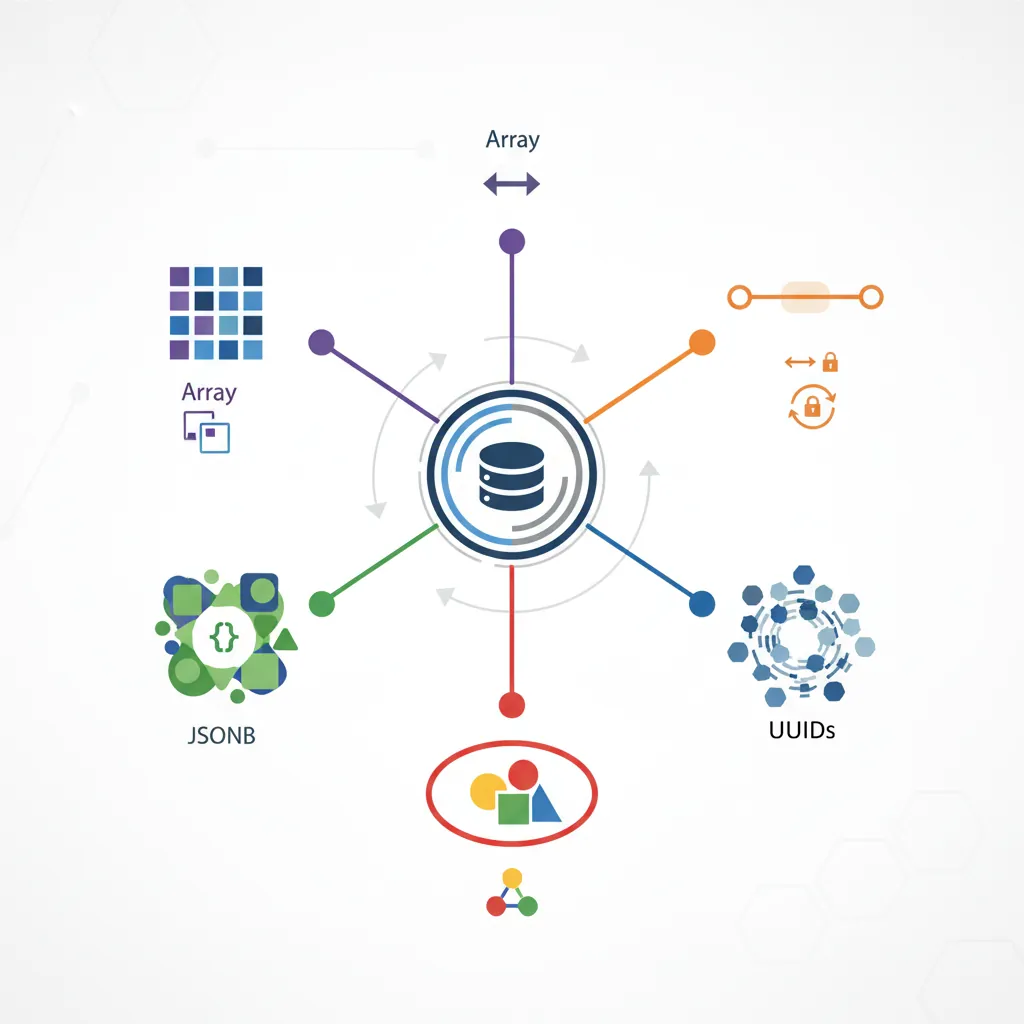
PostgreSQL's rich type system is a major competitive advantage. Beyond standard SQL types, it offers arrays, JSONB, ranges, UUIDs, and the ability to create custom types.
PostgreSQL's advanced type system: arrays, JSONB, ranges, UUIDs, and custom composite types
Arrays
PostgreSQL has native array support—store multiple values in a single column. Great for tags, preferences, or any multi-valued attribute.
-- Creating tables with arrays
CREATE TABLE articles (
    id SERIAL PRIMARY KEY,
    title VARCHAR(200),
    tags TEXT[],                    -- Array of text
    scores INTEGER[]                -- Array of integers
);

-- Inserting array values
INSERT INTO articles (title, tags, scores) VALUES
    ('PostgreSQL Tips', ARRAY['database', 'postgresql', 'sql'], ARRAY[85, 92, 88]),
    ('Python Guide', '{"programming", "python", "tutorial"}', '{90, 95}');

-- Querying arrays
SELECT title, tags FROM articles WHERE 'postgresql' = ANY(tags);
SELECT title, tags FROM articles WHERE tags @> ARRAY['sql'];  -- Contains all
SELECT title, tags FROM articles WHERE tags && ARRAY['python', 'java'];  -- Overlaps

-- Array operations
SELECT
    title,
    tags[1] AS first_tag,           -- 1-indexed!
    array_length(tags, 1) AS tag_count,
    array_to_string(tags, ', ') AS tags_csv,
    scores[1] + scores[2] AS sum_first_two
FROM articles;

-- Unnest: Expand array into rows
SELECT title, unnest(tags) AS tag FROM articles;
JSONB: Binary JSON
JSONB is PostgreSQL's flagship semi-structured data type. It's binary (faster queries) and indexable—getting the best of both SQL and NoSQL worlds.
CREATE TABLE products (
    id SERIAL PRIMARY KEY,
    name VARCHAR(100),
    attributes JSONB
);

INSERT INTO products (name, attributes) VALUES
    ('Gaming Laptop', '{
        "brand": "ASUS",
        "specs": {"ram_gb": 32, "storage_gb": 1024, "gpu": "RTX 4080"},
        "ports": ["USB-C", "HDMI", "Ethernet"],
        "available": true
    }'),
    ('Wireless Mouse', '{
        "brand": "Logitech",
        "dpi": 25600,
        "buttons": 8,
        "wireless": true,
        "color_options": ["black", "white"]
    }');

-- JSONB querying
SELECT name, attributes->>'brand' AS brand FROM products;
SELECT name, attributes->'specs'->>'gpu' AS gpu FROM products;
SELECT name FROM products WHERE attributes->>'brand' = 'ASUS';
SELECT name FROM products WHERE (attributes->'specs'->>'ram_gb')::INT >= 16;

-- Check for existence
SELECT name FROM products WHERE attributes ? 'wireless';  -- Has key
SELECT name FROM products WHERE attributes @> '{"available": true}';  -- Contains

-- JSONB modifications
UPDATE products SET attributes = attributes || '{"warranty_years": 2}'
WHERE name = 'Gaming Laptop';

UPDATE products SET attributes = jsonb_set(attributes, '{specs,ram_gb}', '64')
WHERE name = 'Gaming Laptop';

-- Index JSONB for fast queries
CREATE INDEX idx_products_brand ON products ((attributes->>'brand'));
CREATE INDEX idx_products_attrs ON products USING GIN (attributes);
UUID & Custom Types
-- UUID: Universally unique identifiers
CREATE EXTENSION IF NOT EXISTS "uuid-ossp";

CREATE TABLE sessions (
    id UUID DEFAULT uuid_generate_v4() PRIMARY KEY,
    user_id INT,
    started_at TIMESTAMP DEFAULT CURRENT_TIMESTAMP
);

INSERT INTO sessions (user_id) VALUES (1);
SELECT * FROM sessions;
-- id: 550e8400-e29b-41d4-a716-446655440000

-- Range types: Represent intervals
CREATE TABLE reservations (
    id SERIAL PRIMARY KEY,
    room_id INT,
    during TSRANGE  -- Timestamp range
);

INSERT INTO reservations (room_id, during) VALUES
    (101, '[2024-03-15 09:00, 2024-03-15 11:00)');

-- Prevent double-booking with exclusion constraint
ALTER TABLE reservations
ADD CONSTRAINT no_overlap EXCLUDE USING GIST (
    room_id WITH =,
    during WITH &&
);

-- Enum types: Fixed set of values
CREATE TYPE order_status AS ENUM ('pending', 'processing', 'shipped', 'delivered');

CREATE TABLE orders (
    id SERIAL PRIMARY KEY,
    status order_status DEFAULT 'pending'
);

INSERT INTO orders (status) VALUES ('shipped');
-- INSERT INTO orders (status) VALUES ('cancelled');  -- ERROR: invalid
Other Useful Types:INET/CIDR for IP addresses, MACADDR, MONEY, INTERVAL for durations, POINT/BOX/POLYGON for geometry (or use PostGIS).
Index Types
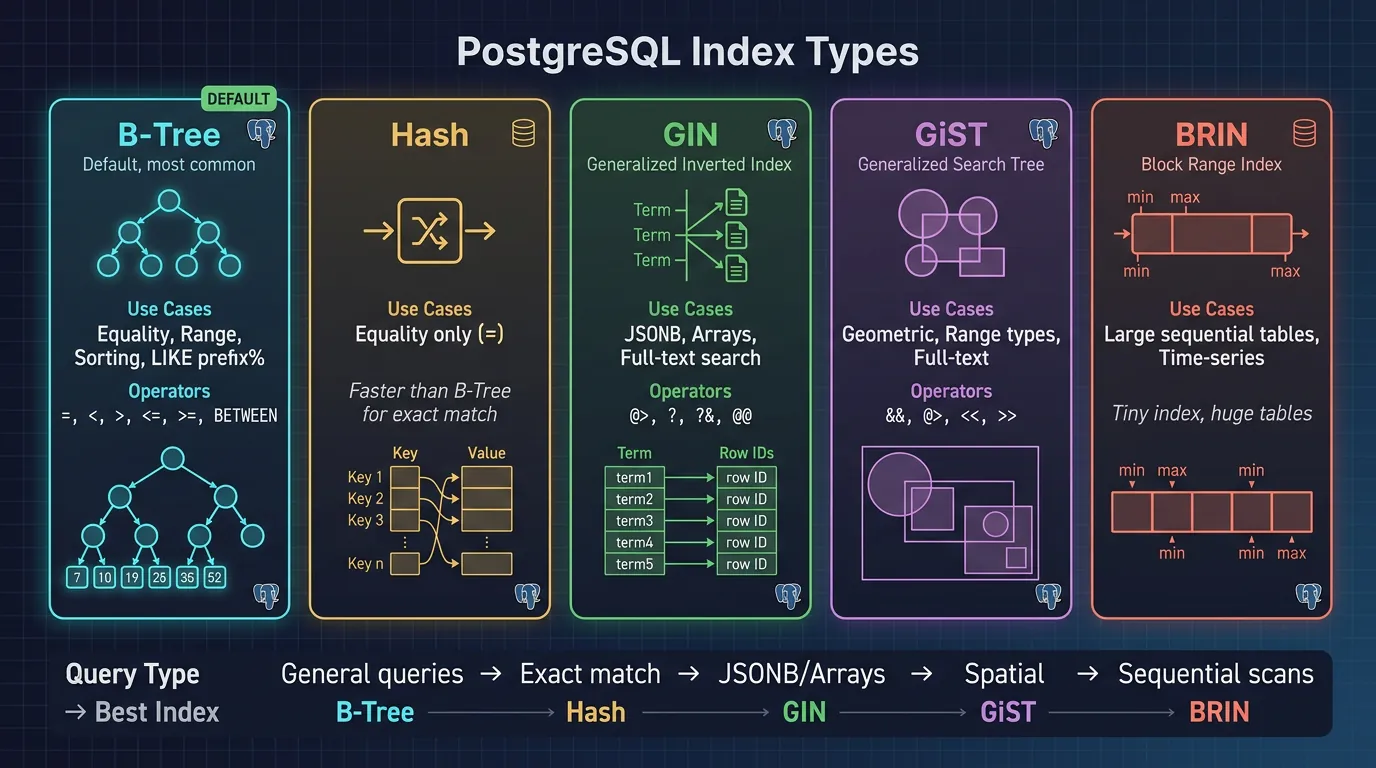
PostgreSQL offers multiple index types, each optimized for different query patterns. Choosing the right index can make queries 100x faster.
PostgreSQL index types: B-Tree for general queries, GIN for composite values, GiST for geometric data, BRIN for large sequential tables
B-Tree & Hash Indexes
B-Tree is the default and most versatile index type. It supports equality and range queries, ordering, and partial matches (prefixes).
-- B-Tree index (default)
CREATE INDEX idx_users_email ON users(email);
CREATE INDEX idx_orders_date ON orders(order_date);

-- Multi-column index (order matters!)
CREATE INDEX idx_orders_customer_date ON orders(customer_id, order_date);
-- ✅ Fast: WHERE customer_id = 1
-- ✅ Fast: WHERE customer_id = 1 AND order_date > '2024-01-01'
-- ❌ Slow: WHERE order_date > '2024-01-01'  (can't use index)

-- Partial index: Only index rows that match condition
CREATE INDEX idx_orders_pending ON orders(created_at)
WHERE status = 'pending';
-- Index is small, fast, and perfect for "show pending orders" query

-- Index with expressions
CREATE INDEX idx_users_lower_email ON users(LOWER(email));
-- Now LOWER(email) queries use the index

-- Hash index (equality only, smaller than B-Tree for high-cardinality)
CREATE INDEX idx_sessions_token ON sessions USING HASH (token);
-- Only for: WHERE token = 'abc123' (not LIKE, not ranges)
GiST (Generalized Search Tree) is great for geometric data, ranges, and proximity searches.
-- GIN for JSONB (index all keys and values)
CREATE INDEX idx_products_attrs ON products USING GIN (attributes);

-- Now these are fast:
SELECT * FROM products WHERE attributes @> '{"brand": "Apple"}';
SELECT * FROM products WHERE attributes ? 'wireless';
SELECT * FROM products WHERE attributes ?| ARRAY['wireless', 'bluetooth'];

-- GIN for arrays
CREATE INDEX idx_articles_tags ON articles USING GIN (tags);
SELECT * FROM articles WHERE tags @> ARRAY['postgresql'];

-- GIN for full-text search
CREATE INDEX idx_articles_content ON articles
USING GIN (to_tsvector('english', content));

-- GiST for range types (prevents overlapping reservations)
CREATE INDEX idx_reservations_period ON reservations
USING GiST (during);

-- GiST for geometry (with PostGIS)
CREATE INDEX idx_locations_point ON locations
USING GiST (coordinates);
BRIN Indexes
BRIN (Block Range Index) is incredibly compact—great for large, naturally-ordered data like time-series or log tables.
-- BRIN for time-series data (events inserted in order)
CREATE TABLE events (
    id BIGSERIAL PRIMARY KEY,
    event_time TIMESTAMP NOT NULL,
    data JSONB
);

-- BRIN stores min/max per block range (very small!)
CREATE INDEX idx_events_time ON events USING BRIN (event_time);

-- Size comparison (1 billion rows):
-- B-Tree: ~20 GB
-- BRIN: ~200 KB (!!)

-- Works because data is physically ordered by time
-- Query: WHERE event_time BETWEEN '2024-01-01' AND '2024-01-31'
-- BRIN quickly eliminates most blocks, then scans remaining
Index Type Selection Guide
Index Type
Best For
Size
B-Tree
=, <, >, BETWEEN, LIKE 'prefix%', ORDER BY
Medium
Hash
= only (high cardinality)
Small
GIN
Arrays, JSONB, full-text search, contains
Large
GiST
Geometry, ranges, nearest-neighbor
Medium
BRIN
Sorted data (timestamps, sequential IDs)
Tiny
Full-Text Search
PostgreSQL includes powerful built-in full-text search—no need for external systems like Elasticsearch for many use cases.
-- Basic full-text search
CREATE TABLE articles (
    id SERIAL PRIMARY KEY,
    title VARCHAR(200),
    body TEXT,
    search_vector TSVECTOR  -- Pre-computed search document
);

-- Create search documents
UPDATE articles SET search_vector =
    to_tsvector('english', title || ' ' || body);

-- Search query
SELECT title, ts_rank(search_vector, query) AS rank
FROM articles, to_tsquery('english', 'database & postgresql') AS query
WHERE search_vector @@ query
ORDER BY rank DESC;

-- Search with OR and NOT
SELECT title FROM articles
WHERE search_vector @@ to_tsquery('english', 'python | java & !javascript');

-- Auto-update search vector with trigger
CREATE OR REPLACE FUNCTION update_search_vector()
RETURNS TRIGGER AS $$
BEGIN
    NEW.search_vector =
        setweight(to_tsvector('english', COALESCE(NEW.title, '')), 'A') ||
        setweight(to_tsvector('english', COALESCE(NEW.body, '')), 'B');
    RETURN NEW;
END;
$$ LANGUAGE plpgsql;

CREATE TRIGGER articles_search_update
BEFORE INSERT OR UPDATE ON articles
FOR EACH ROW EXECUTE FUNCTION update_search_vector();

-- Index for fast full-text search
CREATE INDEX idx_articles_fts ON articles USING GIN (search_vector);

-- Headline: Show matching text with highlights
SELECT
    title,
    ts_headline('english', body, query, 'StartSel=, StopSel=') AS snippet
FROM articles, to_tsquery('english', 'postgresql') AS query
WHERE search_vector @@ query;
Language Support: PostgreSQL supports many languages for stemming and stop words: 'english', 'spanish', 'german', 'simple' (no stemming). Use \dF in psql to list available configurations.
Extensions
Extensions are PostgreSQL's superpower—add specialized functionality without leaving the database. There are extensions for geospatial data, time-series, cryptography, foreign data, and much more.
-- List available extensions
SELECT * FROM pg_available_extensions;

-- Install an extension
CREATE EXTENSION IF NOT EXISTS "uuid-ossp";
CREATE EXTENSION IF NOT EXISTS "pg_stat_statements";

-- List installed extensions
\dx
PostGIS (Geospatial)
PostGIS adds geographic objects and functions—turning PostgreSQL into a powerful spatial database used by mapping applications worldwide.
CREATE EXTENSION postgis;

-- Create table with geometry
CREATE TABLE stores (
    id SERIAL PRIMARY KEY,
    name VARCHAR(100),
    location GEOGRAPHY(POINT, 4326)  -- SRID 4326 = WGS84 (GPS)
);

INSERT INTO stores (name, location) VALUES
    ('Downtown', ST_Point(-73.9857, 40.7484)),  -- NYC
    ('Brooklyn', ST_Point(-73.9442, 40.6782));

-- Find stores within 5km of a point
SELECT name,
       ST_Distance(location, ST_Point(-73.9712, 40.7831)::geography) AS distance_m
FROM stores
WHERE ST_DWithin(location, ST_Point(-73.9712, 40.7831)::geography, 5000)
ORDER BY distance_m;

-- Create spatial index
CREATE INDEX idx_stores_location ON stores USING GIST (location);
Other Popular Extensions
Must-Know PostgreSQL Extensions
Extension
Purpose
pg_stat_statements
Track query execution statistics (essential for optimization)
uuid-ossp
Generate UUIDs (v4 random, v1 timestamp-based)
pg_trgm
Fuzzy text matching, similarity search, LIKE optimization
hstore
Key-value store in a column (predecessor to JSONB)
-- pg_trgm: Fuzzy search with LIKE optimization
CREATE EXTENSION pg_trgm;

CREATE INDEX idx_products_name_trgm ON products
USING GIN (name gin_trgm_ops);

-- Now LIKE '%laptop%' uses the index!
SELECT * FROM products WHERE name ILIKE '%gaming%';

-- Similarity search
SELECT name, similarity(name, 'laptp') AS sim
FROM products
WHERE similarity(name, 'laptp') > 0.3
ORDER BY sim DESC;

-- pgcrypto: Password hashing
CREATE EXTENSION pgcrypto;

-- Hash password
UPDATE users SET password_hash = crypt('user_password', gen_salt('bf'))
WHERE id = 1;

-- Verify password
SELECT id FROM users
WHERE email = 'user@example.com'
  AND password_hash = crypt('user_password', password_hash);
Advanced Features
Table Partitioning
Partitioning splits large tables into smaller, more manageable pieces. Queries automatically route to relevant partitions, dramatically improving performance for time-series and historical data.
-- Create partitioned table (PostgreSQL 10+)
CREATE TABLE events (
    id BIGSERIAL,
    event_time TIMESTAMP NOT NULL,
    event_type VARCHAR(50),
    data JSONB
) PARTITION BY RANGE (event_time);

-- Create partitions for each month
CREATE TABLE events_2024_01 PARTITION OF events
    FOR VALUES FROM ('2024-01-01') TO ('2024-02-01');
CREATE TABLE events_2024_02 PARTITION OF events
    FOR VALUES FROM ('2024-02-01') TO ('2024-03-01');
CREATE TABLE events_2024_03 PARTITION OF events
    FOR VALUES FROM ('2024-03-01') TO ('2024-04-01');

-- Insert goes to correct partition automatically
INSERT INTO events (event_time, event_type, data) VALUES
    ('2024-02-15 10:30:00', 'page_view', '{"page": "/home"}');

-- Query automatically prunes irrelevant partitions
EXPLAIN SELECT * FROM events
WHERE event_time >= '2024-02-01' AND event_time < '2024-03-01';
-- Only scans events_2024_02!

-- List partitioning (for categories)
CREATE TABLE orders (
    id SERIAL,
    region VARCHAR(10),
    total DECIMAL(10,2)
) PARTITION BY LIST (region);

CREATE TABLE orders_us PARTITION OF orders FOR VALUES IN ('US');
CREATE TABLE orders_eu PARTITION OF orders FOR VALUES IN ('EU', 'UK');
CREATE TABLE orders_apac PARTITION OF orders FOR VALUES IN ('APAC');
Materialized Views
Materialized views store query results physically—perfect for expensive reports that don't need real-time data.
-- Create materialized view
CREATE MATERIALIZED VIEW monthly_sales_summary AS
SELECT
    DATE_TRUNC('month', order_date) AS month,
    COUNT(*) AS order_count,
    SUM(total) AS revenue,
    AVG(total) AS avg_order
FROM orders
WHERE status = 'completed'
GROUP BY DATE_TRUNC('month', order_date)
ORDER BY month;

-- Query is instant (reads stored data)
SELECT * FROM monthly_sales_summary WHERE month >= '2024-01-01';

-- Refresh when needed
REFRESH MATERIALIZED VIEW monthly_sales_summary;

-- Concurrent refresh (doesn't lock reads)
REFRESH MATERIALIZED VIEW CONCURRENTLY monthly_sales_summary;
-- Requires unique index:
CREATE UNIQUE INDEX ON monthly_sales_summary (month);
Logical Replication
Logical replication streams changes at the row level—replicate specific tables, support different PostgreSQL versions, or feed data to other systems.
-- On PRIMARY (publisher)
-- postgresql.conf: wal_level = logical

CREATE PUBLICATION my_publication FOR TABLE orders, customers;
-- Or all tables:
CREATE PUBLICATION all_tables FOR ALL TABLES;

-- On REPLICA (subscriber)
CREATE SUBSCRIPTION my_subscription
    CONNECTION 'host=primary_host dbname=mydb user=replicator'
    PUBLICATION my_publication;

-- Check replication status
SELECT * FROM pg_stat_subscription;
SELECT * FROM pg_replication_slots;
Replication Types:
Physical (streaming): Block-level copy, identical replica, same PG version required
-- EXPLAIN ANALYZE: Understand query execution
EXPLAIN (ANALYZE, BUFFERS, FORMAT TEXT)
SELECT * FROM orders
WHERE customer_id = 1234
ORDER BY order_date DESC
LIMIT 10;

-- Output includes:
-- Execution time, rows examined, buffers read, index usage
-- Compare "estimated rows" vs "actual rows" for planner accuracy

-- Common issues to look for:
-- Seq Scan on large table → needs index
-- Large "rows removed by filter" → index not selective enough
-- "Sort" with high memory → increase work_mem or add index
-- Nested Loop with many iterations → check join order
Vacuum & Autovacuum: PostgreSQL MVCC creates dead rows on UPDATE/DELETE. VACUUM reclaims this space. Never disable autovacuum—instead, tune its aggressiveness if needed.
-- Check table bloat
SELECT
    relname AS table_name,
    n_live_tup AS live_rows,
    n_dead_tup AS dead_rows,
    ROUND(n_dead_tup::numeric / NULLIF(n_live_tup, 0) * 100, 2) AS dead_pct,
    last_autovacuum
FROM pg_stat_user_tables
WHERE n_dead_tup > 1000
ORDER BY n_dead_tup DESC;

-- Force vacuum on specific table
VACUUM (VERBOSE, ANALYZE) orders;

-- Tune autovacuum for high-write tables
ALTER TABLE orders SET (
    autovacuum_vacuum_scale_factor = 0.01,  -- Vacuum at 1% dead rows
    autovacuum_analyze_scale_factor = 0.005
);
Monitoring with pg_stat
PostgreSQL has built-in statistics views that expose everything happening in your database. These are essential for troubleshooting and optimization.
-- Active connections and queries
SELECT
    pid,
    usename,
    application_name,
    client_addr,
    state,
    query_start,
    NOW() - query_start AS duration,
    LEFT(query, 80) AS query_snippet
FROM pg_stat_activity
WHERE state != 'idle'
ORDER BY query_start;

-- Kill a long-running query
SELECT pg_cancel_backend(pid);   -- Graceful cancel
SELECT pg_terminate_backend(pid); -- Force terminate

-- Table statistics: Which tables are hot?
SELECT
    relname AS table_name,
    seq_scan,                      -- Full table scans
    idx_scan,                      -- Index scans
    n_tup_ins AS inserts,
    n_tup_upd AS updates,
    n_tup_del AS deletes,
    n_live_tup AS live_rows
FROM pg_stat_user_tables
ORDER BY seq_scan DESC
LIMIT 10;

-- Index usage: Find unused indexes (candidates for removal)
SELECT
    schemaname || '.' || relname AS table,
    indexrelname AS index,
    idx_scan AS times_used,
    pg_size_pretty(pg_relation_size(indexrelid)) AS size
FROM pg_stat_user_indexes
WHERE idx_scan < 50  -- Rarely used
ORDER BY pg_relation_size(indexrelid) DESC;
-- pg_stat_statements: Top queries by time
CREATE EXTENSION IF NOT EXISTS pg_stat_statements;

SELECT
    ROUND(total_exec_time::numeric, 2) AS total_time_ms,
    calls,
    ROUND((mean_exec_time)::numeric, 2) AS avg_time_ms,
    ROUND((total_exec_time / SUM(total_exec_time) OVER()) * 100, 2) AS pct,
    LEFT(query, 100) AS query
FROM pg_stat_statements
ORDER BY total_exec_time DESC
LIMIT 20;

-- Reset statistics periodically
SELECT pg_stat_statements_reset();
SELECT pg_stat_reset();  -- Reset all stats
Key Metrics to Monitor
Metric
Source
Alert Threshold
Active connections
pg_stat_activity
> 80% of max_connections
Long queries
pg_stat_activity
> 5 minutes
Replication lag
pg_stat_replication
> 1 minute
Cache hit ratio
pg_stat_database
< 95%
Transaction wraparound
pg_database.datfrozenxid
< 200M from wraparound
-- Cache hit ratio (should be > 95%)
SELECT
    SUM(heap_blks_read) AS disk_reads,
    SUM(heap_blks_hit) AS cache_hits,
    ROUND(SUM(heap_blks_hit) / NULLIF(SUM(heap_blks_hit) + SUM(heap_blks_read), 0) * 100, 2) AS cache_hit_ratio
FROM pg_statio_user_tables;
Conclusion & Next Steps
PostgreSQL's advanced features make it the database of choice for complex applications. From JSONB to PostGIS, from partitioning to logical replication—you now have the knowledge to leverage its full power.
Continue the Database Mastery Series
Part 2: Advanced SQL & Query Mastery
Master CTEs, window functions, stored procedures, and advanced query techniques.