We use cookies to enhance your browsing experience, serve personalized content, and analyze our traffic.
By clicking "Accept All", you consent to our use of cookies. See our
Privacy Policy
for more information.
Master MySQL and MariaDB—the industry standard databases for web systems. Learn storage engines, replication setup, query optimization, indexing strategies, and high availability configurations.
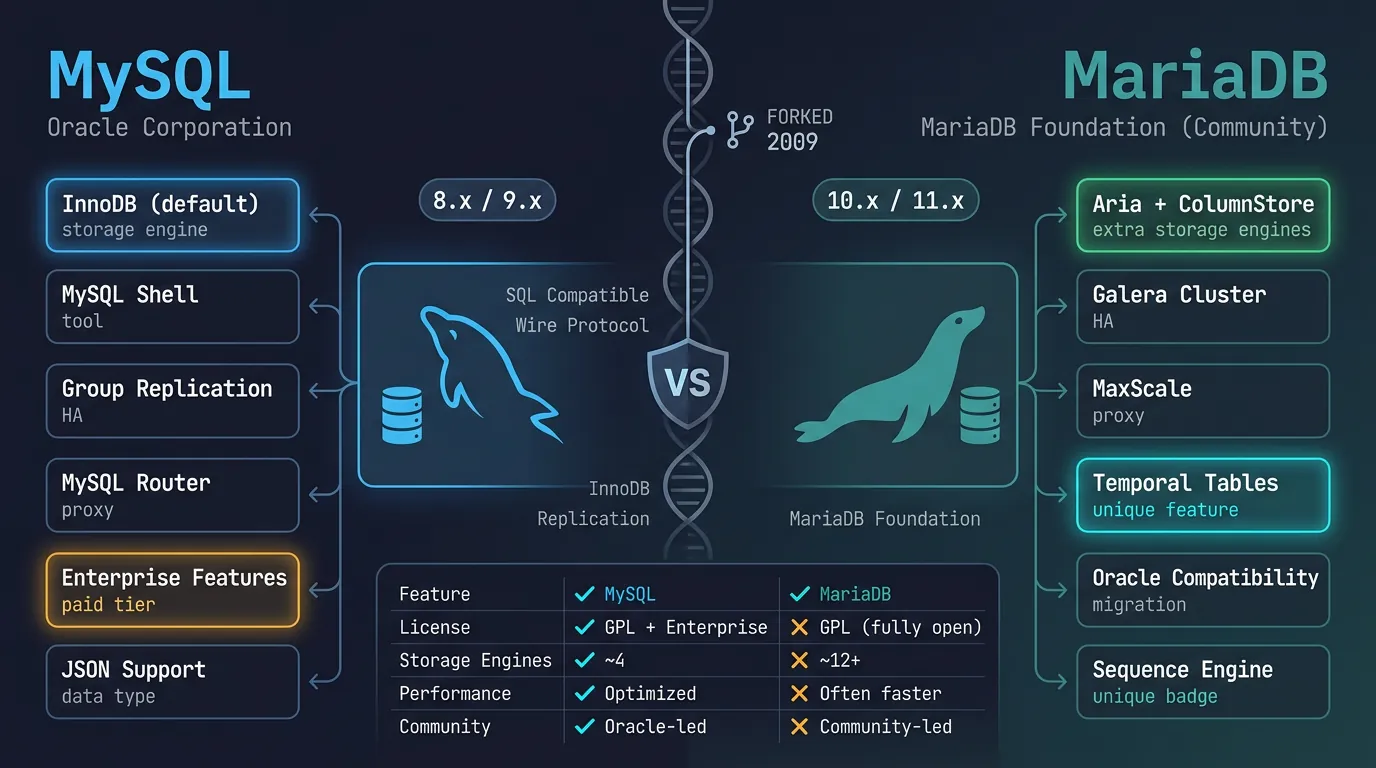
MySQL is the world's most popular open-source database, powering countless web applications. MariaDB is a community-developed fork that maintains compatibility while adding features.
MySQL vs MariaDB: shared heritage with diverging features, storage engines, and community direction
Series Context: This is Part 4 of 15 in the Complete Database Mastery series. We're exploring the databases that power most of the web.
Who Uses MySQL? Facebook, Twitter, YouTube, Netflix, Airbnb, Uber, Spotify—MySQL handles some of the world's largest workloads.
Storage Engines
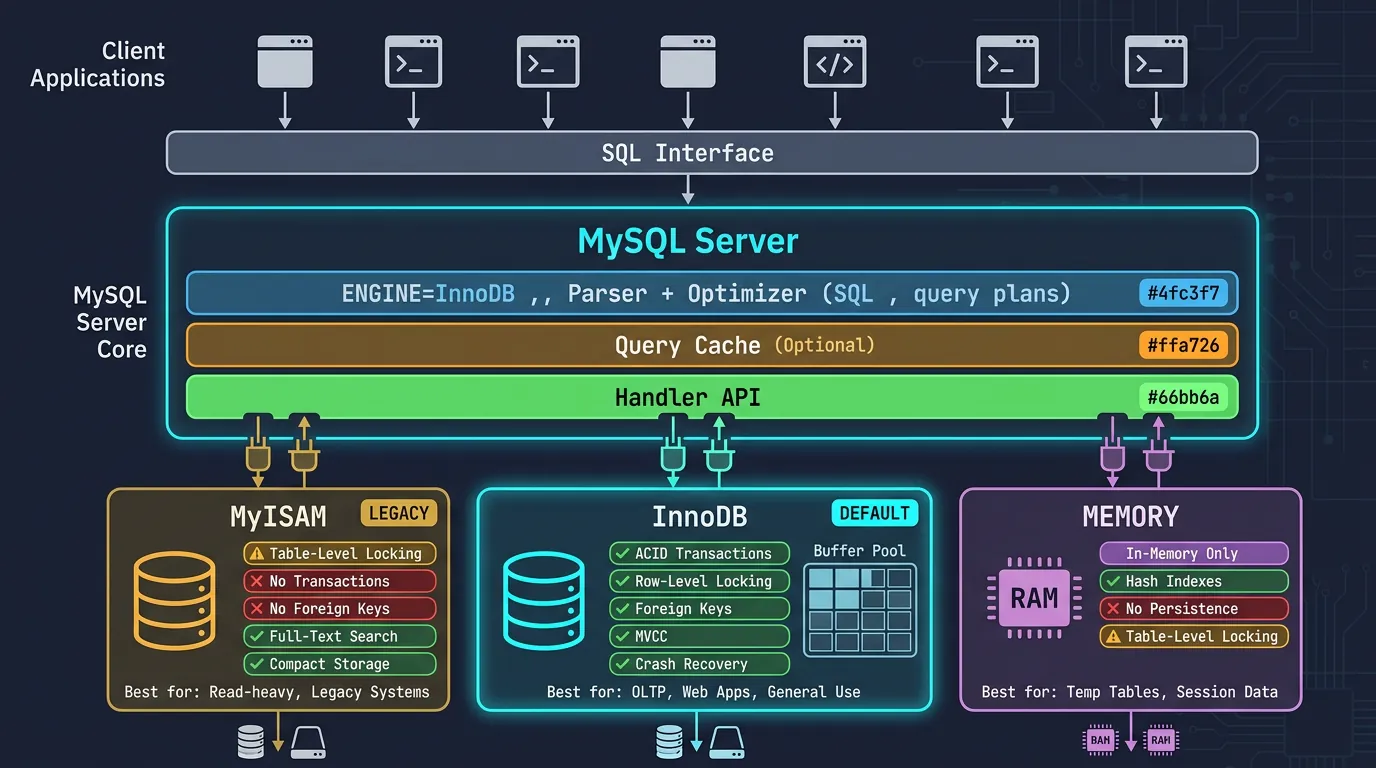
MySQL's pluggable storage engine architecture lets you choose the right engine for each table. This is unique among major databases.
MySQL's pluggable storage engine architecture: InnoDB for ACID transactions, MyISAM for legacy reads, Memory for temporary data
InnoDB: The Default Choice
InnoDB is the default and recommended engine for almost all use cases. It provides ACID transactions, row-level locking, and foreign key support.
-- Create table with InnoDB (default)
CREATE TABLE orders (
    id INT AUTO_INCREMENT PRIMARY KEY,
    customer_id INT NOT NULL,
    total DECIMAL(10,2),
    created_at TIMESTAMP DEFAULT CURRENT_TIMESTAMP,
    FOREIGN KEY (customer_id) REFERENCES customers(id)
) ENGINE=InnoDB;

-- InnoDB configuration (my.cnf)
-- [mysqld]
-- innodb_buffer_pool_size = 4G       # 70-80% of RAM for dedicated server
-- innodb_log_file_size = 256M        # Larger = better write performance
-- innodb_flush_log_at_trx_commit = 1 # Full ACID (2 for better performance)
-- innodb_file_per_table = ON         # Each table in its own file

-- Check InnoDB status
SHOW ENGINE INNODB STATUS\G
MyISAM: Legacy Engine
MyISAM was the original default engine. It's faster for read-heavy workloads but lacks transactions and crash recovery. Rarely used in new projects.
-- MyISAM table (not recommended for new projects)
CREATE TABLE log_archive (
    id INT AUTO_INCREMENT PRIMARY KEY,
    message TEXT,
    created_at DATETIME
) ENGINE=MyISAM;

-- MyISAM advantages:
-- - Full-text search (before MySQL 5.6)
-- - Table-level locking (simpler, sometimes faster for reads)
-- - Smaller disk footprint

-- MyISAM disadvantages:
-- - No transactions
-- - No foreign keys
-- - Table-level locking (terrible for writes)
-- - No crash recovery (corruption risk)
Engine Comparison
Storage Engine Comparison
Feature
InnoDB
MyISAM
Memory
Transactions
✅ Yes
❌ No
❌ No
Foreign Keys
✅ Yes
❌ No
❌ No
Locking
Row-level
Table-level
Table-level
Crash Recovery
✅ Automatic
❌ Manual repair
❌ Data lost
Full-Text Search
✅ Yes (5.6+)
✅ Yes
❌ No
Best For
Everything
Read-only archives
Temp tables, caches
Recommendation: Use InnoDB for everything unless you have a very specific reason not to. The performance gap has closed, and data integrity is priceless.
Replication Setup
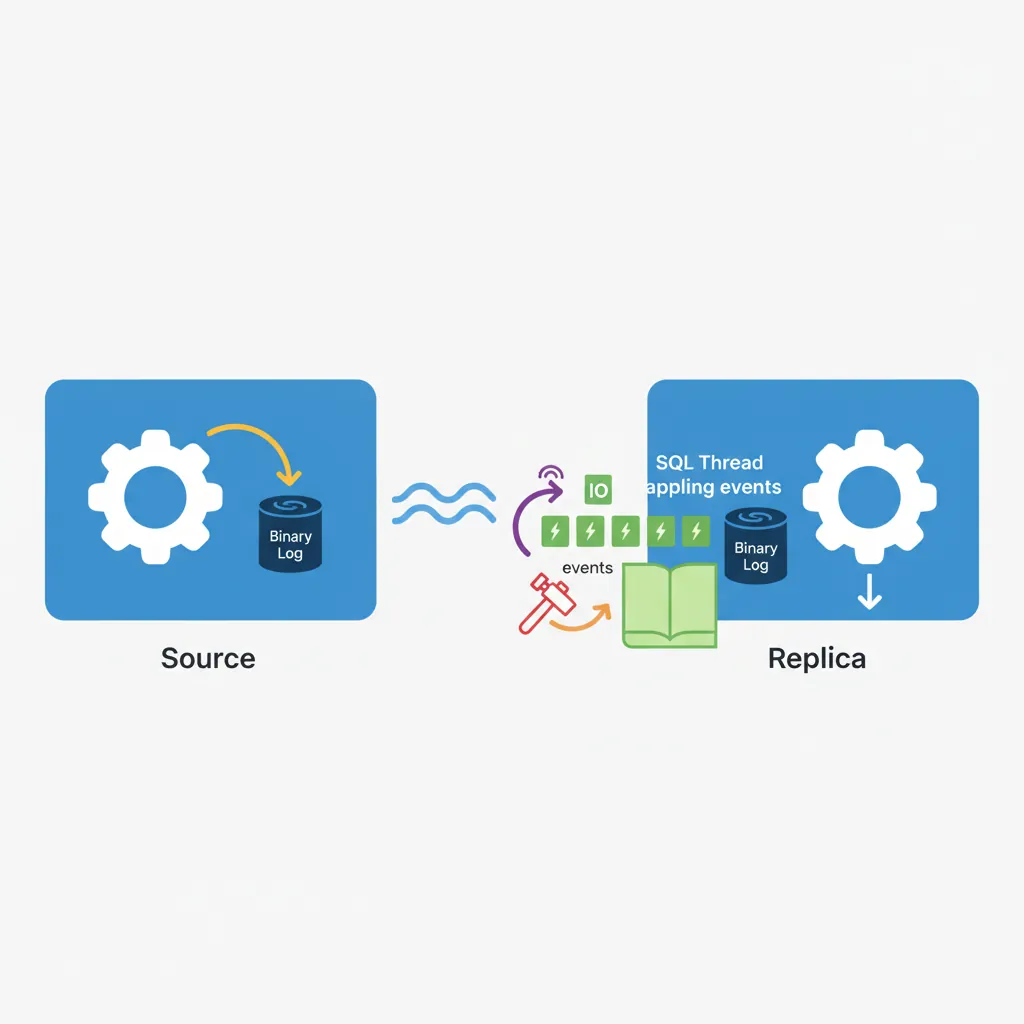
Replication copies data from one MySQL server (source/master) to one or more servers (replicas/slaves). Essential for read scaling, backups, and high availability.
MySQL replication flow: source writes to binary log, replica IO thread fetches events, SQL thread applies changes
Master-Replica Replication
-- On SOURCE (Master) - my.cnf
-- [mysqld]
-- server-id = 1
-- log_bin = mysql-bin
-- binlog_format = ROW
-- binlog_do_db = myapp_production  # Optional: specific databases

-- Create replication user
CREATE USER 'replicator'@'%' IDENTIFIED BY 'secure_password';
GRANT REPLICATION SLAVE ON *.* TO 'replicator'@'%';

-- Get binary log position
SHOW MASTER STATUS;
-- +------------------+----------+
-- | File             | Position |
-- +------------------+----------+
-- | mysql-bin.000003 | 154      |
-- +------------------+----------+

-- On REPLICA (Slave) - my.cnf
-- [mysqld]
-- server-id = 2
-- relay_log = relay-bin
-- read_only = ON

-- Configure replication
CHANGE MASTER TO
    MASTER_HOST = '192.168.1.100',
    MASTER_USER = 'replicator',
    MASTER_PASSWORD = 'secure_password',
    MASTER_LOG_FILE = 'mysql-bin.000003',
    MASTER_LOG_POS = 154;

-- Start replication
START SLAVE;

-- Check status
SHOW SLAVE STATUS\G
-- Look for: Slave_IO_Running: Yes, Slave_SQL_Running: Yes
Multi-Source & GTID Replication
GTID (Global Transaction ID) simplifies replication by uniquely identifying each transaction—no need to track binary log positions.
-- Enable GTID (my.cnf on all servers)
-- [mysqld]
-- gtid_mode = ON
-- enforce_gtid_consistency = ON

-- GTID-based replication setup (simpler!)
CHANGE MASTER TO
    MASTER_HOST = '192.168.1.100',
    MASTER_USER = 'replicator',
    MASTER_PASSWORD = 'secure_password',
    MASTER_AUTO_POSITION = 1;  -- GTID magic

START SLAVE;

-- Multi-source: One replica from multiple masters (MySQL 5.7+)
CHANGE MASTER TO ... FOR CHANNEL 'master1';
CHANGE MASTER TO ... FOR CHANNEL 'master2';

START SLAVE FOR CHANNEL 'master1';
START SLAVE FOR CHANNEL 'master2';
Replication Topologies
Topology
Use Case
Complexity
Master → Replica
Read scaling, backups
Low
Master → Multiple Replicas
High read traffic
Low
Chain (M→R→R)
Geographic distribution
Medium
Circular (M↔M)
Multi-master writes
High (conflict risk)
Query Optimization
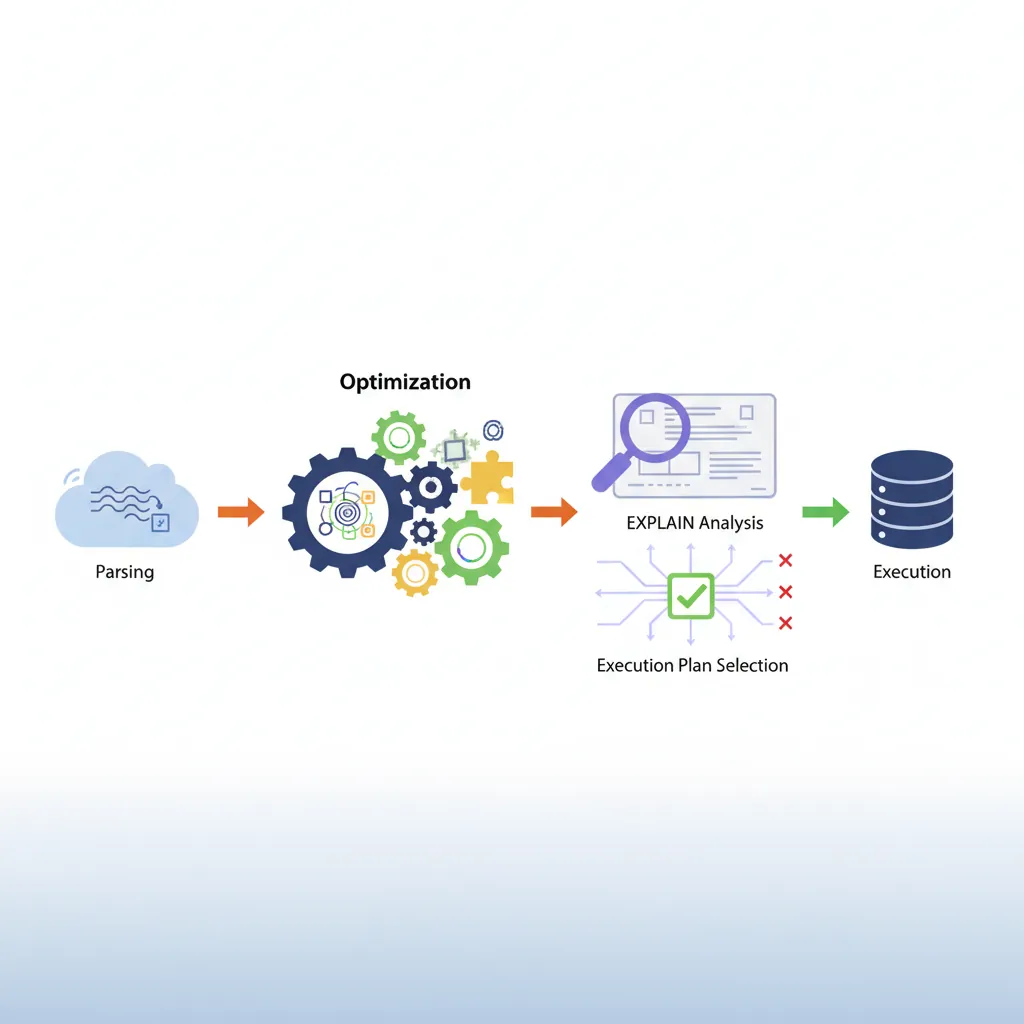
MySQL's query optimizer makes decisions about how to execute queries. Understanding EXPLAIN helps you see what it's doing—and fix problems.
MySQL query optimizer workflow: parsing, optimization, EXPLAIN analysis, and execution plan selection
-- Basic EXPLAIN
EXPLAIN SELECT * FROM orders WHERE customer_id = 123;

-- Detailed EXPLAIN (MySQL 8.0+)
EXPLAIN ANALYZE SELECT * FROM orders WHERE customer_id = 123;

-- Key columns to watch:
-- type: ALL (bad!) → index → range → ref → eq_ref → const (best)
-- key: Which index is used (NULL = no index!)
-- rows: Estimated rows to examine
-- Extra: "Using index" (good), "Using filesort" (often bad)

-- Example output interpretation:
-- +------+-------------+--------+------+---------------+------+---------+
-- | type | table       | type   | key  | rows          | Extra           |
-- +------+-------------+--------+------+---------------+------+---------+
-- | 1    | orders      | ALL    | NULL | 50000         | Using where     |
-- +------+-------------+--------+------+---------------+------+---------+
-- PROBLEM: Full table scan!

-- After adding index:
CREATE INDEX idx_orders_customer ON orders(customer_id);

-- +------+-------------+--------+---------------------+------+---------------------+
-- | type | table       | type   | key                 | rows | Extra               |
-- +------+-------------+--------+---------------------+------+---------------------+
-- | 1    | orders      | ref    | idx_orders_customer | 25   | Using index cond... |
-- +------+-------------+--------+---------------------+------+---------------------+
-- FIXED! Using index now.
Slow Query Log: Enable it to find problematic queries: SET GLOBAL slow_query_log = 'ON'; SET GLOBAL long_query_time = 1;
Indexing Strategies
-- Single column index
CREATE INDEX idx_email ON users(email);

-- Composite index (column order matters!)
CREATE INDEX idx_customer_date ON orders(customer_id, order_date);
-- ✅ Fast: WHERE customer_id = 1
-- ✅ Fast: WHERE customer_id = 1 AND order_date > '2024-01-01'
-- ❌ Slow: WHERE order_date > '2024-01-01' (can't use index)

-- Prefix index for long strings
CREATE INDEX idx_description ON products(description(100));

-- Full-text index
ALTER TABLE articles ADD FULLTEXT INDEX ft_content (title, body);
SELECT * FROM articles WHERE MATCH(title, body) AGAINST('mysql optimization');

-- Invisible index (test removal without dropping)
ALTER TABLE orders ALTER INDEX idx_status INVISIBLE;
-- If queries still fast, safe to drop

-- Index hints (override optimizer - use sparingly)
SELECT * FROM orders USE INDEX (idx_customer_date) WHERE customer_id = 1;
SELECT * FROM orders IGNORE INDEX (idx_status) WHERE status = 'pending';
Index Size vs Performance
Check index sizes—large indexes slow down writes:
SELECT
    table_name,
    index_name,
    ROUND(stat_value * @@innodb_page_size / 1024 / 1024, 2) AS size_mb
FROM mysql.innodb_index_stats
WHERE stat_name = 'size'
ORDER BY size_mb DESC;
High Availability Setups
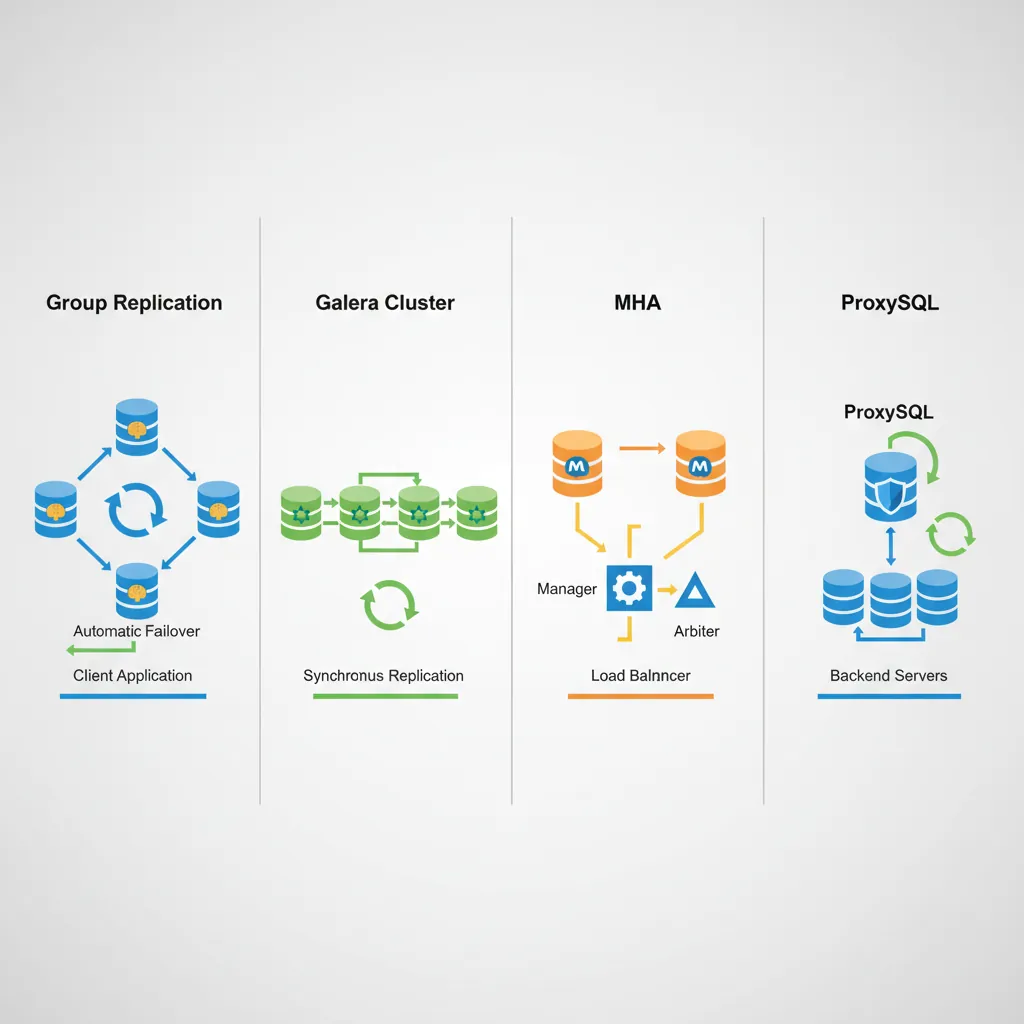
High Availability (HA) ensures your database stays up even when servers fail. Options range from simple replication to fully automated failover.
MySQL HA solutions: Group Replication, Galera Cluster, MHA, and ProxySQL for automatic failover
HA Solutions Comparison
Solution
Failover
Complexity
Best For
Replication + Manual
Manual
Low
Dev/staging
MHA (Master HA)
30-60 sec
Medium
Traditional setups
Group Replication
~10 sec
Medium
MySQL 8.0 native HA
Galera Cluster
Automatic
High
Multi-master writes
ProxySQL + Replication
~5 sec
Medium
Read/write splitting
-- MySQL Group Replication (8.0+)
-- Single-primary mode: One write node, automatic failover

-- my.cnf configuration
-- [mysqld]
-- plugin_load_add='group_replication.so'
-- group_replication_group_name='aaaaaaaa-bbbb-cccc-dddd-eeeeeeeeeeee'
-- group_replication_start_on_boot=OFF
-- group_replication_single_primary_mode=ON
-- group_replication_bootstrap_group=OFF

-- Start group replication
SET GLOBAL group_replication_bootstrap_group=ON;
START GROUP_REPLICATION;
SET GLOBAL group_replication_bootstrap_group=OFF;

-- Check cluster status
SELECT * FROM performance_schema.replication_group_members;
MySQL Clustering & Scaling
-- ProxySQL: Intelligent query routing
-- Separate read and write traffic automatically

-- ProxySQL configuration (admin interface)
-- Add MySQL servers to read/write groups
INSERT INTO mysql_servers (hostgroup_id, hostname, port) VALUES
    (10, 'mysql-master', 3306),   -- Write group
    (20, 'mysql-replica1', 3306), -- Read group
    (20, 'mysql-replica2', 3306); -- Read group

-- Query rules: Route SELECTs to read group
INSERT INTO mysql_query_rules (rule_id, match_pattern, destination_hostgroup)
VALUES (1, '^SELECT', 20);

INSERT INTO mysql_query_rules (rule_id, match_pattern, destination_hostgroup)
VALUES (2, '.*', 10);  -- Everything else to write group

LOAD MYSQL SERVERS TO RUNTIME;
LOAD MYSQL QUERY RULES TO RUNTIME;
Cloud-Native Options: AWS Aurora MySQL, Google Cloud SQL, Azure Database for MySQL provide automatic HA, read replicas, and scaling with minimal configuration.
Conclusion & Next Steps
MySQL and MariaDB remain the workhorses of web development. Understanding their storage engines, replication strategies, and optimization techniques is essential for any backend developer.
Continue the Database Mastery Series
Part 3: PostgreSQL Deep Dive
Compare with PostgreSQL's advanced features and capabilities.