We use cookies to enhance your browsing experience, serve personalized content, and analyze our traffic.
By clicking "Accept All", you consent to our use of cookies. See our
Privacy Policy
for more information.
Complete Database Mastery Part 13: Database Security & Governance
January 31, 2026Wasil Zafar40 min read
Master database security and governance. Learn encryption at rest and in transit, access control (RBAC), SQL injection prevention, auditing, GDPR/HIPAA compliance, data masking, and security best practices.
Database security protects sensitive data from unauthorized access, breaches, and malicious attacks. In an era of data breaches and privacy regulations, security is not optional—it's foundational.
Defense-in-depth model — layered security from network perimeter through encryption, access control, and auditing
Series Context: This is Part 13 of 15 in the Complete Database Mastery series. We're securing our databases against modern threats.
Think of database security like securing a bank vault: multiple layers (encryption, access control, monitoring) work together so that even if one fails, others protect your assets.
Encryption
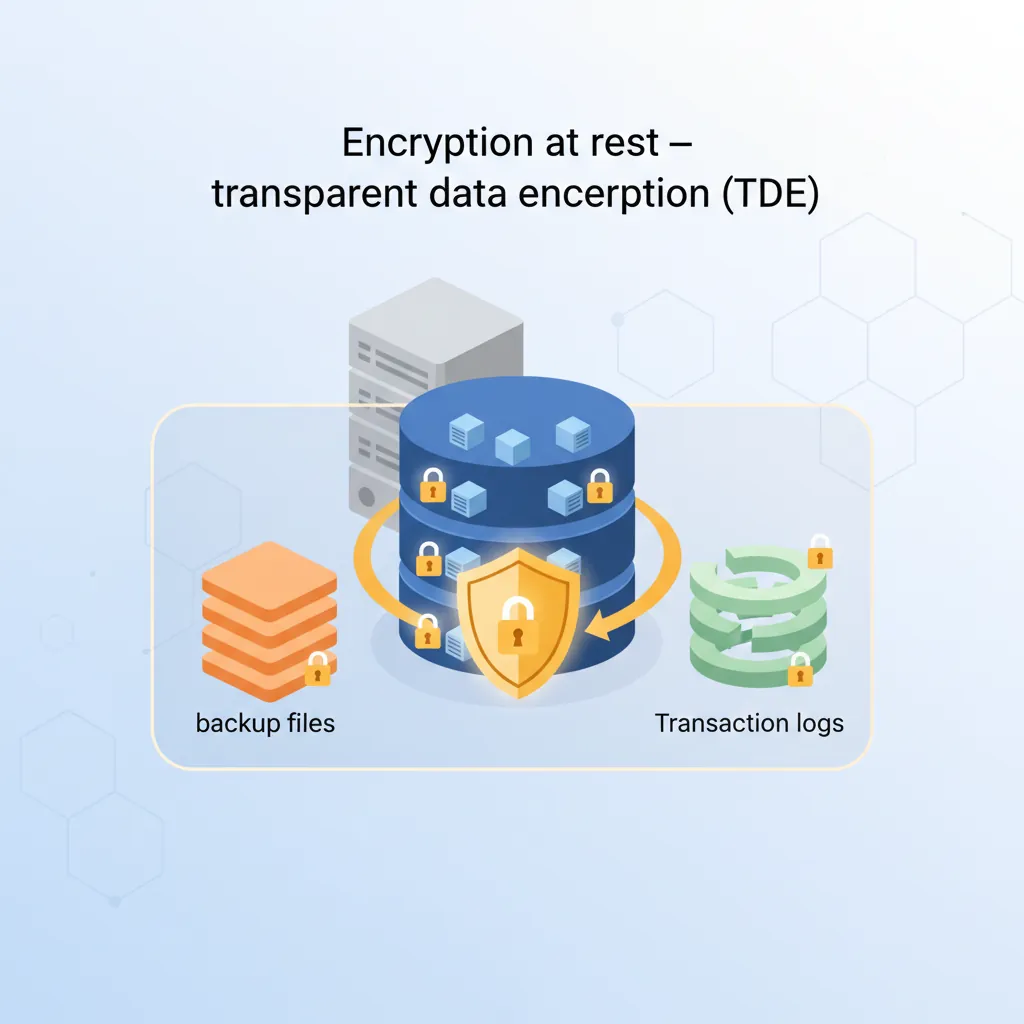
Encryption at Rest
Protect data stored on disk—even if someone steals the physical storage, data remains unreadable.
Encryption at rest — transparent data encryption (TDE) protecting database files, backups, and transaction logs
-- PostgreSQL: Enable Transparent Data Encryption (TDE)
-- Usually configured at instance level, not SQL
-- Cloud providers handle this automatically

-- Check encryption status (AWS RDS)
-- aws rds describe-db-instances --query 'DBInstances[*].StorageEncrypted'

-- MySQL: InnoDB tablespace encryption
ALTER TABLE users ENCRYPTION='Y';

-- SQL Server: Transparent Data Encryption
CREATE DATABASE ENCRYPTION KEY
WITH ALGORITHM = AES_256
ENCRYPTION BY SERVER CERTIFICATE MyServerCert;

ALTER DATABASE MyDatabase SET ENCRYPTION ON;
Encryption in Transit (TLS/SSL)
Encrypt data moving between application and database to prevent eavesdropping.
# PostgreSQL - Force SSL connections
# postgresql.conf
ssl = on
ssl_cert_file = '/path/to/server.crt'
ssl_key_file = '/path/to/server.key'

# pg_hba.conf - Require SSL for all connections
hostssl all all 0.0.0.0/0 scram-sha-256

# MySQL - Enable SSL
# my.cnf
[mysqld]
require_secure_transport = ON
ssl_ca = /path/to/ca.pem
ssl_cert = /path/to/server-cert.pem
ssl_key = /path/to/server-key.pem
# Python connection with SSL
import psycopg2

conn = psycopg2.connect(
    host="db.example.com",
    database="myapp",
    user="appuser",
    password="secret",
    sslmode="require",       # verify-full for production
    sslrootcert="/path/to/ca.crt"
)
Key Management
Key Management Best Practices:

1. Use dedicated key management services:
   - AWS KMS (Key Management Service)
   - Azure Key Vault
   - GCP Cloud KMS
   - HashiCorp Vault

2. Key rotation:
   - Rotate encryption keys annually (minimum)
   - Automate rotation where possible

3. Separation of duties:
   - DBAs should not have access to encryption keys
   - Key administrators should not have database access

4. Backup keys separately from data
   - Store key backups in different locations
   - Test key recovery procedures
Access Control
Role-Based Access Control (RBAC)
-- PostgreSQL: Create roles with specific permissions
CREATE ROLE app_readonly;
CREATE ROLE app_readwrite;
CREATE ROLE app_admin;

-- Grant permissions to roles
GRANT SELECT ON ALL TABLES IN SCHEMA public TO app_readonly;
GRANT SELECT, INSERT, UPDATE, DELETE ON ALL TABLES IN SCHEMA public TO app_readwrite;
GRANT ALL PRIVILEGES ON ALL TABLES IN SCHEMA public TO app_admin;

-- Create users and assign roles
CREATE USER api_service WITH PASSWORD 'secure_password';
GRANT app_readwrite TO api_service;

CREATE USER analyst WITH PASSWORD 'another_password';
GRANT app_readonly TO analyst;

-- Revoke dangerous defaults
REVOKE CREATE ON SCHEMA public FROM PUBLIC;
REVOKE ALL ON DATABASE myapp FROM PUBLIC;
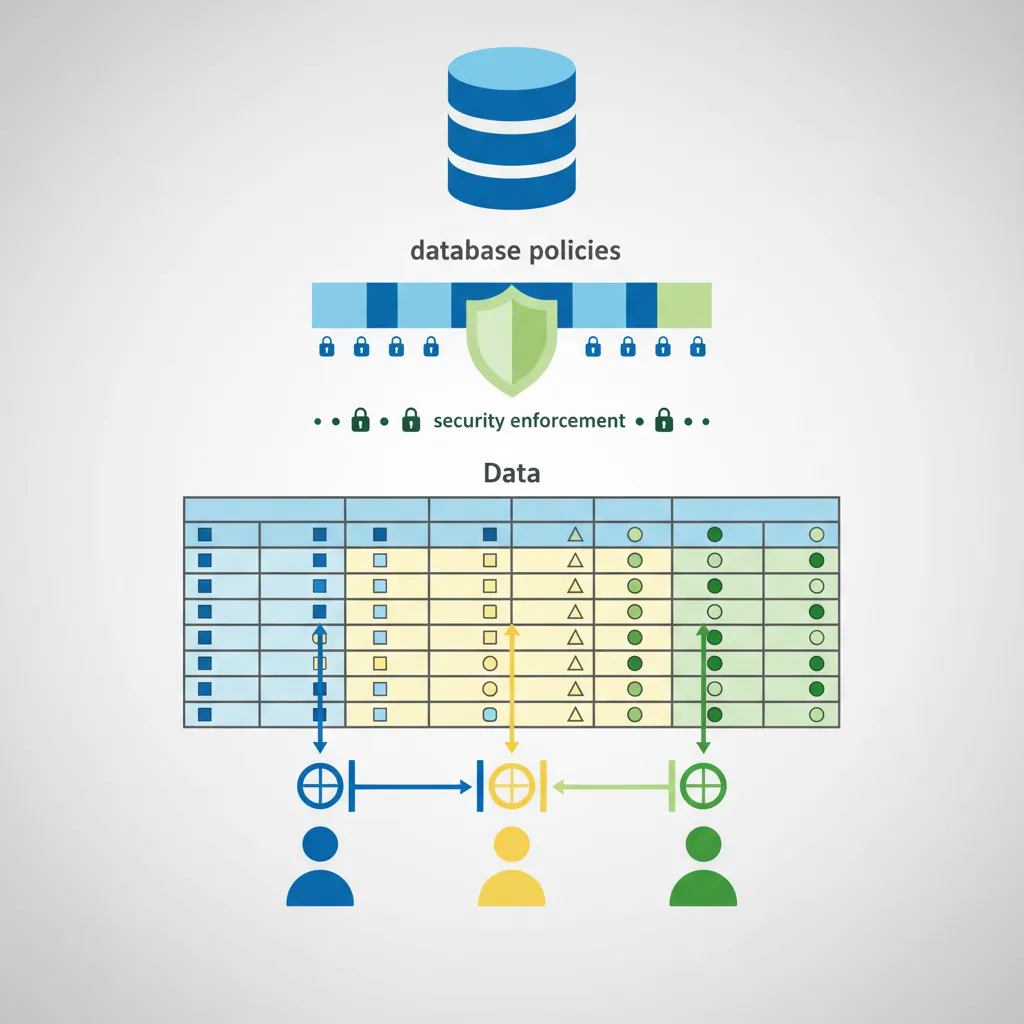
Row-Level Security (RLS)
Restrict which rows users can see based on their identity—essential for multi-tenant applications.
Row-level security (RLS) — enforcing tenant-level data isolation through database policies
-- PostgreSQL Row-Level Security
ALTER TABLE orders ENABLE ROW LEVEL SECURITY;

-- Policy: Users can only see their own orders
CREATE POLICY user_orders_policy ON orders
    FOR ALL
    TO app_users
    USING (user_id = current_setting('app.current_user_id')::int);

-- Set user context in application
SET app.current_user_id = '123';
SELECT * FROM orders;  -- Only sees orders for user 123

-- Multi-tenant isolation
CREATE POLICY tenant_isolation ON customers
    FOR ALL
    USING (tenant_id = current_setting('app.tenant_id')::uuid);
Principle of Least Privilege
Access Control Checklist
✅ Never use database superuser for applications
✅ Create separate users for each application/service
✅ Grant only required permissions (SELECT vs ALL)
✅ Use schema-level permissions for logical separation
✅ Regularly audit and remove unused accounts
✅ Rotate passwords/credentials periodically
✅ Use service accounts with IAM authentication in cloud
SQL Injection Prevention
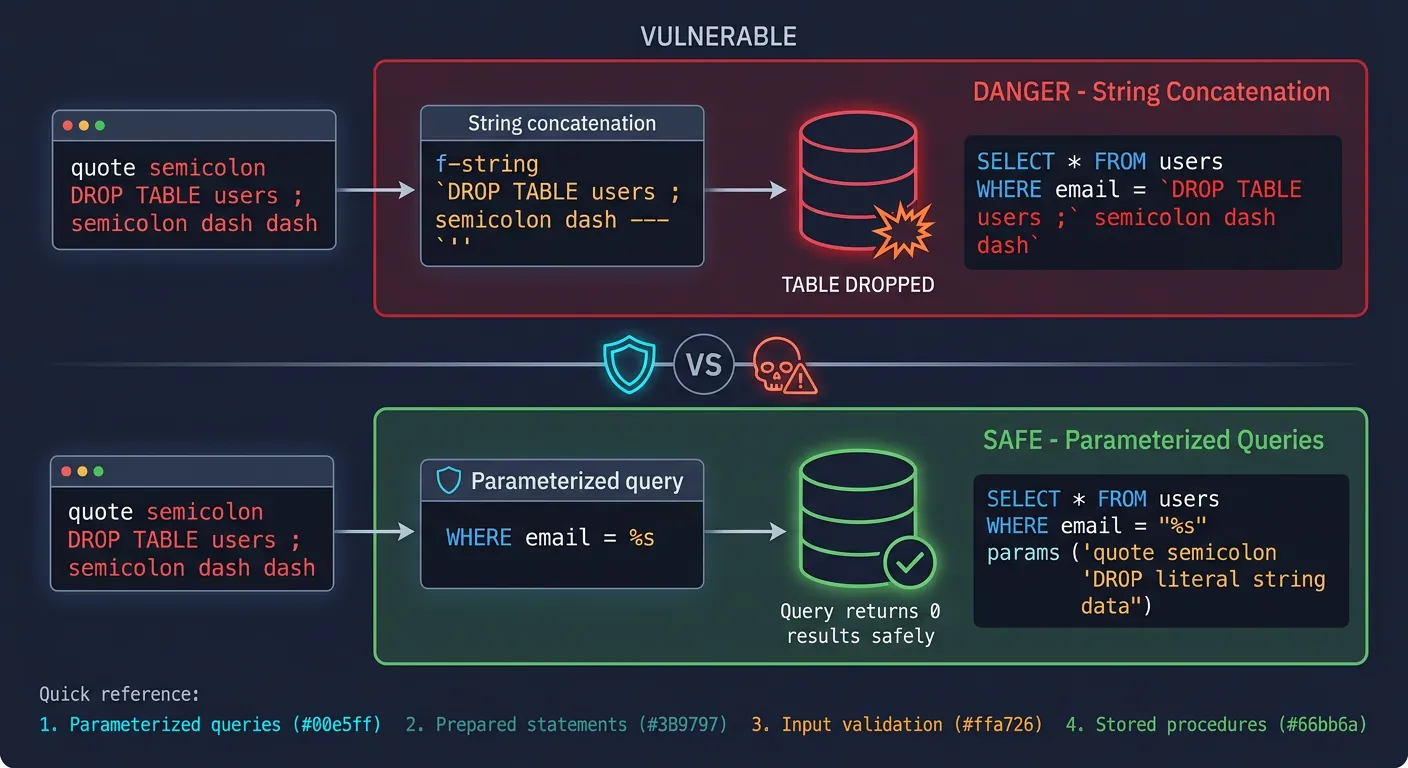
SQL injection remains one of the most common attack vectors. Prevention is straightforward but critical.
SQL injection prevention — how parameterized queries neutralize malicious input before it reaches the database
Parameterized Queries
# WRONG - Vulnerable to SQL injection
user_input = "'; DROP TABLE users; --"
query = f"SELECT * FROM users WHERE email = '{user_input}'"
cursor.execute(query)  # DANGER!

# CORRECT - Parameterized query (safe)
query = "SELECT * FROM users WHERE email = %s"
cursor.execute(query, (user_input,))  # Safe!

# Parameters are treated as data, not SQL code
// Node.js with pg (PostgreSQL)
// WRONG
const query = `SELECT * FROM users WHERE id = ${userId}`;  // Vulnerable!

// CORRECT
const query = 'SELECT * FROM users WHERE id = $1';
const result = await pool.query(query, [userId]);  // Safe!
ORMs & Query Builders
# SQLAlchemy ORM (Python) - Automatically parameterized
from sqlalchemy.orm import Session
from models import User

# Safe - ORM handles parameterization
user = session.query(User).filter(User.email == user_input).first()

# Also safe - SQLAlchemy Core
from sqlalchemy import select
stmt = select(User).where(User.email == user_input)
Never Trust User Input: Even with ORMs, avoid raw SQL with string concatenation. If you must use raw queries, always use parameterized syntax.
Auditing & Logging
-- PostgreSQL: Enable logging
-- postgresql.conf
log_statement = 'all'              -- Log all queries
log_connections = on               -- Log connection attempts
log_disconnections = on            -- Log disconnections

-- PostgreSQL: Audit extension (pgaudit)
CREATE EXTENSION pgaudit;
SET pgaudit.log = 'read, write, ddl';  -- Log specific operations

-- SQL Server: Audit specification
CREATE SERVER AUDIT MyAudit
TO FILE (FILEPATH = 'C:\SQLAudit\');

CREATE DATABASE AUDIT SPECIFICATION AuditDataAccess
FOR SERVER AUDIT MyAudit
ADD (SELECT ON users BY PUBLIC),
ADD (UPDATE ON users BY PUBLIC);

ALTER SERVER AUDIT MyAudit WITH (STATE = ON);
What to Audit
Event Type
Examples
Priority
Authentication
Login success/failure, password changes
Critical
Authorization
Permission changes, role grants
Critical
Data Access
SELECT on sensitive tables (PII, financial)
High
Data Modification
INSERT, UPDATE, DELETE on sensitive data
High
Schema Changes
CREATE, ALTER, DROP statements
Medium
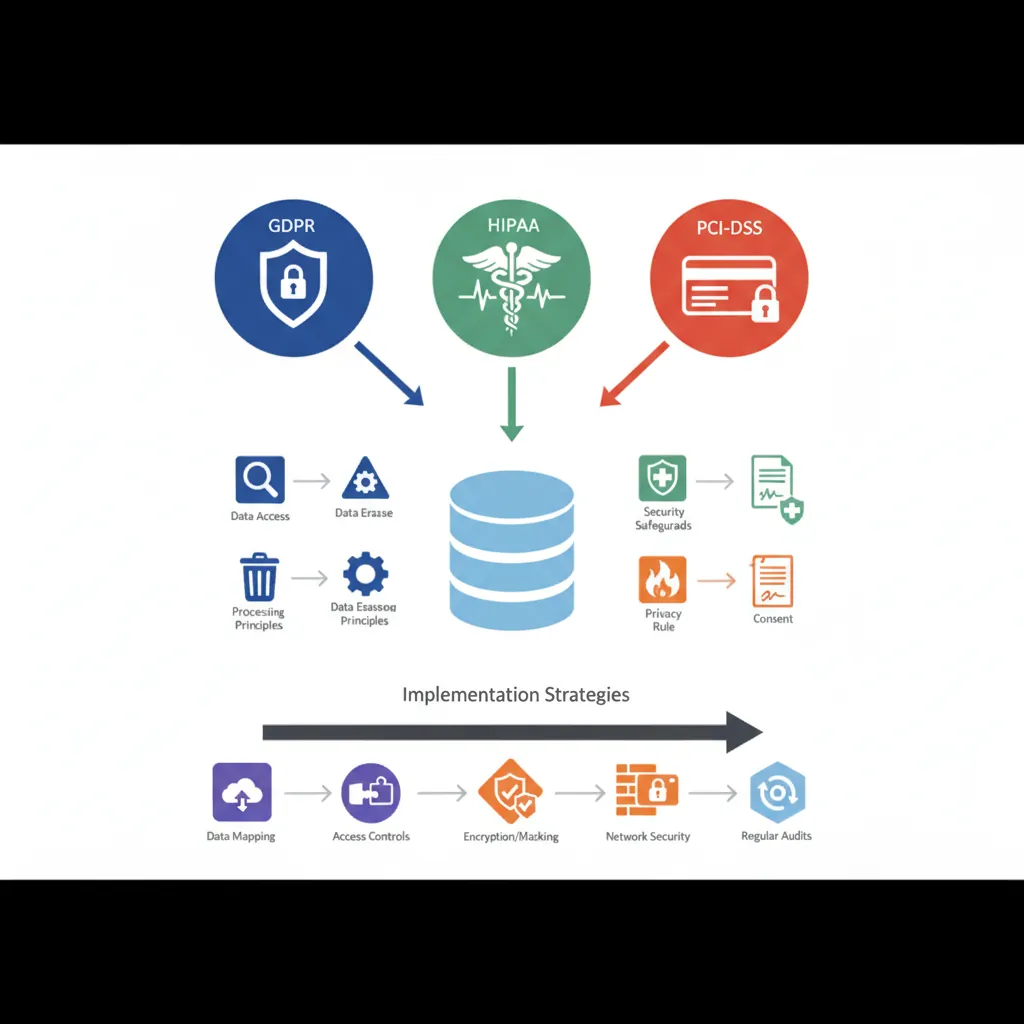
Compliance Frameworks
GDPR
GDPR Database Requirements:

1. Data Subject Rights
   - Right to access: Export user's personal data
   - Right to erasure: Delete user data on request
   - Right to portability: Provide data in machine-readable format

2. Implementation
   -- Identify all personal data
   SELECT * FROM users WHERE id = 123;  -- Export
   DELETE FROM users WHERE id = 123;    -- Erasure (cascade!)

   -- Maintain consent records
   CREATE TABLE consent_log (
       user_id INT,
       consent_type VARCHAR(50),
       granted_at TIMESTAMP,
       revoked_at TIMESTAMP
   );

3. Data Retention
   - Automatically delete data after retention period
   - Document retention policies
Compliance frameworks — GDPR, HIPAA, and PCI-DSS database requirements and implementation strategies
HIPAA
HIPAA Database Requirements:

1. Technical Safeguards
   - Encryption at rest and in transit (mandatory)
   - Unique user identification (no shared accounts)
   - Automatic logoff after inactivity
   - Audit controls (log all PHI access)

2. Access Controls
   - Role-based access to PHI
   - Emergency access procedures
   - Regular access reviews

3. Audit Requirements
   - Log all access to PHI
   - Retain logs for 6 years
   - Regular log reviews
PCI-DSS
PCI-DSS for Cardholder Data:

1. Never store CVV/CVC codes
2. Encrypt PAN (Primary Account Number) at rest
3. Mask PAN in displays: ****-****-****-1234
4. Restrict access to cardholder data on need-to-know

-- Column-level encryption for PAN
CREATE TABLE payments (
    id SERIAL PRIMARY KEY,
    user_id INT,
    pan_encrypted BYTEA,  -- Encrypted
    last_four VARCHAR(4), -- For display
    expiry_month INT,
    expiry_year INT
);
Data Masking & Anonymization
-- PostgreSQL: Dynamic data masking with views
CREATE VIEW users_masked AS
SELECT
    id,
    CONCAT(LEFT(first_name, 1), '***') AS first_name,
    CONCAT(LEFT(last_name, 1), '***') AS last_name,
    CONCAT(LEFT(email, 2), '***@', SPLIT_PART(email, '@', 2)) AS email,
    CONCAT('***-***-', RIGHT(phone, 4)) AS phone,
    created_at
FROM users;

-- Grant access to masked view instead of base table
GRANT SELECT ON users_masked TO analysts;
REVOKE SELECT ON users FROM analysts;

-- SQL Server: Built-in dynamic data masking
ALTER TABLE users
ALTER COLUMN email ADD MASKED WITH (FUNCTION = 'email()');

ALTER TABLE users
ALTER COLUMN phone ADD MASKED WITH (FUNCTION = 'partial(0,"***-***-",4)');
Test Data: Never use production data in non-production environments. Use data masking or synthetic data generation to create realistic test datasets without exposing real user information.
Conclusion & Next Steps
Database security is a continuous journey. As threats evolve and regulations tighten, staying informed and proactive about security practices is essential for protecting your data and your users.
Continue the Database Mastery Series
Part 12: Cloud Databases & Managed Services
Understand cloud security features provided by managed services.