We use cookies to enhance your browsing experience, serve personalized content, and analyze our traffic.
By clicking "Accept All", you consent to our use of cookies. See our
Privacy Policy
for more information.
Redis (Remote Dictionary Server) is an in-memory data structure store that serves as a database, cache, message broker, and streaming engine. It's the Swiss Army knife of high-performance data handling.
Redis architecture: in-memory data store serving as cache, message broker, and streaming engine with optional persistence
Series Context: This is Part 9 of 15 in the Complete Database Mastery series. We're exploring the essential caching layer for modern applications.
Think of Redis like a super-fast notepad that sits between your application and database. Instead of asking the slow database every time, you jot down common answers on your notepad for instant access.
Redis vs Traditional Databases
Feature
Redis
PostgreSQL/MySQL
Storage
In-memory (RAM)
Disk-based
Speed
Sub-millisecond reads
1-100ms typical
Data Model
Key-value with rich types
Relational tables
Persistence
Optional (RDB/AOF)
Always persistent
Use Case
Cache, sessions, queues
Primary data storage
Performance Reality: Redis can handle 100,000+ operations per second on modest hardware. A single Redis instance often outperforms an entire cluster of traditional databases for read-heavy workloads.
Redis Data Structures
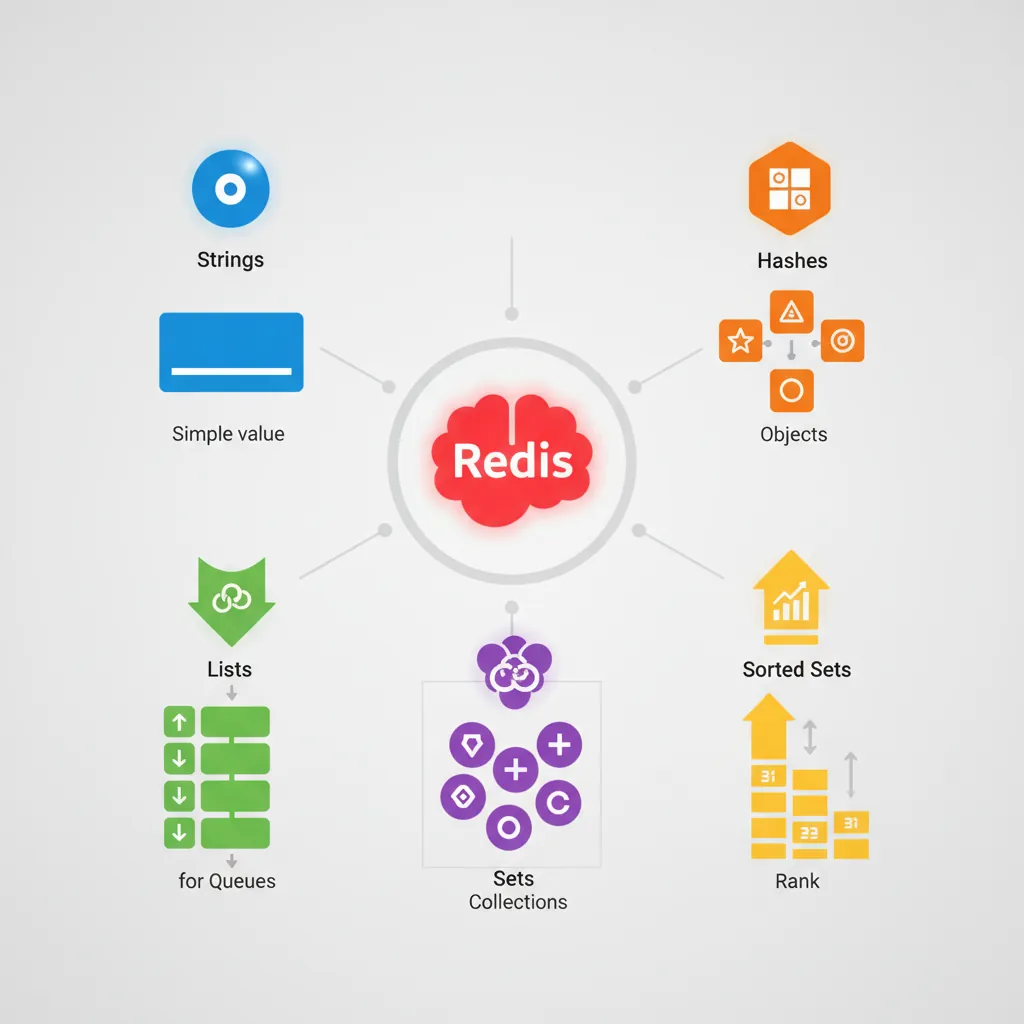
Redis isn't just a simple key-value store—it supports rich data structures that make it incredibly versatile.
Redis data structures: Strings for simple values, Hashes for objects, Lists for queues, Sets for unique collections, Sorted Sets for rankings
Strings (The Foundation)
The simplest type: a key maps to a string value. But "string" can hold text, numbers, or even serialized objects (up to 512MB).
# Basic string operations
SET user:1001:name "Alice"
GET user:1001:name            # "Alice"

# Numbers stored as strings (but with atomic math)
SET views:article:42 0
INCR views:article:42         # 1
INCR views:article:42         # 2
INCRBY views:article:42 10    # 12

# Expiration (TTL) - perfect for cache
SET session:abc123 "user_data" EX 3600   # Expires in 1 hour
TTL session:abc123            # Seconds remaining

# Set only if key doesn't exist (distributed locks)
SETNX lock:resource "owner_id"  # Returns 1 if set, 0 if exists
Hashes (Mini Documents)
Hashes store field-value pairs under a single key—like a lightweight object or row.
# Store user data as hash
HSET user:1001 name "Alice" email "alice@example.com" age 28

# Get individual fields
HGET user:1001 name           # "Alice"
HMGET user:1001 name email    # ["Alice", "alice@example.com"]
HGETALL user:1001             # All fields and values

# Increment numeric field
HINCRBY user:1001 age 1       # 29

# Check field existence
HEXISTS user:1001 email       # 1 (true)

# Delete specific fields
HDEL user:1001 age
Memory Efficiency: Hashes use less memory than individual string keys when storing related data. Use hashes for objects with multiple fields.
Sets & Sorted Sets
Sets are unordered collections of unique strings. Sorted Sets add a score for ordering.
# LISTS - Ordered, allows duplicates (queues/stacks)
RPUSH queue:emails "email1" "email2"   # Push right (end)
LPUSH queue:emails "email0"            # Push left (front)
LPOP queue:emails                      # Pop from left: "email0"
LRANGE queue:emails 0 -1               # Get all

# Blocking pop (for worker queues)
BLPOP queue:emails 30     # Wait up to 30s for item

# BITMAPS - Space-efficient flags
SETBIT user:active:2024-01-15 1001 1   # Mark user 1001 active
GETBIT user:active:2024-01-15 1001     # 1
BITCOUNT user:active:2024-01-15        # Count active users

# HYPERLOGLOGS - Approximate counting (low memory)
PFADD visitors:today "user1" "user2" "user3"
PFCOUNT visitors:today                  # ~3 (estimate)
Data Structure Selection Guide
Use Case
Data Structure
Example
Simple cache
String
API response, page HTML
User profiles
Hash
User object with fields
Tags, followers
Set
Unique values, set math
Leaderboards
Sorted Set
Scores with ranking
Message queues
List
Background jobs
Daily active users
Bitmap
Space-efficient flags
Unique visitors
HyperLogLog
Approximate counts
Caching Patterns
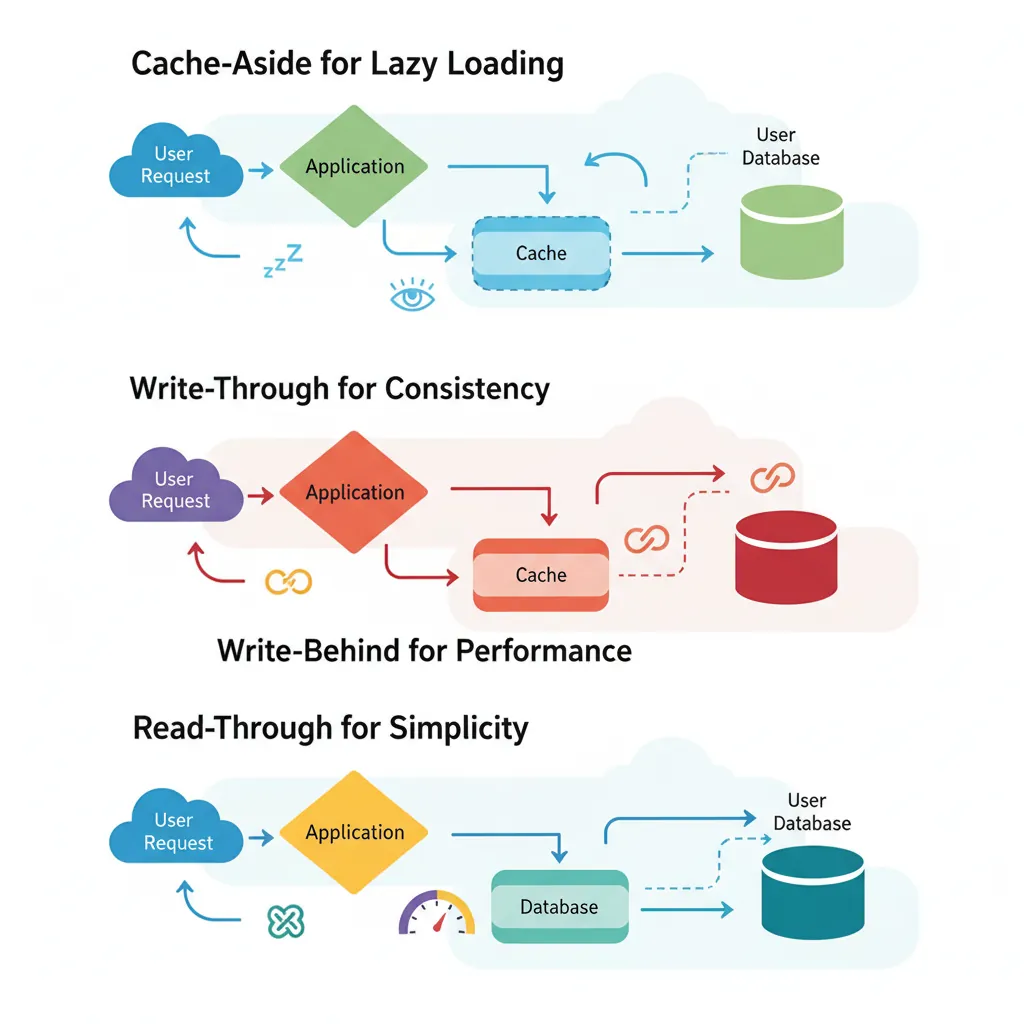
How you interact with the cache determines consistency, performance, and complexity. Choose wisely!
Caching patterns: Cache-Aside for lazy loading, Write-Through for consistency, Write-Behind for performance, Read-Through for simplicity
Cache-Aside (Lazy Loading)
The most common pattern: application checks cache first, falls back to database on miss.
# Cache-Aside Pattern (Python pseudocode)
import redis
import json

r = redis.Redis()

def get_user(user_id):
    # Step 1: Check cache
    cache_key = f"user:{user_id}"
    cached = r.get(cache_key)

    if cached:
        return json.loads(cached)  # Cache HIT

    # Step 2: Cache MISS - fetch from database
    user = database.query("SELECT * FROM users WHERE id = ?", user_id)

    # Step 3: Populate cache for next time
    r.setex(cache_key, 3600, json.dumps(user))  # TTL: 1 hour

    return user

def update_user(user_id, data):
    # Update database
    database.update("users", user_id, data)

    # Invalidate cache (will be refreshed on next read)
    r.delete(f"user:{user_id}")
Pros: Only caches what's actually used. Simple to implement. Cache failures don't break the app.
Cache-Aside (Lazy Loading) Pattern
flowchart TD
    A["Request Received"] --> B{"Check Cache"}
    B -->|Hit| C["Return Cached Data"]
    B -->|Miss| D["Query Database"]
    D --> E["Store in Cache
with TTL"]
    E --> F["Return Data"]

    style C fill:#e8f4f4,stroke:#3B9797
    style D fill:#f0f4f8,stroke:#16476A
Cons: First request always slow (cache miss). Potential stale data if cache not invalidated properly.
Write-Through
Data is written to cache AND database simultaneously. Cache is always up-to-date.
# Write-Through Pattern
def update_user_write_through(user_id, data):
    cache_key = f"user:{user_id}"

    # Write to database
    database.update("users", user_id, data)

    # Write to cache (same transaction conceptually)
    r.setex(cache_key, 3600, json.dumps(data))

    return data

def get_user_write_through(user_id):
    cache_key = f"user:{user_id}"
    cached = r.get(cache_key)

    if cached:
        return json.loads(cached)

    # Only on cold start or cache eviction
    user = database.query("SELECT * FROM users WHERE id = ?", user_id)
    r.setex(cache_key, 3600, json.dumps(user))
    return user
Pros: Cache is always consistent with database. Reads are always fast after first write.
Write-Behind (Write-Back)
Write to cache immediately, then asynchronously persist to database. Maximum write performance.
# Write-Behind Pattern
from queue import Queue
import threading

write_queue = Queue()

def update_user_write_behind(user_id, data):
    cache_key = f"user:{user_id}"

    # Immediate cache write (fast!)
    r.setex(cache_key, 3600, json.dumps(data))

    # Queue database write for later
    write_queue.put(("users", user_id, data))

    return data  # Return immediately

# Background worker persists to database
def db_writer():
    while True:
        table, id, data = write_queue.get()
        try:
            database.update(table, id, data)
        except Exception as e:
            # Handle failures (retry queue, dead letter, etc.)
            log.error(f"DB write failed: {e}")
Warning: Risk of data loss if cache fails before database write. Use with caution for critical data!
Pattern Comparison
Pattern
Consistency
Write Speed
Read Speed
Complexity
Cache-Aside
Eventual
Medium
Fast (after miss)
Low
Write-Through
Strong
Slower
Always fast
Medium
Write-Behind
Eventual
Fastest
Always fast
High
Practical Use Cases
Session Management
Store user sessions in Redis for stateless application servers. Any server can handle any request.
Protect APIs from abuse with sliding window rate limiting.
# Sliding Window Rate Limiter
def is_rate_limited(user_id, limit=100, window_seconds=60):
    """
    Allow 'limit' requests per 'window_seconds'.
    Returns (allowed: bool, remaining: int, reset_time: int)
    """
    key = f"ratelimit:{user_id}"
    now = int(time.time())
    window_start = now - window_seconds

    # Use sorted set: score = timestamp, member = unique request ID
    pipe = r.pipeline()

    # Remove old entries outside the window
    pipe.zremrangebyscore(key, 0, window_start)

    # Count requests in current window
    pipe.zcard(key)

    # Add current request
    pipe.zadd(key, {f"{now}:{secrets.token_hex(4)}": now})

    # Set expiry on the key itself
    pipe.expire(key, window_seconds)

    _, count, _, _ = pipe.execute()

    if count >= limit:
        return False, 0, window_start + window_seconds

    return True, limit - count - 1, now + window_seconds

# Usage
allowed, remaining, reset = is_rate_limited("user:1001")
if not allowed:
    return {"error": "Rate limit exceeded", "retry_after": reset - time.time()}
Distributed Locks
# Distributed Lock (Redlock pattern simplified)
import uuid

def acquire_lock(resource, ttl_ms=5000):
    lock_key = f"lock:{resource}"
    lock_value = str(uuid.uuid4())  # Unique owner ID

    # SET NX (only if not exists) with TTL
    acquired = r.set(lock_key, lock_value, nx=True, px=ttl_ms)

    if acquired:
        return lock_value  # Return owner ID for release
    return None

def release_lock(resource, lock_value):
    lock_key = f"lock:{resource}"

    # Lua script: only delete if we own the lock
    lua_script = """
    if redis.call("get", KEYS[1]) == ARGV[1] then
        return redis.call("del", KEYS[1])
    else
        return 0
    end
    """
    return r.eval(lua_script, 1, lock_key, lock_value)

# Usage
lock_id = acquire_lock("process_order:12345")
if lock_id:
    try:
        process_order(12345)
    finally:
        release_lock("process_order:12345", lock_id)
Pub/Sub Messaging
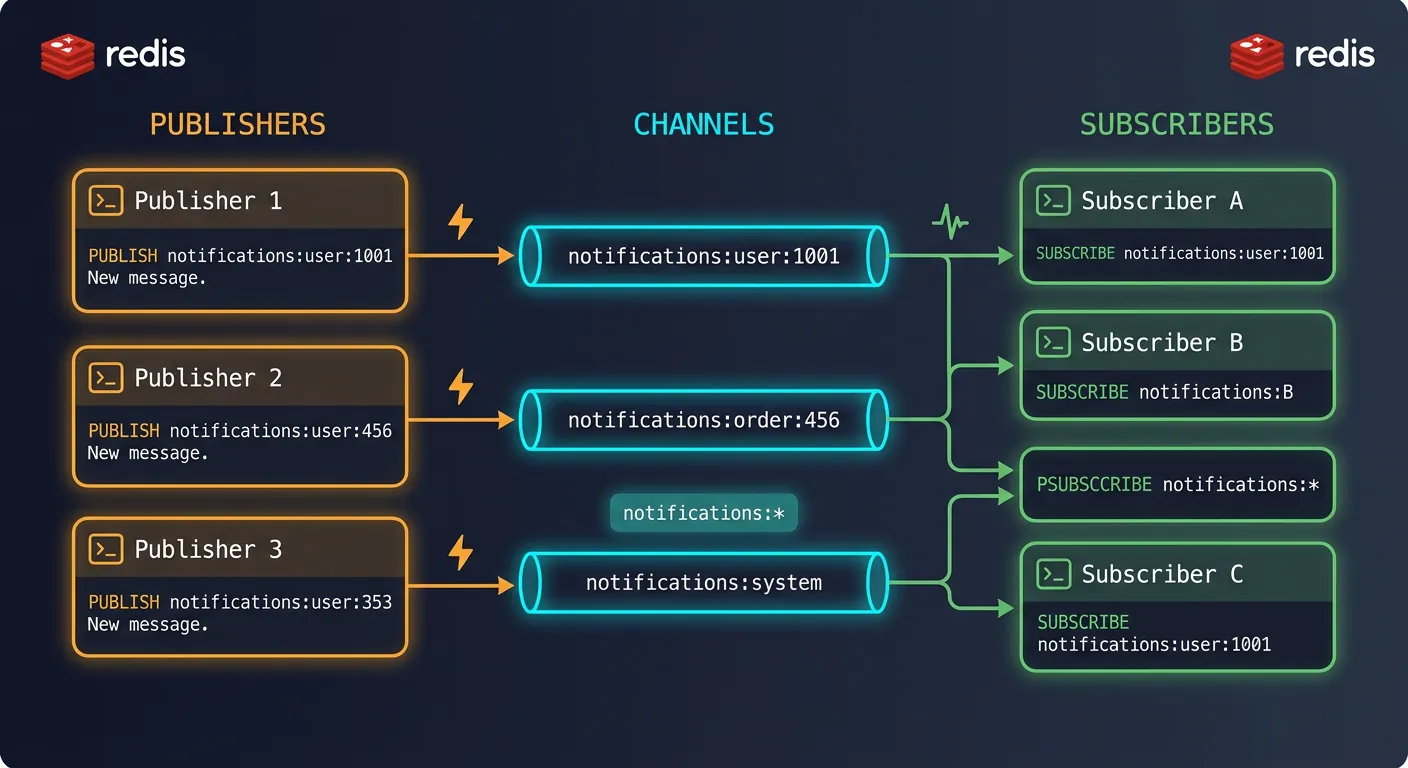
Redis Pub/Sub enables real-time messaging between applications. Publishers send messages to channels; subscribers receive them instantly.
Redis Pub/Sub: publishers send messages to named channels, all subscribed clients receive them in real-time
# Terminal 1: Subscriber
SUBSCRIBE notifications:user:1001
# Waiting for messages...

# Terminal 2: Publisher
PUBLISH notifications:user:1001 "You have a new message!"
# (integer) 1 - number of subscribers who received it

# Pattern subscription (wildcards)
PSUBSCRIBE notifications:*
# Receives messages from notifications:user:1001, notifications:order:456, etc.
# Python Pub/Sub Example
import redis
import threading

r = redis.Redis()

# Publisher
def send_notification(user_id, message):
    channel = f"notifications:{user_id}"
    r.publish(channel, message)

# Subscriber (runs in background)
def notification_listener(user_id):
    pubsub = r.pubsub()
    pubsub.subscribe(f"notifications:{user_id}")

    for message in pubsub.listen():
        if message["type"] == "message":
            data = message["data"].decode()
            print(f"Received: {data}")
            # Handle notification (push to WebSocket, etc.)

# Start listener in background
thread = threading.Thread(target=notification_listener, args=("user:1001",))
thread.daemon = True
thread.start()
Pub/Sub Limitation: Messages are "fire and forget"—if no subscriber is listening, the message is lost. For reliable messaging, use Redis Streams instead.
Redis Streams for Event Systems
Redis Streams provide persistent, ordered message logs with consumer groups—like a lightweight Kafka.
# Add events to stream
XADD orders:events * action "created" order_id "12345" customer "alice"
# Returns: "1706745600000-0" (timestamp-sequence ID)

XADD orders:events * action "paid" order_id "12345" amount "99.99"
XADD orders:events * action "shipped" order_id "12345" tracking "TRACK123"

# Read from stream (get all events)
XRANGE orders:events - +
# Returns all events from start (-) to end (+)

# Read new events only (blocking)
XREAD BLOCK 5000 STREAMS orders:events $
# Wait up to 5 seconds for new events after "$" (latest)
Consumer Groups
Distribute event processing across multiple workers with exactly-once delivery guarantees.
# Create consumer group
XGROUP CREATE orders:events order-processors $ MKSTREAM

# Worker 1 reads (claims events for processing)
XREADGROUP GROUP order-processors worker-1 COUNT 10 STREAMS orders:events >
# ">" means only new, undelivered messages

# Worker 2 reads (gets different events)
XREADGROUP GROUP order-processors worker-2 COUNT 10 STREAMS orders:events >

# After processing, acknowledge completion
XACK orders:events order-processors "1706745600000-0"

# Check pending (unacknowledged) events
XPENDING orders:events order-processors
# Python Stream Consumer
def process_events():
    # Create consumer group (ignore if exists)
    try:
        r.xgroup_create("orders:events", "processors", id="0", mkstream=True)
    except redis.ResponseError:
        pass  # Group already exists

    consumer_name = f"worker-{os.getpid()}"

    while True:
        # Read batch of events
        events = r.xreadgroup(
            groupname="processors",
            consumername=consumer_name,
            streams={"orders:events": ">"},
            count=10,
            block=5000  # Wait 5s for new events
        )

        for stream, messages in events:
            for msg_id, data in messages:
                try:
                    process_order_event(data)
                    # Acknowledge successful processing
                    r.xack("orders:events", "processors", msg_id)
                except Exception as e:
                    log.error(f"Failed to process {msg_id}: {e}")
                    # Event stays pending for retry
Pub/Sub vs Streams
Feature
Pub/Sub
Streams
Persistence
No (fire and forget)
Yes (stored in memory/disk)
Consumer Groups
No
Yes (load balancing)
Replay
No
Yes (read from any point)
Acknowledgment
No
Yes (XACK)
Use Case
Real-time notifications
Event sourcing, job queues
Persistence Options
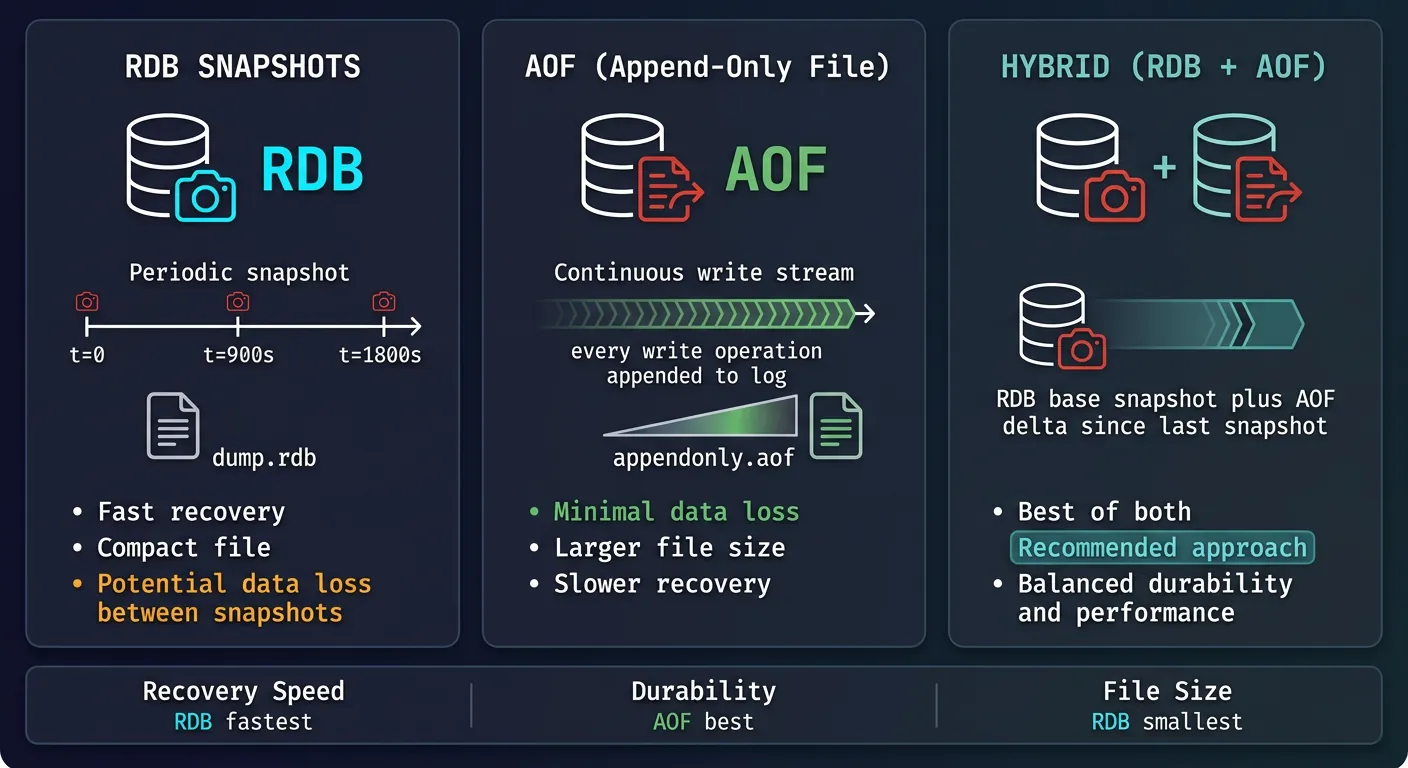
Redis is in-memory, but can persist data to disk for durability. Two strategies available.
Redis persistence: RDB for periodic snapshots, AOF for write-ahead logging, or hybrid for balanced durability and performance
RDB Snapshots
Point-in-time snapshots of the entire dataset. Fast to load, but potential data loss between snapshots.
# redis.conf - RDB configuration
save 900 1      # Save if 1 key changed in 900 seconds
save 300 10     # Save if 10 keys changed in 300 seconds
save 60 10000   # Save if 10000 keys changed in 60 seconds

dbfilename dump.rdb
dir /var/lib/redis

# Manual snapshot
BGSAVE          # Background save (non-blocking)
SAVE            # Foreground save (blocks all operations!)
RDB Pros: Compact file size. Fast restarts. Good for backups. Minimal performance impact.
AOF (Append-Only File)
Logs every write operation. More durable but larger files and slower restarts.
# redis.conf - AOF configuration
appendonly yes
appendfilename "appendonly.aof"

# Sync policies (durability vs performance)
appendfsync always    # Every write (safest, slowest)
appendfsync everysec  # Every second (good balance) - RECOMMENDED
appendfsync no        # OS decides (fastest, least safe)

# AOF rewrite (compaction)
auto-aof-rewrite-percentage 100
auto-aof-rewrite-min-size 64mb
# Rewrites when AOF is 100% larger than last rewrite AND > 64MB

# Manual rewrite
BGREWRITEAOF
Persistence Comparison
Feature
RDB
AOF
RDB + AOF
Data Loss Risk
Minutes of data
~1 second
~1 second
File Size
Compact
Larger
Both files
Restart Speed
Fast
Slower
Uses RDB + AOF tail
Backup Friendly
Excellent
Good
Best of both
Production Recommendation: Use both RDB and AOF together. AOF for durability, RDB for fast backups and disaster recovery.
Redis Cluster Scaling
Redis Cluster provides automatic sharding across multiple nodes with built-in replication.
# Connect with cluster mode (-c flag)
redis-cli -c -h 192.168.1.1 -p 7000

# Keys are automatically routed
SET user:1001 "data"    # Redirected to correct node
GET user:1001           # Redirected to correct node

# Hash tags: force related keys to same slot
SET {user:1001}:profile "..."
SET {user:1001}:orders "..."
SET {user:1001}:cart "..."
# All keys with {user:1001} hash to same slot!

# Multi-key operations require same slot
MGET {user:1001}:profile {user:1001}:orders  # Works!
MGET user:1001 user:1002                      # Error: CROSSSLOT
# Python Redis Cluster Client
from redis.cluster import RedisCluster

# Connect to cluster
rc = RedisCluster(
    host="192.168.1.1",
    port=7000,
    decode_responses=True
)

# Operations work transparently
rc.set("user:1001:name", "Alice")
rc.get("user:1001:name")

# Use hash tags for transactions
pipe = rc.pipeline()
pipe.set("{order:123}:status", "processing")
pipe.set("{order:123}:updated", str(datetime.now()))
pipe.execute()  # Atomic on same node
Scaling Options Comparison
Approach
Use Case
Complexity
Single Instance
Small apps, development
Simple
Sentinel (HA)
High availability, failover
Medium
Cluster (Sharding)
Large datasets, high throughput
High
Managed (ElastiCache)
Production without ops burden
Low ($$)
Cloud Tip: AWS ElastiCache, Azure Cache for Redis, and GCP Memorystore handle clustering, failover, and maintenance automatically. Start there unless you need full control.
Conclusion & Next Steps
Redis is an indispensable tool for high-performance applications. From simple caching to complex event streaming, mastering Redis unlocks new possibilities for scalable architectures.
Continue the Database Mastery Series
Part 8: MongoDB & Document Databases
Use Redis alongside MongoDB for a powerful NoSQL stack.