We use cookies to enhance your browsing experience, serve personalized content, and analyze our traffic.
By clicking "Accept All", you consent to our use of cookies. See our
Privacy Policy
for more information.
Query optimization is the art and science of making database queries run faster. A well-optimized query can be 100x or even 1000x faster than a naive implementation—the difference between milliseconds and minutes.
Series Context: This is Part 6 of 15 in the Complete Database Mastery series. We're unlocking the secrets of database performance.
Think of query optimization as finding the fastest route on a map. The database has many ways to get your data—your job is to help it choose the best path.
The Performance Gap
Scenario
Naive Query
Optimized Query
Find user by email (1M rows)
~500ms (full scan)
~1ms (index lookup)
Report with JOIN (10M rows)
~30 seconds
~200ms
Aggregation query
~10 seconds
~50ms (covering index)
Rule of Thumb: If a query takes more than 100ms for a typical web request, it needs optimization. Users notice delays over 200ms.
How Query Execution Works
Query Processing Pipeline
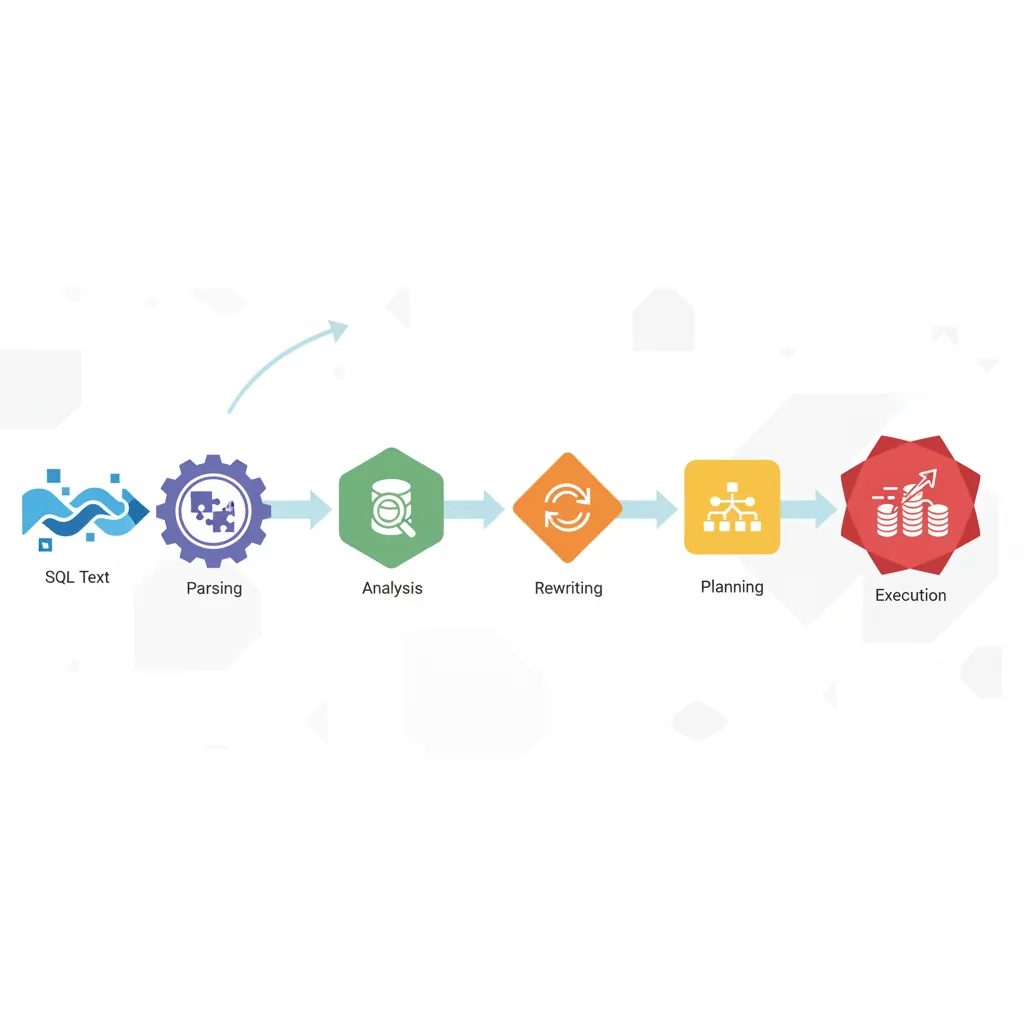
When you run a query, the database goes through several stages:
Query execution pipeline: SQL text flows through parsing, analysis, rewriting, planning, and execution stages
Query Execution Pipeline
flowchart LR
    SQL["SQL Query"] --> PARSE["Parser\nSyntax Check"]
    PARSE --> ANALYZE["Analyzer\nSemantic Check"]
    ANALYZE --> REWRITE["Rewriter\nView Expansion"]
    REWRITE --> PLAN["Planner / Optimizer\nCost-Based"]
    PLAN --> EXEC["Executor\nPlan Interpretation"]
    EXEC --> RESULT["Result Set"]

    PLAN -.->|"Statistics"| STATS["Table Statistics\nHistograms, Cardinality"]
    STATS -.-> PLAN
Query Execution Steps
Parser: Validates syntax, converts SQL to parse tree
Planner/Optimizer: Generates execution plans, estimates costs, chooses best plan
Executor: Runs the chosen plan, returns results
Query Planner & Optimizer
The query planner is the brain of query execution. It considers multiple strategies and picks the one with lowest estimated cost.
-- The planner considers:
-- 1. Table statistics (row counts, data distribution)
-- 2. Available indexes
-- 3. Join algorithms (nested loop, hash join, merge join)
-- 4. Memory available for sorting/hashing
-- 5. Disk I/O patterns

-- PostgreSQL: Update statistics for better plans
ANALYZE orders;           -- Analyze one table
ANALYZE;                  -- Analyze all tables

-- Check table statistics
SELECT
    relname AS table,
    reltuples AS row_estimate,
    relpages AS page_count
FROM pg_class
WHERE relname = 'orders';

-- Check column statistics
SELECT
    attname AS column,
    n_distinct,
    most_common_vals,
    most_common_freqs
FROM pg_stats
WHERE tablename = 'orders';
EXPLAIN Plans
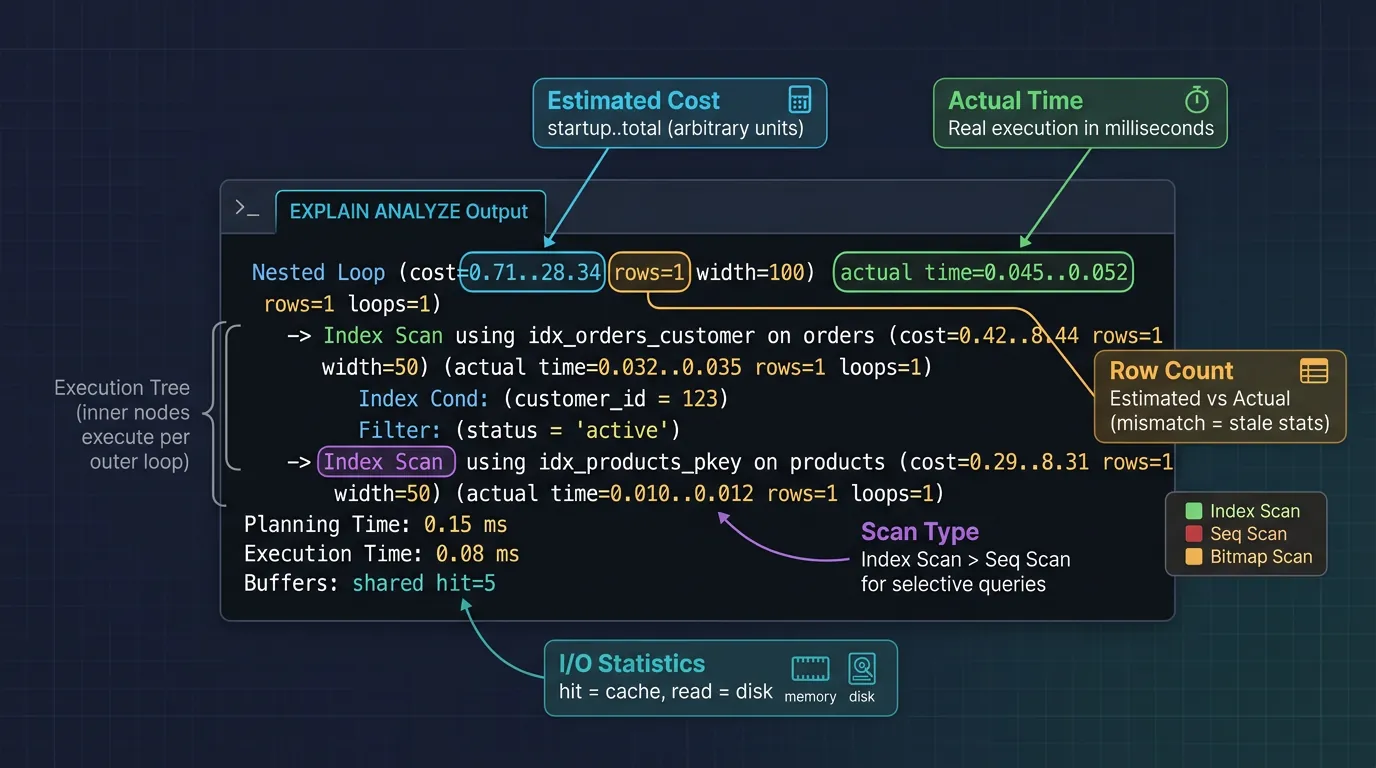
EXPLAIN is your X-ray vision into query execution. It shows exactly what the database plans to do (or did) with your query.
Reading EXPLAIN ANALYZE output: cost estimates, actual execution times, scan types, and I/O statistics
PostgreSQL EXPLAIN ANALYZE
-- Basic EXPLAIN (shows plan without executing)
EXPLAIN SELECT * FROM orders WHERE customer_id = 123;

-- EXPLAIN ANALYZE (executes query, shows actual times)
EXPLAIN ANALYZE SELECT * FROM orders WHERE customer_id = 123;

-- Full details with buffers (I/O stats)
EXPLAIN (ANALYZE, BUFFERS, FORMAT TEXT)
SELECT * FROM orders WHERE customer_id = 123;

-- Example output interpretation:
-- Index Scan using idx_orders_customer on orders  (cost=0.42..8.44 rows=5 width=48) (actual time=0.019..0.025 rows=5 loops=1)
--   Index Cond: (customer_id = 123)
--   Buffers: shared hit=4
-- Planning Time: 0.089 ms
-- Execution Time: 0.045 ms

-- Key metrics to watch:
-- cost: Estimated startup cost..total cost
-- rows: Estimated row count
-- actual time: Real execution time (start..end)
-- Buffers shared hit: Pages read from cache (good!)
-- Buffers shared read: Pages read from disk (slower)

-- Common scan types (best to worst):
-- Index Scan - Uses index, fetches rows from table
-- Index Only Scan - Uses index only, no table access (fastest!)
-- Bitmap Index Scan - Multiple index conditions combined
-- Seq Scan - Full table scan (often bad on large tables)
MySQL EXPLAIN
-- MySQL EXPLAIN
EXPLAIN SELECT * FROM orders WHERE customer_id = 123;

-- MySQL 8.0+ EXPLAIN ANALYZE (actually runs query)
EXPLAIN ANALYZE SELECT * FROM orders WHERE customer_id = 123;

-- Format as JSON (more details)
EXPLAIN FORMAT=JSON SELECT * FROM orders WHERE customer_id = 123;

-- Key columns in MySQL EXPLAIN:
-- type: Access method
--   ALL - Full table scan (bad!)
--   index - Full index scan
--   range - Index range scan
--   ref - Index lookup (non-unique)
--   eq_ref - Index lookup (unique/primary key)
--   const - Single row lookup
--   system - Single row table

-- key: Which index is used (NULL = no index!)
-- rows: Estimated rows to examine
-- filtered: % of rows surviving WHERE clause
-- Extra:
--   "Using index" - Covering index (great!)
--   "Using where" - Server filtering after fetch
--   "Using filesort" - Extra sort step (often slow)
--   "Using temporary" - Temp table needed (can be slow)
Warning:EXPLAIN ANALYZE actually executes the query! Don't use it on DELETE/UPDATE without wrapping in a transaction you'll rollback.
Index Design Principles
When to Create Indexes
Index These Columns
WHERE clauses: Columns used in filters
JOIN conditions: Foreign key columns
ORDER BY: Columns used for sorting
High selectivity: Columns that filter many rows
Unique constraints: Already indexed automatically
-- Analyze query patterns before creating indexes
-- Look at your application's most frequent queries

-- 1. Filter columns
CREATE INDEX idx_orders_status ON orders(status);
-- SELECT * FROM orders WHERE status = 'pending';

-- 2. Join columns (foreign keys)
CREATE INDEX idx_orders_customer ON orders(customer_id);
-- SELECT * FROM orders o JOIN customers c ON o.customer_id = c.id;

-- 3. Sort columns
CREATE INDEX idx_orders_date ON orders(created_at);
-- SELECT * FROM orders ORDER BY created_at DESC LIMIT 10;

-- 4. Combination for common query pattern
CREATE INDEX idx_orders_cust_date ON orders(customer_id, created_at);
-- SELECT * FROM orders
-- WHERE customer_id = 123
-- ORDER BY created_at DESC;
Choosing Index Types
Index Type Guide
Type
Best For
Example Use
B-Tree
=, <, >, BETWEEN, LIKE 'abc%'
Default, most cases
Hash
= only (exact match)
Session lookups
GiST
Geometric, range, full-text
PostGIS, tsquery
GIN
Arrays, JSONB, full-text
Tag arrays, JSON keys
BRIN
Large sorted tables
Time-series logs
Composite & Covering Indexes
Composite Indexes (Multi-Column)
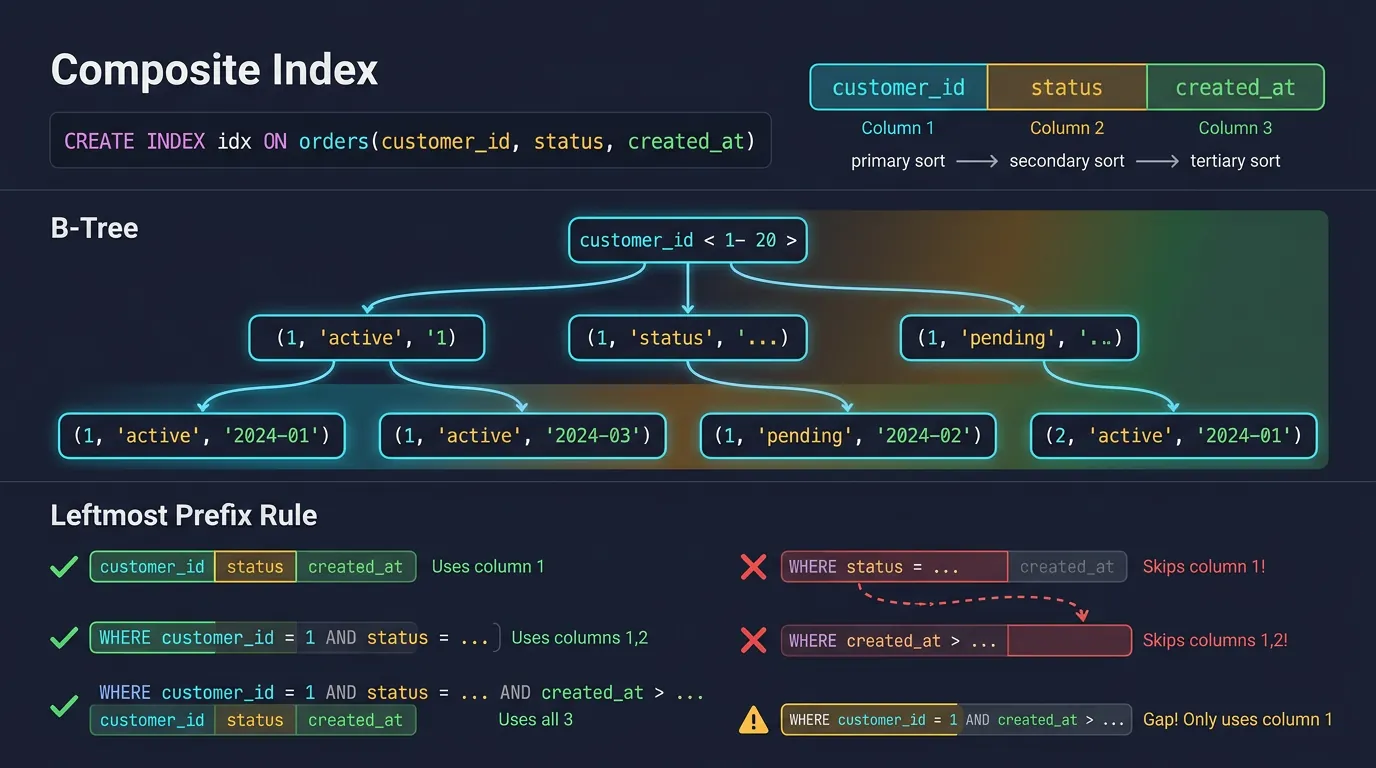
A composite index includes multiple columns. Column order matters critically—the index is sorted by the first column, then the second, etc.
Composite index and the leftmost prefix rule: queries must use columns from left to right to leverage the index
-- Column order follows the "leftmost prefix" rule
CREATE INDEX idx_orders_multi ON orders(customer_id, status, created_at);

-- This index can be used for:
-- ✅ WHERE customer_id = 123
-- ✅ WHERE customer_id = 123 AND status = 'pending'
-- ✅ WHERE customer_id = 123 AND status = 'pending' AND created_at > '2024-01-01'
-- ✅ WHERE customer_id = 123 ORDER BY status, created_at

-- This index CANNOT be used efficiently for:
-- ❌ WHERE status = 'pending' (skips first column)
-- ❌ WHERE created_at > '2024-01-01' (skips first two columns)
-- ❌ WHERE customer_id = 123 AND created_at > '2024-01-01' (skips status)

-- Think of it like a phone book:
-- Sorted by: Last Name → First Name → Phone
-- Easy to find: "Smith, John"
-- Hard to find: All people named "John" (any last name)
Covering Indexes (Index-Only Scans)
A covering index includes all columns the query needs. The database can answer the query from the index alone, without touching the table!
-- Without covering index:
-- Query needs to: 1) Find rows in index, 2) Fetch from table

-- Regular index
CREATE INDEX idx_orders_customer ON orders(customer_id);
-- Query still needs table access for status:
EXPLAIN SELECT customer_id, status FROM orders WHERE customer_id = 123;
-- Index Scan → then fetch 'status' from table

-- Covering index (INCLUDE in PostgreSQL 11+)
CREATE INDEX idx_orders_covering
ON orders(customer_id)
INCLUDE (status, total);

-- Now the query can be answered entirely from the index!
EXPLAIN SELECT customer_id, status, total FROM orders WHERE customer_id = 123;
-- Index Only Scan (no table access needed!)

-- MySQL: Add columns to index itself
CREATE INDEX idx_orders_covering ON orders(customer_id, status, total);
-- Works the same, but index is larger
Index-Only Scan: Look for this in EXPLAIN output—it means zero table access, which is often 10x faster than regular index scans.
When Indexes Hurt Performance
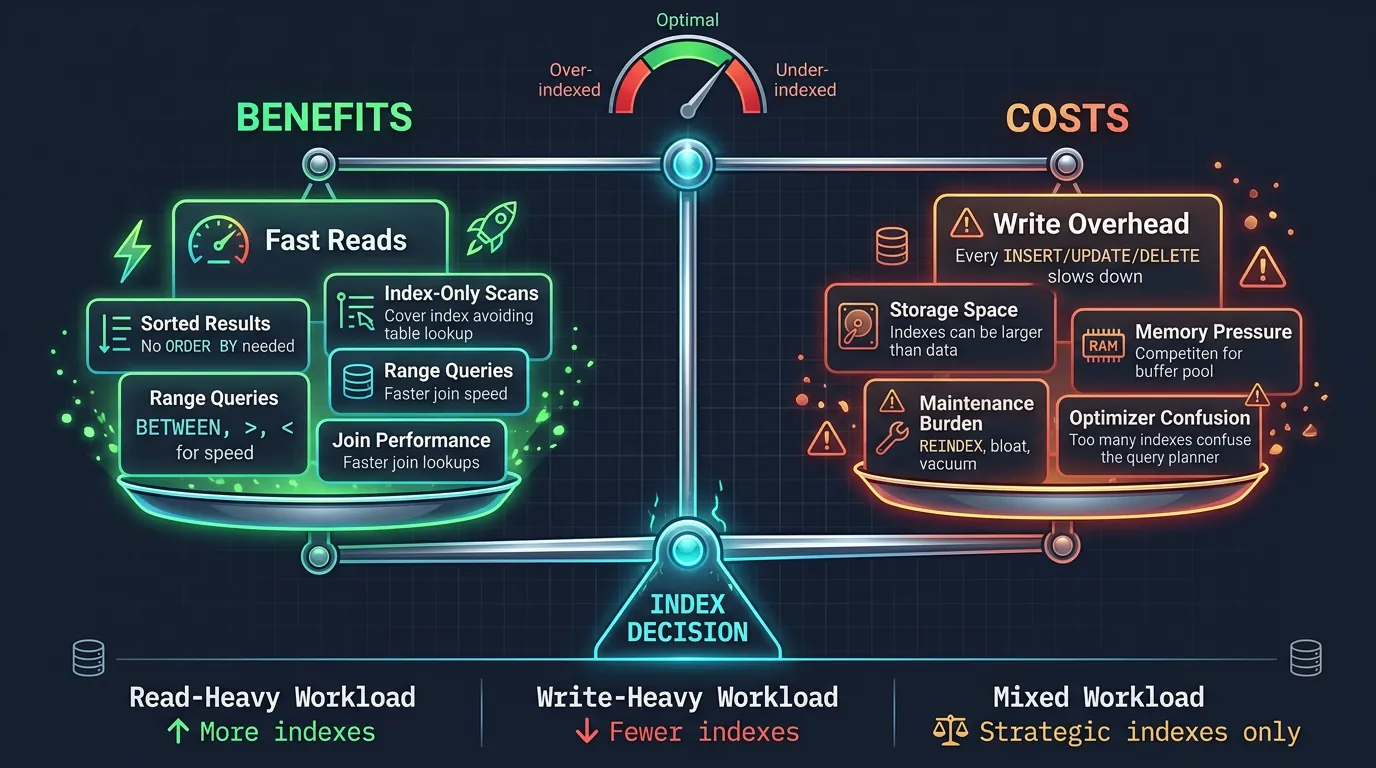
Indexes aren't free—they have costs. Knowing when NOT to index is as important as knowing when to index.
Index cost-benefit analysis: fast reads vs write overhead, storage consumption, and maintenance burden
Index Costs
Write overhead: Every INSERT/UPDATE/DELETE must update all indexes
Storage: Indexes consume disk space (sometimes more than the table!)
Memory: Hot indexes compete for buffer pool space
Maintenance: Indexes can become bloated, need REINDEX
-- When indexes are NOT used (even if they exist):

-- 1. Low selectivity (returns most rows)
SELECT * FROM orders WHERE status = 'completed';
-- If 90% of orders are 'completed', full scan is faster!

-- 2. Functions on indexed columns
SELECT * FROM users WHERE LOWER(email) = 'test@example.com';
-- Index on 'email' won't help! Need functional index:
CREATE INDEX idx_users_email_lower ON users(LOWER(email));

-- 3. OR conditions spanning indexes
SELECT * FROM orders WHERE customer_id = 1 OR status = 'pending';
-- May do full scan instead of using either index

-- 4. LIKE with leading wildcard
SELECT * FROM products WHERE name LIKE '%phone%';
-- B-tree index can't help. Consider full-text search.

-- 5. Type mismatches
SELECT * FROM orders WHERE id = '123';  -- id is INT
-- Implicit cast may prevent index use

-- 6. Very small tables
-- For tables under ~1000 rows, full scan is often faster than index lookup

-- Check for unused indexes (PostgreSQL)
SELECT
    schemaname || '.' || relname AS table,
    indexrelname AS index,
    pg_size_pretty(pg_relation_size(indexrelid)) AS size,
    idx_scan AS times_used
FROM pg_stat_user_indexes
WHERE idx_scan = 0
ORDER BY pg_relation_size(indexrelid) DESC;
-- Consider dropping indexes with 0 scans!
Query Anti-Patterns
-- ❌ ANTI-PATTERN 1: SELECT *
SELECT * FROM orders WHERE customer_id = 123;
-- Problems: Fetches unused columns, prevents index-only scans

-- ✅ FIX: Select only what you need
SELECT id, status, total FROM orders WHERE customer_id = 123;


-- ❌ ANTI-PATTERN 2: N+1 Queries (application-level)
-- for customer in customers:
--     orders = SELECT * FROM orders WHERE customer_id = customer.id

-- ✅ FIX: Batch with JOIN or IN clause
SELECT c.*, o.*
FROM customers c
LEFT JOIN orders o ON c.id = o.customer_id
WHERE c.id IN (1, 2, 3, 4, 5);


-- ❌ ANTI-PATTERN 3: OR in WHERE (hard to optimize)
SELECT * FROM orders WHERE customer_id = 1 OR product_id = 100;

-- ✅ FIX: Use UNION ALL (can use separate indexes)
SELECT * FROM orders WHERE customer_id = 1
UNION ALL
SELECT * FROM orders WHERE product_id = 100 AND customer_id != 1;


-- ❌ ANTI-PATTERN 4: Correlated subquery
SELECT * FROM customers c
WHERE EXISTS (
    SELECT 1 FROM orders o
    WHERE o.customer_id = c.id AND o.total > 1000
);

-- ✅ FIX: Use JOIN (often faster)
SELECT DISTINCT c.*
FROM customers c
JOIN orders o ON c.id = o.customer_id
WHERE o.total > 1000;


-- ❌ ANTI-PATTERN 5: ORDER BY RAND()
SELECT * FROM products ORDER BY RAND() LIMIT 10;
-- Generates random number for EVERY row!

-- ✅ FIX: Pre-select random IDs
SELECT * FROM products
WHERE id >= (SELECT FLOOR(RAND() * MAX(id)) FROM products)
LIMIT 10;
Biggest Performance Killer: The N+1 query problem. One bad loop in your application code can generate thousands of database queries!
Partitioning Strategies
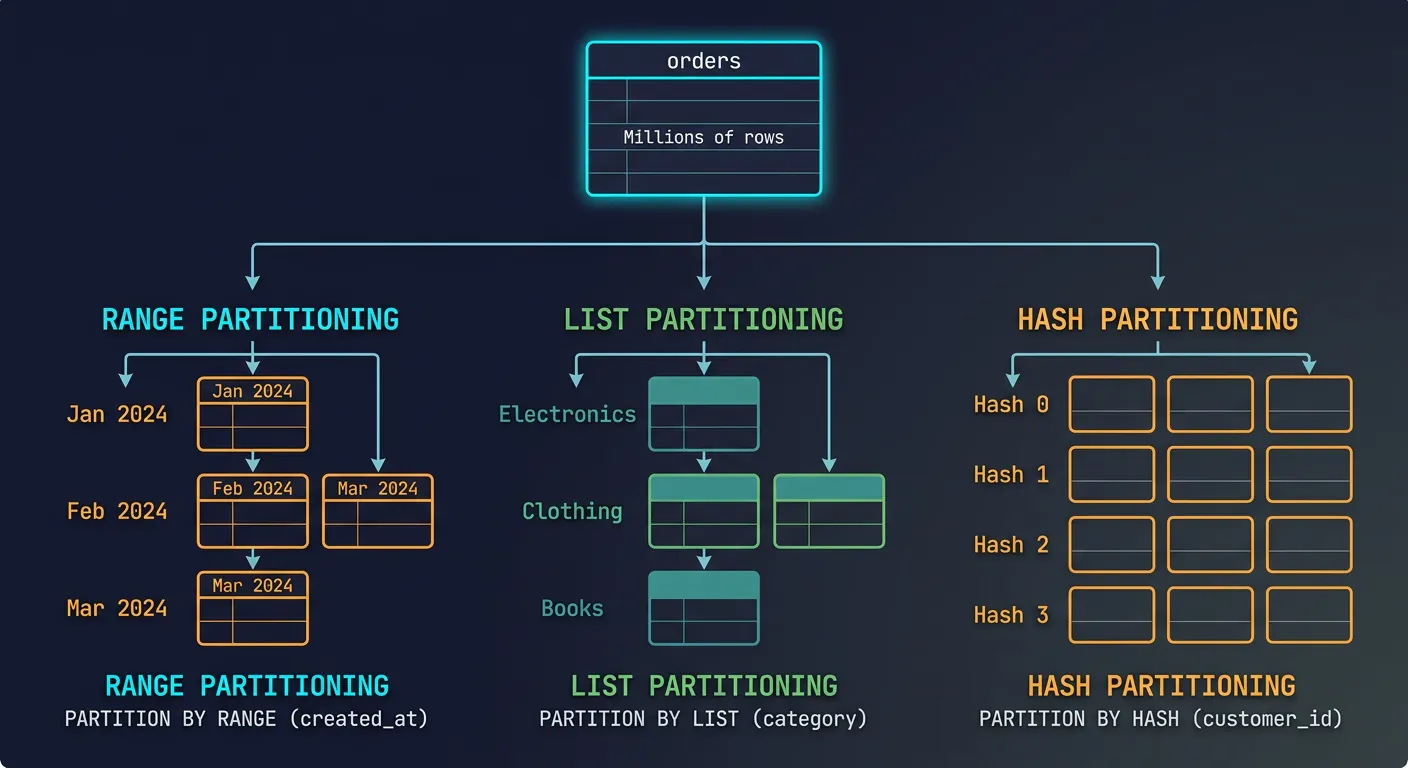
Partitioning splits a large table into smaller, more manageable pieces. The database can scan only relevant partitions, dramatically speeding up queries on huge tables.
Table partitioning strategies: range (by date), list (by category), and hash (even distribution)
-- PostgreSQL: Range partitioning by date (most common)
CREATE TABLE orders (
    id SERIAL,
    customer_id INT,
    created_at TIMESTAMP,
    total DECIMAL(10,2)
) PARTITION BY RANGE (created_at);

-- Create partitions for each month
CREATE TABLE orders_2024_01 PARTITION OF orders
    FOR VALUES FROM ('2024-01-01') TO ('2024-02-01');
CREATE TABLE orders_2024_02 PARTITION OF orders
    FOR VALUES FROM ('2024-02-01') TO ('2024-03-01');
-- ... more partitions

-- Queries automatically use only relevant partitions:
EXPLAIN SELECT * FROM orders WHERE created_at >= '2024-02-15';
-- Scans only orders_2024_02 and later!

-- List partitioning (for categorical data)
CREATE TABLE orders_by_region (
    id SERIAL,
    region TEXT,
    data JSONB
) PARTITION BY LIST (region);

CREATE TABLE orders_us PARTITION OF orders_by_region FOR VALUES IN ('US');
CREATE TABLE orders_eu PARTITION OF orders_by_region FOR VALUES IN ('EU', 'UK');
CREATE TABLE orders_apac PARTITION OF orders_by_region FOR VALUES IN ('APAC');

-- Hash partitioning (even distribution)
CREATE TABLE events (
    id BIGSERIAL,
    user_id INT,
    data JSONB
) PARTITION BY HASH (user_id);

CREATE TABLE events_0 PARTITION OF events FOR VALUES WITH (MODULUS 4, REMAINDER 0);
CREATE TABLE events_1 PARTITION OF events FOR VALUES WITH (MODULUS 4, REMAINDER 1);
CREATE TABLE events_2 PARTITION OF events FOR VALUES WITH (MODULUS 4, REMAINDER 2);
CREATE TABLE events_3 PARTITION OF events FOR VALUES WITH (MODULUS 4, REMAINDER 3);
When to Partition: Tables over 100GB, time-series data where old data is rarely accessed, or when you need to efficiently drop old data (DROP PARTITION is instant vs. DELETE).
Caching Query Results
-- PostgreSQL: Materialized Views (pre-computed query results)
CREATE MATERIALIZED VIEW daily_sales AS
SELECT
    DATE(created_at) AS date,
    COUNT(*) AS order_count,
    SUM(total) AS revenue
FROM orders
GROUP BY DATE(created_at);

-- Query the materialized view (instant!)
SELECT * FROM daily_sales WHERE date >= '2024-01-01';

-- Refresh when needed (recalculates everything)
REFRESH MATERIALIZED VIEW daily_sales;

-- Refresh concurrently (no lock, but needs unique index)
CREATE UNIQUE INDEX ON daily_sales(date);
REFRESH MATERIALIZED VIEW CONCURRENTLY daily_sales;


-- Application-level caching with Redis
-- 1. Check cache first
-- 2. If miss, query database
-- 3. Store result in cache with TTL

-- Cache key pattern
-- user:123:orders:recent → JSON of recent orders
-- product:456:details → Product details
-- dashboard:daily_stats:2024-02-15 → Daily stats

-- Invalidation strategies:
-- Time-based: TTL expiration (simple, may serve stale data)
-- Event-based: Invalidate on write (complex, always fresh)
-- Hybrid: Short TTL + event invalidation
Benchmarking & Profiling Tools
-- PostgreSQL: Find slow queries with pg_stat_statements
CREATE EXTENSION pg_stat_statements;

-- Top 10 queries by total time
SELECT
    substring(query, 1, 50) AS short_query,
    calls,
    round(total_exec_time::numeric, 2) AS total_ms,
    round(mean_exec_time::numeric, 2) AS avg_ms,
    rows
FROM pg_stat_statements
ORDER BY total_exec_time DESC
LIMIT 10;

-- Reset statistics
SELECT pg_stat_statements_reset();


-- MySQL: Slow query log
SET GLOBAL slow_query_log = 'ON';
SET GLOBAL long_query_time = 1;  -- Log queries over 1 second
SET GLOBAL log_queries_not_using_indexes = 'ON';

-- Performance Schema (MySQL 5.6+)
SELECT * FROM performance_schema.events_statements_summary_by_digest
ORDER BY SUM_TIMER_WAIT DESC
LIMIT 10;


-- PostgreSQL: Auto-explain (logs plans for slow queries)
-- In postgresql.conf:
-- shared_preload_libraries = 'auto_explain'
-- auto_explain.log_min_duration = '1s'


-- Benchmarking tool: pgbench (PostgreSQL built-in)
-- Initialize: pgbench -i mydb
-- Run: pgbench -c 10 -j 2 -t 1000 mydb
--   -c 10: 10 concurrent clients
--   -j 2: 2 threads
--   -t 1000: 1000 transactions per client
Essential Monitoring Queries
-- Current running queries (PostgreSQL)
SELECT
    pid,
    now() - pg_stat_activity.query_start AS duration,
    query,
    state
FROM pg_stat_activity
WHERE state != 'idle'
ORDER BY duration DESC;

-- Table sizes
SELECT
    relname AS table,
    pg_size_pretty(pg_total_relation_size(relid)) AS total_size,
    pg_size_pretty(pg_relation_size(relid)) AS table_size,
    pg_size_pretty(pg_indexes_size(relid)) AS index_size
FROM pg_catalog.pg_statio_user_tables
ORDER BY pg_total_relation_size(relid) DESC
LIMIT 10;

-- Index usage stats
SELECT
    relname AS table,
    indexrelname AS index,
    idx_scan AS times_used,
    pg_size_pretty(pg_relation_size(indexrelid)) AS size
FROM pg_stat_user_indexes
ORDER BY idx_scan DESC;
Conclusion & Next Steps
Query optimization is a critical skill that separates good developers from great ones. Understanding EXPLAIN plans, designing proper indexes, and avoiding anti-patterns will dramatically improve your application's performance.
Continue the Database Mastery Series
Part 5: Transactions & Concurrency
Understand how transactions affect query performance.