Introduction to Core NLP Tasks
Core NLP tasks form the building blocks of practical applications. This guide covers the fundamental tasks that extract structured information from text, enabling downstream applications like chatbots, search engines, and content analysis systems.
Key Insight
Core NLP tasks can be framed as classification problems—at the document level (text classification), token level (NER, POS), or structural level (parsing).
NLP Mastery
NLP Fundamentals & Linguistic Basics
Phonology, morphology, syntax, semantics, pragmaticsTokenization & Text Cleaning
Subword tokenization, BPE, stopwords, normalizationText Representation & Feature Engineering
Bag-of-words, TF-IDF, feature extraction, vectorizationWord Embeddings
Word2Vec, GloVe, FastText, embedding spaces, analogiesStatistical Language Models & N-grams
Probability chains, smoothing, perplexity, Markov modelsNeural Networks for NLP
Feedforward nets, backpropagation, activation functionsRNNs, LSTMs & GRUs
Sequence modeling, vanishing gradients, gated architecturesTransformers & Attention Mechanism
Self-attention, multi-head attention, positional encodingPretrained Language Models & Transfer Learning
BERT, RoBERTa, fine-tuning, feature extractionGPT Models & Text Generation
Autoregressive generation, prompting, GPT architectureCore NLP Tasks
NER, POS tagging, sentiment analysis, text classificationAdvanced NLP Tasks
Question answering, summarization, machine translationMultilingual & Cross-lingual NLP
mBERT, XLM-R, zero-shot transfer, language diversityEvaluation, Ethics & Responsible NLP
BLEU, ROUGE, bias detection, fairness, responsible AINLP Systems, Optimization & Production
Model serving, quantization, distillation, deploymentCutting-Edge & Research Topics
LLMs, multimodal NLP, reasoning, emerging researchText Classification
Text classification is the task of assigning predefined categories to text documents. It's one of the most widely used NLP applications, powering everything from spam filters to content moderation systems. The core challenge involves learning to map input text to one or more categorical labels based on the semantic content, writing style, or other textual features.
Modern text classification approaches range from traditional machine learning methods using bag-of-words or TF-IDF features to deep learning approaches using pretrained transformers. The choice depends on available labeled data, computational resources, and required accuracy. For most practical applications today, fine-tuning pretrained models like BERT achieves state-of-the-art results.
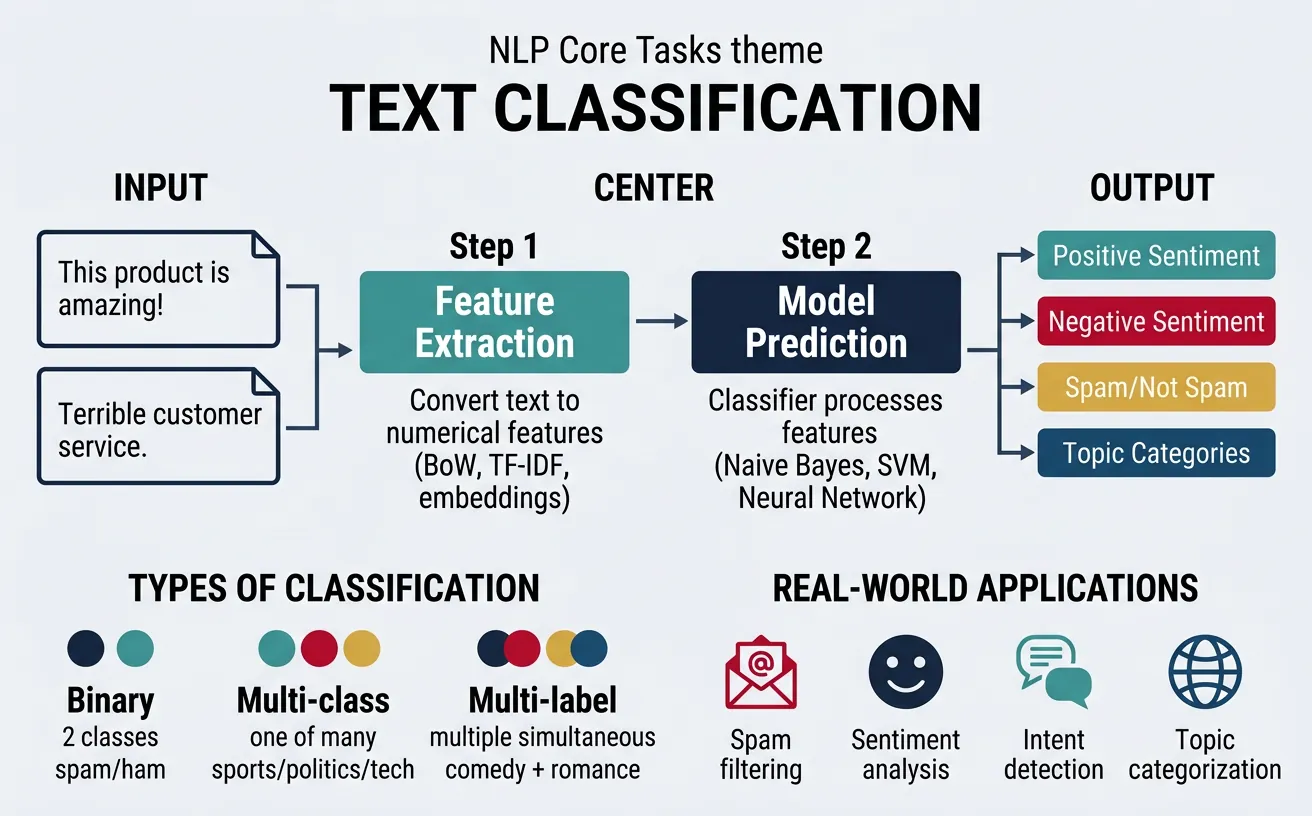
Classification Types
Binary Classification assigns one of two labels (spam/not spam). Multi-class Classification assigns exactly one label from multiple options (news categories). Multi-label Classification can assign multiple labels simultaneously (movie genres: action AND comedy).
# Text Classification with scikit-learn (Traditional ML)
import numpy as np
from sklearn.feature_extraction.text import TfidfVectorizer
from sklearn.naive_bayes import MultinomialNB
from sklearn.pipeline import Pipeline
from sklearn.model_selection import train_test_split
from sklearn.metrics import classification_report

# Sample training data
texts = [
    "The stock market rallied today with tech leading gains",
    "Scientists discover new species in Amazon rainforest",
    "Lakers defeat Celtics in overtime thriller",
    "Apple announces new iPhone with improved camera",
    "Climate change impacts coral reef ecosystems",
    "World Cup final breaks TV viewership records",
    "Federal Reserve raises interest rates again",
    "New study reveals benefits of Mediterranean diet",
    "Tennis star wins fifth Grand Slam title",
    "Startup raises $50 million in Series B funding"
]

labels = ["business", "science", "sports", "technology", "science",
          "sports", "business", "science", "sports", "business"]

# Create classification pipeline
pipeline = Pipeline([
    ('tfidf', TfidfVectorizer(max_features=1000, ngram_range=(1, 2))),
    ('classifier', MultinomialNB())
])

# Train and evaluate
X_train, X_test, y_train, y_test = train_test_split(
    texts, labels, test_size=0.3, random_state=42
)

pipeline.fit(X_train, y_train)
predictions = pipeline.predict(X_test)

print("Classification Results:")
print(classification_report(y_test, predictions))

# Predict new text
new_text = "Bitcoin reaches all-time high as investors pile in"
prediction = pipeline.predict([new_text])
print(f"\nNew text classified as: {prediction[0]}")
Sentiment Analysis
Sentiment analysis determines the emotional tone or opinion expressed in text. It ranges from simple positive/negative/neutral classification to fine-grained analysis including aspect-based sentiment, emotion detection, and stance detection. This capability is crucial for understanding customer feedback, monitoring brand reputation, and analyzing social media trends.
The complexity of sentiment analysis lies in handling sarcasm, negation, context-dependent expressions, and implicit sentiment. Modern approaches use pretrained language models that have learned rich contextual representations, enabling them to capture nuanced sentiment expressions that rule-based systems miss.
# Sentiment Analysis with Transformers
from transformers import pipeline
import numpy as np

# Load pretrained sentiment analysis pipeline
sentiment_analyzer = pipeline(
    "sentiment-analysis",
    model="distilbert-base-uncased-finetuned-sst-2-english"
)

# Analyze various sentiments
reviews = [
    "This product exceeded all my expectations! Absolutely love it.",
    "Terrible customer service. Never buying from them again.",
    "The quality is okay, nothing special but works fine.",
    "Not what I expected, but it's growing on me.",
    "I can't believe how bad this is. Total waste of money!"
]

print("Sentiment Analysis Results:")
print("=" * 60)

for review in reviews:
    result = sentiment_analyzer(review)[0]
    label = result['label']
    score = result['score']

    # Create visual indicator
    emoji = "??" if label == "POSITIVE" else "??"

    print(f"\n{emoji} [{label}] (confidence: {score:.2%})")
    print(f"   Text: {review[:50]}..." if len(review) > 50 else f"   Text: {review}")
Aspect-Based Sentiment Analysis
Aspect-based sentiment analysis (ABSA) identifies sentiment toward specific aspects or features mentioned in text. For example, in "The food was great but service was slow," ABSA detects positive sentiment for food and negative sentiment for service. This requires identifying aspect terms, categorizing them, and determining sentiment polarity for each.
# Fine-grained Sentiment with VADER (lexicon-based)
from vaderSentiment.vaderSentiment import SentimentIntensityAnalyzer
import pandas as pd

# Initialize VADER analyzer
analyzer = SentimentIntensityAnalyzer()

# Sample texts with varying sentiment intensities
texts = [
    "The movie was good.",
    "The movie was REALLY good!",
    "The movie was absolutely FANTASTIC!!!",
    "The movie was not bad.",
    "The movie was not good.",
    "The movie was terrible, but the popcorn was great.",
    "I can't say I didn't enjoy it... ??"
]

# Analyze each text
results = []
for text in texts:
    scores = analyzer.polarity_scores(text)
    results.append({
        'text': text,
        'positive': scores['pos'],
        'negative': scores['neg'],
        'neutral': scores['neu'],
        'compound': scores['compound']
    })

# Display results
df = pd.DataFrame(results)
print("VADER Sentiment Analysis (Fine-grained Scores):")
print(df.to_string(index=False))

# Interpret compound score
print("\nCompound Score Interpretation:")
print(">= 0.05: Positive | <= -0.05: Negative | Otherwise: Neutral")
Topic Classification
Topic classification assigns documents to predefined topic categories such as news domains (sports, politics, technology), support ticket types, or content genres. Unlike topic modeling which discovers latent topics, topic classification uses supervised learning with labeled examples. This is essential for content organization, routing systems, and recommendation engines.
Effective topic classifiers need to capture topical vocabulary, writing style, and domain-specific patterns. They must handle class imbalance (some topics more common than others) and concept drift (topics evolving over time). Hierarchical classification can handle topic taxonomies where broad categories contain more specific subtopics.
# Multi-class Topic Classification with BERT
from transformers import AutoTokenizer, AutoModelForSequenceClassification
import torch
import numpy as np

# Load pretrained model for news classification
model_name = "fabriceyhc/bert-base-uncased-ag_news"
tokenizer = AutoTokenizer.from_pretrained(model_name)
model = AutoModelForSequenceClassification.from_pretrained(model_name)

# AG News categories
categories = ["World", "Sports", "Business", "Science/Tech"]

def classify_topic(text):
    """Classify text into topic categories."""
    inputs = tokenizer(
        text,
        return_tensors="pt",
        truncation=True,
        max_length=512,
        padding=True
    )

    with torch.no_grad():
        outputs = model(**inputs)
        probabilities = torch.softmax(outputs.logits, dim=1)

    # Get top predictions
    probs = probabilities[0].numpy()
    sorted_idx = np.argsort(probs)[::-1]

    return [(categories[i], probs[i]) for i in sorted_idx]

# Test with various texts
test_articles = [
    "The team secured a dramatic victory in the championship finals.",
    "New AI model breaks records in language understanding benchmarks.",
    "Central bank announces major policy shift on interest rates.",
    "Peace talks resume after months of diplomatic stalemate."
]

print("Topic Classification Results:")
print("=" * 60)

for article in test_articles:
    predictions = classify_topic(article)
    top_topic, confidence = predictions[0]

    print(f"\n?? {article[:60]}...")
    print(f"   Topic: {top_topic} (confidence: {confidence:.2%})")
    print(f"   Alternatives: {predictions[1][0]} ({predictions[1][1]:.1%}), "
          f"{predictions[2][0]} ({predictions[2][1]:.1%})")
Intent Detection
Intent detection identifies the purpose or goal behind user utterances, crucial for conversational AI and virtual assistants. When a user says "Can you turn on the lights?", the system must recognize this as a smart home control intent rather than a yes/no question. Intent detection combines with entity extraction to enable natural language understanding in dialogue systems.
Modern intent detection handles multi-intent queries ("Set alarm for 7am and play news"), out-of-scope detection (requests the system can't handle), and intent hierarchy. Zero-shot approaches can detect intents without labeled examples by leveraging semantic similarity with intent descriptions.
# Intent Detection for Conversational AI
from transformers import pipeline
import numpy as np

# Zero-shot classification for intent detection
classifier = pipeline(
    "zero-shot-classification",
    model="facebook/bart-large-mnli"
)

# Define possible intents
intents = [
    "book_flight",
    "check_weather",
    "play_music",
    "set_reminder",
    "get_directions",
    "order_food",
    "general_question"
]

def detect_intent(utterance):
    """Detect intent from user utterance."""
    result = classifier(
        utterance,
        candidate_labels=intents,
        hypothesis_template="This is a request to {}."
    )
    return list(zip(result['labels'], result['scores']))

# Test utterances
utterances = [
    "I need a flight to New York next Tuesday",
    "What's the weather like in London?",
    "Play some jazz music",
    "Remind me to call mom at 3pm",
    "How do I get to the nearest coffee shop?",
    "I'm hungry, what's good around here?",
    "What is the capital of France?"
]

print("Intent Detection Results:")
print("=" * 60)

for utterance in utterances:
    intents_ranked = detect_intent(utterance)
    top_intent, confidence = intents_ranked[0]

    # Intent icons
    icons = {
        "book_flight": "??", "check_weather": "???", "play_music": "??",
        "set_reminder": "?", "get_directions": "???",
        "order_food": "??", "general_question": "?"
    }

    print(f"\n{icons.get(top_intent, '??')} \"{utterance}\"")
    print(f"   Intent: {top_intent} (confidence: {confidence:.2%})")
Named Entity Recognition (NER)
Named Entity Recognition (NER) identifies and classifies named entities in text into predefined categories such as person names, organizations, locations, dates, monetary values, and more. NER is fundamental for information extraction, knowledge graph construction, and understanding factual content in text. It transforms unstructured text into structured data that downstream applications can process.
NER is typically formulated as a sequence labeling problem where each token receives a label indicating whether it's part of an entity and what type. The BIO (Beginning-Inside-Outside) tagging scheme handles multi-token entities: "New York" becomes "New/B-LOC York/I-LOC" indicating the beginning and inside tokens of a location entity. More sophisticated schemes like BIOES add Single and End tags for better boundary detection.
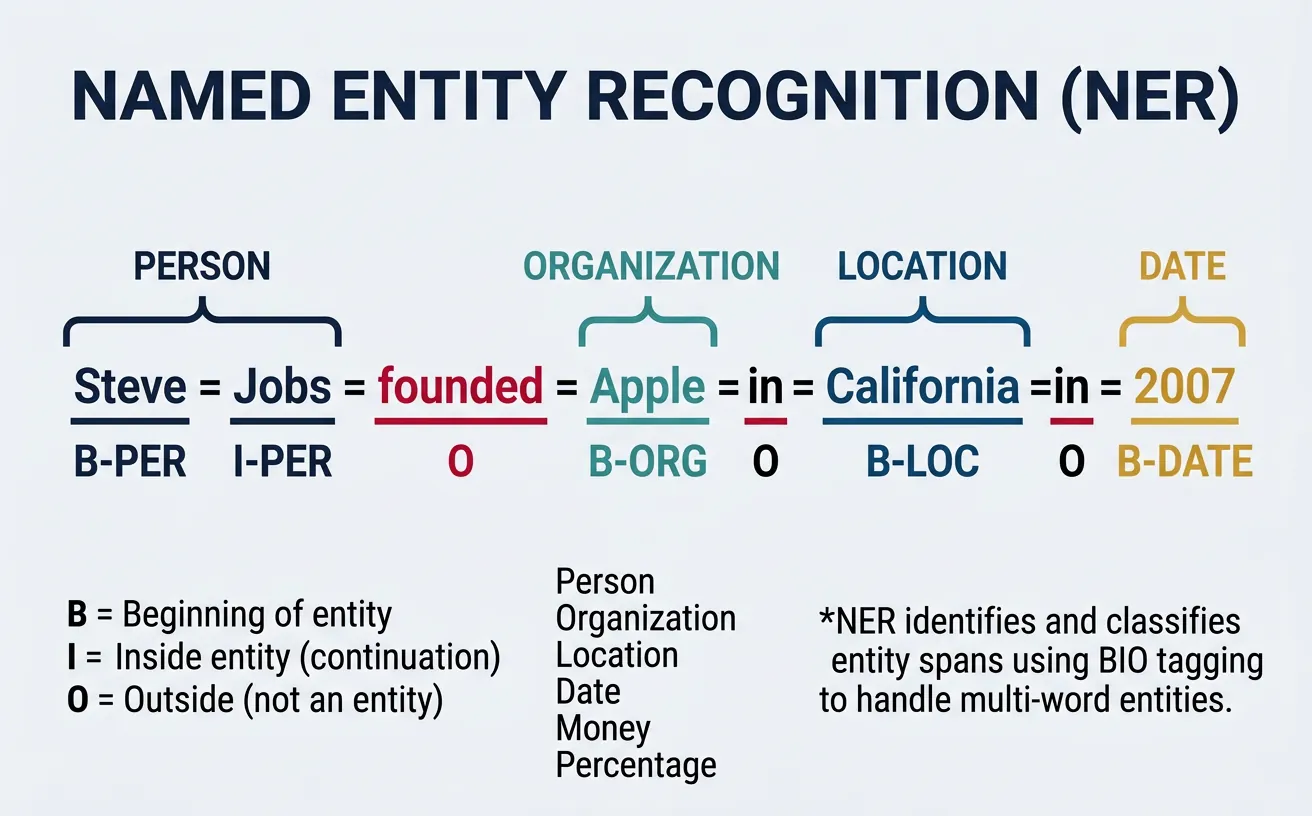
Standard Entity Types
PER (Person): Names of people. ORG (Organization): Companies, institutions. LOC (Location): Countries, cities, landmarks. DATE/TIME: Temporal expressions. MONEY: Monetary values. MISC: Other named entities. Custom NER can define domain-specific types like product names, medical conditions, or legal terms.
# Named Entity Recognition with spaCy
import spacy

# Load English model with NER
nlp = spacy.load("en_core_web_sm")

# Sample text with various entities
text = """Apple Inc. announced today that CEO Tim Cook will visit their
new headquarters in Cupertino, California on January 15, 2026. The company
reported $123.9 billion in quarterly revenue, surpassing Microsoft's
forecast. The event will feature presentations by engineers from Google
and researchers from MIT."""

# Process text
doc = nlp(text)

print("Named Entity Recognition Results:")
print("=" * 60)

# Extract and display entities
for ent in doc.ents:
    print(f"  {ent.text:25} | {ent.label_:10} | {spacy.explain(ent.label_)}")

# Visualize entity spans
print("\nEntity Spans in Text:")
print("-" * 60)
for sent in doc.sents:
    annotated = sent.text
    print(f"\n{annotated}")
    sent_ents = [e for e in doc.ents if e.sent == sent]
    if sent_ents:
        print(f"  Entities: {[(e.text, e.label_) for e in sent_ents]}")
BIO Tagging Scheme Explained
The BIO scheme uses three tag prefixes: B- (Beginning) marks the first token of an entity, I- (Inside) marks subsequent tokens, and O (Outside) marks non-entity tokens. Example: "Barack Obama visited New York" ? "Barack/B-PER Obama/I-PER visited/O New/B-LOC York/I-LOC". This encoding enables models to learn entity boundaries and handle adjacent entities of different types.
# NER with BIO Tags using NLTK and sklearn-crfsuite
import nltk
from nltk import pos_tag, word_tokenize

# Download required data
nltk.download('punkt', quiet=True)
nltk.download('averaged_perceptron_tagger', quiet=True)
nltk.download('maxent_ne_chunker', quiet=True)
nltk.download('words', quiet=True)

def get_bio_tags(text):
    """Convert NLTK NE chunks to BIO format."""
    tokens = word_tokenize(text)
    pos_tags = pos_tag(tokens)
    chunks = nltk.ne_chunk(pos_tags)

    bio_tags = []
    for item in chunks:
        if hasattr(item, 'label'):  # Named entity
            entity_type = item.label()
            for i, (word, pos) in enumerate(item):
                if i == 0:
                    bio_tags.append((word, pos, f"B-{entity_type}"))
                else:
                    bio_tags.append((word, pos, f"I-{entity_type}"))
        else:  # Regular token
            word, pos = item
            bio_tags.append((word, pos, "O"))

    return bio_tags

# Example text
text = "Steve Jobs founded Apple Computer in California with Steve Wozniak."

# Get BIO tags
bio_result = get_bio_tags(text)

print("BIO Tagging Results:")
print("=" * 60)
print(f"{'Token':15} {'POS':8} {'BIO Tag'}")
print("-" * 40)

for token, pos, bio in bio_result:
    # Highlight entity tokens
    marker = "? Entity" if bio != "O" else ""
    print(f"{token:15} {pos:8} {bio:15} {marker}")
# Transformer-based NER with Hugging Face
from transformers import pipeline
import pandas as pd

# Load NER pipeline
ner_pipeline = pipeline(
    "ner",
    model="dslim/bert-base-NER",
    aggregation_strategy="simple"  # Merge subword tokens
)

# Process text
text = "Elon Musk announced that Tesla will open a new factory in Berlin, "
text += "Germany. The $5 billion investment was confirmed by the European Union."

entities = ner_pipeline(text)

# Create DataFrame for nice display
df = pd.DataFrame(entities)
df = df[['word', 'entity_group', 'score', 'start', 'end']]
df['score'] = df['score'].apply(lambda x: f"{x:.2%}")
df.columns = ['Entity', 'Type', 'Confidence', 'Start', 'End']

print("Transformer NER Results:")
print("=" * 60)
print(df.to_string(index=False))

# Show entities in context
print("\nEntities highlighted in text:")
print("-" * 60)
highlighted = text
for ent in sorted(entities, key=lambda x: x['start'], reverse=True):
    highlighted = (highlighted[:ent['start']] +
                   f"[{ent['word']}|{ent['entity_group']}]" +
                   highlighted[ent['end']:])
print(highlighted)
Part-of-Speech Tagging
Part-of-Speech (POS) tagging assigns grammatical categories to each word in a sentence—noun, verb, adjective, adverb, pronoun, preposition, etc. This fundamental NLP task provides syntactic information essential for parsing, information extraction, and understanding sentence structure. POS tags help disambiguate words with multiple meanings; "bank" as a noun (financial institution) vs. verb (to bank a turn).
Modern POS taggers achieve 97%+ accuracy on standard benchmarks. They use context to resolve ambiguity: in "I can can a can," the tagger must distinguish the modal verb, main verb, and noun. Tagsets vary from coarse (12-15 tags) to fine-grained (45+ Penn Treebank tags) to universal (17 tags for cross-lingual consistency). The choice depends on application requirements and language specifics.
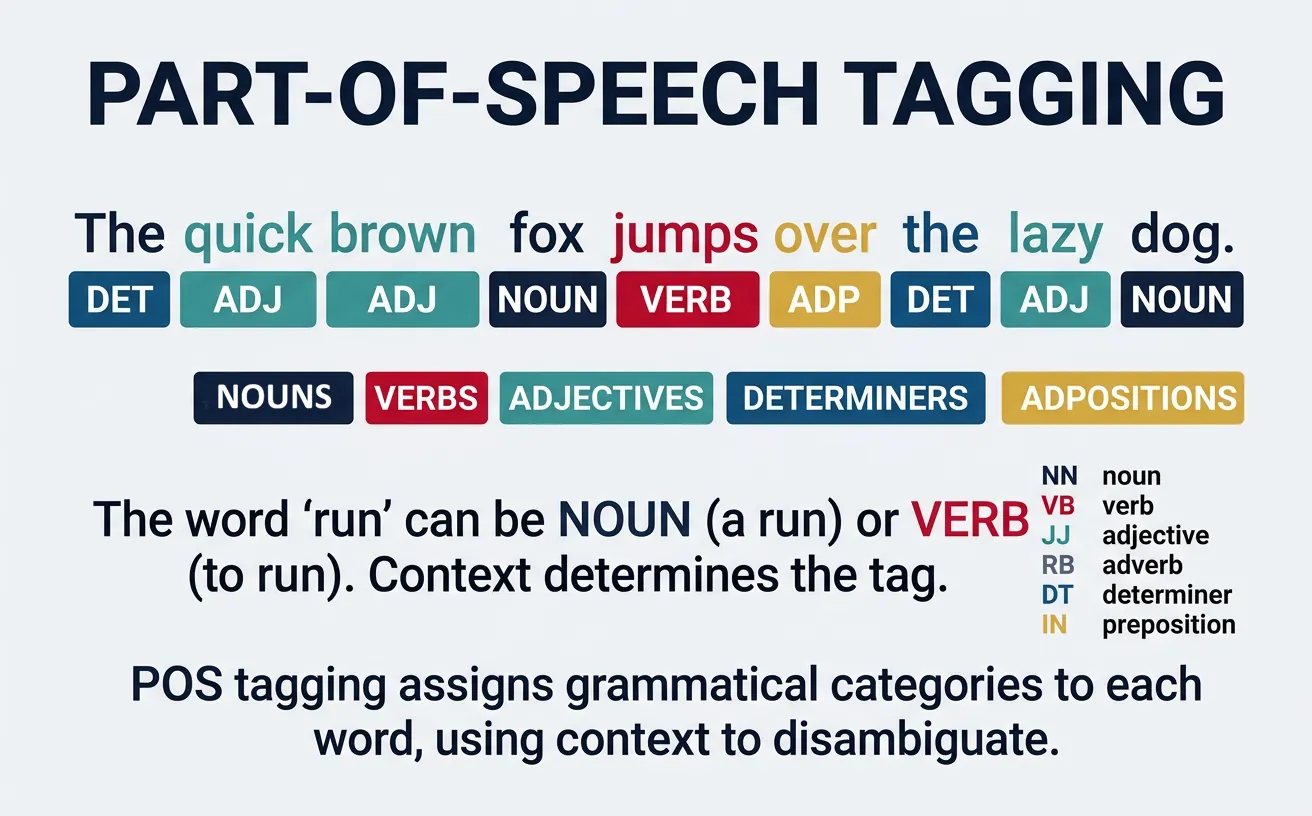
Common POS Tag Categories
Nouns (NN): Person, place, thing, concept. Verbs (VB): Action or state. Adjectives (JJ): Describe nouns. Adverbs (RB): Modify verbs, adjectives, other adverbs. Pronouns (PRP): Replace nouns. Prepositions (IN): Show relationships. Determiners (DT): "the," "a," "some." Conjunctions (CC): Connect clauses.
# Part-of-Speech Tagging with NLTK
import nltk
from nltk import pos_tag, word_tokenize
from collections import Counter

# Download required data
nltk.download('punkt', quiet=True)
nltk.download('averaged_perceptron_tagger', quiet=True)
nltk.download('tagsets', quiet=True)

# Sample text
text = """The quick brown fox jumps over the lazy dog.
She sells seashells by the seashore enthusiastically."""

# Tokenize and tag
tokens = word_tokenize(text)
pos_tags = pos_tag(tokens)

print("Part-of-Speech Tagging Results:")
print("=" * 60)
print(f"{'Token':15} {'POS':6} {'Description'}")
print("-" * 50)

for token, pos in pos_tags:
    # Skip punctuation
    if token.isalpha():
        try:
            description = nltk.help.upenn_tagset(pos, False) or pos
            desc_short = pos  # Use tag as fallback
        except:
            desc_short = pos
        print(f"{token:15} {pos:6}")

# POS distribution
print("\nPOS Tag Distribution:")
print("-" * 30)
pos_counts = Counter(tag for _, tag in pos_tags if tag.isalpha())
for tag, count in pos_counts.most_common():
    print(f"  {tag}: {count}")
Penn Treebank vs Universal Tagset
The Penn Treebank tagset (45 tags) provides fine-grained distinctions like VBG (verb gerund), VBD (past tense), VBN (past participle). The Universal Dependencies tagset (17 tags) simplifies this for cross-lingual consistency: VERB covers all verb forms. Choose Penn for detailed English analysis, Universal for multilingual applications or when fine distinctions aren't needed.
# POS Tagging with spaCy (more accurate, production-ready)
import spacy

# Load English model
nlp = spacy.load("en_core_web_sm")

# Analyze sentence with ambiguous words
text = "I read the book that you read yesterday."
doc = nlp(text)

print("spaCy POS Tagging (with fine-grained tags):")
print("=" * 60)
print(f"{'Token':12} {'POS':8} {'Fine POS':10} {'Explanation'}")
print("-" * 55)

for token in doc:
    # Universal POS and fine-grained tag
    print(f"{token.text:12} {token.pos_:8} {token.tag_:10} {spacy.explain(token.tag_)}")

# Show context-sensitive disambiguation
print("\nContext-sensitive POS Disambiguation:")
print("-" * 55)
ambiguous_text = "They refuse to permit us to obtain a refuse permit."
doc2 = nlp(ambiguous_text)

print(f"Sentence: {ambiguous_text}")
print("\nNote how 'refuse' and 'permit' get different tags:")
for token in doc2:
    if token.text.lower() in ['refuse', 'permit']:
        print(f"  '{token.text}' ? {token.pos_} ({token.tag_}): {spacy.explain(token.tag_)}")
# POS-based Text Analysis
import spacy
from collections import Counter

nlp = spacy.load("en_core_web_sm")

def analyze_writing_style(text):
    """Analyze writing style using POS distributions."""
    doc = nlp(text)

    # Count POS tags
    pos_counts = Counter(token.pos_ for token in doc if token.is_alpha)
    total = sum(pos_counts.values())

    # Calculate ratios
    noun_ratio = (pos_counts.get('NOUN', 0) + pos_counts.get('PROPN', 0)) / total
    verb_ratio = pos_counts.get('VERB', 0) / total
    adj_ratio = pos_counts.get('ADJ', 0) / total
    adv_ratio = pos_counts.get('ADV', 0) / total

    return {
        'noun_ratio': noun_ratio,
        'verb_ratio': verb_ratio,
        'adj_ratio': adj_ratio,
        'adv_ratio': adv_ratio,
        'pos_distribution': dict(pos_counts)
    }

# Compare writing styles
texts = {
    "Scientific": "The experiment demonstrated that temperature significantly affects reaction rates. Results indicate measurable variations across multiple trials.",
    "Creative": "She danced gracefully through the moonlit garden, her silken dress flowing beautifully behind her.",
    "News": "The president announced new economic policies today. Markets responded positively to the unexpected decision."
}

print("Writing Style Analysis (POS Distributions):")
print("=" * 60)

for style, text in texts.items():
    analysis = analyze_writing_style(text)
    print(f"\n?? {style} Style:")
    print(f"   Nouns: {analysis['noun_ratio']:.1%} | "
          f"Verbs: {analysis['verb_ratio']:.1%} | "
          f"Adj: {analysis['adj_ratio']:.1%} | "
          f"Adv: {analysis['adv_ratio']:.1%}")
Syntactic Parsing
Syntactic parsing analyzes sentence structure to reveal grammatical relationships between words. It produces a tree or graph structure showing how words combine into phrases and clauses. Two main approaches exist: dependency parsing (which words modify which) and constituency parsing (how words group into phrases). Parsing is essential for understanding meaning, extracting relations, and enabling semantic analysis.
Modern neural parsers achieve over 95% accuracy on standard benchmarks, making them reliable for production use. They handle various challenges including long-distance dependencies, coordination structures, and attachment ambiguities. Parsing enables applications like question answering (identifying subject/object), information extraction (extracting who did what to whom), and grammar checking.
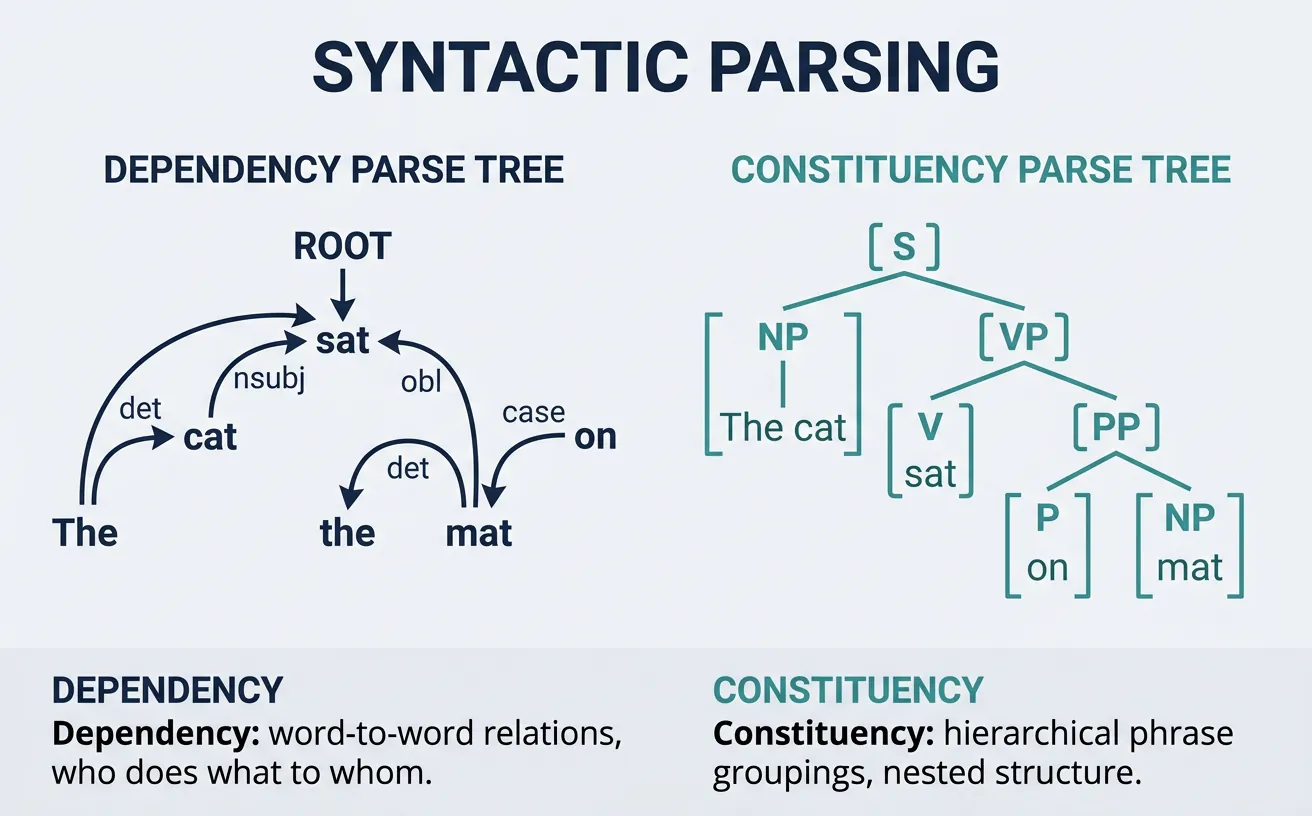
Dependency Parsing
Dependency parsing identifies grammatical relationships between words, connecting each word to its syntactic "head" with a labeled relation. The root (usually main verb) has no head, and all other words depend on another word. Relations include subject (nsubj), direct object (dobj), modifier (amod), and many others. This structure directly captures "who did what to whom" relationships.
Dependency trees are language-independent (no phrase categories needed) and useful for semantic tasks. They represent the sentence as a directed graph where edges show grammatical relations. Projective parsing (no crossing edges) is simpler but non-projective parsing handles freer word order languages.
Core Dependency Relations
nsubj: Nominal subject ("She" in "She runs"). dobj: Direct object ("book" in "read the book"). amod: Adjectival modifier ("red" in "red car"). advmod: Adverbial modifier ("quickly" in "runs quickly"). prep/pobj: Preposition and object ("to school"). det: Determiner ("the", "a"). ROOT: Main predicate of sentence.
# Dependency Parsing with spaCy
import spacy

# Load model
nlp = spacy.load("en_core_web_sm")

# Parse sentence
text = "The quick brown fox jumps over the lazy dog."
doc = nlp(text)

print("Dependency Parse Results:")
print("=" * 60)
print(f"{'Token':12} {'Dep':10} {'Head':12} {'Children'}")
print("-" * 55)

for token in doc:
    children = [child.text for child in token.children]
    children_str = ", ".join(children) if children else "-"
    print(f"{token.text:12} {token.dep_:10} {token.head.text:12} {children_str}")

# Find sentence root and main structure
print("\nSentence Structure:")
print("-" * 55)
for token in doc:
    if token.dep_ == "ROOT":
        subjects = [t.text for t in token.children if "subj" in t.dep_]
        objects = [t.text for t in token.children if "obj" in t.dep_]
        print(f"Main verb: {token.text}")
        print(f"Subject(s): {subjects}")
        print(f"Object(s): {objects}")
# Extract Subject-Verb-Object Triples
import spacy

nlp = spacy.load("en_core_web_sm")

def extract_svo_triples(text):
    """Extract Subject-Verb-Object triples from text."""
    doc = nlp(text)
    triples = []

    for token in doc:
        if token.dep_ == "ROOT":  # Main verb
            verb = token.text

            # Find subject
            subject = None
            for child in token.children:
                if child.dep_ in ["nsubj", "nsubjpass"]:
                    # Include compound nouns and modifiers
                    subject_parts = [c.text for c in child.subtree]
                    subject = " ".join(subject_parts)
                    break

            # Find object
            obj = None
            for child in token.children:
                if child.dep_ in ["dobj", "pobj", "attr"]:
                    obj_parts = [c.text for c in child.subtree]
                    obj = " ".join(obj_parts)
                    break

            if subject or obj:
                triples.append((subject, verb, obj))

    return triples

# Test sentences
sentences = [
    "Apple released a new iPhone yesterday.",
    "The researchers discovered a breakthrough in quantum computing.",
    "Microsoft acquired the gaming company for $70 billion.",
    "Scientists believe the theory explains dark matter."
]

print("Subject-Verb-Object Extraction:")
print("=" * 60)

for sent in sentences:
    triples = extract_svo_triples(sent)
    print(f"\n?? \"{sent}\"")
    for subj, verb, obj in triples:
        print(f"   ? Subject: {subj}")
        print(f"   ? Verb: {verb}")
        print(f"   ? Object: {obj}")
Constituency Parsing
Constituency parsing represents sentences as nested phrase structures, showing how words group into phrases (NP, VP, PP) that combine into larger units. "The big cat" forms a noun phrase (NP) containing a determiner (DT), adjective (JJ), and noun (NN). This hierarchical structure captures how meaning composes bottom-up from words to full sentences.
Constituency trees explicitly represent phrase types (unlike dependency trees) and are useful for tasks requiring phrase-level analysis like chunking, paraphrasing, and grammar-based generation. Common labels include S (sentence), NP (noun phrase), VP (verb phrase), PP (prepositional phrase), and ADJP/ADVP (adjective/adverb phrases).
# Constituency Parsing with benepar (Berkeley Neural Parser)
import spacy
import benepar

# Load spaCy with benepar constituency parser
nlp = spacy.load("en_core_web_sm")
nlp.add_pipe("benepar", config={"model": "benepar_en3"})

# Parse sentence
text = "The quick brown fox jumps over the lazy dog."
doc = nlp(text)

print("Constituency Parse:")
print("=" * 60)

for sent in doc.sents:
    # Get parse tree
    print(f"Sentence: {sent.text}")
    print(f"\nParse Tree:")
    print(sent._.parse_string)

    # Extract noun phrases
    print(f"\nNoun Phrases:")
    for np in sent._.constituents:
        if np._.labels and np._.labels[0] == "NP":
            print(f"  NP: {np.text}")
Dependency vs Constituency Parsing
Dependency Parsing: Best for relation extraction, semantic role labeling, and cross-lingual applications. Directly shows word-to-word relationships. Simpler representation, faster processing. Constituency Parsing: Best for phrase-level tasks, paraphrase generation, and grammar checking. Shows hierarchical phrase grouping. Richer structure, more complex processing.
Sequence Labeling
Sequence labeling assigns a label to each token in a sequence, encompassing tasks like NER, POS tagging, and chunking. The key challenge is modeling dependencies between labels—the tag of one token often depends on surrounding tags. For example, if the current token is tagged B-PER (beginning of person name), the next token is likely I-PER (inside person name) or O (outside entity), not B-LOC.
Classical approaches used Hidden Markov Models (HMMs) or Conditional Random Fields (CRFs) to model label dependencies. Modern methods combine neural encoders (LSTMs, Transformers) with a CRF layer for structured prediction, achieving state-of-the-art results. The neural encoder captures contextual features while the CRF layer ensures valid label sequences.
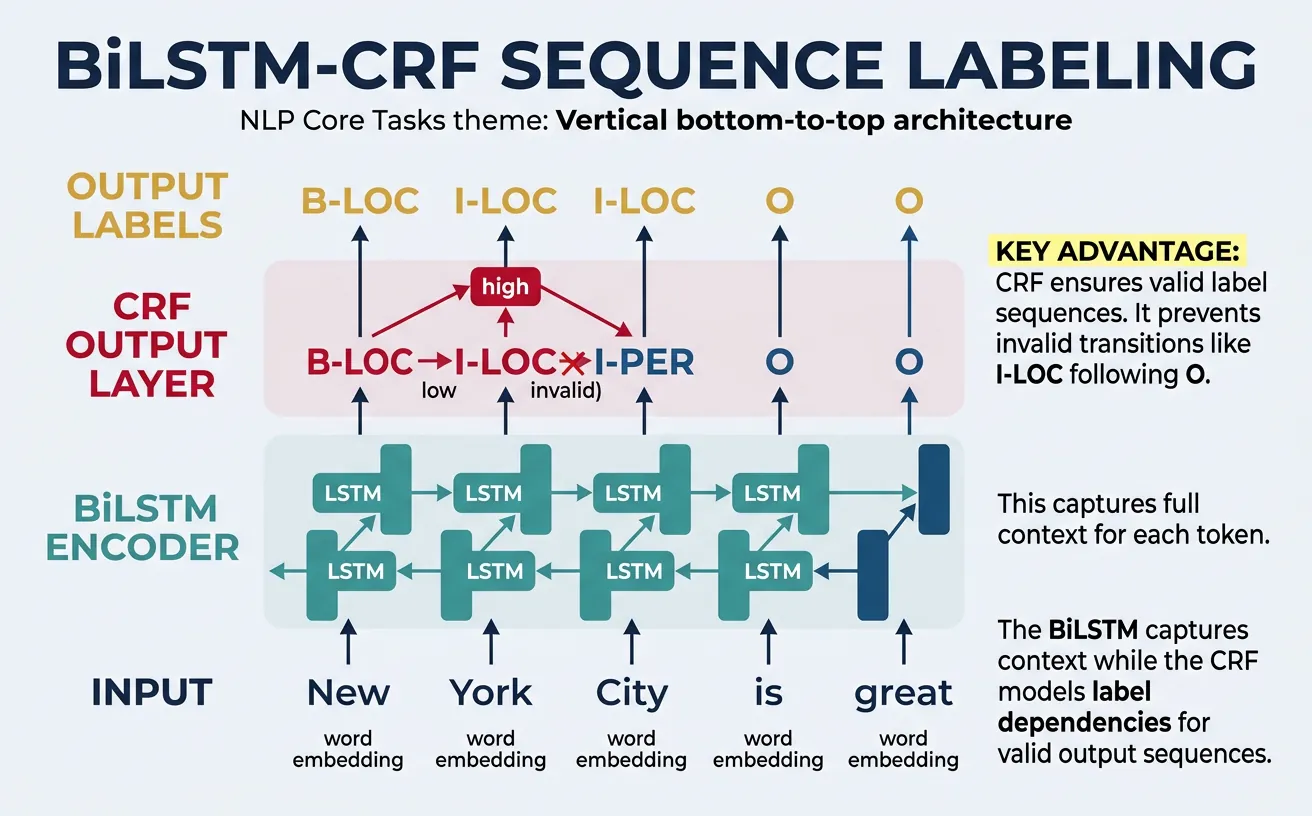
Sequence Labeling Tasks
NER: Label entity tokens (B-PER, I-PER, O). POS Tagging: Label grammatical categories (NN, VB, JJ). Chunking: Label phrase boundaries (B-NP, I-NP, B-VP). Slot Filling: Label intent slots (B-time, I-time for "3 pm"). All share the same model architecture with different tagsets.
# Sequence Labeling with sklearn-crfsuite
from sklearn_crfsuite import CRF
import numpy as np

# Feature extraction for sequence labeling
def word2features(sent, i):
    """Extract features for a word in context."""
    word = sent[i][0]

    features = {
        'word.lower()': word.lower(),
        'word[-3:]': word[-3:],
        'word[-2:]': word[-2:],
        'word.isupper()': word.isupper(),
        'word.istitle()': word.istitle(),
        'word.isdigit()': word.isdigit(),
    }

    if i > 0:
        word1 = sent[i-1][0]
        features.update({
            '-1:word.lower()': word1.lower(),
            '-1:word.istitle()': word1.istitle(),
        })
    else:
        features['BOS'] = True  # Beginning of sentence

    if i < len(sent) - 1:
        word1 = sent[i+1][0]
        features.update({
            '+1:word.lower()': word1.lower(),
            '+1:word.istitle()': word1.istitle(),
        })
    else:
        features['EOS'] = True  # End of sentence

    return features

def sent2features(sent):
    return [word2features(sent, i) for i in range(len(sent))]

def sent2labels(sent):
    return [label for _, label in sent]

# Sample training data: (word, BIO-tag) pairs
train_sents = [
    [("John", "B-PER"), ("Smith", "I-PER"), ("works", "O"),
     ("at", "O"), ("Google", "B-ORG"), (".", "O")],
    [("Apple", "B-ORG"), ("announced", "O"), ("new", "O"),
     ("CEO", "O"), ("Tim", "B-PER"), ("Cook", "I-PER"), (".", "O")],
    [("Visit", "O"), ("New", "B-LOC"), ("York", "I-LOC"),
     ("City", "I-LOC"), ("today", "O"), (".", "O")]
]

# Extract features
X_train = [sent2features(s) for s in train_sents]
y_train = [sent2labels(s) for s in train_sents]

# Train CRF model
crf = CRF(
    algorithm='lbfgs',
    c1=0.1, c2=0.1,
    max_iterations=100,
    all_possible_transitions=True
)
crf.fit(X_train, y_train)

# Predict on new sentence
test_sent = [("Elon", ""), ("Musk", ""), ("founded", ""),
             ("SpaceX", ""), ("in", ""), ("California", ""), (".", "")]

X_test = [sent2features(test_sent)]
predictions = crf.predict(X_test)[0]

print("CRF Sequence Labeling Results:")
print("=" * 40)
print(f"{'Token':15} {'Predicted Tag'}")
print("-" * 30)
for (word, _), pred in zip(test_sent, predictions):
    marker = "? Entity" if pred != "O" else ""
    print(f"{word:15} {pred:15} {marker}")
# Transformer-based Sequence Labeling
from transformers import AutoTokenizer, AutoModelForTokenClassification
import torch
import numpy as np

# Load pretrained NER model
model_name = "dslim/bert-base-NER"
tokenizer = AutoTokenizer.from_pretrained(model_name)
model = AutoModelForTokenClassification.from_pretrained(model_name)

# Label mapping
label_list = model.config.id2label

def predict_sequence_labels(text):
    """Predict BIO labels for each token."""
    # Tokenize
    inputs = tokenizer(
        text,
        return_tensors="pt",
        return_offsets_mapping=True,
        truncation=True
    )
    offset_mapping = inputs.pop("offset_mapping")[0]

    # Predict
    with torch.no_grad():
        outputs = model(**inputs)
        predictions = torch.argmax(outputs.logits, dim=2)[0]

    # Align predictions with words
    tokens = tokenizer.convert_ids_to_tokens(inputs["input_ids"][0])
    results = []

    for token, pred_id, (start, end) in zip(tokens, predictions, offset_mapping):
        if start == end:  # Special token
            continue
        label = label_list[pred_id.item()]
        results.append((token, label))

    return results

# Test
text = "Barack Obama visited Microsoft headquarters in Seattle yesterday."
results = predict_sequence_labels(text)

print("BERT Sequence Labeling:")
print("=" * 45)
print(f"{'Token':15} {'Label':15} {'Description'}")
print("-" * 45)

for token, label in results:
    if label != "O":
        desc = label.replace("B-", "Begin ").replace("I-", "Inside ")
    else:
        desc = "Outside entity"
    marker = "*" if label != "O" else ""
    print(f"{token:15} {label:15} {desc} {marker}")
Practical Implementation
Building production NLP systems requires combining multiple core tasks into cohesive pipelines. A typical document understanding system might combine text classification to route documents, NER to extract entities, and parsing to understand relationships. Each component must be reliable, fast, and handle edge cases gracefully.
This section demonstrates practical implementations that combine core NLP tasks. We'll build systems that process real-world text, extract structured information, and produce actionable outputs. These patterns form the foundation for chatbots, search engines, content analysis systems, and more.
Complete NLP Pipeline
A production NLP pipeline typically includes: (1) Text preprocessing and normalization, (2) Language detection and encoding handling, (3) Core NLP tasks (tokenization, POS, NER, parsing), (4) Custom task-specific models, (5) Output formatting and validation. Each stage must handle errors gracefully and log appropriately.
# Complete NLP Analysis Pipeline
import spacy
from collections import defaultdict
import json

# Load spaCy model
nlp = spacy.load("en_core_web_sm")

def comprehensive_nlp_analysis(text):
    """Perform complete NLP analysis on text."""
    doc = nlp(text)

    analysis = {
        "text": text,
        "statistics": {
            "sentences": len(list(doc.sents)),
            "tokens": len(doc),
            "words": len([t for t in doc if t.is_alpha]),
            "unique_words": len(set(t.lower_ for t in doc if t.is_alpha))
        },
        "entities": [],
        "pos_distribution": defaultdict(int),
        "noun_phrases": [],
        "verbs": [],
        "key_relations": []
    }

    # Extract entities
    for ent in doc.ents:
        analysis["entities"].append({
            "text": ent.text,
            "label": ent.label_,
            "start": ent.start_char,
            "end": ent.end_char
        })

    # POS distribution
    for token in doc:
        if token.is_alpha:
            analysis["pos_distribution"][token.pos_] += 1

    # Noun phrases
    for chunk in doc.noun_chunks:
        analysis["noun_phrases"].append(chunk.text)

    # Main verbs with subjects/objects
    for token in doc:
        if token.pos_ == "VERB" and token.dep_ == "ROOT":
            verb_info = {"verb": token.text, "subjects": [], "objects": []}
            for child in token.children:
                if "subj" in child.dep_:
                    verb_info["subjects"].append(child.text)
                if "obj" in child.dep_:
                    verb_info["objects"].append(child.text)
            analysis["verbs"].append(verb_info)

    return analysis

# Analyze sample text
text = """Apple Inc. announced today that CEO Tim Cook will present the new
iPhone at their Cupertino headquarters. The company expects strong sales
in China and Europe during the holiday season."""

result = comprehensive_nlp_analysis(text)

print("Comprehensive NLP Analysis:")
print("=" * 60)
print(f"\n?? Statistics:")
for key, value in result["statistics"].items():
    print(f"   {key}: {value}")

print(f"\n??? Named Entities:")
for ent in result["entities"]:
    print(f"   {ent['text']} ({ent['label']})")

print(f"\n?? Noun Phrases:")
for np in result["noun_phrases"][:5]:
    print(f"   • {np}")

print(f"\n?? Main Actions:")
for verb in result["verbs"]:
    print(f"   {verb['subjects']} ? {verb['verb']} ? {verb['objects']}")
# Multi-label Classification Pipeline
from transformers import pipeline
from sklearn.preprocessing import MultiLabelBinarizer
import numpy as np

# Zero-shot multi-label classifier
classifier = pipeline(
    "zero-shot-classification",
    model="facebook/bart-large-mnli"
)

def multi_label_classify(text, labels, threshold=0.3):
    """Classify text into multiple applicable labels."""
    result = classifier(
        text,
        candidate_labels=labels,
        multi_label=True  # Enable multi-label mode
    )

    # Filter by threshold
    assigned_labels = [
        (label, score)
        for label, score in zip(result['labels'], result['scores'])
        if score >= threshold
    ]

    return assigned_labels

# Movie genre classification (multi-label)
genres = [
    "action", "comedy", "drama", "romance",
    "thriller", "sci-fi", "horror", "documentary"
]

movie_descriptions = [
    "A love story set against the backdrop of an alien invasion on Earth.",
    "A detective investigates murders while dealing with his own dark past.",
    "Friends embark on a hilarious road trip across America.",
    "Documentary exploring the lives of deep sea creatures."
]

print("Multi-label Genre Classification:")
print("=" * 60)

for desc in movie_descriptions:
    labels = multi_label_classify(desc, genres, threshold=0.25)

    print(f"\n?? \"{desc[:50]}...\"")
    print(f"   Genres: ", end="")
    for label, score in labels:
        print(f"{label} ({score:.0%})", end=" ")
    print()
# Information Extraction System
import spacy
import re
from collections import namedtuple

nlp = spacy.load("en_core_web_sm")

# Define extraction patterns
ExtractedInfo = namedtuple('ExtractedInfo',
    ['persons', 'organizations', 'locations', 'dates', 'money', 'emails', 'urls'])

def extract_information(text):
    """Extract structured information from text."""
    doc = nlp(text)

    # Entity extraction
    entities = {
        'persons': [],
        'organizations': [],
        'locations': [],
        'dates': [],
        'money': []
    }

    for ent in doc.ents:
        if ent.label_ == "PERSON":
            entities['persons'].append(ent.text)
        elif ent.label_ == "ORG":
            entities['organizations'].append(ent.text)
        elif ent.label_ in ["GPE", "LOC"]:
            entities['locations'].append(ent.text)
        elif ent.label_ == "DATE":
            entities['dates'].append(ent.text)
        elif ent.label_ == "MONEY":
            entities['money'].append(ent.text)

    # Regex patterns for emails and URLs
    email_pattern = r'\b[A-Za-z0-9._%+-]+@[A-Za-z0-9.-]+\.[A-Z|a-z]{2,}\b'
    url_pattern = r'https?://(?:[-\w.]|(?:%[\da-fA-F]{2}))+[/\w.?=&-]*'

    emails = re.findall(email_pattern, text)
    urls = re.findall(url_pattern, text)

    return ExtractedInfo(
        persons=list(set(entities['persons'])),
        organizations=list(set(entities['organizations'])),
        locations=list(set(entities['locations'])),
        dates=entities['dates'],
        money=entities['money'],
        emails=emails,
        urls=urls
    )

# Test extraction
text = """Contact John Smith at john.smith@company.com or visit
https://company.com for more information. The meeting with Microsoft
in Seattle is scheduled for January 15, 2026. Budget approved: $1.5 million."""

info = extract_information(text)

print("Information Extraction Results:")
print("=" * 60)
print(f"?? Persons: {info.persons}")
print(f"?? Organizations: {info.organizations}")
print(f"?? Locations: {info.locations}")
print(f"?? Dates: {info.dates}")
print(f"?? Money: {info.money}")
print(f"?? Emails: {info.emails}")
print(f"?? URLs: {info.urls}")
Production Best Practices
Batching: Process multiple texts together for GPU efficiency. Caching: Cache model outputs for repeated inputs. Error Handling: Gracefully handle malformed inputs and model failures. Monitoring: Track latency, throughput, and prediction confidence. A/B Testing: Compare model versions in production.
# Build a Simple Intent + Entity Chatbot Parser
import spacy
from transformers import pipeline

nlp = spacy.load("en_core_web_sm")
intent_classifier = pipeline("zero-shot-classification", model="facebook/bart-large-mnli")

# Define intents
INTENTS = [
    "book_appointment",
    "check_status",
    "cancel_booking",
    "get_information",
    "file_complaint"
]

# Slot definitions per intent
SLOTS = {
    "book_appointment": ["DATE", "TIME", "PERSON"],
    "check_status": ["ORG", "CARDINAL"],
    "cancel_booking": ["DATE", "CARDINAL"],
    "get_information": ["ORG", "PRODUCT"],
    "file_complaint": ["ORG", "PERSON"]
}

def parse_user_query(query):
    """Parse user query into intent and slots."""
    # Detect intent
    intent_result = intent_classifier(query, candidate_labels=INTENTS)
    top_intent = intent_result['labels'][0]
    intent_confidence = intent_result['scores'][0]

    # Extract entities (slots)
    doc = nlp(query)
    slots = {}

    expected_slots = SLOTS.get(top_intent, [])
    for ent in doc.ents:
        if ent.label_ in expected_slots:
            slots[ent.label_] = ent.text

    return {
        "query": query,
        "intent": top_intent,
        "confidence": intent_confidence,
        "slots": slots,
        "parsed_success": len(slots) > 0 or intent_confidence > 0.5
    }

# Test queries
test_queries = [
    "I need to book an appointment for next Monday",
    "What's the status of my order #12345?",
    "Cancel my reservation for December 15th",
    "I want to file a complaint about customer service"
]

print("Chatbot Query Parser:")
print("=" * 60)

for query in test_queries:
    result = parse_user_query(query)

    print(f"\n?? \"{query}\"")
    print(f"   ?? Intent: {result['intent']} ({result['confidence']:.0%})")
    print(f"   ?? Slots: {result['slots'] if result['slots'] else 'None extracted'}")
    print(f"   ? Parse Success: {result['parsed_success']}")
Conclusion & Next Steps
Core NLP tasks—text classification, named entity recognition, POS tagging, dependency parsing, and sequence labeling—form the foundation for virtually all NLP applications. These tasks extract structured information from unstructured text, enabling machines to understand and process natural language at scale. Modern approaches combining pretrained transformers with task-specific heads achieve remarkable accuracy across these tasks.
The key insight is that most core NLP tasks can be framed as classification problems at different levels: document-level (text classification), token-level (NER, POS tagging), or structural-level (parsing). This unified view allows transfer learning and multi-task approaches where a single model handles multiple tasks simultaneously. Transformer architectures excel because they capture bidirectional context, enabling accurate disambiguation of words based on surrounding text.
Key Takeaways
- Text Classification assigns categories at the document level; fine-tune pretrained models for best results
- NER extracts named entities using BIO tagging; combines neural encoders with structured prediction
- POS Tagging provides grammatical categories enabling downstream syntactic analysis
- Dependency Parsing reveals grammatical relationships for information extraction
- Sequence Labeling unifies token-level tasks with CRF layers for valid predictions
- Practical Pipelines combine multiple tasks for comprehensive text understanding
For your next steps, explore Part 12: Advanced NLP Tasks which covers question answering, text summarization, and machine translation. These tasks build directly on core NLP capabilities—using classification for span extraction in QA, dependency structures for summarization, and sequence-to-sequence models for translation. The foundation you've built here enables these more complex applications.
Practice Projects
- News Classifier: Build a multi-class classifier for news articles using transformers
- Custom NER: Train a NER model for domain-specific entities (products, medical terms)
- Relation Extractor: Use dependency parsing to extract subject-verb-object triples
- Intent Parser: Create a chatbot NLU module with intent detection and slot filling
- Sentiment Dashboard: Build a real-time sentiment analysis system for social media