Collaborative Robots (Cobots)
Robotics & Automation Mastery
Introduction to Robotics
History, types, DOF, architectures, mechatronics, ethicsSensors & Perception Systems
Encoders, IMUs, LiDAR, cameras, sensor fusion, Kalman filters, SLAMActuators & Motion Control
DC/servo/stepper motors, hydraulics, drivers, gear systemsKinematics (Forward & Inverse)
DH parameters, transformations, Jacobians, workspace analysisDynamics & Robot Modeling
Newton-Euler, Lagrangian, inertia, friction, contact modelingControl Systems & PID
PID tuning, state-space, LQR, MPC, adaptive & robust controlEmbedded Systems & Microcontrollers
Arduino, STM32, RTOS, PWM, serial protocols, FPGARobot Operating Systems (ROS)
ROS2, nodes, topics, Gazebo, URDF, navigation stacksComputer Vision for Robotics
Calibration, stereo vision, object recognition, visual SLAMAI Integration & Autonomous Systems
ML, reinforcement learning, path planning, swarm roboticsHuman-Robot Interaction (HRI)
Cobots, gesture/voice control, safety standards, social roboticsIndustrial Robotics & Automation
PLC, SCADA, Industry 4.0, smart factories, digital twinsMobile Robotics
Wheeled/legged robots, autonomous vehicles, drones, marine roboticsSafety, Reliability & Compliance
Functional safety, redundancy, ISO standards, cybersecurityAdvanced & Emerging Robotics
Soft robotics, bio-inspired, surgical, space, nano-roboticsSystems Integration & Deployment
HW/SW co-design, testing, field deployment, lifecycleRobotics Business & Strategy
Startups, product-market fit, manufacturing, go-to-marketComplete Robotics System Project
Autonomous rover, pick-and-place arm, delivery robot, swarm simFor most of robotics history, robots and humans occupied separate worlds — robots behind safety cages on factory floors, humans safely outside. Collaborative robots (cobots) shattered this paradigm, enabling robots to work directly alongside people without barriers. Think of the difference between a roaring industrial press (dangerous, fenced off) and a power drill (powerful tool that a human safely controls). Cobots are designed from the ground up for human proximity — with force sensing, compliant joints, and rounded edges that make physical contact safe rather than catastrophic.
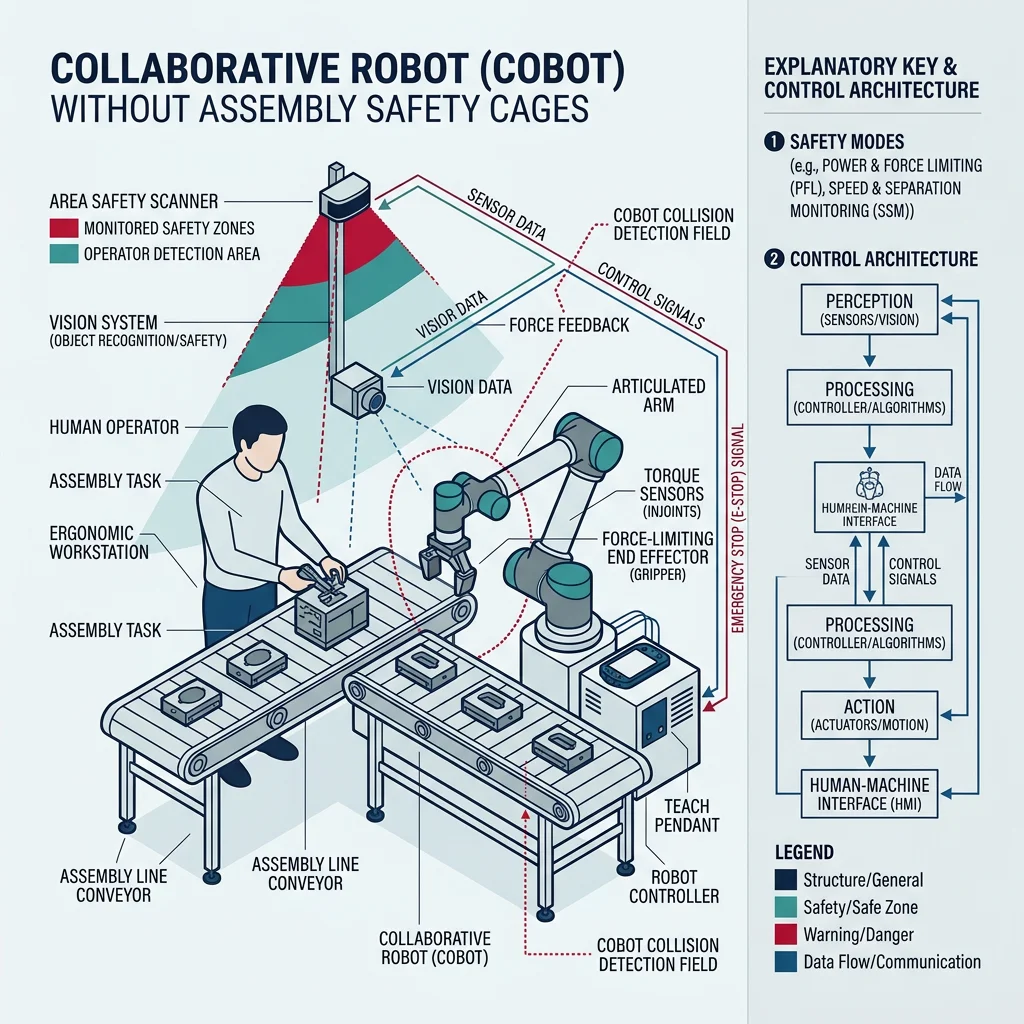
The cobot market has grown from $580 million (2018) to over $2 billion (2025), driven by small-to-medium enterprises that can't afford full-cage automation but need robotic assistance for repetitive tasks like machine tending, quality inspection, and palletizing.
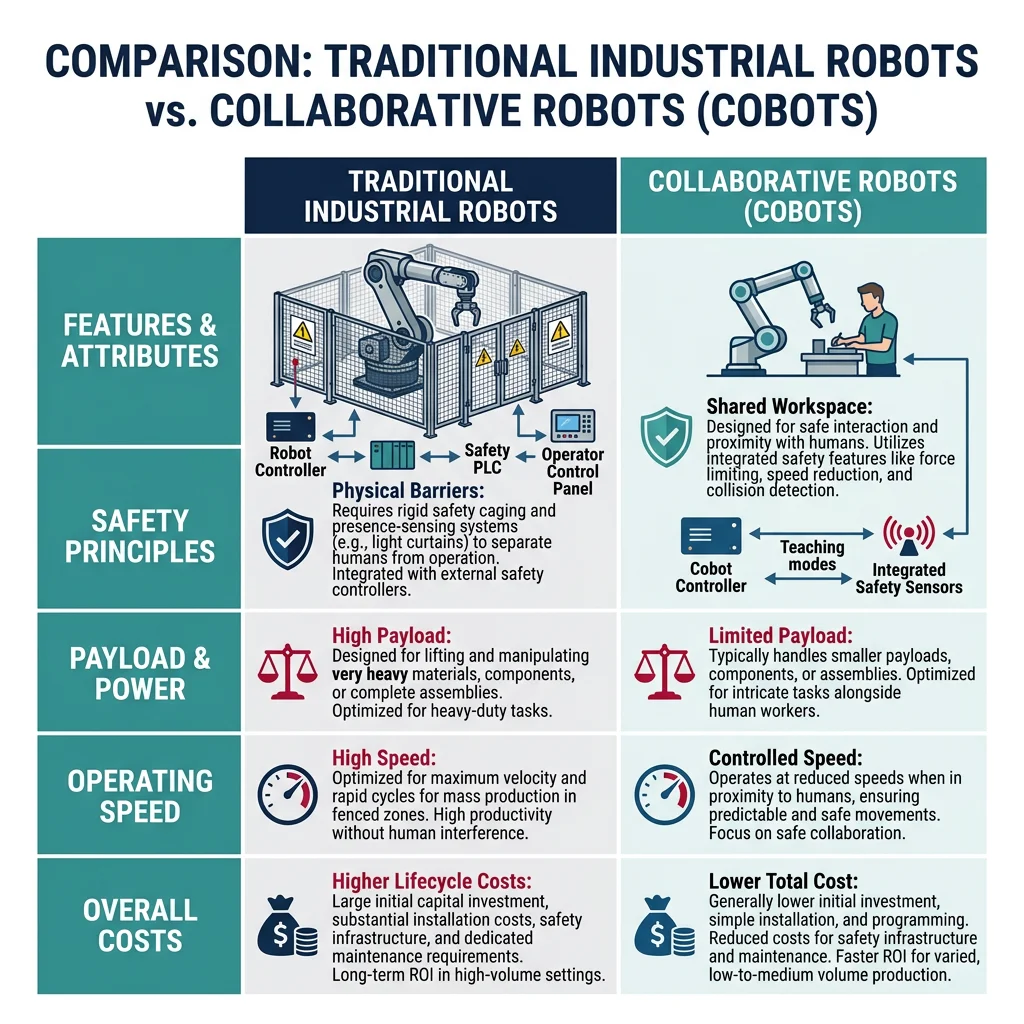
| Feature | Traditional Industrial Robot | Collaborative Robot (Cobot) |
|---|---|---|
| Safety | Requires safety cage/fence | Operates alongside humans |
| Payload | Up to 2,300 kg (Fanuc M-2000) | Typically 3–25 kg |
| Speed | Up to 2+ m/s | Limited to 1.0–1.5 m/s near humans |
| Programming | Expert programmer required | Hand-guiding, drag-and-drop, teach pendant |
| Setup Time | Weeks to months | Hours to days |
| Cost | $50K–$500K + integration | $20K–$70K, often self-deployable |
| Key Players | ABB, KUKA, Fanuc, Yaskawa | Universal Robots, Franka Emika, Techman |
Shared Workspace Design
ISO 10218 and ISO/TS 15066 define four collaborative operation modes, each balancing productivity with safety. Understanding these modes is essential for designing any human-robot shared workspace:
- Safety-Rated Monitored Stop (SMS) — Robot stops when human enters shared space, resumes when clear. Simplest but least productive.
- Hand Guiding — Human physically guides robot through motions. Used for programming-by-demonstration and fine adjustments.
- Speed & Separation Monitoring (SSM) — Robot speed adjusts based on distance to human: full speed when far, slow near, stop at minimum distance.
- Power & Force Limiting (PFL) — Robot limits contact forces to biomechanically safe thresholds. Allows intentional contact. Most flexible mode.
import numpy as np

class SpeedSeparationMonitor:
    """Implements ISO/TS 15066 Speed & Separation Monitoring (SSM).

    Dynamically adjusts robot speed based on human-robot distance:
    - d > d_safe: Full speed operation
    - d_min < d < d_safe: Speed scales linearly
    - d < d_min: Emergency stop
    """

    def __init__(self, v_max=1.5, d_safe=1.5, d_min=0.3):
        self.v_max = v_max      # Max robot speed (m/s)
        self.d_safe = d_safe    # Distance for full speed (m)
        self.d_min = d_min      # Minimum protective distance (m)
        self.current_speed = 0.0
        self.stopped = False

    def compute_safe_speed(self, human_distance):
        """Calculate allowable robot speed based on human proximity."""
        if human_distance <= self.d_min:
            self.stopped = True
            self.current_speed = 0.0
            return 0.0, "EMERGENCY_STOP"

        if human_distance >= self.d_safe:
            self.stopped = False
            self.current_speed = self.v_max
            return self.v_max, "FULL_SPEED"

        # Linear interpolation in transition zone
        ratio = (human_distance - self.d_min) / (self.d_safe - self.d_min)
        self.current_speed = self.v_max * ratio
        self.stopped = False
        return self.current_speed, "REDUCED_SPEED"

    def protective_separation_distance(self, v_human=1.6, t_reaction=0.1, t_stop=0.3):
        """Calculate minimum protective separation per ISO/TS 15066 formula.

        S_p = v_h * (t_r + t_s) + v_r * t_s + C + Z_d + Z_r
        Simplified: S_p = v_h * T + v_r * t_s + safety_margins
        """
        v_robot = self.current_speed
        safety_margin = 0.1  # C + Z_d + Z_r approximation

        s_protective = (v_human * (t_reaction + t_stop) +
                       v_robot * t_stop + safety_margin)
        return s_protective

# Simulate a human approaching a cobot
ssm = SpeedSeparationMonitor(v_max=1.5, d_safe=1.5, d_min=0.3)

print("=== Speed & Separation Monitoring (ISO/TS 15066) ===\n")
print(f"{'Distance(m)':>12} {'Speed(m/s)':>12} {'Status':>18} {'Sep.Dist(m)':>12}")
print("-" * 58)

distances = [3.0, 2.0, 1.5, 1.2, 0.9, 0.6, 0.3, 0.1]
for d in distances:
    speed, status = ssm.compute_safe_speed(d)
    sep_dist = ssm.protective_separation_distance()
    print(f"{d:>12.1f} {speed:>12.2f} {status:>18} {sep_dist:>12.2f}")

print(f"\nMax speed: {ssm.v_max} m/s")
print(f"Full speed beyond: {ssm.d_safe} m")
print(f"Emergency stop within: {ssm.d_min} m")
Force Limiting & Speed Monitoring
When a cobot operates in Power & Force Limiting (PFL) mode, contact with humans is expected and permitted — but only within biomechanically safe limits. ISO/TS 15066 Annex A specifies maximum allowable pressures and forces for 29 body regions:
| Body Region | Max Transient Force (N) | Max Quasi-Static Force (N) | Max Pressure (N/cm²) |
|---|---|---|---|
| Skull/Forehead | 130 | 65 | 10 |
| Face | 65 | 45 | 11 |
| Chest | 140 | 70 | 12 |
| Hand/Fingers | 140 | 70 | 30 |
| Lower Legs | 210 | 130 | 25 |
Case Study: Universal Robots UR10e in BMW Assembly
At BMW's Spartanburg plant, UR10e cobots work alongside assembly workers applying sound-insulating material to car doors. The cobots handle the repetitive pressing operation (applying consistent 80N force) while workers position the parts and perform quality checks. Force/torque sensors in each joint detect unexpected collisions within 10ms, triggering a compliant stop that limits impact to <50N — well below ISO/TS 15066 thresholds for the chest region. Result: 85% reduction in ergonomic injury from repetitive strain, 30% throughput increase, and zero safety incidents over 3 years of operation. Workers reported higher job satisfaction because the "boring, painful parts" were delegated to the cobot.
Interaction Interfaces
Gesture Recognition
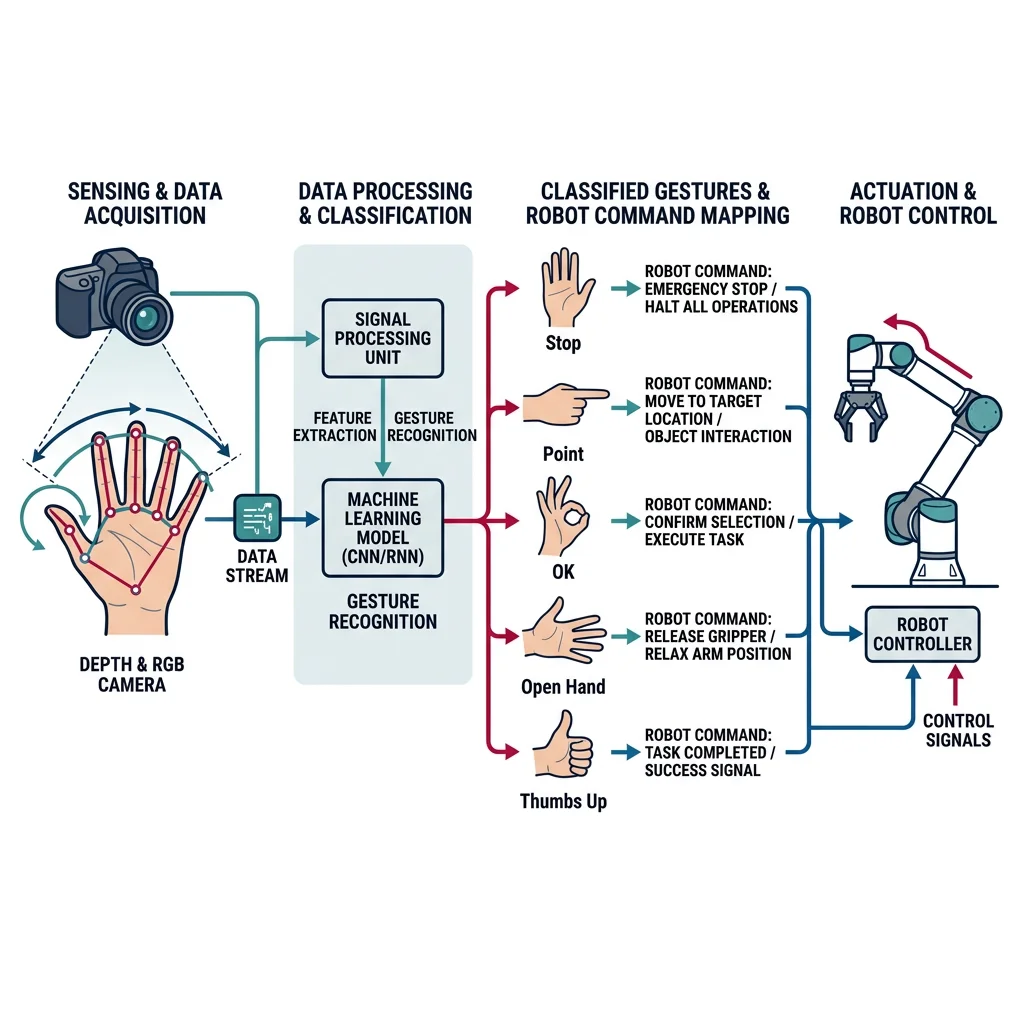
Gesture-based control lets operators communicate with robots using natural body movements — pointing to indicate targets, waving to stop, or using hand signals to switch between tasks. This is critical in noisy factory environments where voice commands fail, or when operators' hands are occupied with tools.
import numpy as np

class GestureClassifier:
    """Simple gesture recognizer using hand landmark positions.

    In production, use MediaPipe or OpenPose for hand tracking.
    This demonstrates the classification logic.
    """

    # Gesture definitions based on finger states
    GESTURES = {
        'STOP': {'fingers_extended': [0, 0, 0, 0, 0]},       # Fist
        'POINT': {'fingers_extended': [0, 1, 0, 0, 0]},       # Index only
        'OK': {'fingers_extended': [0, 0, 1, 1, 1]},          # OK sign
        'OPEN_HAND': {'fingers_extended': [1, 1, 1, 1, 1]},   # All open
        'THUMBS_UP': {'fingers_extended': [1, 0, 0, 0, 0]},   # Thumb only
    }

    GESTURE_ACTIONS = {
        'STOP': 'Emergency stop — halt all motion',
        'POINT': 'Move to pointed direction',
        'OK': 'Confirm current action / proceed',
        'OPEN_HAND': 'Release gripper / open hand',
        'THUMBS_UP': 'Start task / resume operation',
    }

    def classify(self, finger_states):
        """Classify finger states into a gesture.

        finger_states: list of 5 ints (0=bent, 1=extended)
                       [thumb, index, middle, ring, pinky]
        """
        for gesture_name, pattern in self.GESTURES.items():
            if finger_states == pattern['fingers_extended']:
                return gesture_name, self.GESTURE_ACTIONS[gesture_name]
        return 'UNKNOWN', 'No matching gesture — ignore'

    def process_sequence(self, gesture_sequence, hold_frames=5):
        """Process gesture sequence with temporal filtering.

        Requires a gesture to be held for hold_frames consecutive
        detections to filter out noise and accidental gestures.
        """
        if len(gesture_sequence) < hold_frames:
            return None, 'Insufficient frames'

        # Check if last N frames are the same gesture
        recent = gesture_sequence[-hold_frames:]
        if len(set(recent)) == 1 and recent[0] != 'UNKNOWN':
            return recent[0], self.GESTURE_ACTIONS.get(recent[0], 'Unknown action')
        return None, 'Gesture not stable'

# Simulate gesture recognition sequence
gc = GestureClassifier()

print("=== Robot Gesture Control System ===\n")
print("Recognized gestures:")
test_gestures = [
    [0, 0, 0, 0, 0],  # Fist
    [0, 1, 0, 0, 0],  # Point
    [1, 1, 1, 1, 1],  # Open hand
    [1, 0, 0, 0, 0],  # Thumbs up
    [0, 0, 1, 1, 1],  # OK
    [0, 1, 1, 0, 0],  # Peace/unknown
]

for fingers in test_gestures:
    gesture, action = gc.classify(fingers)
    finger_str = ''.join(['✋' if f else '✊' for f in fingers])
    print(f"  {finger_str} → {gesture:12s} → {action}")

# Temporal filtering demo
print("\n--- Temporal Filtering (5-frame hold) ---")
sequence = ['UNKNOWN', 'STOP', 'STOP', 'STOP', 'STOP', 'STOP', 'STOP']
for i in range(3, len(sequence) + 1):
    confirmed, action = gc.process_sequence(sequence[:i])
    status = f"CONFIRMED: {confirmed}" if confirmed else "Waiting..."
    print(f"  Frame {i}: [{', '.join(sequence[:i][-5:])}] → {status}")
Voice Control & NLP
Voice interfaces allow hands-free robot control, especially valuable in surgical, maintenance, and logistics scenarios. Modern robot voice systems combine Automatic Speech Recognition (ASR) for converting speech to text, Natural Language Understanding (NLU) for extracting intent and parameters, and dialogue management for multi-turn conversations.
- Wake Word Detection — Always-on lightweight model (e.g., "Hey Robot") running on edge
- ASR — Speech-to-text (Whisper, Google STT) with noise-robust models for factory floor
- NLU — Intent classification + entity extraction ("move to shelf B3" → intent: navigate, target: B3)
- Confirmation — Critical for safety: "Moving to shelf B3. Confirm?" before executing dangerous actions
- Text-to-Speech — Robot acknowledges commands and reports status verbally
import re

class RobotVoiceCommander:
    """Simple intent-based voice command parser for a robot.

    Parses natural language commands into structured robot actions.
    In production, use Rasa NLU, Dialogflow, or fine-tuned LLMs.
    """

    # Intent patterns (regex-based NLU)
    INTENT_PATTERNS = {
        'move': [
            r'(?:move|go|navigate|drive)\s+(?:to\s+)?(.+)',
            r'(?:take me to|head to)\s+(.+)',
        ],
        'pick': [
            r'(?:pick up|grab|grasp|take)\s+(?:the\s+)?(.+)',
        ],
        'place': [
            r'(?:place|put|drop|set)\s+(?:the\s+)?(?:.+?)\s+(?:on|at|in)\s+(.+)',
            r'(?:place|put|drop)\s+(?:it\s+)?(?:on|at|in)\s+(.+)',
        ],
        'stop': [
            r'\b(?:stop|halt|freeze|pause|emergency)\b',
        ],
        'status': [
            r'(?:what|where|how).+(?:status|position|battery|state)',
            r'(?:report|check)\s+(?:your\s+)?(?:status|position)',
        ],
        'speed': [
            r'(?:set|change)\s+speed\s+(?:to\s+)?(\d+)',
            r'(?:go|move)\s+(faster|slower)',
            r'speed\s+(\d+)',
        ]
    }

    def parse_command(self, text):
        """Parse natural language into intent + entities."""
        text = text.lower().strip()

        for intent, patterns in self.INTENT_PATTERNS.items():
            for pattern in patterns:
                match = re.search(pattern, text)
                if match:
                    entities = match.groups()
                    return {
                        'intent': intent,
                        'entities': list(entities),
                        'raw_text': text,
                        'confidence': 0.85,  # Simplified
                        'requires_confirmation': intent in ['move', 'pick', 'place']
                    }

        return {
            'intent': 'unknown',
            'entities': [],
            'raw_text': text,
            'confidence': 0.0,
            'requires_confirmation': False
        }

# Test voice commands
vc = RobotVoiceCommander()

print("=== Robot Voice Command Parser ===\n")

test_commands = [
    "Move to shelf B3",
    "Pick up the red box",
    "Place it on the conveyor belt",
    "Stop!",
    "What is your battery status?",
    "Set speed to 50",
    "Go faster",
    "Navigate to charging station",
    "Grab the blue cylinder",
    "How's it going?",  # Unknown intent
]

for cmd in test_commands:
    result = vc.parse_command(cmd)
    conf_str = " ⚠️CONFIRM" if result['requires_confirmation'] else ""
    print(f"  \"{cmd}\"")
    print(f"    → Intent: {result['intent']:8s} | "
          f"Entities: {result['entities']}{conf_str}\n")
Haptic Feedback
Haptic feedback provides the sense of touch in robot teleoperation and assistive devices. When a surgeon operates a da Vinci robot, haptic feedback lets them "feel" tissue resistance through the controls. Without it, operators over-apply force because they lack the subconscious feedback loop that governs everyday manipulation.
Types of haptic feedback in robotics:
- Force Feedback (Kinesthetic) — Motorized joysticks/exoskeletons that resist motion proportional to robot contact forces. Used in surgical robots and remote manipulation.
- Vibrotactile — Vibration motors in wearable devices indicating proximity, contact, or warnings. Low-cost, widely used in gloves and controllers.
- Electrotactile — Electrical stimulation of skin to simulate texture and pressure. Experimental but promising for prosthetics.
- Pneumatic — Air-pressure-based force feedback in soft robotic gloves. Comfortable for long-duration use.
Case Study: da Vinci Surgical Robot — Haptic Feedback Research
The Intuitive Surgical da Vinci Xi system (7,500+ units worldwide) is the most commercially successful teleoperated robot. Surgeons control 4 robotic arms through a console, with 7-DOF EndoWrist instruments providing 10× magnification and tremor filtering. However, the current system lacks direct haptic feedback — surgeons rely on visual cues (tissue deformation) to gauge force. Research at Johns Hopkins showed adding haptic feedback to the da Vinci reduced suturing force by 43% and tissue damage by 60%. The next-generation systems are integrating force-sensing instruments with haptic feedback through the master controllers, expected to make robot-assisted surgery feel nearly identical to open surgery.
Teleoperation
Teleoperation enables human operators to control robots remotely — from across a factory floor, across a city, or across the solar system (Mars rovers). The core challenge is latency: a 1-second delay between joystick input and robot response makes precise manipulation extremely difficult.
import numpy as np

class TeleoperationSystem:
    """Simulates a teleoperation system with latency compensation.

    Demonstrates bilateral control with force reflection
    and predictive display for latency management.
    """

    def __init__(self, latency_ms=100, force_scale=1.0):
        self.latency = latency_ms / 1000.0  # Convert to seconds
        self.force_scale = force_scale
        self.master_pos = np.array([0.0, 0.0, 0.0])
        self.slave_pos = np.array([0.0, 0.0, 0.0])
        self.contact_force = np.array([0.0, 0.0, 0.0])
        self.command_buffer = []  # Simulates network delay

    def master_input(self, displacement):
        """Operator moves the master controller."""
        self.master_pos += np.array(displacement)
        # Buffer command (simulates network transmission)
        self.command_buffer.append(self.master_pos.copy())

    def slave_execute(self, environment_stiffness=100.0):
        """Remote robot executes buffered commands."""
        if not self.command_buffer:
            return self.slave_pos, self.contact_force

        # Execute oldest command (FIFO = latency simulation)
        target = self.command_buffer.pop(0)

        # Move toward target with dynamics
        self.slave_pos = 0.8 * self.slave_pos + 0.2 * target

        # Simulate environment contact (wall at z = 1.0)
        if self.slave_pos[2] > 1.0:
            penetration = self.slave_pos[2] - 1.0
            self.contact_force = np.array([0, 0, -environment_stiffness * penetration])
            self.slave_pos[2] = 1.0  # Can't penetrate wall
        else:
            self.contact_force = np.array([0.0, 0.0, 0.0])

        return self.slave_pos, self.contact_force

    def get_haptic_feedback(self):
        """Return scaled contact force to master controller."""
        return self.contact_force * self.force_scale

# Simulate teleoperation with force feedback
teleop = TeleoperationSystem(latency_ms=150, force_scale=0.5)

print("=== Teleoperation with Force Feedback ===")
print(f"Latency: {teleop.latency*1000:.0f}ms, Force scale: {teleop.force_scale}\n")

# Operator moves toward and contacts a surface
movements = [
    [0.1, 0.0, 0.2],   # Move forward + up
    [0.1, 0.0, 0.3],   # More forward + up
    [0.0, 0.0, 0.4],   # Push into surface
    [0.0, 0.0, 0.3],   # Push harder
    [0.0, 0.0, -0.5],  # Pull back (felt force!)
]

for i, move in enumerate(movements):
    teleop.master_input(move)
    slave_pos, force = teleop.slave_execute()
    haptic = teleop.get_haptic_feedback()

    print(f"Step {i+1}: Master cmd={move}")
    print(f"  Slave pos: [{slave_pos[0]:.2f}, {slave_pos[1]:.2f}, {slave_pos[2]:.2f}]")
    print(f"  Contact force: [{force[0]:.1f}, {force[1]:.1f}, {force[2]:.1f}] N")
    print(f"  Haptic feedback: [{haptic[0]:.1f}, {haptic[1]:.1f}, {haptic[2]:.1f}] N")
    contact_status = "⚠️ CONTACT" if np.linalg.norm(force) > 0 else "✓ Free space"
    print(f"  Status: {contact_status}\n")
Safety in Human-Robot Interaction
Safety is the non-negotiable foundation of HRI. Every cobot deployment must undergo a rigorous risk assessment process defined by international standards. Getting safety wrong doesn't just risk regulatory penalties — it risks human lives.
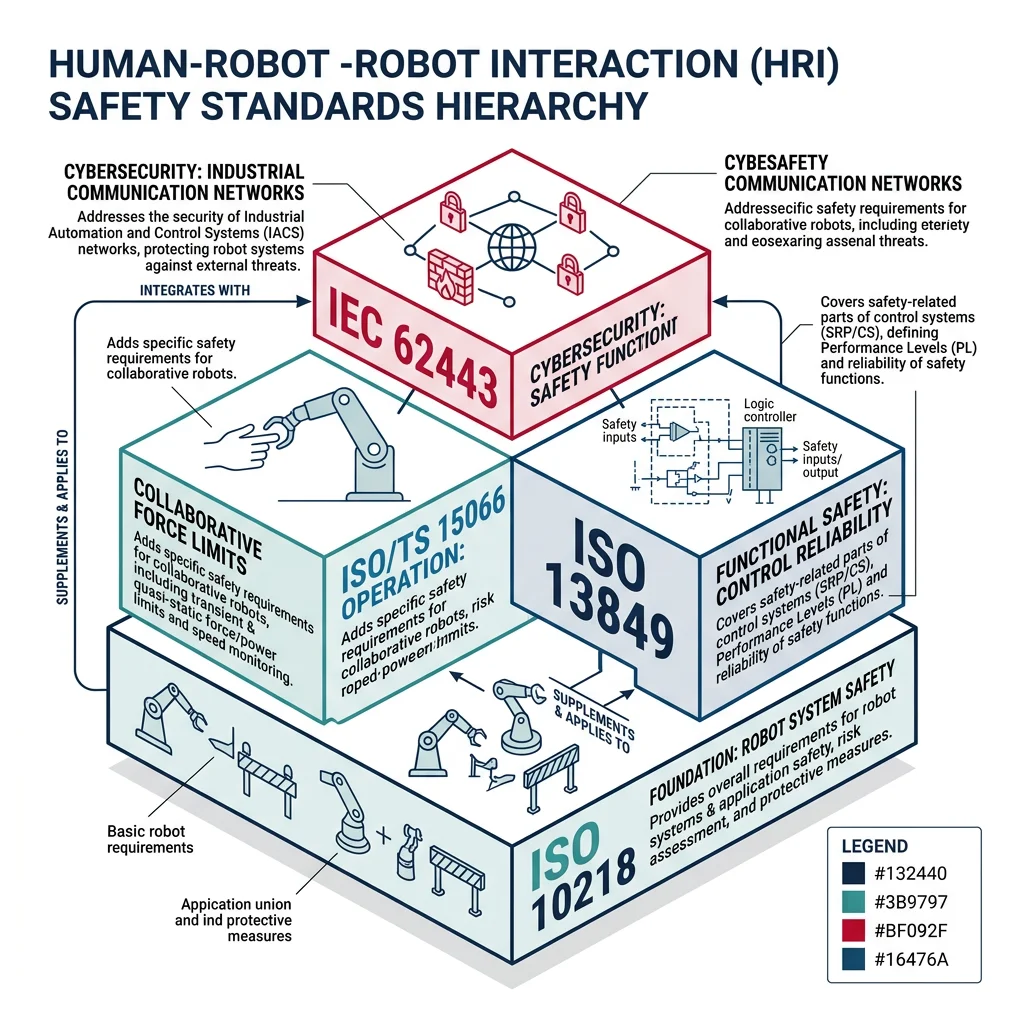
- ISO 10218-1/2 — Robot and robot system safety requirements (the foundation)
- ISO/TS 15066 — Collaborative robot safety — force/pressure limits, separation monitoring
- ISO 13849 — Safety-related control systems Performance Levels (PL a-e)
- IEC 62443 — Cybersecurity for industrial automation (increasingly relevant for connected cobots)
- ANSI/RIA 15.06 — North American robot safety requirements
Risk Assessment
Every HRI deployment requires a systematic risk assessment following ISO 12100. The process identifies hazards, estimates risk severity and probability, and determines risk reduction measures until residual risk is acceptable.
import numpy as np

class HRIRiskAssessment:
    """Risk assessment framework for human-robot interaction scenarios.

    Based on ISO 12100 risk assessment methodology:
    Risk = Severity × (Frequency + Probability + Avoidance)
    """

    SEVERITY_LEVELS = {
        1: 'Negligible (minor discomfort)',
        2: 'Minor (bruise, small cut)',
        3: 'Moderate (fracture, laceration)',
        4: 'Serious (permanent injury)',
        5: 'Critical (life-threatening)'
    }

    FREQUENCY_LEVELS = {
        1: 'Rare (yearly)',
        2: 'Occasional (monthly)',
        3: 'Frequent (daily)',
        4: 'Continuous (every cycle)'
    }

    PROBABILITY_LEVELS = {
        1: 'Very unlikely',
        2: 'Unlikely',
        3: 'Likely',
        4: 'Very likely'
    }

    def assess_risk(self, hazard_name, severity, frequency, probability, avoidability=2):
        """Calculate risk level for a hazard.

        avoidability: 1=easily avoidable, 3=not avoidable
        Returns: risk_score, risk_level, required_action
        """
        exposure = frequency + probability + avoidability
        risk_score = severity * exposure

        if risk_score >= 30:
            level = 'UNACCEPTABLE'
            action = 'MUST eliminate hazard or add safety-rated controls'
        elif risk_score >= 20:
            level = 'HIGH'
            action = 'Implement engineering controls + safety monitoring'
        elif risk_score >= 10:
            level = 'MEDIUM'
            action = 'Add protective measures, training, PPE'
        else:
            level = 'LOW'
            action = 'Acceptable with standard procedures'

        return {
            'hazard': hazard_name,
            'severity': severity,
            'exposure': exposure,
            'risk_score': risk_score,
            'risk_level': level,
            'action': action
        }

# Assess common HRI hazards
assessor = HRIRiskAssessment()

hazards = [
    ('Robot arm collision with head', 5, 3, 2, 2),
    ('Pinch point at gripper', 3, 4, 3, 2),
    ('Dropped heavy part on foot', 3, 3, 2, 3),
    ('Electrical shock from cable', 4, 1, 1, 1),
    ('Repetitive strain from hand-guiding', 2, 4, 3, 2),
    ('Flying debris from machining', 3, 4, 2, 2),
]

print("=== HRI Risk Assessment (ISO 12100) ===\n")
print(f"{'Hazard':<38} {'Sev':>4} {'Exp':>4} {'Score':>6} {'Level':<14} {'Action'}")
print("-" * 110)

for hazard_name, sev, freq, prob, avoid in hazards:
    result = assessor.assess_risk(hazard_name, sev, freq, prob, avoid)
    print(f"{result['hazard']:<38} {result['severity']:>4} {result['exposure']:>4} "
          f"{result['risk_score']:>6} {result['risk_level']:<14} {result['action']}")
Trust Calibration
Trust calibration is the process of ensuring humans have appropriate trust in robot capabilities — not too much (over-trust, leading to complacency) and not too little (under-trust, leading to disuse). Research shows that trust in robots follows a "U-shaped" curve: high initial trust drops after the first error, then slowly rebuilds with consistent reliability.
Factors affecting human trust in robots:
- Reliability — Consistent task success rate (>95% needed for sustained trust)
- Transparency — Robot explains its decisions ("I'm stopping because I detected an obstacle")
- Predictability — Consistent motion patterns; erratic movement destroys trust
- Appearance — Anthropomorphic features increase initial trust but create higher expectations
- Failure severity — A single dangerous failure outweighs hundreds of successes
- Operator experience — Expert operators calibrate trust faster than novices
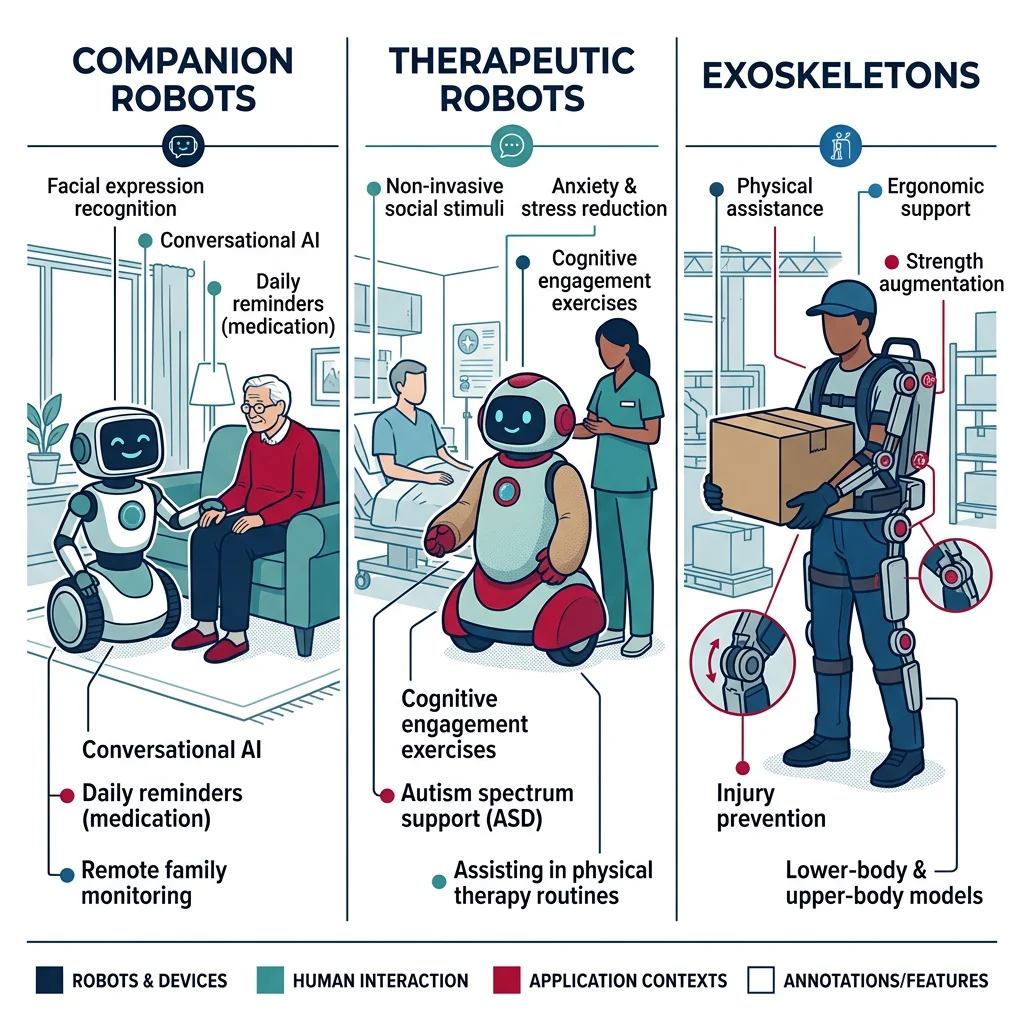
Social & Assistive Robotics
Social robots are designed to interact with people in socially meaningful ways — engaging in conversation, recognizing emotions, maintaining eye contact, and adapting their behavior to social norms. Unlike industrial cobots optimized for throughput, social robots optimize for engagement, comfort, and emotional connection.
| Robot | Developer | Application | Key Features |
|---|---|---|---|
| Pepper | SoftBank | Retail, hospitality | Emotion recognition, multi-language, tablet chest |
| NAO | SoftBank | Education, research | 25-DOF, programmable, dance/walk capabilities |
| PARO | AIST Japan | Elderly care, therapy | Therapeutic seal, responds to touch and voice |
| Sophia | Hanson Robotics | Research, public engagement | Realistic face, 62 facial expressions |
| Spot | Boston Dynamics | Inspection, security | Quadruped, autonomous navigation, sensor platform |
Assistive Robotics
Assistive robots help people with disabilities, elderly individuals, and patients with mobility or cognitive impairments. These range from powered exoskeletons enabling paraplegic individuals to walk, to robotic arms mounted on wheelchairs for independent feeding, to companion robots providing cognitive stimulation for dementia patients.
Case Study: ReWalk Exoskeleton — Walking Again
The ReWalk Personal 6.0 is an FDA-cleared powered exoskeleton that enables individuals with spinal cord injuries (T4-L5) to stand, walk, and climb stairs. The system uses tilt sensors in the hip to detect intended movements — when the user shifts their weight forward, the exoskeleton initiates a step. Battery-powered motors at the hip and knee joints provide the necessary torque. Clinical studies showed that after 60 training sessions, users achieved independent walking speeds of 0.4-0.7 m/s and could walk continuously for 30+ minutes. Beyond mobility, regular ReWalk use showed secondary health benefits: improved bone density (+14%), reduced chronic pain (-52%), and significant mental health improvements from regained independence.
Ethics in HRI
As robots become more socially capable and embedded in intimate contexts (caregiving, therapy, companionship), ethical questions become paramount:
- Deception — Is it ethical for a social robot to simulate emotions it doesn't have? Should PARO "pretend" to be happy when a dementia patient pets it?
- Privacy — Assistive robots collect intimate data (health metrics, daily routines, conversations). Who owns this data? Who can access it?
- Autonomy — If an elderly person prefers robot companionship over human interaction, should we intervene? Does the robot reduce human social contact?
- Attachment — Children and elderly form genuine emotional bonds with robots. What happens when the robot is discontinued or breaks?
- Labor Displacement — Cobots may eliminate assembly jobs while creating robotics technician roles. Is the transition equitable?
- Accountability — When a cobot injures a worker, who is liable: the manufacturer, the integrator, the worker who programmed it, or the company?
HRI Design Planner Tool
Use this interactive planner to design the human-robot interaction system for your application. Specify the cobot platform, interaction modalities, safety requirements, and deployment context — then generate a structured specification document.
HRI System Design Planner
Define your human-robot interaction design — cobot type, interfaces, safety, and deployment. Download as Word, Excel, or PDF.
All data stays in your browser. Nothing is sent to or stored on any server.
Exercises & Challenges
Exercise 1: Adaptive Speed Controller
Task: Extend the SpeedSeparationMonitor class to handle multiple humans simultaneously. Track up to 5 humans using a dictionary of positions, and calculate the safe speed based on the nearest human. Add a method that returns the recommended robot velocity vector (direction away from the nearest human, at safe speed). Simulate a scenario where two humans approach from different directions.
Exercise 2: Gesture-Controlled Pick-and-Place
Task: Combine the GestureClassifier and PickAndPlaceFSM from this article. When the gesture system detects "THUMBS_UP", trigger the FSM to start a new pick-and-place cycle. "STOP" triggers emergency stop. "POINT" with a direction vector selects the next target object. Add a confidence threshold — only accept gestures with >90% classification confidence (simulate this with random noise). Log all gesture → FSM transitions with timestamps.
Exercise 3: Trust Model Simulation
Task: Build a computational trust model. Start trust at 0.7 (out of 1.0). Each successful robot task increases trust by 0.02. Each failure decreases trust by 0.15 (failures hurt more than successes help). If the robot explains its failure ("I dropped the object because it was wet"), reduce the penalty to 0.05. Simulate 100 interactions with a 92% success rate, with and without explanations, and plot trust over time. At what success rate does trust stabilize above 0.5?
Conclusion & Next Steps
Human-Robot Interaction sits at the intersection of robotics engineering, cognitive science, and ethics. We've covered the full HRI spectrum — from cobot safety standards that define allowable contact forces, to gesture and voice interfaces that make robot control intuitive, to the deeper questions of trust calibration and ethical design for social robots. The key takeaway is that HRI is not just a technical challenge — it's a human-centered design problem where the robot must adapt to the human, not the other way around.
- Cobots enable safe human-robot collaboration through 4 ISO-defined modes (SMS, Hand Guiding, SSM, PFL)
- Speed & separation monitoring dynamically adjusts robot speed based on human proximity
- Multi-modal interfaces (gesture + voice + haptic) create the most robust interaction systems
- Teleoperation with force feedback enables remote surgery, bomb disposal, and space exploration
- Risk assessment following ISO 12100 is mandatory for every collaborative robot deployment
- Trust calibration requires transparency — robots that explain failures earn more appropriate trust
- Social and assistive robots raise profound ethical questions about deception, privacy, and attachment