System Design Series Part 6: API Design & REST/GraphQL
January 25, 2026Wasil Zafar35 min read
Master API design best practices for building scalable web services. Learn REST principles, GraphQL advantages, versioning strategies, authentication patterns, and real-world API design considerations.
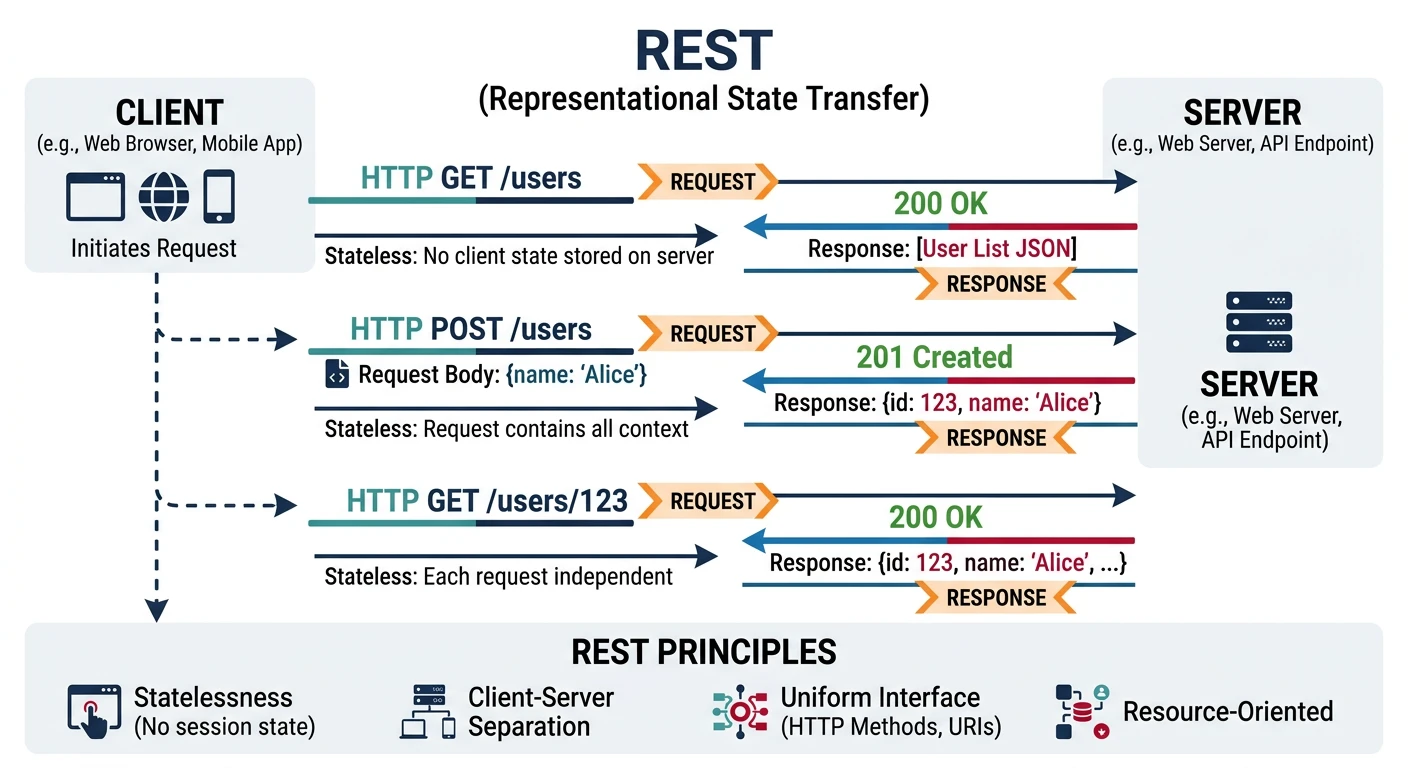
REST (Representational State Transfer) is an architectural style for designing networked applications. It relies on a stateless, client-server protocol—almost always HTTP—to provide standard operations on resources.
REST architectural style — clients interact with server resources through stateless HTTP requests using standard methods and URI patterns
Key Insight: Good API design is about making the common cases easy and the complex cases possible. Think like a consumer of your API.
RESTful Principles
Client-Server: Separation of concerns—UI from data storage
Stateless: Each request contains all information needed
Cacheable: Responses can be cached to improve performance
Uniform Interface: Standardized methods and URI structure
Layered System: Client can't tell if connected to end server
Resource Naming Conventions
# Good REST URLs - Resources as nouns, plural
GET    /api/v1/users              # List all users
GET    /api/v1/users/123          # Get specific user
POST   /api/v1/users              # Create new user
PUT    /api/v1/users/123          # Update entire user
PATCH  /api/v1/users/123          # Partial update
DELETE /api/v1/users/123          # Delete user

# Nested resources
GET    /api/v1/users/123/orders           # User's orders
GET    /api/v1/users/123/orders/456       # Specific order
POST   /api/v1/users/123/orders           # Create order for user

# Bad REST URLs - Avoid verbs, actions
GET    /api/v1/getUsers           # ? Verb in URL
POST   /api/v1/createUser         # ? Verb in URL
GET    /api/v1/user               # ? Singular noun
HTTP Methods
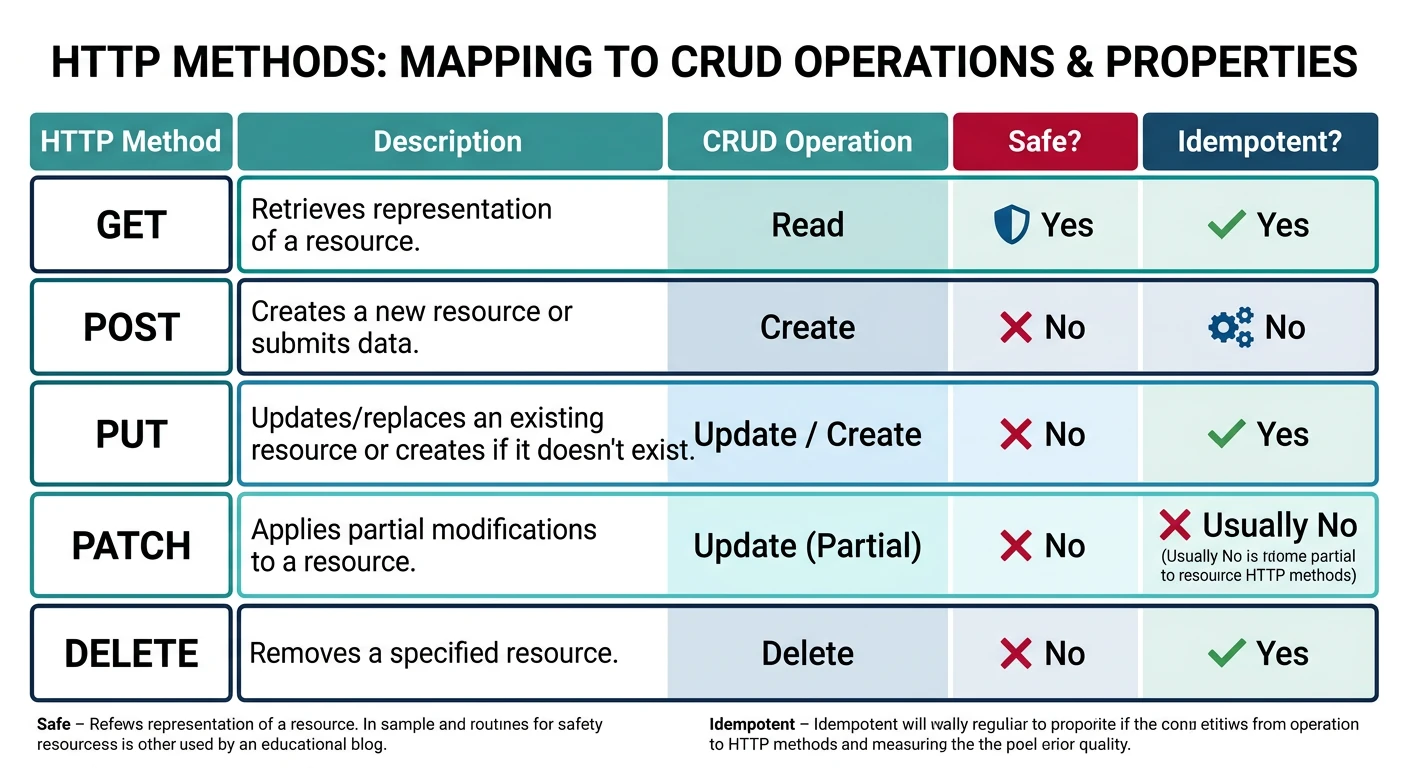
Each HTTP method has specific semantics and properties:
HTTP methods mapped to CRUD operations — showing idempotency and safety characteristics that guide proper API design
Method
Purpose
Idempotent
Safe
Request Body
GET
Retrieve resource
? Yes
? Yes
No
POST
Create resource
? No
? No
Yes
PUT
Replace resource
? Yes
? No
Yes
PATCH
Partial update
? No*
? No
Yes
DELETE
Remove resource
? Yes
? No
Optional
HEAD
Get headers only
? Yes
? Yes
No
OPTIONS
Get allowed methods
? Yes
? Yes
No
*PATCH can be idempotent if designed carefully
Status Codes
# HTTP Status Codes - Use them correctly!

# 2xx Success
200 OK              # General success, return data
201 Created         # Resource created (return location header)
204 No Content      # Success, no response body (DELETE)

# 3xx Redirection
301 Moved Permanently    # Resource URL changed
304 Not Modified         # Cached version is current

# 4xx Client Errors
400 Bad Request     # Invalid syntax, validation error
401 Unauthorized    # Authentication required/failed
403 Forbidden       # Authenticated but not authorized
404 Not Found       # Resource doesn't exist
405 Method Not Allowed   # HTTP method not supported
409 Conflict        # State conflict (duplicate, version)
422 Unprocessable Entity  # Valid syntax, semantic error
429 Too Many Requests    # Rate limit exceeded

# 5xx Server Errors
500 Internal Server Error  # Unexpected server error
502 Bad Gateway            # Upstream server error
503 Service Unavailable    # Maintenance or overload
504 Gateway Timeout        # Upstream timeout
# Cursor-based pagination (recommended for large datasets)
GET /api/v1/users?cursor=eyJpZCI6MTAwfQ&limit=20

# Response
{
    "data": [...],
    "pagination": {
        "next_cursor": "eyJpZCI6MTIwfQ",
        "has_more": true
    }
}

# Offset-based pagination (simpler but less efficient)
GET /api/v1/users?page=5&per_page=20

# Response
{
    "data": [...],
    "pagination": {
        "total": 458,
        "page": 5,
        "per_page": 20,
        "total_pages": 23
    }
}
GraphQL
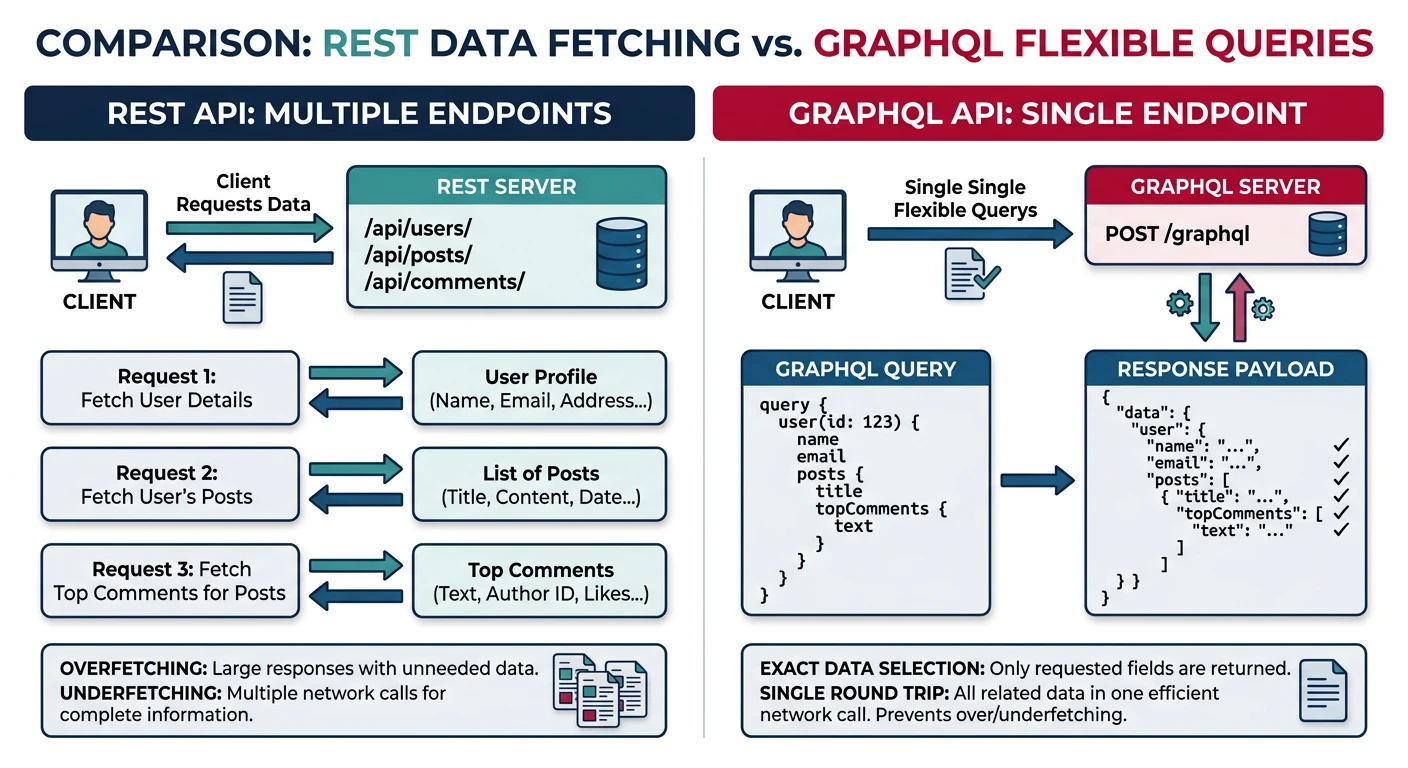
GraphQL is a query language for APIs developed by Facebook. It lets clients request exactly the data they need, solving over-fetching and under-fetching problems common in REST.
GraphQL vs REST data fetching — GraphQL eliminates over-fetching and under-fetching by letting clients request exactly the fields they need in a single query
# GraphQL Query - Client requests exactly what it needs
query GetUserWithPosts($userId: ID!) {
    user(id: $userId) {
        name
        email
        posts {
            id
            title
            likes
            comments {
                text
                author {
                    name
                }
            }
        }
    }
}

# Variables
{
    "userId": "123"
}

# Response - Only requested fields
{
    "data": {
        "user": {
            "name": "John Doe",
            "email": "john@example.com",
            "posts": [
                {
                    "id": "post_1",
                    "title": "My First Post",
                    "likes": 42,
                    "comments": [
                        {
                            "text": "Great post!",
                            "author": { "name": "Jane Smith" }
                        }
                    ]
                }
            ]
        }
    }
}
Mutations
# GraphQL Mutation - Create/Update data
mutation CreatePost($input: CreatePostInput!) {
    createPost(input: $input) {
        id
        title
        content
        publishedAt
        author {
            name
        }
    }
}

# Variables
{
    "input": {
        "title": "GraphQL Best Practices",
        "content": "Here's what I learned..."
    }
}
Subscriptions (Real-time)
# GraphQL Subscription - Real-time updates
subscription OnNewComment($postId: ID!) {
    commentAdded(postId: $postId) {
        id
        text
        author {
            name
            avatar
        }
        createdAt
    }
}

# Server pushes updates when new comments arrive
REST vs GraphQL
Aspect
REST
GraphQL
Data Fetching
Multiple endpoints, fixed responses
Single endpoint, flexible queries
Over/Under-fetching
Common problem
Request exactly what you need
Versioning
URL versioning (/v1/, /v2/)
Evolve schema, deprecate fields
Caching
HTTP caching built-in
More complex, client-side caching
Learning Curve
Familiar HTTP semantics
New query language, tooling
Documentation
OpenAPI/Swagger
Self-documenting schema
Best For
Simple CRUD, public APIs, caching-heavy
Complex data relationships, mobile apps
Choosing Between Them: Use REST for simple, resource-based APIs with good caching needs. Use GraphQL when clients have diverse data needs or you're building mobile apps where bandwidth matters.
Best Practices
1. Versioning
# URL Path Versioning (most common)
GET /api/v1/users
GET /api/v2/users

# Header Versioning
GET /api/users
Accept: application/vnd.myapi.v2+json

# Query Parameter Versioning
GET /api/users?version=2
# Using Pydantic for validation
from pydantic import BaseModel, EmailStr, validator
from typing import Optional

class CreateUserRequest(BaseModel):
    name: str
    email: EmailStr
    age: Optional[int] = None

    @validator('name')
    def name_must_not_be_empty(cls, v):
        if not v.strip():
            raise ValueError('Name cannot be empty')
        return v.strip()

    @validator('age')
    def age_must_be_positive(cls, v):
        if v is not None and v < 0:
            raise ValueError('Age must be positive')
        return v

# Automatically validates and returns 422 on error
4. Filtering, Sorting, and Field Selection
# Flexible querying
GET /api/v1/products?
    category=electronics&
    price_min=100&
    price_max=500&
    sort=-created_at,name&    # Descending created_at, then name
    fields=id,name,price      # Only return these fields

# Implementation
def get_products(request):
    query = Product.query

    # Filtering
    if category := request.args.get('category'):
        query = query.filter(Product.category == category)
    if price_min := request.args.get('price_min'):
        query = query.filter(Product.price >= float(price_min))

    # Sorting
    sort_fields = request.args.get('sort', 'id').split(',')
    for field in sort_fields:
        if field.startswith('-'):
            query = query.order_by(desc(getattr(Product, field[1:])))
        else:
            query = query.order_by(getattr(Product, field))

    # Field selection
    fields = request.args.get('fields', '').split(',')

    return query.all()
# OAuth 2.0 Authorization Code Flow
# 1. Redirect user to authorization server
GET https://auth.example.com/authorize?
    response_type=code&
    client_id=YOUR_CLIENT_ID&
    redirect_uri=https://yourapp.com/callback&
    scope=openid profile email&
    state=random_state

# 2. User authenticates and grants permission

# 3. Receive authorization code at callback
GET https://yourapp.com/callback?code=AUTH_CODE&state=random_state

# 4. Exchange code for tokens
POST https://auth.example.com/token
Content-Type: application/x-www-form-urlencoded

grant_type=authorization_code&
code=AUTH_CODE&
redirect_uri=https://yourapp.com/callback&
client_id=YOUR_CLIENT_ID&
client_secret=YOUR_CLIENT_SECRET

# 5. Receive access token and ID token
{
    "access_token": "eyJ...",
    "token_type": "Bearer",
    "expires_in": 3600,
    "refresh_token": "dGhpc...",
    "id_token": "eyJ..."
}
API Keys
For server-to-server authentication:
# API Key Authentication
# Header approach (recommended)
X-API-Key: your-api-key-here

# Implementation
from functools import wraps
from flask import request

def require_api_key(f):
    @wraps(f)
    def decorated(*args, **kwargs):
        api_key = request.headers.get('X-API-Key')

        if not api_key:
            raise APIError("MISSING_API_KEY", "API key required", status_code=401)

        # Validate key (check database, cache)
        client = validate_api_key(api_key)
        if not client:
            raise APIError("INVALID_API_KEY", "Invalid API key", status_code=401)

        # Attach client info for rate limiting, logging
        request.client = client
        return f(*args, **kwargs)

    return decorated
Networking & Communication Protocols
Key Insight: Understanding the underlying networking protocols is crucial for designing efficient APIs. HTTP sits on top of TCP/IP, and knowing when to use alternatives like WebSockets or gRPC can significantly improve system performance.
HTTP/2 vs HTTP/1.1
Feature
HTTP/1.1
HTTP/2
Multiplexing
Sequential requests (head-of-line blocking)
Multiple streams over single connection
Header Compression
None (repeated headers)
HPACK compression
Server Push
No
Yes (proactively send resources)
Binary Protocol
Text-based
Binary framing
WebSockets & Real-Time Communication
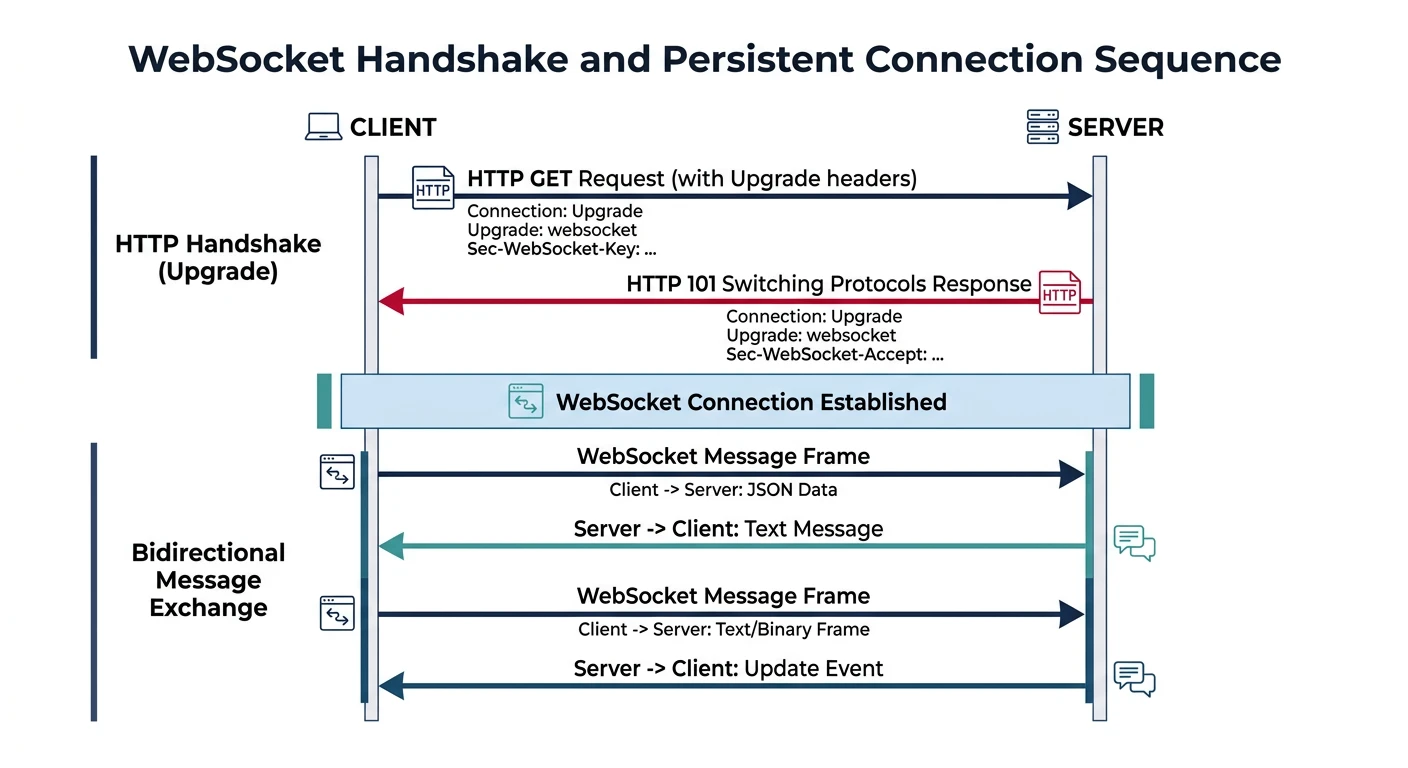
WebSockets provide full-duplex communication channels over a single TCP connection, ideal for real-time applications.
WebSocket connection lifecycle — HTTP upgrade handshake establishes a persistent full-duplex channel for real-time bidirectional communication
WebSocket Implementation
# Server-side (Python with websockets library)
import asyncio
import websockets
import json

connected_clients = set()

async def handler(websocket, path):
    # Register client
    connected_clients.add(websocket)

    try:
        async for message in websocket:
            data = json.loads(message)

            if data["type"] == "chat_message":
                # Broadcast to all connected clients
                await broadcast({
                    "type": "new_message",
                    "user": data["user"],
                    "message": data["message"],
                    "timestamp": datetime.utcnow().isoformat()
                })

    finally:
        connected_clients.remove(websocket)

async def broadcast(message):
    if connected_clients:
        await asyncio.gather(
            *[client.send(json.dumps(message)) for client in connected_clients]
        )

# Start server
asyncio.run(websockets.serve(handler, "localhost", 8765))
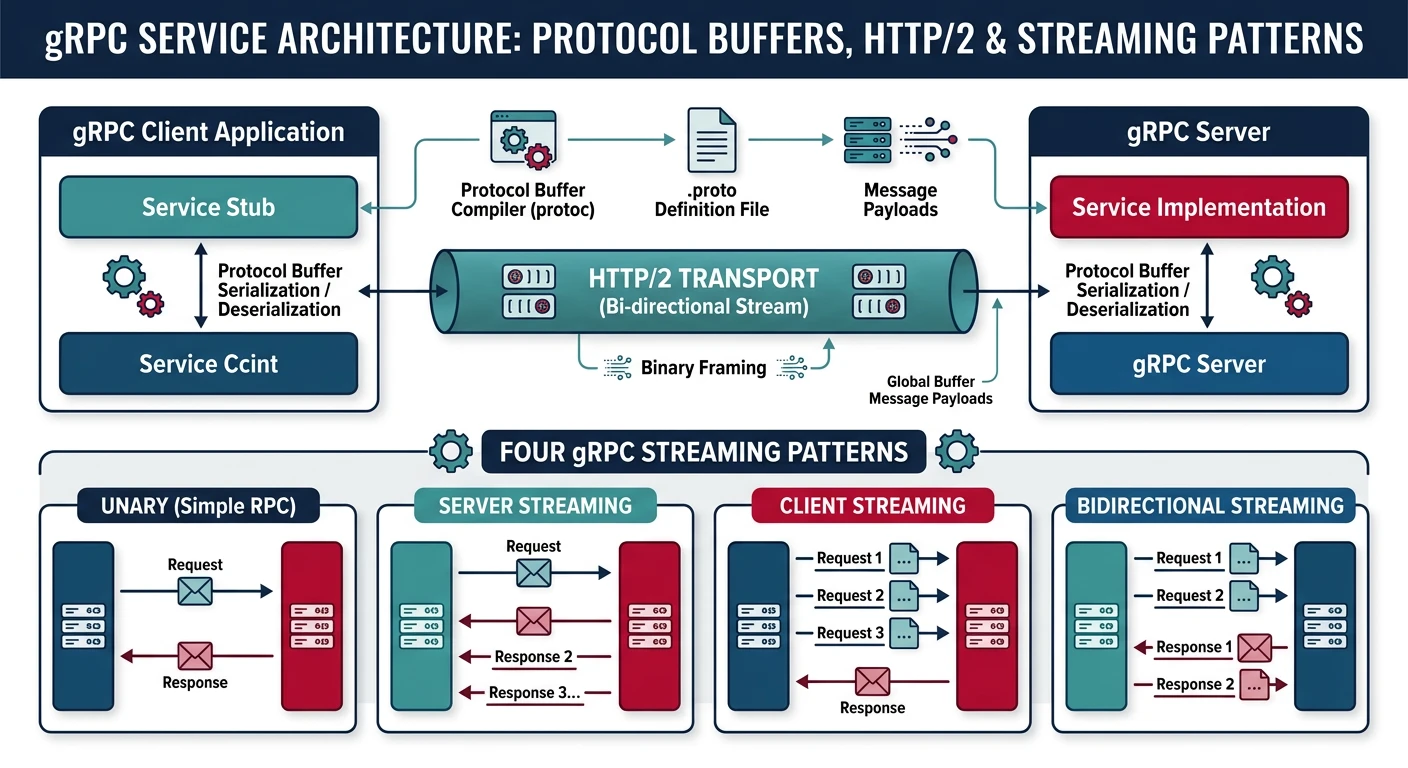
gRPC is a high-performance RPC framework using Protocol Buffers for serialization. It's ideal for microservices communication.
gRPC architecture — high-performance binary serialization over HTTP/2 supporting unary, server, client, and bidirectional streaming patterns
Protocol Buffer Definition
# user.proto - Define service and messages
syntax = "proto3";

package user;

service UserService {
    // Unary RPC
    rpc GetUser(GetUserRequest) returns (User);

    // Server streaming
    rpc ListUsers(ListUsersRequest) returns (stream User);

    // Client streaming
    rpc CreateUsers(stream CreateUserRequest) returns (CreateUsersResponse);

    // Bidirectional streaming
    rpc Chat(stream ChatMessage) returns (stream ChatMessage);
}

message User {
    string id = 1;
    string name = 2;
    string email = 3;
    int32 age = 4;
}

message GetUserRequest {
    string id = 1;
}

message ListUsersRequest {
    int32 page_size = 1;
    string page_token = 2;
}
gRPC Server Implementation
# Python gRPC Server
import grpc
from concurrent import futures
import user_pb2
import user_pb2_grpc

class UserService(user_pb2_grpc.UserServiceServicer):
    def GetUser(self, request, context):
        # Fetch user from database
        user = db.get_user(request.id)

        if not user:
            context.set_code(grpc.StatusCode.NOT_FOUND)
            context.set_details(f"User {request.id} not found")
            return user_pb2.User()

        return user_pb2.User(
            id=user.id,
            name=user.name,
            email=user.email,
            age=user.age
        )

    def ListUsers(self, request, context):
        # Server streaming - yield multiple responses
        users = db.list_users(page_size=request.page_size)
        for user in users:
            yield user_pb2.User(
                id=user.id,
                name=user.name,
                email=user.email
            )

# Start server
server = grpc.server(futures.ThreadPoolExecutor(max_workers=10))
user_pb2_grpc.add_UserServiceServicer_to_server(UserService(), server)
server.add_insecure_port('[::]:50051')
server.start()
server.wait_for_termination()
gRPC vs REST
Aspect
REST
gRPC
Protocol
HTTP/1.1 (usually)
HTTP/2
Data Format
JSON (text)
Protocol Buffers (binary)
Performance
Good
Excellent (10x faster serialization)
Streaming
Limited
Built-in (all 4 types)
Browser Support
Native
Requires grpc-web proxy
Best For
Public APIs, web clients
Internal microservices, mobile apps
Performance Comparison: In benchmarks, gRPC is typically 7-10x faster than REST+JSON for serialization/deserialization, and 2-3x faster in end-to-end latency due to HTTP/2 multiplexing.
Next Steps
API Design Specification Generator
Design your REST or GraphQL API specification with endpoints, authentication, and versioning. Download as Word, Excel, or PDF.
Draft auto-saved
All data stays in your browser. Nothing is sent to or stored on any server.
Continue the Series
Part 5: Microservices Architecture
Review microservices patterns and service mesh architectures.