Back to Technology

System Design Series Part 14: Authentication & Security

January 25, 2026 Wasil Zafar 45 min read

Complete guide to authentication and security in system design including OAuth 2.0, JWT, RBAC, session management, data encryption, SSL/TLS, GDPR compliance, and security best practices for distributed systems.

Table of Contents

  1. Security Fundamentals
  2. Authentication Patterns
  3. Authorization Patterns
  4. Data Encryption
  5. Security Patterns
  6. Compliance & Regulations
  7. Next Steps

Security Fundamentals

Series Navigation: This is Part 14 of the 15-part System Design Series. Review Part 13: Distributed Systems first.

Security is not an afterthought in system design—it must be built into every layer of your architecture. Understanding the difference between authentication (who you are) and authorization (what you can do) is fundamental to designing secure systems.
Key Insight: Security is about trade-offs. More security often means more friction for users. The goal is finding the right balance between protection and usability for your specific use case.
Threat Modeling

Before designing security controls, identify what you're protecting against. The STRIDE model categorizes threats:

Threat Description Mitigation
Spoofing Pretending to be someone else Strong authentication, MFA
Tampering Modifying data or code Integrity checks, signatures
Repudiation Denying actions performed Audit logs, digital signatures
Information Disclosure Exposing sensitive data Encryption, access controls
Denial of Service Making system unavailable Rate limiting, redundancy
Elevation of Privilege Gaining unauthorized access Least privilege, input validation

Authentication Patterns

Authentication verifies identity. There are three factors:

  • Something you know: Passwords, PINs, security questions
  • Something you have: Phone, hardware key, smart card
  • Something you are: Fingerprint, face, iris scan

Multi-Factor Authentication (MFA) combines two or more factors for stronger security.

Token-Based Authentication

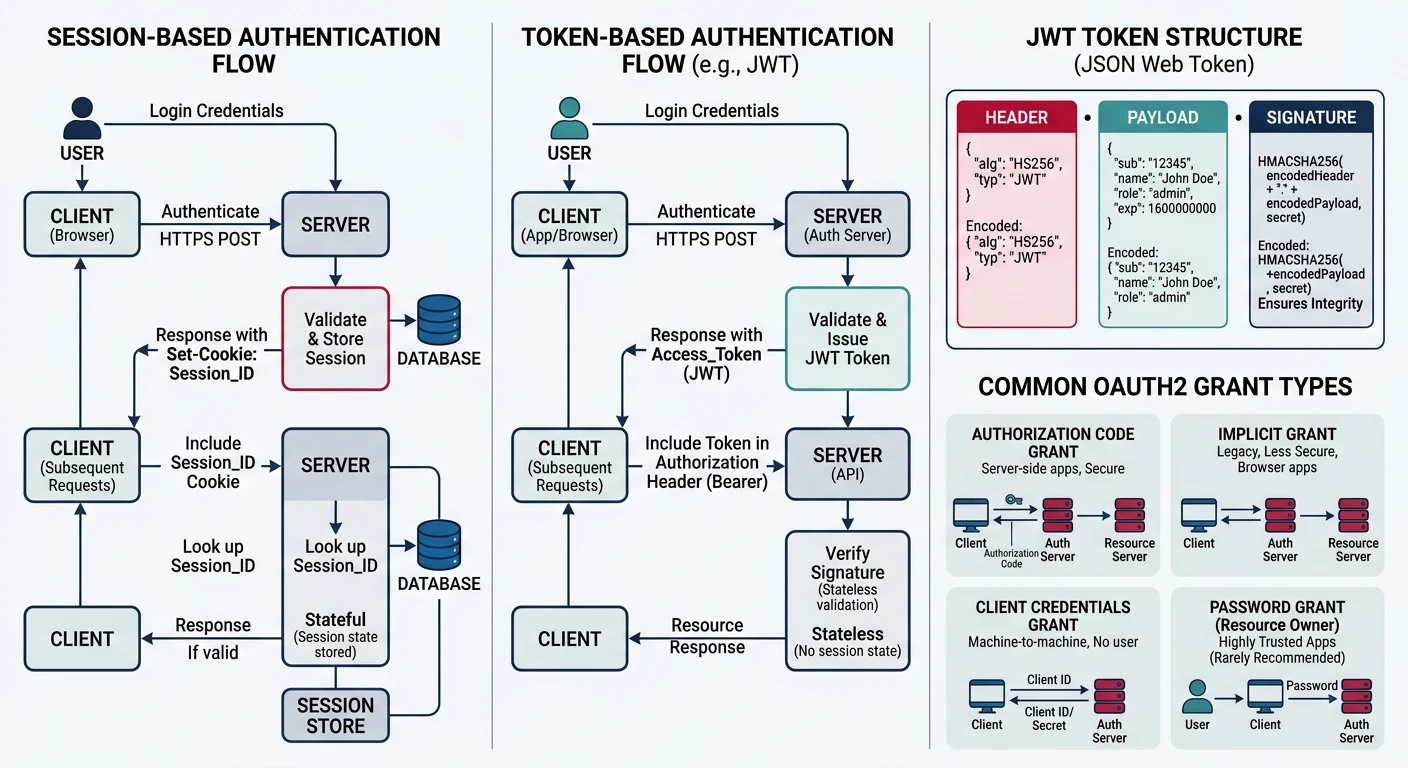
Session vs Token Authentication

# Session-based Authentication (Traditional)
"""
1. User logs in with credentials
2. Server creates session, stores in memory/database
3. Server sends session ID in cookie
4. Client sends cookie with each request
5. Server looks up session to validate

Pros: Server can invalidate sessions instantly
Cons: Requires session storage, hard to scale horizontally
"""

# Token-based Authentication (Modern)
"""
1. User logs in with credentials
2. Server creates signed token (JWT)
3. Server sends token to client
4. Client sends token in Authorization header
5. Server validates token signature (no lookup needed)

Pros: Stateless, scales easily, works with microservices
Cons: Cannot revoke tokens instantly (use short expiry + refresh tokens)
"""

from flask import Flask, request, jsonify
import jwt
from datetime import datetime, timedelta
from functools import wraps

app = Flask(__name__)
SECRET_KEY = 'your-secret-key'

def generate_tokens(user_id):
    """Generate access and refresh token pair"""
    access_token = jwt.encode({
        'user_id': user_id,
        'type': 'access',
        'exp': datetime.utcnow() + timedelta(minutes=15),
        'iat': datetime.utcnow()
    }, SECRET_KEY, algorithm='HS256')
    
    refresh_token = jwt.encode({
        'user_id': user_id,
        'type': 'refresh',
        'exp': datetime.utcnow() + timedelta(days=7),
        'iat': datetime.utcnow()
    }, SECRET_KEY, algorithm='HS256')
    
    return access_token, refresh_token

def require_auth(f):
    """Decorator to protect routes"""
    @wraps(f)
    def decorated(*args, **kwargs):
        token = request.headers.get('Authorization', '').replace('Bearer ', '')
        
        try:
            payload = jwt.decode(token, SECRET_KEY, algorithms=['HS256'])
            if payload['type'] != 'access':
                return jsonify({'error': 'Invalid token type'}), 401
            request.user_id = payload['user_id']
        except jwt.ExpiredSignatureError:
            return jsonify({'error': 'Token expired'}), 401
        except jwt.InvalidTokenError:
            return jsonify({'error': 'Invalid token'}), 401
        
        return f(*args, **kwargs)
    return decorated

@app.route('/protected')
@require_auth
def protected():
    return jsonify({'user_id': request.user_id})

JSON Web Tokens (JWT)

Key Insight: JWTs are not inherently secure—they're a format. Security depends on how you implement them: using strong algorithms (RS256, ES256), short expiration times, and proper token storage.

JWT Structure

# JWT = Header.Payload.Signature

# Header (Base64URL encoded)
{
    "alg": "RS256",  # Algorithm: RS256, ES256, HS256
    "typ": "JWT"
}

# Payload (Base64URL encoded) - Claims
{
    "sub": "user123",        # Subject (user ID)
    "iss": "myapp.com",      # Issuer
    "aud": "myapp-api",      # Audience
    "exp": 1735689600,       # Expiration time
    "iat": 1735686000,       # Issued at
    "nbf": 1735686000,       # Not valid before
    "jti": "unique-id",      # JWT ID (for revocation)
    
    # Custom claims
    "role": "admin",
    "permissions": ["read", "write"]
}

# Signature (prevents tampering)
# RSASSA-PKCS1-v1_5 signature with SHA-256
# signature = RSA_Sign(base64url(header) + "." + base64url(payload), private_key)

# Best Practices
"""
1. Use asymmetric algorithms (RS256, ES256) for distributed systems
   - Auth server signs with private key
   - Services verify with public key
   
2. Keep tokens short-lived (15 min for access, 7 days for refresh)

3. Never store sensitive data in payload (it's readable!)

4. Implement token revocation for logout:
   - Blacklist (Redis with TTL matching token expiry)
   - Token versioning (increment on password change)
   
5. Store tokens securely:
   - Access token: Memory only (JavaScript variable)
   - Refresh token: HttpOnly, Secure, SameSite cookie
"""

# RS256 JWT Implementation
from cryptography.hazmat.primitives import hashes
from cryptography.hazmat.primitives.asymmetric import rsa, padding

def create_jwt_rs256(payload, private_key):
    header = base64url_encode(json.dumps({"alg": "RS256", "typ": "JWT"}))
    body = base64url_encode(json.dumps(payload))
    
    message = f"{header}.{body}".encode()
    signature = private_key.sign(
        message,
        padding.PKCS1v15(),
        hashes.SHA256()
    )
    
    return f"{header}.{body}.{base64url_encode(signature)}"

def verify_jwt_rs256(token, public_key):
    header, payload, signature = token.split('.')
    message = f"{header}.{payload}".encode()
    
    public_key.verify(
        base64url_decode(signature),
        message,
        padding.PKCS1v15(),
        hashes.SHA256()
    )
    
    return json.loads(base64url_decode(payload))

OAuth 2.0 & OpenID Connect

OAuth 2.0 is for authorization (delegated access). OpenID Connect (OIDC) adds an authentication layer on top.

OAuth 2.0 Authorization Code Flow

# OAuth 2.0 Authorization Code Flow (Most Secure)
"""
Used for: Server-side web applications
Why: Code exchanged server-to-server (secret stays safe)

Flow:
1. User clicks "Login with Google"
2. App redirects to Google's auth server
3. User authenticates and grants permissions
4. Google redirects back with authorization code
5. App exchanges code for tokens (server-to-server)
6. App uses access token to call Google APIs
"""

from flask import Flask, redirect, request, session
import requests

app = Flask(__name__)
CLIENT_ID = 'your-client-id'
CLIENT_SECRET = 'your-client-secret'
REDIRECT_URI = 'https://yourapp.com/callback'
AUTH_URL = 'https://accounts.google.com/o/oauth2/v2/auth'
TOKEN_URL = 'https://oauth2.googleapis.com/token'

@app.route('/login')
def login():
    # Step 1: Redirect to authorization server
    params = {
        'client_id': CLIENT_ID,
        'redirect_uri': REDIRECT_URI,
        'response_type': 'code',
        'scope': 'openid email profile',
        'state': generate_csrf_token(),  # Prevent CSRF
        'nonce': generate_nonce()        # Prevent replay attacks
    }
    auth_url = f"{AUTH_URL}?{urlencode(params)}"
    return redirect(auth_url)

@app.route('/callback')
def callback():
    # Step 2: Exchange code for tokens
    code = request.args.get('code')
    state = request.args.get('state')
    
    # Verify state matches
    if state != session.get('csrf_token'):
        return 'CSRF attack detected', 400
    
    # Exchange code for tokens (server-to-server)
    response = requests.post(TOKEN_URL, data={
        'client_id': CLIENT_ID,
        'client_secret': CLIENT_SECRET,
        'code': code,
        'grant_type': 'authorization_code',
        'redirect_uri': REDIRECT_URI
    })
    
    tokens = response.json()
    access_token = tokens['access_token']
    id_token = tokens['id_token']  # OIDC identity token
    
    # Validate ID token and extract user info
    user_info = decode_and_validate_id_token(id_token)
    
    return f"Welcome, {user_info['email']}!"

OAuth 2.0 Grant Types Comparison

Grant Type Use Case Security
Authorization Code Server-side apps High (secret protected)
Auth Code + PKCE SPAs, mobile apps High (no secret needed)
Client Credentials Machine-to-machine Medium (service accounts)
Implicit Legacy SPAs Low (deprecated)

Authorization Patterns

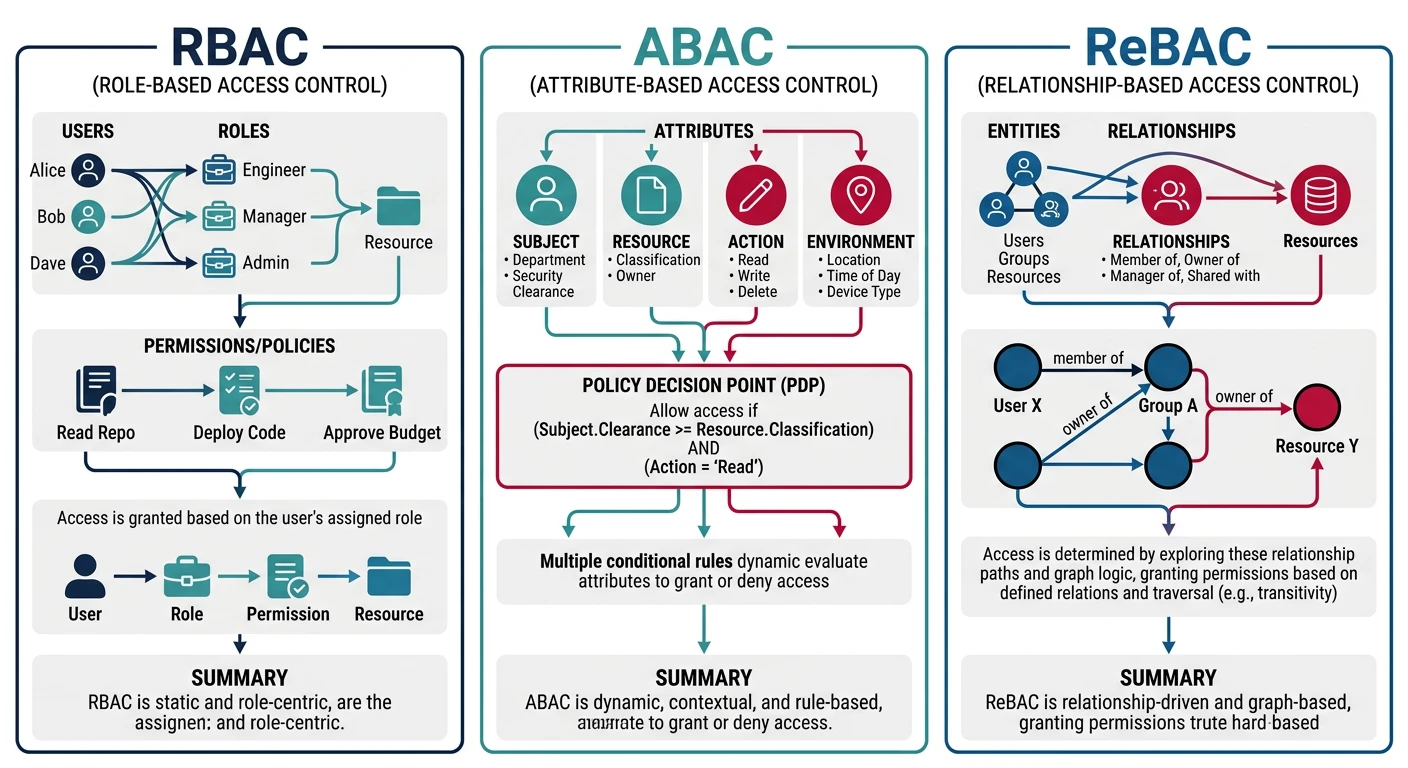
Authorization determines what authenticated users can do. Three main models:

Role-Based Access Control (RBAC)

RBAC Implementation

# RBAC: Users ? Roles ? Permissions
"""
Simple model where permissions are grouped into roles.
Users are assigned roles, not individual permissions.

Pros: Easy to understand and manage
Cons: Can lead to role explosion, not context-aware
"""

from functools import wraps
from flask import request, jsonify

# Define roles and permissions
ROLES = {
    'admin': ['read', 'write', 'delete', 'manage_users'],
    'editor': ['read', 'write'],
    'viewer': ['read']
}

class RBACSystem:
    def __init__(self, db):
        self.db = db
    
    def get_user_roles(self, user_id):
        return self.db.query(
            "SELECT role FROM user_roles WHERE user_id = ?", 
            (user_id,)
        )
    
    def get_permissions(self, user_id):
        """Get all permissions for a user's roles"""
        roles = self.get_user_roles(user_id)
        permissions = set()
        for role in roles:
            permissions.update(ROLES.get(role, []))
        return permissions
    
    def has_permission(self, user_id, permission):
        return permission in self.get_permissions(user_id)
    
    def assign_role(self, user_id, role):
        if role not in ROLES:
            raise ValueError(f"Invalid role: {role}")
        self.db.execute(
            "INSERT INTO user_roles (user_id, role) VALUES (?, ?)",
            (user_id, role)
        )

# Decorator for route protection
def require_permission(permission):
    def decorator(f):
        @wraps(f)
        def decorated(*args, **kwargs):
            user_id = request.user_id  # Set by auth middleware
            if not rbac.has_permission(user_id, permission):
                return jsonify({'error': 'Forbidden'}), 403
            return f(*args, **kwargs)
        return decorated
    return decorator

@app.route('/articles', methods=['POST'])
@require_auth
@require_permission('write')
def create_article():
    # Only users with 'write' permission can reach here
    pass

Attribute-Based Access Control (ABAC)

ABAC Implementation

# ABAC: Policies based on attributes
"""
Decisions based on:
- Subject attributes (user role, department, clearance)
- Resource attributes (owner, classification, type)
- Action attributes (read, write, delete)
- Environment attributes (time, location, device)

Pros: Fine-grained, context-aware
Cons: More complex to manage and audit
"""

class ABACPolicy:
    def evaluate(self, subject, resource, action, environment):
        """Override in subclasses"""
        raise NotImplementedError

class DocumentAccessPolicy(ABACPolicy):
    def evaluate(self, subject, resource, action, environment):
        # Rule 1: Admins can do anything
        if 'admin' in subject.get('roles', []):
            return True
        
        # Rule 2: Owners can read/write their documents
        if resource.get('owner_id') == subject.get('user_id'):
            if action in ['read', 'write', 'delete']:
                return True
        
        # Rule 3: Same department can read if not confidential
        if subject.get('department') == resource.get('department'):
            if action == 'read' and resource.get('classification') != 'confidential':
                return True
        
        # Rule 4: No access outside business hours for sensitive docs
        if resource.get('classification') == 'sensitive':
            hour = environment.get('current_hour', 0)
            if not (9 <= hour <= 17):
                return False
        
        return False

class PolicyEngine:
    def __init__(self):
        self.policies = []
    
    def add_policy(self, policy):
        self.policies.append(policy)
    
    def is_allowed(self, subject, resource, action, environment=None):
        environment = environment or {'current_hour': datetime.now().hour}
        
        for policy in self.policies:
            if policy.evaluate(subject, resource, action, environment):
                return True
        return False

# Usage
engine = PolicyEngine()
engine.add_policy(DocumentAccessPolicy())

allowed = engine.is_allowed(
    subject={'user_id': 123, 'roles': ['editor'], 'department': 'engineering'},
    resource={'owner_id': 456, 'department': 'engineering', 'classification': 'internal'},
    action='read'
)  # True - same department, not confidential

Policy Engines (OPA, Casbin)

Open Policy Agent (OPA)

# OPA uses Rego policy language
# policy.rego
"""
package authz

default allow = false

# Admins can do anything
allow {
    input.user.roles[_] == "admin"
}

# Users can read their own data
allow {
    input.action == "read"
    input.resource.owner == input.user.id
}

# Managers can read team data
allow {
    input.action == "read"
    input.resource.team == input.user.team
    input.user.roles[_] == "manager"
}
"""

# Python integration with OPA
import requests

class OPAClient:
    def __init__(self, opa_url):
        self.url = opa_url
    
    def query(self, policy_path, input_data):
        response = requests.post(
            f"{self.url}/v1/data/{policy_path}",
            json={"input": input_data}
        )
        return response.json().get('result', False)

# Usage
opa = OPAClient('http://localhost:8181')

allowed = opa.query('authz/allow', {
    'user': {'id': 'user123', 'roles': ['editor'], 'team': 'engineering'},
    'action': 'read',
    'resource': {'owner': 'user456', 'team': 'engineering'}
})

Data Encryption

Encrypt data at rest and in transit to protect against unauthorized access.

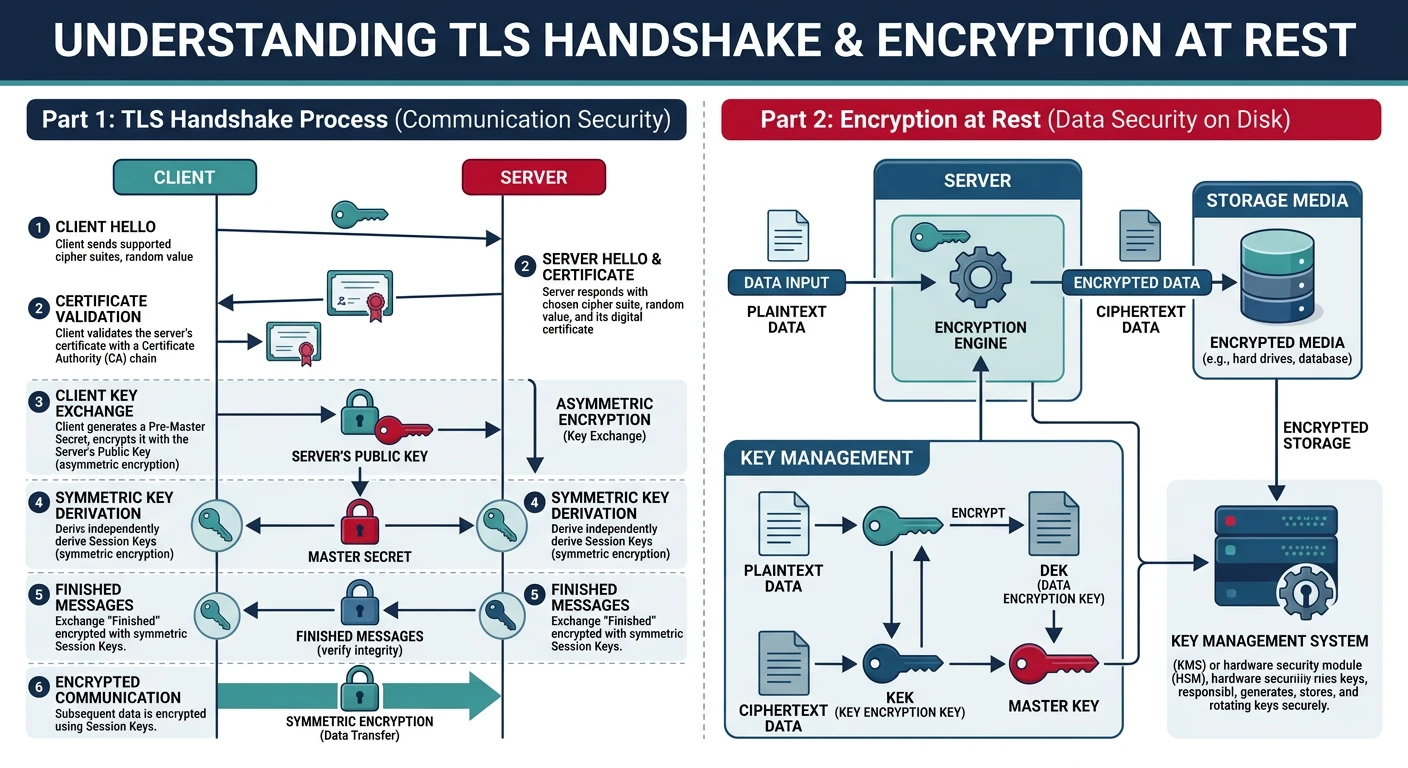
Encryption in Transit (TLS/SSL)

TLS Handshake

# TLS 1.3 Handshake (simplified)
"""
1. Client Hello
   - Supported cipher suites
   - Client random
   - Key share (ECDH public key)

2. Server Hello
   - Selected cipher suite
   - Server random
   - Key share (ECDH public key)
   - Certificate
   - Finished (encrypted)

3. Client Finished
   - Both sides derive session keys
   - All subsequent data encrypted
"""

# Flask with TLS
from flask import Flask

app = Flask(__name__)

if __name__ == '__main__':
    context = ('server.crt', 'server.key')  # Certificate and private key
    app.run(host='0.0.0.0', port=443, ssl_context=context)

# Nginx TLS configuration (production)
"""
server {
    listen 443 ssl http2;
    server_name example.com;
    
    ssl_certificate /etc/ssl/certs/example.com.crt;
    ssl_certificate_key /etc/ssl/private/example.com.key;
    
    # Modern TLS settings
    ssl_protocols TLSv1.2 TLSv1.3;
    ssl_ciphers ECDHE-ECDSA-AES128-GCM-SHA256:ECDHE-RSA-AES128-GCM-SHA256;
    ssl_prefer_server_ciphers off;
    
    # HSTS (force HTTPS)
    add_header Strict-Transport-Security "max-age=63072000" always;
}
"""

# Mutual TLS (mTLS) - Client certificates
"""
Used for service-to-service authentication in microservices.
Both client and server present certificates.

Benefits:
- Strong authentication (both parties verified)
- No shared secrets to manage
- Certificate can include identity claims
"""

Key Management

Encryption at Rest

# Envelope Encryption Pattern
"""
Problem: Encrypting large amounts of data with a master key is slow
Solution: Use a hierarchy of keys

1. Master Key (KEK - Key Encryption Key)
   - Stored in HSM or KMS
   - Never leaves secure boundary
   
2. Data Encryption Key (DEK)
   - Generated per resource/tenant
   - Encrypted with master key
   - Stored alongside encrypted data
"""

from cryptography.fernet import Fernet
import boto3

class EnvelopeEncryption:
    def __init__(self, kms_key_id):
        self.kms = boto3.client('kms')
        self.kms_key_id = kms_key_id
    
    def encrypt(self, plaintext):
        # Generate data key
        response = self.kms.generate_data_key(
            KeyId=self.kms_key_id,
            KeySpec='AES_256'
        )
        
        plaintext_key = response['Plaintext']
        encrypted_key = response['CiphertextBlob']
        
        # Encrypt data with plaintext key
        fernet = Fernet(base64.urlsafe_b64encode(plaintext_key))
        ciphertext = fernet.encrypt(plaintext.encode())
        
        # Return encrypted key + encrypted data
        # (encrypted key can only be decrypted with master key)
        return {
            'encrypted_key': base64.b64encode(encrypted_key).decode(),
            'ciphertext': ciphertext.decode()
        }
    
    def decrypt(self, encrypted_data):
        # Decrypt data key using KMS
        encrypted_key = base64.b64decode(encrypted_data['encrypted_key'])
        response = self.kms.decrypt(CiphertextBlob=encrypted_key)
        plaintext_key = response['Plaintext']
        
        # Decrypt data
        fernet = Fernet(base64.urlsafe_b64encode(plaintext_key))
        plaintext = fernet.decrypt(encrypted_data['ciphertext'].encode())
        
        return plaintext.decode()

Security Patterns

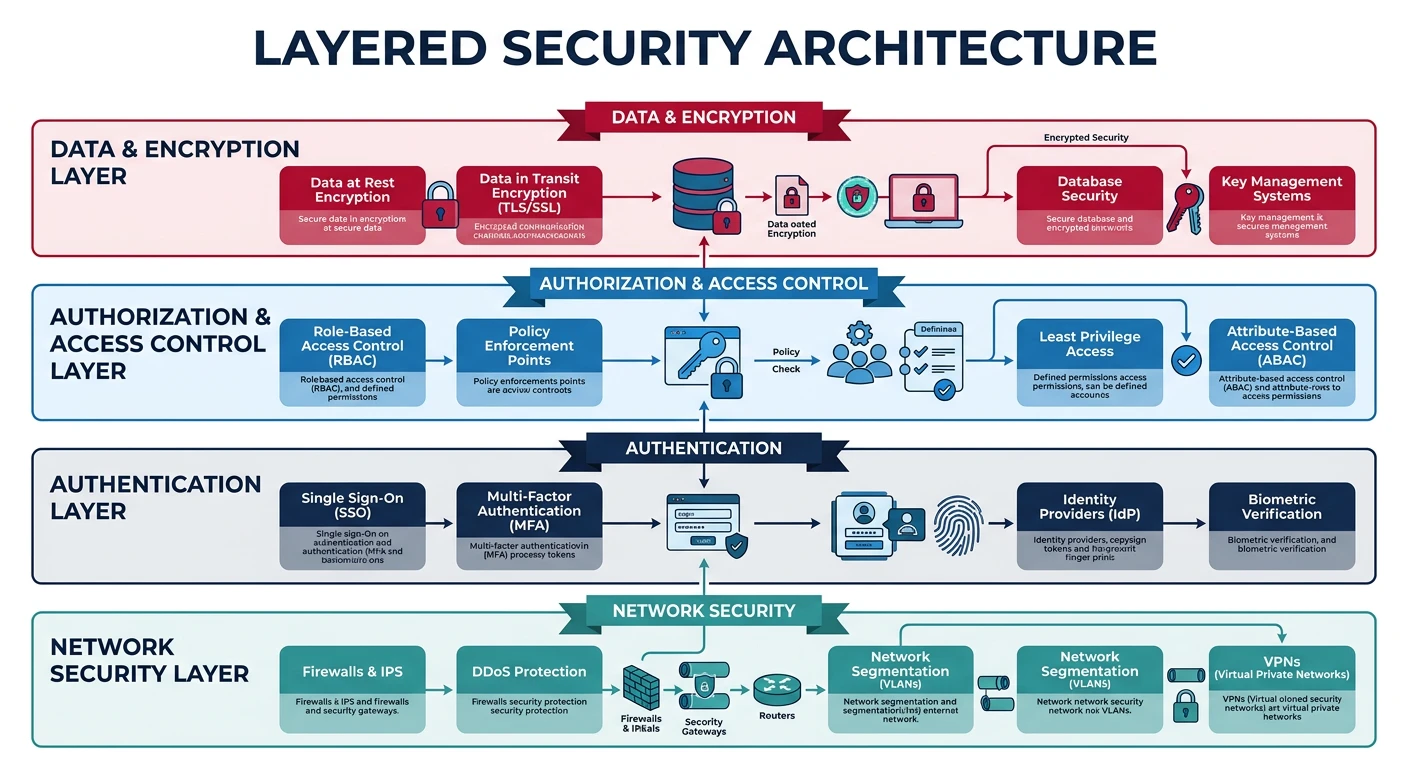
Defense in Depth

Layer multiple security controls so that if one fails, others still protect the system:

  • Network: Firewalls, VPNs, network segmentation
  • Host: OS hardening, antivirus, intrusion detection
  • Application: Input validation, authentication, authorization
  • Data: Encryption, access controls, backup

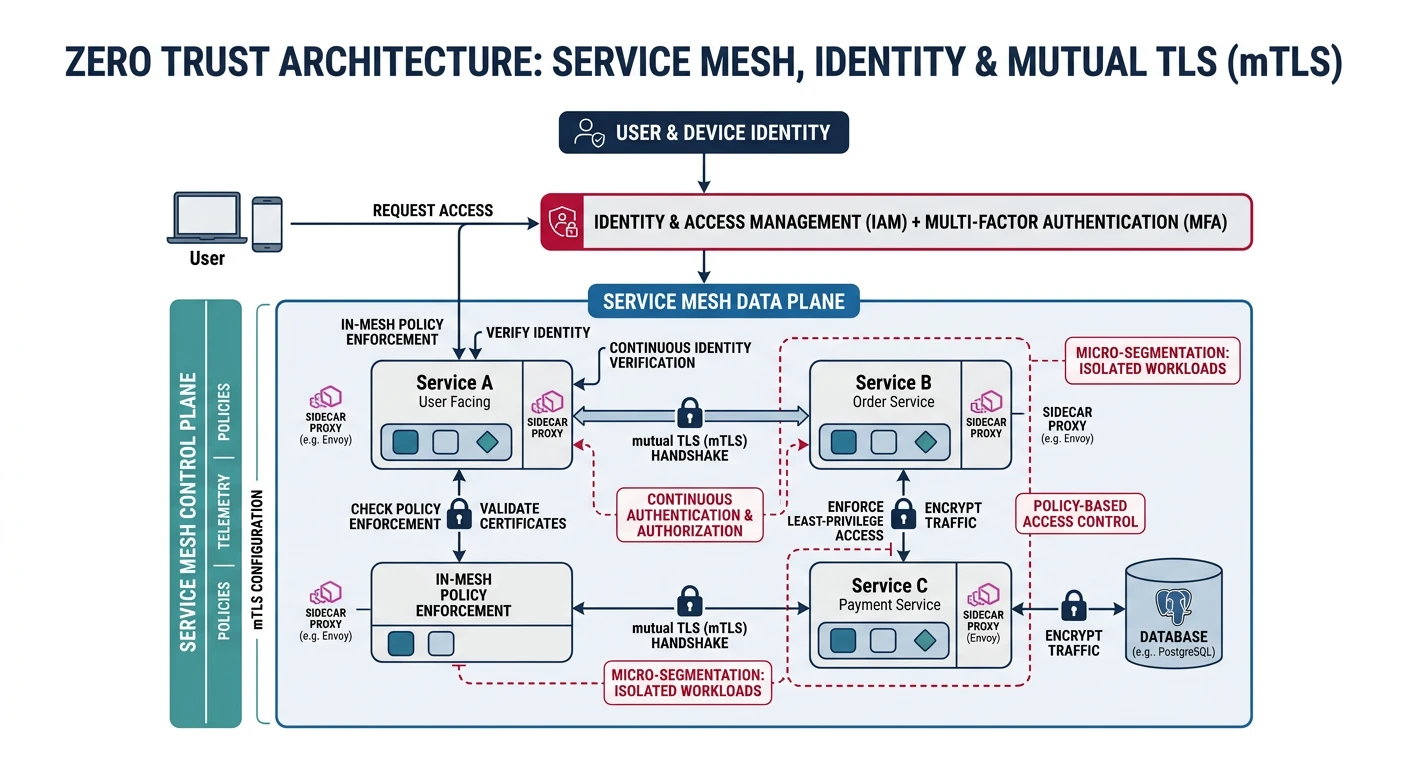
Zero Trust Architecture

Key Principle: "Never trust, always verify." Assume the network is compromised. Authenticate and authorize every request, regardless of source.

Zero Trust Principles

  • Verify explicitly: Authenticate based on all available data points
  • Least privilege access: Limit access to just-in-time and just-enough
  • Assume breach: Minimize blast radius, segment access, verify end-to-end encryption

Zero Trust Implementation

# Zero Trust Service-to-Service Communication
"""
Traditional: Trust based on network location (inside firewall = trusted)
Zero Trust: Trust based on identity, regardless of location

Implementation:
1. Service identity (certificates, SPIFFE)
2. Mutual TLS for all communication
3. Fine-grained authorization policies
4. Continuous verification
"""

# SPIFFE (Secure Production Identity Framework)
"""
Every workload gets a SPIFFE ID:
spiffe://trust-domain/path

Example: spiffe://acme.com/ns/production/sa/payment-service

Components:
- SPIFFE ID: Unique workload identifier
- SVID (SPIFFE Verifiable Identity Document): X.509 cert or JWT
- SPIRE: Reference implementation for issuing SVIDs
"""

# Service mesh authorization (Istio)
"""
apiVersion: security.istio.io/v1beta1
kind: AuthorizationPolicy
metadata:
  name: payment-service-policy
spec:
  selector:
    matchLabels:
      app: payment-service
  rules:
  - from:
    - source:
        principals: ["cluster.local/ns/default/sa/order-service"]
    to:
    - operation:
        methods: ["POST"]
        paths: ["/api/payments"]
  - from:
    - source:
        principals: ["cluster.local/ns/default/sa/admin-service"]
    to:
    - operation:
        methods: ["GET", "POST", "DELETE"]
"""

Secrets Management

HashiCorp Vault

# Vault for Secrets Management
import hvac

client = hvac.Client(url='http://vault:8200')
client.token = 'your-vault-token'

# Store a secret
client.secrets.kv.v2.create_or_update_secret(
    path='database/credentials',
    secret={'username': 'admin', 'password': 'secret123'}
)

# Read a secret
response = client.secrets.kv.v2.read_secret_version(
    path='database/credentials'
)
credentials = response['data']['data']

# Dynamic Secrets (short-lived credentials)
"""
Vault can generate temporary credentials on-demand:
- Database credentials
- AWS IAM credentials
- PKI certificates

Benefits:
- No long-lived secrets
- Automatic rotation
- Audit trail
"""

# Database dynamic secrets
client.secrets.database.create_role(
    name='readonly',
    db_name='postgres',
    creation_statements=[
        "CREATE ROLE \"{{name}}\" WITH LOGIN PASSWORD '{{password}}' VALID UNTIL '{{expiration}}';",
        "GRANT SELECT ON ALL TABLES IN SCHEMA public TO \"{{name}}\";"
    ],
    default_ttl='1h',
    max_ttl='24h'
)

# Get temporary credentials
creds = client.secrets.database.generate_credentials(name='readonly')
# Returns: {'username': 'v-token-readonly-xyz', 'password': 'random', 'lease_id': '...'}

# Kubernetes Integration
"""
apiVersion: v1
kind: Pod
spec:
  serviceAccountName: app-service-account
  containers:
  - name: app
    env:
    - name: DB_PASSWORD
      valueFrom:
        secretKeyRef:
          name: vault-injected-secrets
          key: db_password
"""

Compliance & Regulations

GDPR (General Data Protection Regulation)

EU regulation for data protection and privacy. Key requirements:

  • Consent: Clear, affirmative consent for data processing
  • Right to Access: Users can request their data
  • Right to Erasure: "Right to be forgotten"
  • Data Portability: Export data in machine-readable format
  • Breach Notification: Report breaches within 72 hours

PCI-DSS

Payment Card Industry Data Security Standard for handling credit card data:

  • Build and maintain secure network (firewalls, no default passwords)
  • Protect cardholder data (encryption, access controls)
  • Maintain vulnerability management program
  • Implement strong access control measures
  • Monitor and test networks regularly
  • Maintain information security policy
Best Practice: Use payment tokenization (Stripe, Braintree) to avoid storing card data yourself. This dramatically reduces PCI scope.

HIPAA

Health Insurance Portability and Accountability Act for healthcare data:

  • PHI (Protected Health Information): Any data that identifies a patient
  • Privacy Rule: Limits use and disclosure of PHI
  • Security Rule: Administrative, physical, and technical safeguards
  • BAA (Business Associate Agreement): Required with vendors handling PHI

Next Steps

You now have a comprehensive understanding of authentication and security patterns! Continue to Part 15 for Interview Preparation—strategies and patterns for system design interviews.

Security Architecture Document Generator

Document your authentication flows, access control model, and threat mitigations. Download as Word, Excel, PDF, or PowerPoint.

Draft auto-saved

All data stays in your browser. Nothing is sent to or stored on any server.

Technology