Back to Technology

System Design Series Part 15: Interview Preparation Guide

January 25, 2026 Wasil Zafar 40 min read

Complete guide to system design interview preparation including proven frameworks, common interview questions, mock design problems, trade-off discussions, and strategies for success at top tech companies.

Table of Contents

  1. Interview Overview
  2. The Framework
  3. Common Questions
  4. Trade-off Discussions
  5. Mock Design Problems
  6. Success Strategies
  7. Series Complete

System Design Interview Overview

Series Navigation: This is Part 15 (Final Part) of the System Design Series. Review Part 14: Authentication & Security first.

System design interviews test your ability to design large-scale distributed systems. Unlike coding interviews that have right or wrong answers, system design is about demonstrating your thought process, making reasonable trade-offs, and communicating effectively.

Key Insight: Interviewers care more about HOW you think than the exact solution. There's no perfect design—only designs that make sense for specific requirements and constraints.

The interview is a conversation, not an exam. You're being evaluated on your ability to:

  • Understand and clarify ambiguous requirements
  • Break down complex problems into manageable components
  • Make and justify design decisions with trade-offs
  • Communicate clearly while thinking through problems
  • Identify potential issues and bottlenecks

Level Expectations

Level Expectation Focus Areas
Junior (0-2 years) Basic understanding of system components APIs, databases, caching basics, simple scaling
Mid-Level (3-5 years) Design moderate complexity systems Microservices, message queues, sharding, replication
Senior (5+ years) Design complete large-scale systems Distributed systems, consistency models, fault tolerance
Staff+ (8+ years) Architect systems with organizational context Team structure, cross-system integration, technical strategy

The Interview Framework

The 4-Step Framework:
  1. Clarify Requirements (3-5 min) - Understand scope, users, and constraints
  2. Back-of-Envelope Estimation (3-5 min) - Calculate scale and capacity
  3. High-Level Design (10-15 min) - Draw system components and data flow
  4. Deep Dive (10-15 min) - Explore specific components in detail

Step 1: Clarifying Requirements

Never jump into designing. Spend the first few minutes asking questions to understand what you're building.

Requirements Checklist

# Functional Requirements Questions
"""
1. Who are the users? (B2B, B2C, internal)
2. What are the core features? (MVP scope)
3. What actions can users take?
4. What data needs to be stored/retrieved?
5. Are there real-time requirements?
6. Mobile, web, or API-only?
"""

# Non-Functional Requirements Questions
"""
1. Scale: How many users? DAU/MAU?
2. Performance: Latency requirements? (p50, p99)
3. Availability: What's acceptable downtime?
4. Consistency: Can we tolerate stale data?
5. Geography: Single region or global?
6. Security: Sensitive data? Compliance needs?
"""

# Example: "Design Twitter"
"""
YOU: "Can you help me understand the scope?"
- Is this the full Twitter or specific features?
- Do we need DMs, search, trending?
- What's the expected user base?
- Read-heavy or write-heavy?

CLARIFIED SCOPE:
- Core features: Post tweets, follow users, home timeline
- 500M DAU, 200M tweets/day
- Timeline latency < 200ms
- Eventually consistent is acceptable
- Global users (multi-region)
"""

Step 2: Back-of-Envelope Estimation

Quick math to understand scale. Don't be too precise—order of magnitude is what matters.

Estimation Cheat Sheet

# Key Numbers to Memorize
"""
Time:
- 1 day = 86,400 seconds ˜ 100K seconds
- 1 month = 2.5M seconds
- 1 year = 30M seconds

Storage:
- ASCII character = 1 byte
- Unicode character = 2-4 bytes
- UUID = 16 bytes
- Unix timestamp = 4 bytes (int32)
- Average tweet = 140 chars ˜ 300 bytes with metadata
- Average image = 200KB-2MB
- Average video = 5MB-50MB per minute

Throughput:
- Single MySQL server = 10K QPS (simple queries)
- Single Redis server = 100K QPS
- Single Kafka broker = 100K messages/sec
"""

# Example: Twitter Scale Estimation
"""
Given: 500M DAU, 200M tweets/day

WRITE LOAD:
- Tweets/sec = 200M / 100K = 2,000 TPS
- Peak (3x average) = 6,000 TPS

READ LOAD (read-heavy):
- Assume 100 timeline views per user per day
- Timeline reads = 500M × 100 = 50B/day
- Reads/sec = 50B / 100K = 500K QPS
- Peak = 1.5M QPS

STORAGE:
- Tweet size = 300 bytes (text + metadata)
- Daily storage = 200M × 300B = 60GB/day
- Annual storage = 60GB × 365 = 22TB/year
- 5 years = 110TB (before replication/indexes)

BANDWIDTH:
- Tweets: 60GB/day ÷ 100K sec = 600KB/sec outgoing
- Timeline (including images): 
  - Assume 20 tweets per view, 5 with images
  - Per view = 20 × 300B + 5 × 200KB = 1MB
  - 50B views/day = 50PB/day outgoing
  - Peak bandwidth = 50PB / 100K × 3 = 1.5TB/sec
"""

Step 3: High-Level Design

Draw the main components and how they interact. Start simple, then refine.

HLD Template

# Standard Components to Consider
"""
+-----------------------------------------------------------------+
¦                        CLIENTS                                   ¦
¦              (Web, Mobile, Third-party APIs)                    ¦
+-----------------------------------------------------------------+
                              ¦
                              ?
+-----------------------------------------------------------------+
¦                      LOAD BALANCER                               ¦
¦                  (Route traffic, SSL termination)               ¦
+-----------------------------------------------------------------+
                              ¦
                              ?
+-----------------------------------------------------------------+
¦                      API GATEWAY                                 ¦
¦         (Auth, rate limiting, request routing)                  ¦
+-----------------------------------------------------------------+
                              ¦
          +-------------------+-------------------+
          ?                   ?                   ?
+-----------------+ +-----------------+ +-----------------+
¦  Service A      ¦ ¦  Service B      ¦ ¦  Service C      ¦
¦  (User)         ¦ ¦  (Tweet)        ¦ ¦  (Timeline)     ¦
+-----------------+ +-----------------+ +-----------------+
          ¦                   ¦                   ¦
          +---------------------------------------+
                    ?                   ?
           +---------------+   +---------------+
           ¦    CACHE      ¦   ¦  MESSAGE      ¦
           ¦    (Redis)    ¦   ¦  QUEUE        ¦
           +---------------+   +---------------+
                    ¦                   ¦
                    ?                   ?
           +---------------+   +---------------+
           ¦   DATABASE    ¦   ¦  ASYNC        ¦
           ¦   (Primary)   ¦   ¦  WORKERS      ¦
           +---------------+   +---------------+
"""

# Drawing Tips
"""
1. Start with user ? API ? database (simplest path)
2. Add caching layer for read-heavy paths
3. Add queues for async processing
4. Add CDN for static content
5. Show data flow with arrows
6. Label with technology choices
"""

Step 4: Deep Dive

The interviewer will pick 1-2 areas to explore in detail. Be ready to go deeper.

Common Deep Dive Topics

# Deep Dive Areas
"""
DATABASE SCHEMA:
- Table design, indexes, query patterns
- Sharding key selection
- Read replicas configuration

API DESIGN:
- Endpoint structure (REST/GraphQL)
- Pagination strategy (cursor vs offset)
- Rate limiting approach

CACHING STRATEGY:
- What to cache (hot data, computed results)
- Cache invalidation approach
- Cache-aside vs write-through

SCALING:
- Horizontal vs vertical scaling
- Stateless service design
- Database scaling approach

RELIABILITY:
- Failure scenarios and handling
- Data replication strategy
- Backup and recovery
"""

# Example Deep Dive: Timeline Generation
"""
INTERVIEWER: "Let's dive into how the timeline is generated."

YOU: "There are two main approaches: push (fan-out on write) and 
pull (fan-out on read). Let me walk through both..."

PUSH (Fan-out on Write):
- When user tweets, push to all followers' timelines
- Pros: Fast reads (pre-computed)
- Cons: Write amplification for celebrities
- Implementation: 
  - User posts tweet ? message queue
  - Workers fetch follower list
  - Write to each follower's timeline cache

PULL (Fan-out on Read):
- On timeline request, fetch from followed users
- Pros: No write amplification
- Cons: Slow reads, N+1 queries
- Implementation:
  - Fetch followed user IDs
  - Query recent tweets from each
  - Merge and sort

HYBRID (Twitter's actual approach):
- Push for users with < 1M followers
- Pull for celebrities at read time
- Cache hot timelines
"""

Common Interview Questions

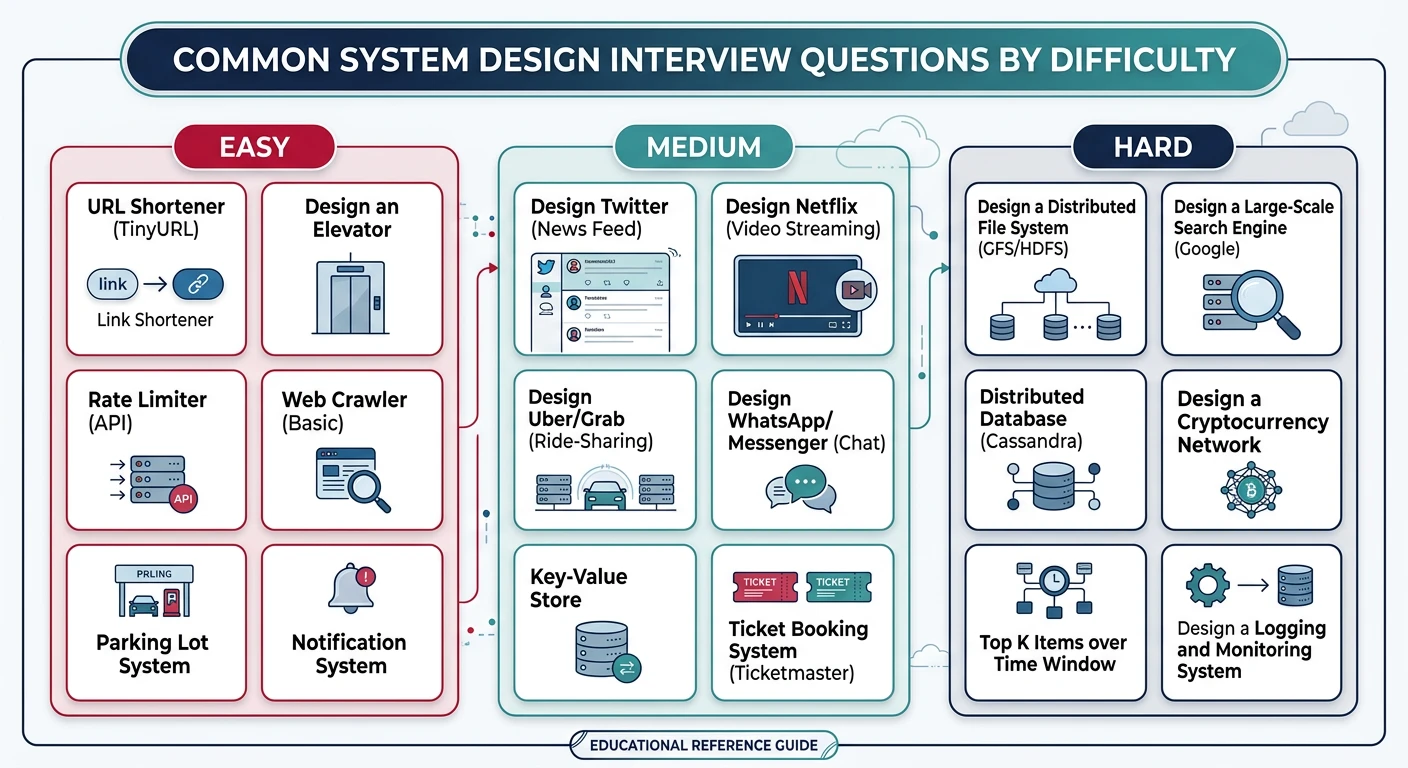
Here are the most frequently asked system design questions, organized by difficulty:

Easy

Design a URL Shortener (like bit.ly)

Key Points: Hashing algorithms, database schema, read-heavy workload, caching, analytics

# Key Design Decisions
"""
1. SHORTENING ALGORITHM:
   - Base62 encoding (a-z, A-Z, 0-9) = 62^7 = 3.5 trillion URLs
   - Use auto-increment ID ? Base62 (simple)
   - Or MD5 hash ? take first 7 chars (collision handling needed)

2. READ VS WRITE:
   - Reads >> Writes (100:1 ratio typical)
   - Cache popular URLs in Redis
   - Reads hit cache first, then database

3. SCALE ESTIMATION (1B URLs/year):
   - Writes: 1B/year = 30 URLs/sec
   - Reads: 30 × 100 = 3,000 QPS (easy for single DB + cache)

4. DATABASE SCHEMA:
   CREATE TABLE urls (
       short_code VARCHAR(7) PRIMARY KEY,
       original_url TEXT NOT NULL,
       user_id INT,
       created_at TIMESTAMP,
       expires_at TIMESTAMP,
       click_count INT DEFAULT 0
   );

5. API DESIGN:
   POST /shorten ? {"short_url": "bit.ly/abc123"}
   GET /{short_code} ? 301 Redirect to original URL
"""
Medium

Design a Chat System (like WhatsApp/Slack)

Key Points: WebSockets, message delivery guarantees, presence, group chat, read receipts

# Key Design Decisions
"""
1. REAL-TIME DELIVERY:
   - WebSocket for persistent connections
   - Each user maintains connection to chat server
   - Server pushes messages instantly

2. MESSAGE DELIVERY GUARANTEES:
   - At-least-once delivery (retry until ACK)
   - Message states: sent ? delivered ? read
   - Client sends ACK, server updates status

3. OFFLINE HANDLING:
   - Store messages in queue if recipient offline
   - Deliver when they reconnect
   - Push notification via APNS/FCM

4. GROUP CHAT SCALING:
   - Fan-out on write for small groups (< 100 members)
   - Fan-out on read for large groups (channels)
   - Cache group membership

5. ARCHITECTURE:
   Client ? WebSocket Gateway ? Chat Service ? Database
                    ?
              Message Queue ? Push Notification Service
                    ?
              Presence Service (online/offline status)
"""
Hard

Design a News Feed (like Facebook/Twitter)

Key Points: Fan-out, ranking algorithms, timeline generation, caching strategy

# Key Design Decisions
"""
1. FAN-OUT STRATEGY:
   Push Model:
   - Write to all followers' feeds on post
   - Fast reads, slow writes
   - Problem: Celebrities with millions of followers
   
   Pull Model:
   - Fetch from all followed users on read
   - Fast writes, slow reads
   - Problem: Many queries per read
   
   Hybrid (Recommended):
   - Push for normal users
   - Pull for celebrities (>10K followers)
   - Merge at read time

2. FEED STORAGE:
   - User timeline in Redis sorted set
   - Key: user:{id}:feed
   - Value: post_id, Score: timestamp
   - ZREVRANGE for recent posts

3. RANKING ALGORITHM:
   score = (likes × 2) + (comments × 3) + recency_decay
   - Filter: Spam, blocked users, seen content
   - Personalize: Interest model, engagement history

4. SCALE:
   - 500M DAU × 100 feed views = 50B reads/day
   - Cache hot feeds, pre-compute for active users
   - Shard by user_id
"""
Medium

Design a Notification System

Key Points: Push/email/SMS channels, priority queues, rate limiting, user preferences

# Key Design Decisions
"""
1. MULTI-CHANNEL DELIVERY:
   - Push (iOS/Android), Email, SMS, In-app
   - User preferences per notification type
   - Channel fallback (push failed ? email)

2. ARCHITECTURE:
   Event Source ? Notification Service ? Channel Routers
                                              ?
   +-----------------------------------------------------+
   ¦  Push Service  ¦  Email Service  ¦  SMS Service    ¦
   ¦  (APNS/FCM)    ¦  (SendGrid)     ¦  (Twilio)       ¦
   +-----------------------------------------------------+

3. PRIORITY HANDLING:
   - High: Security alerts, payment confirmations
   - Medium: Social interactions, updates
   - Low: Marketing, recommendations
   - Separate queues per priority level

4. RATE LIMITING:
   - Per-user: Max 10 notifications/hour
   - Per-channel: Respect provider limits
   - Batching: Group similar notifications

5. DEDUPLICATION:
   - Cache recently sent notifications
   - Idempotency key per notification
   - Prevent duplicate sends on retry
"""

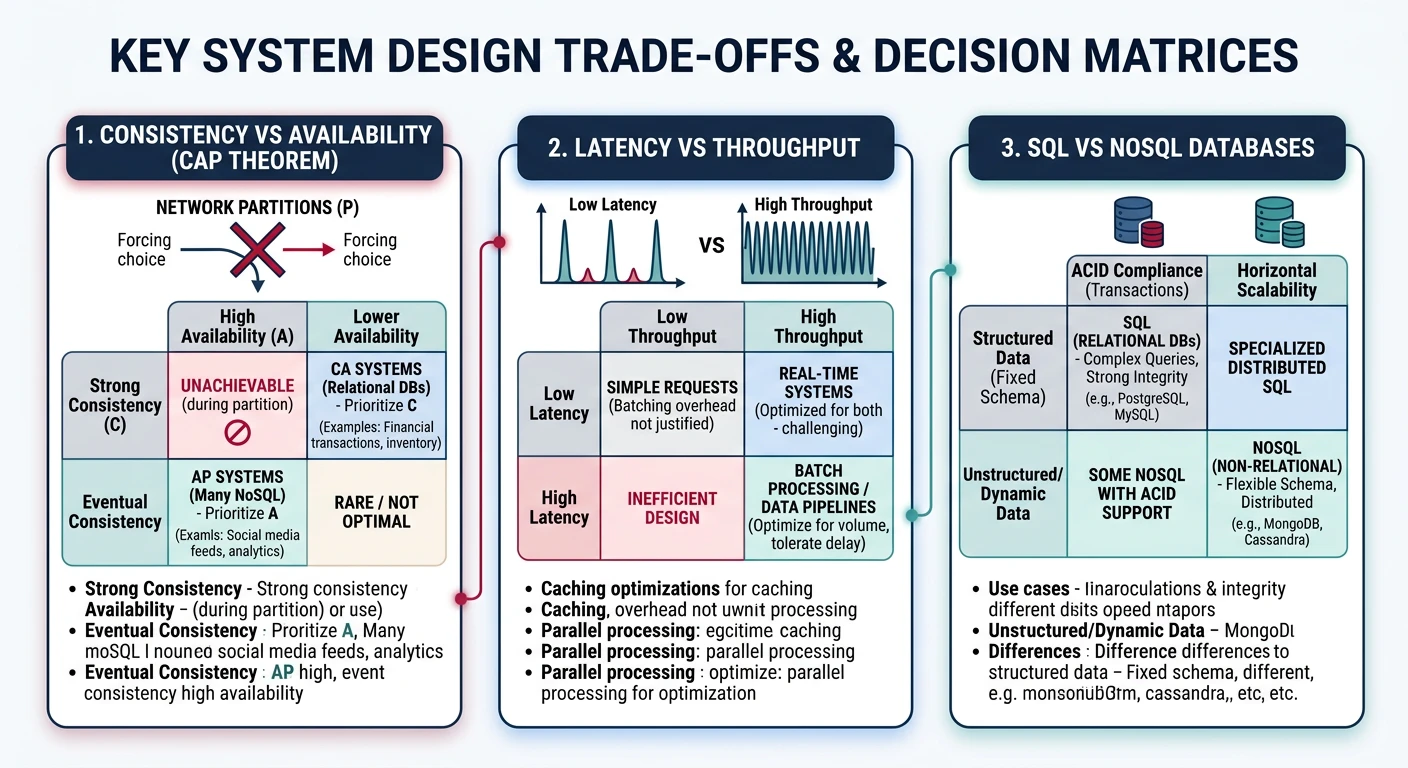
Trade-off Discussions

Every design decision involves trade-offs. Be ready to discuss them explicitly.

SQL vs NoSQL

Factor SQL (PostgreSQL, MySQL) NoSQL (MongoDB, Cassandra)
Schema Fixed schema, migrations required Flexible schema, evolves easily
Relationships JOINs are first-class Denormalize or application joins
Transactions ACID guaranteed Limited (varies by product)
Scaling Vertical, or complex sharding Horizontal scaling built-in
Use When Complex queries, strong consistency High write volume, flexible data

Push vs Pull Architecture

Factor Push (Fan-out on Write) Pull (Fan-out on Read)
Latency Fast reads (pre-computed) Slower reads (computed on demand)
Write Cost High (N writes per post) Low (1 write per post)
Hotspot Celebrity problem (millions of writes) Hot content (many reads)
Freshness Eventually consistent Always fresh
Use When Read-heavy, small follower counts Write-heavy, large follower counts

Mock Design Problems

Practice with these additional problems:

Problem Difficulty Key Focus
Design YouTube Hard Video transcoding, CDN, recommendation
Design Uber Hard Geospatial indexing, matching, real-time
Design Dropbox Medium File sync, chunking, deduplication
Design Rate Limiter Easy Algorithms, distributed state
Design Typeahead Medium Trie, ranking, caching
Design Ticketmaster Hard Inventory, concurrency, fairness

Success Strategies

Top 10 Tips:
  1. Always ask clarifying questions first
  2. Start with requirements, not solutions
  3. Think out loud—explain your reasoning
  4. Draw diagrams as you talk
  5. Acknowledge trade-offs explicitly
  6. Start simple, then iterate
  7. Use real numbers when estimating
  8. Know your fundamentals cold
  9. Practice with a timer
  10. Study real-world systems

Common Mistakes to Avoid

  • Jumping into solution: Always clarify requirements first
  • Over-engineering: Start simple, add complexity when needed
  • Ignoring scale: Design should match the requirements
  • Not communicating: Silence is bad—think out loud
  • Single points of failure: Consider reliability
  • Ignoring trade-offs: Every choice has pros and cons

Study Resources

  • Engineering Blogs: Netflix, Uber, Airbnb, Meta
  • Papers: Google (Bigtable, MapReduce, Spanner)
  • Books: Designing Data-Intensive Applications
  • Practice: Mock interviews, whiteboard sessions

Series Complete!

Congratulations! You've completed the 15-part System Design Series. You now have a comprehensive understanding of system design concepts, from fundamentals to advanced topics and interview preparation.

System Design Interview Worksheet Generator

Structure your system design interview approach with requirements gathering, estimation, design decisions, and analysis. Download as Word, Excel, or PDF.

Draft auto-saved

All data stays in your browser. Nothing is sent to or stored on any server.

Technology