We use cookies to enhance your browsing experience, serve personalized content, and analyze our traffic.
By clicking "Accept All", you consent to our use of cookies. See our
Privacy Policy
for more information.
System Design Series Part 1: Introduction to System Design
January 25, 2026Wasil Zafar40 min read
Master the fundamentals of system design for building scalable, reliable distributed systems. Learn essential concepts, components, and architectural patterns used by top tech companies like Google, Netflix, and Amazon.
Series Overview: This is Part 1 of our 15-part System Design Series. We'll cover everything from fundamental concepts to real-world case studies, including both High-Level Design (HLD) for system architecture and Low-Level Design (LLD) for object-oriented patterns, giving you the knowledge to design systems that scale to millions of users.
System design is the process of defining the architecture, components, modules, interfaces, and data flow of a system to satisfy specified requirements. Whether you're preparing for technical interviews at top tech companies or building production systems, understanding system design is essential.
Key Insight: System design isn't about memorizing solutions—it's about understanding trade-offs and making informed decisions based on requirements, constraints, and scale.
In this comprehensive guide, we'll explore what system design means, why it matters, and how to approach designing systems that can handle millions of users. By the end of this series, you'll have the knowledge to design systems like Netflix, Twitter, Uber, and other large-scale applications.
What is System Design?
At its core, system design is about solving problems at scale. It involves making decisions about:
Architecture: How components are organized and interact with each other
Data Management: How data is stored, accessed, and processed
Scalability: How the system grows to handle increased load
Reliability: How the system handles failures gracefully
Performance: How quickly the system responds to requests
Real-World Example
Netflix's Architecture Challenge
Netflix serves over 230 million subscribers worldwide, streaming 1 billion+ hours of content weekly. Their system must handle:
Peak traffic of 400+ Gbps during prime time
Thousands of microservices working in harmony
Content delivery across 190+ countries
Personalized recommendations for each user
This scale requires careful system design decisions—from content caching strategies to database sharding patterns.
Why System Design Matters
Understanding system design is crucial for several reasons:
Career Growth
1. Technical Interviews
System design interviews are standard for senior engineering roles at companies like Google, Amazon, Meta, and Microsoft. These interviews test your ability to think through complex problems and communicate architectural decisions clearly.
Professional Impact
2. Building Production Systems
Poor design decisions can cost millions in infrastructure, development time, and lost revenue. A well-designed system reduces operational costs, improves user experience, and enables faster feature development.
Technical Leadership
3. Architectural Decision Making
As you advance in your career, you'll be expected to make or influence architectural decisions. Understanding system design principles helps you evaluate trade-offs and guide your team toward effective solutions.
Key Concepts & Terminology
Before diving deeper, let's establish a common vocabulary. These terms will appear throughout this series and in system design discussions:
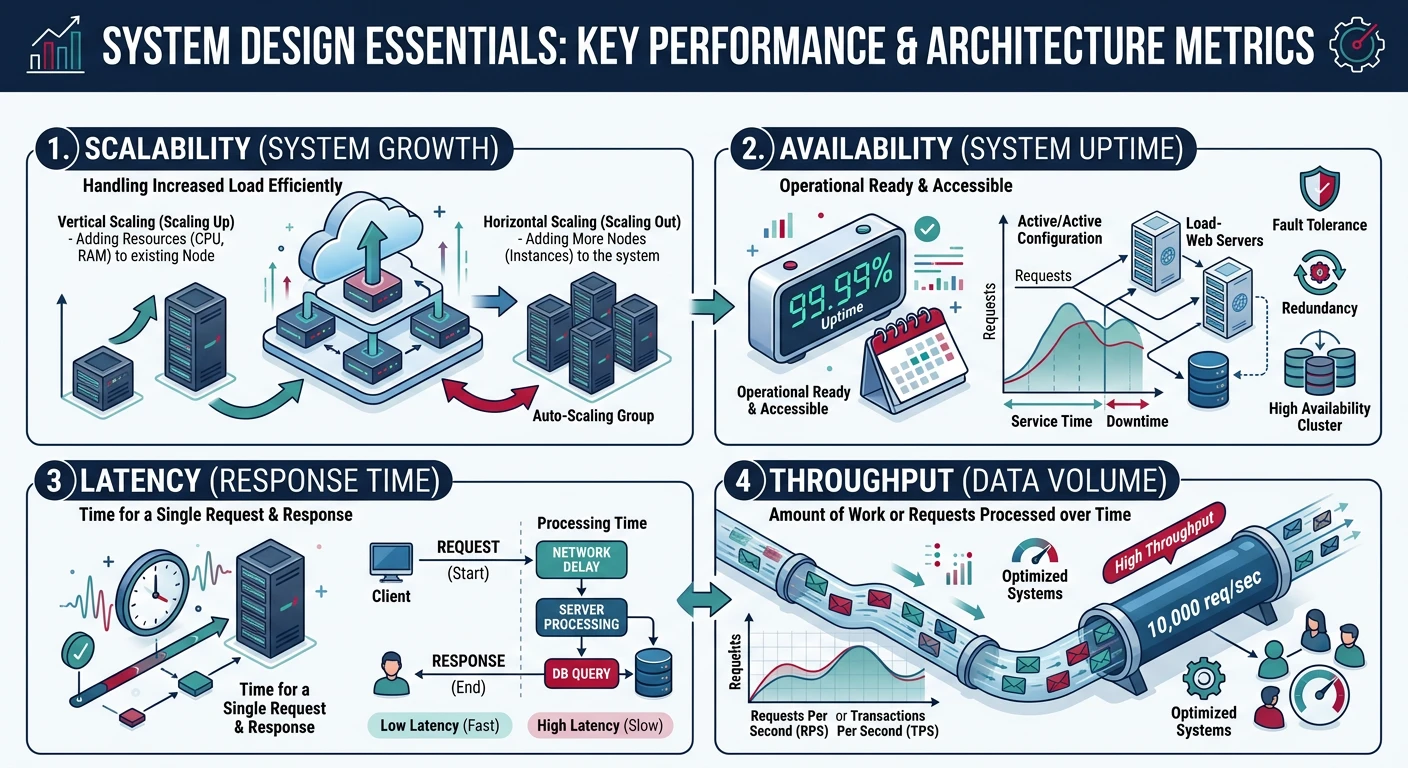
Overview of essential system design terminology and how concepts relate to each other
Scalability Terms
Core Concept
Horizontal Scaling (Scale Out)
Adding more machines to your resource pool. Like adding more lanes to a highway—each server handles a portion of the traffic. This is how most large systems scale.
Example: Adding 10 more web servers to handle increased traffic during Black Friday sales.
Core Concept
Vertical Scaling (Scale Up)
Adding more power to existing machines—more CPU, RAM, or storage. Like upgrading from a sedan to a truck—same vehicle, more capacity.
Example: Upgrading your database server from 16GB to 128GB RAM.
Core Concept
Latency vs Throughput
Latency: The time it takes to complete a single operation (e.g., 50ms response time).
Throughput: The number of operations completed per unit time (e.g., 10,000 requests per second).
A system can have low latency but low throughput, or high throughput with higher latency. Optimizing for one often affects the other.
Reliability Terms
Critical Concept
Availability
The percentage of time a system is operational and accessible. Usually measured in "nines":
99% (two nines): ~3.65 days downtime/year
99.9% (three nines): ~8.76 hours downtime/year
99.99% (four nines): ~52.56 minutes downtime/year
99.999% (five nines): ~5.26 minutes downtime/year
Each additional nine requires exponentially more engineering effort and cost.
Core Concept
Fault Tolerance
The ability of a system to continue operating when components fail. A fault-tolerant system degrades gracefully rather than failing completely.
Example: If one database replica fails, the system automatically routes traffic to healthy replicas without user impact.
Core Concept
Redundancy
Duplicating critical components to eliminate single points of failure. Types include:
Active-Passive: Standby components ready to take over on failure
Data Terms
Core Concept
Consistency
All nodes in a distributed system see the same data at the same time. Different consistency models offer different guarantees:
Strong Consistency: Every read returns the most recent write
Eventual Consistency: Given enough time, all reads will return the same value
Causal Consistency: Related operations appear in order
Core Concept
Partitioning (Sharding)
Dividing data across multiple databases to improve performance and manageability. Each partition contains a subset of the data.
Example: Storing users A-M in Database 1 and N-Z in Database 2.
Core Concept
Replication
Creating copies of data across multiple nodes for reliability and performance. Types include:
Synchronous: Wait for all replicas before confirming write
Asynchronous: Confirm immediately, replicate in background
The System Design Process
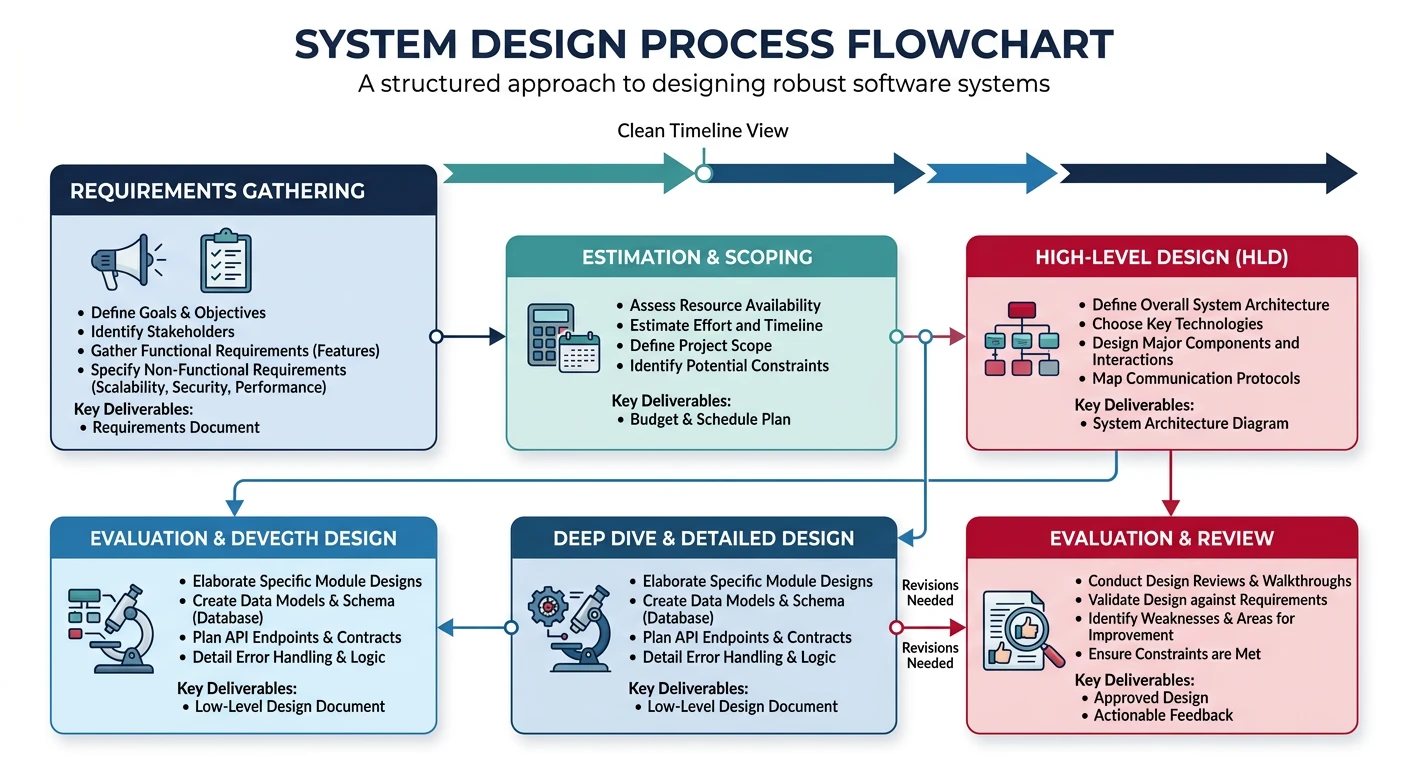
Whether you're in an interview or designing a real system, following a structured approach ensures you cover all bases and communicate clearly. Here's a proven framework:
The structured system design process: from requirements gathering to evaluation
Common Mistake: Jumping straight into technical solutions without understanding requirements. Always start with requirements gathering—it's the foundation of good design.
Step 1: Clarify Requirements (5-10 minutes in interviews)
Ask questions to understand what you're building. Never assume—clarification shows maturity and prevents wasted effort.
Questions to Ask
Functional Requirements
What are the core features needed?
Who are the users? (consumers, businesses, developers)
What actions can users perform?
Are there any specific use cases to prioritize?
Questions to Ask
Non-Functional Requirements
How many users? (1K, 1M, 100M?)
What's the read/write ratio?
What latency is acceptable?
What availability is required?
Are there geographic distribution requirements?
Step 2: Estimate Scale (5 minutes)
Back-of-the-envelope calculations help validate your design and identify bottlenecks early:
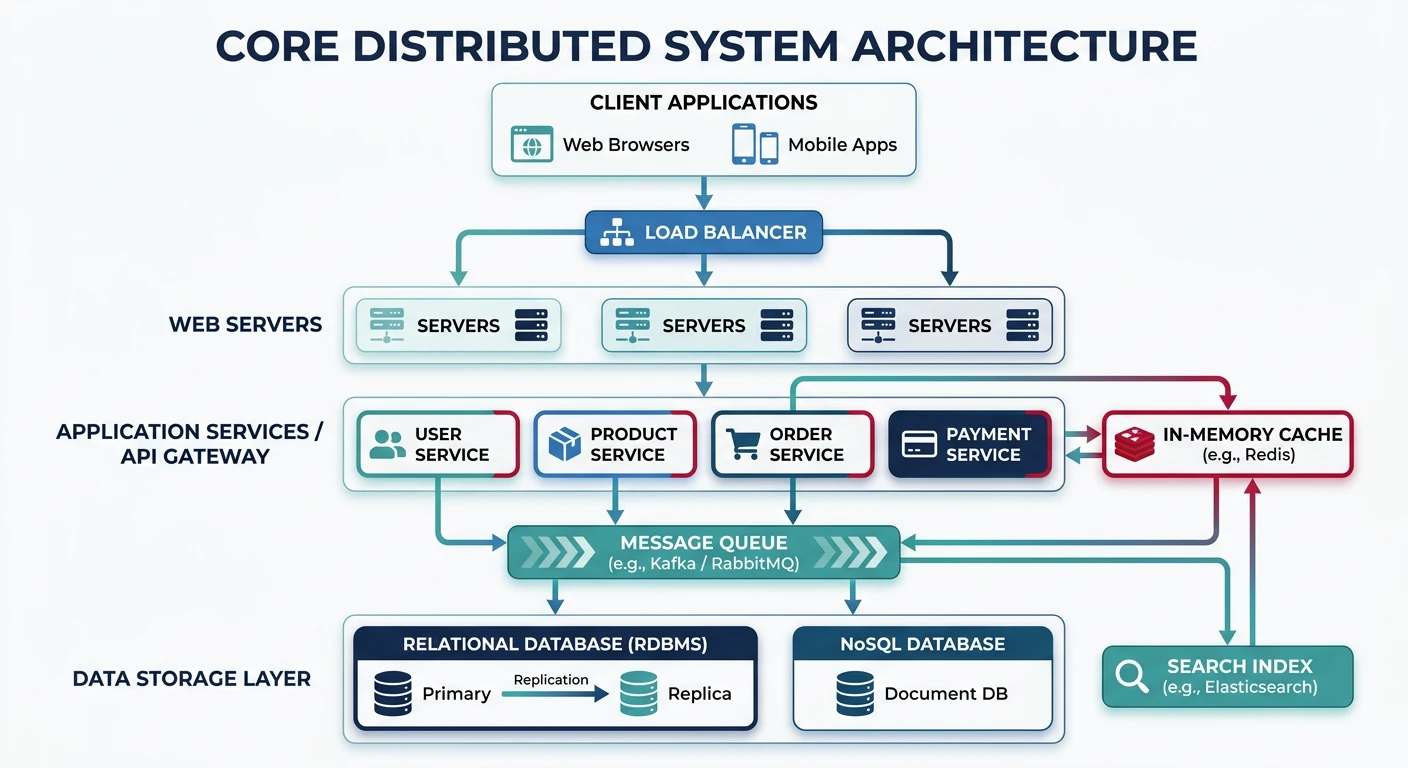
Every distributed system is built from a set of fundamental building blocks. Understanding these components is essential for system design:
Core building blocks of a distributed system and how they interconnect
Building Blocks Mindset: Think of system design like LEGO—you combine standard components (load balancers, caches, databases) in creative ways to solve unique problems.
Servers & Clients
The client-server model is the foundation of most distributed systems:
Component
Web Servers
Handle HTTP requests and serve content. Examples: Nginx, Apache, IIS
Understanding networking basics helps you make informed decisions about communication patterns:
Protocol
HTTP/HTTPS
The foundation of web communication. HTTP/2 and HTTP/3 offer improved performance.
Request-Response: Client sends request, server responds
Stateless: Each request is independent
Methods: GET, POST, PUT, DELETE, PATCH
Protocol
WebSockets
Full-duplex communication for real-time applications.
Persistent Connection: Single connection for multiple messages
Bi-directional: Server can push data to client
Use Cases: Chat, live updates, gaming
Protocol
TCP vs UDP
Transport layer protocols with different trade-offs:
TCP: Reliable, ordered delivery. Use for APIs, web traffic, databases.
UDP: Fast, no guaranteed delivery. Use for video streaming, gaming, DNS.
Network Latency Reference
Know these numbers for capacity estimation:
# Latency comparison (approximate)
memory_reference = "100 ns"          # L1 cache
ssd_read = "150 µs"                  # 150,000 ns
network_same_datacenter = "500 µs"   # 500,000 ns
ssd_write = "1 ms"                   # 1,000,000 ns
network_cross_region = "150 ms"      # US East ? West
network_cross_continent = "300 ms"   # US ? Europe

# Key insight: Network calls are 1000x+ slower than memory
# Design to minimize network round trips
Requirements Analysis
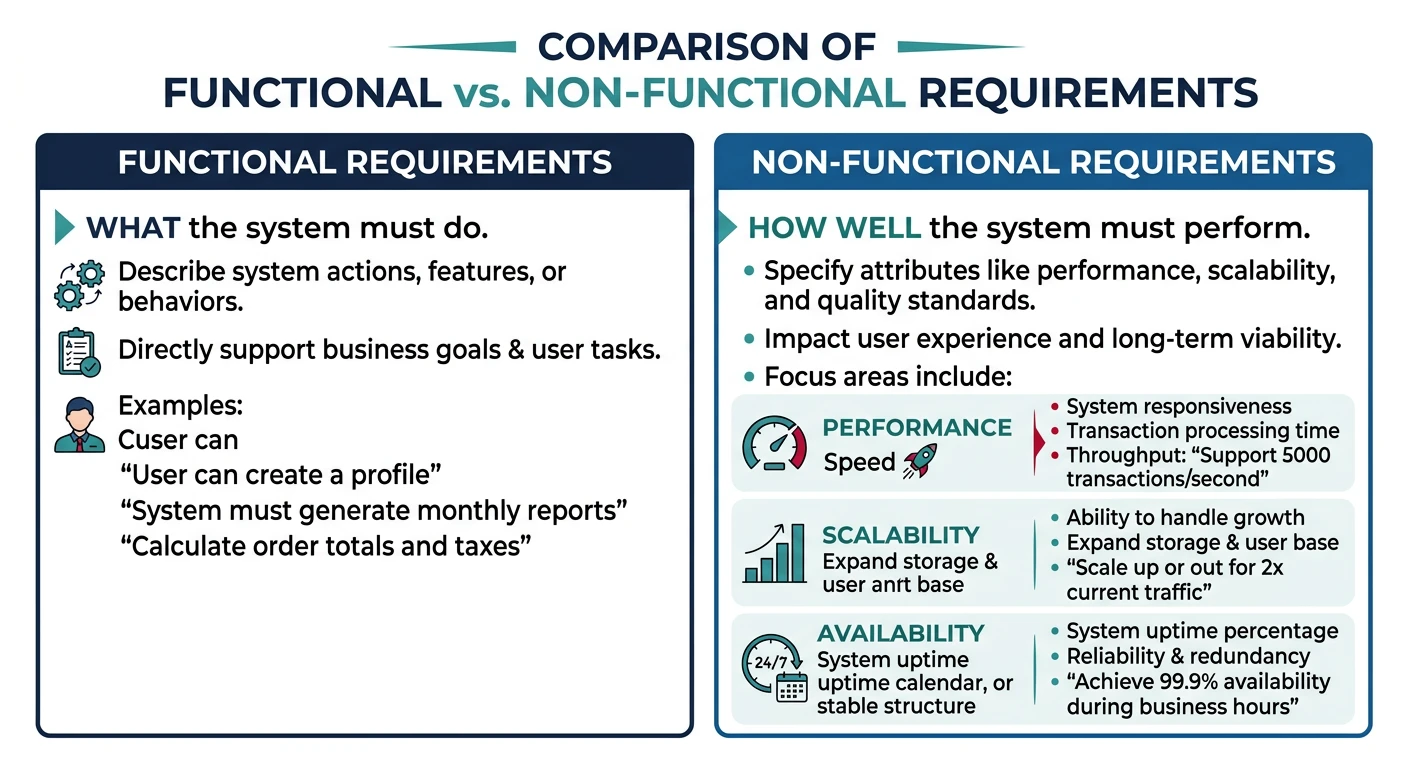
Requirements come in two flavors, and both are critical to system design:
Functional vs non-functional requirements in system design
Functional Requirements
What the system should do—the features and capabilities:
Example: URL Shortener
Functional Requirements
Given a URL, generate a shorter, unique alias
When users access the short link, redirect to the original URL
Users can optionally choose a custom short link
Links expire after a default timespan (optional)
Track click analytics (optional)
Non-Functional Requirements
How the system should perform—the quality attributes:
Example: URL Shortener
Non-Functional Requirements
Availability: 99.9% uptime (system should always be accessible)
Latency: URL redirection should happen in <100ms
Scalability: Handle 100M URLs created per month, 10B redirects
Durability: Once created, URLs should never be lost
Security: Prevent malicious URL creation
Trade-off Alert: You often can't optimize for everything. A highly consistent system may sacrifice availability. A system optimized for write speed may have slower reads. Identify what matters most for your use case.
Common Non-Functional Categories
Category
Description
Metrics
Performance
Speed of operations
Latency (p50, p95, p99), throughput
Scalability
Handle growth
Users, requests/sec, data volume
Availability
Uptime percentage
99.9%, 99.99%, etc.
Durability
Data persistence
Data loss probability
Consistency
Data accuracy
Strong, eventual, causal
Security
Protection
Encryption, auth, audit logs
Capacity Estimation
Back-of-the-envelope calculations help you understand the scale you're designing for. Master these techniques:
Key Numbers to Memorize
# Powers of 2
2^10 = 1 Thousand (KB)
2^20 = 1 Million (MB)
2^30 = 1 Billion (GB)
2^40 = 1 Trillion (TB)

# Time conversions
1 day = 86,400 seconds ˜ 100,000 seconds
1 month ˜ 2.5 million seconds
1 year ˜ 30 million seconds

# Data sizes
Character (ASCII) = 1 byte
Character (UTF-8) = 1-4 bytes
Integer = 4 bytes
Long/Timestamp = 8 bytes
UUID = 16 bytes
Average tweet = ~300 bytes
Average image = ~300 KB
Average video (1 min, 720p) = ~50 MB
Pro Tip: Round aggressively during estimation. The goal is to understand the order of magnitude (thousands, millions, billions), not get exact numbers. 86,400 seconds/day ˜ 100,000 is close enough.
Design Trade-offs
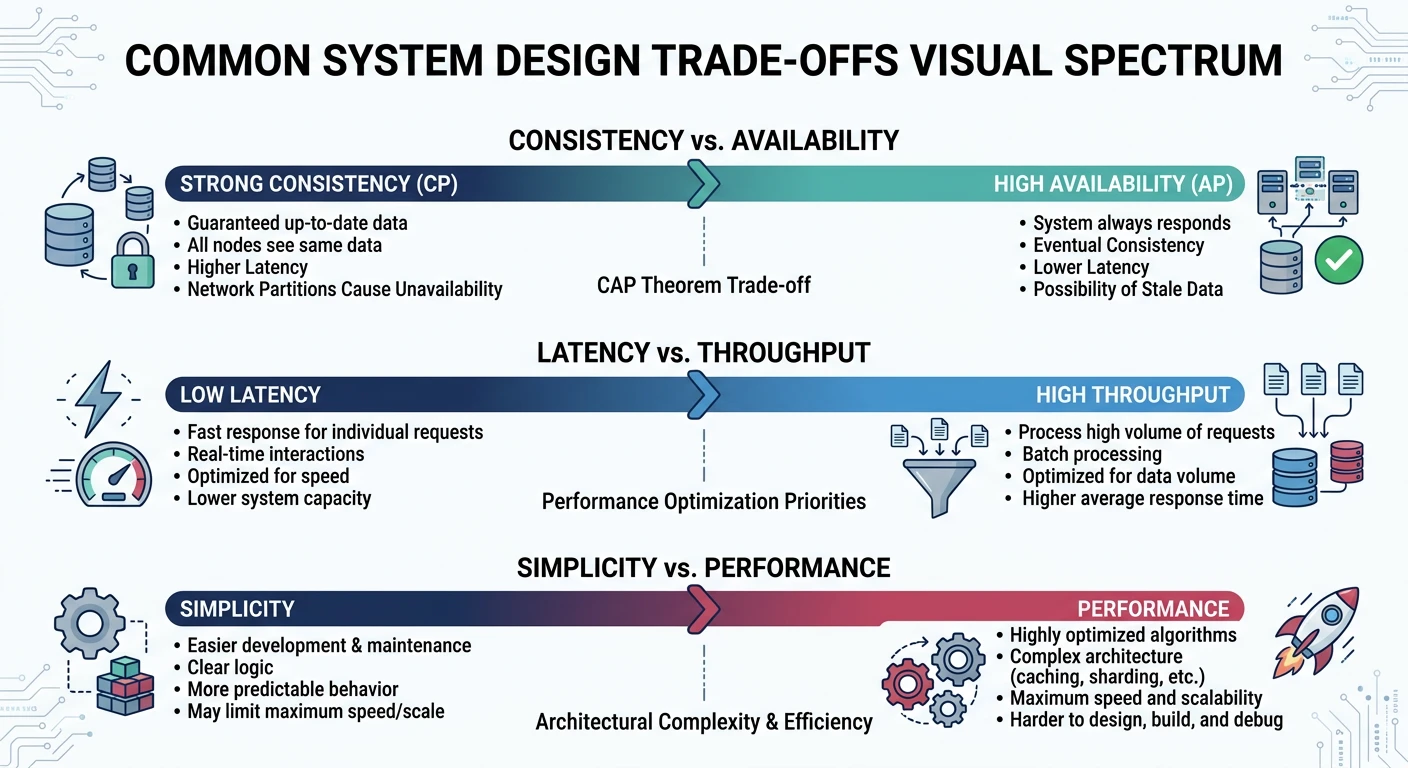
System design is fundamentally about trade-offs. There's no perfect solution—only solutions that are optimal for specific constraints. Understanding common trade-offs helps you make informed decisions:
Key design trade-offs that shape every system architecture decision
Fundamental Trade-off
Consistency vs Availability (CAP Theorem)
In a distributed system experiencing a network partition, you must choose:
CP (Consistency + Partition Tolerance): System returns errors or times out rather than returning stale data. Good for banking, inventory systems.
AP (Availability + Partition Tolerance): System always responds, but data might be stale. Good for social media feeds, caching.
We'll explore CAP theorem in depth in Part 8 of this series.
Common Trade-off
Latency vs Throughput
Optimizing for one often impacts the other:
Low Latency: Process requests immediately, but limits concurrent requests
High Throughput: Batch requests for efficiency, but individual requests wait longer
Example: Database writes—committing each transaction immediately is slower than batching commits every 100ms.
Common Trade-off
Simplicity vs Performance
Complex optimizations add maintenance burden:
Simple: Single database, easier to reason about, but limited scale
Complex: Sharded database, better scale, but complex queries and maintenance
Principle: Start simple, add complexity only when needed.
Common Trade-off
Read vs Write Optimization
Optimize for your access pattern:
Read-heavy (100:1): Denormalize data, use caching, create read replicas
Write-heavy (1:1): Use write-optimized databases, batch writes, async processing
Common Trade-off
Cost vs Reliability
Higher reliability costs more:
99% availability: Basic redundancy, single region
99.99% availability: Multi-region, hot standby, extensive monitoring
Going from 99.9% to 99.99% often costs 10x more. Is it worth it for your use case?
Common Design Patterns
These patterns appear repeatedly across system designs. Recognizing and applying them speeds up your design process:
Pattern
Load Balancing
Distribute traffic across multiple servers to improve throughput and reliability.
Round Robin: Rotate through servers sequentially
Least Connections: Route to server with fewest active connections
Consistent Hashing: Route based on request key (maintains affinity)
Pattern
Caching
Store frequently accessed data in fast storage to reduce latency and database load.
Cache-Aside: Application manages cache, loads on miss
Write-Through: Write to cache and database together
Write-Behind: Write to cache, async write to database
Pattern
Database Replication
Copy data to multiple nodes for reliability and read scaling.
Half-Open: Allow limited requests to test recovery
North Star Architecture
A North Star Architecture is the target-state vision that guides all system design decisions. Rather than reacting to immediate needs, it defines where the system should be in 2–5 years, giving every team a shared destination.
Why It Matters: Without a North Star, teams make locally optimal decisions that create global inconsistency — different data stores, conflicting patterns, and accidental coupling. A clear architectural vision prevents "architecture by accident."
Defining Your North Star
An effective North Star Architecture document answers four questions:
Framework
North Star Architecture Document Structure
Section
Purpose
Example
Vision Statement
One-paragraph description of the ideal end state
"An event-driven platform where every domain owns its data and communicates via async events"
Guiding Principles
5–8 non-negotiable design rules
"Services must be stateless," "Data is owned by one service only"
Target Architecture
Diagram + description of components, boundaries, and data flows
C4 context diagram showing domain services, message bus, API gateway
The North Star is aspirational, not prescriptive. Teams should move toward it incrementally:
Current State ("As-Is"): Document what exists today — monolith structure, data stores, pain points
Target State ("To-Be"): The North Star architecture — ideal component boundaries, communication patterns, data ownership
Transition States: Intermediate architectures that deliver value while moving toward the North Star
Decision Criteria: "Does this change move us closer to the North Star?" — the litmus test for every design decision
Anti-Pattern — Ivory Tower Architecture: A North Star designed in isolation by architects and imposed on teams rarely works. The best North Stars emerge from collaborative workshops where domain experts, developers, and architects co-create the vision. Review and update it at least annually.
Architectural Decision Records (ADRs)
ADRs capture the why behind design choices, linking every decision back to the North Star. They prevent knowledge loss when team members leave and stop repeated debates about settled decisions.
{
  "title": "ADR-042: Use Event Sourcing for Order Service",
  "status": "Accepted",
  "date": "2025-03-15",
  "context": "Order state changes need audit trail and rebuild capability. Current CRUD model loses history.",
  "decision": "Adopt event sourcing for the Order bounded context with CQRS read models.",
  "consequences": {
    "positive": ["Full audit trail", "Temporal queries", "Event-driven integration"],
    "negative": ["Increased storage", "Learning curve", "Eventual consistency complexity"],
    "risks": ["Event schema evolution requires careful versioning"]
  },
  "north_star_alignment": "Moves toward event-driven target architecture (Phase 2)"
}
Technical Roadmapping
A technical roadmap translates the North Star into a sequenced plan of architectural changes. It bridges the gap between "where we want to be" and "what we build this quarter."
Roadmap Frameworks
Framework
Phased Delivery Model
Break the migration into phases, each delivering independent business value:
Phase
Focus
Deliverable
Timeline
Phase 0: Foundation
Observability, CI/CD, shared libraries
Monitoring dashboard, deployment pipeline
Month 1–2
Phase 1: Extract
Carve out highest-value service
First independent microservice running in production
Month 3–5
Phase 2: Scale
Event bus, async communication
Decoupled services communicating via events
Month 6–9
Phase 3: Mature
Self-service platform, developer experience
Teams deploy independently with <15 min lead time
Month 10–14
Technology Radar
A Technology Radar (popularised by ThoughtWorks) classifies technologies by adoption readiness:
Adopt: Proven, recommended for new projects (e.g., PostgreSQL, Kubernetes)
Trial: Worth using on low-risk projects (e.g., OpenTelemetry, gRPC)
Assess: Explore and understand, not for production yet (e.g., WebAssembly, CRDTs)
Hold: Avoid for new work, migrate away from (e.g., SOAP, monolithic ORM frameworks)
Review Cadence: Update your Technology Radar quarterly. Move one technology from Trial to Adopt only after a team has used it in production for 3+ months and documented lessons learned.
Maturity Models
Track progress across dimensions to identify where the architecture needs the most investment:
Dimension
Level 1 (Ad Hoc)
Level 2 (Defined)
Level 3 (Optimised)
Deployment
Manual deployments
CI/CD for all services
Progressive delivery with feature flags
Observability
Logs only
Metrics + structured logs
Distributed tracing, SLO dashboards
Data Ownership
Shared database
Database per service
Event-sourced, CQRS where needed
Resilience
No fallbacks
Circuit breakers, retries
Chaos engineering, graceful degradation
Architectural Principles & Patterns
While Part 12 covers SOLID at the class level, these principles apply at the system boundary — guiding how services, modules, and subsystems interact at scale.
Core System-Level Principles
Principle
Separation of Concerns
Each component or service should have one reason to exist. At the system level, this means:
API Gateway handles authentication and routing — not business logic
Message brokers handle delivery — not message transformation
Each service owns its domain data — no shared databases
Principle
Loose Coupling & High Cohesion
Coupling measures how much one service depends on another. Cohesion measures how related the responsibilities within a service are.
Coupling Type
Example
Risk
Data Coupling (Low)
Services share only IDs via events
Minimal — changes are isolated
Stamp Coupling (Medium)
Services pass shared DTOs
DTO changes ripple across consumers
Content Coupling (High)
Service reads another's database directly
Internal changes break consumers
Goal: Data coupling via async events wherever possible. Content coupling is always an anti-pattern in distributed systems.
Principle
Defense in Depth
Layer security controls so that no single failure exposes the system:
Data Layer: Encryption at rest, column-level access control
Audit Layer: Immutable logs, anomaly detection
Evolutionary Architecture
Systems that last are designed to evolve. Evolutionary architecture uses fitness functions — automated checks that validate architectural properties over time:
# Architectural Fitness Functions — automated guardrails

import subprocess
import json

def check_no_circular_dependencies():
    """Fitness function: services must not have circular call chains"""
    deps = load_service_dependency_graph()
    cycles = find_cycles(deps)
    assert len(cycles) == 0, f"Circular dependencies found: {cycles}"

def check_response_time_p99():
    """Fitness function: p99 latency must stay below 500ms"""
    metrics = query_prometheus("histogram_quantile(0.99, http_request_duration_seconds)")
    for service, latency in metrics.items():
        assert latency < 0.5, f"{service} p99 is {latency}s — exceeds 500ms budget"

def check_service_autonomy():
    """Fitness function: no service shares a database with another"""
    services = load_service_configs()
    db_owners = {}
    for svc in services:
        db = svc["database_url"]
        assert db not in db_owners, f"{svc['name']} shares DB with {db_owners[db]}"
        db_owners[db] = svc["name"]

# Run as part of CI/CD pipeline
check_no_circular_dependencies()
check_response_time_p99()
check_service_autonomy()
print("All architectural fitness functions passed")
Key Insight: Fitness functions turn architectural rules into executable tests. Run them in CI/CD so that no pull request can violate the architecture. Examples: "no service exceeds 500ms p99," "no circular service dependencies," "every service has a health check endpoint."
Principle of Least Privilege
Every component should have the minimum permissions necessary to fulfil its function — and no more:
Service Accounts: Each microservice gets its own identity with scoped permissions
Database Access: Read-only replicas for query services, write access only for owning service
Network Policies: Services can only call the specific services they need — deny by default
Secrets Management: Rotate credentials automatically, never hardcode in config
High-Level Design (HLD) Document Generator
Capture your system's architecture in a professional HLD document. Download as Word, Excel, PDF, or PowerPoint.
Draft auto-saved
All data stays in your browser. Nothing is sent to or stored on any server.
Continue the Series
Part 2: Scalability Fundamentals
Learn horizontal and vertical scaling, load distribution strategies, and how to design systems that handle millions of users.