System Design Series Part 2: Scalability Fundamentals
January 25, 2026Wasil Zafar30 min read
Master scalability fundamentals for building systems that handle millions of users. Learn horizontal vs vertical scaling, load distribution strategies, and real-world patterns from Netflix, Google, and Amazon.
Scalability is the capability of a system to handle growing amounts of work by adding resources. A scalable system can maintain or improve performance levels when tested by larger operational demands.
Key Insight: Scalability isn't just about handling more users—it's about doing so cost-effectively while maintaining reliability and performance.
In this comprehensive guide, we'll explore the two fundamental scaling approaches—horizontal and vertical scaling—along with reliability patterns, fault tolerance strategies, and disaster recovery planning that enable systems like Netflix, Amazon, and Google to serve billions of users.
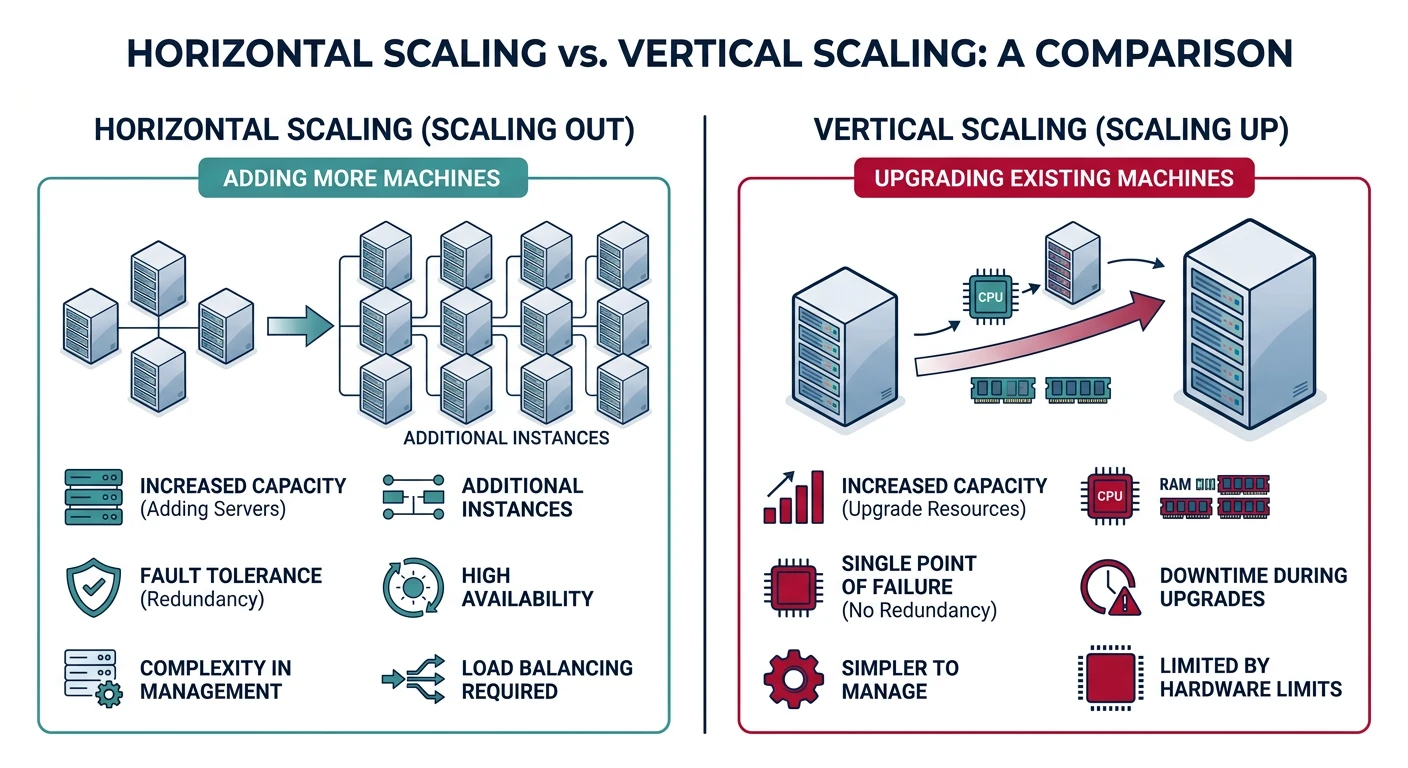
Two fundamental scaling approaches: horizontal (scale out) vs vertical (scale up)
The Scalability Challenge
Consider Twitter's journey: In 2007, they served a few thousand users with a single Ruby on Rails application. By 2012, they handled 400 million tweets per day. This growth required fundamental architectural changes—not just bigger servers.
Real-World Scale
Scale by the Numbers
Google
8.5 billion searches/day
Netflix
1 billion hours streamed/week
WhatsApp
100 billion messages/day
Amazon
$17 billion revenue on Prime Day 2023
These systems didn't achieve this scale overnight—they evolved through careful scaling decisions.
Why Scalability Matters
Scalability directly impacts three critical business areas:
Business Impact
1. User Experience
Amazon found that every 100ms of latency costs them 1% in sales. Google discovered that a 500ms delay reduced search traffic by 20%. Users don't wait—they leave.
Business Impact
2. Cost Efficiency
A well-scaled system uses resources efficiently. Over-provisioning wastes money; under-provisioning causes outages. The goal is to scale proportionally with demand.
Business Impact
3. Business Growth
Systems that can't scale become bottlenecks to business growth. When a viral marketing campaign succeeds, your infrastructure must handle the surge.
Types of Scalability
Load Scalability: Handle more concurrent users/requests
Geographic Scalability: Serve users across different regions
Administrative Scalability: Multiple teams can develop/deploy independently
Functional Scalability: Add new features without major rewrites
Horizontal Scaling (Scale Out)
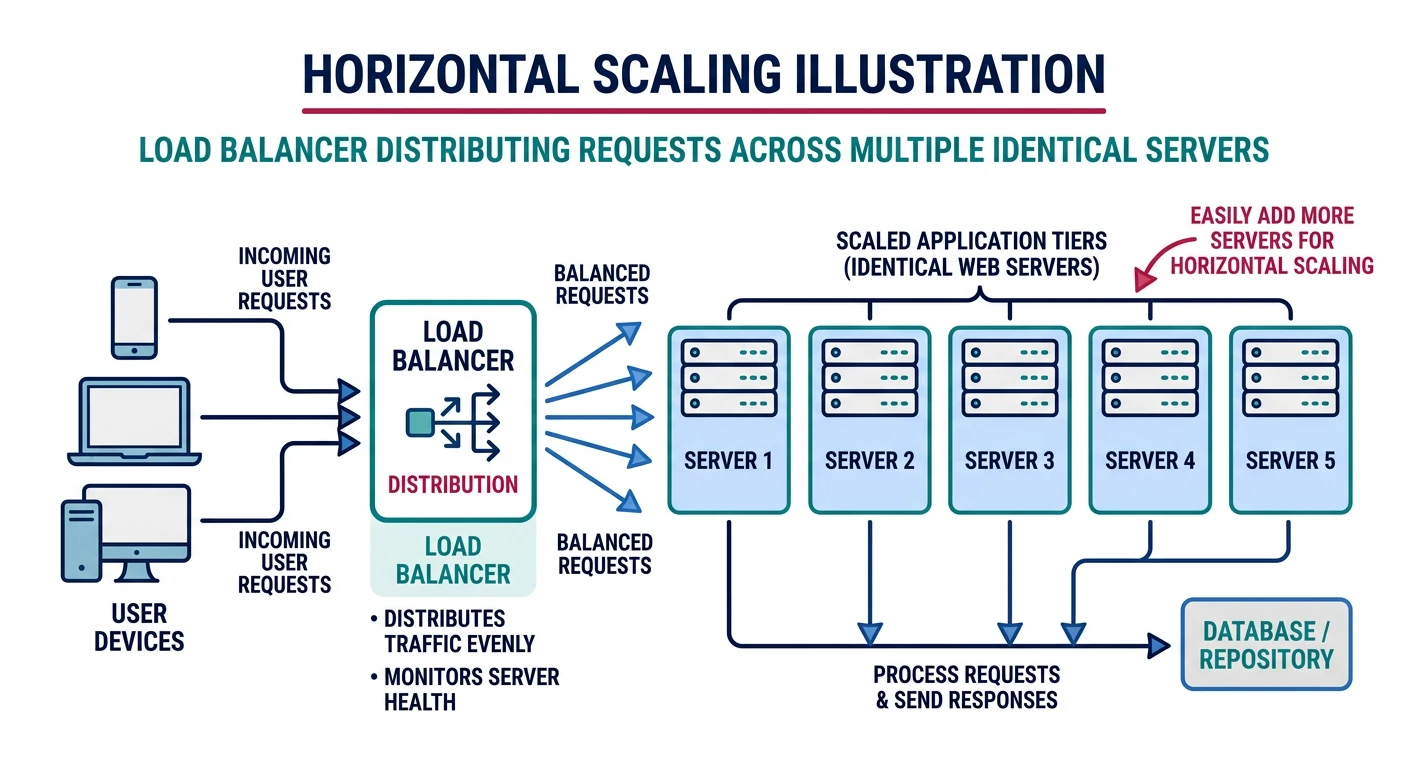
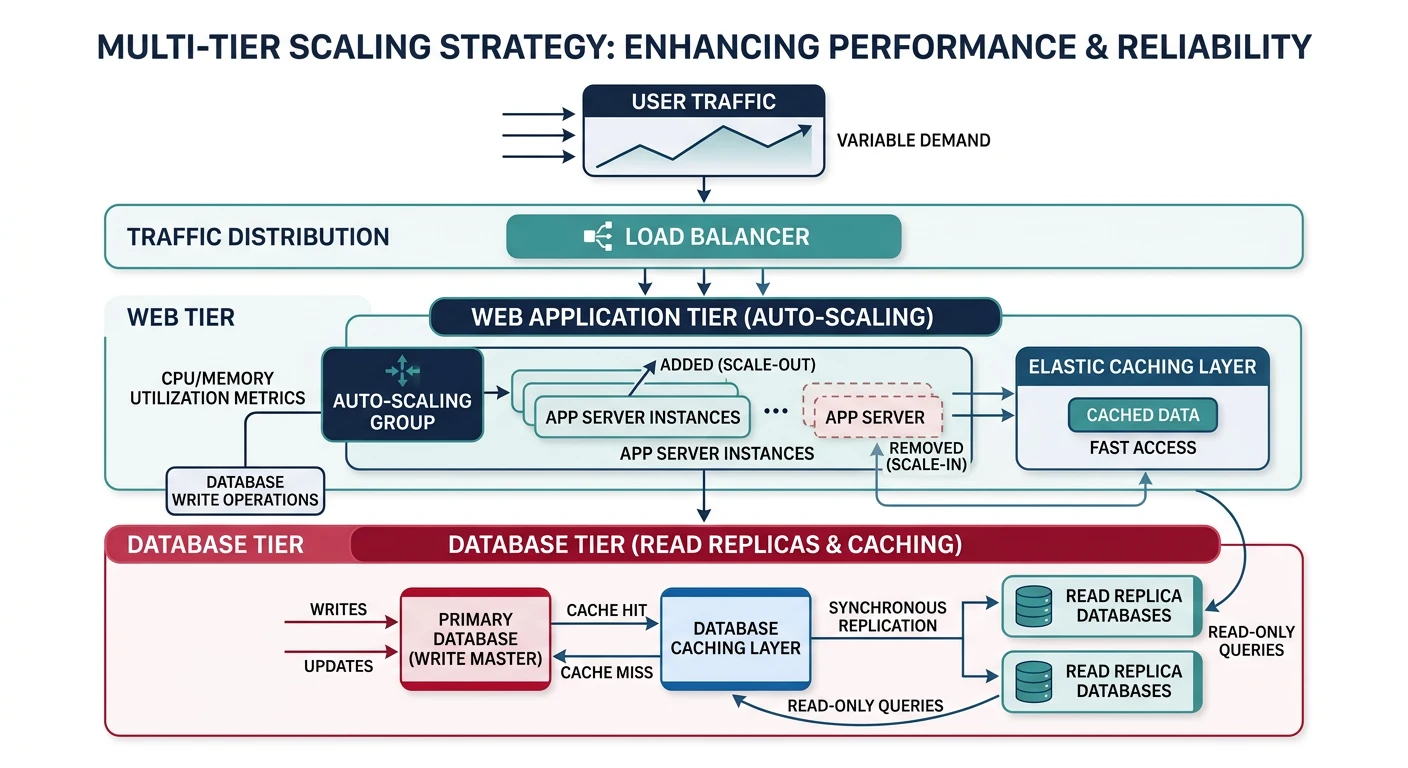
Horizontal scaling means adding more machines to your resource pool. Instead of making one server more powerful, you distribute load across multiple servers.
Horizontal scaling distributes load across multiple servers via a load balancer
Key Principle: Horizontal scaling is the preferred approach for web applications because it offers better fault tolerance, near-unlimited scaling potential, and often better cost efficiency.
How Horizontal Scaling Works
# Before horizontal scaling
# Single server handles all requests
server_capacity = 10000  # requests/second

# After horizontal scaling
# Load balancer distributes across servers
num_servers = 10
total_capacity = server_capacity * num_servers  # 100,000 requests/second

# To handle more load, simply add servers:
num_servers = 20
total_capacity = server_capacity * num_servers  # 200,000 requests/second
Advantages of Horizontal Scaling
Advantage
No Single Point of Failure
When one server fails, others continue serving requests. With proper load balancing, users may not even notice the failure.
Advantage
Linear Cost Scaling
Commodity hardware is cheaper per unit of compute than high-end servers. Ten $1,000 servers often provide more capacity than one $10,000 server.
Advantage
Theoretically Unlimited
You can keep adding servers until you hit network or coordination limits. Companies like Google run millions of servers.
Challenges of Horizontal Scaling
State Management: Session data must be externalized (Redis, database)
Data Consistency: Coordinating data across nodes is complex
Network Overhead: More servers mean more network traffic
Operational Complexity: Managing many servers requires automation
When to Use Horizontal Scaling
Scenario
Recommendation
Stateless web applications
Excellent fit
Read-heavy workloads
Excellent fit
Microservices architecture
Excellent fit
Database writes
More complex (sharding needed)
Strong consistency requirements
Requires coordination
Stateless Architecture
The key to horizontal scaling is stateless design. A stateless server doesn't store any information about previous requests—each request contains all information needed to process it.
Common Mistake: Storing session data in server memory. If that server goes down, all users lose their sessions. If load balancer routes a user to a different server, their session is gone.
Factor VI: Execute the app as one or more stateless processes
Factor IX: Maximize robustness with fast startup and graceful shutdown
Factor XI: Treat logs as event streams
Vertical Scaling (Scale Up)
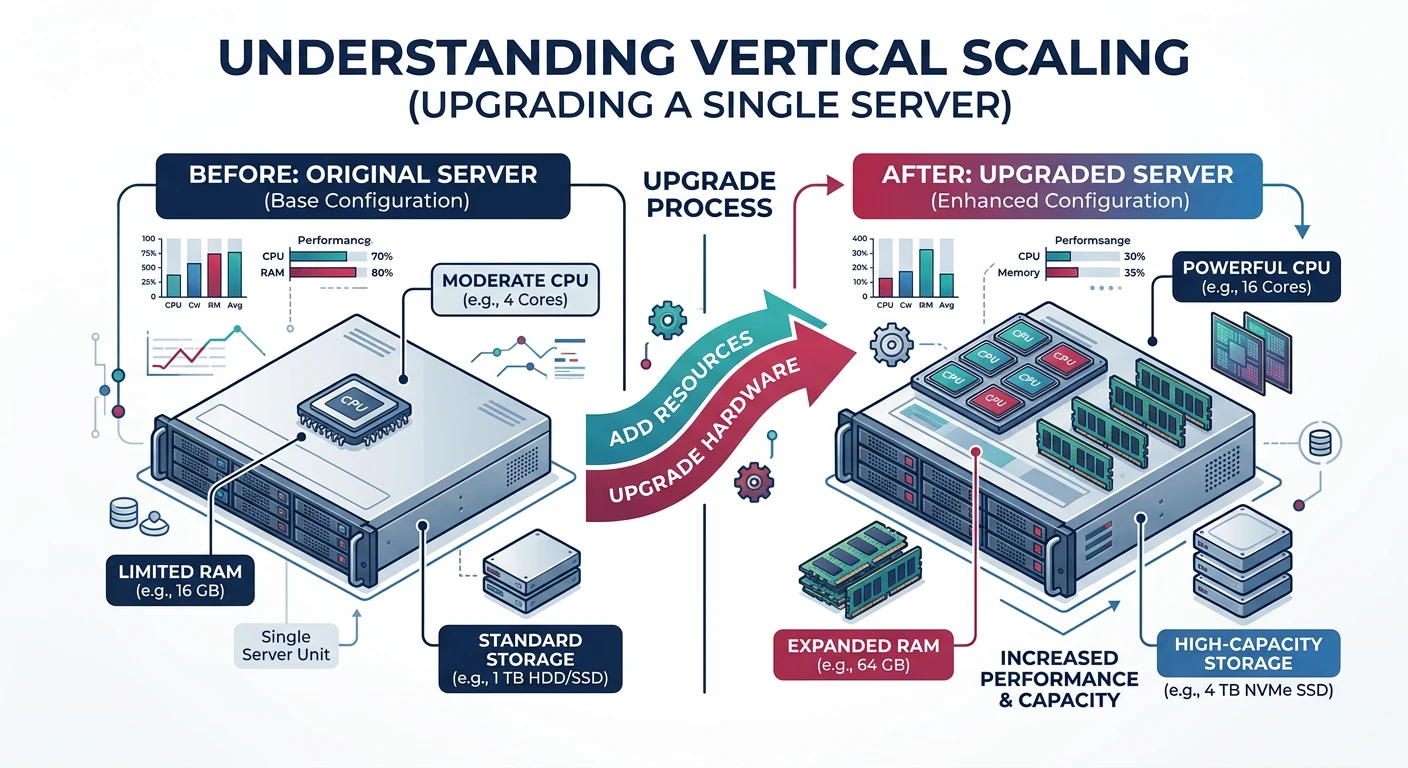
Vertical scaling means adding more power to existing machines—more CPU, RAM, storage, or network bandwidth. Like upgrading from a sedan to a truck.
Vertical scaling upgrades a single server's resources (CPU, RAM, storage)
How Vertical Scaling Works
# Vertical scaling example
# Before: Small database server
db_server = {
    "cpu_cores": 4,
    "ram_gb": 16,
    "storage_tb": 1,
    "max_connections": 200
}

# After: Upgraded database server
db_server = {
    "cpu_cores": 64,
    "ram_gb": 512,
    "storage_tb": 20,
    "max_connections": 5000
}
Advantages of Vertical Scaling
Advantage
Simplicity
No code changes required. No data partitioning. No distributed coordination. Just bigger hardware.
Advantage
Data Consistency
Single server means no distributed transactions, no eventual consistency, no split-brain scenarios.
Advantage
Lower Latency
No network calls between servers. All operations happen in-memory on a single machine.
Limitations of Vertical Scaling
Critical Limitation: Hardware has limits. The biggest servers available (AWS x1e.32xlarge: 128 vCPUs, 3,904 GB RAM) eventually won't be enough, and they're extremely expensive.
Hardware Ceiling: Maximum available server specs limit your growth
Single Point of Failure: One server means one failure takes down everything
Downtime for Upgrades: Usually requires restart to add resources
Cost Inefficiency: High-end servers cost exponentially more per unit of compute
Cost Comparison
# AWS EC2 pricing example (us-east-1, on-demand)
small_instance = {
    "type": "t3.medium",
    "vcpus": 2,
    "memory_gb": 4,
    "hourly_cost": 0.0416,
    "cost_per_vcpu": 0.0208
}

large_instance = {
    "type": "x1e.32xlarge",
    "vcpus": 128,
    "memory_gb": 3904,
    "hourly_cost": 26.688,
    "cost_per_vcpu": 0.2085  # 10x more expensive per vCPU!
}

# Horizontal: 64 t3.medium = 128 vCPUs for $2.66/hour
# Vertical: 1 x1e.32xlarge = 128 vCPUs for $26.69/hour
# Horizontal is 10x cheaper (though less memory per vCPU)
Horizontal vs Vertical: When to Use Each
Factor
Horizontal (Scale Out)
Vertical (Scale Up)
Best for
Web servers, stateless apps
Databases, legacy apps
Fault Tolerance
Built-in (multiple nodes)
Requires separate HA setup
Max Scale
Virtually unlimited
Limited by hardware
Complexity
Higher (distributed system)
Lower (single system)
Cost at Scale
Lower (commodity hardware)
Higher (specialty hardware)
Best Practice: Start with vertical scaling for simplicity. When you approach hardware limits or need better fault tolerance, transition to horizontal scaling. Most systems use a combination of both.
Reliability & Fault Tolerance
Reliability means the system continues to work correctly even when things go wrong. In distributed systems, failures aren't just possible—they're inevitable.
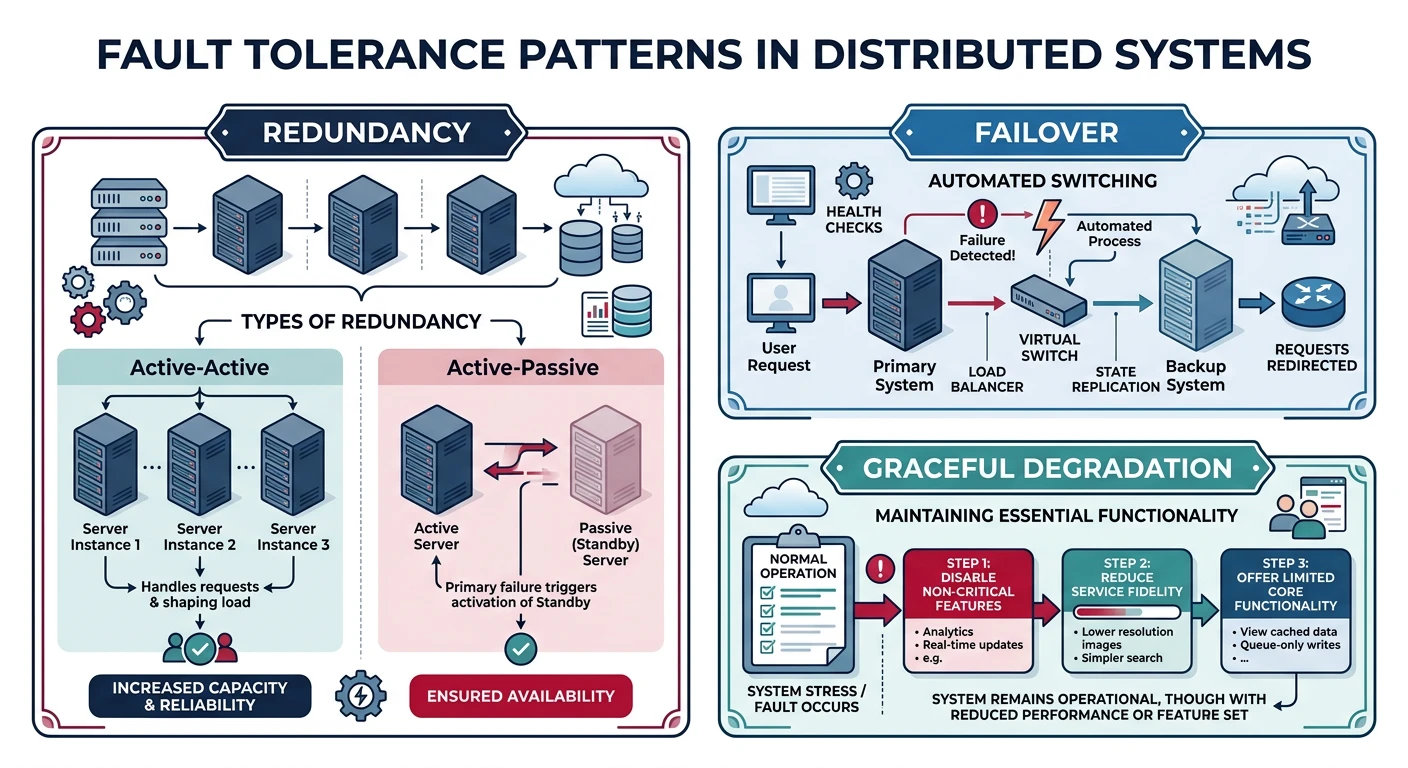
Fault tolerance patterns: redundancy, failover, and graceful degradation
Key Insight: Design for failure. Assume every component can and will fail. The question isn't "if" but "when" and "how often."
Types of Failures
Failure Type
Hardware Failures
Disk failures: ~2-4% annual failure rate for HDDs
Server failures: Power supplies, memory, network cards
Data center failures: Power outages, cooling failures, natural disasters
Failure Type
Software Failures
Bugs causing crashes or incorrect behavior
Memory leaks leading to gradual degradation
Resource exhaustion (connections, file handles)
Cascading failures from dependency issues
Failure Type
Human Errors
Configuration mistakes (wrong environment, typos)
Deployment issues (bad code, incomplete rollout)
Operational errors (accidentally deleting data)
Studies show human error causes 70-80% of outages.
Failure Rate Math
# Understanding failure rates at scale
# Individual server MTBF (Mean Time Between Failures) = 3 years

single_server_mtbf_days = 3 * 365  # 1095 days
num_servers = 1000

# With 1000 servers, expected failures per day:
expected_failures_per_day = num_servers / single_server_mtbf_days
# = 0.91 failures per day

# At Google scale (1 million+ servers):
large_scale_failures = 1_000_000 / single_server_mtbf_days
# = 913 failures per day!

# This is why large-scale systems MUST handle failures automatically
Redundancy Patterns
Redundancy eliminates single points of failure by duplicating critical components.
Pattern
N+1 Redundancy
Run one more instance than required to handle load. If one fails, remaining capacity is sufficient.
# N+1 Example
required_capacity = 10000  # requests/second
single_server_capacity = 2500

# Minimum servers needed: 10000/2500 = 4
# With N+1: 5 servers (4 for capacity + 1 for failure)
servers_deployed = 5
capacity_per_server = required_capacity / (servers_deployed - 1)
# Each server handles 2500 RPS, one can fail without impact
Pattern
N+2 or 2N Redundancy
For critical systems, maintain higher redundancy levels. 2N (double capacity) allows maintenance and failure simultaneously.
Pattern
Geographic Redundancy
Deploy across multiple data centers or regions to survive facility-level failures.
Same Region: Multiple availability zones (protects against data center failure)
Multi-Region: Multiple geographic regions (protects against regional disasters)
Fault Tolerance Strategies
Fault tolerance enables a system to continue operating when components fail.
Strategy
Failover
Automatically switch to a backup component when the primary fails.
Keep multiple copies of data synchronized across nodes.
Synchronous: All replicas confirm before write completes (consistent but slower)
Asynchronous: Write completes immediately, replicas sync later (faster but potential data loss)
Strategy
Circuit Breaker
Prevent cascade failures by stopping requests to failing services.
# Circuit Breaker Pattern
class CircuitBreaker:
    def __init__(self, failure_threshold=5, reset_timeout=60):
        self.failures = 0
        self.failure_threshold = failure_threshold
        self.reset_timeout = reset_timeout
        self.state = "CLOSED"  # CLOSED, OPEN, HALF_OPEN
        self.last_failure_time = None

    def call(self, func):
        if self.state == "OPEN":
            if time.time() - self.last_failure_time > self.reset_timeout:
                self.state = "HALF_OPEN"
            else:
                raise CircuitOpenError("Circuit breaker is open")

        try:
            result = func()
            self.on_success()
            return result
        except Exception as e:
            self.on_failure()
            raise e

    def on_success(self):
        self.failures = 0
        self.state = "CLOSED"

    def on_failure(self):
        self.failures += 1
        self.last_failure_time = time.time()
        if self.failures >= self.failure_threshold:
            self.state = "OPEN"
Strategy
Graceful Degradation
Continue providing partial service when components fail.
Recommendation service down? Show popular items instead
Search slow? Return cached results
Payment processing delayed? Queue orders for retry
Strategy
Retries with Exponential Backoff
Retry failed operations with increasing delays to prevent overwhelming recovering services.
# Exponential Backoff with Jitter
import random
import time

def retry_with_backoff(func, max_retries=5, base_delay=1):
    for attempt in range(max_retries):
        try:
            return func()
        except Exception as e:
            if attempt == max_retries - 1:
                raise e

            # Exponential backoff: 1s, 2s, 4s, 8s, 16s...
            delay = base_delay * (2 ** attempt)

            # Add jitter to prevent thundering herd
            jitter = random.uniform(0, delay * 0.1)

            print(f"Attempt {attempt + 1} failed, retrying in {delay + jitter:.2f}s")
            time.sleep(delay + jitter)
High Availability & Disaster Recovery
Key Insight: High availability (HA) keeps systems running during component failures, while disaster recovery (DR) ensures business continuity after catastrophic events.
Active-Active vs Active-Passive Architectures
Active-Active deployments run all nodes simultaneously, distributing traffic across multiple data centers. This provides the highest availability but requires careful data synchronization.
Active-Passive keeps standby nodes ready to take over when primary fails. Simpler to implement but has longer failover times.
Pattern
Availability
Cost
Complexity
Failover Time
Active-Active
99.99%+
High (2x+ resources)
High (data sync)
Near-zero (automatic)
Active-Passive (Hot)
99.95%
High (standby ready)
Medium
Seconds to minutes
Active-Passive (Warm)
99.9%
Medium
Medium
Minutes to hours
Single Region
99.5%
Low
Low
Manual intervention
Case Study
Netflix's Active-Active Architecture
Netflix runs active-active across three AWS regions (US-East, US-West, EU-West). Benefits: