Series Navigation: This is Part 10 of the 17-part API Development Series. Review Part 9: GCP Apigee first.
API Development Mastery
Your 17-step learning path • Currently on Step 10
Backend API Fundamentals
REST, HTTP, status codes, URI designData Layer & Persistence
Database integration, CRUD, transactions, RedisOpenAPI Specification
Contract-first design, OpenAPI 3.0/3.1Documentation & DX
Swagger UI, Redoc, developer portalsAuthentication & Authorization
OAuth 2.0, JWT, RBAC, ABACSecurity Hardening
OWASP Top 10, input validation, CORSAWS API Gateway
REST/HTTP APIs, Lambda integration, WAFAzure API Management
Policies, products, developer portalGCP Apigee
API proxies, monetization, analytics10
Architecture Patterns
Gateway, BFF, microservices, DDD11
Versioning & Governance
SemVer, deprecation, lifecycle12
Monitoring & Analytics
Observability, tracing, SLIs/SLOs13
Performance & Rate Limiting
Caching, throttling, load testing14
GraphQL & gRPC
Alternative API styles, Protocol Buffers15
Testing & Contracts
Contract testing, Pact, Postman/Newman16
CI/CD & Automation
Spectral, GitHub Actions, Terraform17
API Product Management
API as Product, monetization, ecosystemsAPI Gateway Pattern
What is an API Gateway?
An API Gateway is a single entry point for all client requests, handling cross-cutting concerns like authentication, rate limiting, and routing.
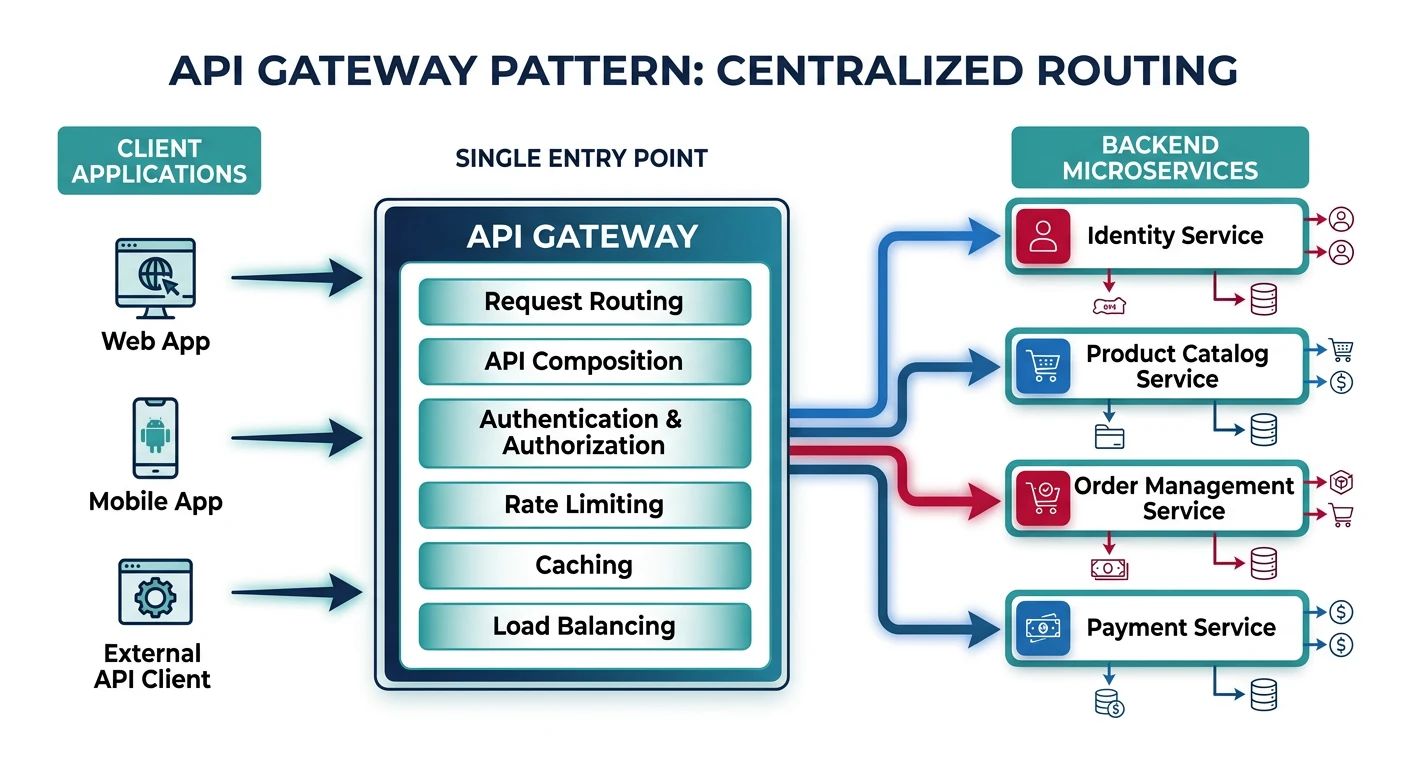
Gateway Responsibilities
| Function | Description |
|---|---|
| Request Routing | Route /users/* to User Service, /orders/* to Order Service |
| Authentication | Validate JWT tokens before forwarding requests |
| Rate Limiting | Throttle excessive requests per client/IP |
| Protocol Translation | Convert REST to gRPC for internal services |
| Response Caching | Cache responses at edge to reduce backend load |
| SSL Termination | Decrypt HTTPS at gateway, use HTTP internally |
// Express.js API Gateway example
const express = require('express');
const httpProxy = require('http-proxy-middleware');
const rateLimit = require('express-rate-limit');
const jwt = require('express-jwt');

const app = express();

// Global rate limiting
const limiter = rateLimit({
  windowMs: 60 * 1000, // 1 minute
  max: 100,
  standardHeaders: true
});
app.use(limiter);

// JWT authentication middleware
const authenticate = jwt({
  secret: process.env.JWT_SECRET,
  algorithms: ['HS256']
}).unless({ path: ['/health', '/auth/login'] });
app.use(authenticate);

// Route to User Service
app.use('/api/users', httpProxy({
  target: 'http://user-service:3001',
  changeOrigin: true,
  pathRewrite: { '^/api/users': '/users' }
}));

// Route to Order Service
app.use('/api/orders', httpProxy({
  target: 'http://order-service:3002',
  changeOrigin: true,
  pathRewrite: { '^/api/orders': '/orders' }
}));

// Route to Product Service
app.use('/api/products', httpProxy({
  target: 'http://product-service:3003',
  changeOrigin: true,
  pathRewrite: { '^/api/products': '/products' }
}));

app.listen(3000, () => console.log('Gateway on port 3000'));
Backend for Frontend
BFF Pattern
The Backend for Frontend pattern creates dedicated API layers optimized for specific client types (web, mobile, IoT).
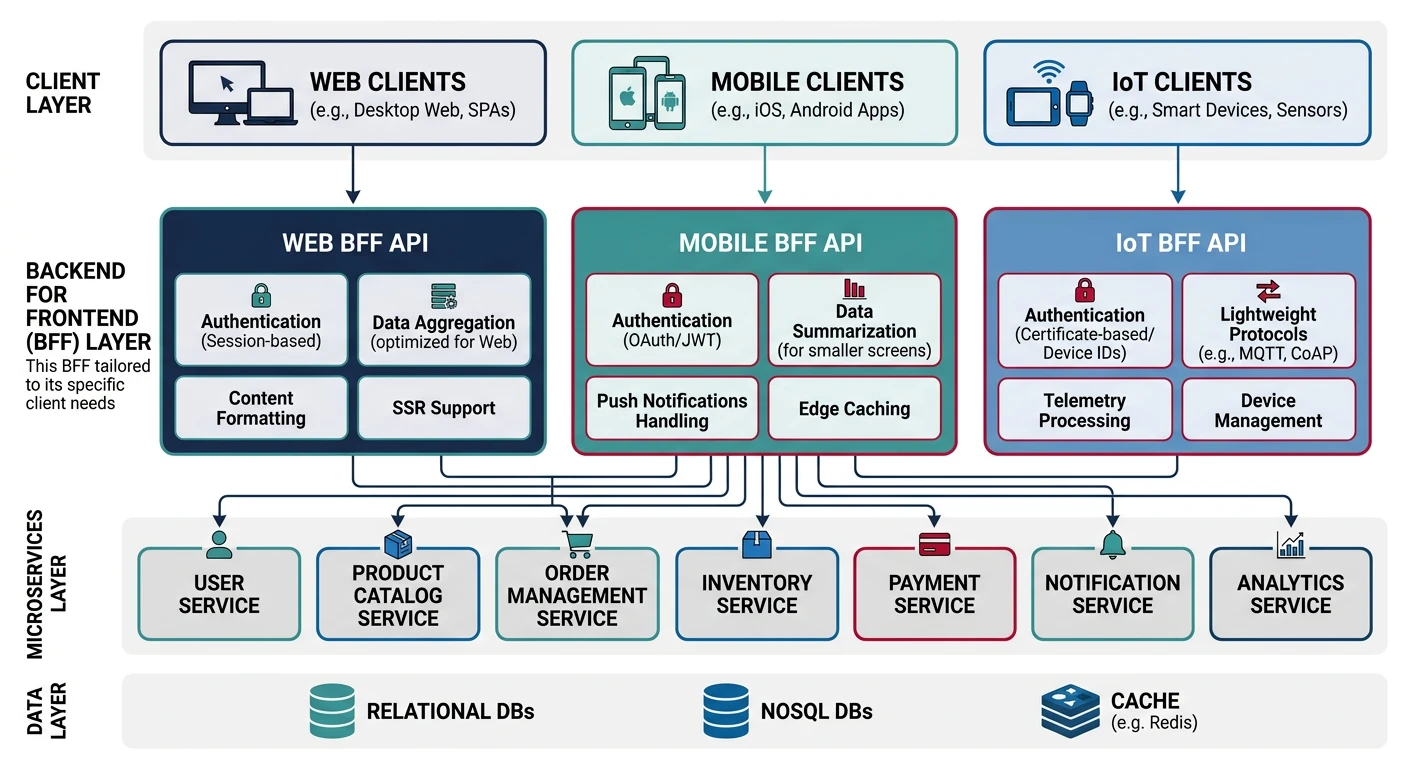
When to Use BFF:
- Different clients need different data shapes
- Mobile needs minimal payloads, web needs rich data
- Clients have different authentication flows
- Teams can work independently per client type
// Mobile BFF - Optimized for minimal bandwidth
// mobile-bff/routes/products.js
const express = require('express');
const router = express.Router();
const productService = require('../services/product');
const imageService = require('../services/image');

// Mobile-optimized product list
router.get('/products', async (req, res) => {
  const products = await productService.getProducts({
    limit: 20,
    fields: ['id', 'name', 'price', 'thumbnailUrl']
  });

  // Return compact response for mobile
  res.json({
    items: products.map(p => ({
      id: p.id,
      name: p.name,
      price: p.price,
      thumb: imageService.getOptimizedUrl(p.thumbnailUrl, '150x150')
    })),
    nextCursor: products.nextCursor
  });
});

module.exports = router;
// Web BFF - Rich data for desktop experience
// web-bff/routes/products.js
const express = require('express');
const router = express.Router();
const productService = require('../services/product');
const reviewService = require('../services/review');
const inventoryService = require('../services/inventory');
// Web-optimized product details with aggregation
router.get('/products/:id', async (req, res) => {
const [product, reviews, inventory] = await Promise.all([
productService.getProduct(req.params.id),
reviewService.getReviews(req.params.id, { limit: 10 }),
inventoryService.getStock(req.params.id)
]);
// Rich response for web
res.json({
...product,
images: product.images.map(img => ({
thumbnail: img.url + '?w=200',
medium: img.url + '?w=600',
large: img.url + '?w=1200'
})),
reviews: {
average: reviews.average,
count: reviews.total,
recent: reviews.items
},
availability: {
inStock: inventory.quantity > 0,
quantity: inventory.quantity,
warehouses: inventory.locations
}
});
});
module.exports = router;Aggregator Pattern
API Aggregation
The Aggregator pattern combines data from multiple microservices into a single response, reducing client roundtrips.
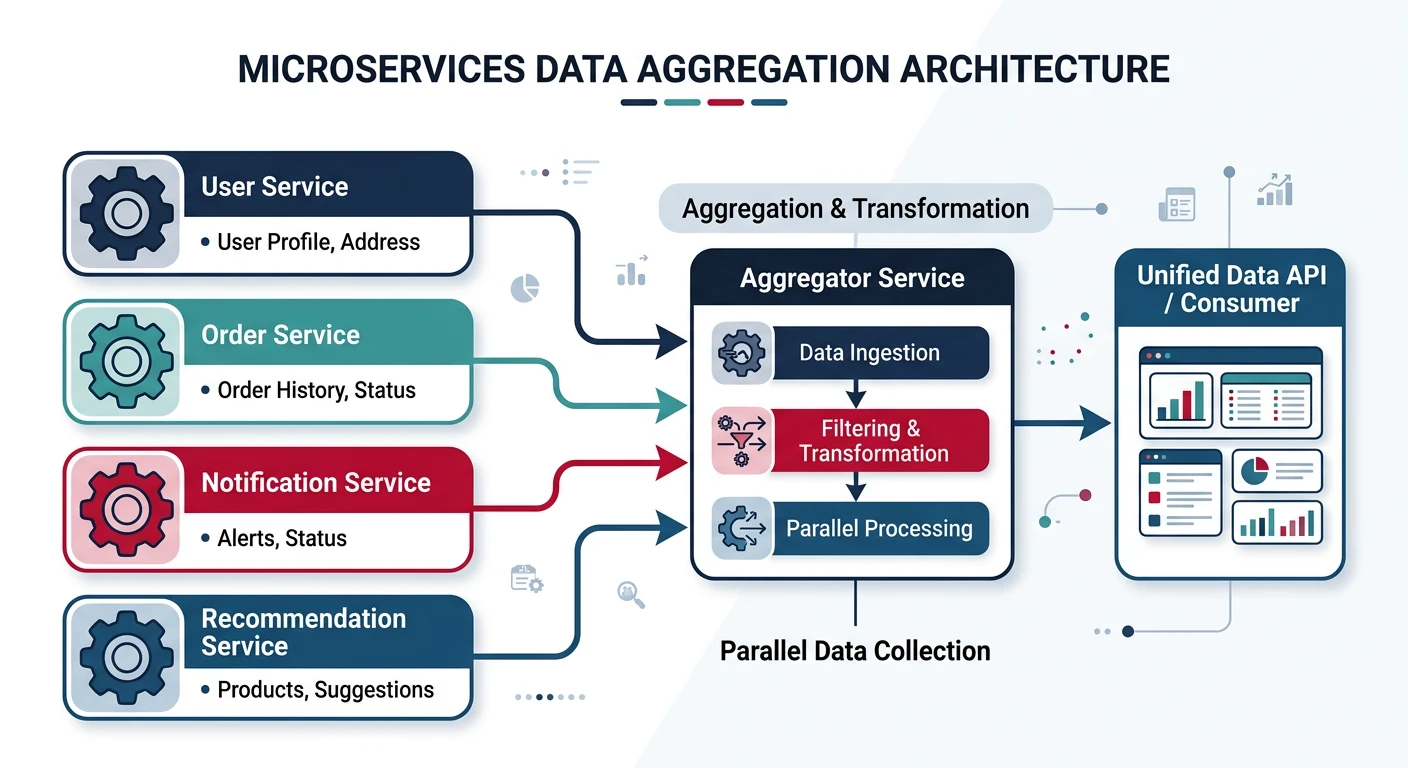
// Aggregator Service
const express = require('express');
const axios = require('axios');
const app = express();

// Aggregate user dashboard data
app.get('/dashboard/:userId', async (req, res) => {
  const { userId } = req.params;

  try {
    // Parallel requests to multiple services
    const [user, orders, notifications, recommendations] = await Promise.all([
      axios.get(`http://user-service/users/${userId}`),
      axios.get(`http://order-service/users/${userId}/orders?limit=5`),
      axios.get(`http://notification-service/users/${userId}/unread`),
      axios.get(`http://recommendation-service/users/${userId}/products`)
    ]);

    // Aggregate into single response
    res.json({
      user: {
        id: user.data.id,
        name: user.data.name,
        avatar: user.data.avatarUrl,
        memberSince: user.data.createdAt
      },
      recentOrders: orders.data.items.map(o => ({
        id: o.id,
        status: o.status,
        total: o.totalAmount,
        date: o.createdAt
      })),
      notifications: {
        unreadCount: notifications.data.count,
        items: notifications.data.items.slice(0, 3)
      },
      recommendations: recommendations.data.products.slice(0, 4)
    });
  } catch (error) {
    // Graceful degradation
    res.json({
      user: null,
      error: 'Some data unavailable',
      partial: true
    });
  }
});

app.listen(3000);
API Composition
Composition vs Aggregation
Pattern Comparison
| Aspect | Aggregation | Composition |
|---|---|---|
| Data Merging | Combines data from services | Orchestrates workflows across services |
| Use Case | Dashboard views, reports | Multi-step transactions |
| Complexity | Read-only, parallel | Write operations, sequential |
// API Composition - Order creation workflow
async function createOrder(userId, cartId, paymentDetails) {
  const saga = new Saga();

  try {
    // Step 1: Validate cart
    const cart = await saga.step(
      () => cartService.getCart(cartId),
      () => {} // No compensation needed
    );

    // Step 2: Reserve inventory
    const reservation = await saga.step(
      () => inventoryService.reserve(cart.items),
      () => inventoryService.release(reservation.id)
    );

    // Step 3: Process payment
    const payment = await saga.step(
      () => paymentService.charge(userId, cart.total, paymentDetails),
      () => paymentService.refund(payment.id)
    );

    // Step 4: Create order
    const order = await saga.step(
      () => orderService.create({ userId, cart, payment, reservation }),
      () => orderService.cancel(order.id)
    );

    // Step 5: Send confirmation
    await notificationService.sendOrderConfirmation(userId, order);

    return { success: true, orderId: order.id };
  } catch (error) {
    await saga.compensate(); // Rollback all steps
    throw error;
  }
}
Microservices API Design
Service Communication Patterns
Sync vs Async Communication:
- Synchronous (REST/gRPC): Real-time queries, immediate response needed
- Asynchronous (Events): Decoupled updates, eventual consistency acceptable
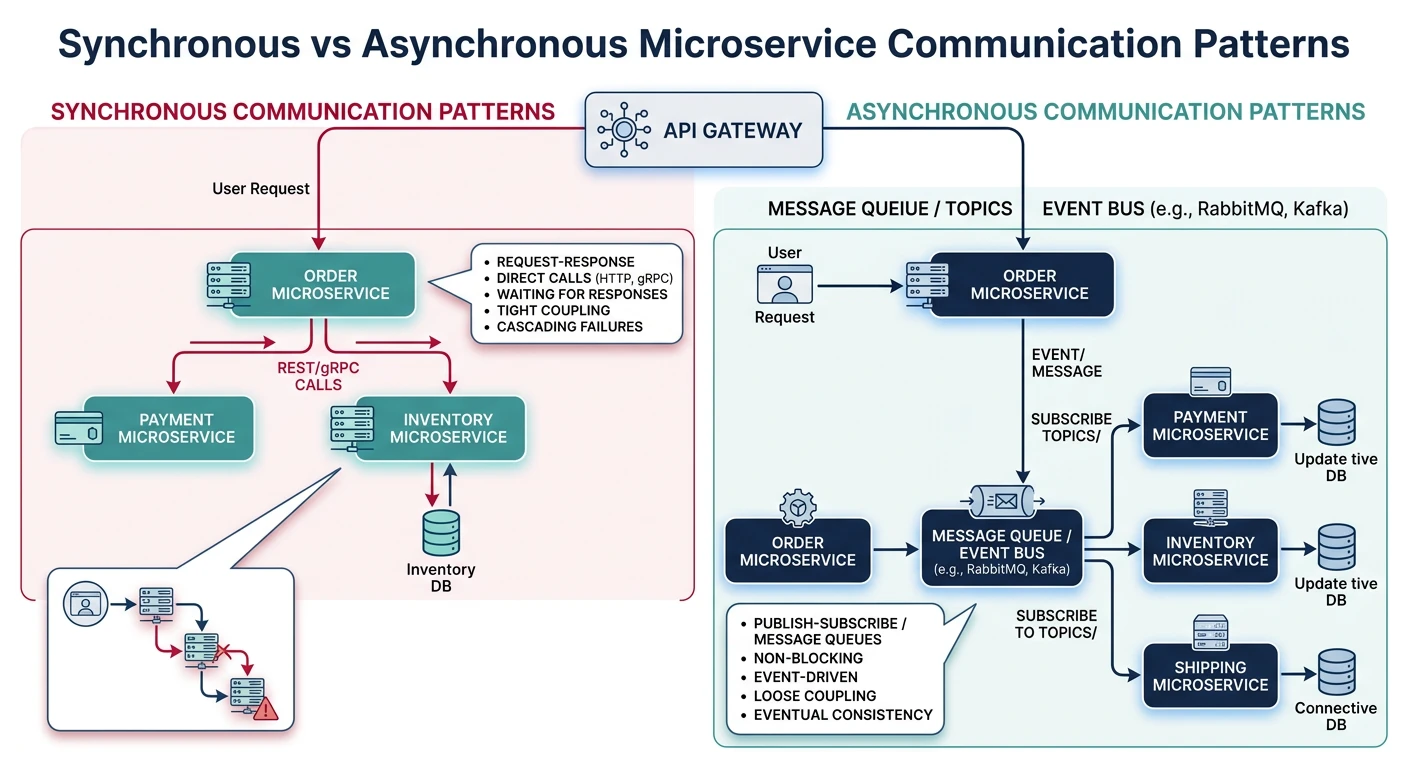
// Event-Driven Communication
const { EventEmitter } = require('events');
const amqp = require('amqplib');

class OrderService {
  constructor(messageBroker) {
    this.messageBroker = messageBroker;
  }

  async createOrder(orderData) {
    // Create order in database
    const order = await this.db.orders.create(orderData);

    // Publish event (async communication)
    await this.messageBroker.publish('orders', 'order.created', {
      orderId: order.id,
      userId: order.userId,
      items: order.items,
      total: order.total,
      createdAt: new Date().toISOString()
    });

    return order;
  }
}

// Inventory Service subscribes to order events
class InventoryService {
  constructor(messageBroker) {
    messageBroker.subscribe('orders', 'order.created',
      this.handleOrderCreated.bind(this)
    );
  }

  async handleOrderCreated(event) {
    const { orderId, items } = event;

    for (const item of items) {
      await this.db.inventory.decrement(item.productId, item.quantity);
    }

    console.log(`Inventory updated for order ${orderId}`);
  }
}
Domain-Driven Boundaries
Bounded Contexts
Domain-Driven Design helps define clear API boundaries based on business domains.
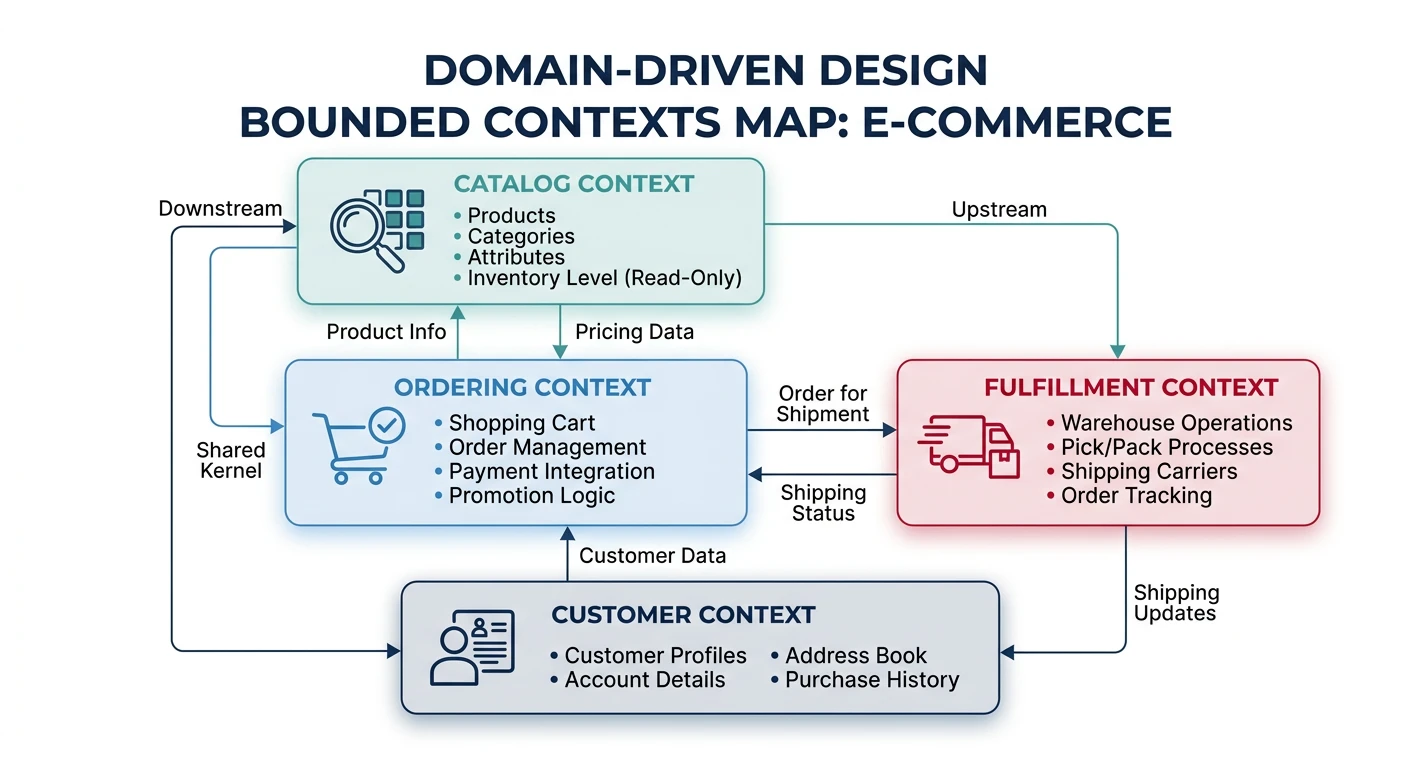
E-Commerce Bounded Contexts
# Context Map for E-Commerce
contexts:
  catalog:
    entities: [Product, Category, Brand]
    apis: [/products, /categories, /search]
    owns: product-service

  ordering:
    entities: [Order, OrderItem, Cart]
    apis: [/orders, /cart]
    owns: order-service

  fulfillment:
    entities: [Shipment, Warehouse, Inventory]
    apis: [/shipments, /inventory]
    owns: fulfillment-service

  customer:
    entities: [Customer, Address, PaymentMethod]
    apis: [/customers, /addresses]
    owns: customer-service

# Relationships
relationships:
  - from: ordering
    to: catalog
    type: customer-supplier  # Catalog provides product data

  - from: fulfillment
    to: ordering
    type: conformist  # Fulfillment conforms to order structure
// Anti-Corruption Layer between contexts
class OrderingAntiCorruptionLayer {
constructor(catalogClient) {
this.catalogClient = catalogClient;
}
// Translate Catalog Product to Ordering domain
async getProductForOrder(productId) {
const catalogProduct = await this.catalogClient.getProduct(productId);
// Map to Order context's view of Product
return {
productId: catalogProduct.id,
name: catalogProduct.title,
price: catalogProduct.pricing.currentPrice,
sku: catalogProduct.inventory.sku,
available: catalogProduct.inventory.quantity > 0
};
}
}Practice Exercises
Exercise 1: Build API Gateway
- Create Express gateway with proxy middleware
- Add JWT authentication middleware
- Implement rate limiting per client
Exercise 2: BFF for Mobile & Web
- Create mobile BFF with compact responses
- Create web BFF with rich aggregations
- Share service clients between BFFs
Exercise 3: Saga Pattern Implementation
- Implement order creation saga
- Add compensation logic for failures
- Test partial failure scenarios