API Development Mastery
Backend API Fundamentals
REST, HTTP, status codes, URI designData Layer & Persistence
Database integration, CRUD, transactions, RedisOpenAPI Specification
Contract-first design, OpenAPI 3.0/3.1Documentation & DX
Swagger UI, Redoc, developer portalsAuthentication & Authorization
OAuth 2.0, JWT, RBAC, ABACSecurity Hardening
OWASP Top 10, input validation, CORSAWS API Gateway
REST/HTTP APIs, Lambda integration, WAFAzure API Management
Policies, products, developer portalGCP Apigee
API proxies, monetization, analyticsArchitecture Patterns
Gateway, BFF, microservices, DDDVersioning & Governance
SemVer, deprecation, lifecycleMonitoring & Analytics
Observability, tracing, SLIs/SLOsPerformance & Rate Limiting
Caching, throttling, load testingGraphQL & gRPC
Alternative API styles, Protocol BuffersTesting & Contracts
Contract testing, Pact, Postman/NewmanCI/CD & Automation
Spectral, GitHub Actions, TerraformAPI Product Management
API as Product, monetization, ecosystemsCore API Concepts
What is an API?
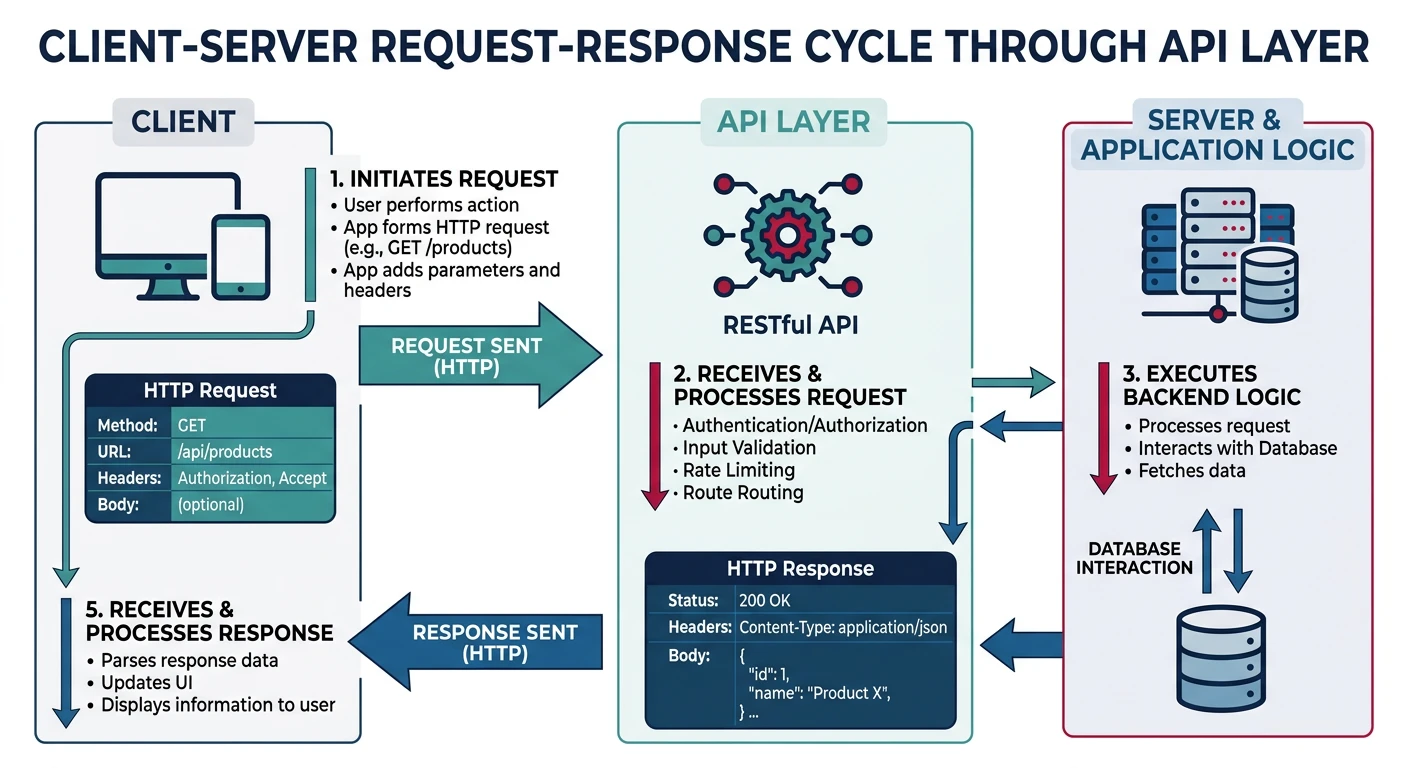
An API (Application Programming Interface) is a contract that defines how software components communicate. Think of it as a waiter in a restaurant: you (the client) don't go directly into the kitchen (the server); instead, you tell the waiter what you want, and they bring back your food. APIs work the same way—they provide a structured way for applications to request and receive data.
REST: The Dominant API Style
REST (Representational State Transfer) is an architectural style for designing networked applications. Created by Roy Fielding in his 2000 doctoral dissertation, REST uses HTTP as its transport protocol and treats everything as a resource.
The Six REST Constraints
- Client-Server: Separation of concerns—client handles UI, server handles data
- Stateless: Each request contains all information needed; server stores no client context
- Cacheable: Responses must define themselves as cacheable or non-cacheable
- Uniform Interface: Resources are identified in requests using URIs
- Layered System: Client can't tell if it's connected directly to the server or a middleman
- Code on Demand (optional): Server can send executable code to clients
Real-World Example: E-Commerce API
In an e-commerce system, resources might include:
/products- Collection of all products/products/123- Specific product with ID 123/users/456/orders- All orders for user 456/orders/789/items- Line items in order 789
Each resource has a unique identifier (URI) and can be manipulated using standard HTTP methods.
Resources and Representations
In REST, a resource is any concept that can be named and addressed—a user, a product, an order, even an abstract concept like "today's weather." Resources are identified by URIs (Uniform Resource Identifiers).
A representation is how that resource is serialized for transfer. The same resource can have multiple representations:
// JSON representation of a user resource
{
  "id": 123,
  "name": "Alice Johnson",
  "email": "alice@example.com",
  "created_at": "2024-01-15T09:30:00Z"
}
<user>
  <id>123</id>
  <name>Alice Johnson</name>
  <email>alice@example.com</email>
  <created_at>2024-01-15T09:30:00Z</created_at>
</user>
HTTP Deep Dive
The HTTP Request Lifecycle
Every API interaction follows the HTTP request-response cycle. Understanding this cycle is fundamental to building and debugging APIs.
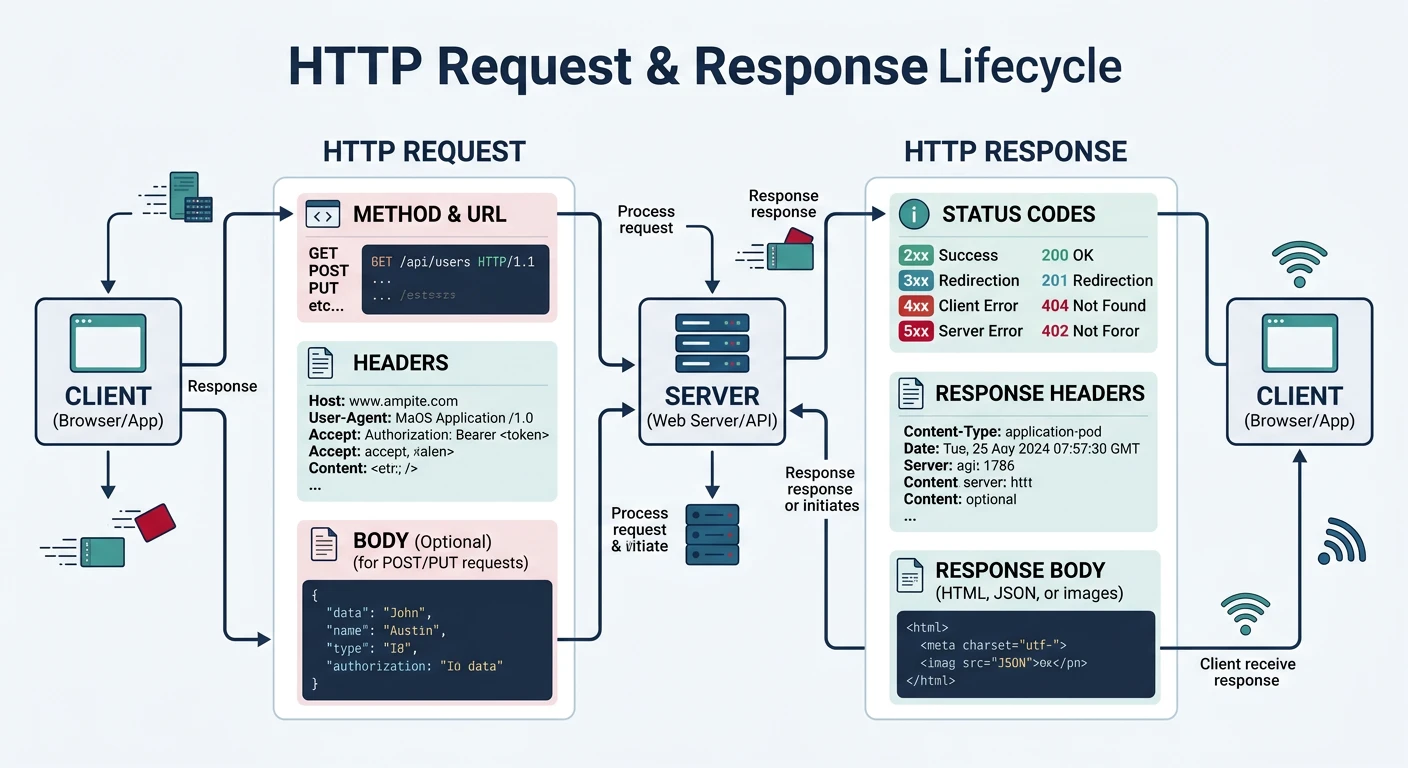
# A complete HTTP request
POST /api/users HTTP/1.1
Host: api.example.com
Content-Type: application/json
Authorization: Bearer eyJhbGciOiJIUzI1NiIs...
Accept: application/json
Content-Length: 67

{
  "name": "Bob Smith",
  "email": "bob@example.com"
}
Request Components
| Component | Example | Purpose |
|---|---|---|
| Method | POST |
Action to perform on the resource |
| Path | /api/users |
Resource identifier |
| Headers | Content-Type: application/json |
Metadata about the request |
| Body | {"name": "Bob"} |
Data payload (optional) |
HTTP Methods (Verbs)
HTTP defines several methods, each with specific semantics. Understanding these is crucial for designing intuitive APIs.
GET - Retrieve Resources
Safe (no side effects) and idempotent. Used to read data without modifying it.
# Get all users
GET /api/users HTTP/1.1
Host: api.example.com
Accept: application/json

# Get specific user
GET /api/users/123 HTTP/1.1
Host: api.example.com
Accept: application/json

# Get with query parameters (filtering)
GET /api/users?status=active&limit=10 HTTP/1.1
Host: api.example.com
Accept: application/json
POST - Create Resources
Not idempotent. Creates a new resource. The server typically assigns the ID and returns the created resource.
# Create a new user
POST /api/users HTTP/1.1
Host: api.example.com
Content-Type: application/json

{
  "name": "Alice Johnson",
  "email": "alice@example.com",
  "role": "member"
}
// Server response (201 Created)
{
"id": 456,
"name": "Alice Johnson",
"email": "alice@example.com",
"role": "member",
"created_at": "2024-01-20T14:30:00Z"
}PUT - Replace Resources
Idempotent. Replaces the entire resource. If you omit a field, it should be removed or set to null.
# Replace entire user resource
PUT /api/users/456 HTTP/1.1
Host: api.example.com
Content-Type: application/json

{
  "name": "Alice Smith",
  "email": "alice.smith@example.com",
  "role": "admin"
}
PATCH - Partial Update
May not be idempotent (depends on implementation). Updates only specified fields.
# Update only the role field
PATCH /api/users/456 HTTP/1.1
Host: api.example.com
Content-Type: application/json

{
  "role": "admin"
}
DELETE - Remove Resources
Idempotent. Removes the resource. Subsequent DELETEs should return 404 or 204.
# Delete a user
DELETE /api/users/456 HTTP/1.1
Host: api.example.com
HTTP Methods Summary
| Method | CRUD | Idempotent | Safe | Request Body |
|---|---|---|---|---|
| GET | Read | ✅ Yes | ✅ Yes | ❌ No |
| POST | Create | ❌ No | ❌ No | ✅ Yes |
| PUT | Update (Full) | ✅ Yes | ❌ No | ✅ Yes |
| PATCH | Update (Partial) | ⚠️ Depends | ❌ No | ✅ Yes |
| DELETE | Delete | ✅ Yes | ❌ No | ❌ No |
HTTP Status Codes
Status codes tell clients what happened with their request. They're grouped into five classes.
2xx Success
200 OK- Request succeeded (general success)201 Created- Resource created successfully (usually for POST)204 No Content- Success with no response body (common for DELETE)202 Accepted- Request accepted for async processing
3xx Redirection
301 Moved Permanently- Resource has a new permanent URI304 Not Modified- Cached version is still valid307 Temporary Redirect- Redirect without changing method
4xx Client Errors
400 Bad Request- Malformed request syntax401 Unauthorized- Authentication required403 Forbidden- Authenticated but not authorized404 Not Found- Resource doesn't exist409 Conflict- Request conflicts with current state422 Unprocessable Entity- Validation errors429 Too Many Requests- Rate limit exceeded
5xx Server Errors
500 Internal Server Error- Generic server error502 Bad Gateway- Invalid response from upstream server503 Service Unavailable- Server temporarily unavailable504 Gateway Timeout- Upstream server didn't respond in time
200 OK with an error message in the body. Always use appropriate status codes—clients depend on them for error handling!
Essential HTTP Headers
# Request Headers
Accept: application/json                    # Preferred response format
Content-Type: application/json              # Body format
Authorization: Bearer <token>               # Authentication
X-Request-ID: abc123                        # Request tracing
Accept-Language: en-US                      # Localization
If-None-Match: "etag123"                    # Conditional request

# Response Headers
Content-Type: application/json              # Response format
Location: /api/users/456                    # URI of created resource
ETag: "abc123"                              # Resource version for caching
Cache-Control: max-age=3600                 # Caching directives
X-RateLimit-Remaining: 99                   # Rate limit info
X-Request-ID: abc123                        # Echo request ID for tracing
API Design Best Practices
URI Design Principles
Well-designed URIs make APIs intuitive and self-documenting. Follow these conventions:
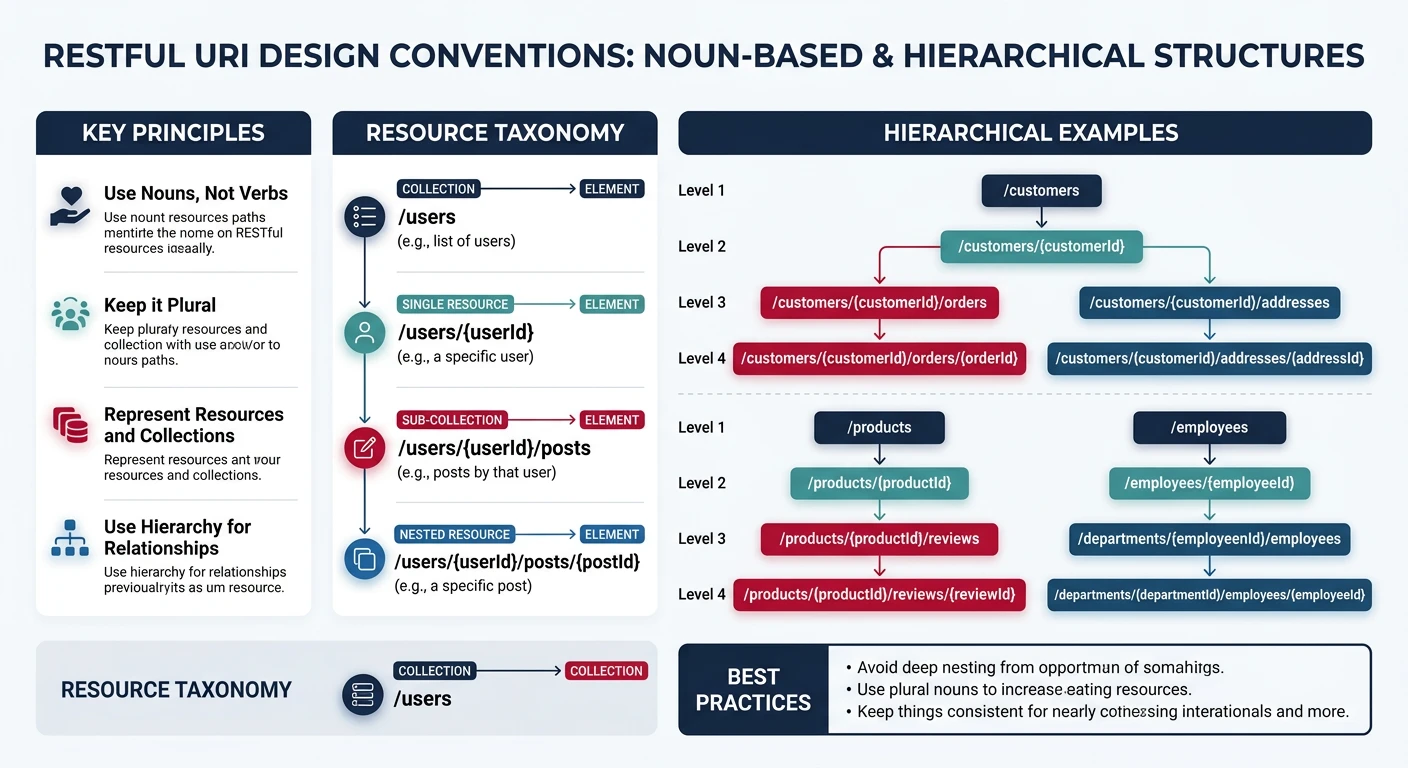
1. Use Nouns, Not Verbs
# ✅ Good - Use nouns for resources
GET /api/users
POST /api/orders
DELETE /api/products/123

# ❌ Bad - Don't use verbs (HTTP methods provide the action)
GET /api/getUsers
POST /api/createOrder
POST /api/deleteProduct
2. Use Plural Nouns Consistently
# ✅ Good - Consistent plurals
/api/users
/api/users/123
/api/users/123/orders

# ❌ Bad - Inconsistent singular/plural
/api/user
/api/user/123
/api/users/123/order
3. Use Hierarchical Relationships
# Parent-child relationships
GET /api/users/123/orders              # Orders belonging to user 123
GET /api/orders/456/items              # Items in order 456
GET /api/companies/789/employees       # Employees of company 789

# Keep nesting shallow (max 2-3 levels)
# ❌ Too deep
GET /api/companies/789/departments/12/teams/34/members
4. Use Query Parameters for Filtering
# Filtering
GET /api/users?status=active
GET /api/products?category=electronics&min_price=100

# Sorting
GET /api/users?sort=created_at&order=desc

# Searching
GET /api/products?search=laptop

# Field selection
GET /api/users?fields=id,name,email
Pagination Strategies
Large collections must be paginated to prevent overwhelming clients and servers.
Offset Pagination
Simple but has performance issues with large offsets.
# Request
GET /api/users?offset=20&limit=10

# Response
{
  "data": [...],
  "pagination": {
    "total": 150,
    "limit": 10,
    "offset": 20,
    "has_more": true
  }
}
Cursor Pagination (Recommended)
More efficient for large datasets. Uses an opaque cursor instead of offset.
# Request (first page)
GET /api/users?limit=10

# Response
{
  "data": [...],
  "pagination": {
    "next_cursor": "eyJpZCI6MTAwfQ==",
    "has_more": true
  }
}

# Request (next page)
GET /api/users?limit=10&cursor=eyJpZCI6MTAwfQ==
Implementing Cursor Pagination
// Cursor is typically base64-encoded JSON
function encodeCursor(lastItem) {
  return Buffer.from(JSON.stringify({
    id: lastItem.id,
    created_at: lastItem.created_at
  })).toString('base64');
}

function decodeCursor(cursor) {
  return JSON.parse(Buffer.from(cursor, 'base64').toString());
}

// Usage in query
async function getUsers(cursor, limit = 10) {
  let query = db('users').orderBy('created_at', 'desc').limit(limit + 1);

  if (cursor) {
    const { id, created_at } = decodeCursor(cursor);
    query = query.where('created_at', '<=', created_at)
                 .whereNot('id', id);
  }

  const results = await query;
  const hasMore = results.length > limit;
  const data = hasMore ? results.slice(0, -1) : results;

  return {
    data,
    pagination: {
      next_cursor: hasMore ? encodeCursor(data[data.length - 1]) : null,
      has_more: hasMore
    }
  };
}
API Versioning
APIs evolve. Versioning helps maintain backward compatibility while introducing new features.
URL Path Versioning (Most Common)
/api/v1/users
/api/v2/users
Header Versioning
GET /api/users
Accept: application/vnd.api+json;version=2
Query Parameter Versioning
/api/users?version=2Backend Implementation
Layered Architecture
Well-structured APIs use a layered architecture to separate concerns and improve maintainability.
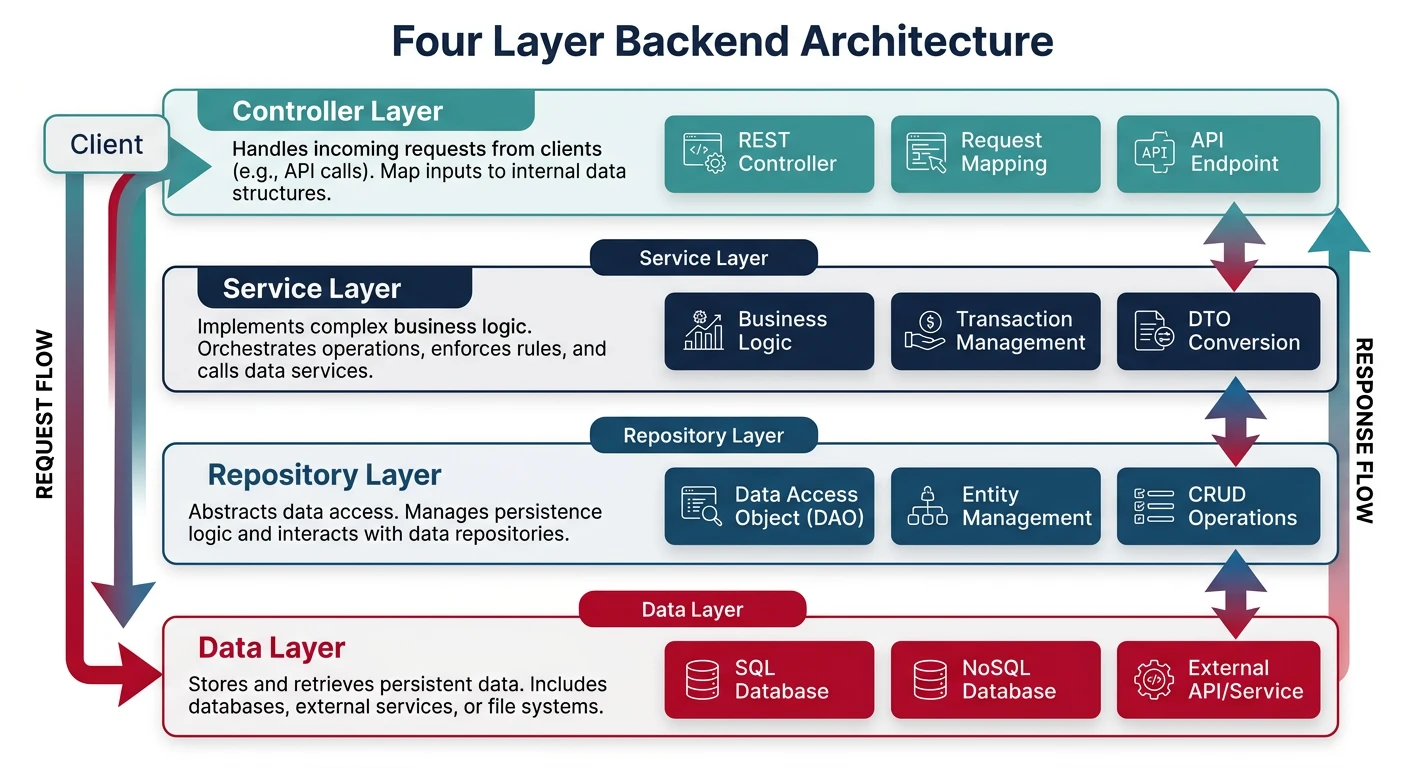
The Four-Layer Architecture
- Presentation Layer (Controllers) - Handles HTTP requests/responses
- Service Layer (Business Logic) - Contains business rules and orchestration
- Repository Layer (Data Access) - Abstracts database operations
- Data Layer (Models/Entities) - Defines data structures
Controller Layer (Express.js Example)
// controllers/userController.js
const userService = require('../services/userService');

class UserController {
  async getUsers(req, res, next) {
    try {
      const { limit, cursor, status } = req.query;
      const result = await userService.getUsers({ limit, cursor, status });
      res.json(result);
    } catch (error) {
      next(error);
    }
  }

  async getUserById(req, res, next) {
    try {
      const user = await userService.getUserById(req.params.id);
      if (!user) {
        return res.status(404).json({
          error: 'User not found'
        });
      }
      res.json(user);
    } catch (error) {
      next(error);
    }
  }

  async createUser(req, res, next) {
    try {
      const user = await userService.createUser(req.body);
      res.status(201).json(user);
    } catch (error) {
      next(error);
    }
  }
}

module.exports = new UserController();
Service Layer
// services/userService.js
const userRepository = require('../repositories/userRepository');
const { validateEmail } = require('../utils/validators');

class UserService {
  async getUsers({ limit = 10, cursor, status }) {
    const filters = {};
    if (status) filters.status = status;

    return userRepository.findAll({ limit, cursor, filters });
  }

  async getUserById(id) {
    if (!id) throw new Error('User ID is required');
    return userRepository.findById(id);
  }

  async createUser(data) {
    // Business validation
    if (!validateEmail(data.email)) {
      throw new ValidationError('Invalid email format');
    }

    // Check for duplicates
    const existing = await userRepository.findByEmail(data.email);
    if (existing) {
      throw new ConflictError('Email already registered');
    }

    // Transform data if needed
    const userData = {
      ...data,
      status: 'active',
      created_at: new Date()
    };

    return userRepository.create(userData);
  }
}

module.exports = new UserService();
Repository Layer
// repositories/userRepository.js
const db = require('../database');

class UserRepository {
  async findAll({ limit, cursor, filters }) {
    let query = db('users')
      .select('*')
      .orderBy('created_at', 'desc')
      .limit(limit + 1);

    if (filters.status) {
      query = query.where('status', filters.status);
    }

    if (cursor) {
      const { created_at, id } = this.decodeCursor(cursor);
      query = query.where('created_at', '<=', created_at)
                   .whereNot('id', id);
    }

    const results = await query;
    const hasMore = results.length > limit;

    return {
      data: hasMore ? results.slice(0, -1) : results,
      pagination: {
        next_cursor: hasMore ? this.encodeCursor(results[limit - 1]) : null,
        has_more: hasMore
      }
    };
  }

  async findById(id) {
    return db('users').where('id', id).first();
  }

  async findByEmail(email) {
    return db('users').where('email', email).first();
  }

  async create(data) {
    const [id] = await db('users').insert(data);
    return this.findById(id);
  }

  encodeCursor(item) {
    return Buffer.from(JSON.stringify({
      id: item.id,
      created_at: item.created_at
    })).toString('base64');
  }

  decodeCursor(cursor) {
    return JSON.parse(Buffer.from(cursor, 'base64').toString());
  }
}

module.exports = new UserRepository();
Middleware Pattern
Middleware functions process requests before they reach controllers. Use them for cross-cutting concerns.
// middleware/requestId.js
const { v4: uuidv4 } = require('uuid');

function requestId(req, res, next) {
  req.id = req.headers['x-request-id'] || uuidv4();
  res.setHeader('X-Request-ID', req.id);
  next();
}

// middleware/logger.js
function requestLogger(req, res, next) {
  const start = Date.now();

  res.on('finish', () => {
    const duration = Date.now() - start;
    console.log(JSON.stringify({
      timestamp: new Date().toISOString(),
      request_id: req.id,
      method: req.method,
      path: req.path,
      status: res.statusCode,
      duration_ms: duration
    }));
  });

  next();
}

// middleware/auth.js
const jwt = require('jsonwebtoken');

function authenticate(req, res, next) {
  const token = req.headers.authorization?.split(' ')[1];

  if (!token) {
    return res.status(401).json({ error: 'No token provided' });
  }

  try {
    const decoded = jwt.verify(token, process.env.JWT_SECRET);
    req.user = decoded;
    next();
  } catch (error) {
    res.status(401).json({ error: 'Invalid token' });
  }
}

// app.js - Apply middleware
const express = require('express');
const app = express();

app.use(express.json());
app.use(requestId);
app.use(requestLogger);

// Protected routes
app.use('/api/users', authenticate, userRoutes);
Error Handling & RFC 7807
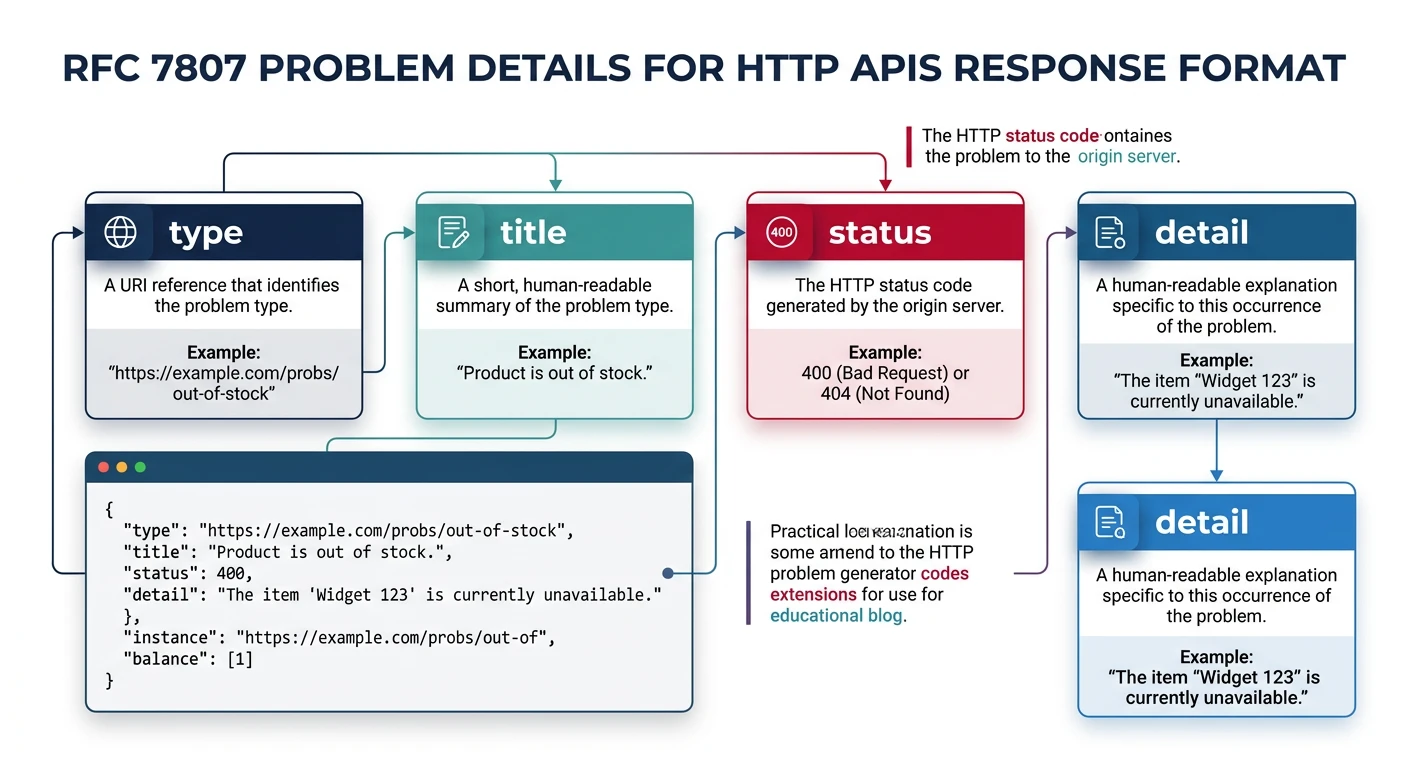
Problem Details (RFC 7807)
RFC 7807 defines a standard format for error responses, making it easier for clients to handle errors programmatically.
// Standard Problem Details response
{
  "type": "https://api.example.com/errors/validation-error",
  "title": "Validation Error",
  "status": 422,
  "detail": "The request body contains invalid fields",
  "instance": "/api/users",
  "errors": [
    {
      "field": "email",
      "message": "Must be a valid email address"
    },
    {
      "field": "age",
      "message": "Must be a positive integer"
    }
  ]
}
Implementation
// errors/ApiError.js
class ApiError extends Error {
  constructor(status, title, detail, type) {
    super(detail);
    this.status = status;
    this.title = title;
    this.detail = detail;
    this.type = type || 'about:blank';
  }

  toJSON() {
    return {
      type: this.type,
      title: this.title,
      status: this.status,
      detail: this.detail
    };
  }
}

class ValidationError extends ApiError {
  constructor(errors) {
    super(422, 'Validation Error', 'Request validation failed');
    this.type = 'https://api.example.com/errors/validation';
    this.errors = errors;
  }

  toJSON() {
    return {
      ...super.toJSON(),
      errors: this.errors
    };
  }
}

class NotFoundError extends ApiError {
  constructor(resource) {
    super(404, 'Not Found', `${resource} not found`);
    this.type = 'https://api.example.com/errors/not-found';
  }
}

// middleware/errorHandler.js
function errorHandler(err, req, res, next) {
  console.error({
    request_id: req.id,
    error: err.message,
    stack: err.stack
  });

  if (err instanceof ApiError) {
    return res.status(err.status).json({
      ...err.toJSON(),
      instance: req.originalUrl
    });
  }

  // Default error response
  res.status(500).json({
    type: 'https://api.example.com/errors/internal',
    title: 'Internal Server Error',
    status: 500,
    detail: 'An unexpected error occurred',
    instance: req.originalUrl
  });
}

module.exports = { ApiError, ValidationError, NotFoundError, errorHandler };
Consistent Error Responses
Error Response Examples
// 400 Bad Request - Malformed JSON
{
  "type": "https://api.example.com/errors/bad-request",
  "title": "Bad Request",
  "status": 400,
  "detail": "Request body must be valid JSON"
}

// 401 Unauthorized
{
  "type": "https://api.example.com/errors/unauthorized",
  "title": "Unauthorized",
  "status": 401,
  "detail": "Invalid or expired authentication token"
}

// 403 Forbidden
{
  "type": "https://api.example.com/errors/forbidden",
  "title": "Forbidden",
  "status": 403,
  "detail": "You don't have permission to access this resource"
}

// 404 Not Found
{
  "type": "https://api.example.com/errors/not-found",
  "title": "Not Found",
  "status": 404,
  "detail": "User with ID 999 not found"
}

// 429 Too Many Requests
{
  "type": "https://api.example.com/errors/rate-limit",
  "title": "Too Many Requests",
  "status": 429,
  "detail": "Rate limit exceeded. Try again in 60 seconds",
  "retry_after": 60
}
Request Validation
Input Validation Strategies
Never trust client input. Validate everything on the server side, even if you have client-side validation.
Using Joi for Validation
// validators/userValidator.js
const Joi = require('joi');

const createUserSchema = Joi.object({
  name: Joi.string()
    .min(2)
    .max(100)
    .required()
    .messages({
      'string.min': 'Name must be at least 2 characters',
      'any.required': 'Name is required'
    }),

  email: Joi.string()
    .email()
    .required()
    .messages({
      'string.email': 'Must be a valid email address'
    }),

  password: Joi.string()
    .min(8)
    .pattern(/^(?=.*[a-z])(?=.*[A-Z])(?=.*\d)/)
    .required()
    .messages({
      'string.pattern.base': 'Password must contain uppercase, lowercase, and number'
    }),

  age: Joi.number()
    .integer()
    .min(18)
    .max(120)
    .optional(),

  role: Joi.string()
    .valid('user', 'admin', 'moderator')
    .default('user')
});

const updateUserSchema = Joi.object({
  name: Joi.string().min(2).max(100),
  email: Joi.string().email(),
  age: Joi.number().integer().min(18).max(120)
}).min(1); // At least one field required

// middleware/validate.js
function validate(schema) {
  return (req, res, next) => {
    const { error, value } = schema.validate(req.body, {
      abortEarly: false, // Return all errors
      stripUnknown: true // Remove unknown fields
    });

    if (error) {
      const errors = error.details.map(detail => ({
        field: detail.path.join('.'),
        message: detail.message
      }));

      return res.status(422).json({
        type: 'https://api.example.com/errors/validation',
        title: 'Validation Error',
        status: 422,
        detail: 'Request validation failed',
        errors
      });
    }

    req.body = value; // Use sanitized values
    next();
  };
}

// routes/userRoutes.js
const express = require('express');
const router = express.Router();
const { validate } = require('../middleware/validate');
const { createUserSchema, updateUserSchema } = require('../validators/userValidator');
const userController = require('../controllers/userController');

router.post('/', validate(createUserSchema), userController.createUser);
router.patch('/:id', validate(updateUserSchema), userController.updateUser);

module.exports = router;
Path Parameter Validation
// middleware/validateParams.js
const { param } = require('express-validator');

const validateUserId = [
  param('id')
    .isInt({ min: 1 })
    .withMessage('User ID must be a positive integer'),

  (req, res, next) => {
    const errors = validationResult(req);
    if (!errors.isEmpty()) {
      return res.status(400).json({
        type: 'https://api.example.com/errors/invalid-parameter',
        title: 'Invalid Parameter',
        status: 400,
        detail: 'Invalid path parameter',
        errors: errors.array()
      });
    }
    next();
  }
];

// Usage
router.get('/:id', validateUserId, userController.getUserById);Practice Exercises
Exercise 1: Build a Todo API
Build a REST API for a todo list application with these endpoints:
GET /api/todos- List all todos (with pagination)POST /api/todos- Create a new todoGET /api/todos/:id- Get a specific todoPATCH /api/todos/:id- Update a todoDELETE /api/todos/:id- Delete a todo
Requirements:
- Use proper HTTP methods and status codes
- Implement input validation
- Return RFC 7807 error responses
- Add cursor-based pagination
Exercise 2: Add Filtering and Sorting
Extend your Todo API with:
- Filter by status:
GET /api/todos?status=completed - Filter by date range:
GET /api/todos?created_after=2024-01-01 - Sort by field:
GET /api/todos?sort=created_at&order=desc - Field selection:
GET /api/todos?fields=id,title,status
Exercise 3: Build a Layered Architecture
Refactor your Todo API to use proper layered architecture:
- Create separate controller, service, and repository layers
- Add middleware for request ID, logging, and error handling
- Implement dependency injection for testability
- Write unit tests for the service layer