Series Navigation: This is Part 5 of the 17-part API Development Series. Review Part 4: Documentation & DX first.
API Development Mastery
Your 17-step learning path • Currently on Step 5
Backend API Fundamentals
REST, HTTP, status codes, URI designData Layer & Persistence
Database integration, CRUD, transactions, RedisOpenAPI Specification
Contract-first design, OpenAPI 3.0/3.1Documentation & DX
Swagger UI, Redoc, developer portals5
Authentication & Authorization
OAuth 2.0, JWT, RBAC, ABAC6
Security Hardening
OWASP Top 10, input validation, CORS7
AWS API Gateway
REST/HTTP APIs, Lambda integration, WAF8
Azure API Management
Policies, products, developer portal9
GCP Apigee
API proxies, monetization, analytics10
Architecture Patterns
Gateway, BFF, microservices, DDD11
Versioning & Governance
SemVer, deprecation, lifecycle12
Monitoring & Analytics
Observability, tracing, SLIs/SLOs13
Performance & Rate Limiting
Caching, throttling, load testing14
GraphQL & gRPC
Alternative API styles, Protocol Buffers15
Testing & Contracts
Contract testing, Pact, Postman/Newman16
CI/CD & Automation
Spectral, GitHub Actions, Terraform17
API Product Management
API as Product, monetization, ecosystemsAuthN vs AuthZ Concepts
Understanding the Difference
Authentication (AuthN) and Authorization (AuthZ) are related but distinct security concepts that every API developer must understand.
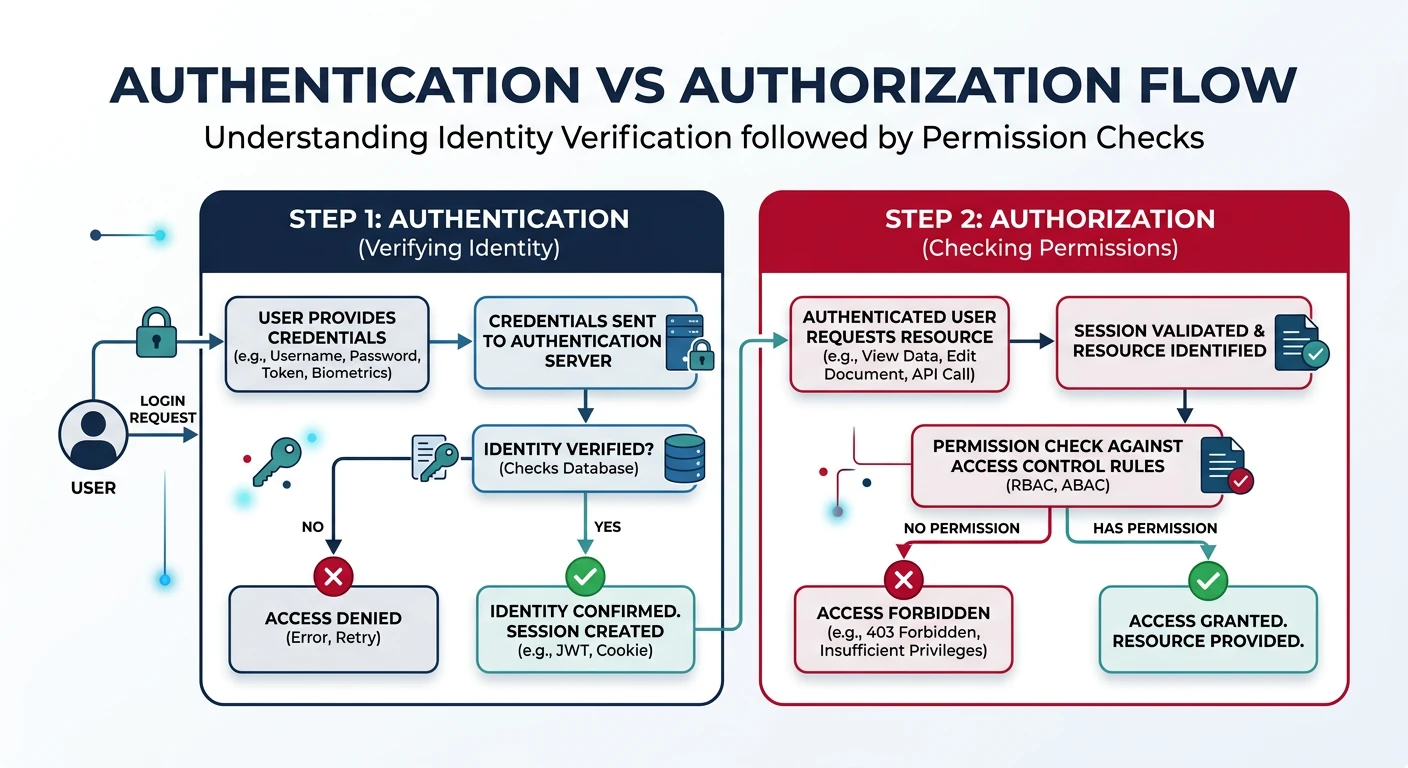
AuthN vs AuthZ
| Aspect | Authentication (AuthN) | Authorization (AuthZ) |
|---|---|---|
| Question | "Who are you?" | "What can you do?" |
| Purpose | Verify identity | Grant permissions |
| Happens | First (before access) | Second (after identity known) |
| Examples | Login, API key, JWT | Roles, scopes, policies |
| HTTP Status | 401 Unauthorized | 403 Forbidden |
API Key Authentication
The simplest authentication method—suitable for server-to-server communication.
// API Key middleware
const apiKeyAuth = (req, res, next) => {
  const apiKey = req.headers['x-api-key'] || req.query.api_key;

  if (!apiKey) {
    return res.status(401).json({
      type: 'https://api.example.com/errors/missing-api-key',
      title: 'Authentication Required',
      status: 401,
      detail: 'Provide an API key via X-API-Key header'
    });
  }

  // Validate key (in production: check database/cache)
  const keyData = await validateApiKey(apiKey);

  if (!keyData) {
    return res.status(401).json({
      type: 'https://api.example.com/errors/invalid-api-key',
      title: 'Invalid API Key',
      status: 401,
      detail: 'The provided API key is invalid or expired'
    });
  }

  // Attach key metadata to request
  req.apiKey = keyData;
  req.clientId = keyData.clientId;
  next();
};

// Generate secure API keys
const crypto = require('crypto');

function generateApiKey(prefix = 'myapp') {
  // Format: prefix_env_randomstring (similar to Stripe pattern)
  const random = crypto.randomBytes(24).toString('base64url');
  return `${prefix}_prod_${random}`;
}
// Example output: myapp_prod_Abc123XyzRandomString
JWT Deep Dive
JWT Structure
JSON Web Tokens (JWT) are self-contained tokens with three parts: Header, Payload, and Signature.
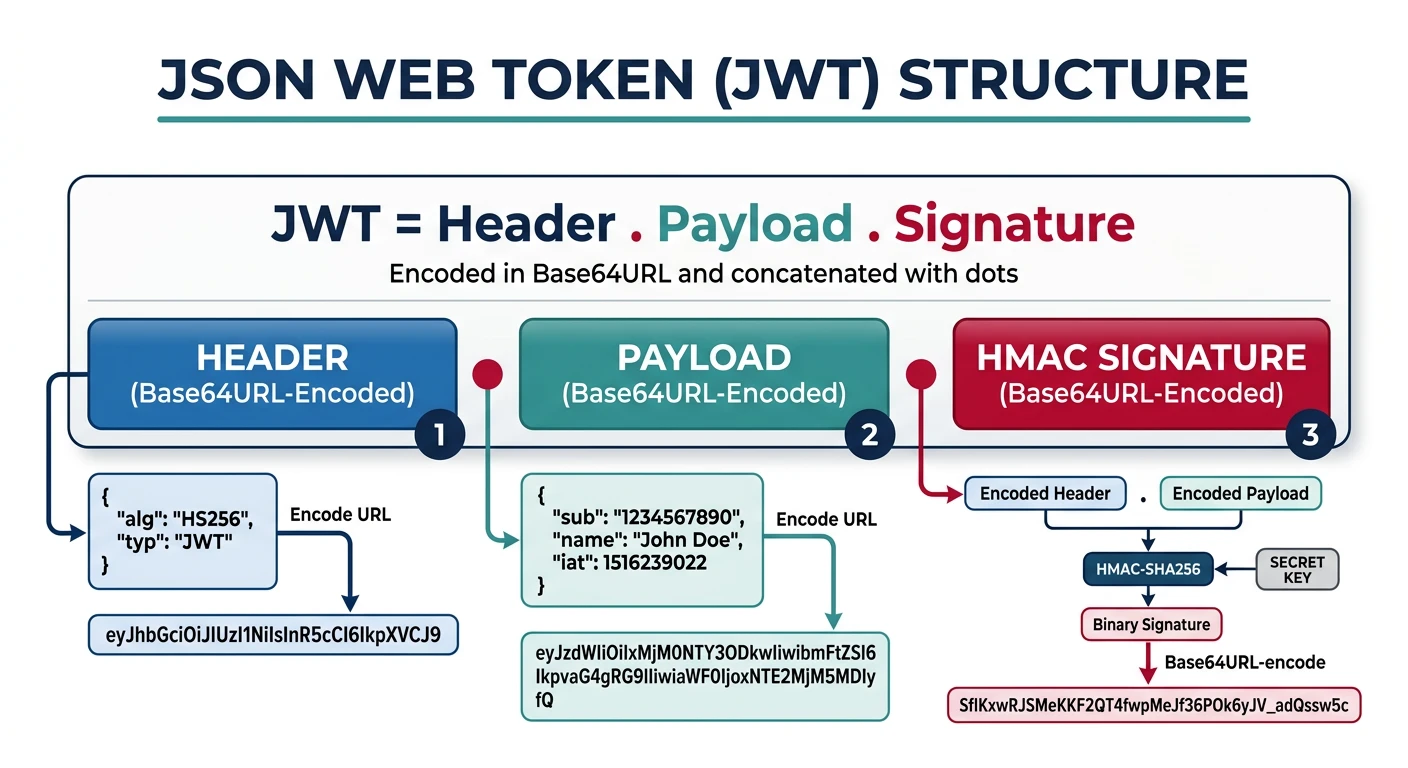
// JWT has 3 parts separated by dots: header.payload.signature
// Example JWT:
// eyJhbGciOiJIUzI1NiIsInR5cCI6IkpXVCJ9.
// eyJzdWIiOiJ1c2VyXzEyMyIsIm5hbWUiOiJKb2huIiwiZXhwIjoxNzA0MDY3MjAwfQ.
// SflKxwRJSMeKKF2QT4fwpMeJf36POk6yJV_adQssw5c

// Header (Base64URL decoded):
{
  "alg": "HS256",  // Algorithm: HS256, RS256, ES256
  "typ": "JWT"
}

// Payload (Base64URL decoded):
{
  "sub": "user_123",           // Subject (user ID)
  "name": "John Doe",          // Custom claim
  "email": "john@example.com",
  "roles": ["user", "admin"],
  "iat": 1704063600,           // Issued at
  "exp": 1704067200,           // Expiration time
  "iss": "https://auth.example.com",  // Issuer
  "aud": "https://api.example.com"    // Audience
}

// Signature:
// HMACSHA256(base64UrlEncode(header) + "." + base64UrlEncode(payload), secret)
JWT Implementation
const jwt = require('jsonwebtoken');

// Configuration
const JWT_SECRET = process.env.JWT_SECRET; // For HS256
const JWT_PRIVATE_KEY = process.env.JWT_PRIVATE_KEY; // For RS256
const ACCESS_TOKEN_EXPIRY = '15m';
const REFRESH_TOKEN_EXPIRY = '7d';

// Generate tokens
function generateTokens(user) {
  const accessToken = jwt.sign(
    {
      sub: user.id,
      email: user.email,
      roles: user.roles,
      type: 'access'
    },
    JWT_SECRET,
    {
      expiresIn: ACCESS_TOKEN_EXPIRY,
      issuer: 'https://api.example.com',
      audience: 'https://api.example.com'
    }
  );

  const refreshToken = jwt.sign(
    { sub: user.id, type: 'refresh' },
    JWT_SECRET,
    { expiresIn: REFRESH_TOKEN_EXPIRY }
  );

  return { accessToken, refreshToken };
}

// Verify middleware
const verifyJwt = (req, res, next) => {
  const authHeader = req.headers.authorization;

  if (!authHeader?.startsWith('Bearer ')) {
    return res.status(401).json({
      type: 'https://api.example.com/errors/missing-token',
      title: 'Authentication Required',
      status: 401
    });
  }

  const token = authHeader.slice(7); // Remove 'Bearer '

  try {
    const decoded = jwt.verify(token, JWT_SECRET, {
      issuer: 'https://api.example.com',
      audience: 'https://api.example.com'
    });

    req.user = decoded;
    next();
  } catch (err) {
    if (err.name === 'TokenExpiredError') {
      return res.status(401).json({
        type: 'https://api.example.com/errors/token-expired',
        title: 'Token Expired',
        status: 401,
        detail: 'Your access token has expired. Use refresh token.'
      });
    }

    return res.status(401).json({
      type: 'https://api.example.com/errors/invalid-token',
      title: 'Invalid Token',
      status: 401
    });
  }
};
JWT Security Rules:
- Never store sensitive data in JWT payload (it's only Base64 encoded, not encrypted)
- Use short expiry for access tokens (15 minutes typical)
- Always validate
iss,aud, andexpclaims - Use RS256/ES256 for public/private key signing in distributed systems
OAuth2 Flows
OAuth 2.0 Grant Types
OAuth 2.0 defines several flows for different client types and use cases.
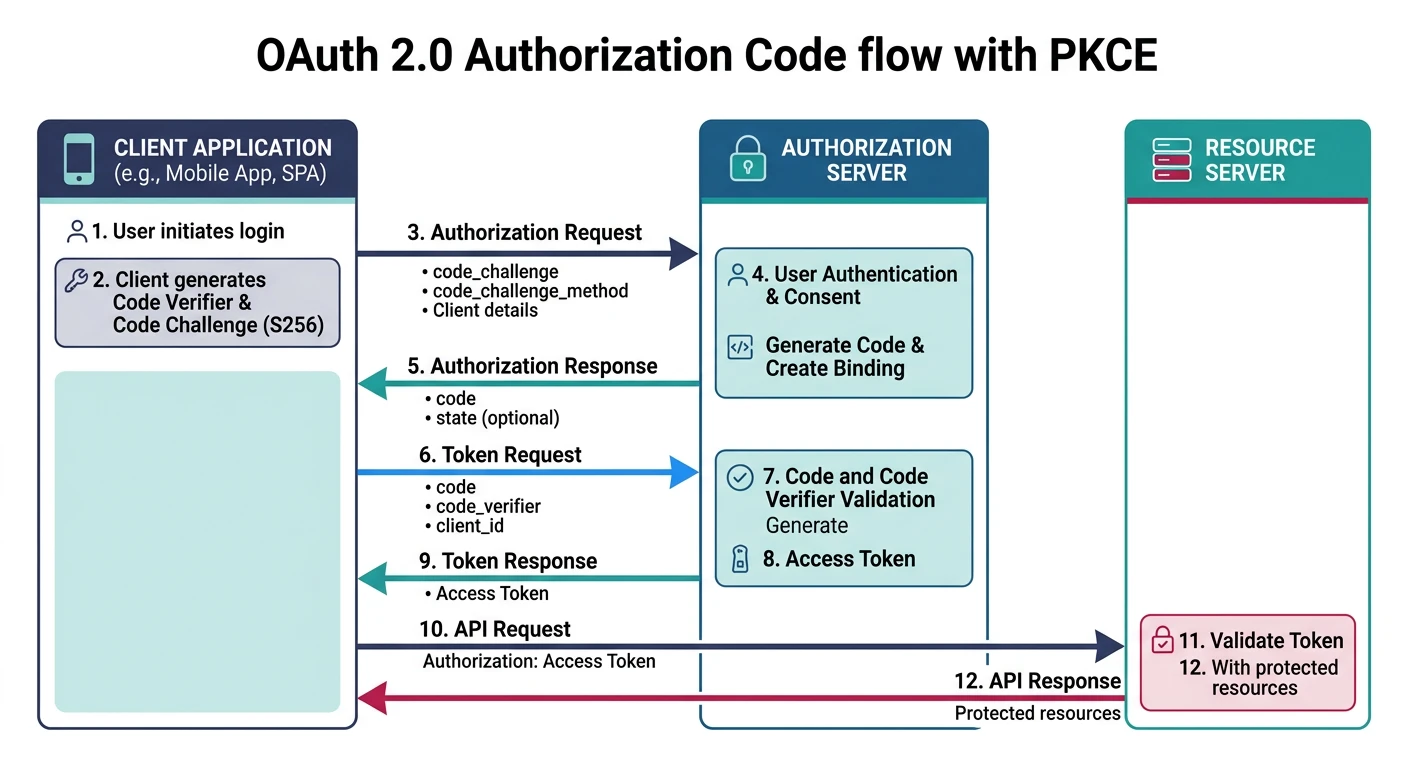
OAuth 2.0 Authorization Code Flow
sequenceDiagram
    participant U as User (Browser)
    participant C as Client App
    participant AS as Auth Server
    participant RS as Resource Server

    U->>C: Click "Login with Provider"
    C->>AS: Authorization Request + redirect_uri
    AS->>U: Login Page
    U->>AS: Credentials + Consent
    AS->>C: Authorization Code (via redirect)
    C->>AS: Code + client_secret
    AS->>C: Access Token + Refresh Token
    C->>RS: API Request + Access Token
    RS->>C: Protected Resource
    C->>U: Display Data
OAuth 2.0 Flows
| Flow | Use Case | Security |
|---|---|---|
| Authorization Code + PKCE | SPAs, mobile apps, web apps | Most secure, recommended |
| Client Credentials | Machine-to-machine (M2M) | Server-side only |
| Device Code | Smart TVs, CLIs, IoT | For limited-input devices |
| Refresh Token | Token renewal | Secure rotation required |
Authorization Code Flow with PKCE
// Step 1: Client generates PKCE codes
const crypto = require('crypto');

function generatePKCE() {
  // Code verifier: random 43-128 character string
  const codeVerifier = crypto.randomBytes(32).toString('base64url');

  // Code challenge: SHA256 hash of verifier
  const codeChallenge = crypto
    .createHash('sha256')
    .update(codeVerifier)
    .digest('base64url');

  return { codeVerifier, codeChallenge };
}

// Step 2: Build authorization URL
const { codeVerifier, codeChallenge } = generatePKCE();

const authUrl = new URL('https://auth.example.com/authorize');
authUrl.searchParams.set('client_id', 'your-client-id');
authUrl.searchParams.set('redirect_uri', 'https://app.example.com/callback');
authUrl.searchParams.set('response_type', 'code');
authUrl.searchParams.set('scope', 'openid profile email tasks:read tasks:write');
authUrl.searchParams.set('state', crypto.randomBytes(16).toString('hex'));
authUrl.searchParams.set('code_challenge', codeChallenge);
authUrl.searchParams.set('code_challenge_method', 'S256');

// Step 3: Exchange code for tokens (at callback)
async function exchangeCodeForTokens(authCode, codeVerifier) {
  const response = await fetch('https://auth.example.com/token', {
    method: 'POST',
    headers: { 'Content-Type': 'application/x-www-form-urlencoded' },
    body: new URLSearchParams({
      grant_type: 'authorization_code',
      code: authCode,
      redirect_uri: 'https://app.example.com/callback',
      client_id: 'your-client-id',
      code_verifier: codeVerifier  // Proves we initiated the flow
    })
  });

  return response.json();
  // { access_token, refresh_token, expires_in, token_type }
}
Client Credentials Flow
// For server-to-server (M2M) communication
async function getM2MToken() {
  const response = await fetch('https://auth.example.com/token', {
    method: 'POST',
    headers: {
      'Content-Type': 'application/x-www-form-urlencoded',
      'Authorization': `Basic ${Buffer.from(
        `${CLIENT_ID}:${CLIENT_SECRET}`
      ).toString('base64')}`
    },
    body: new URLSearchParams({
      grant_type: 'client_credentials',
      scope: 'api:read api:write'
    })
  });

  return response.json();
}
OpenID Connect
OIDC Layer on OAuth 2.0
OpenID Connect adds an identity layer to OAuth 2.0, providing standardized user information.
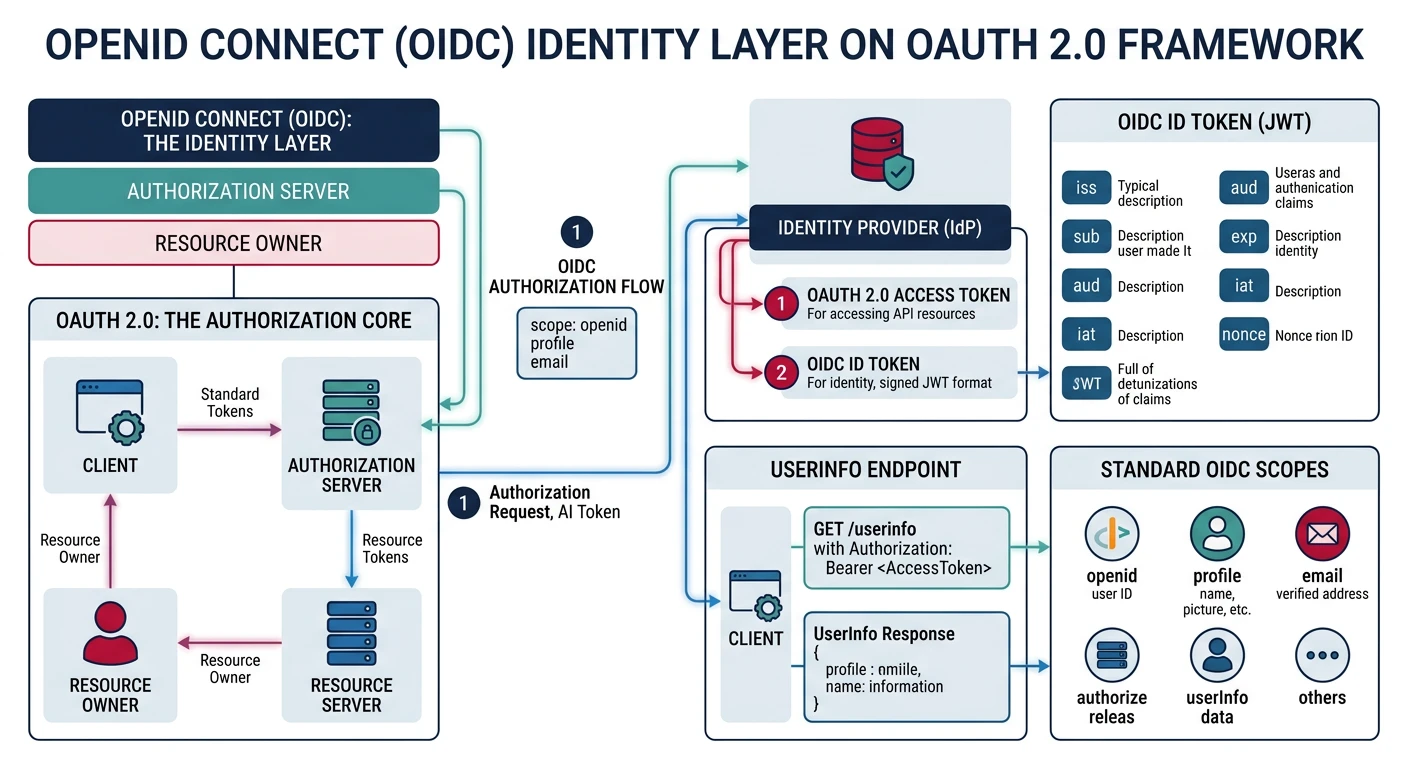
// OIDC adds:
// 1. ID Token - JWT with user identity claims
// 2. UserInfo endpoint - /userinfo
// 3. Standard scopes: openid, profile, email, address, phone
// 4. Discovery document: /.well-known/openid-configuration

// ID Token payload example
{
  "iss": "https://auth.example.com",
  "sub": "user_abc123",
  "aud": "your-client-id",
  "exp": 1704067200,
  "iat": 1704063600,
  "nonce": "n-0S6_WzA2Mj",  // Replay attack prevention
  "at_hash": "MTIzNDU2Nzg",  // Access token hash

  // Standard claims (from profile scope)
  "name": "John Doe",
  "given_name": "John",
  "family_name": "Doe",
  "picture": "https://example.com/john.jpg",
  "email": "john@example.com",
  "email_verified": true
}

// Fetch user info
async function getUserInfo(accessToken) {
  const response = await fetch('https://auth.example.com/userinfo', {
    headers: { 'Authorization': `Bearer ${accessToken}` }
  });
  return response.json();
}
RBAC vs ABAC
Role-Based Access Control (RBAC)
// Define roles and permissions
const permissions = {
  admin: ['tasks:create', 'tasks:read', 'tasks:update', 'tasks:delete', 'users:manage'],
  editor: ['tasks:create', 'tasks:read', 'tasks:update'],
  viewer: ['tasks:read']
};

// RBAC middleware
const requirePermission = (permission) => {
  return (req, res, next) => {
    const userRoles = req.user.roles || [];

    const hasPermission = userRoles.some(role =>
      permissions[role]?.includes(permission)
    );

    if (!hasPermission) {
      return res.status(403).json({
        type: 'https://api.example.com/errors/forbidden',
        title: 'Access Denied',
        status: 403,
        detail: `Missing permission: ${permission}`
      });
    }

    next();
  };
};

// Usage
app.delete('/tasks/:id',
  verifyJwt,
  requirePermission('tasks:delete'),
  deleteTask
);
Attribute-Based Access Control (ABAC)
// ABAC: Access based on attributes of user, resource, and context
const abacPolicy = {
  rules: [
    {
      // Users can edit their own tasks
      effect: 'allow',
      action: ['update', 'delete'],
      resource: 'task',
      condition: (user, resource) => resource.ownerId === user.id
    },
    {
      // Admins can access everything
      effect: 'allow',
      action: '*',
      resource: '*',
      condition: (user) => user.roles.includes('admin')
    },
    {
      // Only during business hours
      effect: 'allow',
      action: ['create'],
      resource: 'task',
      condition: (user, resource, context) => {
        const hour = new Date().getUTCHours();
        return hour >= 9 && hour < 17; // 9 AM - 5 PM UTC
      }
    }
  ]
};

function evaluateAbac(user, action, resource, context = {}) {
  for (const rule of abacPolicy.rules) {
    const actionMatch = rule.action === '*' || rule.action.includes(action);
    const resourceMatch = rule.resource === '*' || rule.resource === resource.type;

    if (actionMatch && resourceMatch && rule.condition(user, resource, context)) {
      return rule.effect === 'allow';
    }
  }
  return false; // Deny by default
}
Cloud Identity Providers
Choosing an Identity Provider
Popular Options:
- Auth0: Full-featured, great DX, generous free tier
- AWS Cognito: Deep AWS integration, cost-effective at scale
- Azure AD B2C: Enterprise-grade, Microsoft ecosystem
- Firebase Auth: Simple, mobile-first, Google ecosystem
- Clerk/Supabase: Developer-friendly alternatives
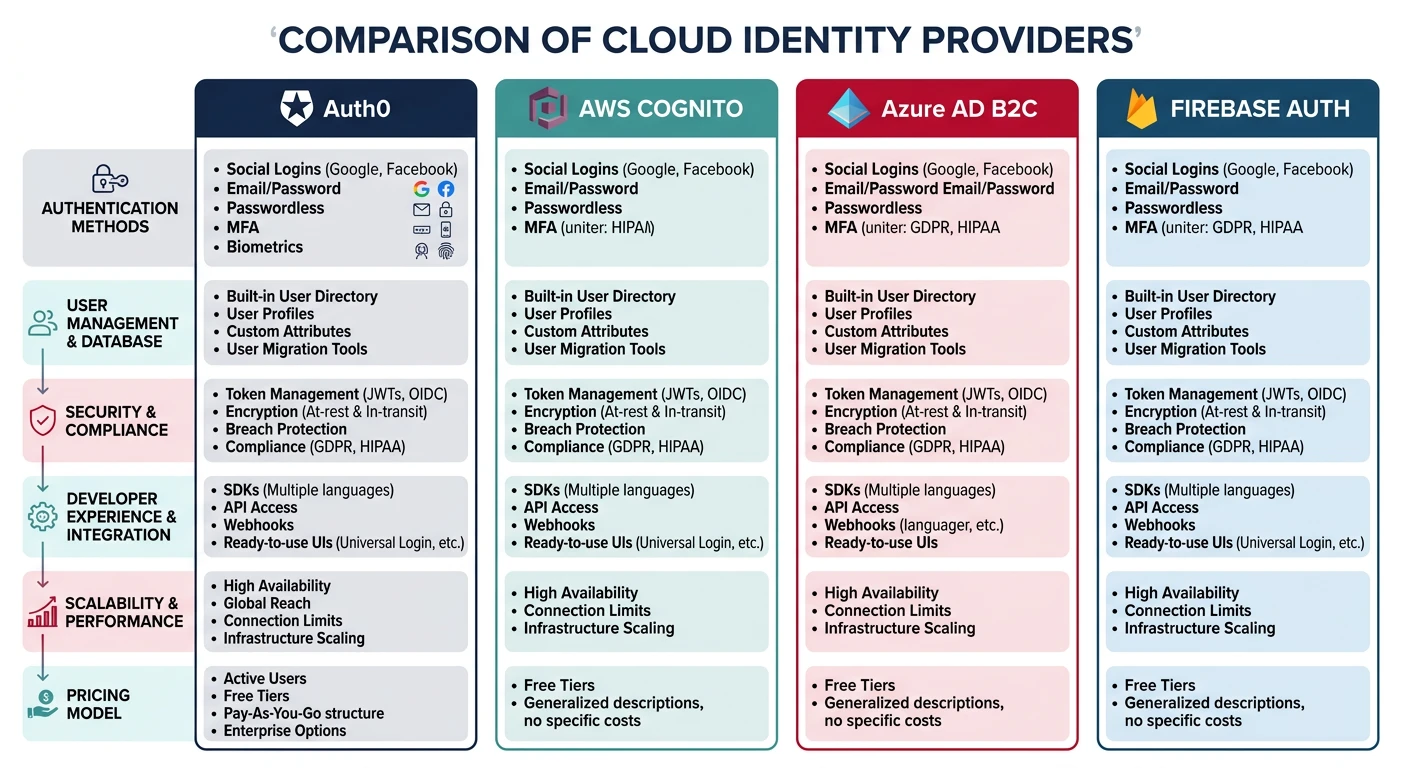
Auth0 Integration Example
// Express middleware for Auth0 JWT validation
const { auth } = require('express-oauth2-jwt-bearer');

const checkJwt = auth({
  audience: 'https://api.example.com',
  issuerBaseURL: 'https://your-tenant.auth0.com/',
  tokenSigningAlg: 'RS256'
});

// Protected route
app.get('/api/private', checkJwt, (req, res) => {
  res.json({
    message: 'Authenticated!',
    user: req.auth.payload
  });
});

// Check permissions (Auth0 RBAC)
const { requiredScopes } = require('express-oauth2-jwt-bearer');

app.delete('/api/tasks/:id',
  checkJwt,
  requiredScopes('delete:tasks'),
  deleteTask
);
Practice Exercises
Exercise 1: JWT Authentication
- Implement JWT-based login endpoint
- Create access and refresh token pair
- Build token refresh endpoint
- Add JWT verification middleware
Exercise 2: OAuth 2.0 PKCE
- Set up Auth0 or similar provider
- Implement Authorization Code + PKCE flow
- Handle callback and token exchange
- Implement secure token storage
Exercise 3: RBAC System
- Design role hierarchy (admin, manager, user)
- Define granular permissions
- Implement permission checking middleware
- Add role management endpoints