API Development Mastery
Backend API Fundamentals
REST, HTTP, status codes, URI designData Layer & Persistence
Database integration, CRUD, transactions, RedisOpenAPI Specification
Contract-first design, OpenAPI 3.0/3.1Documentation & DX
Swagger UI, Redoc, developer portalsAuthentication & Authorization
OAuth 2.0, JWT, RBAC, ABACSecurity Hardening
OWASP Top 10, input validation, CORSAWS API Gateway
REST/HTTP APIs, Lambda integration, WAFAzure API Management
Policies, products, developer portalGCP Apigee
API proxies, monetization, analyticsArchitecture Patterns
Gateway, BFF, microservices, DDDVersioning & Governance
SemVer, deprecation, lifecycleMonitoring & Analytics
Observability, tracing, SLIs/SLOsPerformance & Rate Limiting
Caching, throttling, load testingGraphQL & gRPC
Alternative API styles, Protocol BuffersTesting & Contracts
Contract testing, Pact, Postman/NewmanCI/CD & Automation
Spectral, GitHub Actions, TerraformAPI Product Management
API as Product, monetization, ecosystemsSwagger Ecosystem
The Swagger Toolchain
Swagger is a suite of tools that work together to design, document, and consume APIs. While "Swagger" is often used interchangeably with "OpenAPI," they're different: OpenAPI is the specification, Swagger is the toolset.
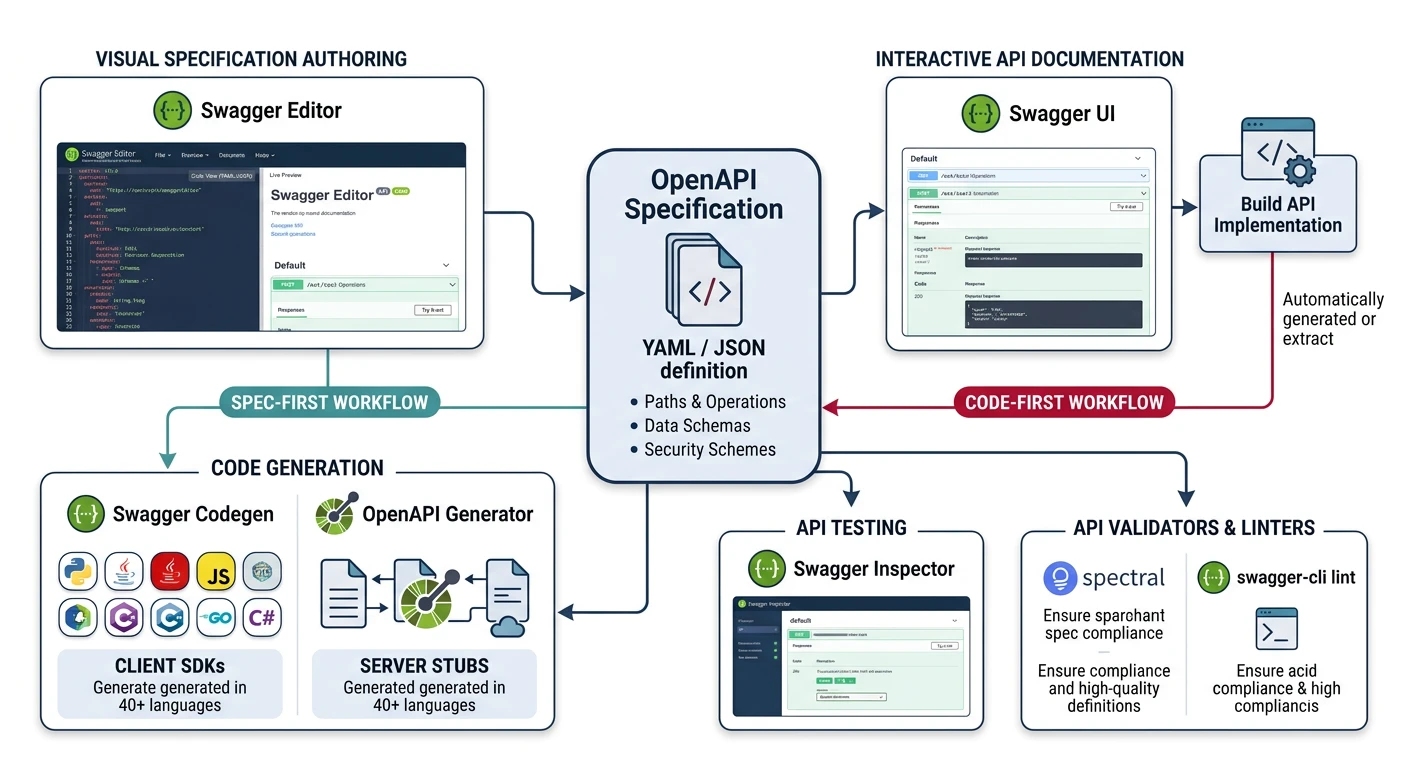
Swagger Tools Overview
| Tool | Purpose | Use Case |
|---|---|---|
| Swagger Editor | Browser-based spec editor | Design APIs with real-time validation |
| Swagger UI | Interactive documentation | Let developers explore and test APIs |
| Swagger Codegen | Code generation | Generate client SDKs and server stubs |
| SwaggerHub | Collaboration platform | Team-based API design and publishing |
Swagger Editor Setup
# Run Swagger Editor locally with Docker
docker run -d -p 8080:8080 swaggerapi/swagger-editor

# Or use the online version at https://editor.swagger.io
Self-Hosted Swagger UI
// server.js - Express with Swagger UI
const express = require('express');
const swaggerUi = require('swagger-ui-express');
const yaml = require('yaml');
const fs = require('fs');

const app = express();

// Load OpenAPI spec
const openApiSpec = yaml.parse(
  fs.readFileSync('./openapi.yaml', 'utf8')
);

// Swagger UI options
const swaggerOptions = {
  explorer: true,
  customSiteTitle: 'Task API Documentation',
  customCss: `
    .swagger-ui .topbar { display: none }
    .swagger-ui .info .title { color: #132440 }
  `,
  swaggerOptions: {
    docExpansion: 'list',      // 'none', 'list', 'full'
    filter: true,              // Enable filtering
    showRequestDuration: true,
    tryItOutEnabled: true,     // Enable "Try it out" by default
    persistAuthorization: true // Remember auth between refreshes
  }
};

// Serve Swagger UI at /docs
app.use('/docs', swaggerUi.serve, swaggerUi.setup(openApiSpec, swaggerOptions));

// Serve raw OpenAPI spec
app.get('/openapi.yaml', (req, res) => {
  res.type('text/yaml').send(fs.readFileSync('./openapi.yaml', 'utf8'));
});

app.get('/openapi.json', (req, res) => {
  res.json(openApiSpec);
});

app.listen(3000, () => {
  console.log('Docs at http://localhost:3000/docs');
});
OpenAPI Generator
Code Generation Power
OpenAPI Generator creates client SDKs, server stubs, and documentation in 50+ languages from your spec. This ensures API consumers always have accurate, up-to-date code.
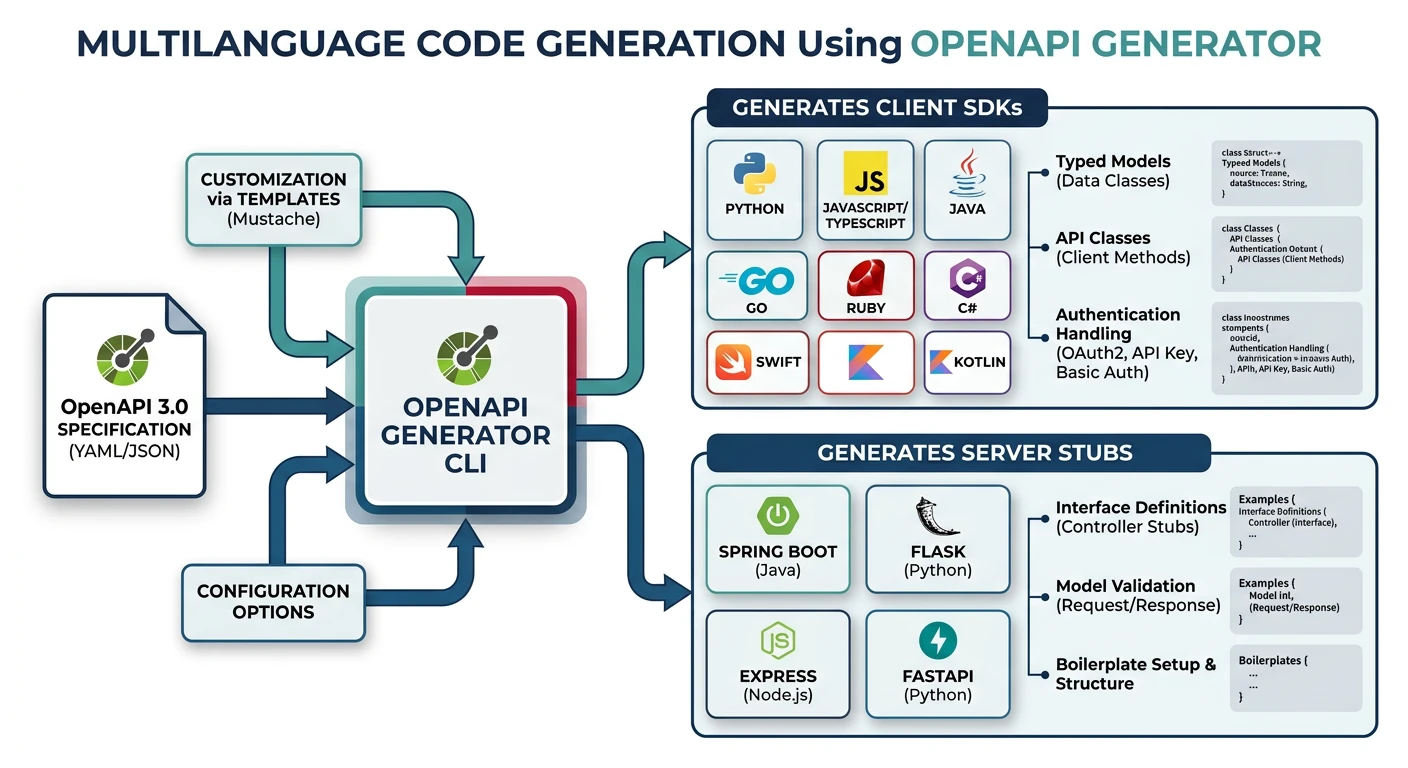
# Install OpenAPI Generator
npm install @openapitools/openapi-generator-cli -g

# Generate TypeScript client
openapi-generator-cli generate \
  -i openapi.yaml \
  -g typescript-axios \
  -o ./generated/typescript-client \
  --additional-properties=npmName=@myorg/task-api-client

# Generate Python client
openapi-generator-cli generate \
  -i openapi.yaml \
  -g python \
  -o ./generated/python-client

# Generate Node.js Express server stub
openapi-generator-cli generate \
  -i openapi.yaml \
  -g nodejs-express-server \
  -o ./generated/server
Using Generated Clients
// Generated TypeScript client usage
import { TasksApi, Configuration } from '@myorg/task-api-client';

const config = new Configuration({
  basePath: 'https://api.example.com/v1',
  accessToken: 'your-jwt-token'
});

const tasksApi = new TasksApi(config);

// Fully typed API calls!
const tasks = await tasksApi.listTasks({ status: 'pending', limit: 10 });
const newTask = await tasksApi.createTask({
  title: 'Review PR',
  priority: 'high'
});
Redocly Documentation
Why Redocly?
Redocly produces cleaner, more professional documentation than Swagger UI with better readability, multi-language code samples, and a three-panel layout.
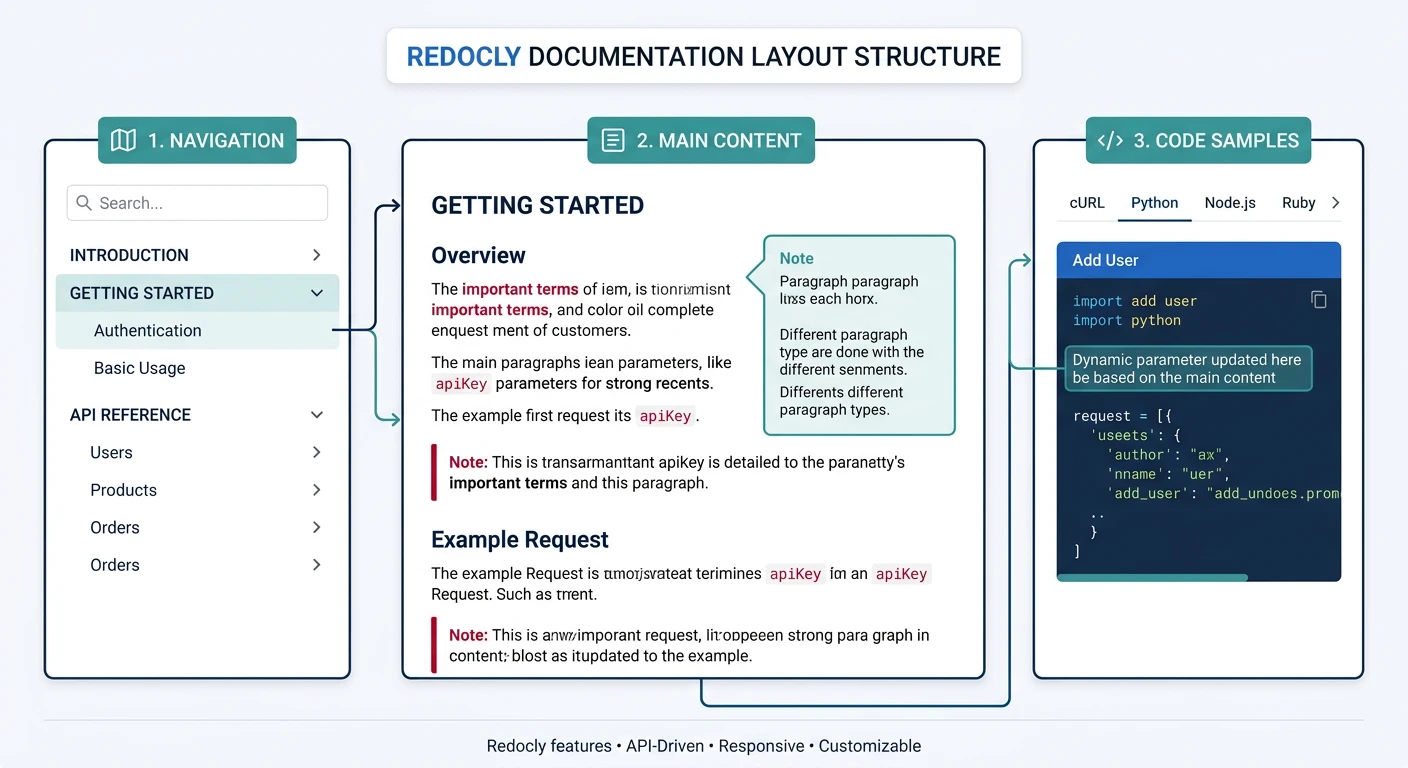
# Install Redocly CLI
npm install -g @redocly/cli

# Preview docs locally
redocly preview-docs openapi.yaml
# Opens browser at http://localhost:8080

# Build static HTML
redocly build-docs openapi.yaml -o docs/index.html
Custom Configuration
# redocly.yaml - Configuration file
extends:
  - recommended

theme:
  colors:
    primary:
      main: '#132440'
    success:
      main: '#3B9797'
  typography:
    fontFamily: '"Inter", sans-serif'

apis:
  main:
    root: ./openapi.yaml

lint:
  rules:
    operation-description: error
    operation-operationId: error
Multi-Language Code Samples
# Add code samples via x-codeSamples extension
paths:
  /tasks:
    post:
      x-codeSamples:
        - lang: curl
          label: cURL
          source: |
            curl -X POST https://api.example.com/v1/tasks \
              -H "Authorization: Bearer $TOKEN" \
              -H "Content-Type: application/json" \
              -d '{"title": "My Task", "status": "pending"}'
        - lang: javascript
          label: Node.js
          source: |
            const response = await fetch('https://api.example.com/v1/tasks', {
              method: 'POST',
              headers: {
                'Authorization': `Bearer ${token}`,
                'Content-Type': 'application/json'
              },
              body: JSON.stringify({ title: 'My Task' })
            });
        - lang: python
          label: Python
          source: |
            import requests
            response = requests.post(
                'https://api.example.com/v1/tasks',
                headers={'Authorization': f'Bearer {token}'},
                json={'title': 'My Task'}
            )
Developer Portal Design
Portal Components
A complete developer portal goes beyond API reference to include guides, authentication, and community features.
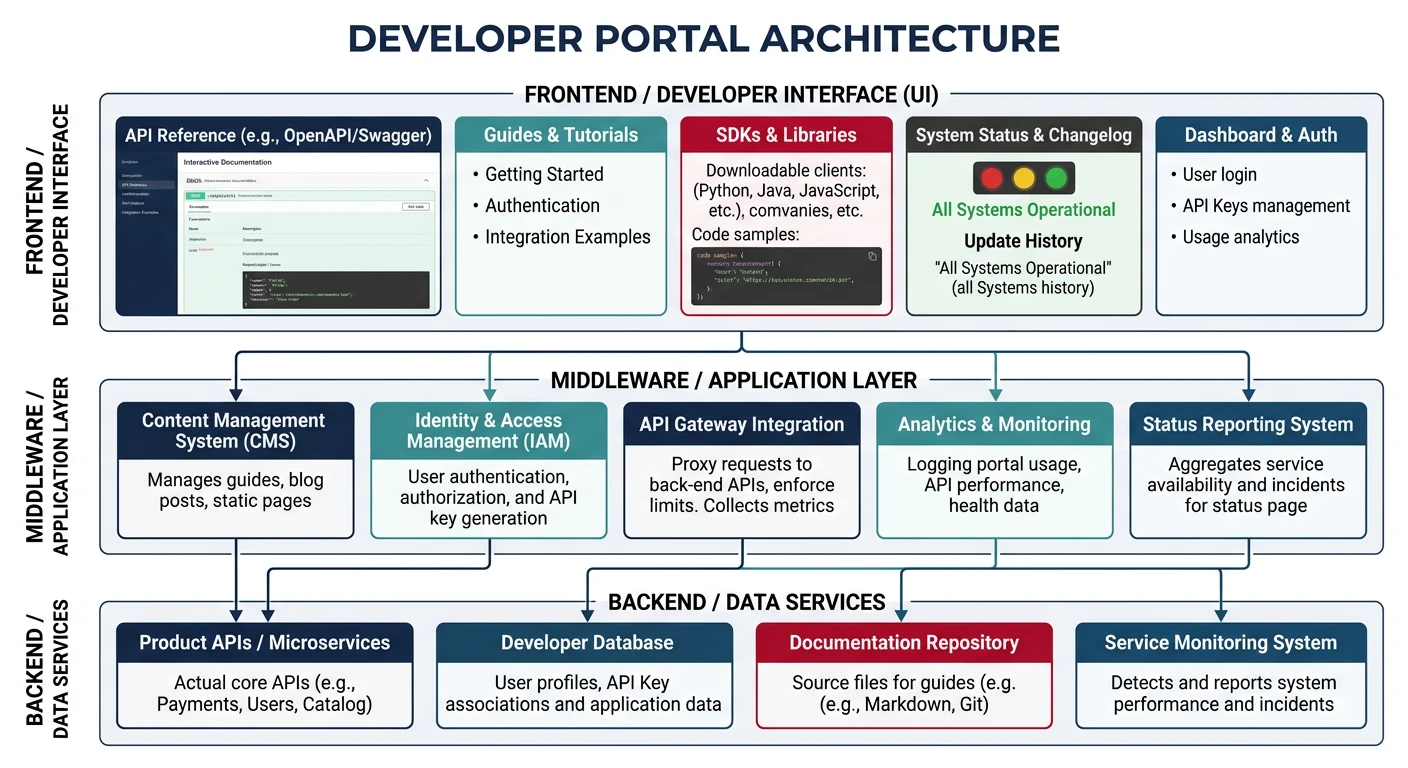
Essential Portal Elements
- Landing Page: Value proposition, getting started CTA
- API Reference: Swagger UI or Redocly
- Guides & Tutorials: Step-by-step walkthroughs
- Authentication: API key management, OAuth setup
- SDKs & Libraries: Download links, installation guides
- Changelog: Version history with migration guides
- Status Page: Real-time API health
Building with Docusaurus
# Create portal
npx create-docusaurus@latest developer-portal classic
cd developer-portal

# Add OpenAPI plugin
npm install docusaurus-plugin-openapi-docs
The "Time to Hello World" Metric
- Can developers get an API key in under 2 minutes?
- Is there a "Try it now" button that works without signup?
- Does the quickstart guide include copy-paste code?
- Are error messages actionable (tell what to fix)?
SDK Publishing
SDK Distribution Strategy
Publish generated SDKs to package managers for easy consumption.
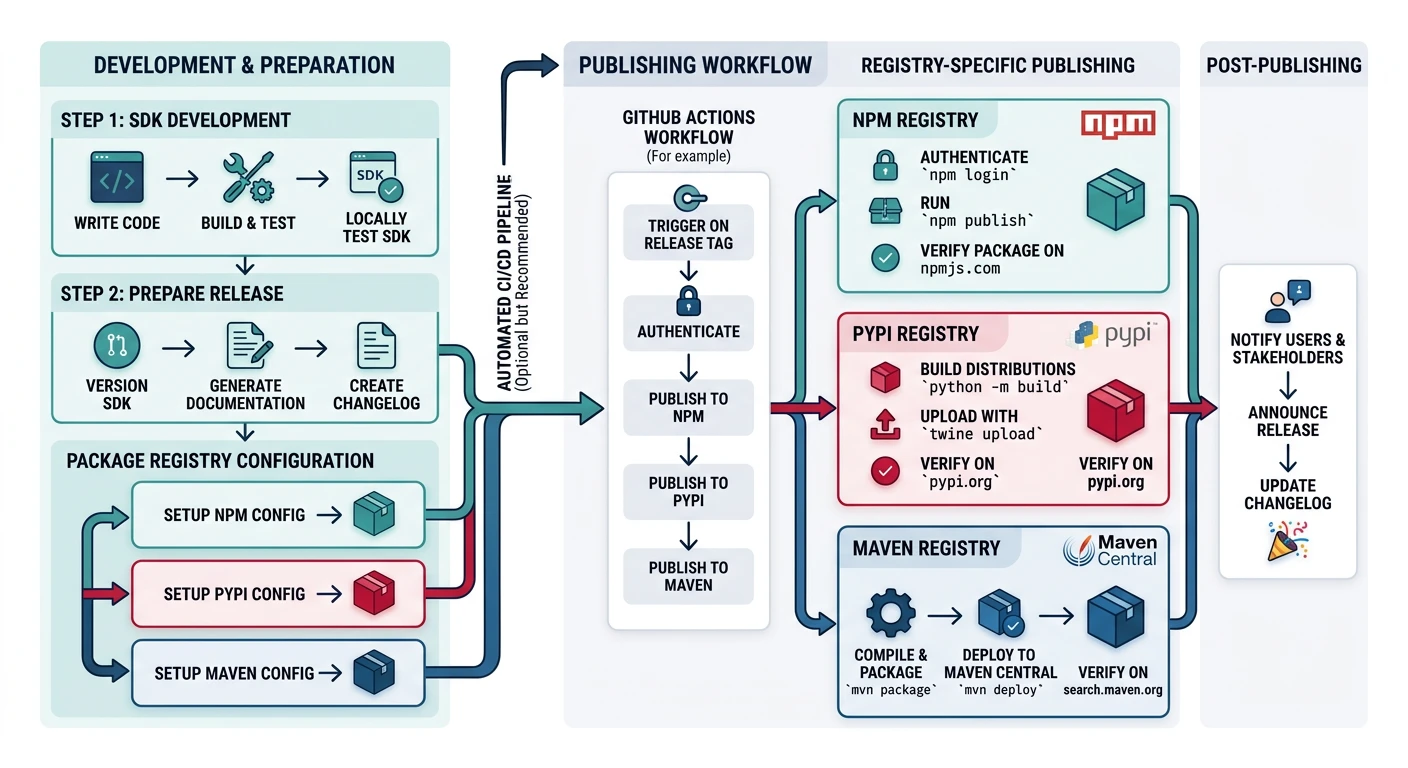
# Publish TypeScript SDK to npm
cd generated/typescript-client
npm publish --access public

# Publish Python SDK to PyPI
cd generated/python-client
pip install build twine
python -m build
twine upload dist/*
SDK Versioning
{
  "name": "@myorg/task-api-client",
  "version": "2.3.0",
  "description": "Official Task API client",
  "main": "dist/index.js",
  "types": "dist/index.d.ts",
  "peerDependencies": {
    "axios": "^1.0.0"
  },
  "repository": {
    "type": "git",
    "url": "https://github.com/myorg/task-api-sdk-js"
  }
}
API Changelogs
Changelog Best Practices
Keep developers informed about API changes with clear, actionable changelogs.
# API Changelog

## [2.3.0] - 2024-01-15

### Added
- `POST /tasks/{id}/comments` - Add comments to tasks
- `assignee_id` field on Task responses

### Changed
- `GET /tasks` now supports `sort` parameter
- Pagination limit increased from 50 to 100

### Deprecated
- `due_date` string format (use ISO 8601)
  - Migration: Change "2024-01-15" to "2024-01-15T00:00:00Z"
  - Removal date: 2024-07-01

### Fixed
- 500 error when creating task with empty title

## [2.2.0] - 2024-01-01
...
Breaking Change Announcements
- Announce 6+ months before removal
- Include migration guide with code examples
- Send email notifications to API key owners
- Add deprecation headers to affected endpoints
Practice Exercises
Exercise 1: Set Up Documentation
Create documentation for your API:
- Set up Swagger UI with custom theming
- Add authentication configuration
- Enable "Try it out" functionality
Exercise 2: Generate SDK
- Generate TypeScript client from your spec
- Add
x-codeSamplesfor 3 languages - Create a usage example demonstrating the SDK
Exercise 3: Build Developer Portal
- Set up Docusaurus with OpenAPI plugin
- Write a quickstart guide (5 minutes to first call)
- Create changelog with proper versioning
- Measure "Time to Hello World" with a test user