Series Navigation: This is Part 6 of the 17-part API Development Series. Review Part 5: Authentication & Authorization first.
API Development Mastery
Your 17-step learning path • Currently on Step 6
Backend API Fundamentals
REST, HTTP, status codes, URI designData Layer & Persistence
Database integration, CRUD, transactions, RedisOpenAPI Specification
Contract-first design, OpenAPI 3.0/3.1Documentation & DX
Swagger UI, Redoc, developer portalsAuthentication & Authorization
OAuth 2.0, JWT, RBAC, ABAC6
Security Hardening
OWASP Top 10, input validation, CORS7
AWS API Gateway
REST/HTTP APIs, Lambda integration, WAF8
Azure API Management
Policies, products, developer portal9
GCP Apigee
API proxies, monetization, analytics10
Architecture Patterns
Gateway, BFF, microservices, DDD11
Versioning & Governance
SemVer, deprecation, lifecycle12
Monitoring & Analytics
Observability, tracing, SLIs/SLOs13
Performance & Rate Limiting
Caching, throttling, load testing14
GraphQL & gRPC
Alternative API styles, Protocol Buffers15
Testing & Contracts
Contract testing, Pact, Postman/Newman16
CI/CD & Automation
Spectral, GitHub Actions, Terraform17
API Product Management
API as Product, monetization, ecosystemsOWASP API Security Top 10
2023 OWASP API Security Risks
OWASP maintains a list of the most critical API security risks. Understanding these is essential for building secure APIs.
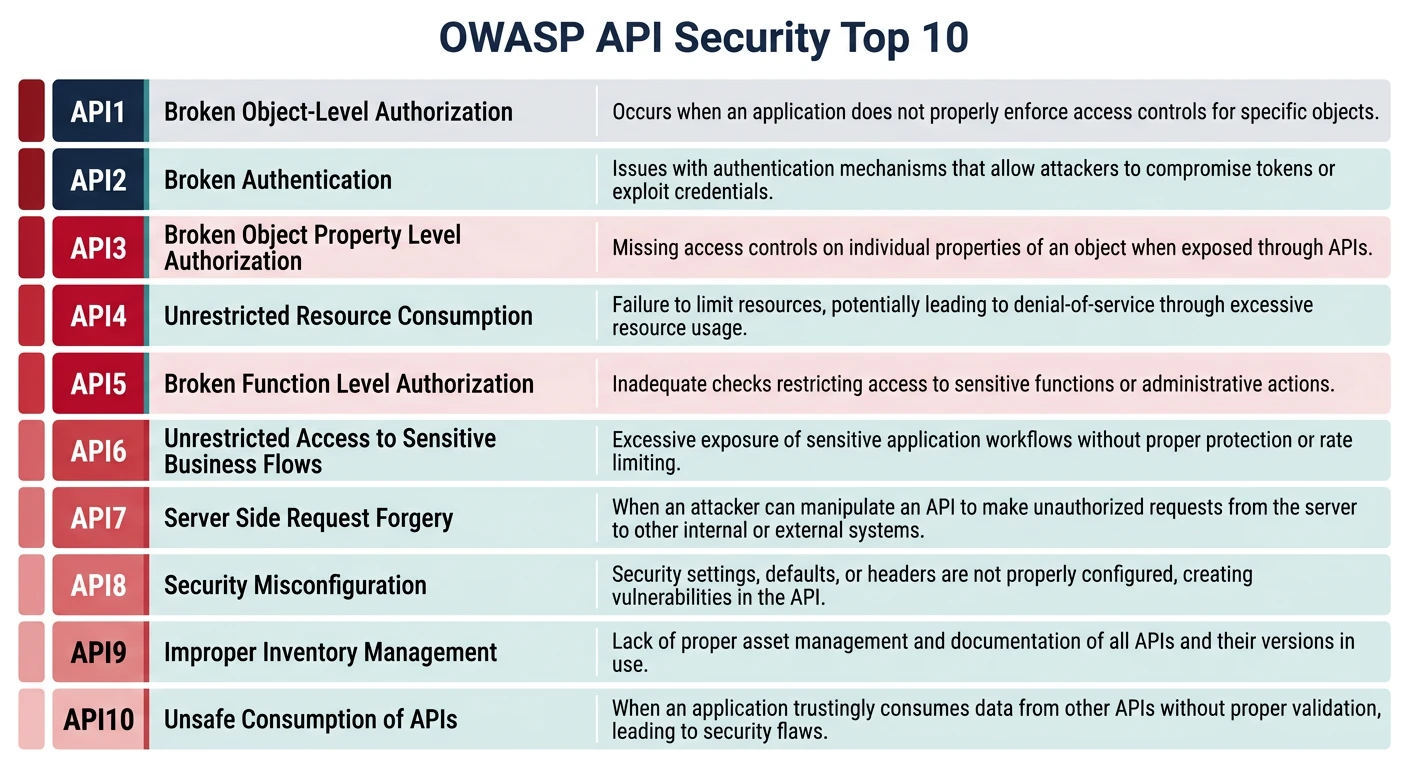
OWASP API Top 10 (2023)
| # | Risk | Description |
|---|---|---|
| 1 | Broken Object Level Auth | Accessing other users' data via ID manipulation |
| 2 | Broken Authentication | Weak auth mechanisms, credential stuffing |
| 3 | Broken Object Property Auth | Mass assignment, excessive data exposure |
| 4 | Unrestricted Resource Consumption | Missing rate limits, DoS attacks |
| 5 | Broken Function Level Auth | Accessing admin functions without permission |
| 6 | Unrestricted Access to Sensitive Flows | Abuse of business flows (checkout, signup) |
| 7 | Server-Side Request Forgery | Exploiting server to make internal requests |
| 8 | Security Misconfiguration | Default configs, verbose errors, CORS issues |
| 9 | Improper Inventory Management | Undocumented endpoints, old API versions |
| 10 | Unsafe API Consumption | Trusting third-party API responses blindly |
Broken Object Level Authorization (BOLA)
// VULNERABLE: No ownership check
app.get('/tasks/:id', async (req, res) => {
  const task = await Task.findById(req.params.id);
  return res.json(task); // Anyone can access any task!
});

// SECURE: Verify ownership
app.get('/tasks/:id', verifyJwt, async (req, res) => {
  const task = await Task.findById(req.params.id);

  if (!task) {
    return res.status(404).json({ error: 'Task not found' });
  }

  // Check ownership or team membership
  if (task.ownerId !== req.user.sub &&
      !task.teamMembers.includes(req.user.sub)) {
    return res.status(403).json({
      type: 'https://api.example.com/errors/forbidden',
      title: 'Access Denied',
      status: 403,
      detail: 'You do not have access to this resource'
    });
  }

  return res.json(task);
});
Zero Trust Architecture
Zero Trust Principles
Never Trust, Always Verify:
- Verify Explicitly: Authenticate every request, every time
- Least Privilege: Grant minimum permissions needed
- Assume Breach: Design as if attackers are already inside
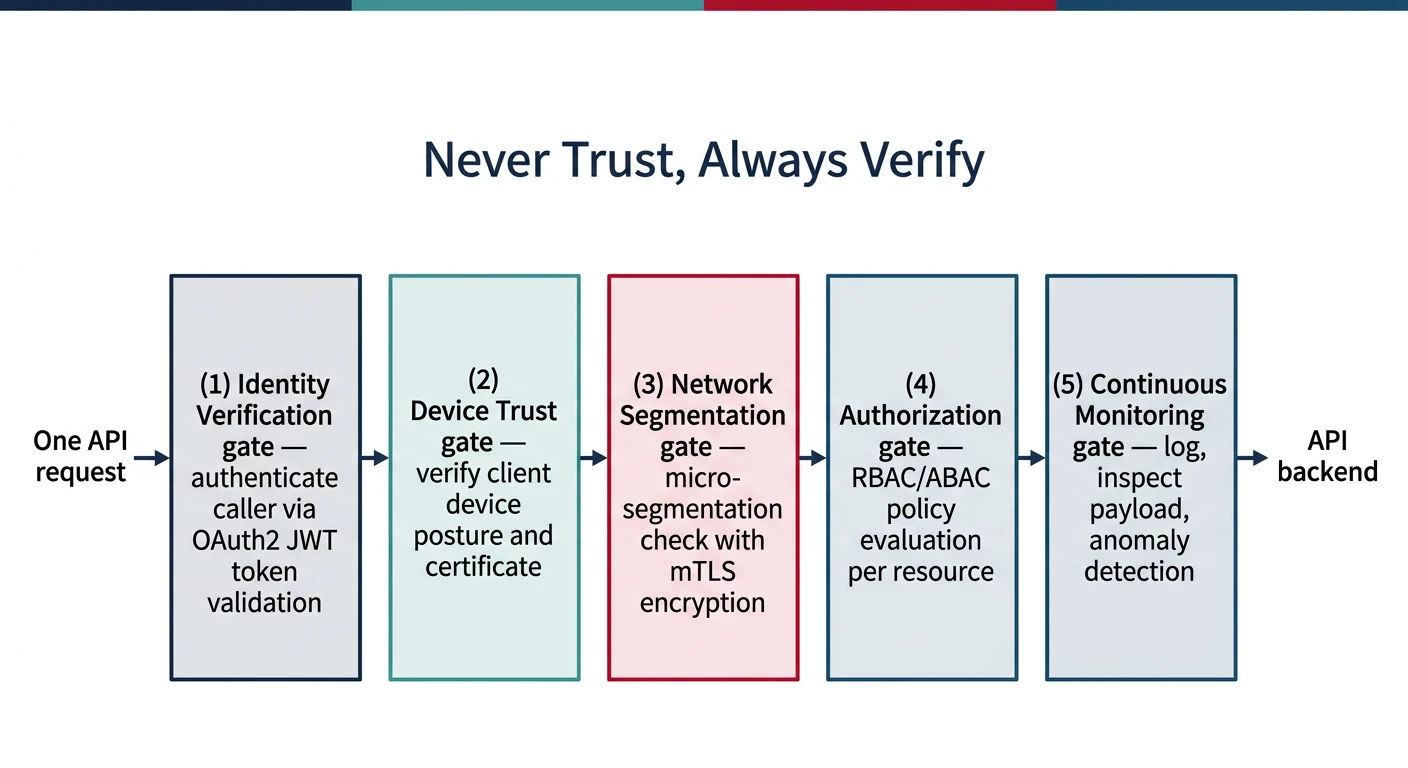
// Zero Trust middleware stack
app.use('/api/*', [
  // 1. Validate request origin
  validateOrigin,

  // 2. Authenticate identity
  verifyJwt,

  // 3. Check authorization
  checkPermissions,

  // 4. Validate input
  validateRequest,

  // 5. Log everything
  auditLog,

  // 6. Rate limit
  rateLimit
]);

// Validate request origin
const validateOrigin = (req, res, next) => {
  const allowedOrigins = ['https://app.example.com', 'https://admin.example.com'];
  const origin = req.headers.origin;

  if (origin && !allowedOrigins.includes(origin)) {
    return res.status(403).json({
      type: 'https://api.example.com/errors/origin-not-allowed',
      title: 'Origin Not Allowed',
      status: 403
    });
  }
  next();
};
Input Validation
Defense in Depth
Validate inputs at multiple layers: API gateway, application, and database.
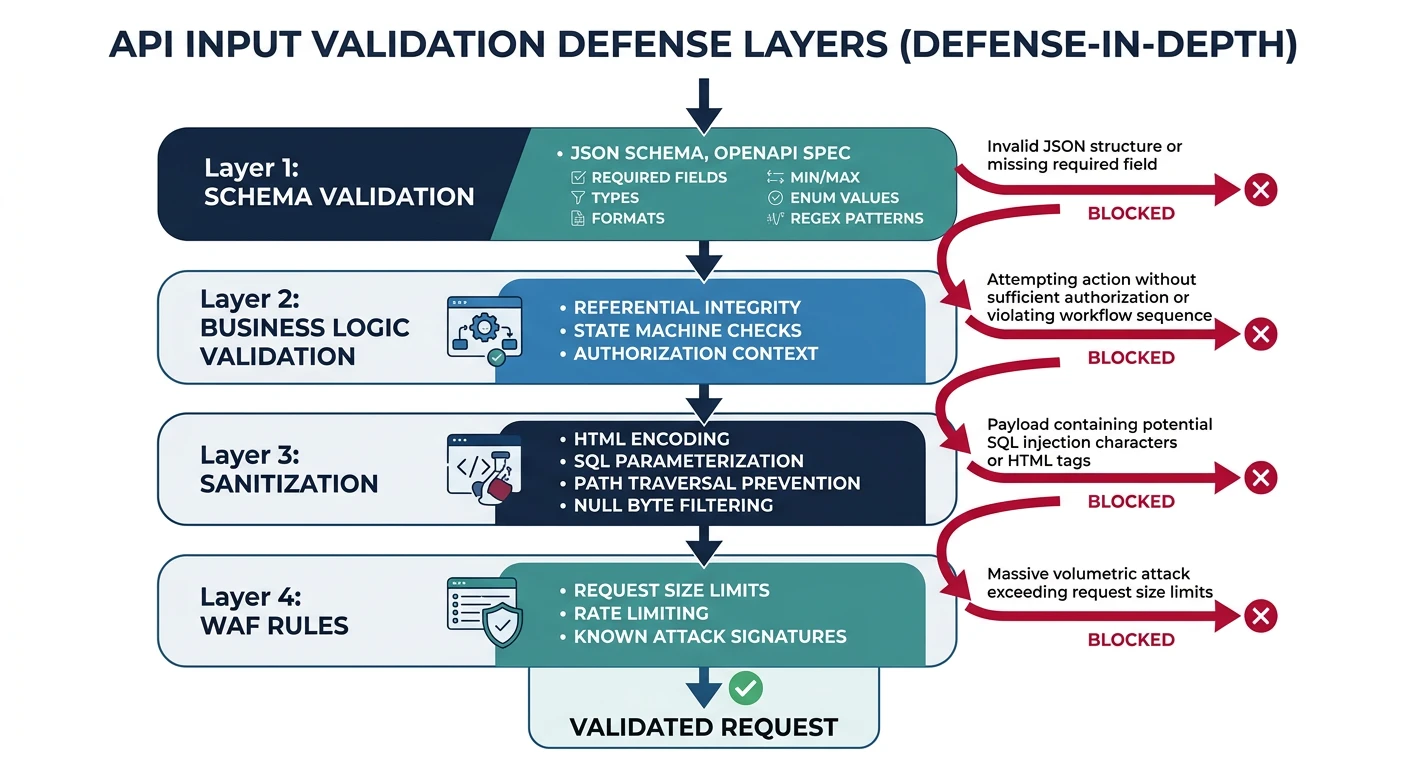
const Joi = require('joi');

// Define strict schemas
const createTaskSchema = Joi.object({
  title: Joi.string()
    .min(1)
    .max(200)
    .pattern(/^[a-zA-Z0-9\s\-_.,:!?]+$/)  // Whitelist characters
    .required(),

  description: Joi.string()
    .max(2000)
    .allow('')
    .optional(),

  status: Joi.string()
    .valid('pending', 'in_progress', 'completed')
    .default('pending'),

  priority: Joi.string()
    .valid('low', 'medium', 'high', 'urgent')
    .default('medium'),

  due_date: Joi.date()
    .iso()
    .greater('now')
    .optional(),

  tags: Joi.array()
    .items(Joi.string().max(50))
    .max(10)
    .optional(),

  // Prevent mass assignment - only allow known fields
}).options({ stripUnknown: true });

// Validation middleware
const validate = (schema) => {
  return (req, res, next) => {
    const { error, value } = schema.validate(req.body, {
      abortEarly: false,  // Return all errors
      convert: true       // Type coercion
    });

    if (error) {
      const errors = error.details.map(d => ({
        field: d.path.join('.'),
        message: d.message,
        code: d.type
      }));

      return res.status(422).json({
        type: 'https://api.example.com/errors/validation',
        title: 'Validation Error',
        status: 422,
        errors
      });
    }

    req.body = value; // Use sanitized value
    next();
  };
};
SQL Injection Prevention
// VULNERABLE: String concatenation
const query = `SELECT * FROM tasks WHERE id = '${req.params.id}'`;

// SECURE: Parameterized queries
const task = await db.query(
  'SELECT * FROM tasks WHERE id = $1 AND owner_id = $2',
  [req.params.id, req.user.sub]
);

// With Knex.js query builder
const task = await knex('tasks')
  .where({ id: req.params.id, owner_id: req.user.sub })
  .first();
WAF Integration
Web Application Firewall Rules
WAFs provide an additional security layer at the edge, blocking attacks before they reach your application.
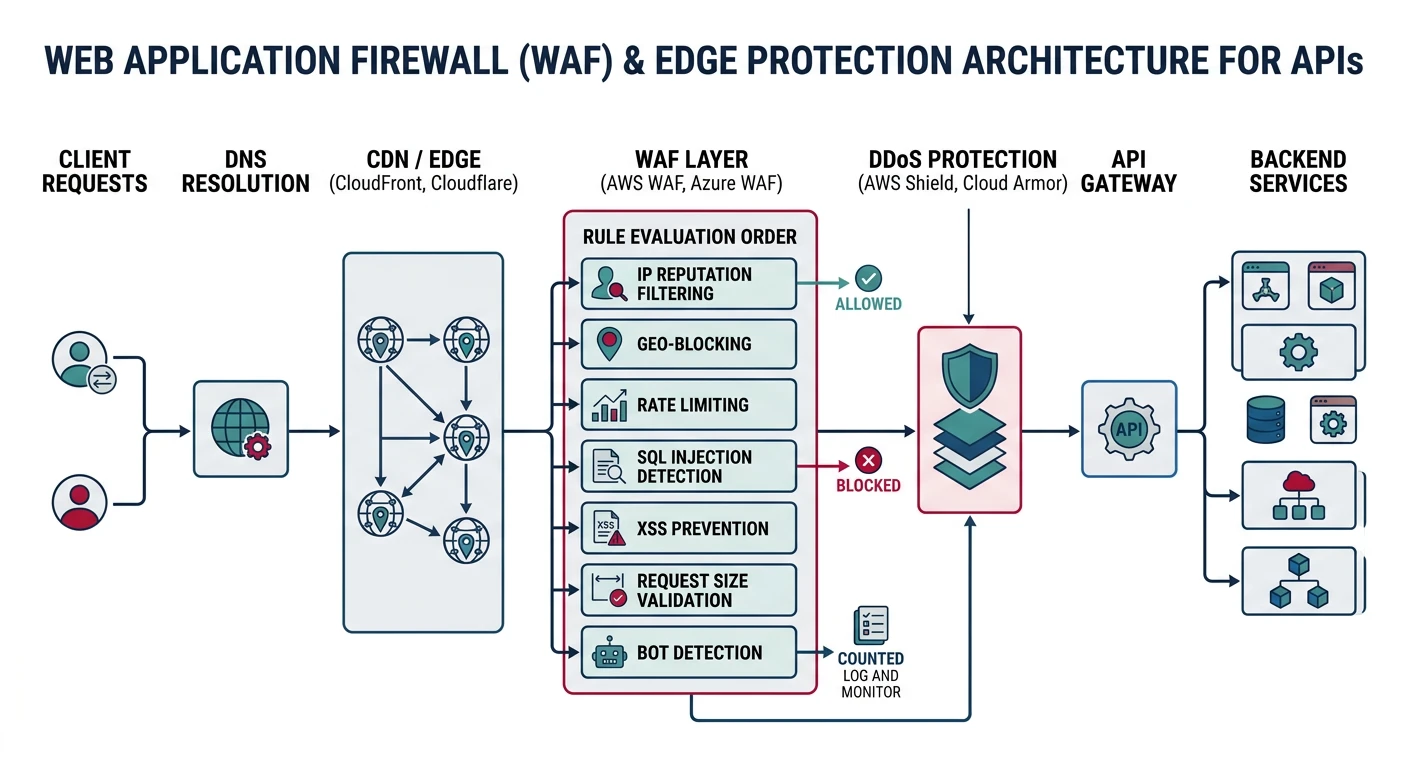
# AWS WAF Rule Example (Terraform)
resource "aws_wafv2_web_acl" "api_waf" {
  name  = "api-protection"
  scope = "REGIONAL"

  default_action {
    allow {}
  }

  # Block SQL injection
  rule {
    name     = "SQLiProtection"
    priority = 1

    statement {
      sqli_match_statement {
        field_to_match { body {} }
        text_transformation {
          priority = 1
          type     = "URL_DECODE"
        }
      }
    }

    action { block {} }
  }

  # Block XSS
  rule {
    name     = "XSSProtection"
    priority = 2

    statement {
      xss_match_statement {
        field_to_match { body {} }
        text_transformation {
          priority = 1
          type     = "HTML_ENTITY_DECODE"
        }
      }
    }

    action { block {} }
  }

  # Rate limiting
  rule {
    name     = "RateLimitRule"
    priority = 3

    statement {
      rate_based_statement {
        limit              = 2000
        aggregate_key_type = "IP"
      }
    }

    action { block {} }
  }
}
Gateway Rate Limiting
const rateLimit = require('express-rate-limit');
const RedisStore = require('rate-limit-redis');
const Redis = require('ioredis');

const redis = new Redis(process.env.REDIS_URL);

// Tiered rate limiting
const rateLimitByTier = (tier) => {
  const limits = {
    free: { windowMs: 60000, max: 60 },     // 60/min
    pro: { windowMs: 60000, max: 600 },     // 600/min
    enterprise: { windowMs: 60000, max: 6000 } // 6000/min
  };

  return rateLimit({
    store: new RedisStore({ client: redis }),
    windowMs: limits[tier].windowMs,
    max: limits[tier].max,
    keyGenerator: (req) => req.apiKey?.clientId || req.ip,
    handler: (req, res) => {
      res.status(429).json({
        type: 'https://api.example.com/errors/rate-limit',
        title: 'Rate Limit Exceeded',
        status: 429,
        detail: `You have exceeded ${limits[tier].max} requests per minute`
      });
    },
    headers: true // Send RateLimit-* headers
  });
};

// Apply based on API key tier
app.use('/api/*', (req, res, next) => {
  const tier = req.apiKey?.tier || 'free';
  rateLimitByTier(tier)(req, res, next);
});
Secrets Management
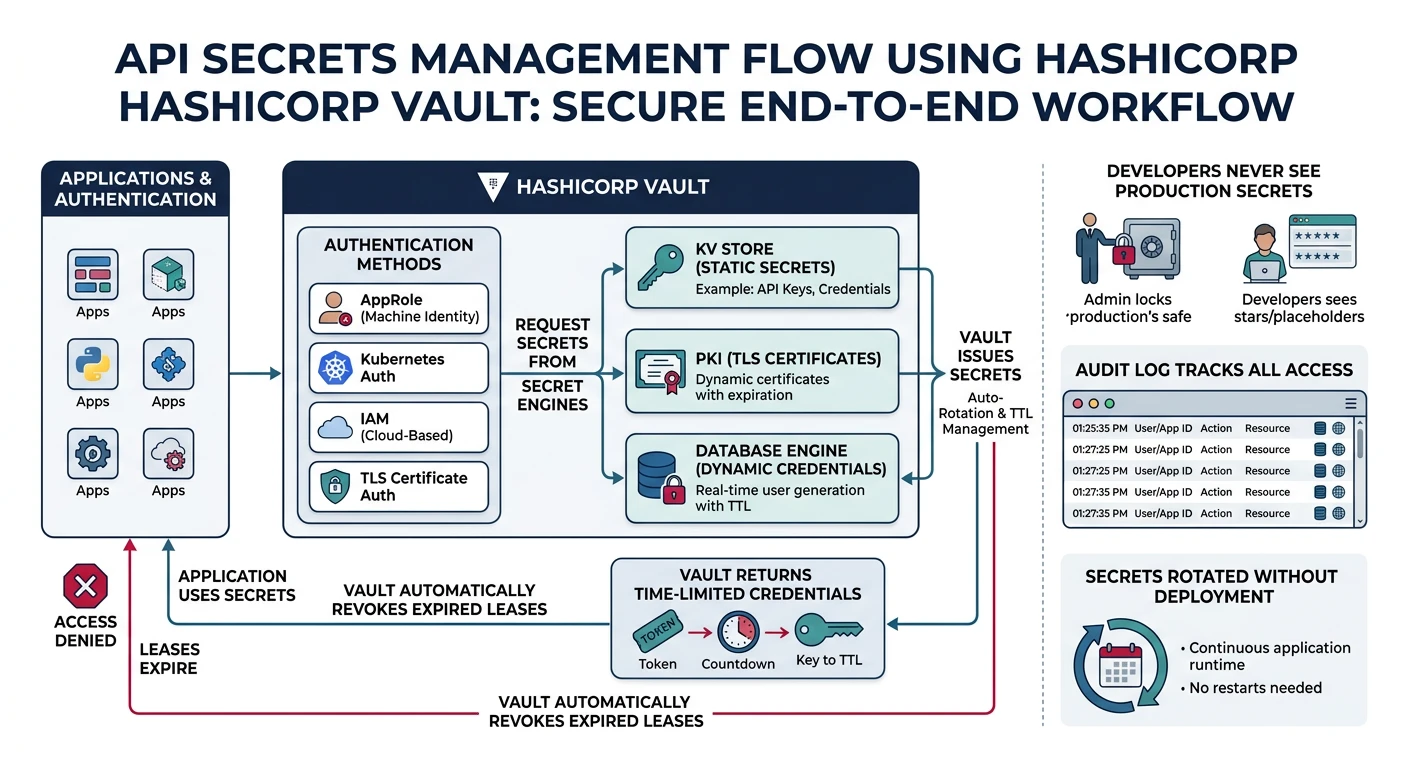
Never Hardcode Secrets
Critical Rules:
- Never commit secrets to git (use .gitignore, git-secrets)
- Use environment variables for local development
- Use secrets managers for production (AWS Secrets Manager, HashiCorp Vault)
- Rotate secrets regularly and on suspected compromise
// Using AWS Secrets Manager
const { SecretsManagerClient, GetSecretValueCommand } = require('@aws-sdk/client-secrets-manager');

const client = new SecretsManagerClient({ region: 'us-east-1' });

async function getSecret(secretName) {
  const command = new GetSecretValueCommand({ SecretId: secretName });
  const response = await client.send(command);
  return JSON.parse(response.SecretString);
}

// Load secrets at startup
const secrets = await getSecret('prod/api/database');
const dbConfig = {
  host: secrets.host,
  user: secrets.username,
  password: secrets.password,
  database: secrets.database
};
Security Headers
const helmet = require('helmet');

app.use(helmet({
  contentSecurityPolicy: {
    directives: {
      defaultSrc: ["'self'"],
      scriptSrc: ["'self'"],
      styleSrc: ["'self'", "'unsafe-inline'"],
      imgSrc: ["'self'", 'data:', 'https:'],
    }
  },
  hsts: { maxAge: 31536000, includeSubDomains: true },
  noSniff: true,
  xssFilter: true,
  referrerPolicy: { policy: 'strict-origin-when-cross-origin' }
}));

// CORS configuration
const cors = require('cors');
app.use(cors({
  origin: ['https://app.example.com'],
  methods: ['GET', 'POST', 'PUT', 'DELETE'],
  allowedHeaders: ['Content-Type', 'Authorization', 'X-API-Key'],
  credentials: true,
  maxAge: 86400
}));
Practice Exercises
Exercise 1: Input Validation
- Add Joi validation to all endpoints
- Implement schema-based request validation
- Return structured validation errors
Exercise 2: Security Headers
- Configure Helmet with strict CSP
- Set up CORS properly
- Verify headers with security scanner
Exercise 3: WAF Configuration
- Set up AWS WAF with managed rules
- Create custom SQLi/XSS rules
- Implement IP-based rate limiting
- Test with OWASP ZAP