Series Navigation: This is Part 7 of the 17-part API Development Series. Review Part 6: Security Hardening first.
API Development Mastery
Your 17-step learning path • Currently on Step 7
Backend API Fundamentals
REST, HTTP, status codes, URI designData Layer & Persistence
Database integration, CRUD, transactions, RedisOpenAPI Specification
Contract-first design, OpenAPI 3.0/3.1Documentation & DX
Swagger UI, Redoc, developer portalsAuthentication & Authorization
OAuth 2.0, JWT, RBAC, ABACSecurity Hardening
OWASP Top 10, input validation, CORS7
AWS API Gateway
REST/HTTP APIs, Lambda integration, WAF8
Azure API Management
Policies, products, developer portal9
GCP Apigee
API proxies, monetization, analytics10
Architecture Patterns
Gateway, BFF, microservices, DDD11
Versioning & Governance
SemVer, deprecation, lifecycle12
Monitoring & Analytics
Observability, tracing, SLIs/SLOs13
Performance & Rate Limiting
Caching, throttling, load testing14
GraphQL & gRPC
Alternative API styles, Protocol Buffers15
Testing & Contracts
Contract testing, Pact, Postman/Newman16
CI/CD & Automation
Spectral, GitHub Actions, Terraform17
API Product Management
API as Product, monetization, ecosystemsREST APIs vs HTTP APIs
Choosing the Right API Type
AWS API Gateway offers two API types. Understanding their differences is crucial for selecting the right one for your use case.
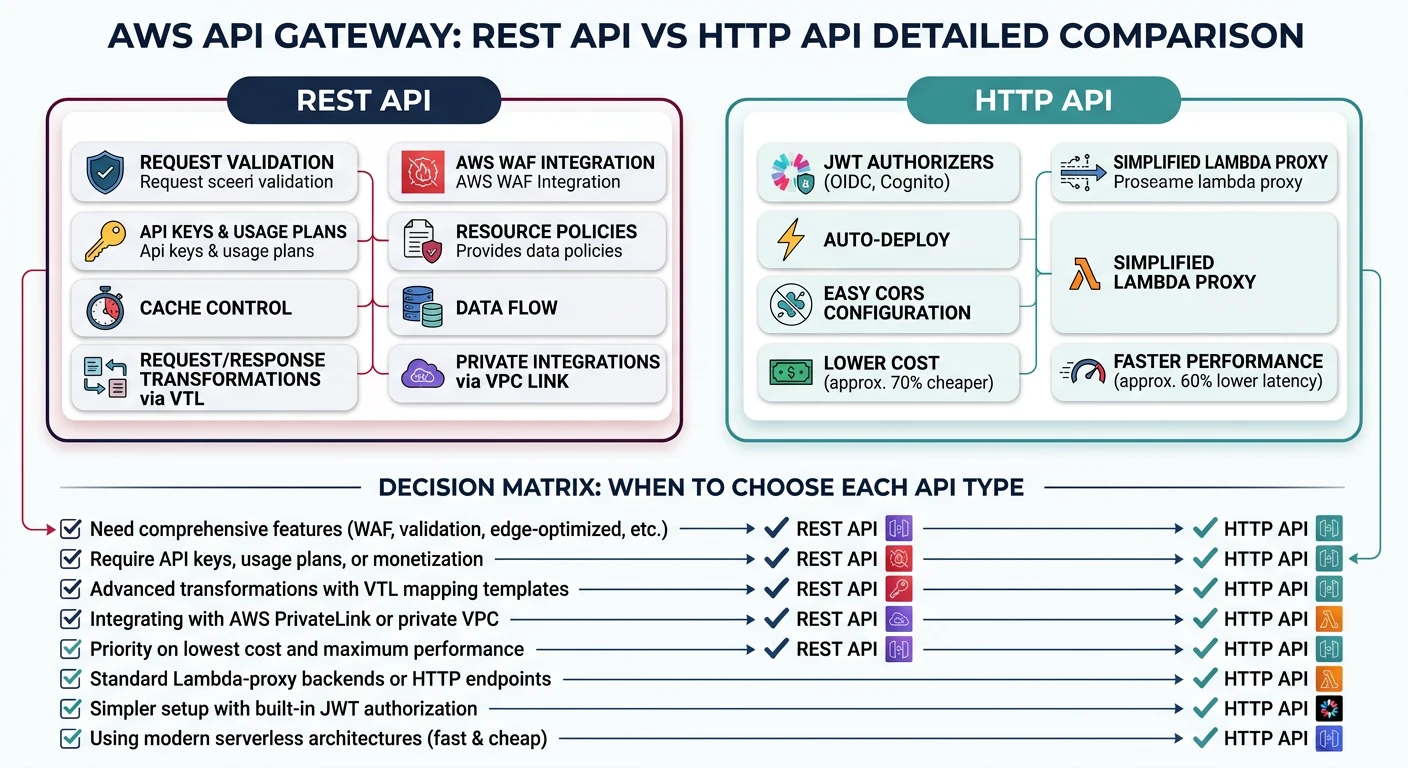
REST API vs HTTP API
| Feature | REST API | HTTP API |
|---|---|---|
| Cost | $3.50/million requests | $1.00/million requests (70% cheaper) |
| Performance | Higher latency | ~60% faster |
| API Keys | Built-in support | Not supported |
| Usage Plans | Yes (throttling, quotas) | No |
| Request Validation | Yes (models) | No (validate in Lambda) |
| Caching | Yes | No |
| WAF Integration | Yes | No (use CloudFront) |
When to Choose:
- HTTP API: Simple CRUD, cost-sensitive, WebSocket not needed
- REST API: Need API keys, usage plans, caching, or WAF
Lambda Proxy Integration
Lambda Handler Pattern
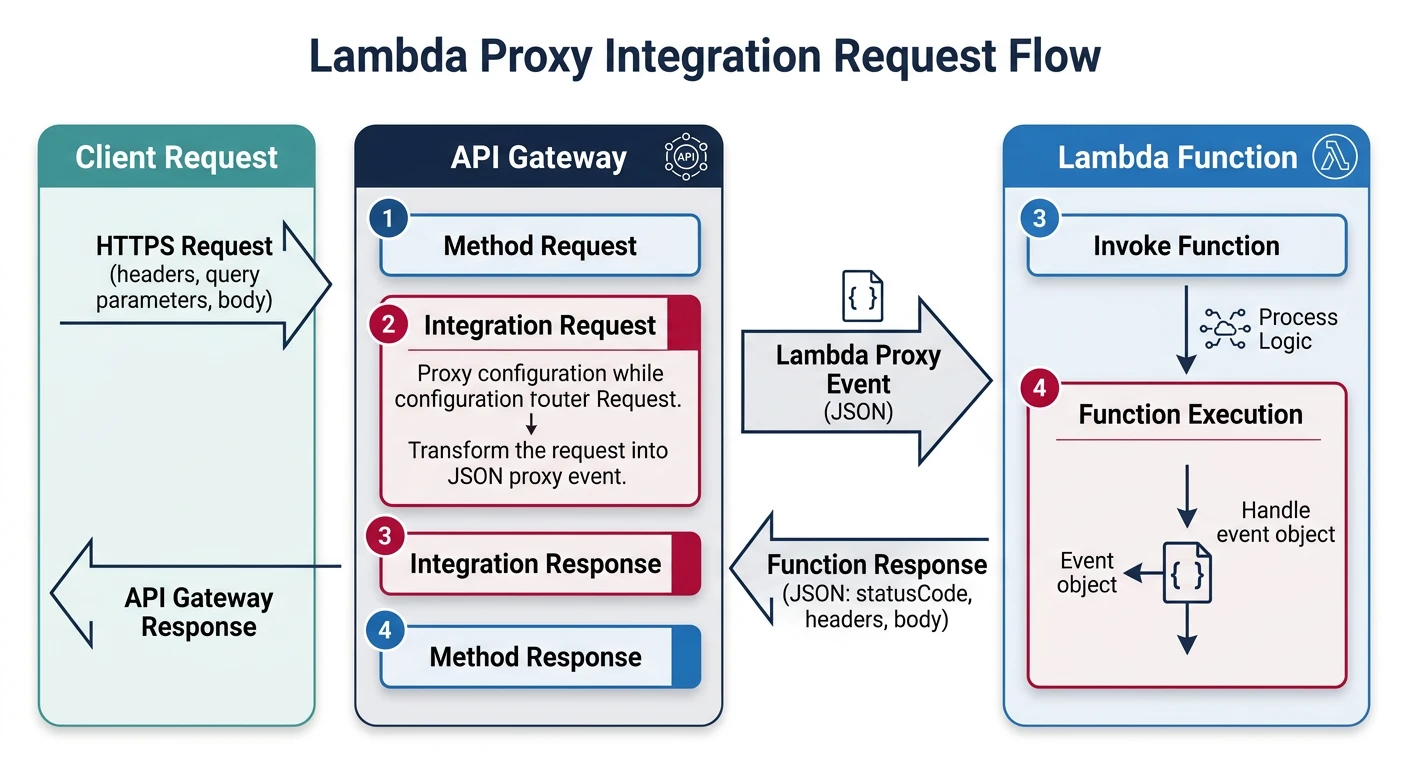
// handler.js - Lambda with proxy integration
exports.handler = async (event) => {
  console.log('Event:', JSON.stringify(event));

  // Extract request details
  const {
    httpMethod,
    path,
    pathParameters,
    queryStringParameters,
    headers,
    body
  } = event;

  try {
    // Route based on method and path
    if (httpMethod === 'GET' && path === '/tasks') {
      return await listTasks(queryStringParameters);
    }

    if (httpMethod === 'POST' && path === '/tasks') {
      return await createTask(JSON.parse(body));
    }

    if (httpMethod === 'GET' && pathParameters?.id) {
      return await getTask(pathParameters.id);
    }

    return response(404, { error: 'Not found' });
  } catch (error) {
    console.error('Error:', error);
    return response(500, {
      type: 'https://api.example.com/errors/internal',
      title: 'Internal Server Error',
      status: 500
    });
  }
};

// Response helper
function response(statusCode, body) {
  return {
    statusCode,
    headers: {
      'Content-Type': 'application/json',
      'Access-Control-Allow-Origin': '*',
      'Access-Control-Allow-Credentials': true
    },
    body: JSON.stringify(body)
  };
}

async function listTasks(query) {
  const { status, limit = 20 } = query || {};
  // Query database...
  return response(200, {
    data: tasks,
    pagination: { hasMore: false }
  });
}

async function createTask(data) {
  // Validate and save...
  return response(201, newTask);
}
Request/Response Mapping
VTL Mapping Templates (REST API)
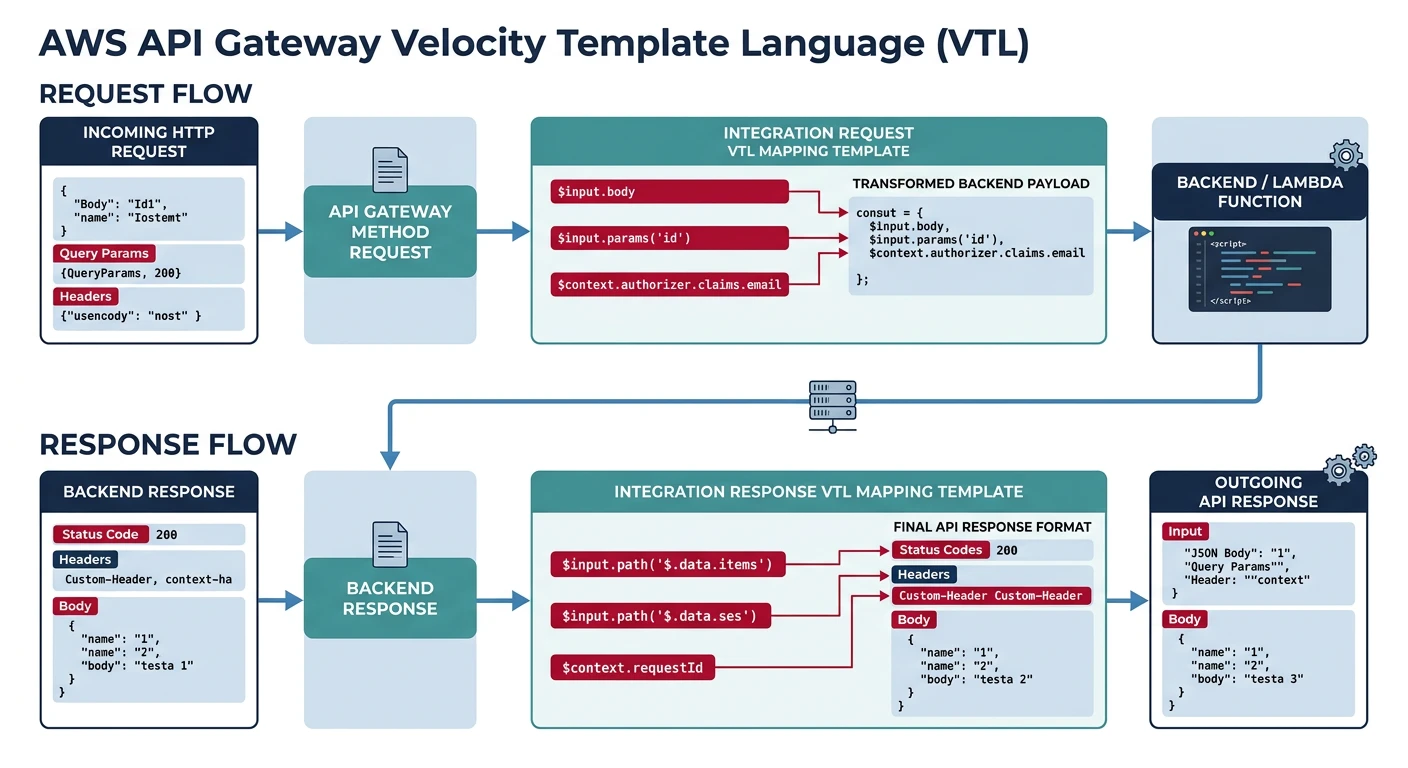
// Request mapping template
#set($inputRoot = $input.path('$'))
{
  "id": "$input.params('id')",
  "userId": "$context.authorizer.claims.sub",
  "body": $input.json('$'),
  "timestamp": "$context.requestTime"
}

// Response mapping template
#set($inputRoot = $input.path('$'))
{
  "task": {
    "id": "$inputRoot.id",
    "title": "$inputRoot.title",
    "status": "$inputRoot.status"
  },
  "metadata": {
    "requestId": "$context.requestId"
  }
}
Usage Plans & API Keys
# serverless.yml - Usage plans configuration
resources:
  Resources:
    ApiUsagePlan:
      Type: AWS::ApiGateway::UsagePlan
      Properties:
        UsagePlanName: BasicPlan
        Description: Basic tier usage plan
        ApiStages:
          - ApiId: !Ref ApiGatewayRestApi
            Stage: prod
        Throttle:
          BurstLimit: 100     # Max concurrent requests
          RateLimit: 50       # Requests per second
        Quota:
          Limit: 10000        # Requests per period
          Period: MONTH

    ApiKey:
      Type: AWS::ApiGateway::ApiKey
      Properties:
        Name: BasicApiKey
        Enabled: true

    UsagePlanKey:
      Type: AWS::ApiGateway::UsagePlanKey
      Properties:
        KeyId: !Ref ApiKey
        KeyType: API_KEY
        UsagePlanId: !Ref ApiUsagePlan
Cognito Authorizers
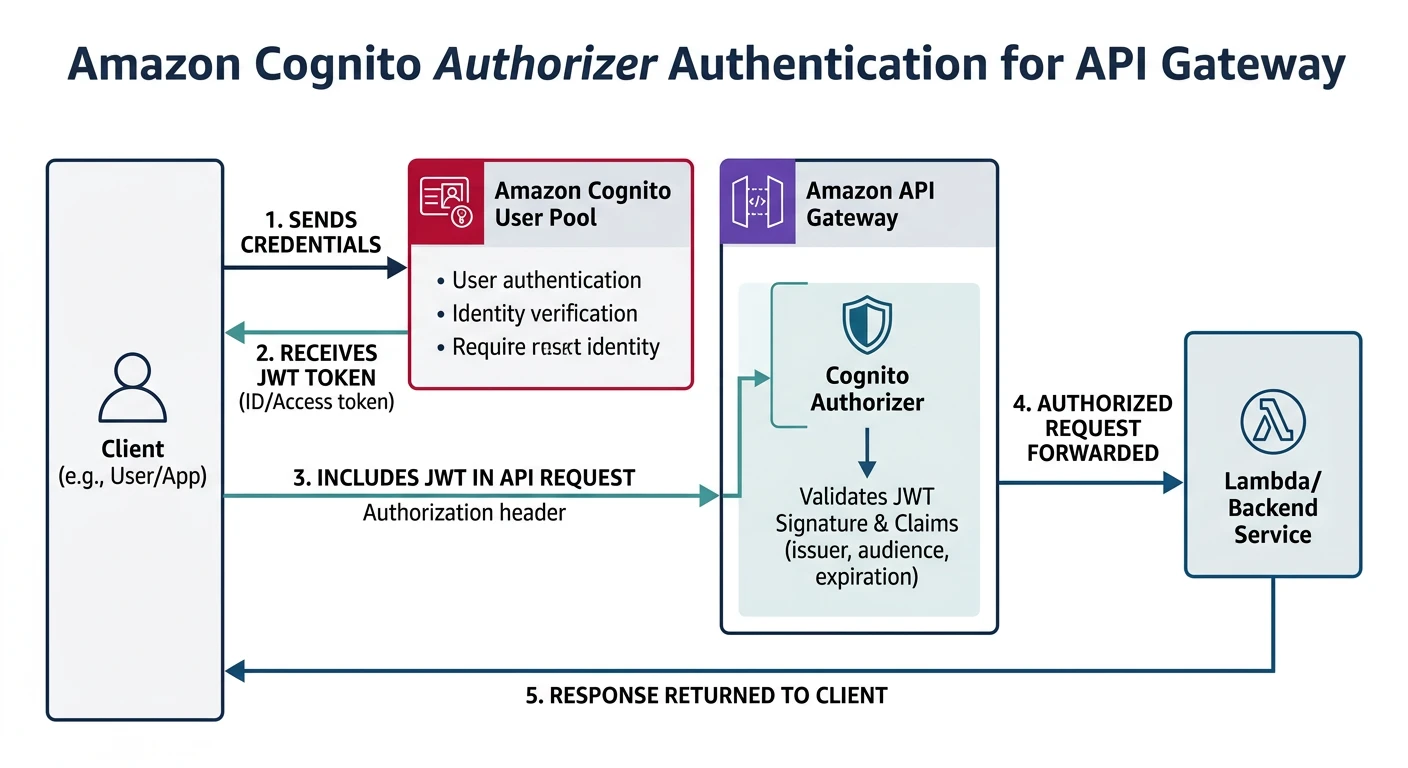
# serverless.yml - Cognito authorizer
functions:
  getTasks:
    handler: handler.getTasks
    events:
      - http:
          path: /tasks
          method: get
          authorizer:
            type: COGNITO_USER_POOLS
            authorizerId: !Ref CognitoAuthorizer

resources:
  Resources:
    CognitoUserPool:
      Type: AWS::Cognito::UserPool
      Properties:
        UserPoolName: TaskApiUsers
        AutoVerifiedAttributes:
          - email
        Policies:
          PasswordPolicy:
            MinimumLength: 8
            RequireLowercase: true
            RequireNumbers: true

    CognitoUserPoolClient:
      Type: AWS::Cognito::UserPoolClient
      Properties:
        UserPoolId: !Ref CognitoUserPool
        ExplicitAuthFlows:
          - ALLOW_USER_SRP_AUTH
          - ALLOW_REFRESH_TOKEN_AUTH

    CognitoAuthorizer:
      Type: AWS::ApiGateway::Authorizer
      Properties:
        Name: CognitoAuth
        Type: COGNITO_USER_POOLS
        IdentitySource: method.request.header.Authorization
        RestApiId: !Ref ApiGatewayRestApi
        ProviderARNs:
          - !GetAtt CognitoUserPool.Arn
Custom Lambda Authorizer
// authorizer.js - Custom authorizer
exports.handler = async (event) => {
  const token = event.authorizationToken?.replace('Bearer ', '');

  if (!token) {
    throw new Error('Unauthorized');
  }

  try {
    const decoded = jwt.verify(token, process.env.JWT_SECRET);

    return {
      principalId: decoded.sub,
      policyDocument: {
        Version: '2012-10-17',
        Statement: [{
          Action: 'execute-api:Invoke',
          Effect: 'Allow',
          Resource: event.methodArn
        }]
      },
      context: {
        userId: decoded.sub,
        email: decoded.email,
        roles: JSON.stringify(decoded.roles)
      }
    };
  } catch (error) {
    throw new Error('Unauthorized');
  }
};
Terraform & CDK
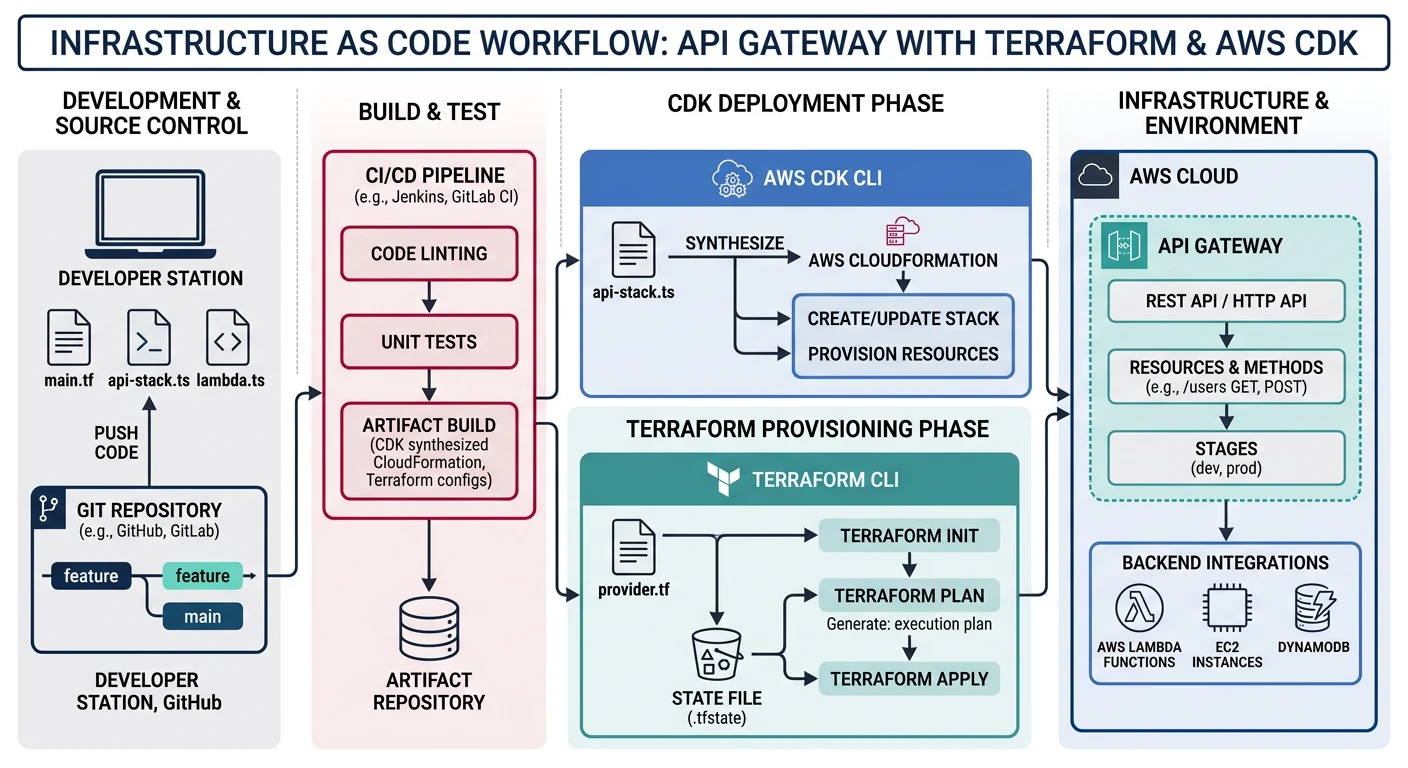
Terraform Example
# api-gateway.tf
resource "aws_apigatewayv2_api" "task_api" {
  name          = "task-api"
  protocol_type = "HTTP"

  cors_configuration {
    allow_origins = ["https://app.example.com"]
    allow_methods = ["GET", "POST", "PUT", "DELETE"]
    allow_headers = ["Content-Type", "Authorization"]
    max_age       = 86400
  }
}

resource "aws_apigatewayv2_integration" "lambda" {
  api_id           = aws_apigatewayv2_api.task_api.id
  integration_type = "AWS_PROXY"
  integration_uri  = aws_lambda_function.task_handler.invoke_arn
}

resource "aws_apigatewayv2_route" "get_tasks" {
  api_id    = aws_apigatewayv2_api.task_api.id
  route_key = "GET /tasks"
  target    = "integrations/${aws_apigatewayv2_integration.lambda.id}"
}

resource "aws_apigatewayv2_stage" "prod" {
  api_id      = aws_apigatewayv2_api.task_api.id
  name        = "prod"
  auto_deploy = true
}
Practice Exercises
Exercise 1: HTTP API with Lambda
- Create HTTP API with Lambda integration
- Implement CRUD endpoints
- Configure CORS properly
Exercise 2: Cognito Auth
- Set up Cognito User Pool
- Configure Cognito authorizer
- Test authentication flow
Exercise 3: REST API with Usage Plans
- Create REST API with request validation
- Configure usage plans with throttling
- Add WAF integration
- Deploy with Terraform