API Development Mastery
Backend API Fundamentals
REST, HTTP, status codes, URI designData Layer & Persistence
Database integration, CRUD, transactions, RedisOpenAPI Specification
Contract-first design, OpenAPI 3.0/3.1Documentation & DX
Swagger UI, Redoc, developer portalsAuthentication & Authorization
OAuth 2.0, JWT, RBAC, ABACSecurity Hardening
OWASP Top 10, input validation, CORSAWS API Gateway
REST/HTTP APIs, Lambda integration, WAFAzure API Management
Policies, products, developer portalGCP Apigee
API proxies, monetization, analyticsArchitecture Patterns
Gateway, BFF, microservices, DDDVersioning & Governance
SemVer, deprecation, lifecycleMonitoring & Analytics
Observability, tracing, SLIs/SLOsPerformance & Rate Limiting
Caching, throttling, load testingGraphQL & gRPC
Alternative API styles, Protocol BuffersTesting & Contracts
Contract testing, Pact, Postman/NewmanCI/CD & Automation
Spectral, GitHub Actions, TerraformAPI Product Management
API as Product, monetization, ecosystemsRelational Databases
Understanding SQL Databases
Relational databases store data in tables with predefined schemas and relationships. They use SQL (Structured Query Language) for data manipulation and are ideal when data integrity and complex queries are priorities.
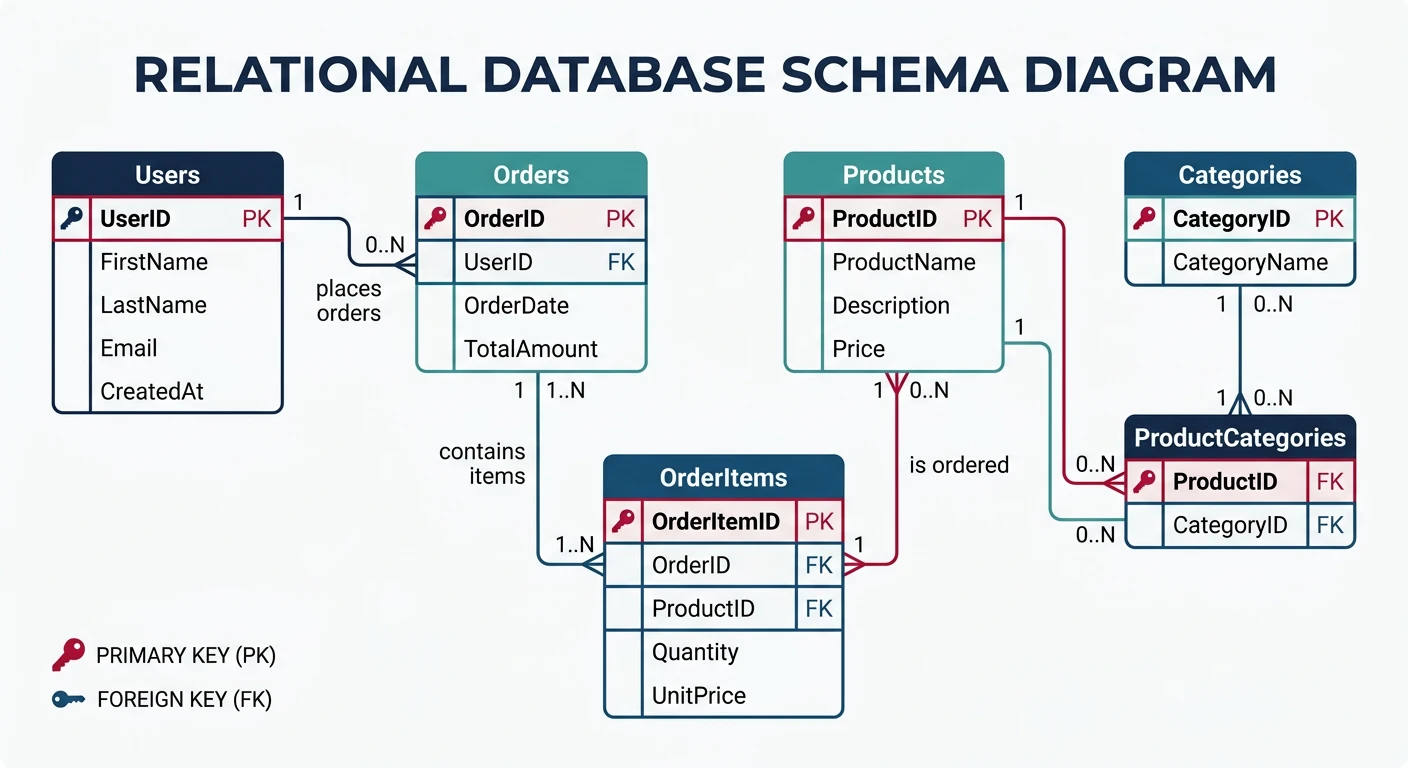
Popular Relational Databases
| Database | Best For | Cloud Options |
|---|---|---|
| PostgreSQL | Complex queries, JSON support, extensibility | AWS RDS, Azure Database, Cloud SQL |
| MySQL/MariaDB | Web applications, read-heavy workloads | AWS RDS, Azure Database, Cloud SQL |
| SQL Server | Enterprise, .NET integration | Azure SQL, AWS RDS |
Database Schema Design
-- Example: E-commerce database schema
CREATE TABLE users (
    id SERIAL PRIMARY KEY,
    email VARCHAR(255) UNIQUE NOT NULL,
    name VARCHAR(100) NOT NULL,
    password_hash VARCHAR(255) NOT NULL,
    status VARCHAR(20) DEFAULT 'active',
    created_at TIMESTAMP DEFAULT CURRENT_TIMESTAMP,
    updated_at TIMESTAMP DEFAULT CURRENT_TIMESTAMP
);

CREATE TABLE products (
    id SERIAL PRIMARY KEY,
    name VARCHAR(255) NOT NULL,
    description TEXT,
    price DECIMAL(10, 2) NOT NULL,
    stock_quantity INTEGER DEFAULT 0,
    category_id INTEGER REFERENCES categories(id),
    created_at TIMESTAMP DEFAULT CURRENT_TIMESTAMP
);

CREATE TABLE orders (
    id SERIAL PRIMARY KEY,
    user_id INTEGER NOT NULL REFERENCES users(id),
    status VARCHAR(50) DEFAULT 'pending',
    total_amount DECIMAL(10, 2) NOT NULL,
    shipping_address JSONB,
    created_at TIMESTAMP DEFAULT CURRENT_TIMESTAMP,
    updated_at TIMESTAMP DEFAULT CURRENT_TIMESTAMP
);

CREATE TABLE order_items (
    id SERIAL PRIMARY KEY,
    order_id INTEGER NOT NULL REFERENCES orders(id) ON DELETE CASCADE,
    product_id INTEGER NOT NULL REFERENCES products(id),
    quantity INTEGER NOT NULL CHECK (quantity > 0),
    unit_price DECIMAL(10, 2) NOT NULL,
    UNIQUE(order_id, product_id)
);

-- Indexes for common queries
CREATE INDEX idx_users_email ON users(email);
CREATE INDEX idx_orders_user_id ON orders(user_id);
CREATE INDEX idx_orders_status ON orders(status);
CREATE INDEX idx_order_items_order_id ON order_items(order_id);
Connecting from Node.js
// database/connection.js
const { Pool } = require('pg');

// Connection pool configuration
const pool = new Pool({
  host: process.env.DB_HOST,
  port: process.env.DB_PORT || 5432,
  database: process.env.DB_NAME,
  user: process.env.DB_USER,
  password: process.env.DB_PASSWORD,
  max: 20,               // Maximum connections in pool
  idleTimeoutMillis: 30000,
  connectionTimeoutMillis: 2000,
  ssl: process.env.NODE_ENV === 'production' ? { rejectUnauthorized: false } : false
});

// Test connection
pool.on('connect', () => {
  console.log('Connected to PostgreSQL database');
});

pool.on('error', (err) => {
  console.error('Database pool error:', err);
  process.exit(-1);
});

module.exports = {
  query: (text, params) => pool.query(text, params),
  getClient: () => pool.connect(),
  pool
};
NoSQL Databases
Types of NoSQL Databases
NoSQL Database Categories
| Type | Examples | Best For |
|---|---|---|
| Document | MongoDB, CouchDB, Firebase | Flexible schemas, nested data, rapid development |
| Key-Value | Redis, DynamoDB, Memcached | Caching, sessions, simple lookups |
| Wide-Column | Cassandra, HBase, Bigtable | Time-series, write-heavy workloads |
| Graph | Neo4j, Neptune, ArangoDB | Social networks, recommendations |
MongoDB: Document Database
// database/mongodb.js
const { MongoClient } = require('mongodb');

const uri = process.env.MONGODB_URI;
const client = new MongoClient(uri, {
  maxPoolSize: 50,
  wtimeoutMS: 2500,
  useNewUrlParser: true,
  useUnifiedTopology: true
});

let db;

async function connectDB() {
  try {
    await client.connect();
    db = client.db(process.env.DB_NAME);
    console.log('Connected to MongoDB');

    // Create indexes
    await db.collection('users').createIndex({ email: 1 }, { unique: true });
    await db.collection('orders').createIndex({ userId: 1, createdAt: -1 });

    return db;
  } catch (error) {
    console.error('MongoDB connection error:', error);
    process.exit(1);
  }
}

function getDB() {
  if (!db) throw new Error('Database not initialized');
  return db;
}

module.exports = { connectDB, getDB };
// repositories/userRepository.mongodb.js
const { ObjectId } = require('mongodb');
const { getDB } = require('../database/mongodb');
class UserRepository {
constructor() {
this.collection = () => getDB().collection('users');
}
async findAll({ limit = 10, cursor, filters = {} }) {
const query = { ...filters };
if (cursor) {
query._id = { $lt: new ObjectId(cursor) };
}
const results = await this.collection()
.find(query)
.sort({ _id: -1 })
.limit(limit + 1)
.toArray();
const hasMore = results.length > limit;
const data = hasMore ? results.slice(0, -1) : results;
return {
data: data.map(this.mapToUser),
pagination: {
next_cursor: hasMore ? data[data.length - 1]._id.toString() : null,
has_more: hasMore
}
};
}
async findById(id) {
const doc = await this.collection().findOne({ _id: new ObjectId(id) });
return doc ? this.mapToUser(doc) : null;
}
async create(userData) {
const doc = {
...userData,
createdAt: new Date(),
updatedAt: new Date()
};
const result = await this.collection().insertOne(doc);
return this.findById(result.insertedId);
}
async update(id, updates) {
const result = await this.collection().findOneAndUpdate(
{ _id: new ObjectId(id) },
{
$set: { ...updates, updatedAt: new Date() }
},
{ returnDocument: 'after' }
);
return result.value ? this.mapToUser(result.value) : null;
}
mapToUser(doc) {
return {
id: doc._id.toString(),
email: doc.email,
name: doc.name,
status: doc.status,
created_at: doc.createdAt,
updated_at: doc.updatedAt
};
}
}
module.exports = new UserRepository();CRUD vs DDD Patterns
Traditional CRUD Repository
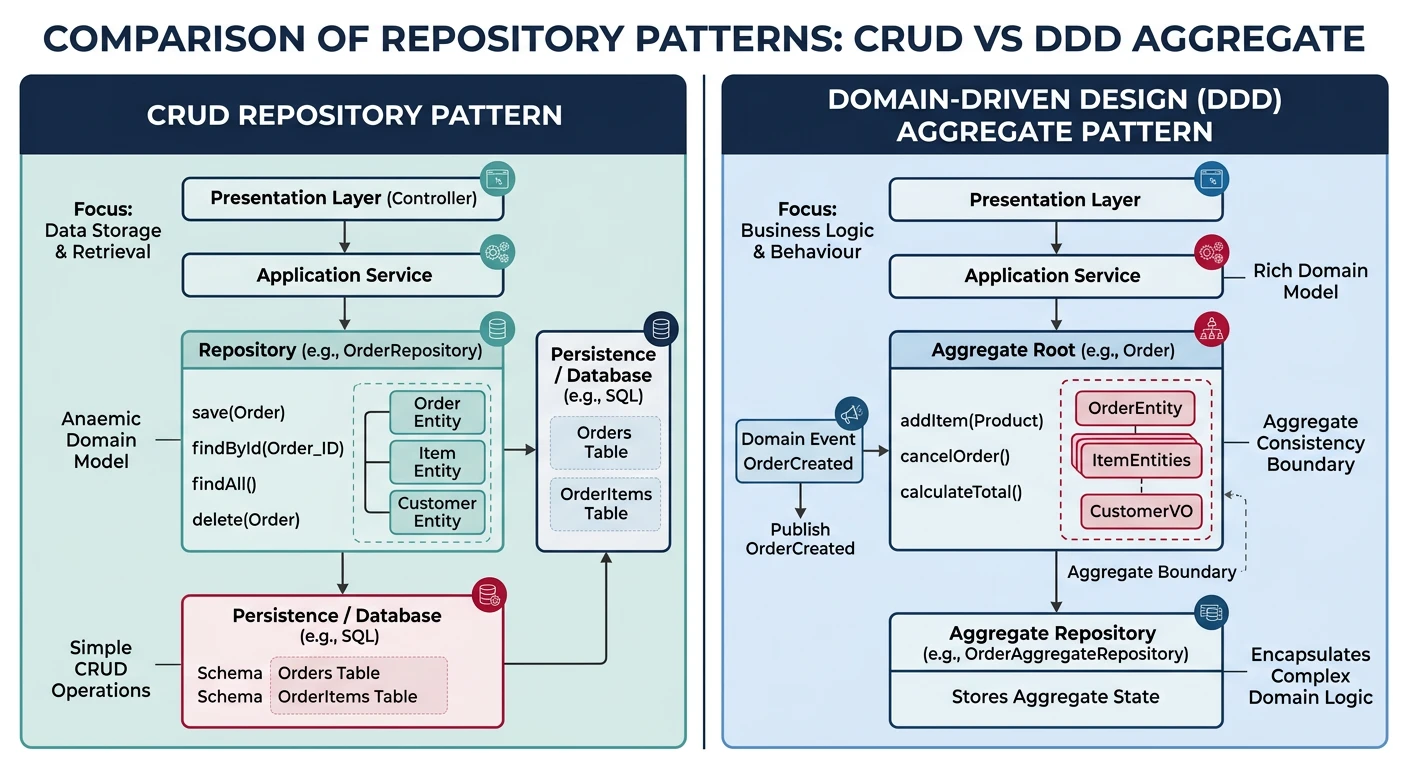
CRUD (Create, Read, Update, Delete) is a simple pattern that maps directly to database operations. It works well for straightforward data management.
// repositories/productRepository.js
const db = require('../database');

class ProductRepository {
  // CREATE
  async create(productData) {
    const [id] = await db('products').insert({
      name: productData.name,
      description: productData.description,
      price: productData.price,
      stock_quantity: productData.stockQuantity,
      category_id: productData.categoryId
    });
    return this.findById(id);
  }

  // READ (single)
  async findById(id) {
    return db('products')
      .where('id', id)
      .first();
  }

  // READ (collection)
  async findAll({ limit = 10, offset = 0, categoryId }) {
    let query = db('products').select('*').limit(limit).offset(offset);

    if (categoryId) {
      query = query.where('category_id', categoryId);
    }

    return query;
  }

  // UPDATE
  async update(id, updates) {
    await db('products')
      .where('id', id)
      .update({
        ...updates,
        updated_at: new Date()
      });
    return this.findById(id);
  }

  // DELETE
  async delete(id) {
    return db('products')
      .where('id', id)
      .del();
  }
}

module.exports = new ProductRepository();
Domain-Driven Design (DDD) Approach
For complex business domains, DDD separates domain logic from infrastructure concerns. Entities encapsulate business rules, and repositories handle persistence.
// domain/entities/Order.js
class Order {
  constructor({ id, userId, items = [], status = 'draft', createdAt }) {
    this.id = id;
    this.userId = userId;
    this.items = items;
    this.status = status;
    this.createdAt = createdAt || new Date();
  }

  // Business logic encapsulated in the entity
  addItem(product, quantity) {
    if (this.status !== 'draft') {
      throw new Error('Cannot modify a submitted order');
    }

    const existingItem = this.items.find(i => i.productId === product.id);

    if (existingItem) {
      existingItem.quantity += quantity;
    } else {
      this.items.push({
        productId: product.id,
        name: product.name,
        quantity,
        unitPrice: product.price
      });
    }
  }

  removeItem(productId) {
    if (this.status !== 'draft') {
      throw new Error('Cannot modify a submitted order');
    }
    this.items = this.items.filter(i => i.productId !== productId);
  }

  calculateTotal() {
    return this.items.reduce(
      (sum, item) => sum + (item.unitPrice * item.quantity),
      0
    );
  }

  submit() {
    if (this.items.length === 0) {
      throw new Error('Cannot submit an empty order');
    }
    if (this.status !== 'draft') {
      throw new Error('Order already submitted');
    }
    this.status = 'pending';
    this.submittedAt = new Date();
  }

  markPaid() {
    if (this.status !== 'pending') {
      throw new Error('Only pending orders can be paid');
    }
    this.status = 'paid';
    this.paidAt = new Date();
  }

  cancel() {
    if (['shipped', 'delivered'].includes(this.status)) {
      throw new Error('Cannot cancel shipped or delivered orders');
    }
    this.status = 'cancelled';
    this.cancelledAt = new Date();
  }
}

module.exports = Order;
// domain/repositories/OrderRepository.js (Interface/Port)
class OrderRepository {
async findById(id) { throw new Error('Not implemented'); }
async findByUserId(userId) { throw new Error('Not implemented'); }
async save(order) { throw new Error('Not implemented'); }
async delete(id) { throw new Error('Not implemented'); }
}
// infrastructure/repositories/PostgresOrderRepository.js
const db = require('../../database');
const Order = require('../../domain/entities/Order');
class PostgresOrderRepository {
async findById(id) {
const orderData = await db('orders').where('id', id).first();
if (!orderData) return null;
const items = await db('order_items').where('order_id', id);
return new Order({
id: orderData.id,
userId: orderData.user_id,
status: orderData.status,
items: items.map(i => ({
productId: i.product_id,
name: i.name,
quantity: i.quantity,
unitPrice: parseFloat(i.unit_price)
})),
createdAt: orderData.created_at
});
}
async save(order) {
const trx = await db.transaction();
try {
if (order.id) {
// Update existing order
await trx('orders')
.where('id', order.id)
.update({
status: order.status,
total_amount: order.calculateTotal(),
updated_at: new Date()
});
// Replace items
await trx('order_items').where('order_id', order.id).del();
} else {
// Insert new order
const [id] = await trx('orders').insert({
user_id: order.userId,
status: order.status,
total_amount: order.calculateTotal(),
created_at: order.createdAt
});
order.id = id;
}
// Insert items
if (order.items.length > 0) {
await trx('order_items').insert(
order.items.map(item => ({
order_id: order.id,
product_id: item.productId,
name: item.name,
quantity: item.quantity,
unit_price: item.unitPrice
}))
);
}
await trx.commit();
return order;
} catch (error) {
await trx.rollback();
throw error;
}
}
}
module.exports = PostgresOrderRepository;Transactions & Indexing
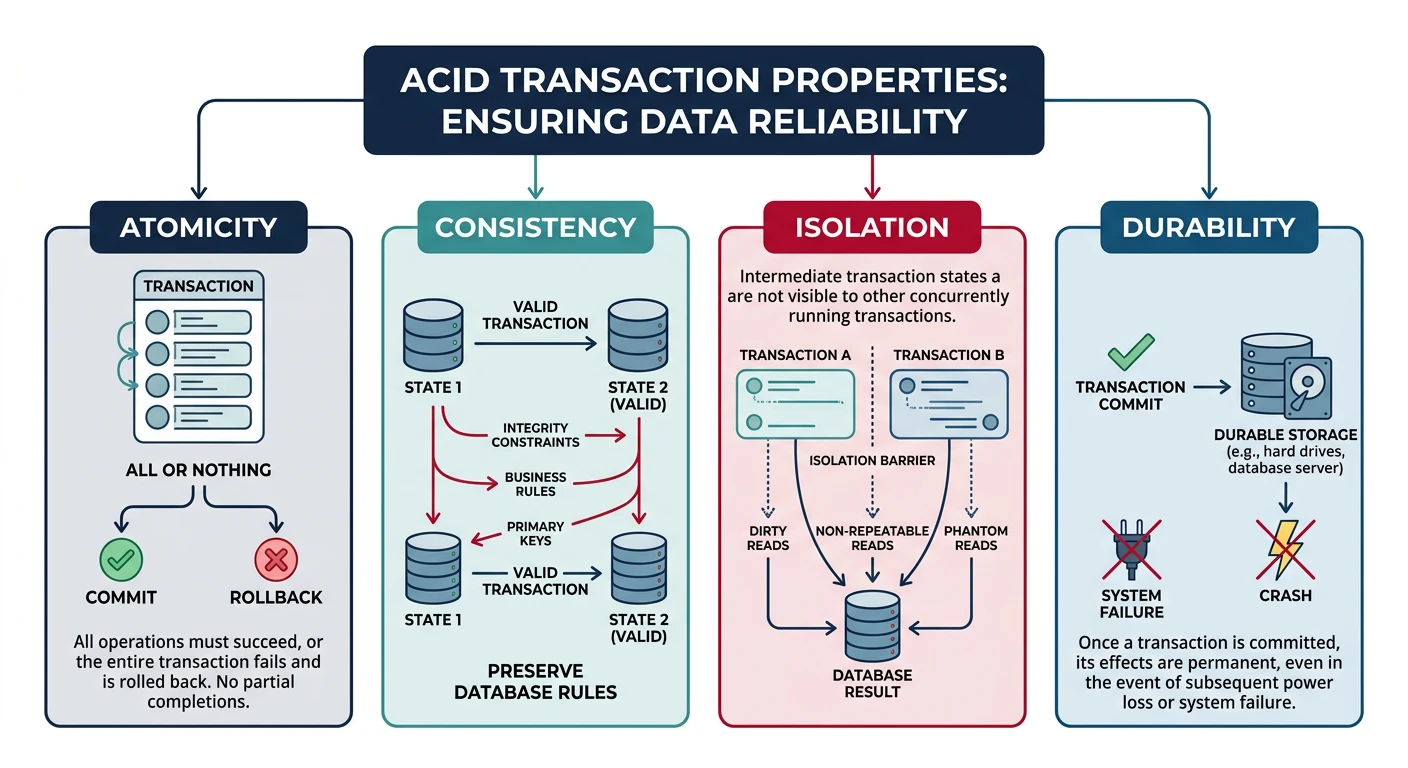
Understanding ACID Transactions
- Atomicity: All operations succeed or all fail
- Consistency: Database remains in a valid state
- Isolation: Concurrent transactions don't interfere
- Durability: Committed transactions survive failures
Transaction Implementation
// services/orderService.js
const db = require('../database');

class OrderService {
  async createOrder(userId, items) {
    const trx = await db.transaction();

    try {
      // 1. Validate stock availability
      for (const item of items) {
        const product = await trx('products')
          .where('id', item.productId)
          .forUpdate()  // Lock the row
          .first();

        if (!product) {
          throw new Error(`Product ${item.productId} not found`);
        }

        if (product.stock_quantity < item.quantity) {
          throw new Error(`Insufficient stock for ${product.name}`);
        }
      }

      // 2. Calculate total
      const total = items.reduce((sum, item) =>
        sum + (item.unitPrice * item.quantity), 0
      );

      // 3. Create order
      const [orderId] = await trx('orders').insert({
        user_id: userId,
        status: 'pending',
        total_amount: total,
        created_at: new Date()
      });

      // 4. Create order items
      await trx('order_items').insert(
        items.map(item => ({
          order_id: orderId,
          product_id: item.productId,
          quantity: item.quantity,
          unit_price: item.unitPrice
        }))
      );

      // 5. Reduce stock
      for (const item of items) {
        await trx('products')
          .where('id', item.productId)
          .decrement('stock_quantity', item.quantity);
      }

      // 6. Commit transaction
      await trx.commit();

      return { orderId, total };

    } catch (error) {
      // Rollback on any error
      await trx.rollback();
      throw error;
    }
  }
}

module.exports = new OrderService();
Database Indexing
Indexes dramatically improve query performance but add write overhead. Choose indexes based on your query patterns.
-- B-Tree indexes (default) - Good for equality and range queries
CREATE INDEX idx_products_category ON products(category_id);
CREATE INDEX idx_orders_created ON orders(created_at DESC);

-- Composite indexes - Order matters! Left-to-right prefix matching
CREATE INDEX idx_orders_user_status ON orders(user_id, status);
-- This index helps: WHERE user_id = ? AND status = ?
-- Also helps: WHERE user_id = ?
-- Does NOT help: WHERE status = ? (needs separate index)

-- Partial indexes - Index only relevant rows
CREATE INDEX idx_orders_pending ON orders(user_id)
WHERE status = 'pending';

-- Expression indexes
CREATE INDEX idx_users_lower_email ON users(LOWER(email));

-- GIN indexes for JSON (PostgreSQL)
CREATE INDEX idx_orders_shipping ON orders USING GIN (shipping_address);

-- Full-text search
CREATE INDEX idx_products_search ON products
USING GIN (to_tsvector('english', name || ' ' || description));
Index Analysis with EXPLAIN
-- Check if your query uses indexes
EXPLAIN ANALYZE
SELECT * FROM orders
WHERE user_id = 123 AND status = 'pending';

-- Output shows:
-- Index Scan using idx_orders_user_status on orders
--   Index Cond: ((user_id = 123) AND (status = 'pending'))
--   Execution Time: 0.05 ms

-- vs Sequential Scan (bad for large tables):
-- Seq Scan on orders
--   Filter: ((user_id = 123) AND (status = 'pending'))
--   Execution Time: 150 ms
Event Sourcing & CQRS
Understanding Event Sourcing
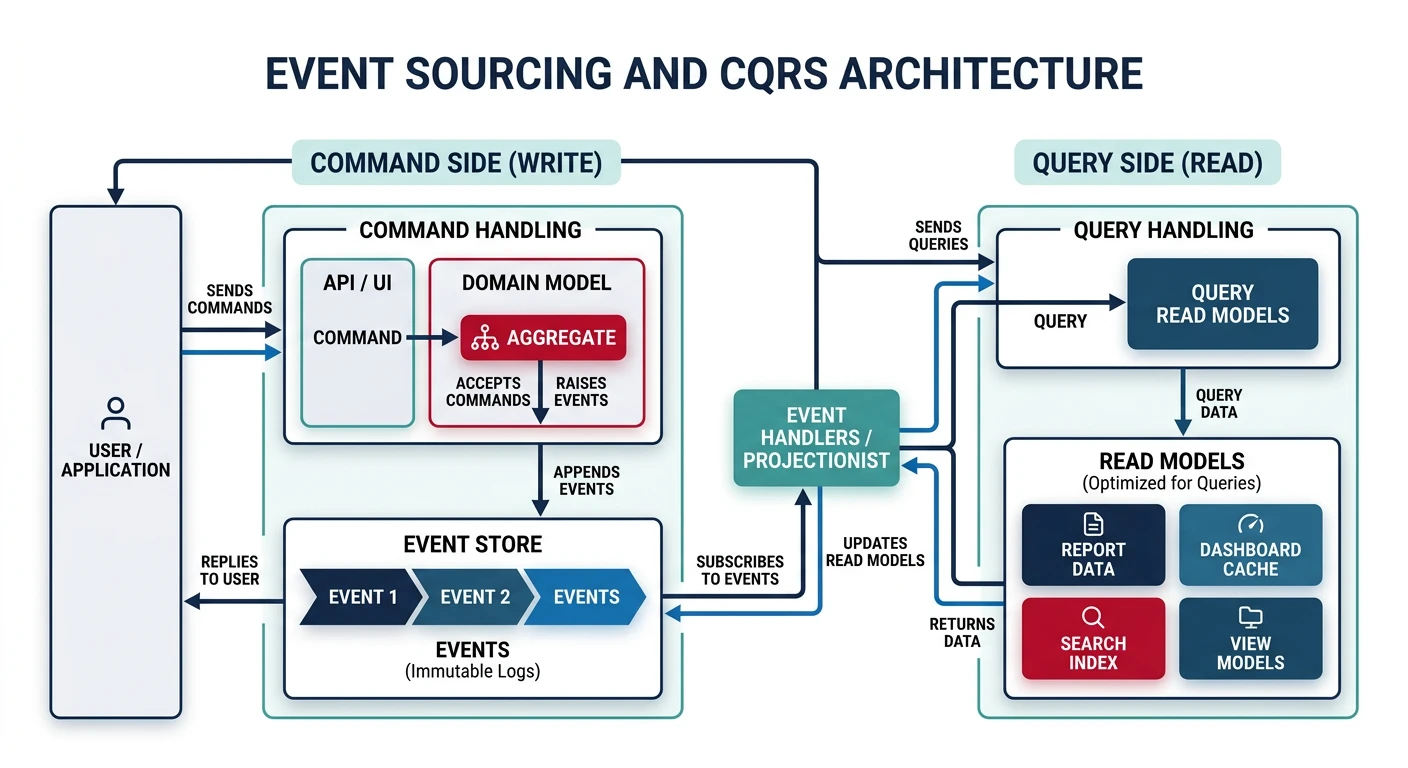
Instead of storing current state, Event Sourcing stores all events that led to the current state. This provides a complete audit trail and enables powerful patterns like temporal queries and event replay.
// events/orderEvents.js
class OrderCreated {
  constructor(orderId, userId, items, timestamp = new Date()) {
    this.type = 'OrderCreated';
    this.aggregateId = orderId;
    this.payload = { userId, items };
    this.timestamp = timestamp;
  }
}

class ItemAddedToOrder {
  constructor(orderId, productId, quantity, unitPrice) {
    this.type = 'ItemAddedToOrder';
    this.aggregateId = orderId;
    this.payload = { productId, quantity, unitPrice };
    this.timestamp = new Date();
  }
}

class OrderSubmitted {
  constructor(orderId) {
    this.type = 'OrderSubmitted';
    this.aggregateId = orderId;
    this.payload = {};
    this.timestamp = new Date();
  }
}

// Event Store
class EventStore {
  constructor(db) {
    this.db = db;
  }

  async append(event) {
    await this.db('events').insert({
      aggregate_id: event.aggregateId,
      type: event.type,
      payload: JSON.stringify(event.payload),
      timestamp: event.timestamp
    });
  }

  async getEvents(aggregateId) {
    const rows = await this.db('events')
      .where('aggregate_id', aggregateId)
      .orderBy('timestamp', 'asc');

    return rows.map(row => ({
      type: row.type,
      aggregateId: row.aggregate_id,
      payload: JSON.parse(row.payload),
      timestamp: row.timestamp
    }));
  }
}

// Order Aggregate - Rebuilds state from events
class OrderAggregate {
  constructor() {
    this.id = null;
    this.userId = null;
    this.items = [];
    this.status = 'draft';
  }

  // Apply events to rebuild state
  apply(event) {
    switch (event.type) {
      case 'OrderCreated':
        this.id = event.aggregateId;
        this.userId = event.payload.userId;
        this.status = 'draft';
        break;
      case 'ItemAddedToOrder':
        this.items.push(event.payload);
        break;
      case 'OrderSubmitted':
        this.status = 'pending';
        break;
    }
    return this;
  }

  // Rebuild from event stream
  static fromEvents(events) {
    const order = new OrderAggregate();
    events.forEach(e => order.apply(e));
    return order;
  }
}
CQRS Pattern
CQRS (Command Query Responsibility Segregation) separates read and write models. Commands modify data, queries read data—often from different optimized stores.
// Write side - Commands
class CreateOrderCommand {
  constructor(userId, items) {
    this.userId = userId;
    this.items = items;
  }
}

class OrderCommandHandler {
  constructor(eventStore) {
    this.eventStore = eventStore;
  }

  async handle(command) {
    if (command instanceof CreateOrderCommand) {
      const orderId = generateId();
      const event = new OrderCreated(
        orderId,
        command.userId,
        command.items
      );
      await this.eventStore.append(event);
      return orderId;
    }
  }
}

// Read side - Projections
class OrderProjection {
  constructor(db) {
    this.db = db;
  }

  // Update read model when events occur
  async project(event) {
    switch (event.type) {
      case 'OrderCreated':
        await this.db('order_read_model').insert({
          id: event.aggregateId,
          user_id: event.payload.userId,
          status: 'draft',
          total: 0,
          item_count: 0,
          created_at: event.timestamp
        });
        break;

      case 'ItemAddedToOrder':
        await this.db('order_read_model')
          .where('id', event.aggregateId)
          .increment('item_count', 1)
          .increment('total',
            event.payload.quantity * event.payload.unitPrice
          );
        break;

      case 'OrderSubmitted':
        await this.db('order_read_model')
          .where('id', event.aggregateId)
          .update({ status: 'pending' });
        break;
    }
  }
}

// Query Handler - Fast reads from denormalized view
class OrderQueryHandler {
  constructor(db) {
    this.db = db;
  }

  async getOrderSummary(orderId) {
    return this.db('order_read_model')
      .where('id', orderId)
      .first();
  }

  async getUserOrders(userId, status) {
    return this.db('order_read_model')
      .where('user_id', userId)
      .modify(query => {
        if (status) query.where('status', status);
      })
      .orderBy('created_at', 'desc');
  }
}
Redis Caching
Why Cache?
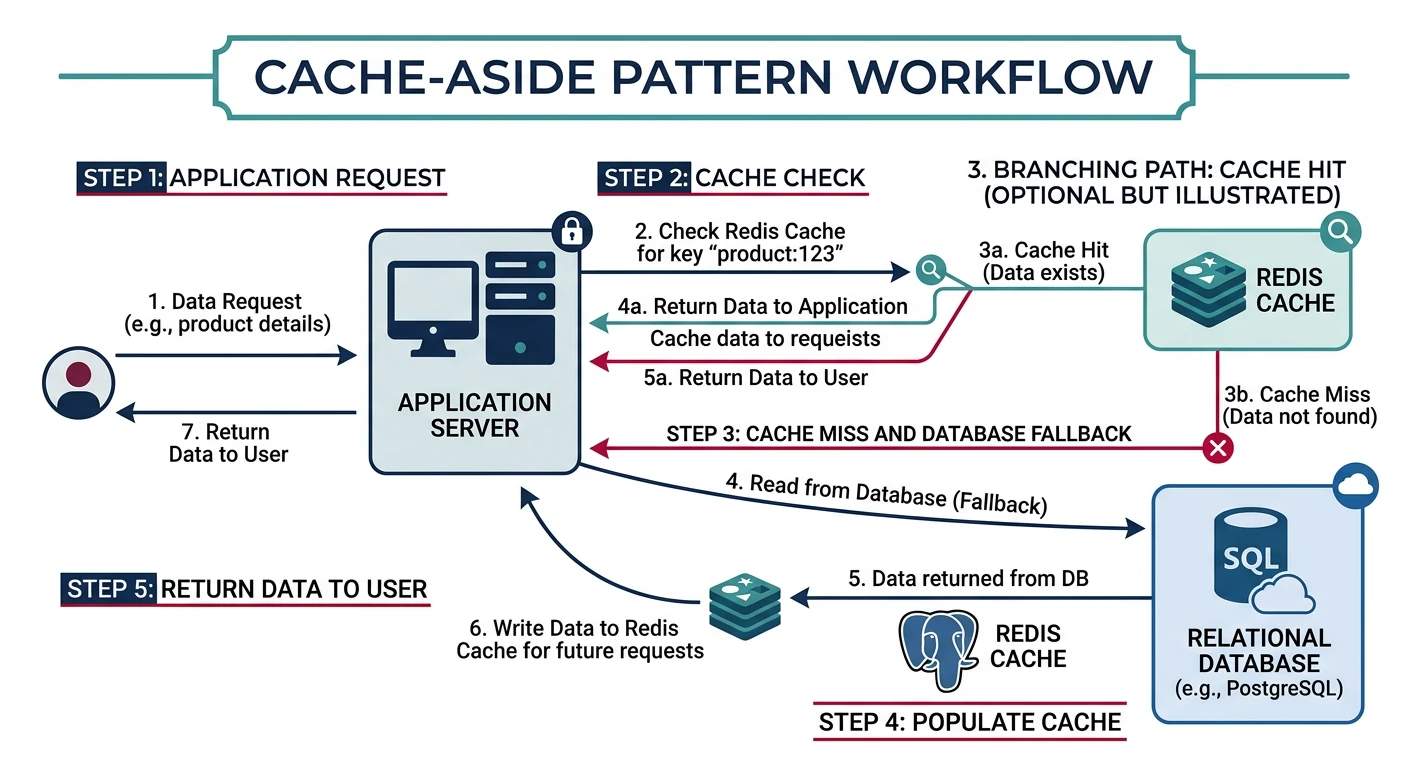
Caching dramatically reduces database load and improves response times. Redis is an in-memory data store perfect for caching, sessions, and real-time features.
Redis Connection Setup
// cache/redis.js
const Redis = require('ioredis');

const redis = new Redis({
  host: process.env.REDIS_HOST,
  port: process.env.REDIS_PORT || 6379,
  password: process.env.REDIS_PASSWORD,
  maxRetriesPerRequest: 3,
  retryDelayOnFailover: 100,
  enableReadyCheck: true
});

redis.on('connect', () => console.log('Redis connected'));
redis.on('error', (err) => console.error('Redis error:', err));

module.exports = redis;
Caching Patterns
Cache-Aside (Lazy Loading)
// services/productService.js
const redis = require('../cache/redis');
const productRepository = require('../repositories/productRepository');

class ProductService {
  constructor() {
    this.CACHE_TTL = 3600; // 1 hour
  }

  async getProduct(id) {
    const cacheKey = `product:${id}`;

    // 1. Try cache first
    const cached = await redis.get(cacheKey);
    if (cached) {
      console.log('Cache HIT:', cacheKey);
      return JSON.parse(cached);
    }

    console.log('Cache MISS:', cacheKey);

    // 2. Fetch from database
    const product = await productRepository.findById(id);
    if (!product) return null;

    // 3. Store in cache
    await redis.setex(cacheKey, this.CACHE_TTL, JSON.stringify(product));

    return product;
  }

  async updateProduct(id, updates) {
    const product = await productRepository.update(id, updates);

    // Invalidate cache
    await redis.del(`product:${id}`);

    return product;
  }
}
Write-Through Cache
// Write-through: Update cache immediately on write
async createProduct(data) {
  // 1. Write to database
  const product = await productRepository.create(data);

  // 2. Write to cache immediately
  const cacheKey = `product:${product.id}`;
  await redis.setex(cacheKey, this.CACHE_TTL, JSON.stringify(product));

  return product;
}
Caching Collections with Tags
// Cache list with tags for invalidation
async getProductsByCategory(categoryId) {
  const cacheKey = `products:category:${categoryId}`;

  const cached = await redis.get(cacheKey);
  if (cached) return JSON.parse(cached);

  const products = await productRepository.findByCategory(categoryId);

  // Store with tag for bulk invalidation
  const pipeline = redis.pipeline();
  pipeline.setex(cacheKey, this.CACHE_TTL, JSON.stringify(products));
  pipeline.sadd(`tags:category:${categoryId}`, cacheKey);
  await pipeline.exec();

  return products;
}

// Invalidate all caches for a category
async invalidateCategoryCache(categoryId) {
  const tagKey = `tags:category:${categoryId}`;
  const keys = await redis.smembers(tagKey);

  if (keys.length > 0) {
    await redis.del(...keys, tagKey);
  }
}
Session Storage with Redis
// middleware/session.js
const session = require('express-session');
const RedisStore = require('connect-redis').default;
const redis = require('../cache/redis');

const sessionMiddleware = session({
  store: new RedisStore({ client: redis }),
  secret: process.env.SESSION_SECRET,
  resave: false,
  saveUninitialized: false,
  cookie: {
    secure: process.env.NODE_ENV === 'production',
    httpOnly: true,
    maxAge: 24 * 60 * 60 * 1000 // 24 hours
  }
});

module.exports = sessionMiddleware;
Rate Limiting with Redis
// middleware/rateLimiter.js
const redis = require('../cache/redis');

function rateLimiter({ windowMs = 60000, max = 100 }) {
  return async (req, res, next) => {
    const key = `ratelimit:${req.ip}`;

    const current = await redis.incr(key);

    if (current === 1) {
      await redis.pexpire(key, windowMs);
    }

    res.setHeader('X-RateLimit-Limit', max);
    res.setHeader('X-RateLimit-Remaining', Math.max(0, max - current));

    if (current > max) {
      const ttl = await redis.pttl(key);
      res.setHeader('Retry-After', Math.ceil(ttl / 1000));

      return res.status(429).json({
        type: 'https://api.example.com/errors/rate-limit',
        title: 'Too Many Requests',
        status: 429,
        detail: `Rate limit exceeded. Try again in ${Math.ceil(ttl / 1000)} seconds`
      });
    }

    next();
  };
}

// Usage
app.use('/api', rateLimiter({ windowMs: 60000, max: 100 }));
Practice Exercises
Exercise 1: Implement Repository Pattern
Create a repository for a "Task" entity with:
- PostgreSQL implementation with proper connection pooling
- CRUD operations with parameterized queries
- Cursor-based pagination
- Filtering by status and due date
Exercise 2: Add Caching Layer
Add Redis caching to your Task repository:
- Cache individual tasks with cache-aside pattern
- Cache task lists with proper invalidation
- Implement cache warming on startup
- Add cache hit/miss metrics
Exercise 3: Build Event-Sourced Aggregate
Implement an event-sourced "Project" aggregate:
- Events: ProjectCreated, TaskAdded, TaskCompleted, ProjectArchived
- Rebuild state from event stream
- Create a read projection for fast queries
- Implement a command handler