Series Navigation: This is Part 8 of the 17-part API Development Series. Review Part 7: AWS API Gateway first.
API Development Mastery
Your 17-step learning path • Currently on Step 8
Backend API Fundamentals
REST, HTTP, status codes, URI designData Layer & Persistence
Database integration, CRUD, transactions, RedisOpenAPI Specification
Contract-first design, OpenAPI 3.0/3.1Documentation & DX
Swagger UI, Redoc, developer portalsAuthentication & Authorization
OAuth 2.0, JWT, RBAC, ABACSecurity Hardening
OWASP Top 10, input validation, CORSAWS API Gateway
REST/HTTP APIs, Lambda integration, WAF8
Azure API Management
Policies, products, developer portal9
GCP Apigee
API proxies, monetization, analytics10
Architecture Patterns
Gateway, BFF, microservices, DDD11
Versioning & Governance
SemVer, deprecation, lifecycle12
Monitoring & Analytics
Observability, tracing, SLIs/SLOs13
Performance & Rate Limiting
Caching, throttling, load testing14
GraphQL & gRPC
Alternative API styles, Protocol Buffers15
Testing & Contracts
Contract testing, Pact, Postman/Newman16
CI/CD & Automation
Spectral, GitHub Actions, Terraform17
API Product Management
API as Product, monetization, ecosystemsAzure APIM Overview
Azure API Management Architecture
Azure API Management (APIM) is a fully managed service for publishing, securing, and analyzing APIs. It provides a gateway, developer portal, and management plane.
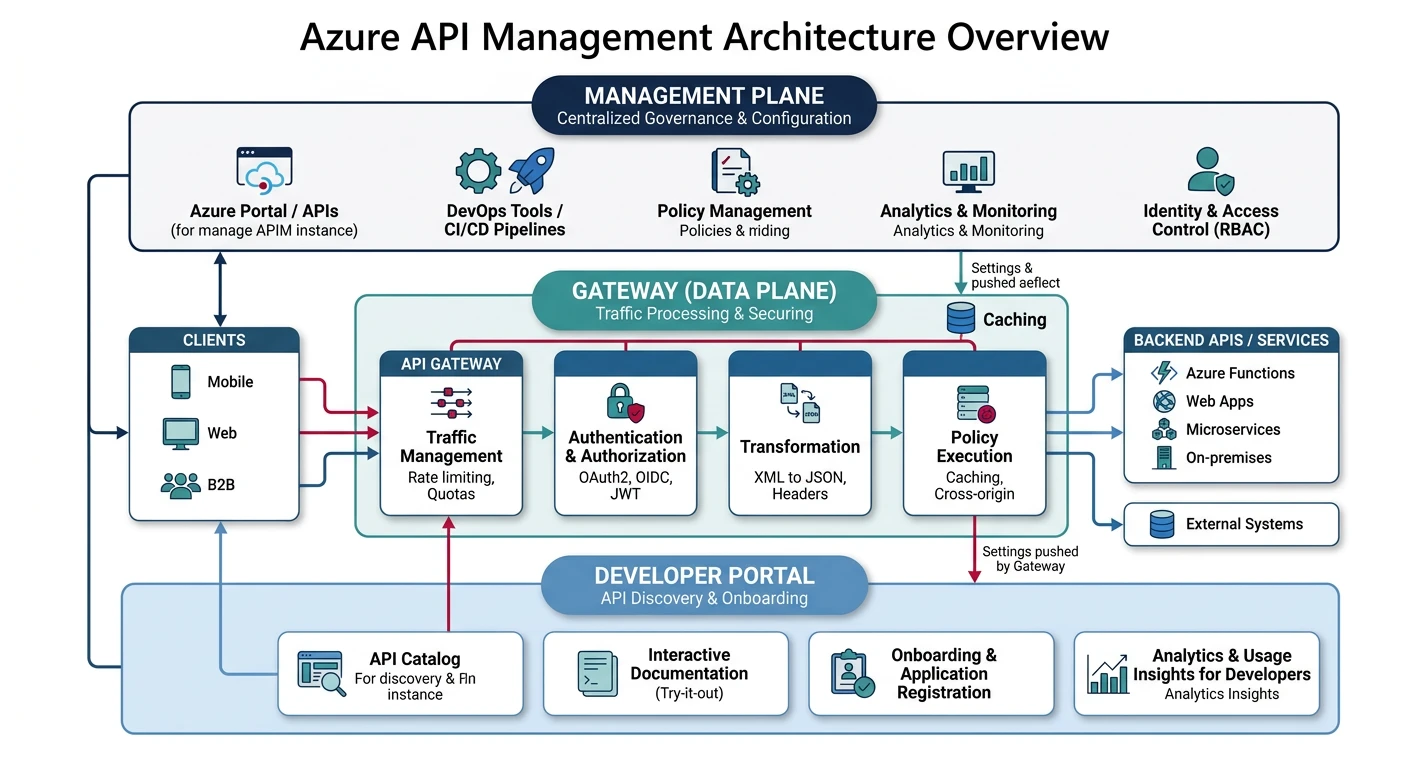
APIM Components
| Component | Purpose |
|---|---|
| Gateway | Routes requests, applies policies, rate limiting |
| Developer Portal | Self-service docs, API exploration, key management |
| Management Plane | Admin portal, API definitions, analytics |
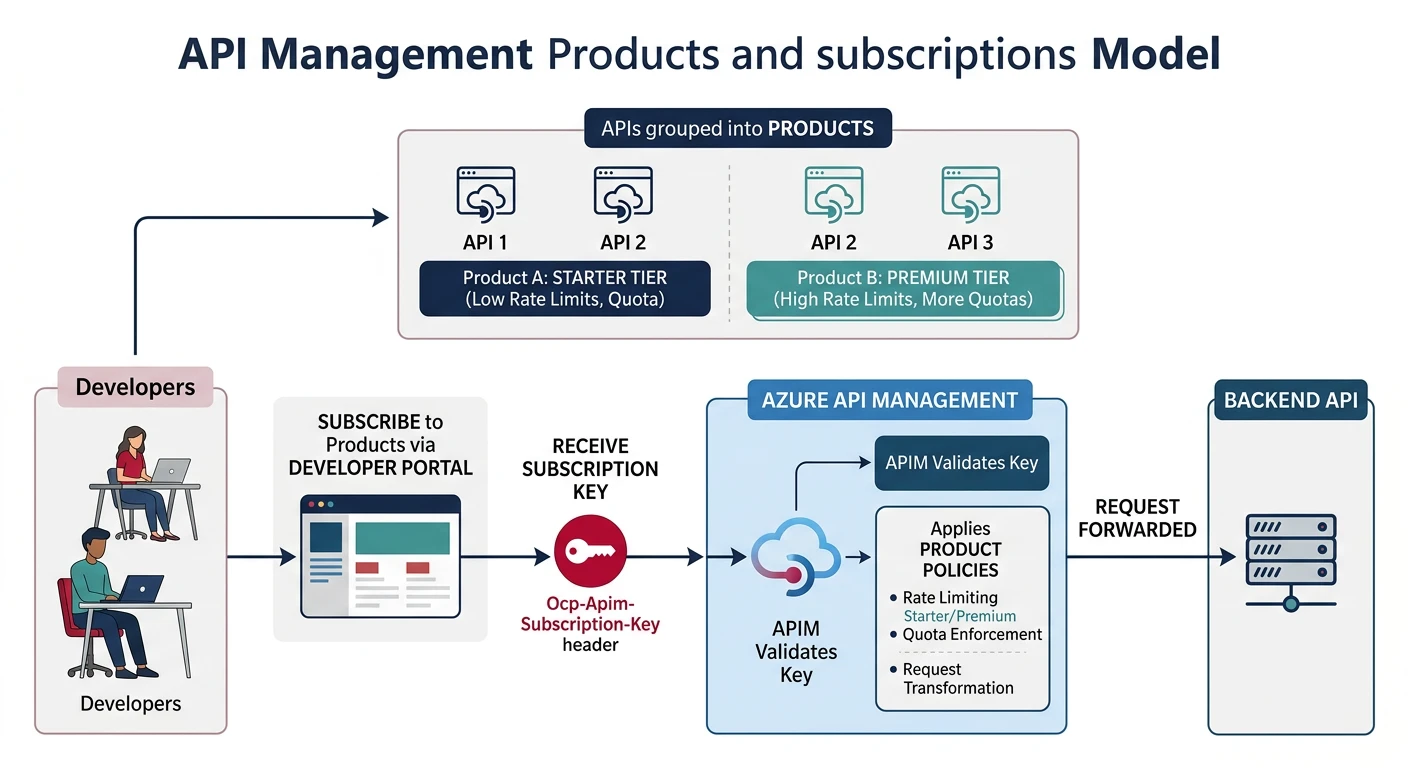
| Products | Bundle APIs with access policies |
| Subscriptions | API keys tied to products with quotas |
Pricing Tiers
Choose Your Tier:
- Consumption: Serverless, pay-per-call ($0.035/10K calls)
- Developer: Non-production, no SLA (~$50/month)
- Basic/Standard: Production workloads with SLA
- Premium: Multi-region, VNet, self-hosted gateway
Products & Subscriptions
Creating Products
# Azure CLI - Create product
az apim product create \
  --resource-group myResourceGroup \
  --service-name myApim \
  --product-id "basic-tier" \
  --display-name "Basic Tier" \
  --description "Basic API access with rate limits" \
  --subscription-required true \
  --approval-required false \
  --state published

# Add API to product
az apim product api add \
  --resource-group myResourceGroup \
  --service-name myApim \
  --product-id "basic-tier" \
  --api-id "task-api"
Subscription Management
// Subscription response structure
{
  "id": "/subscriptions/.../subscriptions/sub_abc123",
  "name": "sub_abc123",
  "properties": {
    "displayName": "John's Subscription",
    "ownerId": "/users/john@example.com",
    "scope": "/products/basic-tier",
    "state": "active",
    "primaryKey": "pk_abc123...",
    "secondaryKey": "sk_def456...",
    "createdDate": "2024-01-15T10:00:00Z"
  }
}
Policy Engine
Policy Structure
Policies are XML configurations applied at different scopes: global, product, API, and operation level.
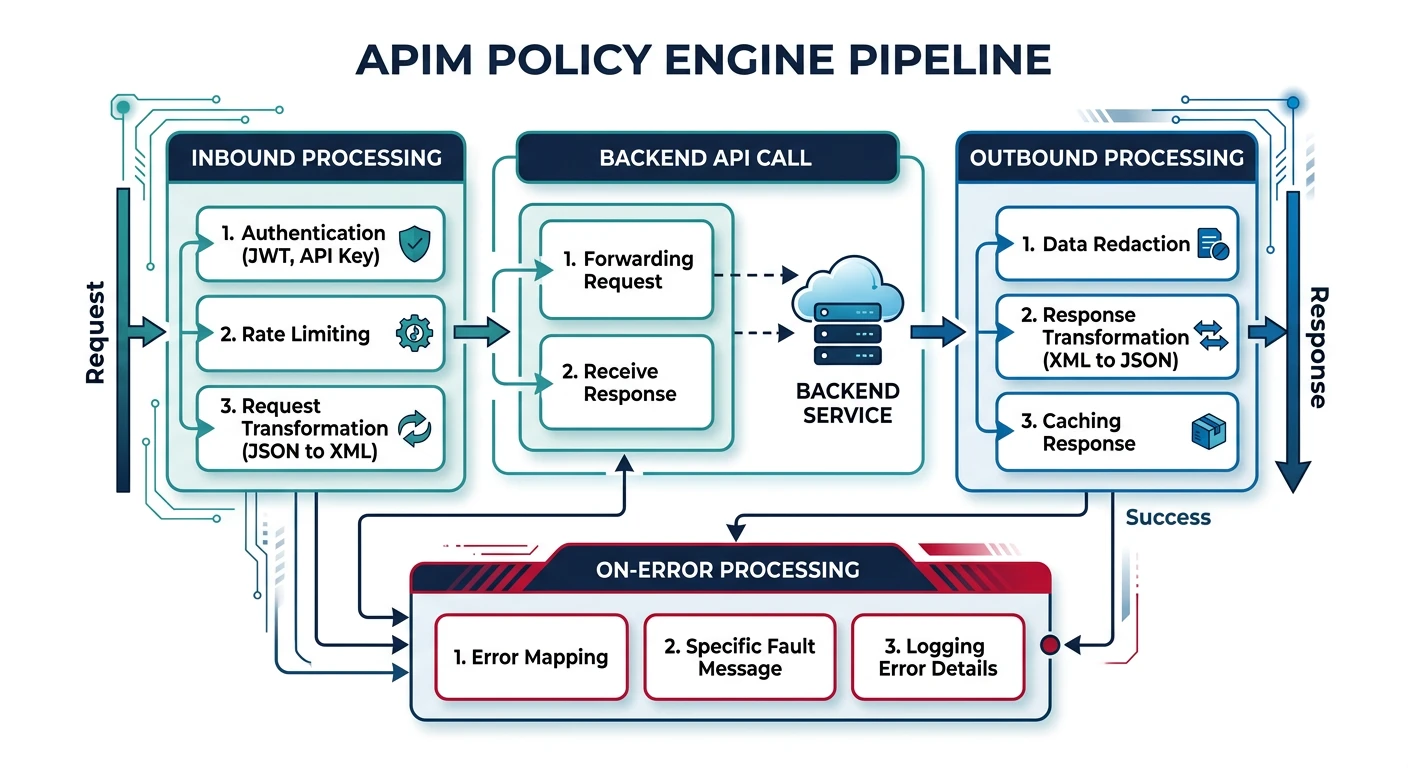
<policies>
    <inbound>
        <!-- Process before forwarding to backend -->
        <base />

        <!-- Rate limiting -->
        <rate-limit-by-key
            calls="100"
            renewal-period="60"
            counter-key="@(context.Subscription?.Id ?? context.Request.IpAddress)" />

        <!-- Validate JWT -->
        <validate-jwt header-name="Authorization" failed-validation-httpcode="401">
            <openid-config url="https://login.microsoftonline.com/tenant/.well-known/openid-configuration" />
            <required-claims>
                <claim name="aud" match="any">
                    <value>api://task-api</value>
                </claim>
            </required-claims>
        </validate-jwt>

        <!-- Set header for backend -->
        <set-header name="X-User-Id" exists-action="override">
            <value>@(context.Request.Headers["Authorization"].First().Split(' ')[1].AsJwt()?.Claims["sub"].First())</value>
        </set-header>
    </inbound>

    <backend>
        <base />
    </backend>

    <outbound>
        <base />
        <!-- Add CORS headers -->
        <cors allow-credentials="true">
            <allowed-origins>
                <origin>https://app.example.com</origin>
            </allowed-origins>
            <allowed-methods>
                <method>GET</method>
                <method>POST</method>
            </allowed-methods>
        </cors>
    </outbound>

    <on-error>
        <base />
        <set-body>@{
            return new JObject(
                new JProperty("type", "https://api.example.com/errors/gateway"),
                new JProperty("title", context.LastError.Message),
                new JProperty("status", context.Response.StatusCode)
            ).ToString();
        }</set-body>
    </on-error>
</policies>
Common Policy Patterns
<!-- Response caching -->
<cache-lookup vary-by-developer="false"
              vary-by-developer-groups="false"
              downstream-caching-type="none">
    <vary-by-query-parameter>status</vary-by-query-parameter>
</cache-lookup>

<!-- In outbound -->
<cache-store duration="300" />

<!-- Mock response -->
<mock-response status-code="200" content-type="application/json">
    {"status": "ok", "message": "Mocked response"}
</mock-response>

<!-- Rewrite URL -->
<rewrite-uri template="/api/v2/tasks/{taskId}" copy-unmatched-params="true" />
Backend Integration
Azure Functions Backend
# Import OpenAPI from Function App
az apim api import \
  --resource-group myResourceGroup \
  --service-name myApim \
  --api-id "task-api" \
  --path "tasks" \
  --specification-format OpenApi \
  --specification-url "https://task-functions.azurewebsites.net/api/openapi/v3.json"

# Set backend to Function App with managed identity
az apim backend create \
  --resource-group myResourceGroup \
  --service-name myApim \
  --backend-id "task-functions" \
  --protocol http \
  --url "https://task-functions.azurewebsites.net/api"
Versioning & Revisions
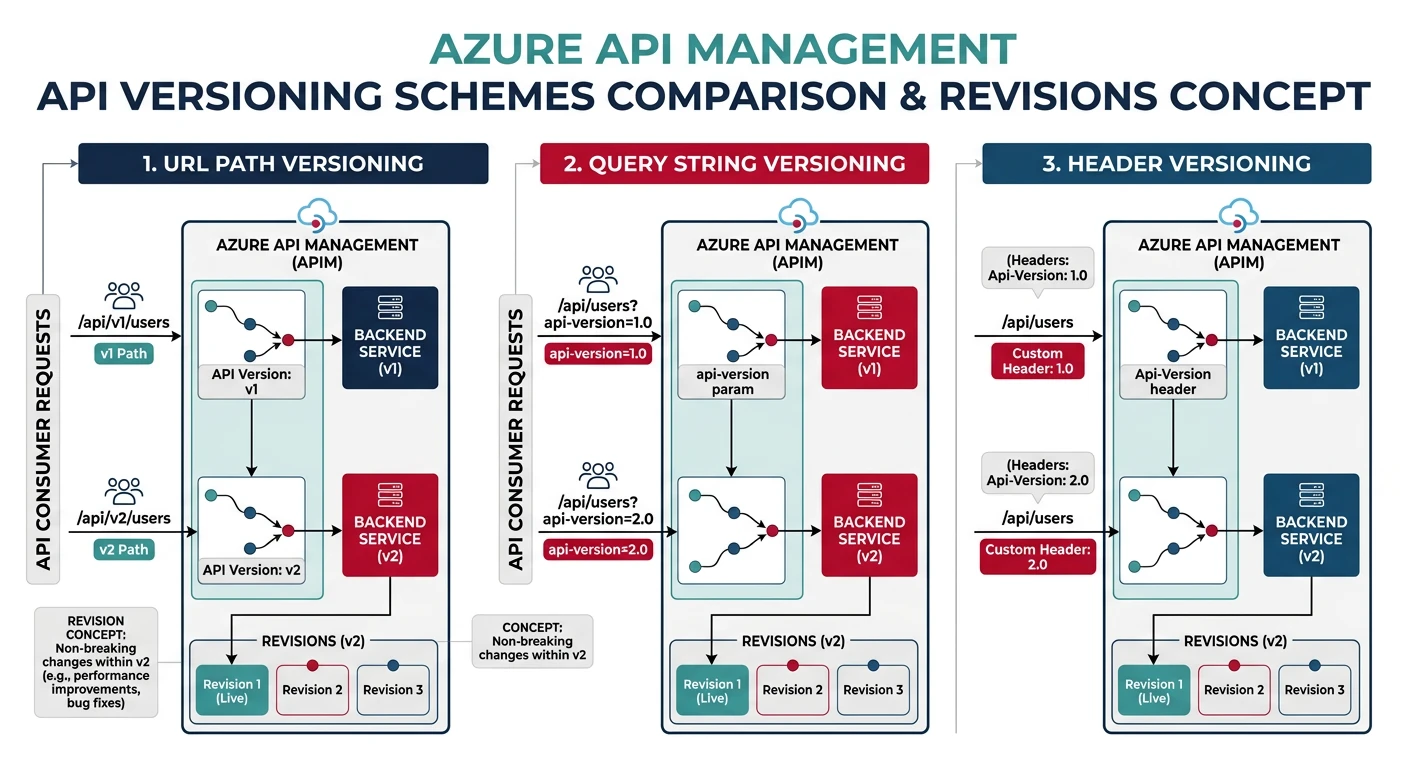
API Versioning Schemes
Versioning Options:
- Path: /v1/tasks, /v2/tasks
- Header: Api-Version: 2024-01-01
- Query: /tasks?api-version=v2
# Create versioned API
az apim api create \
  --resource-group myResourceGroup \
  --service-name myApim \
  --api-id "task-api-v2" \
  --path "v2/tasks" \
  --display-name "Task API v2" \
  --api-version "v2" \
  --api-version-set-id "task-api-version-set"
Multi-Region Deployment
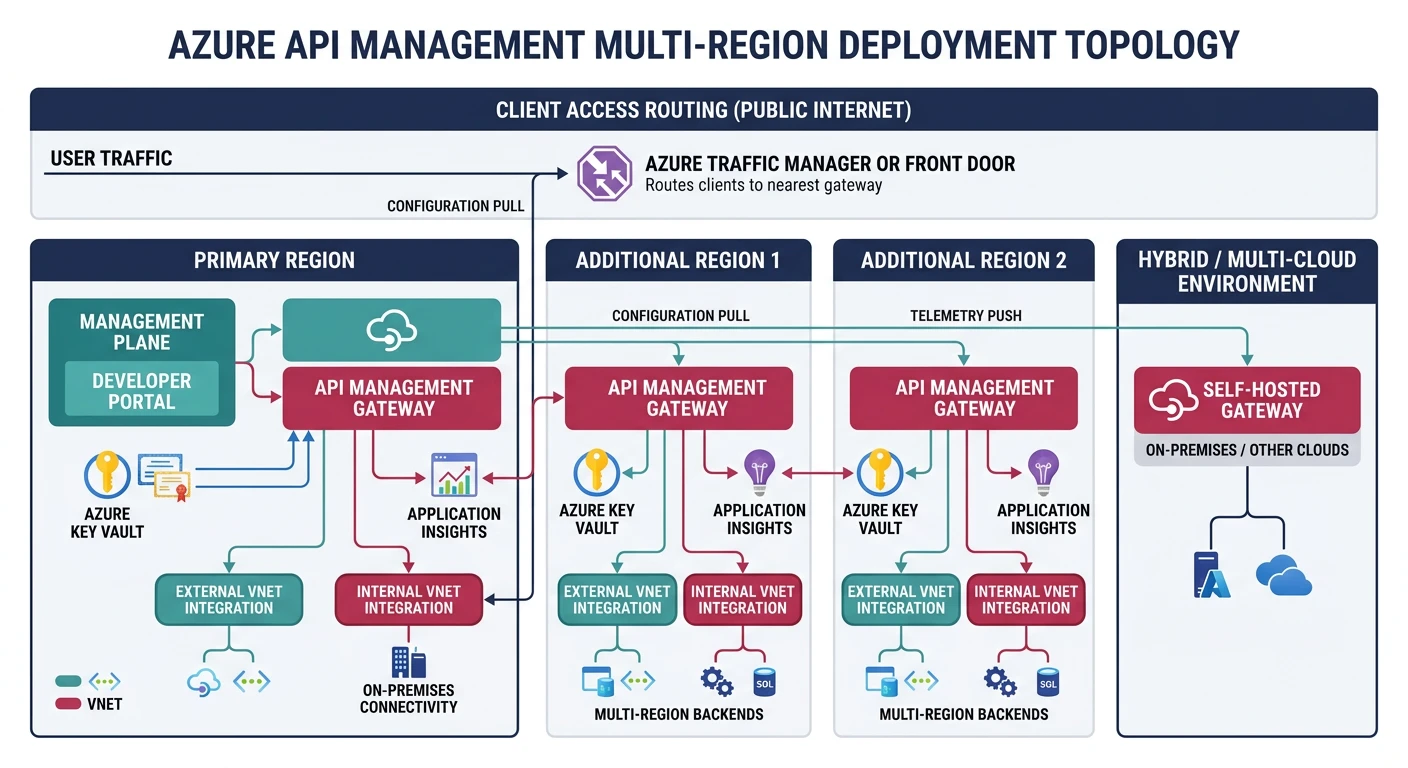
// Bicep - Multi-region APIM
resource apim 'Microsoft.ApiManagement/service@2023-03-01-preview' = {
  name: 'global-apim'
  location: 'eastus'
  sku: {
    name: 'Premium'
    capacity: 1
  }
  properties: {
    additionalLocations: [
      {
        location: 'westeurope'
        sku: { name: 'Premium', capacity: 1 }
      }
      {
        location: 'southeastasia'
        sku: { name: 'Premium', capacity: 1 }
      }
    ]
  }
}
Practice Exercises
Exercise 1: Create Product
- Create APIM instance (Consumption tier)
- Import API from OpenAPI spec
- Create product with subscription
Exercise 2: Policy Configuration
- Add JWT validation policy
- Configure rate limiting
- Set up response caching
Exercise 3: Developer Portal
- Customize developer portal branding
- Enable self-service registration
- Add custom content pages
- Configure Azure AD B2C authentication