API Development Mastery
Backend API Fundamentals
REST, HTTP, status codes, URI designData Layer & Persistence
Database integration, CRUD, transactions, RedisOpenAPI Specification
Contract-first design, OpenAPI 3.0/3.1Documentation & DX
Swagger UI, Redoc, developer portalsAuthentication & Authorization
OAuth 2.0, JWT, RBAC, ABACSecurity Hardening
OWASP Top 10, input validation, CORSAWS API Gateway
REST/HTTP APIs, Lambda integration, WAFAzure API Management
Policies, products, developer portalGCP Apigee
API proxies, monetization, analyticsArchitecture Patterns
Gateway, BFF, microservices, DDDVersioning & Governance
SemVer, deprecation, lifecycleMonitoring & Analytics
Observability, tracing, SLIs/SLOsPerformance & Rate Limiting
Caching, throttling, load testingGraphQL & gRPC
Alternative API styles, Protocol BuffersTesting & Contracts
Contract testing, Pact, Postman/NewmanCI/CD & Automation
Spectral, GitHub Actions, TerraformAPI Product Management
API as Product, monetization, ecosystemsWhy OpenAPI Matters
The API Contract Problem
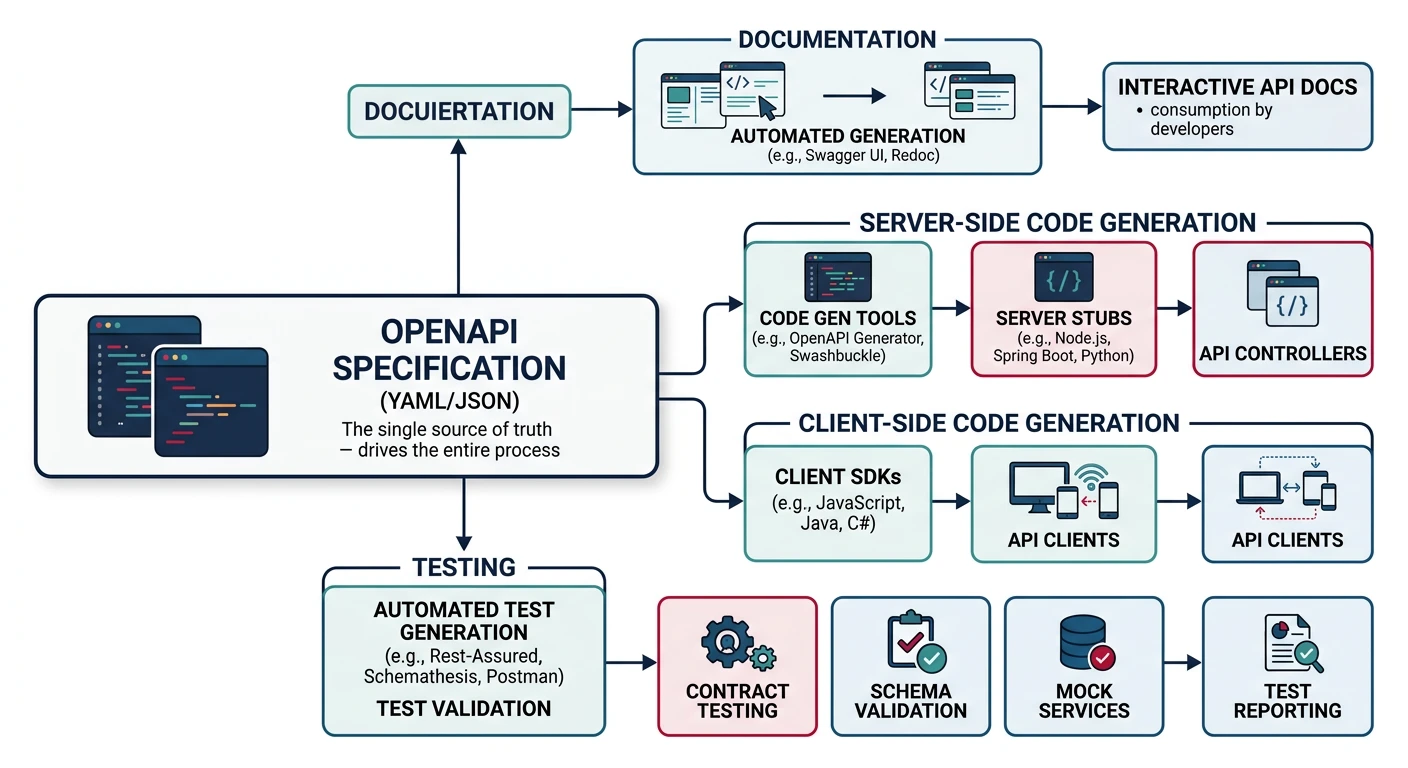
Without a formal API specification, teams face constant challenges: miscommunication between frontend and backend developers, outdated documentation, inconsistent error handling, and broken integrations. OpenAPI (formerly Swagger) solves this by providing a machine-readable contract that all parties can trust.
Benefits of OpenAPI
- Single Source of Truth: One specification drives docs, mocks, and validation
- Code Generation: Generate client SDKs, server stubs, and test cases
- Interactive Documentation: Swagger UI lets developers try endpoints instantly
- Validation: Automatically validate requests and responses against the spec
- API Governance: Enforce design standards with linting tools like Spectral
OpenAPI 3.0 vs 3.1
| Feature | OpenAPI 3.0 | OpenAPI 3.1 |
|---|---|---|
| JSON Schema | Subset (incompatible) | Full Draft 2020-12 alignment |
| Null support | nullable: true |
type: ['string', 'null'] |
| Webhooks | Not supported | Native webhook definitions |
| License | Apache 2.0 | Apache 2.0 + SPDX identifiers |
Your First OpenAPI Document
# openapi.yaml - Basic structure
openapi: 3.1.0
info:
  title: Task Management API
  version: 1.0.0
  description: |
    A RESTful API for managing tasks and projects.

    ## Features
    - Create, read, update, delete tasks
    - Organize tasks into projects
    - Filter and search tasks
  contact:
    name: API Support
    email: api-support@example.com
    url: https://developer.example.com
  license:
    name: MIT
    url: https://opensource.org/licenses/MIT

servers:
  - url: https://api.example.com/v1
    description: Production server
  - url: https://staging-api.example.com/v1
    description: Staging server
  - url: http://localhost:3000/v1
    description: Local development

tags:
  - name: Tasks
    description: Task management operations
  - name: Projects
    description: Project management operations

paths:
  # Define your endpoints here

components:
  # Reusable schemas, security schemes, etc.
Paths & Operations
Defining Endpoints
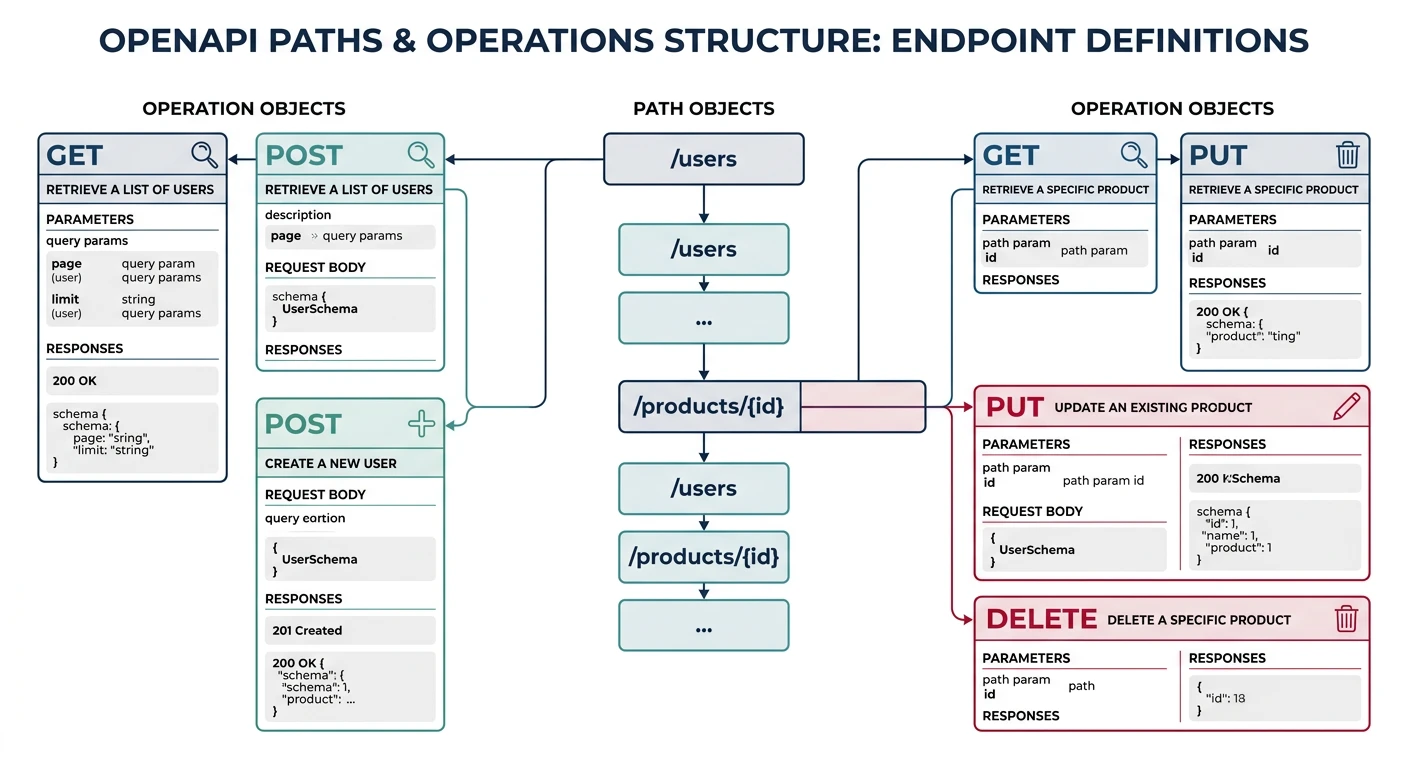
Paths define the available endpoints in your API. Each path can support multiple HTTP methods (operations).
paths:
  /tasks:
    get:
      tags:
        - Tasks
      summary: List all tasks
      description: Returns a paginated list of tasks with optional filtering
      operationId: listTasks
      parameters:
        - name: status
          in: query
          description: Filter by task status
          schema:
            type: string
            enum: [pending, in_progress, completed]
        - name: limit
          in: query
          description: Maximum number of results
          schema:
            type: integer
            minimum: 1
            maximum: 100
            default: 20
        - name: cursor
          in: query
          description: Pagination cursor from previous response
          schema:
            type: string
      responses:
        '200':
          description: Successful response
          content:
            application/json:
              schema:
                $ref: '#/components/schemas/TaskList'
        '400':
          $ref: '#/components/responses/BadRequest'
        '401':
          $ref: '#/components/responses/Unauthorized'

    post:
      tags:
        - Tasks
      summary: Create a new task
      description: Creates a new task and returns the created resource
      operationId: createTask
      requestBody:
        required: true
        content:
          application/json:
            schema:
              $ref: '#/components/schemas/CreateTaskRequest'
            examples:
              simple:
                summary: Simple task
                value:
                  title: "Review PR #123"
                  status: pending
              detailed:
                summary: Detailed task
                value:
                  title: "Implement user authentication"
                  description: "Add JWT-based auth with refresh tokens"
                  status: pending
                  priority: high
                  due_date: "2024-02-15"
                  project_id: "proj_abc123"
      responses:
        '201':
          description: Task created successfully
          headers:
            Location:
              description: URL of the created task
              schema:
                type: string
                format: uri
          content:
            application/json:
              schema:
                $ref: '#/components/schemas/Task'
        '400':
          $ref: '#/components/responses/BadRequest'
        '422':
          $ref: '#/components/responses/ValidationError'
Path Parameters
  /tasks/{taskId}:
    parameters:
      - name: taskId
        in: path
        required: true
        description: Unique task identifier
        schema:
          type: string
          pattern: '^task_[a-zA-Z0-9]{8,}$'
          example: task_abc12345

    get:
      tags:
        - Tasks
      summary: Get a specific task
      operationId: getTask
      responses:
        '200':
          description: Task found
          content:
            application/json:
              schema:
                $ref: '#/components/schemas/Task'
        '404':
          $ref: '#/components/responses/NotFound'

    patch:
      tags:
        - Tasks
      summary: Update a task
      operationId: updateTask
      requestBody:
        required: true
        content:
          application/json:
            schema:
              $ref: '#/components/schemas/UpdateTaskRequest'
      responses:
        '200':
          description: Task updated
          content:
            application/json:
              schema:
                $ref: '#/components/schemas/Task'
        '404':
          $ref: '#/components/responses/NotFound'
        '422':
          $ref: '#/components/responses/ValidationError'

    delete:
      tags:
        - Tasks
      summary: Delete a task
      operationId: deleteTask
      responses:
        '204':
          description: Task deleted successfully
        '404':
          $ref: '#/components/responses/NotFound'
Parameters & Request Body
Parameter Locations
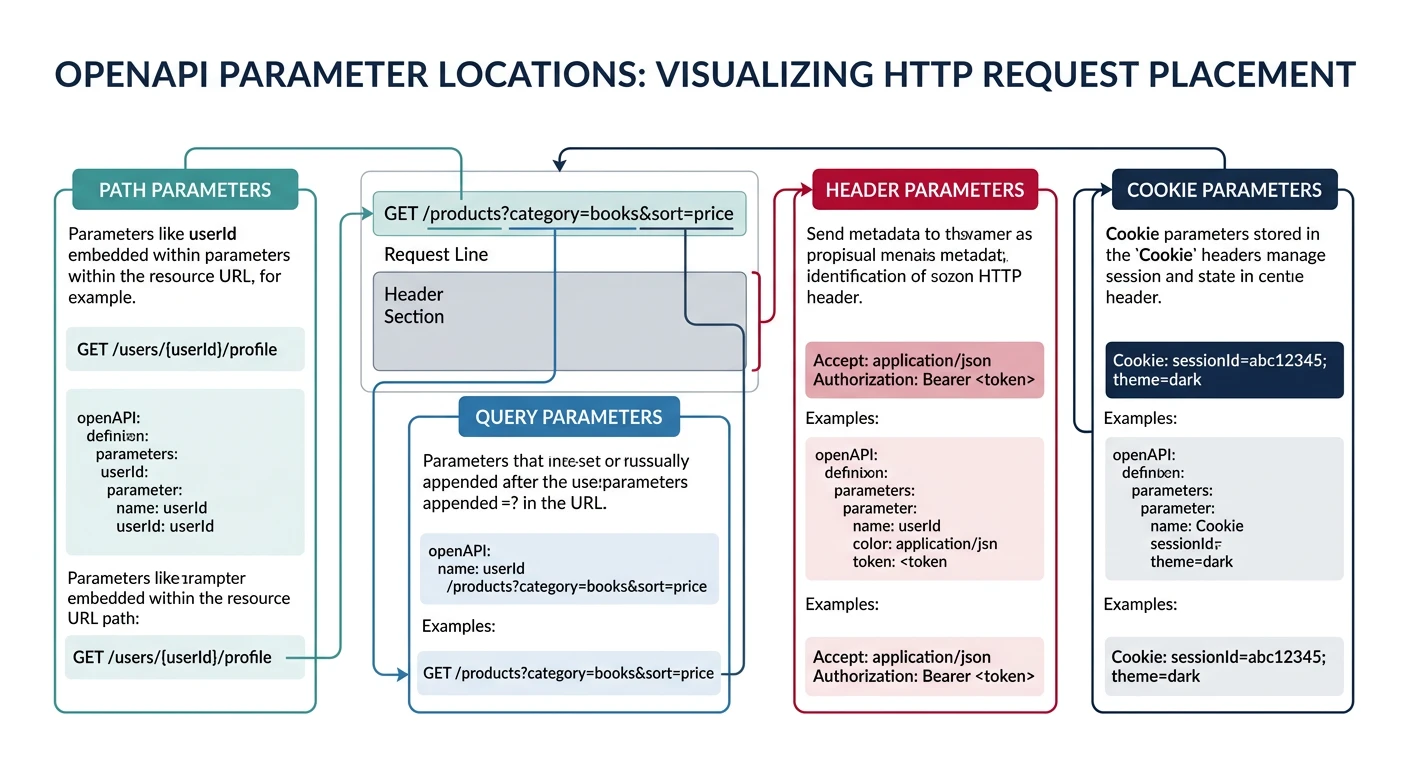
Parameters can appear in four locations: path, query, header, and cookie.
parameters:
  # Path parameter (in URL)
  - name: taskId
    in: path
    required: true
    schema:
      type: string

  # Query parameter (?key=value)
  - name: status
    in: query
    required: false
    schema:
      type: string
      enum: [pending, completed]

  # Header parameter
  - name: X-Request-ID
    in: header
    required: false
    description: Unique request identifier for tracing
    schema:
      type: string
      format: uuid

  # Cookie parameter
  - name: session_id
    in: cookie
    required: false
    schema:
      type: string
Reusable Parameters
components:
  parameters:
    # Pagination parameters
    LimitParam:
      name: limit
      in: query
      description: Maximum number of items to return
      schema:
        type: integer
        minimum: 1
        maximum: 100
        default: 20

    CursorParam:
      name: cursor
      in: query
      description: Cursor for pagination
      schema:
        type: string

    # Common filters
    StatusFilter:
      name: status
      in: query
      description: Filter by status
      schema:
        type: string
        enum: [active, inactive, archived]

    # Sorting
    SortParam:
      name: sort
      in: query
      description: Sort field and direction
      schema:
        type: string
        pattern: '^-?[a-z_]+$'
        example: '-created_at'

# Usage in paths
paths:
  /tasks:
    get:
      parameters:
        - $ref: '#/components/parameters/LimitParam'
        - $ref: '#/components/parameters/CursorParam'
        - $ref: '#/components/parameters/StatusFilter'
Request Body Schemas
requestBody:
  required: true
  content:
    application/json:
      schema:
        type: object
        required:
          - title
        properties:
          title:
            type: string
            minLength: 1
            maxLength: 200
            description: Task title
          description:
            type: string
            maxLength: 2000
            description: Detailed task description
          status:
            type: string
            enum: [pending, in_progress, completed]
            default: pending
          priority:
            type: string
            enum: [low, medium, high, urgent]
            default: medium
          due_date:
            type: string
            format: date
            description: Due date in ISO 8601 format
          assignee_id:
            type: string
            description: User ID of the assignee
          tags:
            type: array
            items:
              type: string
            maxItems: 10
description: Labels for categorizationrequired, minLength, maxLength, minimum, maximum, and pattern constraints. These enable automatic request validation.
Components & Schemas
Defining Reusable Schemas
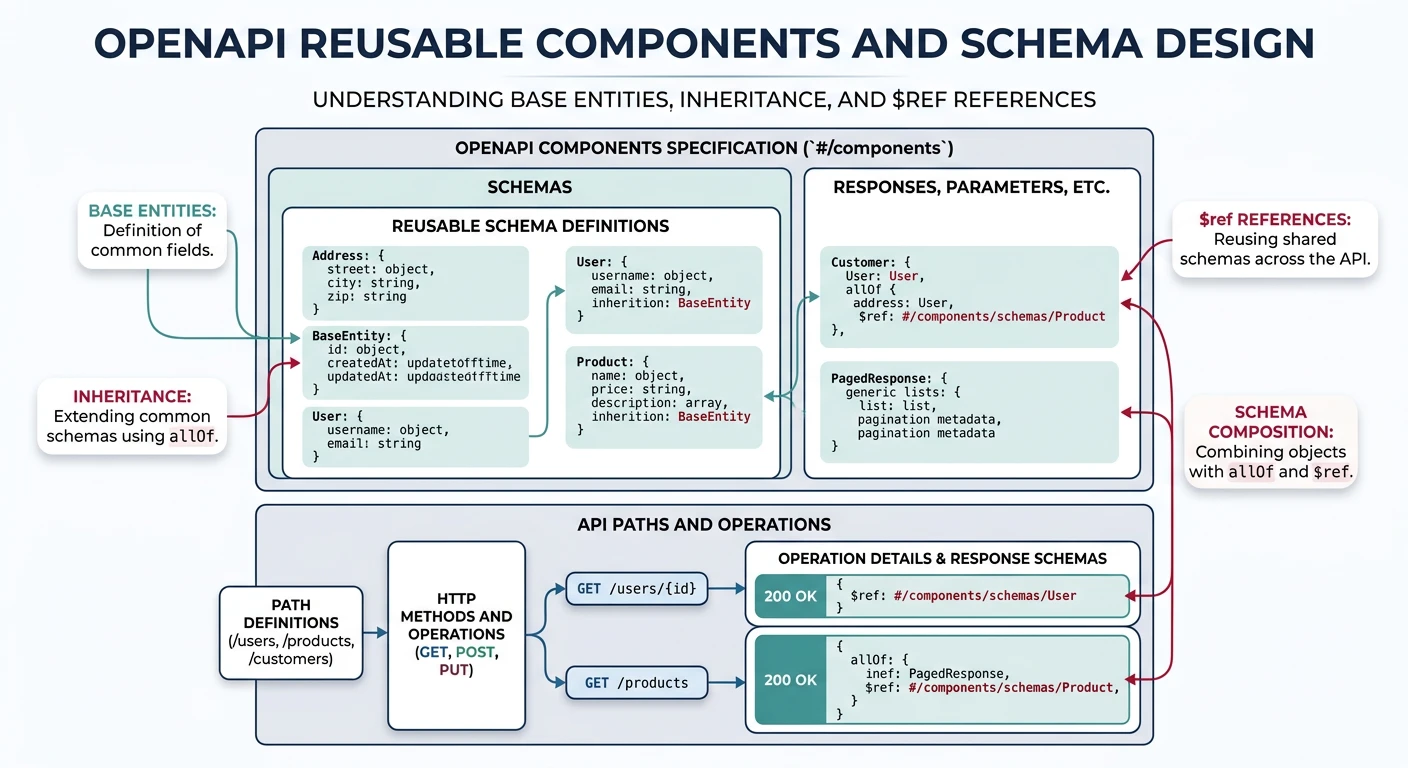
The components/schemas section contains reusable data models. Well-designed schemas reduce duplication and ensure consistency.
components:
  schemas:
    # Base entity with common fields
    BaseEntity:
      type: object
      properties:
        id:
          type: string
          readOnly: true
          description: Unique identifier
          example: task_abc12345
        created_at:
          type: string
          format: date-time
          readOnly: true
          description: Creation timestamp
        updated_at:
          type: string
          format: date-time
          readOnly: true
          description: Last update timestamp

    # Task schema
    Task:
      allOf:
        - $ref: '#/components/schemas/BaseEntity'
        - type: object
          required:
            - title
            - status
          properties:
            title:
              type: string
              minLength: 1
              maxLength: 200
            description:
              type: string
              maxLength: 2000
            status:
              $ref: '#/components/schemas/TaskStatus'
            priority:
              $ref: '#/components/schemas/Priority'
            due_date:
              type: string
              format: date
            assignee:
              $ref: '#/components/schemas/UserSummary'
            project:
              $ref: '#/components/schemas/ProjectSummary'
            tags:
              type: array
              items:
                type: string

    # Enums as separate schemas for reuse
    TaskStatus:
      type: string
      enum: [pending, in_progress, completed, cancelled]
      description: Current task status

    Priority:
      type: string
      enum: [low, medium, high, urgent]
      default: medium

    # Embedded/summary objects
    UserSummary:
      type: object
      properties:
        id:
          type: string
        name:
          type: string
        avatar_url:
          type: string
          format: uri

    ProjectSummary:
      type: object
      properties:
        id:
          type: string
        name:
          type: string
        color:
          type: string
          pattern: '^#[0-9A-Fa-f]{6}$'
Request vs Response Schemas
    # Input schema - what clients send
    CreateTaskRequest:
      type: object
      required:
        - title
      properties:
        title:
          type: string
          minLength: 1
          maxLength: 200
        description:
          type: string
        status:
          $ref: '#/components/schemas/TaskStatus'
        priority:
          $ref: '#/components/schemas/Priority'
        due_date:
          type: string
          format: date
        project_id:
          type: string
        assignee_id:
          type: string
        tags:
          type: array
          items:
            type: string

    # Partial update schema
    UpdateTaskRequest:
      type: object
      minProperties: 1  # At least one field required
      properties:
        title:
          type: string
          minLength: 1
          maxLength: 200
        description:
          type: string
        status:
          $ref: '#/components/schemas/TaskStatus'
        priority:
          $ref: '#/components/schemas/Priority'
        due_date:
          type: ['string', 'null']
          format: date
        assignee_id:
          type: ['string', 'null']

    # Collection response with pagination
    TaskList:
      type: object
      required:
        - data
        - pagination
      properties:
        data:
          type: array
          items:
            $ref: '#/components/schemas/Task'
        pagination:
          $ref: '#/components/schemas/CursorPagination'

    CursorPagination:
      type: object
      properties:
        next_cursor:
          type: ['string', 'null']
          description: Cursor for the next page, null if no more pages
        has_more:
          type: boolean
          description: Whether more results are available
oneOf/allOf/anyOf
Schema Composition
OpenAPI provides three keywords for combining schemas, each with different semantics.
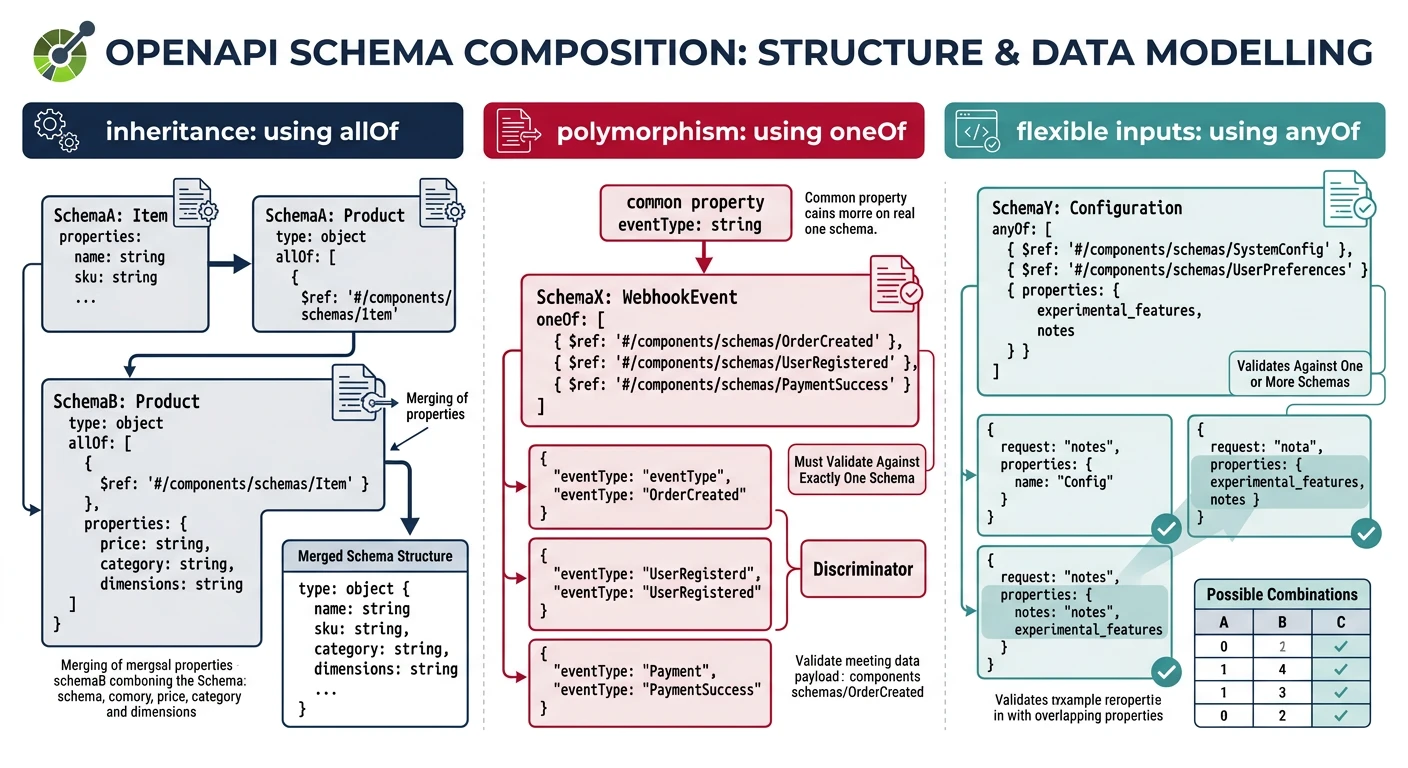
Composition Keywords
| Keyword | Meaning | Use Case |
|---|---|---|
allOf |
Must match ALL schemas | Inheritance, extending base schemas |
oneOf |
Must match exactly ONE schema | Polymorphism, discriminated unions |
anyOf |
Must match at least ONE schema | Optional variants, flexible inputs |
allOf - Schema Inheritance
# Base schema
BaseEntity:
  type: object
  properties:
    id:
      type: string
      readOnly: true
    created_at:
      type: string
      format: date-time
      readOnly: true

# Extended schema using allOf
Task:
  allOf:
    - $ref: '#/components/schemas/BaseEntity'
    - type: object
      required:
        - title
      properties:
        title:
          type: string
        status:
          type: string

# Result: Task has id, created_at, title, and status
oneOf - Polymorphic Types (Discriminator)
# Notification can be email, sms, or push
Notification:
  oneOf:
    - $ref: '#/components/schemas/EmailNotification'
    - $ref: '#/components/schemas/SmsNotification'
    - $ref: '#/components/schemas/PushNotification'
  discriminator:
    propertyName: type
    mapping:
      email: '#/components/schemas/EmailNotification'
      sms: '#/components/schemas/SmsNotification'
      push: '#/components/schemas/PushNotification'

EmailNotification:
  type: object
  required:
    - type
    - to
    - subject
    - body
  properties:
    type:
      type: string
      enum: [email]
    to:
      type: string
      format: email
    subject:
      type: string
    body:
      type: string
    cc:
      type: array
      items:
        type: string
        format: email

SmsNotification:
  type: object
  required:
    - type
    - phone_number
    - message
  properties:
    type:
      type: string
      enum: [sms]
    phone_number:
      type: string
      pattern: '^\+[1-9]\d{1,14}$'
    message:
      type: string
      maxLength: 160

PushNotification:
  type: object
  required:
    - type
    - device_token
    - title
  properties:
    type:
      type: string
      enum: [push]
    device_token:
      type: string
    title:
      type: string
    body:
      type: string
    data:
      type: object
      additionalProperties: true
anyOf - Flexible Inputs
# User identifier can be ID or email
UserIdentifier:
  anyOf:
    - type: object
      required: [user_id]
      properties:
        user_id:
          type: string
    - type: object
      required: [email]
      properties:
        email:
          type: string
          format: email

# Search query accepts multiple filter types
SearchFilter:
  anyOf:
    - $ref: '#/components/schemas/DateRangeFilter'
    - $ref: '#/components/schemas/StatusFilter'
    - $ref: '#/components/schemas/TextFilter'
Error Responses with RFC 7807
components:
  schemas:
    # RFC 7807 Problem Details
    ProblemDetails:
      type: object
      required:
        - type
        - title
        - status
      properties:
        type:
          type: string
          format: uri
          description: URI identifying the problem type
          example: 'https://api.example.com/errors/validation'
        title:
          type: string
          description: Human-readable summary
          example: 'Validation Error'
        status:
          type: integer
          description: HTTP status code
          example: 422
        detail:
          type: string
          description: Human-readable explanation
          example: 'The request body contains invalid fields'
        instance:
          type: string
          format: uri
          description: URI of the specific occurrence

    ValidationProblem:
      allOf:
        - $ref: '#/components/schemas/ProblemDetails'
        - type: object
          properties:
            errors:
              type: array
              items:
                type: object
                properties:
                  field:
                    type: string
                  message:
                    type: string
                  code:
                    type: string

  responses:
    BadRequest:
      description: Bad request
      content:
        application/problem+json:
          schema:
            $ref: '#/components/schemas/ProblemDetails'

    Unauthorized:
      description: Authentication required
      content:
        application/problem+json:
          schema:
            $ref: '#/components/schemas/ProblemDetails'

    NotFound:
      description: Resource not found
      content:
        application/problem+json:
          schema:
            $ref: '#/components/schemas/ProblemDetails'

    ValidationError:
      description: Validation failed
      content:
        application/problem+json:
          schema:
            $ref: '#/components/schemas/ValidationProblem'
Contract-First Workflow
Design-First Development
In contract-first development, you design the API specification before writing any implementation code. This approach has several advantages:
- Early Feedback: Stakeholders can review the API design before coding begins
- Parallel Development: Frontend and backend teams can work simultaneously
- Better Design: Thinking about the interface first often leads to cleaner APIs
- Accurate Documentation: Docs are always in sync because they're the source of truth
Contract-First Workflow
- Design: Write OpenAPI spec collaboratively
- Review: Get stakeholder approval on the interface
- Mock: Generate mock server for frontend development
- Implement: Build backend against the specification
- Validate: Test implementation matches specification
- Document: Generate docs from the same spec
Tools for Contract-First Development
Spectral - API Linting
# .spectral.yaml - Custom ruleset
extends: spectral:oas
rules:
  # Require descriptions on all operations
  operation-description:
    description: Operations must have descriptions
    given: "$.paths[*][*]"
    then:
      field: description
      function: truthy

  # Enforce consistent naming
  path-keys-kebab-case:
    description: Path segments should use kebab-case
    given: "$.paths[*]~"
    then:
      function: pattern
      functionOptions:
        match: "^(/[a-z][a-z0-9-]*)+$"

  # Require examples
  schema-examples:
    description: Schemas should have examples
    given: "$.components.schemas[*]"
    then:
      field: example
      function: truthy
# Run Spectral linting
npx @stoplight/spectral-cli lint openapi.yaml
# Output:
# ✖ 2 problems (1 error, 1 warning)
# openapi.yaml
# 23:5 error operation-description Operations must have descriptions
# 45:3 warning schema-examples Schemas should have examplesPrism - Mock Server
# Start mock server from spec
npx @stoplight/prism-cli mock openapi.yaml

# Prism is running at http://127.0.0.1:4010
# Now you can make requests:
curl http://localhost:4010/tasks

# Prism returns example responses from the spec
OpenAPI Generator - Code Generation
# Generate TypeScript client
npx @openapitools/openapi-generator-cli generate \
  -i openapi.yaml \
  -g typescript-axios \
  -o ./generated/client

# Generate Node.js server stub
npx @openapitools/openapi-generator-cli generate \
  -i openapi.yaml \
  -g nodejs-express-server \
  -o ./generated/server

# Generate Python FastAPI server
npx @openapitools/openapi-generator-cli generate \
  -i openapi.yaml \
  -g python-fastapi \
  -o ./generated/python-server
Validating Implementation Against Spec
// Using express-openapi-validator
const OpenApiValidator = require('express-openapi-validator');

app.use(
  OpenApiValidator.middleware({
    apiSpec: './openapi.yaml',
    validateRequests: true,
    validateResponses: true, // Also validate your responses!
    validateSecurity: {
      handlers: {
        BearerAuth: (req) => {
          // Validate JWT token
          return validateJwt(req.headers.authorization);
        }
      }
    }
  })
);

// All requests are now validated against the OpenAPI spec
// Invalid requests return 400 with validation errors
// Invalid responses return 500 (caught in development)
Practice Exercises
Exercise 1: Define a Blog API
Write an OpenAPI specification for a blog API:
- Resources: Posts, Comments, Authors
- CRUD operations for posts
- Nested route:
/posts/{id}/comments - Pagination on list endpoints
- Proper error responses
Exercise 2: Add Polymorphic Types
Extend your blog API with:
- Content blocks using
oneOf(text, image, code, quote) - Media attachments with discriminator
- Rich examples for each type
Exercise 3: Set Up Contract-First Workflow
Create a complete contract-first setup:
- Write custom Spectral rules for your organization
- Set up Prism mock server
- Generate TypeScript client SDK
- Add request/response validation middleware
- Create GitHub Actions workflow for spec validation