Series Navigation: This is Part 9 of the 17-part API Development Series. Review Part 8: Azure API Management first.
API Development Mastery
Your 17-step learning path • Currently on Step 9
Backend API Fundamentals
REST, HTTP, status codes, URI designData Layer & Persistence
Database integration, CRUD, transactions, RedisOpenAPI Specification
Contract-first design, OpenAPI 3.0/3.1Documentation & DX
Swagger UI, Redoc, developer portalsAuthentication & Authorization
OAuth 2.0, JWT, RBAC, ABACSecurity Hardening
OWASP Top 10, input validation, CORSAWS API Gateway
REST/HTTP APIs, Lambda integration, WAFAzure API Management
Policies, products, developer portal9
GCP Apigee
API proxies, monetization, analytics10
Architecture Patterns
Gateway, BFF, microservices, DDD11
Versioning & Governance
SemVer, deprecation, lifecycle12
Monitoring & Analytics
Observability, tracing, SLIs/SLOs13
Performance & Rate Limiting
Caching, throttling, load testing14
GraphQL & gRPC
Alternative API styles, Protocol Buffers15
Testing & Contracts
Contract testing, Pact, Postman/Newman16
CI/CD & Automation
Spectral, GitHub Actions, Terraform17
API Product Management
API as Product, monetization, ecosystemsGCP API Gateway
GCP API Management Options
Google Cloud offers multiple API management solutions. Let's compare them to understand when to use each.
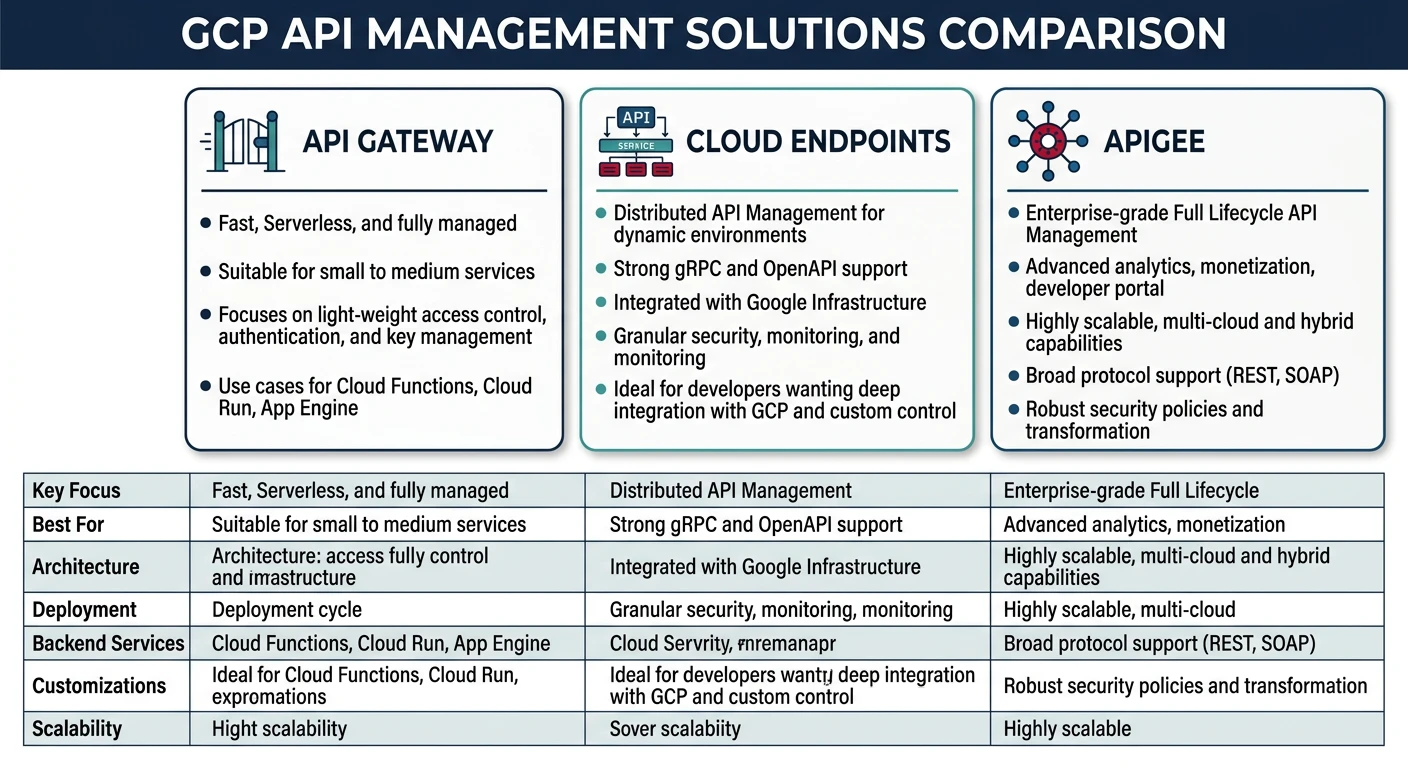
GCP API Solutions Comparison
| Product | Best For | Key Features |
|---|---|---|
| API Gateway | Serverless APIs, Cloud Functions | Low cost, OpenAPI native, auto-scaling |
| Cloud Endpoints | GKE, Compute Engine backends | Extensible Service Proxy, gRPC support |
| Apigee | Enterprise, full lifecycle | Developer portal, monetization, analytics |
API Gateway Setup
# openapi.yaml for GCP API Gateway
swagger: "2.0"
info:
  title: Task API
  version: "1.0.0"
host: "task-api-gateway-xyz.apigateway.myproject.cloud.goog"
schemes:
  - "https"
produces:
  - "application/json"

x-google-backend:
  address: https://us-central1-myproject.cloudfunctions.net/tasks
  deadline: 30.0

paths:
  /tasks:
    get:
      operationId: listTasks
      responses:
        "200":
          description: Success
      security:
        - api_key: []

securityDefinitions:
  api_key:
    type: apiKey
    name: x-api-key
    in: header
# Deploy API Gateway
gcloud api-gateway apis create task-api \
--project=myproject
gcloud api-gateway api-configs create task-config \
--api=task-api \
--openapi-spec=openapi.yaml \
--project=myproject
gcloud api-gateway gateways create task-gateway \
--api=task-api \
--api-config=task-config \
--location=us-central1 \
--project=myprojectCloud Endpoints
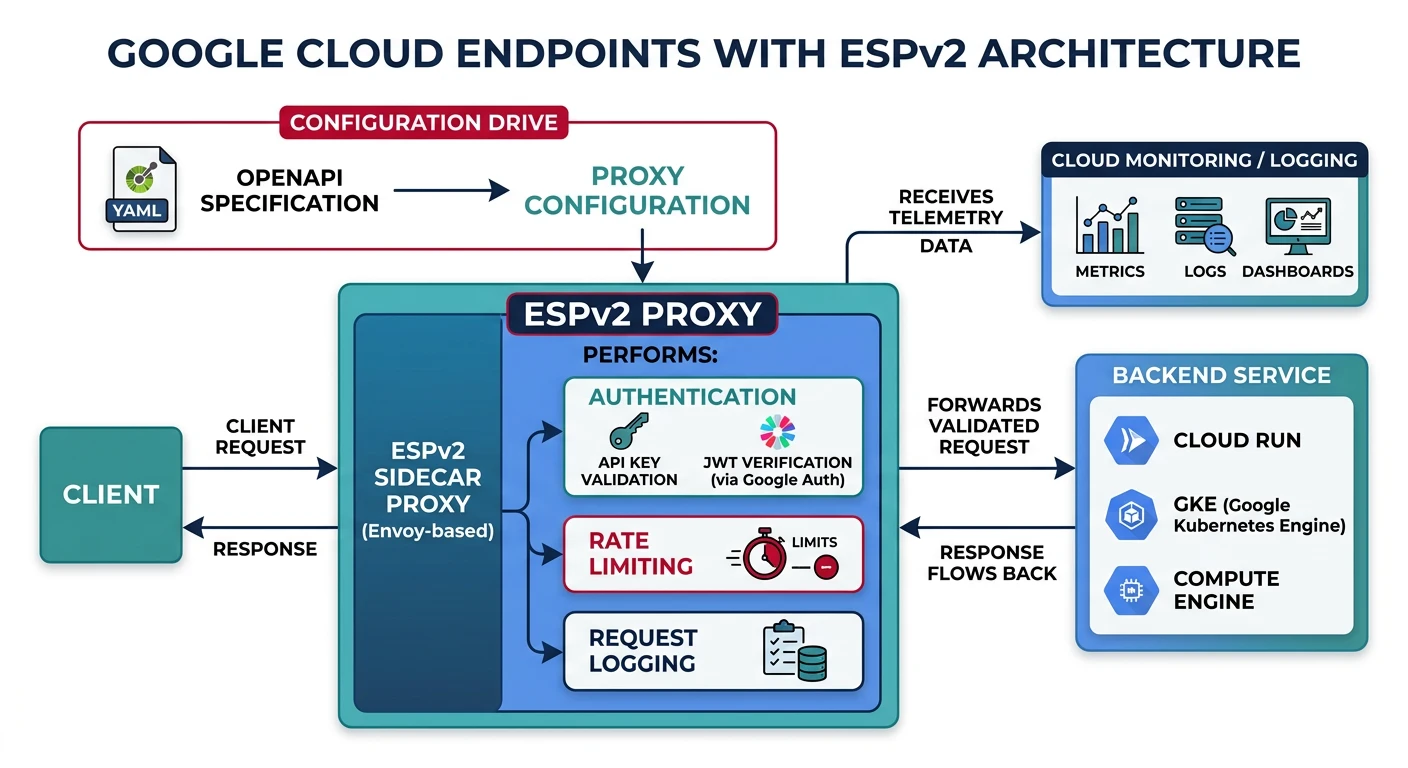
Extensible Service Proxy (ESP)
Cloud Endpoints uses ESPv2, an Envoy-based proxy, deployed alongside your backend.
# cloud-run-endpoints.yaml
apiVersion: serving.knative.dev/v1
kind: Service
metadata:
  name: task-service
spec:
  template:
    spec:
      containers:
        # ESPv2 sidecar
        - name: espv2
          image: gcr.io/endpoints-release/endpoints-runtime-serverless:2
          args:
            - "--service=task-api-xyz.apigateway.myproject.cloud.goog"
            - "--rollout_strategy=managed"
            - "--backend=grpc://127.0.0.1:8080"
        # Your application
        - name: app
          image: gcr.io/myproject/task-service:latest
          ports:
            - containerPort: 8080
Apigee Overview
Apigee Architecture
Apigee is Google Cloud's full-featured API management platform for enterprises.
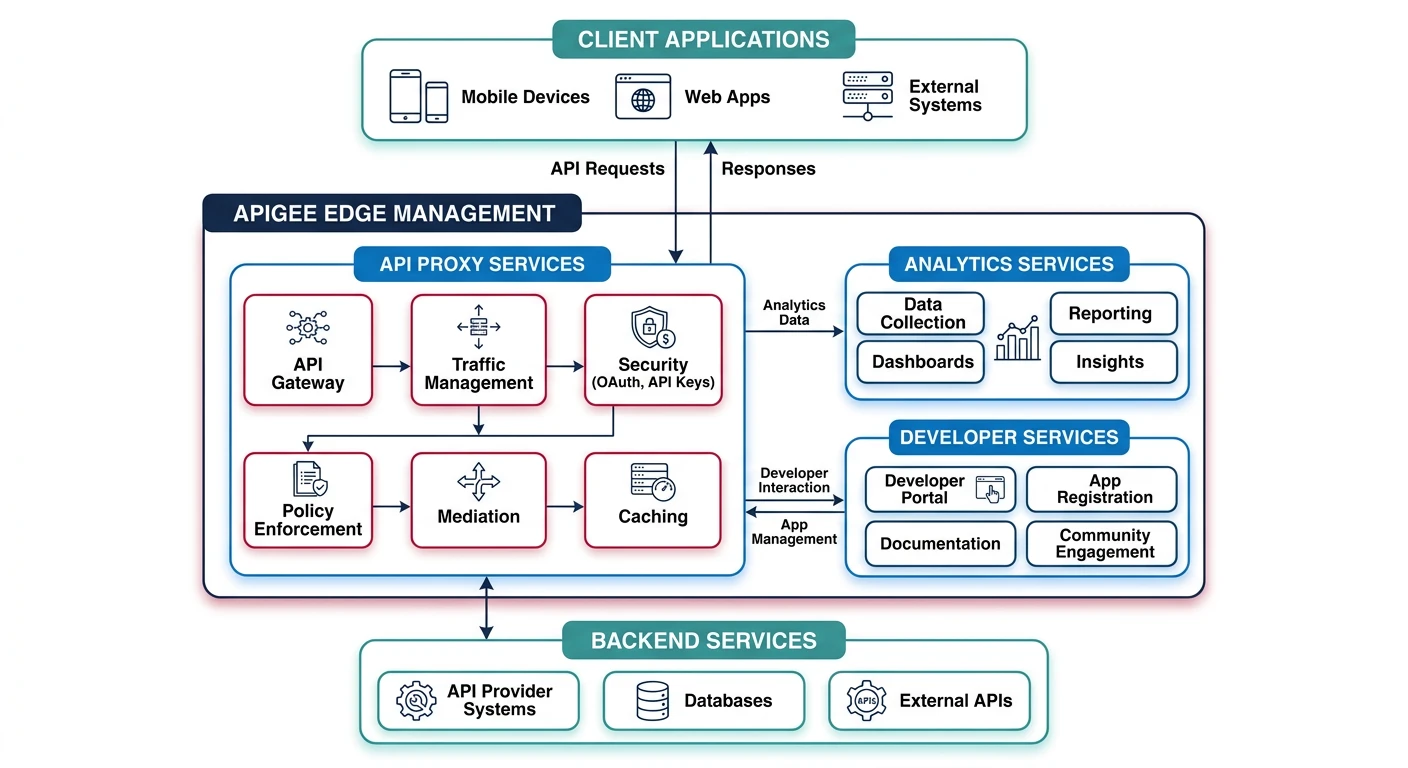
Apigee Editions:
- Apigee X: Fully managed on GCP (recommended)
- Apigee Hybrid: Runtime on your infrastructure
- Apigee Edge: Legacy SaaS (use X for new projects)
# Create Apigee X organization
gcloud apigee organizations provision \
  --project=myproject \
  --analytics-region=us-east1 \
  --runtime-location=us-east1-b \
  --authorized-network=default

# Create environment
gcloud apigee environments create prod \
  --organization=myproject

# Deploy API proxy
gcloud apigee apis deploy \
  --organization=myproject \
  --environment=prod \
  --api=task-api \
  --revision=1
API Proxy Structure
# Apigee proxy bundle structure
apiproxy/
├── task-api.xml               # Proxy metadata
├── proxies/
│   └── default.xml            # ProxyEndpoint configuration
├── targets/
│   └── default.xml            # TargetEndpoint configuration
├── policies/
│   ├── AM-SetCors.xml         # AssignMessage policy
│   ├── FC-RateLimit.xml       # FlowCallout policy
│   ├── JS-Transform.xml       # JavaScript policy
│   └── VA-ApiKey.xml          # VerifyAPIKey policy
└── resources/
    └── jsc/
        └── transform.js       # JavaScript resource
Apigee Policies
ProxyEndpoint Configuration
<!-- proxies/default.xml -->
<ProxyEndpoint name="default">
    <PreFlow name="PreFlow">
        <Request>
            <Step><Name>VA-VerifyApiKey</Name></Step>
            <Step><Name>FC-RateLimitByKey</Name></Step>
            <Step><Name>AM-RemoveApiKey</Name></Step>
        </Request>
    </PreFlow>

    <Flows>
        <Flow name="GetTasks">
            <Condition>(proxy.pathsuffix MatchesPath "/tasks") and (request.verb = "GET")</Condition>
            <Response>
                <Step><Name>JS-TransformResponse</Name></Step>
            </Response>
        </Flow>
    </Flows>

    <PostFlow name="PostFlow">
        <Response>
            <Step><Name>AM-SetCorsHeaders</Name></Step>
        </Response>
    </PostFlow>

    <HTTPProxyConnection>
        <BasePath>/v1/tasks</BasePath>
        <VirtualHost>secure</VirtualHost>
    </HTTPProxyConnection>

    <RouteRule name="default">
        <TargetEndpoint>default</TargetEndpoint>
    </RouteRule>
</ProxyEndpoint>
Common Apigee Policies
<!-- policies/VA-VerifyApiKey.xml -->
<VerifyAPIKey name="VA-VerifyApiKey">
    <APIKey ref="request.header.x-api-key"/>
</VerifyAPIKey>

<!-- policies/FC-RateLimitByKey.xml -->
<SpikeArrest name="FC-RateLimitByKey">
    <Rate>10ps</Rate>  <!-- 10 per second -->
    <Identifier ref="verifyapikey.VA-VerifyApiKey.client_id"/>
</SpikeArrest>

<!-- policies/AM-SetCorsHeaders.xml -->
<AssignMessage name="AM-SetCorsHeaders">
    <Set>
        <Headers>
            <Header name="Access-Control-Allow-Origin">*</Header>
            <Header name="Access-Control-Allow-Methods">GET, POST, PUT, DELETE</Header>
            <Header name="Access-Control-Allow-Headers">Content-Type, x-api-key</Header>
        </Headers>
    </Set>
    <IgnoreUnresolvedVariables>true</IgnoreUnresolvedVariables>
</AssignMessage>
JavaScript Policy for Transformation
// resources/jsc/transform.js
var response = JSON.parse(context.getVariable('response.content'));

// Transform backend response
var transformed = {
    data: response.items.map(function(item) {
        return {
            id: item.task_id,
            title: item.task_title,
            status: item.is_complete ? 'completed' : 'pending',
            createdAt: new Date(item.created_timestamp).toISOString()
        };
    }),
    meta: {
        total: response.total_count,
        page: response.current_page
    }
};

context.setVariable('response.content', JSON.stringify(transformed));
Developer Portal
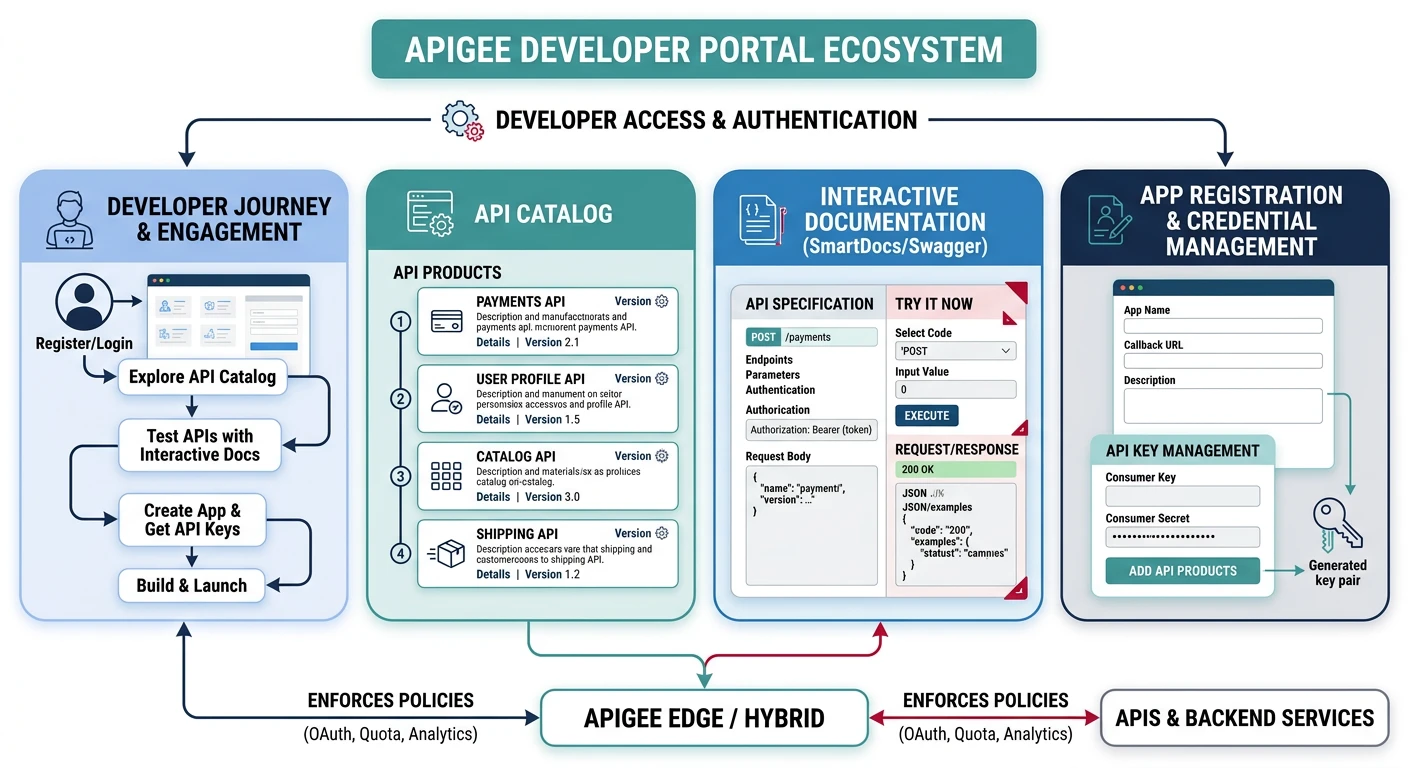
Integrated Developer Portal
Apigee provides a fully customizable developer portal for API discovery and onboarding.
# Enable developer portal
gcloud apigee portals create my-portal \
  --organization=myproject

# Publish API to portal
gcloud apigee portals api-products create \
  --portal=my-portal \
  --organization=myproject \
  --api-product=task-api-product \
  --display-name="Task API" \
  --description="Manage tasks programmatically"
Developer Portal Features
- API Catalog: Browse and search available APIs
- Interactive Docs: Try APIs in the browser
- App Registration: Create apps and get API keys
- Analytics Dashboard: View usage and performance
- Custom Branding: Match your organization style
Analytics & Monetization
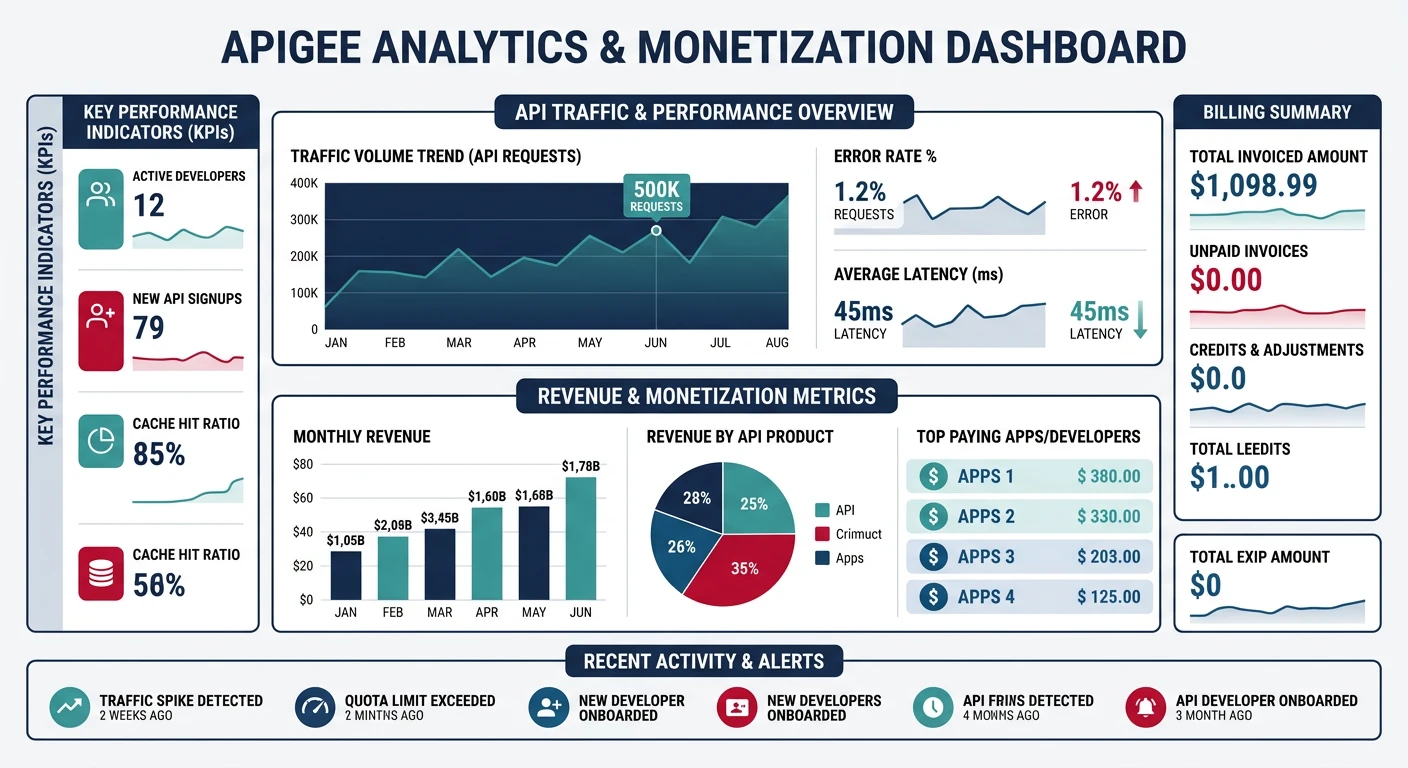
API Analytics
# Query analytics via API
curl -X POST \
  "https://apigee.googleapis.com/v1/organizations/myproject/environments/prod/stats/apiproxy" \
  -H "Authorization: Bearer $(gcloud auth print-access-token)" \
  -H "Content-Type: application/json" \
  -d '{
    "metrics": [
      {"name": "sum(message_count)", "alias": "requests"},
      {"name": "avg(total_response_time)", "alias": "latency_ms"}
    ],
    "dimensions": ["apiproxy", "response_status_code"],
    "timeRange": "last24hours"
  }'
Monetization Plans
Monetization Models:
- Freemium: Free tier + paid upgrades
- Pay-as-you-go: $X per 1,000 API calls
- Tiered: Bronze/Silver/Gold with volume discounts
- Revenue Share: Percentage of transaction value
// Rate plan configuration
{
  "name": "task-api-standard",
  "displayName": "Standard Plan",
  "billingPeriod": "MONTHLY",
  "currencyCode": "USD",
  "consumptionPricingType": "BANDED_TIERED",
  "consumptionPricingRates": [
    {
      "start": 0,
      "end": 10000,
      "fee": { "currencyCode": "USD", "units": 0 }
    },
    {
      "start": 10001,
      "end": 100000,
      "fee": { "currencyCode": "USD", "nanos": 1000000 }
    },
    {
      "start": 100001,
      "fee": { "currencyCode": "USD", "nanos": 500000 }
    }
  ]
}
Practice Exercises
Exercise 1: API Gateway + Cloud Functions
- Deploy Cloud Function as backend
- Create OpenAPI spec with x-google-backend
- Deploy API Gateway and test with API key
Exercise 2: Apigee Proxy with Policies
- Create Apigee organization and environment
- Build proxy with rate limiting policy
- Add JavaScript transformation policy
Exercise 3: Developer Portal & Monetization
- Set up developer portal with branding
- Create API product with rate plan
- Configure analytics dashboards
- Test developer self-registration flow