We use cookies to enhance your browsing experience, serve personalized content, and analyze our traffic.
By clicking "Accept All", you consent to our use of cookies. See our
Privacy Policy
for more information.
Kernel Development Series Phase 0: Orientation & Big Picture
February 6, 2026Wasil Zafar20 min read
Build Your Own Operating System from scratch. Understand kernel architectures, how Linux, Windows, and macOS differ, and why this knowledge matters before writing your first line of kernel code.
Series Overview: This is Phase 0 of our 18-part Kernel Development Series. We'll build a complete operating system from scratch, covering boot processes, memory management, filesystems, processes, drivers, and more. By the end, you'll have a fully functional OS that you understand from the first instruction to the last pixel.
Imagine you just bought a brand new computer. You press the power button and... nothing useful happens. The CPU wakes up and starts executing instructions, but without software to orchestrate everything, your expensive hardware is just an expensive paperweight. The operating system (OS) is what transforms raw hardware into a usable computer.
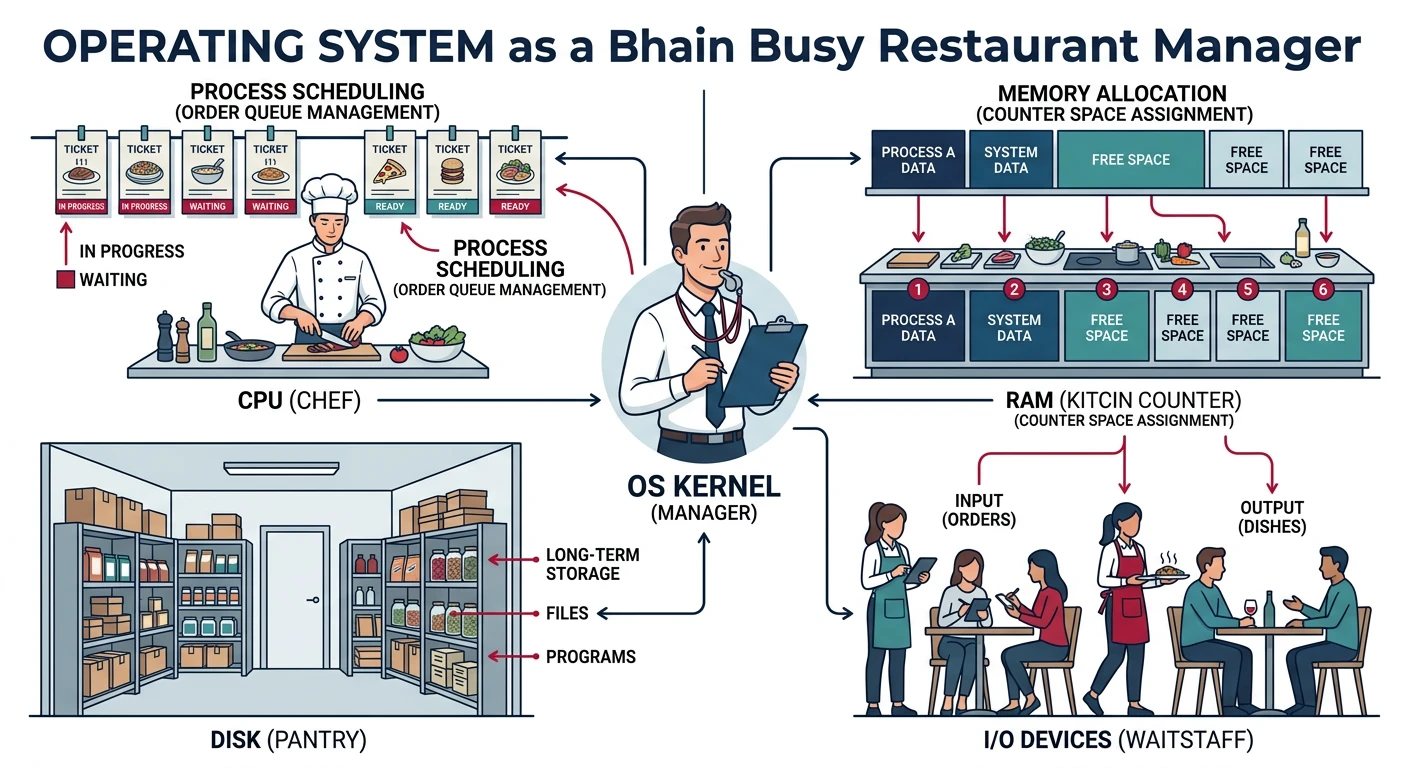
Think of the operating system as the manager of a busy restaurant. The hardware is the kitchen equipment, the waitstaff, and the tables. Without a manager, the cooks would fight over who uses the stove, customers would seat themselves randomly, and orders would get lost. The manager (OS) coordinates everything: who uses which resource, when, and for how long.
The operating system acts as a manager, coordinating CPU, memory, storage, and I/O devices so applications can run without conflicts
OS Development Mastery
Your 18-step learning path • Currently on Step 1
1
Phase 0: Orientation & Big Picture
OS fundamentals, kernel architectures, learning path
An operating system has several core responsibilities:
Resource Management
CPU Time - Deciding which program runs when
Memory - Allocating RAM to programs safely
Storage - Managing files and directories
Devices - Coordinating access to hardware
Protection & Security
Isolation - Programs can't interfere with each other
Permissions - Controlling who can access what
Hardware Protection - Preventing crashes from bad code
Fairness - Ensuring no program hogs resources
Real-World Analogy: The Office Building
Conceptual Model
Imagine an office building (your computer). Each office (process) has workers (threads) doing tasks. The building has limited resources:
Conference Rooms (CPU) - The OS schedules who uses them and for how long
Filing Cabinets (RAM) - The OS assigns cabinet space to each office
The Basement Archive (Disk) - The OS manages the filing system
Building Entrance (I/O Devices) - The OS controls access to the outside world (network, printers)
The kernel is the building's management company - always running in the background, making sure everything works smoothly without tenants having to worry about the details.
Why Build Your Own Operating System?
Building an OS from scratch is one of the most educational projects a programmer can undertake. Here's why:
Benefit
What You'll Learn
Deep Hardware Understanding
How CPUs actually execute code, memory hierarchies, device communication
Systems Programming Mastery
Low-level C, assembly, memory management without libraries
Debugging Excellence
When there's no OS to help, you become a debugging expert
Algorithm Implementation
Schedulers, allocators, data structures without standard libraries
Appreciation for Abstractions
Understanding why modern OS features exist and the problems they solve
Key Insight: You don't need to build a production OS to benefit from this knowledge. Understanding how operating systems work makes you a better programmer at every level - from debugging tricky race conditions to optimizing performance-critical code.
Kernel vs Full Operating System
People often use "kernel" and "operating system" interchangeably, but they're different things. Understanding this distinction is crucial before you start building.
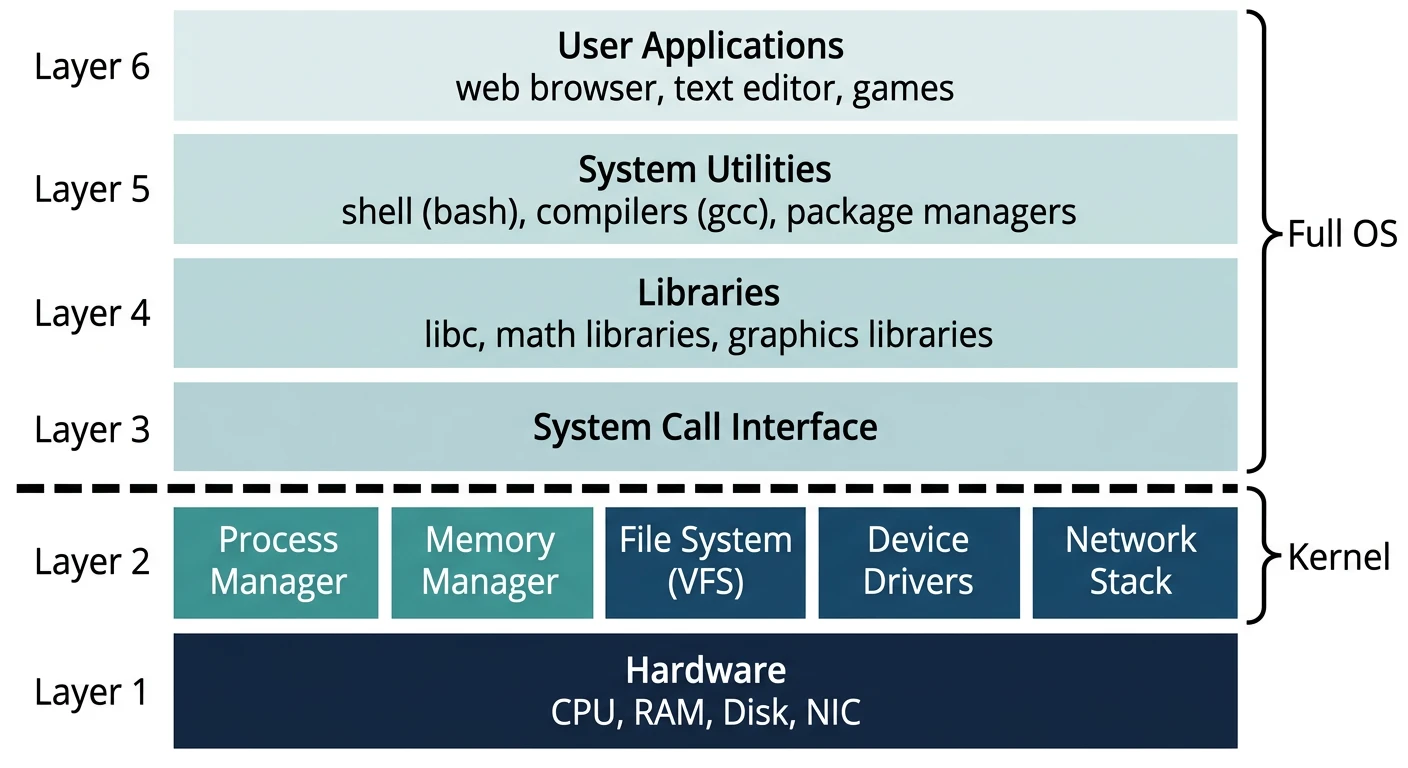
The kernel is the privileged core that manages hardware, while the full OS includes system libraries, services, and user-facing tools on top
The Kernel: Heart of the OS
The kernel is the core component that runs in privileged mode with full hardware access. It provides the most fundamental services:
A full operating system includes the kernel plus many additional components:
System Libraries
Standard C library (libc), math libraries, threading libraries. These wrap kernel system calls into convenient functions like printf() and malloc().
System Services
Background processes (daemons/services) like network managers, print spoolers, and logging services that run without user interaction.
User Interface
Command-line shells like bash, or graphical environments like GNOME, Windows Explorer, or macOS Finder.
What We're Building: In this series, we'll build a kernel first, then gradually add the components needed for a minimal but complete operating system: device drivers, filesystem, process management, a simple shell, and eventually graphics support.
Kernel Architectures
One of the first decisions in OS design is the kernel architecture. This fundamental choice affects everything from performance to reliability to how you'll structure your code.
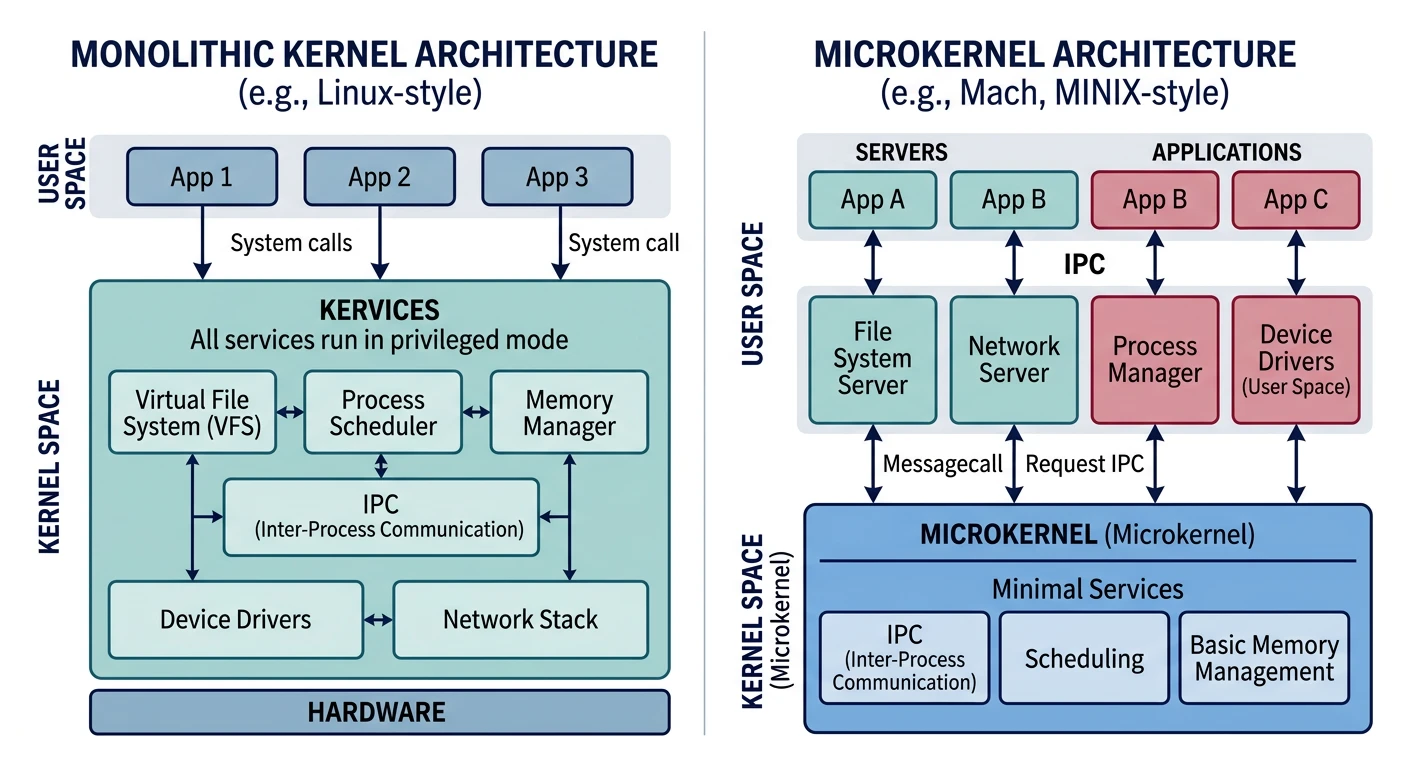
Comparison of kernel architectures: monolithic kernels run all services in kernel space, while microkernels move drivers and services to user space
Monolithic Kernels
In a monolithic kernel, all kernel services run in the same address space with full privileges. Think of it as a single large program that handles everything.
Reliability - Crash in a driver only affects that service, not the whole system
Security - Smaller trusted computing base (TCB)
Modularity - Services can be restarted independently
Disadvantages:
Performance overhead - IPC is slower than direct function calls
Complexity - Everything becomes a distributed systems problem
Less mature tooling - Fewer developers, smaller ecosystems
Real-World Example: MINIX 3
MINIX was created by Andrew Tanenbaum for teaching. MINIX 3 is a true microkernel where even device drivers run in user space. Fun fact: MINIX code runs in every Intel CPU manufactured since 2008 as part of the Intel Management Engine!
Other microkernel examples: QNX (used in cars and medical devices), seL4 (formally verified secure kernel), GNU Hurd.
Hybrid Kernels
A hybrid kernel attempts to combine the best of both worlds. It runs more code in kernel space than a microkernel (for performance) but adopts microkernel ideas like message passing and modularity.
Examples: Windows NT/XP/10/11, macOS/XNU, BeOS/Haiku
For This Series: We'll build a monolithic kernel. It's the most straightforward architecture to learn and implement, and understanding it deeply will help you appreciate why alternatives exist.
Real-World Kernels Compared
Let's examine how major operating systems implement their kernels. Understanding their design decisions will inform our own choices.
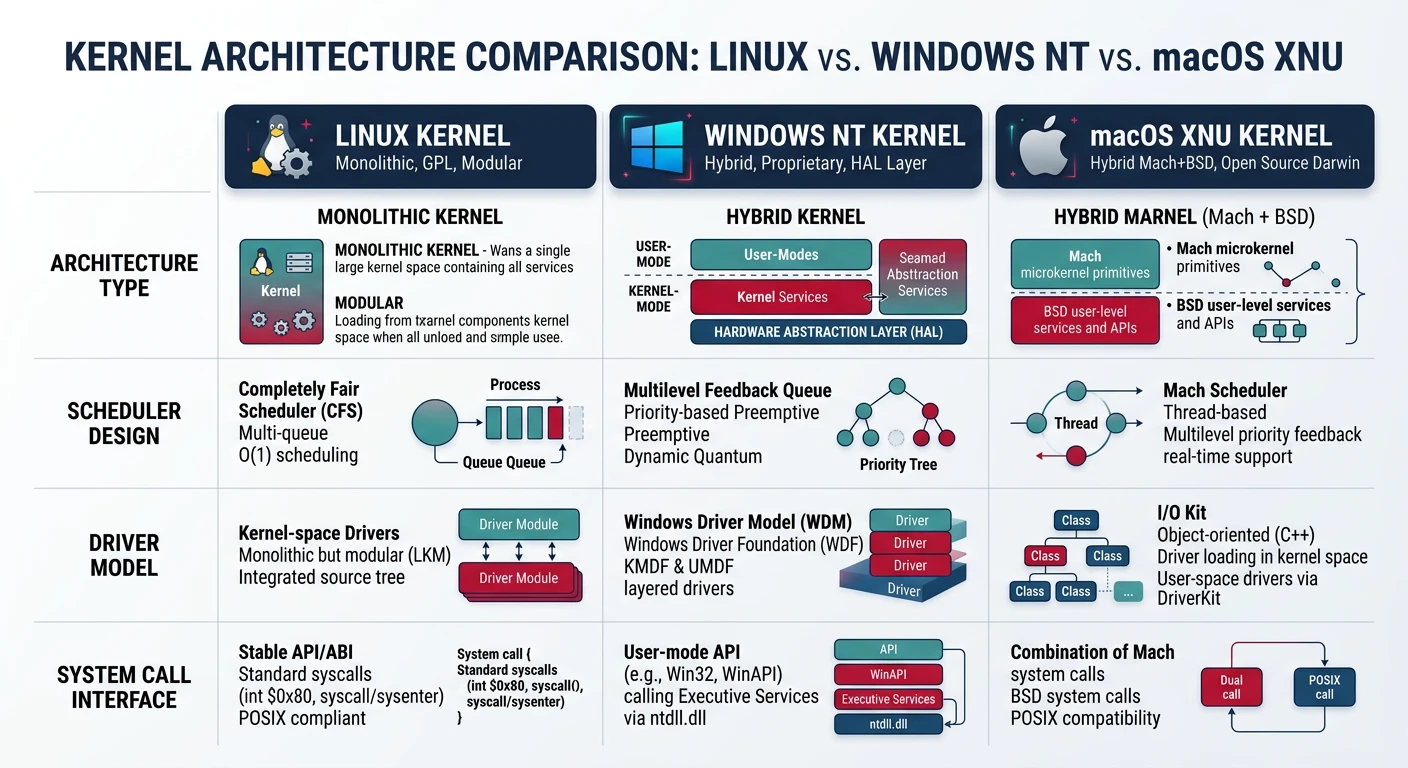
Side-by-side comparison of Linux (monolithic), Windows NT (hybrid), and macOS XNU (hybrid) kernel architectures
Linux Kernel
At a Glance
Architecture: Monolithic
Created: 1991 by Linus Torvalds
Language: C (with some assembly)
License: GPL v2
Lines of Code: ~30+ million
Linux started as a hobby project and grew into the most widely deployed kernel in history. It runs on everything from smartphones (Android) to supercomputers (500+ of the top 500).
Key Features:
Loadable Kernel Modules - Add/remove drivers at runtime
Virtual File System (VFS) - Unified interface for all filesystems
Completely Fair Scheduler (CFS) - Sophisticated process scheduling
Namespaces & cgroups - Foundation for containers (Docker)
Windows NT was designed from scratch by Dave Cutler (who previously designed VMS at DEC). Despite Microsoft often calling it a "hybrid" kernel, it runs most services in kernel mode for performance.
Key Features:
Hardware Abstraction Layer (HAL) - Portable across architectures
Object Manager - Everything is an object (files, processes, threads)
Registry - Centralized configuration database
Multiple Subsystems - Can run Win32, POSIX, OS/2 apps (historically)
XNU stands for "X is Not Unix" - it combines a Mach microkernel (from CMU) with FreeBSD's filesystem, networking, and POSIX APIs. It's a true hybrid that uses Mach for low-level operations and BSD for higher-level services.
Key Features:
Mach Ports - IPC mechanism for communication between services
IOKit - Object-oriented driver framework (C++)
BSD Layer - POSIX-compliant APIs and networking
Grand Central Dispatch - Kernel-level thread pooling
Kernel Comparison Summary
Feature
Linux
Windows NT
macOS XNU
Architecture
Monolithic
Hybrid
Hybrid (Mach+BSD)
Drivers Run In
Kernel space
Kernel space
Kernel space (IOKit)
IPC Mechanism
Pipes, sockets, signals
LPC/ALPC
Mach ports
Open Source
Yes (GPL)
No
Partially (APSL)
Learning Resources
Excellent
Limited
Good
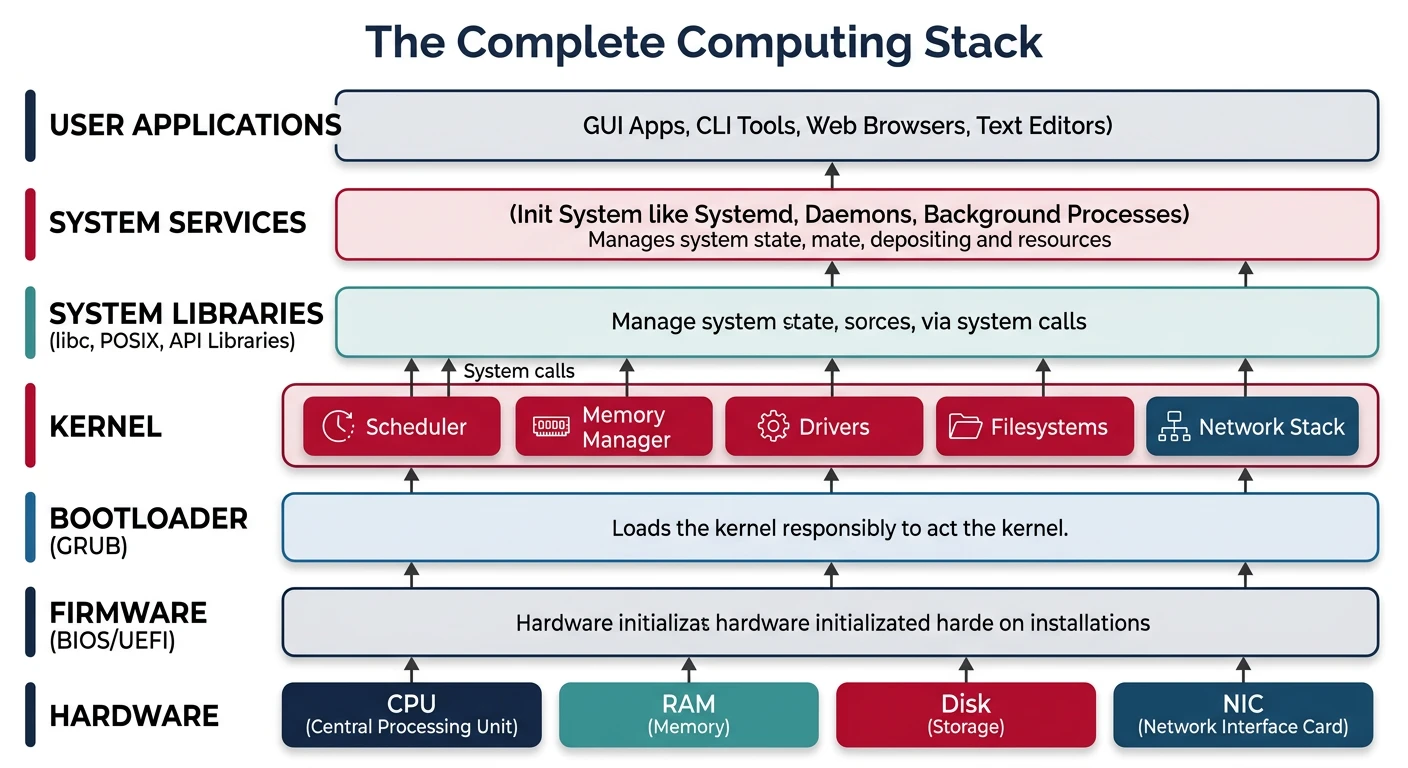
The Complete Computing Stack
Before diving into kernel code, let's understand where the kernel fits in the complete picture - from silicon to applications.
The complete computing stack: hardware → firmware → bootloader → kernel → system libraries → user applications
Hardware Layer
At the bottom is the physical hardware:
Central Processing Unit (CPU)
The brain of the computer. Executes instructions, has registers for fast storage, and multiple privilege levels (rings). Modern CPUs have multiple cores, caches, and special features like virtual memory support.
Memory (RAM)
Fast, volatile storage where running programs live. The CPU can only directly execute code that's in RAM. Memory is organized as a linear array of bytes, each with an address.
Storage (Disk/SSD)
Persistent storage for files and programs. Much slower than RAM but survives power loss. Data must be copied to RAM before the CPU can execute it.
I/O Devices
Everything else: keyboard, mouse, display, network card, USB devices. Each has its own protocol for communication, which drivers abstract away.
Firmware (BIOS/UEFI)
When you press the power button, the CPU doesn't immediately run your operating system. First, it runs firmware - software built into the motherboard.
The Boot Process Overview
1. POWER ON
   └─→ Power Supply sends "Power Good" signal to motherboard

2. CPU RESET
   └─→ CPU starts executing at a fixed address (0xFFFFFFF0)
   └─→ This address is mapped to firmware ROM

3. FIRMWARE INITIALIZATION (BIOS or UEFI)
   └─→ POST (Power-On Self-Test)
   └─→ Initialize hardware (RAM, USB, display)
   └─→ Find bootable device (disk, USB, network)
   └─→ Load boot sector / EFI application

4. BOOTLOADER (GRUB, Windows Boot Manager, etc.)
   └─→ Present boot menu (optional)
   └─→ Load kernel into memory
   └─→ Pass control to kernel

5. KERNEL INITIALIZATION
   └─→ Set up memory management
   └─→ Initialize drivers
   └─→ Start first user process

6. USER SPACE
   └─→ Init system starts services
   └─→ Login manager appears
   └─→ You start doing work!
Stability - The kernel can terminate misbehaving programs
System Calls: The Bridge
User programs need kernel services (file access, network, memory). They can't just call kernel functions directly (different privilege level). Instead, they use system calls:
/* User space: "I want to write to a file" */
write(fd, buffer, size);    /* This triggers a system call */

/* Internally:
   1. Arguments placed in registers
   2. "syscall" instruction executed
   3. CPU switches to Ring 0
   4. Kernel writes data to file
   5. CPU switches back to Ring 3
   6. Control returns to user program
*/
Milestone: Run multiple programs, interactive shell
Phases 11-17: Advanced
64-bit mode and UEFI
Graphics and windowing
Device drivers
Performance and security
Milestone: Modern, full-featured operating system
Tools You'll Use
Tool
Purpose
Why We Use It
QEMU
Emulator
Test your OS without rebooting real hardware
GCC Cross-Compiler
C Compiler
Compile code for your custom target (not your host OS)
NASM
Assembler
Low-level bootstrap code and hardware interaction
GNU LD
Linker
Combine object files into the kernel binary
GDB
Debugger
Step through kernel code, inspect memory
Make
Build System
Automate compilation and linking
Development Environment: We'll set up everything in Phase 1. Works on Windows (WSL), macOS, and Linux.
Exercises
Before moving to Phase 1, strengthen your foundation with these exercises:
Exercise 1: Explore Your System
Linux/macOS users:
# View kernel version
uname -a

# See kernel boot messages
dmesg | head -50

# List loaded kernel modules
lsmod

# View system calls made by a program
strace ls
Windows users:
# View system information (PowerShell)
systeminfo

# View kernel drivers
driverquery

# View system calls (requires Process Monitor from Sysinternals)
Question: What kernel version is your computer running? How many modules are loaded?