We use cookies to enhance your browsing experience, serve personalized content, and analyze our traffic.
By clicking "Accept All", you consent to our use of cookies. See our
Privacy Policy
for more information.
Implement VGA text mode for screen output, handle keyboard input via PS/2, and build the printf/putc functions that let your kernel communicate with users.
Phase 4 Goals: By the end of this phase, your kernel will have a working text display with colors, a cursor, scrolling, and keyboard input. You'll have printf() for output and getchar() for input—the basic tools for user interaction.
Your kernel can now execute C code in protected mode - but it's silent. A kernel that can't communicate with users isn't very useful! In this phase, we'll build the fundamental I/O layer that every operating system needs: text display and keyboard input.
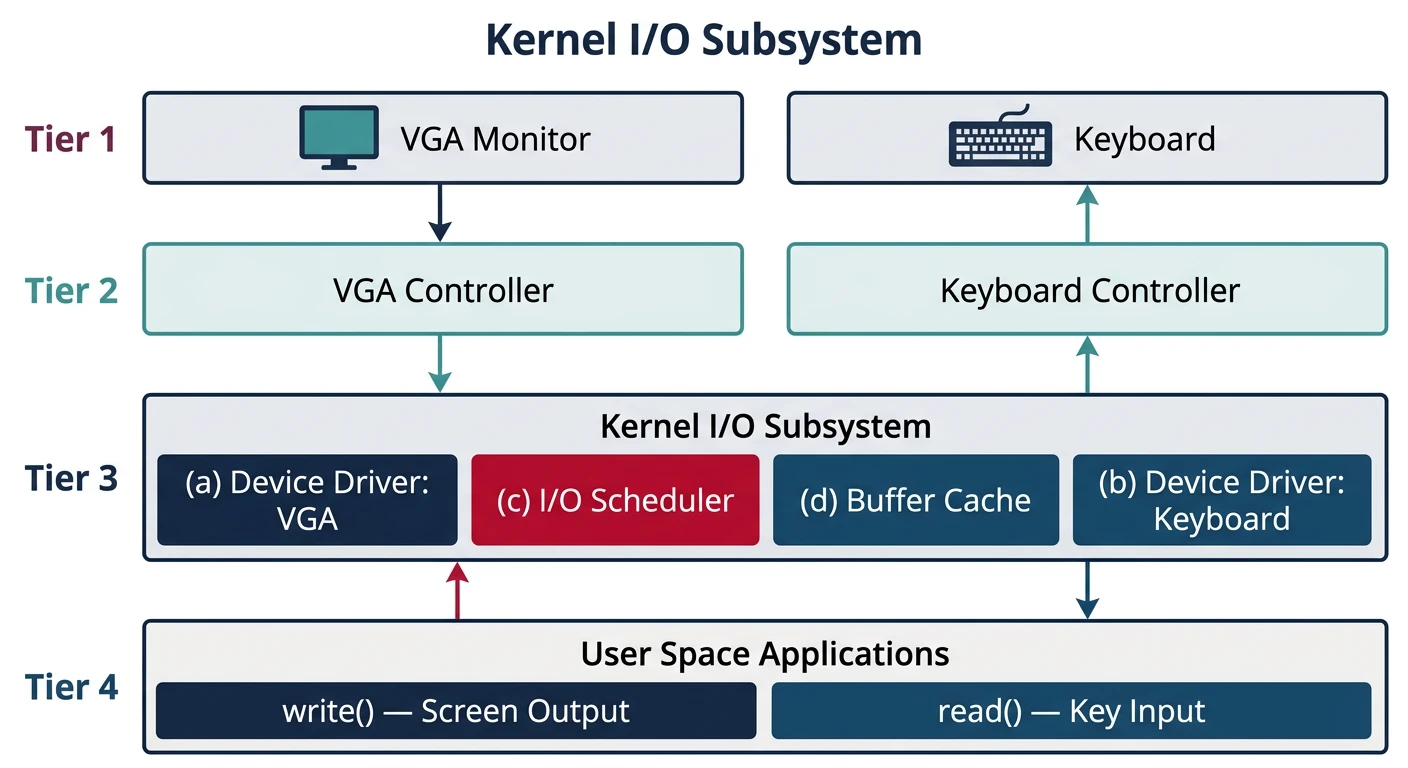
Kernel I/O architecture: VGA text mode provides screen output at 0xB8000, while the PS/2 controller delivers keyboard scan codes via port 0x60
A Brief History of Text Mode
VGA (Video Graphics Array) was introduced by IBM in 1987 and became the standard PC display interface. Its text mode (Mode 3) provides:
80 columns × 25 rows = 2000 characters
16 colors for foreground and background
256 characters (extended ASCII/Code Page 437)
Memory-mapped I/O at 0xB8000 for instant updates
Even today, most BIOS/UEFI setups default to VGA-compatible text mode before loading a graphical OS!
Key Insight: VGA text mode is elegant in its simplicity: each character on screen is just two bytes in memory—one for the character, one for the color. Direct memory access means instant updates without any driver complexity.
Why I/O Matters
Without input and output, your kernel is a black box. Proper I/O allows you to:
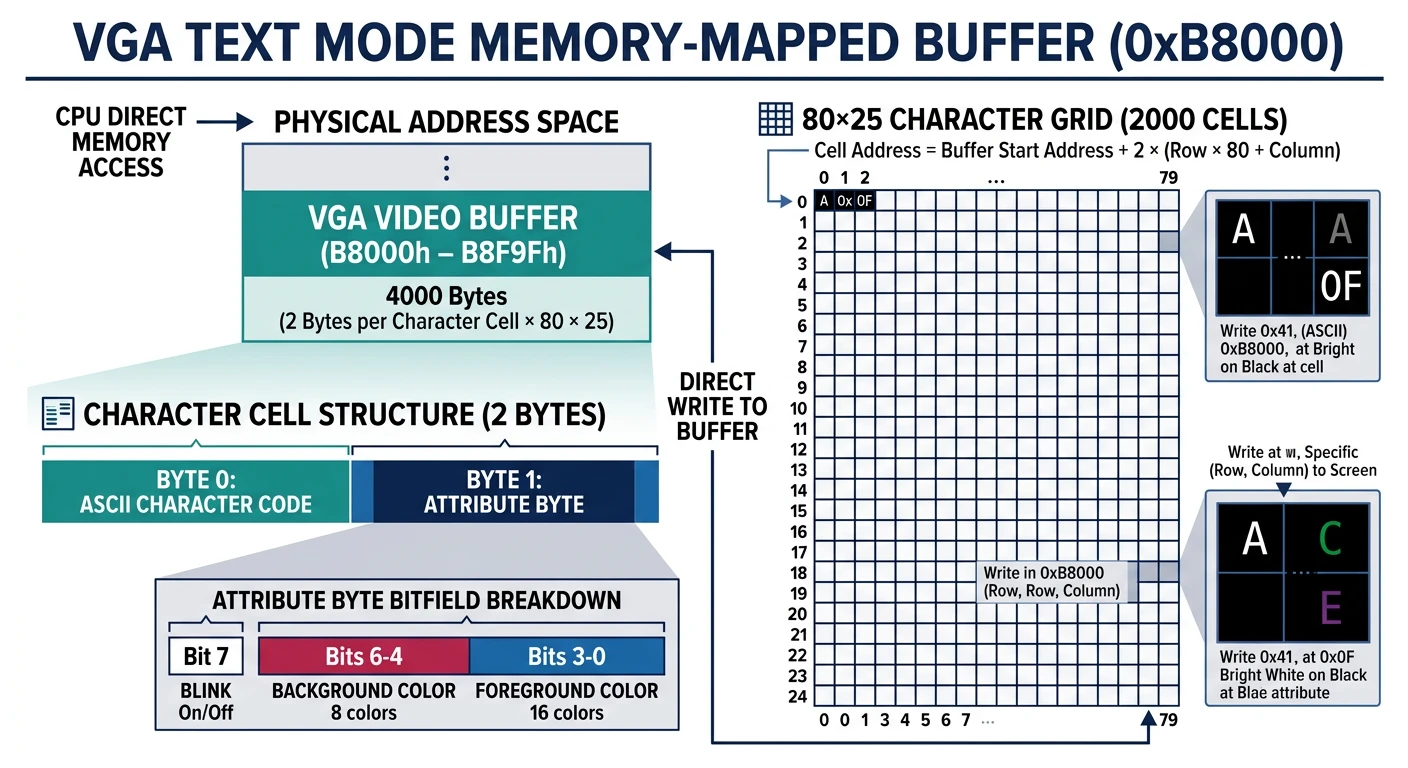
VGA text mode uses memory-mapped I/O. The video buffer lives at physical address 0xB8000, and any writes to this memory instantly appear on screen!
VGA text mode memory layout: each screen cell at 0xB8000 is 2 bytes — one for the ASCII character and one for the color attribute (foreground + background)
Cursor Shapes: The cursor is drawn between scanlines. Standard text mode has 16 scanlines per character cell. enable_cursor(13, 15) gives an underline cursor; enable_cursor(0, 15) gives a block cursor.
Screen Output Functions
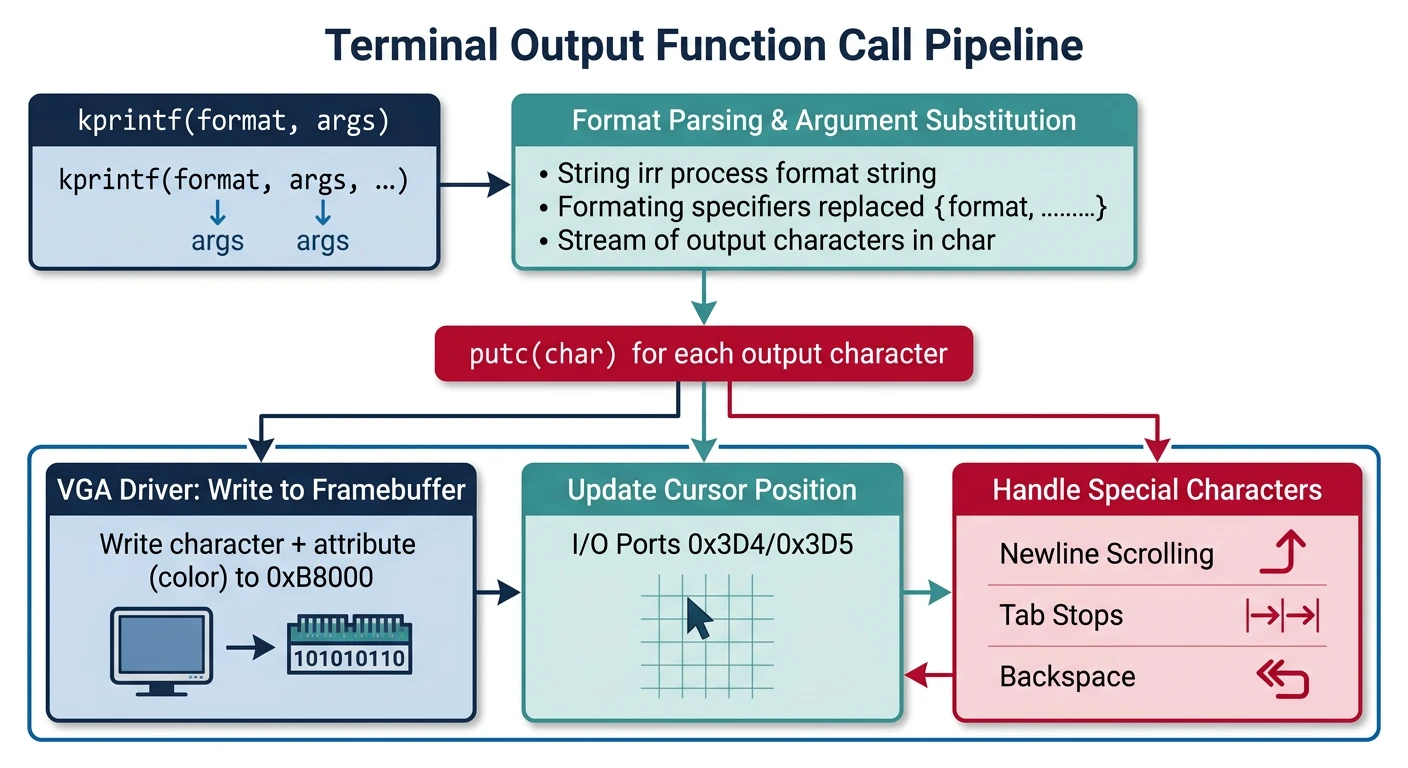
Now we'll build a complete terminal-style output system. We'll create layered functions: putc for single characters, puts for strings, and kprintf for formatted output—the foundation of all kernel debugging!
Terminal output pipeline: kprintf formats strings, puts writes character sequences, and putc handles individual characters with cursor management and scrolling
putc Implementation
The putc function is the lowest-level output primitive. It handles every character including special control characters:
CONTROL CHARACTERS FOR TERMINAL OUTPUT
═══════════════════════════════════════════════════════════════

Character     Code    Effect
─────────────────────────────────────────────────────────────
'\n' (LF)     0x0A    Move to start of next line (newline)
'\r' (CR)     0x0D    Move to start of current line
'\t' (TAB)    0x09    Move to next 8-column boundary
'\b' (BS)     0x08    Move cursor back, erase character
'\f' (FF)     0x0C    Clear screen (form feed)
Printable    0x20-7E  Display character at cursor position
/* terminal.c - Complete terminal output implementation */

#include "vga.h"
#include "io.h"
#include <stdint.h>
#include <stdbool.h>

/* Terminal state */
static int term_col = 0;           /* Current column (0-79) */
static int term_row = 0;           /* Current row (0-24) */
static uint8_t term_color = 0x0F;  /* White on black default */

/* VGA buffer pointer */
static volatile vga_char_t* const VGA_BUFFER = (vga_char_t*)VGA_ADDRESS;

/* Forward declarations */
static void terminal_scroll(void);
static void terminal_newline(void);
static void terminal_update_cursor(void);

/* Set terminal color */
void terminal_set_color(uint8_t color) {
    term_color = color;
}

/* Clear the entire screen */
void terminal_clear(void) {
    for (int i = 0; i < VGA_SIZE; i++) {
        VGA_BUFFER[i].character = ' ';
        VGA_BUFFER[i].attribute = term_color;
    }
    term_col = 0;
    term_row = 0;
    terminal_update_cursor();
}

/* Print a single character */
void putc(char c) {
    switch (c) {
        case '\n':  /* Newline - move to next line, column 0 */
            terminal_newline();
            break;

        case '\r':  /* Carriage return - column 0 */
            term_col = 0;
            break;

        case '\t':  /* Tab - advance to next 8-column boundary */
            term_col = (term_col + 8) & ~7;
            if (term_col >= VGA_WIDTH) {
                terminal_newline();
            }
            break;

        case '\b':  /* Backspace - erase previous character */
            if (term_col > 0) {
                term_col--;
                int idx = term_row * VGA_WIDTH + term_col;
                VGA_BUFFER[idx].character = ' ';
                VGA_BUFFER[idx].attribute = term_color;
            }
            break;

        case '\f':  /* Form feed - clear screen */
            terminal_clear();
            break;

        default:    /* Printable character */
            if (c >= ' ' && c <= '~') {
                int idx = term_row * VGA_WIDTH + term_col;
                VGA_BUFFER[idx].character = c;
                VGA_BUFFER[idx].attribute = term_color;
                term_col++;

                if (term_col >= VGA_WIDTH) {
                    terminal_newline();
                }
            }
            break;
    }

    terminal_update_cursor();
}

/* Move to next line, scrolling if necessary */
static void terminal_newline(void) {
    term_col = 0;
    term_row++;

    if (term_row >= VGA_HEIGHT) {
        terminal_scroll();
        term_row = VGA_HEIGHT - 1;
    }
}

/* Update hardware cursor to match terminal position */
static void terminal_update_cursor(void) {
    vga_set_cursor(term_col, term_row);
}
puts Implementation
Building on putc, puts prints entire strings at once:
/* Print a null-terminated string */
void puts(const char* str) {
    while (*str) {
        putc(*str++);
    }
}

/* Print a string with newline */
void puts_nl(const char* str) {
    puts(str);
    putc('\n');
}

/* Print a string at specific position with color */
void puts_at(const char* str, int x, int y, uint8_t color) {
    uint8_t old_color = term_color;
    int old_col = term_col;
    int old_row = term_row;

    term_col = x;
    term_row = y;
    term_color = color;

    puts(str);

    term_color = old_color;
    term_col = old_col;
    term_row = old_row;
    terminal_update_cursor();
}
kprintf Implementation
A kernel-mode printf is essential for debugging. Here's a complete implementation supporting common format specifiers:
KPRINTF FORMAT SPECIFIERS
═══════════════════════════════════════════════════════════════

Specifier   Type               Example           Output
─────────────────────────────────────────────────────────────
%c          char               kprintf("%c", 'A')    A
%s          string             kprintf("%s", "hi")   hi
%d          signed int         kprintf("%d", -42)    -42
%u          unsigned int       kprintf("%u", 42)     42
%x          hex (lowercase)    kprintf("%x", 255)    ff
%X          hex (uppercase)    kprintf("%X", 255)    FF
%p          pointer            kprintf("%p", ptr)    0x00102030
%%          literal %          kprintf("%%")         %
/* kprintf - kernel printf implementation */

#include <stdarg.h>

/* Helper: print unsigned integer in given base */
static void print_uint(unsigned int value, int base, bool uppercase) {
    static const char digits_lower[] = "0123456789abcdef";
    static const char digits_upper[] = "0123456789ABCDEF";
    const char* digits = uppercase ? digits_upper : digits_lower;

    char buffer[32];
    int pos = 0;

    /* Special case for zero */
    if (value == 0) {
        putc('0');
        return;
    }

    /* Build digits in reverse */
    while (value > 0) {
        buffer[pos++] = digits[value % base];
        value /= base;
    }

    /* Print in correct order */
    while (pos > 0) {
        putc(buffer[--pos]);
    }
}

/* Helper: print signed integer */
static void print_int(int value) {
    if (value < 0) {
        putc('-');
        /* Handle INT_MIN edge case */
        if (value == (-2147483647 - 1)) {
            puts("2147483648");
            return;
        }
        value = -value;
    }
    print_uint((unsigned int)value, 10, false);
}

/* Helper: print pointer */
static void print_ptr(void* ptr) {
    puts("0x");
    unsigned long value = (unsigned long)ptr;
    /* Print all 8 hex digits (32-bit pointer) */
    for (int i = 28; i >= 0; i -= 4) {
        int digit = (value >> i) & 0xF;
        putc("0123456789ABCDEF"[digit]);
    }
}

/* Main kprintf implementation */
int kprintf(const char* fmt, ...) {
    va_list args;
    va_start(args, fmt);

    int count = 0;

    while (*fmt) {
        if (*fmt != '%') {
            putc(*fmt++);
            count++;
            continue;
        }

        fmt++;  /* Skip '%' */

        switch (*fmt) {
            case 'c':
                putc((char)va_arg(args, int));
                count++;
                break;

            case 's': {
                const char* s = va_arg(args, const char*);
                while (*s) {
                    putc(*s++);
                    count++;
                }
                break;
            }

            case 'd':
            case 'i':
                print_int(va_arg(args, int));
                count++;
                break;

            case 'u':
                print_uint(va_arg(args, unsigned int), 10, false);
                count++;
                break;

            case 'x':
                print_uint(va_arg(args, unsigned int), 16, false);
                count++;
                break;

            case 'X':
                print_uint(va_arg(args, unsigned int), 16, true);
                count++;
                break;

            case 'p':
                print_ptr(va_arg(args, void*));
                count++;
                break;

            case '%':
                putc('%');
                count++;
                break;

            default:
                /* Unknown specifier - print as-is */
                putc('%');
                putc(*fmt);
                count += 2;
                break;
        }

        fmt++;
    }

    va_end(args);
    return count;
}
Understanding <stdarg.h>: The macros va_start, va_arg, and va_end work directly with the CPU stack to access variadic arguments. GCC provides these as builtins, so they work without any standard library!
Screen Scrolling
When text reaches the bottom of the screen, we need to scroll up. This involves copying memory and clearing the last line:
/* Scroll the screen up by one line */
static void terminal_scroll(void) {
    /* Move lines 1-24 up to positions 0-23 */
    for (int y = 0; y < VGA_HEIGHT - 1; y++) {
        for (int x = 0; x < VGA_WIDTH; x++) {
            int dst = y * VGA_WIDTH + x;
            int src = (y + 1) * VGA_WIDTH + x;
            VGA_BUFFER[dst] = VGA_BUFFER[src];
        }
    }

    /* Clear the last line */
    int last_line = (VGA_HEIGHT - 1) * VGA_WIDTH;
    for (int x = 0; x < VGA_WIDTH; x++) {
        VGA_BUFFER[last_line + x].character = ' ';
        VGA_BUFFER[last_line + x].attribute = term_color;
    }
}

/* Optimized scroll using memcpy (requires memory functions) */
void terminal_scroll_fast(void) {
    /* Move all rows except first up by one row worth of bytes */
    size_t line_bytes = VGA_WIDTH * sizeof(vga_char_t);
    size_t copy_bytes = (VGA_HEIGHT - 1) * line_bytes;

    /* Copy memory up */
    memcpy((void*)VGA_BUFFER,
           (void*)(VGA_BUFFER + VGA_WIDTH),
           copy_bytes);

    /* Clear last line */
    vga_char_t blank = { .character = ' ', .attribute = term_color };
    for (int x = 0; x < VGA_WIDTH; x++) {
        VGA_BUFFER[(VGA_HEIGHT - 1) * VGA_WIDTH + x] = blank;
    }
}
Complete Terminal Demo
Put it all together in your kernel entry point:
/* kernel.c - Demonstrating terminal functions */

void kernel_main(void) {
    /* Initialize terminal */
    terminal_clear();

    /* Set colors and print welcome message */
    terminal_set_color(vga_make_color(VGA_LIGHT_GREEN, VGA_BLACK));
    puts_nl("MiniOS v0.1 - Display System Demo");

    terminal_set_color(vga_make_color(VGA_WHITE, VGA_BLACK));
    puts("━━━━━━━━━━━━━━━━━━━━━━━━━━━━━━━━━━━━━━━━━━━━━\n\n");

    /* Test kprintf */
    kprintf("Testing kprintf:\n");
    kprintf("  Integer: %d\n", -12345);
    kprintf("  Unsigned: %u\n", 12345);
    kprintf("  Hex: 0x%X\n", 0xDEADBEEF);
    kprintf("  String: %s\n", "Hello, kernel!");
    kprintf("  Pointer: %p\n", (void*)0xB8000);
    kprintf("  Char: '%c'\n", 'X');

    /* Test colors */
    terminal_set_color(vga_make_color(VGA_LIGHT_RED, VGA_BLACK));
    kprintf("\n[ERROR] ");
    terminal_set_color(vga_make_color(VGA_WHITE, VGA_BLACK));
    puts("This is an error message\n");

    terminal_set_color(vga_make_color(VGA_YELLOW, VGA_BLACK));
    kprintf("[WARN]  ");
    terminal_set_color(vga_make_color(VGA_WHITE, VGA_BLACK));
    puts("This is a warning\n");

    terminal_set_color(vga_make_color(VGA_LIGHT_CYAN, VGA_BLACK));
    kprintf("[INFO]  ");
    terminal_set_color(vga_make_color(VGA_WHITE, VGA_BLACK));
    puts("This is informational\n");

    /* Halt */
    for (;;) {
        __asm__ volatile ("hlt");
    }
}
Output Demo
Keyboard Input
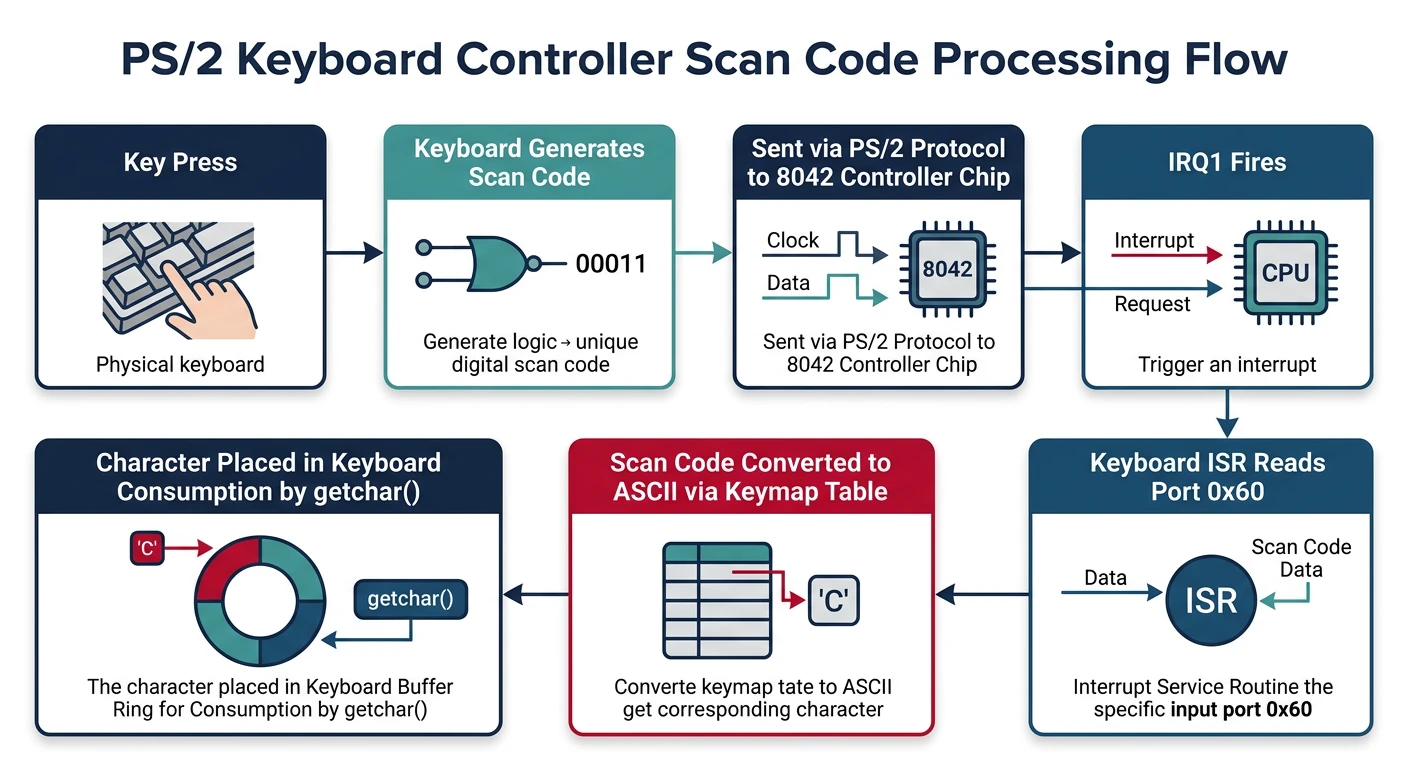
Now let's tackle the input side. Reading from a keyboard is more complex than writing to a screen because keyboards generate scan codes that we must translate to characters.
Keyboard input flow: key press generates a scan code, the PS/2 controller buffers it at port 0x60, and our driver translates it to an ASCII character
PS/2 Controller
The PS/2 controller (Intel 8042) is the traditional keyboard controller. Even modern PCs emulate it for compatibility. It uses two I/O ports:
PS/2 CONTROLLER PORTS
═══════════════════════════════════════════════════════════════

Port 0x60 - Data Port (R/W)
├── Read:  Get scan code or response from keyboard
└── Write: Send command to keyboard

Port 0x64 - Status/Command Port
├── Read:  Get controller status byte
└── Write: Send command to controller

STATUS REGISTER (Port 0x64, Read)
┌────┬────┬────┬────┬────┬────┬────┬────┐
│Bit7│Bit6│Bit5│Bit4│Bit3│Bit2│Bit1│Bit0│
│PRTY│TMOT│AUX │KLCK│CMD │SYS │IBF │OBF │
└────┴────┴────┴────┴────┴────┴────┴────┘

OBF (Bit 0): Output Buffer Full - data available to read
IBF (Bit 1): Input Buffer Full - controller processing command
SYS (Bit 2): System Flag - 1 after self-test passed
CMD (Bit 3): Command/Data - 1 = last write was command
AUX (Bit 5): Auxiliary Output - 1 = mouse data, 0 = keyboard
/* keyboard.h - PS/2 keyboard interface */
#ifndef KEYBOARD_H
#define KEYBOARD_H

#include <stdint.h>
#include "io.h"

/* PS/2 controller ports */
#define PS2_DATA_PORT    0x60   /* Read/write keyboard data */
#define PS2_STATUS_PORT  0x64   /* Read status register */
#define PS2_COMMAND_PORT 0x64   /* Write commands */

/* Status register bits */
#define PS2_STATUS_OUTPUT_FULL   0x01  /* Can read from port 0x60 */
#define PS2_STATUS_INPUT_FULL    0x02  /* Cannot write yet */
#define PS2_STATUS_SYSTEM        0x04  /* Self-test passed */
#define PS2_STATUS_COMMAND       0x08  /* Last write was command */
#define PS2_STATUS_TIMEOUT       0x40  /* Timeout error */
#define PS2_STATUS_PARITY        0x80  /* Parity error */

/* Wait until we can read from keyboard */
static inline void ps2_wait_output(void) {
    while (!(inb(PS2_STATUS_PORT) & PS2_STATUS_OUTPUT_FULL));
}

/* Wait until we can write to keyboard */
static inline void ps2_wait_input(void) {
    while (inb(PS2_STATUS_PORT) & PS2_STATUS_INPUT_FULL);
}

/* Check if data is available */
static inline int ps2_data_available(void) {
    return inb(PS2_STATUS_PORT) & PS2_STATUS_OUTPUT_FULL;
}

#endif
Scan Codes
Keyboards don't send ASCII characters—they send scan codes representing physical key positions. Every key press generates a "make" code, and every release generates a "break" code:
SCAN CODE SETS
═══════════════════════════════════════════════════════════════

Scan Code Set 1 (XT) - Legacy, what BIOS emulates
Scan Code Set 2 (AT) - Most common native keyboard set
Scan Code Set 3 (PS/2) - Rarely used

SCAN CODE SET 1 EXAMPLES (what we'll use):
┌────────────────────────────────────────────────────────────┐
│ Key      │ Make Code │ Break Code │ Notes                 │
├──────────┼───────────┼────────────┼───────────────────────┤
│ A        │ 0x1E      │ 0x9E       │ Break = Make + 0x80   │
│ Enter    │ 0x1C      │ 0x9C       │                       │
│ Space    │ 0x39      │ 0xB9       │                       │
│ Escape   │ 0x01      │ 0x81       │                       │
│ L-Shift  │ 0x2A      │ 0xAA       │ Modifier key          │
│ L-Ctrl   │ 0x1D      │ 0x9D       │ Modifier key          │
│ Keypad * │ 0xE0 0x37 │ 0xE0 0xB7  │ Extended (2-byte)     │
│ Arrow Up │ 0xE0 0x48 │ 0xE0 0xC8  │ Extended (2-byte)     │
└────────────────────────────────────────────────────────────┘

The 0xE0 prefix indicates extended keys (added with 101-key keyboards)
Polling means continuously checking if data is available. It's simple but wasteful—later we'll replace this with interrupts:
/* keyboard.c - Keyboard polling driver */

#include "keyboard.h"

/* Keyboard state */
static int shift_pressed = 0;
static int ctrl_pressed = 0;
static int alt_pressed = 0;
static int caps_lock = 0;

/* Special scan codes */
#define KEY_ESCAPE      0x01
#define KEY_BACKSPACE   0x0E
#define KEY_TAB         0x0F
#define KEY_ENTER       0x1C
#define KEY_CTRL        0x1D
#define KEY_LSHIFT      0x2A
#define KEY_RSHIFT      0x36
#define KEY_ALT         0x38
#define KEY_SPACE       0x39
#define KEY_CAPSLOCK    0x3A
#define KEY_F1          0x3B
#define KEY_F10         0x44
#define KEY_NUMLOCK     0x45
#define KEY_SCROLLLOCK  0x46

/* Read a raw scan code (blocking) */
uint8_t keyboard_read_scancode(void) {
    ps2_wait_output();
    return inb(PS2_DATA_PORT);
}

/* Read a raw scan code (non-blocking, returns 0 if none) */
uint8_t keyboard_read_scancode_nowait(void) {
    if (ps2_data_available()) {
        return inb(PS2_DATA_PORT);
    }
    return 0;
}

/* Get a character (blocking, handles modifiers) */
char keyboard_getchar(void) {
    while (1) {
        uint8_t scancode = keyboard_read_scancode();

        /* Handle key release (break code) */
        if (scancode & 0x80) {
            uint8_t release = scancode & 0x7F;

            if (release == KEY_LSHIFT || release == KEY_RSHIFT) {
                shift_pressed = 0;
            } else if (release == KEY_CTRL) {
                ctrl_pressed = 0;
            } else if (release == KEY_ALT) {
                alt_pressed = 0;
            }
            continue;  /* Keep waiting for a key press */
        }

        /* Handle modifier key presses */
        if (scancode == KEY_LSHIFT || scancode == KEY_RSHIFT) {
            shift_pressed = 1;
            continue;
        }
        if (scancode == KEY_CTRL) {
            ctrl_pressed = 1;
            continue;
        }
        if (scancode == KEY_ALT) {
            alt_pressed = 1;
            continue;
        }
        if (scancode == KEY_CAPSLOCK) {
            caps_lock = !caps_lock;
            continue;
        }

        /* Look up ASCII value */
        char c;
        int use_shift = shift_pressed;

        /* Caps lock affects only letters */
        if (scancode >= 0x10 && scancode <= 0x19) {  /* Q-P */
            use_shift ^= caps_lock;
        } else if (scancode >= 0x1E && scancode <= 0x26) {  /* A-L */
            use_shift ^= caps_lock;
        } else if (scancode >= 0x2C && scancode <= 0x32) {  /* Z-M */
            use_shift ^= caps_lock;
        }

        if (use_shift) {
            c = scancode_ascii_shift[scancode];
        } else {
            c = scancode_ascii[scancode];
        }

        /* Return valid characters */
        if (c != 0) {
            return c;
        }
    }
}
Polling Wastes CPU! The keyboard_getchar() function spins in a tight loop, consuming 100% CPU while waiting. In Phase 5, we'll replace this with interrupt-driven input where the CPU sleeps until a key is pressed.
Extended Keys & Special Handling
Modern keyboards have extended keys (arrows, Insert, Delete, etc.) that send multi-byte scan codes starting with 0xE0:
/* Extended key handling */

/* Extended key codes (after 0xE0 prefix) */
#define KEY_EXT_UP       0x48
#define KEY_EXT_DOWN     0x50
#define KEY_EXT_LEFT     0x4B
#define KEY_EXT_RIGHT    0x4D
#define KEY_EXT_INSERT   0x52
#define KEY_EXT_DELETE   0x53
#define KEY_EXT_HOME     0x47
#define KEY_EXT_END      0x4F
#define KEY_EXT_PAGEUP   0x49
#define KEY_EXT_PAGEDOWN 0x51

/* Special key result codes (returned instead of ASCII) */
#define KEYCODE_UP       0x100
#define KEYCODE_DOWN     0x101
#define KEYCODE_LEFT     0x102
#define KEYCODE_RIGHT    0x103
#define KEYCODE_INSERT   0x104
#define KEYCODE_DELETE   0x105
#define KEYCODE_HOME     0x106
#define KEYCODE_END      0x107
#define KEYCODE_PAGEUP   0x108
#define KEYCODE_PAGEDOWN 0x109

/* Get key with extended key support - returns int to allow codes > 255 */
int keyboard_getkey(void) {
    uint8_t scancode = keyboard_read_scancode();

    /* Handle 0xE0 extended keys */
    if (scancode == 0xE0) {
        scancode = keyboard_read_scancode();

        /* Ignore break codes for extended keys */
        if (scancode & 0x80) {
            return 0;
        }

        switch (scancode) {
            case KEY_EXT_UP:       return KEYCODE_UP;
            case KEY_EXT_DOWN:     return KEYCODE_DOWN;
            case KEY_EXT_LEFT:     return KEYCODE_LEFT;
            case KEY_EXT_RIGHT:    return KEYCODE_RIGHT;
            case KEY_EXT_INSERT:   return KEYCODE_INSERT;
            case KEY_EXT_DELETE:   return KEYCODE_DELETE;
            case KEY_EXT_HOME:     return KEYCODE_HOME;
            case KEY_EXT_END:      return KEYCODE_END;
            case KEY_EXT_PAGEUP:   return KEYCODE_PAGEUP;
            case KEY_EXT_PAGEDOWN: return KEYCODE_PAGEDOWN;
            default:               return 0;
        }
    }

    /* Handle regular keys (reuse modifier logic from keyboard_getchar) */
    /* ... same logic as before ... */

    return scancode_ascii[scancode];
}
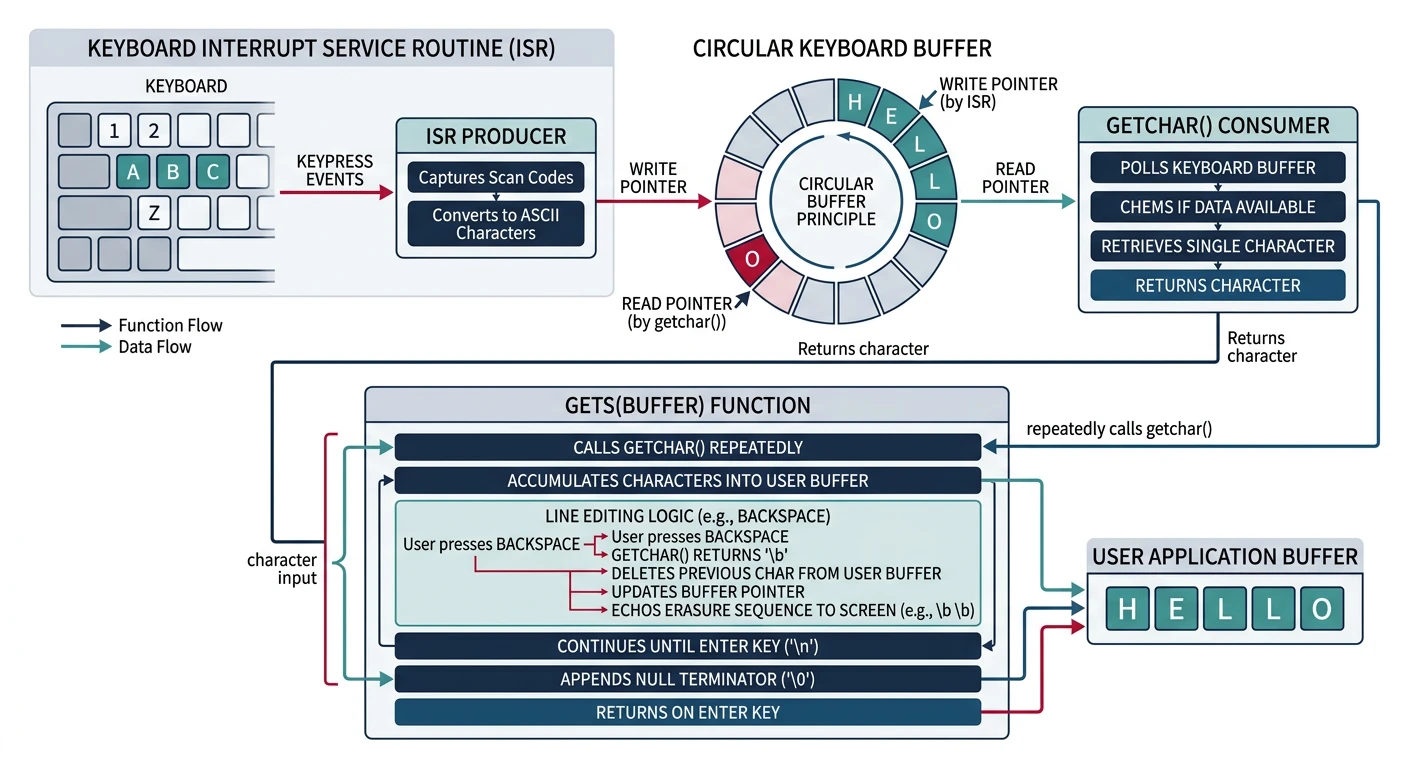
High-Level Input Functions
Let's build user-friendly input functions that combine our keyboard driver with terminal output for proper echoing and line editing.
High-level input: getchar reads and echoes one character, while gets builds a full line buffer with backspace handling and newline termination
getchar Implementation
A proper getchar echoes the character to the screen so users see what they're typing:
/* stdio.c - High-level I/O functions */

#include "terminal.h"
#include "keyboard.h"

/* Get a single character with echo */
char getchar(void) {
    char c = keyboard_getchar();

    /* Echo printable characters */
    if (c >= ' ' && c <= '~') {
        putc(c);
    } else if (c == '\n' || c == '\r') {
        putc('\n');
    }

    return c;
}

/* Get a single character without echo (for passwords, etc.) */
char getchar_noecho(void) {
    return keyboard_getchar();
}

/* Check if a key is available (non-blocking) */
int kbhit(void) {
    return ps2_data_available();
}
gets Implementation with Line Editing
A proper line input function needs to handle backspace, display limits, and buffer overflow protection:
/* Read a line of input with editing support */
char* gets(char* buffer, int max_length) {
    int pos = 0;
    max_length--;  /* Reserve space for null terminator */

    while (1) {
        char c = keyboard_getchar();

        if (c == '\n' || c == '\r') {
            /* Enter pressed - complete the line */
            buffer[pos] = '\0';
            putc('\n');
            return buffer;
        }
        else if (c == '\b' || c == 127) {  /* Backspace or DEL */
            if (pos > 0) {
                pos--;
                /* Erase character on screen: back, space, back */
                puts("\b \b");
            }
        }
        else if (c == 0x1B) {  /* Escape - cancel input */
            buffer[0] = '\0';
            putc('\n');
            return NULL;
        }
        else if (c == 0x15) {  /* Ctrl+U - clear line */
            while (pos > 0) {
                pos--;
                puts("\b \b");
            }
        }
        else if (c >= ' ' && c <= '~') {  /* Printable character */
            if (pos < max_length) {
                buffer[pos++] = c;
                putc(c);
            }
            /* Silently ignore if buffer is full */
        }
    }
}

/* Read a line with a prompt */
char* prompt(const char* prompt_str, char* buffer, int max_length) {
    puts(prompt_str);
    return gets(buffer, max_length);
}

/* Read a password (no echo) */
char* getpass(const char* prompt_str, char* buffer, int max_length) {
    puts(prompt_str);

    int pos = 0;
    max_length--;

    while (1) {
        char c = keyboard_getchar();

        if (c == '\n' || c == '\r') {
            buffer[pos] = '\0';
            putc('\n');
            return buffer;
        }
        else if (c == '\b' || c == 127) {
            if (pos > 0) {
                pos--;
                /* No visual feedback for password */
            }
        }
        else if (c >= ' ' && c <= '~') {
            if (pos < max_length) {
                buffer[pos++] = c;
                putc('*');  /* Show asterisk instead of actual char */
            }
        }
    }
}
Buffer Overflow Protection: Never use unbounded input functions! Always pass a maximum length. The classic gets() without bounds was so dangerous it was removed from C11.
Complete I/O Header
Here's a complete header file declaring all our I/O functions:
/* stdio.h - Standard I/O declarations */
#ifndef STDIO_H
#define STDIO_H

#include <stdarg.h>
#include <stdint.h>

/* Output functions */
void putc(char c);
void puts(const char* str);
void puts_nl(const char* str);
void puts_at(const char* str, int x, int y, uint8_t color);
int kprintf(const char* fmt, ...);

/* Terminal control */
void terminal_clear(void);
void terminal_set_color(uint8_t color);

/* Input functions */
char getchar(void);
char getchar_noecho(void);
int kbhit(void);
char* gets(char* buf, int maxlen);
char* prompt(const char* prompt, char* buf, int maxlen);
char* getpass(const char* prompt, char* buf, int maxlen);

#endif
What You Can Build
Phase 4 Project: A mini shell UI for your kernel! Your OS can now display colored text, accept keyboard input, and respond to user commands in a basic read-eval-print loop.
Mini Shell Implementation
Let's build a basic interactive shell that responds to commands:
/* shell.c - Mini shell implementation */

#include "stdio.h"
#include "string.h"  /* We'll need strcmp, etc. */

#define MAX_CMD_LEN 256

/* Simple string comparison (implement yourself or use ours) */
static int str_equal(const char* a, const char* b) {
    while (*a && *b) {
        if (*a++ != *b++) return 0;
    }
    return *a == *b;
}

/* Command handlers */
static void cmd_help(void) {
    puts_nl("Available commands:");
    puts_nl("  help    - Show this help message");
    puts_nl("  clear   - Clear the screen");
    puts_nl("  info    - Display system information");
    puts_nl("  version - Show OS version");
    puts_nl("  color   - Cycle through colors");
    puts_nl("  echo    - Echo text back");
    puts_nl("  reboot  - Restart the system");
}

static void cmd_info(void) {
    puts_nl("System Information:");
    puts_nl("  Architecture: x86 (i386)");
    puts_nl("  Mode: 32-bit Protected Mode");
    kprintf("  VGA Buffer: %p\n", (void*)0xB8000);
    puts_nl("  Display: 80x25 text mode");
}

static void cmd_version(void) {
    terminal_set_color(vga_make_color(VGA_LIGHT_CYAN, VGA_BLACK));
    puts_nl("MiniOS v0.4 - Display & Input");
    terminal_set_color(vga_make_color(VGA_LIGHT_GREY, VGA_BLACK));
    puts_nl("Kernel Development Tutorial - Phase 4");
}

static void cmd_reboot(void) {
    puts_nl("Rebooting...");

    /* Triple fault method - CPU resets */
    /* Load an invalid IDT and trigger interrupt */
    __asm__ volatile (
        "lidt (%0)"
        : : "r" ((void*)0)
    );
    __asm__ volatile ("int $0");
}

/* Color demo */
static void cmd_color(void) {
    const char* names[] = {
        "Black", "Blue", "Green", "Cyan",
        "Red", "Magenta", "Brown", "Light Grey",
        "Dark Grey", "Light Blue", "Light Green", "Light Cyan",
        "Light Red", "Light Magenta", "Yellow", "White"
    };

    puts_nl("VGA Colors:");
    for (int i = 0; i < 16; i++) {
        terminal_set_color(vga_make_color(i, VGA_BLACK));
        kprintf("  %d: %s\n", i, names[i]);
    }
    terminal_set_color(vga_make_color(VGA_LIGHT_GREY, VGA_BLACK));
}

/* Parse and execute command */
static void execute_command(char* cmd) {
    /* Skip leading whitespace */
    while (*cmd == ' ') cmd++;

    /* Empty command */
    if (*cmd == '\0') return;

    /* Match commands */
    if (str_equal(cmd, "help") || str_equal(cmd, "?")) {
        cmd_help();
    }
    else if (str_equal(cmd, "clear") || str_equal(cmd, "cls")) {
        terminal_clear();
    }
    else if (str_equal(cmd, "info")) {
        cmd_info();
    }
    else if (str_equal(cmd, "version") || str_equal(cmd, "ver")) {
        cmd_version();
    }
    else if (str_equal(cmd, "color") || str_equal(cmd, "colors")) {
        cmd_color();
    }
    else if (str_equal(cmd, "reboot")) {
        cmd_reboot();
    }
    else if (cmd[0] == 'e' && cmd[1] == 'c' && cmd[2] == 'h' &&
             cmd[3] == 'o' && cmd[4] == ' ') {
        /* echo command with argument */
        puts_nl(cmd + 5);
    }
    else {
        terminal_set_color(vga_make_color(VGA_LIGHT_RED, VGA_BLACK));
        kprintf("Unknown command: %s\n", cmd);
        terminal_set_color(vga_make_color(VGA_LIGHT_GREY, VGA_BLACK));
        puts_nl("Type 'help' for available commands.");
    }
}

/* Main shell loop */
void shell_run(void) {
    char buffer[MAX_CMD_LEN];

    /* Welcome banner */
    terminal_clear();
    terminal_set_color(vga_make_color(VGA_LIGHT_GREEN, VGA_BLACK));
    puts_nl("╔═══════════════════════════════════════════╗");
    puts_nl("║       MiniOS Shell - Phase 4 Demo         ║");
    puts_nl("║   Type 'help' for available commands      ║");
    puts_nl("╚═══════════════════════════════════════════╝");
    terminal_set_color(vga_make_color(VGA_LIGHT_GREY, VGA_BLACK));
    putc('\n');

    /* Read-Eval-Print Loop */
    while (1) {
        /* Print prompt */
        terminal_set_color(vga_make_color(VGA_LIGHT_CYAN, VGA_BLACK));
        puts("minios");
        terminal_set_color(vga_make_color(VGA_WHITE, VGA_BLACK));
        puts("> ");
        terminal_set_color(vga_make_color(VGA_LIGHT_GREY, VGA_BLACK));

        /* Get input */
        if (gets(buffer, MAX_CMD_LEN) != NULL) {
            execute_command(buffer);
        }
    }
}

/* Kernel entry point */
void kernel_main(void) {
    /* Initialize subsystems */
    terminal_clear();
    vga_enable_cursor(13, 15);  /* Underline cursor */

    /* Run interactive shell */
    shell_run();
}
Exercise 1: Add More Commands
Extend the shell with these commands:
time - Display uptime (you'll need a tick counter in Phase 5)
mem - Display memory information (parse from BIOS)
beep - Make the PC speaker beep
Implementation
Exercise 2: Hex Dump Utility
Create a hexdump command that displays memory contents:
void cmd_hexdump(uint32_t address, int length) {
    uint8_t* ptr = (uint8_t*)address;

    for (int i = 0; i < length; i += 16) {
        kprintf("%08X: ", address + i);

        /* Hex bytes */
        for (int j = 0; j < 16 && (i + j) < length; j++) {
            kprintf("%02X ", ptr[i + j]);
        }

        puts(" |");

        /* ASCII representation */
        for (int j = 0; j < 16 && (i + j) < length; j++) {
            char c = ptr[i + j];
            putc((c >= 32 && c < 127) ? c : '.');
        }
        puts("|\n");
    }
}
/* Usage: hexdump 0xB8000 256 */
Memory Tools
Exercise 3: Text Editor Mode
Create a simple full-screen text editor:
Arrow keys move the cursor (using keyboard_getkey())
Type anywhere on screen
Escape exits editor mode
Hint: Store text in a 80×25 character buffer, redraw on changes
Advanced UI
Next Steps
Your kernel can now communicate with users! But there's a fundamental problem: our keyboard input uses polling, constantly checking for keypresses and wasting CPU cycles. And what about handling errors gracefully?
What's Coming in Phase 5: Interrupts
In Phase 5, we'll implement proper interrupt-driven I/O:
Interrupt Descriptor Table (IDT) – Tell the CPU where to find handler code