We use cookies to enhance your browsing experience, serve personalized content, and analyze our traffic.
By clicking "Accept All", you consent to our use of cookies. See our
Privacy Policy
for more information.
Phase 8 Goals: By the end of this phase, your kernel will run multiple processes. You'll have task switching for multitasking, system calls for controlled kernel access, and user mode execution with memory protection.
Key Insight: Processes are the foundation of any useful operating system. Task switching creates the illusion of parallelism, while system calls provide a secure gateway from user code to kernel services.
Consider your computer running a web browser, music player, and text editor simultaneously. Each feels like it has the CPU to itself, yet there's only one (or a few) physical CPU cores. This magic is multitasking - the operating system rapidly switching between processes, giving each a slice of CPU time. In this phase, we'll build this capability from scratch.
┌─────────────────────────────────────────────────────────────────┐
│                     PROCESS ABSTRACTION                          │
├─────────────────────────────────────────────────────────────────┤
│                                                                  │
│   ┌─────────┐   ┌─────────┐   ┌─────────┐   ┌─────────┐        │
│   │Process A│   │Process B│   │Process C│   │Process D│        │
│   │ (Shell) │   │(Browser)│   │ (Music) │   │ (Game)  │        │
│   └────┬────┘   └────┬────┘   └────┬────┘   └────┬────┘        │
│        │             │             │             │              │
│        └─────────────┼─────────────┼─────────────┘              │
│                      │ Each thinks │                            │
│                      │ it owns CPU │                            │
│                      ▼             ▼                            │
│   ┌──────────────────────────────────────────────────────┐     │
│   │                  SCHEDULER                            │     │
│   │    "A runs... now B... now C... back to A..."        │     │
│   └──────────────────────────────────────────────────────┘     │
│                      │                                          │
│                      ▼                                          │
│   ┌──────────────────────────────────────────────────────┐     │
│   │              PHYSICAL CPU                             │     │
│   │         (Actually runs ONE at a time)                 │     │
│   └──────────────────────────────────────────────────────┘     │
│                                                                  │
└─────────────────────────────────────────────────────────────────┘
Process Concept
A process is a program in execution. While a program is just a file on disk (like hello.exe), a process is that program alive - with its own memory, registers, and state. Think of it like the difference between a recipe (program) and actually cooking (process).
PCB (Process Control Block) - The kernel's data structure for managing each process. Contains everything needed to stop a process and restart it later.
Virtual Address Space - Each process believes it has the entire address space to itself. The MMU (with paging) translates virtual addresses to physical, isolating processes from each other.
Process States
State
Description
Transition
NEW
Process is being created
→ READY (when fully initialized)
READY
Waiting for CPU assignment
→ RUNNING (when scheduler picks it)
RUNNING
Currently executing on CPU
→ READY (preempted) or → BLOCKED (waiting)
BLOCKED
Waiting for I/O or event
→ READY (when I/O completes)
TERMINATED
Finished execution
Resources freed, PCB removed
Privilege Levels (Protection Rings)
The x86 CPU has four privilege levels (rings 0-3), though most operating systems only use two. This hardware-enforced separation prevents user programs from corrupting the kernel or other processes.
To do any of these, a user program must ask the kernel via a system call.
CPL, DPL, and RPL
/*
 * Current Privilege Level (CPL) - Stored in CS register (bits 0-1)
 *   The CPU's current privilege level. 0 = kernel, 3 = user.
 *
 * Descriptor Privilege Level (DPL) - In segment descriptors
 *   The privilege level required to access that segment.
 *
 * Requested Privilege Level (RPL) - In segment selectors
 *   Used when loading segments, must be >= CPL to access.
 *
 * Access Rule:  CPL <= DPL  (lower number = more privilege)
 */

// Example: User code (CPL=3) cannot load kernel data segment (DPL=0)
// Attempting to do so triggers a General Protection Fault (#GP)

// Segment selector format:
// ┌──────────────────┬───────┬─────┐
// │  Index (13 bits) │ TI(1) │RPL(2)│
// └──────────────────┴───────┴─────┘
//   TI = 0: GDT, 1: LDT

#define KERNEL_CODE_SELECTOR  0x08  // Index 1, GDT, RPL 0
#define KERNEL_DATA_SELECTOR  0x10  // Index 2, GDT, RPL 0
#define USER_CODE_SELECTOR    0x1B  // Index 3, GDT, RPL 3
#define USER_DATA_SELECTOR    0x23  // Index 4, GDT, RPL 3
Task State Segment (TSS)
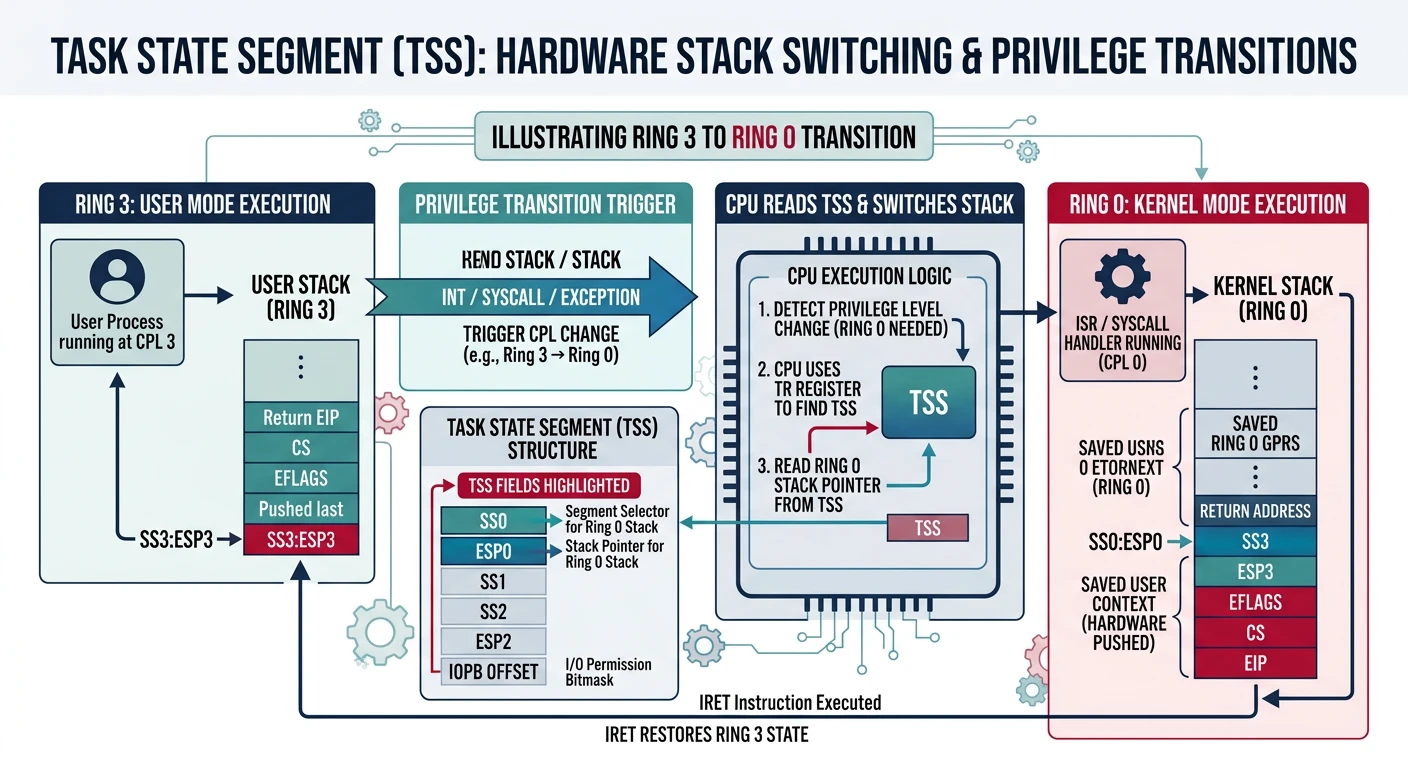
When a user program makes a system call or an interrupt occurs, the CPU needs to switch from Ring 3 (user) to Ring 0 (kernel). But the user's stack is untrusted - we can't use it for kernel operations. The Task State Segment (TSS) tells the CPU where to find the kernel stack for privilege transitions.
Task State Segment providing the kernel stack pointer (ESP0) for privilege transitions from user mode (Ring 3) to kernel mode (Ring 0)
The TSS is a legacy from Intel's hardware task switching mechanism (rarely used today). For modern software task switching, we only need it to store the kernel stack pointer for privilege transitions.
/* tss.h - Task State Segment Definition */

#ifndef TSS_H
#define TSS_H

#include <stdint.h>

/* Task State Segment (32-bit) */
typedef struct {
    uint32_t prev_tss;    // Previous TSS link (for hardware switching)

    /* Ring 0 stack - ESSENTIAL for privilege transitions */
    uint32_t esp0;        // Stack pointer for ring 0
    uint32_t ss0;         // Stack segment for ring 0

    /* Ring 1 stack (typically unused) */
    uint32_t esp1;
    uint32_t ss1;

    /* Ring 2 stack (typically unused) */
    uint32_t esp2;
    uint32_t ss2;

    uint32_t cr3;         // Page directory base (for hardware switching)

    /* Saved registers (for hardware switching - we don't use these) */
    uint32_t eip;
    uint32_t eflags;
    uint32_t eax, ecx, edx, ebx;
    uint32_t esp, ebp, esi, edi;
    uint32_t es, cs, ss, ds, fs, gs;

    uint32_t ldt;         // LDT selector
    uint16_t trap;        // Debug trap flag
    uint16_t iomap_base;  // I/O permission bitmap offset
} __attribute__((packed)) tss_entry_t;

/* Global TSS instance */
extern tss_entry_t tss;

/* Initialize TSS with kernel stack address */
void tss_init(uint32_t kernel_stack);

/* Update kernel stack in TSS (called during task switch) */
void tss_set_kernel_stack(uint32_t stack);

#endif /* TSS_H */
Why Only ESP0/SS0? In a Ring 3 → Ring 0 transition, the CPU only needs the Ring 0 stack. The other fields (ESP1, ESP2, saved registers) were for Intel's hardware task switching, which is slow and rarely used. Modern OSes do software task switching, saving registers manually in the interrupt handler.
Setting Up TSS
Setting up the TSS requires three steps: initialize the structure, add a TSS descriptor to the GDT, and load it with the LTR instruction.
/* tss.c - Task State Segment Implementation */

#include "tss.h"
#include "gdt.h"
#include <string.h>

/* Global TSS instance */
tss_entry_t tss __attribute__((aligned(4)));

/* Initialize TSS */
void tss_init(uint32_t kernel_stack) {
    /* Zero out the TSS */
    memset(&tss, 0, sizeof(tss));

    /* Set kernel stack for Ring 0 - THE CRITICAL PART */
    tss.ss0 = KERNEL_DATA_SELECTOR;  // 0x10 - Kernel data segment
    tss.esp0 = kernel_stack;         // Top of kernel stack

    /*
     * Set I/O permission bitmap offset beyond TSS limit
     * This denies all I/O port access from user mode
     * (offset > TSS limit means "no I/O bitmap, deny all")
     */
    tss.iomap_base = sizeof(tss);

    /*
     * Install TSS descriptor in GDT (typically entry 5)
     *
     * TSS Descriptor format:
     * - Base: Address of TSS structure
     * - Limit: sizeof(tss) - 1
     * - Access: 0x89 = Present, DPL 0, TSS (not busy)
     *           0xE9 = Present, DPL 3, TSS (accessible from ring 3)
     * - Flags: 0x00 (byte granularity, 16-bit - though limit is enough)
     */
    gdt_set_gate(5, (uint32_t)&tss, sizeof(tss) - 1, 0xE9, 0x00);

    /*
     * Load TSS register
     * The selector is: index * 8 = 5 * 8 = 0x28
     * We OR with 3 to set RPL=3, making it accessible from user mode
     */
    uint16_t tss_selector = 0x28 | 0x03; // TSS selector with RPL 3

    asm volatile("ltr %0" : : "r"(tss_selector));
}

/* Update kernel stack (called when switching tasks) */
void tss_set_kernel_stack(uint32_t stack) {
    tss.esp0 = stack;
}
GDT with User Segments and TSS
To support user mode, we need to expand our GDT with Ring 3 code and data segments, plus the TSS descriptor:
┌─────────────────────────────────────────────────────────────────┐
│                  EXTENDED GDT LAYOUT                             │
├─────────────────────────────────────────────────────────────────┤
│                                                                  │
│   Index    Selector     Description           DPL   Type        │
│   ─────    ────────     ───────────           ───   ────        │
│     0        0x00       Null Descriptor        -    Required    │
│     1        0x08       Kernel Code Segment    0    Exec/Read   │
│     2        0x10       Kernel Data Segment    0    Read/Write  │
│     3        0x18       User Code Segment      3    Exec/Read   │
│     4        0x20       User Data Segment      3    Read/Write  │
│     5        0x28       Task State Segment     3    TSS         │
│                                                                  │
│   When loading segment registers from USER mode:                 │
│   - User Code: CS = 0x1B  (0x18 | 0x03 for RPL=3)              │
│   - User Data: DS = 0x23  (0x20 | 0x03 for RPL=3)              │
│                                                                  │
└─────────────────────────────────────────────────────────────────┘
Context Switching
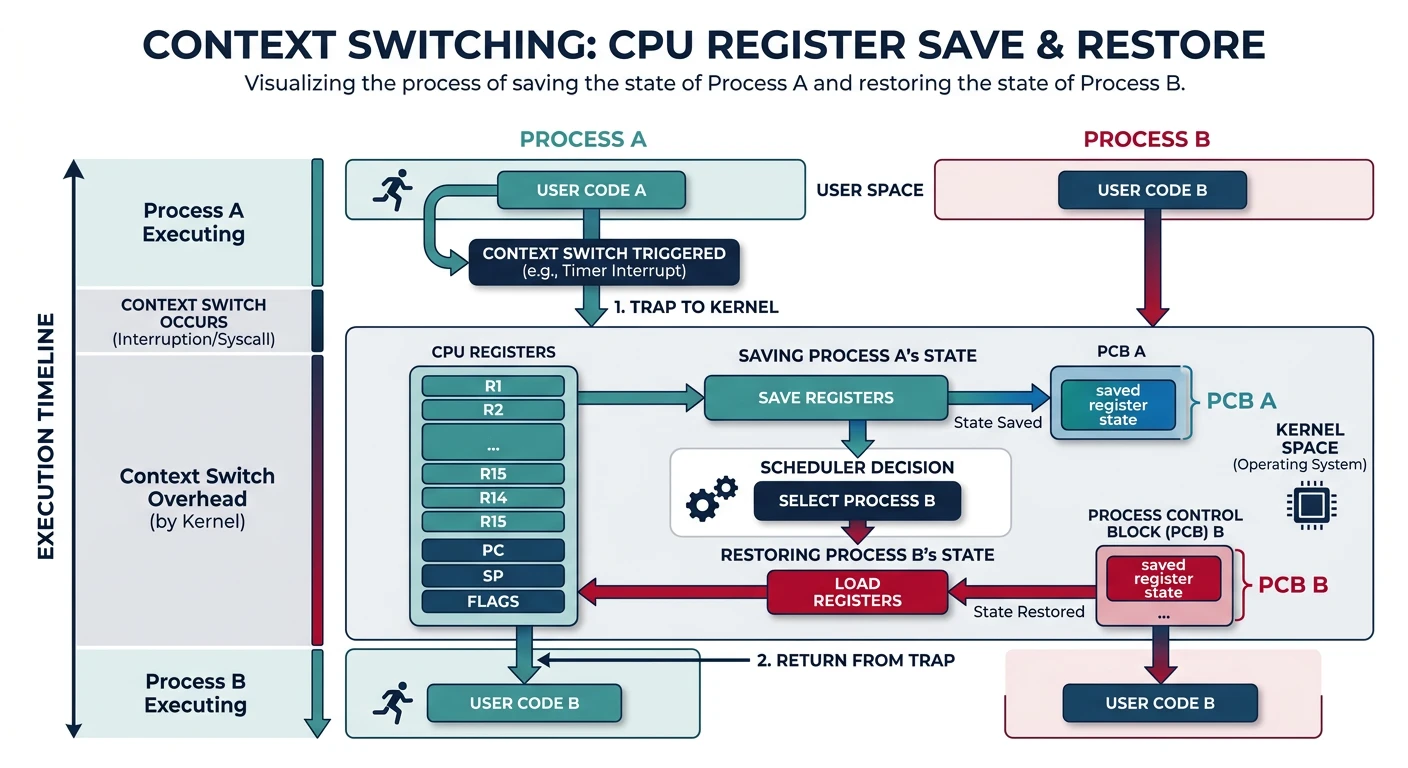
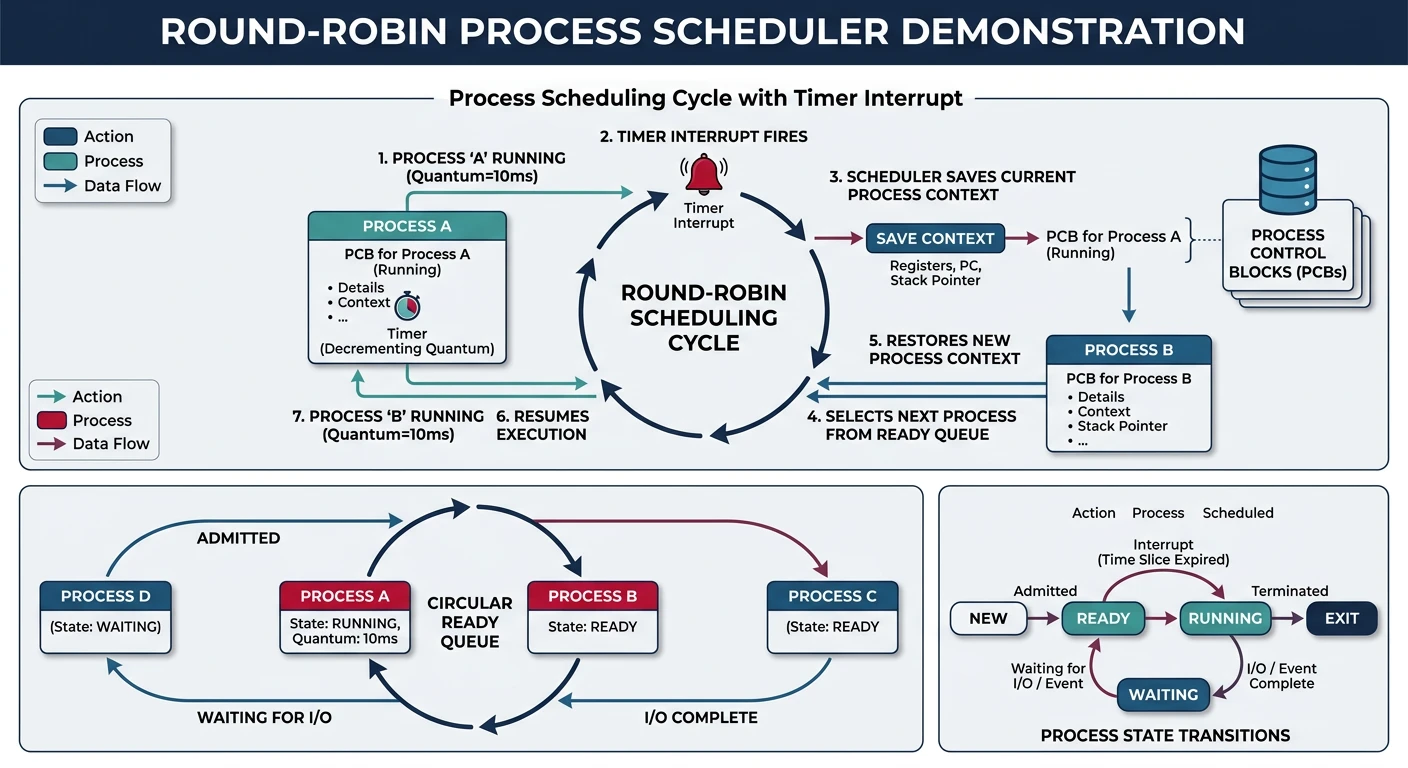
The context switch is the heart of multitasking. It's the mechanism that saves one process's state and loads another's, creating the illusion that multiple programs run simultaneously.
Context switch flow: the scheduler saves Process A's registers and stack pointer, then restores Process B's state to resume execution
┌─────────────────────────────────────────────────────────────────┐
│                   CONTEXT SWITCH FLOW                            │
├─────────────────────────────────────────────────────────────────┤
│                                                                  │
│   TIME ──────────────────────────────────────────────────────▶ │
│                                                                  │
│   PROCESS A      CONTEXT        PROCESS B      CONTEXT          │
│   RUNNING        SWITCH         RUNNING        SWITCH           │
│   ┌─────┐   ┌─────────────┐    ┌─────┐    ┌─────────────┐      │
│   │ A   │──▶│ Save A      │──▶│ B   │──▶│ Save B      │──▶...  │
│   │runs │   │ Load B      │   │runs │   │ Load A      │        │
│   └─────┘   └─────────────┘   └─────┘   └─────────────┘        │
│                                                                  │
│   WHAT GETS SAVED/RESTORED:                                      │
│   ┌──────────────────────────────────────────────────────────┐  │
│   │  • CPU Registers: EAX, EBX, ECX, EDX, ESI, EDI, EBP     │  │
│   │  • Stack Pointer: ESP (crucial for resuming execution)   │  │
│   │  • Instruction Pointer: EIP (where to continue)          │  │
│   │  • Flags: EFLAGS (CPU state flags)                       │  │
│   │  • Segment Registers: CS, DS, ES, FS, GS, SS            │  │
│   │  • Page Directory: CR3 (address space switch)            │  │
│   └──────────────────────────────────────────────────────────┘  │
│                                                                  │
│   TRIGGERED BY:                                                  │
│   • Timer interrupt (preemptive multitasking)                   │
│   • System call (process yields or blocks)                      │
│   • I/O completion (waking a blocked process)                   │
│                                                                  │
└─────────────────────────────────────────────────────────────────┘
Process Control Block (PCB)
The PCB is the kernel's record for each process. It contains everything needed to stop a process mid-execution and resume it later exactly where it left off.
/* process.h - Process Control Block */

#ifndef PROCESS_H
#define PROCESS_H

#include <stdint.h>

/* Process states */
typedef enum {
    PROCESS_STATE_NEW,        // Being created
    PROCESS_STATE_READY,      // Ready to run
    PROCESS_STATE_RUNNING,    // Currently executing
    PROCESS_STATE_BLOCKED,    // Waiting for I/O/event
    PROCESS_STATE_TERMINATED  // Finished execution
} process_state_t;

/* Saved CPU context - matches stack layout from interrupt */
typedef struct {
    /* Pushed by 'pusha' */
    uint32_t edi, esi, ebp, esp_dummy, ebx, edx, ecx, eax;

    /* Pushed by interrupt stub */
    uint32_t int_no, err_code;

    /* Pushed by CPU on interrupt */
    uint32_t eip, cs, eflags, user_esp, user_ss;
} cpu_context_t;

/* Process Control Block */
typedef struct pcb {
    /* Process identification */
    uint32_t pid;             // Unique process ID
    uint32_t parent_pid;      // Parent process ID
    char name[32];            // Process name (for debugging)

    /* Process state */
    process_state_t state;
    int exit_code;            // Exit status (when terminated)

    /* Memory management */
    uint32_t* page_directory; // Virtual address space
    uint32_t kernel_stack;    // Top of kernel stack
    uint32_t user_stack;      // Top of user stack

    /* CPU context saved during switch */
    uint32_t esp;             // Stack pointer (to saved context)
    uint32_t ebp;             // Base pointer
    uint32_t eip;             // Instruction pointer

    /* Scheduling */
    uint32_t priority;        // Higher = more important
    uint32_t time_slice;      // Remaining time in milliseconds
    uint32_t total_time;      // Total CPU time used

    /* File descriptors (simplified) */
    void* files[16];          // Open file handles

    /* Linked list for scheduler queues */
    struct pcb* next;
    struct pcb* prev;
} pcb_t;

/* Process management globals */
extern pcb_t* current_process;  // Currently running process
extern pcb_t* ready_queue;      // List of ready processes
extern uint32_t next_pid;       // Next available PID

/* Process management functions */
pcb_t* process_create(const char* name, void* entry_point, uint32_t priority);
void process_destroy(pcb_t* process);
void process_yield(void);
void process_block(process_state_t reason);
void process_unblock(pcb_t* process);

/* Context switching */
extern void switch_context(uint32_t* old_esp, uint32_t new_esp);

#endif /* PROCESS_H */
Why Save ESP? The key insight is that we don't need to save ALL registers manually. When a process is interrupted (timer, syscall), the CPU and our handler already push everything onto the stack. We just save the stack pointer - when we restore ESP and return, all registers come back automatically!
Switch Implementation
The actual context switch is elegant: save the current stack pointer, load the new one, and return. Since the return address and all registers are on the stack, we seamlessly resume the new process.
; switch.asm - Low-level context switch
; void switch_context(uint32_t* old_esp, uint32_t new_esp)
;
; Parameters:
;   old_esp: Pointer to where to save current ESP
;   new_esp: The ESP value to switch to

global switch_context
section .text

switch_context:
    ; ========================================
    ; PHASE 1: Save current process context
    ; ========================================

    ; Save callee-saved registers (cdecl convention)
    push ebp
    push ebx
    push esi
    push edi

    ; Get pointer to old_esp (where to save)
    mov eax, [esp + 20]     ; old_esp is at esp+20 (after pushes)

    ; Save current stack pointer
    mov [eax], esp          ; *old_esp = current ESP

    ; ========================================
    ; PHASE 2: Load new process context
    ; ========================================

    ; Get new stack pointer
    mov esp, [esp + 24]     ; new_esp is at esp+24

    ; Restore callee-saved registers from new stack
    pop edi
    pop esi
    pop ebx
    pop ebp

    ; Return pops EIP from new stack, continuing new process
    ret
The C wrapper and process management:
/* process.c - Process Management */

#include "process.h"
#include "pmm.h"
#include "vmm.h"
#include "heap.h"
#include "tss.h"
#include <string.h>

/* Globals */
pcb_t* current_process = NULL;
pcb_t* ready_queue = NULL;
uint32_t next_pid = 1;

/* Kernel stack size per process */
#define KERNEL_STACK_SIZE 4096

/* Create a new process */
pcb_t* process_create(const char* name, void* entry_point, uint32_t priority) {
    /* Allocate PCB */
    pcb_t* proc = (pcb_t*)kmalloc(sizeof(pcb_t));
    if (!proc) return NULL;

    memset(proc, 0, sizeof(pcb_t));

    /* Basic info */
    proc->pid = next_pid++;
    proc->parent_pid = current_process ? current_process->pid : 0;
    strncpy(proc->name, name, sizeof(proc->name) - 1);
    proc->state = PROCESS_STATE_NEW;
    proc->priority = priority;
    proc->time_slice = 100;  // 100ms default time slice

    /* Create address space (clone kernel mappings) */
    proc->page_directory = vmm_create_address_space();
    if (!proc->page_directory) {
        kfree(proc);
        return NULL;
    }

    /* Allocate kernel stack */
    proc->kernel_stack = (uint32_t)kmalloc(KERNEL_STACK_SIZE);
    if (!proc->kernel_stack) {
        vmm_destroy_address_space(proc->page_directory);
        kfree(proc);
        return NULL;
    }
    proc->kernel_stack += KERNEL_STACK_SIZE;  // Stack grows down

    /*
     * Set up initial stack frame
     * When switch_context runs, it will pop these and 'ret' to entry_point
     */
    uint32_t* stack = (uint32_t*)proc->kernel_stack;

    /* Create fake "saved" context on stack */
    *(--stack) = (uint32_t)entry_point;  // Return address (EIP)
    *(--stack) = 0;                       // EBP
    *(--stack) = 0;                       // EBX
    *(--stack) = 0;                       // ESI
    *(--stack) = 0;                       // EDI

    proc->esp = (uint32_t)stack;
    proc->state = PROCESS_STATE_READY;

    /* Add to ready queue */
    if (!ready_queue) {
        ready_queue = proc;
        proc->next = proc;  // Circular list
        proc->prev = proc;
    } else {
        proc->next = ready_queue;
        proc->prev = ready_queue->prev;
        ready_queue->prev->next = proc;
        ready_queue->prev = proc;
    }

    return proc;
}

/* Destroy a process and free resources */
void process_destroy(pcb_t* process) {
    /* Remove from scheduler queue */
    if (process->next == process) {
        /* Only process in queue */
        ready_queue = NULL;
    } else {
        process->prev->next = process->next;
        process->next->prev = process->prev;
        if (ready_queue == process) {
            ready_queue = process->next;
        }
    }

    /* Free resources */
    vmm_destroy_address_space(process->page_directory);
    kfree((void*)(process->kernel_stack - KERNEL_STACK_SIZE));
    kfree(process);
}

/* Voluntarily give up CPU */
void process_yield(void) {
    schedule();  // Pick next process
}
Simple Scheduler
The scheduler decides which process runs next. We'll implement a simple Round-Robin scheduler - each process gets equal time slices in rotation.
┌─────────────────────────────────────────────────────────────────┐
│                    ROUND-ROBIN SCHEDULING                        │
├─────────────────────────────────────────────────────────────────┤
│                                                                  │
│   Ready Queue (circular):                                        │
│                                                                  │
│   ┌─────┐    ┌─────┐    ┌─────┐    ┌─────┐                     │
│   │  A  │───▶│  B  │───▶│  C  │───▶│  D  │───┐                 │
│   └─────┘    └─────┘    └─────┘    └─────┘   │                 │
│       ▲                                      │                  │
│       └──────────────────────────────────────┘                  │
│                                                                  │
│   Timeline:                                                      │
│   ────────────────────────────────────────────────▶             │
│   │   A   │   B   │   C   │   D   │   A   │   B   │...         │
│   └───────┴───────┴───────┴───────┴───────┴───────┘             │
│    10ms    10ms    10ms    10ms    10ms    10ms                  │
│                                                                  │
│   Each process gets equal time quantum (time slice)             │
│   Timer interrupt triggers scheduler at end of quantum          │
│                                                                  │
└─────────────────────────────────────────────────────────────────┘
/* scheduler.c - Round-Robin Scheduler */

#include "process.h"
#include "tss.h"

/* Time slice duration in timer ticks */
#define TIME_QUANTUM_TICKS 10  // ~10ms with 1000Hz timer

static uint32_t ticks_remaining = TIME_QUANTUM_TICKS;

/*
 * Called from timer interrupt handler
 * Decrements time slice and triggers schedule when expired
 */
void scheduler_tick(void) {
    if (current_process == NULL) return;

    ticks_remaining--;
    current_process->total_time++;

    if (ticks_remaining == 0) {
        ticks_remaining = TIME_QUANTUM_TICKS;
        schedule();  // Time's up, switch process
    }
}

/*
 * Pick next process and switch to it
 * Called from:
 *   - Timer interrupt (preemption)
 *   - process_yield() (voluntary)
 *   - process_block() (waiting for I/O)
 */
void schedule(void) {
    if (!current_process || !ready_queue) return;

    pcb_t* old = current_process;
    pcb_t* next = NULL;

    /* Round-Robin: pick next in circular queue */
    if (old->state == PROCESS_STATE_RUNNING) {
        old->state = PROCESS_STATE_READY;
        next = old->next;
    } else {
        /* Old process blocked, skip it */
        next = ready_queue;
    }

    /* Find a READY process */
    pcb_t* start = next;
    do {
        if (next->state == PROCESS_STATE_READY) {
            break;
        }
        next = next->next;
    } while (next != start);

    /* No ready processes? Should not happen (idle process) */
    if (next->state != PROCESS_STATE_READY) {
        return;  // Keep running current or halt
    }

    next->state = PROCESS_STATE_RUNNING;
    current_process = next;
    ticks_remaining = TIME_QUANTUM_TICKS;

    /* Update TSS with new kernel stack */
    tss_set_kernel_stack(next->kernel_stack);

    /* Switch page directory (address space) */
    asm volatile("mov %0, %%cr3" : : "r"(next->page_directory));

    /* Perform the actual context switch */
    switch_context(&old->esp, next->esp);
}

/* Block current process (e.g., waiting for I/O) */
void process_block(process_state_t reason) {
    current_process->state = reason;
    schedule();
}

/* Unblock a process (e.g., I/O complete) */
void process_unblock(pcb_t* process) {
    process->state = PROCESS_STATE_READY;
    /* If higher priority, might want to reschedule immediately */
}
Understanding Context Switch Timing
┌─────────────────────────────────────────────────────────────────┐
│            TIMER INTERRUPT → CONTEXT SWITCH                      │
├─────────────────────────────────────────────────────────────────┤
│                                                                  │
│   Process A running                                              │
│   │                                                              │
│   │  ┌───────────────────────┐                                  │
│   │  │  add eax, ebx        │  ← Executing user code            │
│   │  │  mov [esi], eax      │                                   │
│   └──│  ...                 │                                   │
│      └───────────┬──────────┘                                   │
│                  │                                               │
│   TIMER IRQ!     ▼                                               │
│   ┌──────────────────────────────────┐                          │
│   │ 1. CPU pushes SS,ESP,EFLAGS,CS,EIP│  (onto kernel stack)    │
│   │ 2. CPU switches to Ring 0        │                          │
│   │ 3. CPU jumps to IDT[32] handler  │                          │
│   └──────────────────────────────────┘                          │
│                  │                                               │
│                  ▼                                               │
│   ┌──────────────────────────────────┐                          │
│   │ timer_handler:                   │                          │
│   │   pusha                          │  Save all registers      │
│   │   call scheduler_tick            │  Check time slice        │
│   │     → calls schedule()           │  (if expired)            │
│   │       → switch_context()         │  MAGIC HAPPENS HERE      │
│   │                                  │                          │
│   │ Stack now belongs to Process B!  │                          │
│   │   popa                           │  Restore B's registers   │
│   │   iret                           │  Return to Process B     │
│   └──────────────────────────────────┘                          │
│                  │                                               │
│   Process B resuming                                             │
│   │  ┌───────────────────────┐                                  │
│   │  │  xor ecx, ecx        │  ← Process B continues            │
│   └──│  call printf         │    as if nothing happened         │
│      └──────────────────────┘                                   │
│                                                                  │
└─────────────────────────────────────────────────────────────────┘
The beauty: Process A has no idea it was interrupted. When it runs again, it continues exactly where it left off.
System Calls
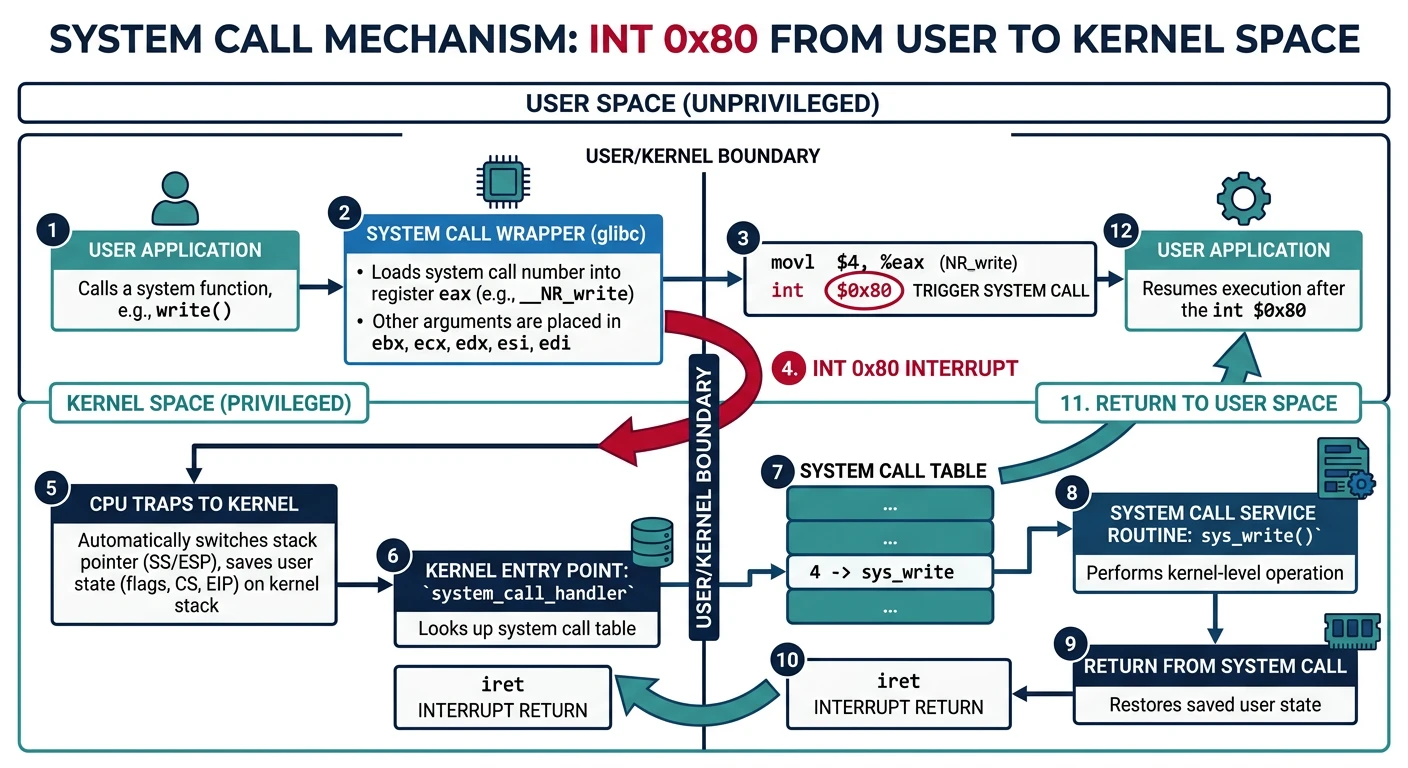
User programs run in Ring 3 with limited privileges - they can't access hardware or kernel memory directly. When a user program needs to read a file, allocate memory, or communicate with the network, it must ask the kernel. System calls are the controlled gateway between user space and kernel space.
System call pathway: user application calls libc wrapper, which triggers INT 0x80 to enter the kernel syscall handler for privileged operations
We'll use the traditional x86 approach: software interrupt int 0x80. Parameters are passed in registers, and the return value comes back in EAX.
System Call Calling Convention
Register
Purpose
Example
EAX
System call number
1 = write
EBX
First argument
File descriptor
ECX
Second argument
Buffer pointer
EDX
Third argument
Count (bytes)
ESI
Fourth argument
(if needed)
EDI
Fifth argument
(if needed)
EAX (return)
Return value
Bytes written, or -errno
System Call Dispatch Flow
sequenceDiagram
    participant UP as User Process
Ring 3
    participant CPU as CPU
    participant ISR as ISR Handler
    participant ST as Syscall Table
    participant KF as Kernel Function

    UP->>CPU: INT 0x80 (EAX = syscall number)
    Note over CPU: Save State + Switch to Ring 0
    CPU->>ISR: Invoke Interrupt Handler
    ISR->>ST: Lookup by EAX Number
    ST->>KF: Dispatch to Handler
    KF->>KF: Execute Kernel Logic
    KF->>ISR: Return Value in EAX
    ISR->>CPU: IRET Instruction
    Note over CPU: Restore State + Switch to Ring 3
    CPU->>UP: Result in EAX
/* syscall.h - System Call Definitions */

#ifndef SYSCALL_H
#define SYSCALL_H

/* System call numbers - keep in sync with user-space headers */
#define SYS_EXIT        0
#define SYS_FORK        1
#define SYS_READ        2
#define SYS_WRITE       3
#define SYS_OPEN        4
#define SYS_CLOSE       5
#define SYS_WAITPID     6
#define SYS_EXEC        7
#define SYS_GETPID      8
#define SYS_SBRK        9   // Heap memory allocation
#define SYS_SLEEP       10
#define SYS_YIELD       11

#define NUM_SYSCALLS    12

/* Error codes (negative return values) */
#define ENOENT          -2   // No such file or directory
#define ENOMEM          -12  // Out of memory
#define EINVAL          -22  // Invalid argument
#define ENOSYS          -38  // Function not implemented

/* Initialize system call handler */
void syscall_init(void);

#endif /* SYSCALL_H */
Handler Implementation
The syscall handler is triggered by int 0x80. It looks up the requested system call in a table and executes the corresponding kernel function.
/* syscall.c - System Call Handler */

#include "syscall.h"
#include "isr.h"
#include "process.h"
#include "vfs.h"
#include "heap.h"
#include <string.h>

/* Forward declarations of syscall handlers */
static int sys_exit(int status);
static int sys_fork(registers_t* regs);
static int sys_read(int fd, void* buf, size_t count);
static int sys_write(int fd, const void* buf, size_t count);
static int sys_open(const char* path, int flags);
static int sys_close(int fd);
static int sys_waitpid(int pid, int* status, int options);
static int sys_exec(const char* path, char* const argv[]);
static int sys_getpid(void);
static void* sys_sbrk(intptr_t increment);
static int sys_sleep(unsigned int seconds);
static int sys_yield(void);

/* Syscall function pointer type */
typedef int (*syscall_handler_t)(void);

/* System call table */
static void* syscall_handlers[NUM_SYSCALLS] = {
    [SYS_EXIT]    = sys_exit,
    [SYS_FORK]    = sys_fork,
    [SYS_READ]    = sys_read,
    [SYS_WRITE]   = sys_write,
    [SYS_OPEN]    = sys_open,
    [SYS_CLOSE]   = sys_close,
    [SYS_WAITPID] = sys_waitpid,
    [SYS_EXEC]    = sys_exec,
    [SYS_GETPID]  = sys_getpid,
    [SYS_SBRK]    = sys_sbrk,
    [SYS_SLEEP]   = sys_sleep,
    [SYS_YIELD]   = sys_yield,
};

/* Main system call dispatcher */
static void syscall_handler(registers_t* regs) {
    /* Syscall number in EAX */
    uint32_t syscall_num = regs->eax;

    /* Validate syscall number */
    if (syscall_num >= NUM_SYSCALLS || !syscall_handlers[syscall_num]) {
        regs->eax = ENOSYS;  // Function not implemented
        return;
    }

    /* Get arguments from registers */
    uint32_t arg1 = regs->ebx;
    uint32_t arg2 = regs->ecx;
    uint32_t arg3 = regs->edx;
    uint32_t arg4 = regs->esi;
    uint32_t arg5 = regs->edi;

    /* Call the handler - different syscalls take different args */
    int result;

    switch (syscall_num) {
        case SYS_EXIT:
            result = sys_exit(arg1);
            break;
        case SYS_FORK:
            result = sys_fork(regs);  // Needs full register state
            break;
        case SYS_READ:
            result = sys_read(arg1, (void*)arg2, arg3);
            break;
        case SYS_WRITE:
            result = sys_write(arg1, (void*)arg2, arg3);
            break;
        case SYS_OPEN:
            result = sys_open((char*)arg1, arg2);
            break;
        case SYS_CLOSE:
            result = sys_close(arg1);
            break;
        case SYS_WAITPID:
            result = sys_waitpid(arg1, (int*)arg2, arg3);
            break;
        case SYS_EXEC:
            result = sys_exec((char*)arg1, (char**)arg2);
            break;
        case SYS_GETPID:
            result = sys_getpid();
            break;
        case SYS_SBRK:
            result = (int)sys_sbrk((intptr_t)arg1);
            break;
        case SYS_SLEEP:
            result = sys_sleep(arg1);
            break;
        case SYS_YIELD:
            result = sys_yield();
            break;
        default:
            result = ENOSYS;
    }

    /* Return value goes in EAX */
    regs->eax = result;
}

/* Install syscall handler */
void syscall_init(void) {
    /*
     * Register int 0x80 handler
     * DPL = 3 so user code can trigger it
     * Type = Trap gate (0xEE) - interrupts stay enabled
     */
    idt_set_gate(0x80, (uint32_t)syscall_stub, 0x08, 0xEE);
}

/*
 * Syscall stub in assembly (in isr.asm)
 * Pushes registers, calls syscall_handler, pops registers, iret
 */
Assembly stub for the syscall entry point:
; syscall_stub in isr.asm
global syscall_stub
extern syscall_handler

syscall_stub:
    ; Save all registers
    pusha
    push ds
    push es
    push fs
    push gs

    ; Load kernel data segment
    mov ax, 0x10
    mov ds, ax
    mov es, ax
    mov fs, ax
    mov gs, ax

    ; Pass pointer to saved registers
    push esp
    call syscall_handler
    add esp, 4

    ; Restore segments
    pop gs
    pop fs
    pop es
    pop ds

    ; Restore registers (EAX modified by handler = return value)
    popa

    ; Return to user mode
    iret
Security Critical: Always validate user pointers! A malicious program might pass a kernel address as a buffer. Before using any pointer from user space, verify it points to user-accessible memory:
static int validate_user_ptr(void* ptr, size_t size) {
    // Check pointer is in user address range
    if ((uint32_t)ptr < USER_SPACE_START ||
        (uint32_t)ptr + size > USER_SPACE_END) {
        return 0;  // Invalid
    }
    return 1;  // OK
}
Implementing Key System Calls
/* Process-related syscalls */

static int sys_exit(int status) {
    current_process->state = PROCESS_STATE_TERMINATED;
    current_process->exit_code = status;

    /* Wake up parent if it's waiting */
    // TODO: Implement waitpid wakeup

    /* Switch to another process */
    schedule();

    /* Never returns */
    return 0;
}

static int sys_getpid(void) {
    return current_process->pid;
}

static int sys_yield(void) {
    schedule();
    return 0;
}

/* File I/O syscalls */

static int sys_write(int fd, const void* buf, size_t count) {
    /* Validate buffer */
    if (!validate_user_ptr((void*)buf, count)) {
        return EINVAL;
    }

    /* Special case: stdout (fd=1) and stderr (fd=2) */
    if (fd == 1 || fd == 2) {
        /* Write to console */
        const char* str = (const char*)buf;
        for (size_t i = 0; i < count; i++) {
            terminal_putchar(str[i]);
        }
        return count;
    }

    /* Regular file */
    vfs_node_t* node = current_process->files[fd];
    if (!node) return EINVAL;

    return vfs_write(node, 0, count, (uint8_t*)buf);
}

static int sys_read(int fd, void* buf, size_t count) {
    if (!validate_user_ptr(buf, count)) {
        return EINVAL;
    }

    /* Special case: stdin (fd=0) */
    if (fd == 0) {
        /* Read from keyboard buffer */
        char* str = (char*)buf;
        for (size_t i = 0; i < count; i++) {
            str[i] = keyboard_getchar();  // May block
            if (str[i] == '\n') {
                return i + 1;
            }
        }
        return count;
    }

    vfs_node_t* node = current_process->files[fd];
    if (!node) return EINVAL;

    return vfs_read(node, 0, count, (uint8_t*)buf);
}

/* Memory syscall */
static void* sys_sbrk(intptr_t increment) {
    /* Adjust process heap */
    // Simplified: just allocate from kernel heap for now
    if (increment > 0) {
        return kmalloc(increment);
    }
    return (void*)-1;  // Error
}
User-Space API
User programs need a clean interface to make system calls. We provide wrapper functions that set up registers and execute int 0x80.
/* user/syscall.h - User-space syscall wrappers */

#ifndef _USER_SYSCALL_H
#define _USER_SYSCALL_H

/* System call numbers (must match kernel) */
#define SYS_EXIT    0
#define SYS_FORK    1
#define SYS_READ    2
#define SYS_WRITE   3
#define SYS_OPEN    4
#define SYS_CLOSE   5
#define SYS_GETPID  8
#define SYS_YIELD   11

/* Generic syscall macros */

static inline int syscall0(int num) {
    int ret;
    asm volatile(
        "int $0x80"
        : "=a"(ret)
        : "a"(num)
        : "memory"
    );
    return ret;
}

static inline int syscall1(int num, int arg1) {
    int ret;
    asm volatile(
        "int $0x80"
        : "=a"(ret)
        : "a"(num), "b"(arg1)
        : "memory"
    );
    return ret;
}

static inline int syscall2(int num, int arg1, int arg2) {
    int ret;
    asm volatile(
        "int $0x80"
        : "=a"(ret)
        : "a"(num), "b"(arg1), "c"(arg2)
        : "memory"
    );
    return ret;
}

static inline int syscall3(int num, int arg1, int arg2, int arg3) {
    int ret;
    asm volatile(
        "int $0x80"
        : "=a"(ret)
        : "a"(num), "b"(arg1), "c"(arg2), "d"(arg3)
        : "memory"
    );
    return ret;
}

/* User-friendly wrappers */

static inline void exit(int status) {
    syscall1(SYS_EXIT, status);
    while (1) {}  // Should never return
}

static inline int getpid(void) {
    return syscall0(SYS_GETPID);
}

static inline int write(int fd, const void* buf, int count) {
    return syscall3(SYS_WRITE, fd, (int)buf, count);
}

static inline int read(int fd, void* buf, int count) {
    return syscall3(SYS_READ, fd, (int)buf, count);
}

static inline void yield(void) {
    syscall0(SYS_YIELD);
}

/* Simple printf for user space */
static inline void puts(const char* str) {
    int len = 0;
    while (str[len]) len++;
    write(1, str, len);
}

#endif /* _USER_SYSCALL_H */
Example User Program
/* user/hello.c - Simple user program */

#include "syscall.h"

void _start(void) {
    /* This runs in Ring 3! */

    int pid = getpid();

    puts("Hello from user space!\n");
    puts("My PID is: ");

    /* Simple number printing */
    char buf[16];
    int i = 0;
    int tmp = pid;
    do {
        buf[i++] = '0' + (tmp % 10);
        tmp /= 10;
    } while (tmp > 0);

    /* Reverse */
    for (int j = 0; j < i / 2; j++) {
        char t = buf[j];
        buf[j] = buf[i - 1 - j];
        buf[i - 1 - j] = t;
    }
    buf[i++] = '\n';

    write(1, buf, i);

    /* Exit cleanly */
    exit(0);
}
Note: User programs use _start instead of main - there's no C runtime yet to call main().
Entering User Mode
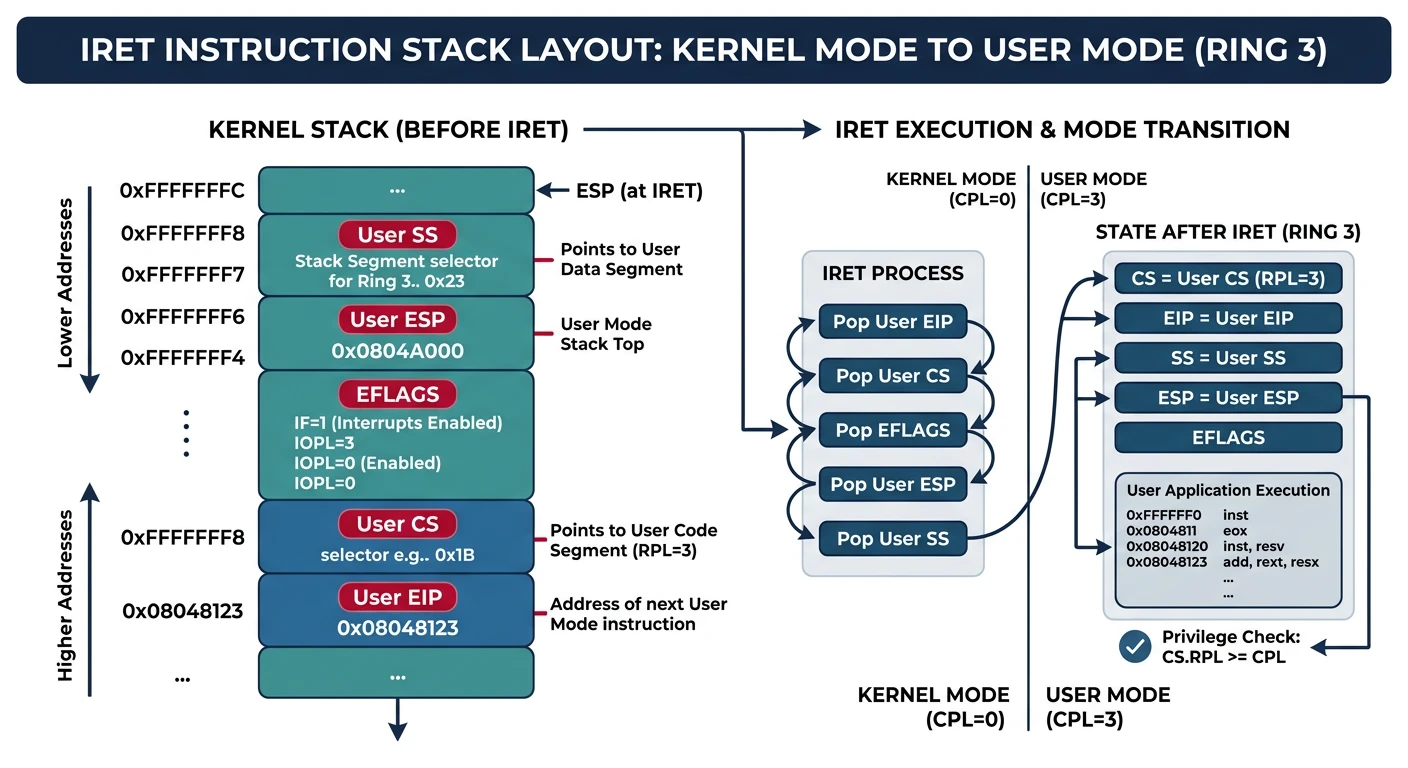
The final piece of the process puzzle: actually running user code in Ring 3. This requires careful setup of the GDT user segments, proper stack preparation, and using iret to make the privilege transition.
Entering user mode via IRET: the kernel pushes user SS, ESP, EFLAGS, CS, and EIP onto the stack, then IRET pops them to switch to Ring 3
┌─────────────────────────────────────────────────────────────────┐
│                 ENTERING USER MODE (Ring 3)                      │
├─────────────────────────────────────────────────────────────────┤
│                                                                  │
│   KERNEL (Ring 0)                                               │
│   ┌─────────────────────────────────────────────────────────┐   │
│   │  1. Allocate user stack (at 0x7FFFF000)                 │   │
│   │  2. Load program into user address space                │   │
│   │  3. Set up stack for IRET "return to user"              │   │
│   │                                                         │   │
│   │  Stack Layout for IRET:                                 │   │
│   │  ┌─────────────────┐ ← Current ESP                     │   │
│   │  │   User SS       │ (0x23 - user data + RPL 3)        │   │
│   │  ├─────────────────┤                                    │   │
│   │  │   User ESP      │ (0x7FFFFFF0 - top of user stack)  │   │
│   │  ├─────────────────┤                                    │   │
│   │  │   EFLAGS        │ (0x202 - IF set for interrupts)   │   │
│   │  ├─────────────────┤                                    │   │
│   │  │   User CS       │ (0x1B - user code + RPL 3)        │   │
│   │  ├─────────────────┤                                    │   │
│   │  │   User EIP      │ (entry point of user program)     │   │
│   │  └─────────────────┘                                    │   │
│   │                                                         │   │
│   │  4. Execute IRET instruction                            │   │
│   └─────────────────────────────────────────────────────────┘   │
│                          │                                      │
│                          │ IRET pops all 5 values              │
│                          │ CPU switches to Ring 3              │
│                          ▼                                      │
│   USER (Ring 3)                                                 │
│   ┌─────────────────────────────────────────────────────────┐   │
│   │  User program now executing!                            │   │
│   │  - Cannot access kernel memory                          │   │
│   │  - Cannot execute privileged instructions               │   │
│   │  - Must use syscalls for kernel services                │   │
│   └─────────────────────────────────────────────────────────┘   │
│                                                                  │
└─────────────────────────────────────────────────────────────────┘
Ring 3 Setup
Before we can enter user mode, we need to set up the user address space with proper page mappings and ensure our GDT has user-accessible segments.
/* user_mode.c - Entering User Mode */

#include "process.h"
#include "vmm.h"
#include "tss.h"
#include <stdint.h>

/* User address space layout */
#define USER_STACK_TOP      0x7FFFFFF0   // Just below 2GB
#define USER_STACK_SIZE     0x10000      // 64KB stack
#define USER_STACK_BOTTOM   (USER_STACK_TOP - USER_STACK_SIZE + 16)
#define USER_CODE_START     0x08000000   // 128MB mark
#define USER_HEAP_START     0x10000000   // 256MB mark

/* Segment selectors with RPL 3 */
#define USER_CODE_SELECTOR  0x1B  // GDT[3] (0x18) | RPL 3
#define USER_DATA_SELECTOR  0x23  // GDT[4] (0x20) | RPL 3

/* Setup user address space */
int setup_user_space(pcb_t* proc) {
    /* Create a new page directory (clones kernel mappings) */
    proc->page_directory = vmm_create_address_space();
    if (!proc->page_directory) return -1;

    /* Allocate and map user stack pages */
    for (uint32_t addr = USER_STACK_BOTTOM; addr < USER_STACK_TOP; addr += PAGE_SIZE) {
        /* Allocate physical page */
        uint32_t phys = pmm_alloc_page();
        if (!phys) return -1;

        /* Map with USER access */
        vmm_map_page(proc->page_directory, addr, phys,
                     PAGE_PRESENT | PAGE_RW | PAGE_USER);
    }

    proc->user_stack = USER_STACK_TOP;

    return 0;
}

/*
 * Jump to user mode
 *
 * This is the magic transition from Ring 0 to Ring 3.
 * We use IRET which pops: EIP, CS, EFLAGS, ESP, SS
 * By setting up the stack correctly, we "return" to user code.
 */
void enter_user_mode(uint32_t entry_point, uint32_t user_stack) {
    /* Update TSS with kernel stack for this process */
    tss_set_kernel_stack(current_process->kernel_stack);

    /*
     * Critical: Set up data segments BEFORE iret
     * After iret, we'll be in Ring 3 and can't access Ring 0 segments
     */
    asm volatile(
        "cli\n"                    // Disable interrupts during transition

        /* Load user data segment into DS, ES, FS, GS */
        "mov $0x23, %%ax\n"        // USER_DATA_SELECTOR (0x20 | RPL 3)
        "mov %%ax, %%ds\n"
        "mov %%ax, %%es\n"
        "mov %%ax, %%fs\n"
        "mov %%ax, %%gs\n"

        /* Build IRET stack frame */
        "push $0x23\n"             // User SS (data segment)
        "push %0\n"                // User ESP (stack pointer)

        /* Push EFLAGS with IF (interrupt flag) set */
        "pushf\n"                  // Push current flags
        "pop %%eax\n"              // Get into EAX
        "or $0x200, %%eax\n"       // Set IF bit (enable interrupts)
        "push %%eax\n"             // Push modified flags

        "push $0x1B\n"             // User CS (code segment)
        "push %1\n"                // User EIP (entry point)

        /* IRET pops: EIP, CS, EFLAGS, ESP, SS */
        "iret\n"
        :
        : "r"(user_stack), "r"(entry_point)
        : "eax", "memory"
    );

    /* Should never reach here */
    __builtin_unreachable();
}
The IRET Trick: IRET (Interrupt Return) is normally used to return from an ISR to the interrupted code. But we can use it to "return" to code that was never interrupted - our user program! We just set up the stack as if an interrupt had occurred.
Address Space Layout
┌─────────────────────────────────────────────────────────────────┐
│              USER PROCESS ADDRESS SPACE                          │
├─────────────────────────────────────────────────────────────────┤
│                                                                  │
│  0xFFFFFFFF ┌──────────────────────────────────────────────┐    │
│             │            KERNEL SPACE                       │    │
│             │    (Mapped but NOT accessible from Ring 3)   │    │
│             │    Page table entries: no USER flag          │    │
│  0xC0000000 ├──────────────────────────────────────────────┤    │
│             │                                              │    │
│             │     (Unmapped - will fault if accessed)      │    │
│             │                                              │    │
│  0x7FFFFFFF ├──────────────────────────────────────────────┤    │
│             │            USER STACK                        │    │
│             │         ↓ grows downward                     │    │
│  0x7FFF0000 │            (64KB)                            │    │
│             ├──────────────────────────────────────────────┤    │
│             │                                              │    │
│             │     (Available for memory mapping)           │    │
│             │                                              │    │
│  0x10000000 ├──────────────────────────────────────────────┤    │
│             │            USER HEAP                         │    │
│             │         ↑ grows upward                       │    │
│             │        (dynamic, via sbrk)                   │    │
│             ├──────────────────────────────────────────────┤    │
│             │            USER BSS                          │    │
│             │      (Uninitialized global data)             │    │
│             ├──────────────────────────────────────────────┤    │
│             │            USER DATA                         │    │
│             │      (Initialized global data)               │    │
│             ├──────────────────────────────────────────────┤    │
│  0x08000000 │            USER TEXT                         │    │
│             │      (Code - executable, read-only)          │    │
│             │         ← Entry point here                  │    │
│             ├──────────────────────────────────────────────┤    │
│  0x00001000 │     (Reserved - catches NULL pointers)       │    │
│  0x00000000 └──────────────────────────────────────────────┘    │
│                                                                  │
└─────────────────────────────────────────────────────────────────┘
First User Process
Let's put it all together and launch our first user-mode process:
/* init.c - Create and run the first user process */

#include "process.h"
#include "vmm.h"
#include "elf.h"  // We'll implement this in Phase 9

/*
 * For now, we'll embed a simple test program directly in memory.
 * In Phase 9, we'll load proper ELF executables from disk.
 */

/* Simple user program bytecode (assembled) */
static uint8_t user_program[] = {
    /* _start: */
    /* mov eax, 8         ; SYS_GETPID */
    0xB8, 0x08, 0x00, 0x00, 0x00,
    /* int 0x80           ; syscall */
    0xCD, 0x80,

    /* ; Print "Hello!\n" */
    /* mov eax, 3         ; SYS_WRITE */
    0xB8, 0x03, 0x00, 0x00, 0x00,
    /* mov ebx, 1         ; fd = stdout */
    0xBB, 0x01, 0x00, 0x00, 0x00,
    /* mov ecx, msg       ; buffer (we'll patch this) */
    0xB9, 0x30, 0x00, 0x00, 0x08,  // 0x08000030
    /* mov edx, 7         ; length */
    0xBA, 0x07, 0x00, 0x00, 0x00,
    /* int 0x80 */
    0xCD, 0x80,

    /* ; exit(0) */
    /* mov eax, 0         ; SYS_EXIT */
    0xB8, 0x00, 0x00, 0x00, 0x00,
    /* xor ebx, ebx       ; status = 0 */
    0x31, 0xDB,
    /* int 0x80 */
    0xCD, 0x80,

    /* ; loop forever (should never reach) */
    /* jmp $ */
    0xEB, 0xFE,

    /* msg: "Hello!\n" (at offset 0x30) */
    /* padding to align */
    0x00, 0x00, 0x00, 0x00, 0x00, 0x00,
    0x48, 0x65, 0x6C, 0x6C, 0x6F, 0x21, 0x0A, 0x00  // "Hello!\n\0"
};

/* Create the init process (PID 1) */
void create_init_process(void) {
    /* Create process structure */
    pcb_t* init = (pcb_t*)kmalloc(sizeof(pcb_t));
    memset(init, 0, sizeof(pcb_t));

    init->pid = 1;
    init->parent_pid = 0;  // No parent (we are the first!)
    strcpy(init->name, "init");
    init->priority = 1;

    /* Set up address space */
    if (setup_user_space(init) < 0) {
        kprintf("Failed to create address space for init!\n");
        return;
    }

    /* Copy user program to user address space */
    uint32_t user_entry = USER_CODE_START;  // 0x08000000

    /* Map code pages */
    uint32_t code_pages = (sizeof(user_program) + PAGE_SIZE - 1) / PAGE_SIZE;
    for (uint32_t i = 0; i < code_pages; i++) {
        uint32_t virt = user_entry + i * PAGE_SIZE;
        uint32_t phys = pmm_alloc_page();
        vmm_map_page(init->page_directory, virt, phys,
                     PAGE_PRESENT | PAGE_USER);  // Read-only for code
    }

    /* Switch to init's address space temporarily to copy code */
    uint32_t old_cr3;
    asm volatile("mov %%cr3, %0" : "=r"(old_cr3));
    asm volatile("mov %0, %%cr3" : : "r"(init->page_directory));

    memcpy((void*)user_entry, user_program, sizeof(user_program));

    /* Switch back */
    asm volatile("mov %0, %%cr3" : : "r"(old_cr3));

    /* Allocate kernel stack */
    init->kernel_stack = (uint32_t)kmalloc(4096) + 4096;

    /* Mark as ready */
    init->state = PROCESS_STATE_READY;

    /* Add to scheduler */
    current_process = init;
    ready_queue = init;
    init->next = init;
    init->prev = init;

    kprintf("Created init process (PID %d)\n", init->pid);

    /* Jump to user mode! */
    kprintf("Entering user mode...\n");
    enter_user_mode(user_entry, init->user_stack);
}

/* Kernel entry point modification */
void kernel_main(void) {
    /* ... previous initialization ... */

    kprintf("Initializing TSS...\n");
    tss_init(get_stack_top());

    kprintf("Initializing syscalls...\n");
    syscall_init();

    kprintf("Creating init process...\n");
    create_init_process();

    /* Should never reach here if init runs correctly */
    kprintf("Init process returned? This shouldn't happen!\n");
    while (1) { asm volatile("hlt"); }
}
Verification Checklist
When your first user process runs successfully, you should see:
✅ "Entering user mode..." message from kernel
✅ "Hello!" (or similar) printed via syscall
✅ Process exits cleanly (returns to scheduler)
✅ No General Protection Fault (#GP)
✅ No Page Fault (#PF) from invalid access
Common Issues:
Triple Fault: TSS not set up correctly, or no kernel stack on interrupt
#GP: Segment selectors wrong, or trying to access Ring 0 from Ring 3
#PF: User pages not mapped with USER flag
Hangs: Interrupts disabled (forgot to set IF in EFLAGS)
What You Can Build
Phase 8 Achievement: A multitasking kernel! Your OS can now run multiple processes, switch between them, handle system calls, and execute user programs with proper privilege separation. This is a real operating system!
Demonstration: Multitasking Demo
Create multiple processes that run "simultaneously" and display their activity:
Multitasking demonstration showing the scheduler interleaving execution of three concurrent processes on a single CPU core
/* demo_multitask.c - Demonstrate multitasking */

#include "process.h"
#include "terminal.h"

/* Task A: Prints 'A' periodically */
void task_a(void) {
    while (1) {
        terminal_putchar('A');
        /* Simple delay */
        for (volatile int i = 0; i < 1000000; i++);
    }
}

/* Task B: Prints 'B' periodically */
void task_b(void) {
    while (1) {
        terminal_putchar('B');
        for (volatile int i = 0; i < 1000000; i++);
    }
}

/* Task C: Counts and prints numbers */
void task_c(void) {
    int count = 0;
    while (1) {
        kprintf("%d ", count++);
        for (volatile int i = 0; i < 2000000; i++);
    }
}

void demo_multitasking(void) {
    kprintf("\n=== MULTITASKING DEMONSTRATION ===\n");
    kprintf("Watch A, B, and numbers interleave:\n\n");

    /* Create three tasks */
    process_create("task_a", task_a, 1);
    process_create("task_b", task_b, 1);
    process_create("task_c", task_c, 1);

    /* Enable timer interrupts to trigger scheduling */
    asm volatile("sti");

    /* The kernel becomes the idle task */
    while (1) {
        asm volatile("hlt");  // Sleep until next interrupt
    }
}

/*
 * Expected Output (interleaved):
 * === MULTITASKING DEMONSTRATION ===
 * Watch A, B, and numbers interleave:
 *
 * AABB0 1 ABAB2 3 BABA4 5 ABBA6 7 ...
 */
/* cmd_kill.c - Terminate a process */

void cmd_kill(int pid) {
    if (pid <= 0) {
        kprintf("Usage: kill <pid>\n");
        return;
    }

    /* Find process by PID */
    pcb_t* proc = ready_queue;
    do {
        if (proc->pid == pid) {
            if (proc == current_process) {
                kprintf("Cannot kill running process from itself!\n");
                return;
            }

            kprintf("Killing process %d (%s)...\n", pid, proc->name);

            proc->state = PROCESS_STATE_TERMINATED;
            proc->exit_code = -9;  // SIGKILL

            process_destroy(proc);
            kprintf("Process %d terminated.\n", pid);
            return;
        }
        proc = proc->next;
    } while (proc != ready_queue);

    kprintf("Process %d not found.\n", pid);
}
Exercises
Exercise 1: Priority Scheduler
Modify the round-robin scheduler to use priorities. Higher priority processes should get more CPU time or run before lower priority ones.
/* Hint: Simple priority scheduling */
void schedule_priority(void) {
    pcb_t* highest = NULL;
    pcb_t* proc = ready_queue;

    /* Find highest priority READY process */
    do {
        if (proc->state == PROCESS_STATE_READY) {
            if (!highest || proc->priority > highest->priority) {
                highest = proc;
            }
        }
        proc = proc->next;
    } while (proc != ready_queue);

    if (highest) {
        /* Switch to it */
        // TODO: Implement the switch
    }
}

/* Challenge: Prevent starvation - low priority processes
 * must eventually run. Consider "aging" priorities. */
IntermediateScheduler
Exercise 2: Implement fork()
Implement the fork() system call that creates a copy of the current process. The child process should be an exact duplicate but with a new PID.
/* Hint: fork() implementation skeleton */
int sys_fork(registers_t* regs) {
    /* 1. Create new PCB */
    pcb_t* child = kmalloc(sizeof(pcb_t));
    memcpy(child, current_process, sizeof(pcb_t));
    child->pid = next_pid++;
    child->parent_pid = current_process->pid;

    /* 2. Clone address space (copy-on-write is advanced) */
    child->page_directory = clone_address_space(
        current_process->page_directory
    );

    /* 3. Create new kernel stack */
    child->kernel_stack = (uint32_t)kmalloc(4096) + 4096;

    /* 4. Copy current interrupt frame to child's stack */
    // The tricky part: child returns 0, parent returns child PID

    /* 5. Add child to scheduler */
    // ...

    /* Return child PID to parent */
    return child->pid;
}
Key insight: The child's register state (including EAX=0) must be set up so that when it's scheduled, it "returns" from fork() with 0.
AdvancedProcess Creation
Exercise 3: Implement wait()
Implement waitpid() so a parent process can wait for a child to exit and retrieve its exit status.
/* Hint: waitpid() blocks parent until child exits */
int sys_waitpid(int pid, int* status, int options) {
    /* Find the child process */
    pcb_t* child = find_process(pid);
    if (!child || child->parent_pid != current_process->pid) {
        return -EINVAL;  // Not our child
    }

    /* If child already terminated, return immediately */
    if (child->state == PROCESS_STATE_TERMINATED) {
        if (status) {
            // Copy exit code to user space (validate pointer!)
            *status = child->exit_code;
        }
        process_destroy(child);  // Clean up zombie
        return pid;
    }

    /* Otherwise, block until child exits */
    current_process->state = PROCESS_STATE_BLOCKED;
    current_process->waiting_for = pid;  // Add this field to PCB
    schedule();

    /* When we wake up, child has exited */
    // ... retrieve status and clean up
}
AdvancedIPC
Exercise 4: User-Mode Shell
Create a simple shell that runs entirely in user mode, using only system calls to interact with the kernel.
/* user/shell.c - Minimal user-mode shell */

void _start(void) {
    char buf[256];
    int len;

    while (1) {
        /* Print prompt */
        write(1, "$ ", 2);

        /* Read command */
        len = read(0, buf, sizeof(buf) - 1);
        if (len <= 0) continue;
        buf[len] = '\0';

        /* Simple command parsing */
        if (strncmp(buf, "exit", 4) == 0) {
            exit(0);
        }
        else if (strncmp(buf, "echo ", 5) == 0) {
            write(1, buf + 5, len - 5);
            write(1, "\n", 1);
        }
        else if (strncmp(buf, "ps", 2) == 0) {
            /* Need a syscall for this! */
            syscall0(SYS_PS);
        }
        else {
            write(1, "Unknown command\n", 16);
        }
    }
}
Challenge: Implement exec() syscall to run actual programs!
AdvancedUser Space
Next Steps
Congratulations! You now have a true multitasking operating system. Processes can run in isolation, communicate with the kernel via system calls, and share the CPU fairly. But there's one big limitation: we're embedding programs directly in kernel code.
In Phase 9: ELF Loading & Executables, we'll learn to load real compiled programs from disk:
Processes are programs in execution with their own memory space and CPU context
TSS provides the kernel stack pointer for Ring 3 → Ring 0 transitions
Context switching saves/restores CPU state to create multitasking illusion
System calls (int 0x80) are the secure gateway between user and kernel mode
Ring 3 (user mode) runs with limited privileges for memory protection
IRET is used to "return" to user mode, even for the first time
With processes and user mode complete, you have a foundation for a real operating system. Users can run multiple programs safely isolated from each other and from the kernel. Next, we'll add the ability to load and run actual executable files!
Continue the Series
Phase 7: Disk Access & Filesystems
Review ATA drivers, FAT filesystem, and VFS abstraction.