We use cookies to enhance your browsing experience, serve personalized content, and analyze our traffic.
By clicking "Accept All", you consent to our use of cookies. See our
Privacy Policy
for more information.
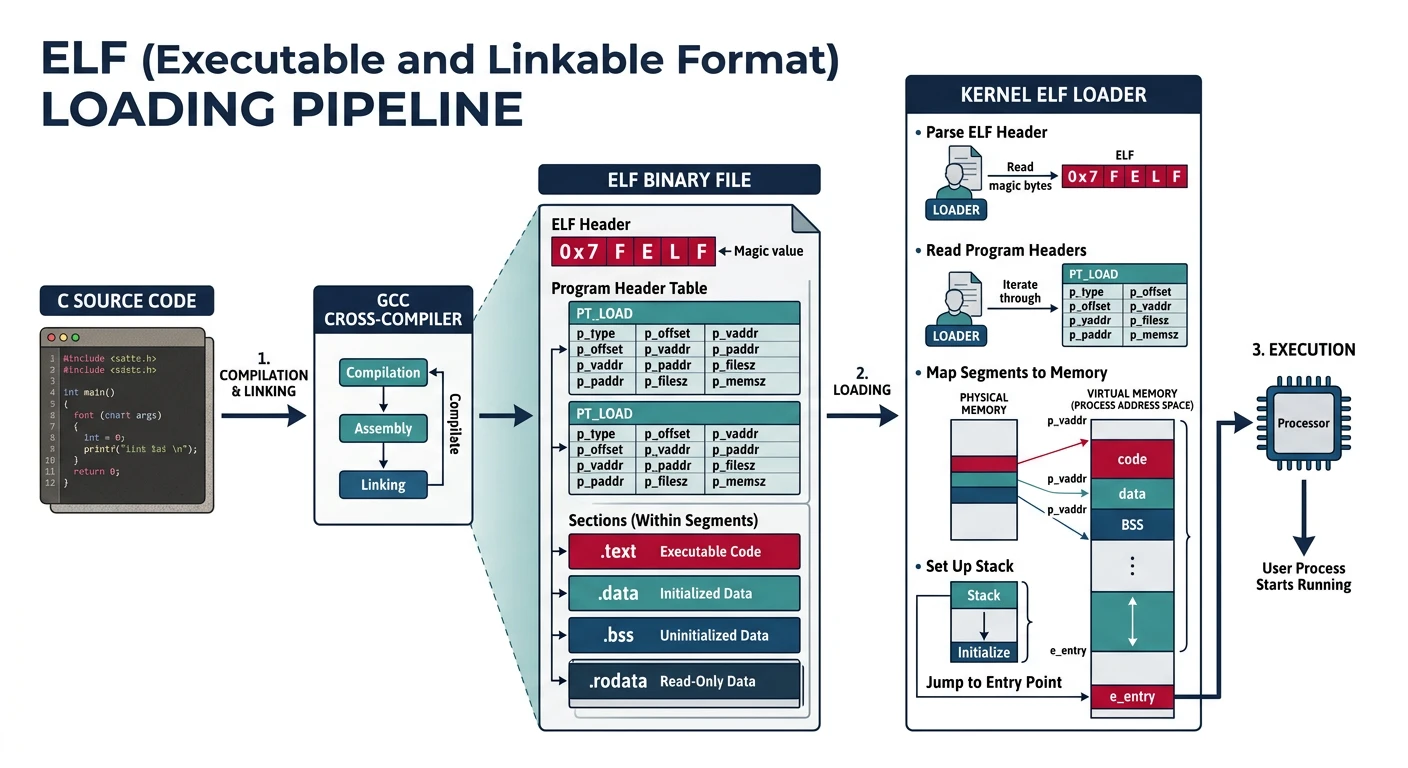
Phase 9 Goals: By the end of this phase, your kernel will load and execute ELF binaries. You'll understand the ELF format, parse headers, load segments into memory, and jump to entry points to run real compiled programs.
In Phase 8, we created processes with embedded bytecode—the program was hardcoded directly into the kernel. That's like a restaurant where you can only order what the chef decided to make that morning. Real operating systems let you run any program—games, text editors, compilers, whatever you want. The magic that makes this possible is an executable format.
/*
 * THE JOURNEY FROM SOURCE CODE TO RUNNING PROGRAM
 * ================================================
 *
 * hello.c                 hello.o                hello (ELF)
 * ┌─────────────┐        ┌─────────────┐        ┌─────────────┐
 * │ #include... │  gcc   │ .text       │  ld    │ ELF Header  │
 * │             │───────>│ .data       │───────>│ Prog Headers│
 * │ int main()  │ -c     │ .bss        │        │ .text       │
 * │ {           │        │ .rodata     │        │ .data       │
 * │   printf(); │        │ Relocations │        │ .bss        │
 * │ }           │        │ Symbols     │        │ Entry Point │
 * └─────────────┘        └─────────────┘        └─────────────┘
 *    Source Code           Object File           Executable
 *
 *
 * WHAT THE OS LOADER DOES:
 * ┌──────────────────────────────────────────────────────────┐
 * │  1. Read ELF header → Validate magic number             │
 * │  2. Parse program headers → Find loadable segments      │
 * │  3. Allocate memory → Map pages for each segment        │
 * │  4. Copy code/data → Load from file to memory           │
 * │  5. Zero BSS → Initialize uninitialized data            │
 * │  6. Setup stack → Prepare argc, argv, environment       │
 * │  7. Jump to entry → Start executing at e_entry          │
 * └──────────────────────────────────────────────────────────┘
 */
Key Insight: ELF (Executable and Linkable Format) is the standard executable format on Unix-like systems. Understanding ELF lets your OS run programs compiled with standard toolchains like GCC.
Executable Formats
Every operating system needs a way to package programs. An executable format defines how code, data, and metadata are organized in a file. Think of it like a shipping container with a manifest—the format tells the loader where everything is.
Executable Format Evolution
Format
Era
Used By
Characteristics
a.out
1970s
Early Unix
Simple, fixed layout, limited
COFF
1980s
System V, early Windows
Sections, symbols, debug info
PE (Portable Executable)
1993
Windows (.exe, .dll)
DOS stub, COFF-based, imports
Mach-O
1989
macOS, iOS
Fat binaries, LC commands
ELF
1995
Linux, BSD, Solaris, etc.
Flexible, extensible, standard
Real-World Analogy: Think of executable formats like book formats. A physical book, an ebook, and an audiobook all contain "The Lord of the Rings," but they're packaged differently. Each reader (Kindle, Audible, your eyes) expects a specific format. Similarly, Windows expects PE files, macOS expects Mach-O, and Linux expects ELF.
Why ELF?
ELF (Executable and Linkable Format) became the standard for Unix-like systems because it solves real problems elegantly:
Two Views of ELF: ELF has separate "views"—the linking view (sections for compilers/linkers) and the execution view (segments for the OS loader). We only need the execution view to run programs. Segments tell us what to load where; sections are optional metadata for debuggers.
What You'll Build: By the end of this phase, you'll be able to compile a C program on your development machine, copy the resulting ELF binary to your OS's filesystem, and run it. Your homemade operating system will execute real compiled programs!
ELF File Structure
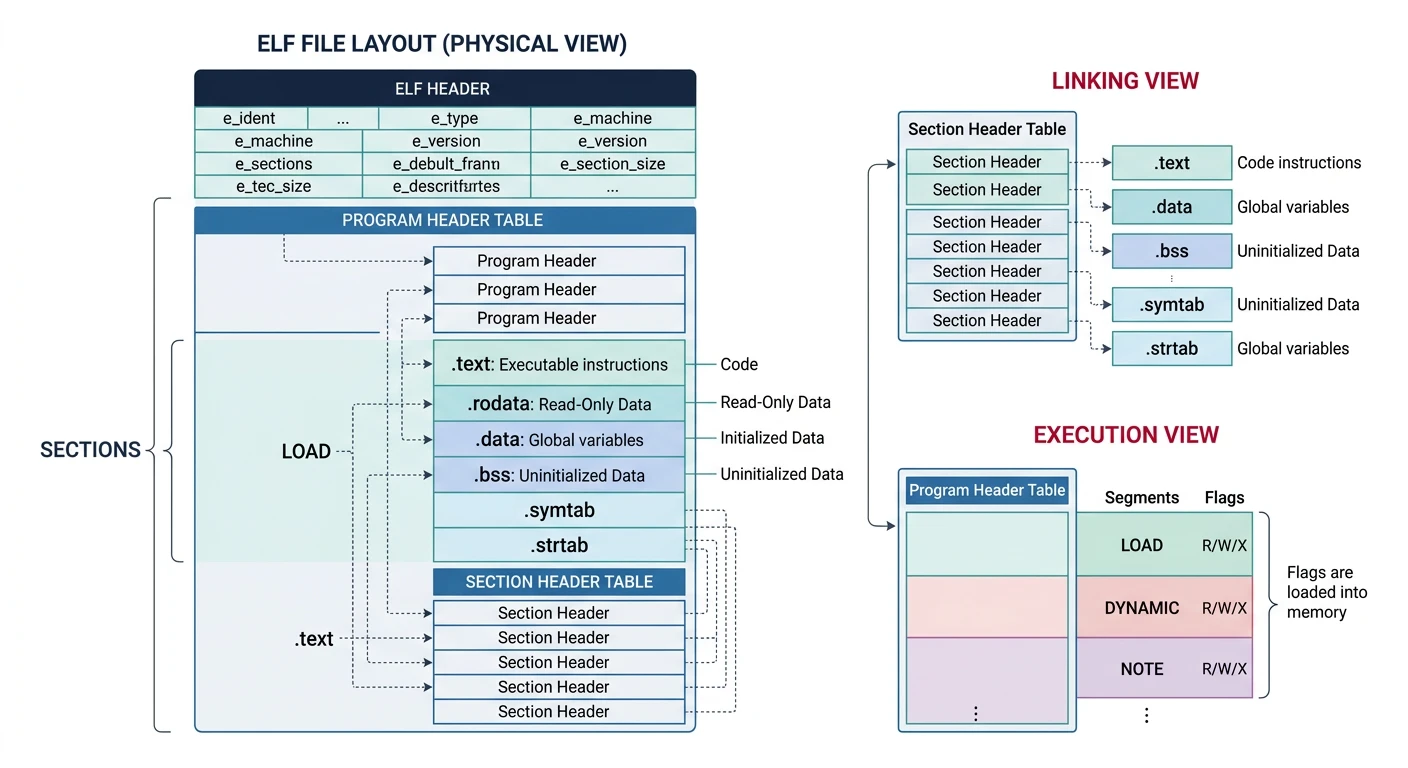
An ELF file is like a well-organized filing cabinet. At the front is an index (the ELF header) that tells you where to find everything else. The file can contain program headers (for loading), section headers (for linking/debugging), and the actual code and data.
ELF file layout with the ELF header at offset 0, program headers describing loadable segments, code and data sections, and optional section headers
The ELF header is always at offset 0 in the file. It's exactly 52 bytes for 32-bit ELF. Every field has a purpose:
/* ELF32 Header */
typedef struct {
    uint8_t  e_ident[16];   // Magic number and other info
    uint16_t e_type;        // Object file type
    uint16_t e_machine;     // Architecture
    uint32_t e_version;     // Object file version
    uint32_t e_entry;       // Entry point virtual address
    uint32_t e_phoff;       // Program header table offset
    uint32_t e_shoff;       // Section header table offset
    uint32_t e_flags;       // Processor-specific flags
    uint16_t e_ehsize;      // ELF header size
    uint16_t e_phentsize;   // Program header table entry size
    uint16_t e_phnum;       // Program header table entry count
    uint16_t e_shentsize;   // Section header table entry size
    uint16_t e_shnum;       // Section header table entry count
    uint16_t e_shstrndx;    // Section name string table index
} Elf32_Ehdr;

// ELF magic number
#define ELF_MAGIC 0x464C457F  // "\x7FELF" in little endian

// e_type values
#define ET_NONE   0  // No file type
#define ET_REL    1  // Relocatable file
#define ET_EXEC   2  // Executable file
#define ET_DYN    3  // Shared object file
#define ET_CORE   4  // Core file

// e_machine for i386
#define EM_386    3
ELF Header Field Breakdown
Field
Size
Purpose
e_ident[0-3]
4
Magic: 0x7F, 'E', 'L', 'F'
e_ident[4]
1
Class: 1=32-bit, 2=64-bit
e_ident[5]
1
Endianness: 1=little, 2=big
e_type
2
File type: REL, EXEC, DYN, CORE
e_machine
2
Architecture: 3=i386, 62=AMD64
e_entry
4
Virtual address of entry point (_start)
e_phoff
4
Program header table file offset
e_phnum
2
Number of program headers
Examining Real ELF Files: Use readelf -h on any Linux executable to see the header:
# Examine a real ELF header
$ readelf -h /bin/ls

ELF Header:
  Magic:   7f 45 4c 46 02 01 01 00 00 00 00 00 00 00 00 00
  Class:                             ELF64
  Data:                              2's complement, little endian
  Version:                           1 (current)
  Type:                              DYN (Position-Independent Executable file)
  Machine:                           Advanced Micro Devices X86-64
  Entry point address:               0x6aa0
  Start of program headers:          64 (bytes into file)
  Number of program headers:         13
  ...

# View the raw bytes of an ELF header
$ hexdump -C /bin/ls | head -4
00000000  7f 45 4c 46 02 01 01 00  00 00 00 00 00 00 00 00  |.ELF............|
00000010  03 00 3e 00 01 00 00 00  a0 6a 00 00 00 00 00 00  |..>......j......|
00000020  40 00 00 00 00 00 00 00  88 2a 02 00 00 00 00 00  |@........*......|
00000030  00 00 00 00 40 00 38 00  0d 00 40 00 1e 00 1d 00  |....@.8...@.....|
Program Headers
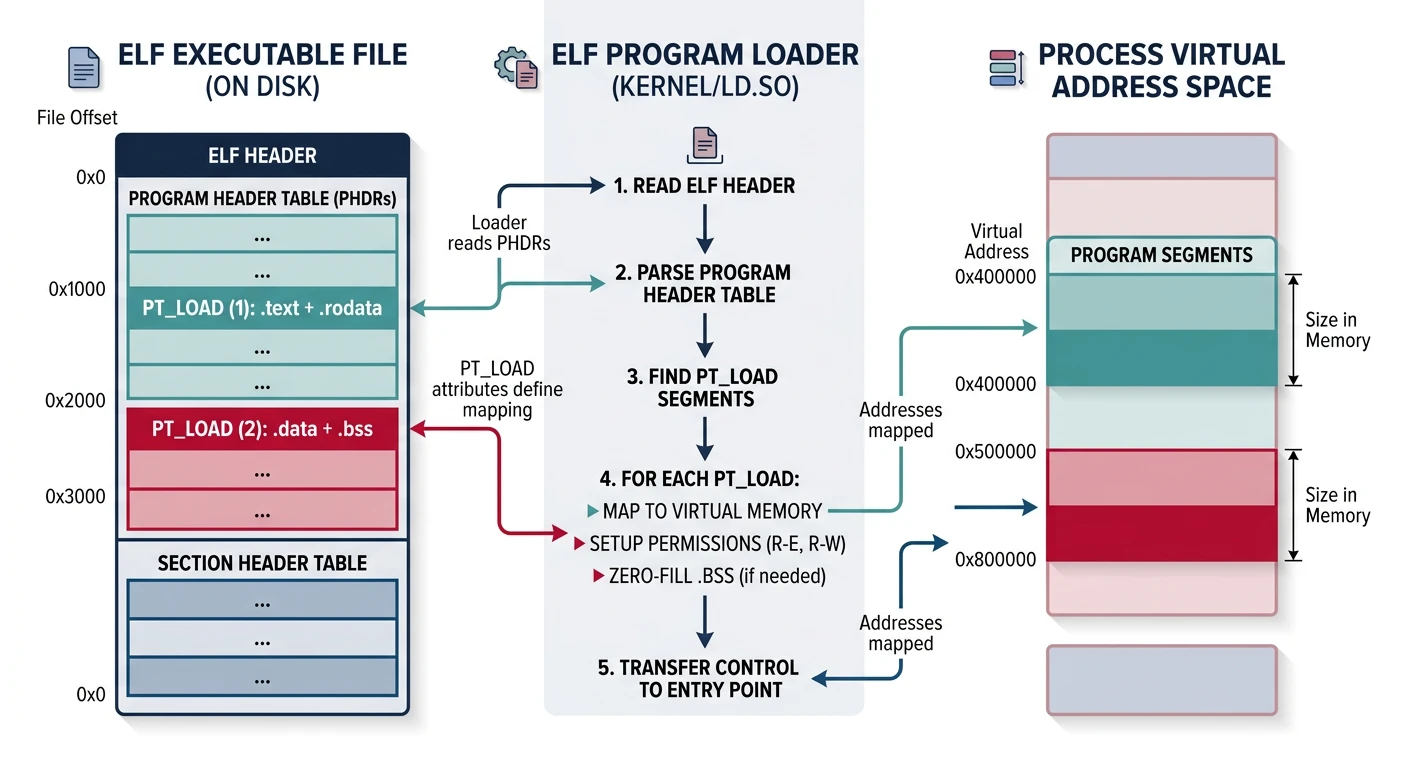
Program headers describe segments—contiguous chunks of the file to load into memory. For execution, we only care about PT_LOAD segments. Each header tells us:
Where to find the segment in the file (p_offset)
Where to load it in memory (p_vaddr)
How many bytes to copy (p_filesz) and total memory needed (p_memsz)
What permissions to set (p_flags: read, write, execute)
The BSS Trick: When p_memsz > p_filesz, the extra bytes are BSS (uninitialized data). We don't store zeros in the file—we just note how many bytes to zero at load time. A program with a large uninitialized array doesn't bloat the executable file.
Section headers provide a linking view—detailed information for linkers, debuggers, and tools. For loading executables, we can ignore them entirely! But they're useful to understand:
/* ELF32 Section Header */
typedef struct {
    uint32_t sh_name;       // Section name (index into string table)
    uint32_t sh_type;       // Section type
    uint32_t sh_flags;      // Section flags
    uint32_t sh_addr;       // Virtual address in memory
    uint32_t sh_offset;     // Offset in file
    uint32_t sh_size;       // Size of section
    uint32_t sh_link;       // Link to another section
    uint32_t sh_info;       // Additional information
    uint32_t sh_addralign;  // Alignment
    uint32_t sh_entsize;    // Entry size if section holds table
} Elf32_Shdr;

// Common section types
#define SHT_NULL      0   // Inactive
#define SHT_PROGBITS  1   // Program data (.text, .data, .rodata)
#define SHT_SYMTAB    2   // Symbol table
#define SHT_STRTAB    3   // String table
#define SHT_NOBITS    8   // No file data (.bss)
Common ELF Sections
Section
Type
Contents
.text
PROGBITS
Executable machine code
.rodata
PROGBITS
Read-only data (strings, constants)
.data
PROGBITS
Initialized writable data
.bss
NOBITS
Uninitialized data (zeroed)
.symtab
SYMTAB
Symbol table (functions, variables)
.strtab
STRTAB
String table (symbol names)
.shstrtab
STRTAB
Section name strings
Key Difference: Sections are for tools (compilers, linkers, debuggers). Segments are for the OS loader. An ELF file always has a header, usually has program headers (for executables), and optionally has section headers (can be stripped).
Parsing ELF Files
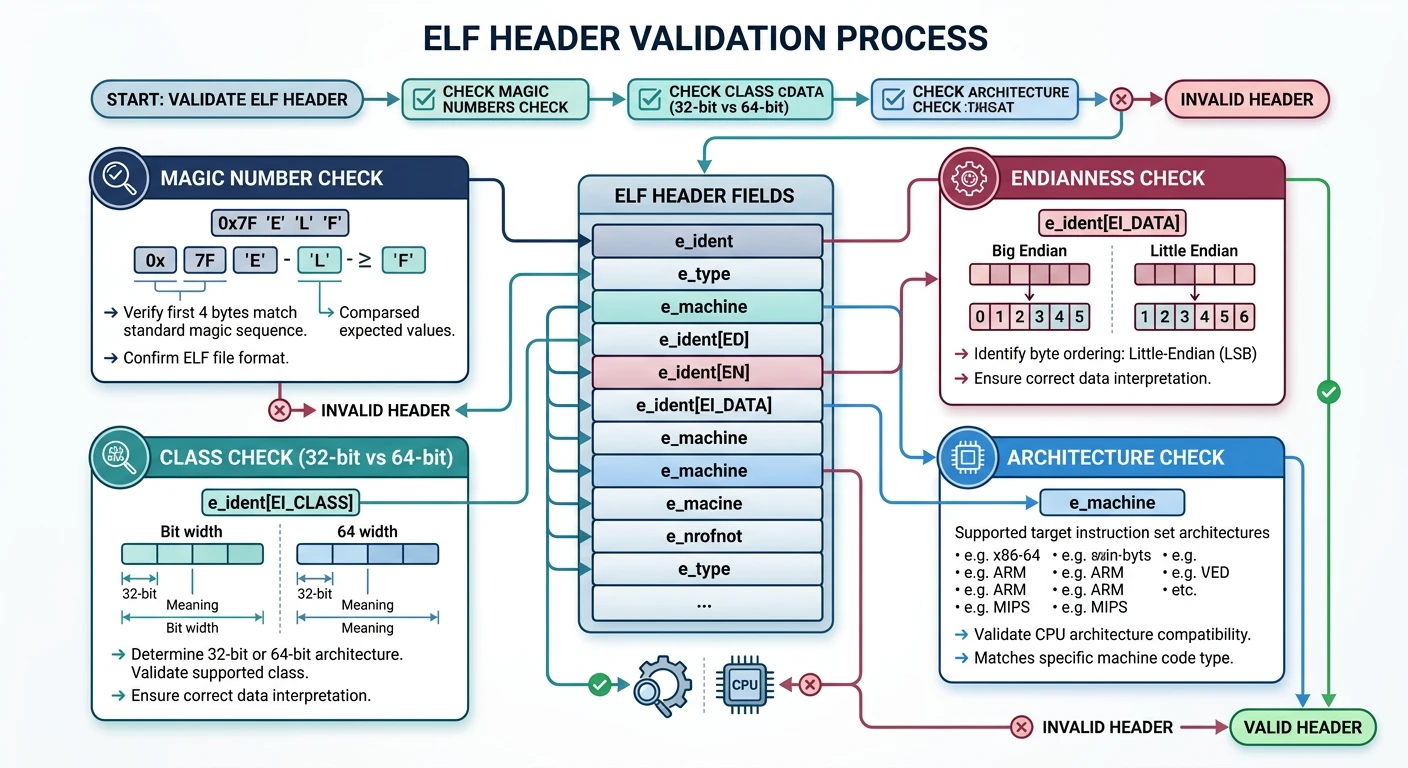
Before we can load a program, we need to verify it's a valid ELF file for our architecture. This is called validation. Then we iterate through the program headers to find loadable segments.
ELF validation sequence verifying the magic number (0x7F ELF), 32-bit class, little-endian encoding, executable type, and i386 machine architecture
Header Validation
ELF validation is crucial for security and stability. A malformed ELF file could crash the kernel or worse—be a deliberate attack. We check:
Magic number: First 4 bytes must be 0x7F, 'E', 'L', 'F'
Class: Must be 32-bit (we're on i386)
Endianness: Must be little-endian (x86 standard)
File type: Must be ET_EXEC (executable)
Architecture: Must be EM_386 (Intel 80386)
/* Validate ELF header */
bool elf_validate(Elf32_Ehdr* header) {
    // Check magic number
    if (*(uint32_t*)header->e_ident != ELF_MAGIC) {
        return false;
    }

    // Check class (32-bit)
    if (header->e_ident[4] != 1) {  // ELFCLASS32
        return false;
    }

    // Check data encoding (little endian)
    if (header->e_ident[5] != 1) {  // ELFDATA2LSB
        return false;
    }

    // Check file type (executable)
    if (header->e_type != ET_EXEC) {
        return false;
    }

    // Check machine type (i386)
    if (header->e_machine != EM_386) {
        return false;
    }

    return true;
}
Security Note: In a real OS, you'd also check that the entry point falls within a valid segment, that addresses don't overflow, and that the file isn't truncated. Never trust user-supplied data!
Segment Loading
Once validated, we iterate through program headers looking for PT_LOAD segments. Each one needs memory allocated and data copied:
/*
 * SEGMENT LOADING PROCESS
 * ========================
 *
 * For each PT_LOAD segment:
 *
 *    ELF File                          Process Memory
 *    ┌──────────────────┐              ┌──────────────────┐
 *    │                  │              │                  │
 *    │  p_offset ───────┼──────┐       │                  │
 *    │                  │      │       │                  │
 *    ├──────────────────┤      │       ├──────────────────┤ p_vaddr
 *    │▓▓▓▓▓▓▓▓▓▓▓▓▓▓▓▓▓▓│      └──────>│▓▓▓▓▓▓▓▓▓▓▓▓▓▓▓▓▓▓│ ← memcpy
 *    │▓▓▓ p_filesz ▓▓▓▓▓│              │▓▓▓ code/data ▓▓▓▓│
 *    │▓▓▓▓▓▓▓▓▓▓▓▓▓▓▓▓▓▓│              │▓▓▓▓▓▓▓▓▓▓▓▓▓▓▓▓▓▓│
 *    ├──────────────────┤              ├──────────────────┤ p_vaddr + p_filesz
 *    │                  │              │░░░░░░░░░░░░░░░░░░│ ← memset 0
 *    │  (not in file)   │              │░░░░ BSS ░░░░░░░░░│   (if memsz > filesz)
 *    │                  │              │░░░░░░░░░░░░░░░░░░│
 *    └──────────────────┘              └──────────────────┘ p_vaddr + p_memsz
 *
 * Steps:
 *   1. Calculate number of pages needed
 *   2. Allocate physical frames
 *   3. Map pages at p_vaddr with correct permissions
 *   4. Copy p_filesz bytes from file
 *   5. Zero remaining (p_memsz - p_filesz) bytes
 */

/* Process a single PT_LOAD segment */
void load_segment(Elf32_Phdr* phdr, uint8_t* file_data, uint32_t* page_dir) {
    uint32_t vaddr_start = phdr->p_vaddr & ~0xFFF;  // Page-align down
    uint32_t vaddr_end = (phdr->p_vaddr + phdr->p_memsz + 0xFFF) & ~0xFFF;

    // Determine page flags
    uint32_t flags = PAGE_PRESENT | PAGE_USER;
    if (phdr->p_flags & PF_W) {
        flags |= PAGE_WRITE;
    }
    // Note: x86 page tables don't have execute bit in 32-bit mode
    // (NX bit requires PAE or 64-bit)

    // Allocate and map pages
    for (uint32_t vaddr = vaddr_start; vaddr < vaddr_end; vaddr += 0x1000) {
        uint32_t frame = alloc_frame();
        map_page(page_dir, vaddr, frame, flags);
    }

    // Copy segment data from file
    memcpy((void*)phdr->p_vaddr,
           file_data + phdr->p_offset,
           phdr->p_filesz);

    // Zero BSS portion (memsz > filesz)
    if (phdr->p_memsz > phdr->p_filesz) {
        memset((void*)(phdr->p_vaddr + phdr->p_filesz),
               0,
               phdr->p_memsz - phdr->p_filesz);
    }
}
ELF Segment Loading Process
flowchart TD
    A["Read ELF File"] --> B["Validate ELF Header
Magic: 0x7F ELF"]
    B --> C["Iterate Program Headers"]
    C --> D{"Type == PT_LOAD?"}
    D -->|No| C
    D -->|Yes| E["Allocate Pages
at p_vaddr"]
    E --> F["Copy p_filesz Bytes
from File Offset"]
    F --> G["Zero BSS Region
memsz - filesz"]
    G --> C
    C -->|All Done| H["Set Entry Point
e_entry"]
    H --> I["Jump to Kernel"]

    style A fill:#e8f4f4,stroke:#3B9797
    style I fill:#f0f4f8,stroke:#16476A
Program Loader
The program loader is the component that takes an ELF file and transforms it into a running process. It combines everything we've built: memory management (Phase 6), filesystem (Phase 7), and process infrastructure (Phase 8).
Program loader mapping ELF segments into the process address space: text and rodata as read-execute, data as read-write, and BSS zeroed in memory
Memory Setup
Each process needs its own address space. We create a new page directory and map the ELF segments into it. The memory layout follows Unix conventions:
The ELF header's e_entry field contains the virtual address where execution should begin. This is typically _start from crt0 (the C runtime startup code), which then calls main().
Why 0x08048000? This traditional Linux start address leaves low memory unmapped as a "null pointer guard." Accessing NULL (address 0) causes a page fault instead of silently corrupting data—a helpful debugging feature!
Stack & Arguments
Before jumping to user code, we need to set up the stack with the expected arguments. C programs expect argc, argv, and envp at specific stack locations:
/*
 * USER STACK LAYOUT (at program start)
 * =====================================
 *
 * High addresses
 *        ┌────────────────────────────────┐
 *        │ "PATH=/bin:/usr/bin"           │ ← Environment strings
 *        │ "/home/user/hello"             │ ← argv[1] string
 *        │ "./hello"                      │ ← argv[0] string (program name)
 *        ├────────────────────────────────┤
 *        │ NULL                           │ ← End of envp[]
 *        │ ptr to "PATH=..."              │ ← envp[0]
 *        ├────────────────────────────────┤
 *        │ NULL                           │ ← End of argv[]
 *        │ ptr to "/home/user/hello"      │ ← argv[1]
 *        │ ptr to "./hello"               │ ← argv[0]
 *        ├────────────────────────────────┤
 *   SP → │ argc = 2                       │ ← Stack pointer here at entry
 *        └────────────────────────────────┘
 * Low addresses
 *
 * _start in crt0 does:
 *   pop ecx        ; ecx = argc
 *   mov esi, esp   ; esi = argv
 *   push [esp+ecx*4+4]  ; envp
 *   push esi       ; argv
 *   push ecx       ; argc
 *   call main
 */

/* Setup user stack with arguments */
uint32_t setup_user_stack(uint32_t* page_dir, int argc, char** argv, char** envp) {
    // Allocate stack pages (typically 8KB = 2 pages)
    uint32_t stack_top = 0xC0000000;  // Below kernel space
    uint32_t stack_base = stack_top - 0x2000;  // 8KB stack

    for (uint32_t addr = stack_base; addr < stack_top; addr += 0x1000) {
        uint32_t frame = alloc_frame();
        map_page(page_dir, addr, frame, PAGE_PRESENT | PAGE_WRITE | PAGE_USER);
    }

    uint32_t sp = stack_top;

    // Copy string data first (at top of stack)
    // Then build pointer arrays
    // Finally push argc

    // 1. Copy environment strings (if any)
    int envc = 0;
    uint32_t* env_ptrs = NULL;
    if (envp) {
        while (envp[envc]) envc++;
        env_ptrs = kmalloc(sizeof(uint32_t) * (envc + 1));
        for (int i = 0; i < envc; i++) {
            size_t len = strlen(envp[i]) + 1;
            sp -= len;
            memcpy((void*)sp, envp[i], len);
            env_ptrs[i] = sp;
        }
        env_ptrs[envc] = 0;  // NULL terminator
    }

    // 2. Copy argument strings
    uint32_t* argv_ptrs = kmalloc(sizeof(uint32_t) * (argc + 1));
    for (int i = 0; i < argc; i++) {
        size_t len = strlen(argv[i]) + 1;
        sp -= len;
        memcpy((void*)sp, argv[i], len);
        argv_ptrs[i] = sp;
    }
    argv_ptrs[argc] = 0;  // NULL terminator

    // Align to 4 bytes
    sp &= ~0x3;

    // 3. Push envp array
    for (int i = envc; i >= 0; i--) {
        sp -= 4;
        *(uint32_t*)sp = env_ptrs ? env_ptrs[i] : 0;
    }

    // 4. Push argv array
    for (int i = argc; i >= 0; i--) {
        sp -= 4;
        *(uint32_t*)sp = argv_ptrs[i];
    }

    // 5. Push argc
    sp -= 4;
    *(uint32_t*)sp = argc;

    kfree(argv_ptrs);
    if (env_ptrs) kfree(env_ptrs);

    return sp;  // Return stack pointer for entry
}
Implementing exec()
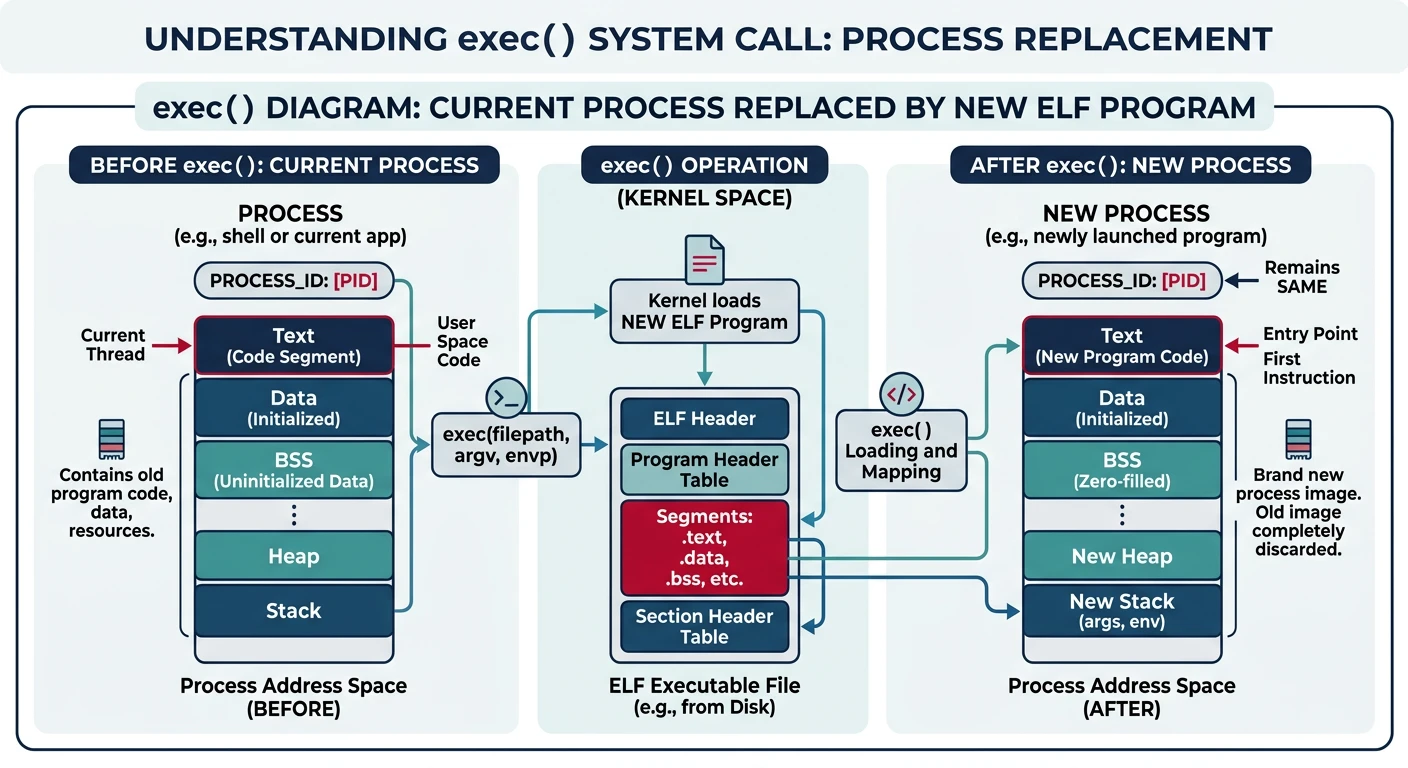
The exec() system call replaces the current process's memory image with a new program. Unlike fork(), which creates a copy, exec()transforms the process—same PID, new program. This is the Unix model for running programs.
The exec() system call transforms a process by replacing its code, data, stack, and heap with a new ELF program while preserving PID and open file descriptors
Fork-Exec Pattern: Unix typically uses fork() + exec() together. The shell forks, the child calls exec to run the command, and the parent waits. This separation allows the child to set up redirections, pipes, and environment before exec.
/* Execute a program */
int sys_exec(const char* path, char* const argv[]) {
    // Read file from filesystem
    vfs_node_t* file = vfs_open(path);
    if (!file) {
        return -1;
    }

    // Read entire file into memory
    uint32_t size = file->length;
    uint8_t* data = kmalloc(size);
    vfs_read(file, 0, size, data);
    vfs_close(file);

    // Create new address space
    uint32_t* new_page_dir = create_page_directory();

    // Load ELF
    uint32_t entry = elf_load(data, new_page_dir);
    kfree(data);

    if (!entry) {
        free_page_directory(new_page_dir);
        return -1;
    }

    // Setup user stack
    uint32_t user_stack = 0xBFFFF000;
    map_user_stack(new_page_dir, user_stack);

    // Copy arguments to user stack
    int argc = count_args(argv);
    uint32_t sp = setup_args(user_stack, argc, argv);

    // Switch address space
    switch_page_directory(new_page_dir);

    // Jump to user mode
    enter_user_mode(entry, sp);

    // Never reaches here
    return 0;
}
Error Handling: If exec() succeeds, it never returns—the new program simply starts running. If it fails (file not found, not executable, permission denied), it returns -1 and sets errno. The calling code must handle this:
/* Example: Shell executing a command */
void shell_exec_command(char* path, char** argv) {
    pid_t pid = fork();

    if (pid == 0) {
        // Child process
        execv(path, argv);

        // If we get here, exec failed!
        printf("exec failed: %s\n", strerror(errno));
        exit(127);  // Standard exit code for "command not found"
    } else if (pid > 0) {
        // Parent: wait for child
        int status;
        waitpid(pid, &status, 0);

        if (WIFEXITED(status)) {
            printf("Program exited with code %d\n", WEXITSTATUS(status));
        }
    } else {
        // fork() failed
        printf("fork failed\n");
    }
}
What You Can Build
Phase 9 Project: An OS that runs real programs! Compile C programs with GCC, produce ELF binaries, and your kernel loads and executes them. You can now run programs written by others on your OS.
Project 1: Simple ELF Loader
Build a complete ELF loader that can run statically linked programs:
End-to-end ELF loading pipeline: compile with GCC, produce ELF binary, kernel validates and loads segments, then jumps to entry point
/* Complete ELF loader implementation */
#include "elf.h"
#include "paging.h"
#include "process.h"
#include "fs.h"

/* Main ELF loading function */
int elf_exec(const char* path, int argc, char** argv) {
    // 1. Read file from filesystem
    vfs_node_t* file = vfs_open(path);
    if (!file) {
        return -ENOENT;
    }

    // 2. Read ELF header
    Elf32_Ehdr ehdr;
    if (vfs_read(file, 0, sizeof(ehdr), &ehdr) != sizeof(ehdr)) {
        vfs_close(file);
        return -EIO;
    }

    // 3. Validate header
    if (!elf_validate(&ehdr)) {
        vfs_close(file);
        return -ENOEXEC;
    }

    // 4. Create new address space
    uint32_t* new_pd = create_user_address_space();

    // 5. Read and process program headers
    size_t phdr_size = ehdr.e_phentsize * ehdr.e_phnum;
    Elf32_Phdr* phdrs = kmalloc(phdr_size);
    vfs_read(file, ehdr.e_phoff, phdr_size, phdrs);

    for (int i = 0; i < ehdr.e_phnum; i++) {
        if (phdrs[i].p_type == PT_LOAD) {
            // Read segment from file
            uint8_t* segment_data = kmalloc(phdrs[i].p_filesz);
            vfs_read(file, phdrs[i].p_offset, phdrs[i].p_filesz, segment_data);

            // Load segment into address space (temporarily switch PD)
            load_segment(&phdrs[i], segment_data, new_pd);

            kfree(segment_data);
        }
    }

    kfree(phdrs);
    vfs_close(file);

    // 6. Setup user stack with arguments
    uint32_t user_sp = setup_user_stack(new_pd, argc, argv, NULL);

    // 7. Update current process
    pcb_t* proc = get_current_process();

    // Free old address space
    if (proc->page_directory != kernel_page_directory) {
        free_page_directory(proc->page_directory);
    }

    proc->page_directory = new_pd;

    // 8. Switch to new address space and jump to entry
    switch_page_directory(new_pd);
    enter_user_mode(ehdr.e_entry, user_sp);

    // Never reached
    return 0;
}
Project 2: readelf Command
Build a user-space tool that displays ELF file information (like the Linux readelf command):
With program loading working, your OS can now run real compiled programs! But those programs need a way to interact with the system—they need a standard library. And we need a shell to manage running programs interactively.
Phase 9 Achievements:
Understand the ELF executable format (headers, segments, sections)
Parse and validate ELF files for security
Load program segments into memory with correct permissions