We use cookies to enhance your browsing experience, serve personalized content, and analyze our traffic.
By clicking "Accept All", you consent to our use of cookies. See our
Privacy Policy
for more information.
Phase 12 Goals: By the end of this phase, your OS will boot via UEFI. You'll have accurate memory maps, direct framebuffer access via GOP, and a modern boot process that works on current hardware.
Throughout this series, we've used BIOS (Basic Input/Output System) to boot our kernel. BIOS has served the PC industry since 1981, but it was designed for 16-bit CPUs and 1MB of memory. Modern systems need something better.
UEFI (Unified Extensible Firmware Interface) is that something better. Originally developed by Intel as EFI, it became an industry standard and now ships on virtually every PC manufactured since 2010. UEFI isn't just "better BIOS"—it's a complete reimagining of how firmware should work.
Key Insight: UEFI replaces the ancient BIOS with a modern firmware interface. It provides 64-bit operation from the start, standardized protocols for hardware access, and eliminates many legacy headaches.
Think of the difference like this: BIOS is like a 1980s calculator—it can do basic math, but you have to handle everything yourself. UEFI is like a modern smartphone—it provides sophisticated services, handles complex tasks, and speaks your language (literally, via Unicode).
UEFI vs BIOS
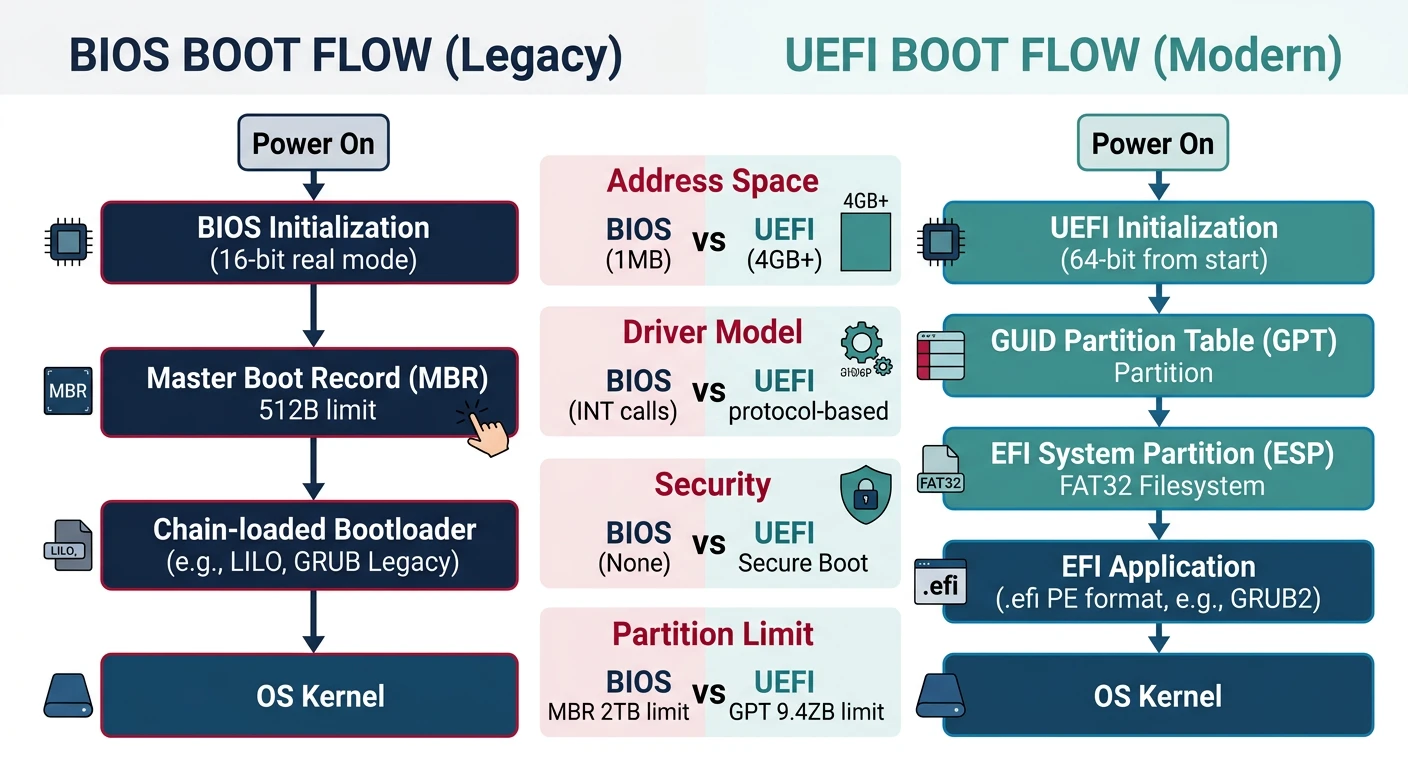
Let's visualize the fundamental architectural differences:
UEFI boot flow vs legacy BIOS — from power-on to kernel handoff
Feature
BIOS (Legacy)
UEFI (Modern)
CPU Mode at Boot
16-bit Real Mode
32-bit or 64-bit
Boot Sector Size
512 bytes (MBR)
No limit (PE/COFF executables)
Max Disk Size
2 TB (MBR limit)
9.4 ZB (GPT)
Memory Map
INT 0x15 E820 (unreliable)
GetMemoryMap() (precise)
Graphics
VGA BIOS, mode switching
GOP protocol (direct framebuffer)
Character Set
ASCII only
Full Unicode (UCS-2)
Driver Model
ROM-based, hardware-specific
Portable EFI drivers
Secure Boot
Not supported
Built-in signature verification
Networking
PXE only (INT 0x18)
Full TCP/IP stack available
Partitioning
MBR (4 primary partitions)
GPT (128+ partitions)
The Legacy Boot Problem
Real-WorldWhy Change?
Consider what we had to do with BIOS boot:
Stage 1 bootloader: Squeeze into 446 bytes of MBR, load Stage 2
A20 line: Enable archaic memory gate from 1981
Real Mode assembly: Write 16-bit code to load anything
Mode switching: Jump from Real → Protected → Long mode manually
Memory detection: Call multiple BIOS functions, results often lie
VGA setup: Set mode via INT 0x10, or hack VBE for higher resolution
With UEFI, we write a C program that receives a framebuffer and accurate memory map directly. The firmware has already done the hard work.
UEFI Benefits for OS Developers
Why should you embrace UEFI for your OS? Here are the key advantages:
64-Bit From the Start: UEFI boots directly into 64-bit long mode. No more Real Mode assembly, no mode transitions, no segment limits. Your boot loader can be pure C code.
Accurate Memory Maps: UEFI's GetMemoryMap() returns a precise list of all memory regions with their types. No more hoping BIOS E820 tells the truth about your hardware.
Graphics Output Protocol: GOP gives you direct access to a linear framebuffer. Set resolution, get the address, and start drawing pixels. No VGA registers, no VESA headaches.
Additional benefits include:
File system support: UEFI reads FAT partitions natively—load files without writing a FAT driver
Modern interfaces: Standard protocols for keyboard, mouse, networking, USB, and more
Larger bootloader: No 512-byte limit—your boot code can be megabytes if needed
Runtime services: Access NVRAM variables, RTC, and system reset after boot
Secure Boot: Cryptographic verification chain from firmware to kernel
CSM (Compatibility Support Module): Many UEFI systems include CSM for legacy BIOS compatibility. However, CSM is being phased out—Windows 11 requires UEFI, and many manufacturers are removing CSM entirely. Future-proof your OS by supporting native UEFI boot.
UEFI Application Structure
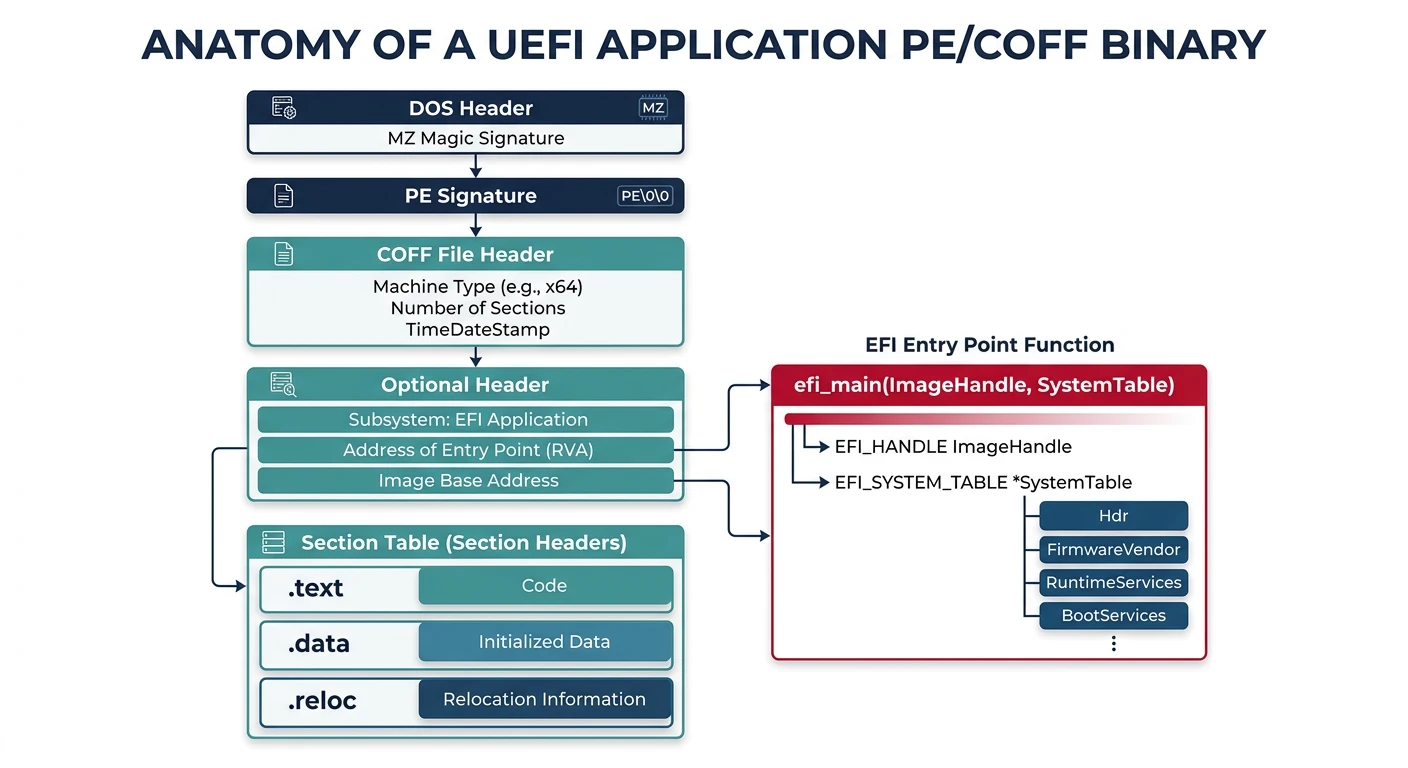
A UEFI application is fundamentally different from a BIOS bootloader. It's a proper PE/COFF executable (the same format Windows uses) that receives rich context from the firmware. Let's understand the anatomy of a UEFI boot loader.
Anatomy of a UEFI boot application: PE/COFF format with firmware entry point
Entry Point: Where It All Begins
Every UEFI application starts with a standardized entry point. The firmware passes two critical arguments:
/* UEFI Application Entry Point */
#include
#include

EFI_STATUS EFIAPI efi_main(EFI_HANDLE ImageHandle,
                           EFI_SYSTEM_TABLE* SystemTable) {
    EFI_STATUS status;

    // Initialize library
    InitializeLib(ImageHandle, SystemTable);

    // Clear screen
    SystemTable->ConOut->ClearScreen(SystemTable->ConOut);

    // Print welcome message
    Print(L"Hello from UEFI!\r\n");

    // Get graphics output
    EFI_GRAPHICS_OUTPUT_PROTOCOL* gop;
    status = get_gop(&gop);
    if (EFI_ERROR(status)) {
        Print(L"Failed to get GOP\r\n");
        return status;
    }

    // Get memory map and exit boot services
    // Load kernel
    // Jump to kernel

    return EFI_SUCCESS;
}
Code Breakdown:
• EFI_HANDLE ImageHandle - Opaque identifier for this loaded image; pass it to functions that need to know "who's asking"
• EFI_SYSTEM_TABLE* SystemTable - The master pointer; everything else is accessible through this
• InitializeLib() - gnu-efi helper that sets up global variables like gBS (BootServices) and gST (SystemTable)
• Print(L"...") - UEFI uses wide strings (UCS-2 Unicode), hence the L prefix
• \r\n - UEFI console requires both carriage return and newline
System Table: The Master Index
The EFI System Table is like the table of contents for all UEFI functionality. Here's its structure:
/* EFI System Table Structure */
typedef struct {
    EFI_TABLE_HEADER                Hdr;
    CHAR16*                         FirmwareVendor;
    UINT32                          FirmwareRevision;

    EFI_HANDLE                      ConsoleInHandle;
    EFI_SIMPLE_TEXT_INPUT_PROTOCOL* ConIn;      // Keyboard input

    EFI_HANDLE                      ConsoleOutHandle;
    EFI_SIMPLE_TEXT_OUTPUT_PROTOCOL*ConOut;     // Screen output

    EFI_HANDLE                      StandardErrorHandle;
    EFI_SIMPLE_TEXT_OUTPUT_PROTOCOL*StdErr;     // Error output

    EFI_RUNTIME_SERVICES*           RuntimeServices;  // Persist after boot
    EFI_BOOT_SERVICES*              BootServices;     // Available until ExitBootServices

    UINTN                           NumberOfTableEntries;
    EFI_CONFIGURATION_TABLE*        ConfigurationTable;  // ACPI, SMBIOS, etc.
} EFI_SYSTEM_TABLE;

/* Common usage patterns */
void uefi_examples(EFI_SYSTEM_TABLE* ST) {
    // Print to screen
    ST->ConOut->OutputString(ST->ConOut, L"Message\r\n");

    // Clear screen
    ST->ConOut->ClearScreen(ST->ConOut);

    // Get key press
    EFI_INPUT_KEY key;
    ST->ConIn->ReadKeyStroke(ST->ConIn, &key);

    // Access Boot Services
    EFI_BOOT_SERVICES* BS = ST->BootServices;

    // Find ACPI table
    for (UINTN i = 0; i < ST->NumberOfTableEntries; i++) {
        if (CompareGuid(&ST->ConfigurationTable[i].VendorGuid,
                        &gEfiAcpi20TableGuid)) {
            void* acpi_rsdp = ST->ConfigurationTable[i].VendorTable;
            // RSDP found!
        }
    }
}
Understanding gBS, gST, and gRT
gnu-efi ConventionGlobal Variables
When using gnu-efi library, InitializeLib() sets up these global pointers:
gST - Global System Table pointer (EFI_SYSTEM_TABLE*)
gBS - Global Boot Services pointer (EFI_BOOT_SERVICES*)
gRT - Global Runtime Services pointer (EFI_RUNTIME_SERVICES*)
This lets you write gBS->AllocatePool(...) instead of SystemTable->BootServices->AllocatePool(...)
Protocols: UEFI's Interface System
UEFI protocols are like interfaces in object-oriented programming. Each protocol is identified by a GUID (Globally Unique Identifier) and provides a specific set of functions. Here's how they work:
/* Locating and Using Protocols */

/* Each protocol has a GUID */
#define EFI_GRAPHICS_OUTPUT_PROTOCOL_GUID \
    { 0x9042a9de, 0x23dc, 0x4a38, \
      {0x96, 0xfb, 0x7a, 0xde, 0xd0, 0x80, 0x51, 0x6a} }

/* Locate a protocol - simplest method */
EFI_STATUS get_gop(EFI_GRAPHICS_OUTPUT_PROTOCOL** gop) {
    EFI_GUID gop_guid = EFI_GRAPHICS_OUTPUT_PROTOCOL_GUID;

    // LocateProtocol finds first instance of protocol
    return gBS->LocateProtocol(&gop_guid, NULL, (void**)gop);
}

/* Locate all handles supporting a protocol */
EFI_STATUS enumerate_block_devices(void) {
    EFI_GUID block_guid = EFI_BLOCK_IO_PROTOCOL_GUID;
    EFI_HANDLE* handles;
    UINTN handle_count;

    // Get all handles that support Block I/O
    EFI_STATUS status = gBS->LocateHandleBuffer(
        ByProtocol,           // Search method
        &block_guid,          // Protocol GUID
        NULL,                 // Optional search key
        &handle_count,        // Number of handles found
        &handles              // Array of handles
    );

    if (EFI_ERROR(status)) return status;

    Print(L"Found %d block devices\r\n", handle_count);

    // Query each handle's Block I/O protocol
    for (UINTN i = 0; i < handle_count; i++) {
        EFI_BLOCK_IO_PROTOCOL* block_io;
        status = gBS->HandleProtocol(
            handles[i],
            &block_guid,
            (void**)&block_io
        );

        if (!EFI_ERROR(status)) {
            Print(L"  Device %d: %d bytes/block, %ld blocks\r\n",
                  i,
                  block_io->Media->BlockSize,
                  block_io->Media->LastBlock + 1);
        }
    }

    gBS->FreePool(handles);
    return EFI_SUCCESS;
}
Protocol Discovery Pattern:
1. LocateProtocol() - Find first instance of a protocol (e.g., "give me a graphics adapter")
2. LocateHandleBuffer() - Find ALL handles supporting a protocol (e.g., "list all disks")
3. HandleProtocol() - Get specific protocol from a known handle
4. OpenProtocol() - Advanced: explicit open with access control
Boot Services
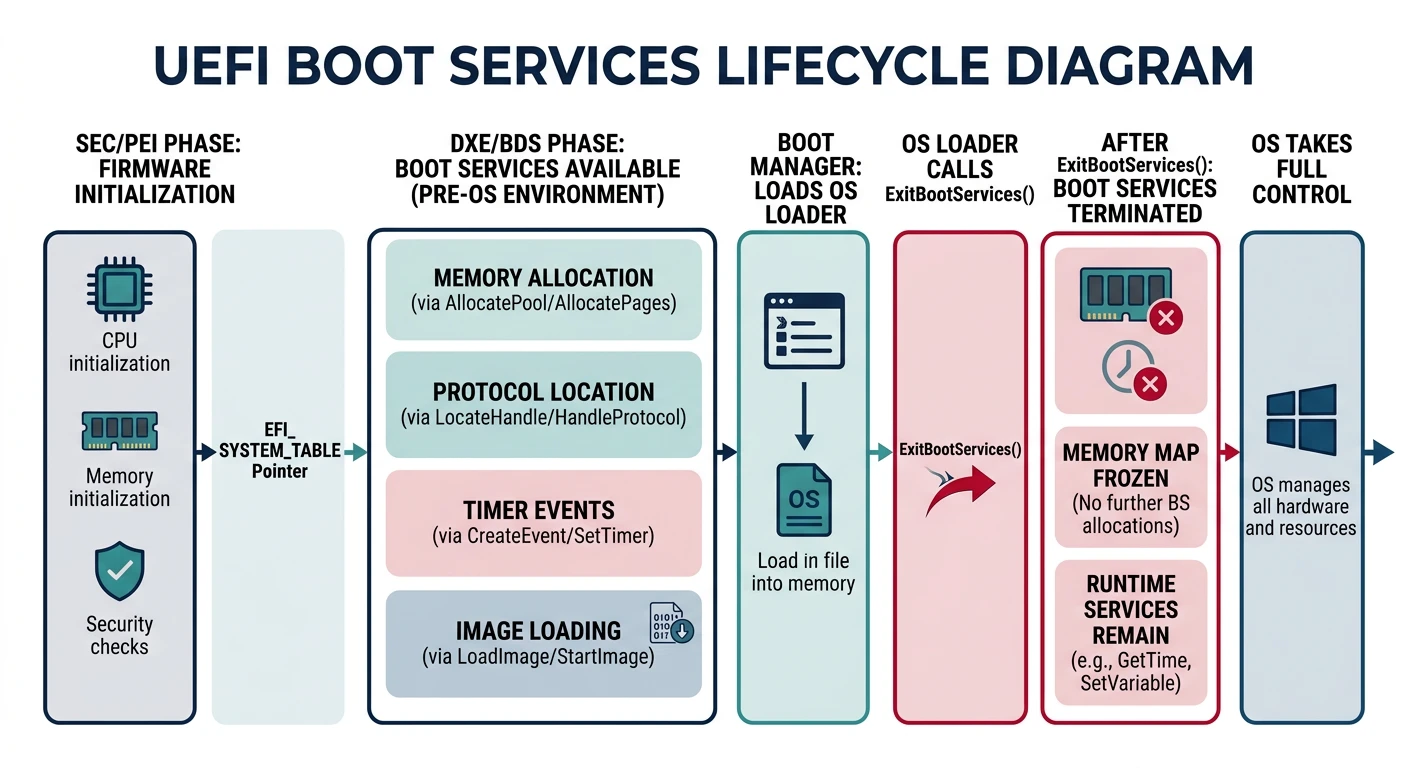
Boot Services are UEFI functions available only during boot time. Once your OS calls ExitBootServices(), these functions become unavailable—the firmware releases its resources for your kernel to use. Think of them as the scaffolding you use while building; it comes down when construction is complete.
Boot Services lifecycle — temporary firmware scaffolding available before ExitBootServices()
Critical Understanding: Boot Services are temporary. You must extract all needed information (memory map, framebuffer address) BEFORE calling ExitBootServices(). After that call, the firmware's Boot Services are gone forever.
Memory Map: The Critical Resource
The most important Boot Service for any serious OS is GetMemoryMap(). Unlike BIOS's inconsistent INT 0x15-E820, UEFI provides a precise, standardized memory layout:
/* Get UEFI Memory Map */
EFI_STATUS get_memory_map(EFI_MEMORY_DESCRIPTOR** map,
                          UINTN* map_size,
                          UINTN* map_key,
                          UINTN* desc_size,
                          UINT32* desc_version) {
    EFI_STATUS status;

    *map_size = 0;
    status = gBS->GetMemoryMap(map_size, NULL, map_key,
                                desc_size, desc_version);

    // Allocate buffer (add extra space)
    *map_size += 2 * *desc_size;
    status = gBS->AllocatePool(EfiLoaderData, *map_size, (void**)map);

    // Get actual memory map
    status = gBS->GetMemoryMap(map_size, *map, map_key,
                                desc_size, desc_version);

    return status;
}
Let's understand each step:
Why Call GetMemoryMap() Twice?
First call with NULL buffer returns the required buffer size. We then allocate that size (plus a safety margin) and call again. This pattern is common in UEFI—sizes are queried before data is retrieved.
UEFI provides several allocation functions for different needs:
Function
Unit
Use Case
AllocatePool()
Bytes
Small allocations (like malloc)
AllocatePages()
4KB pages
Page-aligned allocations, kernel loading
FreePool()
-
Free pool memory
FreePages()
-
Free page-aligned memory
/* Memory Allocation Examples */

/* Allocate pool memory (like malloc) */
void* buffer;
EFI_STATUS status = gBS->AllocatePool(
    EfiLoaderData,        // Memory type
    1024,                 // Size in bytes
    &buffer               // Output pointer
);
if (!EFI_ERROR(status)) {
    // Use buffer...
    gBS->FreePool(buffer);
}

/* Allocate pages for kernel loading */
EFI_PHYSICAL_ADDRESS kernel_base = 0x100000;  // Where we want it
UINTN kernel_pages = 256;                     // 1 MB

status = gBS->AllocatePages(
    AllocateAddress,      // Allocation type
    EfiLoaderData,        // Memory type
    kernel_pages,         // Number of 4KB pages
    &kernel_base          // Physical address (in/out)
);

/* Allocation types:
   AllocateAnyPages  - UEFI picks the address
   AllocateMaxAddress - Below a maximum address
   AllocateAddress   - At a specific address
*/

/* Allocating at any location */
EFI_PHYSICAL_ADDRESS any_location;
status = gBS->AllocatePages(
    AllocateAnyPages,     // Let firmware choose
    EfiLoaderData,
    64,                   // 256 KB
    &any_location         // Output address
);

/* Allocating below a limit (e.g., for 32-bit pointers) */
EFI_PHYSICAL_ADDRESS below_4gb = 0xFFFFFFFF;
status = gBS->AllocatePages(
    AllocateMaxAddress,   // At or below given address
    EfiLoaderData,
    32,
    &below_4gb            // Updated to actual address
);
ExitBootServices: The Point of No Return
ExitBootServices() is the most critical—and most error-prone—Boot Service call. It tells UEFI: "I'm done, shut down your services, I'm taking over." After this call succeeds:
UEFI Boot Handoff Sequence
flowchart TD
    A["UEFI Firmware Init"] --> B["Load UEFI Application
EFI Executable"]
    B --> C["Get Memory Map
GetMemoryMap()"]
    C --> D["Setup Framebuffer
GOP Protocol"]
    D --> E["Load Kernel from Disk
File Protocol"]
    E --> F["ExitBootServices()"]
    F --> G["Point of No Return
UEFI Services Unavailable"]
    G --> H["Transfer to Kernel
Jump to Entry Point"]

    style F fill:#BF092F,stroke:#132440,color:#fff
    style G fill:#fff5f5,stroke:#BF092F
    style H fill:#e8f4f4,stroke:#3B9797
Boot Services gone - No more AllocatePool, LocateProtocol, etc.
Timer gone - UEFI's event system stops
Console gone - ConOut stops working (but GOP framebuffer remains)
Your kernel owns everything - Boot services memory is yours to use
/* Robust ExitBootServices Implementation */
EFI_STATUS exit_boot_services_safe(EFI_HANDLE image,
                                    boot_info_t* boot_info) {
    EFI_STATUS status;
    EFI_MEMORY_DESCRIPTOR* memory_map = NULL;
    UINTN map_size = 0;
    UINTN map_key = 0;
    UINTN desc_size = 0;
    UINT32 desc_version = 0;

    // Get memory map (may need to retry)
    int retries = 3;
    while (retries--) {
        // Get required size
        status = gBS->GetMemoryMap(&map_size, NULL, &map_key,
                                   &desc_size, &desc_version);

        // Add safety margin (allocation might change map)
        map_size += 2 * desc_size;

        // Allocate buffer
        status = gBS->AllocatePool(EfiLoaderData, map_size,
                                   (void**)&memory_map);
        if (EFI_ERROR(status)) {
            Print(L"Failed to allocate memory map buffer\r\n");
            return status;
        }

        // Get actual memory map
        status = gBS->GetMemoryMap(&map_size, memory_map, &map_key,
                                   &desc_size, &desc_version);
        if (EFI_ERROR(status)) {
            gBS->FreePool(memory_map);
            memory_map = NULL;
            continue;
        }

        // Try to exit boot services with this map_key
        status = gBS->ExitBootServices(image, map_key);
        if (status == EFI_SUCCESS) {
            // Success! Save everything to boot_info for kernel
            boot_info->memory_map = memory_map;
            boot_info->memory_map_size = map_size;
            boot_info->memory_map_desc_size = desc_size;
            return EFI_SUCCESS;
        }

        // Map key changed between GetMemoryMap and ExitBootServices
        // The AllocatePool call may have modified the memory map!
        // Free and retry
        gBS->FreePool(memory_map);
        memory_map = NULL;
        map_size = 0;  // Reset size to query again
    }

    Print(L"ExitBootServices failed after retries\r\n");
    return EFI_ABORTED;
}
The Map Key Race Condition
Common BugMust Understand
The most common ExitBootServices bug:
You call GetMemoryMap() - returns map_key = 0x1234
You call AllocatePool() for something - this changes the memory map!
You call ExitBootServices(image, 0x1234) - FAILS because map changed
Solution: Always get the memory map, then immediately call ExitBootServices without any allocations in between. If it fails, get a fresh map and retry.
Graphics Output Protocol (GOP)
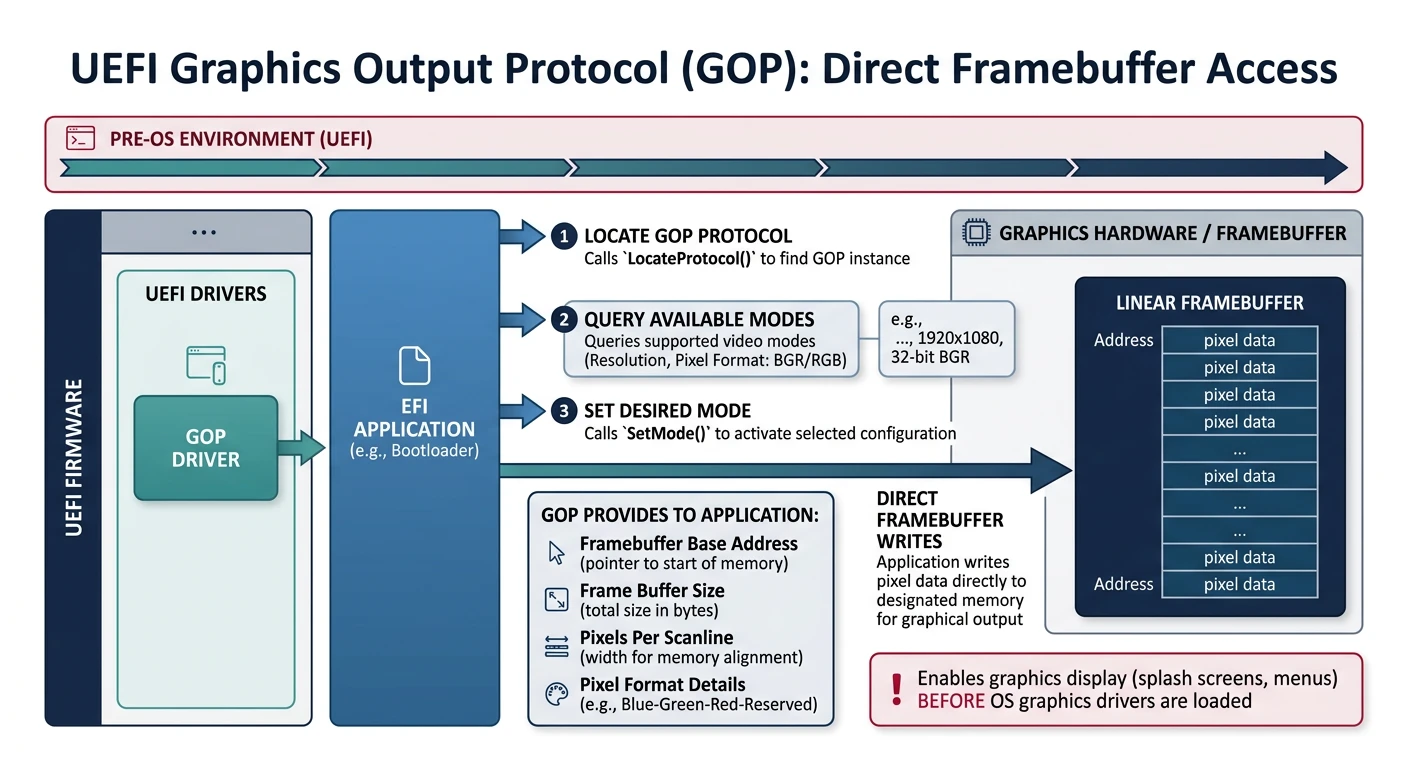
One of UEFI's biggest improvements over BIOS is graphics handling. Gone are the days of VGA registers and VESA BIOS Extensions. GOP provides direct access to a linear framebuffer—a simple array of pixels you can write to directly.
GOP provides direct linear framebuffer access — no VGA registers or VESA mode-switching required
GOP vs VGA/VESA: With BIOS, you had to set video modes via INT 0x10 (limited) or VBE (complex real-mode calls). GOP gives you the framebuffer address directly in 64-bit mode. No mode switching, no real mode calls, just pixels in memory.
Video Modes: Finding the Right Resolution
GOP supports multiple video modes. Let's explore how to enumerate and select them:
┌─────────────────────────────────────────────────────────────────────────────┐
│                    GOP Mode Information Structure                           │
├─────────────────────────────────────────────────────────────────────────────┤
│                                                                             │
│   EFI_GRAPHICS_OUTPUT_PROTOCOL                                              │
│   ════════════════════════════════                                          │
│                                                                             │
│   ┌─────────────────────────────────────────────────────────────────────┐   │
│   │  Mode (EFI_GRAPHICS_OUTPUT_PROTOCOL_MODE)                           │   │
│   │  ─────────────────────────────────────────                          │   │
│   │                                                                     │   │
│   │  MaxMode           ─── Total number of supported modes              │   │
│   │  Mode              ─── Currently active mode number                 │   │
│   │  SizeOfInfo        ─── Size of Info structure                       │   │
│   │  FrameBufferBase   ─── Physical address of framebuffer ◄────────    │   │
│   │  FrameBufferSize   ─── Size in bytes                     KEY DATA   │   │
│   │                                                                     │   │
│   │  Info (EFI_GRAPHICS_OUTPUT_MODE_INFORMATION)                        │   │
│   │  ─────────────────────────────────────────────                      │   │
│   │    Version                                                          │   │
│   │    HorizontalResolution ─── Width in pixels (e.g., 1920)            │   │
│   │    VerticalResolution   ─── Height in pixels (e.g., 1080)           │   │
│   │    PixelFormat          ─── How pixels are laid out                 │   │
│   │    PixelInformation     ─── Bit masks for RGB (if applicable)       │   │
│   │    PixelsPerScanLine    ─── May be >= HorizontalResolution          │   │
│   │                                                                     │   │
│   └─────────────────────────────────────────────────────────────────────┘   │
│                                                                             │
│   Pixel Formats:                                                            │
│   ───────────────                                                           │
│   PixelRedGreenBlueReserved8BitPerColor ─── 32bpp RGBX (common)            │
│   PixelBlueGreenRedReserved8BitPerColor ─── 32bpp BGRX (common)            │
│   PixelBitMask                          ─── Custom, check masks            │
│   PixelBltOnly                          ─── No direct framebuffer access!  │
│                                                                             │
└─────────────────────────────────────────────────────────────────────────────┘
/* Set up GOP Framebuffer */
EFI_STATUS setup_gop(framebuffer_t* fb) {
    EFI_STATUS status;
    EFI_GRAPHICS_OUTPUT_PROTOCOL* gop;
    EFI_GUID gopGuid = EFI_GRAPHICS_OUTPUT_PROTOCOL_GUID;

    status = gBS->LocateProtocol(&gopGuid, NULL, (void**)&gop);
    if (EFI_ERROR(status)) {
        return status;
    }

    // Find best mode (1920x1080 preferred)
    UINT32 best_mode = gop->Mode->Mode;
    for (UINT32 i = 0; i < gop->Mode->MaxMode; i++) {
        EFI_GRAPHICS_OUTPUT_MODE_INFORMATION* info;
        UINTN size;
        gop->QueryMode(gop, i, &size, &info);

        if (info->HorizontalResolution == 1920 &&
            info->VerticalResolution == 1080) {
            best_mode = i;
            break;
        }
    }

    // Set mode
    gop->SetMode(gop, best_mode);

    // Fill framebuffer info for kernel
    fb->base = (void*)gop->Mode->FrameBufferBase;
    fb->size = gop->Mode->FrameBufferSize;
    fb->width = gop->Mode->Info->HorizontalResolution;
    fb->height = gop->Mode->Info->VerticalResolution;
    fb->pitch = gop->Mode->Info->PixelsPerScanLine * 4;

    return EFI_SUCCESS;
}
Let's look at a more robust mode selection that considers multiple preferred resolutions:
/* Advanced GOP Mode Selection */
typedef struct {
    UINT32 width;
    UINT32 height;
} resolution_t;

// Preferred resolutions in order
static resolution_t preferred[] = {
    {1920, 1080},  // Full HD
    {1280, 720},   // HD
    {1024, 768},   // XGA
    {800, 600},    // SVGA fallback
    {0, 0}         // End marker
};

EFI_STATUS setup_gop_best(framebuffer_t* fb) {
    EFI_STATUS status;
    EFI_GRAPHICS_OUTPUT_PROTOCOL* gop;
    EFI_GUID gop_guid = EFI_GRAPHICS_OUTPUT_PROTOCOL_GUID;

    status = gBS->LocateProtocol(&gop_guid, NULL, (void**)&gop);
    if (EFI_ERROR(status)) {
        Print(L"GOP not found!\r\n");
        return status;
    }

    Print(L"GOP Found: %d modes available\r\n", gop->Mode->MaxMode);

    // Try each preferred resolution
    for (int p = 0; preferred[p].width != 0; p++) {
        for (UINT32 i = 0; i < gop->Mode->MaxMode; i++) {
            EFI_GRAPHICS_OUTPUT_MODE_INFORMATION* info;
            UINTN info_size;

            status = gop->QueryMode(gop, i, &info_size, &info);
            if (EFI_ERROR(status)) continue;

            // Check if mode matches preferred resolution
            if (info->HorizontalResolution == preferred[p].width &&
                info->VerticalResolution == preferred[p].height) {

                // Check pixel format is usable
                if (info->PixelFormat == PixelBltOnly) {
                    continue;  // No direct framebuffer access
                }

                Print(L"Setting mode %d: %dx%d\r\n", i,
                      info->HorizontalResolution,
                      info->VerticalResolution);

                status = gop->SetMode(gop, i);
                if (!EFI_ERROR(status)) {
                    goto mode_set;
                }
            }
        }
    }

    // No preferred resolution found, use current mode
    Print(L"Using default mode\r\n");

mode_set:
    // Export framebuffer info
    fb->base = (uint32_t*)gop->Mode->FrameBufferBase;
    fb->size = gop->Mode->FrameBufferSize;
    fb->width = gop->Mode->Info->HorizontalResolution;
    fb->height = gop->Mode->Info->VerticalResolution;
    fb->pitch = gop->Mode->Info->PixelsPerScanLine;  // In pixels

    // Determine pixel format
    switch (gop->Mode->Info->PixelFormat) {
        case PixelRedGreenBlueReserved8BitPerColor:
            fb->pixel_format = PIXEL_RGBX;
            break;
        case PixelBlueGreenRedReserved8BitPerColor:
            fb->pixel_format = PIXEL_BGRX;
            break;
        case PixelBitMask:
            // Extract bit positions from masks
            fb->red_mask = gop->Mode->Info->PixelInformation.RedMask;
            fb->green_mask = gop->Mode->Info->PixelInformation.GreenMask;
            fb->blue_mask = gop->Mode->Info->PixelInformation.BlueMask;
            fb->pixel_format = PIXEL_BITMASK;
            break;
        default:
            fb->pixel_format = PIXEL_UNKNOWN;
    }

    Print(L"Framebuffer at 0x%lx, %dx%d, pitch=%d\r\n",
          fb->base, fb->width, fb->height, fb->pitch);

    return EFI_SUCCESS;
}
Framebuffer Access: Drawing Pixels
Once you have the framebuffer, drawing is straightforward. Here's how pixels are arranged:
/* Framebuffer Structure for Kernel */
typedef enum {
    PIXEL_RGBX,      // Red, Green, Blue, Reserved
    PIXEL_BGRX,      // Blue, Green, Red, Reserved
    PIXEL_BITMASK,   // Use masks to extract colors
    PIXEL_UNKNOWN
} pixel_format_t;

typedef struct {
    uint32_t*      base;          // Framebuffer address
    uint64_t       size;          // Total size in bytes
    uint32_t       width;         // Horizontal resolution
    uint32_t       height;        // Vertical resolution
    uint32_t       pitch;         // Pixels per scan line
    pixel_format_t pixel_format;  // Pixel layout
    uint32_t       red_mask;      // For BITMASK format
    uint32_t       green_mask;
    uint32_t       blue_mask;
} framebuffer_t;

/* Basic pixel drawing operations */
static inline void fb_put_pixel(framebuffer_t* fb,
                                 int x, int y,
                                 uint32_t color) {
    if (x < 0 || x >= (int)fb->width ||
        y < 0 || y >= (int)fb->height) {
        return;  // Bounds check
    }

    // Calculate pixel address: base + (y * pitch) + x
    uint32_t* pixel = fb->base + (y * fb->pitch) + x;
    *pixel = color;
}

/* Color conversion based on pixel format */
static inline uint32_t fb_make_color(framebuffer_t* fb,
                                      uint8_t r, uint8_t g, uint8_t b) {
    switch (fb->pixel_format) {
        case PIXEL_RGBX:  // 0xRRGGBBXX
            return (r << 24) | (g << 16) | (b << 8);

        case PIXEL_BGRX:  // 0xBBGGRRXX (most common!)
            return (b << 24) | (g << 16) | (r << 8);

        default:
            return (r << 16) | (g << 8) | b;  // Guess
    }
}

/* Fill rectangle */
void fb_fill_rect(framebuffer_t* fb,
                  int x, int y, int w, int h,
                  uint32_t color) {
    for (int row = y; row < y + h && row < (int)fb->height; row++) {
        uint32_t* line = fb->base + (row * fb->pitch) + x;
        for (int col = 0; col < w && (x + col) < (int)fb->width; col++) {
            line[col] = color;
        }
    }
}

/* Clear screen to a color */
void fb_clear(framebuffer_t* fb, uint32_t color) {
    fb_fill_rect(fb, 0, 0, fb->width, fb->height, color);
}

/* Example: Draw colorful test pattern */
void fb_test_pattern(framebuffer_t* fb) {
    uint32_t red   = fb_make_color(fb, 255, 0, 0);
    uint32_t green = fb_make_color(fb, 0, 255, 0);
    uint32_t blue  = fb_make_color(fb, 0, 0, 255);
    uint32_t white = fb_make_color(fb, 255, 255, 255);

    int w = fb->width / 4;
    int h = fb->height;

    fb_fill_rect(fb, 0*w, 0, w, h, red);
    fb_fill_rect(fb, 1*w, 0, w, h, green);
    fb_fill_rect(fb, 2*w, 0, w, h, blue);
    fb_fill_rect(fb, 3*w, 0, w, h, white);
}
Pitch vs Width: A Common Trap
CriticalGraphics Bug
PixelsPerScanLine (pitch) is NOT always equal to HorizontalResolution!
For memory alignment, the framebuffer may have extra padding at the end of each row:
1920x1080 might have pitch = 2048 (for power-of-2 alignment)
1366x768 might have pitch = 1376 (for 64-byte cache line alignment)
Always use pitch for row calculations, never width!
GOP Survives ExitBootServices: Unlike Boot Services, the framebuffer remains accessible after ExitBootServices(). The graphics hardware keeps displaying whatever you write to the framebuffer address. Your kernel just needs to preserve this memory region and keep drawing.
Loading the Kernel
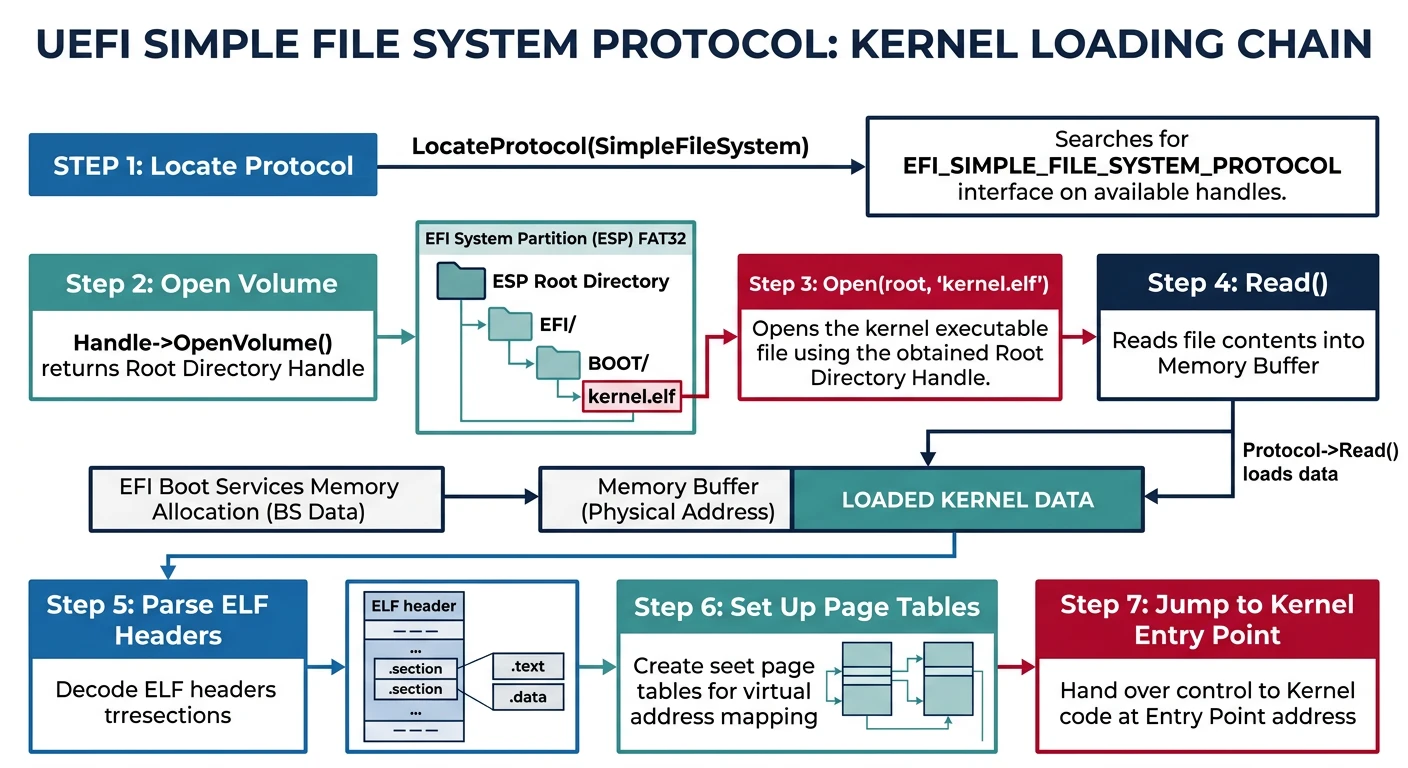
With BIOS booting, we had to write FAT drivers in Assembly to load our kernel. UEFI firmware already knows how to read FAT filesystems! We can use the File Protocol to load files directly—no filesystem code required in the bootloader.
Kernel loading via UEFI File Protocol — the firmware handles FAT filesystem access
File Protocol: Reading Files from Disk
The Simple File System Protocol lets you open volumes, browse directories, and read files. Here's the architecture:
/* Load a File from the Boot Volume */
EFI_STATUS load_file(EFI_HANDLE image,
                     CHAR16* filename,
                     void** buffer,
                     UINTN* size) {
    EFI_STATUS status;
    EFI_GUID lipGuid = EFI_LOADED_IMAGE_PROTOCOL_GUID;
    EFI_GUID fsGuid = EFI_SIMPLE_FILE_SYSTEM_PROTOCOL_GUID;
    EFI_GUID fileInfoGuid = EFI_FILE_INFO_ID;

    // Get the loaded image protocol (to find boot volume)
    EFI_LOADED_IMAGE_PROTOCOL* loaded_image;
    status = gBS->HandleProtocol(image, &lipGuid, (void**)&loaded_image);
    if (EFI_ERROR(status)) return status;

    // Get file system protocol from the boot device
    EFI_SIMPLE_FILE_SYSTEM_PROTOCOL* fs;
    status = gBS->HandleProtocol(loaded_image->DeviceHandle,
                                  &fsGuid, (void**)&fs);
    if (EFI_ERROR(status)) return status;

    // Open the root directory
    EFI_FILE_PROTOCOL* root;
    status = fs->OpenVolume(fs, &root);
    if (EFI_ERROR(status)) return status;

    // Open the kernel file
    EFI_FILE_PROTOCOL* file;
    status = root->Open(root, &file, filename,
                        EFI_FILE_MODE_READ, 0);
    if (EFI_ERROR(status)) {
        Print(L"Failed to open %s\r\n", filename);
        root->Close(root);
        return status;
    }

    // Get file size
    EFI_FILE_INFO* info;
    UINTN info_size = sizeof(EFI_FILE_INFO) + 256;
    status = gBS->AllocatePool(EfiLoaderData, info_size, (void**)&info);
    if (EFI_ERROR(status)) {
        file->Close(file);
        root->Close(root);
        return status;
    }

    status = file->GetInfo(file, &fileInfoGuid, &info_size, info);
    if (EFI_ERROR(status)) {
        gBS->FreePool(info);
        file->Close(file);
        root->Close(root);
        return status;
    }

    *size = info->FileSize;
    gBS->FreePool(info);

    // Allocate memory for file contents
    status = gBS->AllocatePool(EfiLoaderData, *size, buffer);
    if (EFI_ERROR(status)) {
        file->Close(file);
        root->Close(root);
        return status;
    }

    // Read the entire file
    status = file->Read(file, size, *buffer);

    file->Close(file);
    root->Close(root);

    return status;
}

/* Usage example */
void* kernel_data;
UINTN kernel_size;
status = load_file(ImageHandle, L"\\kernel.elf", &kernel_data, &kernel_size);
if (!EFI_ERROR(status)) {
    Print(L"Loaded kernel: %lu bytes\r\n", kernel_size);
}
Path Convention: UEFI uses backslashes for paths (like Windows). The root is L"\\". For a kernel at /EFI/MYOS/kernel.elf, use L"\\EFI\\MYOS\\kernel.elf".
Transfer to Kernel: The Final Handoff
After loading the kernel ELF, we need to:
Parse the ELF headers (we learned this in Phase 9)
/* Boot Information Structure Passed to Kernel */
#define BOOT_MAGIC 0xB00710AD  // "BOOTLOAD" in hex-speak

typedef struct {
    uint32_t           magic;              // Verify structure validity

    // Memory map from UEFI
    void*              memory_map;         // EFI_MEMORY_DESCRIPTOR array
    uint64_t           memory_map_size;    // Total size of map
    uint64_t           memory_map_desc_size; // Size of each descriptor

    // Framebuffer info from GOP
    framebuffer_t      framebuffer;

    // ACPI RSDP pointer
    void*              acpi_rsdp;

    // UEFI Runtime Services (remain valid after ExitBootServices)
    EFI_RUNTIME_SERVICES* runtime_services;

} boot_info_t;

/* Main Boot Loader Logic */
EFI_STATUS EFIAPI efi_main(EFI_HANDLE ImageHandle,
                           EFI_SYSTEM_TABLE* SystemTable) {
    EFI_STATUS status;
    InitializeLib(ImageHandle, SystemTable);

    Print(L"MyOS UEFI Bootloader v1.0\r\n");
    Print(L"══════════════════════════\r\n\r\n");

    // Allocate boot_info in a safe location
    boot_info_t* boot_info;
    status = gBS->AllocatePool(EfiLoaderData, sizeof(boot_info_t),
                               (void**)&boot_info);
    if (EFI_ERROR(status)) {
        Print(L"Failed to allocate boot_info\r\n");
        return status;
    }
    boot_info->magic = BOOT_MAGIC;

    // 1. Set up graphics (before any errors might occur)
    Print(L"[1/5] Setting up GOP...\r\n");
    status = setup_gop_best(&boot_info->framebuffer);
    if (EFI_ERROR(status)) {
        Print(L"GOP setup failed\r\n");
        return status;
    }

    // 2. Load kernel ELF file
    Print(L"[2/5] Loading kernel...\r\n");
    void* kernel_data;
    UINTN kernel_size;
    status = load_file(ImageHandle, L"\\kernel.elf",
                       &kernel_data, &kernel_size);
    if (EFI_ERROR(status)) {
        Print(L"Failed to load kernel\r\n");
        return status;
    }
    Print(L"  Loaded %lu bytes\r\n", kernel_size);

    // 3. Parse and load ELF (from Phase 9)
    Print(L"[3/5] Parsing ELF...\r\n");
    uint64_t kernel_entry;
    status = load_elf64(kernel_data, &kernel_entry);
    if (EFI_ERROR(status)) {
        Print(L"ELF parsing failed\r\n");
        return status;
    }
    Print(L"  Entry point: 0x%lx\r\n", kernel_entry);

    // 4. Find ACPI tables
    Print(L"[4/5] Finding ACPI...\r\n");
    boot_info->acpi_rsdp = find_acpi_rsdp();
    boot_info->runtime_services = gRT;

    // 5. Exit boot services and jump to kernel
    Print(L"[5/5] Exiting boot services...\r\n");
    Print(L"\r\nPress any key to continue...\r\n");
    wait_for_key();

    status = exit_boot_services_safe(ImageHandle, boot_info);
    if (EFI_ERROR(status)) {
        // Can't print anymore if ExitBootServices partially succeeded!
        return status;
    }

    // Jump to kernel! (No return)
    typedef void (*kernel_entry_t)(boot_info_t*);
    kernel_entry_t kernel = (kernel_entry_t)kernel_entry;
    kernel(boot_info);

    // Should never reach here
    while(1) __asm__("hlt");
    return EFI_SUCCESS;
}
Finding ACPI Tables
ConfigurationHardware Info
ACPI tables contain crucial hardware information. UEFI makes them easy to find via the Configuration Table:
/* Find ACPI RSDP from Configuration Table */
void* find_acpi_rsdp(void) {
    EFI_GUID acpi2_guid = EFI_ACPI_20_TABLE_GUID;
    EFI_GUID acpi1_guid = ACPI_TABLE_GUID;

    // Prefer ACPI 2.0 (XSDT with 64-bit pointers)
    for (UINTN i = 0; i < gST->NumberOfTableEntries; i++) {
        if (CompareGuid(&gST->ConfigurationTable[i].VendorGuid,
                        &acpi2_guid)) {
            return gST->ConfigurationTable[i].VendorTable;
        }
    }

    // Fall back to ACPI 1.0 (RSDT with 32-bit pointers)
    for (UINTN i = 0; i < gST->NumberOfTableEntries; i++) {
        if (CompareGuid(&gST->ConfigurationTable[i].VendorGuid,
                        &acpi1_guid)) {
            return gST->ConfigurationTable[i].VendorTable;
        }
    }

    return NULL;  // No ACPI found
}
After ExitBootServices: Once you call ExitBootServices successfully, you cannot use Print(), AllocatePool(), or any Boot Service. Interrupts are disabled by default. Your kernel must set up its own IDT, GDT, and memory management before anything complex can happen.
What You Can Build
Phase 12 Project: A UEFI-bootable OS! Your kernel now boots on modern hardware via UEFI, has accurate memory maps, and direct framebuffer access. No more legacy BIOS limitations.
Let's bring everything together into a complete, buildable UEFI boot loader:
Complete UEFI Bootloader
/* bootloader.c - Complete UEFI Boot Loader */
#include
#include

#define BOOT_MAGIC 0xB00710AD

/*==========================================================
 * Data Structures
 *=========================================================*/

typedef enum {
    PIXEL_RGBX,
    PIXEL_BGRX,
    PIXEL_BITMASK,
    PIXEL_UNKNOWN
} pixel_format_t;

typedef struct {
    uint32_t*      base;
    uint64_t       size;
    uint32_t       width;
    uint32_t       height;
    uint32_t       pitch;
    pixel_format_t pixel_format;
} framebuffer_t;

typedef struct {
    uint32_t             magic;
    void*                memory_map;
    uint64_t             memory_map_size;
    uint64_t             memory_map_desc_size;
    framebuffer_t        framebuffer;
    void*                acpi_rsdp;
    EFI_RUNTIME_SERVICES* runtime_services;
} boot_info_t;

/*==========================================================
 * GOP Setup
 *=========================================================*/

EFI_STATUS setup_gop(framebuffer_t* fb) {
    EFI_STATUS status;
    EFI_GRAPHICS_OUTPUT_PROTOCOL* gop;
    EFI_GUID gop_guid = EFI_GRAPHICS_OUTPUT_PROTOCOL_GUID;

    status = gBS->LocateProtocol(&gop_guid, NULL, (void**)&gop);
    if (EFI_ERROR(status)) {
        return status;
    }

    // Try to find 1920x1080, otherwise use default
    UINT32 best_mode = gop->Mode->Mode;
    for (UINT32 i = 0; i < gop->Mode->MaxMode; i++) {
        EFI_GRAPHICS_OUTPUT_MODE_INFORMATION* info;
        UINTN info_size;
        if (!EFI_ERROR(gop->QueryMode(gop, i, &info_size, &info))) {
            if (info->HorizontalResolution == 1920 &&
                info->VerticalResolution == 1080 &&
                info->PixelFormat != PixelBltOnly) {
                best_mode = i;
                break;
            }
        }
    }

    gop->SetMode(gop, best_mode);

    fb->base = (uint32_t*)gop->Mode->FrameBufferBase;
    fb->size = gop->Mode->FrameBufferSize;
    fb->width = gop->Mode->Info->HorizontalResolution;
    fb->height = gop->Mode->Info->VerticalResolution;
    fb->pitch = gop->Mode->Info->PixelsPerScanLine;

    switch (gop->Mode->Info->PixelFormat) {
        case PixelRedGreenBlueReserved8BitPerColor:
            fb->pixel_format = PIXEL_RGBX;
            break;
        case PixelBlueGreenRedReserved8BitPerColor:
            fb->pixel_format = PIXEL_BGRX;
            break;
        default:
            fb->pixel_format = PIXEL_UNKNOWN;
    }

    return EFI_SUCCESS;
}

/*==========================================================
 * File Loading
 *=========================================================*/

EFI_STATUS load_file(EFI_HANDLE image, CHAR16* path,
                     void** data, UINTN* size) {
    EFI_STATUS status;
    EFI_LOADED_IMAGE_PROTOCOL* lip;
    EFI_SIMPLE_FILE_SYSTEM_PROTOCOL* fs;
    EFI_FILE_PROTOCOL* root;
    EFI_FILE_PROTOCOL* file;

    // Get loaded image -> device -> filesystem
    EFI_GUID lip_guid = EFI_LOADED_IMAGE_PROTOCOL_GUID;
    EFI_GUID fs_guid = EFI_SIMPLE_FILE_SYSTEM_PROTOCOL_GUID;

    status = gBS->HandleProtocol(image, &lip_guid, (void**)&lip);
    if (EFI_ERROR(status)) return status;

    status = gBS->HandleProtocol(lip->DeviceHandle, &fs_guid, (void**)&fs);
    if (EFI_ERROR(status)) return status;

    status = fs->OpenVolume(fs, &root);
    if (EFI_ERROR(status)) return status;

    status = root->Open(root, &file, path, EFI_FILE_MODE_READ, 0);
    if (EFI_ERROR(status)) {
        root->Close(root);
        return status;
    }

    // Get file size
    EFI_GUID info_guid = EFI_FILE_INFO_ID;
    UINTN info_size = sizeof(EFI_FILE_INFO) + 256;
    EFI_FILE_INFO* info;
    gBS->AllocatePool(EfiLoaderData, info_size, (void**)&info);
    file->GetInfo(file, &info_guid, &info_size, info);
    *size = info->FileSize;
    gBS->FreePool(info);

    // Read file
    gBS->AllocatePool(EfiLoaderData, *size, data);
    file->Read(file, size, *data);

    file->Close(file);
    root->Close(root);
    return EFI_SUCCESS;
}

/*==========================================================
 * ACPI Discovery
 *=========================================================*/

void* find_acpi_rsdp(void) {
    EFI_GUID acpi20 = EFI_ACPI_20_TABLE_GUID;
    EFI_GUID acpi10 = ACPI_TABLE_GUID;

    for (UINTN i = 0; i < gST->NumberOfTableEntries; i++) {
        if (CompareGuid(&gST->ConfigurationTable[i].VendorGuid, &acpi20) ||
            CompareGuid(&gST->ConfigurationTable[i].VendorGuid, &acpi10)) {
            return gST->ConfigurationTable[i].VendorTable;
        }
    }
    return NULL;
}

/*==========================================================
 * Memory Map & Exit Boot Services
 *=========================================================*/

EFI_STATUS exit_boot_services_safe(EFI_HANDLE image, boot_info_t* bi) {
    EFI_STATUS status;
    UINTN map_size = 0, map_key, desc_size;
    UINT32 desc_ver;

    for (int retry = 0; retry < 3; retry++) {
        // Query size
        gBS->GetMemoryMap(&map_size, NULL, &map_key, &desc_size, &desc_ver);
        map_size += 2 * desc_size;

        // Allocate
        gBS->AllocatePool(EfiLoaderData, map_size, &bi->memory_map);

        // Get map
        status = gBS->GetMemoryMap(&map_size, bi->memory_map,
                                   &map_key, &desc_size, &desc_ver);
        if (EFI_ERROR(status)) {
            gBS->FreePool(bi->memory_map);
            continue;
        }

        bi->memory_map_size = map_size;
        bi->memory_map_desc_size = desc_size;

        // Exit boot services immediately!
        status = gBS->ExitBootServices(image, map_key);
        if (status == EFI_SUCCESS) {
            return EFI_SUCCESS;
        }

        gBS->FreePool(bi->memory_map);
        map_size = 0;
    }
    return EFI_LOAD_ERROR;
}

/*==========================================================
 * Entry Point
 *=========================================================*/

EFI_STATUS EFIAPI efi_main(EFI_HANDLE ImageHandle,
                           EFI_SYSTEM_TABLE* SystemTable) {
    EFI_STATUS status;
    InitializeLib(ImageHandle, SystemTable);

    gST->ConOut->ClearScreen(gST->ConOut);
    Print(L"╔══════════════════════════════════════╗\r\n");
    Print(L"║     MyOS UEFI Bootloader v1.0        ║\r\n");
    Print(L"╚══════════════════════════════════════╝\r\n\r\n");

    // Allocate boot info
    boot_info_t* boot_info;
    gBS->AllocatePool(EfiLoaderData, sizeof(boot_info_t), (void**)&boot_info);
    boot_info->magic = BOOT_MAGIC;

    // Setup GOP
    Print(L"[1] Setting up graphics... ");
    status = setup_gop(&boot_info->framebuffer);
    Print(EFI_ERROR(status) ? L"FAILED\r\n" : L"OK (%dx%d)\r\n",
          boot_info->framebuffer.width, boot_info->framebuffer.height);

    // Load kernel
    Print(L"[2] Loading kernel.elf... ");
    void* kernel_data;
    UINTN kernel_size;
    status = load_file(ImageHandle, L"\\kernel.elf", &kernel_data, &kernel_size);
    Print(EFI_ERROR(status) ? L"FAILED\r\n" : L"OK (%lu bytes)\r\n", kernel_size);
    if (EFI_ERROR(status)) return status;

    // Find ACPI
    Print(L"[3] Finding ACPI tables... ");
    boot_info->acpi_rsdp = find_acpi_rsdp();
    Print(boot_info->acpi_rsdp ? L"OK\r\n" : L"Not found\r\n");

    // Save runtime services pointer
    boot_info->runtime_services = gRT;

    // Wait for user
    Print(L"\r\nReady to boot. Press any key...\r\n");
    EFI_INPUT_KEY key;
    gST->ConIn->Reset(gST->ConIn, FALSE);
    while (gST->ConIn->ReadKeyStroke(gST->ConIn, &key) == EFI_NOT_READY);

    // Exit boot services
    Print(L"[4] Exiting boot services...\r\n");
    status = exit_boot_services_safe(ImageHandle, boot_info);
    if (EFI_ERROR(status)) {
        return status;  // Can't print anymore!
    }

    // For now, just draw a test pattern to prove GOP works
    // (Real OS would parse ELF and jump to kernel)
    uint32_t* fb = boot_info->framebuffer.base;
    uint32_t pitch = boot_info->framebuffer.pitch;
    uint32_t height = boot_info->framebuffer.height;

    // Draw gradient
    for (uint32_t y = 0; y < height; y++) {
        for (uint32_t x = 0; x < boot_info->framebuffer.width; x++) {
            uint8_t r = (x * 255) / boot_info->framebuffer.width;
            uint8_t b = (y * 255) / height;
            fb[y * pitch + x] = (b << 16) | (128 << 8) | r;
        }
    }

    // Halt (kernel would take over here)
    while (1) __asm__ volatile("hlt");

    return EFI_SUCCESS;
}
Task: Before ExitBootServices, display the complete memory map with human-readable type names and calculate total usable RAM.
Hints:
Use Print() with format specifiers for addresses
Iterate through descriptors using desc_size
Sum EfiConventionalMemory + EfiBootServices* pages
Exercise 2: Boot Menu
Difficulty: MediumInteractive
Task: Create a simple boot menu that lists available .ELF files in /kernels/ and lets the user select which one to boot.
Hints:
Use File Protocol's Read() on a directory to enumerate files
Filter for .elf extension
Display numbered list, read key 1-9 for selection
Exercise 3: Secure Boot Info
Difficulty: MediumSecurity
Task: Query the EFI_SECURITY_PROTOCOL or check UEFI variables to determine if Secure Boot is enabled, and display the status.
Hints:
Read SecureBoot variable using GetVariable()
Check EFI_VARIABLE_BOOTSERVICE_ACCESS attribute
Value of 1 = enabled, 0 = disabled
Exercise 4: Network Boot Option
Difficulty: HardAdvanced
Task: Extend your bootloader to check if an EFI_SIMPLE_NETWORK_PROTOCOL is available, and if so, display network information (MAC address, link status).
Hints:
LocateHandleBuffer for SNP_GUID
Query Mode->CurrentAddress for MAC
Check MediaPresent for cable connection
Foundation for future TFTP boot support
Next Steps
With GOP framebuffer access, it's time to build a real graphical system. In Phase 13, we'll implement drawing primitives, font rendering, and the foundation for a windowed GUI.
Milestone Achieved: Your OS now boots via UEFI! You've eliminated hundreds of lines of legacy BIOS code, gained a reliable memory map, and have direct access to high-resolution graphics. This is how modern operating systems boot.