We use cookies to enhance your browsing experience, serve personalized content, and analyze our traffic.
By clicking "Accept All", you consent to our use of cookies. See our
Privacy Policy
for more information.
Phase 17 Goals: This is the final phase! By the end, your OS will have debugging tools, security hardening, robust error handling, and a proper init/shutdown sequence. You will have built a complete operating system from scratch.
Welcome to the final phase of your kernel development journey! Over the past 17 phases, you've assembled every major component of a modern operating system. Now it's time to add the professional polish that separates hobby projects from production-ready systems: comprehensive debugging infrastructure, security hardening, robust error handling, and proper system lifecycle management.
Think of building an OS like constructing a skyscraper. The previous phases built the foundation (bootloader), the steel frame (kernel core), the floors (memory/processes), and the amenities (GUI/filesystem). This phase adds the fire suppression systems, security checkpoints, emergency procedures, and building management—everything that makes it safe for actual occupants.
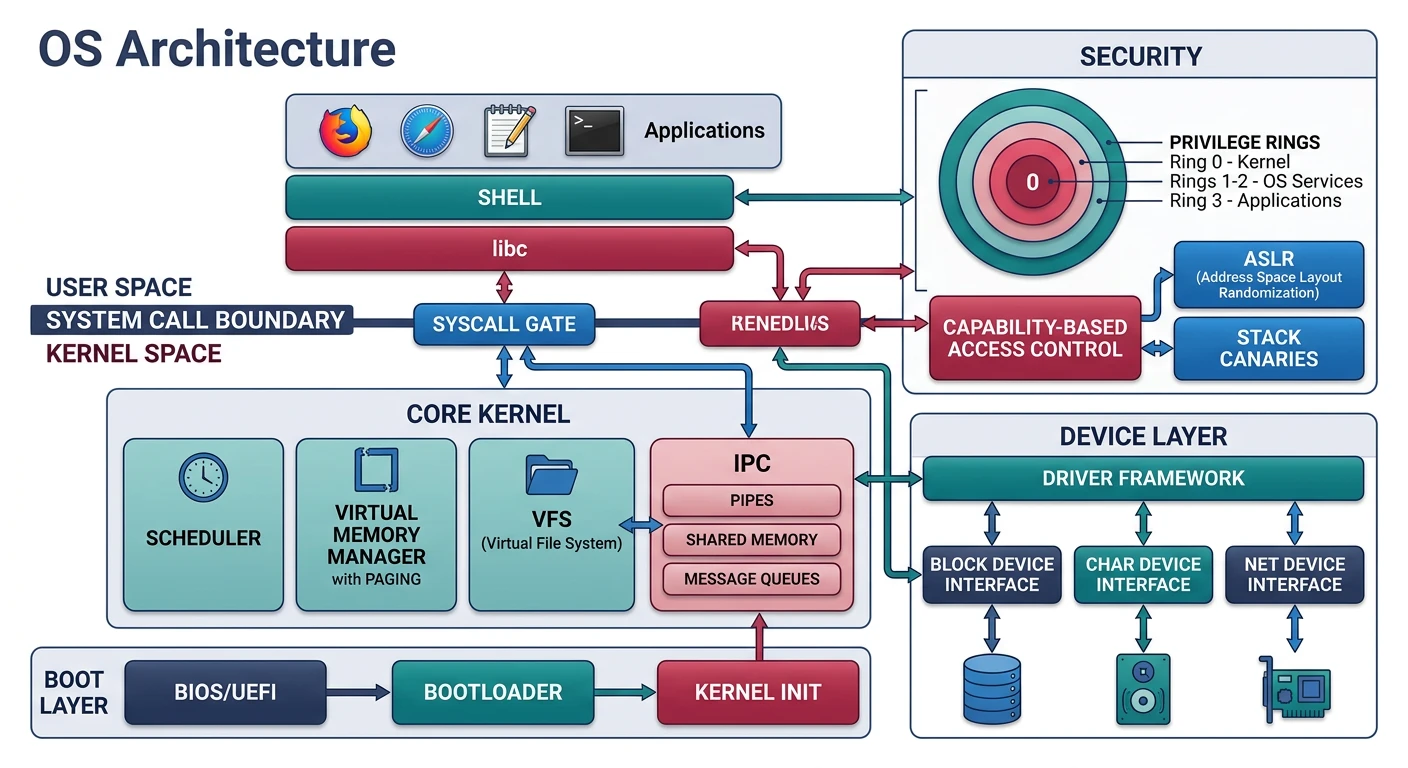
Complete OS architecture — all 17 phases from bootloader to security and stability
┌─────────────────────────────────────────────────────────────────────────────┐│COMPLETE OPERATING SYSTEM - YOUR CREATION│├─────────────────────────────────────────────────────────────────────────────┤│││┌───────────┐┌───────────┐┌───────────┐┌───────────┐│││ User App ││ User App ││ Shell ││ GUI │User││└─────┬─────┘└─────┬─────┘└─────┬─────┘└─────┬─────┘Space││└──────────────┴──────────────┴──────────────┘│││System Calls││══════════════════════════════════════════════════════════════════││┌─────────────────────────────────────────────────────────────────┐│││KERNEL││││┌─────────┐┌─────────┐┌─────────┐┌──────────┐│││││Scheduler││ Memory ││Filesystem││ Drivers │││││└─────────┘└─────────┘└─────────┘└──────────┘││││┌─────────┐┌─────────┐┌─────────┐┌──────────┐│││││ Debug ││Security ││ Error ││ Init/ ││││││ Tools ││Hardening││ Handling││ Shutdown │││││└─────────┘└─────────┘└─────────┘└──────────┘││││↑ PHASE 17 ADDITIONS ↑│││└─────────────────────────────────────────────────────────────────┘││══════════════════════════════════════════════════════════════════││┌─────────────────────────────────────────────────────────────────┐│││HARDWARE││││CPU • RAM • Disk • GPU • Keyboard • Mouse│││└─────────────────────────────────────────────────────────────────┘│││└─────────────────────────────────────────────────────────────────────────────┘
Key Insight: A complete OS needs more than features—it needs stability for real-world use, security to protect users, and proper initialization and shutdown sequences. This final phase ties everything together.
Completing the Journey
Before we dive into the final components, let's appreciate what you're about to finish. Building an operating system is one of the most challenging endeavors in computer science—you've tackled:
Low-level boot code that runs before the OS exists
Memory management with virtual memory and paging
Process scheduling for multitasking
Hardware drivers for real devices
Filesystem implementation for persistent storage
GUI systems for user interaction
The components in this final phase ensure your OS handles the unexpected gracefully. When something goes wrong (and it will), you need tools to diagnose problems. When malicious code tries to exploit your system, security features must block it. And when users want to start or stop the system, the process must be clean and safe.
The Production Quality Checklist
System RequirementsQuality Gates
Component
Why It Matters
Without It
Stack Traces
Identify exact location of crashes
Hours of guesswork debugging
Kernel Logging
Record events for post-mortem analysis
Crashes leave no clues
NX Bit
Prevent code execution from data areas
Buffer overflows become exploits
ASLR
Randomize memory layout
Attackers know where everything is
Kernel Panic
Graceful handling of fatal errors
Silent corruption, data loss
Clean Shutdown
Safe filesystem unmount, cache flush
Data corruption on every poweroff
What We've Built
Let's inventory the major subsystems you've implemented across all 17 phases:
That's over 50 major components working together! Now let's add the final pieces that make this a complete, production-quality operating system.
Debugging Tools
Debugging kernel code is fundamentally different from debugging user applications. There's no debugger running inside your OS to set breakpoints—you are the OS. When something goes wrong, you need infrastructure to understand what happened.
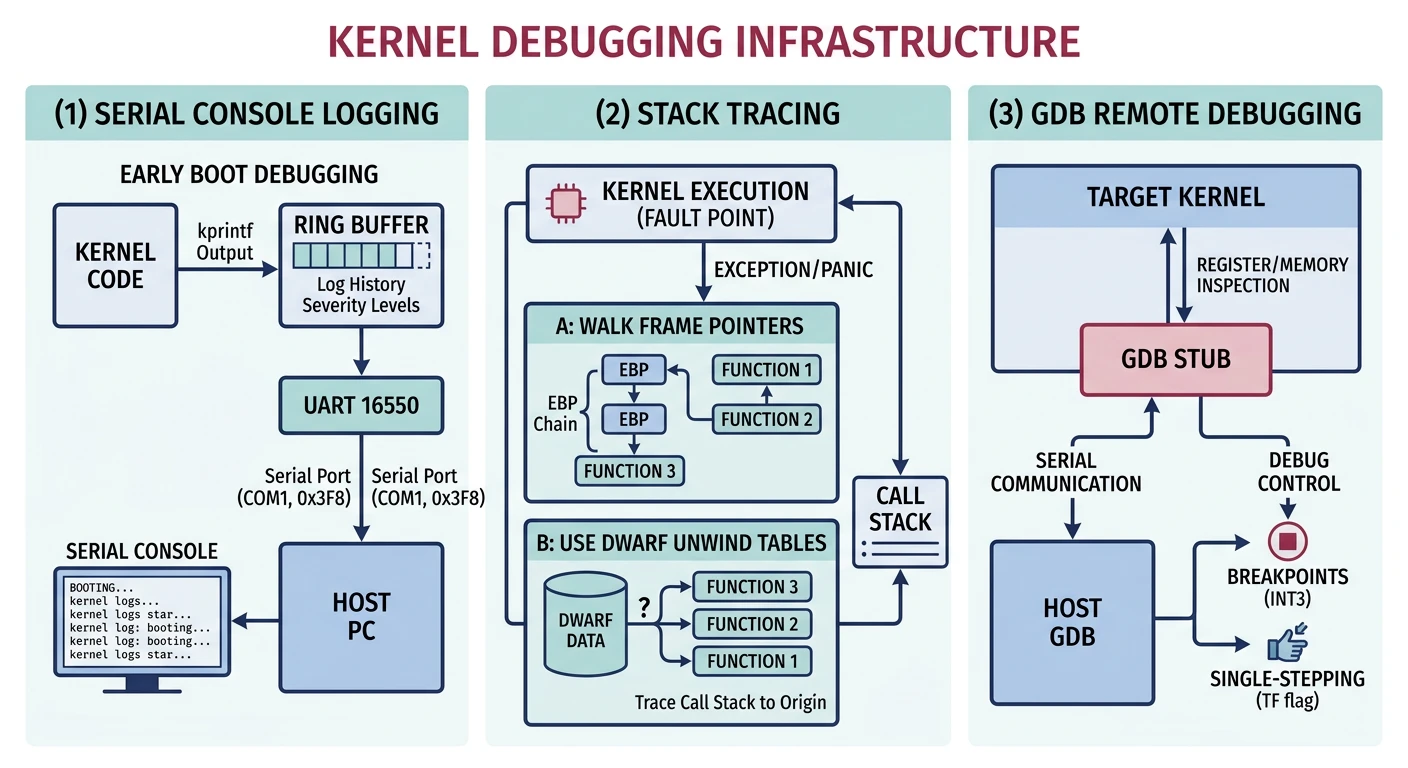
Kernel debugging infrastructure — serial logging, stack unwinding, and GDB stub integration
┌─────────────────────────────────────────────────────────────────┐│KERNEL DEBUGGING CHALLENGES│├─────────────────────────────────────────────────────────────────┤│││User-Space Debugging:Kernel Debugging:││────────────────────── ───────────────────││• gdb sets breakpoints • No debugger inside OS││• OS catches signals • Triple fault = reboot││• printf() always works • Screen may not exist yet││• Core dumps saved • Must build own diagnostics││• Crash = app terminates • Crash = entire system down│││└─────────────────────────────────────────────────────────────────┘
Stack Traces
When your kernel crashes (and it will during development), the most important question is: "Where did it crash?" A stack trace answers this by walking backwards through function calls, showing exactly what code path led to the failure.
Stack Frame Anatomy: Each function call pushes a "frame" onto the stack containing: the return address (where to go after the function), saved registers, and local variables. By following the chain of return addresses, we can reconstruct the call history.
Before graphics initialization, serial output is your only window into the kernel. Serial ports are simple, reliable, and available very early in boot—making them indispensable for debugging boot issues and kernel initialization.
Why Serial? Serial ports (COM1, COM2) use the 8250/16550 UART chip, initialized by BIOS. They work even when memory management, interrupts, and display drivers haven't been set up yet. QEMU can redirect serial output to your terminal with -serial stdio.
/* Serial Port I/O Ports */
#define SERIAL_COM1_BASE    0x3F8
#define SERIAL_COM2_BASE    0x2F8

/* UART Registers (offset from base) */
#define SERIAL_DATA         0   // Data register (read/write)
#define SERIAL_INTR_ENABLE  1   // Interrupt enable
#define SERIAL_FIFO_CTRL    2   // FIFO control
#define SERIAL_LINE_CTRL    3   // Line control (baud rate, parity)
#define SERIAL_MODEM_CTRL   4   // Modem control
#define SERIAL_LINE_STATUS  5   // Line status

/* Line Status Register bits */
#define SERIAL_LSR_DR       (1 << 0)  // Data ready
#define SERIAL_LSR_THRE     (1 << 5)  // Transmit holding register empty

/* Initialize serial port */
void serial_init(uint16_t port) {
    outb(port + SERIAL_INTR_ENABLE, 0x00);  // Disable interrupts
    outb(port + SERIAL_LINE_CTRL, 0x80);    // Enable DLAB (baud divisor)
    outb(port + SERIAL_DATA, 0x03);         // Divisor low byte (38400 baud)
    outb(port + SERIAL_INTR_ENABLE, 0x00);  // Divisor high byte
    outb(port + SERIAL_LINE_CTRL, 0x03);    // 8 bits, no parity, 1 stop bit
    outb(port + SERIAL_FIFO_CTRL, 0xC7);    // Enable FIFO, 14-byte threshold
    outb(port + SERIAL_MODEM_CTRL, 0x0B);   // IRQs enabled, RTS/DSR set

    KLOG_INFO("Serial port 0x%x initialized", port);
}

/* Check if transmit buffer is empty */
static int serial_is_transmit_empty(uint16_t port) {
    return inb(port + SERIAL_LINE_STATUS) & SERIAL_LSR_THRE;
}

/* Write single character to serial port */
void serial_putc(uint16_t port, char c) {
    while (!serial_is_transmit_empty(port)) {
        // Busy wait - fine for debugging
        __asm__ volatile("pause");
    }
    outb(port + SERIAL_DATA, c);
}

/* Write string to serial port */
void serial_puts(uint16_t port, const char* str) {
    while (*str) {
        if (*str == '\n') {
            serial_putc(port, '\r');  // Newline needs carriage return
        }
        serial_putc(port, *str++);
    }
}

/* Printf to serial port (for early debugging) */
void serial_printf(const char* fmt, ...) {
    char buf[256];
    va_list args;
    va_start(args, fmt);
    vsnprintf(buf, sizeof(buf), fmt, args);
    va_end(args);

    serial_puts(SERIAL_COM1_BASE, buf);
}

/* Very early boot debugging (can call before anything else) */
void early_debug(const char* msg) {
    // Minimal initialization - just enough to send chars
    outb(SERIAL_COM1_BASE + SERIAL_LINE_CTRL, 0x03);  // 8N1
    serial_puts(SERIAL_COM1_BASE, "[EARLY] ");
    serial_puts(SERIAL_COM1_BASE, msg);
    serial_puts(SERIAL_COM1_BASE, "\n");
}
Example usage in QEMU:
# Run with serial output to terminal
qemu-system-x86_64 -kernel myos.bin -serial stdio

# Or redirect to file for later analysis
qemu-system-x86_64 -kernel myos.bin -serial file:serial.log
Security Hardening
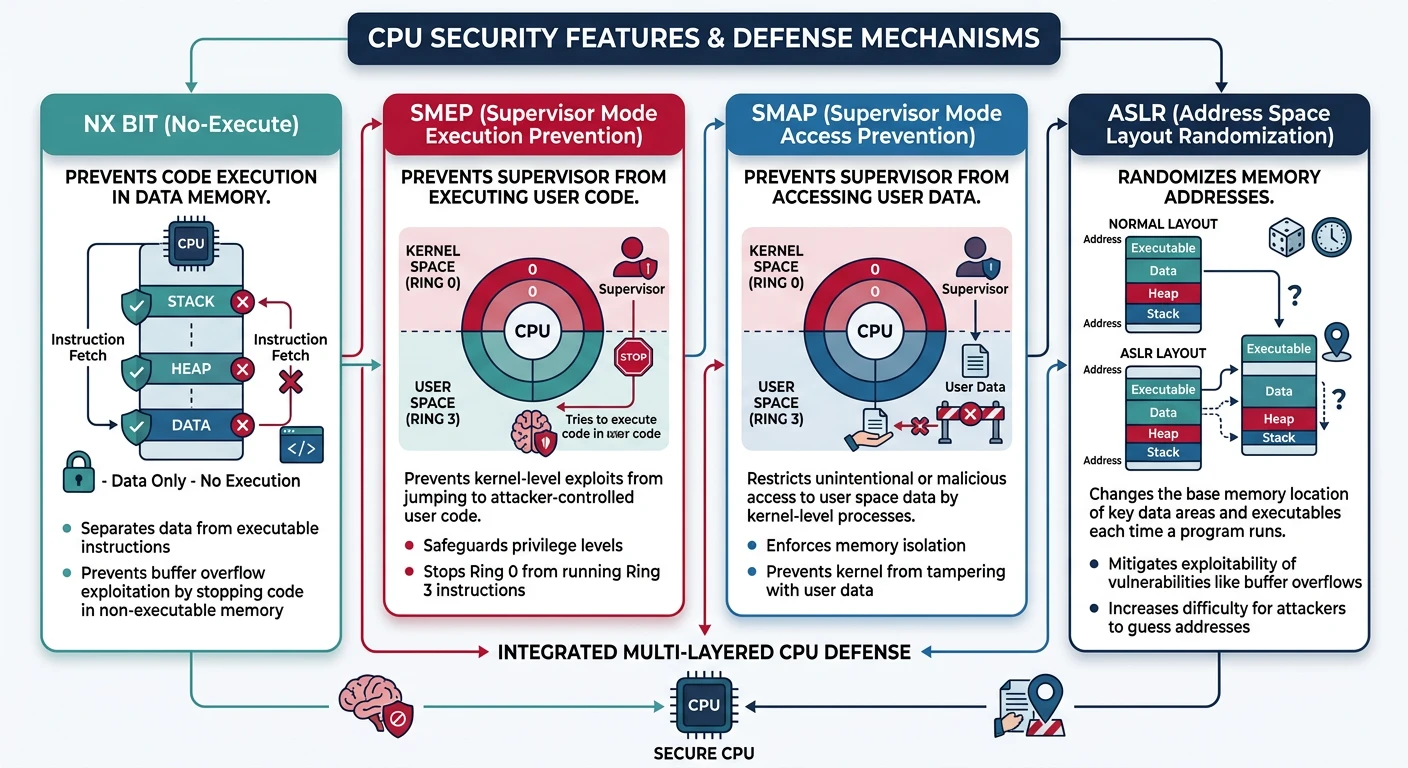
Modern CPUs include hardware security features designed to prevent common exploitation techniques. These features make it significantly harder for attackers to turn bugs into exploits, even when your code has vulnerabilities.
Hardware security features — NX/XD bit, SMEP, SMAP, and kernel ASLR protection layers
┌─────────────────────────────────────────────────────────────────┐│CPU SECURITY FEATURES│├─────────────────────────────────────────────────────────────────┤│││Without SecurityWith Security││───────────────────────────────────────││││Buffer Overflow:Buffer Overflow:││┌────────────────┐┌────────────────┐│││ Shellcode runs ││NX blocks exec││││ from stack ││ from data │││└───────┬────────┘└───────┬────────┘││↓↓││ROP Attack:ROP Attack:││┌────────────────┐┌────────────────┐│││ Known address ││ASLR randomizes││││ of gadgets ││ all addresses │││└───────┬────────┘└───────┬────────┘││↓↓││Kernel Exploit:Kernel Exploit:││┌────────────────┐┌────────────────┐│││ Jump to user ││SMEP/SMAP││││ shellcode ││blocks access│││└────────────────┘└────────────────┘│││└─────────────────────────────────────────────────────────────────┘
NX Bit (DEP)
The NX (No-Execute) bit, also called DEP (Data Execution Prevention), marks memory pages as either executable or non-executable. This prevents the classic buffer overflow attack where an attacker overwrites a return address to jump into their own code stored in a data area.
The W^X Principle: Memory should be either Writable OR eXecutable, never both. Code segments are executable but read-only. Data segments are writable but non-executable. This simple rule prevents most code injection attacks.
Without NX, an attacker who finds a buffer overflow can:
Inject shellcode (malicious machine code) into a buffer
Overwrite the return address to point to their shellcode
When the function returns, execution jumps to the shellcode
With NX enabled and data pages marked non-executable, step 3 triggers a page fault—the CPU refuses to execute code from a non-executable page, and the attack fails.
ASLR (Address Space Layout Randomization) makes exploitation harder by randomizing where code and data are loaded in memory. Even if an attacker finds a vulnerability, they don't know where their target functions or gadgets are located.
Randomization Entropy: ASLR effectiveness depends on how many random bits are used. With 16 bits of entropy, there are 65,536 possible locations—an attacker has a 1 in 65,536 chance of guessing correctly on each attempt. Failed guesses typically crash the program.
/* Simple ASLR Implementation */

/* Random number generator (use hardware RNG if available) */
static uint64_t aslr_seed;

void aslr_init(void) {
    // Seed from RDTSC (timestamp counter) - not cryptographically secure
    // but good enough for basic ASLR
    aslr_seed = rdtsc() ^ (rdtsc() >> 17);

    // Better: use RDRAND if available
    if (cpu_has_rdrand()) {
        __asm__ volatile("rdrand %0" : "=r"(aslr_seed));
    }
}

uint64_t aslr_random(void) {
    // xorshift64 - fast PRNG
    aslr_seed ^= aslr_seed >> 12;
    aslr_seed ^= aslr_seed << 25;
    aslr_seed ^= aslr_seed >> 27;
    return aslr_seed * 0x2545F4914F6CDD1DULL;
}

/* Randomize base addresses for process loading */
uint64_t aslr_mmap_base(void) {
    // Randomize with 28 bits of entropy (256M possibilities)
    uint64_t offset = (aslr_random() & 0x0FFFFFFF) << PAGE_SHIFT;
    return MMAP_BASE_DEFAULT + offset;
}

uint64_t aslr_stack_base(void) {
    // Randomize stack with 22 bits of entropy
    uint64_t offset = (aslr_random() & 0x003FFFFF) << PAGE_SHIFT;
    return STACK_BASE_DEFAULT - offset;
}

uint64_t aslr_heap_base(void) {
    // Randomize heap start
    uint64_t offset = (aslr_random() & 0x001FFFFF) << PAGE_SHIFT;
    return HEAP_BASE_DEFAULT + offset;
}

/* During process creation */
task_t* create_process_with_aslr(const char* path) {
    task_t* task = alloc_task();

    // Randomize memory layout
    task->mmap_base = aslr_mmap_base();
    task->stack_base = aslr_stack_base();
    task->heap_start = aslr_heap_base();

    // Load executable at randomized address
    load_elf_at(path, task->mmap_base);

    return task;
}
SMEP/SMAP
SMEP (Supervisor Mode Execution Prevention) and SMAP (Supervisor Mode Access Prevention) are CPU features that prevent the kernel from executing code or accessing data in user-space memory. These stop a common kernel exploitation technique where an attacker places shellcode in user memory, then tricks the kernel into jumping to it.
Classic Kernel Exploit Blocked: Without SMEP/SMAP, an attacker who finds a kernel vulnerability can: (1) map shellcode at a user address, (2) trigger the vulnerability to redirect kernel execution to that address. With SMEP, the CPU faults instead of executing user code while in supervisor mode.
┌─────────────────────────────────────────────────────────────────┐│SMEP/SMAP PROTECTION│├─────────────────────────────────────────────────────────────────┤│││User SpaceKernel Space││(Ring 3)(Ring 0)││││┌───────────┐┌───────────┐│││ User Code ││ Kernel ││││ (attacker │✗│ Code ││││ shellcode)│──│ │SMEP: No exec││└───────────┘└───────────┘of user pages││││┌───────────┐┌───────────┐│││ User Data ││ Kernel ││││ (attacker │✗│ Data ││││ payload) │──│ │SMAP: No access││└───────────┘└───────────┘of user pages││││Legitimate access via STAC/CLAC (copy_from_user)│││└─────────────────────────────────────────────────────────────────┘
The stac() and clac() instructions temporarily disable SMAP for legitimate kernel access to user memory (like copying data to/from user buffers). This creates a small, auditable window where the kernel can access user memory:
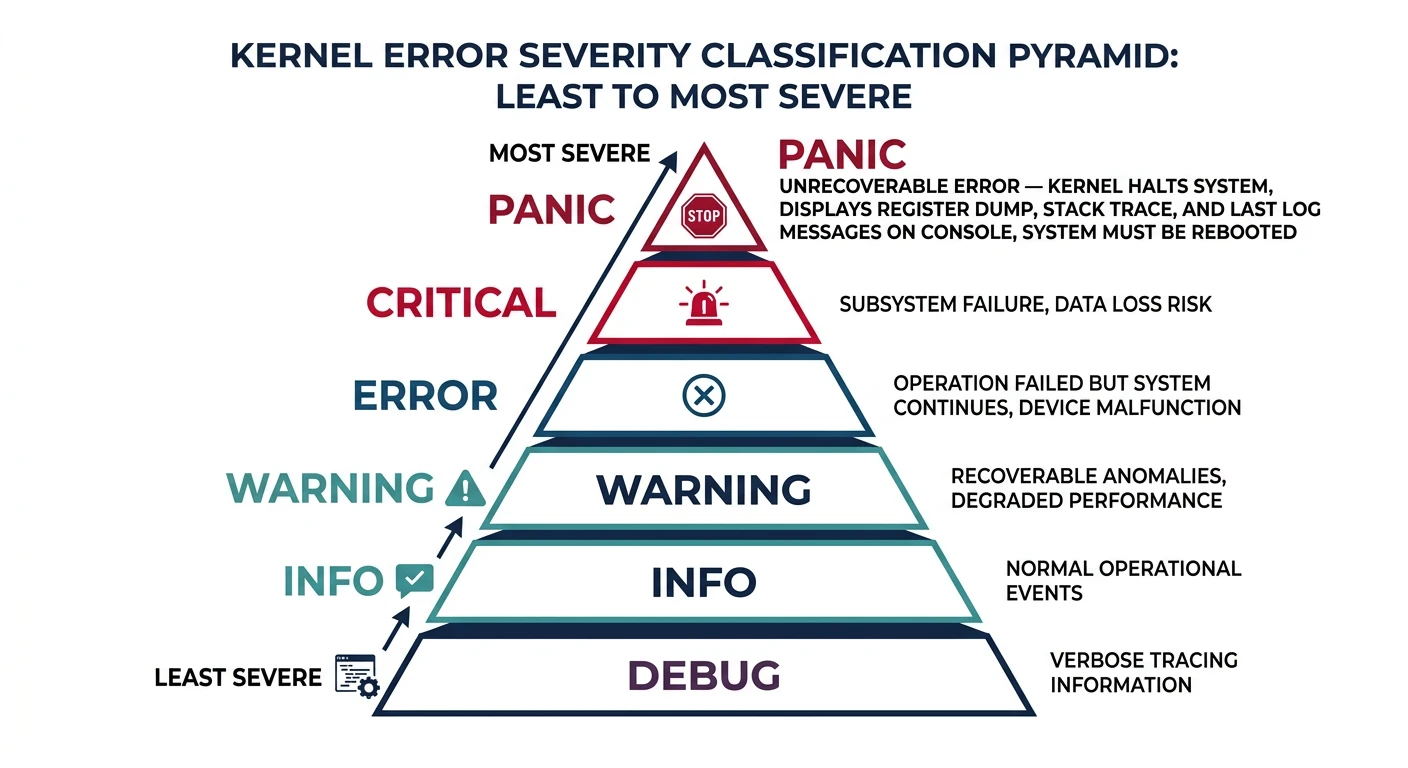
In user-space programming, errors can often be recovered from—catch an exception, display an error message, maybe restart the operation. In kernel code, some errors are so severe that the only safe response is to stop everything. Other errors are serious but potentially recoverable. Distinguishing between these cases is crucial for building a reliable OS.
Error severity spectrum — from recoverable warnings to fatal kernel panics
A kernel panic is the kernel's last resort when it detects an unrecoverable error. Continuing would risk data corruption, security breaches, or unpredictable behavior. The safest action is to stop immediately, display diagnostic information, and halt the system.
When to Panic: Only panic when continuing would make things worse. Corrupted kernel data structures, failed assertions that indicate programming errors, hardware failures that affect core systems, and security violations that could lead to privilege escalation are all valid reasons to panic.
A well-designed panic handler should:
Disable interrupts - Prevent further code execution that might worsen the situation
Display the error - Show what went wrong and where
Print CPU state - Register contents help debugging
Print stack trace - Show the call path that led to the panic
Not every kernel error needs to crash the entire system. An OOPS (the term Linux uses) is a soft fault that indicates a serious error but one that might be recoverable. The kernel logs diagnostic information, kills the offending process if identifiable, and attempts to continue.
OOPS vs Panic: An OOPS kills the current process and logs an error but keeps the system running. If the OOPS occurs in critical code (like the scheduler or during interrupt handling), it escalates to a panic because the system can't safely continue.
/* Kernel OOPS - serious but potentially recoverable error */
typedef struct {
    const char* message;      // Error message
    const char* file;         // Source file
    int line;                 // Line number
    uint64_t ip;             // Instruction pointer
    uint64_t sp;             // Stack pointer
    task_t* task;            // Current task (if any)
    bool in_interrupt;        // Were we in an interrupt?
} oops_info_t;

void kernel_oops(oops_info_t* info) {
    // Disable preemption - don't context switch during OOPS
    preempt_disable();

    // Log the error
    kprintf("\n========== KERNEL OOPS ==========\n");
    kprintf("Error: %s\n", info->message);
    kprintf("Location: %s:%d\n", info->file, info->line);
    kprintf("IP: 0x%016lx  SP: 0x%016lx\n", info->ip, info->sp);

    // Print registers
    print_registers();

    // Print stack trace
    print_stack_trace();

    // Can we recover?
    if (info->in_interrupt) {
        kprintf("OOPS in interrupt context - escalating to panic\n");
        panic("Unrecoverable OOPS in interrupt");
    }

    if (info->task == NULL || info->task == &idle_task) {
        kprintf("OOPS in kernel thread - escalating to panic\n");
        panic("Unrecoverable OOPS in kernel context");
    }

    // Kill the offending process
    kprintf("Killing process %d (%s)\n",
            info->task->pid, info->task->name);
    kprintf("=================================\n\n");

    // Send SIGKILL to the process
    send_signal(info->task, SIGKILL);

    preempt_enable();
    schedule();  // Switch to another task
}

/* Macros for triggering OOPS */
#define WARN(msg) do { \
    KLOG_WARN("%s at %s:%d", msg, __FILE__, __LINE__); \
} while(0)

#define WARN_ON(cond) do { \
    if (unlikely(cond)) { \
        KLOG_WARN("WARN_ON(" #cond ") at %s:%d", __FILE__, __LINE__); \
        print_stack_trace(); \
    } \
} while(0)

#define BUG() do { \
    oops_info_t info = { \
        .message = "BUG() triggered", \
        .file = __FILE__, \
        .line = __LINE__, \
        .ip = (uint64_t)__builtin_return_address(0), \
        .sp = get_sp(), \
        .task = current_task, \
        .in_interrupt = in_interrupt_context() \
    }; \
    kernel_oops(&info); \
} while(0)

#define BUG_ON(cond) do { \
    if (unlikely(cond)) { \
        BUG(); \
    } \
} while(0)

/* Example usage in kernel code */
void* kmalloc(size_t size) {
    void* ptr = do_alloc(size);

    // Don't panic on allocation failure - OOPS instead
    if (ptr == NULL) {
        WARN("kmalloc failed - memory pressure");
        return NULL;
    }

    return ptr;
}

void process_list_add(task_t* task) {
    // This should never happen - indicates a bug
    BUG_ON(task == NULL);
    BUG_ON(task->state == TASK_DEAD);

    list_add(&task->list, &process_list);
}
Finishing Touches
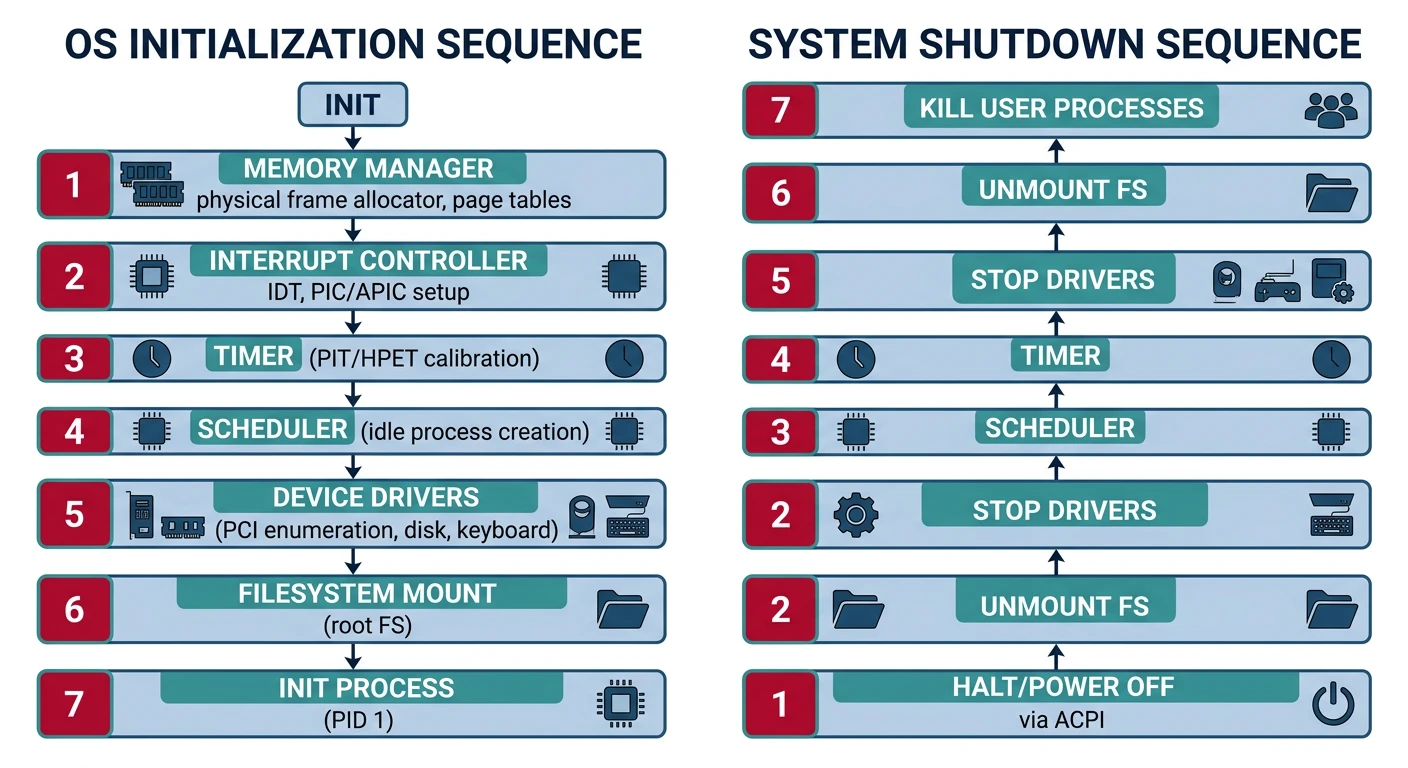
A complete operating system needs proper lifecycle management. The kernel must initialize all subsystems in the right order, launch the first user process, and when the time comes, shut down cleanly without corrupting data. These bookend operations—startup and shutdown—are surprisingly complex.
OS lifecycle — ordered init sequence, PID 1 launch, and graceful shutdown procedure
Init Process
The init process (traditionally PID 1) is the ancestor of all user processes. After the kernel finishes internal initialization, it creates and launches init, which then spawns all other user-space services. If init dies, the system typically panics because the process hierarchy becomes orphaned.
Why PID 1 is Special: The init process has unique responsibilities: it adopts orphaned processes (when a parent dies, its children become init's children), it handles system-wide signals like SIGTERM for shutdown, and it's the last user process to exit during shutdown.
┌─────────────────────────────────────────────────────────────────┐│KERNEL BOOT TO INIT SEQUENCE│├─────────────────────────────────────────────────────────────────┤│││BIOS/UEFI││↓││Bootloader(stage1, stage2)││↓││Kernel Entry(start_kernel)│││││├── Memory init (PMM, VMM, heap)││├── Interrupt setup (IDT, PIC/APIC)││├── Timer init (PIT/HPET)││├── Driver init (PCI scan, device probing)││├── Filesystem init (VFS, mount root)││├── Scheduler init│││││└──kernel_main()│││││├── Create init process (PID 1)││├── Enable interrupts││└── Become idle process (PID 0)││↓││Scheduler runs││↓││Init starts spawning services│││└─────────────────────────────────────────────────────────────────┘
/* Kernel main - after all subsystems initialized */
void kernel_main(void) {
    // Final initialization
    KLOG_INFO("Kernel initialization complete");
    KLOG_INFO("Starting init process...");

    // Create init process (PID 1)
    task_t* init = create_process("/bin/init", 0, NULL);
    if (!init) {
        panic("Failed to start init process");
    }

    KLOG_INFO("Init process started (PID %d)", init->pid);

    // Enable interrupts and start scheduling
    __asm__ volatile("sti");

    // Become idle process (PID 0)
    for (;;) {
        __asm__ volatile("hlt");
    }
}
Clean Shutdown
Shutting down is just as important as booting up. An improper shutdown can corrupt filesystems, lose data in caches, and leave hardware in undefined states. The shutdown sequence must carefully unwind everything the boot sequence set up.
Why Clean Shutdown Matters: Modern filesystems assume write caches will be flushed before power-off. Pulling the plug without unmounting can leave the filesystem in an inconsistent state, requiring repair on next boot (fsck/chkdsk). In severe cases, data loss can occur.
┌─────────────────────────────────────────────────────────────────┐│CLEAN SHUTDOWN SEQUENCE│├─────────────────────────────────────────────────────────────────┤│││ 1. Signal user processes(SIGTERM)││└─ Applications save state and exit gracefully││││ 2. Wait timeout(e.g., 5 seconds)││└─ Give processes time to clean up││││ 3. Force kill remaining(SIGKILL)││└─ No process survives SIGKILL││││ 4. Sync filesystems││└─ Flush dirty buffers to disk││││ 5. Unmount filesystems││└─ Mark filesystems cleanly unmounted││││ 6. Flush disk caches││└─ Block cache writeback, disk cache flush││││ 7. Power off via ACPI││└─ Signal power management to cut power│││└─────────────────────────────────────────────────────────────────┘
/* System shutdown sequence */
void system_shutdown(void) {
    KLOG_INFO("System shutdown initiated");

    // Stop all user processes
    KLOG_INFO("Terminating user processes...");
    kill_all_processes();

    // Sync filesystems
    KLOG_INFO("Syncing filesystems...");
    vfs_sync_all();

    // Unmount filesystems
    KLOG_INFO("Unmounting filesystems...");
    vfs_unmount_all();

    // Flush disk caches
    KLOG_INFO("Flushing disk caches...");
    block_cache_flush_all();

    KLOG_INFO("Shutdown complete. Power off now safe.");

    // ACPI power off
    acpi_power_off();

    // Fallback: halt
    __asm__ volatile("cli; hlt");
}

/* ACPI power off */
void acpi_power_off(void) {
    // Write SLP_TYPa and SLP_EN to PM1a_CNT
    outw(acpi_pm1a_cnt, (acpi_slp_typa << 10) | (1 << 13));
}
Series Summary: What You've Built
Over 18 phases, you've built every major component of a modern operating system from scratch. Let's celebrate what you've accomplished and the skills you've developed.
Throughout this series, you haven't just learned about operating systems—you've developed skills that transfer to many areas of systems programming:
Technical Skills Mastered
Low-Level ProgrammingSystems Engineering
Category
Skills
Where It's Used
Assembly
Boot code, context switching, interrupt handlers
Embedded systems, drivers, security research
Memory Management
Paging, virtual memory, allocators
Database engines, game engines, VMs
Concurrency
Scheduling, synchronization, locks
Distributed systems, high-performance computing
Hardware Interfaces
PCI, DMA, MMIO, interrupts
Driver development, embedded systems
File Systems
VFS, caching, block devices
Storage systems, databases
Security
NX, ASLR, SMEP/SMAP, privilege separation
Security engineering, malware analysis
Debugging
Stack traces, logging, serial debugging
All software development
Phase-by-Phase Recap
Phase
Topic
Key Achievement
0
Orientation
Understanding OS architecture and kernel types
1
Boot Process
Understanding BIOS, UEFI, and how PCs start
2
Real Mode
Writing a working bootloader from scratch
3
Protected Mode
GDT setup and 32-bit mode transition
4
Display & I/O
VGA text mode and keyboard input
5
Interrupts
IDT, ISRs, and PIC programming
6
Memory
Paging, virtual memory, and heap allocator
7
Filesystems
FAT driver and VFS layer
8
Processes
Multitasking and system calls
9
ELF Loading
Loading and executing user programs
10
Shell & libc
Command-line shell and C library
11
64-Bit Mode
Long mode and 64-bit paging
12
UEFI
Modern boot services and memory maps
13
Graphics
Framebuffer and windowing system
14
Input & Timing
Mouse driver and high-precision timers
15
Hardware Drivers
PCI enumeration, AHCI, NVMe
16
Performance
Caching, scheduler tuning, profiling
17
Security & Finishing
Hardening, debugging, init/shutdown
You've joined an elite group. Building an operating system from scratch is one of the most challenging accomplishments in computer science. Most programmers never attempt it. You not only attempted it—you completed it. That takes dedication, curiosity, and exceptional problem-solving skills.
What's Next
Your OS development journey doesn't end here. There are many directions you can take your operating system:
Networking: TCP/IP stack, network drivers, socket API