We use cookies to enhance your browsing experience, serve personalized content, and analyze our traffic.
By clicking "Accept All", you consent to our use of cookies. See our
Privacy Policy
for more information.
Phase 10 Goals: By the end of this phase, your OS will have a working shell and C library. User programs can use standard C functions, and you'll have an interactive command line to run them.
In Phase 9, we loaded and ran ELF programs, but those programs had to make raw system calls. That's like giving someone a car without a steering wheel—technically it moves, but it's not very usable. Now we'll add the standard C library (libc) so programs can use familiar functions like printf(), malloc(), and strlen(). Then we'll build a shell—the program that lets users type commands and run programs interactively.
Key Insight: The C standard library bridges applications and the kernel. Your shell brings everything together—it's the first program most users interact with and demonstrates your entire OS working.
libc Overview
GNU's glibc is 1.5 million lines of code—too complex for a hobby OS. We'll build a minimal libc with just the essential functions. Think of it as the difference between a Swiss Army knife and a chef's knife—we want something sharp and simple.
Real-World Analogy: libc is like a translator between you and a foreign country. You speak C (printf("hello")), and libc translates that into the local language (write(1, "hello", 5) syscall). Different countries (OSes) speak different dialects, but C programs work everywhere because libc handles the translation.
Shell Purpose
The shell is the user's gateway to your operating system. It's a program that:
Reads commands from the user (or a script)
Parses the command and arguments
Executes the command (builtin or external program)
Waits for completion and displays results
Repeats (the "read-eval-print loop" or REPL)
/*
 * SHELL: THE USER INTERFACE
 * ==========================
 *
 * ╔════════════════════════════════════════════════════════════════╗
 * ║  MyOS Shell v1.0                                               ║
 * ║  $ ls                                                          ║
 * ║  bin/  home/  etc/  dev/  tmp/                                 ║
 * ║  $ cat /etc/motd                                               ║
 * ║  Welcome to MyOS!                                              ║
 * ║  $ echo Hello World                                            ║
 * ║  Hello World                                                   ║
 * ║  $ ./hello                                                     ║
 * ║  Hello from C!                                                 ║
 * ║  $ cd /home                                                    ║
 * ║  $ pwd                                                         ║
 * ║  /home                                                         ║
 * ║  $ exit                                                        ║
 * ╚════════════════════════════════════════════════════════════════╝
 *
 * Shell Types:
 *   - sh        (Bourne Shell - simple, POSIX standard)
 *   - bash      (Bourne Again Shell - most popular on Linux)
 *   - zsh       (Z Shell - powerful features, macOS default)
 *   - fish      (Friendly Interactive Shell - user-friendly)
 *
 * Our shell will be closest to sh - simple but functional.
 */
Historical Note: The original Unix shell (1971) was written by Ken Thompson. The Bourne shell (sh) came in 1979 and became the standard. Bash ("Bourne Again Shell") arrived in 1989 and is still the default on most Linux systems. We'll build something simpler but follow the same principles.
Building libc
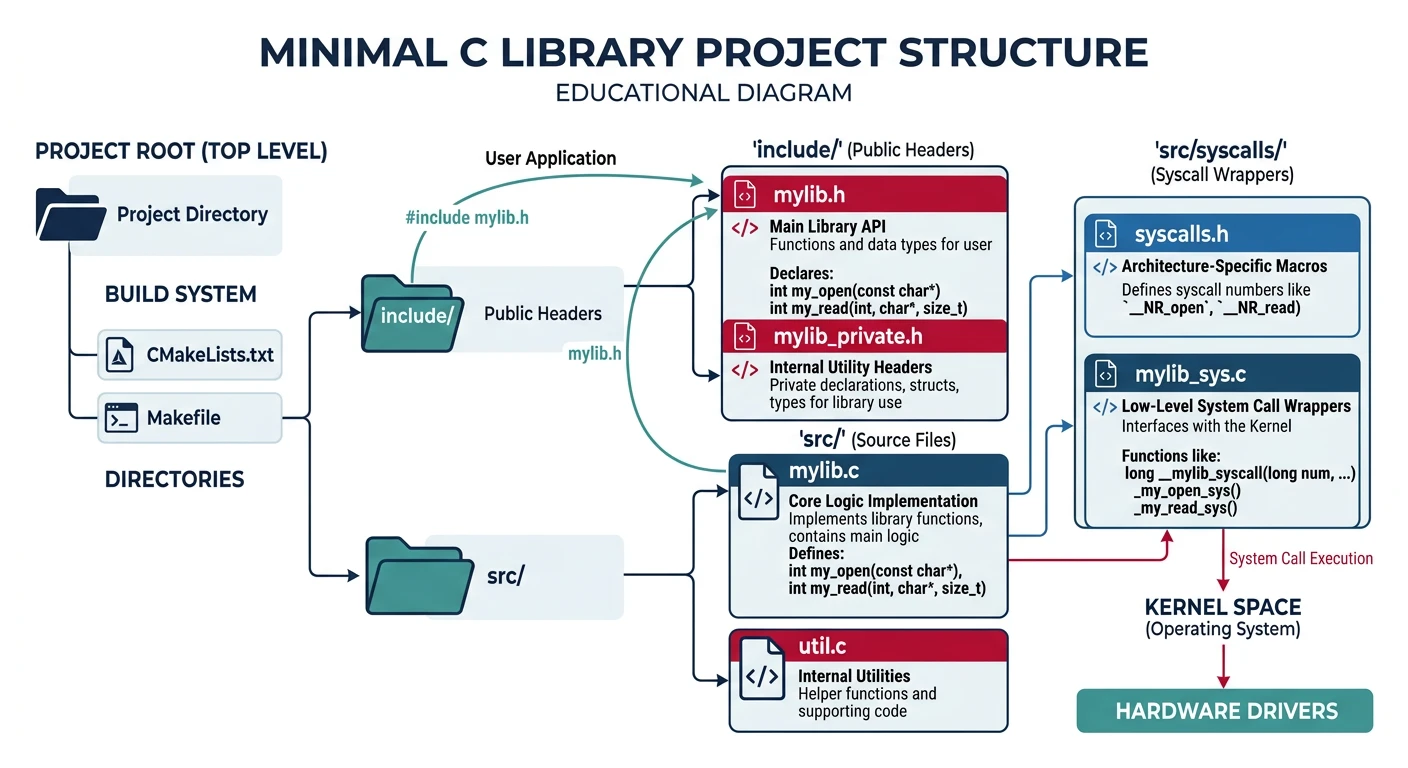
We'll build libc as a static library (libc.a) that gets linked into every program. User programs include our headers and link against our library—they never know they're not using GNU libc!
Minimal libc project layout with include headers (stdio, stdlib, string, unistd), source implementations, syscall wrappers, and crt0 startup code
String functions are the workhorses of C programming. These are simple but must be correct—bugs here affect every program. Here's our implementation:
/* String functions for user-space libc */

size_t strlen(const char* str) {
    size_t len = 0;
    while (str[len]) len++;
    return len;
}

char* strcpy(char* dest, const char* src) {
    char* ret = dest;
    while ((*dest++ = *src++));
    return ret;
}

int strcmp(const char* s1, const char* s2) {
    while (*s1 && (*s1 == *s2)) {
        s1++;
        s2++;
    }
    return *(unsigned char*)s1 - *(unsigned char*)s2;
}

char* strcat(char* dest, const char* src) {
    char* ret = dest;
    while (*dest) dest++;
    while ((*dest++ = *src++));
    return ret;
}

char* strchr(const char* s, int c) {
    while (*s != (char)c) {
        if (!*s) return NULL;
        s++;
    }
    return (char*)s;
}
Warning:gets() is dangerous because it doesn't check buffer size—it's been removed from C11. We include it for simplicity, but real code should use fgets() instead. Never use gets() in production!
Memory Functions
Memory functions operate on raw bytes regardless of type. Unlike string functions, they don't stop at null bytes—they work with exact byte counts. These are used everywhere, including inside other libc functions.
/* Memory functions */

void* memcpy(void* dest, const void* src, size_t n) {
    uint8_t* d = dest;
    const uint8_t* s = src;
    while (n--) *d++ = *s++;
    return dest;
}

void* memset(void* s, int c, size_t n) {
    uint8_t* p = s;
    while (n--) *p++ = (uint8_t)c;
    return s;
}

int memcmp(const void* s1, const void* s2, size_t n) {
    const uint8_t* p1 = s1;
    const uint8_t* p2 = s2;
    while (n--) {
        if (*p1 != *p2) return *p1 - *p2;
        p1++;
        p2++;
    }
    return 0;
}
Optimization Tip: Real libc implementations use SIMD instructions (SSE/AVX) to process 16-32 bytes at once. Our simple byte-by-byte version is correct but slow. Add optimizations later once everything works!
Standard I/O
Standard I/O functions provide formatted input/output. printf() is the most complex—it must parse format strings and handle multiple data types. We'll implement a simplified version that handles the most common cases:
/* Standard I/O using system calls */

int putchar(int c) {
    char ch = c;
    write(1, &ch, 1);  // fd 1 = stdout
    return c;
}

int puts(const char* s) {
    while (*s) putchar(*s++);
    putchar('\n');
    return 0;
}

int getchar(void) {
    char c;
    if (read(0, &c, 1) <= 0) return EOF;  // fd 0 = stdin
    return (unsigned char)c;
}

char* gets(char* s) {
    char* p = s;
    int c;
    while ((c = getchar()) != '\n' && c != EOF) {
        *p++ = c;
    }
    *p = '\0';
    return s;
}

// Simple printf (integer and string only)
int printf(const char* fmt, ...) {
    // Implement using va_args
    // Handle %d, %s, %c, %x
    // Content will be expanded
    return 0;
}
Here's a working printf() implementation that handles the common format specifiers:
/* Complete printf implementation */
#include <stdarg.h>

// Helper: Print unsigned integer in given base
static int print_num(unsigned int num, int base, int is_signed, int width, char pad) {
    char buf[32];
    char* digits = "0123456789abcdef";
    int count = 0;
    int negative = 0;

    // Handle negative numbers for signed decimal
    if (is_signed && (int)num < 0) {
        negative = 1;
        num = -num;
    }

    // Convert to string (reversed)
    int i = 0;
    do {
        buf[i++] = digits[num % base];
        num /= base;
    } while (num > 0);

    // Add negative sign
    if (negative) buf[i++] = '-';

    // Pad if needed
    while (i < width) {
        buf[i++] = pad;
    }

    // Print in reverse
    while (i > 0) {
        putchar(buf[--i]);
        count++;
    }

    return count;
}

int printf(const char* fmt, ...) {
    va_list args;
    va_start(args, fmt);

    int count = 0;
    char c;

    while ((c = *fmt++)) {
        if (c != '%') {
            putchar(c);
            count++;
            continue;
        }

        // Parse width
        int width = 0;
        char pad = ' ';
        if (*fmt == '0') {
            pad = '0';
            fmt++;
        }
        while (*fmt >= '0' && *fmt <= '9') {
            width = width * 10 + (*fmt++ - '0');
        }

        // Handle format specifier
        c = *fmt++;
        switch (c) {
            case 'd':
            case 'i':
                count += print_num(va_arg(args, int), 10, 1, width, pad);
                break;
            case 'u':
                count += print_num(va_arg(args, unsigned), 10, 0, width, pad);
                break;
            case 'x':
                count += print_num(va_arg(args, unsigned), 16, 0, width, pad);
                break;
            case 'p': {
                putchar('0'); putchar('x'); count += 2;
                count += print_num(va_arg(args, unsigned), 16, 0, 8, '0');
                break;
            }
            case 'c':
                putchar(va_arg(args, int));
                count++;
                break;
            case 's': {
                char* s = va_arg(args, char*);
                if (!s) s = "(null)";
                while (*s) {
                    putchar(*s++);
                    count++;
                }
                break;
            }
            case '%':
                putchar('%');
                count++;
                break;
            default:
                putchar('%');
                putchar(c);
                count += 2;
        }
    }

    va_end(args);
    return count;
}
stdlib Functions
The stdlib functions provide memory allocation, program termination, and utility functions. The most important is malloc()—dynamic memory allocation for user programs.
/* stdlib implementation */

// Simple sbrk-based memory allocator
static uint8_t* heap_start = NULL;
static uint8_t* heap_end = NULL;
static uint8_t* heap_current = NULL;

// Block header for malloc
typedef struct block_header {
    size_t size;
    int free;
    struct block_header* next;
} block_header_t;

static block_header_t* free_list = NULL;

void* malloc(size_t size) {
    // Initialize heap on first call
    if (!heap_start) {
        heap_start = (uint8_t*)sbrk(0);
        heap_end = heap_start;
        heap_current = heap_start;
    }

    // Align to 8 bytes
    size = (size + 7) & ~7;

    // First-fit search in free list
    block_header_t* block = free_list;
    block_header_t* prev = NULL;

    while (block) {
        if (block->free && block->size >= size) {
            block->free = 0;
            return (void*)(block + 1);
        }
        prev = block;
        block = block->next;
    }

    // No suitable free block, allocate new one
    size_t total = sizeof(block_header_t) + size;

    if (heap_current + total > heap_end) {
        // Grow heap
        if (sbrk(total + 4096) == (void*)-1) {
            return NULL;  // Out of memory
        }
        heap_end += total + 4096;
    }

    block = (block_header_t*)heap_current;
    block->size = size;
    block->free = 0;
    block->next = NULL;

    if (prev) {
        prev->next = block;
    } else {
        free_list = block;
    }

    heap_current += total;

    return (void*)(block + 1);
}

void free(void* ptr) {
    if (!ptr) return;

    block_header_t* block = (block_header_t*)ptr - 1;
    block->free = 1;

    // TODO: Coalesce adjacent free blocks
}

void* calloc(size_t nmemb, size_t size) {
    size_t total = nmemb * size;
    void* ptr = malloc(total);
    if (ptr) {
        memset(ptr, 0, total);
    }
    return ptr;
}

void* realloc(void* ptr, size_t size) {
    if (!ptr) return malloc(size);
    if (size == 0) {
        free(ptr);
        return NULL;
    }

    block_header_t* block = (block_header_t*)ptr - 1;
    if (block->size >= size) {
        return ptr;  // Current block is big enough
    }

    void* new_ptr = malloc(size);
    if (new_ptr) {
        memcpy(new_ptr, ptr, block->size);
        free(ptr);
    }
    return new_ptr;
}

// Exit function
void exit(int status) {
    // TODO: Call atexit() handlers
    // TODO: Flush stdio buffers
    _exit(status);  // Syscall
}

// String to integer
int atoi(const char* str) {
    int result = 0;
    int sign = 1;

    // Skip whitespace
    while (*str == ' ' || *str == '\t') str++;

    // Handle sign
    if (*str == '-') { sign = -1; str++; }
    else if (*str == '+') { str++; }

    // Convert digits
    while (*str >= '0' && *str <= '9') {
        result = result * 10 + (*str - '0');
        str++;
    }

    return sign * result;
}

int abs(int n) {
    return n < 0 ? -n : n;
}
malloc() Caveats
Our simple malloc has limitations:
No coalescing: Adjacent free blocks aren't merged, causing fragmentation
First-fit: May not find the best block, wastes memory
No thread safety: Multiple threads could corrupt the heap
No reuse: Free blocks are marked but never returned to OS
Production allocators (jemalloc, ptmalloc, mimalloc) use sophisticated techniques to address these issues.
C Runtime (crt0)
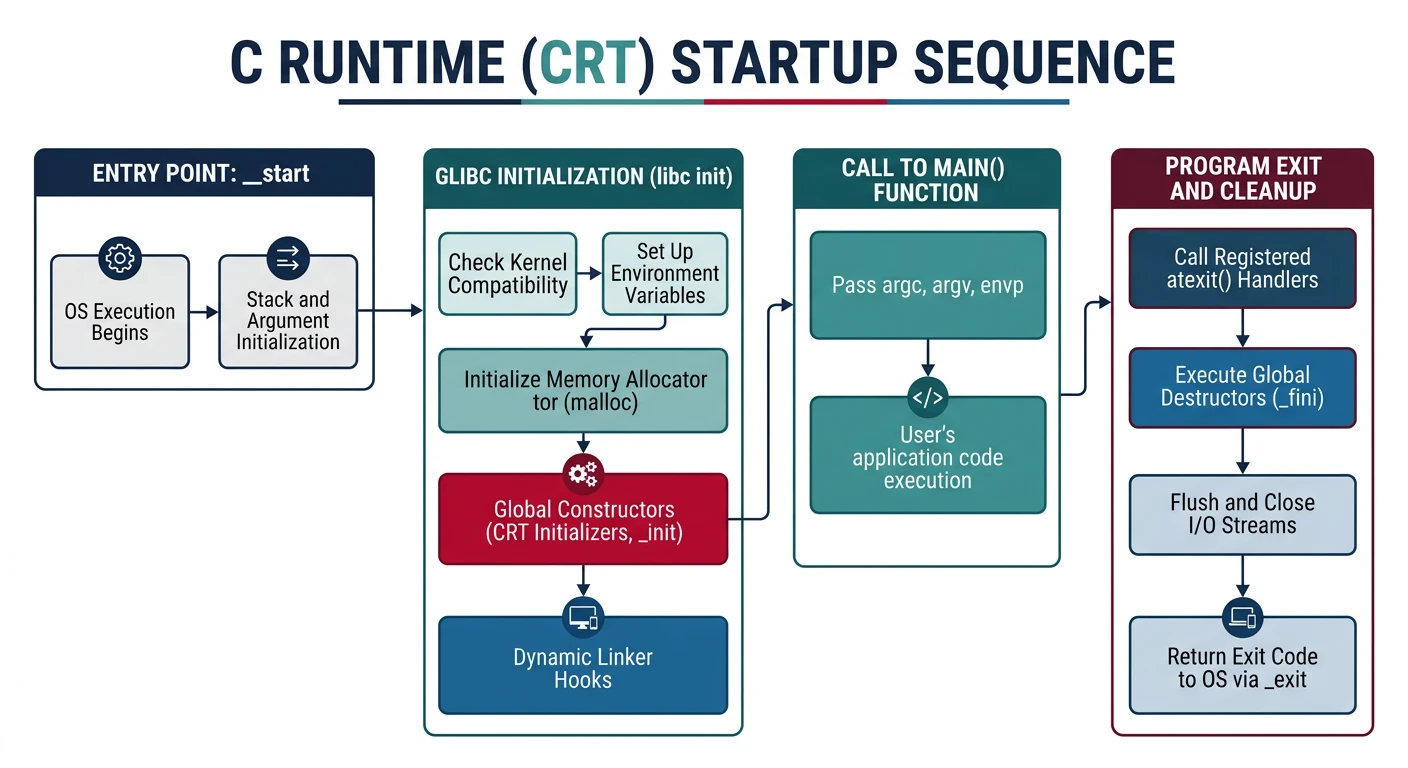
The C runtime is the glue between the OS loader and your main() function. When the kernel loads a program, it doesn't call main() directly—it jumps to _start in crt0, which sets things up properly.
Program startup chain: _start in crt0 extracts argc/argv, initializes libc, calls main(), then invokes exit() with the return value
The startup code must handle the exact stack layout the kernel provides. Here's our complete crt0:
; crt0.asm - C runtime startup code
section .text
global _start
extern main
extern exit

_start:
    ; Stack layout from kernel:
    ; [esp+0]  = argc
    ; [esp+4]  = argv[0]
    ; [esp+8]  = argv[1]
    ; ...

    ; Get argc
    mov eax, [esp]

    ; Calculate argv pointer
    lea ebx, [esp + 4]

    ; Call main(argc, argv)
    push ebx    ; argv
    push eax    ; argc
    call main
    add esp, 8

    ; Call exit with return value
    push eax
    call exit

    ; Should never reach here
    jmp $
Why clear EBP? Setting EBP to 0 marks the end of the call stack. Debuggers use EBP to walk the stack and print backtraces—a zero EBP tells them to stop. Without it, stack traces would contain garbage.
Exit Handling
The exit() function does cleanup before terminating. This ensures files are flushed and resources are released:
/* Exit handling with atexit() support */

#define MAX_ATEXIT_FUNCS 32

static void (*atexit_funcs[MAX_ATEXIT_FUNCS])(void);
static int atexit_count = 0;

// Register a function to call at exit
int atexit(void (*func)(void)) {
    if (atexit_count >= MAX_ATEXIT_FUNCS) {
        return -1;
    }
    atexit_funcs[atexit_count++] = func;
    return 0;
}

// Clean exit with cleanup
void exit(int status) {
    // Call atexit handlers in reverse order
    while (atexit_count > 0) {
        atexit_funcs[--atexit_count]();
    }

    // Flush stdio buffers
    fflush(stdout);
    fflush(stderr);

    // Close all open files
    // for (int fd = 0; fd < MAX_FDS; fd++) {
    //     close(fd);
    // }

    // Terminate process
    _exit(status);
}

// Example usage
void cleanup_temp_files(void) {
    printf("Cleaning up temporary files...\n");
    unlink("/tmp/myapp.tmp");
}

int main() {
    atexit(cleanup_temp_files);  // Will be called when exit() runs

    printf("Doing work...\n");

    return 0;  // exit(0) called by crt0
}
Complete libc Header
/* libc/include/stdlib.h */
#ifndef _STDLIB_H
#define _STDLIB_H

#include <stddef.h>  // size_t, NULL

#define EXIT_SUCCESS 0
#define EXIT_FAILURE 1

// Memory allocation
void* malloc(size_t size);
void* calloc(size_t nmemb, size_t size);
void* realloc(void* ptr, size_t size);
void free(void* ptr);

// Process control
void exit(int status) __attribute__((noreturn));
void _exit(int status) __attribute__((noreturn));
int atexit(void (*func)(void));
void abort(void) __attribute__((noreturn));

// String conversion
int atoi(const char* str);
long atol(const char* str);
long strtol(const char* str, char** endptr, int base);

// Math
int abs(int n);
long labs(long n);

// Random numbers
int rand(void);
void srand(unsigned int seed);
#define RAND_MAX 32767

// Environment
char* getenv(const char* name);
int setenv(const char* name, const char* value, int overwrite);

#endif /* _STDLIB_H */
Building a Shell
The shell is the user's interface to your operating system. It combines everything we've built: file I/O, process creation, program execution, and our C library. Let's build a working shell step by step.
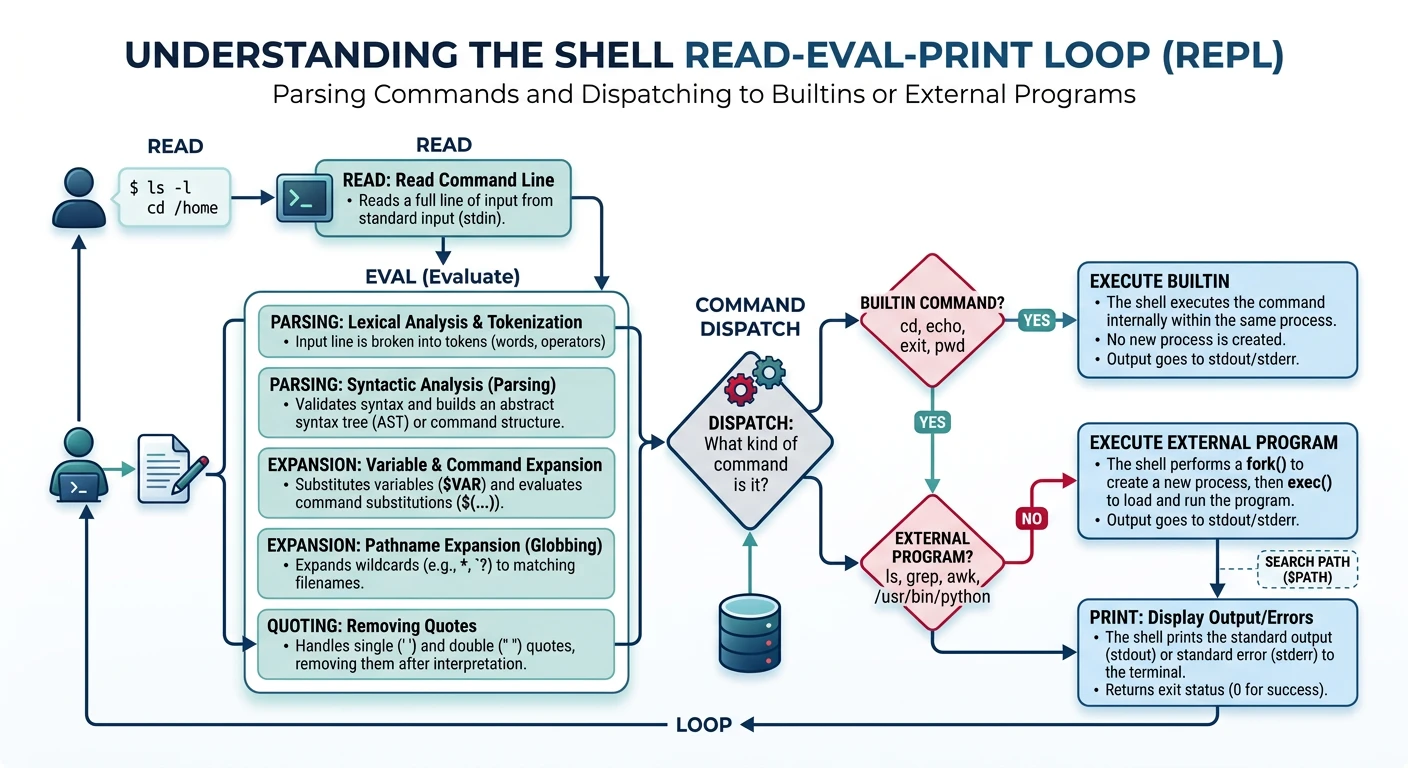
Shell REPL architecture: read input, tokenize into argv, check for builtin commands, or fork/exec external programs and wait for completion
The main loop is simple: prompt → read → parse → execute → repeat. This is the heart of the shell:
/* Simple shell main loop */
#include
#include
#include

#define MAX_LINE 256
#define MAX_ARGS 32

char* prompt = "myos> ";

int main(void) {
    char line[MAX_LINE];
    char* args[MAX_ARGS];

    while (1) {
        // Print prompt
        printf("%s", prompt);

        // Read command
        if (gets(line) == NULL) {
            break;
        }

        // Skip empty lines
        if (line[0] == '\0') {
            continue;
        }

        // Parse and execute
        int argc = parse_line(line, args);
        if (argc > 0) {
            execute(argc, args);
        }
    }

    return 0;
}
Line Editing: Our simple shell uses gets() which has no editing capability. Real shells support left/right arrows, history (up/down), tab completion, and more. These features require raw terminal mode and are complex to implement properly.
Command Parsing
Parsing splits the command line into individual arguments. This simple tokenizer handles spaces and tabs:
/* Parse command line into arguments */
int parse_line(char* line, char* args[]) {
    int argc = 0;
    char* p = line;

    while (*p && argc < MAX_ARGS - 1) {
        // Skip whitespace
        while (*p == ' ' || *p == '\t') p++;

        if (*p == '\0') break;

        // Found argument
        args[argc++] = p;

        // Find end of argument
        while (*p && *p != ' ' && *p != '\t') p++;

        if (*p) {
            *p++ = '\0';  // Null terminate
        }
    }

    args[argc] = NULL;
    return argc;
}
How parsing works:
Skip whitespace - Move past spaces/tabs between arguments
Mark start - Store pointer to beginning of each word
Find end - Scan to next whitespace or end of line
Terminate - Replace whitespace with null byte to create separate strings
Input: "ls -la /home" ┌───────────────────────────────┐ │ l │ s │ │ - │ l │ a │ │ / │ h │ o │ m │ e │ \0│ └───────────────────────────────┘After parsing: ┌───────────────────────────────┐ │ l │ s │\0│ - │ l │ a │\0│ / │ h │ o │ m │ e │ \0│ └───────────────────────────────┘ ↑ ↑ ↑ args[0] args[1] args[2]
Production shells handle much more: Quoted strings ("hello world"), escape sequences (\n), variable expansion ($HOME), pipes (|), redirects (><), and more. Our parser is minimal but demonstrates the core idea.
Builtin Commands
Builtins are commands that must run inside the shell process itself, not as separate programs. Why? Some operations only make sense in the current process:
Builtin
Why It Must Be Builtin
What Happens Otherwise
cd
Changes shell's working directory
Child would change its own directory, parent unchanged
exit
Terminates shell process
Child would exit, parent keeps running
export
Sets environment variables
Child's environment doesn't affect parent
/* Builtin shell commands */
typedef struct {
    char* name;
    int (*func)(int argc, char* argv[]);
} builtin_t;

int builtin_cd(int argc, char* argv[]) {
    if (argc < 2) {
        printf("cd: missing argument\n");
        return 1;
    }
    if (chdir(argv[1]) != 0) {
        printf("cd: %s: No such directory\n", argv[1]);
        return 1;
    }
    return 0;
}

int builtin_exit(int argc, char* argv[]) {
    exit(0);
    return 0;  // Never reached
}

int builtin_help(int argc, char* argv[]) {
    printf("Available commands:\n");
    printf("  cd   - Change directory\n");
    printf("  exit      - Exit shell\n");
    printf("  help      - Show this help\n");
    return 0;
}

builtin_t builtins[] = {
    {"cd", builtin_cd},
    {"exit", builtin_exit},
    {"help", builtin_help},
    {NULL, NULL}
};
Extending Builtins: Adding new builtins is easy—just create a function with the signature int func(int argc, char* argv[]) and add it to the array. Common additions include pwd, echo, and alias.
Program Execution
When a command isn't a builtin, the shell must launch an external program. This uses the classic fork-exec pattern we learned in Phase 8:
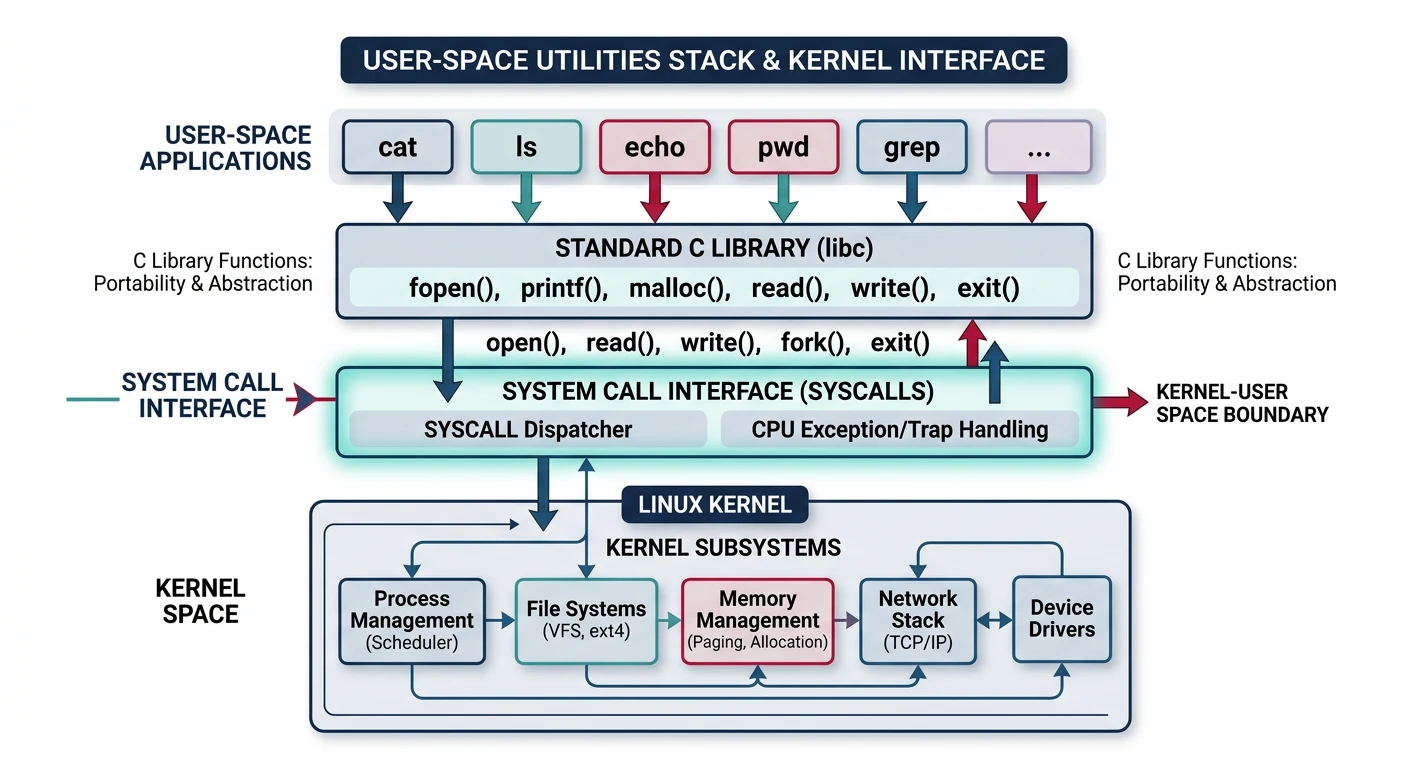
With our shell working, we need utilities to run! Let's implement the most fundamental commands. These combine everything we've built: libc functions, file I/O syscalls, and proper command-line handling.
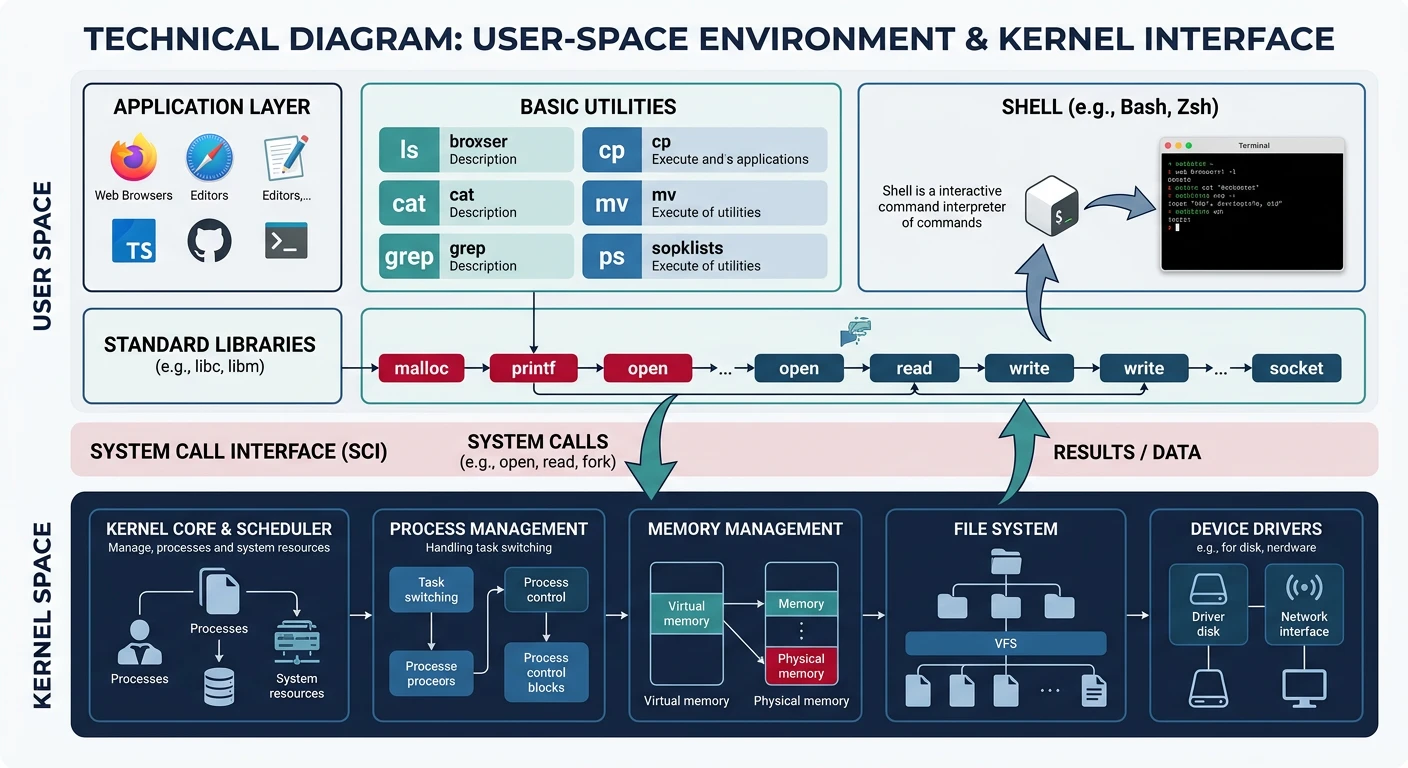
User-space utility stack: programs like cat, ls, and echo use libc functions, which translate to system calls handled by the kernel's VFS and drivers
Utility Programs Use Everything: User-Space Utilities┌─────────────────────────────────────────────┐│ cat ls echo │├─────────────────────────────────────────────┤│ Standard Library (libc) ││ printf() strlen() malloc() getchar() │├─────────────────────────────────────────────┤│ System Call Interface ││ read() write() open() close() │├─────────────────────────────────────────────┤│ Kernel ││ VFS Filesystem Drivers │└─────────────────────────────────────────────┘
/* cat.c - Display file contents */
#include "libc.h"

#define BUF_SIZE 1024

int cat_file(const char* filename) {
    int fd;

    if (filename == NULL || strcmp(filename, "-") == 0) {
        fd = 0;  // stdin
    } else {
        fd = open(filename, O_RDONLY);
        if (fd < 0) {
            printf("cat: %s: No such file\n", filename);
            return 1;
        }
    }

    char buf[BUF_SIZE];
    ssize_t n;

    while ((n = read(fd, buf, BUF_SIZE)) > 0) {
        write(1, buf, n);  // stdout
    }

    if (fd != 0) close(fd);
    return 0;
}

int main(int argc, char* argv[]) {
    if (argc < 2) {
        // No args = read from stdin
        return cat_file(NULL);
    }

    int ret = 0;
    for (int i = 1; i < argc; i++) {
        ret |= cat_file(argv[i]);
    }
    return ret;
}
Why use read()/write() instead of printf()? For efficient binary-safe output. printf() processes format strings and stops at null bytes. Direct syscalls copy exactly what's in the file—binary data, null bytes, everything.
ls - Directory Listing
ls lists directory contents. This requires the readdir() syscall we implemented in Phase 7. The simplest version just prints names:
/* ls.c - List directory contents */
#include "libc.h"

int list_dir(const char* path) {
    DIR* dir = opendir(path);
    if (!dir) {
        printf("ls: cannot access '%s'\n", path);
        return 1;
    }

    struct dirent* entry;
    while ((entry = readdir(dir)) != NULL) {
        // Skip . and .. for cleaner output
        if (entry->d_name[0] == '.' &&
            (entry->d_name[1] == '\0' ||
             (entry->d_name[1] == '.' && entry->d_name[2] == '\0'))) {
            continue;
        }

        // Show type indicator
        char type = ' ';
        if (entry->d_type == DT_DIR) type = '/';
        else if (entry->d_type == DT_LNK) type = '@';

        printf("%s%c  ", entry->d_name, type);
    }
    printf("\n");

    closedir(dir);
    return 0;
}

int main(int argc, char* argv[]) {
    if (argc < 2) {
        return list_dir(".");
    }

    for (int i = 1; i < argc; i++) {
        if (argc > 2) printf("%s:\n", argv[i]);
        list_dir(argv[i]);
    }
    return 0;
}
Enhancement
Adding ls -la Support
A full ls implementation adds stat() calls for each entry:
// Extended listing with -l flag
struct stat st;
stat(fullpath, &st);
printf("%c%s %4d %s %8ld %s\n",
    S_ISDIR(st.st_mode) ? 'd' : '-',
    mode_string(st.st_mode),  // rwxr-xr-x
    st.st_nlink,
    uid_to_name(st.st_uid),
    st.st_size,
    entry->d_name);
Enhancementstat()
echo - Print Arguments
echo is the simplest utility—it just prints its arguments. But even simple tools need proper option handling:
/* echo.c - Print arguments */
#include "libc.h"

int main(int argc, char* argv[]) {
    int newline = 1;  // Print trailing newline by default
    int start = 1;

    // Handle -n flag (no newline)
    if (argc > 1 && strcmp(argv[1], "-n") == 0) {
        newline = 0;
        start = 2;
    }

    // Print arguments separated by spaces
    for (int i = start; i < argc; i++) {
        if (i > start) putchar(' ');

        char* p = argv[i];
        while (*p) {
            // Handle escape sequences
            if (*p == '\\' && *(p+1)) {
                p++;
                switch (*p) {
                    case 'n': putchar('\n'); break;
                    case 't': putchar('\t'); break;
                    case '\\': putchar('\\'); break;
                    default: putchar(*p);
                }
            } else {
                putchar(*p);
            }
            p++;
        }
    }

    if (newline) putchar('\n');
    return 0;
}
Command
Syscalls Used
libc Functions
cat
open, read, write, close
printf, strcmp
ls
open, getdents, close
printf, opendir, readdir
echo
write (via putchar)
putchar, strcmp
What You Can Build
Phase 10 Milestone: A complete user-space environment! Your OS now has a working shell, standard C library, and basic utilities. Users can type commands and run programs. This is a usable operating system!
Complete libc Header
Combine all our functions into a single header:
Complete user-space environment milestone: a working shell with libc support and basic utilities forms an interactive, usable operating system
Major Milestone! You now have a working operating system. Users can boot it, get a shell prompt, run commands, execute programs—just like "real" operating systems. Everything from here builds on this foundation.
What's Next: 64-Bit Long Mode
In Phase 11, we'll upgrade from 32-bit protected mode to 64-bit long mode. This unlocks modern hardware capabilities:
Feature
32-bit Mode
64-bit Mode
Address Space
4 GB max
256 TB virtual
Registers
8 (EAX-EDI)
16 (RAX-R15)
Paging
2-level (PD+PT)
4-level (PML4)
Calling Convention
Stack-based
Register-based (faster)
Key Takeaways
libc bridges user/kernel - Provides portable API over raw syscalls
String functions are fundamental - Nearly every program uses them
Heap management is complex - Real allocators are highly optimized
CRT handles startup/exit - Programs don't start at main()
Shells are surprisingly simple - Read-parse-execute loop is the core
Builtins must run in-process - cd, exit can't be external programs