x86 Assembly Series Part 5: NASM Syntax, Directives & Macros
February 6, 2026Wasil Zafar28 min read
Master the NASM (Netwide Assembler) syntax including sections, data directives, labels, symbols, macros, conditional assembly, and producing ELF32/ELF64 binaries for Linux development.
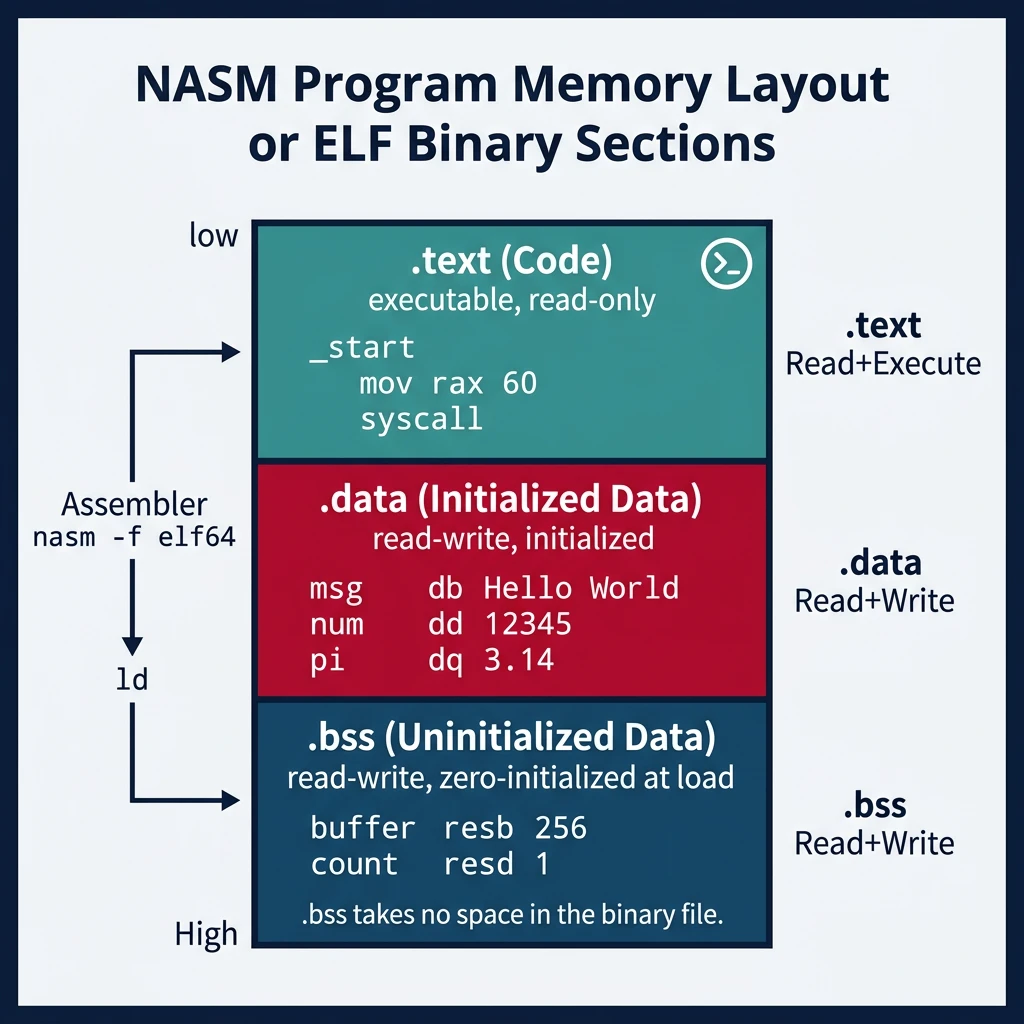
NASM Basics: NASM uses Intel syntax (destination, source) and is case-insensitive for instructions/registers but case-sensitive for labels and symbols.
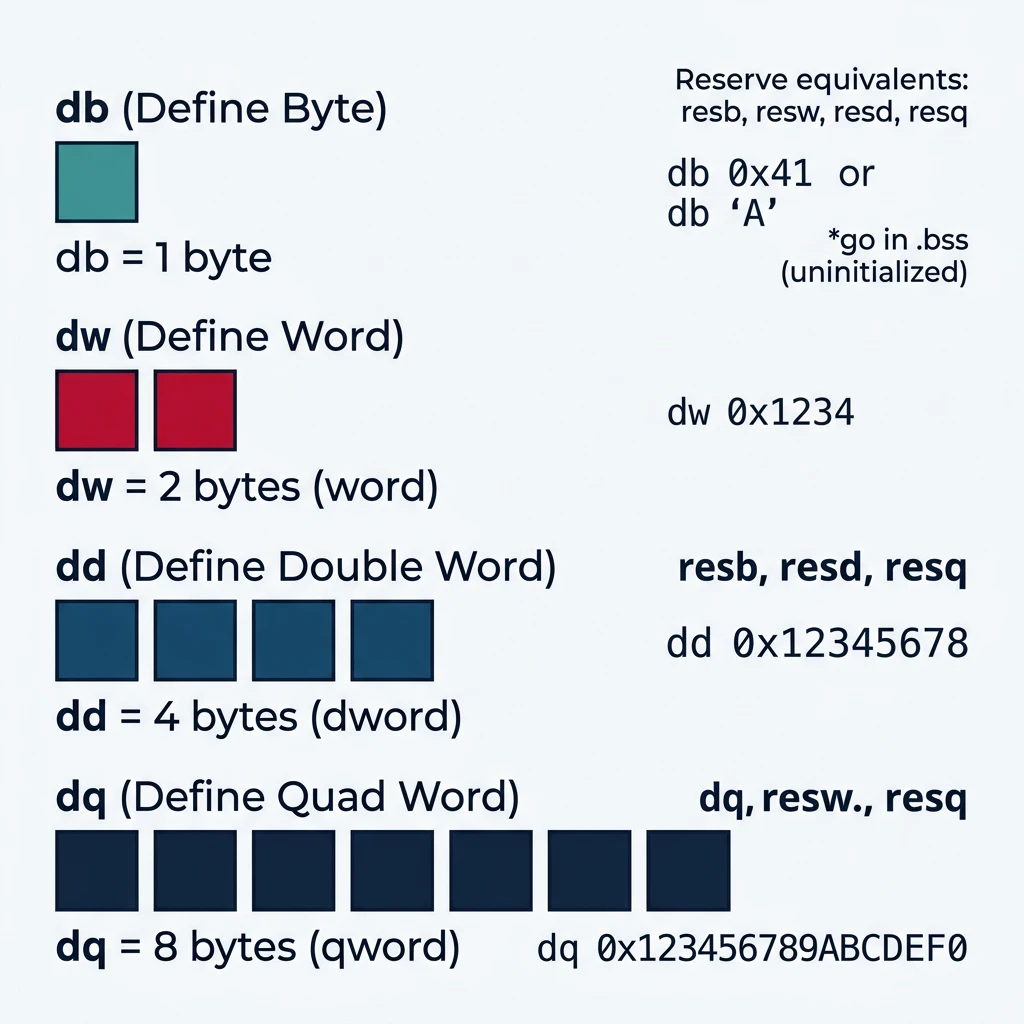
NASM data definition directives (db, dw, dd, dq) and their corresponding byte sizes in memory.
Define Data (db, dw, dd, dq)
Reference
Data Definition Directives
Directive
Size
Example
db
1 byte
db 0x41, 'A', 65
dw
2 bytes (word)
dw 0x1234
dd
4 bytes (dword)
dd 0x12345678
dq
8 bytes (qword)
dq 0x123456789ABCDEF0
Reserve Space (resb, resw, resd, resq)
Reserve directives allocate uninitialized space in the .bss section:
section .bss
    buffer  resb 256    ; Reserve 256 bytes
    count   resd 1      ; Reserve 1 dword (4 bytes)
    array   resq 100    ; Reserve 100 qwords (800 bytes)
flags resw 16 ; Reserve 16 words (32 bytes)
; .bss is NOT stored in the executable file!
; The OS zeros this memory when loading the program
Define vs Reserve:
db, dw, dd, dq — Define data with initial values (goes in .data or .rodata)
resb, resw, resd, resq — Reserve uninitialized space (goes in .bss)
; Calculating sizes
struc Point
    .x: resd 1
    .y: resd 1
endstruc

section .bss
    points resb Point_size * 100  ; Array of 100 Point structures
    ; Point_size is automatically defined by NASM
Labels, Scope & Symbols
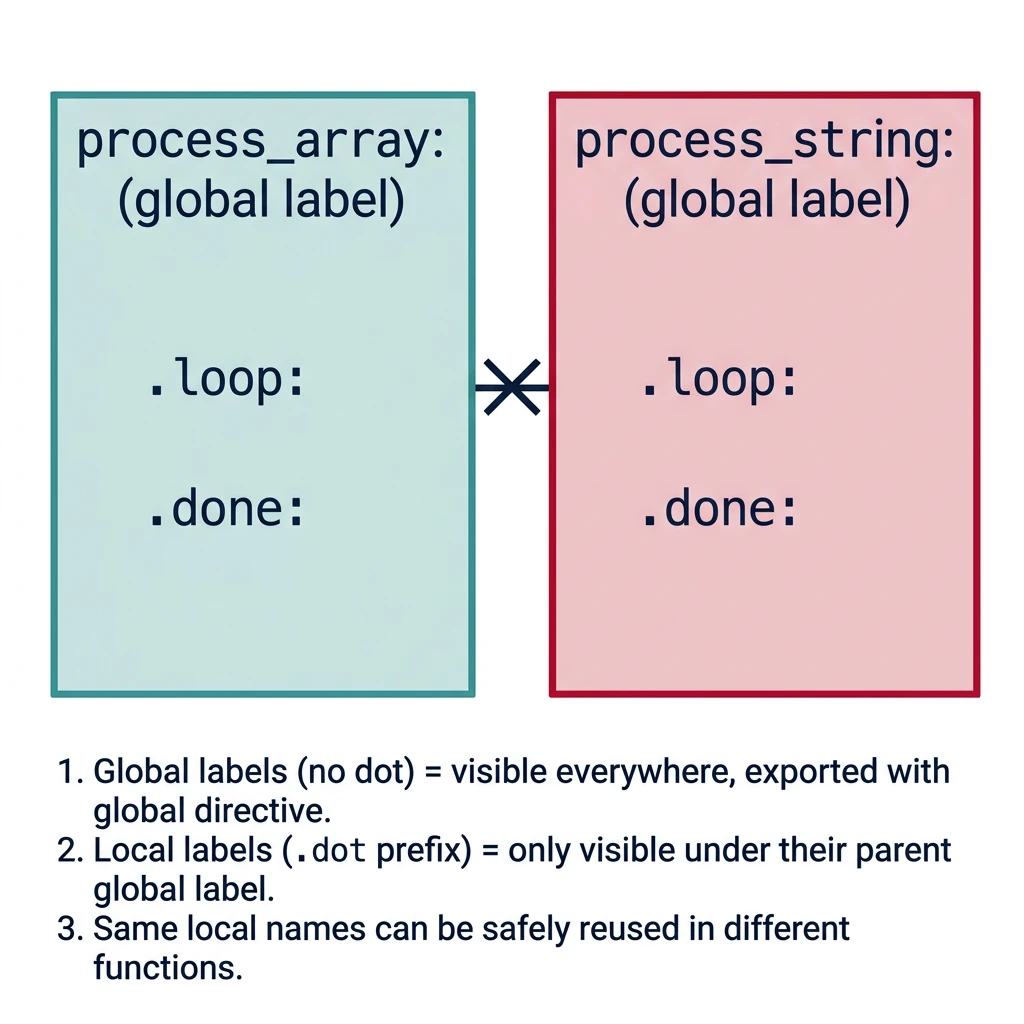
Label scope in NASM — global labels visible to the linker and local dot-prefixed labels scoped to their parent.
Global Labels
; Global labels are visible to the linker
global _start              ; Export symbol (visible to linker)
global my_function         ; Another exported symbol

extern printf              ; Import symbol from another object
extern malloc

_start:                    ; Define the label
    call my_function
    ; ...

my_function:
    push rbp
    ; ...
    ret
Local Labels (Dot Prefix)
; Local labels start with a dot and belong to the previous global label
process_array:
    xor rcx, rcx           ; i = 0
.loop:                     ; Local to process_array
    cmp rcx, rax
    jge .done              ; Jump to process_array.done
    ; Process element...
    inc rcx
    jmp .loop
.done:
    ret

process_string:
    ; Can reuse .loop and .done names!
.loop:                     ; Local to process_string (different from above)
    ; ...
.done:
    ret
Anonymous Labels ($$ and $)
; $ = current address, $$ = section start
section .text
message db "Hello", 0
msg_len equ $ - message    ; Length calculation

; Boot sector example
times 510 - ($ - $$) db 0  ; Pad to 510 bytes
dw 0xAA55                  ; Boot signature
Symbol Visibility for Shared Libraries
; Control symbol visibility for dynamic linking
global public_api:function           ; Visible, typed as function
global internal_helper:function hidden ; Hidden from dynamic linker

; In ELF output, you can also use:
global my_data:data
Exercise: Label Scope
; What labels are accessible where?
func_a:
    jmp .loop    ; Valid - same function
func_a.loop:
    jmp func_b.loop  ; Valid - fully qualified name
    ret

func_b:
    jmp .loop    ; Valid - different .loop
.loop:
    ret
Constants & Equates
EQU — Assemble-Time Constants
; EQU creates a constant that cannot be changed later
BUFFER_SIZE equ 4096
MAX_ITEMS   equ 100
NULL        equ 0

; EQU with expressions
HEADER_SIZE equ 16
DATA_OFFSET equ HEADER_SIZE + 4

; System call numbers
SYS_READ    equ 0
SYS_WRITE   equ 1
SYS_EXIT    equ 60

; Use them like constants
mov rax, SYS_WRITE
mov rdi, BUFFER_SIZE
%define — Preprocessor Macros
; %define creates text substitution (like C #define)
%define STDIN  0
%define STDOUT 1
%define STDERR 2

; Can include expressions
%define KB(n) ((n) * 1024)
%define MB(n) ((n) * 1024 * 1024)

mov rax, KB(4)         ; Expands to ((4) * 1024) = 4096

; String constants
%define NEWLINE 10
%define GREETING "Hello, World!", NEWLINE, 0

; How GREETING expands:
; When you write:   db GREETING
; NASM substitutes: db "Hello, World!", 10, 0
;
; This produces 15 bytes in memory:
;   48 65 6C 6C 6F 2C 20 57 6F 72 6C 64 21  ("Hello, World!")
;   0A                                         (10 = newline '\n')
;   00                                         (0 = null terminator)
;
; The comma-separated list works because db accepts multiple values:
;   db "text", byte, byte  →  string bytes followed by individual bytes
;
; This is a common pattern for defining printable C-style strings:
;   %define CR    13       ; Carriage return '\r'
;   %define LF    10       ; Line feed '\n'
;   %define CRLF  CR, LF   ; Windows-style line ending
;   %define NULL  0        ; Null terminator
;
; Usage in .data section:
;   section .data
;       msg db GREETING           ; "Hello, World!\n\0" (15 bytes)
;       err db "Error", CRLF, 0   ; "Error\r\n\0" (8 bytes)
EQU vs %define
Aspect
EQU
%define
Evaluation time
Assembly time (once)
Preprocessor (text substitution)
Can redefine?
No
Yes (with %undef first)
Parameters?
No
Yes (macro-like)
Use case
Numeric constants
Flexible substitutions
Best Practice: Use equ for simple numeric constants (syscall numbers, sizes). Use %define for parametric macros or when you need text substitution.
Macros
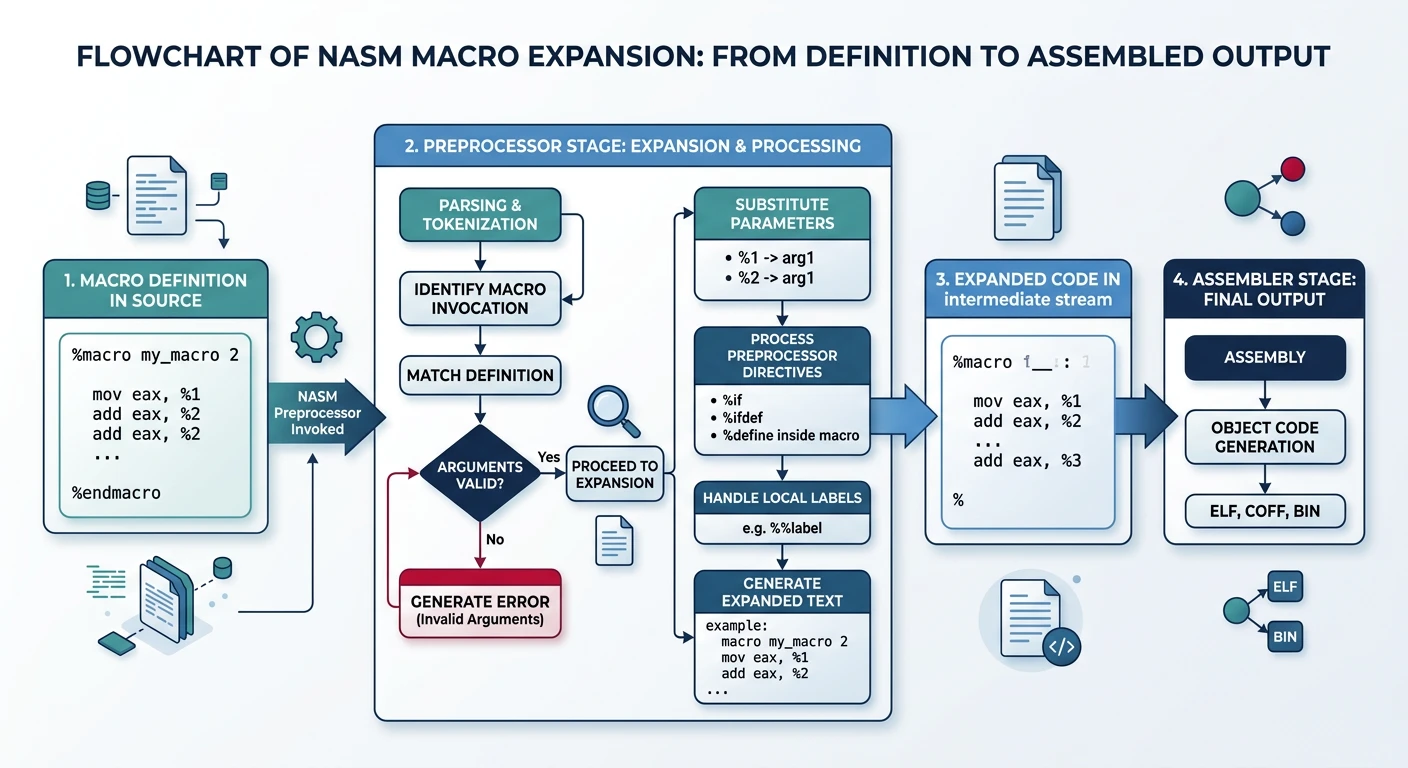
NASM macro expansion process — from %define and %macro definitions through preprocessor substitution to final assembled code.
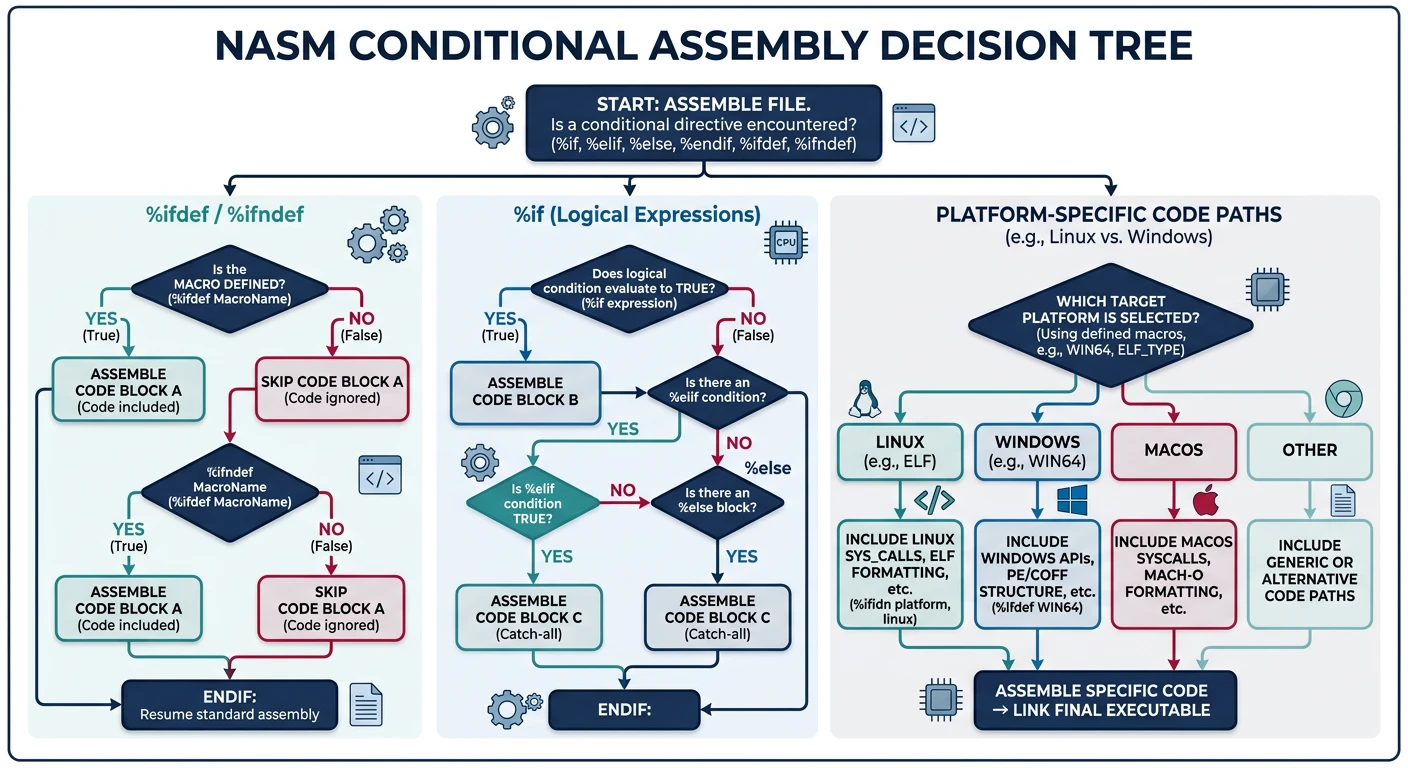
; Check if a symbol is defined
%define DEBUG 1

%ifdef DEBUG
    ; Include debug output
    call debug_print
    call dump_registers
%endif

%ifndef RELEASE
    ; Extra checks for non-release builds
    call validate_input
%endif

; Can also use command line: nasm -DDEBUG program.asm
Platform-Specific Code
; Assemble different code for Linux vs Windows
%ifdef LINUX
    %define SYS_WRITE 1
    %define SYS_EXIT 60
%elifdef WINDOWS
    ; Windows uses different approach (WinAPI)
    extern WriteFile
    extern ExitProcess
%else
    %error "Define LINUX or WINDOWS"
%endif

; Build: nasm -DLINUX -f elf64 program.asm
;    or: nasm -DWINDOWS -f win64 program.asm
; Generate repeated code or data
%assign i 0
%rep 10
    db i                       ; Generates: db 0, db 1, ..., db 9
    %assign i i+1
%endrep

; Unrolled loop
%rep 4
    add rax, [rsi]
    add rsi, 8
%endrep
%assign vs EQU: Use %assign for mutable preprocessor variables (can be reassigned). Use equ for fixed constants that never change.
Producing ELF Binaries
NASM Output Formats (-f)
Format
Option
Use Case
ELF64
-f elf64
Linux 64-bit executable/object
ELF32
-f elf32 or -f elf
Linux 32-bit
Win64
-f win64
Windows 64-bit COFF object
Win32
-f win32
Windows 32-bit COFF object
Binary
-f bin
Raw binary (boot sectors, firmware)
Mach-O 64
-f macho64
macOS 64-bit
Complete Build Example (Linux)
# Simple standalone program
nasm -f elf64 hello.asm -o hello.o
ld hello.o -o hello
./hello

# With debug symbols
nasm -f elf64 -g -F dwarf hello.asm -o hello.o
ld hello.o -o hello
gdb ./hello

# Linking with libc
nasm -f elf64 program.asm -o program.o
gcc program.o -o program -no-pie  # Use GCC to link with C runtime

# Or with ld (specify C library path)
ld -dynamic-linker /lib64/ld-linux-x86-64.so.2 \
   -lc program.o -o program
Complete Build Example (Windows)
# Windows with MSVC linker
nasm -f win64 hello_win.asm -o hello_win.obj
link /SUBSYSTEM:CONSOLE /ENTRY:main hello_win.obj kernel32.lib

# Windows with GoLink (simpler)
nasm -f win64 hello_win.asm -o hello_win.obj
golink /console /entry main hello_win.obj kernel32.dll
Complete Build Example (macOS)
macOS Key Differences:
Object format:macho64 (Mach-O) instead of elf64
Entry point: Labels must be prefixed with _ (e.g., _main not _start)