x86 Assembly Series Part 15: Linking & Object Files
February 6, 2026Wasil Zafar37 min read
Master the ELF format, understand sections (.text, .data, .bss), symbol tables, relocation entries, and the complete linking process from object files to executables and shared libraries.
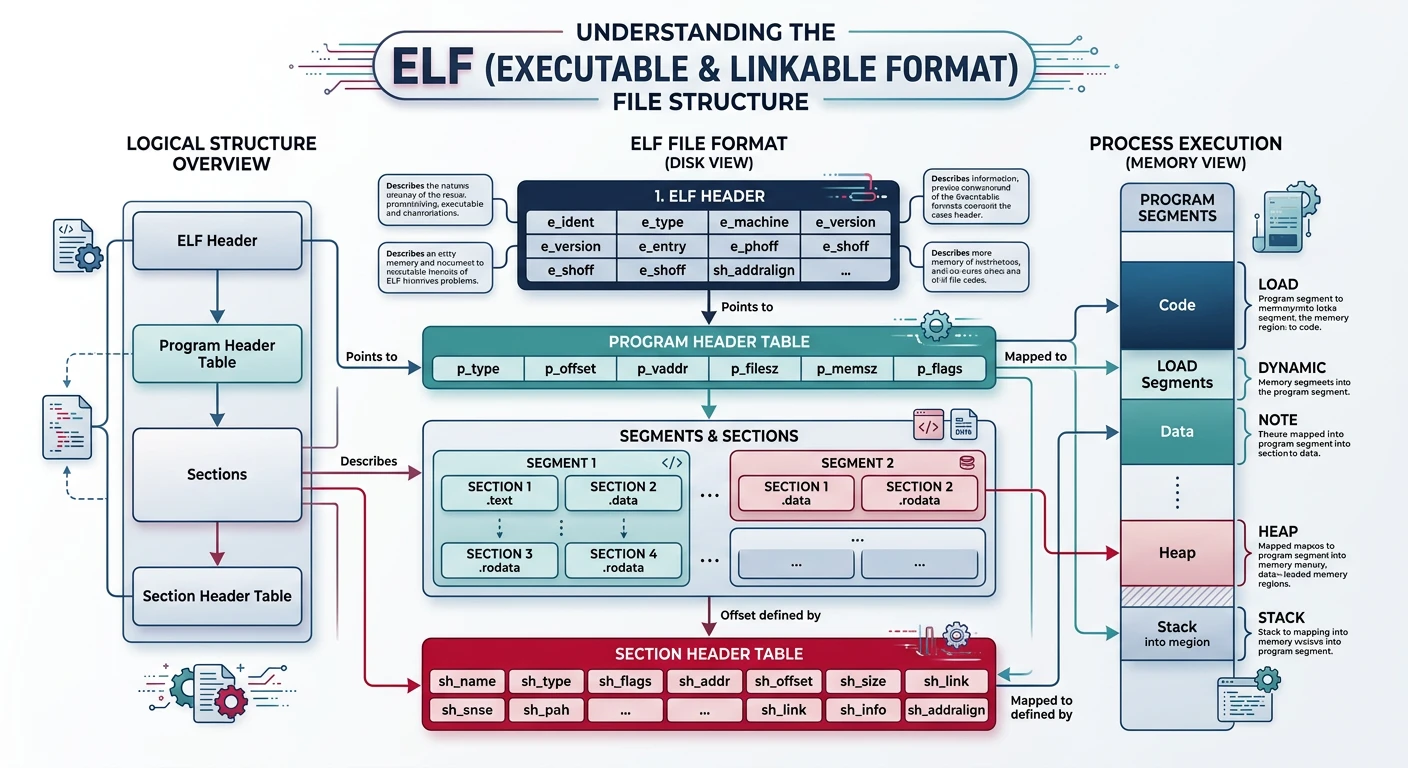
ELF: Executable and Linkable Format is the standard binary format on Linux/Unix. It describes object files (.o), executables, and shared libraries (.so).
A common question is: if .bss variables are "zero-filled", who actually writes those zeros? The answer lies in the ELF program headers — the structures the OS loader reads to map an executable into memory.
Each loadable segment has a PT_LOAD program header containing two critical size fields:
ELFProgram Headers
p_filesz vs p_memsz in PT_LOAD Segments
Field
Meaning
Example
p_offset
Offset into the ELF file where segment data begins
0x1000
p_vaddr
Virtual address where the segment is loaded
0x601000
p_filesz
Number of bytes in the file (on disk)
0x120 (288 bytes)
p_memsz
Number of bytes in memory (at runtime)
0x920 (2336 bytes)
p_flags
Permissions (R / W / X)
RW (read-write)
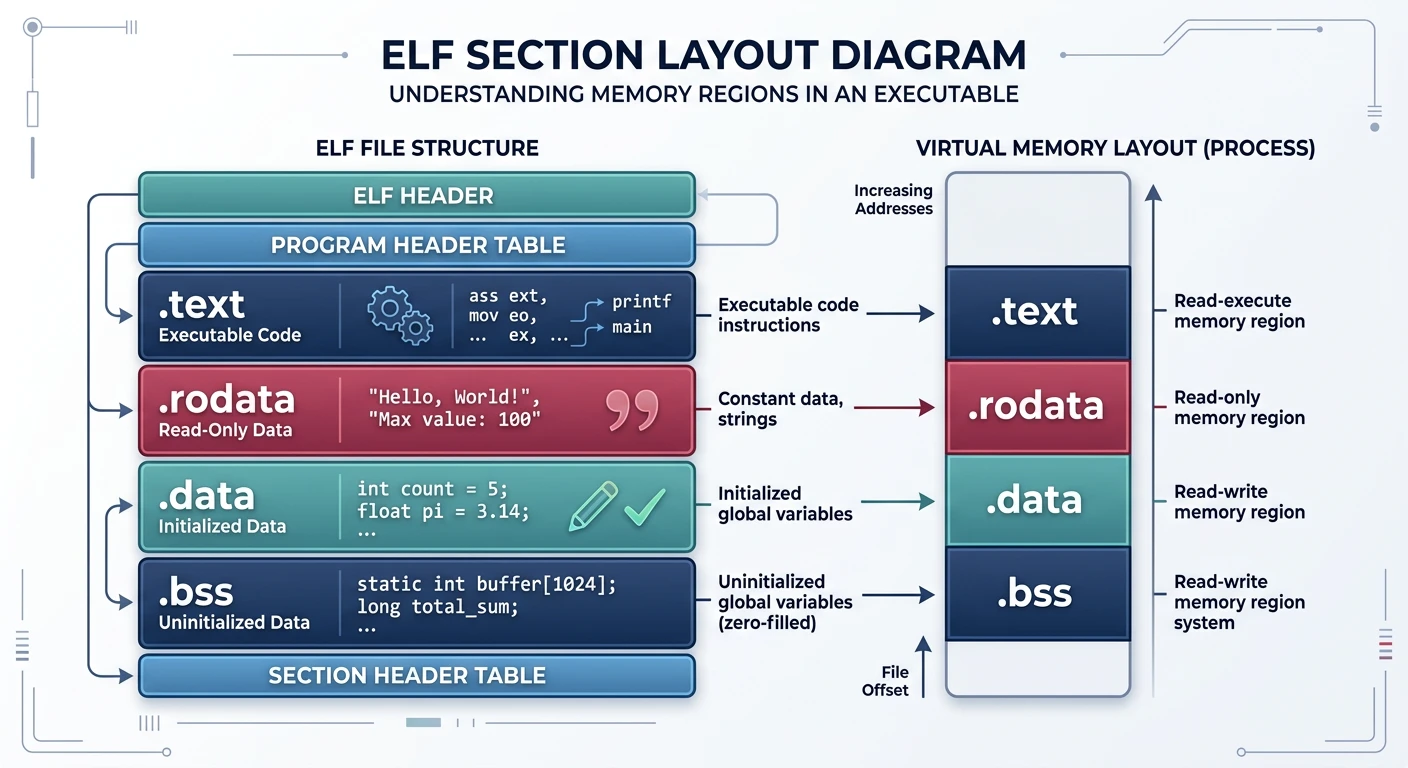
The key insight: when p_memsz > p_filesz, the loader reads p_filesz bytes from the file (the initialised .data variables) and then zero-fills the remaining p_memsz − p_filesz bytes. That zero-filled region is exactly where .bss lives. Because .bss contains no data in the file, it adds zero bytes to the ELF on disk — saving space while still guaranteeing zeroed memory at runtime.
# Examine program headers — look at the DATA segment
$ readelf -l program

#   Type   Offset   VirtAddr         FileSiz  MemSiz   Flg
#   LOAD   0x001000 0x0000000000601000 0x000120 0x000920 RW
#                                      ^^^^^^^^ ^^^^^^^^
#                                      p_filesz p_memsz
#   Difference (0x800 = 2048 bytes) is .bss, zero-filled by the loader
Why it matters: This design means a program with a 1 MB .bss array adds exactly zero bytes to the executable file. The linker simply sets p_memsz = p_filesz + bss_size, and the OS kernel's load_elf_binary() function (or the dynamic linker ld.so) handles zero-filling when it maps the segment via mmap + anonymous pages.
Symbol Tables
# View symbol table
nm program
objdump -t program

# Symbol types:
# T/t = text (code)
# D/d = initialized data
# B/b = BSS (uninitialized)
# U   = undefined (external reference)
Relocation
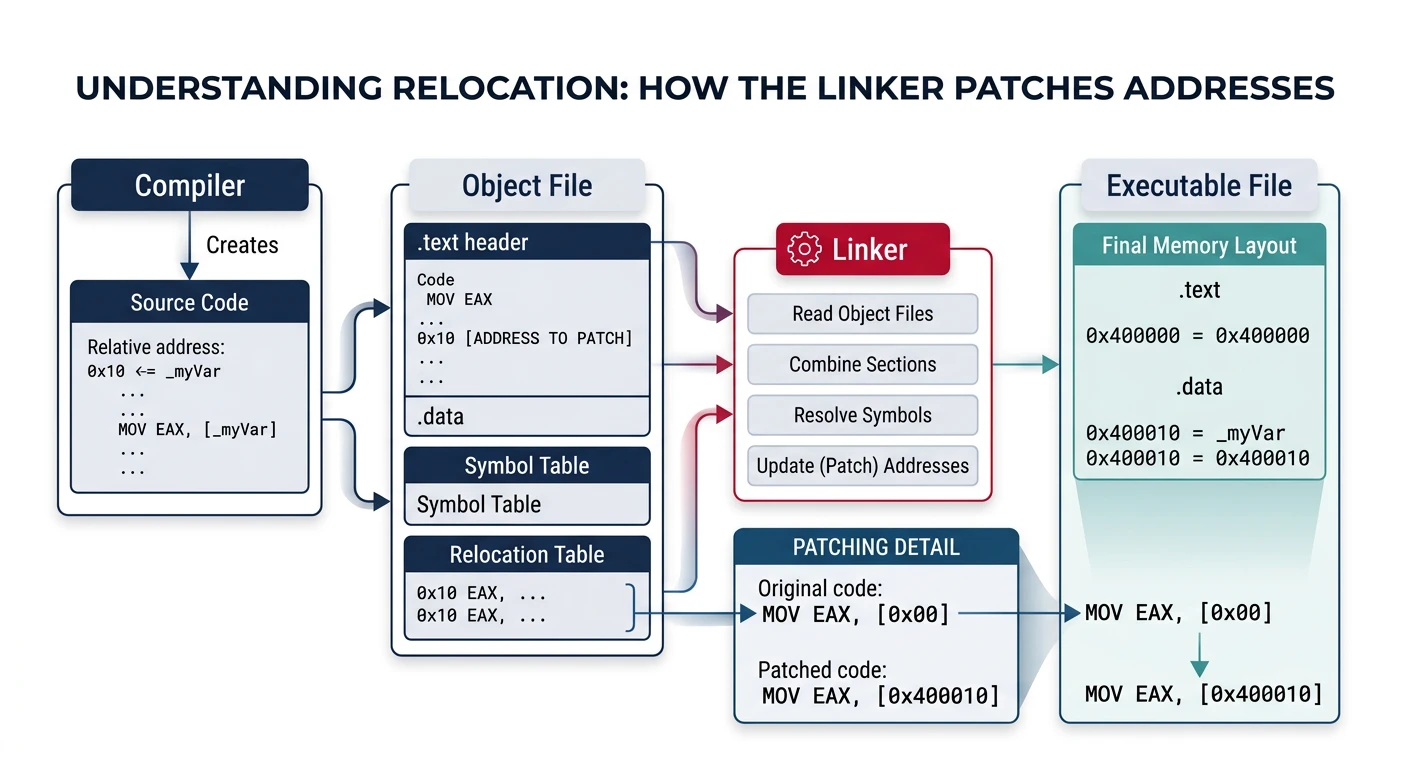
Relocation is how the linker patches addresses in object files to create a runnable executable:
The linker relocation process: resolving symbol references and patching addresses across object files
; Non-PIC (absolute addressing)
mov rax, [my_var]           ; Needs relocation at runtime

; PIC (RIP-relative) - preferred for shared libraries
mov rax, [rel my_var]       ; Uses RIP-relative addressing
lea rdi, [rel my_var]       ; Get address of my_var (PIC)

; For external/global data in shared libraries, use GOT:
mov rax, [rel external_var wrt ..got]  ; Load via GOT
Why PIC? Position-independent code can load at any address, enabling shared libraries, ASLR (Address Space Layout Randomization), and memory sharing between processes.
Static Linking
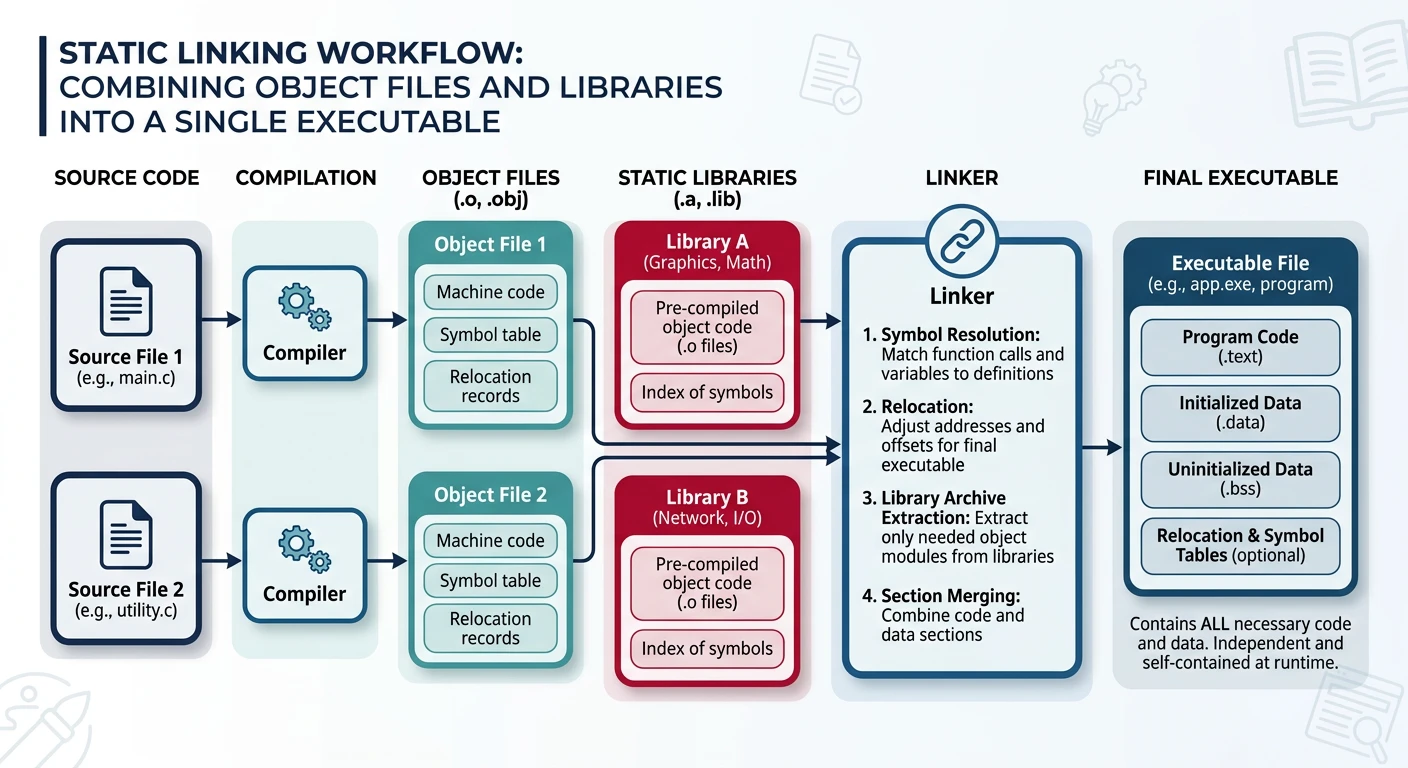
Static linking combines all object files into one standalone executable:
Static linking: merging object files and static libraries into one self-contained executable
# Create static library from object files
ar rcs libmylib.a file1.o file2.o file3.o

# Link with static library
ld -o program main.o -L. -lmylib
# Or with gcc:
gcc -static -o program main.o -L. -lmylib

# View archive contents
ar -t libmylib.a

# Extract member
ar -x libmylib.a file1.o
Static Link Process
1. Collect all object files and libraries
2. Resolve symbol references
3. Merge sections (.text, .data, .bss)
4. Apply relocations (patch addresses)
5. Write executable with all code embedded

Pros: No runtime dependencies, faster startup
Cons: Larger executables, no library updates without recompile
Dynamic Linking
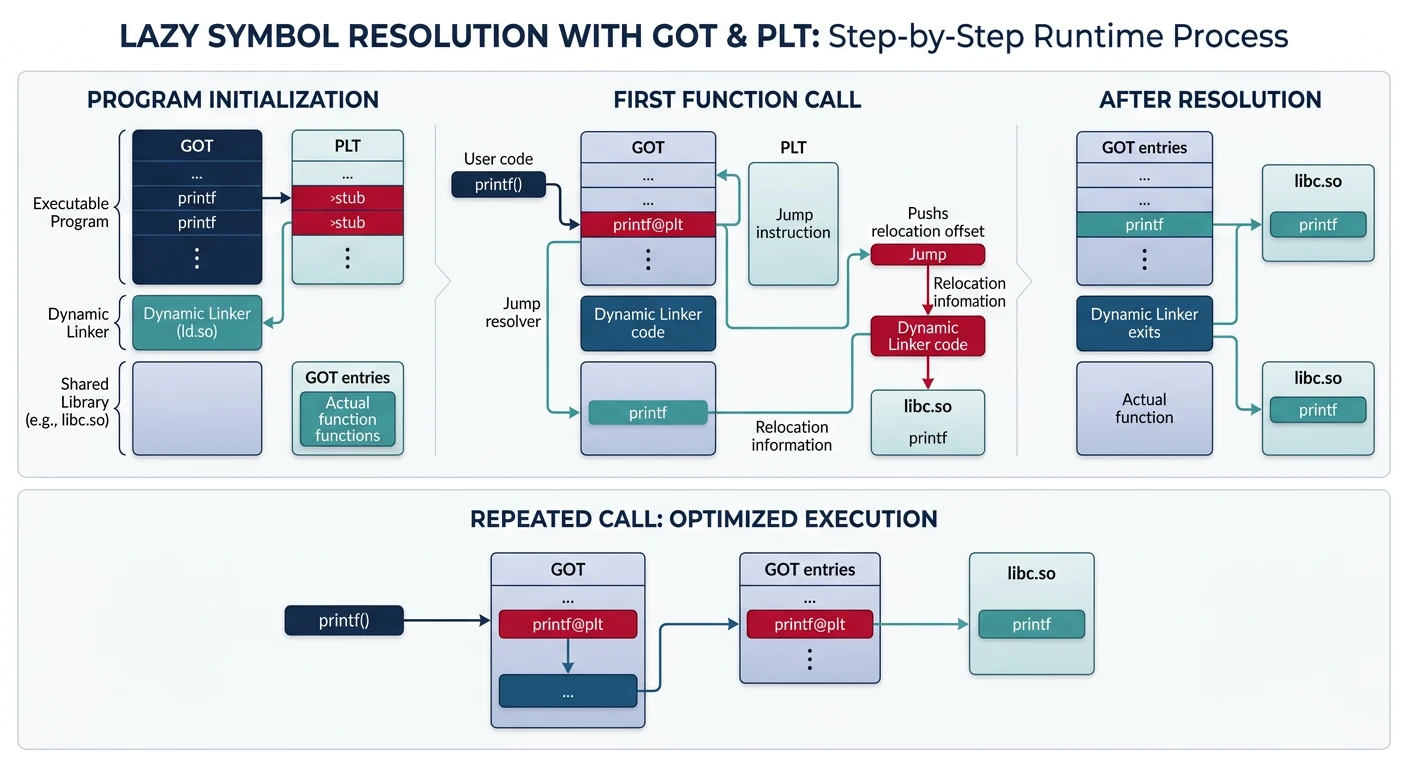
Dynamic linking defers symbol resolution until runtime:
Dynamic linking: GOT and PLT mechanism for lazy symbol resolution at runtime
GOT (Global Offset Table):
- Table of pointers to global data/functions
- Filled in by dynamic linker at load time
- Code references GOT entries, not absolute addresses

PLT (Procedure Linkage Table):
- Stub code for calling external functions
- First call: resolve symbol, patch GOT, call function
- Subsequent calls: jump directly via GOT (fast path)

call printf@PLT      ; First call flow:
  └─→ PLT stub: jmp [GOT entry]
        └─→ GOT initially points back to PLT
              └─→ PLT: push index; jmp dynamic_linker
                    └─→ Linker resolves, patches GOT
                          └─→ Function runs
; Calling external function (dynamic)
section .text
    extern printf
global _start
_start:
    lea rdi, [rel fmt]
    xor eax, eax              ; No float args
    call printf wrt ..plt     ; Call via PLT

; Or let NASM figure it out:
    call printf               ; NASM generates PLT reference
# View dynamic symbols
readelf -d program        # Dynamic section
readelf --dyn-syms prog   # Dynamic symbol table
objdump -R program        # Dynamic relocations
ldd program               # List shared library dependencies
Creating Shared Libraries
# Assemble as PIC (position-independent)
nasm -f elf64 -o mylib.o mylib.asm

# Create shared library (.so)
ld -shared -o libmylib.so mylib.o
# Or with gcc (adds libc):
gcc -shared -o libmylib.so mylib.o

# Link against shared library
ld -o program main.o -L. -lmylib -dynamic-linker /lib64/ld-linux-x86-64.so.2

# Run with library path
LD_LIBRARY_PATH=. ./program

# Install system-wide
sudo cp libmylib.so /usr/local/lib/
sudo ldconfig    # Update library cache
Exported Symbols
; mylib.asm - Shared library source
global my_function:function    ; Export as function
global my_variable:data        ; Export as data

section .data
my_variable: dd 42

section .text
my_function:
    mov eax, [rel my_variable]
    ret
Exercise: Create and Use a Shared Library
Write mathlib.asm with add_numbers and multiply_numbers functions