Authentication vs Authorization:

AUTHENTICATION (AuthN)
"Who are you?"
• Verifies identity
• Username/password
• Certificates
• Biometrics

AUTHORIZATION (AuthZ)
"What can you access?"
• Permissions
• Roles
• Access control
• Scopes

Example - Hotel:
• AuthN: Show ID at check-in (prove identity)
• AuthZ: Key card grants room access (not other rooms)

Protocol Mapping:
• OAuth 2.0: Authorization only
• OpenID Connect: Authentication (built on OAuth)
• SAML: Both (primarily AuthN)
• Kerberos: Both (tickets grant access)
• LDAP: Directory (stores identity data)
Overview
Protocol Landscape
Protocol
Type
Best For
Token Format
OAuth 2.0
Authorization
API access, mobile
Opaque/JWT
OIDC
AuthN + AuthZ
Web login, SSO
JWT (ID Token)
SAML 2.0
AuthN + AuthZ
Enterprise SSO
XML Assertion
Kerberos
AuthN + AuthZ
Active Directory
Tickets
LDAP
Directory
User lookup
N/A
OAuth 2.0: Authorization Framework
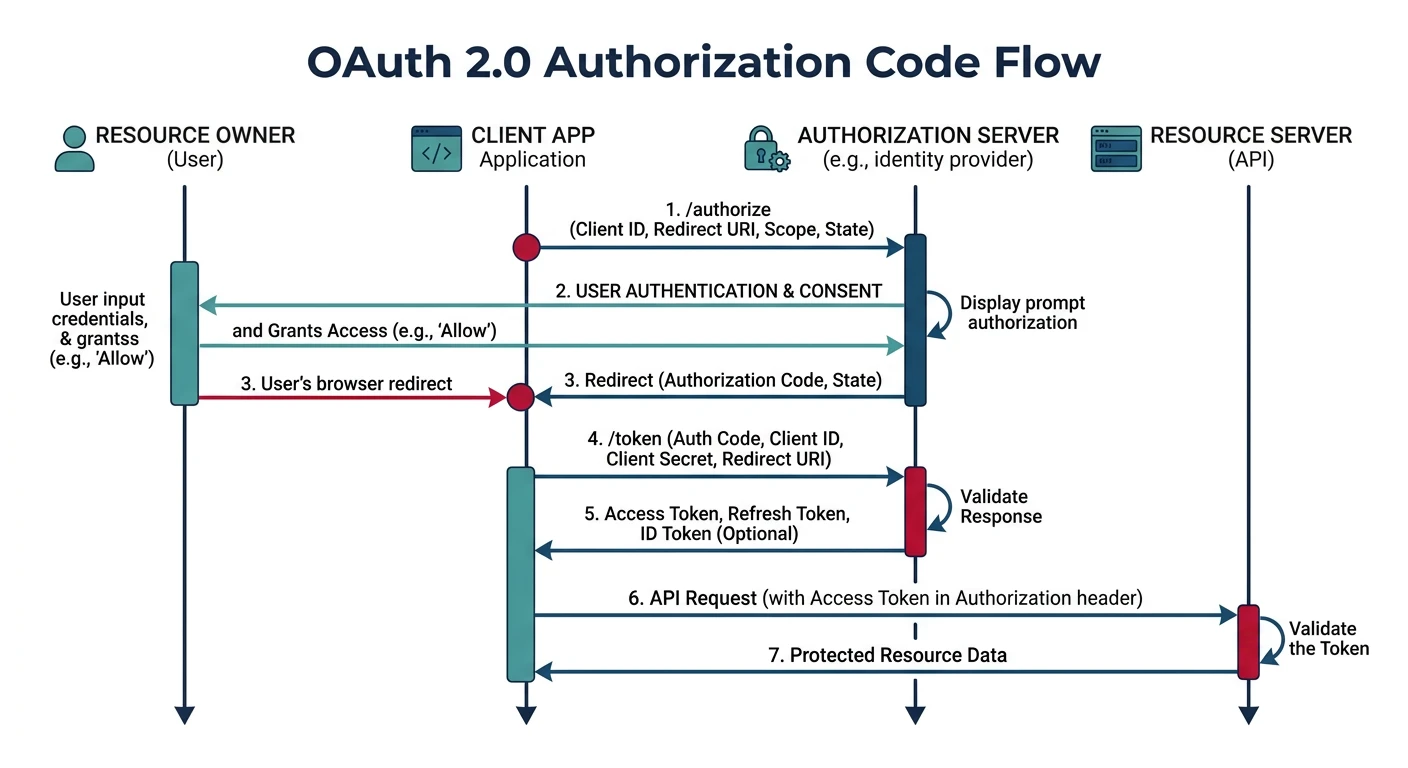
OAuth 2.0 is THE authorization standard for APIs. It lets users grant apps limited access without sharing credentials. "Log in with Google" uses OAuth.
OAuth 2.0 Authorization Code flow — the user authorizes the client app at the authorization server, which issues tokens for API access without exposing credentials
OAuth 2.0 Authorization Code Flow
sequenceDiagram
    participant U as User Browser
    participant A as Application
    participant AS as Authorization Server
    participant RS as Resource Server

    U->>A: Click Login
    A->>AS: Redirect with client_id, scope, redirect_uri
    U->>AS: Authenticate and Grant Permission
    AS->>A: Authorization Code via redirect

    A->>AS: Exchange Code + client_secret
    Note right of A: Server-to-server request
    AS->>A: Access Token + Refresh Token

    A->>RS: API Request + Access Token
    RS->>A: Protected Resource Data
Key Insight: OAuth 2.0 is about AUTHORIZATION, not authentication. It answers "Can this app access my photos?" not "Who is this user?"
Roles
OAuth 2.0 Actors
OAuth 2.0 Roles:

1. RESOURCE OWNER
   The user who owns the data
   Example: You

2. CLIENT
   The application wanting access
   Example: Third-party photo app

3. AUTHORIZATION SERVER
   Issues tokens after user consent
   Example: Google's auth server

4. RESOURCE SERVER
   Hosts the protected data
   Example: Google Photos API

Flow:
User → "I want to use PhotoApp"
PhotoApp → "Please authorize at Google"
User → Google: "Yes, allow read-only photos"
Google → PhotoApp: "Here's an access token"
PhotoApp → Google Photos API: "Token: xyz, get photos"
API → PhotoApp: "Here are the photos"
Grant Types
OAuth 2.0 Flows
OAuth 2.0 Grant Types:

1. AUTHORIZATION CODE (most secure)
   Best for: Server-side web apps
   Flow: Code exchanged for token server-side

2. AUTHORIZATION CODE + PKCE
   Best for: Mobile apps, SPAs
   Flow: Code + code_verifier for security
   PKCE = Proof Key for Code Exchange

3. CLIENT CREDENTIALS
   Best for: Machine-to-machine (no user)
   Flow: App authenticates directly

4. DEVICE CODE
   Best for: TVs, CLI tools (no browser)
   Flow: User authorizes on separate device

5. IMPLICIT (deprecated)
   Was for: SPAs (replaced by PKCE)
   Issue: Token in URL fragment
# Authorization Code Flow with PKCE

# Step 1: Generate code verifier and challenge
code_verifier="random-43-to-128-character-string"
code_challenge=$(echo -n "$code_verifier" | sha256sum | cut -d' ' -f1 | xxd -r -p | base64 -w0 | tr '+/' '-_' | tr -d '=')

# Step 2: Redirect user to authorization
https://auth.example.com/authorize?
  client_id=my-app&
  response_type=code&
  redirect_uri=https://myapp.com/callback&
  scope=read:photos&
  state=random-csrf-token&
  code_challenge=$code_challenge&
  code_challenge_method=S256

# Step 3: User logs in and consents
# Redirected back with authorization code

# Step 4: Exchange code for tokens (server-side)
curl -X POST https://auth.example.com/token \
  -d "grant_type=authorization_code" \
  -d "code=AUTHORIZATION_CODE" \
  -d "redirect_uri=https://myapp.com/callback" \
  -d "client_id=my-app" \
  -d "code_verifier=$code_verifier"

# Response:
{
  "access_token": "eyJhbGciOiJSUzI1NiIs...",
  "token_type": "Bearer",
  "expires_in": 3600,
  "refresh_token": "dGhpcyBpcyBhIHJlZnJlc2g..."
}
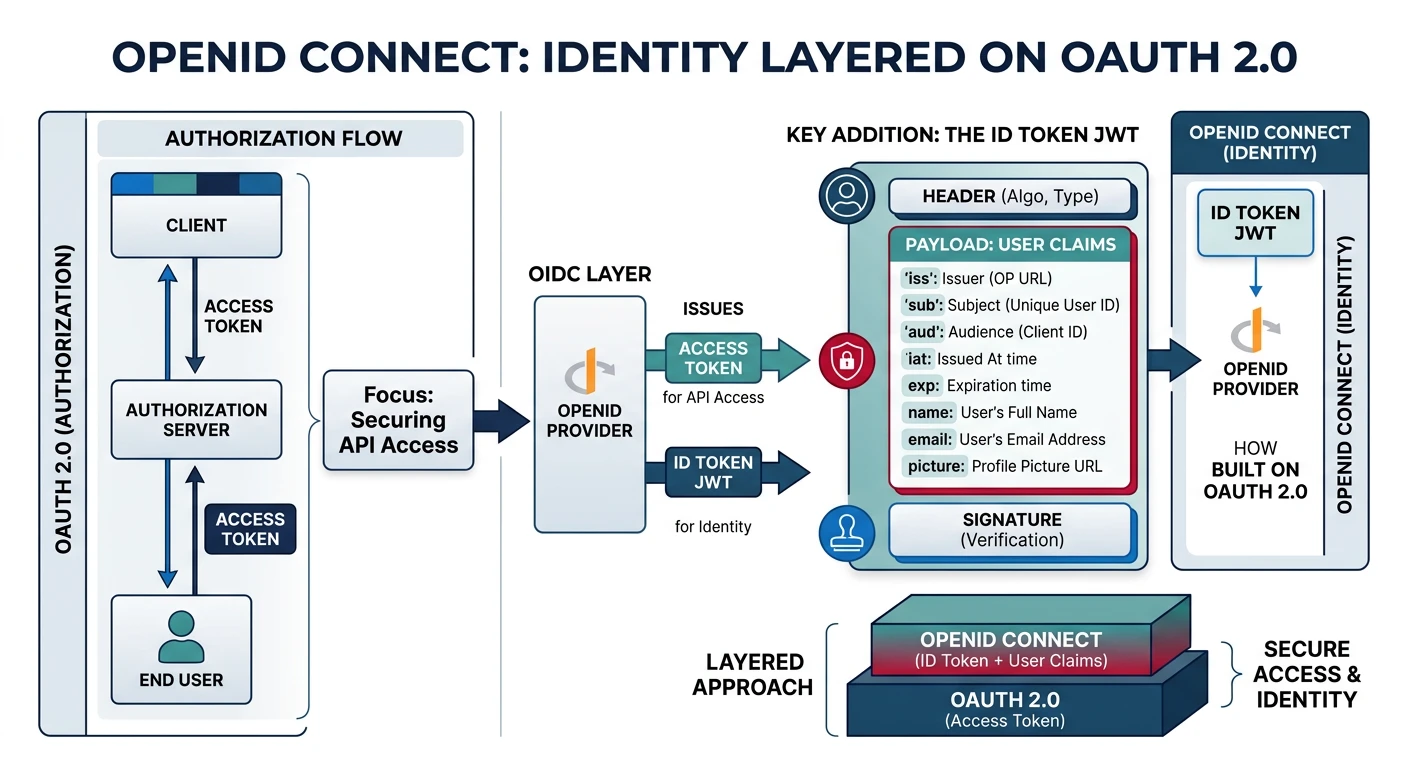
OpenID Connect (OIDC) adds authentication to OAuth 2.0. It provides an ID Token that proves who the user is—not just what they can access.
OpenID Connect adds an identity layer to OAuth 2.0 — the ID Token (JWT) contains user claims like name and email, while the access token handles API authorization
OIDC
OIDC vs OAuth 2.0
OIDC = OAuth 2.0 + Identity

What OIDC Adds:
• ID Token (JWT proving identity)
• UserInfo endpoint
• Standard claims (name, email, picture)
• Discovery endpoint

Tokens in OIDC:
• Access Token: API authorization (same as OAuth)
• ID Token: User identity (NEW in OIDC)
• Refresh Token: Get new tokens (same as OAuth)

ID Token Claims:
{
  "iss": "https://accounts.google.com",
  "sub": "110169484474386276334",  // Unique user ID
  "aud": "my-client-id",
  "exp": 1735689600,
  "iat": 1735686000,
  "name": "Jane Doe",
  "email": "jane@example.com",
  "picture": "https://..."
}
# OIDC Authentication (Python with Authlib)

def oidc_example():
    """Demonstrate OIDC authentication"""

    print("OIDC Authentication Flow")
    print("=" * 50)

    print("""
    # Flask OIDC Example

    from authlib.integrations.flask_client import OAuth

    oauth = OAuth(app)
    oauth.register(
        name='google',
        client_id='your-client-id',
        client_secret='your-client-secret',
        server_metadata_url='https://accounts.google.com/.well-known/openid-configuration',
        client_kwargs={'scope': 'openid email profile'}
    )

    @app.route('/login')
    def login():
        redirect_uri = url_for('callback', _external=True)
        return oauth.google.authorize_redirect(redirect_uri)

    @app.route('/callback')
    def callback():
        token = oauth.google.authorize_access_token()

        # ID Token contains user identity
        id_token = token['id_token']
        userinfo = token['userinfo']

        # Now you know WHO the user is
        user_id = userinfo['sub']
        email = userinfo['email']
        name = userinfo['name']

        return f'Hello {name}!'
    """)

    print("\nKey OIDC Scopes:")
    print("• openid: Required, returns ID token")
    print("• profile: Name, picture, etc.")
    print("• email: Email address")
    print("• address: Physical address")
    print("• phone: Phone number")

oidc_example()
SAML 2.0: Enterprise SSO
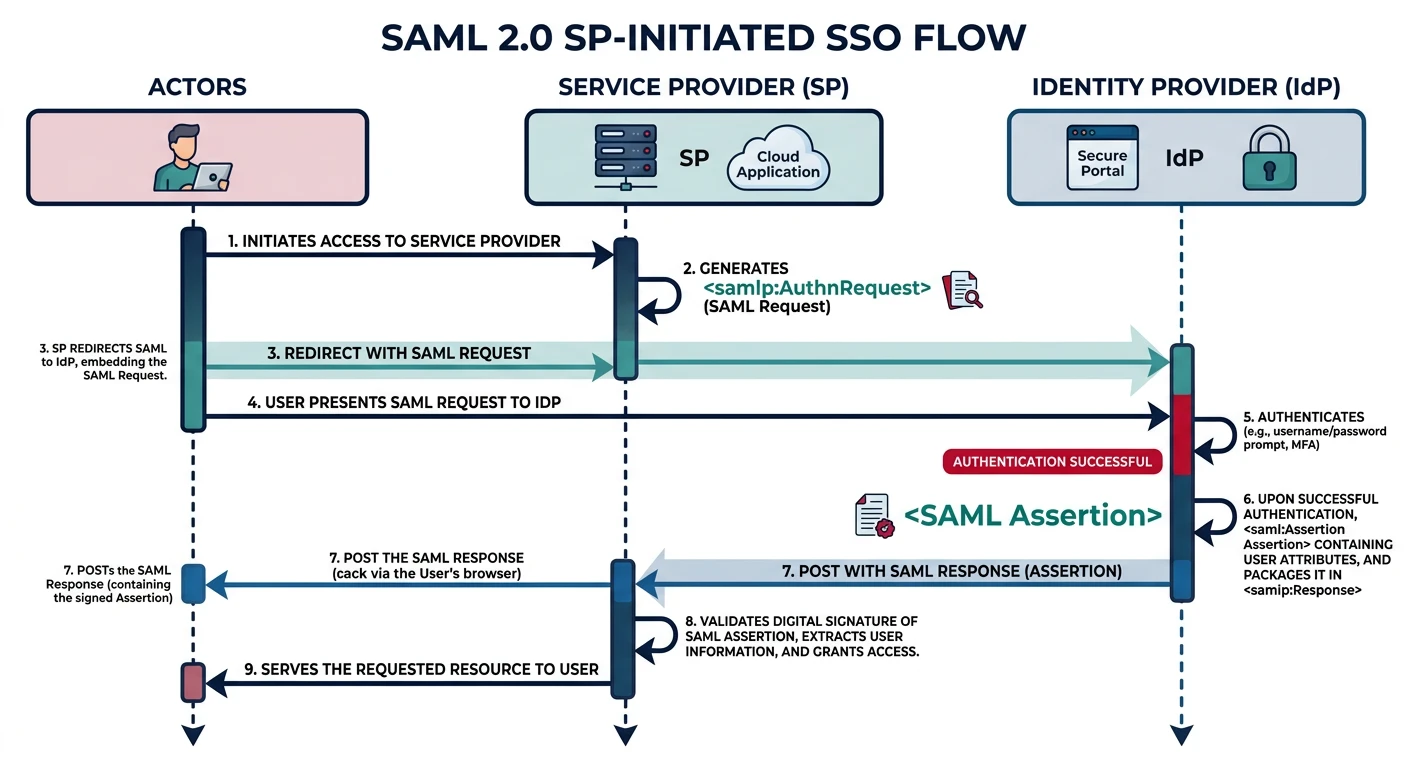
SAML (Security Assertion Markup Language) is the enterprise standard for Single Sign-On. XML-based, mature, used by most corporate identity providers.
SAML 2.0 SP-initiated SSO flow — the user accesses the service provider, gets redirected to the identity provider for authentication, and returns with a signed SAML assertion
SAML
SAML Components
SAML 2.0 Components:

1. IDENTITY PROVIDER (IdP)
   • Authenticates users
   • Issues SAML assertions
   • Examples: Okta, Azure AD, ADFS

2. SERVICE PROVIDER (SP)
   • Your application
   • Trusts the IdP
   • Consumes assertions

3. SAML ASSERTION
   • XML document proving identity
   • Contains attributes (email, groups)
   • Digitally signed by IdP

SAML Flows:
• SP-Initiated: User starts at app, redirected to IdP
• IdP-Initiated: User starts at IdP portal

SP-Initiated Flow:
User → SP: "Access app"
SP → User: "Redirect to IdP"
User → IdP: "Login page"
User → IdP: "Credentials"
IdP → User: "SAML Response (redirect to SP)"
User → SP: "Here's SAML Response"
SP → User: "Authenticated! Welcome"
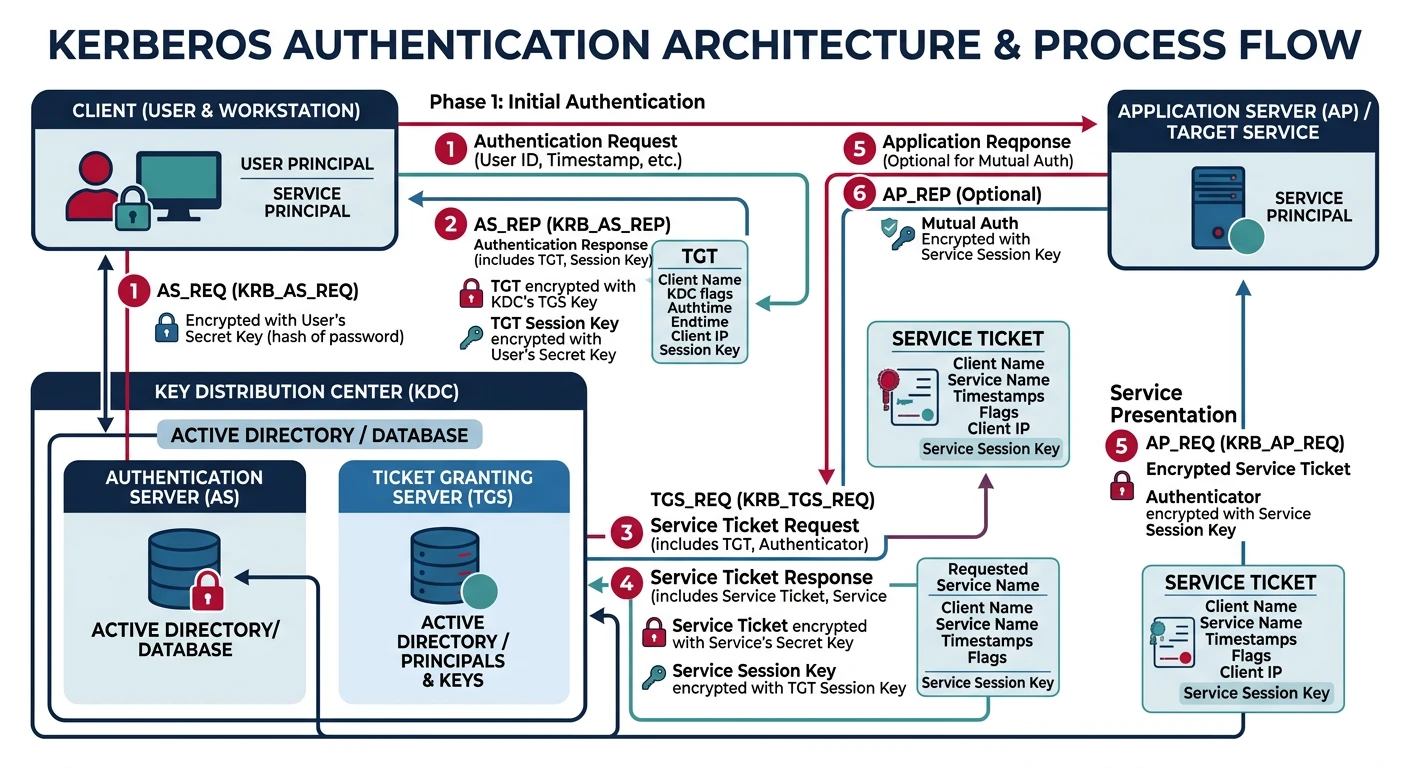
Kerberos is the authentication backbone of Active Directory. Uses tickets instead of passwords—users authenticate once, get tickets for services.
Kerberos ticket-based authentication — the user obtains a TGT from the Authentication Server, then exchanges it at the TGS for service tickets without re-entering credentials
Kerberos
Kerberos Architecture
Kerberos Components:

1. KDC (Key Distribution Center)
   • Authentication Server (AS)
   • Ticket Granting Server (TGS)
   • Holds all secrets

2. TICKETS
   • TGT (Ticket Granting Ticket): Proves identity
   • Service Ticket: Grants access to specific service

3. PRINCIPALS
   • Users: user@REALM.COM
   • Services: HTTP/web.realm.com@REALM.COM

Kerberos Authentication:
User → AS: "I'm alice, want TGT"
AS → User: "Here's TGT (encrypted)"
User → TGS: "TGT, want ticket for fileserver"
TGS → User: "Here's service ticket"
User → FileServer: "Service ticket"
FileServer → User: "Access granted"

Key Concept: User password NEVER sent over network
# Kerberos ticket management (Linux)

# Initialize (get TGT)
kinit alice@EXAMPLE.COM
# Enter password (locally hashed, not sent)

# List tickets
klist
# Ticket cache: FILE:/tmp/krb5cc_1000
# Default principal: alice@EXAMPLE.COM
#
# Valid starting       Expires              Service principal
# 01/31/2026 09:00    01/31/2026 19:00     krbtgt/EXAMPLE.COM@EXAMPLE.COM

# Get service ticket (automatic when accessing service)
curl --negotiate -u : http://web.example.com/

# Destroy tickets (logout)
kdestroy

# Check keytab (for service accounts)
klist -k /etc/krb5.keytab
# Kerberos authentication in Python

def kerberos_example():
    """Kerberos authentication demonstration"""

    print("Kerberos in Python")
    print("=" * 50)

    print("""
    # Using requests-kerberos

    import requests
    from requests_kerberos import HTTPKerberosAuth

    # Auto-use cached TGT
    response = requests.get(
        'https://api.example.com/data',
        auth=HTTPKerberosAuth()
    )

    # For SPNEGO (HTTP Negotiate)
    from requests_kerberos import HTTPKerberosAuth, OPTIONAL

    response = requests.get(
        'https://api.example.com/data',
        auth=HTTPKerberosAuth(mutual_authentication=OPTIONAL)
    )
    """)

    print("\nKerberos vs Password Auth:")
    print("• Kerberos: Ticket-based, password never leaves client")
    print("• Password: Sent to server (even if encrypted)")
    print("• Kerberos: Mutual auth (server proves identity too)")
    print("• Kerberos: Time-limited tickets, auto-expire")

kerberos_example()
LDAP: Directory Services
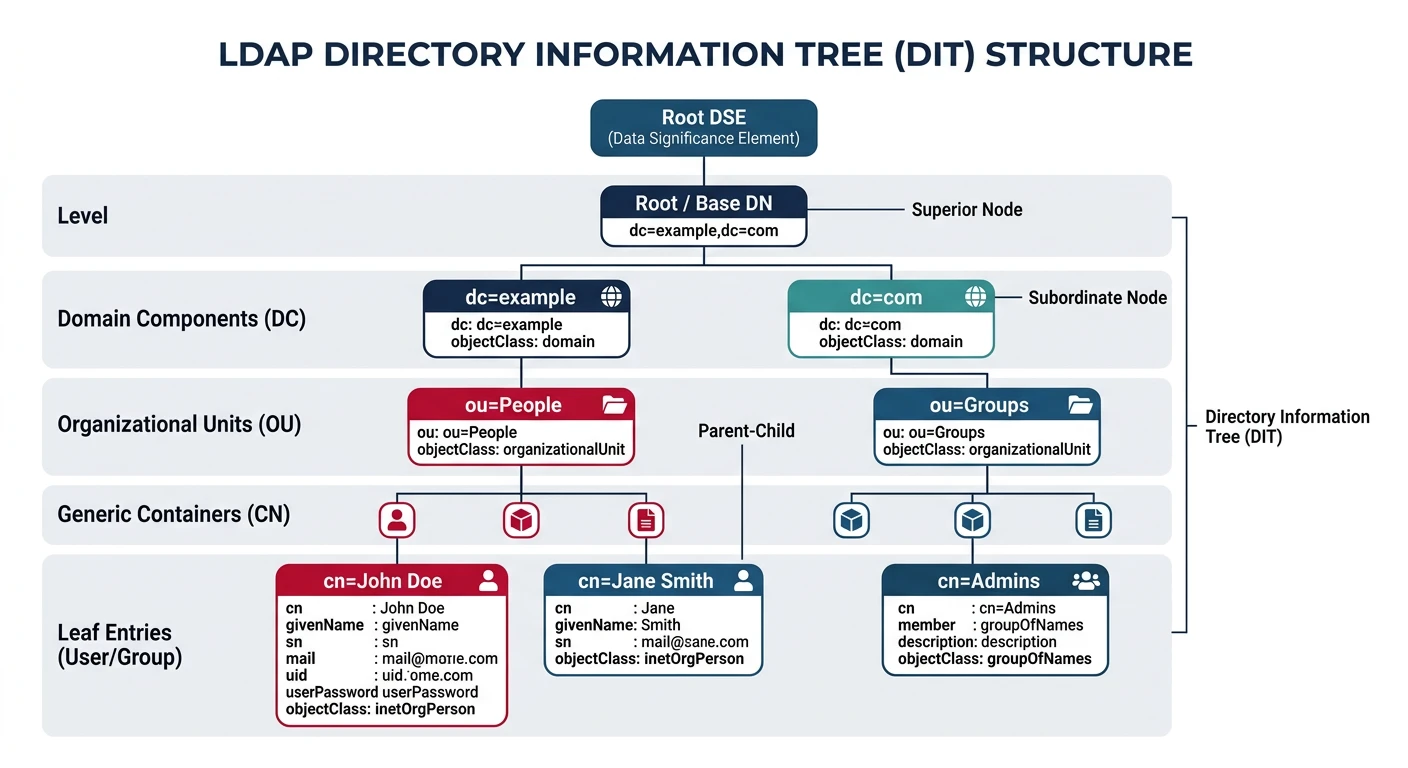
LDAP (Lightweight Directory Access Protocol) stores and retrieves identity data. It's not strictly an authentication protocol—it's the database that backs authentication.
LDAP Directory Information Tree (DIT) — entries are organized hierarchically under domain components, with organizational units grouping users, groups, and other objects
LDAP
LDAP Structure
LDAP Concepts:

1. DIRECTORY TREE (DIT)
   Hierarchical structure
   dc=example,dc=com (domain)
    └── ou=People
         └── uid=alice
         └── uid=bob
    └── ou=Groups
         └── cn=developers

2. DISTINGUISHED NAME (DN)
   Unique identifier for entry
   uid=alice,ou=People,dc=example,dc=com

3. ATTRIBUTES
   cn: Common Name
   uid: User ID
   mail: Email
   userPassword: Hashed password
   memberOf: Group membership

4. OPERATIONS
   • Bind: Authenticate
   • Search: Query
   • Add/Modify/Delete: CRUD